warning FORD B MAX 2012 1.G Owner's Manual
[x] Cancel search | Manufacturer: FORD, Model Year: 2012, Model line: B MAX, Model: FORD B MAX 2012 1.GPages: 256, PDF Size: 19.67 MB
Page 34 of 256
Downloaded from www.Manualslib.com manuals search engine KEYLESS ENTRY
General Information
WARNING
The system may not function if thekey is close to metal objects orelectronic devices such as mobilephones.
The system will not function if:
•Your vehicle battery has no charge.
•The passive key frequencies arejammed.
•The passive key battery is flat.
Note:If the system does not function, youwill need to use the key blade to lock andunlock your vehicle.
The system allows you to operate yourvehicle without the use of a key or remotecontrol.
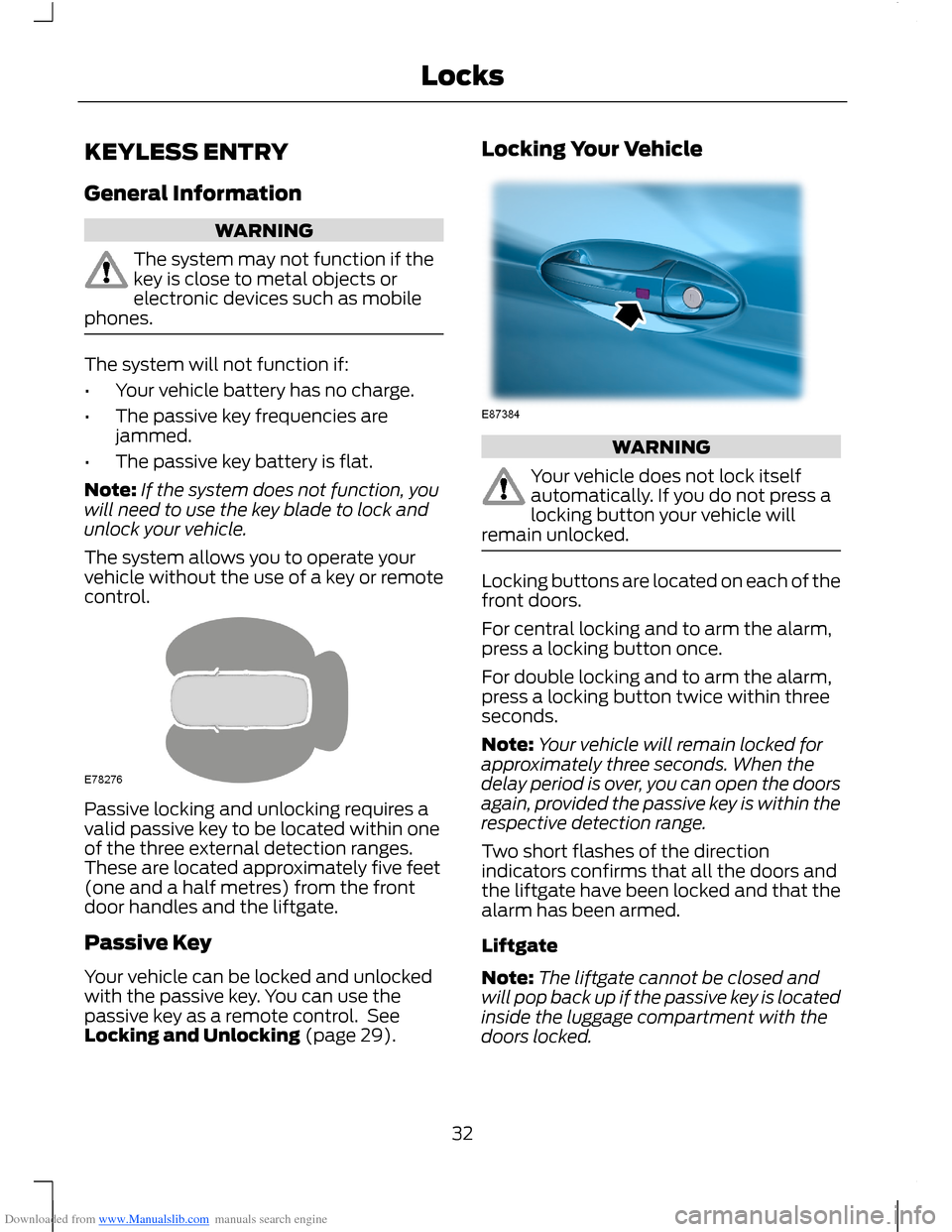
Passive locking and unlocking requires avalid passive key to be located within oneof the three external detection ranges.These are located approximately five feet(one and a half metres) from the frontdoor handles and the liftgate.
Passive Key
Your vehicle can be locked and unlockedwith the passive key. You can use thepassive key as a remote control. SeeLocking and Unlocking (page 29).
Locking Your Vehicle
WARNING
Your vehicle does not lock itselfautomatically. If you do not press alocking button your vehicle willremain unlocked.
Locking buttons are located on each of thefront doors.
For central locking and to arm the alarm,press a locking button once.
For double locking and to arm the alarm,press a locking button twice within threeseconds.
Note:Your vehicle will remain locked forapproximately three seconds. When thedelay period is over, you can open the doorsagain, provided the passive key is within therespective detection range.
Two short flashes of the directionindicators confirms that all the doors andthe liftgate have been locked and that thealarm has been armed.
Liftgate
Note:The liftgate cannot be closed andwill pop back up if the passive key is locatedinside the luggage compartment with thedoors locked.
32Locks
Page 37 of 256
Downloaded from www.Manualslib.com manuals search engine PASSIVE ANTI-THEFT
SYSTEM
Principle of Operation
The engine immobiliser is a theft protectionsystem that prevents someone fromstarting the engine with an incorrectlycoded key.
Coded Keys
Note:Do not shield your keys with metalobjects. This may prevent the receiver fromrecognising your key as a valid one.
Note:Have all of your remaining keyserased and recoded if you lose a key. Ask anauthorised dealer for further information.Have replacement keys recoded togetherwith your existing keys.
If you lose a key, you can obtain areplacement from an authroised dealer. Ifpossible, provide them with the keynumber from the tag provided with theoriginal keys. You can also obtainadditional keys from an authroised dealer.
Arming the Engine Immobiliser
After you switch the ignition off the engineimmobiliser will arm automatically after ashort time.
Disarming the Engine Immobiliser
The engine immobiliser is disarmedautomatically when you switch the ignitionon with a correctly coded key.
When the indicator stays on, flashes forapproximately one minute or repeatedlyat irregular intervals, the key has not beenrecognised. Remove the key and try again.
If you are unable to start the engine with acorrectly coded key, this indicates amalfunction. Have the immobiliser checkedimmediately.
ANTI-THEFT ALARM
Alarm System
Your vehicle may have one of the followingalarm systems:
•Perimeter alarm.
•Perimeter alarm with interior sensors.
•Category one alarm with interiorsensors and battery back-up sounder.
Perimeter Alarm
The perimeter alarm is a deterrent againstunauthorised access to your vehiclethrough the doors and the bonnet. It alsoprotects the audio unit.
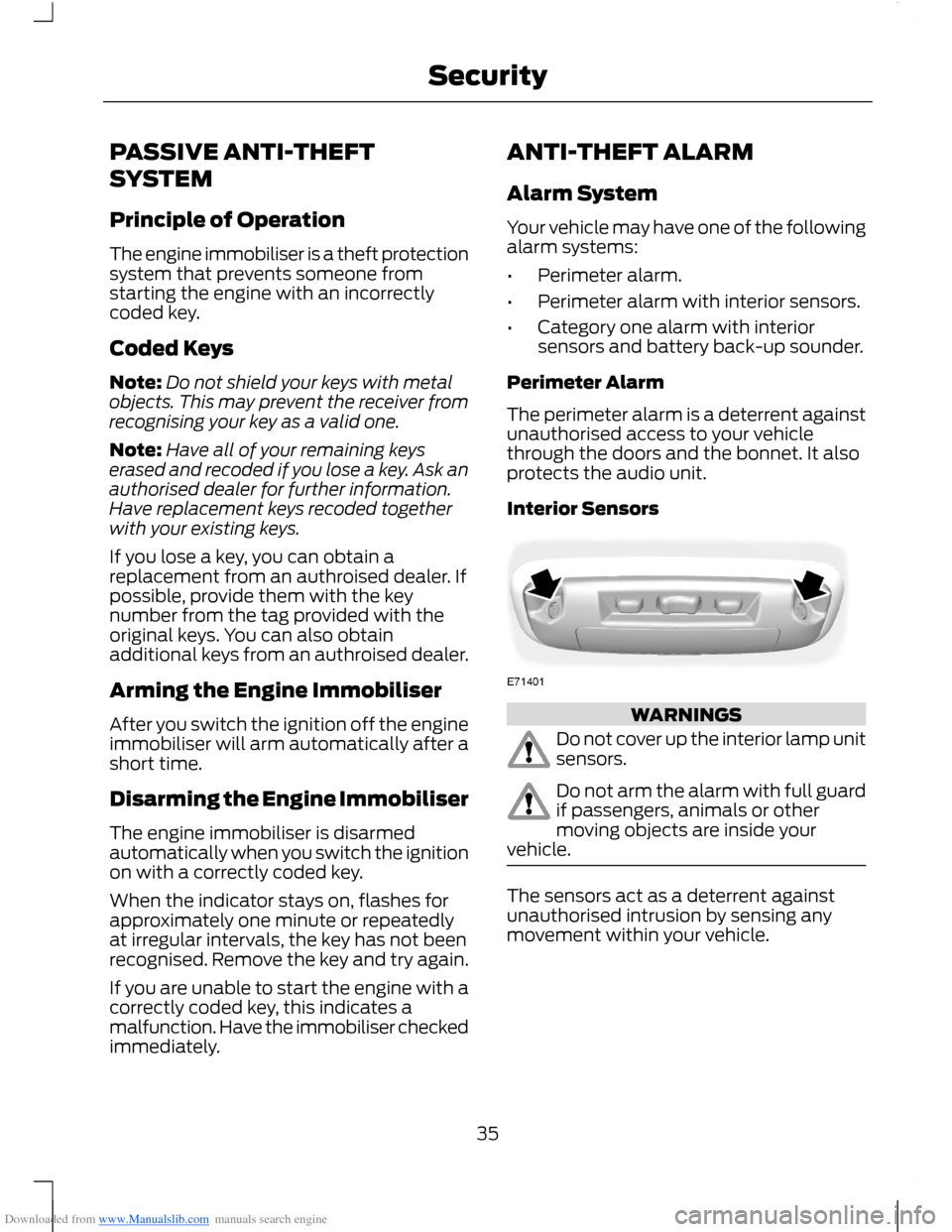
Interior Sensors
WARNINGS
Do not cover up the interior lamp unitsensors.
Do not arm the alarm with full guardif passengers, animals or othermoving objects are inside yourvehicle.
The sensors act as a deterrent againstunauthorised intrusion by sensing anymovement within your vehicle.
35Security
Page 38 of 256
Downloaded from www.Manualslib.com manuals search engine Battery Back-up Sounder
The battery back-up sounder is an extraalarm system which will sound a sirenwhen the alarm is triggered. When you lockyour vehicle the system is armed. Thesounder has its own battery and will soundan alarm siren even if someonedisconnects your vehicle battery or thebattery back-up sounder itself.
Triggering the Alarm
Once armed, the alarm is triggered in anyof the following ways:
•If someone opens a door, the liftgateor the hood without a valid key orremote control.
•If someone removes the audio ornavigation system.
•If you switch the ignition on without avalid key.
•If the interior sensors detect movementwithin your vehicle.
•On vehicles with a battery back-upsounder, if someone disconnects yourvehicle battery or the battery back-upsounder itself.
If the alarm is triggered, the alarm horn willsound for 30 seconds and the hazardwarning flasher will flash for five minutes.
Any further attempts to perform one of theabove will trigger the alarm again.
Full and Reduced Guard
Full Guard
Full guard is the standard setting.
In full guard, the interior sensors are onwhen you arm the alarm.
Note:This may result in false alarms ifanimals or moving objects are inside yourvehicle.
Reduced Guard
In reduced guard, the interior sensors areoff when you arm the alarm.
Note:You can set the alarm to reducedguard for the current ignition cycle only. Thealarm will reset to full guard the next timeyou switch the ignition on.
Ask on Exit
You can set the information display to askyou each time which level of guard youwish to set.
If you select Ask on Exit, the messageReduced guard? appears in theinformation display each time you switchthe ignition off. See InformationMessages (page 62).
If you wish to arm the alarm with reducedguard, press the OK button when thismessage appears.
If you wish to arm the alarm with full guard,leave your vehicle without pressing the OKbutton.
Selecting Full or Reduced Guard
Note:Selecting Reduced does not set thealarm permanently to reduced guard. It setsit to reduced guard only for the currentignition cycle. If you regularly set the alarmto reduced guard, select Ask on Exit.
You can select full or reduced guard usingthe information display. See GeneralInformation (page 58).
Arming the Alarm
To arm the alarm, lock your vehicle. SeeLocks (page 29).
36Security
Page 40 of 256
Downloaded from www.Manualslib.com manuals search engine ADJUSTING THE STEERING
WHEEL
WARNING
Do not adjust the steering wheelwhen your vehicle is moving.
Note:Make sure that you are sitting in thecorrect position. See Sitting in the CorrectPosition (page 76).
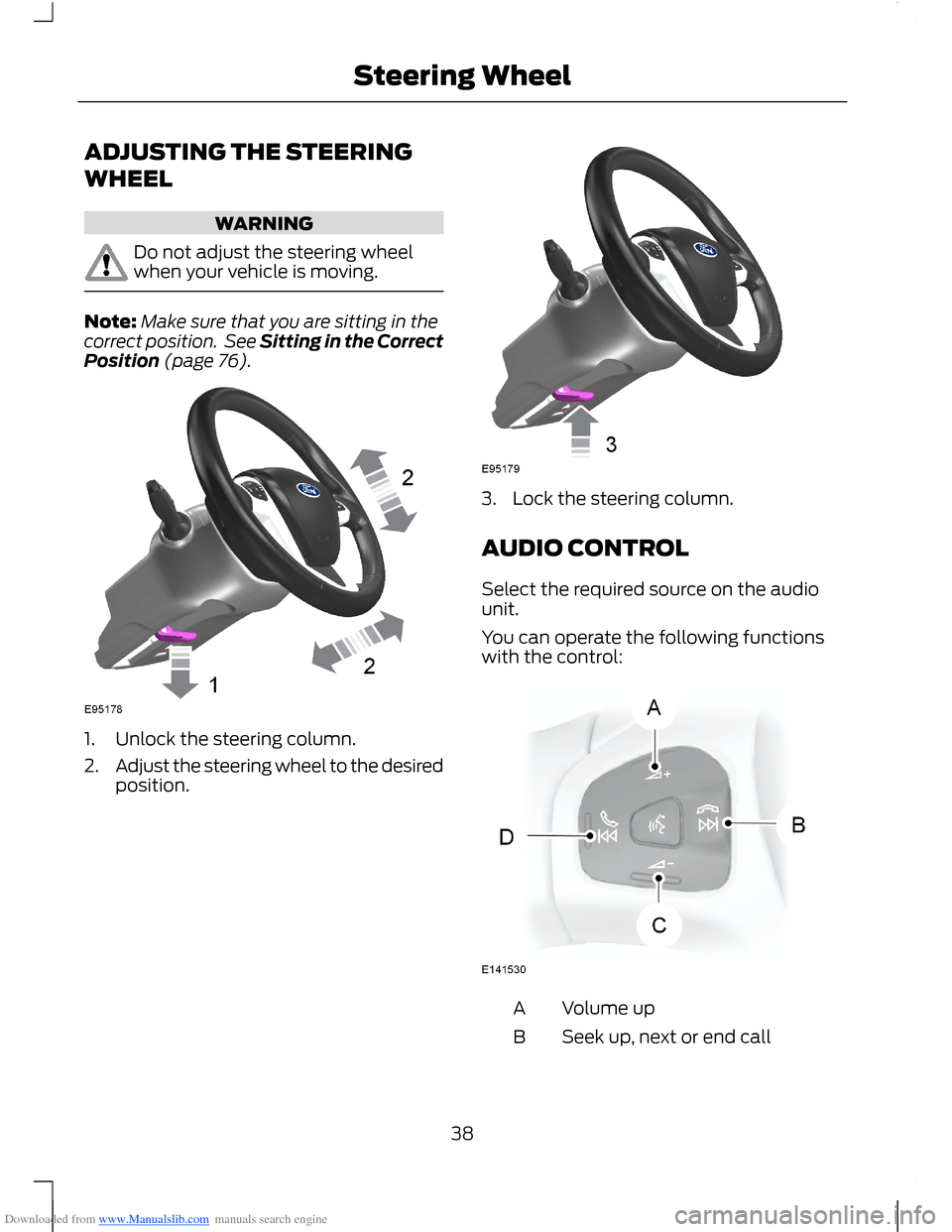
1.Unlock the steering column.
2.Adjust the steering wheel to the desiredposition.
3.Lock the steering column.
AUDIO CONTROL
Select the required source on the audiounit.
You can operate the following functionswith the control:
Volume upA
Seek up, next or end callB
38Steering Wheel
Page 47 of 256
Downloaded from www.Manualslib.com manuals search engine DAYTIME RUNNING LAMPS
WARNING
Always remember to switch yourheadlamps on in low light situationsor during inclement weather. Thesystem does not turn on the tail lamps andmay not provide adequate lighting duringthese conditions. Failure to switch theheadlamps on under these conditions mayresult in a collision.
The system switches the headlamps on inlow light situations.
To switch the system on:
1.Switch the ignition on.
2.Turn the lighting control to the off,autolamp or parking lamp position.
3.Make sure the transmission selectorlever is not in position P.
FRONT FOG LAMPS
WARNING
Only use the front fog lamps whenvisibility is considerably restricted byfog, snow or rain.
Note:If you switch autolamps on, you canonly switch the front fog lamps on onceautolamps has switched the headlamps on.
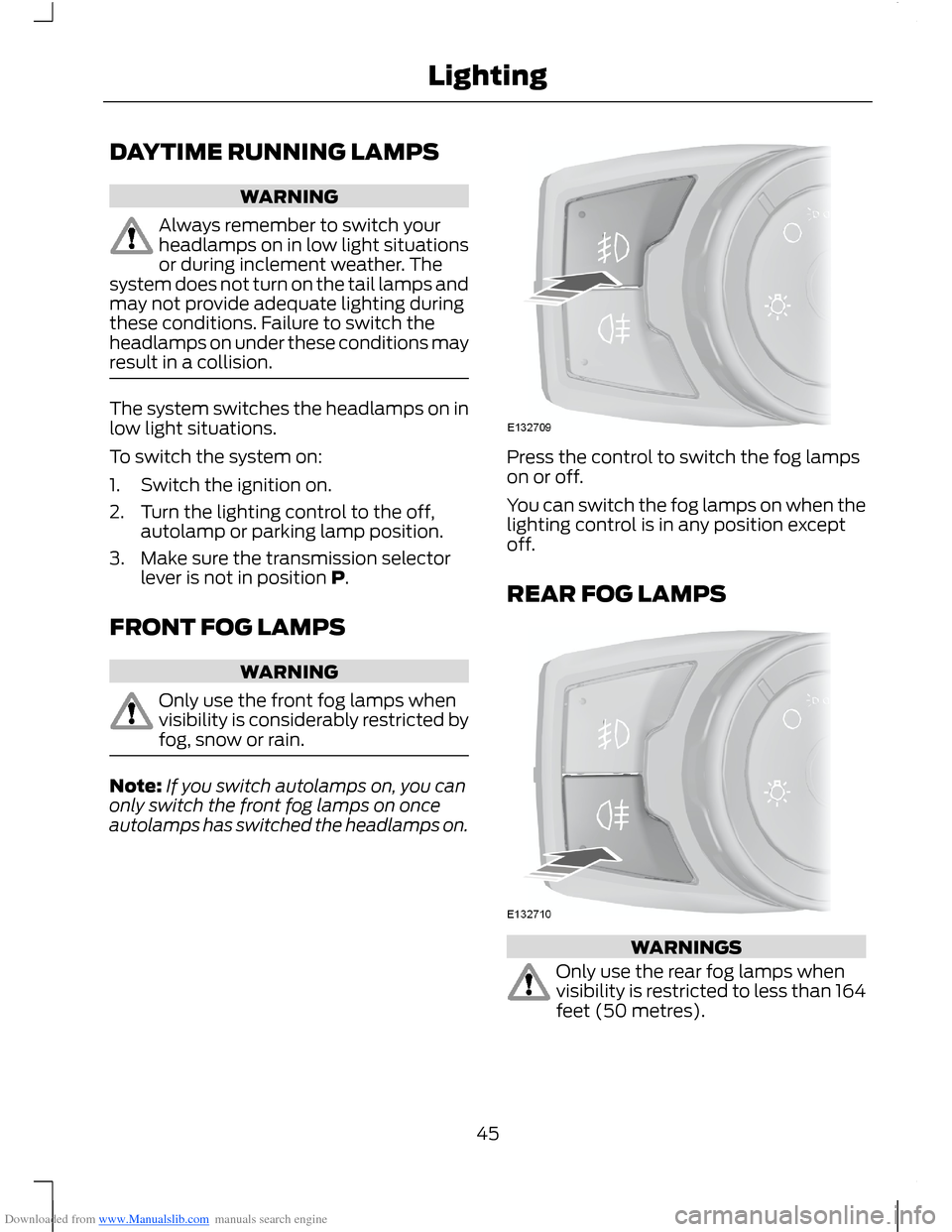
Press the control to switch the fog lampson or off.
You can switch the fog lamps on when thelighting control is in any position exceptoff.
REAR FOG LAMPS
WARNINGS
Only use the rear fog lamps whenvisibility is restricted to less than 164feet (50 metres).
45Lighting
Page 48 of 256
Downloaded from www.Manualslib.com manuals search engine WARNINGS
Do not use the rear fog lamps whenit is raining or snowing and visibilityis more than 164 feet (50 metres).
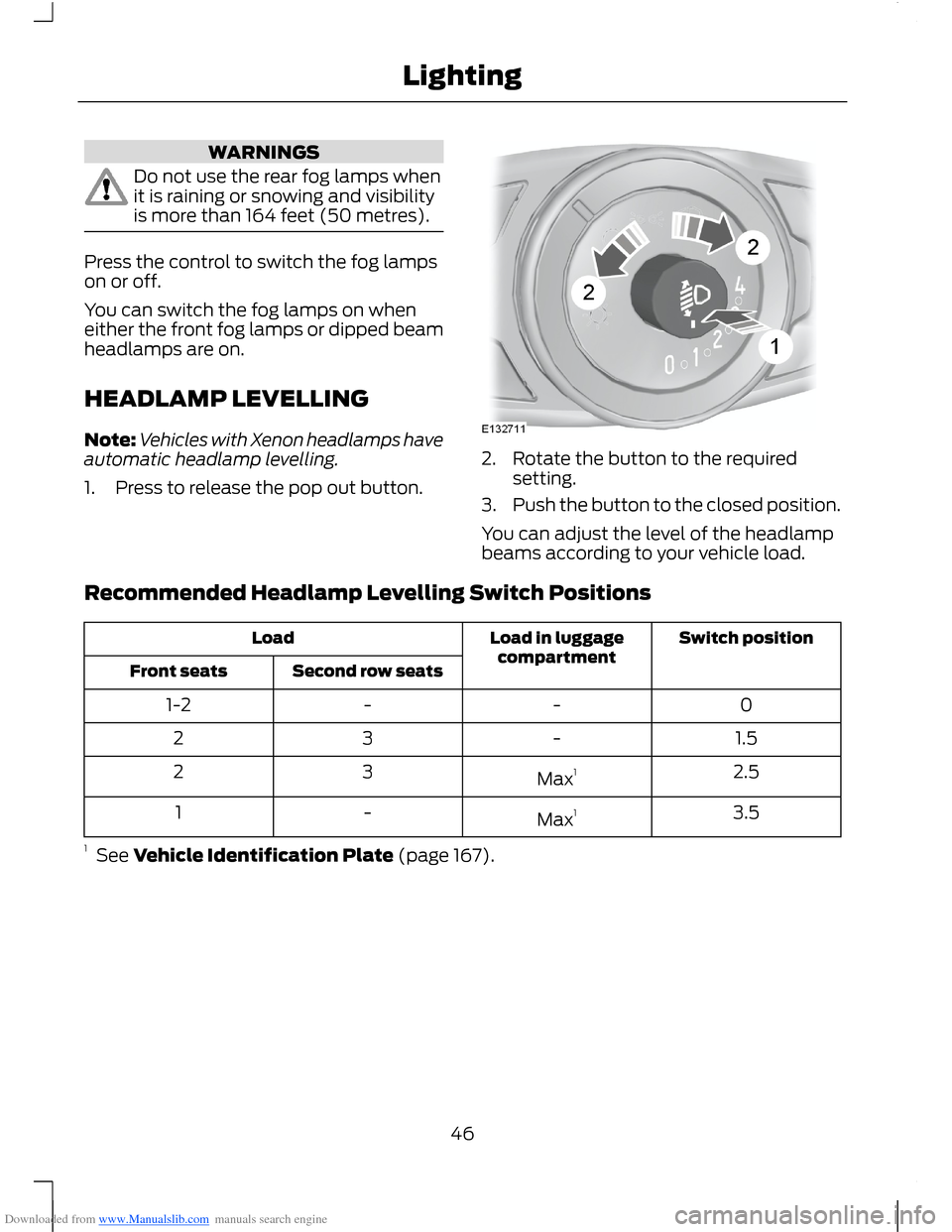
Press the control to switch the fog lampson or off.
You can switch the fog lamps on wheneither the front fog lamps or dipped beamheadlamps are on.
HEADLAMP LEVELLING
Note:Vehicles with Xenon headlamps haveautomatic headlamp levelling.
1.Press to release the pop out button.
2.Rotate the button to the requiredsetting.
3.Push the button to the closed position.
You can adjust the level of the headlampbeams according to your vehicle load.
Recommended Headlamp Levelling Switch Positions
Switch positionLoad in luggagecompartmentLoad
Second row seatsFront seats
0--1-2
1.5-32
2.5Max132
3.5Max1-1
1 See Vehicle Identification Plate (page 167).
46Lighting
Page 50 of 256
Downloaded from www.Manualslib.com manuals search engine POWER WINDOWS
WARNINGS
Do not leave children unattended inthe vehicle and do not let them playwith the power windows. They mayseriously injure themselves.
When closing the power windows,you should verify they are free ofobstructions and make sure thatchildren and pets are not in the proximityof the window openings.
Note:You may hear a rumbling noise whenjust one of the windows are open. Lower theopposite window slightly to reduce thisnoise.
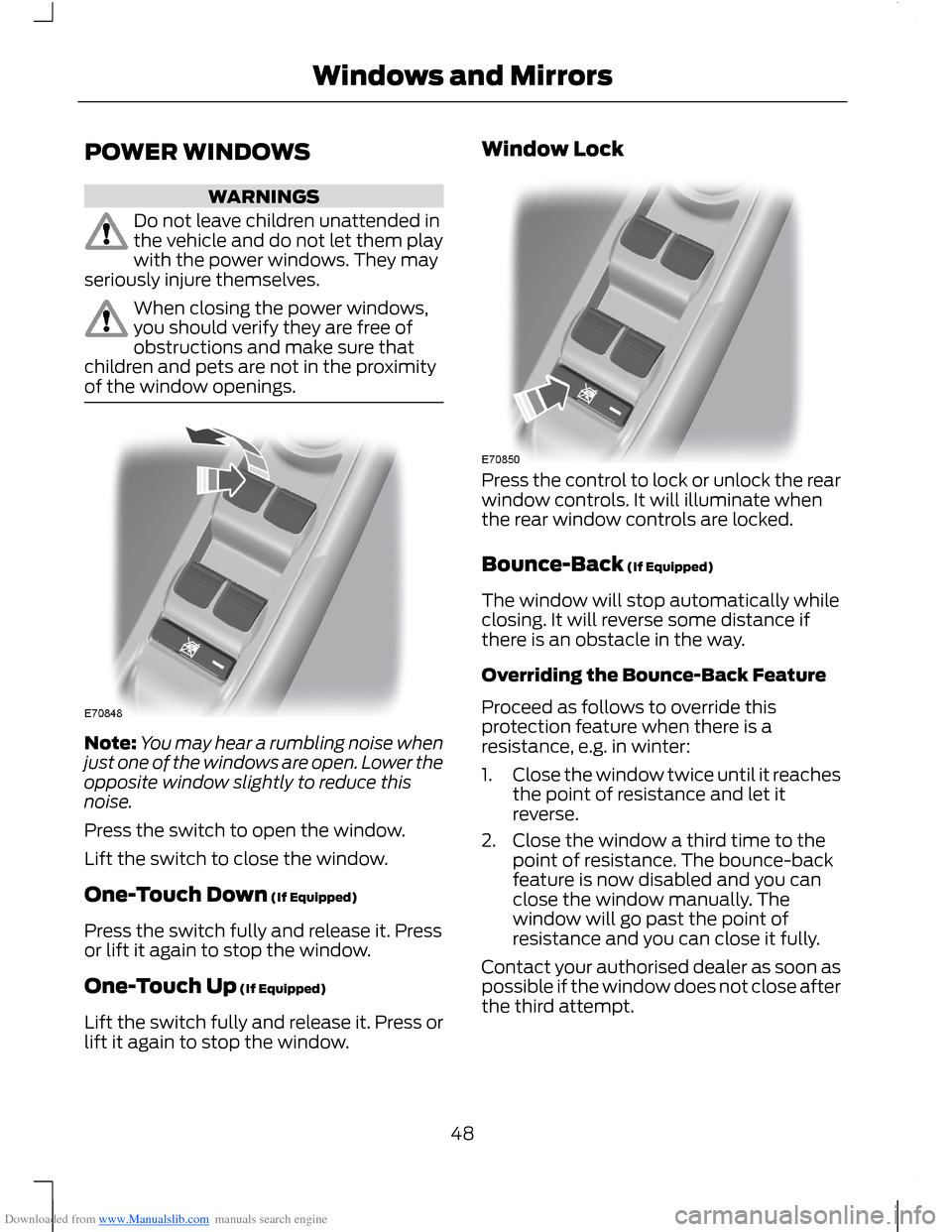
Press the switch to open the window.
Lift the switch to close the window.
One-Touch Down (If Equipped)
Press the switch fully and release it. Pressor lift it again to stop the window.
One-Touch Up (If Equipped)
Lift the switch fully and release it. Press orlift it again to stop the window.
Window Lock
Press the control to lock or unlock the rearwindow controls. It will illuminate whenthe rear window controls are locked.
Bounce-Back (If Equipped)
The window will stop automatically whileclosing. It will reverse some distance ifthere is an obstacle in the way.
Overriding the Bounce-Back Feature
Proceed as follows to override thisprotection feature when there is aresistance, e.g. in winter:
1.Close the window twice until it reachesthe point of resistance and let itreverse.
2.Close the window a third time to thepoint of resistance. The bounce-backfeature is now disabled and you canclose the window manually. Thewindow will go past the point ofresistance and you can close it fully.
Contact your authorised dealer as soon aspossible if the window does not close afterthe third attempt.
48Windows and Mirrors
Page 51 of 256
Downloaded from www.Manualslib.com manuals search engine Resetting the Bounce-Back Feature
WARNING
The bounce-back function remainsdeactivated until you have reset thememory.
If you have disconnected the battery, youmust reset the bounce-back memoryseparately for each window.
1.Lift and hold the switch until thewindow is fully closed.
2.Release the switch.
3.Lift the switch again for one moresecond.
4.Press and hold the switch until thewindow is fully open.
5.Release the switch.
6.Lift and hold the switch until thewindow is fully closed.
7.Open the window and then try to closeit automatically.
8.Reset and repeat the procedure if thewindow does not close automatically.
Accessory Delay (If Equipped)
You can use the window switches forseveral minutes after you have switchedthe ignition off or until either front door isopened.
EXTERIOR MIRRORS
Power Exterior Mirrors
WARNING
Do not adjust the mirrors when yourvehicle is moving.
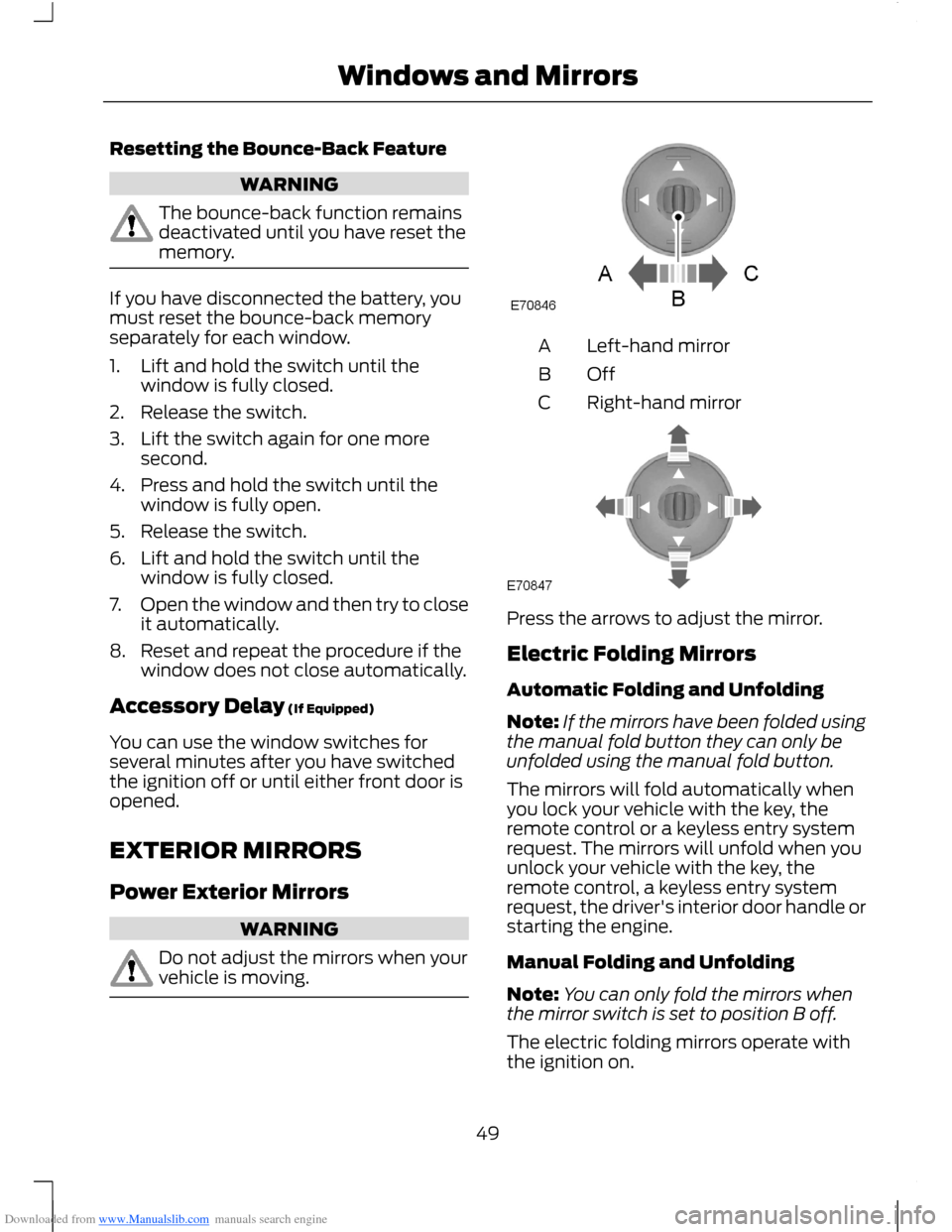
Left-hand mirrorA
OffB
Right-hand mirrorC
Press the arrows to adjust the mirror.
Electric Folding Mirrors
Automatic Folding and Unfolding
Note:If the mirrors have been folded usingthe manual fold button they can only beunfolded using the manual fold button.
The mirrors will fold automatically whenyou lock your vehicle with the key, theremote control or a keyless entry systemrequest. The mirrors will unfold when youunlock your vehicle with the key, theremote control, a keyless entry systemrequest, the driver's interior door handle orstarting the engine.
Manual Folding and Unfolding
Note:You can only fold the mirrors whenthe mirror switch is set to position B off.
The electric folding mirrors operate withthe ignition on.
49Windows and Mirrors
Page 52 of 256
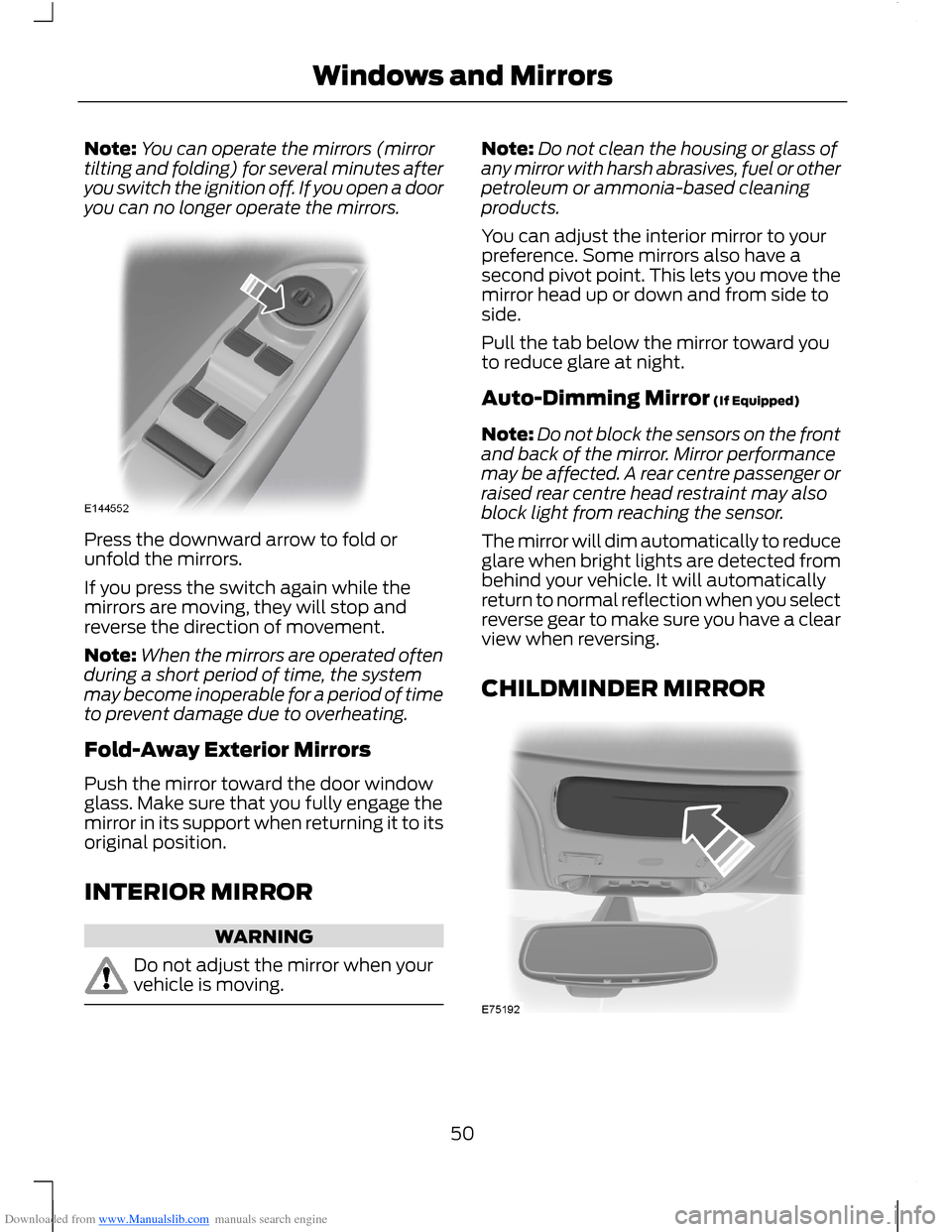
Downloaded from www.Manualslib.com manuals search engine Note:You can operate the mirrors (mirrortilting and folding) for several minutes afteryou switch the ignition off. If you open a dooryou can no longer operate the mirrors.
Press the downward arrow to fold orunfold the mirrors.
If you press the switch again while themirrors are moving, they will stop andreverse the direction of movement.
Note:When the mirrors are operated oftenduring a short period of time, the systemmay become inoperable for a period of timeto prevent damage due to overheating.
Fold-Away Exterior Mirrors
Push the mirror toward the door windowglass. Make sure that you fully engage themirror in its support when returning it to itsoriginal position.
INTERIOR MIRROR
WARNING
Do not adjust the mirror when yourvehicle is moving.
Note:Do not clean the housing or glass ofany mirror with harsh abrasives, fuel or otherpetroleum or ammonia-based cleaningproducts.
You can adjust the interior mirror to yourpreference. Some mirrors also have asecond pivot point. This lets you move themirror head up or down and from side toside.
Pull the tab below the mirror toward youto reduce glare at night.
Auto-Dimming Mirror (If Equipped)
Note:Do not block the sensors on the frontand back of the mirror. Mirror performancemay be affected. A rear centre passenger orraised rear centre head restraint may alsoblock light from reaching the sensor.
The mirror will dim automatically to reduceglare when bright lights are detected frombehind your vehicle. It will automaticallyreturn to normal reflection when you selectreverse gear to make sure you have a clearview when reversing.
CHILDMINDER MIRROR
50Windows and Mirrors
Page 53 of 256
Downloaded from www.Manualslib.com manuals search engine GLOBAL OPENING AND
CLOSING
You can also operate the power windowswith the ignition off using the globalopening and global closing function.
Note:Global opening will only operate fora short period of time after you haveunlocked your vehicle using the remotecontrol.
Note:Global closing will only operate if youhave set the memory correctly for eachwindow. See Power Windows (page 48).
Global Opening
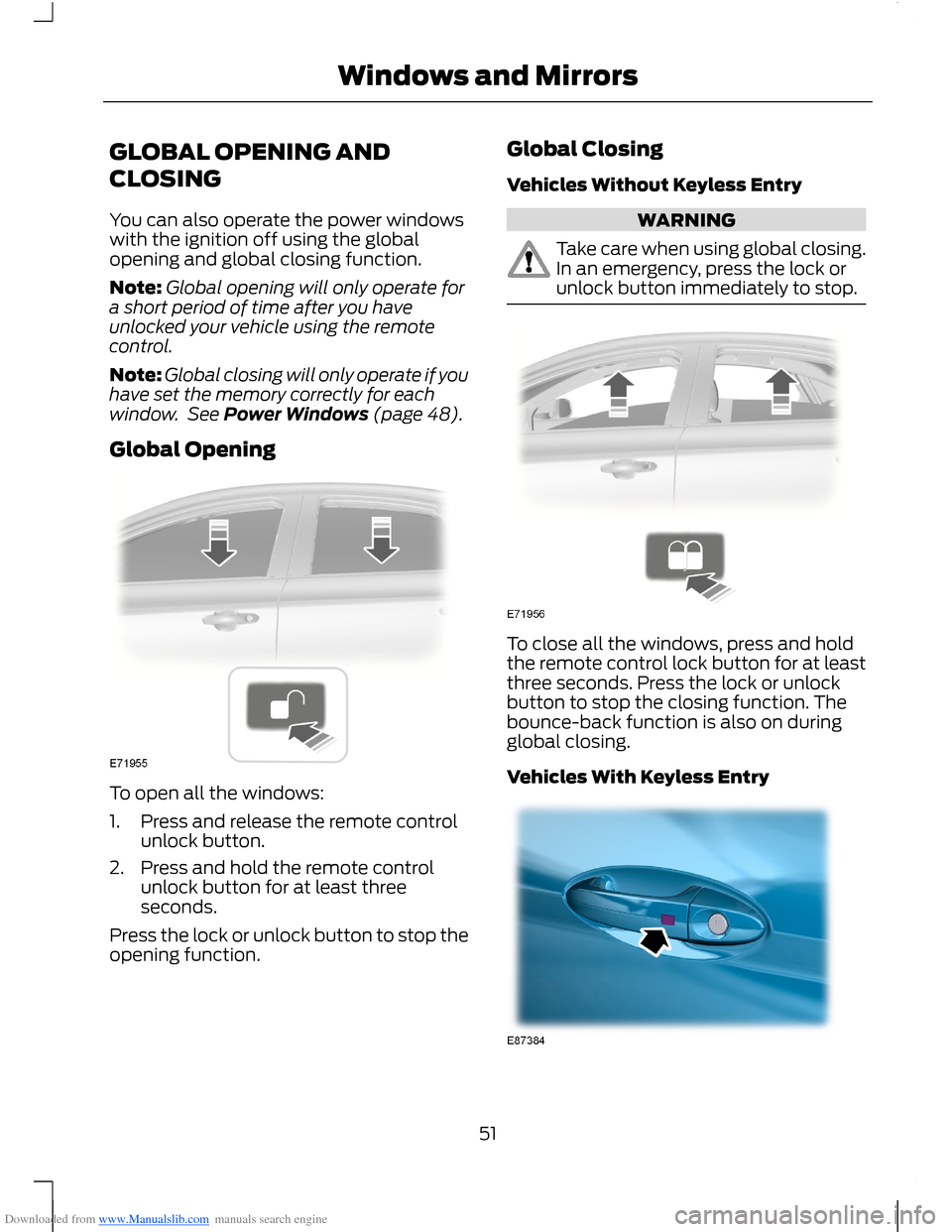
To open all the windows:
1.Press and release the remote controlunlock button.
2.Press and hold the remote controlunlock button for at least threeseconds.
Press the lock or unlock button to stop theopening function.
Global Closing
Vehicles Without Keyless Entry
WARNING
Take care when using global closing.In an emergency, press the lock orunlock button immediately to stop.
To close all the windows, press and holdthe remote control lock button for at leastthree seconds. Press the lock or unlockbutton to stop the closing function. Thebounce-back function is also on duringglobal closing.
Vehicles With Keyless Entry
51Windows and Mirrors