warning FORD B MAX 2012 1.G Repair Manual
[x] Cancel search | Manufacturer: FORD, Model Year: 2012, Model line: B MAX, Model: FORD B MAX 2012 1.GPages: 256, PDF Size: 19.67 MB
Page 105 of 256
Downloaded from www.Manualslib.com manuals search engine PRINCIPLE OF OPERATION
Electronic Stability Program
WARNING
The system does not relieve you ofyour responsibility to drive with duecare and attention.
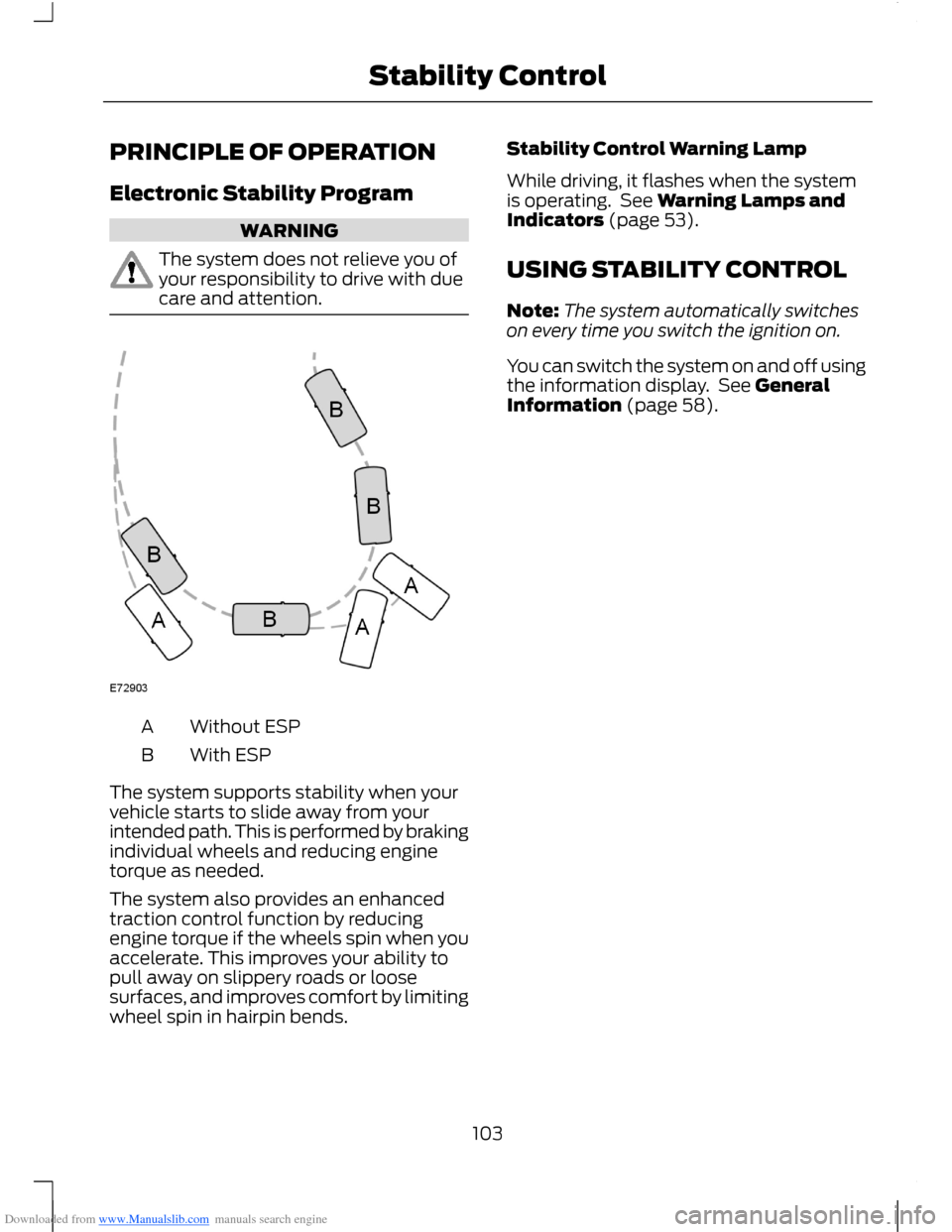
Without ESPA
With ESPB
The system supports stability when yourvehicle starts to slide away from yourintended path. This is performed by brakingindividual wheels and reducing enginetorque as needed.
The system also provides an enhancedtraction control function by reducingengine torque if the wheels spin when youaccelerate. This improves your ability topull away on slippery roads or loosesurfaces, and improves comfort by limitingwheel spin in hairpin bends.
Stability Control Warning Lamp
While driving, it flashes when the systemis operating. See Warning Lamps andIndicators (page 53).
USING STABILITY CONTROL
Note:The system automatically switcheson every time you switch the ignition on.
You can switch the system on and off usingthe information display. See GeneralInformation (page 58).
103Stability Control
Page 106 of 256
Downloaded from www.Manualslib.com manuals search engine PRINCIPLE OF OPERATION
WARNINGS
The system does not relieve you ofyour responsibility to drive with duecare and attention.
If your vehicles has a trailer towmodule not approved by us, thesystem may not correctly detectobstacles.
The sensors may not detect objectsin heavy rain or other conditions thatcause disruptive reflections.
The sensors may not detect objectswith surfaces that absorb ultrasonicwaves.
The system does not detectobstacles moving away from yourvehicle. They will only be detectedshortly after they start to move towardyour vehicle.
Take particular care when reversingwith a tow ball arm or rear fittedaccessories e.g. a bicycle carrier, asthe rear parking aid will only indicate thedistance from the bumper to the obstacle.
If you use a high pressure spray towash your vehicle, only spray thesensors briefly from a distance notless than 8 inches (20 centimetres).
Note:If your vehicle has a tow ball arm, thesystem is switched off automatically whenany trailer lamps (or lighting boards) areconnected to the 13-pin socket via a trailertow module we have approved.
Note:Keep the sensors free from dirt, iceand snow. Do not clean with sharp objects.
Note:The system may emit false tones ifit detects a signal using the same frequencyas the sensors or if your vehicle is fully laden.
Note:The outer sensors may detect theside walls of a garage. If the distancebetween the outer sensor and the side wallremains constant for three seconds, thetone will switch off. As you continue, theinner sensors will detect rearward objects.
PARKING AID
WARNINGS
To help avoid personal injury, readand understand the limitations of thesystem as contained in this section.Sensing is only an aid for some (generallylarge and fixed) objects when moving inreverse on a flat surface at parking speeds.Traffic control systems, inclementweather, air brakes and external motorsand fans may also affect the function ofthe sensing system. This may includereduced performance or a false activation.
To help avoid personal injury, alwaysuse caution when moving in reverseand when using the sensing system.
This system is not designed toprevent contact with small or movingobjects. The system is designed toprovide a warning to assist the driver indetecting large stationary objects to avoiddamaging the vehicle. The system may notdetect smaller objects, particularly thoseclose to the ground.
Certain add-on devices such as largetrailer hitches, bike or surfboard racksand any device that may block thenormal detection zone of the system, maycreate false audible warnings.
Note:Keep the sensors located on thebumper or fascia free from snow, ice andlarge accumulations of dirt. If the sensorsare covered, the system’s accuracy can beaffected. Do not clean the sensors withsharp objects.
104Parking Aids
Page 107 of 256
Downloaded from www.Manualslib.com manuals search engine Note:If your vehicle sustains damage tothe bumper or fascia, leaving it misalignedor bent, the sensing zone may be alteredcausing inaccurate measurement ofobstacles or false alarms.
The system warns you of obstacles withina certain range of the bumper area.
When receiving a detection warning, theradio volume is reduced to apredetermined level. After the warninggoes away, the radio volume returns to theprevious level.
Rear Sensing System
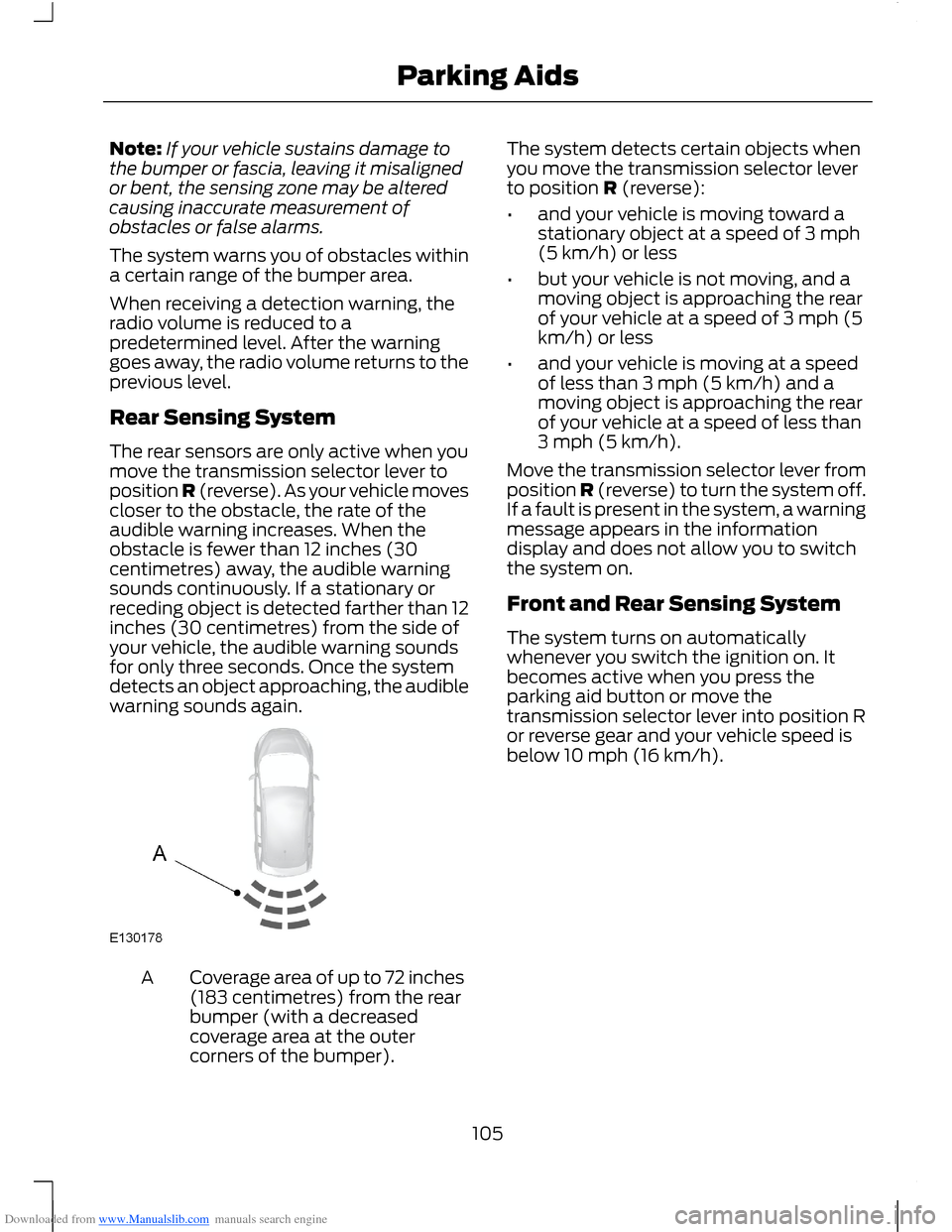
The rear sensors are only active when youmove the transmission selector lever toposition R (reverse). As your vehicle movescloser to the obstacle, the rate of theaudible warning increases. When theobstacle is fewer than 12 inches (30centimetres) away, the audible warningsounds continuously. If a stationary orreceding object is detected farther than 12inches (30 centimetres) from the side ofyour vehicle, the audible warning soundsfor only three seconds. Once the systemdetects an object approaching, the audiblewarning sounds again.
Coverage area of up to 72 inches(183 centimetres) from the rearbumper (with a decreasedcoverage area at the outercorners of the bumper).
A
The system detects certain objects whenyou move the transmission selector leverto position R (reverse):
•and your vehicle is moving toward astationary object at a speed of 3 mph(5 km/h) or less
•but your vehicle is not moving, and amoving object is approaching the rearof your vehicle at a speed of 3 mph (5km/h) or less
•and your vehicle is moving at a speedof less than 3 mph (5 km/h) and amoving object is approaching the rearof your vehicle at a speed of less than3 mph (5 km/h).
Move the transmission selector lever fromposition R (reverse) to turn the system off.If a fault is present in the system, a warningmessage appears in the informationdisplay and does not allow you to switchthe system on.
Front and Rear Sensing System
The system turns on automaticallywhenever you switch the ignition on. Itbecomes active when you press theparking aid button or move thetransmission selector lever into position Ror reverse gear and your vehicle speed isbelow 10 mph (16 km/h).
105Parking Aids
Page 108 of 256
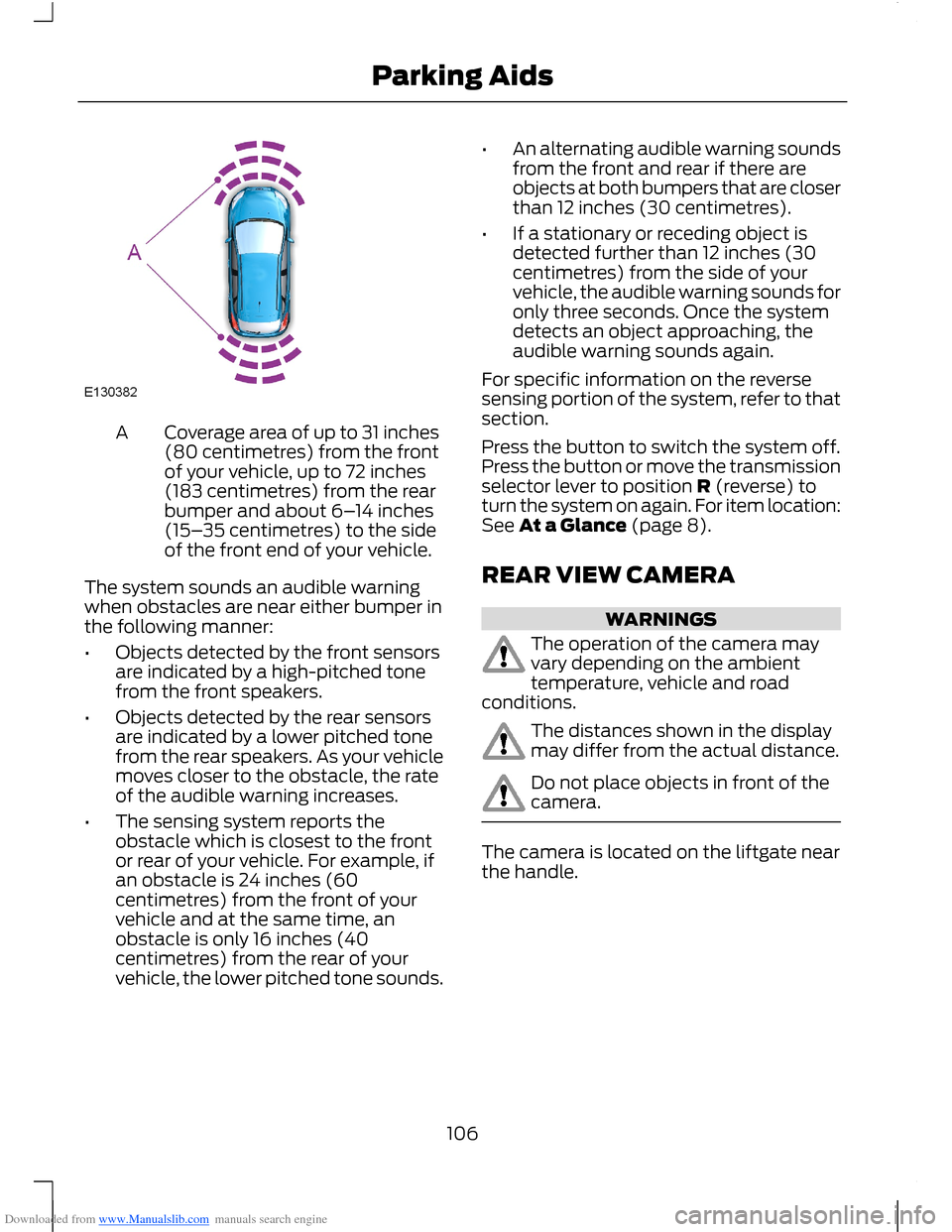
Downloaded from www.Manualslib.com manuals search engine Coverage area of up to 31 inches(80 centimetres) from the frontof your vehicle, up to 72 inches(183 centimetres) from the rearbumper and about 6–14 inches(15–35 centimetres) to the sideof the front end of your vehicle.
A
The system sounds an audible warningwhen obstacles are near either bumper inthe following manner:
•Objects detected by the front sensorsare indicated by a high-pitched tonefrom the front speakers.
•Objects detected by the rear sensorsare indicated by a lower pitched tonefrom the rear speakers. As your vehiclemoves closer to the obstacle, the rateof the audible warning increases.
•The sensing system reports theobstacle which is closest to the frontor rear of your vehicle. For example, ifan obstacle is 24 inches (60centimetres) from the front of yourvehicle and at the same time, anobstacle is only 16 inches (40centimetres) from the rear of yourvehicle, the lower pitched tone sounds.
•An alternating audible warning soundsfrom the front and rear if there areobjects at both bumpers that are closerthan 12 inches (30 centimetres).
•If a stationary or receding object isdetected further than 12 inches (30centimetres) from the side of yourvehicle, the audible warning sounds foronly three seconds. Once the systemdetects an object approaching, theaudible warning sounds again.
For specific information on the reversesensing portion of the system, refer to thatsection.
Press the button to switch the system off.Press the button or move the transmissionselector lever to position R (reverse) toturn the system on again. For item location:See At a Glance (page 8).
REAR VIEW CAMERA
WARNINGS
The operation of the camera mayvary depending on the ambienttemperature, vehicle and roadconditions.
The distances shown in the displaymay differ from the actual distance.
Do not place objects in front of thecamera.
The camera is located on the liftgate nearthe handle.
106Parking Aids
Page 109 of 256
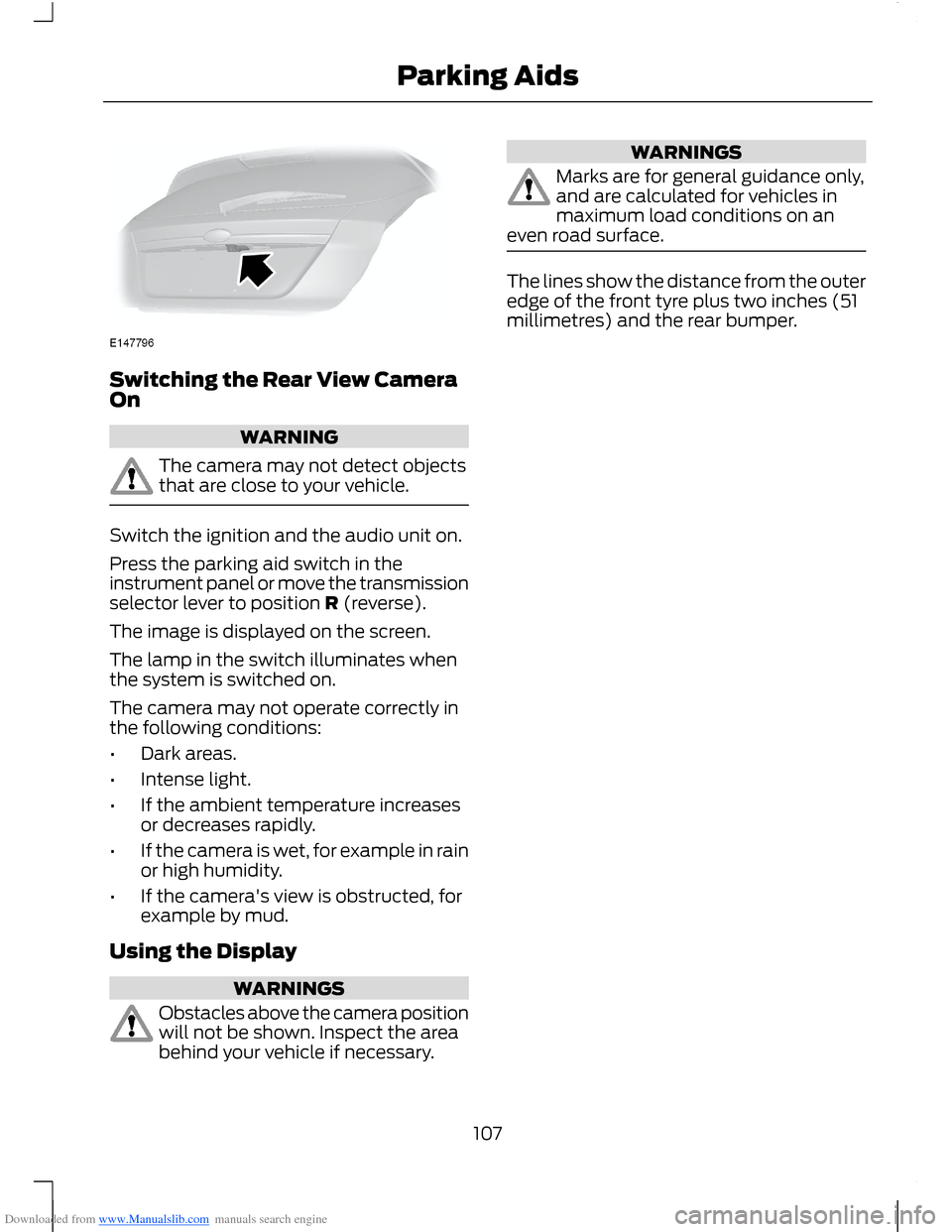
Downloaded from www.Manualslib.com manuals search engine Switching the Rear View CameraOn
WARNING
The camera may not detect objectsthat are close to your vehicle.
Switch the ignition and the audio unit on.
Press the parking aid switch in theinstrument panel or move the transmissionselector lever to position R (reverse).
The image is displayed on the screen.
The lamp in the switch illuminates whenthe system is switched on.
The camera may not operate correctly inthe following conditions:
•Dark areas.
•Intense light.
•If the ambient temperature increasesor decreases rapidly.
•If the camera is wet, for example in rainor high humidity.
•If the camera's view is obstructed, forexample by mud.
Using the Display
WARNINGS
Obstacles above the camera positionwill not be shown. Inspect the areabehind your vehicle if necessary.
WARNINGS
Marks are for general guidance only,and are calculated for vehicles inmaximum load conditions on aneven road surface.
The lines show the distance from the outeredge of the front tyre plus two inches (51millimetres) and the rear bumper.
107Parking Aids
Page 111 of 256
Downloaded from www.Manualslib.com manuals search engine PRINCIPLE OF OPERATION
WARNING
The system does not relieve you ofyour responsibility to drive with duecare and attention.
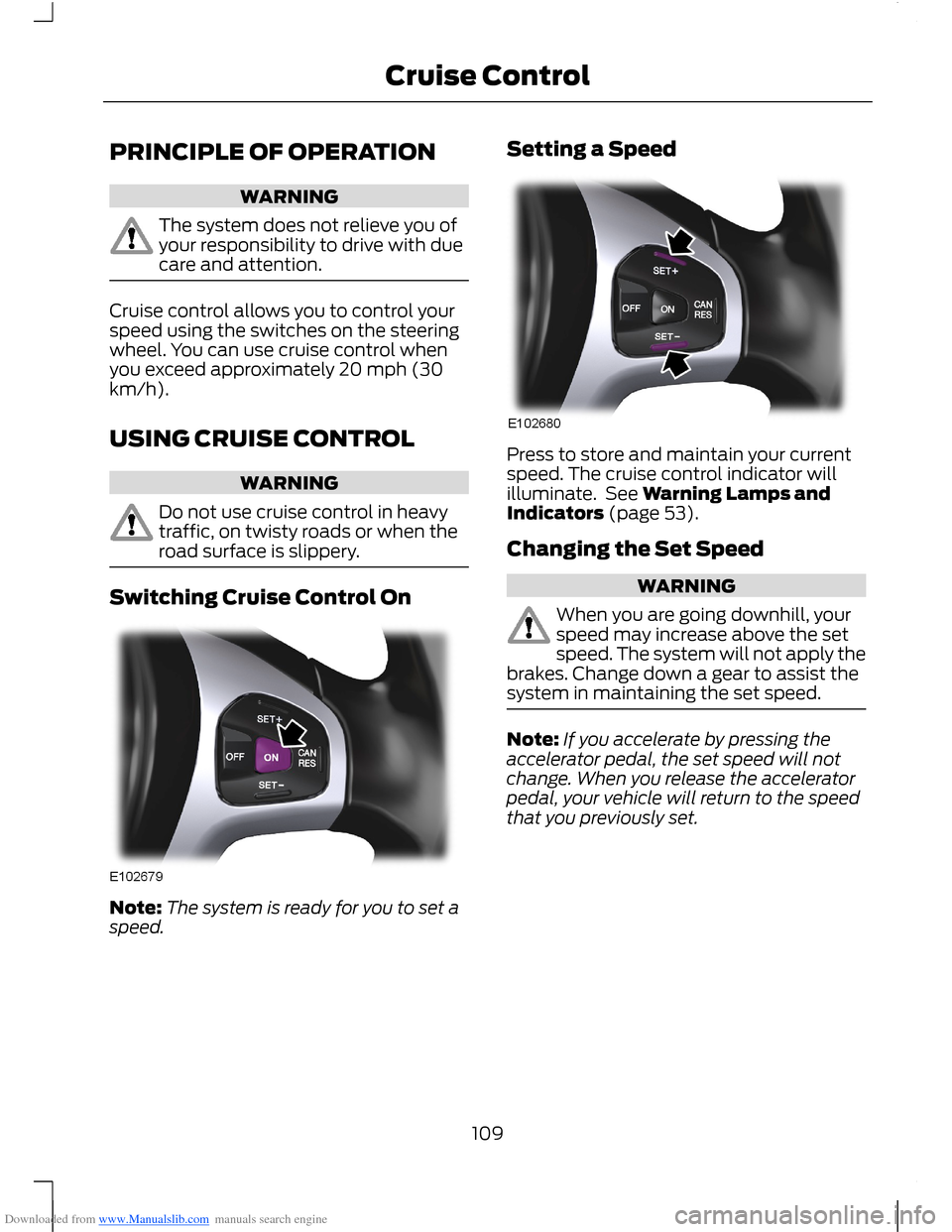
Cruise control allows you to control yourspeed using the switches on the steeringwheel. You can use cruise control whenyou exceed approximately 20 mph (30km/h).
USING CRUISE CONTROL
WARNING
Do not use cruise control in heavytraffic, on twisty roads or when theroad surface is slippery.
Switching Cruise Control On
Note:The system is ready for you to set aspeed.
Setting a Speed
Press to store and maintain your currentspeed. The cruise control indicator willilluminate. See Warning Lamps andIndicators (page 53).
Changing the Set Speed
WARNING
When you are going downhill, yourspeed may increase above the setspeed. The system will not apply thebrakes. Change down a gear to assist thesystem in maintaining the set speed.
Note:If you accelerate by pressing theaccelerator pedal, the set speed will notchange. When you release the acceleratorpedal, your vehicle will return to the speedthat you previously set.
109Cruise Control
Page 113 of 256
Downloaded from www.Manualslib.com manuals search engine ACTIVE CITY STOP
General Information
WARNINGS
The system does not relieve you ofyour responsibility to drive with duecare and attention.
At all times you are responsible forcontrolling your vehicle, supervisingthe system and intervening ifrequired.
Never look directly into the sensorwith any type of object. There is a riskof eye injury.
If the sensor becomes blocked thesystem may not function.
To achieve full system performance,you must bed the braking system in.See Running-In (page 121).
The system performance may varydepending on your vehicle and roadconditions.
The system will not react to vehiclesdriving in a different direction.
The system will not react to bicycles,motorcycles, people or animals.
When the ignition is on the sensorwill constantly transmit a laserbeam.
The system will not operate duringharsh acceleration and steering.
In cold and severe weatherconditions the system may notfunction. Rain, snow, spray and icecan all influence the sensor.
Do not carry out windscreen repairsin the immediate area surroundingthe sensor.
WARNINGS
If you install a windscreen notapproved by us, the system may notfunction correctly.
If the engine stops after the systemhas been switched on, the hazardwarning flashers will turn on.
The system may not function whendriving around sharp bends.
Note:Keep the windscreen free fromobstructions such as bird droppings, insects,snow or ice.
Note:Keep the bonnet free of ice and snow,otherwise the system may not functioncorrectly.
A sensor is mounted behind the interiorrear view mirror. It continuously monitorsconditions to decide when to intervene.
The system is designed to help you reducelow speed collisions into the rear ofanother vehicle. It will also help you reducethe impact damage or potentially avoidthe collision completely.
The system operates at speeds belowapproximately 19 mph (30 km/h) byapplying the brakes when the sensordetects that a collision is likely.
You must depress the brake pedal toobtain full braking force.
When the system is braking or hasautomatically applied the brakes, amessage will be shown in the informationdisplay.
Using Active City Stop
Switching the System Off and On
Note:The system is on by default.
Note:In certain situations, it is advisable todisable the system, for example driving offroad when objects may cover thewindscreen.
111Driving Aids
Page 114 of 256
Downloaded from www.Manualslib.com manuals search engine You can switch the system off and on usingthe information display. See GeneralInformation (page 58).
Active City Stop Relearning Procedure
Note:When you disconnect the battery, thesystem will go through a relearningprocedure. During this time the system willnot be available.
You must drive your vehicle above 31mph(50 km/h) in a straight line for theprocedure to complete. This proceduremay take several minutes.
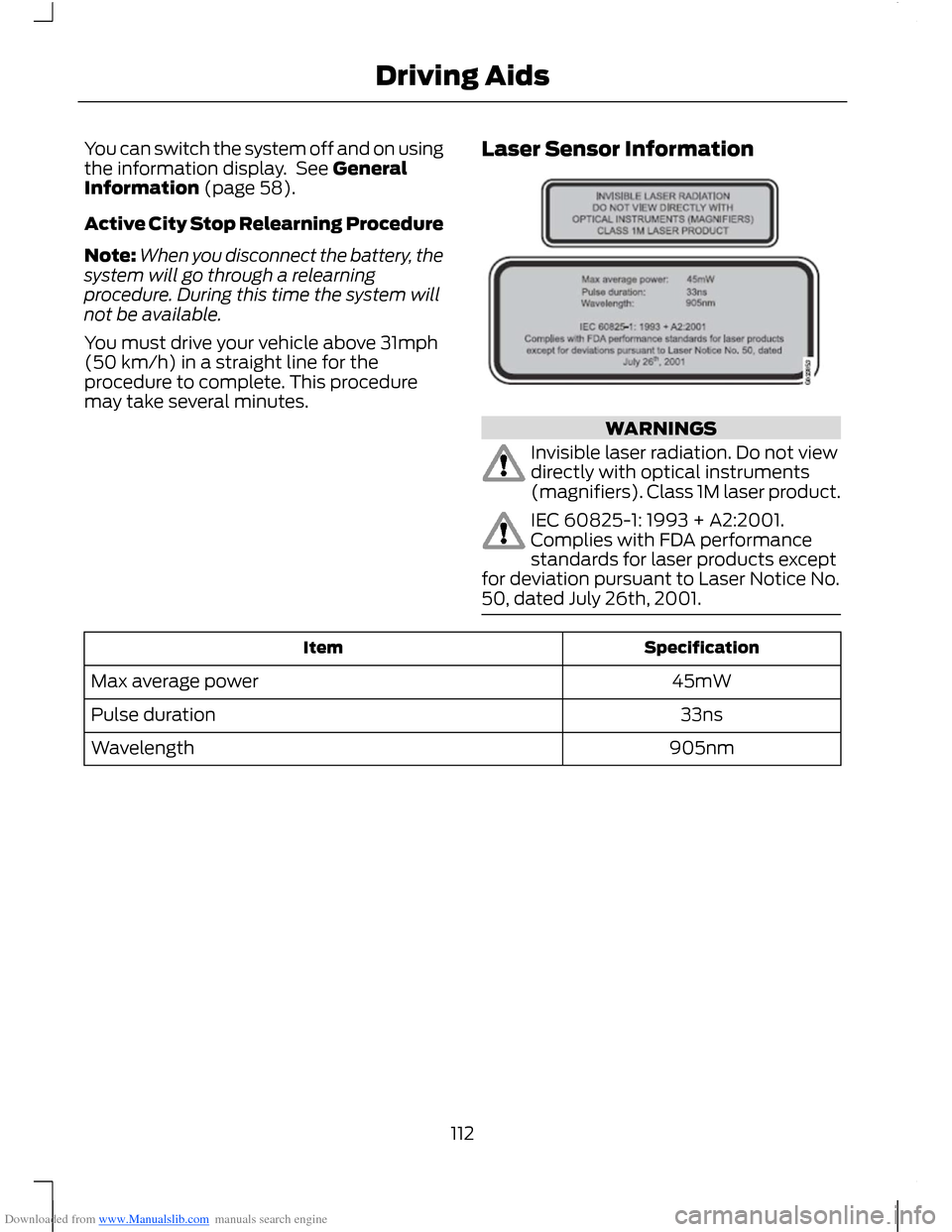
Laser Sensor Information
WARNINGS
Invisible laser radiation. Do not viewdirectly with optical instruments(magnifiers). Class 1M laser product.
IEC 60825-1: 1993 + A2:2001.Complies with FDA performancestandards for laser products exceptfor deviation pursuant to Laser Notice No.50, dated July 26th, 2001.
SpecificationItem
45mWMax average power
33nsPulse duration
905nmWavelength
112Driving Aids
Page 115 of 256
Downloaded from www.Manualslib.com manuals search engine GENERAL INFORMATION
WARNINGS
Use load securing straps to anapproved standard, e.g. DIN.
Make sure that you secure all looseitems properly.
Place luggage and other loads as lowand as far forward as possible withinthe luggage or loadspace.
Do not drive with the tailgate or reardoor open. Exhaust fumes may enteryour vehicle.
Do not exceed the maximum frontand rear axle loads for your vehicle.See Vehicle Identification Plate(page 167).
Do not allow items to contact therear windows.
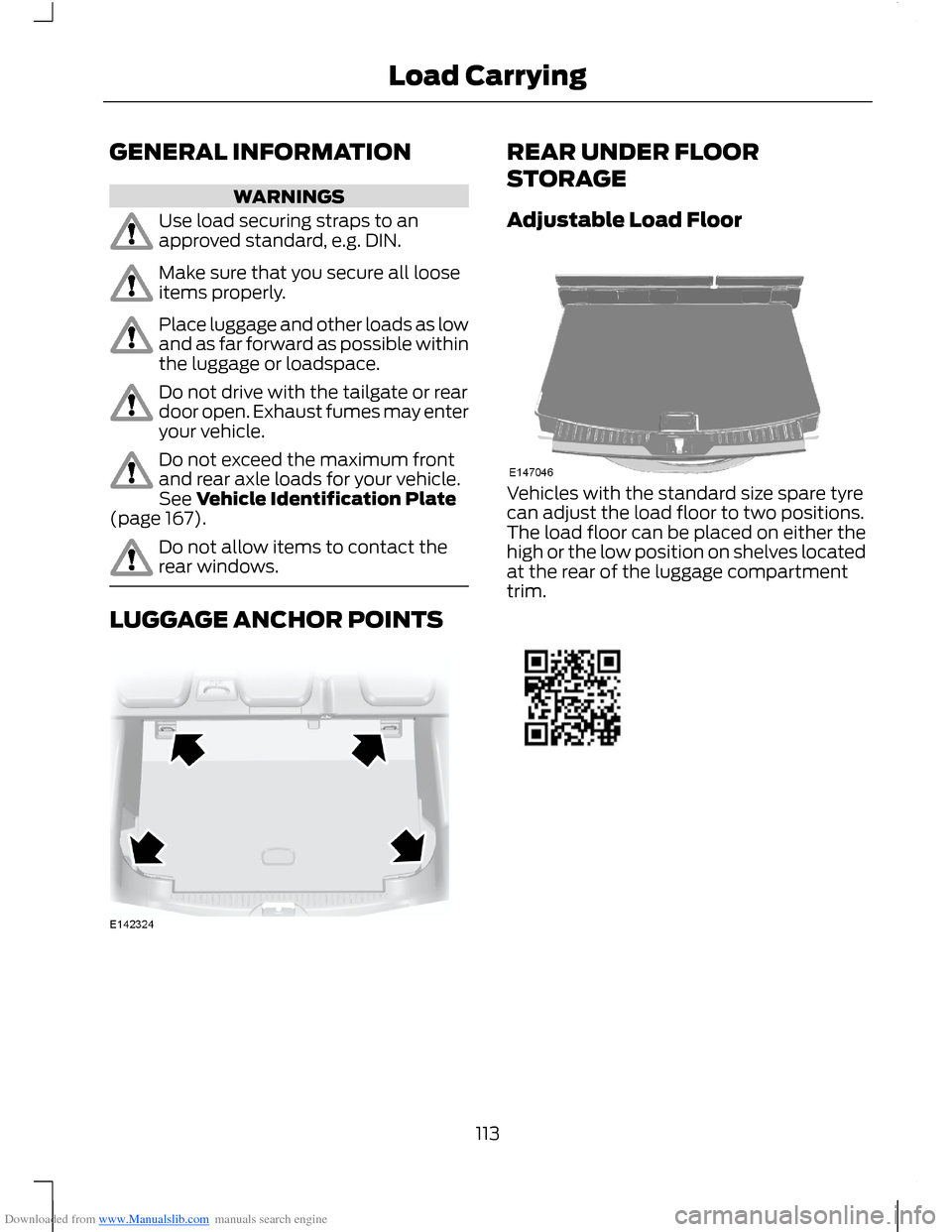
LUGGAGE ANCHOR POINTS
REAR UNDER FLOOR
STORAGE
Adjustable Load Floor
Vehicles with the standard size spare tyrecan adjust the load floor to two positions.The load floor can be placed on either thehigh or the low position on shelves locatedat the rear of the luggage compartmenttrim.
113Load Carrying
Page 116 of 256
Downloaded from www.Manualslib.com manuals search engine CARGO NETS
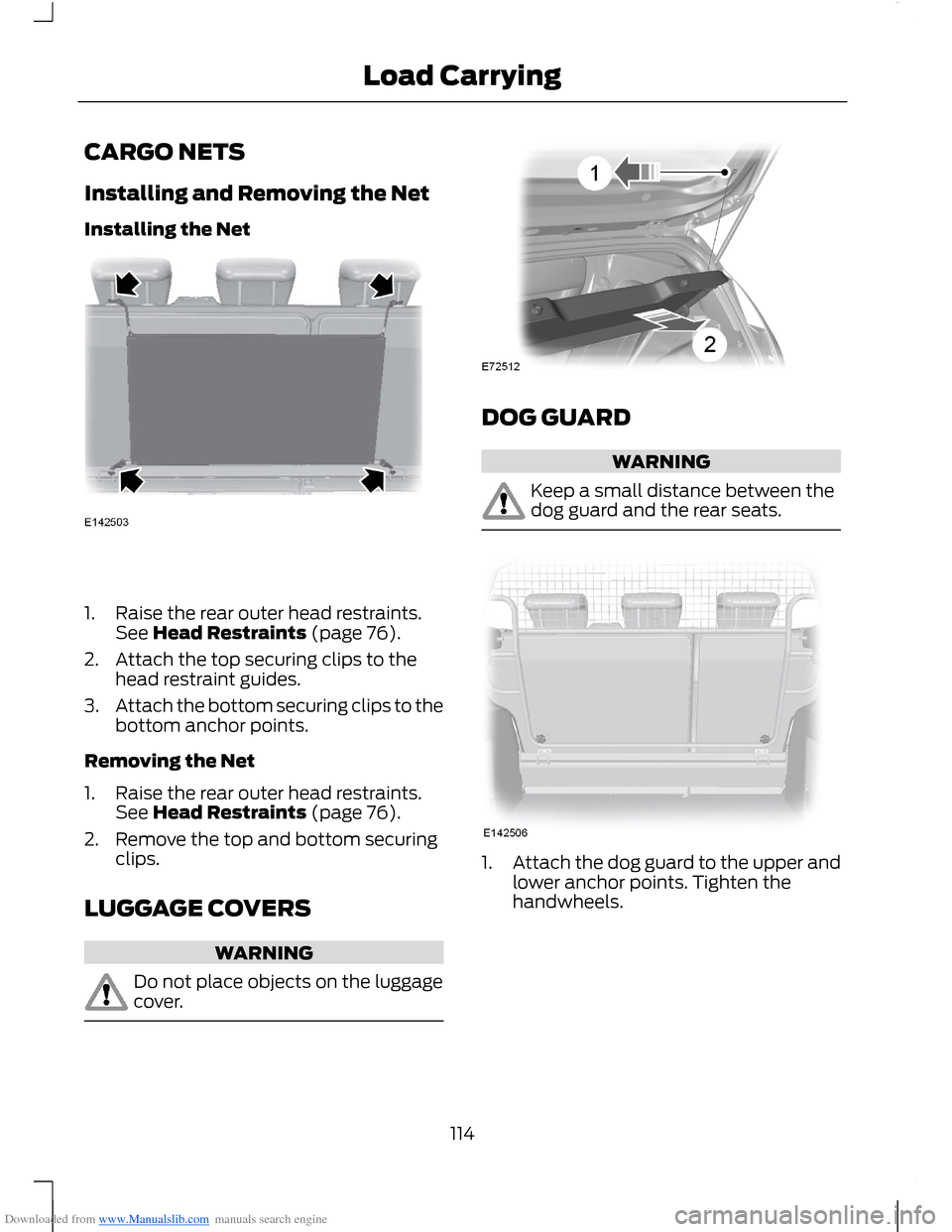
Installing and Removing the Net
Installing the Net
1.Raise the rear outer head restraints.See Head Restraints (page 76).
2.Attach the top securing clips to thehead restraint guides.
3.Attach the bottom securing clips to thebottom anchor points.
Removing the Net
1.Raise the rear outer head restraints.See Head Restraints (page 76).
2.Remove the top and bottom securingclips.
LUGGAGE COVERS
WARNING
Do not place objects on the luggagecover.
DOG GUARD
WARNING
Keep a small distance between thedog guard and the rear seats.
1.Attach the dog guard to the upper andlower anchor points. Tighten thehandwheels.
114Load Carrying