light FORD BRONCO 2023 Owner's Manual
[x] Cancel search | Manufacturer: FORD, Model Year: 2023, Model line: BRONCO, Model: FORD BRONCO 2023Pages: 642, PDF Size: 14.71 MB
Page 115 of 642
SWITCHING ALL OF THE
INTERIOR LAMPS ON AND OFF
The lamps turn on under the followingconditions:
•You open any door.
•You press a button on the remotecontrol.
•You press the all lamps on button onthe overhead console.
Press to switch all interior lampson or off.
SWITCHING THE FRONT
INTERIOR LAMPS ON AND OFF
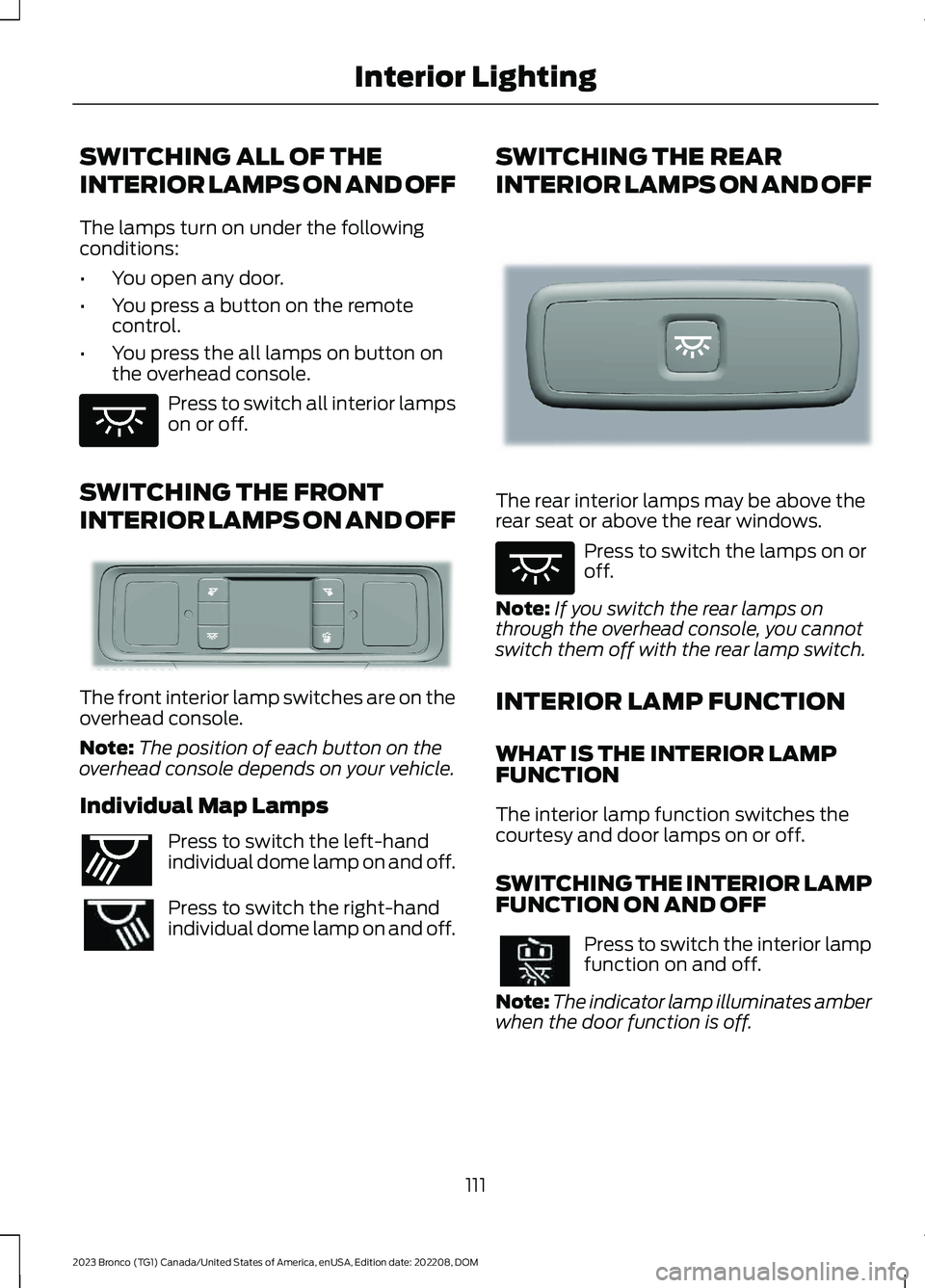
The front interior lamp switches are on theoverhead console.
Note:The position of each button on theoverhead console depends on your vehicle.
Individual Map Lamps
Press to switch the left-handindividual dome lamp on and off.
Press to switch the right-handindividual dome lamp on and off.
SWITCHING THE REAR
INTERIOR LAMPS ON AND OFF
The rear interior lamps may be above therear seat or above the rear windows.
Press to switch the lamps on oroff.
Note:If you switch the rear lamps onthrough the overhead console, you cannotswitch them off with the rear lamp switch.
INTERIOR LAMP FUNCTION
WHAT IS THE INTERIOR LAMPFUNCTION
The interior lamp function switches thecourtesy and door lamps on or off.
SWITCHING THE INTERIOR LAMPFUNCTION ON AND OFF
Press to switch the interior lampfunction on and off.
Note:The indicator lamp illuminates amberwhen the door function is off.
111
2023 Bronco (TG1) Canada/United States of America, enUSA, Edition date: 202208, DOMInterior LightingE259649 E281230 E262193 E281231 E259649
Page 116 of 642
ADJUSTING THE INSTRUMENT
PANEL LIGHTING
BRIGHTNESS
The instrument lighting dimmer buttonsare on the lighting control.
Repeatedly press one of thebuttons to adjust the brightness.
AMBIENT LIGHTING (IF EQUIPPED)
SWITCHING AMBIENT LIGHTINGON AND OFF
1.Press Settings on the touchscreen.
2.Press Vehicle Settings.
3.Press Ambient Light.
4.Switch Ambient Light on or off.
ADJUSTING AMBIENT LIGHTING
Drag the slider left or right.
INTERIOR LIGHTING –
TROUBLESHOOTING
INTERIOR LIGHTING –FREQUENTLY ASKED QUESTIONS
Why do my courtesy lamps or interiorlamps turn off when I have themswitched on when I switch my vehicleoff?
The battery saver turns the courtesylamps and interior lamps off after ashort period of time after you switchyour vehicle off.
112
2023 Bronco (TG1) Canada/United States of America, enUSA, Edition date: 202208, DOMInterior LightingE291299 E296433
Page 117 of 642
OPENING AND CLOSING THE
WINDOWS
WARNING: Do not leave childrenunattended in your vehicle and do notlet them play with the power windows.Failure to follow this instruction couldresult in personal injury.
WARNING: When closing thepower windows, verify they are free ofobstruction and make sure that childrenand pets are not in the proximity of thewindow openings.
Press the control to open thewindow. Lift the control to closethe window.
Note:The power windows operate with theignition on, and for several minutes after youswitch the ignition off or until you open afront door.
To reduce wind noise or pulsing noise whenone window is open, slightly open theopposite window.
One-Touch Open (If Equipped)
Fully press the window control and releaseit. Press again or lift it to stop the window.
One-Touch Close (If Equipped)
Fully lift the window control and releaseit. Press again or lift it to stop the window.
Resetting One-Touch Close
Carry out all steps within 30 seconds ofstarting the sequence.
1.Fully open the window.
2.Lift and hold the window control untilthe window is fully closed. Keep thewindow control held for a two seconds
3.Press and hold the window control untilthe window is fully open. Keep thewindow control pressed for twoseconds.
4.Lift and hold the window control untilthe window is fully closed. Keep thewindow control held for a two seconds
Note:Repeat the procedure if the windowdoes not close when you use one-touch.
Tailgate Window
To open the window, do the following:
1.Open the tailgate. See Opening theTailgate From Outside Your Vehicle(page 93).
2.Lift the window.
To close the window, do the following:
1.Push the window down.
2.Close the tailgate. See Closing theTailgate From Outside Your Vehicle(page 93).
GLOBAL OPENING
WHAT IS GLOBAL OPENING
You can use the remote control to openthe windows with the ignition off.
USING GLOBAL OPENING
1.Press and release the unlock button onthe remote control.
2.Press and hold the unlock button onthe remote control.
3.Release the button when the windowsstart to open.
Press the lock or the unlock button on theremote control to stop global opening.
Note:You can use global opening for ashort period of time when you unlock yourvehicle using the remote control.
113
2023 Bronco (TG1) Canada/United States of America, enUSA, Edition date: 202208, DOMWindows
Page 119 of 642
INTERIOR MIRROR
PRECAUTIONS
WARNING: Do not adjust themirrors when your vehicle is moving. Thiscould result in the loss of control of yourvehicle, serious personal injury or death.
Note:Do not clean the mirror housing orglass with harsh abrasives, fuel or otherpetroleum-based cleaning products.
MANUALLY DIMMING THE
INTERIOR MIRROR
Pull the tab below the mirror toward youto reduce glare at night.
AUTO-DIMMING INTERIOR
MIRROR (IF EQUIPPED)
WHAT IS THE AUTO-DIMMINGINTERIOR MIRROR
The mirror dims to reduce the effect ofbright light from behind. It returns tonormal when the bright light from behindis no longer present or if you shift intoreverse (R), to make sure you have a clearview when backing up.
AUTO-DIMMING INTERIORMIRROR LIMITATIONS
Do not block the sensors on the front andback of the mirror.
Note:A rear center passenger or raised rearcenter head restraint could prevent lightfrom reaching the sensor.
115
2023 Bronco (TG1) Canada/United States of America, enUSA, Edition date: 202208, DOMInterior Mirror
Page 120 of 642
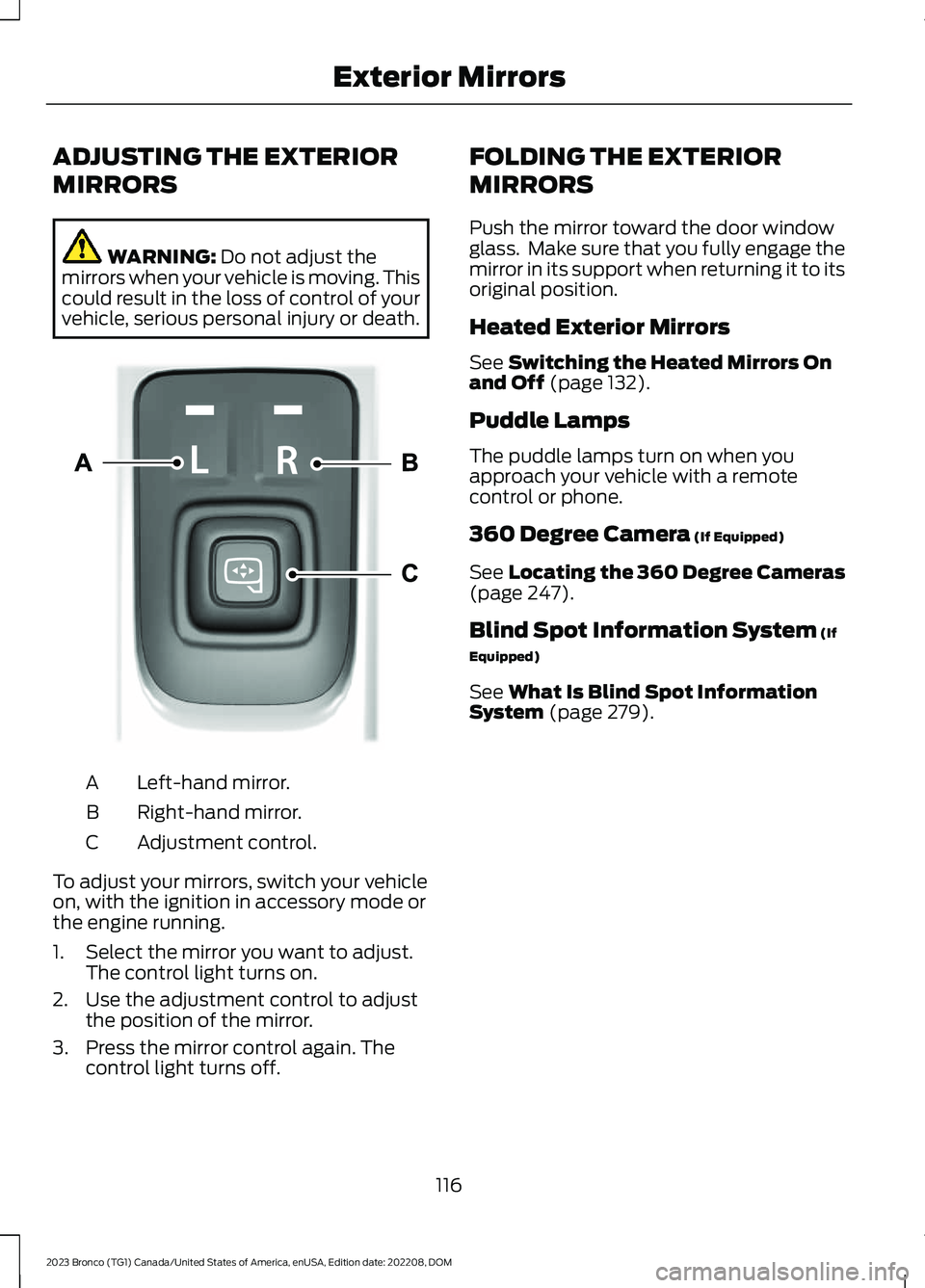
ADJUSTING THE EXTERIOR
MIRRORS
WARNING: Do not adjust themirrors when your vehicle is moving. Thiscould result in the loss of control of yourvehicle, serious personal injury or death.
Left-hand mirror.A
Right-hand mirror.B
Adjustment control.C
To adjust your mirrors, switch your vehicleon, with the ignition in accessory mode orthe engine running.
1.Select the mirror you want to adjust.The control light turns on.
2.Use the adjustment control to adjustthe position of the mirror.
3.Press the mirror control again. Thecontrol light turns off.
FOLDING THE EXTERIOR
MIRRORS
Push the mirror toward the door windowglass. Make sure that you fully engage themirror in its support when returning it to itsoriginal position.
Heated Exterior Mirrors
See Switching the Heated Mirrors Onand Off (page 132).
Puddle Lamps
The puddle lamps turn on when youapproach your vehicle with a remotecontrol or phone.
360 Degree Camera (If Equipped)
See Locating the 360 Degree Cameras(page 247).
Blind Spot Information System (If
Equipped)
See What Is Blind Spot InformationSystem (page 279).
116
2023 Bronco (TG1) Canada/United States of America, enUSA, Edition date: 202208, DOMExterior MirrorsE328042
Page 126 of 642
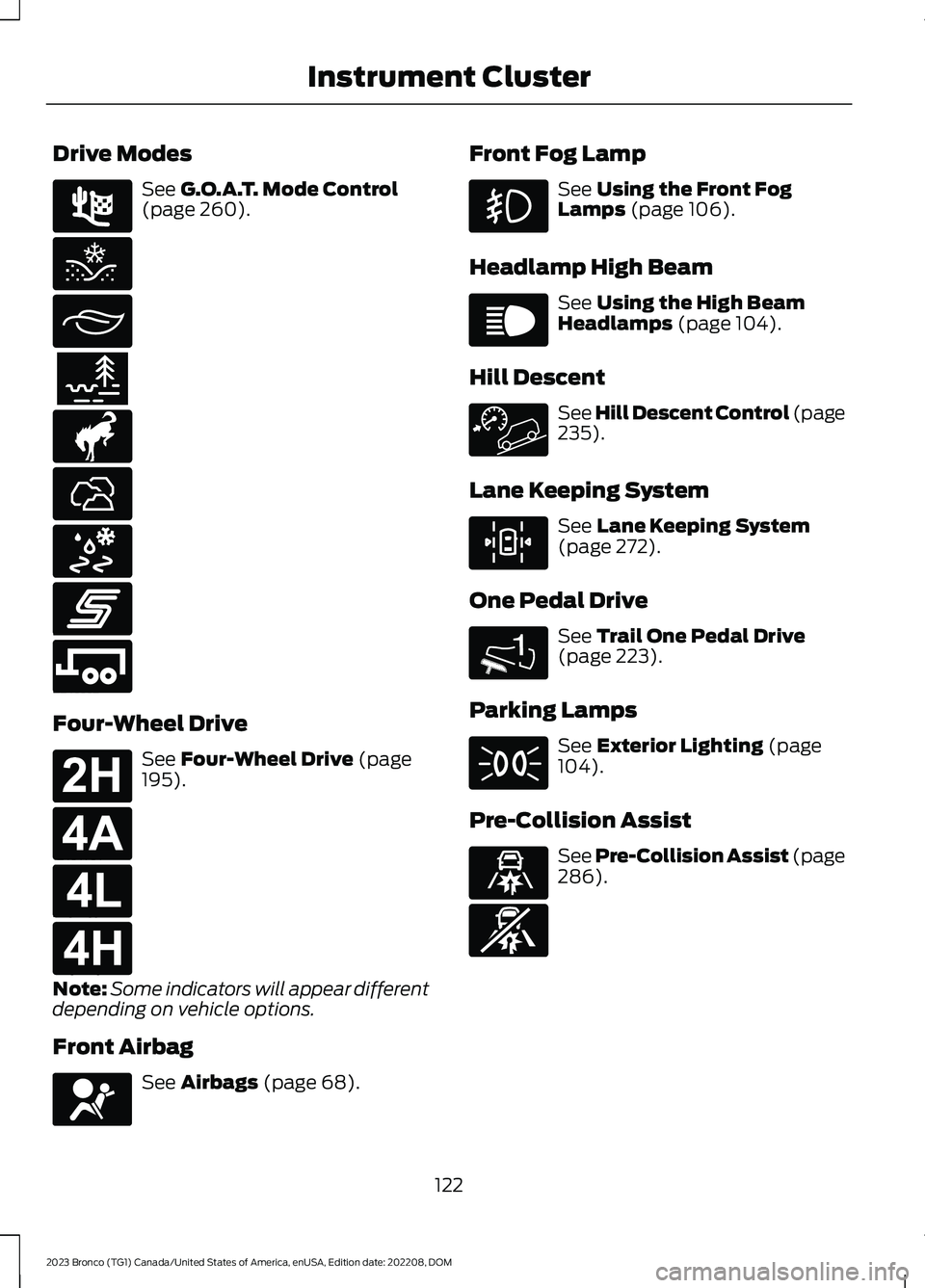
Drive Modes
See G.O.A.T. Mode Control(page 260).
Four-Wheel Drive
See Four-Wheel Drive (page195).
Note:Some indicators will appear differentdepending on vehicle options.
Front Airbag
See Airbags (page 68).
Front Fog Lamp
See Using the Front FogLamps (page 106).
Headlamp High Beam
See Using the High BeamHeadlamps (page 104).
Hill Descent
See Hill Descent Control (page235).
Lane Keeping System
See Lane Keeping System(page 272).
One Pedal Drive
See Trail One Pedal Drive(page 223).
Parking Lamps
See Exterior Lighting (page104).
Pre-Collision Assist
See Pre-Collision Assist (page286).
122
2023 Bronco (TG1) Canada/United States of America, enUSA, Edition date: 202208, DOMInstrument ClusterE225314 E295420 E295413 E296606 E317283 E322413 E295414 E246593 E246592 E181778 E181781 E181780 E181779 E67017 E67019 E308131 1E328584 E71341 E329466 E329467
Page 128 of 642
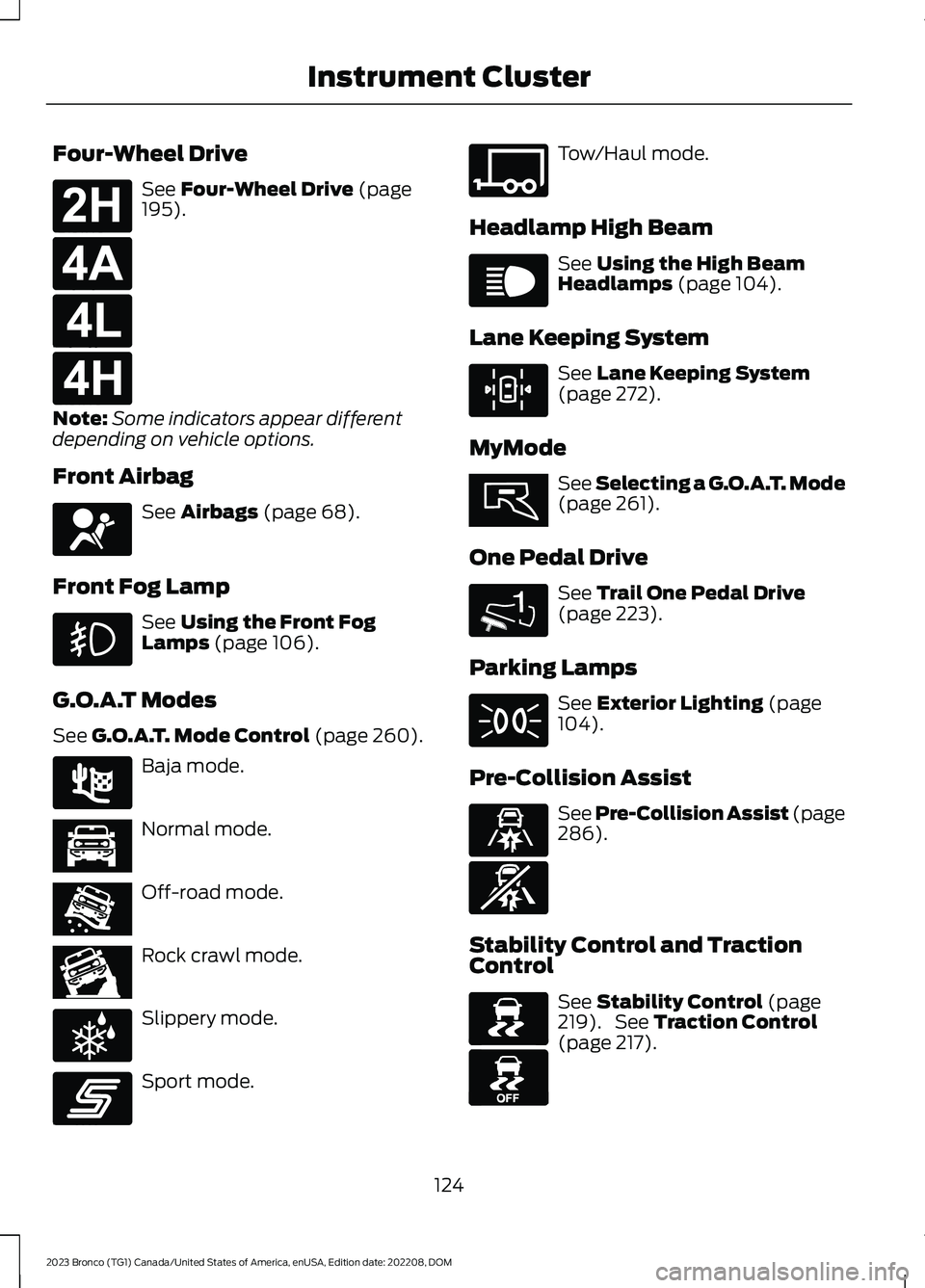
Four-Wheel Drive
See Four-Wheel Drive (page195).
Note:Some indicators appear differentdepending on vehicle options.
Front Airbag
See Airbags (page 68).
Front Fog Lamp
See Using the Front FogLamps (page 106).
G.O.A.T Modes
See G.O.A.T. Mode Control (page 260).
Baja mode.
Normal mode.
Off-road mode.
Rock crawl mode.
Slippery mode.
Sport mode.
Tow/Haul mode.
Headlamp High Beam
See Using the High BeamHeadlamps (page 104).
Lane Keeping System
See Lane Keeping System(page 272).
MyMode
See Selecting a G.O.A.T. Mode(page 261).
One Pedal Drive
See Trail One Pedal Drive(page 223).
Parking Lamps
See Exterior Lighting (page104).
Pre-Collision Assist
See Pre-Collision Assist (page286).
Stability Control and TractionControl
See Stability Control (page219). See Traction Control(page 217).
124
2023 Bronco (TG1) Canada/United States of America, enUSA, Edition date: 202208, DOMInstrument ClusterE181778 E181781 E181780 E181779 E67017 E225314 E366490 E366491 E366492 E347004 E246593 E347108 E67019 E308131 E359278 1E328584 E71341 E329466 E329467 E138639 E130458
Page 131 of 642
INSTRUMENT CLUSTER
DISPLAY MAIN MENU -
RAPTOR
Depending on your vehicle options, somemenu items can appear different or not atall.
Note:For your safety, some features arespeed-dependent and could be unavailablewhen your vehicle is above a certain speed.
Menu Item
MyView
Trip/Fuel
Raptor Information
Navigation
Phone
Audio
Settings
TRIP COMPUTER
ACCESSING THE TRIP COMPUTER
1.Select Trip/Fuel.
2.Select Fuel Economy,Trip 1 or Trip 2.
RESETTING THE TRIP COMPUTER
1.Select Trip/Fuel.
2.Press and hold the OK button for a fewseconds.
RESETTING THE INDIVIDUAL TRIPVALUES
1.Select Trip/Fuel.
2.Select Trip 1 or Trip 2.
3.Press and hold the OK button for a fewseconds.
CUSTOMIZING THE
INSTRUMENT CLUSTER
DISPLAY
Adding Screens Using MyView
1.Using the information display controlson the steering wheel, select MyView.
2.Select Configure MyView.
3.Select a screen.
4.Press the OK button.
Note:The number of screens you can addis limited. If the selected screen does notappear you must deselect screens from theMyView menu.
Adding Screens Using SelectScreens
1.Select Select Screens.
2.Use the controls on the steering wheelto highlight a screen to add.
3.Press the OK button.
Note:The number of screens you can addis limited. If the selected screen does notappear you must deselect screens from theSelect Screens menu.
Configuring Gauges
1.Select Settings.
2.Select Configure Gauges.
3.Select to swap or change left-handside and right-hand side gauges.
127
2023 Bronco (TG1) Canada/United States of America, enUSA, Edition date: 202208, DOMInstrument Cluster Display
Page 136 of 642
SWITCHING THE HEATED
REAR WINDOW ON AND OFF (IF
EQUIPPED)
Press the button to clear the rearwindow of thin ice and fog. Theheated rear window turns offafter a short period of time.
Note:This button also activates the heatedmirrors.
Note:Do not use harsh chemicals, razorblades or other sharp objects to clean orremove decals from the inside of the heatedrear window as this could cause damage tothe heated rear window grid lines notcovered by the vehicle Warranty.
SETTING THE BLOWER MOTOR
SPEED
Press up or down on the controlto select the blower motorspeed.
Note:Lights on the control illuminate toindicate the blower motor speed.
Note: When you switch the blower motoroff, air conditioning turns off and thewindows could fog up.
SWITCHING THE HEATED
MIRRORS ON AND OFF (IF
EQUIPPED)
Heated Mirrors
Press the button.
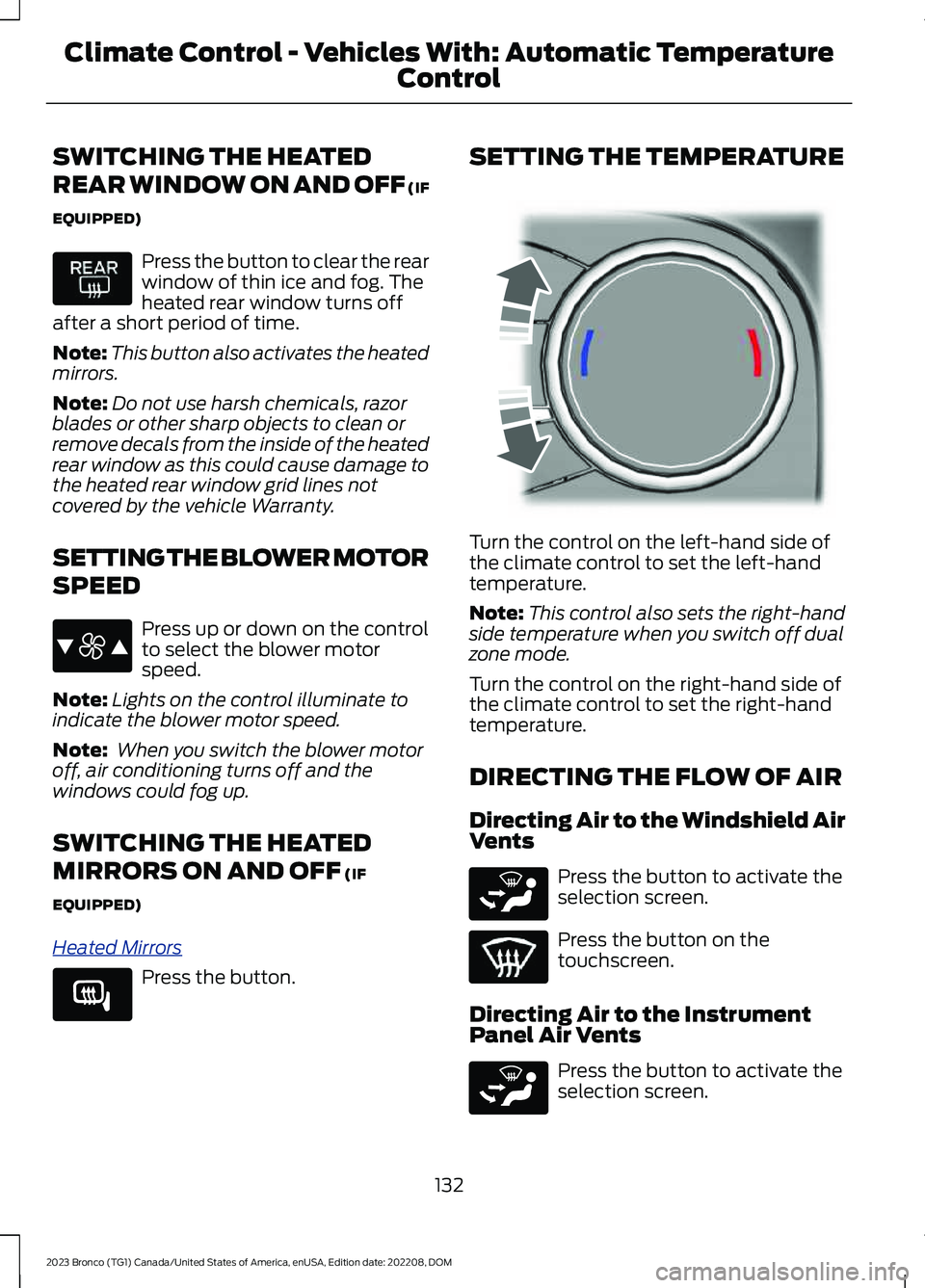
SETTING THE TEMPERATURE
Turn the control on the left-hand side ofthe climate control to set the left-handtemperature.
Note:This control also sets the right-handside temperature when you switch off dualzone mode.
Turn the control on the right-hand side ofthe climate control to set the right-handtemperature.
DIRECTING THE FLOW OF AIR
Directing Air to the Windshield AirVents
Press the button to activate theselection screen.
Press the button on thetouchscreen.
Directing Air to the InstrumentPanel Air Vents
Press the button to activate theselection screen.
132
2023 Bronco (TG1) Canada/United States of America, enUSA, Edition date: 202208, DOMClimate Control - Vehicles With: Automatic Temperature
Control E387423 E266189 E244115 E265283 E265283
Page 137 of 642
Press the button on thetouchscreen.
Directing Air to the Footwell AirVents
Press the button to activate theselection screen.
Press the button on thetouchscreen.
AUTO MODE
SWITCHING AUTO MODE ON ANDOFF
Press the button to switch automode on. Repeatedly press thebutton to adjust auto mode.
Note:When you switch auto mode on,lights on the blower motor control do notilluminate to indicate the blower motorspeed.
Adjust the blower motor control or airdistribution control to switch auto modeoff.
AUTO MODE INDICATORS
The indicators are on the Auto Modebutton.
DescriptionAuto Mode IndicatorStatus
The blower motor speed is reduced. Use this setting tominimize the amount of noise from the blower motor. Thissetting increases the time taken to cool the interior.
One indicator illumin-ated.
The blower motor speed is moderate.Two indicators illumin-ated.
The blower motor speed is increased. Use this setting toreduce the time taken to cool the interior. This settingincreases the amount of noise from the blower motor.
Three indicators illumin-ated.
133
2023 Bronco (TG1) Canada/United States of America, enUSA, Edition date: 202208, DOMClimate Control - Vehicles With: Automatic Temperature
ControlE244097 E265283 E244098