light FORD BRONCO 2023 Service Manual
[x] Cancel search | Manufacturer: FORD, Model Year: 2023, Model line: BRONCO, Model: FORD BRONCO 2023Pages: 642, PDF Size: 14.71 MB
Page 203 of 642
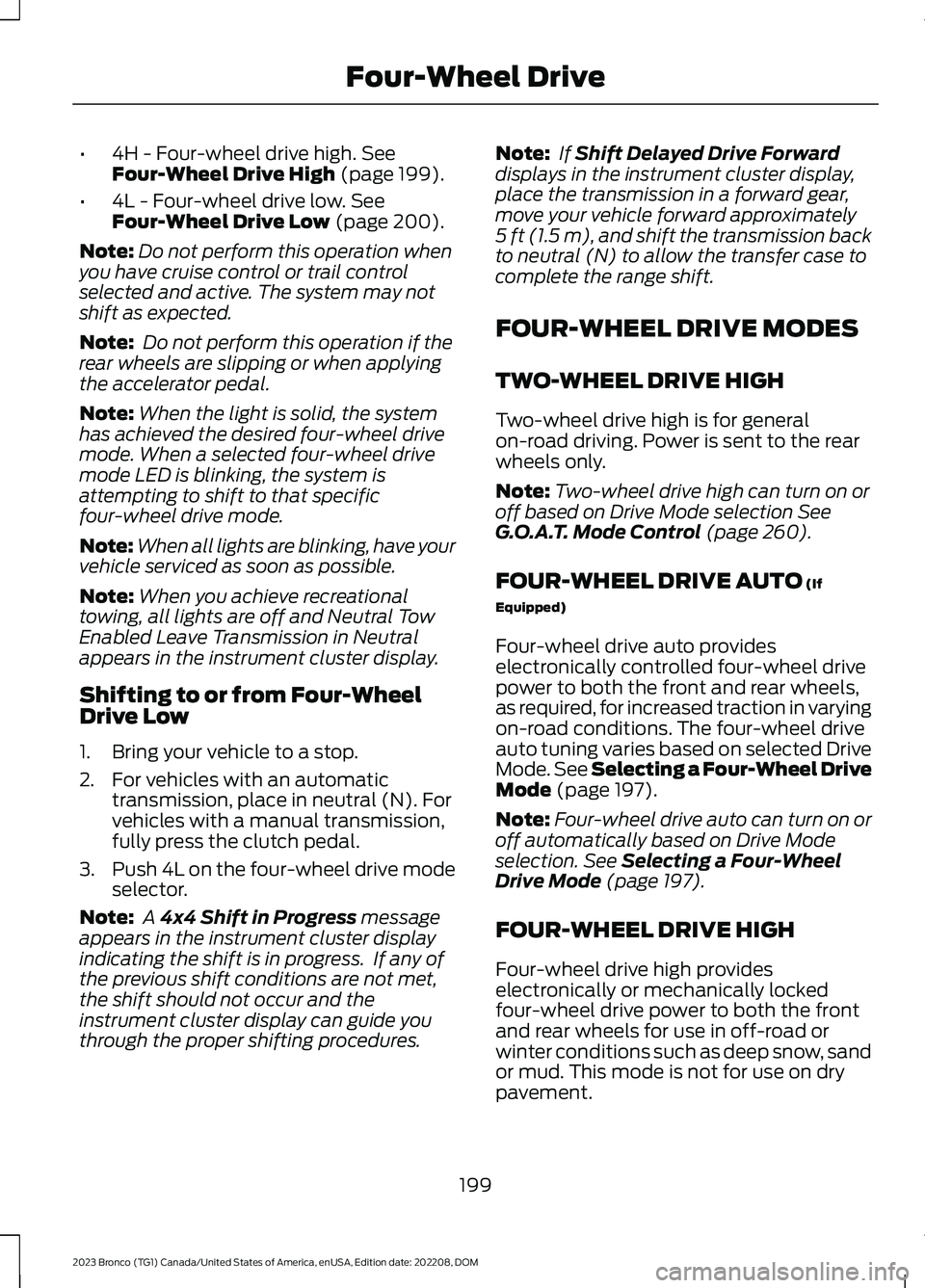
•4H - Four-wheel drive high. SeeFour-Wheel Drive High (page 199).
•4L - Four-wheel drive low. SeeFour-Wheel Drive Low (page 200).
Note:Do not perform this operation whenyou have cruise control or trail controlselected and active. The system may notshift as expected.
Note: Do not perform this operation if therear wheels are slipping or when applyingthe accelerator pedal.
Note:When the light is solid, the systemhas achieved the desired four-wheel drivemode. When a selected four-wheel drivemode LED is blinking, the system isattempting to shift to that specificfour-wheel drive mode.
Note:When all lights are blinking, have yourvehicle serviced as soon as possible.
Note:When you achieve recreationaltowing, all lights are off and Neutral TowEnabled Leave Transmission in Neutralappears in the instrument cluster display.
Shifting to or from Four-WheelDrive Low
1.Bring your vehicle to a stop.
2.For vehicles with an automatictransmission, place in neutral (N). Forvehicles with a manual transmission,fully press the clutch pedal.
3.Push 4L on the four-wheel drive modeselector.
Note: A 4x4 Shift in Progress messageappears in the instrument cluster displayindicating the shift is in progress. If any ofthe previous shift conditions are not met,the shift should not occur and theinstrument cluster display can guide youthrough the proper shifting procedures.
Note: If Shift Delayed Drive Forwarddisplays in the instrument cluster display,place the transmission in a forward gear,move your vehicle forward approximately5 ft (1.5 m), and shift the transmission backto neutral (N) to allow the transfer case tocomplete the range shift.
FOUR-WHEEL DRIVE MODES
TWO-WHEEL DRIVE HIGH
Two-wheel drive high is for generalon-road driving. Power is sent to the rearwheels only.
Note:Two-wheel drive high can turn on oroff based on Drive Mode selection SeeG.O.A.T. Mode Control (page 260).
FOUR-WHEEL DRIVE AUTO (If
Equipped)
Four-wheel drive auto provideselectronically controlled four-wheel drivepower to both the front and rear wheels,as required, for increased traction in varyingon-road conditions. The four-wheel driveauto tuning varies based on selected DriveMode. See Selecting a Four-Wheel DriveMode (page 197).
Note:Four-wheel drive auto can turn on oroff automatically based on Drive Modeselection. See Selecting a Four-WheelDrive Mode (page 197).
FOUR-WHEEL DRIVE HIGH
Four-wheel drive high provideselectronically or mechanically lockedfour-wheel drive power to both the frontand rear wheels for use in off-road orwinter conditions such as deep snow, sandor mud. This mode is not for use on drypavement.
199
2023 Bronco (TG1) Canada/United States of America, enUSA, Edition date: 202208, DOMFour-Wheel Drive
Page 223 of 642
HOW DOES STABILITY
CONTROL WORK
WARNING: Vehicle modificationsinvolving braking system, aftermarketroof racks, suspension, steering system,tire construction and wheel and tire sizemay change the handling characteristicsof your vehicle and may adversely affectthe performance of the electronicstability control system. In addition,installing any stereo speakers mayinterfere with and adversely affect theelectronic stability control system.Reducing the effectiveness of theelectronic stability control system couldlead to an increased risk of loss of vehiclecontrol, vehicle rollover, personal injuryand death.
WARNING: Remember that evenadvanced technology cannot defy thelaws of physics. It's always possible tolose control of a vehicle due toinappropriate driver input for theconditions. Aggressive driving on anyroad condition can cause you to losecontrol of your vehicle increasing the riskof personal injury or property damage.Activation of the electronic stabilitycontrol system is an indication that atleast some of the tires have exceededtheir ability to grip the road; this couldreduce the operator's ability to controlthe vehicle potentially resulting in a lossof vehicle control, vehicle rollover,personal injury and death.
WARNING: You are responsible forcontrolling your vehicle at all times. Thesystem is designed to be an aid and doesnot relieve you of your responsibility todrive with due care and attention. Failureto follow this instruction could result inthe loss of control of your vehicle,personal injury or death.
If a driving condition activates either thestability control or traction control you mayexperience the following conditions:
•The stability and traction control lightflashes.
•Your vehicle slows down.
•Reduced engine power.
The stability control system has severalfeatures built into it to help you maintaincontrol of your vehicle:
Electronic Stability Control
Electronic stability control enhances yourvehicle’s ability to prevent skids or lateralslides by applying brakes to one or moreof the wheels individually and, if necessary,reducing engine power.
Roll Stability Control
Roll stability control enhances yourvehicle’s ability to prevent rollovers bydetecting your vehicle’s roll motion andthe rate at which it changes by applyingthe brakes to one or more wheelsindividually.
Curve Control
Curve control enhances your vehicle’sability to follow the road when corneringseverely or avoiding objects in the roadway.Curve control operates by reducing enginepower and, if necessary, applying brakesto one or more of the wheels individually.
219
2023 Bronco (TG1) Canada/United States of America, enUSA, Edition date: 202208, DOMStability Control
Page 225 of 642
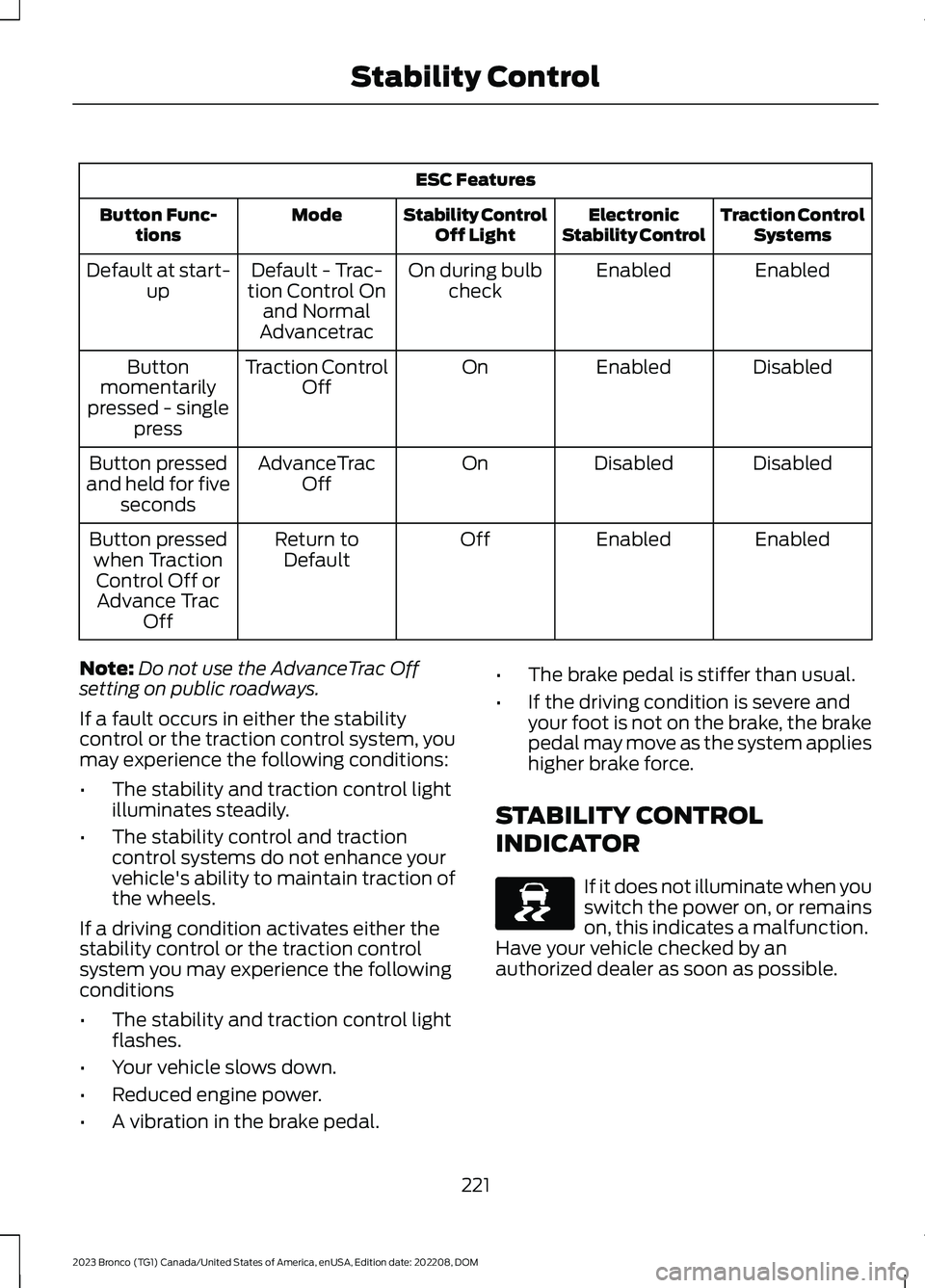
ESC Features
Traction ControlSystemsElectronicStability ControlStability ControlOff LightModeButton Func-tions
EnabledEnabledOn during bulbcheckDefault - Trac-tion Control Onand NormalAdvancetrac
Default at start-up
DisabledEnabledOnTraction ControlOffButtonmomentarilypressed - singlepress
DisabledDisabledOnAdvanceTracOffButton pressedand held for fiveseconds
EnabledEnabledOffReturn toDefaultButton pressedwhen TractionControl Off orAdvance TracOff
Note:Do not use the AdvanceTrac Offsetting on public roadways.
If a fault occurs in either the stabilitycontrol or the traction control system, youmay experience the following conditions:
•The stability and traction control lightilluminates steadily.
•The stability control and tractioncontrol systems do not enhance yourvehicle's ability to maintain traction ofthe wheels.
If a driving condition activates either thestability control or the traction controlsystem you may experience the followingconditions
•The stability and traction control lightflashes.
•Your vehicle slows down.
•Reduced engine power.
•A vibration in the brake pedal.
•The brake pedal is stiffer than usual.
•If the driving condition is severe andyour foot is not on the brake, the brakepedal may move as the system applieshigher brake force.
STABILITY CONTROL
INDICATOR
If it does not illuminate when youswitch the power on, or remainson, this indicates a malfunction.Have your vehicle checked by anauthorized dealer as soon as possible.
221
2023 Bronco (TG1) Canada/United States of America, enUSA, Edition date: 202208, DOMStability ControlE138639
Page 231 of 642
WHAT IS TRAIL TURN ASSIST
Trail turn assist can reduce the turningradius of your vehicle by applying thebrakes to the inside rear wheel inlow-speed, high steering-angle maneuvers.
TRAIL TURN ASSIST
PRECAUTIONS
Note:Do not use trail turn assist on dry,hard surfaced roads. Doing so can produceexcessive noise, increase tire wear and maydamage drive line, or braking components.Trail turn assist is only intended for slippery,or loose surfaces.
You may hear noise from the anti-lockbrake system while trail turn assist isactive. This is normal operation.
TRAIL TURN ASSIST
LIMITATIONS
You can only use trail turn assist when thesystem is in four-wheel drive high (4H), orfour-wheel drive low (4L) mode.
You cannot use trail turn assist with therear differential engaged. If the systemdetects that the rear differential hasrecently been engaged, it may not activatetrail turn assist until it can confirm that therear differential is disengaged.
If the vehicle’s rear differential is engagedwhen pressing the trail turn assist button,the rear differential will attempt todisengage to allow for trail turn assistoperation.
SWITCHING TRAIL TURN
ASSIST ON AND OFF
Bronco Off-Road Features
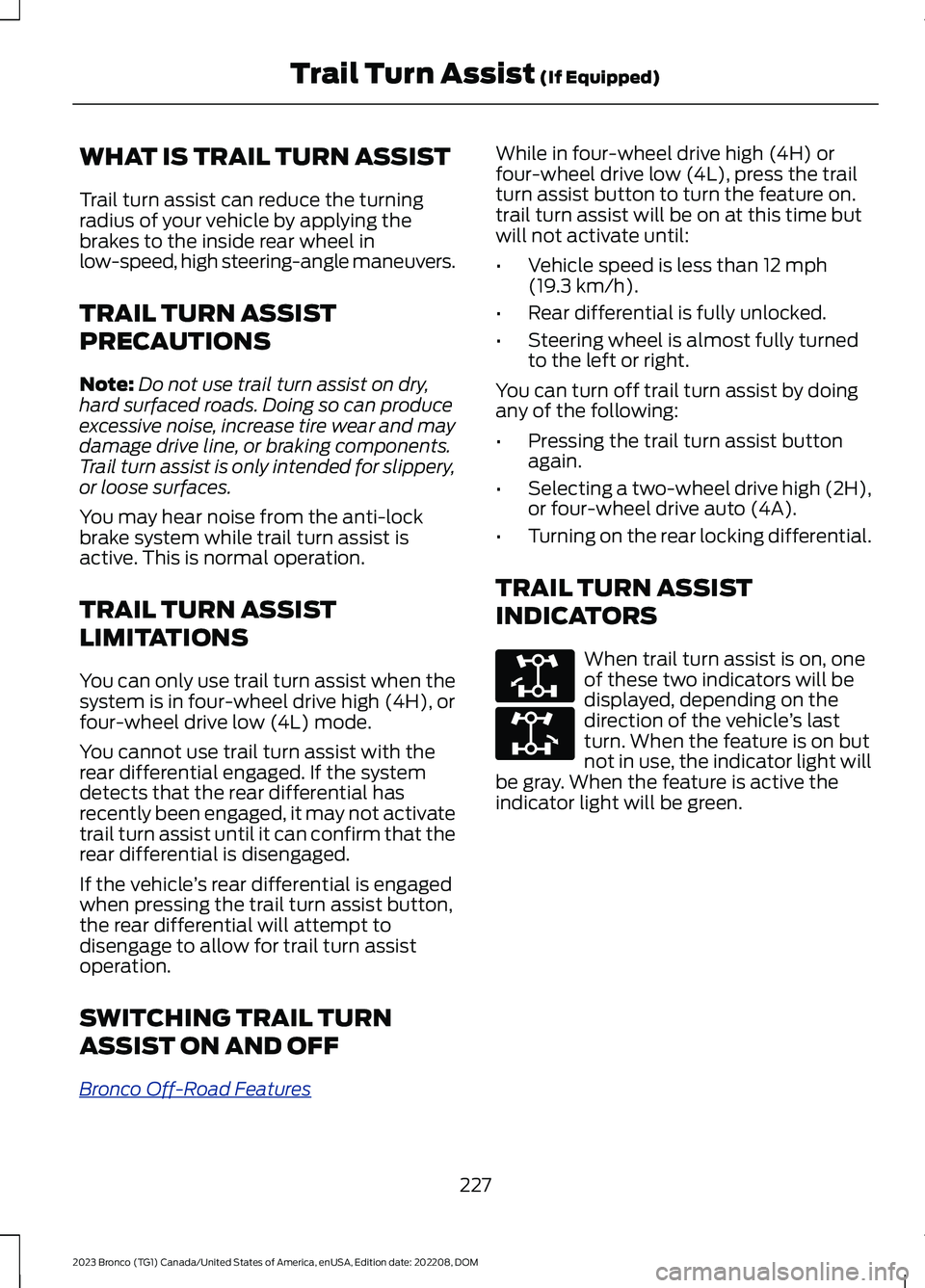
While in four-wheel drive high (4H) orfour-wheel drive low (4L), press the trailturn assist button to turn the feature on.trail turn assist will be on at this time butwill not activate until:
•Vehicle speed is less than 12 mph(19.3 km/h).
•Rear differential is fully unlocked.
•Steering wheel is almost fully turnedto the left or right.
You can turn off trail turn assist by doingany of the following:
•Pressing the trail turn assist buttonagain.
•Selecting a two-wheel drive high (2H),or four-wheel drive auto (4A).
•Turning on the rear locking differential.
TRAIL TURN ASSIST
INDICATORS
When trail turn assist is on, oneof these two indicators will bedisplayed, depending on thedirection of the vehicle’s lastturn. When the feature is on butnot in use, the indicator light willbe gray. When the feature is active theindicator light will be green.
227
2023 Bronco (TG1) Canada/United States of America, enUSA, Edition date: 202208, DOMTrail Turn Assist (If Equipped)E338899 E338900
Page 239 of 642
WHAT IS HILL DESCENT
CONTROL
Hill descent control allows the driver to setand maintain vehicle speed whiledescending steep slopes in various surfaceconditions.
HOW DOES HILL DESCENT
CONTROL WORK
Hill descent control can maintain vehiclespeeds on downhill slopes between2–20 mph (3–32 km/h). Above 20 mph(32 km/h), the system remains on but thedescent speed cannot be set ormaintained.
Note:The system does not function below2 mph (3 km/h).
The system requires a cool down intervalafter a period of sustained use. Hill descentcontrol provides a warning in the messagecenter and a tone sounds when the systemis about to disengage for cooling. At thistime, manually apply the brakes as neededto maintain descent speed.
Note:The amount of time that the systemcan remain active before cooling varies withconditions.
HILL DESCENT CONTROL
PRECAUTIONS
WARNING: The system does notcontrol speed in low traction conditionsor extremely steep slopes. The systemis designed to be an aid and does notrelieve you of your responsibility to drivewith due care and attention. Failure tofollow this instruction could result inpersonal injury.
WARNING: The system does notreplace the parking brake. When youleave your vehicle, always apply theparking brake.
SWITCHING HILL DESCENT
CONTROL ON AND OFF
Bronco Off-Road Features
Press the button on the centerconsole. A light in the instrumentcluster illuminates when thesystem is active.
SETTING THE HILL DESCENT
SPEED
To increase or decrease the descent speed,press the accelerator or brake pedal, or usethe SET + and SET - buttons on thesteering wheel. Once you reach thepreferred speed remove your feet from thepedals.
HILL DESCENT CONTROL
INDICATOR
Illuminates when you switch hilldescent control on.
235
2023 Bronco (TG1) Canada/United States of America, enUSA, Edition date: 202208, DOMHill Descent Control - Manual TransmissionE328593 E328593
Page 249 of 642
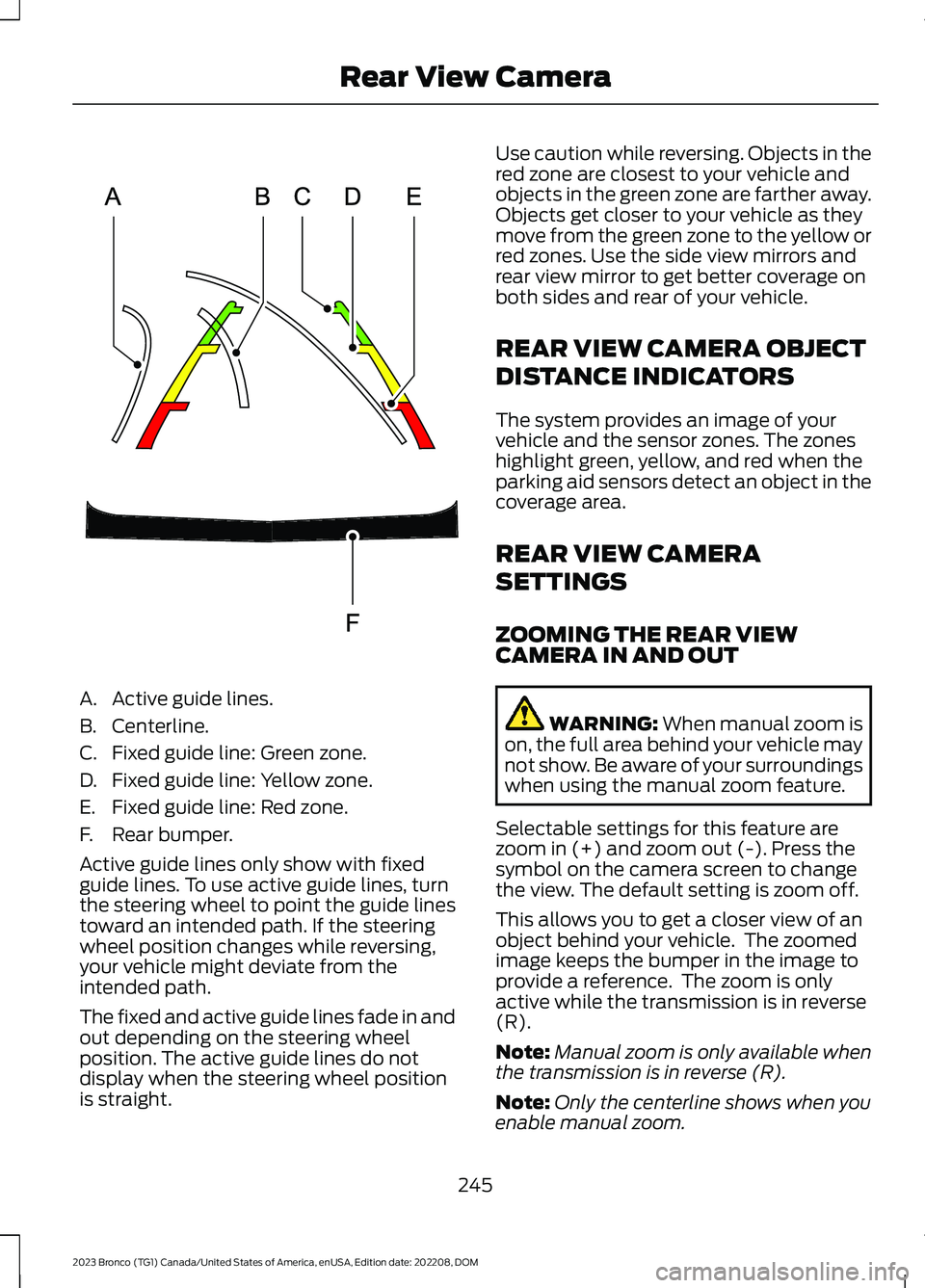
A.Active guide lines.
B.Centerline.
C.Fixed guide line: Green zone.
D.Fixed guide line: Yellow zone.
E.Fixed guide line: Red zone.
F.Rear bumper.
Active guide lines only show with fixedguide lines. To use active guide lines, turnthe steering wheel to point the guide linestoward an intended path. If the steeringwheel position changes while reversing,your vehicle might deviate from theintended path.
The fixed and active guide lines fade in andout depending on the steering wheelposition. The active guide lines do notdisplay when the steering wheel positionis straight.
Use caution while reversing. Objects in thered zone are closest to your vehicle andobjects in the green zone are farther away.Objects get closer to your vehicle as theymove from the green zone to the yellow orred zones. Use the side view mirrors andrear view mirror to get better coverage onboth sides and rear of your vehicle.
REAR VIEW CAMERA OBJECT
DISTANCE INDICATORS
The system provides an image of yourvehicle and the sensor zones. The zoneshighlight green, yellow, and red when theparking aid sensors detect an object in thecoverage area.
REAR VIEW CAMERA
SETTINGS
ZOOMING THE REAR VIEWCAMERA IN AND OUT
WARNING: When manual zoom ison, the full area behind your vehicle maynot show. Be aware of your surroundingswhen using the manual zoom feature.
Selectable settings for this feature arezoom in (+) and zoom out (-). Press thesymbol on the camera screen to changethe view. The default setting is zoom off.
This allows you to get a closer view of anobject behind your vehicle. The zoomedimage keeps the bumper in the image toprovide a reference. The zoom is onlyactive while the transmission is in reverse(R).
Note:Manual zoom is only available whenthe transmission is in reverse (R).
Note:Only the centerline shows when youenable manual zoom.
245
2023 Bronco (TG1) Canada/United States of America, enUSA, Edition date: 202208, DOMRear View CameraE306774
Page 257 of 642
Note:An audible alarm sounds and thesystem shuts down if it applies brakes foran extended period of time. This allows thebrakes to cool. The system functionsnormally again after the brakes cool.
ADAPTIVE CRUISE CONTROL
LIMITATIONS
Sensor Limitations
WARNING: On rare occasions,detection issues can occur due to theroad infrastructures, for example bridges,tunnels and safety barriers. In thesecases, the system may brake late orunexpectedly. At all times, you areresponsible for controlling your vehicle,supervising the system and intervening,if required.
WARNING: If the systemmalfunctions, have your vehicle checkedas soon as possible.
WARNING: Large contrasts inoutside lighting can limit sensorperformance.
WARNING: The system only warnsof vehicles detected by the radar sensor.In some cases there may be no warningor a delayed warning. Apply the brakeswhen necessary. Failure to follow thisinstruction could result in personal injuryor death.
WARNING: The system may notdetect stationary or slow movingvehicles below 6 mph (10 km/h).
WARNING: The system does notdetect pedestrians or objects in the road.
WARNING: The system does notdetect oncoming vehicles in the samelane.
WARNING: The system may notoperate properly if the sensor is blocked.Keep the windshield free fromobstruction.
WARNING: The sensor mayincorrectly track lane markings as otherstructures or objects. This can result ina false or missed warning.
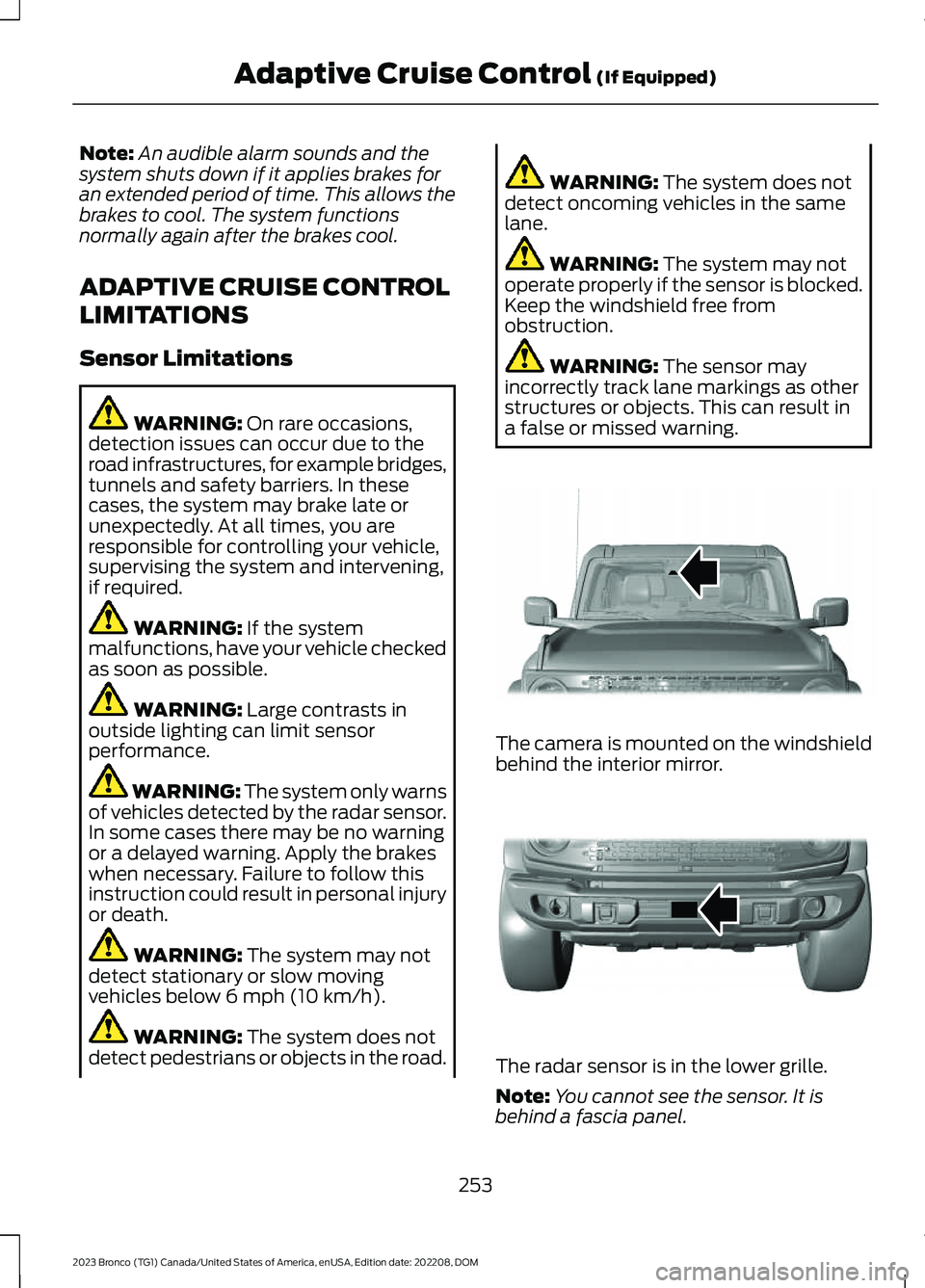
The camera is mounted on the windshieldbehind the interior mirror.
The radar sensor is in the lower grille.
Note:You cannot see the sensor. It isbehind a fascia panel.
253
2023 Bronco (TG1) Canada/United States of America, enUSA, Edition date: 202208, DOMAdaptive Cruise Control (If Equipped)E327935 E327936
Page 258 of 642
Note:Keep the front of your vehicle free ofdirt, metal badges or objects. Vehicle frontprotectors, aftermarket lights, additionalpaint or plastic coatings could also degradesensor performance.
A message displays if something obstructsthe camera or the sensor. When somethingblocks the sensor, the system cannotdetect a vehicle ahead and does notfunction. See Adaptive Cruise Control –Information Messages (page 258).
The radar sensor has a limited field ofview. It may not detect vehicles at all ordetect a vehicle later than expected insome situations. The lead vehicle imagedoes not illuminate if the system does notdetect a vehicle in front of you.
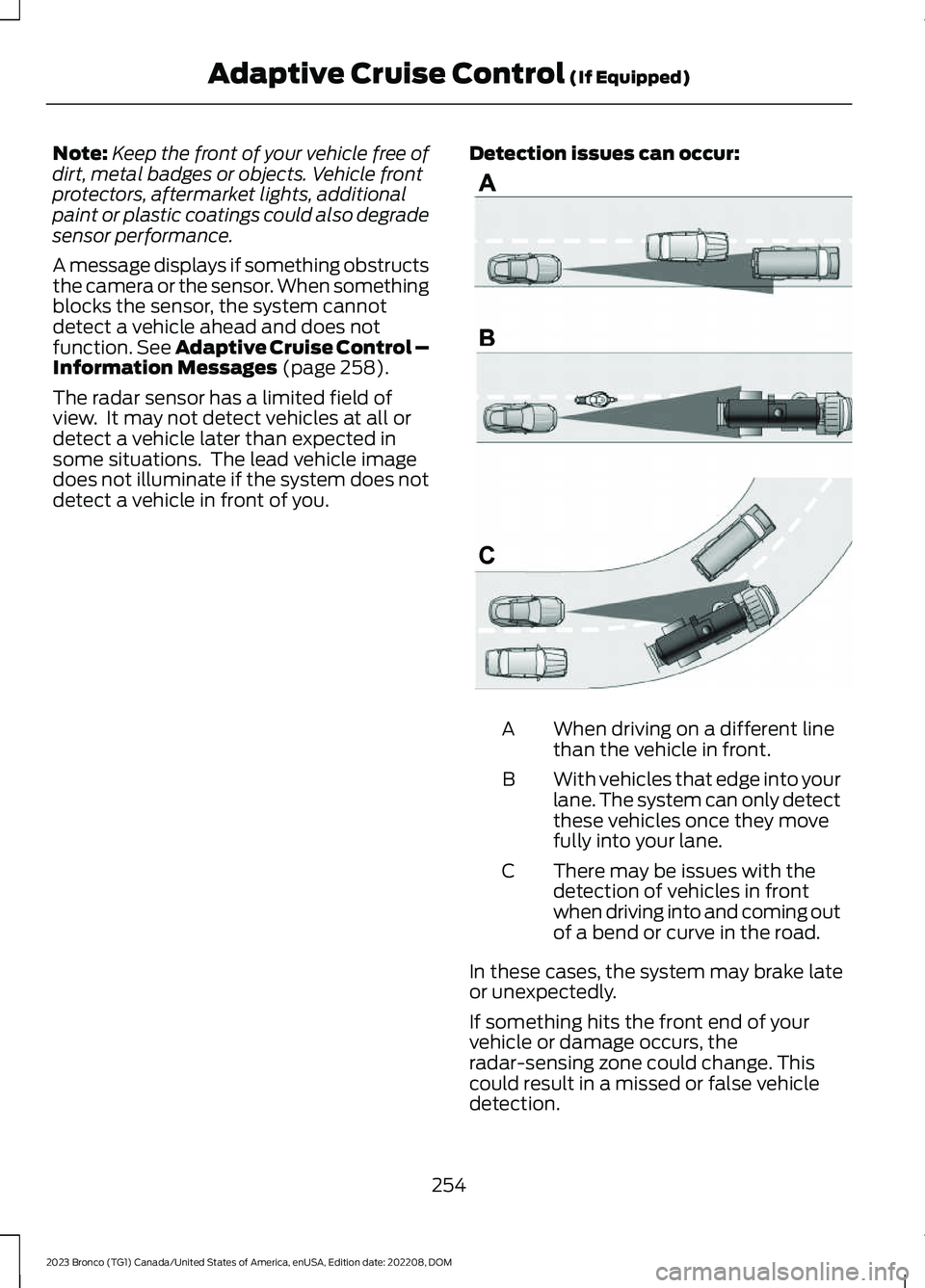
Detection issues can occur:
When driving on a different linethan the vehicle in front.A
With vehicles that edge into yourlane. The system can only detectthese vehicles once they movefully into your lane.
B
There may be issues with thedetection of vehicles in frontwhen driving into and coming outof a bend or curve in the road.
C
In these cases, the system may brake lateor unexpectedly.
If something hits the front end of yourvehicle or damage occurs, theradar-sensing zone could change. Thiscould result in a missed or false vehicledetection.
254
2023 Bronco (TG1) Canada/United States of America, enUSA, Edition date: 202208, DOMAdaptive Cruise Control (If Equipped)E71621
Page 259 of 642
Optimal system performance requires aclear view of the road by thewindshield-mounted camera.
Optimal performance may not occur if:
•The camera is blocked.
•There is poor visibility or lightingconditions.
•There are bad weather conditions.
SWITCHING ADAPTIVE
CRUISE CONTROL ON AND OFF
The cruise controls are on the steeringwheel. See Cruise Control (page 250).
Switching Adaptive Cruise ControlOn
Press the button to activate thesystem. When the systemactivates, the set speed is equalto the current vehicle speed. If the speedis too low, or other conditions are notcorrect for adaptive cruise controlactivation, the system enters standbymode.
Note:The minimum set speed is 15 mph or20 km/h.
The indicator, current gap setting and setspeed appear in the instrument clusterdisplay.
Switching Adaptive Cruise ControlOff
Press the button when thesystem is in standby mode orswitch the ignition off.
Note:When you switch the system off, theset speed clears.
Automatic Cancellation orDeactivation
The system may cancel if:
•The tires lose traction.
•You apply the parking brake.
•Your vehicle speed falls significantlybelow 15 mph or 20 km/h.
The system may turn off or preventactivating when requested if:
•The vehicle has a blocked sensor.
•The brake temperature is too high.
•There is a failure in the system or arelated system.
SETTING THE ADAPTIVE
CRUISE CONTROL SPEED
Drive to the speed you prefer.
Press the button to set thecurrent speed.
Take your foot off the accelerator pedal.
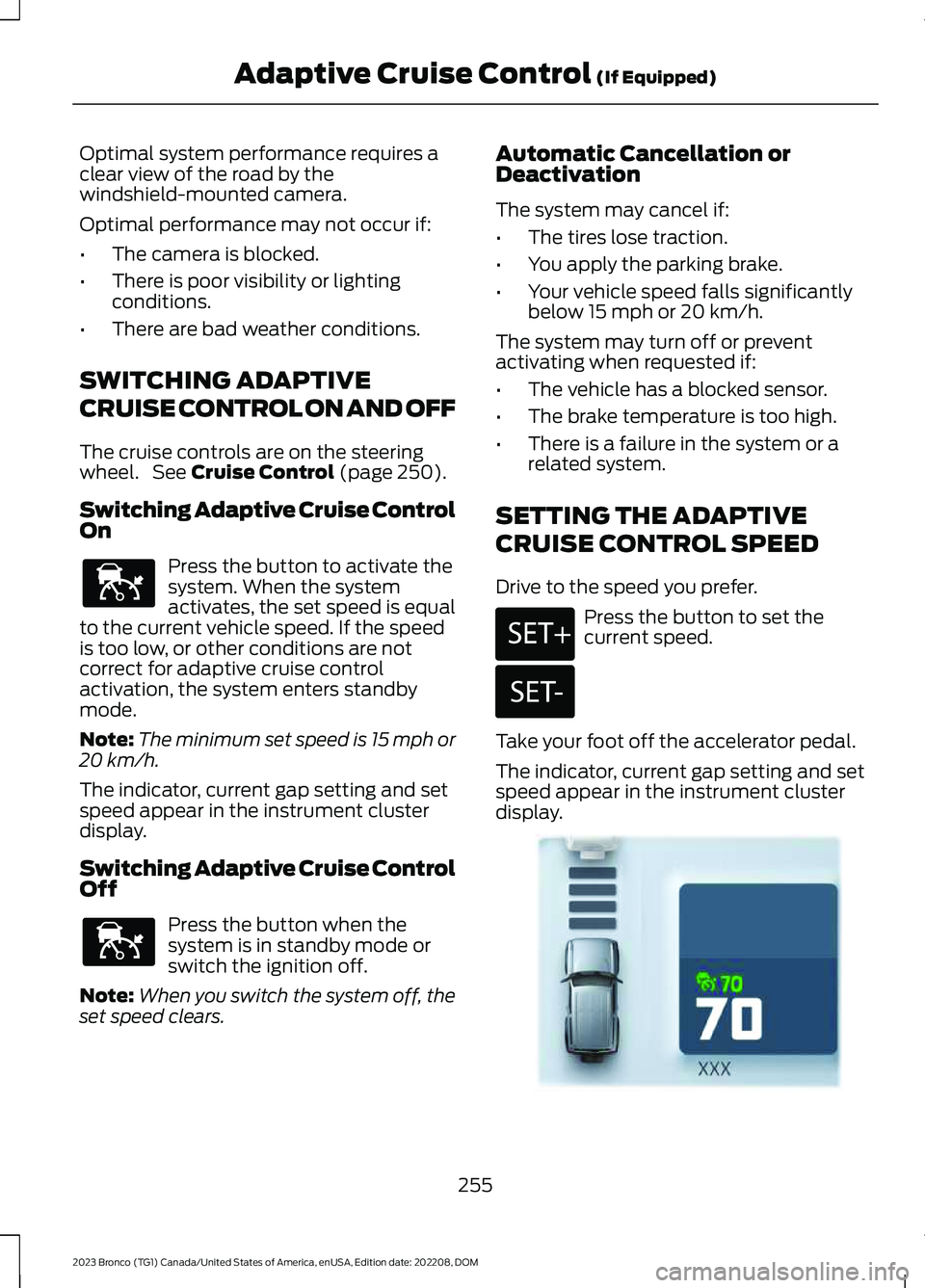
The indicator, current gap setting and setspeed appear in the instrument clusterdisplay.
255
2023 Bronco (TG1) Canada/United States of America, enUSA, Edition date: 202208, DOMAdaptive Cruise Control (If Equipped)E144529 E144529 E246884 E246885 E355963
Page 260 of 642
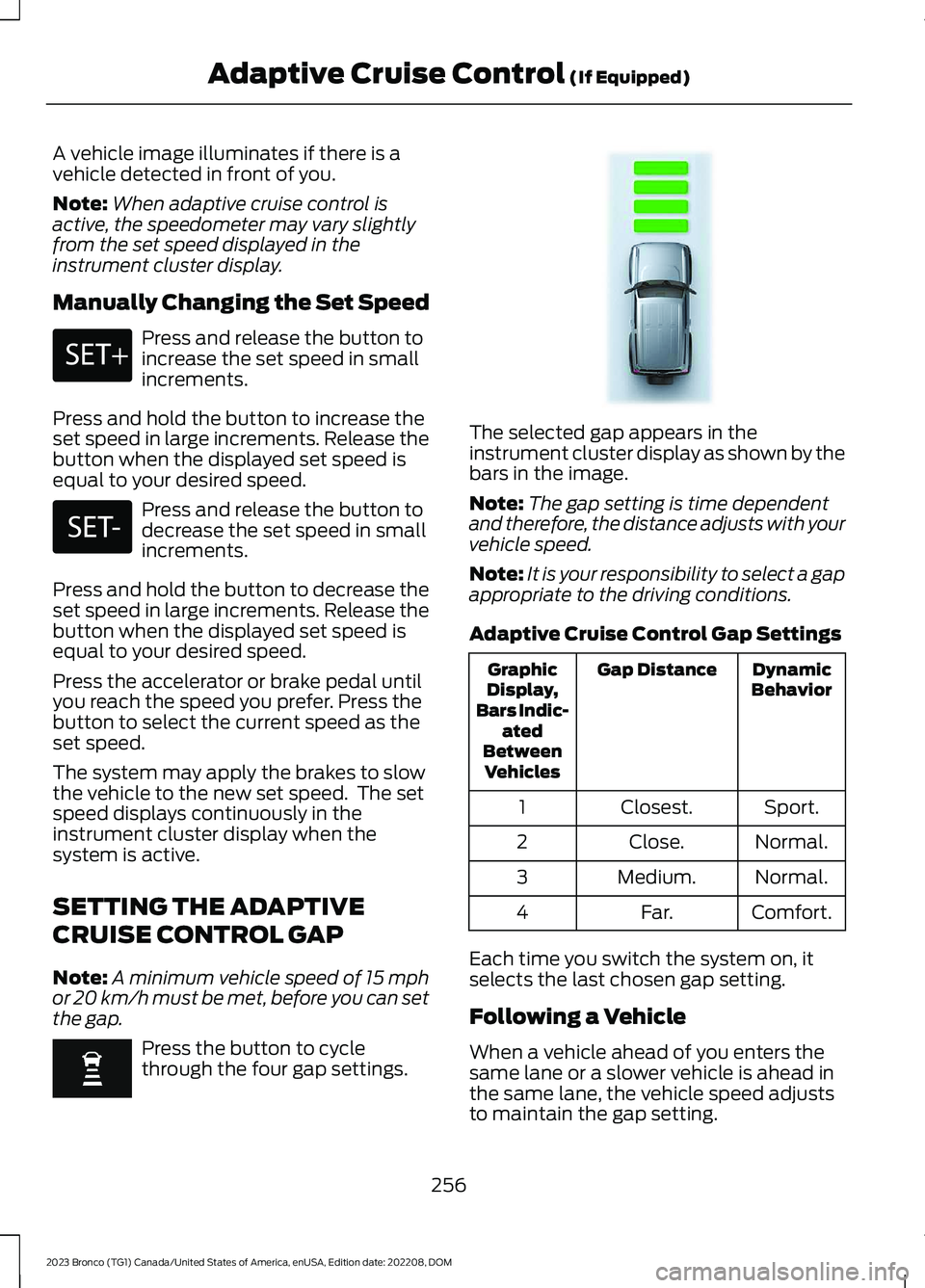
A vehicle image illuminates if there is avehicle detected in front of you.
Note:When adaptive cruise control isactive, the speedometer may vary slightlyfrom the set speed displayed in theinstrument cluster display.
Manually Changing the Set Speed
Press and release the button toincrease the set speed in smallincrements.
Press and hold the button to increase theset speed in large increments. Release thebutton when the displayed set speed isequal to your desired speed.
Press and release the button todecrease the set speed in smallincrements.
Press and hold the button to decrease theset speed in large increments. Release thebutton when the displayed set speed isequal to your desired speed.
Press the accelerator or brake pedal untilyou reach the speed you prefer. Press thebutton to select the current speed as theset speed.
The system may apply the brakes to slowthe vehicle to the new set speed. The setspeed displays continuously in theinstrument cluster display when thesystem is active.
SETTING THE ADAPTIVE
CRUISE CONTROL GAP
Note:A minimum vehicle speed of 15 mphor 20 km/h must be met, before you can setthe gap.
Press the button to cyclethrough the four gap settings.
The selected gap appears in theinstrument cluster display as shown by thebars in the image.
Note:The gap setting is time dependentand therefore, the distance adjusts with yourvehicle speed.
Note:It is your responsibility to select a gapappropriate to the driving conditions.
Adaptive Cruise Control Gap Settings
DynamicBehaviorGap DistanceGraphicDisplay,Bars Indic-atedBetweenVehicles
Sport.Closest.1
Normal.Close.2
Normal.Medium.3
Comfort.Far.4
Each time you switch the system on, itselects the last chosen gap setting.
Following a Vehicle
When a vehicle ahead of you enters thesame lane or a slower vehicle is ahead inthe same lane, the vehicle speed adjuststo maintain the gap setting.
256
2023 Bronco (TG1) Canada/United States of America, enUSA, Edition date: 202208, DOMAdaptive Cruise Control (If Equipped)E246884 E246885 E348855