seats FORD BRONCO 2023 Owner's Guide
[x] Cancel search | Manufacturer: FORD, Model Year: 2023, Model line: BRONCO, Model: FORD BRONCO 2023Pages: 642, PDF Size: 14.71 MB
Page 155 of 642
Semiannual Reminder (If Equipped)
When you switch the system off, amessage appears every six months as areminder that the system is off. You canswitch the system back on or leave it off.
REAR OCCUPANT ALERT
SYSTEM INDICATORS
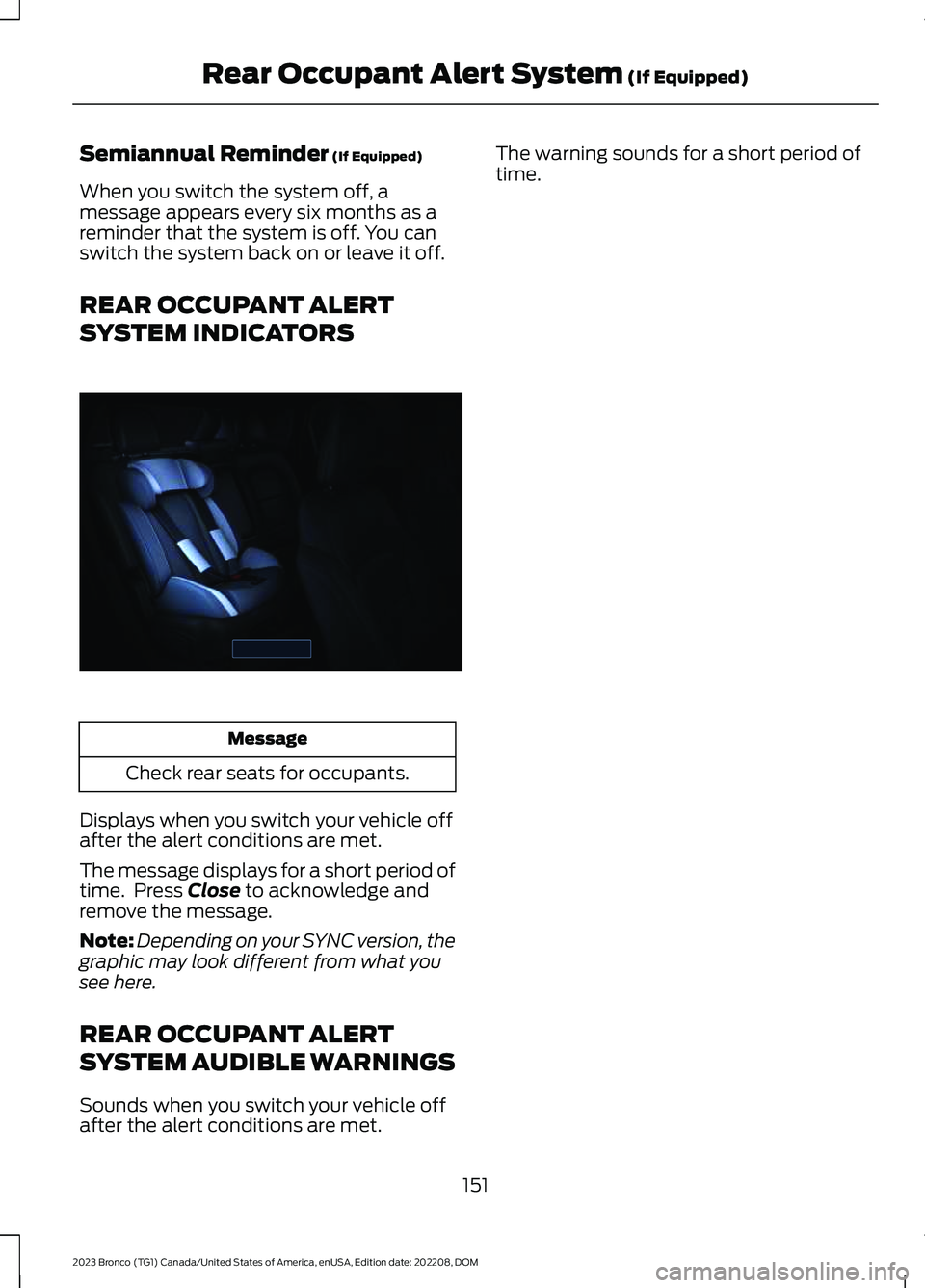
Message
Check rear seats for occupants.
Displays when you switch your vehicle offafter the alert conditions are met.
The message displays for a short period oftime. Press Close to acknowledge andremove the message.
Note:Depending on your SYNC version, thegraphic may look different from what yousee here.
REAR OCCUPANT ALERT
SYSTEM AUDIBLE WARNINGS
Sounds when you switch your vehicle offafter the alert conditions are met.
The warning sounds for a short period oftime.
151
2023 Bronco (TG1) Canada/United States of America, enUSA, Edition date: 202208, DOMRear Occupant Alert System (If Equipped)E350472
Page 167 of 642
UNDER FLOOR STORAGE
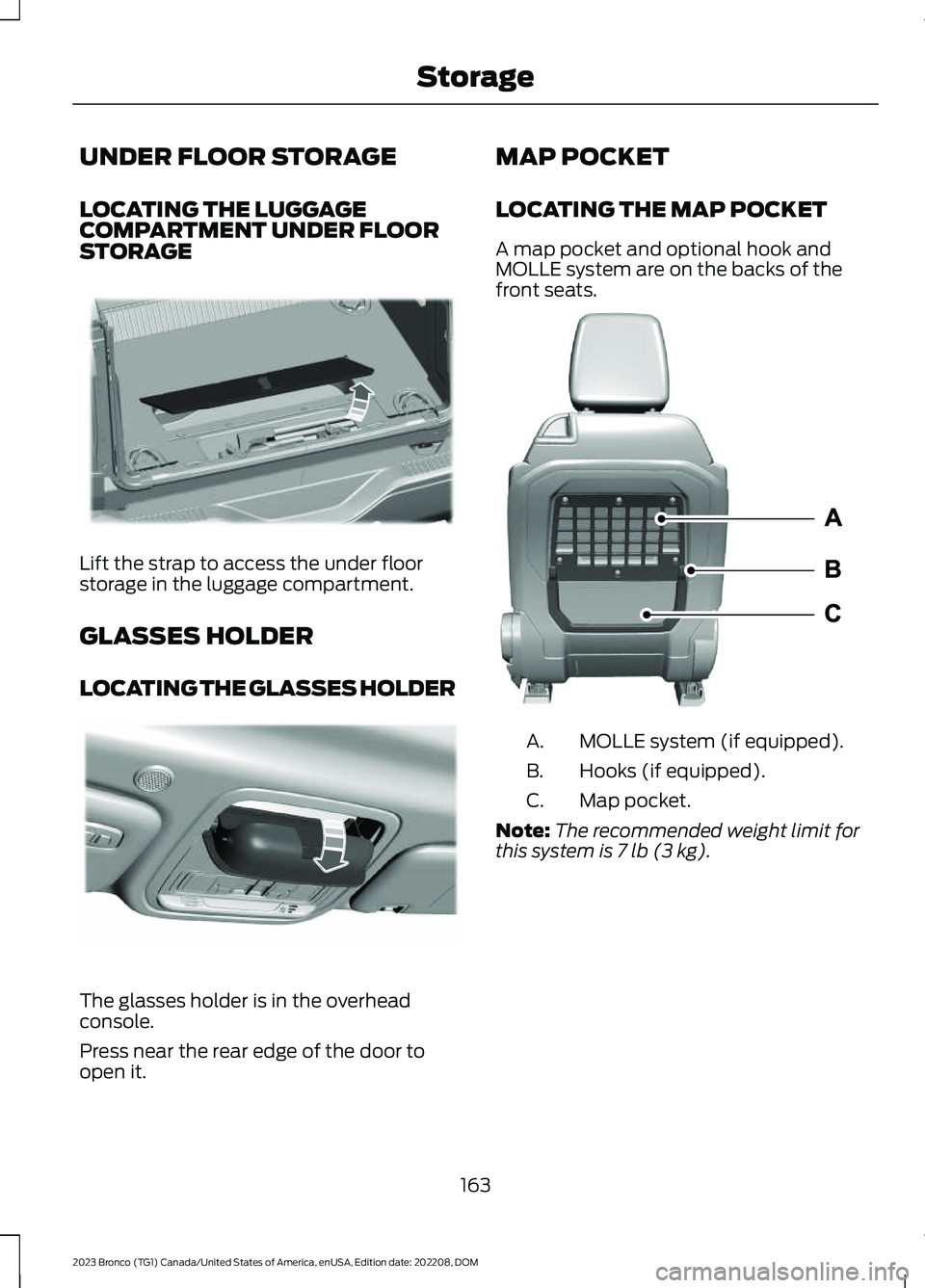
LOCATING THE LUGGAGECOMPARTMENT UNDER FLOORSTORAGE
Lift the strap to access the under floorstorage in the luggage compartment.
GLASSES HOLDER
LOCATING THE GLASSES HOLDER
The glasses holder is in the overheadconsole.
Press near the rear edge of the door toopen it.
MAP POCKET
LOCATING THE MAP POCKET
A map pocket and optional hook andMOLLE system are on the backs of thefront seats.
MOLLE system (if equipped).A.
Hooks (if equipped).B.
Map pocket.C.
Note:The recommended weight limit forthis system is 7 lb (3 kg).
163
2023 Bronco (TG1) Canada/United States of America, enUSA, Edition date: 202208, DOMStorageE332867 E306967 E337638
Page 308 of 642
REAR CARGO AREA ANCHOR
POINTS
REAR CARGO AREA ANCHORPOINT PRECAUTIONS
WARNING: Always properly securecargo to prevent shifting cargo or cargofalling from the vehicle. Failure to do socould result in compromised vehiclestability and serious personal injury tovehicle occupants or others.
WARNING: The appropriateloading capacity of your vehicle can belimited either by volume capacity (howmuch space is available) or by payloadcapacity (how much weight the vehicleshould carry). Once you have reachedthe maximum payload of your vehicle,do not add more cargo, even if there isspace available. Overloading orimproperly loading your vehicle cancontribute to loss of vehicle control andvehicle rollover.
WARNING: It is extremelydangerous to ride in a cargo area, insideor outside of a vehicle. In a crash, peopleriding in these areas are more likely to beseriously injured or killed. Do not allowpeople to ride in any area of your vehiclethat is not equipped with seats andseatbelts. Make sure everyone in yourvehicle is in a seat and properly using aseatbelt. Failure to follow this warningcould result in serious personal injury ordeath.
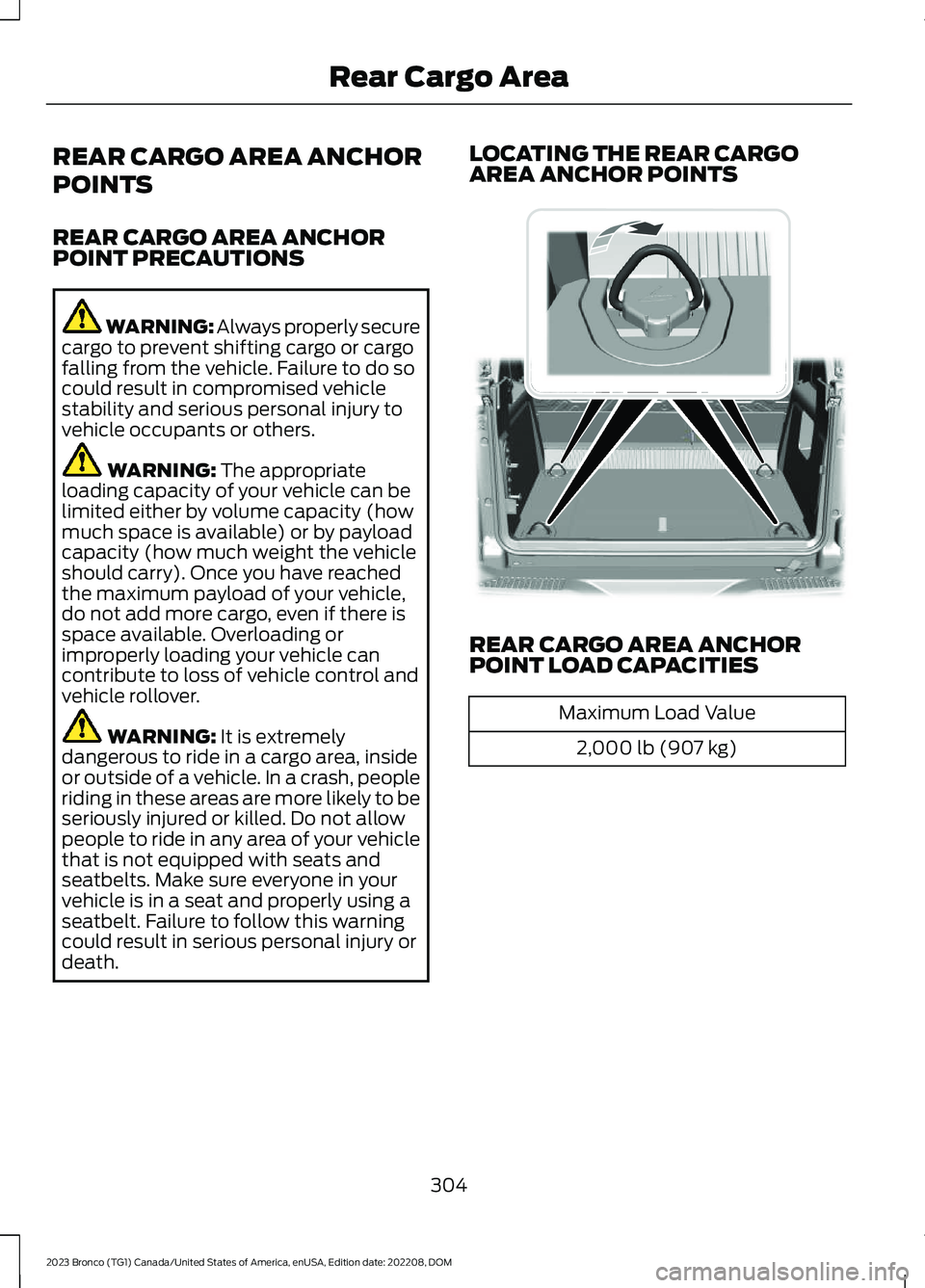
LOCATING THE REAR CARGOAREA ANCHOR POINTS
REAR CARGO AREA ANCHORPOINT LOAD CAPACITIES
Maximum Load Value
2,000 lb (907 kg)
304
2023 Bronco (TG1) Canada/United States of America, enUSA, Edition date: 202208, DOMRear Cargo Area E324512
Page 366 of 642
WARNING: This vehicle may havemore than one battery. Removing thebattery cables from only one batterydoes not disconnect your vehicleelectrical system. Make sure youdisconnect the battery cables from allbatteries when disconnecting power.Failure to do so may cause seriouspersonal injury or property damage.
WARNING: For vehicles withAuto-Start-Stop the battery requirementis different. You must replace the batterywith one of exactly the samespecification.
WHAT IS THE BATTERYMANAGEMENT SYSTEM
The battery management system monitorsbattery conditions and takes actions toextend battery life.
HOW DOES THE BATTERYMANAGEMENT SYSTEM WORK
If excessive battery drain is detected, thesystem temporarily disables someelectrical systems to protect the battery.
Systems included are:
•Heated rear window.
•Heated seats.
•Climate control.
•Heated steering wheel.
•Audio unit.
•Navigation system.
A message could appear in the informationdisplay to alert you that battery protectionactions are active. This message is only fornotification that an action is taking place,and not intended to indicate an electricalproblem or that the battery requiresreplacement.
BATTERY MANAGEMENT SYSTEMLIMITATIONS
After battery replacement, or in somecases after charging the battery with anexternal charger, the battery managementsystem requires eight hours of vehicle sleeptime to relearn the battery state of charge.During this time, your vehicle must remainfully locked with the ignition switched off.
Note:Prior to relearning the battery stateof charge, the battery management systemcould temporarily disable some electricalsystems.
Electrical Accessory Installation
To make sure the battery managementsystem works correctly, do not connect anelectrical device ground connectiondirectly to the battery negative post. Thiscan cause inaccurate measurements ofthe battery condition and potentialincorrect system operation.
Note:If you add electrical accessories orcomponents to the vehicle, it couldadversely affect battery performance anddurability. This could also affect theperformance of other electrical systems inthe vehicle.
CHANGING THE 12V BATTERY
The battery is in the engine compartment.See Maintenance (page 349).
Your vehicle has a maintenance-freebattery. It does not require additionalwater during service.
If the vehicle battery has a cover, makesure you correctly install it after cleaningor replacing the battery.
362
2023 Bronco (TG1) Canada/United States of America, enUSA, Edition date: 202208, DOMMaintenance
Page 430 of 642
CLEANING VINYL
WARNING: On vehicles equippedwith seat-mounted airbags, do not usechemical solvents or strong detergents.Such products could contaminate theside airbag system and affectperformance of the side airbag in a crash.
We recommend that you only clean vinylsurfaces in the following way:
1.Remove dust and loose dirt with avacuum cleaner.
2.Wipe the surface with a soft, dampcloth and a mild soap and watersolution. Dry the area with a clean, softcloth.
3.For additional information andassistance, we recommend that youcontact an authorized dealer.
CLEANING CARPETS AND FLOORMATS
We recommend that you only clean yourcarpets in the following way:
1.Remove dust and loose dirt with avacuum cleaner.
2.Wipe the surface with a soft, dampcloth and a mild soap and watersolution. Dry the area with a clean, softcloth.
3.For additional information andassistance, we recommend that youcontact an authorized dealer.
For heavy stains, spot clean the area. If aring forms on the fabric, clean the entirearea immediately, but do not over-saturateor the ring could set.
We recommend that you only clean yourfloor mats in the following way:
1.Remove dust and loose dirt with avacuum cleaner.
2.Wash rubber floor mats using mildsoap and lukewarm or cold water.
3.Completely dry the floor mat beforeplacing them back in your vehicle.
Cleaning Rubber Floors
1.Remove the floor mats prior to washingout. See Floor Mats (page 327).
Note:Prior to washing out, remove largedebris to prevent clogging the drain.
2.Turn active drain plugs in eachpassenger compartmentcounterclockwise to open.
3.Wash out debris using a standardgarden style hose.
Note:Use caution to not spray seats,console, door interior, electrical connections,instrument cluster display and underside ofthe instrument panel on both driver andpassenger sides.
4.Wipe out remaining water or debrisfrom the floor.
5.Install active drain plugs and turnclockwise to close.
6.Reinstall floor mats.
CLEANING SEATBELTS
WARNING: Do not use cleaningsolvents, bleach or dye on the vehicle'sseatbelts, as these actions may weakenthe belt webbing.
1.Wipe the surface with a soft, dampcloth and a mild soap and watersolution. Dry the area with a clean, softcloth.
426
2023 Bronco (TG1) Canada/United States of America, enUSA, Edition date: 202208, DOMVehicle Care
Page 621 of 642
Automatic Transmission AudibleWarnings.......................................................194Automatic Transmission...........................190Automatic Transmission Positions.............190Brake Shift Interlock..........................................193Manually Shifting Gears....................................191Automatic Transmission Fluid Capacityand Specification......................................478Automatic Transmission PositionIndicators.......................................................191Automatic Transmission Positions.......190Drive (D)................................................................190Manual (M)............................................................191Neutral (N)...........................................................190Park (P)..................................................................190Reverse (R)...........................................................190Sport (S).................................................................191Automatic TransmissionPrecautions.................................................190Auto Mode.......................................................133Auto Mode Indicators........................................133Switching Auto Mode On and Off................133Switching Dual Mode On and Off................134Auto-Start-Stop............................................174Auto-Start-Stop – Troubleshooting............176Auto-Start-Stop Indicators.......................176Auto-Start-Stop Precautions -Automatic Transmission.........................174Auto-Start-Stop Precautions - ManualTransmission................................................174Auto-Start-Stop –Troubleshooting.........................................176Auto-Start-Stop – Frequently AskedQuestions..........................................................178Auto-Start-Stop – InformationMessages..........................................................176Autounlock.......................................................88Autounlock Requirements...............................88Switching Autounlock On and Off................88What Is Autounlock............................................88Auxiliary Switches.......................................522
B
Blind Spot Information System..............279Blind Spot Information System –Troubleshooting............................................282
Blind Spot Information SystemIndicators......................................................281Blind Spot Information SystemLimitations...................................................279Blind Spot Information SystemPrecautions.................................................279Blind Spot Information SystemRequirements - AutomaticTransmission..............................................280Blind Spot Information SystemRequirements - ManualTransmission..............................................279Blind Spot Information System –Troubleshooting........................................282Blind Spot Information System –Information Messages................................282Bluetooth®.....................................................510Body Control Module Fuse Box..............345Accessing the Body Control Module FuseBox.....................................................................345Identifying the Fuses in the Body ControlModule Fuse Box..........................................346Locating the Body Control Module FuseBox.....................................................................345Bonnet LockSee: Opening and Closing the Hood..........349See: Opening and Closing the Hood -Raptor...............................................................350Booster Seats...................................................57Brake Fluid Specification...........................210Brake Over Accelerator.............................209Brake Precautions.......................................209Brakes..............................................................209Anti-Lock Braking System.............................209Brakes – Troubleshooting...............................210Brake Shift Interlock....................................193Brake Shift Interlock Precautions.................193Using Brake Shift Interlock.............................194What Is Brake Shift Interlock..........................193Brakes – Troubleshooting.........................210Brakes – Frequently Asked Questions........212Brakes – Information Messages.....................211Brakes – Warning Lamps................................210Breaking-In.....................................................326
C
Calculating Payload....................................297
617
2023 Bronco (TG1) Canada/United States of America, enUSA, Edition date: 202208, DOMIndex
Page 626 of 642
Front Passenger Sensing System.............72Front Passenger Sensing SystemIndicators............................................................74Front Passenger Sensing SystemPrecautions........................................................74How Does the Front Passenger SensingSystem Work.....................................................72What Is the Front Passenger SensingSystem.................................................................72Front Seat Precautions..............................140Front Seats.....................................................140Heated Seats.......................................................146Manual Seats........................................................141Power Seats..........................................................143Fuel and Refueling.......................................179Fuel and Refueling –Troubleshooting.............................................184Fuel Quality..........................................................180Refueling................................................................182Running Out of Fuel............................................181Fuel and Refueling Precautions..............179Fuel and Refueling –Troubleshooting.........................................184Fuel and Refueling – InformationMessages..........................................................184Fuel and Refueling – Warning Lamps........184Fuel Gauge.......................................................118Fuel Gauge Limitations.....................................119Locating the Fuel Filler Door...........................119What Is Distance to Empty..............................119What Is the Fuel Gauge.....................................118What Is the Low Fuel Reminder.....................119Fuel Quality....................................................180Selecting the Correct Fuel..............................180Fuel Tank Capacity......................................183Fuse Precautions..........................................341Fuses.................................................................341Body Control Module Fuse Box....................345Fuses – Troubleshooting................................348Under Hood Fuse Box.......................................341Fuses – Troubleshooting..........................348Fuses – Frequently Asked Questions........348
G
G.O.A.T. Mode Control...............................260G.O.A.T. Mode Control –Troubleshooting............................................269
G.O.A.T. Modes....................................................263G.O.A.T. Mode Control –Troubleshooting........................................269G.O.A.T. Mode Control – Frequently AskedQuestions..........................................................271G.O.A.T. Mode Control – InformationMessages.........................................................269G.O.A.T. Mode Control – WarningLamps...............................................................269G.O.A.T. Modes..............................................263Baja.........................................................................263Eco..........................................................................264Mud/Ruts.............................................................264Normal...................................................................264Off-Road...............................................................265Rock Crawl...........................................................265Sand.......................................................................266Slippery.................................................................266Sport......................................................................268Tow/Haul..............................................................268Garage Door Opener AdditionalAssistance....................................................155Garage Door Opener....................................152Garage Door Opener Introduction..........152Garage Door Opener Precautions andFrequencies..................................................152General Maintenance Information.......528Glasses Holder...............................................163Locating the Glasses Holder..........................163Global Opening..............................................113Switching Global Opening On and Off........114Using Global Opening........................................113What Is Global Opening....................................113Glossary of Tire Terminology..................436Glove Compartment...................................162Locking the Glove Compartment.................162Opening the Glove Compartment...............162
H
Headlamp AdjustingSee: Adjusting the Headlamps.....................365Headlamps.....................................................104Headlamp Indicators........................................104Using the High Beam Headlamps...............104Headlamps – Troubleshooting...............104Headlamps – Frequently AskedQuestions.........................................................104
622
2023 Bronco (TG1) Canada/United States of America, enUSA, Edition date: 202208, DOMIndex
Page 627 of 642
Heated Seats.................................................146Heated Seat Precautions................................146Switching the Heated Seats On andOff.......................................................................146HeatingSee: Climate Control - Vehicles With:Automatic Temperature Control...............131See: Climate Control - Vehicles With: ManualTemperature Control....................................136Hill Descent Control....................................235Hill Descent Control –Troubleshooting............................................236Hill Descent Control Indicator.................235Hill Descent Control Precautions..........235Hill Descent Control –Troubleshooting........................................236Hill Descent Control – InformationMessages.........................................................236Hill Start Assist..............................................216Hill Start Assist – Troubleshooting..............216Hill Start Assist Precautions.....................216Hill Start Assist – Troubleshooting........216Hill Start Assist – InformationMessages..........................................................216Hood LockSee: Opening and Closing the Hood..........349See: Opening and Closing the Hood -Raptor...............................................................350Horn....................................................................99How Does 911 Assist Work...........................77How Does Adaptive Cruise ControlWork...............................................................252How Does Blind Spot InformationSystem Work..............................................279How Does Cross Traffic AlertWork..............................................................283How Does Driver Alert Work....................293How Does Four-Wheel Drive Work - 4x4with Part Time Engagement.................195How Does Four-Wheel Drive Work -Advanced 4x4 with 4A Mode...............195How Does G.O.A.T. Mode ControlWork..............................................................260How Does Hill Descent ControlWork...............................................................235How Does Hill Start Assist Work............216How Does Pre-Collision AssistWork..............................................................286
How Does Stability Control Work...........219How Does the 360 Degree CameraWork...............................................................247How Does the Lane Keeping SystemWork...............................................................272How Does the Personal Safety SystemWork.................................................................67How Does the Rear Occupant AlertSystem Work...............................................150How Does the Safety Canopy™Work.................................................................69How Does Traction Control Work...........217How Does Trailer Sway ControlWork................................................................313How Do the Front Airbags Work..............68How Do the Side Airbags Work................68
I
Identifying Fuse Types..............................348Identifying the Audio Unit........................488Identifying the Auxiliary Switch Wiring -Excluding: Raptor.....................................524Identifying the Auxiliary Switch Wiring -Raptor...........................................................525Identifying the Climate Control Unit......131Inflating the Tires..........................................441Information On Demand Screen -Vehicles With: 12 Inch Screen..............499Information on the Tire Sidewall............431Inspecting the Tire for Damage.............442Inspecting the Tire for Wear....................442Inspecting the Wheel ValveStems............................................................443Installing Child Restraints...........................53Combining the Seatbelt and Lower Anchorsfor Attaching Child Restraints....................56Installing a Child Restraint in a CenterSeat......................................................................56Using Lower Anchors and Tethers forChildren...............................................................55Using Seatbelts.....................................................53Using Tether Straps.............................................57Instrument Cluster Display.......................126Personalized Settings.......................................128Trip Computer.......................................................127Instrument Cluster Display Main Menu -Excluding: Raptor......................................126
623
2023 Bronco (TG1) Canada/United States of America, enUSA, Edition date: 202208, DOMIndex
Page 629 of 642
Locating the Brake Fluid Reservoir - 2.3LEcoBoost™................................................209Locating the Brake Fluid Reservoir - 2.7LEcoBoost™/3.0L EcoBoost™............209Locating the Cross Traffic Alert Sensors- Excluding: Raptor..................................284Locating the Cross Traffic Alert Sensors- Raptor........................................................284Locating the Fuel Filler Funnel................180Locating the Power Outlets......................158Locating the Pre-Collision AssistSensors........................................................288Locating the Rear View Camera............244Locating the Safety ComplianceCertification Labels.................................296Locating the Tire label...............................430Locating the USB Ports..............................156Locating the Wireless AccessoryCharger...........................................................161Locating Your Vehicle...................................80Locking and Unlocking the Tailgate........93Locking the Rear Window Controls........114
M
Maintenance.................................................34912V Battery............................................................36112V Battery – Troubleshooting.....................364Engine Oil..............................................................354Exterior Bulbs......................................................367Interior Bulbs.......................................................369Maintenance Precautions........................349Making and Receiving a PhoneCall.................................................................507Manually Dimming the InteriorMirror...............................................................115Manually Releasing the Electric ParkingBrake...............................................................213Manually Shifting Gears..............................191Shifting Using the Buttons on the SelectorLever...................................................................192Shifting Using the Paddle Shifters................191Manual Seats..................................................141Adjusting the Head Restraint..........................141Adjusting the Seat Backrest...........................143Folding the Seats...............................................148Head Restraint Components..........................141Installing the Head Restraint..........................142
Moving the Seat Backward andForward.............................................................142Removing the Head Restraint........................142Unfolding the Seats...........................................149Manual Transmission Fluid Capacity andSpecification...............................................188Manual Transmission.................................186Crawler Gear........................................................186Manual Transmission –Troubleshooting.............................................189Manual Transmission Precautions........186Manual Transmission –Troubleshooting........................................189Manual Transmission – Frequently AskedQuestions.........................................................189Map Pocket.....................................................163Locating the Map Pocket.................................163Mislock...............................................................89Mislock Limitations.............................................89Switching Mislock On and Off........................89What Is Mislock....................................................89Mobile CommunicationsEquipment..................................................583Mobile Device Data.......................................26Motorcraft Parts - 2.3LEcoBoost™................................................464Motorcraft Parts - 2.7LEcoBoost™.................................................465Motorcraft Parts - 3.0LEcoBoost™................................................466Muting the Audio.........................................489MyKey Settings...............................................84Configurable MyKey Settings..........................84Non-Configurable MyKey Settings................84MyKey – Troubleshooting...........................86MyKey – Frequently Asked Questions..........87MyKey – Information Messages.....................86MyKey™............................................................84MyKey Settings.....................................................84MyKey – Troubleshooting.................................86
N
Navigation Map Updates...........................514Navigation.......................................................514Adjusting the Map..............................................514Live Traffic.............................................................514Route Guidance..................................................516
625
2023 Bronco (TG1) Canada/United States of America, enUSA, Edition date: 202208, DOMIndex
Page 630 of 642
Setting a Destination........................................515Waypoints.............................................................515Normal Scheduled Maintenance...........531
O
Off-Road Driving...........................................318After Driving Your Vehicle Off-Road...........325Basic Off-Road Driving Techniques.............318Driving Off-Road.................................................319Driving Through Water Limitations.............323Driving Your Vehicle at High Speeds...........323Off-Road Driving Aids......................................324Off-Road Driving Precautions.......................318What Is Off-Road Driving................................318Opening and Closing the Hood..............349Opening and Closing the Hood -Raptor...........................................................350Opening and Closing the Windows........113Opening the Tailgate....................................93Opening the Tailgate From Outside YourVehicle.................................................................93Operating the Doors From Inside YourVehicle............................................................88Opening the Doors From Inside YourVehicle.................................................................88Unlocking and Locking the Doors Using theCentral Locking................................................88Operating the Doors From Outside YourVehicle............................................................88Unlocking and Locking the Doors Using theRemote Control...............................................88Ordering a Canadian French Owner'sManual..........................................................539OTASee: Software Update Settings.....................517See: Vehicle Software Updates.....................517Overriding the Set Speed..........................257Over the airSee: Software Update Settings.....................517Over-the-airSee: Software Update Settings.....................517See: Vehicle Software Updates.....................517See: Vehicle Software Updates.....................517
P
Parking Aid Indicators................................243
Parking Aid Precautions............................240Parking Aids...................................................240Front Parking Aid.................................................241Parking Aids – Troubleshooting...................243Rear Parking Aid..................................................241Parking Aids – Troubleshooting.............243Parking Aids – InformationMessages.........................................................243Passive Anti-Theft System.........................97How Does the Passive Anti-Theft SystemWork.....................................................................97What Is the Passive Anti-TheftSystem.................................................................97Perchlorate.....................................................582Performing a System Reset......................519Personalized Settings.................................128Changing the Instrument Cluster DisplayLanguage..........................................................128Changing the Measurement Unit.................128Changing the Temperature Unit...................128Changing the Tire Pressure Unit...................128Personal Safety SystemComponents.................................................67Personal Safety System™..........................67Phone Menu..................................................505Phone..............................................................505Phone Precautions.....................................505Playing Media Using Bluetooth®...........510Playing Media Using the USB Port........156Playing or Pausing the AudioSource..........................................................488Post-Crash Alert System...........................331How Does the Post-Crash Alert SystemWork....................................................................331Post-Crash Alert System Limitations..........331Switching the Post-Crash Alert SystemOff........................................................................331What Is the Post-Crash Alert System.........331Post Impact Braking....................................331How Does Post Impact Braking Work.........331Overriding Post Impact Braking...................332Post Impact Braking Indicators....................332Post Impact Braking Limitations..................331Power Outlet Indicators.............................158Power Outlet..................................................158Power Outlet Precautions.........................158Power Seats....................................................143Adjusting the Head Restraint.........................143
626
2023 Bronco (TG1) Canada/United States of America, enUSA, Edition date: 202208, DOMIndex