battery FORD BRONCO 2023 Workshop Manual
[x] Cancel search | Manufacturer: FORD, Model Year: 2023, Model line: BRONCO, Model: FORD BRONCO 2023Pages: 642, PDF Size: 14.71 MB
Page 432 of 642
PREPARING YOUR VEHICLE
FOR STORAGE
If you plan on storing your vehicle for 30days or more, the following maintenancerecommendations ensures your vehiclestays in good operating condition.
Under various conditions, long-termstorage may lead to degraded engineperformance or failure unless you usespecific precautions to preserve yourvehicle.
General
•Store all vehicles in a dry, ventilatedplace.
•If vehicles are stored outside, theyrequire regular maintenance to protectagainst rust and weather damage.
•Make sure all linkages, cables, leversand pins under your vehicle are coveredwith grease to prevent rust.
•Move vehicles at least 25 ft (7.5 m)every 15 days to lubricate working partsand prevent corrosion.
•Fill the fuel tank with high-quality fueluntil the first automatic shutoff of thefuel pump nozzle.
Engine
•Change the engine oil and filter prior tostorage because used engine oilcontains contaminants which maycause engine damage.
•Start the engine every 15 days for aminimum of 15 minutes. Run at fastidle with the climate controls set todefrost until the engine reaches normaloperating temperature.
•With your foot on the brake, shiftthrough all the gears while the engineis running.
Body
•Wash your vehicle thoroughly toremove dirt, grease, oil, tar or mud fromexterior surfaces, rear wheel housingsand the underside of front fenders.
•Periodically wash your vehicle if it isstored in exposed locations.
•Touch-up exposed or primed metal toprevent rust.
•Cover chrome and stainless steel partswith a thick coat of auto wax to preventdiscoloration. Rewax as necessarywhen you wash your vehicle.
•Lubricate all hood, door and luggagecompartment hinges and latches witha light grade oil.
•Cover interior trim to prevent fading.
•Keep all rubber parts free from oil andsolvents.
12 Volt Battery
•When storing your vehicle for greaterthan 30 days the state of chargeshould be approximately 50%.Additionally, we recommenddisconnecting the 12v battery whichwill reduce system loads on thebattery.
•Check and recharge as necessary. Keepconnections clean.
Note:It is necessary to reset memoryfeatures if you disconnect the batterycables.
Brakes
Make sure the brakes and parking brakerelease fully.
Note:If you intend on parking your vehiclefor an extended period after cleaning thewheels with a wheel cleaner, drive yourvehicle for a few minutes before doing so toreduce the risk of increased corrosion of thebrake discs, brake pads and linings.
428
2023 Bronco (TG1) Canada/United States of America, enUSA, Edition date: 202208, DOMStoring Your Vehicle
Page 433 of 642
Tires
Maintain recommended air pressure.
Note:If you intend on parking your vehiclefor an extended period after cleaning thewheels with a wheel cleaner, drive yourvehicle for a few minutes before doing so.This reduces the risk of corrosion of thebrake discs, brake pads and linings.
REMOVING YOUR VEHICLE
FROM STORAGE
When your vehicle is ready to come out ofstorage, do the following:
•We recommend that you change theengine oil before you use your vehicleagain.
•Wash your vehicle to remove any dirtor grease film build-up on windowsurfaces.
•Check windshield wipers for anydeterioration.
•Check the underhood for any foreignmaterials such as mice or squirrelnests.
•Check the exhaust for any foreignmaterials.
•Check tire pressures and set tireinflation per the Tire Label.
•Check brake pedal operation. Corrodedbrake rotors could cause brake noise.Drive your vehicle and gently apply andrelease the brakes repeatedly over a10-minute drive to reduce the corrosionfrom the brakes.
•Check fluid levels (including coolant,oil and gas) to make sure there are noleaks, and fluids are at recommendedlevels.
•If you remove the battery, clean thebattery cable ends and check fordamage.
Contact an authorized dealer if you haveany concerns or issues.
429
2023 Bronco (TG1) Canada/United States of America, enUSA, Edition date: 202208, DOMStoring Your Vehicle
Page 468 of 642
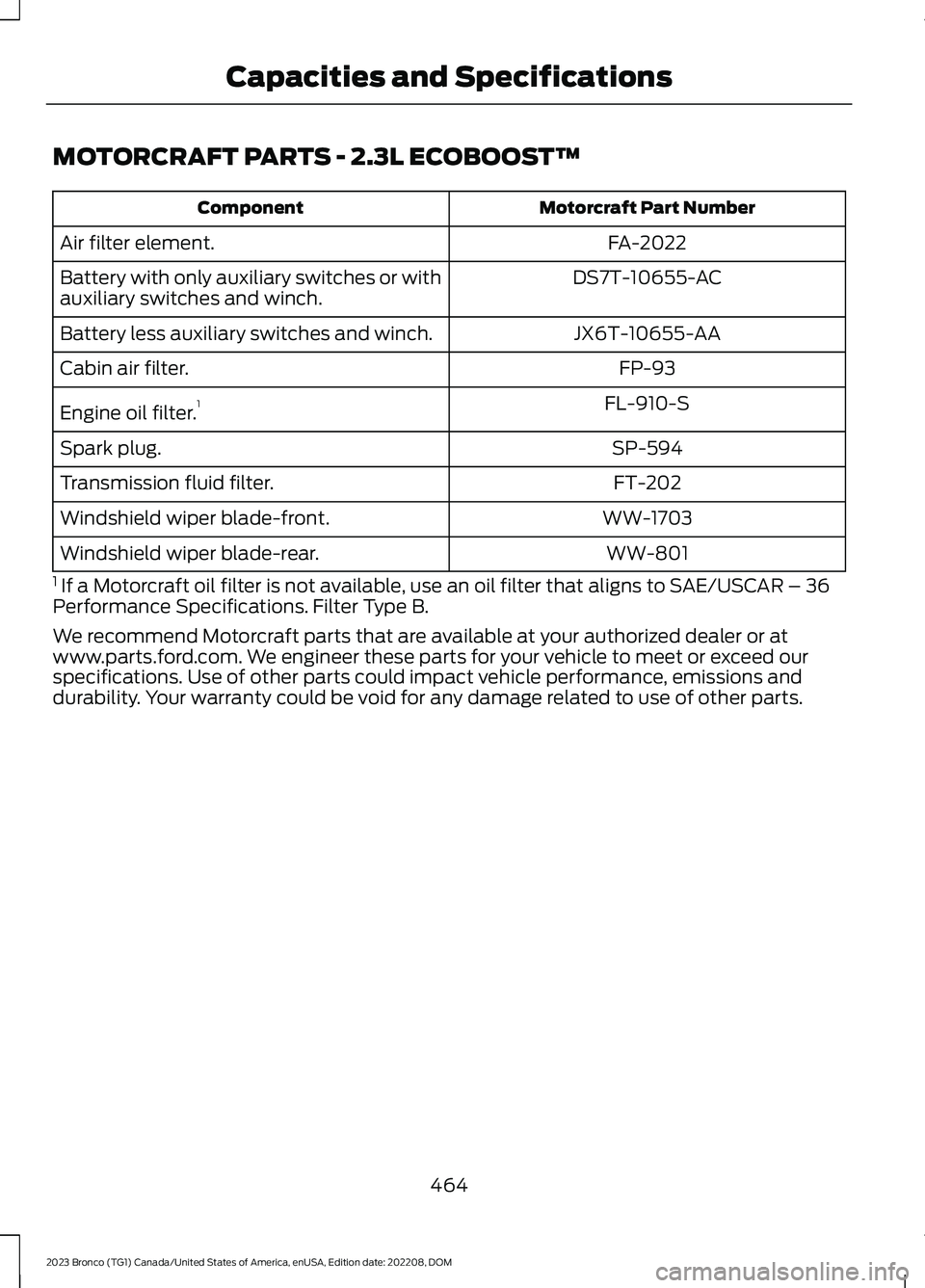
MOTORCRAFT PARTS - 2.3L ECOBOOST™
Motorcraft Part NumberComponent
FA-2022Air filter element.
DS7T-10655-ACBattery with only auxiliary switches or withauxiliary switches and winch.
JX6T-10655-AABattery less auxiliary switches and winch.
FP-93Cabin air filter.
FL-910-SEngine oil filter.1
SP-594Spark plug.
FT-202Transmission fluid filter.
WW-1703Windshield wiper blade-front.
WW-801Windshield wiper blade-rear.
1 If a Motorcraft oil filter is not available, use an oil filter that aligns to SAE/USCAR – 36Performance Specifications. Filter Type B.
We recommend Motorcraft parts that are available at your authorized dealer or atwww.parts.ford.com. We engineer these parts for your vehicle to meet or exceed ourspecifications. Use of other parts could impact vehicle performance, emissions anddurability. Your warranty could be void for any damage related to use of other parts.
464
2023 Bronco (TG1) Canada/United States of America, enUSA, Edition date: 202208, DOMCapacities and Specifications
Page 469 of 642
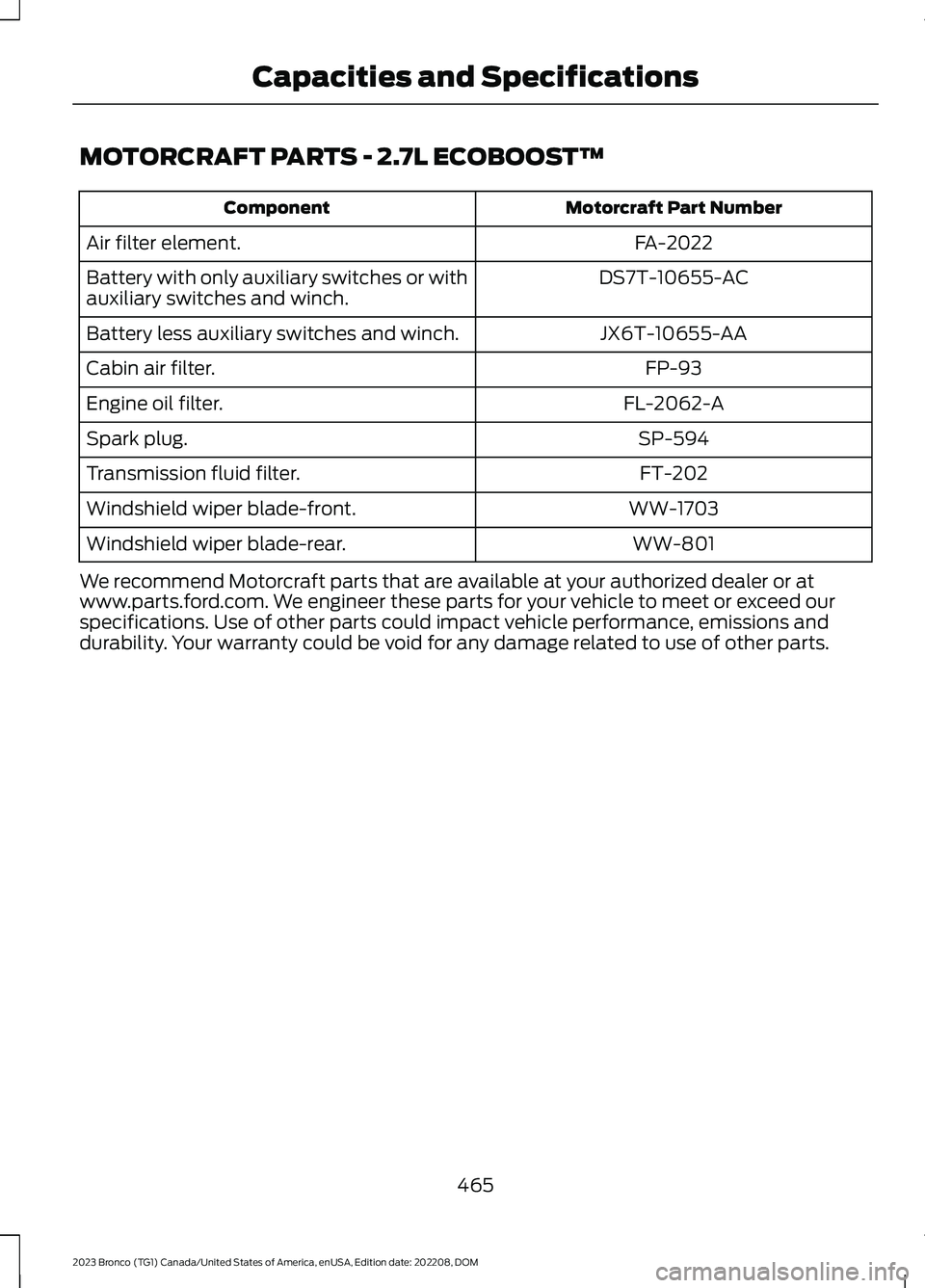
MOTORCRAFT PARTS - 2.7L ECOBOOST™
Motorcraft Part NumberComponent
FA-2022Air filter element.
DS7T-10655-ACBattery with only auxiliary switches or withauxiliary switches and winch.
JX6T-10655-AABattery less auxiliary switches and winch.
FP-93Cabin air filter.
FL-2062-AEngine oil filter.
SP-594Spark plug.
FT-202Transmission fluid filter.
WW-1703Windshield wiper blade-front.
WW-801Windshield wiper blade-rear.
We recommend Motorcraft parts that are available at your authorized dealer or atwww.parts.ford.com. We engineer these parts for your vehicle to meet or exceed ourspecifications. Use of other parts could impact vehicle performance, emissions anddurability. Your warranty could be void for any damage related to use of other parts.
465
2023 Bronco (TG1) Canada/United States of America, enUSA, Edition date: 202208, DOMCapacities and Specifications
Page 470 of 642
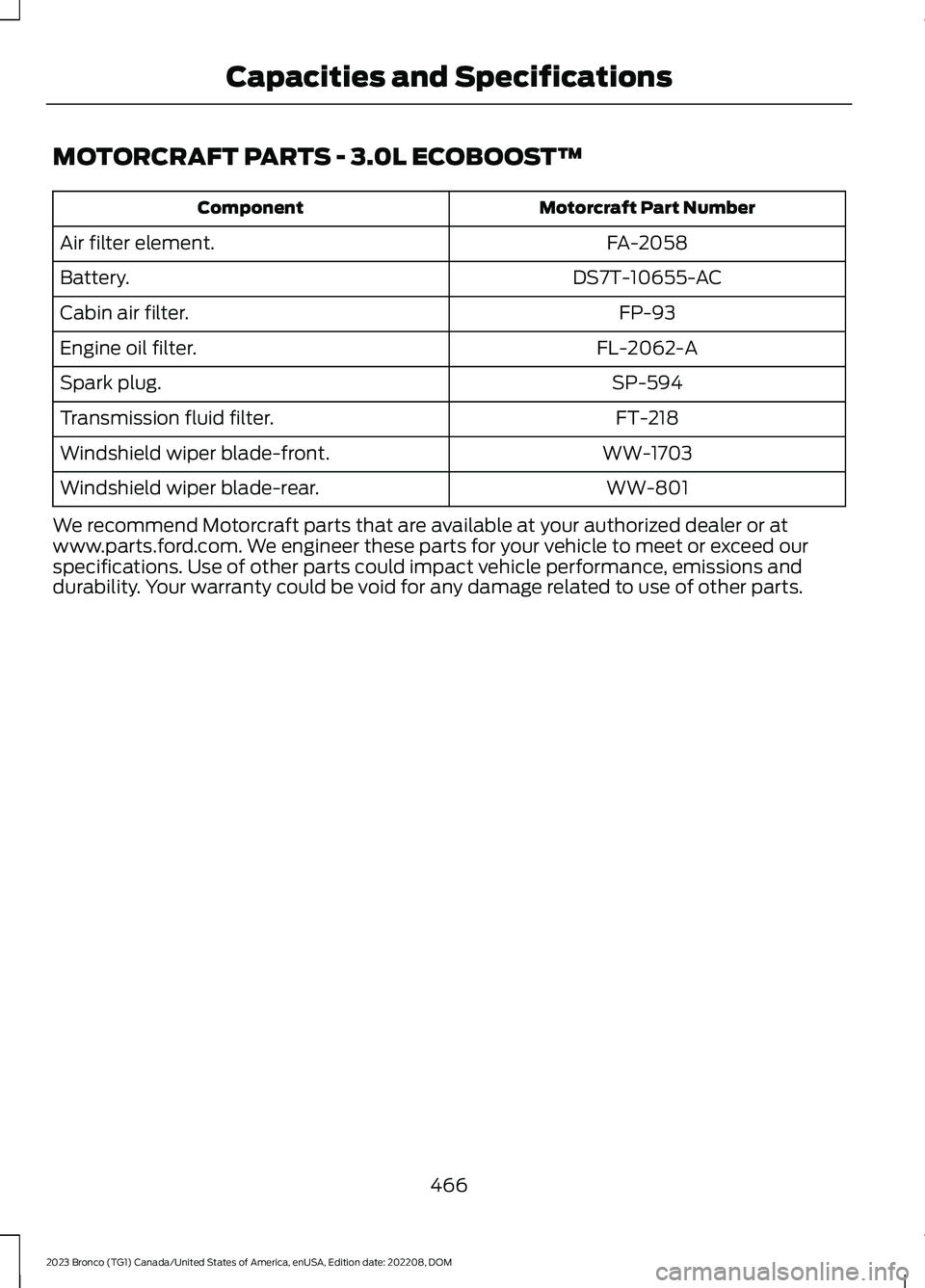
MOTORCRAFT PARTS - 3.0L ECOBOOST™
Motorcraft Part NumberComponent
FA-2058Air filter element.
DS7T-10655-ACBattery.
FP-93Cabin air filter.
FL-2062-AEngine oil filter.
SP-594Spark plug.
FT-218Transmission fluid filter.
WW-1703Windshield wiper blade-front.
WW-801Windshield wiper blade-rear.
We recommend Motorcraft parts that are available at your authorized dealer or atwww.parts.ford.com. We engineer these parts for your vehicle to meet or exceed ourspecifications. Use of other parts could impact vehicle performance, emissions anddurability. Your warranty could be void for any damage related to use of other parts.
466
2023 Bronco (TG1) Canada/United States of America, enUSA, Edition date: 202208, DOMCapacities and Specifications
Page 502 of 642
CENTER DISPLAY
PRECAUTIONS
WARNING: Driving while distractedcan result in loss of vehicle control, crashand injury. We strongly recommend thatyou use extreme caution when using anydevice that may take your focus off theroad. Your primary responsibility is thesafe operation of your vehicle. Werecommend against the use of anyhand-held device while driving andencourage the use of voice-operatedsystems when possible. Make sure youare aware of all applicable local lawsthat may affect the use of electronicdevices while driving.
CENTER DISPLAY
LIMITATIONS
Speed-restricted Features
For your safety, some features are notavailable while the vehicle is in motion ator above 5 mph (8 km/h). Settings thatare not critical while driving your vehicleare shown as restricted on your display.Some of these settings include:
•Software updates.
•Personal profiles setup.
•Valet mode setup.
•Driver assistance settings.
•MyKey setup.
•Door keypad code setup.
These restricted features becomeavailable when your vehicle is no longer inmotion.
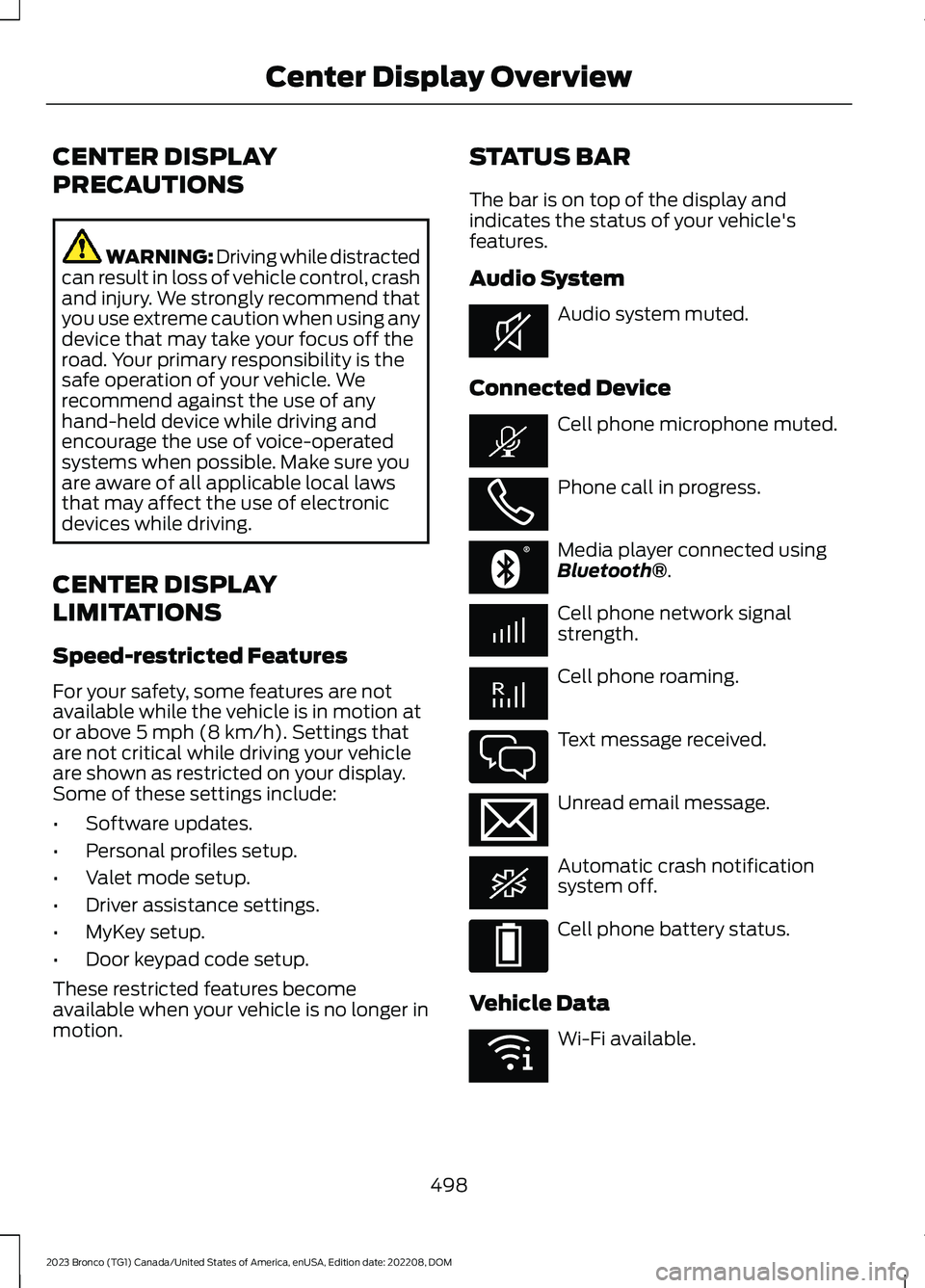
STATUS BAR
The bar is on top of the display andindicates the status of your vehicle'sfeatures.
Audio System
Audio system muted.
Connected Device
Cell phone microphone muted.
Phone call in progress.
Media player connected usingBluetooth®.
Cell phone network signalstrength.
Cell phone roaming.
Text message received.
Unread email message.
Automatic crash notificationsystem off.
Cell phone battery status.
Vehicle Data
Wi-Fi available.
498
2023 Bronco (TG1) Canada/United States of America, enUSA, Edition date: 202208, DOMCenter Display OverviewE353221 E353213 E353208 E335295 E353216 E335293 E353219
Page 511 of 642
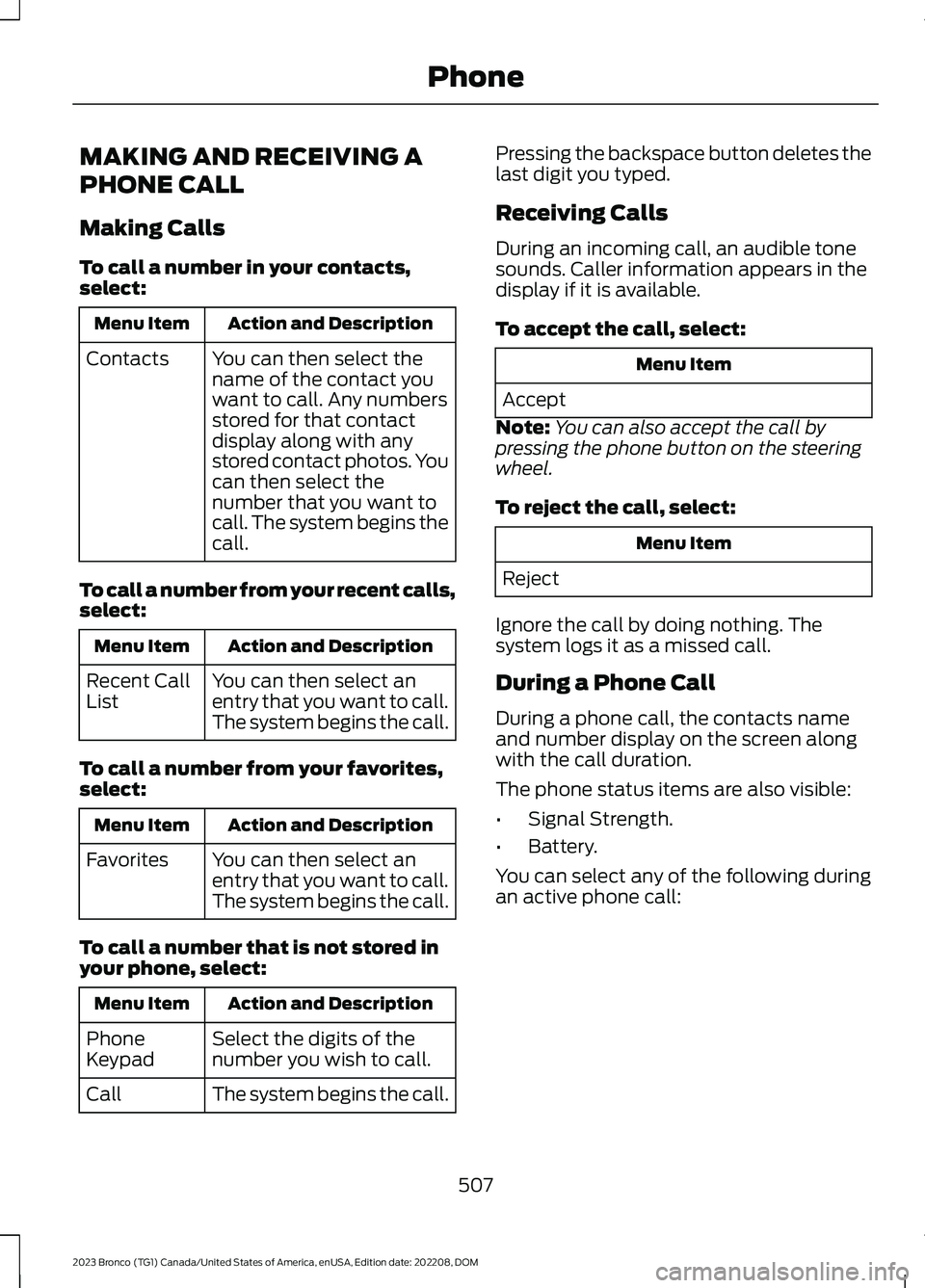
MAKING AND RECEIVING A
PHONE CALL
Making Calls
To call a number in your contacts,select:
Action and DescriptionMenu Item
You can then select thename of the contact youwant to call. Any numbersstored for that contactdisplay along with anystored contact photos. Youcan then select thenumber that you want tocall. The system begins thecall.
Contacts
To call a number from your recent calls,select:
Action and DescriptionMenu Item
You can then select anentry that you want to call.The system begins the call.
Recent CallList
To call a number from your favorites,select:
Action and DescriptionMenu Item
You can then select anentry that you want to call.The system begins the call.
Favorites
To call a number that is not stored inyour phone, select:
Action and DescriptionMenu Item
Select the digits of thenumber you wish to call.PhoneKeypad
The system begins the call.Call
Pressing the backspace button deletes thelast digit you typed.
Receiving Calls
During an incoming call, an audible tonesounds. Caller information appears in thedisplay if it is available.
To accept the call, select:
Menu Item
Accept
Note:You can also accept the call bypressing the phone button on the steeringwheel.
To reject the call, select:
Menu Item
Reject
Ignore the call by doing nothing. Thesystem logs it as a missed call.
During a Phone Call
During a phone call, the contacts nameand number display on the screen alongwith the call duration.
The phone status items are also visible:
•Signal Strength.
•Battery.
You can select any of the following duringan active phone call:
507
2023 Bronco (TG1) Canada/United States of America, enUSA, Edition date: 202208, DOMPhone
Page 521 of 642
This introduces new features and providesupdates to the vehicle's software systems.Make sure to switch Automatic Updateson, set a recurring update schedule andconnect your vehicle to Wi-Fi. Updatescould take longer when not connected toWi-Fi or could not download at all. SeeConnecting the Vehicle to a Wi-FiNetwork (page 483). See Connecting theVehicle to a Wi-Fi Network (page 483).
Your vehicle may be able to receivedrivable software updates, non-drivablesoftware updates or both. Drivablesoftware updates happen during normalvehicle usage and require limited inputfrom you. You are notified on yourtouchscreen and connected device priorto a non-drivable update.
Most updates complete in less than 30minutes, although some updates couldtake up to a few hours. Check yourtouchscreen or connected device for themost accurate estimated update time.
You are notified of the status of the vehiclesoftware update in the touchscreen andon your connected device. See SoftwareUpdate Indicators (page 518).
Vehicle Software UpdateRequirements
Non-drivable software updates do notinstall if any of the following occur:
•Your vehicle is running.
•Your vehicle is switched on.
•Your vehicle is not parked.
•The 12 V battery charge is too low.
•The hazard indicators are switched on.
•The alarm is sounding.
•The doors are open.
•The parking lamps are switched on.
•You are pressing the brake pedal.
•An emergency call is in process.
•Your vehicle is in limp home mode.
Vehicle Software UpdateLimitations
Once you begin a non-drivable softwareupdate, you cannot:
•Cancel the update.
•Lock, unlock or enter your vehicleunless you have a key blade.
•You can open the doors using themechanical latch if child locks arenot on.
•Drive your vehicle.
•Start your vehicle.
•Use the remote control to lock, unlockor start your vehicle.
•Use the alarm, central locks or doortones.
•Use the electronic door locks.
•Charge your vehicle.
•Charging resumes once the updatecompletes.
SOFTWARE UPDATE
SETTINGS
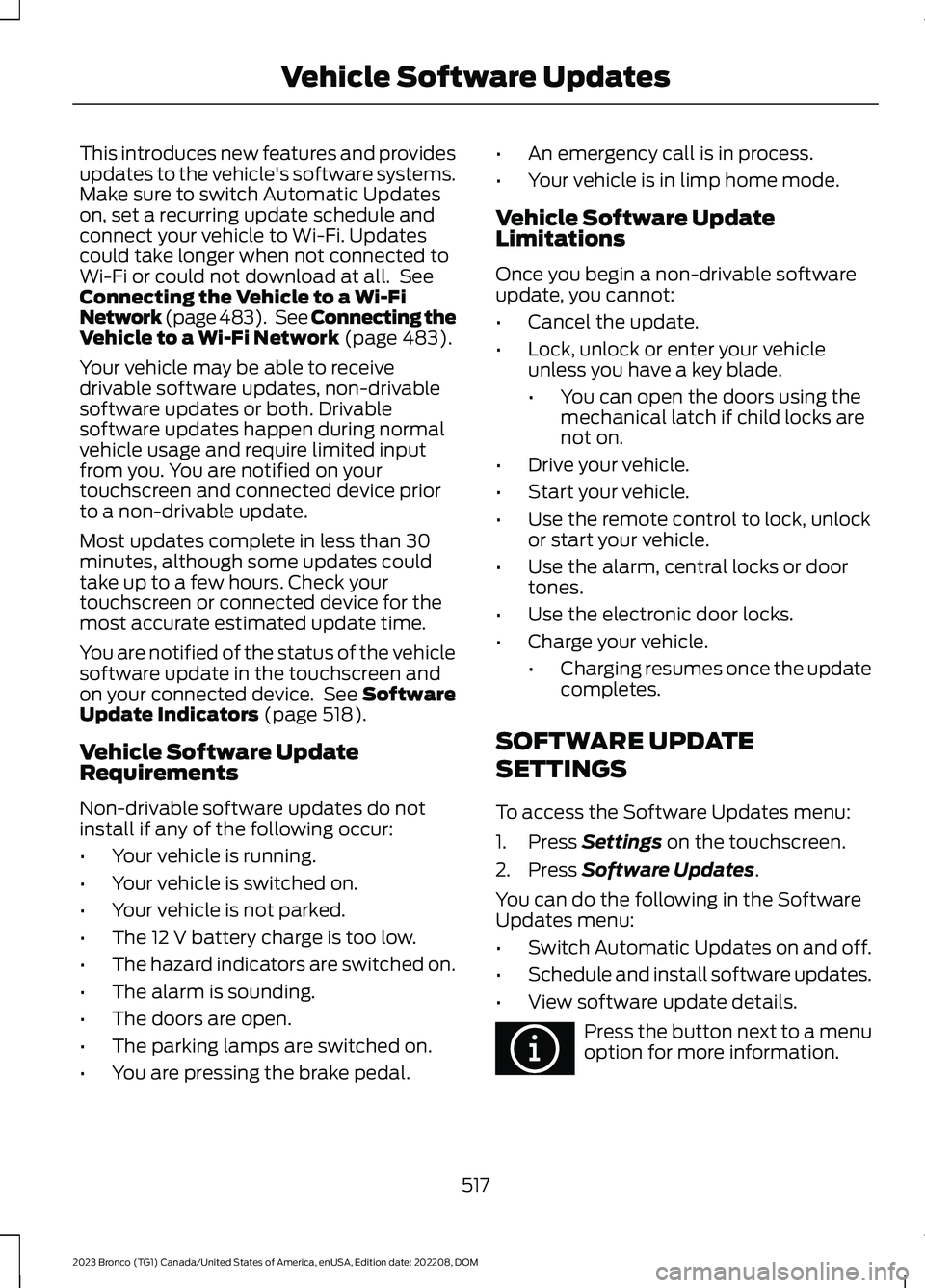
To access the Software Updates menu:
1.Press Settings on the touchscreen.
2.Press Software Updates.
You can do the following in the SoftwareUpdates menu:
•Switch Automatic Updates on and off.
•Schedule and install software updates.
•View software update details.
Press the button next to a menuoption for more information.
517
2023 Bronco (TG1) Canada/United States of America, enUSA, Edition date: 202208, DOMVehicle Software UpdatesE366956
Page 525 of 642
•An authorized dealer needs to installmobile communications systems.Improper installation may harm theoperation of your vehicle, particularlyif the manufacturer did not design themobile communication systemspecifically for automotive use.
•If you or an authorized Ford dealer addany non-Ford electrical or electronicaccessories or components to yourvehicle, you may adversely affectbattery performance and durability. Inaddition, you may also adversely affectthe performance of other electricalsystems in the vehicle.
521
2023 Bronco (TG1) Canada/United States of America, enUSA, Edition date: 202208, DOMAccessories
Page 526 of 642
WHAT ARE THE AUXILIARY
SWITCHES
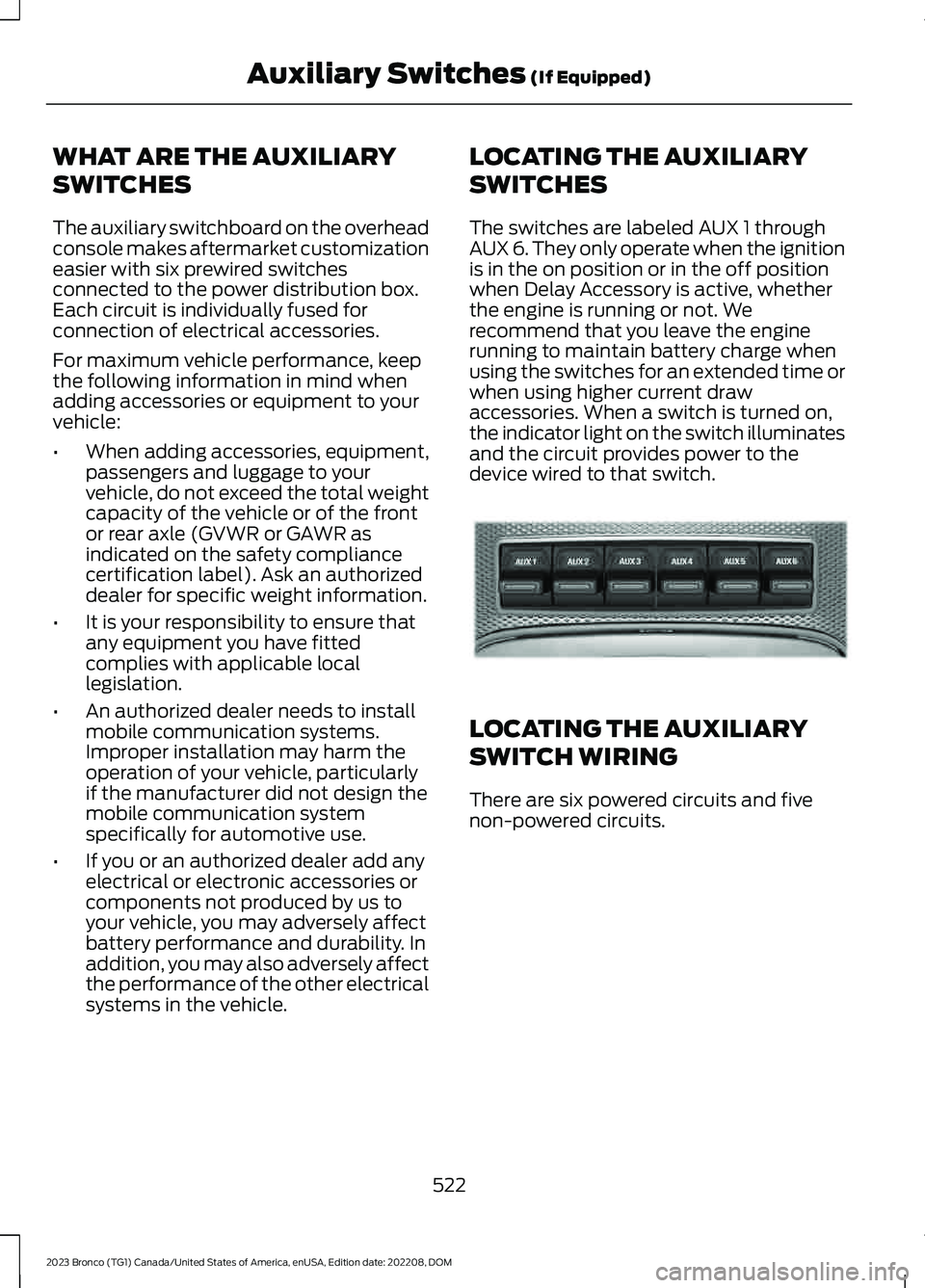
The auxiliary switchboard on the overheadconsole makes aftermarket customizationeasier with six prewired switchesconnected to the power distribution box.Each circuit is individually fused forconnection of electrical accessories.
For maximum vehicle performance, keepthe following information in mind whenadding accessories or equipment to yourvehicle:
•When adding accessories, equipment,passengers and luggage to yourvehicle, do not exceed the total weightcapacity of the vehicle or of the frontor rear axle (GVWR or GAWR asindicated on the safety compliancecertification label). Ask an authorizeddealer for specific weight information.
•It is your responsibility to ensure thatany equipment you have fittedcomplies with applicable locallegislation.
•An authorized dealer needs to installmobile communication systems.Improper installation may harm theoperation of your vehicle, particularlyif the manufacturer did not design themobile communication systemspecifically for automotive use.
•If you or an authorized dealer add anyelectrical or electronic accessories orcomponents not produced by us toyour vehicle, you may adversely affectbattery performance and durability. Inaddition, you may also adversely affectthe performance of the other electricalsystems in the vehicle.
LOCATING THE AUXILIARY
SWITCHES
The switches are labeled AUX 1 throughAUX 6. They only operate when the ignitionis in the on position or in the off positionwhen Delay Accessory is active, whetherthe engine is running or not. Werecommend that you leave the enginerunning to maintain battery charge whenusing the switches for an extended time orwhen using higher current drawaccessories. When a switch is turned on,the indicator light on the switch illuminatesand the circuit provides power to thedevice wired to that switch.
LOCATING THE AUXILIARY
SWITCH WIRING
There are six powered circuits and fivenon-powered circuits.
522
2023 Bronco (TG1) Canada/United States of America, enUSA, Edition date: 202208, DOMAuxiliary Switches (If Equipped)E220728