transmission FORD BRONCO 2023 Workshop Manual
[x] Cancel search | Manufacturer: FORD, Model Year: 2023, Model line: BRONCO, Model: FORD BRONCO 2023Pages: 642, PDF Size: 14.71 MB
Page 247 of 642
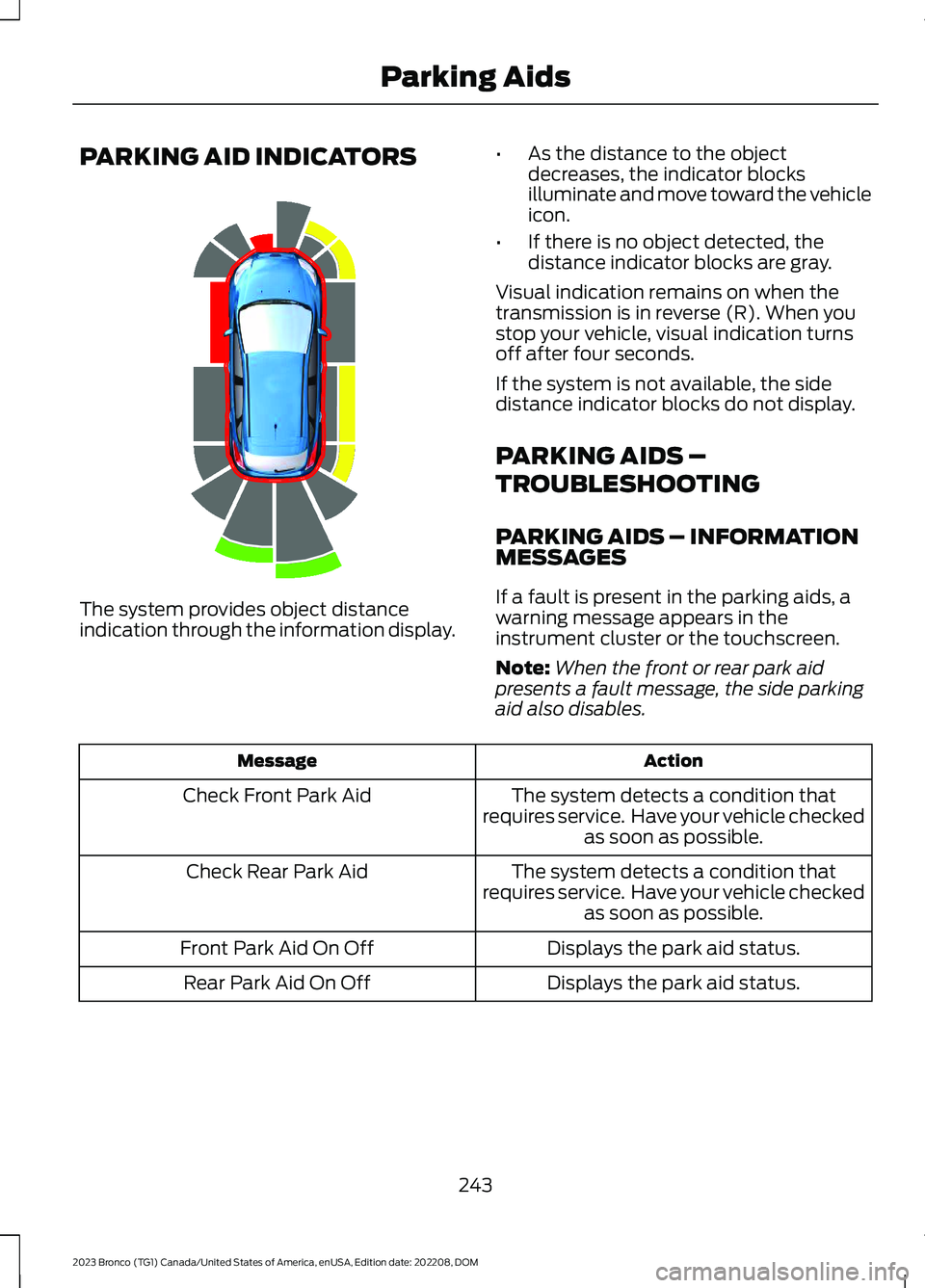
PARKING AID INDICATORS
The system provides object distanceindication through the information display.
•As the distance to the objectdecreases, the indicator blocksilluminate and move toward the vehicleicon.
•If there is no object detected, thedistance indicator blocks are gray.
Visual indication remains on when thetransmission is in reverse (R). When youstop your vehicle, visual indication turnsoff after four seconds.
If the system is not available, the sidedistance indicator blocks do not display.
PARKING AIDS –
TROUBLESHOOTING
PARKING AIDS – INFORMATIONMESSAGES
If a fault is present in the parking aids, awarning message appears in theinstrument cluster or the touchscreen.
Note:When the front or rear park aidpresents a fault message, the side parkingaid also disables.
ActionMessage
The system detects a condition thatrequires service. Have your vehicle checkedas soon as possible.
Check Front Park Aid
The system detects a condition thatrequires service. Have your vehicle checkedas soon as possible.
Check Rear Park Aid
Displays the park aid status.Front Park Aid On Off
Displays the park aid status.Rear Park Aid On Off
243
2023 Bronco (TG1) Canada/United States of America, enUSA, Edition date: 202208, DOMParking AidsE190459
Page 248 of 642
WHAT IS THE REAR VIEW
CAMERA
The rear view camera provides a videoimage of the area behind your vehicle whenthe transmission is in reverse (R).
REAR VIEW CAMERA
PRECAUTIONS
WARNING: The rear view camerasystem is a reverse aid supplementdevice that still requires the driver to useit in conjunction with the interior andexterior mirrors for maximum coverage.
WARNING: Objects that are closeto either corner of the bumper or underthe bumper, might not be seen on thescreen due to the limited coverage of thecamera system.
WARNING: Reverse your vehicleslowly. Failure to follow this instructioncould result in the loss of control of yourvehicle, personal injury or death.
WARNING: Use caution when thetailgate is ajar. If the tailgate is ajar, thecamera is out of position and the videoimage could be incorrect. All guide linesdisappear when the tailgate is ajar.Failure to follow this instruction couldresult in personal injury.
WARNING: Use caution whenturning camera features on or off whenthe transmission is not in park (P). Makesure your vehicle is not moving.
Note: When towing, the camera only seeswhat you are towing. This might not provideadequate coverage and you might not seesome objects. In some vehicles, the guidelines may disappear when you connect thetrailer tow connector.
LOCATING THE REAR VIEW
CAMERA
The rear view camera is in the spare tirecarrier.
REAR VIEW CAMERA GUIDE
LINES
Note:Active guide lines and fixed guidelines are only available when thetransmission is in reverse (R).
Note:The centerline is only available if theactive or fixed guide lines are on.
244
2023 Bronco (TG1) Canada/United States of America, enUSA, Edition date: 202208, DOMRear View Camera
Page 249 of 642
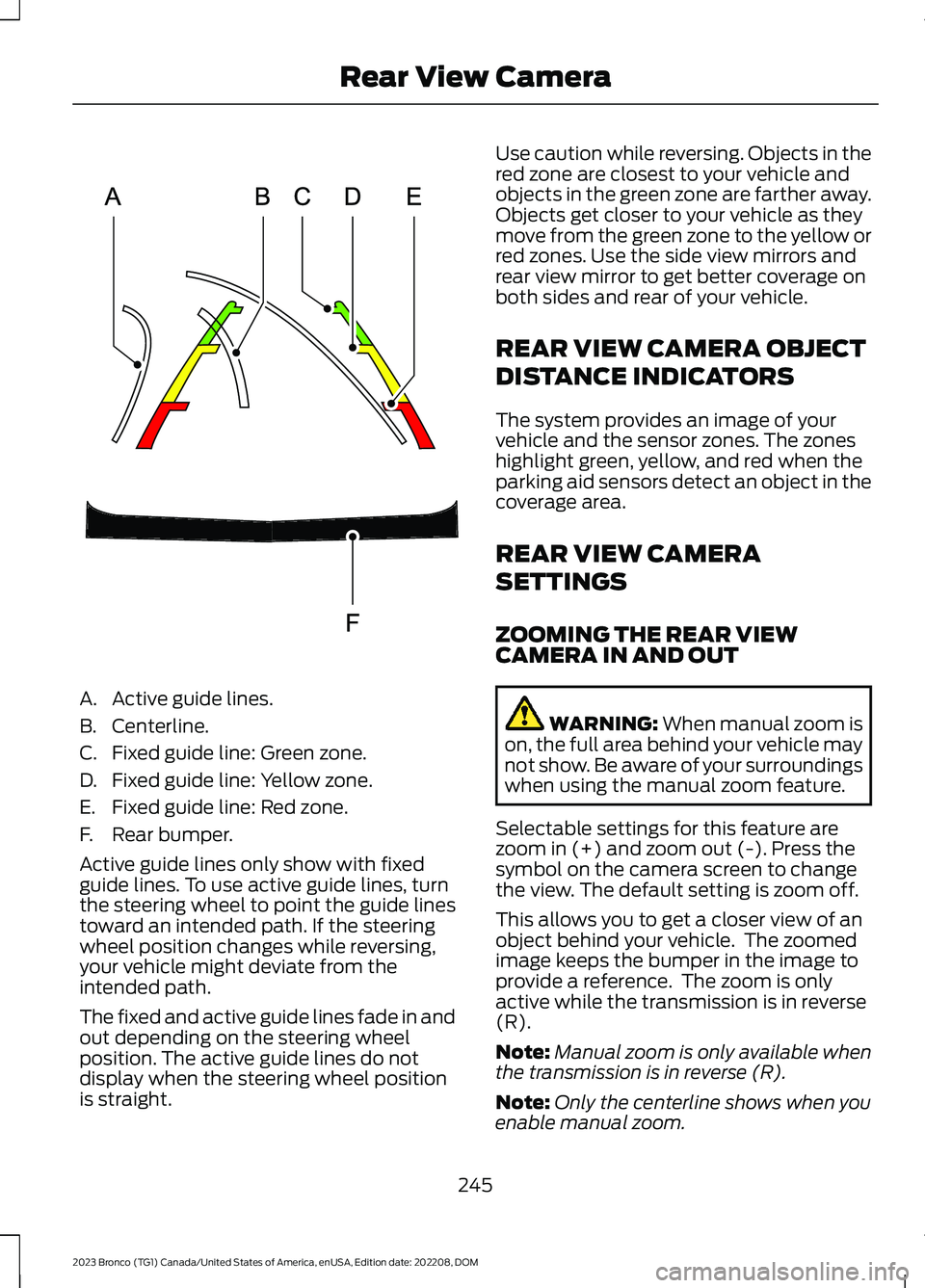
A.Active guide lines.
B.Centerline.
C.Fixed guide line: Green zone.
D.Fixed guide line: Yellow zone.
E.Fixed guide line: Red zone.
F.Rear bumper.
Active guide lines only show with fixedguide lines. To use active guide lines, turnthe steering wheel to point the guide linestoward an intended path. If the steeringwheel position changes while reversing,your vehicle might deviate from theintended path.
The fixed and active guide lines fade in andout depending on the steering wheelposition. The active guide lines do notdisplay when the steering wheel positionis straight.
Use caution while reversing. Objects in thered zone are closest to your vehicle andobjects in the green zone are farther away.Objects get closer to your vehicle as theymove from the green zone to the yellow orred zones. Use the side view mirrors andrear view mirror to get better coverage onboth sides and rear of your vehicle.
REAR VIEW CAMERA OBJECT
DISTANCE INDICATORS
The system provides an image of yourvehicle and the sensor zones. The zoneshighlight green, yellow, and red when theparking aid sensors detect an object in thecoverage area.
REAR VIEW CAMERA
SETTINGS
ZOOMING THE REAR VIEWCAMERA IN AND OUT
WARNING: When manual zoom ison, the full area behind your vehicle maynot show. Be aware of your surroundingswhen using the manual zoom feature.
Selectable settings for this feature arezoom in (+) and zoom out (-). Press thesymbol on the camera screen to changethe view. The default setting is zoom off.
This allows you to get a closer view of anobject behind your vehicle. The zoomedimage keeps the bumper in the image toprovide a reference. The zoom is onlyactive while the transmission is in reverse(R).
Note:Manual zoom is only available whenthe transmission is in reverse (R).
Note:Only the centerline shows when youenable manual zoom.
245
2023 Bronco (TG1) Canada/United States of America, enUSA, Edition date: 202208, DOMRear View CameraE306774
Page 250 of 642
SWITCHING REAR VIEW CAMERADELAY ON AND OFF
1.Press Features on the touchscreen.
2.Press Driver Assistance.
3.Press Rear View Camera.
4.Switch Rear View Camera Delay on oroff.
When shifting the transmission out ofreverse (R) and into any gear other thanpark (P), the camera image remains in thedisplay until:
•Your vehicle speed reachesapproximately 5 mph (8 km/h).
•You shift your vehicle into park (P).
246
2023 Bronco (TG1) Canada/United States of America, enUSA, Edition date: 202208, DOMRear View Camera
Page 252 of 642
Note:The front camera system switcheson when you are in mud/sand mode.
Side View Camera
The side view cameras are on the outsidemirrors. They provide a video image of thearea on the sides of your vehicle to aid youwhen parking.
360 DEGREE CAMERA GUIDE
LINES
Note:Active guide lines are only availablewhen the transmission is in reverse (R).
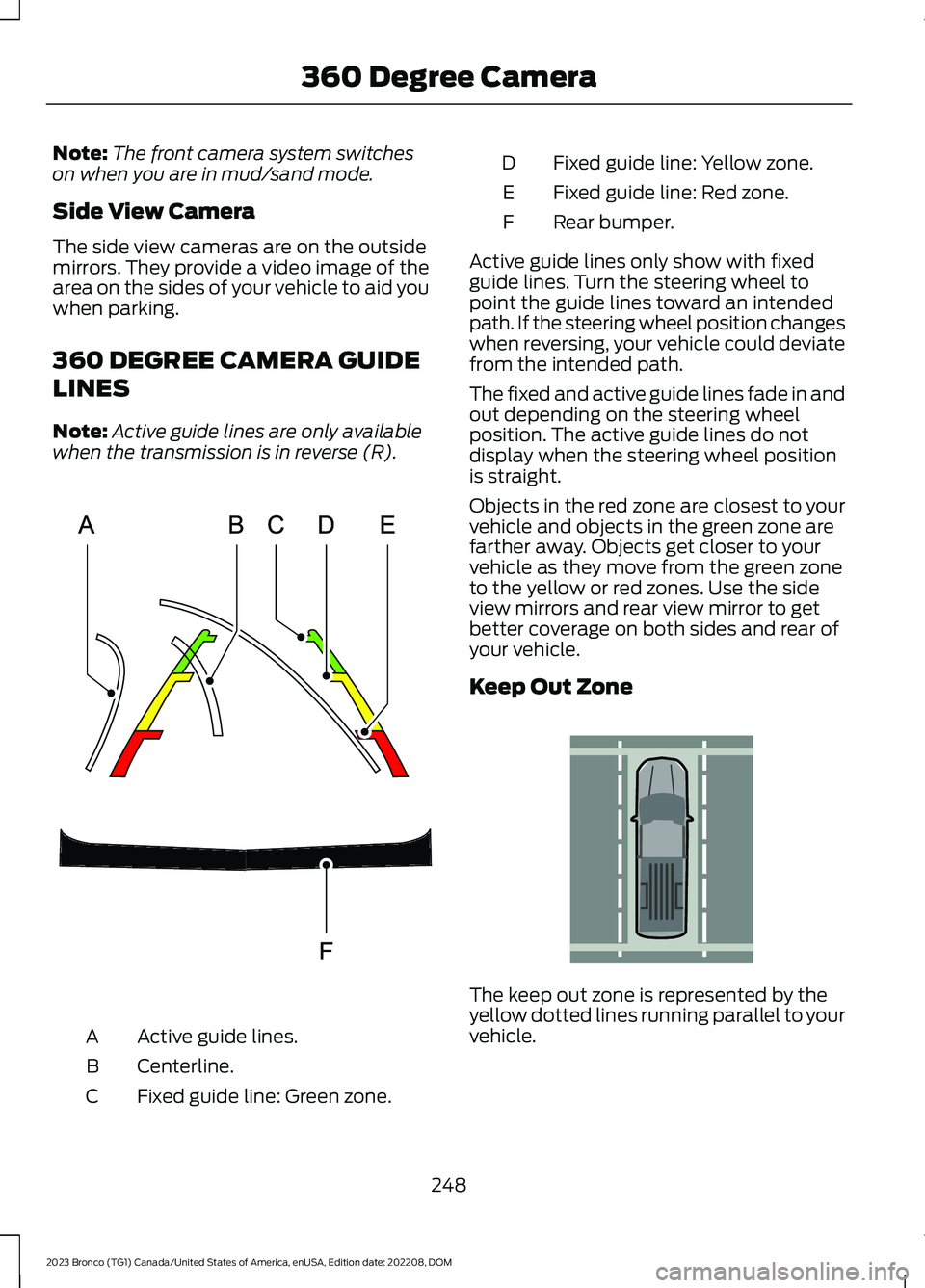
Active guide lines.A
Centerline.B
Fixed guide line: Green zone.C
Fixed guide line: Yellow zone.D
Fixed guide line: Red zone.E
Rear bumper.F
Active guide lines only show with fixedguide lines. Turn the steering wheel topoint the guide lines toward an intendedpath. If the steering wheel position changeswhen reversing, your vehicle could deviatefrom the intended path.
The fixed and active guide lines fade in andout depending on the steering wheelposition. The active guide lines do notdisplay when the steering wheel positionis straight.
Objects in the red zone are closest to yourvehicle and objects in the green zone arefarther away. Objects get closer to yourvehicle as they move from the green zoneto the yellow or red zones. Use the sideview mirrors and rear view mirror to getbetter coverage on both sides and rear ofyour vehicle.
Keep Out Zone
The keep out zone is represented by theyellow dotted lines running parallel to yourvehicle.
248
2023 Bronco (TG1) Canada/United States of America, enUSA, Edition date: 202208, DOM360 Degree CameraE306774 E310341
Page 264 of 642
WHAT IS G.O.A.T. MODE
CONTROL
Your vehicle has several goes overany-type of terrain (G.O.A.T.) modes thatyou can select for different drivingconditions. Depending on the mode thatyou select, the system adjusts variousvehicle settings.
HOW DOES G.O.A.T. MODE
CONTROL WORK
Each selectable mode changes variouselectronic and mechanical settings withinyour vehicle to tailor its performance anddriving characteristics to on-road oroff-road driving conditions. The systemmay alter steering feel and effort, tractioncontrol, stability control, chassis controls,powertrain response, transmission shiftpoints, four-wheel driveline setting,exhaust noise level and suspensiondampening to predetermined settings,depending upon the mode that you select.
The system reverts to the normal modeeach time you start your vehicle. At startupthe system also displays a prompt on theinstrument cluster display that gives youthe option to return to the previouslyselected drive mode during the last ignitioncycle. If you select yes, the system returnsto the last selected drive mode and thedefault driveline settings associated withthat mode. If you select no or do not makea selection within a short time, the systemremains in normal mode and the drivelinesettings remain the same as selected inthe prior ignition cycle.
Note:Your vehicle has diagnostic checksthat continuously monitor all systems forproper operation. If a mode is unavailabledue to a system fault, your vehicle defaultsto normal mode and the driveline remainsin the four-wheel drive setting that you lastselected prior to the system fault.
SELECTING A G.O.A.T. MODE -
EXCLUDING: RAPTOR
Bronco 4x4 Systems
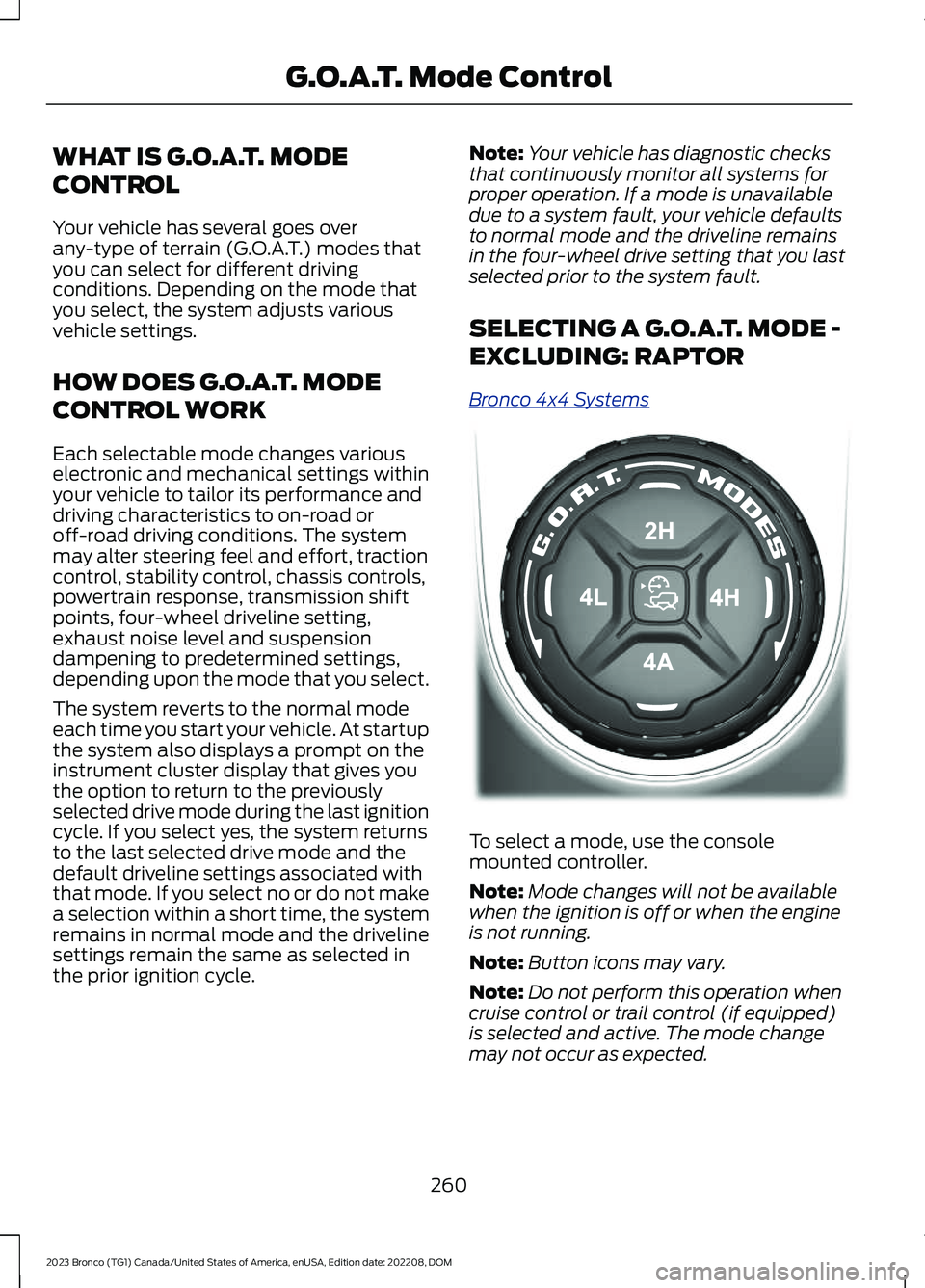
To select a mode, use the consolemounted controller.
Note:Mode changes will not be availablewhen the ignition is off or when the engineis not running.
Note:Button icons may vary.
Note:Do not perform this operation whencruise control or trail control (if equipped)is selected and active. The mode changemay not occur as expected.
260
2023 Bronco (TG1) Canada/United States of America, enUSA, Edition date: 202208, DOMG.O.A.T. Mode ControlE324543
Page 267 of 642
You can save the following settings asMyMode:
•Drive mode.
•Steering mode.
•Suspension mode.
•Exhaust mode.
•Four-wheel drive mode.
•Stop and start on or off.
•Front electronic locking differential onor off.
•Rear electronic locking differential onor off.
Note:MyMode settings can only be madewith configurations that are available toeach individual drive mode.
Note:You can save or view MyMode at anytime, regardless of your vehicle's speed ortransmission selection, as long as yourvehicle is running and it meets systemconditions.
Note:When activating MyMode, yourvehicle must meet all preconditions for thedrive mode and various settings before itactivates. A message appears if it does notmeet system conditions.
G.O.A.T. MODES
BAJA - EXCLUDING: RAPTOR
For high speed off-road driving.Baja mode optimizes the throttlecontrol for better response andtorque delivery.
Four-wheel drive high (4H) is the defaultfour-wheel drive mode. Four-wheel driveauto (4A) is not selectable in baja mode.
The front electronic locking differential isavailable below 25 mph (40 km/h) whenin four-wheel drive low (4L). The rearelectronic locking differential is availableat any speed in all selectable four-wheeldrive modes.
The stabilizer bar disconnect is availablein four-wheel drive high (4H) or four-wheeldrive low (4L).
Note:Depending on the four-wheel drivemode selected when using Baja mode ondry/hard pavement, your vehicle couldexperience vibration, driveline bind up,damage and potential excessive tire andvehicle wear.
BAJA - RAPTOR
For high speed off-road driving.Baja mode optimizes the throttlecontrol for better response andtorque delivery.
Four-wheel drive high (4H) is the defaultfour-wheel drive mode but two-wheeldrive high (2H) is available. Four-wheeldrive auto (4A) is not available in bajamode.
Off-road is the default steering andsuspension mode. All steering andsuspension modes are available.
Baja is the default exhaust mode. Allexhaust modes are available. The systemtunes the engine, transmission, stabilityand traction controls to baja mode.
The rear electronic locking differential isavailable at all speeds in four-wheel drive,and the front electronic locking differentialis available in four-wheel drive low (4L).See Switching the Electronic LockingDifferential On and Off (page 203).
The stabilizer bar is connected by defaultbut can be disconnected up to 50 mph(80 km/h).
263
2023 Bronco (TG1) Canada/United States of America, enUSA, Edition date: 202208, DOMG.O.A.T. Mode ControlE225314 E225314
Page 269 of 642
Two-wheel drive high (2H) is the defaultfour-wheel drive mode. All four-wheel drivemodes are selectable when in normalmode. Normal is the default for thesteering, suspension and exhaust modes.Off-road steering mode is not available.All suspension and exhaust modes areavailable.
The system tunes the engine andtransmission controls and the stability andtraction controls to normal mode.
The rear electronic locking rear differentialis available below 25 mph (40 km/h), andboth locking differentials are availablebelow 25 mph (40 km/h) when four-wheeldrive low (4L) is selected in the transfercase. See Switching the ElectronicLocking Differential On and Off (page203).
The stabilizer bar can be disconnected atspeeds below 30 mph (48 km/h). Trail onepedal, trail control, and trail turn assist arealso available.
OFF-ROAD - RAPTOR
For off-road driving throughsand, loose gravel, mud or mixedoff-road terrain.
This mode optimizes accelerator pedalresponse, traction and stability controls toenhance vehicle performance in off-roadenvironments. If your vehicle becomesstuck in deep conditions, this mode maybe preferred.
Four-wheel drive high (4H) is the defaultfour-wheel drive mode. Four-wheel drivelow (4L) is selectable, but two-wheel drivehigh (2H) and four-wheel drive auto (4A)are not available. Off-road is the defaultsteering and suspension mode. Sport is thedefault exhaust mode, but all steering,suspension, and exhaust modes areavailable.
The system tunes the engine, transmission,stability and traction control to off-roadmode.
The rear electronic locking differentialengages when you select this mode at anyspeed, and you can disengage it at anytime using the button. The front electroniclocking differential can be engaged in 4L.See Switching the Electronic LockingDifferential On and Off (page 203).
The stabilizer bar can be disconnected atspeeds below 50 mph (80 km/h). Thecamera system also turns on.
Note:Do not use this mode when drivingon pavement or packed snow. This couldcause driveline bind up and damage thesystem depending on the four-wheel drivemode selection. See Four-Wheel Drive(page 195).
ROCK CRAWL - EXCLUDING:RAPTOR
For off-road driving andoptimum rock-climbing ability.Rock crawl mode optimizes thethrottle and transmission response toprovide you additional control of yourvehicle.
Four-wheel drive low (4L) is the onlydriveline configuration available in rockcrawl, the system prompts you to put yourvehicle into four-wheel drive low (4L) uponselection.
The front electronic locking differential isavailable below 25 mph (40 km/h) whenin four-wheel drive low (4L). The rearelectronic locking differential is engagedwhen in rock crawl mode and is availableat any speed.
The stabilizer bar disconnects when in rockcrawl mode.
265
2023 Bronco (TG1) Canada/United States of America, enUSA, Edition date: 202208, DOMG.O.A.T. Mode ControlE366491 E322413
Page 270 of 642
Note:When using rock crawl mode ondry/hard pavement, your vehicle couldexperience vibration, driveline bind up,damage and potential excessive tire andvehicle wear.
ROCK CRAWL - RAPTOR
For off-road driving andoptimum rock-climbingcapability.
Rock crawl mode has the followingfeatures:
•Engages both front and rear electroniclocking differentials.
•Disconnects the stabilizer bar.
•Turns on the cameras.
•Optimizes throttle response.
•Adjusts transmission shift points toprovide additional control of yourvehicle.
Four-wheel drive low (4L) is the onlytransfer case option available in rock crawlmode. Off-road is the default steeringsetting, but all steering modes areavailable. Off-road is the defaultsuspension mode, and Normal is thedefault exhaust mode. The system tunesthe engine and transmission controls torock crawl mode.
The electronic locking differentials engagewhen you select this mode, and you candisengage them at any time using thebuttons. See Switching the ElectronicLocking Differential On and Off (page203).
The stabilizer bar can be disconnected atspeeds below 50 mph (80 km/h).
Note:When using rock crawl mode ondry/hard pavement, your vehicle couldexperience vibration, driveline bind up,damage and potential excessive tire andvehicle wear.
SAND - EXCLUDING: RAPTOR
For off-road driving on soft, drysand or deep snow. This modemay help get your vehicleunstuck from deep snow or sand.
Four-wheel drive high (4H) is the defaultfour-wheel drive mode. Four-wheel drivelow (4L) is selectable in sand mode.
The front electronic locking differential isavailable below 25 mph (40 km/h) whenin four-wheel drive low (4L). The rearelectronic locking differential is engagedwhen in sand mode and is available at anyspeed in all selectable four-wheel drivemodes.
The stabilizer bar disconnect is availablein four-wheel drive high (4H) or four-wheeldrive low (4L).
Note:The front camera system switcheson when you are in sand mode and yourspeed is less than 15 mph (24 km/h). If youexceed 15 mph (24 km/h), the camera shutsoff until your vehicle speed is below 12 mph(20 km/h).
Note:When using Sand mode on dry/hardpavement, your vehicle could experiencevibration, driveline bind up, damage andpotential excessive tire and vehicle wear.
Note:Sand mode is not intended for useon firm, slippery surfaces, such as pavedroads covered with snow or ice. For slippery,firm surfaces use slippery mode.
SLIPPERY - ADVANCED 4X4 WITH4A MODE, EXCLUDING: RAPTOR
For less than ideal roadconditions, you can use thismode for crossing terrain wherea firm surface is covered with loose orslippery material, such as snow or ice.Slippery mode lowers throttle responseand optimizes shifting for slippery surfaces.
266
2023 Bronco (TG1) Canada/United States of America, enUSA, Edition date: 202208, DOMG.O.A.T. Mode ControlE366492 E332185 E295414
Page 271 of 642
Four-wheel drive auto (4A) is the defaultfour-wheel drive mode. Two-wheel drivehigh (2H) is not selectable in slipperymode.
The front electronic locking differential isavailable below 25 mph (40 km/h) whenin four-wheel drive low (4L). The rearelectronic locking differential is availablebelow 25 mph (40 km/h).
Note:The rear electronic locking differentialis available at any speed when in four-wheeldrive low (4L).
The stabilizer bar disconnect is notavailable in slippery mode.
Note:Depending on the four-wheel drivemode selected when using slippery modeon dry/hard pavement, your vehicle couldexperience vibration, driveline bind up,damage and potential excessive tire andvehicle wear.
SLIPPERY - 4X4 WITH PART TIMEENGAGEMENT
For less than ideal roadconditions, you can use thismode for crossing terrain wherea firm surface is covered with loose orslippery material, such as snow or ice.Slippery mode lowers throttle responseand optimizes shifting for slippery surfaces.
Four-wheel drive high (4H) is the defaultfour-wheel drive mode. All four-wheel drivemodes are selectable in slippery mode.
The front electronic locking differential isavailable below 25 mph (40 km/h) whenin four-wheel drive low (4L). The rearelectronic locking differential is availablebelow 25 mph (40 km/h).
Note:The rear electronic locking differentialis available at any speed when in four-wheeldrive low (4L).
The stabilizer bar disconnect is notavailable in slippery mode.
Note:Depending on the four-wheel drivemode selected when using slippery modeon dry hard pavement, your vehicle couldexperience vibration, driveline bind up,damage and potential excessive tire andvehicle wear.
SLIPPERY - RAPTOR
For less than ideal roadconditions such as snow or icecovered roads.
Use this mode for crossing terrain whereloose or slippery materials cover a firmsurface. Slippery mode lowers throttleresponse and optimizes shifting for slipperysurfaces.
Four-wheel drive auto (4A) is the defaultfour-wheel drive mode. Two-wheel drivehigh (2H) is not available in slippery mode.
Normal is the default steering, suspension,and exhaust modes. Off-road steeringmode is not available, but all suspensionand exhaust modes are available.
The system tunes the engine, transmissioncontrols and the stability and tractioncontrol modes to normal mode.
The rear electronic locking differential isavailable below 25 mph (40 km/h), andthe front electronic locking differential isavailable in four-wheel drive (4L). SeeSwitching the Electronic LockingDifferential On and Off (page 203).
The stabilizer bar disconnect is notavailable in slippery mode.
Note:Depending on the four-wheel drivemode selected when using slippery modeon dry/hard pavement, your vehicle couldexperience vibration, driveline bind up,damage and potential excessive tire andvehicle wear.
267
2023 Bronco (TG1) Canada/United States of America, enUSA, Edition date: 202208, DOMG.O.A.T. Mode ControlE295414 E347004