brake FORD ESCAPE 2013 3.G User Guide
[x] Cancel search | Manufacturer: FORD, Model Year: 2013, Model line: ESCAPE, Model: FORD ESCAPE 2013 3.GPages: 423, PDF Size: 4.59 MB
Page 83 of 423
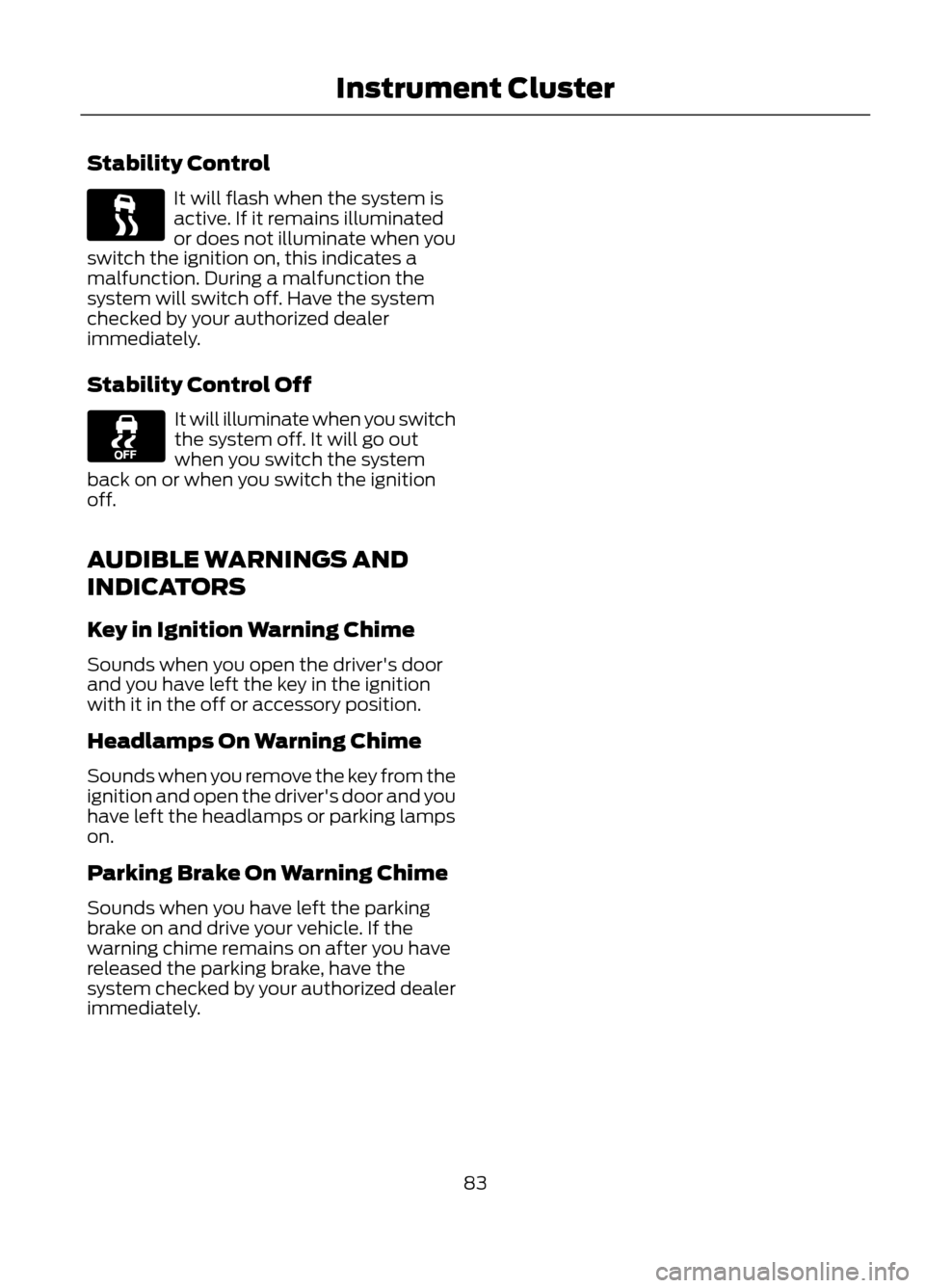
Stability Control
It will flash when the system is
active. If it remains illuminated
or does not illuminate when you
switch the ignition on, this indicates a
malfunction. During a malfunction the
system will switch off. Have the system
checked by your authorized dealer
immediately.
Stability Control Off
It will illuminate when you switch
the system off. It will go out
when you switch the system
back on or when you switch the ignition
off.
AUDIBLE WARNINGS AND
INDICATORS
Key in Ignition Warning Chime
Sounds when you open the driver's door
and you have left the key in the ignition
with it in the off or accessory position.
Headlamps On Warning Chime
Sounds when you remove the key from the
ignition and open the driver's door and you
have left the headlamps or parking lamps
on.
Parking Brake On Warning Chime
Sounds when you have left the parking
brake on and drive your vehicle. If the
warning chime remains on after you have
released the parking brake, have the
system checked by your authorized dealer
immediately.
83
Instrument Cluster
Page 91 of 423
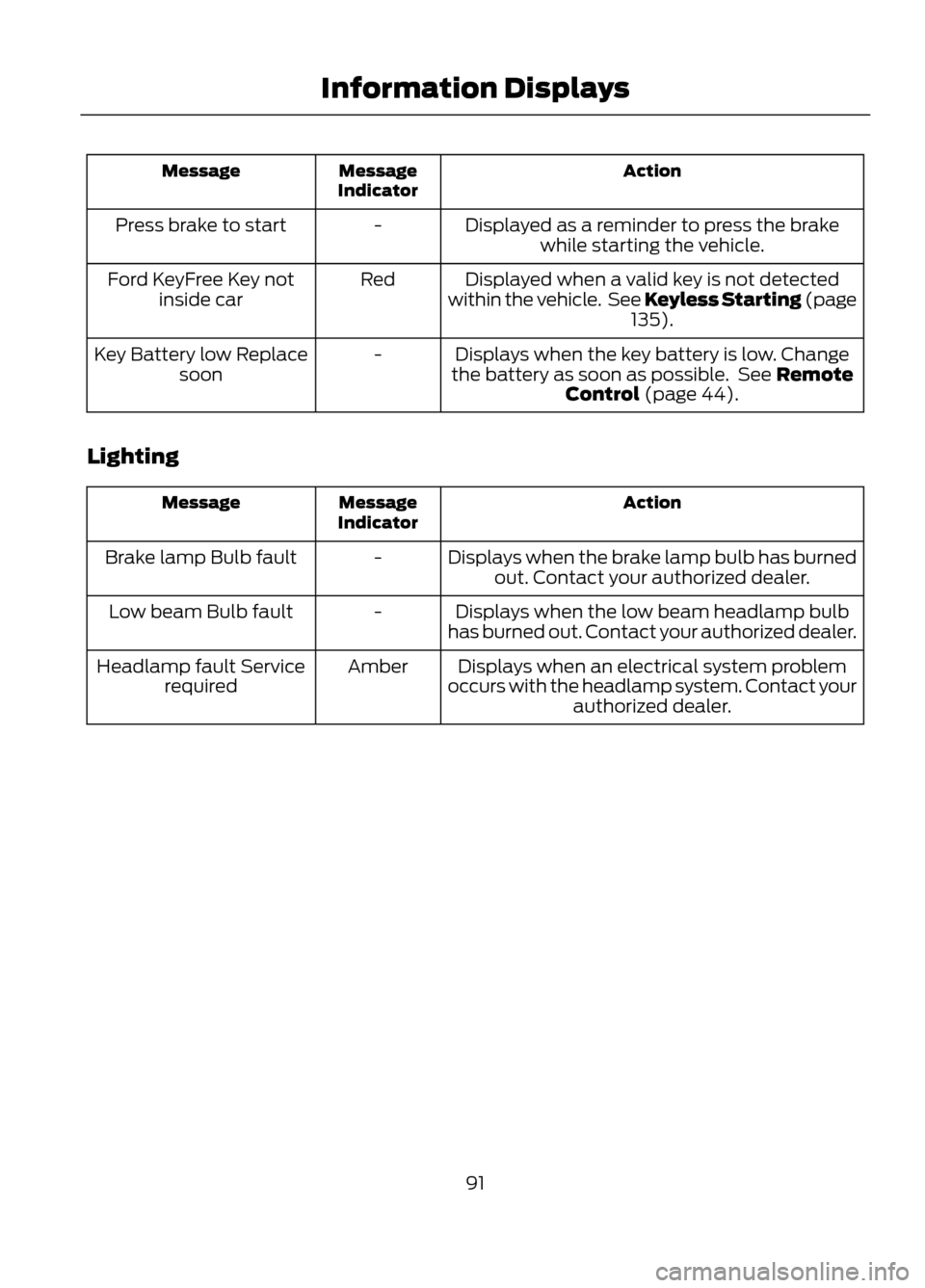
Action
Message
Indicator
Message
Displayed as a reminder to press the brakewhile starting the vehicle.
-
Press brake to start
Displayed when a valid key is not detected
within the vehicle. See Keyless Starting (page 135).
Red
Ford KeyFree Key not
inside car
Displays when the key battery is low. Change
the battery as soon as possible. See Remote Control (page 44).
-
Key Battery low Replace
soon
Lighting
Action
Message
Indicator
Message
Displays when the brake lamp bulb has burnedout. Contact your authorized dealer.
-
Brake lamp Bulb fault
Displays when the low beam headlamp bulb
has burned out. Contact your authorized dealer.
-
Low beam Bulb fault
Displays when an electrical system problem
occurs with the headlamp system. Contact your authorized dealer.
Amber
Headlamp fault Service
required
91
Information Displays
Page 92 of 423
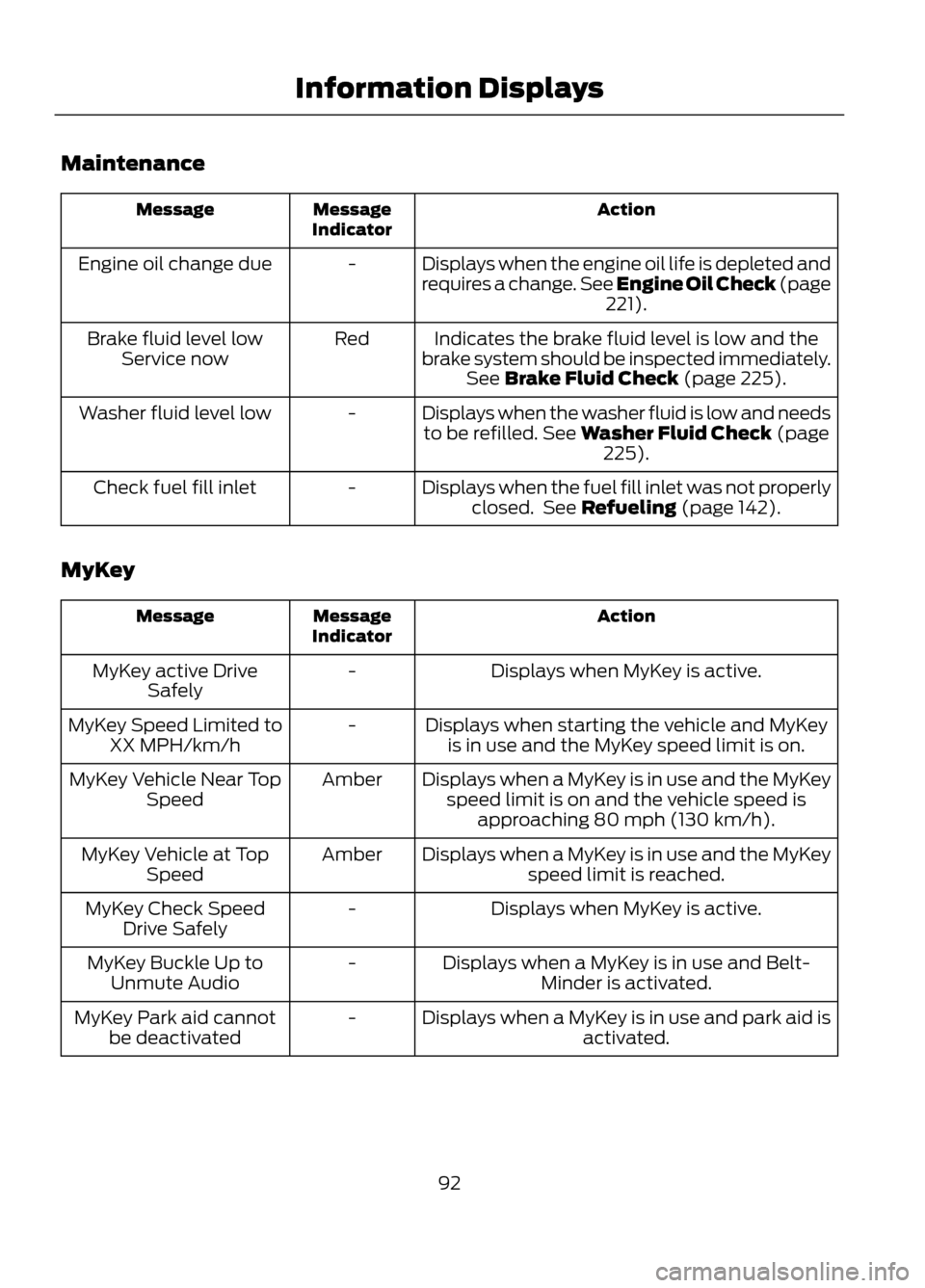
Maintenance
Action
Message
Indicator
Message
Displays when the engine oil life is depleted and
requires a change. See Engine Oil Check (page221).
-
Engine oil change due
Indicates the brake fluid level is low and the
brake system should be inspected immediately. See Brake Fluid Check (page 225).
Red
Brake fluid level low
Service now
Displays when the washer fluid is low and needsto be refilled. See Washer Fluid Check (page 225).
-
Washer fluid level low
Displays when the fuel fill inlet was not properlyclosed. See Refueling (page 142).
-
Check fuel fill inlet
MyKey
Action
Message
Indicator
Message
Displays when MyKey is active.
-
MyKey active Drive
Safely
Displays when starting the vehicle and MyKeyis in use and the MyKey speed limit is on.
-
MyKey Speed Limited to
XX MPH/km/h
Displays when a MyKey is in use and the MyKeyspeed limit is on and the vehicle speed is approaching 80 mph (130 km/h).
Amber
MyKey Vehicle Near Top
Speed
Displays when a MyKey is in use and the MyKeyspeed limit is reached.
Amber
MyKey Vehicle at Top
Speed
Displays when MyKey is active.
-
MyKey Check Speed
Drive Safely
Displays when a MyKey is in use and Belt-Minder is activated.
-
MyKey Buckle Up to
Unmute Audio
Displays when a MyKey is in use and park aid isactivated.
-
MyKey Park aid cannot
be deactivated
92
Information Displays
Page 93 of 423
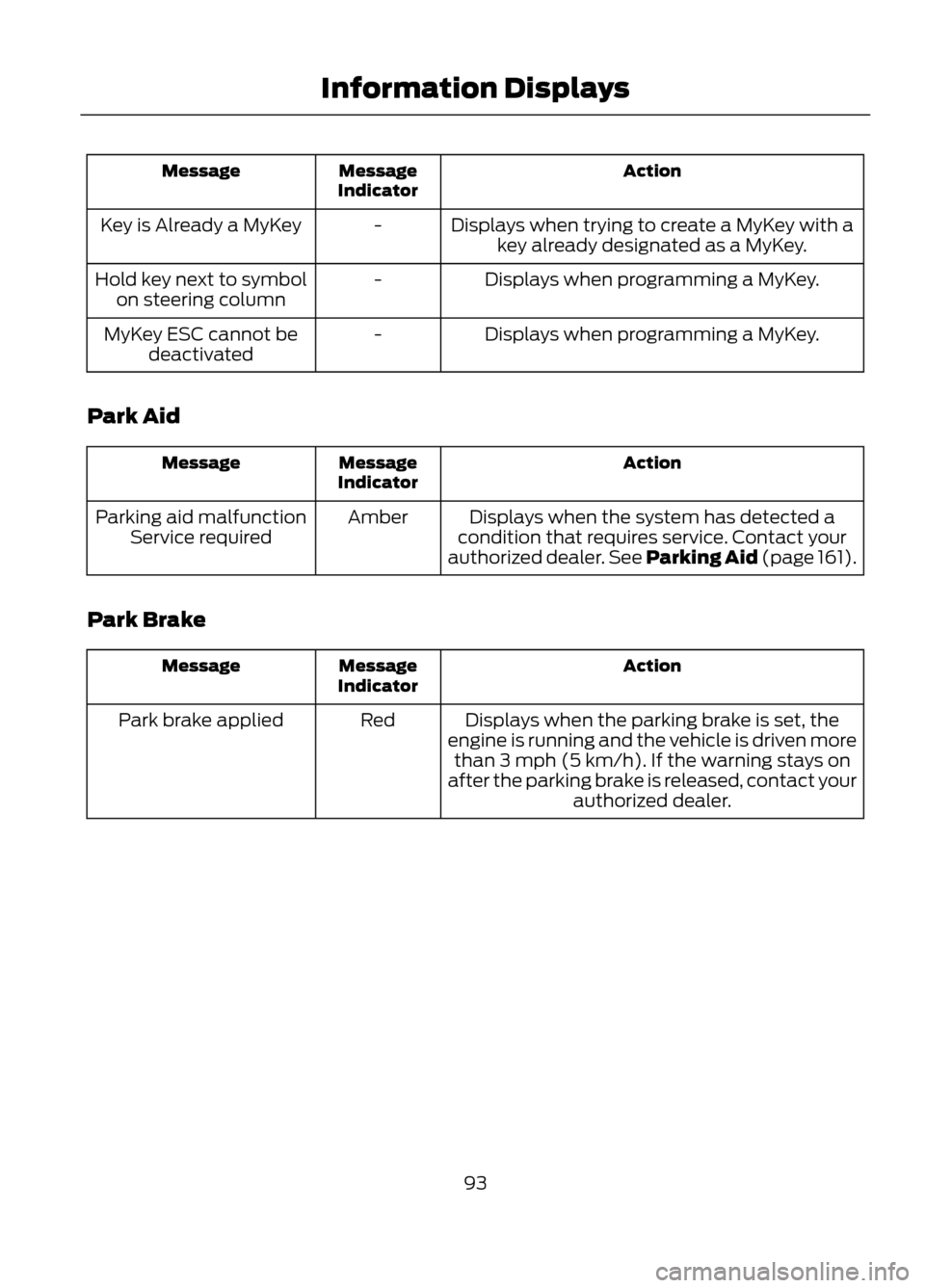
Action
Message
Indicator
Message
Displays when trying to create a MyKey with akey already designated as a MyKey.
-
Key is Already a MyKey
Displays when programming a MyKey.
-
Hold key next to symbol
on steering column
Displays when programming a MyKey.
-
MyKey ESC cannot be
deactivated
Park Aid
Action
Message
Indicator
Message
Displays when the system has detected a
condition that requires service. Contact your
authorized dealer. See Parking Aid (page 161).
Amber
Parking aid malfunction
Service required
Park Brake
Action
Message
Indicator
Message
Displays when the parking brake is set, the
engine is running and the vehicle is driven more than 3 mph (5 km/h). If the warning stays on
after the parking brake is released, contact your authorized dealer.
Red
Park brake applied
93
Information Displays
Page 94 of 423
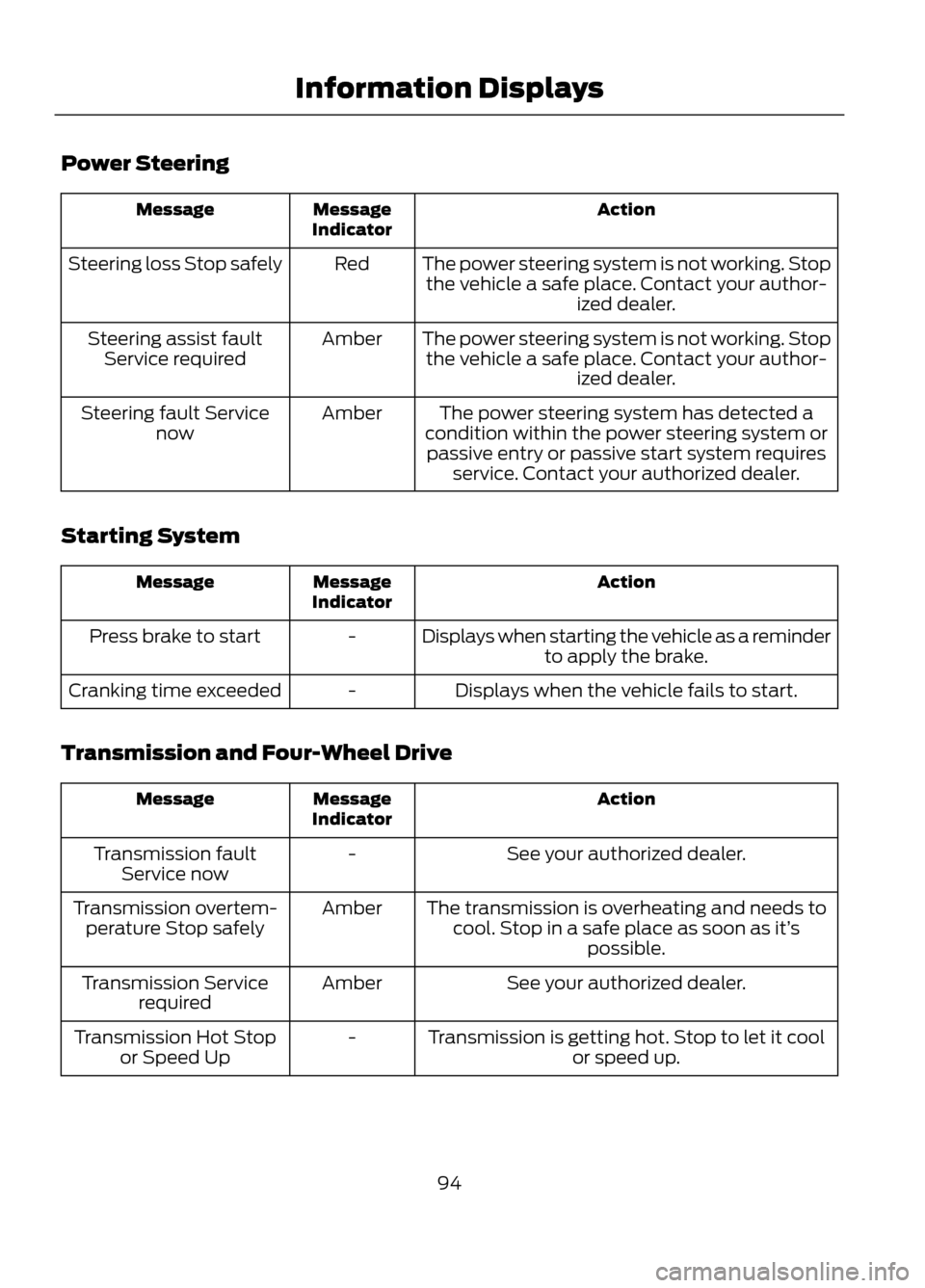
Power Steering
Action
Message
Indicator
Message
The power steering system is not working. Stopthe vehicle a safe place. Contact your author- ized dealer.
Red
Steering loss Stop safely
The power steering system is not working. Stopthe vehicle a safe place. Contact your author- ized dealer.
Amber
Steering assist fault
Service required
The power steering system has detected a
condition within the power steering system or passive entry or passive start system requires service. Contact your authorized dealer.
Amber
Steering fault Service
now
Starting System
Action
Message
Indicator
Message
Displays when starting the vehicle as a reminderto apply the brake.
-
Press brake to start
Displays when the vehicle fails to start.
-
Cranking time exceeded
Transmission and Four-Wheel Drive
Action
Message
Indicator
Message
See your authorized dealer.
-
Transmission fault
Service now
The transmission is overheating and needs tocool. Stop in a safe place as soon as it’ s
possible.
Amber
Transmission overtem-
perature Stop safely
See your authorized dealer.
Amber
Transmission Service
required
Transmission is getting hot. Stop to let it coolor speed up.
-
Transmission Hot Stop
or Speed Up
94
Information Displays
Page 95 of 423
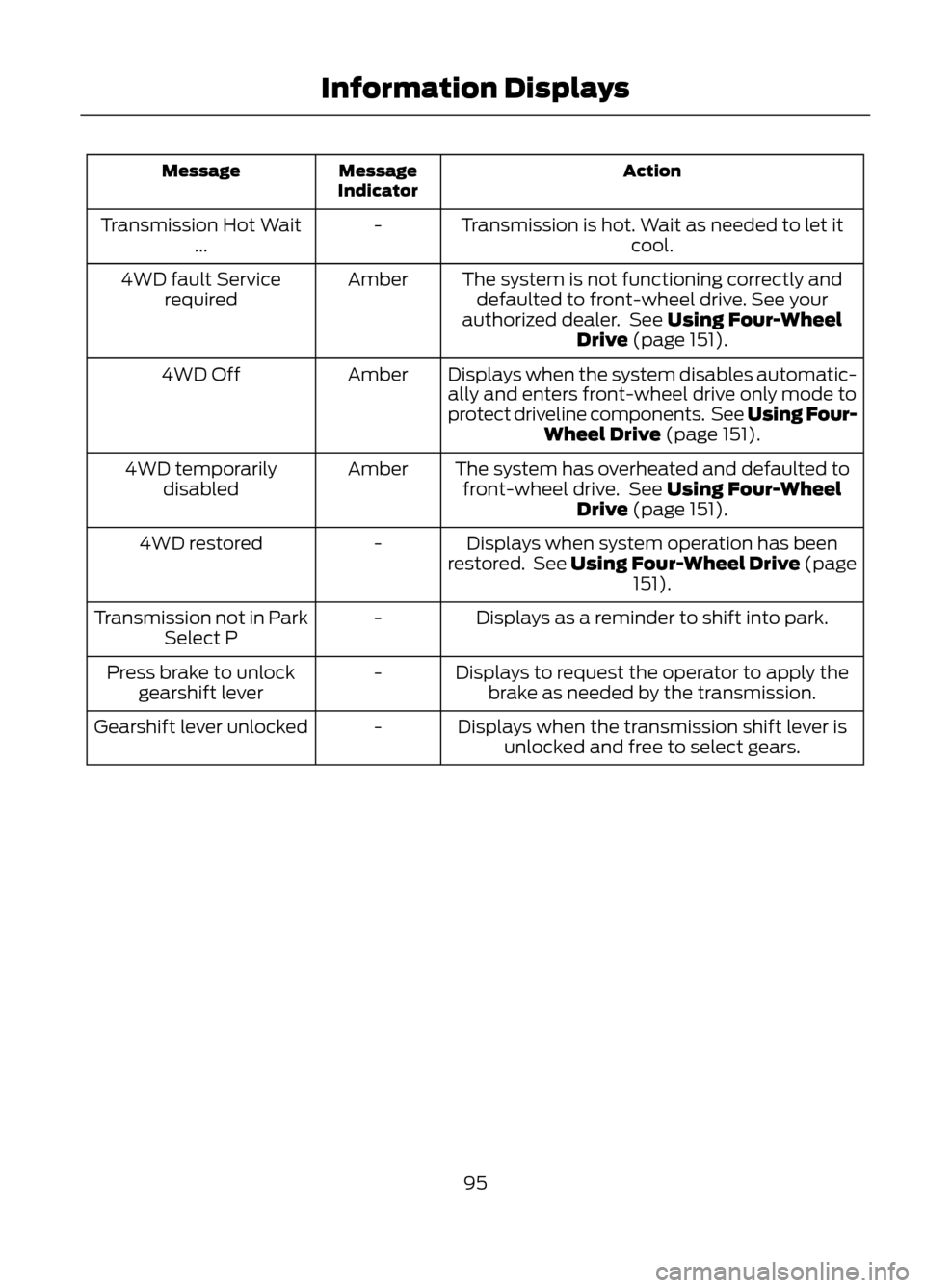
Action
Message
Indicator
Message
Transmission is hot. Wait as needed to let itcool.
-
Transmission Hot Wait
...
The system is not functioning correctly anddefaulted to front-wheel drive. See your
authorized dealer. See Using Four-Wheel Drive (page 151).
Amber
4WD fault Service
required
Displays when the system disables automatic-ally and enters front-wheel drive only mode to
protect driveline components. See Using Four- Wheel Drive (page 151).
Amber
4WD Off
The system has overheated and defaulted tofront-wheel drive. See Using Four-Wheel Drive (page 151).
Amber
4WD temporarily
disabled
Displays when system operation has been
restored. See Using Four-Wheel Drive (page 151).
-
4WD restored
Displays as a reminder to shift into park.
-
Transmission not in Park
Select P
Displays to request the operator to apply thebrake as needed by the transmission.
-
Press brake to unlock
gearshift lever
Displays when the transmission shift lever isunlocked and free to select gears.
-
Gearshift lever unlocked
95
Information Displays
Page 118 of 423
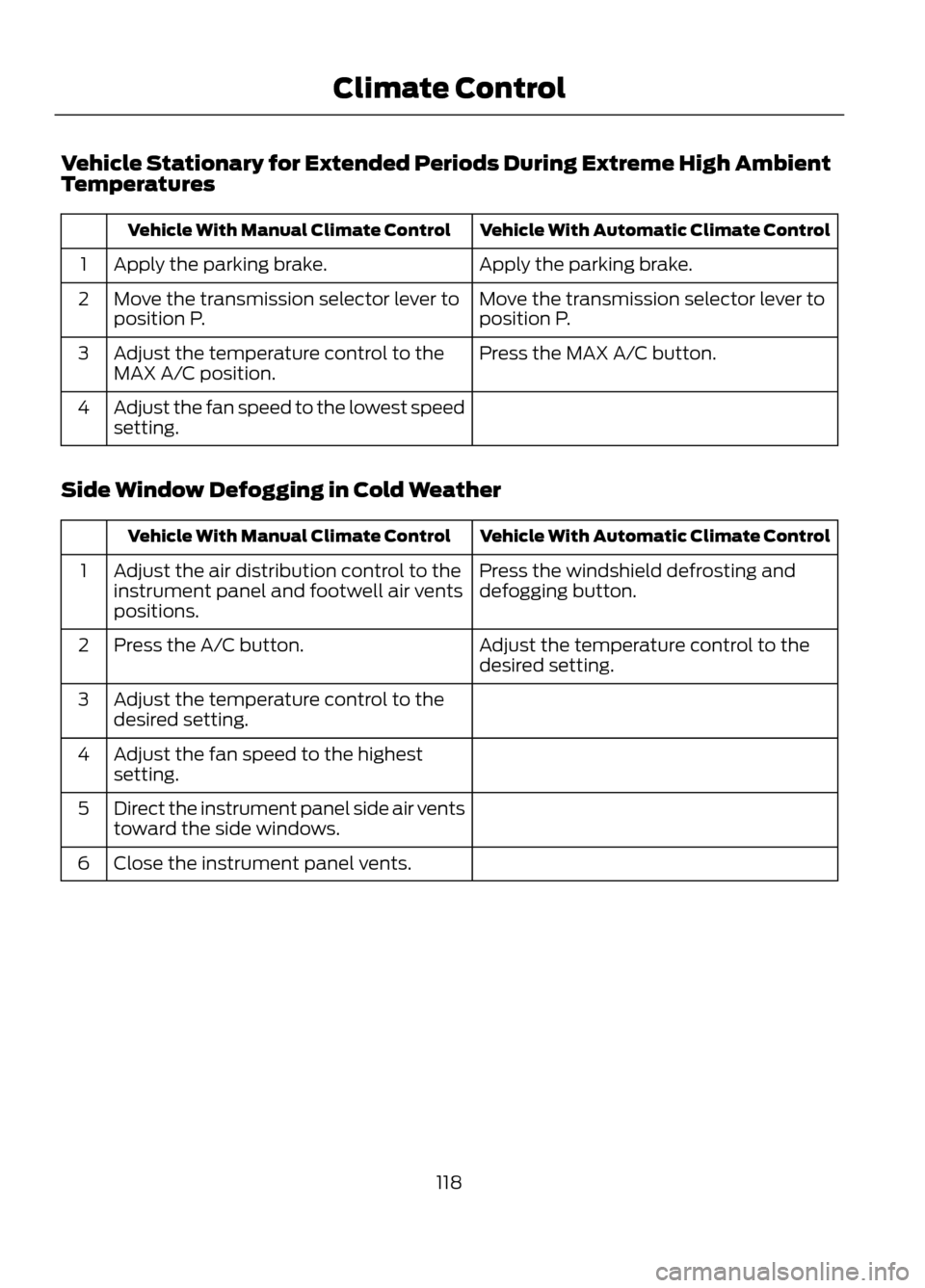
Vehicle Stationary for Extended Periods During Extreme High Ambient
Temperatures
Vehicle With Automatic Climate Control
Vehicle With Manual Climate Control
Apply the parking brake.
Apply the parking brake.
1
Move the transmission selector lever to
position P.
Move the transmission selector lever to
position P.
2
Press the MAX A/C button.
Adjust the temperature control to the
MAX A/C position.
3
Adjust the fan speed to the lowest speed
setting.
4
Side Window Defogging in Cold Weather
Vehicle With Automatic Climate Control
Vehicle With Manual Climate Control
Press the windshield defrosting and
defogging button.
Adjust the air distribution control to the
instrument panel and footwell air vents
positions.
1
Adjust the temperature control to the
desired setting.
Press the A/C button.
2
Adjust the temperature control to the
desired setting.
3
Adjust the fan speed to the highest
setting.
4
Direct the instrument panel side air vents
toward the side windows.
5
Close the instrument panel vents.
6
118
Climate Control
Page 135 of 423
GENERAL INFORMATION
If you disconnect the battery, your vehicle
may exhibit some unusual driving
characteristics for approximately 5 miles
(8 kilometers) after you reconnect it. This
is because the engine management system
must realign itself with the engine. You can
disregard any unusual driving
characteristics during this period.
WARNINGS
Extended idling at high engine
speeds can produce very high
temperatures in the engine and
exhaust system, creating the risk of fire or
other damage.
Do not park, idle or drive your vehicle
on dry grass or other dry ground
cover. The emission system heats up
the engine compartment and exhaust
system, creating the risk of fire.
Do not start the engine in a closed
garage or in other enclosed areas.
Exhaust fumes can be toxic. Always
open the garage door before you start the
engine.
If you smell exhaust fumes inside
your vehicle, have your vehicle
checked by your authorized dealer
immediately. Do not drive your vehicle if
you smell exhaust fumes.
This system meets all Canadian
interference-causing equipment standard
requirements regulating the impulse
electrical field or radio noise.
When you start the engine, avoid pressing
the accelerator pedal before and during
operation. Only use the accelerator pedal
when you have difficulty starting the
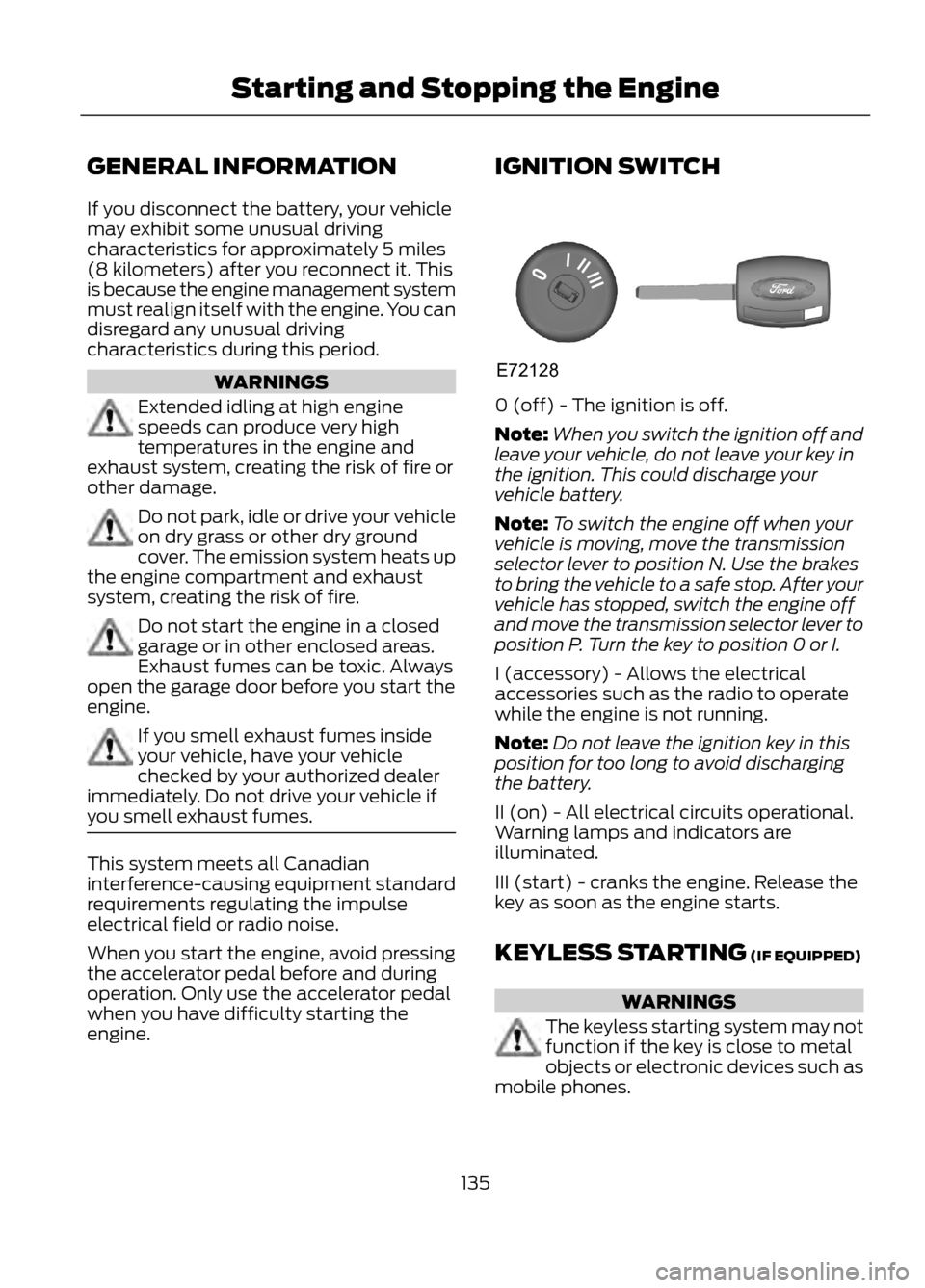
engine. IGNITION SWITCH
0 (off) - The ignition is off.
Note:
When you switch the ignition off and
leave your vehicle, do not leave your key in
the ignition. This could discharge your
vehicle battery.
Note: To switch the engine off when your
vehicle is moving, move the transmission
selector lever to position N. Use the brakes
to bring the vehicle to a safe stop. After your
vehicle has stopped, switch the engine off
and move the transmission selector lever to
position P. Turn the key to position 0 or I.
I (accessory) - Allows the electrical
accessories such as the radio to operate
while the engine is not running.
Note: Do not leave the ignition key in this
position for too long to avoid discharging
the battery.
II (on) - All electrical circuits operational.
Warning lamps and indicators are
illuminated.
III (start) - cranks the engine. Release the
key as soon as the engine starts.
KEYLESS STARTING (IF EQUIPPED)
WARNINGS
The keyless starting system may not
function if the key is close to metal
objects or electronic devices such as
mobile phones.
135
Starting and Stopping the Engine
E72128
Page 136 of 423
WARNINGS
Always check that the steering wheel
lock is deactivated before
attempting to move your vehicle.
Note:A valid key must be located inside
your vehicle to switch the ignition on and
start the engine.
Switching the Ignition On (Accessory
Mode)
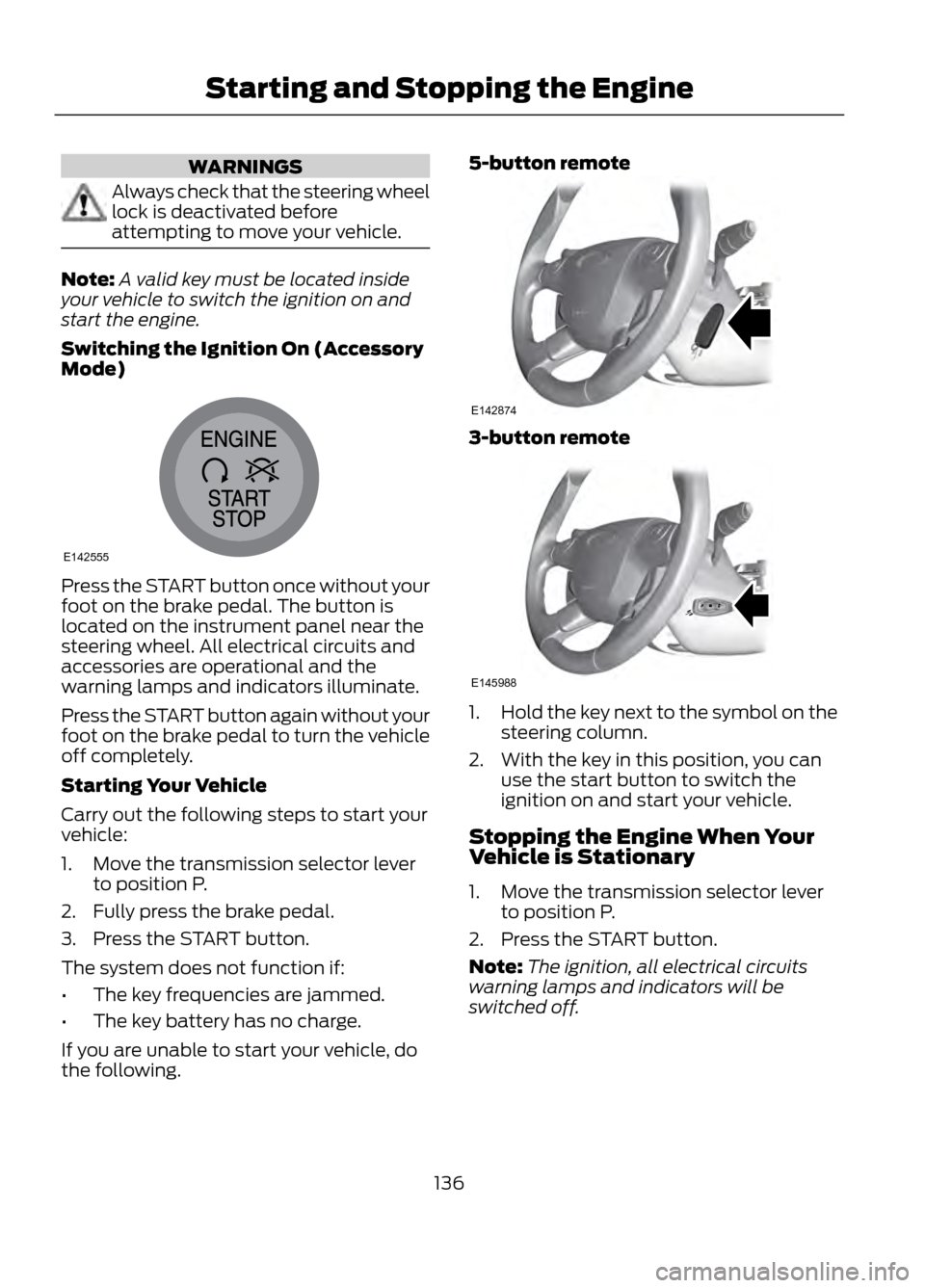
Press the START button once without your
foot on the brake pedal. The button is
located on the instrument panel near the
steering wheel. All electrical circuits and
accessories are operational and the
warning lamps and indicators illuminate.
Press the START button again without your
foot on the brake pedal to turn the vehicle
off completely.
Starting Your Vehicle
Carry out the following steps to start your
vehicle:
1. Move the transmission selector lever to position P.
2. Fully press the brake pedal.
3. Press the START button.
The system does not function if:
• The key frequencies are jammed.
• The key battery has no charge.
If you are unable to start your vehicle, do
the following. 5-button remote
3-button remote
1.
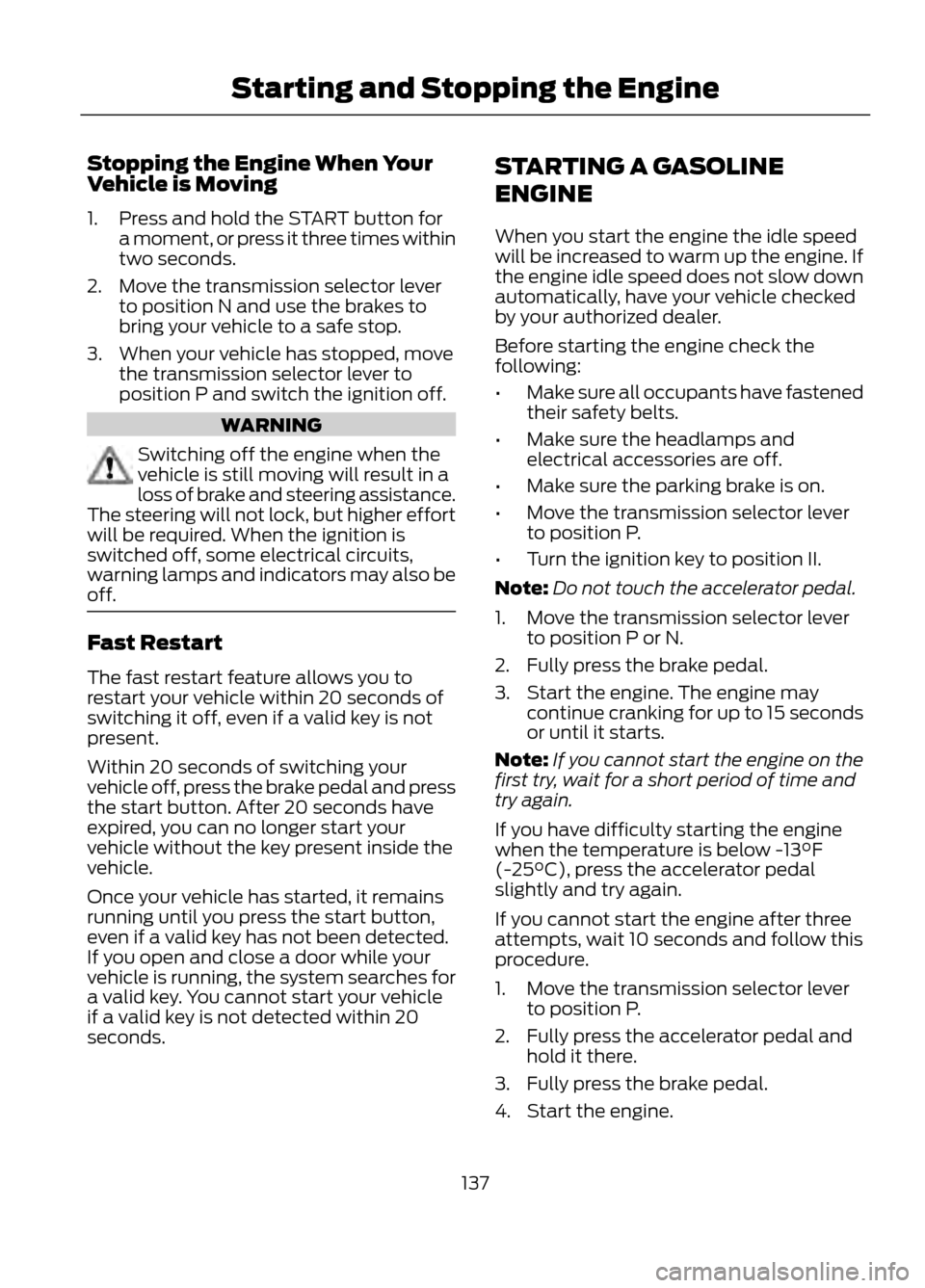
Hold the key next to the symbol on the
steering column.
2. With the key in this position, you can use the start button to switch the
ignition on and start your vehicle.
Stopping the Engine When Your
Vehicle is Stationary
1. Move the transmission selector lever to position P.
2. Press the START button.
Note: The ignition, all electrical circuits
warning lamps and indicators will be
switched off.
136
Starting and Stopping the Engine
E142555
E142874
E145988
Page 137 of 423
Stopping the Engine When Your
Vehicle is Moving
1. Press and hold the START button fora moment, or press it three times within
two seconds.
2. Move the transmission selector lever to position N and use the brakes to
bring your vehicle to a safe stop.
3. When your vehicle has stopped, move the transmission selector lever to
position P and switch the ignition off.
WARNING
Switching off the engine when the
vehicle is still moving will result in a
loss of brake and steering assistance.
The steering will not lock, but higher effort
will be required. When the ignition is
switched off, some electrical circuits,
warning lamps and indicators may also be
off.
Fast Restart
The fast restart feature allows you to
restart your vehicle within 20 seconds of
switching it off, even if a valid key is not
present.
Within 20 seconds of switching your
vehicle off, press the brake pedal and press
the start button. After 20 seconds have
expired, you can no longer start your
vehicle without the key present inside the
vehicle.
Once your vehicle has started, it remains
running until you press the start button,
even if a valid key has not been detected.
If you open and close a door while your
vehicle is running, the system searches for
a valid key. You cannot start your vehicle
if a valid key is not detected within 20
seconds. STARTING A GASOLINE
ENGINE
When you start the engine the idle speed
will be increased to warm up the engine. If
the engine idle speed does not slow down
automatically, have your vehicle checked
by your authorized dealer.
Before starting the engine check the
following:
•
Make sure all occupants have fastened
their safety belts.
• Make sure the headlamps and
electrical accessories are off.
• Make sure the parking brake is on.
• Move the transmission selector lever
to position P.
• Turn the ignition key to position II.
Note: Do not touch the accelerator pedal.
1. Move the transmission selector lever to position P or N.
2. Fully press the brake pedal.
3. Start the engine. The engine may continue cranking for up to 15 seconds
or until it starts.
Note: If you cannot start the engine on the
first try, wait for a short period of time and
try again.
If you have difficulty starting the engine
when the temperature is below -13°F
(-25°C), press the accelerator pedal
slightly and try again.
If you cannot start the engine after three
attempts, wait 10 seconds and follow this
procedure.
1. Move the transmission selector lever to position P.
2. Fully press the accelerator pedal and hold it there.
3. Fully press the brake pedal.
4. Start the engine.
137
Starting and Stopping the Engine