ignition FORD ESCAPE 2013 3.G Owner's Manual
[x] Cancel search | Manufacturer: FORD, Model Year: 2013, Model line: ESCAPE, Model: FORD ESCAPE 2013 3.GPages: 423, PDF Size: 4.59 MB
Page 71 of 423
Note:If you switch autolamps on in
conjunction with autowipers, low beam
headlamps will illuminate automatically
when the rain sensor activates the
windshield wipers continuously.
INSTRUMENT LIGHTING
DIMMER
Note: If you disconnect the battery or it
becomes discharged, the illuminated
components will switch to the maximum
setting.
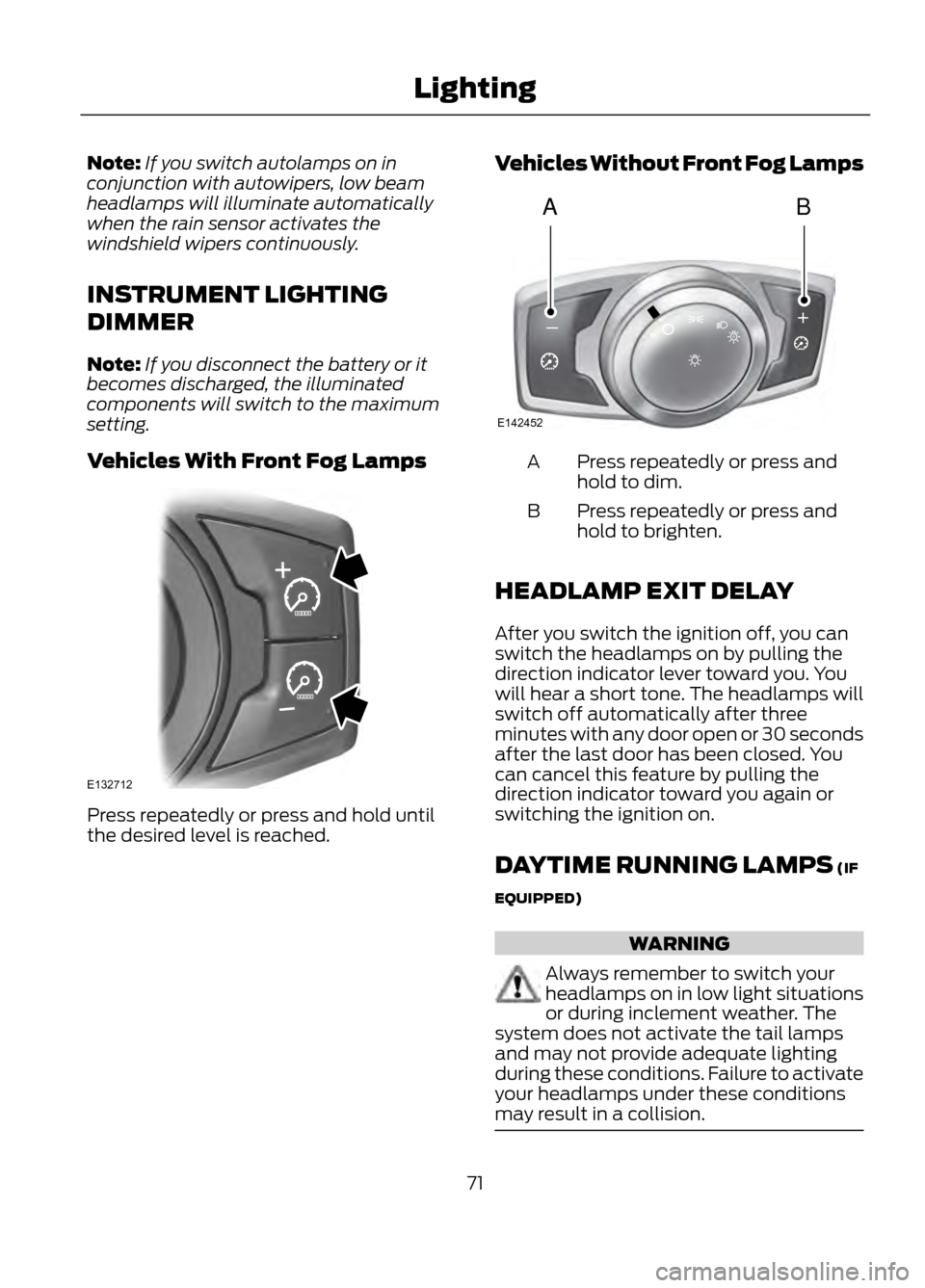
Vehicles With Front Fog Lamps
Press repeatedly or press and hold until
the desired level is reached. Vehicles Without Front Fog Lamps
Press repeatedly or press and
hold to dim.
A
Press repeatedly or press and
hold to brighten.
B
HEADLAMP EXIT DELAY
After you switch the ignition off, you can
switch the headlamps on by pulling the
direction indicator lever toward you. You
will hear a short tone. The headlamps will
switch off automatically after three
minutes with any door open or 30 seconds
after the last door has been closed. You
can cancel this feature by pulling the
direction indicator toward you again or
switching the ignition on.
DAYTIME RUNNING LAMPS (IF
EQUIPPED)
WARNING
Always remember to switch your
headlamps on in low light situations
or during inclement weather. The
system does not activate the tail lamps
and may not provide adequate lighting
during these conditions. Failure to activate
your headlamps under these conditions
may result in a collision.
71
Lighting
E132712
AB
A
E142452
Page 72 of 423
If equipped with halogen headlamps, the
system switches the low beam headlamps
on at a reduced intensity in day light
conditions.
If equipped with high intensity discharge
(HID) headlamps, the system switches the
fog lamps on in day light conditions.
To switch the system on, switch the
ignition on, and switch the lighting control
to the off, autolamp, or parking lamp
position.
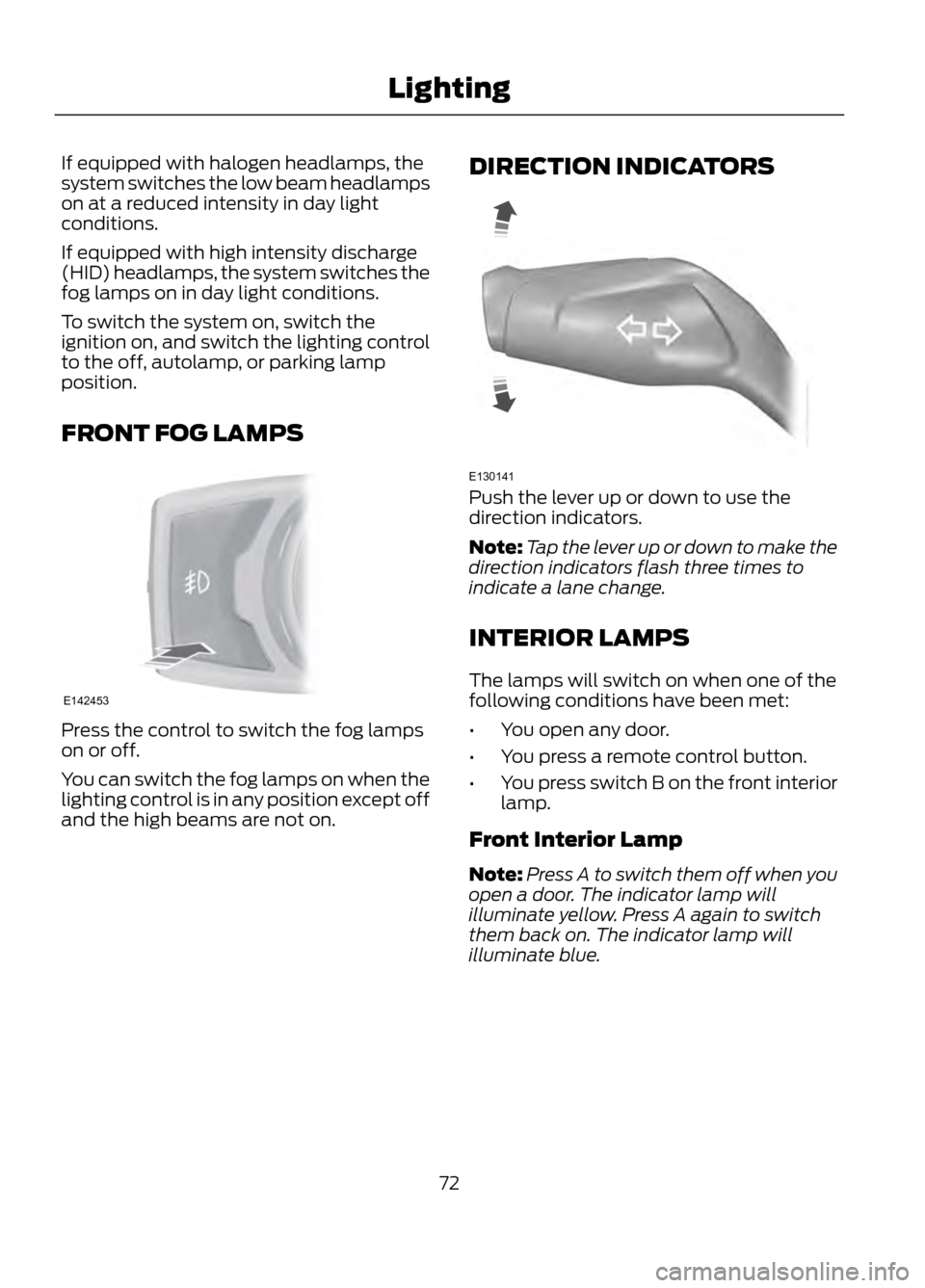
FRONT FOG LAMPS
Press the control to switch the fog lamps
on or off.
You can switch the fog lamps on when the
lighting control is in any position except off
and the high beams are not on.DIRECTION INDICATORS
Push the lever up or down to use the
direction indicators.
Note:
Tap the lever up or down to make the
direction indicators flash three times to
indicate a lane change.
INTERIOR LAMPS
The lamps will switch on when one of the
following conditions have been met:
• You open any door.
• You press a remote control button.
• You press switch B on the front interior
lamp.
Front Interior Lamp
Note: Press A to switch them off when you
open a door. The indicator lamp will
illuminate yellow. Press A again to switch
them back on. The indicator lamp will
illuminate blue.
72
Lighting
E142453
E130141
Page 73 of 423

Door function switch.
A
All lamps on and off switch.
B
Individual lamp on and off
switch.
C
Rear Interior Lamp (If Equipped)
You can switch individual map lamps on
independently by pressing switch A.
AMBIENT LIGHTING (IF EQUIPPED)
The ambient lighting system illuminates
the interior with a choice of several colors.
The ambient lighting control is located in
the overhead console.
Color palette
A
Control knob
B
Search mode
C
Rotate B past the first detent to switch on
and adjust to the desired brightness.
Press A to cycle through the color choices.
Press C to switch on all interior lamps and
the ambient lighting. Press C again to
switch off the interior lamps and return the
ambient lighting to the previously selected
color.
The ambient lighting will switch on when
the following conditions have been met:
• you switch the ignition on
• you switch the headlamps on
• the outside ambient light level is low.
The ambient lighting will remain on until
you switch the ignition off and one of the
following conditions have been met:
• you lock your vehicle
• the accessory delay timer expires.
73
Lighting
B
C
A
E142454
A
E142455
ABC
E142456
Page 75 of 423
Resetting the Bounce-Back Feature
WARNING
The bounce-back function remains
deactivated until you have reset the
memory.
If you have disconnected the battery, you
must reset the bounce-back memory
separately for each window.
1. Lift and hold the switch until thewindow is fully closed.
2. Release the switch.
3. Lift the switch again for one more second.
4. Press and hold the switch until the window is fully open.
5. Release the switch.
6. Lift and hold the switch until the window is fully closed.
7. Open the window and then try to close
it automatically.
8. Reset and repeat the procedure if the window does not close automatically.
Accessory Delay (If Equipped)
You can use the window switches for
several minutes after you have switched
the ignition off or until either front door is
opened.
EXTERIOR MIRRORS
Power Exterior Mirrors
WARNING
Do not adjust the mirrors when your
vehicle is moving.
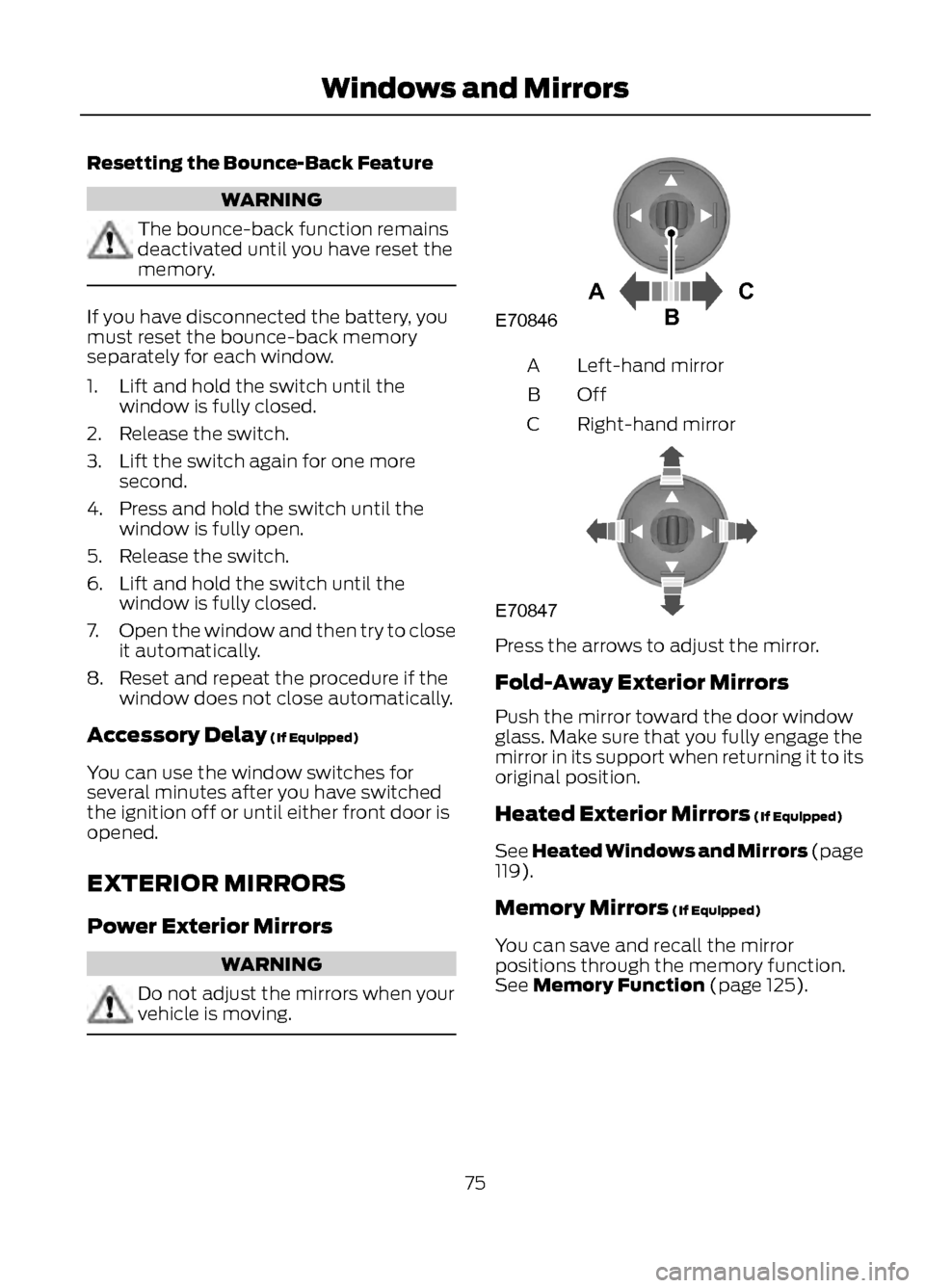
Left-hand mirror
A
OffB
Right-hand mirror
C
Press the arrows to adjust the mirror.
Fold-Away Exterior Mirrors
Push the mirror toward the door window
glass. Make sure that you fully engage the
mirror in its support when returning it to its
original position.
Heated Exterior Mirrors (If Equipped)
See Heated Windows and Mirrors (page
119).
Memory Mirrors (If Equipped)
You can save and recall the mirror
positions through the memory function.
See Memory Function (page 125).
75
Windows and Mirrors
AC
B
E70846
E70847
Page 80 of 423
Odometer
Located in the bottom of the information
display Registers the accumulated
distance your vehicle has traveled.
Outside Air Temperature
Shows the outside air temperature.
Trip Computer
See Trip Computer (page 86).
Vehicle Settings and Personalization
See General Information (page 84).
Engine Coolant Temperature
Gauge
WARNING
Never remove the coolant reservoir
cap while the engine is running or hot.
At normal operating temperature, the
needle will remain in the center section.
Note:Do not restart the engine until the
cause of overheating has been resolved.
If the needle enters the red section, the
engine is overheating. Stop the engine,
switch the ignition off and determine the
cause once the engine has cooled down.
See Engine Coolant Check (page 222). Fuel Gauge
Switch the ignition on. The fuel gauge will
indicate approximately how much fuel is
left in the fuel tank. The fuel gauge may
vary slightly when your vehicle is moving
or on a gradient. The arrow adjacent to the
fuel pump symbol indicates on which side
of the vehicle the fuel filler door is located.
WARNING LAMPS AND
INDICATORS
The following warning lamps and
indicators will alert you to a vehicle
condition that may become serious. Some
lamps will illuminate when you start your
vehicle to make sure they work. If any
lamps remain on after starting your vehicle,
refer to the respective system warning
lamp for further information.
Note:
Some warning indicators appear in
the information display and function the
same as a warning lamp but do not display
when you start your vehicle.
Airbag - Front
If it fails to illuminate when you
start your vehicle, continues to
flash or remains on, it indicates
a malfunction. Have the system checked
by your authorized dealer.
Anti-Lock Braking System
If it illuminates when you are
driving, this indicates a
malfunction. You will continue
to have the normal braking system
(without ABS) unless the brake system
warning lamp is also illuminated. Have the
system checked by your authorized dealer.
80
Instrument Cluster
123
4
5
6 7 8 9 1011 12 13 14 15
E142800
Page 81 of 423
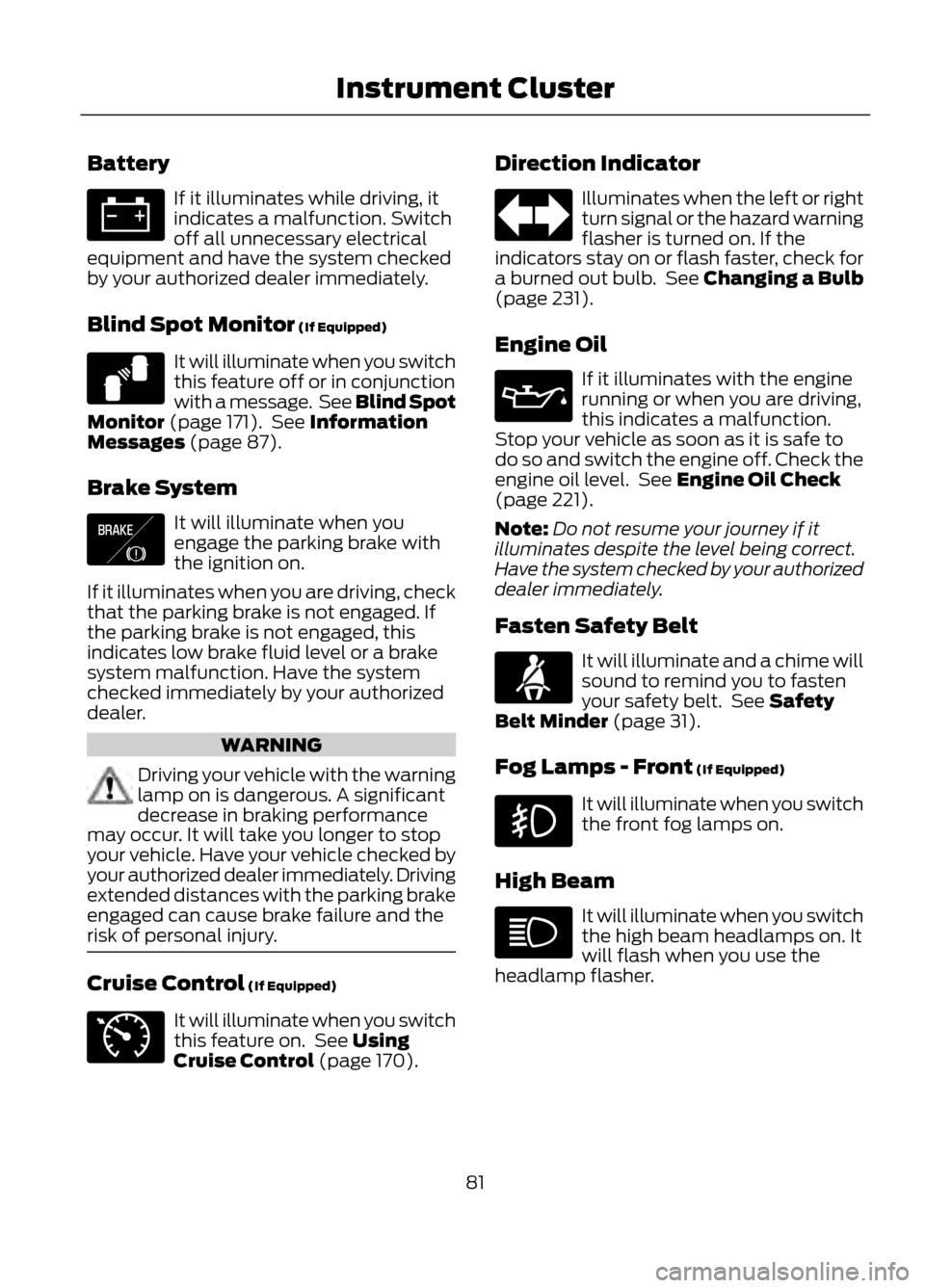
Battery
If it illuminates while driving, it
indicates a malfunction. Switch
off all unnecessary electrical
equipment and have the system checked
by your authorized dealer immediately.
Blind Spot Monitor (If Equipped)
It will illuminate when you switch
this feature off or in conjunction
with a message. See Blind Spot
Monitor (page 171). See Information
Messages (page 87).
Brake System
It will illuminate when you
engage the parking brake with
the ignition on.
If it illuminates when you are driving, check
that the parking brake is not engaged. If
the parking brake is not engaged, this
indicates low brake fluid level or a brake
system malfunction. Have the system
checked immediately by your authorized
dealer.
WARNING
Driving your vehicle with the warning
lamp on is dangerous. A significant
decrease in braking performance
may occur. It will take you longer to stop
your vehicle. Have your vehicle checked by
your authorized dealer immediately. Driving
extended distances with the parking brake
engaged can cause brake failure and the
risk of personal injury.
Cruise Control (If Equipped)
It will illuminate when you switch
this feature on. See Using
Cruise Control (page 170). Direction Indicator
Illuminates when the left or right
turn signal or the hazard warning
flasher is turned on. If the
indicators stay on or flash faster, check for
a burned out bulb. See Changing a Bulb
(page 231).
Engine Oil
If it illuminates with the engine
running or when you are driving,
this indicates a malfunction.
Stop your vehicle as soon as it is safe to
do so and switch the engine off. Check the
engine oil level. See Engine Oil Check
(page 221).
Note: Do not resume your journey if it
illuminates despite the level being correct.
Have the system checked by your authorized
dealer immediately.
Fasten Safety Belt
It will illuminate and a chime will
sound to remind you to fasten
your safety belt. See Safety
Belt Minder (page 31).
Fog Lamps - Front (If Equipped)
It will illuminate when you switch
the front fog lamps on.
High Beam
It will illuminate when you switch
the high beam headlamps on. It
will flash when you use the
headlamp flasher.
81
Instrument Cluster
E124823
E138644
E71340
Page 82 of 423
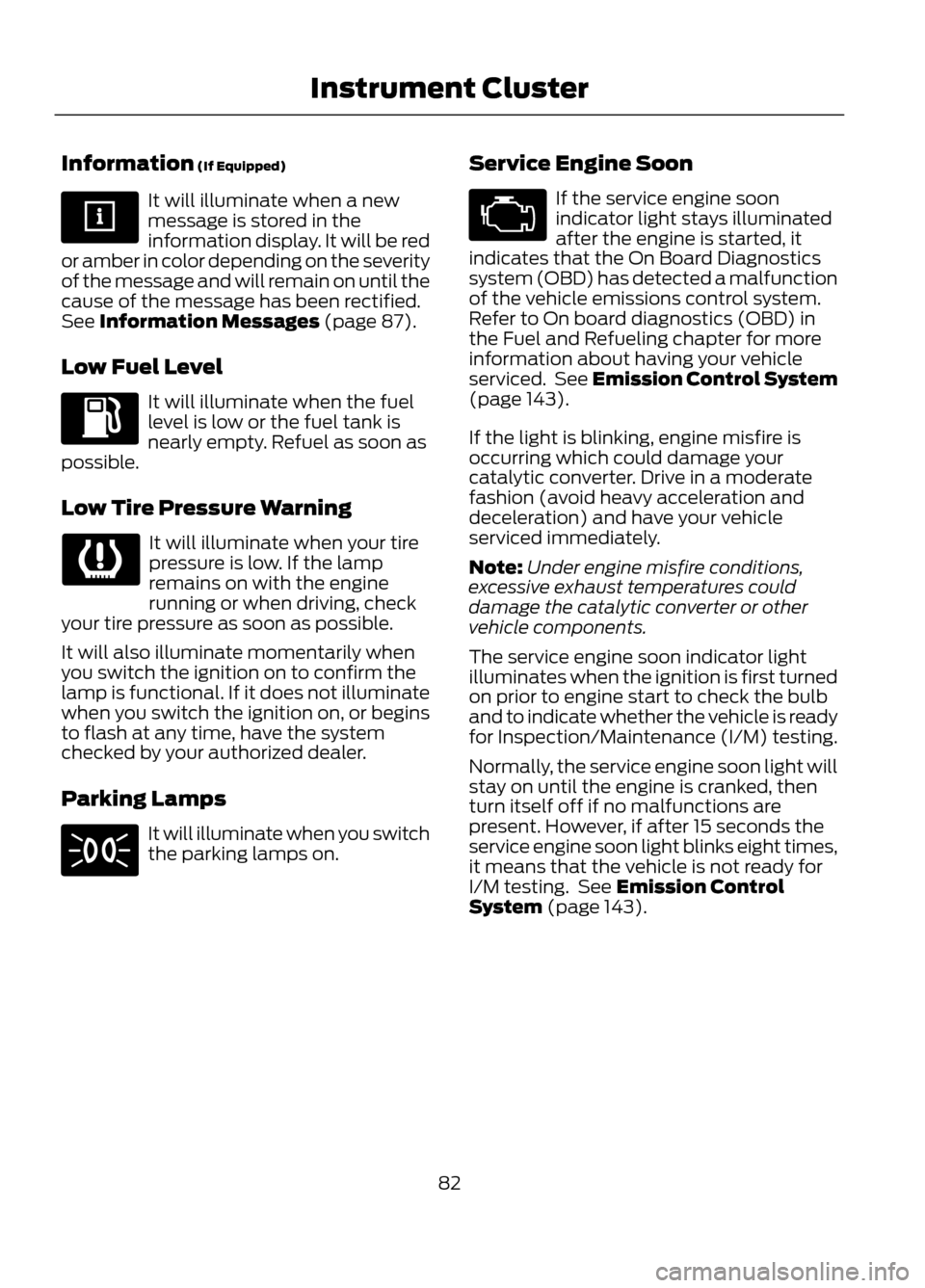
Information (If Equipped)
It will illuminate when a new
message is stored in the
information display. It will be red
or amber in color depending on the severity
of the message and will remain on until the
cause of the message has been rectified.
See Information Messages (page 87).
Low Fuel Level
It will illuminate when the fuel
level is low or the fuel tank is
nearly empty. Refuel as soon as
possible.
Low Tire Pressure Warning
It will illuminate when your tire
pressure is low. If the lamp
remains on with the engine
running or when driving, check
your tire pressure as soon as possible.
It will also illuminate momentarily when
you switch the ignition on to confirm the
lamp is functional. If it does not illuminate
when you switch the ignition on, or begins
to flash at any time, have the system
checked by your authorized dealer.
Parking Lamps
It will illuminate when you switch
the parking lamps on. Service Engine Soon
If the service engine soon
indicator light stays illuminated
after the engine is started, it
indicates that the On Board Diagnostics
system (OBD) has detected a malfunction
of the vehicle emissions control system.
Refer to On board diagnostics (OBD) in
the Fuel and Refueling chapter for more
information about having your vehicle
serviced. See Emission Control System
(page 143).
If the light is blinking, engine misfire is
occurring which could damage your
catalytic converter. Drive in a moderate
fashion (avoid heavy acceleration and
deceleration) and have your vehicle
serviced immediately.
Note: Under engine misfire conditions,
excessive exhaust temperatures could
damage the catalytic converter or other
vehicle components.
The service engine soon indicator light
illuminates when the ignition is first turned
on prior to engine start to check the bulb
and to indicate whether the vehicle is ready
for Inspection/Maintenance (I/M) testing.
Normally, the service engine soon light will
stay on until the engine is cranked, then
turn itself off if no malfunctions are
present. However, if after 15 seconds the
service engine soon light blinks eight times,
it means that the vehicle is not ready for
I/M testing. See Emission Control
System (page 143).
82
Instrument Cluster
Page 83 of 423
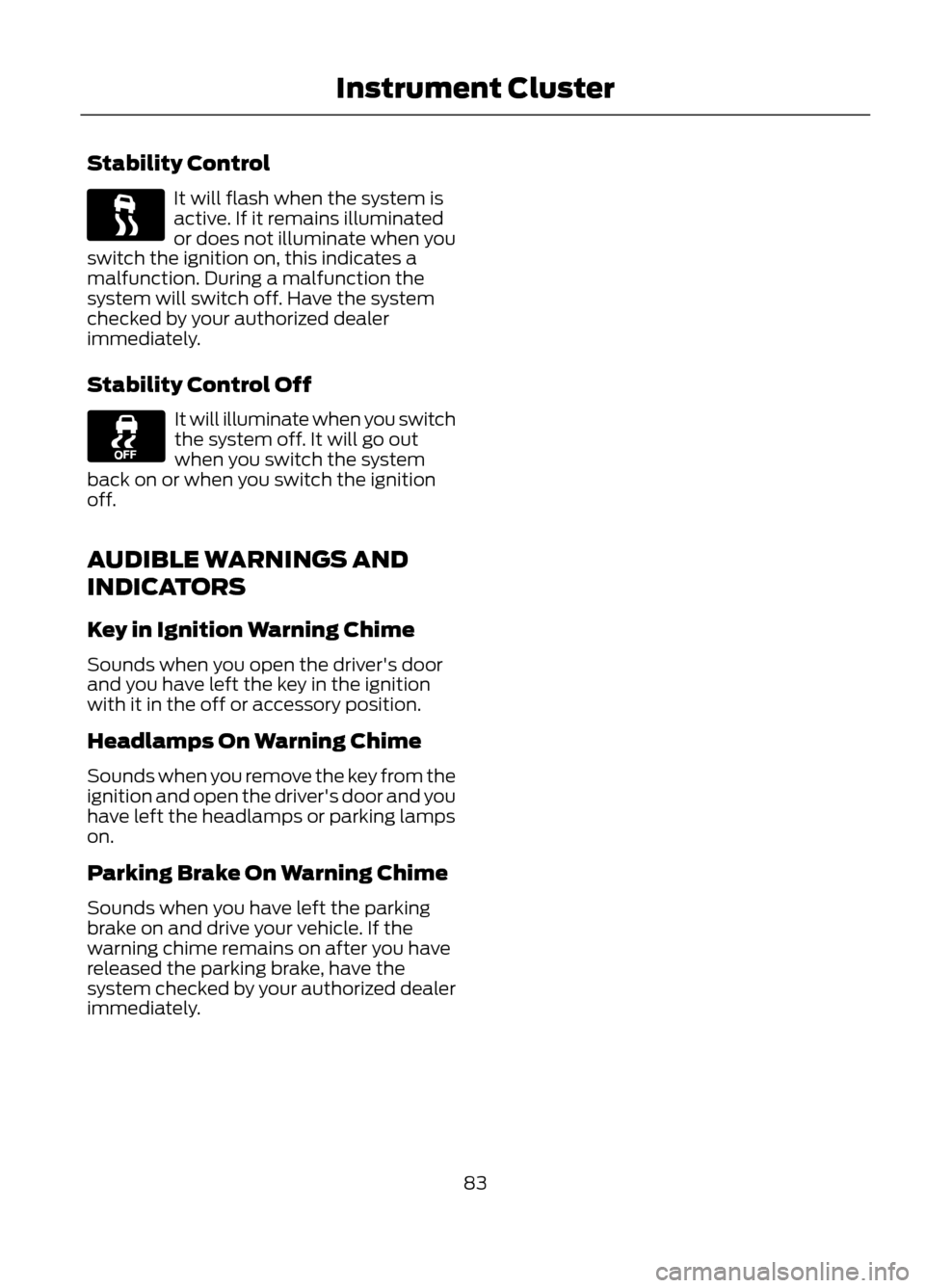
Stability Control
It will flash when the system is
active. If it remains illuminated
or does not illuminate when you
switch the ignition on, this indicates a
malfunction. During a malfunction the
system will switch off. Have the system
checked by your authorized dealer
immediately.
Stability Control Off
It will illuminate when you switch
the system off. It will go out
when you switch the system
back on or when you switch the ignition
off.
AUDIBLE WARNINGS AND
INDICATORS
Key in Ignition Warning Chime
Sounds when you open the driver's door
and you have left the key in the ignition
with it in the off or accessory position.
Headlamps On Warning Chime
Sounds when you remove the key from the
ignition and open the driver's door and you
have left the headlamps or parking lamps
on.
Parking Brake On Warning Chime
Sounds when you have left the parking
brake on and drive your vehicle. If the
warning chime remains on after you have
released the parking brake, have the
system checked by your authorized dealer
immediately.
83
Instrument Cluster
Page 88 of 423
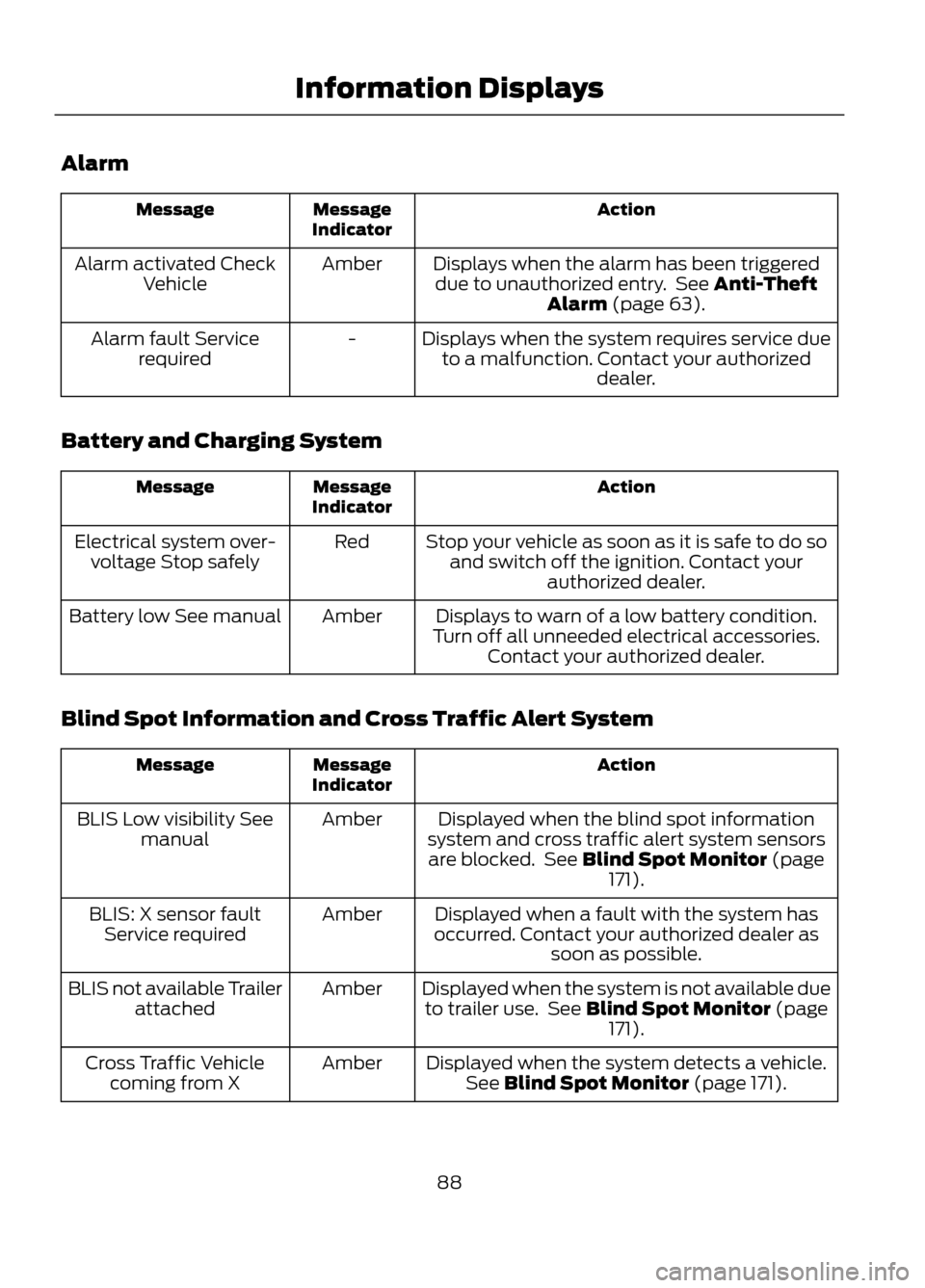
Alarm
Action
Message
Indicator
Message
Displays when the alarm has been triggereddue to unauthorized entry. See Anti-Theft Alarm (page 63).
Amber
Alarm activated Check
Vehicle
Displays when the system requires service dueto a malfunction. Contact your authorized dealer.
-
Alarm fault Service
required
Battery and Charging System
Action
Message
Indicator
Message
Stop your vehicle as soon as it is safe to do soand switch off the ignition. Contact your authorized dealer.
Red
Electrical system over-
voltage Stop safely
Displays to warn of a low battery condition.
Turn off all unneeded electrical accessories. Contact your authorized dealer.
Amber
Battery low See manual
Blind Spot Information and Cross Traffic Alert System
Action
Message
Indicator
Message
Displayed when the blind spot information
system and cross traffic alert system sensors are blocked. See Blind Spot Monitor (page 171).
Amber
BLIS Low visibility See
manual
Displayed when a fault with the system has
occurred. Contact your authorized dealer as soon as possible.
Amber
BLIS: X sensor fault
Service required
Displayed when the system is not available dueto trailer use. See Blind Spot Monitor (page 171).
Amber
BLIS not available Trailer
attached
Displayed when the system detects a vehicle.See Blind Spot Monitor (page 171).
Amber
Cross Traffic Vehicle
coming from X
88
Information Displays
Page 102 of 423
Seek: Press to go to the next station up the radio frequency band or the next
track on a CD.
K
ON/OFF: Press to switch the audio system on or off by pressing the button.
Turn the dial to adjust the volume.
L
Seek: Press to go to the next station down the radio frequency band or the
previous track on a CD.
M
Function button 2: Press to select different functions of the audio system
depending on which mode (i.e. radio or CD) you are in.
N
Function button 1: Press to select different functions of the audio system
depending on which mode (i.e. radio or CD) you are in.
O
MENU: Press to access different audio system features. See Menu Structure
later in this chapter.
P
PHONE: Press to access the phone features of the SYNC® system by pressing
MENU, then PHONE. See SYNC® (page 279).
Q
AUX: Press to access the media features of the SYNC® system by pressing
MENU, then AUX. See SYNC® (page 279).
R
RADIO: Press to access different radio features by pressing RADIO, then MENU.
See Menu Structure later in this chapter.
S
CD: Press to access different CD features by pressing CD, then MENU. See
Menu Structure later in this chapter.
T
AUDIO UNIT - VEHICLES WITH:
AM/FM/CD/SATELLITE
RADIO/SYNC
WARNING
Driving while distracted can result in
loss of vehicle control, accident and
injury. Ford strongly recommends
that you use extreme caution when using
any device or feature that may take your
focus off the road. Your primary
responsibility is the safe operation of the
vehicle. We recommend against the use
of any handheld device while driving,
encourage the use of voice-operated
systems when possible and that you
become aware of applicable state and
local laws that may affect use of electronic
devices while driving.
Note: Your audio system can operate for
up to one hour after the ignition is turned
off. Press the ON/OFF control to operate
the system with the ignition turned off. The
system automatically turns off after one
hour.
Note: Some features such as SIRIUS
satellite radio may not be available in your
location. Check with your authorized dealer.
102
Audio System