steering wheel FORD ESCAPE 2013 3.G Owner's Manual
[x] Cancel search | Manufacturer: FORD, Model Year: 2013, Model line: ESCAPE, Model: FORD ESCAPE 2013 3.GPages: 423, PDF Size: 4.59 MB
Page 165 of 423
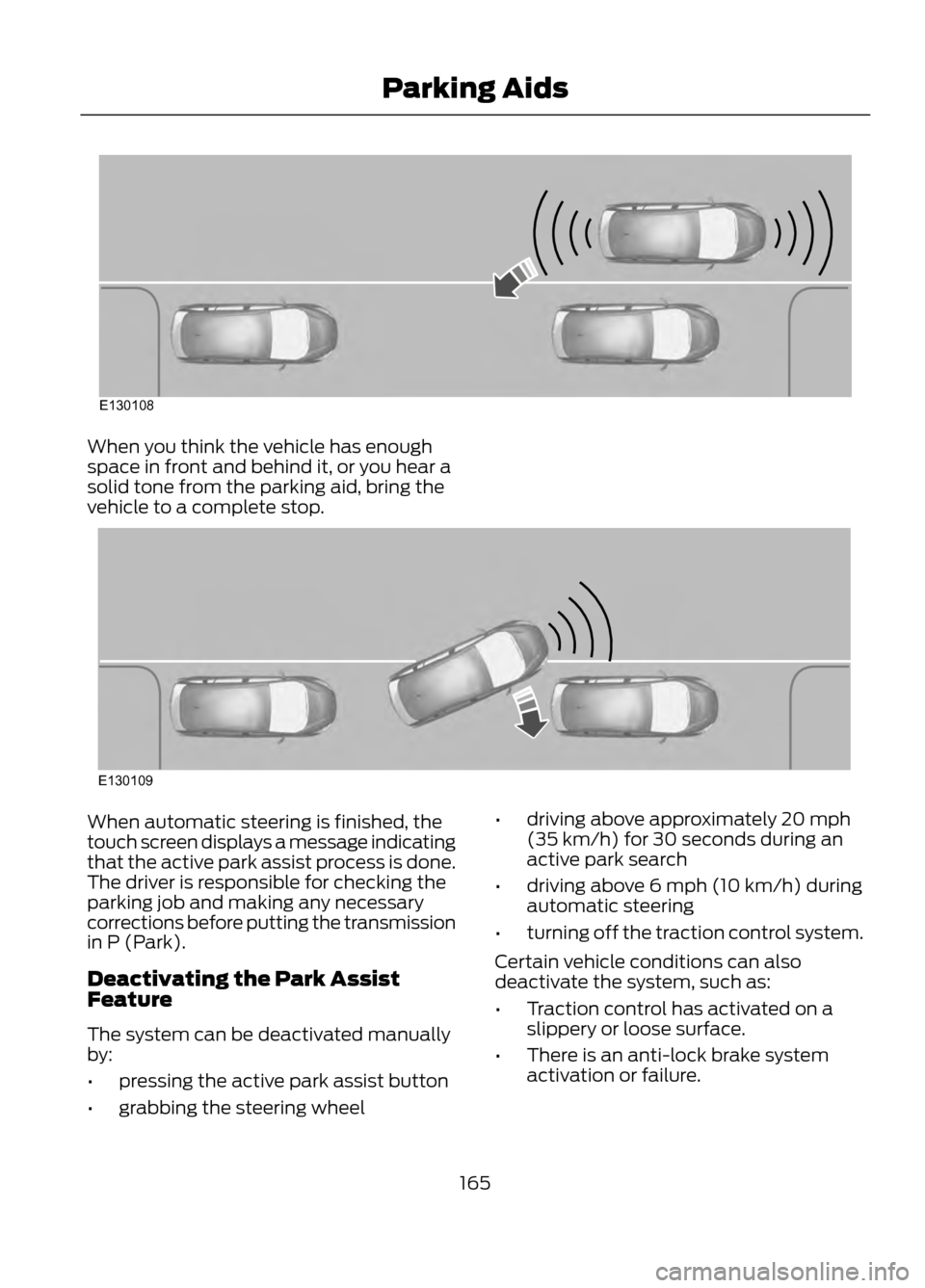
When you think the vehicle has enough
space in front and behind it, or you hear a
solid tone from the parking aid, bring the
vehicle to a complete stop.
When automatic steering is finished, the
touch screen displays a message indicating
that the active park assist process is done.
The driver is responsible for checking the
parking job and making any necessary
corrections before putting the transmission
in P (Park).
Deactivating the Park Assist
Feature
The system can be deactivated manually
by:
•pressing the active park assist button
• grabbing the steering wheel •
driving above approximately 20 mph
(35 km/h) for 30 seconds during an
active park search
• driving above 6 mph (10 km/h) during
automatic steering
• turning off the traction control system.
Certain vehicle conditions can also
deactivate the system, such as:
• Traction control has activated on a
slippery or loose surface.
• There is an anti-lock brake system
activation or failure.
165
Parking Aids
E130108
E130109
Page 166 of 423
•Any door (except the driver ’s) opens.
• Something touches the steering wheel. If a problem occurs with the system, a
warning message is displayed, followed
by a chime. Occasional system messages
may occur in normal operation. For
recurring or frequent system faults, contact
an authorized dealer to have your vehicle
serviced.
Troubleshooting the System
The system does not look for a space
The traction control system may be off
Any door (except the driver ’s) may not be completely closed
The system does not offer a particular space
Something may be contacting the front bumper or side sensors
There is not enough room on both sides of the vehicle in order to park
There is not enough space for the parking maneuver on the opposite side of the parking
space
The vehicle is farther than 5 ft (1.5 m) from the parking space
The vehicle is closer than 16 in. (40 cm) from neighboring parked vehicles
The transmission is in R (Reverse); the vehicle must be moving forward to detect a
parking space
The system does not position the vehicle where I want in the space
The vehicle is rolling in the opposite direction of the transmission (i.e. rolling forward
when R [Reverse] is selected)
The transmission is in R (Reverse); the vehicle must be moving forward to detect a
parking space
An irregular curb along the parking space prevents the system from aligning the vehicle
properly
Vehicles or objects bordering the space may not be positioned correctly
The vehicle was pulled too far past the parking space. The system performs best when
you drive the same distance past the parking space
166
Parking Aids
Page 169 of 423
Active guidelines are only shown with fixed
guidelines. To use active guidelines, turn
the steering wheel to point the guidelines
toward an intended path. If the steering
wheel position is changed while reversing,
the vehicle might deviate from the original
intended path.
The fixed and active guidelines fade in and
out depending on the steering wheel
position. The active guidelines are not
shown when the steering wheel position
is straight.
Always use caution while reversing.
Objects in the red zone are closest to your
vehicle and objects in the green zone are
farther away. Objects are getting closer to
your vehicle as they move from the green
zone to the yellow or red zones. Use the
side view mirrors and rear view mirror to
get better coverage on both sides and rear
of the vehicle.
Selectable settings for this feature are
ACTIVE + FIXED, FIXED and OFF.
Visual Park Aid Alert
Note:Visual park alert is only available
when the transmission is in R (Reverse).
Note: The reverse sensing system is not
effective at speeds above 3 mph (5 km/h)
and may not detect certain angular or
moving objects.
The system uses red, yellow and green
highlights which appear on top of the video
image when an object is detected by the
reverse sensing system. The alert highlights
the closest object detected. The reverse
sensing alert can be disabled and if visual
park aid alert is enabled, highlighted areas
are still displayed.
Selectable settings for this feature are ON
and OFF. Manual Zoom
WARNING
When manual zoom is on, the full
area behind the vehicle is not shown.
Be aware of your surroundings when
using the manual zoom feature.
Note: Manual zoom is only available when
the transmission is in R (Reverse).
Note: When manual zoom is enabled, only
the centerline is shown.
This allows you to get a closer view of an
object behind the vehicle. The zoomed
image keeps the bumper in the image to
provide a reference. The zoom is only
active while the transmission is in R
(Reverse). When the transmission is
shifted out of R (Reverse), the feature
automatically turns off and must be reset
when it is used again.
Selectable settings for this feature are OFF,
Level 1, Level 2 or Level 3. Press the up and
down arrows to change the view. The
selection level appears between the
buttons (i.e. Level 1). The default setting
for the manual zoom is OFF.
Rear Camera Delay
When shifting the transmission out of R
(Reverse) and into any gear other than P
(Park), the camera image remains in the
display until the vehicle speed reaches 5
mph (8 km/h). This occurs when the rear
camera delay feature is on, or until a radio
button is selected.
Selectable settings for this feature are ON
and OFF. The default setting for the rear
camera delay is OFF.
169
Parking Aids
Page 191 of 423
When Towing a Trailer
•Do not drive faster than 70 mph (113
km/h) during the first 500 miles (800
kilometers) and do not make
full-throttle starts.
• Check your hitch, electrical connections
and trailer wheel lug nuts thoroughly
after you have traveled 50 miles (80
km).
• Place the gearshift lever in position P
to aid in engine and transmission
cooling and A/C efficiency during hot
weather while stopped in traffic.
• Turn off the speed control. The speed
control may turn off automatically
when you are towing on long, steep
grades.
• Shift to a lower gear when driving down
a long or steep hill. Do not apply the
brakes continuously, as they may
overheat and become less effective.
• If your transmission is equipped with
the grade assist feature, use this
feature when towing. This provides
engine braking and helps eliminate
excessive transmission shifting for
optimum fuel economy and
transmission cooling.
• Allow more distance for stopping with
a trailer attached; anticipate stops and
brake gradually.
• Avoid parking on a grade. However, if
you must park on a grade, place wheel
chocks under the trailer's wheels.
TOWING POINTS (IF EQUIPPED)
Towing Eye Location
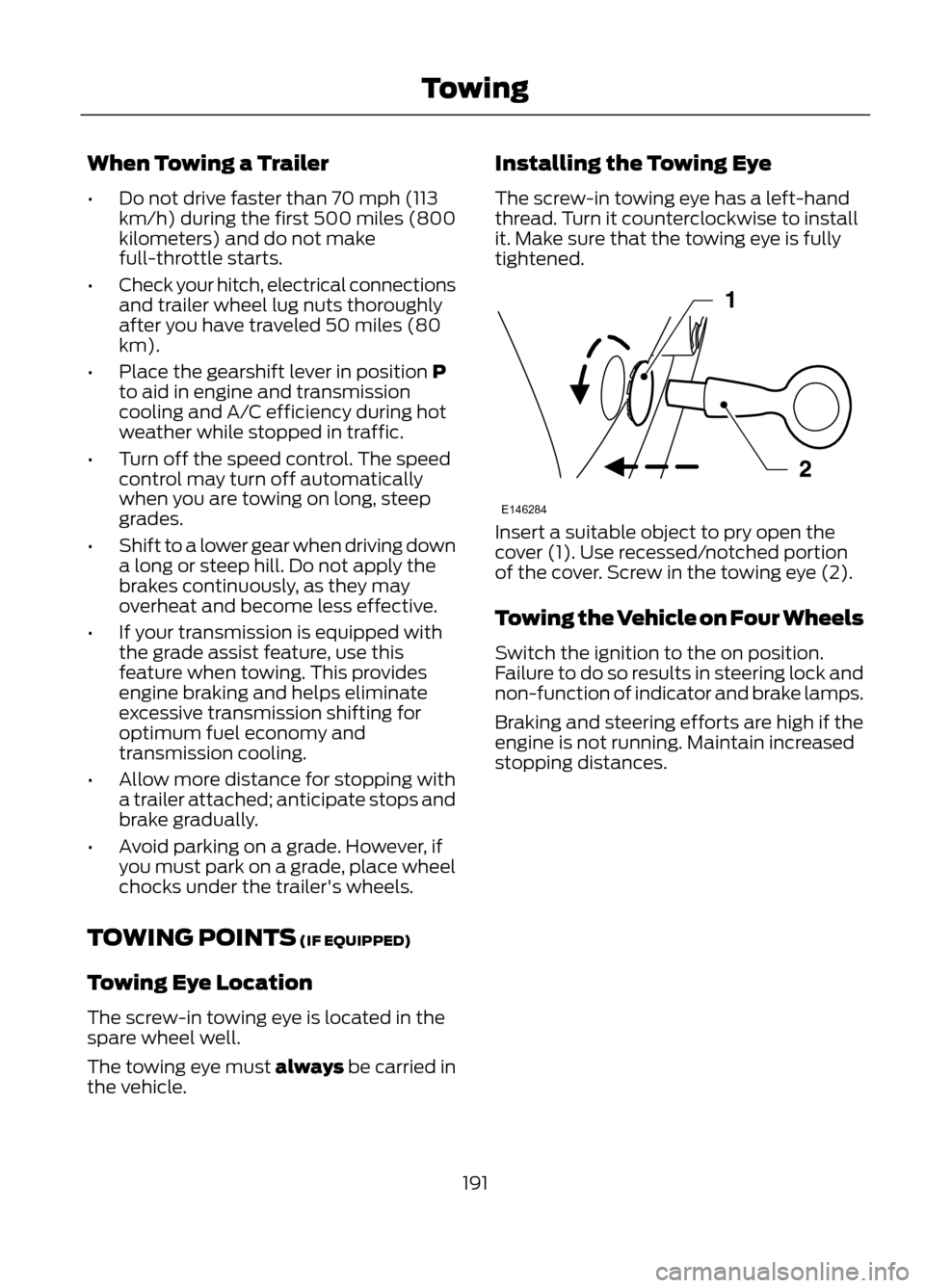
The screw-in towing eye is located in the
spare wheel well.
The towing eye must always be carried in
the vehicle. Installing the Towing Eye
The screw-in towing eye has a left-hand
thread. Turn it counterclockwise to install
it. Make sure that the towing eye is fully
tightened.
Insert a suitable object to pry open the
cover (1). Use recessed/notched portion
of the cover. Screw in the towing eye (2).
Towing the Vehicle on Four Wheels
Switch the ignition to the on position.
Failure to do so results in steering lock and
non-function of indicator and brake lamps.
Braking and steering efforts are high if the
engine is not running. Maintain increased
stopping distances.
191
Towing
E146284
Page 213 of 423
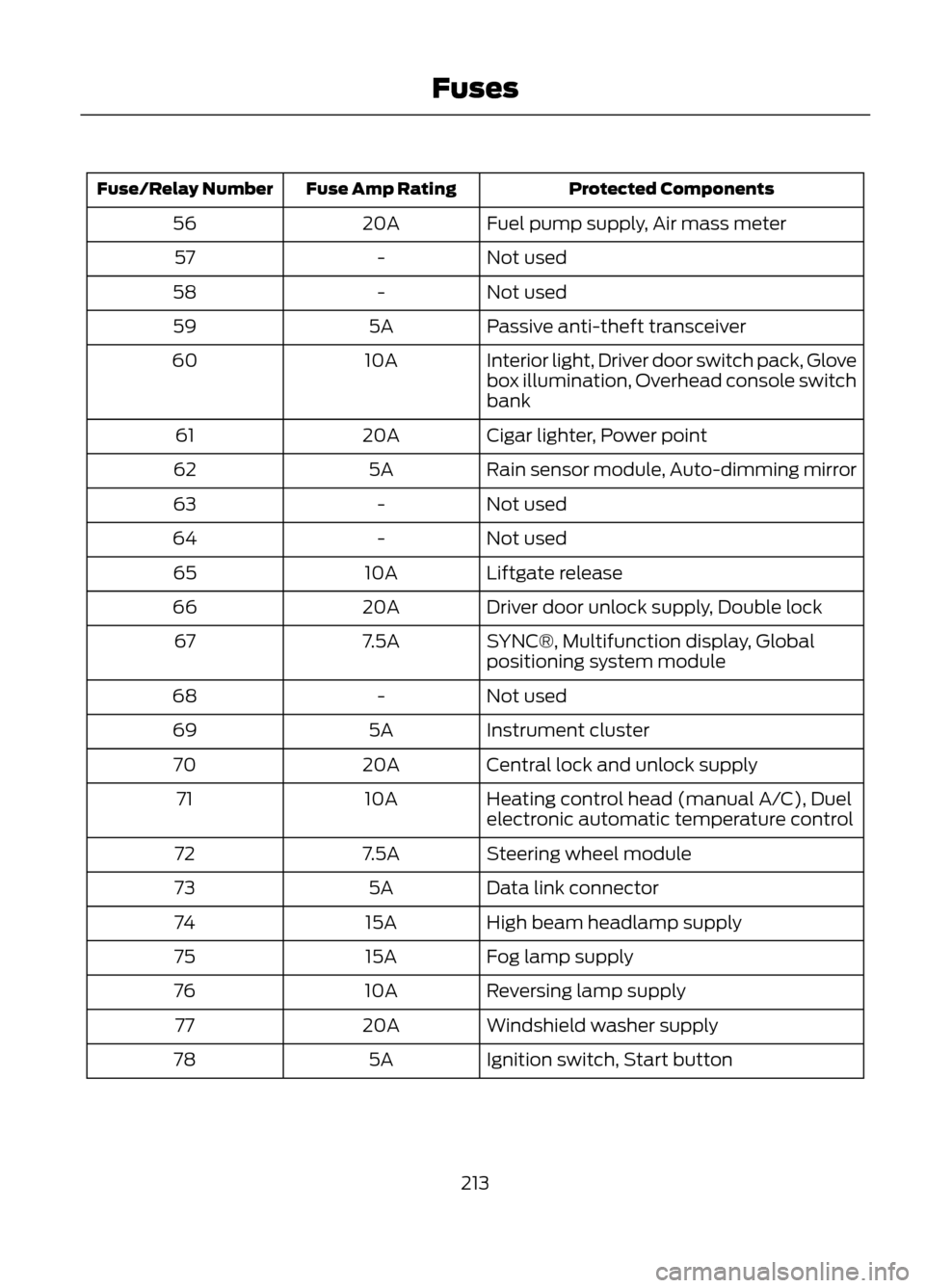
Protected Components
Fuse Amp Rating
Fuse/Relay Number
Fuel pump supply, Air mass meter
20A
56
Not used
-
57
Not used
-
58
Passive anti-theft transceiver
5A
59
Interior light, Driver door switch pack, Glove
box illumination, Overhead console switch
bank
10A
60
Cigar lighter, Power point
20A
61
Rain sensor module, Auto-dimming mirror
5A
62
Not used
-
63
Not used
-
64
Liftgate release
10A
65
Driver door unlock supply, Double lock
20A
66
SYNC®, Multifunction display, Global
positioning system module
7.5A
67
Not used
-
68
Instrument cluster
5A
69
Central lock and unlock supply
20A
70
Heating control head (manual A/C), Duel
electronic automatic temperature control
10A
71
Steering wheel module
7.5A
72
Data link connector
5A
73
High beam headlamp supply
15A
74
Fog lamp supply
15A
75
Reversing lamp supply
10A
76
Windshield washer supply
20A
77
Ignition switch, Start button
5A
78
213
Fuses
Page 239 of 423
•If grease or tar is present on the
material, spot-clean the area first with
Motorcraft® Spot and Stain Remover.
In Canada, use Motorcraftt
Multi-Purpose Cleaner.
• If a ring forms on the fabric after spot
cleaning, clean the entire area
immediately (but do not oversaturate)
or the ring will set.
• Do not use household cleaning
products or glass cleaners, which can
stain and discolor the fabric and affect
the flame retardant abilities of the seat
materials.
CLEANING THE INSTRUMENT
PANEL AND INSTRUMENT
CLUSTER LENS
WARNING
Do not use chemical solvents or
strong detergents when cleaning the
steering wheel or instrument panel
to avoid contamination of the airbag
system.
Clean the instrument panel and cluster
lens with a clean, damp, white cotton
cloth, then use a clean and dry white
cotton cloth to dry these areas.
• Avoid cleaners or polishes that increase
the gloss of the upper portion of the
instrument panel. The dull finish in this
area helps protect the driver from
undesirable windshield reflection.
• Be certain to wash or wipe your hands
clean if you have been in contact with
certain products such as insect
repellent and suntan lotion in order to
avoid possible damage to the interior
painted surfaces. •
Do not use household or glass cleaners
as these may damage the finish of the
instrument panel, interior trim and
cluster lens.
• Do not allow air fresheners and hand
sanitizers to spill on interior surfaces.
If a spill occurs, wipe off immediately.
Damage may not be covered by your
warranty.
If a staining liquid like coffee/juice has
been spilled on the instrument panel or on
interior trim surfaces, clean as follows:
1. Wipe up spilled liquid using a clean, white, cotton cloth.
2. Wipe the surface with a damp, clean, white cotton cloth. For more thorough
cleaning, use a mild soap and water
solution. If the spot cannot be
completely cleaned by this method,
the area may be cleaned using a
commercially available cleaning
product designed for automotive
interiors.
3. If necessary, apply more soap and water solution or cleaning product to
a clean, white, cotton cloth and press
the cloth onto the soiled area–allow
this to set at room temperature for 30
minutes.
4. Remove the soaked cloth, and if it is not soiled badly, use this cloth to clean
the area by using a rubbing motion for
60 seconds.
5. Following this, wipe area dry with a clean, white, cotton cloth.
CLEANING LEATHER SEATS (IF
EQUIPPED)
• Remove dust and loose dirt with a
vacuum cleaner.
• Clean spills and stains as quickly as
possible.
239
Vehicle Care
Page 244 of 423
How your vehicle differs from
other vehicles
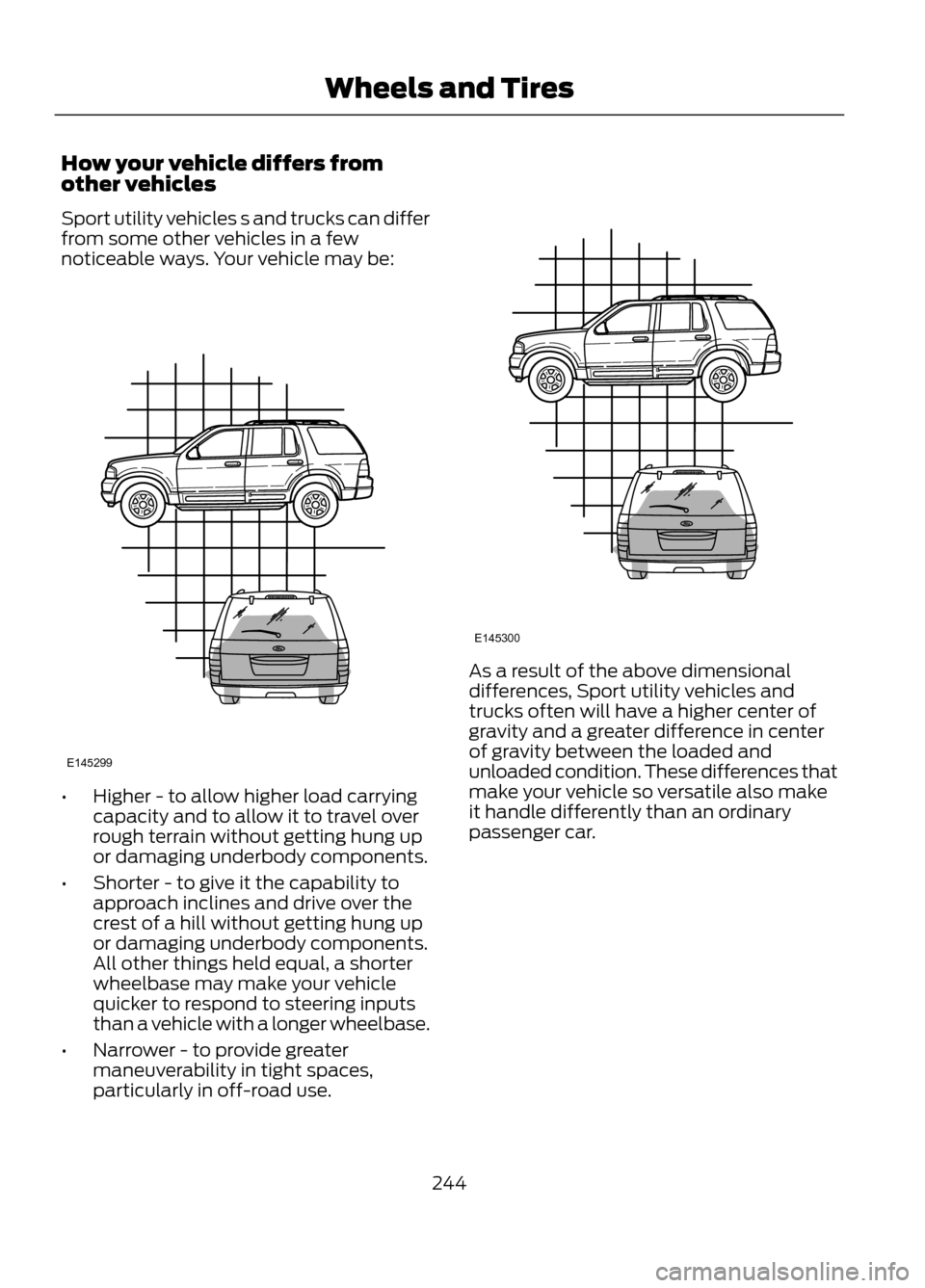
Sport utility vehicles s and trucks can differ
from some other vehicles in a few
noticeable ways. Your vehicle may be:
•Higher - to allow higher load carrying
capacity and to allow it to travel over
rough terrain without getting hung up
or damaging underbody components.
• Shorter - to give it the capability to
approach inclines and drive over the
crest of a hill without getting hung up
or damaging underbody components.
All other things held equal, a shorter
wheelbase may make your vehicle
quicker to respond to steering inputs
than a vehicle with a longer wheelbase.
• Narrower - to provide greater
maneuverability in tight spaces,
particularly in off-road use.
As a result of the above dimensional
differences, Sport utility vehicles and
trucks often will have a higher center of
gravity and a greater difference in center
of gravity between the loaded and
unloaded condition. These differences that
make your vehicle so versatile also make
it handle differently than an ordinary
passenger car.
244
Wheels and Tires
E145299
E145300
Page 254 of 423
WARNINGS
found on these labels then you should
contact your authorized dealer as soon as
possible. Use of any tire or wheel not
recommended by Ford can affect the
safety and performance of your vehicle,
which could result in an increased risk of
loss of vehicle control, vehicle rollover,
personal injury and death. Additionally the
use of non-recommended tires and wheels
could cause steering, suspension, axle,
transfer case or power transfer unit failure.
If you have questions regarding tire
replacement, contact your authorized
dealer as soon as possible.
When mounting replacement tires
and wheels, you should not exceed
the maximum pressure indicated on
the sidewall of the tire to set the beads
without additional precautions listed
below. If the beads do not seat at the
maximum pressure indicated, re-lubricate
and try again
When inflating the tire for mounting
pressures up to 20 psi (1.38 bar) greater
than the maximum pressure on the tire
sidewall, the following precautions must
be taken to protect the person mounting
the tire:
1. Make sure that you have the correct tire
and wheel size.
2. Lubricate the tire bead and wheel bead
seat area again.
3. Stand at a minimum of 12 ft (3.66 m)
away from the wheel and tire assembly.
4. Use both eye and ear protection.
For a mounting pressure more than 20 psi
(1.38 bar) greater than the maximum
pressure, a Ford dealer or other tire service
professional should do the mounting.
WARNINGS
Always inflate steel carcass tires with a
remote air fill with the person inflating
standing at a minimum of 12 ft (3.66 m)
away from the wheel and tire assembly
Important: Remember to replace the
wheel valve stems when the road tires are
replaced on your vehicle
It is recommended that the two front tires
or two rear tires generally be replaced as
a pair.
The tire pressure sensors mounted in the
wheels (originally installed on your vehicle)
are not designed to be used in aftermarket
wheels.
The use of wheels or tires not
recommended by Ford Motor Company
may affect the operation of your tire
pressure monitoring system.
If the TPMS indicator is flashing, your
TPMS is malfunctioning. Your replacement
tire might be incompatible with your TPMS,
or some component of the TPMS may be
damaged.
Safety Practices
WARNINGS
If your vehicle is stuck in snow, mud,
sand, etc., do not rapidly spin the
tires; spinning the tires can tear the
tire and cause an explosion. A tire can
explode in as little as three to five seconds.
Do not spin the wheels at over 35
mph (56 km/h). The tires may fail
and injure a passenger or bystander.
Driving habits have a great deal to do with
your tire mileage and safety.
• Observe posted speed limits
• Avoid fast starts, stops and turns
254
Wheels and Tires
Page 256 of 423
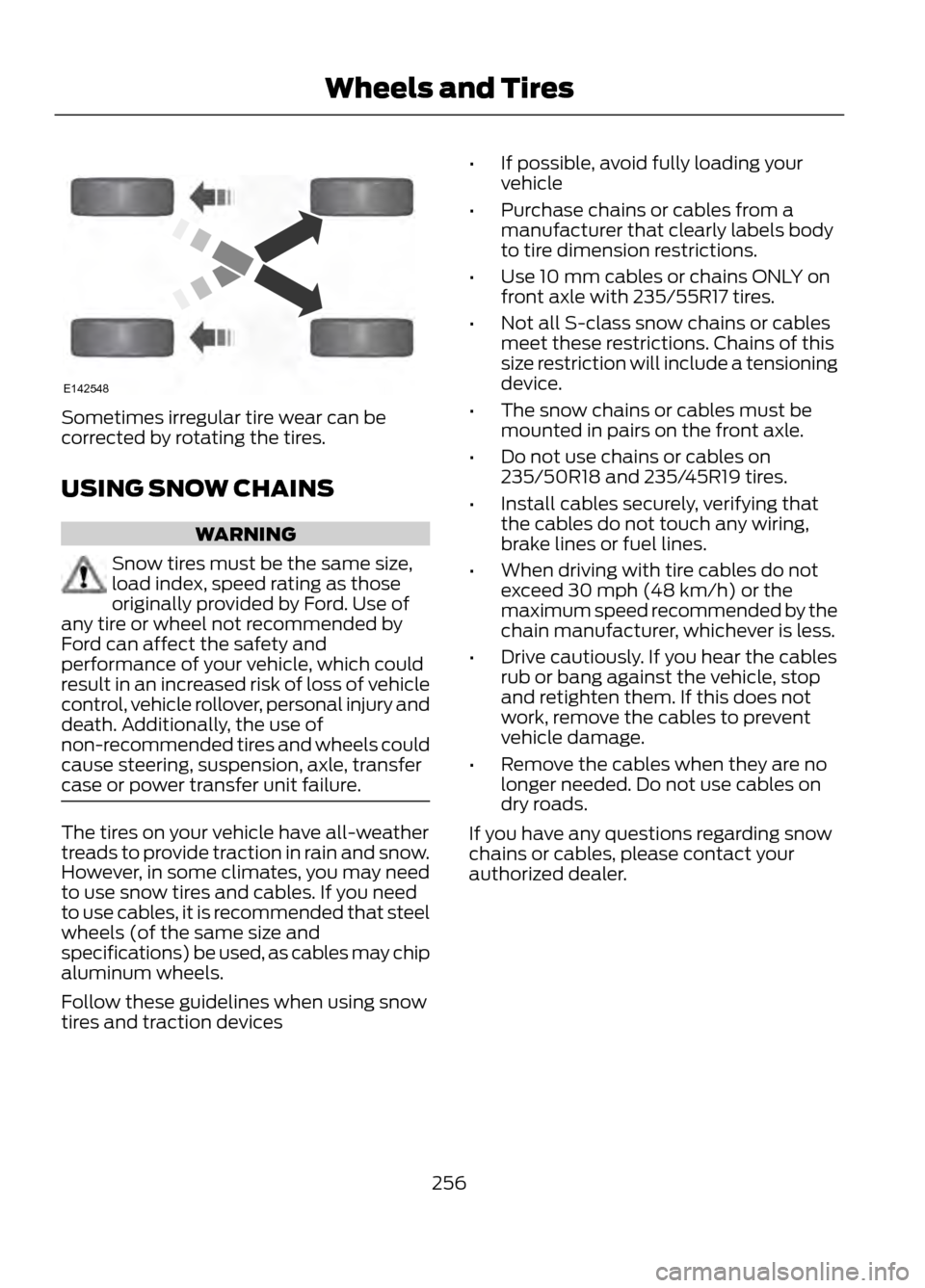
Sometimes irregular tire wear can be
corrected by rotating the tires.
USING SNOW CHAINS
WARNING
Snow tires must be the same size,
load index, speed rating as those
originally provided by Ford. Use of
any tire or wheel not recommended by
Ford can affect the safety and
performance of your vehicle, which could
result in an increased risk of loss of vehicle
control, vehicle rollover, personal injury and
death. Additionally, the use of
non-recommended tires and wheels could
cause steering, suspension, axle, transfer
case or power transfer unit failure.
The tires on your vehicle have all-weather
treads to provide traction in rain and snow.
However, in some climates, you may need
to use snow tires and cables. If you need
to use cables, it is recommended that steel
wheels (of the same size and
specifications) be used, as cables may chip
aluminum wheels.
Follow these guidelines when using snow
tires and traction devices •
If possible, avoid fully loading your
vehicle
• Purchase chains or cables from a
manufacturer that clearly labels body
to tire dimension restrictions.
• Use 10 mm cables or chains ONLY on
front axle with 235/55R17 tires.
• Not all S-class snow chains or cables
meet these restrictions. Chains of this
size restriction will include a tensioning
device.
• The snow chains or cables must be
mounted in pairs on the front axle.
• Do not use chains or cables on
235/50R18 and 235/45R19 tires.
• Install cables securely, verifying that
the cables do not touch any wiring,
brake lines or fuel lines.
• When driving with tire cables do not
exceed 30 mph (48 km/h) or the
maximum speed recommended by the
chain manufacturer, whichever is less.
• Drive cautiously. If you hear the cables
rub or bang against the vehicle, stop
and retighten them. If this does not
work, remove the cables to prevent
vehicle damage.
• Remove the cables when they are no
longer needed. Do not use cables on
dry roads.
If you have any questions regarding snow
chains or cables, please contact your
authorized dealer.
256
Wheels and Tires
E142548
Page 260 of 423
How Temperature Affects your Tire
Pressure
The tire pressure monitoring system
monitors tire pressure in each pneumatic
tire. While driving in a normal manner, a
typical passenger tire inflation pressure
may increase approximately 2 to 4 psi (14
to 28 kPa) from a cold start situation. If
the vehicle is stationary overnight with the
outside temperature significantly lower
than the daytime temperature, the tire
pressure may decrease approximately 3
psi (21 kPa) for a drop of 30°F (17°C) in
ambient temperature. This lower pressure
value may be detected by the TPMS as
being significantly lower than the
recommended inflation pressure and
activate the TPMS warning light for low
tire pressure. If the low tire pressure
warning light is on, visually check each tire
to verify that no tire is flat. (If one or more
tires are flat, repair as necessary.) Check
air pressure in the road tires. If any tire is
under-inflated, carefully drive the vehicle
to the nearest location where air can be
added to the tires. Inflate all the tires to
the recommended inflation pressure.
CHANGING A ROAD WHEEL
WARNINGS
The use of tire sealants may damage
your tire pressure monitoring system
and should not be used. However, if
you must use a sealant, the tire pressure
monitoring system sensor and valve stem
on the wheel must be replaced by an
authorized Ford dealer.
See Tire Pressure Monitoring
System (page 257). for important
information. If the tire pressure
monitor sensor becomes damaged, it will
no longer function.
Note: The tire pressure monitoring system
indicator light will illuminate when the spare
tire is in use. To restore the full functionality
of the monitoring system, all road wheels
equipped with tire pressure monitoring
sensors must be mounted on the vehicle.
If you get a flat tire while driving, do not
apply the brake heavily. Instead, gradually
decrease your speed. Hold the steering
wheel firmly and slowly move to a safe
place on the side of the road.
Have a flat serviced by an authorized
dealer in order to prevent damage to the
tire pressure monitoring system sensors.
See Tire Pressure Monitoring System
(page 257). Replace the spare tire with a
road tire as soon as possible. During
repairing or replacing of the flat tire, have
the authorized dealer inspect the tire
pressure monitoring system sensor for
damage.
Dissimilar Spare Wheel and Tire
Assembly Information
WARNING
Failure to follow these guidelines
could result in an increased risk of
loss of vehicle control, injury or death.
If you have a dissimilar spare wheel and
tire, then it is intended for temporary use
only. This means that if you need to use it,
you should replace it as soon as possible
with a road wheel and tire assembly that
is the same size and type as the road tires
and wheels that were originally provided
by Ford. If the dissimilar spare tire or wheel
is damaged, it should be replaced rather
than repaired.
A dissimilar spare wheel and tire assembly
is defined as a spare wheel and tire
assembly that is different in brand, size or
appearance from the road tires and wheels
and can be one of three types:
260
Wheels and Tires