mirror FORD ESCAPE 2015 3.G User Guide
[x] Cancel search | Manufacturer: FORD, Model Year: 2015, Model line: ESCAPE, Model: FORD ESCAPE 2015 3.GPages: 449, PDF Size: 5.36 MB
Page 113 of 449
You cannot adjust the system during
remote start operation. Switch on the
ignition to return the system to its previous
settings. You can now make adjustments.
You need to switch on certain
vehicle-dependent features, such as:
•
Heated seats.
• Heated mirrors.
• Heated rear window.
You can adjust the settings using the
information display controls. See
Information Displays (page 90).
Automatic Settings
You can set the climate control to operate
in AUTO mode through the information
display setting: Remote Start > Climate
Control > Heater-A/C > Auto. The climate
control system automatically sets the
interior temperature to 72°F (22°C).
In hot weather, the system is set to 72°F
(22°C). Cooled seats are set to high (if
available, and selected to AUTO in the
information display).
In moderate weather, the system either
heats or cools (based on previous
settings). The rear defroster, heated
mirrors and heated or cooled seats do not
automatically turn on.
In cold weather, the system is set to 72°F
(22°C). The rear defroster and heated
mirrors automatically turn on.
Last Settings
You can set the climate control to operate
using the last climate control settings
through the information display setting:
Remote Start > Climate Control >
Heater –A/C > Last Settings. The climate
control system automatically uses the
settings last selected before you turned
off the vehicle. Heated and Cooled Devices
The climate control system controls other
heated and cooled devices inside the
vehicle. You can switch these devices on
(if available, and selected to AUTO in the
information displays) during remote start.
Heated devices typically switch on during
cold weather, and cooled devices during
hot weather.
110
Escape (TM2), enUSA, First Printing Climate Control
Page 118 of 449
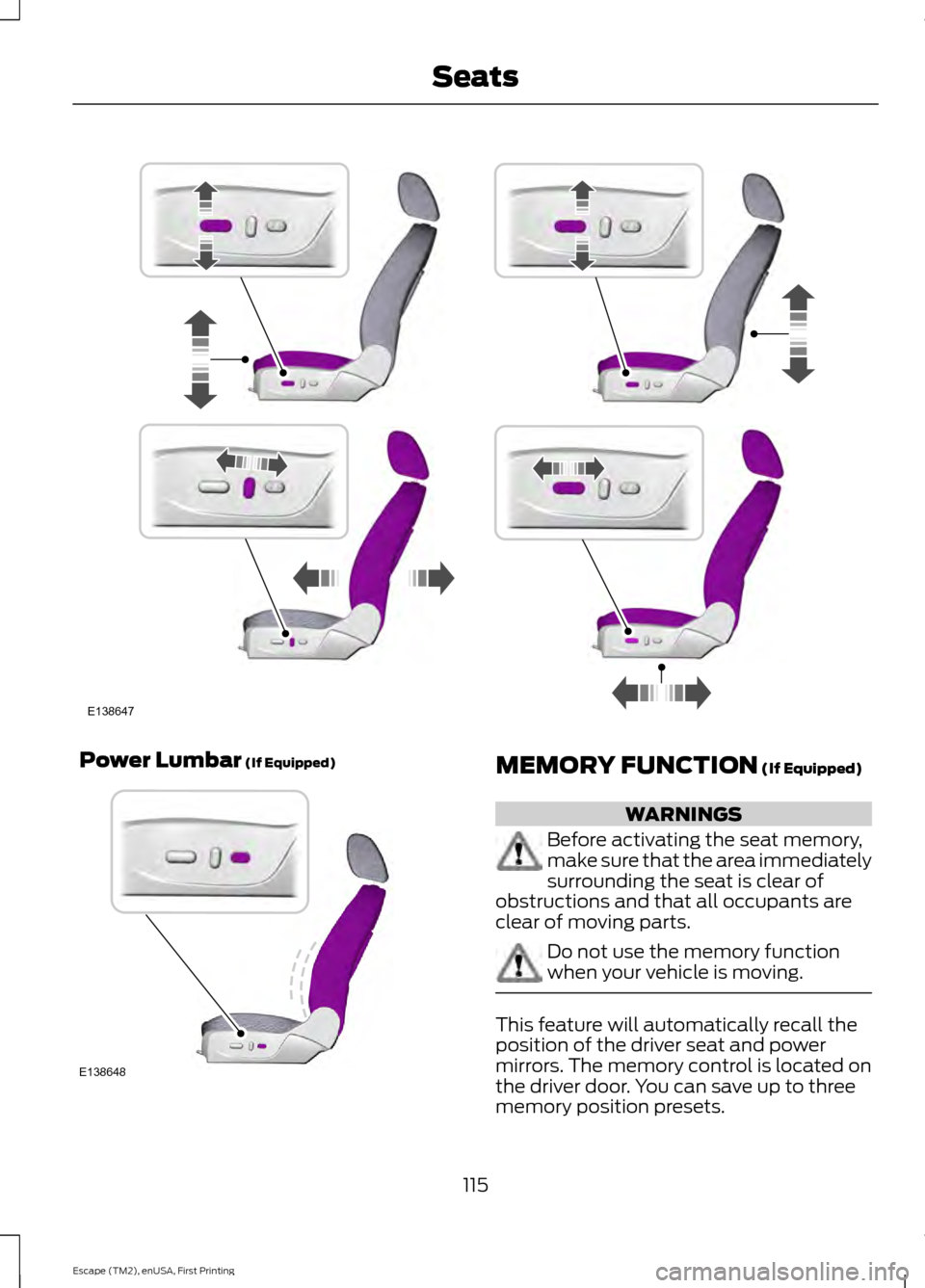
Power Lumbar (If Equipped)
MEMORY FUNCTION (If Equipped)
WARNINGS
Before activating the seat memory,
make sure that the area immediately
surrounding the seat is clear of
obstructions and that all occupants are
clear of moving parts. Do not use the memory function
when your vehicle is moving.
This feature will automatically recall the
position of the driver seat and power
mirrors. The memory control is located on
the driver door. You can save up to three
memory position presets.
115
Escape (TM2), enUSA, First Printing SeatsE138647 E138648
Page 119 of 449
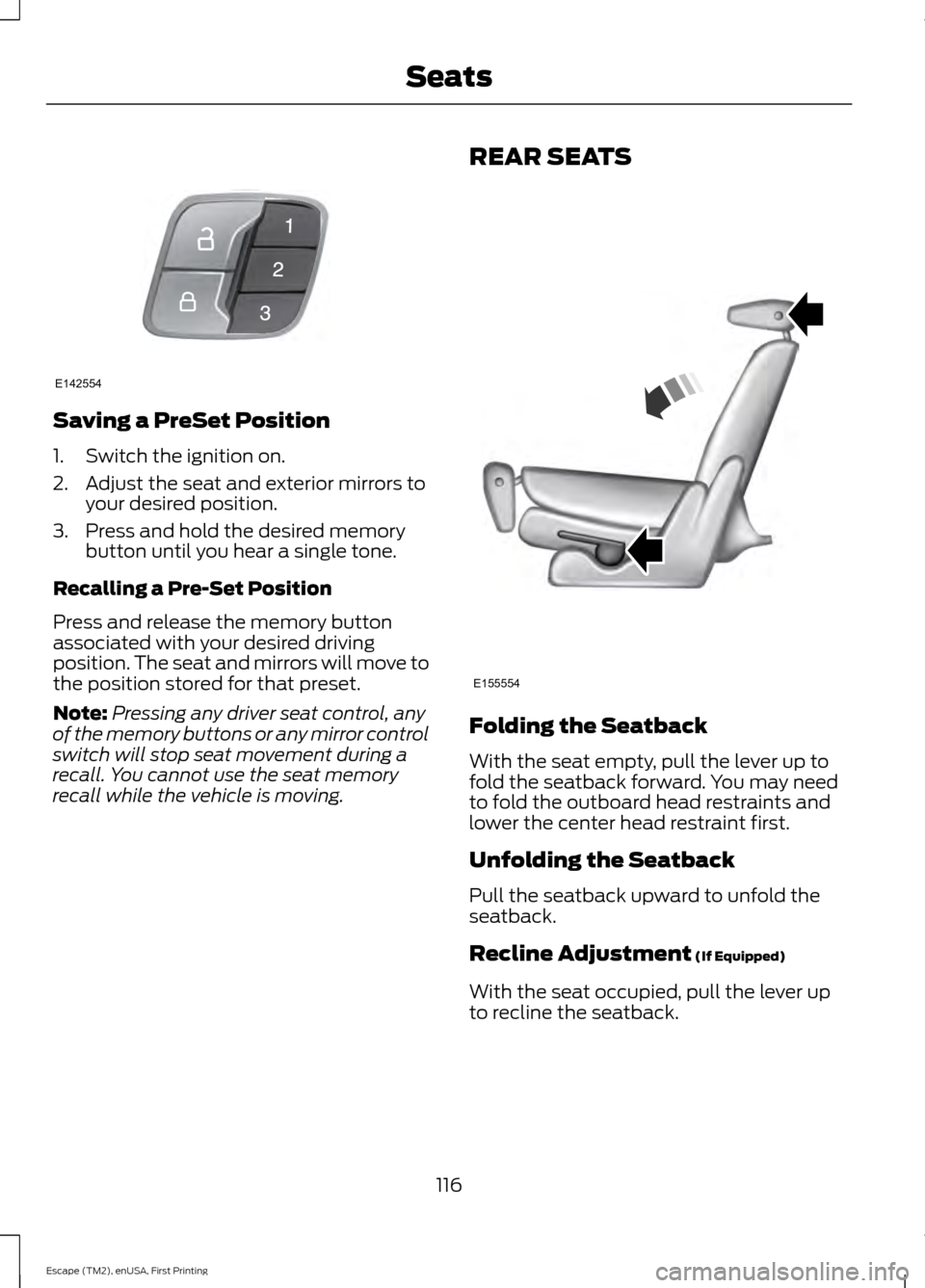
Saving a PreSet Position
1. Switch the ignition on.
2. Adjust the seat and exterior mirrors to
your desired position.
3. Press and hold the desired memory button until you hear a single tone.
Recalling a Pre-Set Position
Press and release the memory button
associated with your desired driving
position. The seat and mirrors will move to
the position stored for that preset.
Note: Pressing any driver seat control, any
of the memory buttons or any mirror control
switch will stop seat movement during a
recall. You cannot use the seat memory
recall while the vehicle is moving. REAR SEATS
Folding the Seatback
With the seat empty, pull the lever up to
fold the seatback forward. You may need
to fold the outboard head restraints and
lower the center head restraint first.
Unfolding the Seatback
Pull the seatback upward to unfold the
seatback.
Recline Adjustment (If Equipped)
With the seat occupied, pull the lever up
to recline the seatback.
116
Escape (TM2), enUSA, First Printing SeatsE142554 E155554
Page 161 of 449
The system does not position the vehicle where I want in the space
A parked vehicle has a high attachment (i.e. salt sprayer, snowplow, moving truck bed,
etc.)
The parking space length or position of parked objects changed after your vehicle passed
The temperature around your vehicle changes quickly (i.e. driving from a heated garage
into the cold, or after leaving a car wash)
REAR VIEW CAMERA (If Equipped) WARNINGS
The rear view camera system is a
reverse aid supplement device that
still requires the driver to use it in
conjunction with the interior and exterior
mirrors for maximum coverage. Objects that are close to either
corner of the bumper or under the
bumper, might not be seen on the
screen due to the limited coverage of the
camera system. Back up as slow as possible since
higher speeds might limit your
reaction time to stop your vehicle.
Use caution when using the rear
video camera and the luggage
compartment door is ajar. If the
luggage compartment door is ajar, the
camera will be out of position and the
video image may be incorrect. All
guidelines disappear when the luggage
compartment door is ajar. Use caution when turning camera
features on or off. Make sure your
vehicle is not moving.
The rear view camera system provides a
video image of the area behind your
vehicle. During operation, lines appear in the
display which represent your vehicle
’s path
and proximity to objects behind your
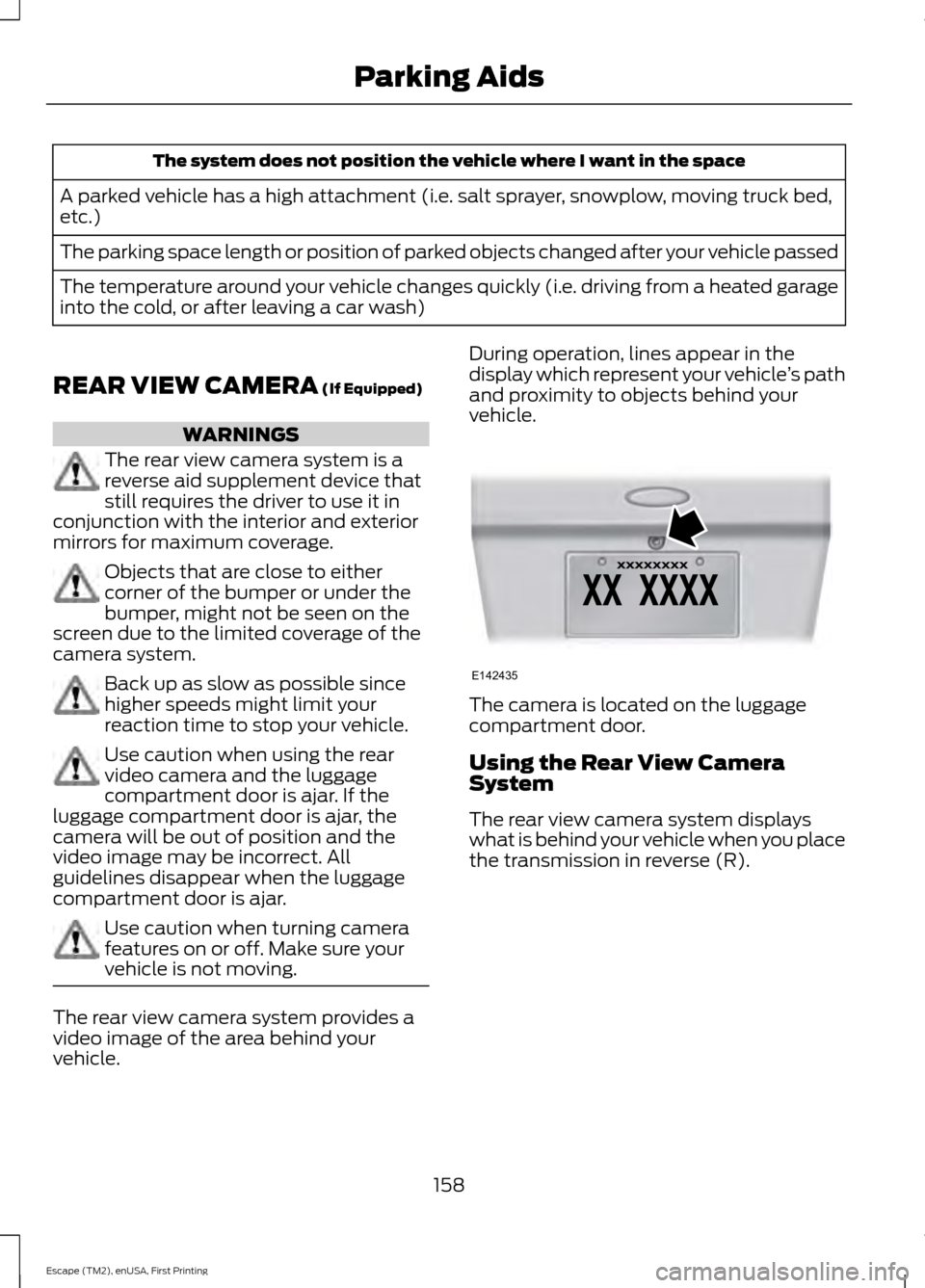
vehicle. The camera is located on the luggage
compartment door.
Using the Rear View Camera
System
The rear view camera system displays
what is behind your vehicle when you place
the transmission in reverse (R).
158
Escape (TM2), enUSA, First Printing Parking AidsE142435
Page 163 of 449
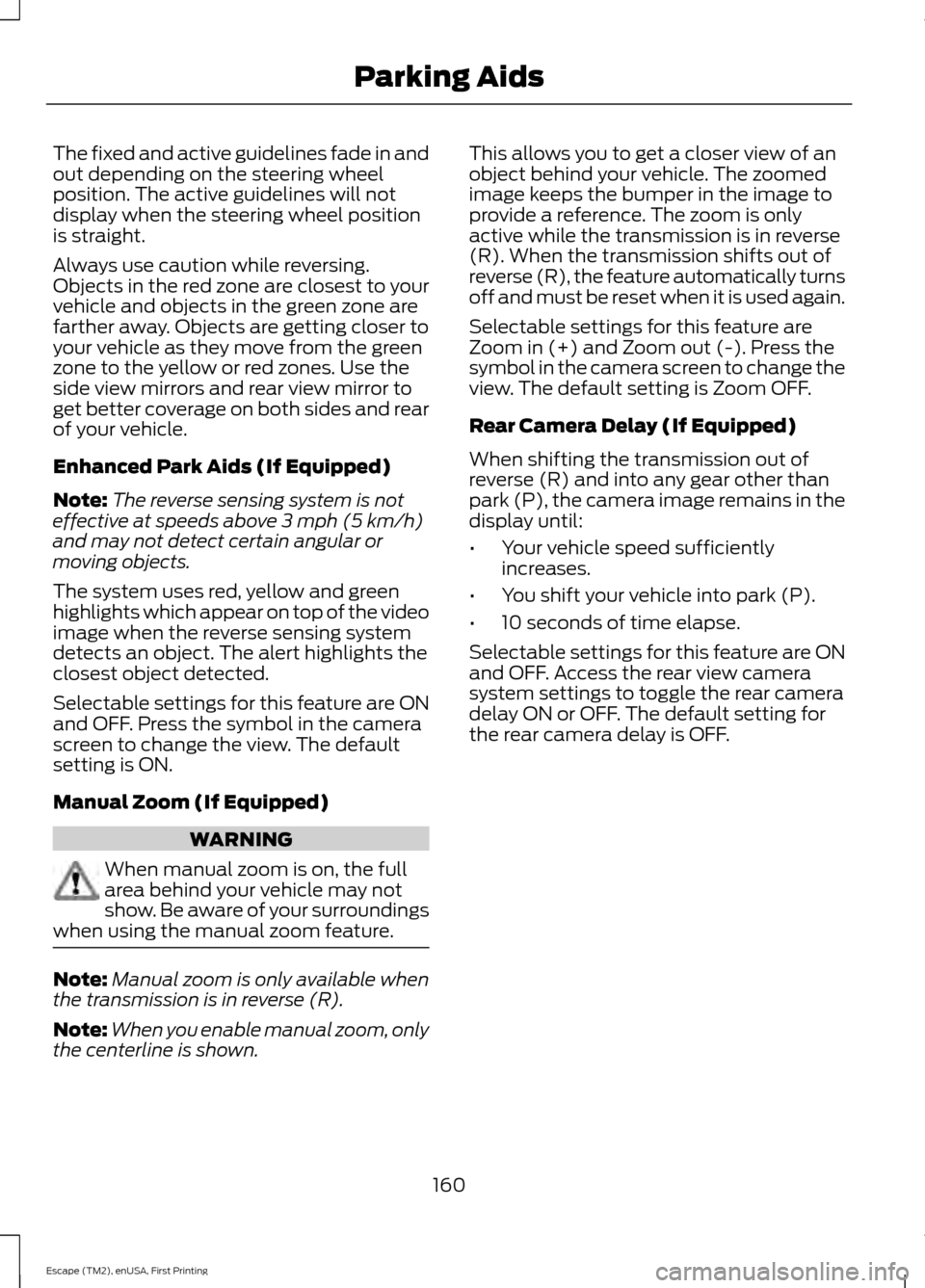
The fixed and active guidelines fade in and
out depending on the steering wheel
position. The active guidelines will not
display when the steering wheel position
is straight.
Always use caution while reversing.
Objects in the red zone are closest to your
vehicle and objects in the green zone are
farther away. Objects are getting closer to
your vehicle as they move from the green
zone to the yellow or red zones. Use the
side view mirrors and rear view mirror to
get better coverage on both sides and rear
of your vehicle.
Enhanced Park Aids (If Equipped)
Note:
The reverse sensing system is not
effective at speeds above 3 mph (5 km/h)
and may not detect certain angular or
moving objects.
The system uses red, yellow and green
highlights which appear on top of the video
image when the reverse sensing system
detects an object. The alert highlights the
closest object detected.
Selectable settings for this feature are ON
and OFF. Press the symbol in the camera
screen to change the view. The default
setting is ON.
Manual Zoom (If Equipped) WARNING
When manual zoom is on, the full
area behind your vehicle may not
show. Be aware of your surroundings
when using the manual zoom feature. Note:
Manual zoom is only available when
the transmission is in reverse (R).
Note: When you enable manual zoom, only
the centerline is shown. This allows you to get a closer view of an
object behind your vehicle. The zoomed
image keeps the bumper in the image to
provide a reference. The zoom is only
active while the transmission is in reverse
(R). When the transmission shifts out of
reverse (R), the feature automatically turns
off and must be reset when it is used again.
Selectable settings for this feature are
Zoom in (+) and Zoom out (-). Press the
symbol in the camera screen to change the
view. The default setting is Zoom OFF.
Rear Camera Delay (If Equipped)
When shifting the transmission out of
reverse (R) and into any gear other than
park (P), the camera image remains in the
display until:
•
Your vehicle speed sufficiently
increases.
• You shift your vehicle into park (P).
• 10 seconds of time elapse.
Selectable settings for this feature are ON
and OFF. Access the rear view camera
system settings to toggle the rear camera
delay ON or OFF. The default setting for
the rear camera delay is OFF.
160
Escape (TM2), enUSA, First Printing Parking Aids
Page 165 of 449
BLIND SPOT INFORMATION
SYSTEM (If Equipped)
Blind Spot Information System
(BLIS ™) with Cross Traffic Alert
(If Equipped) WARNING
To help avoid injuries, NEVER use the
Blind Spot Information System as a
replacement for using the interior
and exterior mirrors or looking over your
shoulder before changing lanes. The Blind
Spot Information System is not a
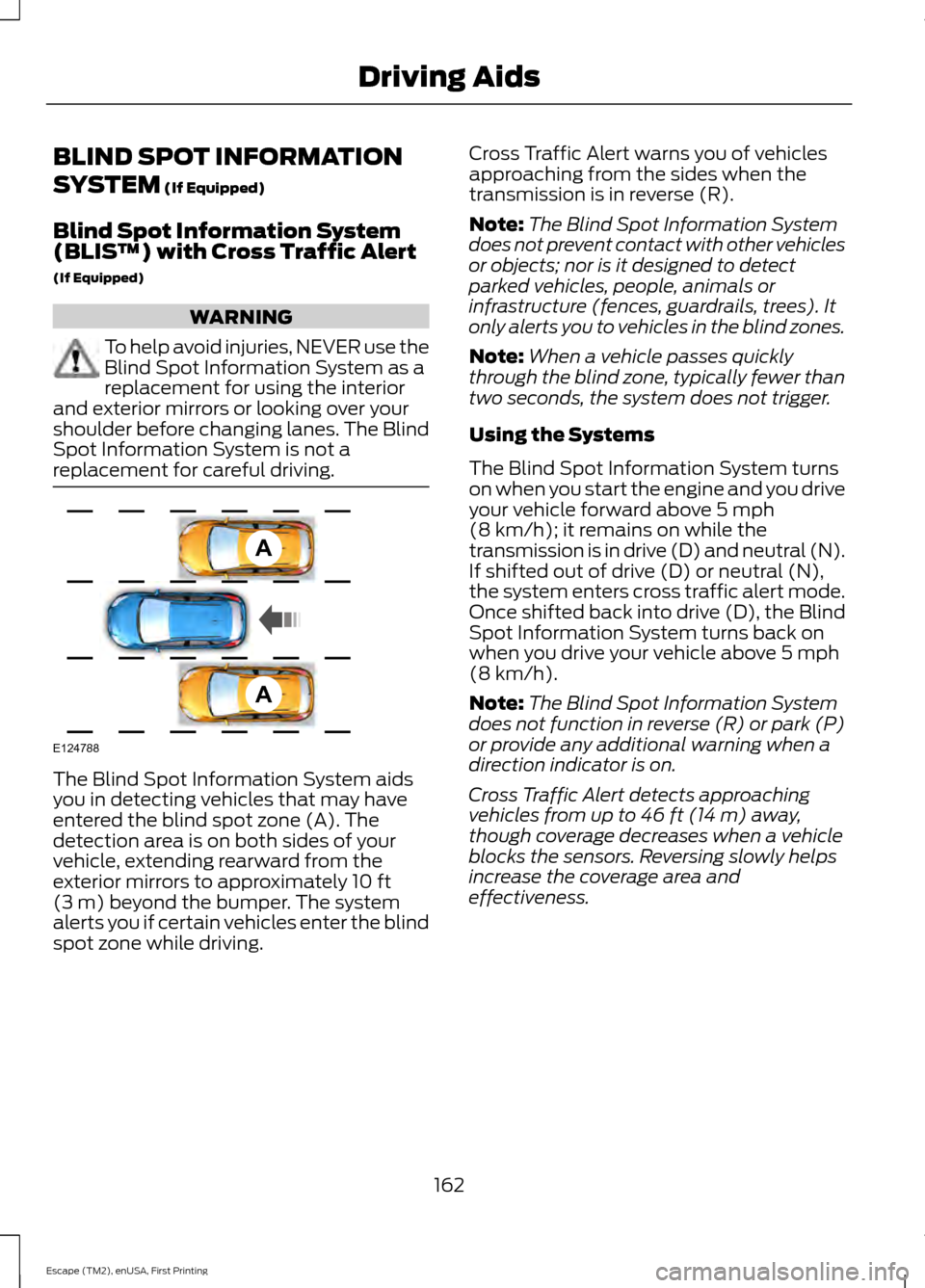
replacement for careful driving. The Blind Spot Information System aids
you in detecting vehicles that may have
entered the blind spot zone (A). The
detection area is on both sides of your
vehicle, extending rearward from the
exterior mirrors to approximately
10 ft
(3 m) beyond the bumper. The system
alerts you if certain vehicles enter the blind
spot zone while driving. Cross Traffic Alert warns you of vehicles
approaching from the sides when the
transmission is in reverse (R).
Note:
The Blind Spot Information System
does not prevent contact with other vehicles
or objects; nor is it designed to detect
parked vehicles, people, animals or
infrastructure (fences, guardrails, trees). It
only alerts you to vehicles in the blind zones.
Note: When a vehicle passes quickly
through the blind zone, typically fewer than
two seconds, the system does not trigger.
Using the Systems
The Blind Spot Information System turns
on when you start the engine and you drive
your vehicle forward above
5 mph
(8 km/h); it remains on while the
transmission is in drive (D) and neutral (N).
If shifted out of drive (D) or neutral (N),
the system enters cross traffic alert mode.
Once shifted back into drive (D), the Blind
Spot Information System turns back on
when you drive your vehicle above
5 mph
(8 km/h).
Note: The Blind Spot Information System
does not function in reverse (R) or park (P)
or provide any additional warning when a
direction indicator is on.
Cross Traffic Alert detects approaching
vehicles from up to
46 ft (14 m) away,
though coverage decreases when a vehicle
blocks the sensors. Reversing slowly helps
increase the coverage area and
effectiveness.
162
Escape (TM2), enUSA, First Printing Driving AidsA
A
E124788
Page 167 of 449
System Lights and Messages
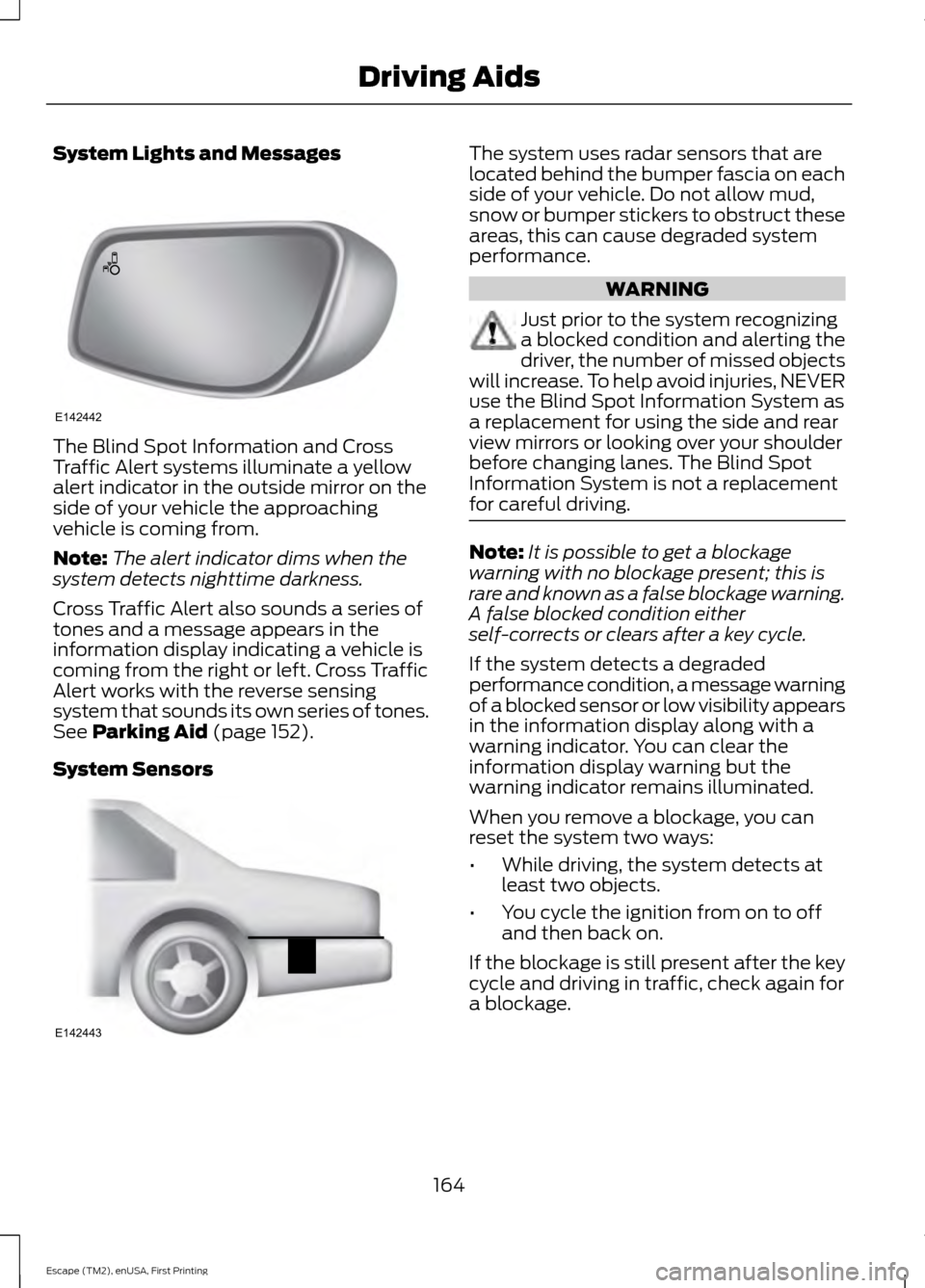
The Blind Spot Information and Cross
Traffic Alert systems illuminate a yellow
alert indicator in the outside mirror on the
side of your vehicle the approaching
vehicle is coming from.
Note:
The alert indicator dims when the
system detects nighttime darkness.
Cross Traffic Alert also sounds a series of
tones and a message appears in the
information display indicating a vehicle is
coming from the right or left. Cross Traffic
Alert works with the reverse sensing
system that sounds its own series of tones.
See Parking Aid (page 152).
System Sensors The system uses radar sensors that are
located behind the bumper fascia on each
side of your vehicle. Do not allow mud,
snow or bumper stickers to obstruct these
areas, this can cause degraded system
performance.
WARNING
Just prior to the system recognizing
a blocked condition and alerting the
driver, the number of missed objects
will increase. To help avoid injuries, NEVER
use the Blind Spot Information System as
a replacement for using the side and rear
view mirrors or looking over your shoulder
before changing lanes. The Blind Spot
Information System is not a replacement
for careful driving. Note:
It is possible to get a blockage
warning with no blockage present; this is
rare and known as a false blockage warning.
A false blocked condition either
self-corrects or clears after a key cycle.
If the system detects a degraded
performance condition, a message warning
of a blocked sensor or low visibility appears
in the information display along with a
warning indicator. You can clear the
information display warning but the
warning indicator remains illuminated.
When you remove a blockage, you can
reset the system two ways:
• While driving, the system detects at
least two objects.
• You cycle the ignition from on to off
and then back on.
If the blockage is still present after the key
cycle and driving in traffic, check again for
a blockage.
164
Escape (TM2), enUSA, First Printing Driving AidsE142442 E142443
Page 204 of 449
Protected components
Fuse amp rating
Fuse or relay number
Anti-lock brake system and electronic
stability program pump.
50A**
F7
Electronic stability program valve.
30A**
F8
Not used.
—
F9
Heater blower motor.
40A**
F10
Body control module feed.
30A**
F11
Powertrain control module relay.
30A**
F12
Starter relay.
30A**
F13
Rear power window (without door control
unit).
25A**
F14
Front cigar lighter or power outlet.
20A**
F15
Front power window (without door control
unit).
25A**
F16
Rear power outlet.
20A**
F17
Center power outlet.
20A**
F18
Anti-lock brake system and electronic
stability program 15 feed.
5A*
F19
Horn.
15A*
F20
Stop light switch.
5A*
F21
Battery monitor system.
15A*
F22
Relay coils.
5A*
F23
Light switch module.
5A*
F24
Power exterior mirror (without door control
unit).
10A*
F25
Keep-alive power
5A*
F26
Air conditioner clutch.
15A*
F27
Vehicle power - fuel injector (2.5L engine).
10A*
F28
Rear window defroster.
25A*
F29
201
Escape (TM2), enUSA, First Printing Fuses
Page 208 of 449
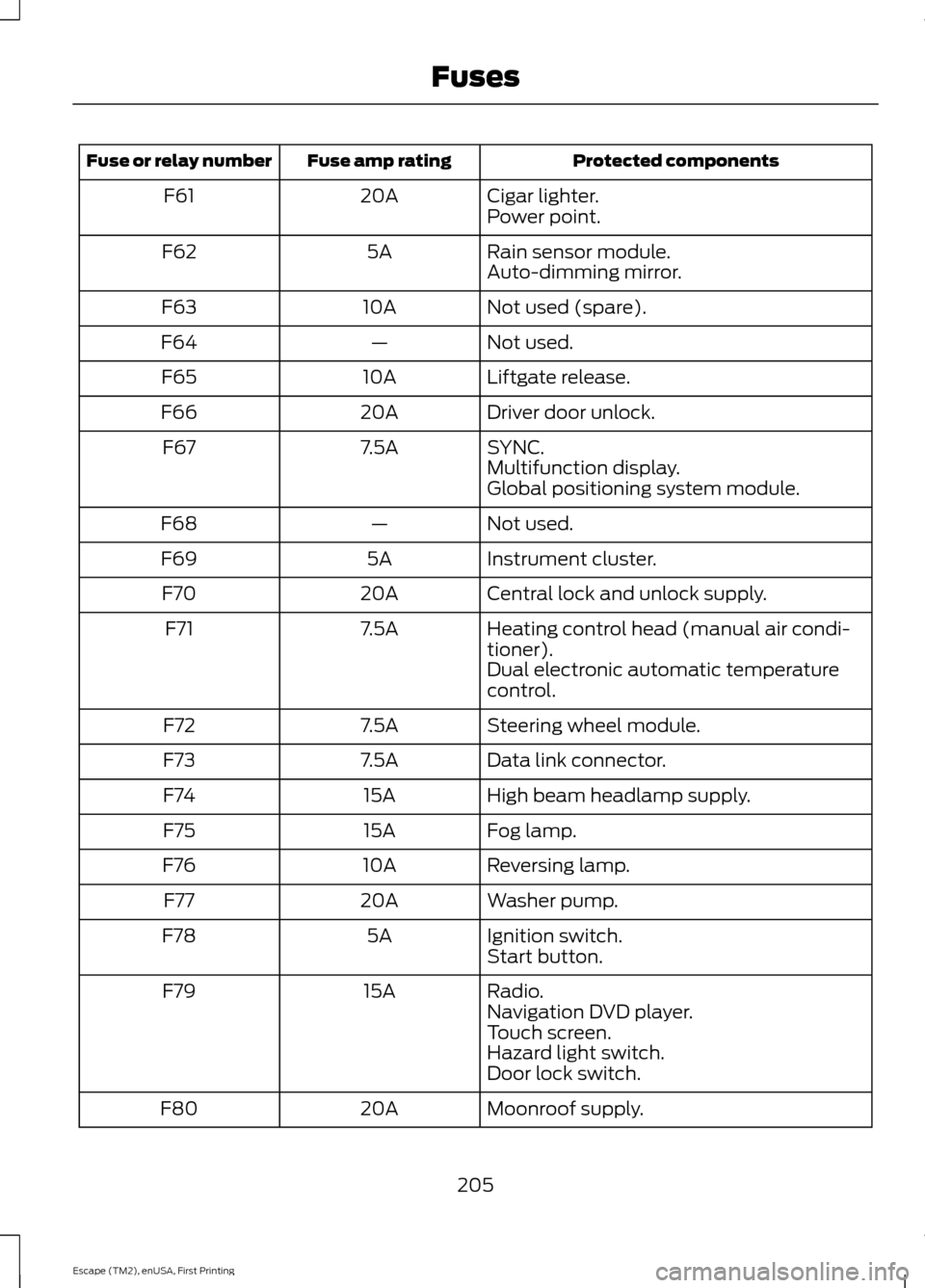
Protected components
Fuse amp rating
Fuse or relay number
Cigar lighter.
20A
F61
Power point.
Rain sensor module.
5A
F62
Auto-dimming mirror.
Not used (spare).
10A
F63
Not used.
—
F64
Liftgate release.
10A
F65
Driver door unlock.
20A
F66
SYNC.
7.5A
F67
Multifunction display.
Global positioning system module.
Not used.
—
F68
Instrument cluster.
5A
F69
Central lock and unlock supply.
20A
F70
Heating control head (manual air condi-
tioner).
7.5A
F71
Dual electronic automatic temperature
control.
Steering wheel module.
7.5A
F72
Data link connector.
7.5A
F73
High beam headlamp supply.
15A
F74
Fog lamp.
15A
F75
Reversing lamp.
10A
F76
Washer pump.
20A
F77
Ignition switch.
5A
F78
Start button.
Radio.
15A
F79
Navigation DVD player.
Touch screen.
Hazard light switch.
Door lock switch.
Moonroof supply.
20A
F80
205
Escape (TM2), enUSA, First Printing Fuses
Page 224 of 449
presets, are also maintained in memory by
power from the low voltage battery. When
a technician disconnects and connects the
low voltage battery, these settings are
erased. Complete the following procedure
in order to restore the settings:
1. With the vehicle at a complete stop,
set the parking brake.
2. Shift the transmission into P.
3. Turn off all accessories.
4. Step on the brake pedal and start the vehicle.
5. Run the engine until it reaches normal operating temperature. While the
engine is warming up, complete the
following: Reset the clock. See Audio
System (page 272). Reset the power
windows bounce-back feature. See
Windows and Mirrors
(page 79).
Reset the radio station presets. See
Audio System
(page 272).
6. Allow the engine to idle for at least one
minute. If the engine turns off, step on
the accelerator to start the engine.
7. While the engine is running, step on the
brake pedal and shift the transmission
to N.
8. Allow the engine to run for at least one
minute by pressing on the accelerator
pedal.
9. Drive the vehicle at least 10 miles (16 kilometers) to completely relearn the
idle and fuel trim strategy.
Note: If you do not allow the engine to
relearn the idle and fuel trim strategy, the
idle quality of your vehicle may be adversely
affected until the engine computer
eventually relearns the idle trim and fuel
trim strategy. Note:
Always dispose of automotive
batteries in a responsible manner. Follow
your local authorized standards for disposal.
Call your local authorized recycling center
to find out more about recycling automotive
batteries.
Note: It is recommended that the negative
battery cable terminal be disconnected from
the battery if you plan to store your vehicle
for an extended period of time.
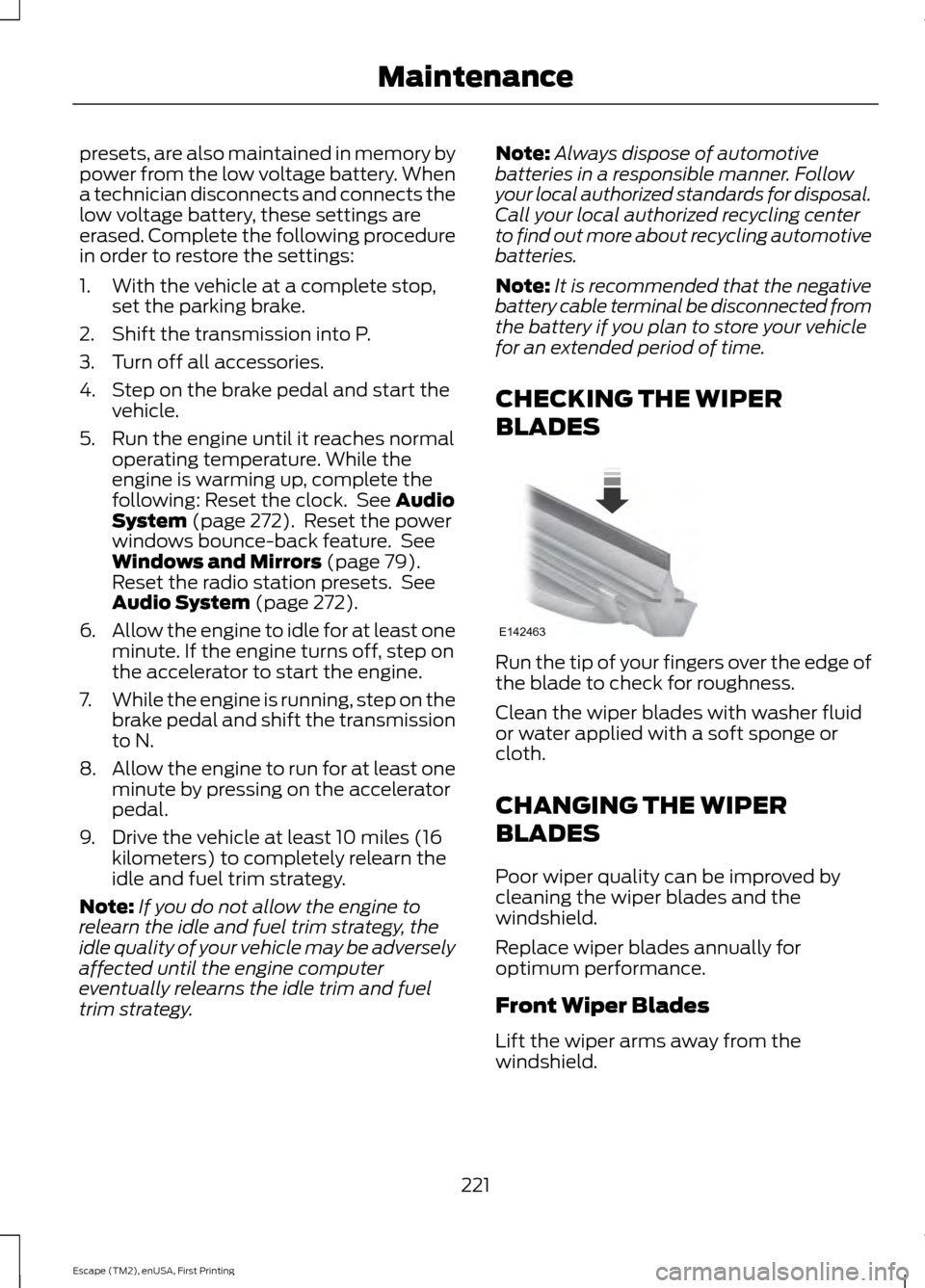
CHECKING THE WIPER
BLADES Run the tip of your fingers over the edge of
the blade to check for roughness.
Clean the wiper blades with washer fluid
or water applied with a soft sponge or
cloth.
CHANGING THE WIPER
BLADES
Poor wiper quality can be improved by
cleaning the wiper blades and the
windshield.
Replace wiper blades annually for
optimum performance.
Front Wiper Blades
Lift the wiper arms away from the
windshield.
221
Escape (TM2), enUSA, First Printing MaintenanceE142463