stop start FORD ESCAPE 2015 3.G Owners Manual
[x] Cancel search | Manufacturer: FORD, Model Year: 2015, Model line: ESCAPE, Model: FORD ESCAPE 2015 3.GPages: 449, PDF Size: 5.36 MB
Page 5 of 449
Information Display Control.......................70
Wipers and Washers
Windshield Wipers
..........................................71
Autowipers.........................................................71
Windshield Washers
......................................72
Rear Window Wiper and Washers...........73
Lighting
Lighting Control...............................................74
Autolamps........................................................74
Instrument Lighting Dimmer......................75
Headlamp Exit Delay....................................76
Daytime Running Lamps
.............................76
Front Fog Lamps.............................................77
Direction Indicators
........................................77
Interior Lamps
..................................................77
Ambient Lighting.............................................77
Windows and Mirrors
Power Windows
..............................................79
Global Opening
..............................................80
Exterior Mirrors
...............................................80
Interior Mirror
...................................................82
Sun Visors
.........................................................82
Moonroof...........................................................83
Instrument Cluster
Gauges...............................................................84
Warning Lamps and Indicators................86
Audible Warnings and Indicators.............88
Information Displays
General Information
.....................................90
Trip Computer.................................................92
Information Messages
.................................93
Climate Control
Manual Climate Control
............................103 Automatic Climate Control......................104
Hints on Controlling the Interior
Climate........................................................106
Heated Windows and Mirrors
..................109
Cabin Air Filter
...............................................109
Remote Start.................................................109
Seats
Sitting in the Correct Position....................111
Head Restraints
...............................................111
Manual Seats
..................................................113
Power Seats
.....................................................114
Memory Function
...........................................115
Rear Seats........................................................116
Heated Seats
...................................................117
Rear Seat Armrest.........................................117
Universal Garage Door Opener
Universal Garage Door Opener
................118
Auxiliary Power Points
Auxiliary Power Points
................................122
Storage Compartments
Center Console..............................................124
Overhead Console
........................................124
Starting and Stopping the Engine
General Information
....................................125
Ignition Switch
...............................................125
Keyless Starting.............................................125
Starting a Gasoline Engine
.......................126
Engine Block Heater....................................129
Fuel and Refueling
Safety Precautions
........................................131
Fuel Quality
.....................................................132
Running Out of Fuel.....................................132
2
Escape (TM2), enUSA, First Printing Table of Contents
Page 51 of 449
PRINCIPLE OF OPERATION
The remote control allows you to:
•
Remotely lock or unlock the vehicle
doors.
• Unlock the doors without actively using
a key or remote control (intelligent
access only).
• Remotely open the power liftgate (if
equipped).
• Remotely start or stop the engine and
user pre-set features (if equipped).
• Arm and disarm the anti-theft system.
• Activate the panic alarm.
GENERAL INFORMATION ON
RADIO FREQUENCIES
This device complies with Part 15 of the
FCC Rules and with Industry Canada
license-exempt RSS standard(s).
Operation is subject to the following two
conditions: (1) This device may not cause
harmful interference, and (2) This device
must accept any interference received,
including interference that may cause
undesired operation.
Note: Changes or modifications not
expressively approved by the party
responsible for compliance could void the
user's authority to operate the equipment.
The term IC before the radio certification
number only signifies that Industry Canada
technical specifications were met.
The typical operating range for your
transmitter is approximately 33 feet (10
meters). Vehicles with the remote start
feature will have a greater range. One of
the following could cause a decrease in
operating range:
• Weather conditions.
• Nearby radio towers. •
Structures around the vehicle.
• Other vehicles parked next to your
vehicle.
The radio frequency used by your remote
control can also be used by other short
distance radio transmissions, for example
amateur radios, medical equipment,
wireless headphones, remote controls and
alarm systems. If the frequencies are
jammed, you will not be able to use your
remote control. You can lock and unlock
the doors with the key.
Note: Make sure to lock your vehicle before
leaving it unattended.
Note: If you are in range, the remote control
will operate if you press any button
unintentionally.
Intelligent Access
(If Equipped)
The system uses a radio frequency signal
to communicate with your vehicle and
authorize your vehicle to unlock when one
of the following conditions are met:
• You activate the front exterior door
handle switch.
• You press the luggage compartment
button.
• You press a button on the transmitter.
If excessive radio frequency interference
is present in the area or if the transmitter
battery is low, you may need to
mechanically unlock your door. You can
use the mechanical key blade in your
intelligent access key to open the driver
door in this situation. See
Remote
Control (page 49).
48
Escape (TM2), enUSA, First Printing Keys and Remote Controls
Page 54 of 449
Note:
If locking was not successful or if any
door or the liftgate is open, or if the hood is
open on vehicles with a perimeter alarm or
remote start, the horn will sound twice and
the lamps will not flash.
Sounding a Panic Alarm
Note: The panic alarm will only operate
when the ignition is off. Press the button to activate the
alarm. Press the button again or
turn the ignition on to deactivate.
Remote Start (If Equipped) WARNING
To avoid exhaust fumes, do not use
remote start if your vehicle is parked
indoors or areas that are not well
ventilated. Note:
Do not use remote start if your vehicle
is low on fuel. The remote start button is on the
transmitter.
This feature allows you to start your
vehicle from outside the vehicle. The
transmitter has an extended operating
range.
Vehicles with automatic climate control
can be configured to operate when the
vehicle is remote started. See Automatic
Climate Control
(page 104).
Many states and provinces have
restrictions for the use of remote start.
Check your local and state or provincial
laws for specific requirements regarding
remote start systems.
The remote start system will not work if:
• the ignition is on
• the alarm system is triggered
• you disable the feature •
the hood is open
• the transmission is not in
P
• the vehicle battery voltage is too low
• the service engine soon indicator was
on the last time your vehicle was
driven.
Remote Starting the Vehicle
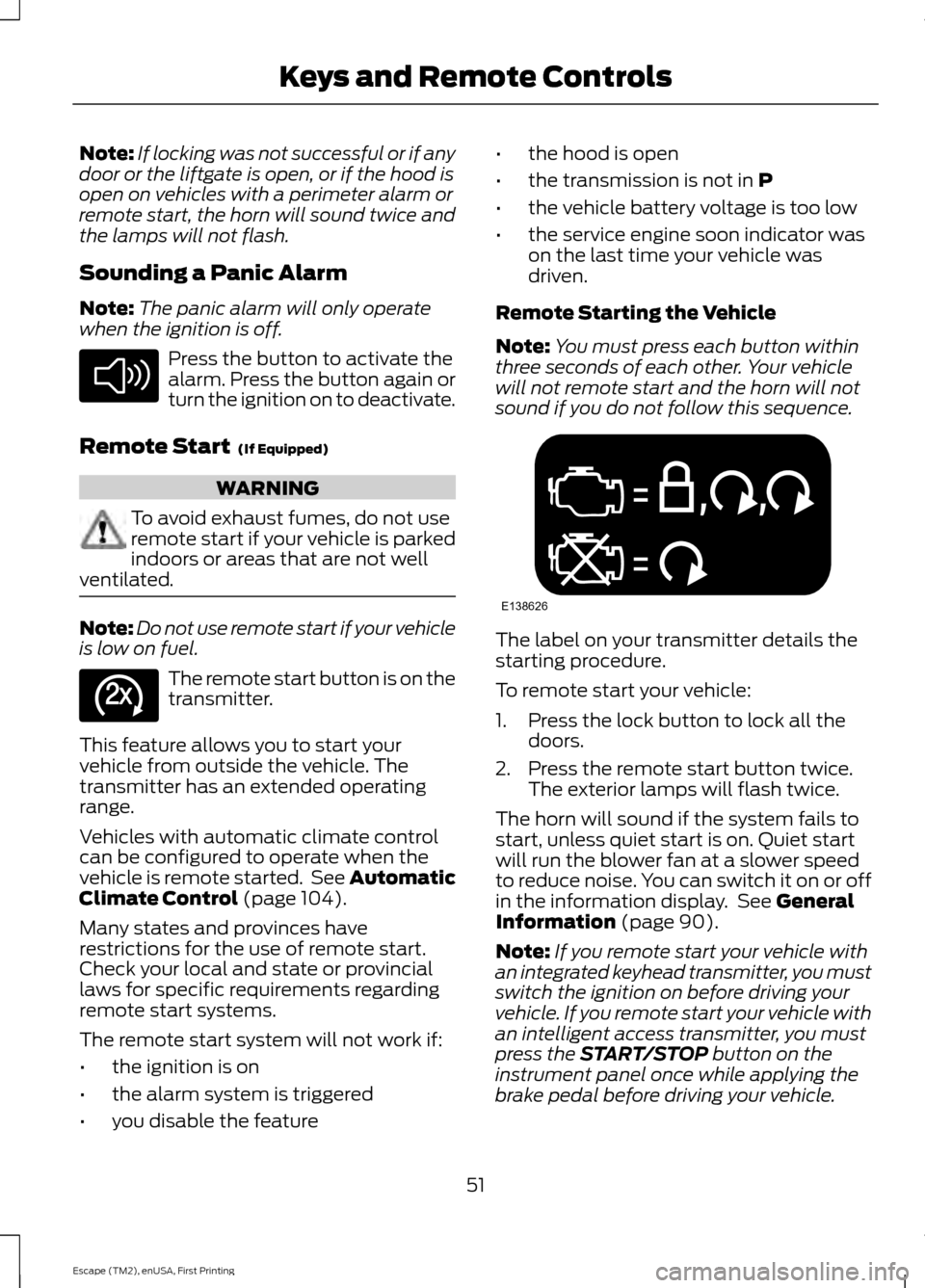
Note: You must press each button within
three seconds of each other. Your vehicle
will not remote start and the horn will not
sound if you do not follow this sequence. The label on your transmitter details the
starting procedure.
To remote start your vehicle:
1. Press the lock button to lock all the
doors.
2. Press the remote start button twice. The exterior lamps will flash twice.
The horn will sound if the system fails to
start, unless quiet start is on. Quiet start
will run the blower fan at a slower speed
to reduce noise. You can switch it on or off
in the information display. See
General
Information (page 90).
Note: If you remote start your vehicle with
an integrated keyhead transmitter, you must
switch the ignition on before driving your
vehicle. If you remote start your vehicle with
an intelligent access transmitter, you must
press the
START/STOP button on the
instrument panel once while applying the
brake pedal before driving your vehicle.
51
Escape (TM2), enUSA, First Printing Keys and Remote ControlsE138624 E138625 E138626
Page 57 of 449
1. Insert the key you want to program into
the ignition. If your vehicle is equipped with
a push-button start, hold the intelligent
access key next to the steering column.
Details on the correct fob placement and
position is in another chapter. See
Starting and Stopping the Engine (page
125).
2. Switch the ignition on.
3. Access the main menu on the
information display controls, and select
Settings
and then MyKey by pressing OK
or the > button.
4. Press
OK or the > button to select
Create MyKey.
5. When prompted, hold the
OK button
until you see a message informing you to
label this key as a MyKey. The key will be
restricted at your vehicle's next start.
MyKey is successfully created. Make sure
you label it so you can distinguish it from
the admin keys.
You can also program configurable
settings for the key(s). Refer to
Programming/Changing Configurable
Settings
. Programming/Changing
Configurable Settings
Use the information display to access your
configurable MyKey settings:
1. Switch the ignition on using an admin
key or fob.
2. Access the main menu on the information display controls, and select
Settings
, then MyKey by pressing OK
or the > button.
3. Use the arrow buttons to get to a configurable feature.
4. Press
OK or > to make a selection.
Note: You can clear or change your MyKey
settings at any time during the same key
cycle as you created the MyKey. Once you
have switched the engine off, however, you
will need an admin key to change or clear
your MyKey settings.
CLEARING ALL MYKEYS
You can clear or change your MyKey
settings using the information display
control on the steering wheel. See
Information Displays
(page 90).
Switch the ignition on using an admin key
or fob.
To clear all MyKeys of all MyKey settings, press the left arrow button to access
the main menu and scroll to: Action and Description
Message
Press the
OK button.
Settings
Press the
OK button.
MyKey
Press and hold the
OK button until the following message
displays.
Clear MyKey
All MyKeys
Cleared
Note: When you clear your MyKeys, you remove all restrictions and return all MyKeys to
their original admin key status.
54
Escape (TM2), enUSA, First Printing MyKey
™
Page 71 of 449
You must have two previously
programmed coded keys and the new
unprogrammed key readily accessible. See
your authorized dealer to have the spare
key programmed if two previously
programmed coded keys are not available.
Read and understand the entire procedure
before you begin.
1.
Insert the first previously programmed
coded key into the ignition.
2. Switch the ignition from off to on. Keep
the ignition on for at least three
seconds, but no more than 10 seconds.
3. Switch the ignition off and remove the
first coded key from the ignition.
4. After three seconds but within 10 seconds of switching the ignition off,
insert the second previously coded key
into the ignition.
5. Switch the ignition from off to on. Keep
the ignition on for at least three
seconds, but no more than 10 seconds.
6. Switch the ignition off and remove the
second previously programmed coded
key from the ignition.
7. After three seconds but within 10 seconds of switching the ignition off
and removing the previously
programmed coded key, insert the new
unprogrammed key into the ignition.
8. Switch the ignition from off to on. Keep
the ignition on for at least six seconds.
9. Remove the newly programmed coded
key from the ignition.
If the key has been successfully
programmed it will start the engine and
operate the remote entry system (if the
new key is an integrated keyhead
transmitter).
If programming was not successful, wait
10 seconds and repeat Steps 1 through 8.
If you are still unsuccessful, take your
vehicle to your authorized dealer. Programming a Spare Intelligent
Access Key
See your authorized dealer to have
additional keys programmed to your
vehicle.
ANTI-THEFT ALARM (If Equipped)
The system will warn you of an
unauthorized entry to your vehicle. It will
be triggered if any door, the luggage
compartment or the hood is opened
without using the key, remote control or
keyless entry keypad.
The direction indicators will flash and the
horn will sound if unauthorized entry is
attempted while the alarm is armed.
Take all remote controls to an authorized
dealer if there is any potential alarm
problem with your vehicle.
Arming the Alarm
The alarm is ready to arm when there is
not a key in the ignition. Electronically lock
the vehicle to arm the alarm. The message indicator flashes
when theft protection is active.
Disarming the Alarm
Disarm the alarm by any of the following
actions:
• Unlock the doors or luggage
compartment with the remote control
or keyless entry keypad.
• Switch the ignition on or start the
vehicle.
• Use a key in the driver ’s door to unlock
the vehicle, then switch the ignition on
within 12 seconds.
Note: Pressing the panic button on the
remote control will stop the horn and signal
indicators, but will not disarm the system.
68
Escape (TM2), enUSA, First Printing Security
Page 88 of 449
Odometer
Located in the bottom of the information
display, it registers the accumulated
distance your vehicle has traveled.
Outside Air Temperature
Shows the outside air temperature.
Trip Computer
See Trip Computer (page 92).
Vehicle Settings and Personalization
See
General Information (page 90).
Engine Coolant Temperature
Gauge WARNING
Never remove the coolant reservoir
cap while the engine is running or hot.
At normal operating temperature, the
needle will remain in the center section.
Note:
Do not restart the engine until the
cause of overheating has been resolved.
If the needle enters the red section, the
engine is overheating. Stop the engine,
switch the ignition off and determine the
cause once the engine has cooled down.
See
Engine Coolant Check (page 216). Fuel Gauge
Note:
The fuel gauge level may vary slightly
when your vehicle is moving or when driving
on a slope.
Switch the ignition on. The fuel gauge will
indicate approximately how much fuel is
in the fuel tank. The arrow next to the fuel
pump symbol shows the fuel filler door
side of your vehicle.
The needle will move toward full when you
refuel your vehicle. If the needle still points
to empty after adding fuel, have your
vehicle repaired.
After refueling the needle may not always
return to exactly the same position. This is
normal.
Note: It may take a short time for the
needle to reach full after refueling and
driving. This is normal and may be due to
the slope of pavement at the service station.
Note: The fuel pumped into the tank may
differ slightly from the fuel gauge. This is
normal and may be due to the slope of
pavement at the service station.
Note: If the service station nozzle shuts off
before the tank is full, complete refueling
at a different pump.
Low Fuel Level Reminder
Vehicles with no distance-to-empty
display
A low fuel level reminder lights when the
fuel gauge needle is at 1/16 above empty.
Vehicles equipped with distance-to-
empty display
A low fuel level reminder displays when
the fuel gauge needle is at 1/16 above
empty or at about 35 miles (56km) to
empty, whichever occurs first.
85
Escape (TM2), enUSA, First Printing Instrument Cluster1
2
3
4
5
678910 1112 13 14 15
E142800
Page 100 of 449
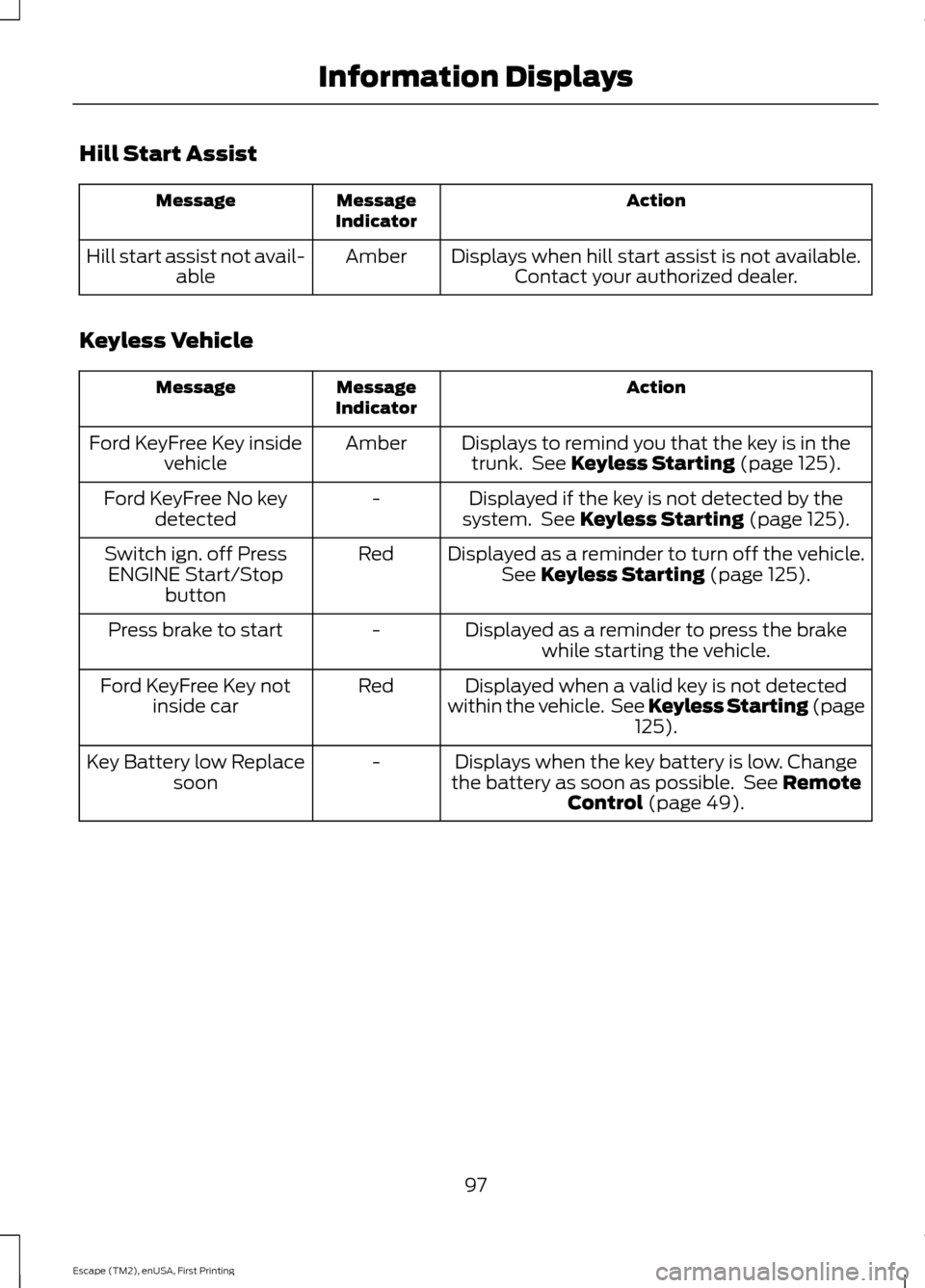
Hill Start Assist
Action
Message
Indicator
Message
Displays when hill start assist is not available.Contact your authorized dealer.
Amber
Hill start assist not avail-
able
Keyless Vehicle Action
Message
Indicator
Message
Displays to remind you that the key is in thetrunk. See Keyless Starting (page 125).
Amber
Ford KeyFree Key inside
vehicle
Displayed if the key is not detected by the
system. See
Keyless Starting (page 125).
-
Ford KeyFree No key
detected
Displayed as a reminder to turn off the vehicle.See
Keyless Starting (page 125).
Red
Switch ign. off Press
ENGINE Start/Stop button
Displayed as a reminder to press the brakewhile starting the vehicle.
-
Press brake to start
Displayed when a valid key is not detected
within the vehicle. See Keyless Starting (page 125
).
Red
Ford KeyFree Key not
inside car
Displays when the key battery is low. Change
the battery as soon as possible. See
Remote
Control (page 49).
-
Key Battery low Replace
soon
97
Escape (TM2), enUSA, First Printing Information Displays
Page 103 of 449
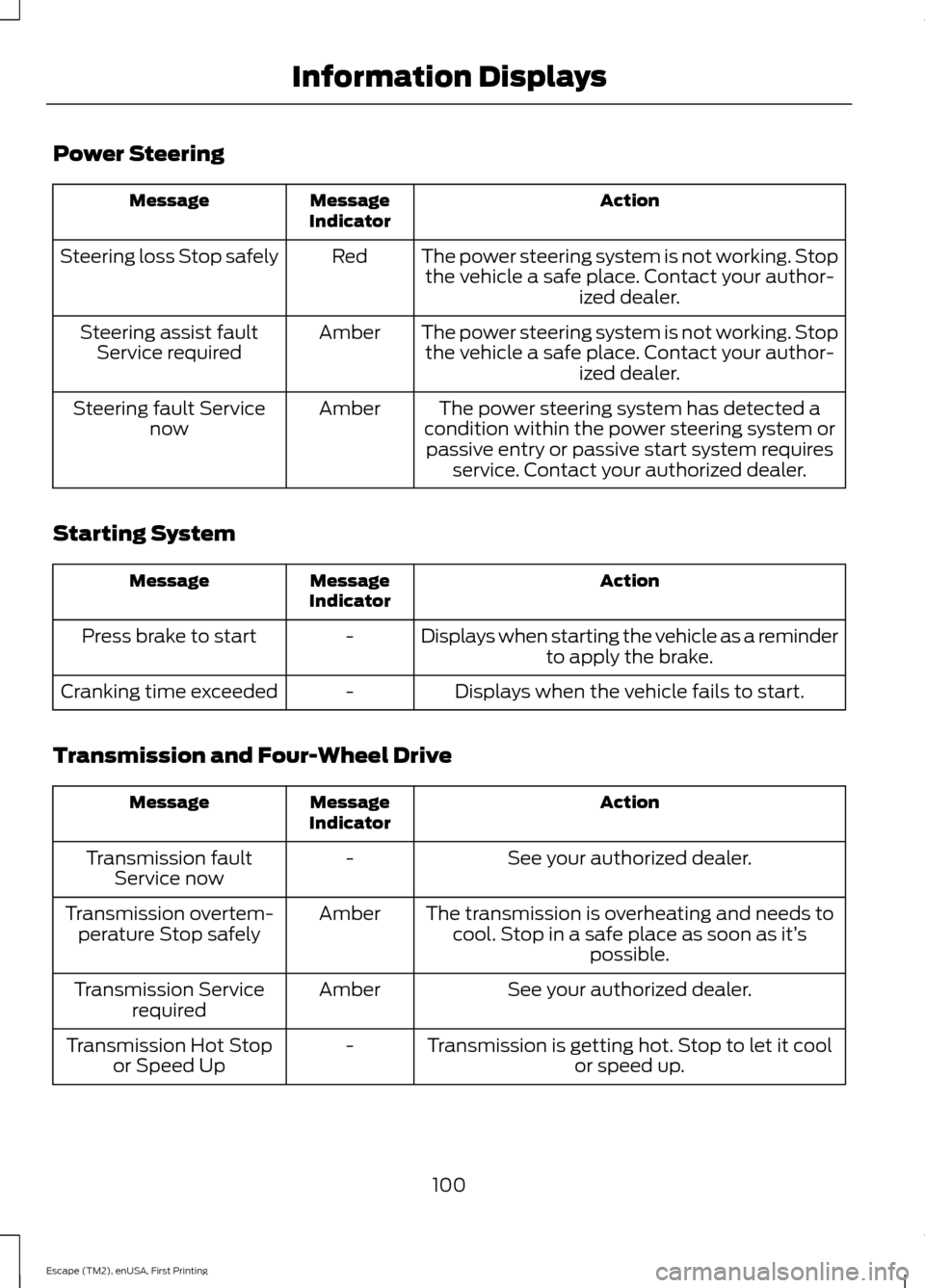
Power Steering
Action
Message
Indicator
Message
The power steering system is not working. Stopthe vehicle a safe place. Contact your author- ized dealer.
Red
Steering loss Stop safely
The power steering system is not working. Stopthe vehicle a safe place. Contact your author- ized dealer.
Amber
Steering assist fault
Service required
The power steering system has detected a
condition within the power steering system or passive entry or passive start system requires service. Contact your authorized dealer.
Amber
Steering fault Service
now
Starting System Action
Message
Indicator
Message
Displays when starting the vehicle as a reminderto apply the brake.
-
Press brake to start
Displays when the vehicle fails to start.
-
Cranking time exceeded
Transmission and Four-Wheel Drive Action
Message
Indicator
Message
See your authorized dealer.
-
Transmission fault
Service now
The transmission is overheating and needs tocool. Stop in a safe place as soon as it’ s
possible.
Amber
Transmission overtem-
perature Stop safely
See your authorized dealer.
Amber
Transmission Service
required
Transmission is getting hot. Stop to let it coolor speed up.
-
Transmission Hot Stop
or Speed Up
100
Escape (TM2), enUSA, First Printing Information Displays
Page 121 of 449
HomeLink Wireless Control
System (If Equipped)
WARNING
Do not use the system with any
garage door opener that does not
have the safety stop and reverse
feature as required by U.S. Federal Safety
Standards (this includes any garage door
opener manufactured before April 1, 1982).
A garage door opener which cannot detect
an object, signaling the door to stop and
reverse, does not meet current federal
safety standards. Using a garage door
opener without these features increases
the risk of serious injury or death. Note:
Make sure that the garage door and
security device are free from obstruction
when you are programming. Do not program
the system with the vehicle in the garage.
Note: Make sure you keep the original
remote control transmitter for use in other
vehicles as well as for future system
programming.
Note: We recommend that upon the sale
or lease termination of your vehicle, you
erase the programmed function buttons for
security reasons. See Erasing the function
button codes later in this section.
Note: You can program a maximum of
three devices. To change or replace any of
the three devices after it has been initially
programmed, you must first erase the
current settings. See Erasing the function
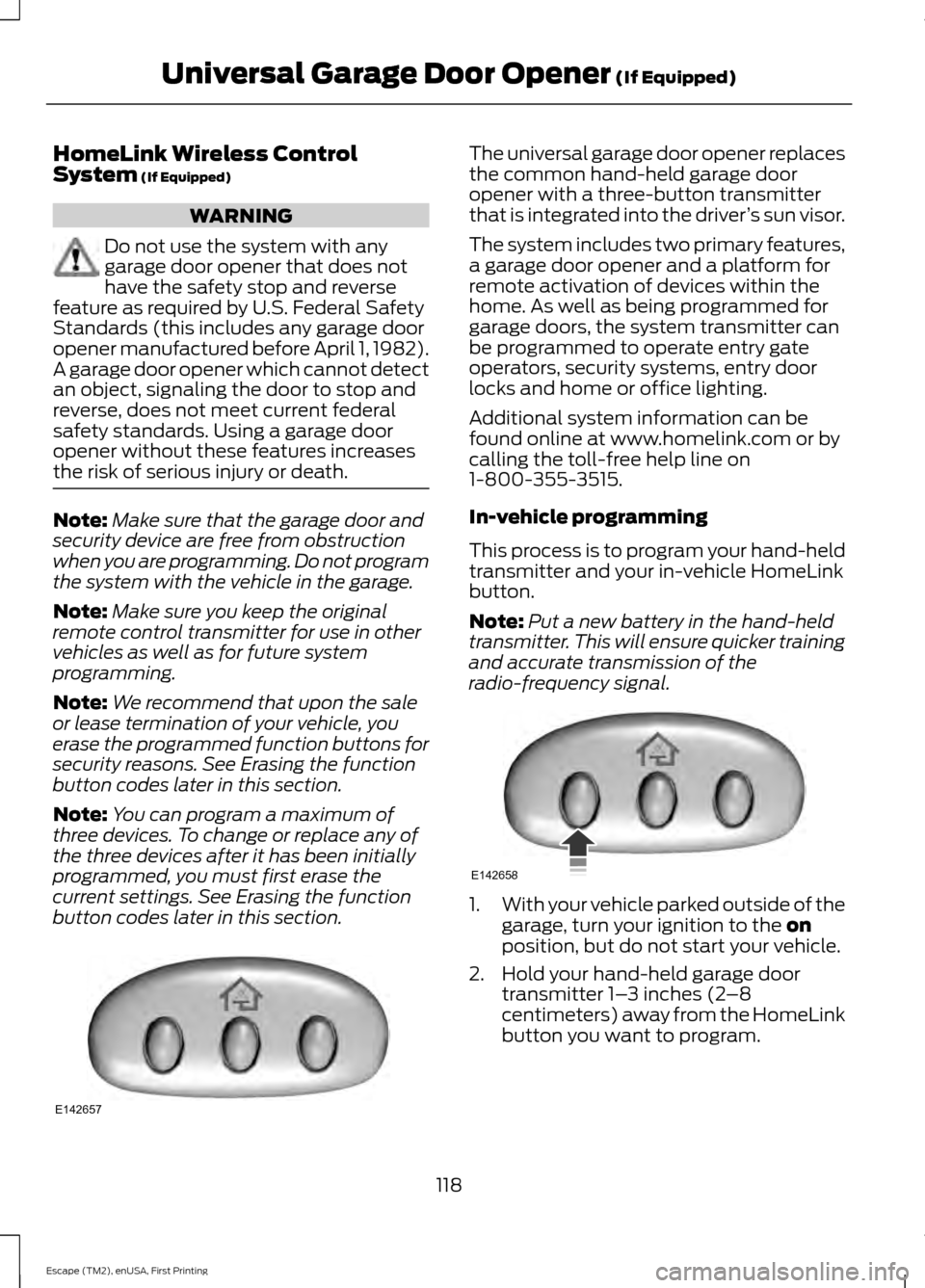
button codes later in this section. The universal garage door opener replaces
the common hand-held garage door
opener with a three-button transmitter
that is integrated into the driver
’s sun visor.
The system includes two primary features,
a garage door opener and a platform for
remote activation of devices within the
home. As well as being programmed for
garage doors, the system transmitter can
be programmed to operate entry gate
operators, security systems, entry door
locks and home or office lighting.
Additional system information can be
found online at www.homelink.com or by
calling the toll-free help line on
1-800-355-3515.
In-vehicle programming
This process is to program your hand-held
transmitter and your in-vehicle HomeLink
button.
Note: Put a new battery in the hand-held
transmitter. This will ensure quicker training
and accurate transmission of the
radio-frequency signal. 1.
With your vehicle parked outside of the
garage, turn your ignition to the
on
position, but do not start your vehicle.
2. Hold your hand-held garage door transmitter 1– 3 inches (2–8
centimeters) away from the HomeLink
button you want to program.
118
Escape (TM2), enUSA, First Printing Universal Garage Door Opener
(If Equipped)E142657 E142658
Page 128 of 449
GENERAL INFORMATION
WARNINGS
Extended idling at high engine
speeds can produce very high
temperatures in the engine and
exhaust system, creating the risk of fire or
other damage. Do not park, idle or drive your vehicle
on dry grass or other dry ground
cover. The emission system heats up
the engine compartment and exhaust
system, creating the risk of fire. Do not start the engine in a closed
garage or in other enclosed areas.
Exhaust fumes can be toxic. Always
open the garage door before you start the
engine. If you smell exhaust fumes inside
your vehicle, have your vehicle
checked by an authorized dealer
immediately. Do not drive your vehicle if
you smell exhaust fumes. If you disconnect the battery, your vehicle
may exhibit some unusual driving
characteristics for approximately 5 miles
(8 kilometers) after you reconnect it. This
is because the engine management system
must realign itself with the engine. You can
disregard any unusual driving
characteristics during this period.
The powertrain control system meets all
Canadian interference-causing equipment
standard requirements regulating the
impulse electrical field or radio noise.
When you start the engine, avoid pressing
the accelerator pedal before and during
operation. Only use the accelerator pedal
when you have difficulty starting the
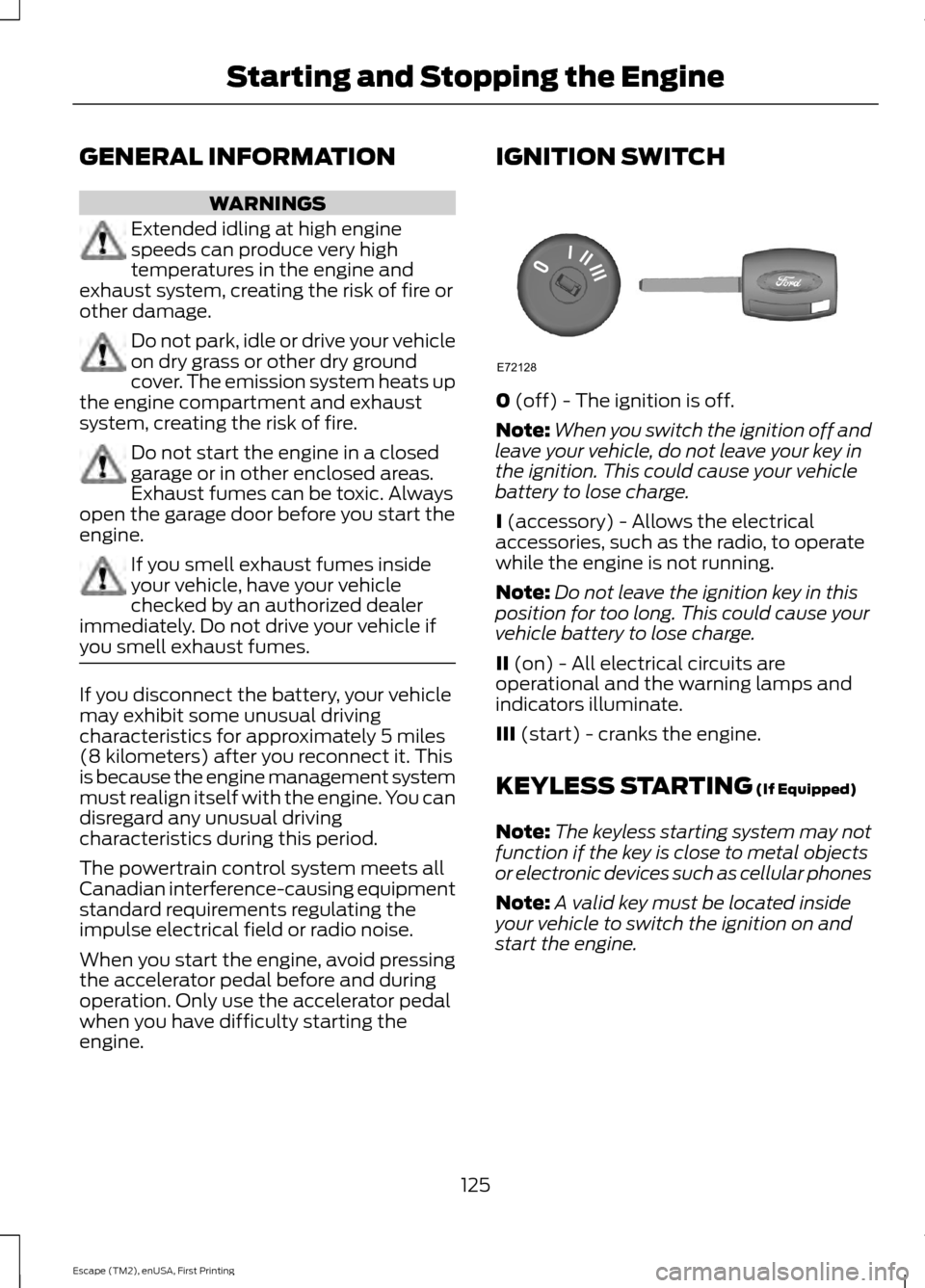
engine. IGNITION SWITCH
0 (off) - The ignition is off.
Note: When you switch the ignition off and
leave your vehicle, do not leave your key in
the ignition. This could cause your vehicle
battery to lose charge.
I
(accessory) - Allows the electrical
accessories, such as the radio, to operate
while the engine is not running.
Note: Do not leave the ignition key in this
position for too long. This could cause your
vehicle battery to lose charge.
II
(on) - All electrical circuits are
operational and the warning lamps and
indicators illuminate.
III
(start) - cranks the engine.
KEYLESS STARTING
(If Equipped)
Note: The keyless starting system may not
function if the key is close to metal objects
or electronic devices such as cellular phones
Note: A valid key must be located inside
your vehicle to switch the ignition on and
start the engine.
125
Escape (TM2), enUSA, First Printing Starting and Stopping the EngineE72128