brake sensor FORD EXPEDITION 2023 Owners Manual
[x] Cancel search | Manufacturer: FORD, Model Year: 2023, Model line: EXPEDITION, Model: FORD EXPEDITION 2023Pages: 658, PDF Size: 16.16 MB
Page 239 of 658
WHAT IS REVERSE BRAKING
ASSIST
Reverse braking assist is designed toreduce impact damage or assist in avoidinga collision while in reverse (R). Usingsensors on the rear of the vehicle, it candetect a possible collision and apply thebrakes. If full braking occurs, the systemattempts to stop the vehicle a safedistance from the obstacle.
HOW DOES REVERSE
BRAKING ASSIST WORK
Reverse braking assist functions when inreverse (R) and traveling at a speed of1–7 mph (2–12 km/h).
If the system detects an obstacle behindyour vehicle, it provides a warning throughthe rear parking aid or cross traffic alertsystem.
REVERSE BRAKING ASSIST
PRECAUTIONS
WARNING: You are responsible forcontrolling your vehicle at all times. Thesystem is designed to be an aid and doesnot relieve you of your responsibility todrive with due care and attention. Failureto follow this instruction could result inthe loss of control of your vehicle,personal injury or death.
WARNING: To help avoid personalinjury, always use caution when inreverse (R) and when using the sensingsystem.
WARNING: The system may notoperate properly during severe weatherconditions, for example snow, ice, heavyrain and spray. Always drive with duecare and attention. Failure to take caremay result in a crash.
WARNING: Traffic control systems,fluorescent lamps, inclement weather,air brakes, external motors and fans mayaffect the correct operation of thesensing system. This may cause reducedperformance or false alerts.
WARNING: Some situations andobjects prevent hazard detection. Forexample low or direct sunlight, inclementweather, unconventional vehicle types,and pedestrians. Apply the brakes whennecessary. Failure to follow thisinstruction could result in the loss ofcontrol of your vehicle, personal injury ordeath.
WARNING: Do not use the systemwith accessories that extend beyond thefront or rear of your vehicle, for examplea trailer hitch or bike rack. The system isnot able to make corrections for theadditional length of the accessories.
The system only applies the brakes for ashort period of time when an event occurs.Act as soon as you notice the brakes applyto remain in control of the vehicle. If youdo not intervene the vehicle may start tomove again.
Note:Certain add-on devices around thebumper or fascia may create false alerts.For example, large trailer hitches, bicycle orsurfboard racks, license plate brackets,bumper covers or any other device that mayblock the normal detection zone of thesystem. Remove the add-on device toprevent false alerts.
235
2023 Expedition (TB8) Canada/United States of America, enUSA, Edition date: 202207, DOMReverse Braking Assist (If Equipped)
Page 240 of 658
Note:The system does not react to smallor moving objects, particularly those closeto the ground.
Note:The system does not operate duringhard acceleration or steering.
Note:If your vehicle sustains damage tothe bumper or fascia leaving it misalignedor bent, it could alter the sensing zonecausing inaccurate measurement ofobstacles or false alerts.
Note:Vehicle loading and suspensionchanges can impact the angle of the sensorsand may change the normal detection zoneof the system resulting in inaccuratemeasurement of obstacles or false alerts.
Note:When you connect a trailer, thesystem may detect the trailer and providean alert, or the system turns off. If thesystem does not turn off, manually switchthe system off after you connect the trailer.
Note:You may experience reduced systemperformance on road surfaces that limitdeceleration. For example, roads with ice,loose gravel, mud or sand.
SWITCHING REVERSE
BRAKING ASSIST ON AND OFF
- VEHICLES WITH: 12 INCH
SCREEN
1.Press Features on the touchscreen.
2.Press Driver Assistance.
3.Switch Reverse Brake Assist on or off.
Note:The system is unavailable when therear parking aid, cross traffic alert or tractioncontrol is off.
Note:If your vehicle is not equipped withcross traffic alert the reverse braking assistrelies on input from the rear parking aid andrear camera sensors.
Note:The default setting is on in someregions.
SWITCHING REVERSE
BRAKING ASSIST ON AND OFF
- VEHICLES WITH: 15 INCH
SCREEN
1.Access the vehicle drawer on thetouchscreen.
2.Press SETTINGS.
3.Press Driver Assistance.
4.Switch Reverse Brake Assist on or off.
Note:The system is unavailable when therear parking aid, cross traffic alert or tractioncontrol is off.
Note:If your vehicle is not equipped withcross traffic alert the reverse braking assistrelies on input from the rear parking aid andrear camera sensors.
Note:The default setting is on in someregions.
OVERRIDING REVERSE
BRAKING ASSIST
There could be instances whenunexpected or unwanted braking occurs.Firmly pressing the accelerator pedal orswitching the feature off overrides thesystem.
REVERSE BRAKING ASSIST
INDICATORS
If the system determines that a collisionwith an obstacle may occur, full brakingmay apply.
A message and warningindicator appear when thesystem applies the brakes.
236
2023 Expedition (TB8) Canada/United States of America, enUSA, Edition date: 202207, DOMReverse Braking Assist (If Equipped)E293490
Page 242 of 658
REVERSE BRAKING ASSIST –FREQUENTLY ASKED QUESTIONS
Why is reverse braking assist unavailable?
•Make sure the reverse braking assist ison. See Switching Reverse BrakingAssist On and Off (page 236).
•Make sure that all doors, liftgate ortailgate and hood are closed. Drive thevehicle on a straight road for a shortperiod. If the message remains, havethe system checked.
•If your vehicle has the cross traffic alertsystem, make sure it is on. SeeSwitching Cross Traffic Alert Onand Off (page 326).
•Make sure the rear parking aid systemis on. See Parking Aids (page 261).
•Make sure the traction control is on.See Switching Traction Control Onand Off (page 245).
Note:The traction control automaticallyturns off if four-wheel drive low and certaindrive modes such as mud/ruts andsnow/sand is activated.
•Your vehicle may have sustained a rearend impact. Have the sensors checkedfor proper coverage and operation.
•An anti-lock brake, traction control orstability control event may haveoccurred. Reverse braking assistresumes operation when the event iscomplete.
•Make sure the rear view camera and360 degree camera are not dirty orobstructed. If dirty, clean the camera.If the message still appears aftercleaning the camera, wait a short timefor the message to clear. If themessage does not clear, have thesystem checked.
•Make sure the cross traffic alert, rearparking aid and side parking aid sensorsare not blocked or faulty. See Locatingthe Cross Traffic Alert Sensors(page 326). See Locating the RearParking Aid Sensors (page 262). SeeLocating the Side Parking AidSensors (page 264).
•You recently had your vehicle serviced,or the battery disconnected. Drive yourvehicle a short distance to resumesystem operation.
•Reverse braking assist does notfunction when you connect a trailer.Operation resumes when youdisconnect the trailer.
Note:If the answers to why the system isunavailable do not assist in returning reversebraking assist to available, have the systemchecked as soon as possible.
238
2023 Expedition (TB8) Canada/United States of America, enUSA, Edition date: 202207, DOMReverse Braking Assist (If Equipped)
Page 243 of 658
WHAT IS CROSS TRAFFIC
BRAKING
The system is designed to reduce impactdamage or assist in avoiding a collision byusing the sensors on the rear of yourvehicle to detect a possible collision andapplying the brakes.
HOW DOES CROSS TRAFFIC
BRAKING WORK
The system only reacts for vehiclesapproaching from the sides when you shiftinto reverse (R).
If the system detects a vehicle approachingyour vehicle, it provides a warning throughthe cross traffic alert system. See What IsCross Traffic Alert (page 325).
The system only applies the brakes for ashort period of time when an event occurs.Take action as soon as you notice thesystem applying the brakes in order toremain in control of your vehicle, thesystem does not do this for you.
Note:You need to enable cross traffic alertfor the system to function.
CROSS TRAFFIC BRAKING
PRECAUTIONS
WARNING: You are responsible forcontrolling your vehicle at all times. Thesystem is designed to be an aid and doesnot relieve you of your responsibility todrive with due care and attention. Failureto follow this instruction could result inthe loss of control of your vehicle,personal injury or death.
WARNING: To help avoid personalinjury, always use caution when inreverse (R) and when using the sensingsystem.
WARNING: The system may notoperate properly during severe weatherconditions, for example snow, ice, heavyrain and spray. Always drive with duecare and attention. Failure to take caremay result in a crash.
WARNING: Do not use the systemwith accessories that extend beyond thefront or rear of your vehicle, for examplea trailer hitch or bike rack. The system isnot able to make corrections for theadditional length of the accessories.
WARNING: Some situations andobjects prevent hazard detection, forexample, inclement weather,unconventional vehicle types andpedestrians. Apply the brakes whennecessary. Failure to follow thisinstruction could result in the loss ofcontrol of your vehicle, personal injury ordeath.
Note:If your vehicle sustains damage tothe bumper or fascia leaving it misalignedor bent, it could alter the sensing zonecausing inaccurate measurement ofobstacles or false alerts.
Note:Vehicle loading and suspensionchanges can impact the angle of the sensorsand may change the normal detection zoneof the system resulting in inaccuratemeasurement of obstacles or false alerts.
Note:When you connect a trailer, thesystem may detect the trailer and providean alert, or the system turns off. If thesystem does not turn off, switch the systemoff manually after you connect the trailer.
239
2023 Expedition (TB8) Canada/United States of America, enUSA, Edition date: 202207, DOMCross Traffic Braking
Page 265 of 658
PARKING AID PRECAUTIONS
WARNING: To help avoid personalinjury, always use caution when inreverse (R) and when using the sensingsystem.
WARNING: The system may notdetect objects with surfaces that absorbreflection. Always drive with due careand attention. Failure to take care mayresult in a crash.
WARNING: Traffic control systems,fluorescent lamps, inclement weather,air brakes, external motors and fans mayaffect the correct operation of thesensing system. This may cause reducedperformance or false alerts.
WARNING: The system may notdetect small or moving objects,particularly those close to the ground.
WARNING: The parking aid systemcan only assist you to detect objectswhen your vehicle is moving at parkingspeeds. To help avoid personal injury youmust take care when using the parkingaid system.
WARNING: The system may notfunction if the sensor is blocked.
WARNING: In cold and severeweather conditions the system may notfunction. Rain, snow and spray can alllimit sensor performance.
WARNING: If damage occurs in theimmediate area surrounding the sensor,have your vehicle checked as soon aspossible.
Note:If your vehicle sustains damageleaving the sensors misaligned, this willcause inaccurate measurements or falsealerts.
When you connect a trailer to your vehicle,the rear parking aid detects the trailer andprovides an alert. Disable the parking aidwhen you connect a trailer to prevent thealert.
Note:Connected trailers might be detectedby the vehicle and parking aid turns offautomatically in those instances.
Note:Certain add-on devices installedaround the bumper or fascia may createfalse alerts, for example, large trailerhitches, bike or surfboard racks, license platebrackets, bumper covers or any other devicethat could block the normal detection zoneof the parking aid system. Aftermarket sparetires or spare tire covers mounted to the reartailgate could cause false alerts from thepark aid system. Remove the add-on deviceto prevent false alerts.
Note: Keep the sensors free from snow, iceand large accumulations of dirt. If thesensors are covered, the system's accuracycan be affected.
Do not clean the sensors with sharpobjects.
Note: When using a programmed MyKey,you cannot switch the parking aids off. SeeMyKey™ (page 75).
SWITCHING PARKING AID ON
AND OFF
Press the parking aid button anduse the menu to turn the systemon and off.
The system can also be turned off usingthe pop-up message that appears whenyou are in reverse (R).
261
2023 Expedition (TB8) Canada/United States of America, enUSA, Edition date: 202207, DOMParking AidsPE326188
Page 268 of 658
The side parking aid may not function if:
•Your vehicle remains stationary for overtwo minutes.
•The anti-lock brake system activates.
•The traction control system activates.
•Your vehicle is in park (P).
•The steering wheel angle informationis not available. You must drive at least492 ft (150 m) above 19 mph(30 km/h) to reset the steering wheelangle information.
Note:If you switch traction control off, theside sensing system also turns off.
To reinitialize the system, drive the lengthof your vehicle.
The side parking aid does not detect anobject that is moving toward the side ofyour vehicle, for example another vehiclemoving at a low speed, if it does not passa front or rear parking aid sensor.
If the transmission is in reverse (R), the sidesensing system provides audible warnings.When your vehicle is moving slowly,obstacles are detected within 24 in(60 cm) and are inside the driving path ofyour vehicle. If your vehicle remainsstationary for a few seconds, the audiblewarning turns off. Visual indication isalways present in reverse (R).
If your vehicle is in neutral (N), the sidesensing system provides visual indicationonly when your vehicle is moving slowlyand there is a front or rear parking aidobstacle detected, and the side obstacleis within 24 in (60 cm) from the side ofyour vehicle. If your vehicle remainsstationary for a few seconds, the visualindication turns off.
If the transmission is in drive (D) or anyother forward gear, the side sensing systemprovides audible and visual warnings.When your vehicle is moving slowly,obstacles are detected within 24 in(60 cm) and are inside the driving path ofyour vehicle. If your vehicle remainsstationary for a few seconds, the visualindication and audible warning turns off.
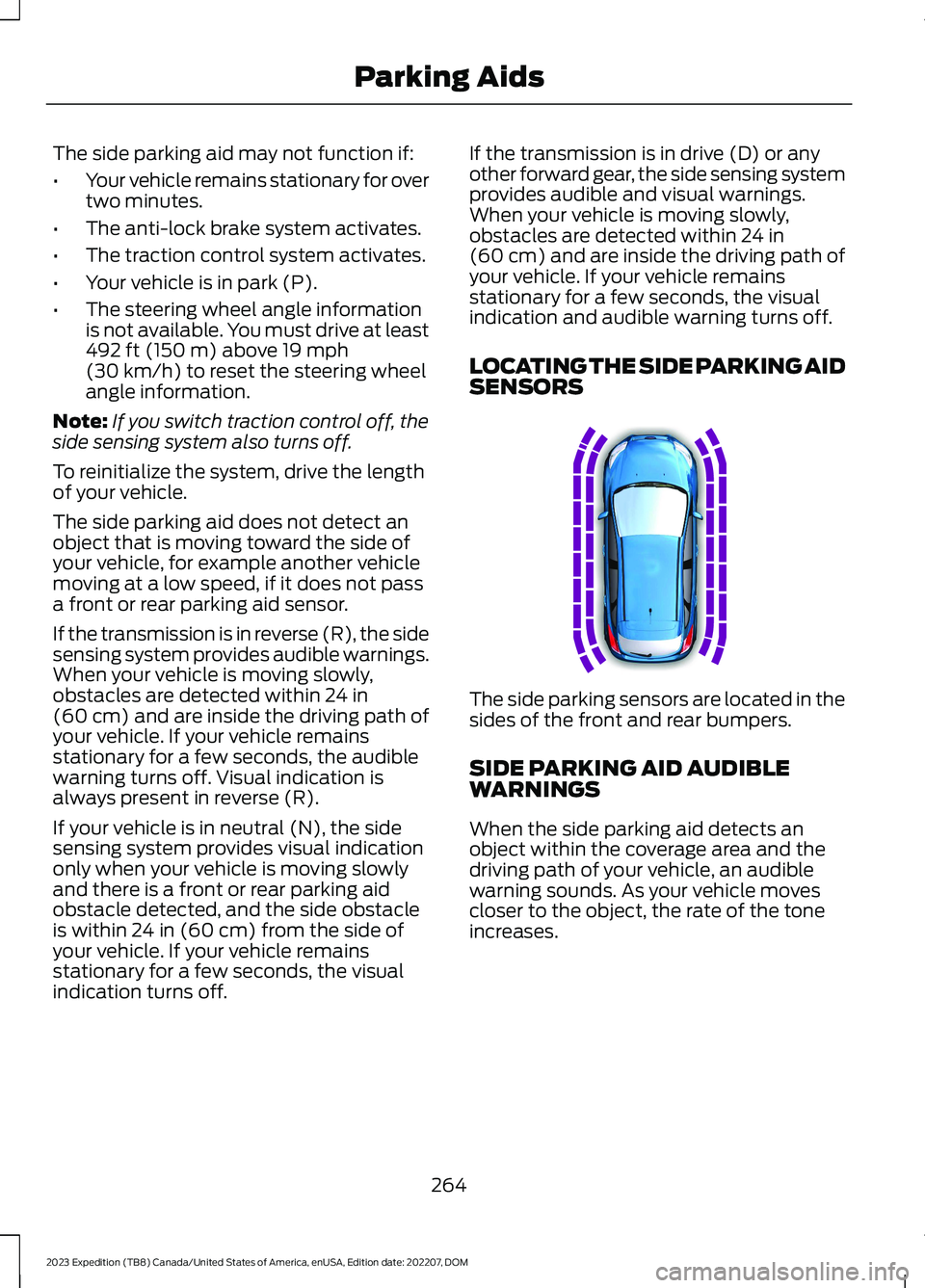
LOCATING THE SIDE PARKING AIDSENSORS
The side parking sensors are located in thesides of the front and rear bumpers.
SIDE PARKING AID AUDIBLEWARNINGS
When the side parking aid detects anobject within the coverage area and thedriving path of your vehicle, an audiblewarning sounds. As your vehicle movescloser to the object, the rate of the toneincreases.
264
2023 Expedition (TB8) Canada/United States of America, enUSA, Edition date: 202207, DOMParking AidsE187810
Page 277 of 658
WHAT IS ACTIVE PARK
ASSIST
Active Park Assist 2.0
Assists you with parking in and out ofparking spaces.
HOW DOES ACTIVE PARK
ASSIST WORK
Active park assist uses sensors to detectparking spaces. The system steers,accelerates, brakes and shifts gears asnecessary to maneuver into or out of aparking space.
ACTIVE PARK ASSIST
PRECAUTIONS
WARNING: You must remain inyour vehicle when the system turns on.At all times, you are responsible forcontrolling your vehicle, supervising thesystem and intervening, if required.Failure to take care may result in the lossof control of your vehicle, seriouspersonal injury or death.
WARNING: The sensors may notdetect objects in heavy rain or otherconditions that cause interference.
WARNING: You are responsible forcontrolling your vehicle at all times. Thesystem is designed to be an aid and doesnot relieve you of your responsibility todrive with due care and attention. Failureto follow this instruction could result inthe loss of control of your vehicle,personal injury or death.
WARNING: Do not use the systemwith accessories that extend beyond thefront or rear of your vehicle, for examplea trailer hitch or bike rack. The system isnot able to make corrections for theadditional length of the accessories.
SWITCHING ACTIVE PARK
ASSIST ON AND OFF
Press the parking aid button,then press the active park assisticon on the touchscreen to bringup full screen notifications.
Press the soft keys on the touchscreen toswitch between the parallel park in,perpendicular park in, or parallel park outparking modes.
Cancelling Active Park Assist
To cancel parking assistance at any time,shift out of neutral (N).
Pausing Active Park Assist
To pause parking assistance at any time,release the parking aid button.
If you open the passenger or rear doors,active park assist pauses.
To resume parking, press and hold theparking aid button again.
ENTERING A PARALLEL
PARKING SPACE
1.Press the parking aid button.
Note:The system detects other vehiclesand curbs to find a parking space.
2.Press the active park assist icon on thetouchscreen.
273
2023 Expedition (TB8) Canada/United States of America, enUSA, Edition date: 202207, DOMActive Park Assist (If Equipped)PE326188
Page 279 of 658
4.Use the turn signal to choose thedirection to exit the parking space.
5.Press and hold the brake pedal.
6.Release the steering wheel and shiftinto neutral (N).
7.Release the parking brake.
8.Press and hold the parking aid button.
9.Release the brake pedal to allow yourvehicle to move.
Note:After active park assist drives yourvehicle to a position where you can exit theparking space in a forward movement, amessage appears instructing you to take fullcontrol of your vehicle.
10.Take control of your vehicle.
Note:You can slow down your vehicle atany time by pressing the brake pedal.
ACTIVE PARK ASSIST –
TROUBLESHOOTING
ACTIVE PARK ASSIST –INFORMATION MESSAGES
ActionMessage
The systemrequires service.Have your vehiclechecked as soon aspossible.
Active Park Fault
ACTIVE PARK ASSIST –FREQUENTLY ASKED QUESTIONS
Why does active park assist notoperate correctly?
The system is unable to detect avehicle, curb or object to park next toor in between. The system needsboundary objects to operate correctly.
Why does active park assist not searchfor a parking space?
You have switched traction control off.
Why does active park assist not searchfor a parking space?
The transmission is in reverse (R). Yourvehicle must be moving forward to beable to detect a parking space.
Why does active park assist not offera parking space?
The sensors could be blocked. Forexample, snow, ice or largeaccumulations of dirt. Blocked sensorscan affect how the system functions.
Why does active park assist not offera parking space?
The sensors in the front or rear bumpercould be damaged.
Why does active park assist not offera parking space?
There is not enough room in theparking space for your vehicle to safelypark.
Why does active park assist not offera parking space?
There is not enough space for theparking maneuver on the opposite sideof the parking space.
Why does active park assist not offera parking space?
The parking space is more than 5 ft(1.5 m) or less than 2 ft (0.5 m) awayfrom your vehicle.
Why does active park assist not offera parking space?
Your vehicle's speed is greater than22 mph (35 km/h) for parallel parkingor greater than 19 mph (30 km/h) forperpendicular parking.
275
2023 Expedition (TB8) Canada/United States of America, enUSA, Edition date: 202207, DOMActive Park Assist (If Equipped)
Page 283 of 658
HOW DOES ADAPTIVE CRUISE
CONTROL WITH STOP AND GO
WORK
Adaptive cruise control with stop and gouses radar and camera sensors to maintaina set gap between your vehicle and thevehicle in front of you while following it toa complete stop. Stop and go can also beset to follow a vehicle directly in front ofyou and adjust the set speed, while you areat a complete stop.
ADAPTIVE CRUISE CONTROL
PRECAUTIONS
WARNING: You are responsible forcontrolling your vehicle at all times. Thesystem is designed to be an aid and doesnot relieve you of your responsibility todrive with due care and attention. Failureto follow this instruction could result inthe loss of control of your vehicle,personal injury or death.
WARNING: Do not use adaptivecruise control on winding roads, in heavytraffic or when the road surface isslippery. This could result in loss ofvehicle control, serious injury or death.
WARNING: Pay close attention tochanging road conditions such asentering or leaving a highway, on roadswith intersections or roundabouts, roadswithout visible lanes of travel, roads thatare unpaved, or steep slopes. Failure tofollow this instruction could result in theloss of control of your vehicle, personalinjury or death.
WARNING: The system is not acrash warning or avoidance system.
WARNING: Do not use the systemwhen towing a trailer that hasaftermarket electronic trailer brakecontrols. Failure to follow this instructioncould result in the loss of control of yourvehicle, personal injury or death.
WARNING: Do not use tire sizesother than those recommended becausethis can affect the normal operation ofthe system. Failure to do so may resultin a loss of vehicle control, which couldresult in serious injury.
WARNING: Do not use the systemwith a snow plow blade installed.
WARNING: Do not use the systemin poor visibility, for example fog, heavyrain, spray or snow.
When Following a Vehicle
WARNING: When following avehicle that is braking, your vehicle doesnot always decelerate quickly enough toavoid a crash without driver intervention.Apply the brakes when necessary. Failureto follow this instruction could result inpersonal injury or death.
Hilly Condition Usage
Select a lower gear when the system isactive in situations such as prolongeddownhill driving on steep slopes, forexample in mountainous areas.
279
2023 Expedition (TB8) Canada/United States of America, enUSA, Edition date: 202207, DOMAdaptive Cruise Control (If Equipped)
Page 284 of 658
ADAPTIVE CRUISE CONTROL
LIMITATIONS
Sensor Limitations
WARNING: On rare occasions,detection issues can occur due to theroad infrastructures, for example bridges,tunnels and safety barriers. In thesecases, the system may brake late orunexpectedly. At all times, you areresponsible for controlling your vehicle,supervising the system and intervening,if required.
WARNING: If the systemmalfunctions, have your vehicle checkedas soon as possible.
WARNING: Large contrasts inoutside lighting can limit sensorperformance.
WARNING: The system only warnsof vehicles detected by the radar sensor.In some cases there may be no warningor a delayed warning. Apply the brakeswhen necessary. Failure to follow thisinstruction could result in personal injuryor death.
WARNING: The system may notdetect stationary or slow movingvehicles below 6 mph (10 km/h).
WARNING: The system does notdetect pedestrians or objects in the road.
WARNING: The system does notdetect oncoming vehicles in the samelane.
WARNING: The system may notoperate properly if the sensor is blocked.Keep the windshield free fromobstruction.
WARNING: The sensor mayincorrectly track lane markings as otherstructures or objects. This can result ina false or missed warning.
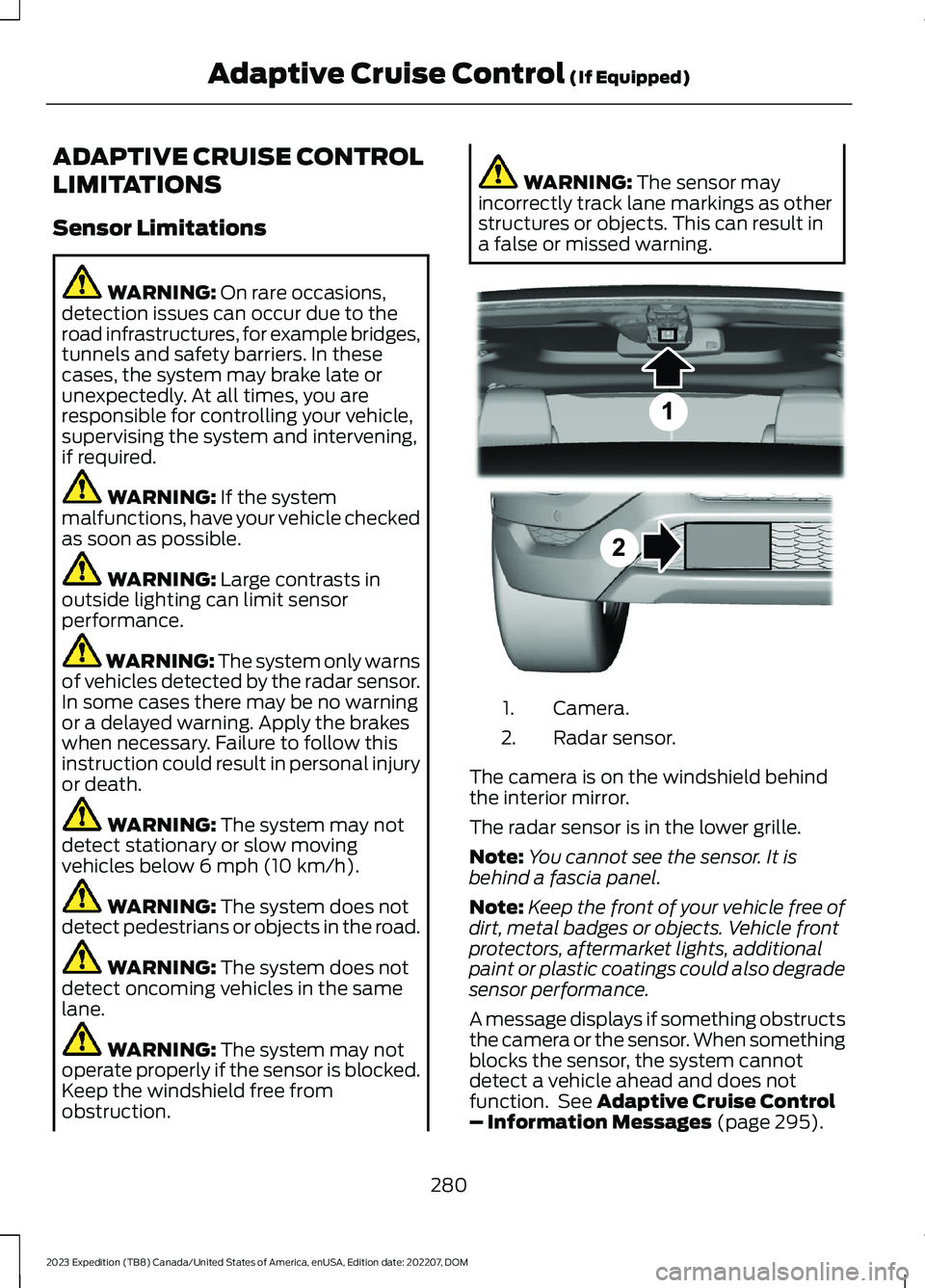
Camera.1.
Radar sensor.2.
The camera is on the windshield behindthe interior mirror.
The radar sensor is in the lower grille.
Note:You cannot see the sensor. It isbehind a fascia panel.
Note:Keep the front of your vehicle free ofdirt, metal badges or objects. Vehicle frontprotectors, aftermarket lights, additionalpaint or plastic coatings could also degradesensor performance.
A message displays if something obstructsthe camera or the sensor. When somethingblocks the sensor, the system cannotdetect a vehicle ahead and does notfunction. See Adaptive Cruise Control– Information Messages (page 295).
280
2023 Expedition (TB8) Canada/United States of America, enUSA, Edition date: 202207, DOMAdaptive Cruise Control (If Equipped)E305503