display FORD EXPLORER 2023 Owners Manual
[x] Cancel search | Manufacturer: FORD, Model Year: 2023, Model line: EXPLORER, Model: FORD EXPLORER 2023Pages: 573, PDF Size: 16.1 MB
Page 437 of 573
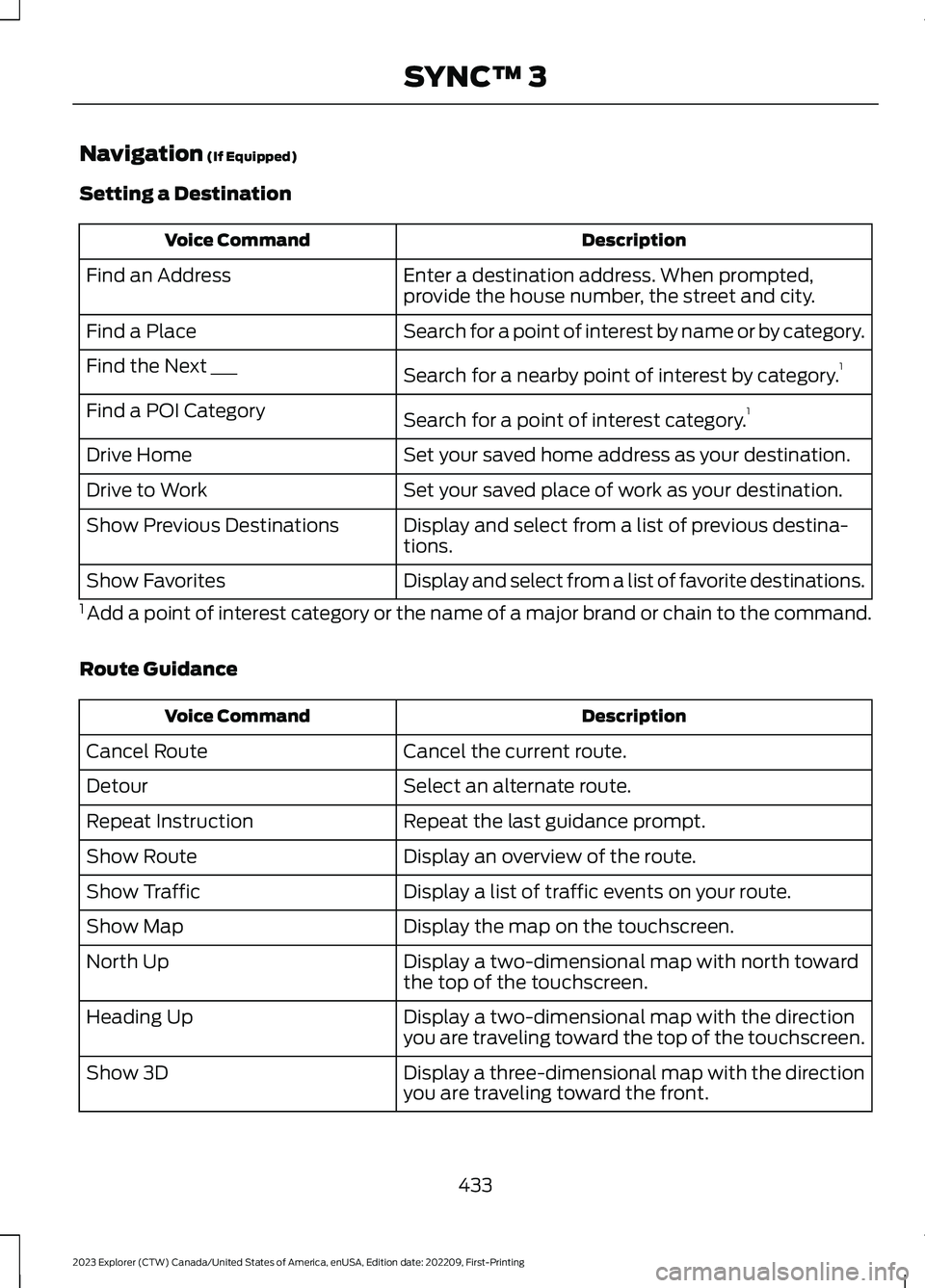
Navigation (If Equipped)
Setting a Destination
DescriptionVoice Command
Enter a destination address. When prompted,provide the house number, the street and city.Find an Address
Search for a point of interest by name or by category.Find a Place
Search for a nearby point of interest by category.1Find the Next ___
Search for a point of interest category.1Find a POI Category
Set your saved home address as your destination.Drive Home
Set your saved place of work as your destination.Drive to Work
Display and select from a list of previous destina-tions.Show Previous Destinations
Display and select from a list of favorite destinations.Show Favorites
1 Add a point of interest category or the name of a major brand or chain to the command.
Route Guidance
DescriptionVoice Command
Cancel the current route.Cancel Route
Select an alternate route.Detour
Repeat the last guidance prompt.Repeat Instruction
Display an overview of the route.Show Route
Display a list of traffic events on your route.Show Traffic
Display the map on the touchscreen.Show Map
Display a two-dimensional map with north towardthe top of the touchscreen.North Up
Display a two-dimensional map with the directionyou are traveling toward the top of the touchscreen.Heading Up
Display a three-dimensional map with the directionyou are traveling toward the front.Show 3D
433
2023 Explorer (CTW) Canada/United States of America, enUSA, Edition date: 202209, First-PrintingSYNC™ 3
Page 438 of 573
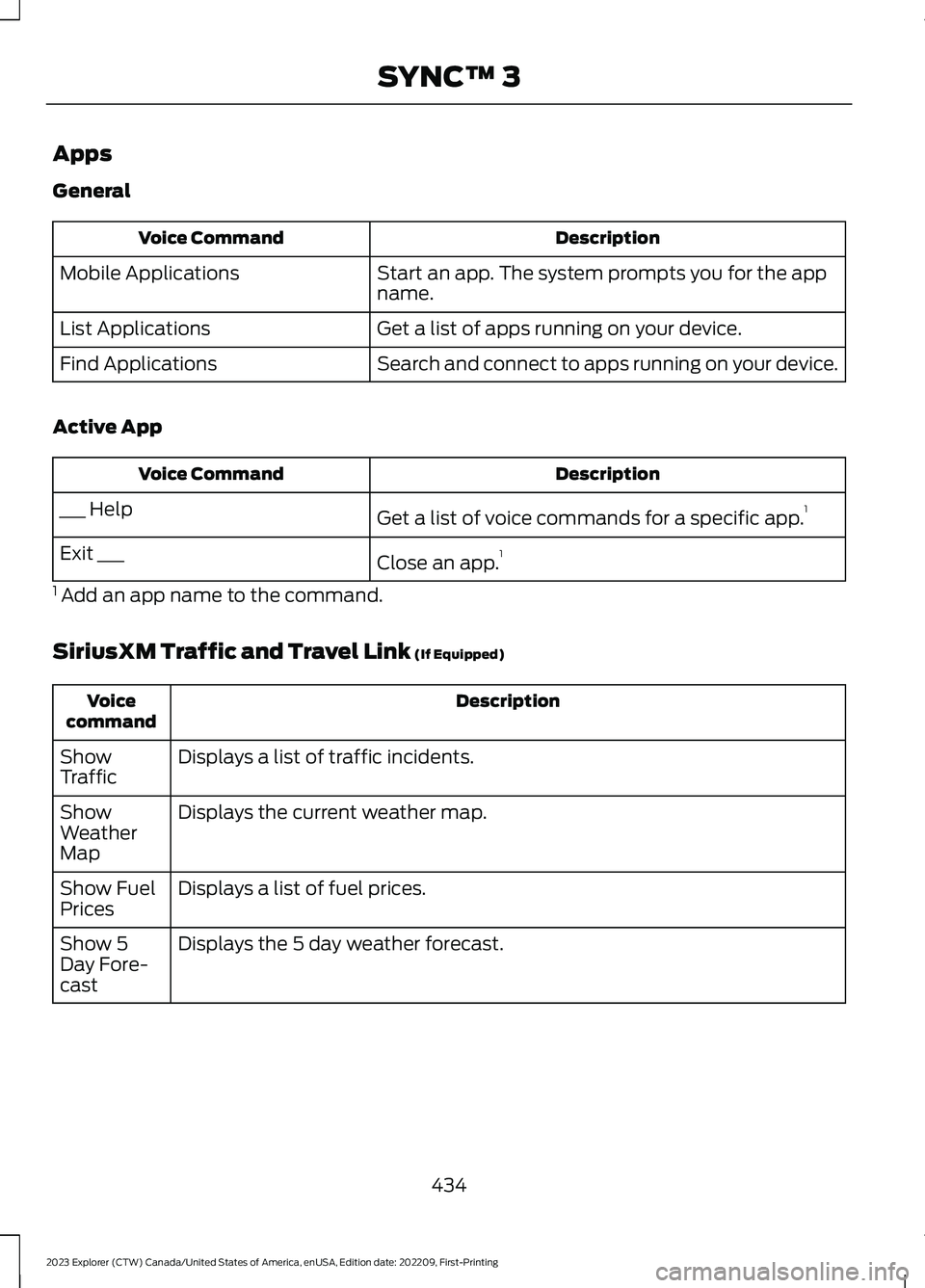
Apps
General
DescriptionVoice Command
Start an app. The system prompts you for the appname.Mobile Applications
Get a list of apps running on your device.List Applications
Search and connect to apps running on your device.Find Applications
Active App
DescriptionVoice Command
Get a list of voice commands for a specific app.1___ Help
Close an app.1Exit ___
1 Add an app name to the command.
SiriusXM Traffic and Travel Link (If Equipped)
DescriptionVoicecommand
Displays a list of traffic incidents.ShowTraffic
Displays the current weather map.ShowWeatherMap
Displays a list of fuel prices.Show FuelPrices
Displays the 5 day weather forecast.Show 5Day Fore-cast
434
2023 Explorer (CTW) Canada/United States of America, enUSA, Edition date: 202209, First-PrintingSYNC™ 3
Page 439 of 573
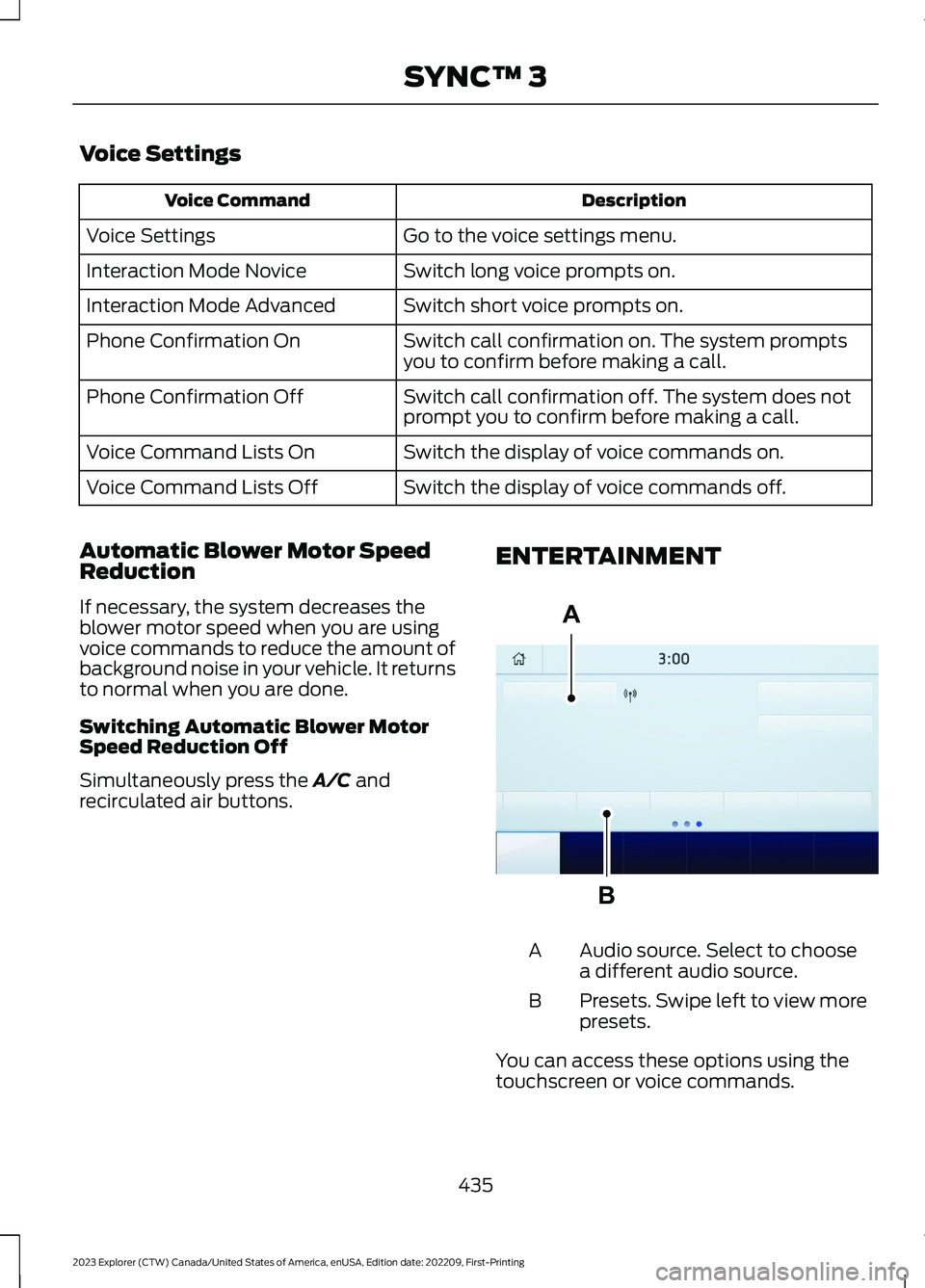
Voice Settings
DescriptionVoice Command
Go to the voice settings menu.Voice Settings
Switch long voice prompts on.Interaction Mode Novice
Switch short voice prompts on.Interaction Mode Advanced
Switch call confirmation on. The system promptsyou to confirm before making a call.Phone Confirmation On
Switch call confirmation off. The system does notprompt you to confirm before making a call.Phone Confirmation Off
Switch the display of voice commands on.Voice Command Lists On
Switch the display of voice commands off.Voice Command Lists Off
Automatic Blower Motor SpeedReduction
If necessary, the system decreases theblower motor speed when you are usingvoice commands to reduce the amount ofbackground noise in your vehicle. It returnsto normal when you are done.
Switching Automatic Blower MotorSpeed Reduction Off
Simultaneously press the A/C andrecirculated air buttons.
ENTERTAINMENT
Audio source. Select to choosea different audio source.A
Presets. Swipe left to view morepresets.B
You can access these options using thetouchscreen or voice commands.
435
2023 Explorer (CTW) Canada/United States of America, enUSA, Edition date: 202209, First-PrintingSYNC™ 3ABE293491
Page 440 of 573
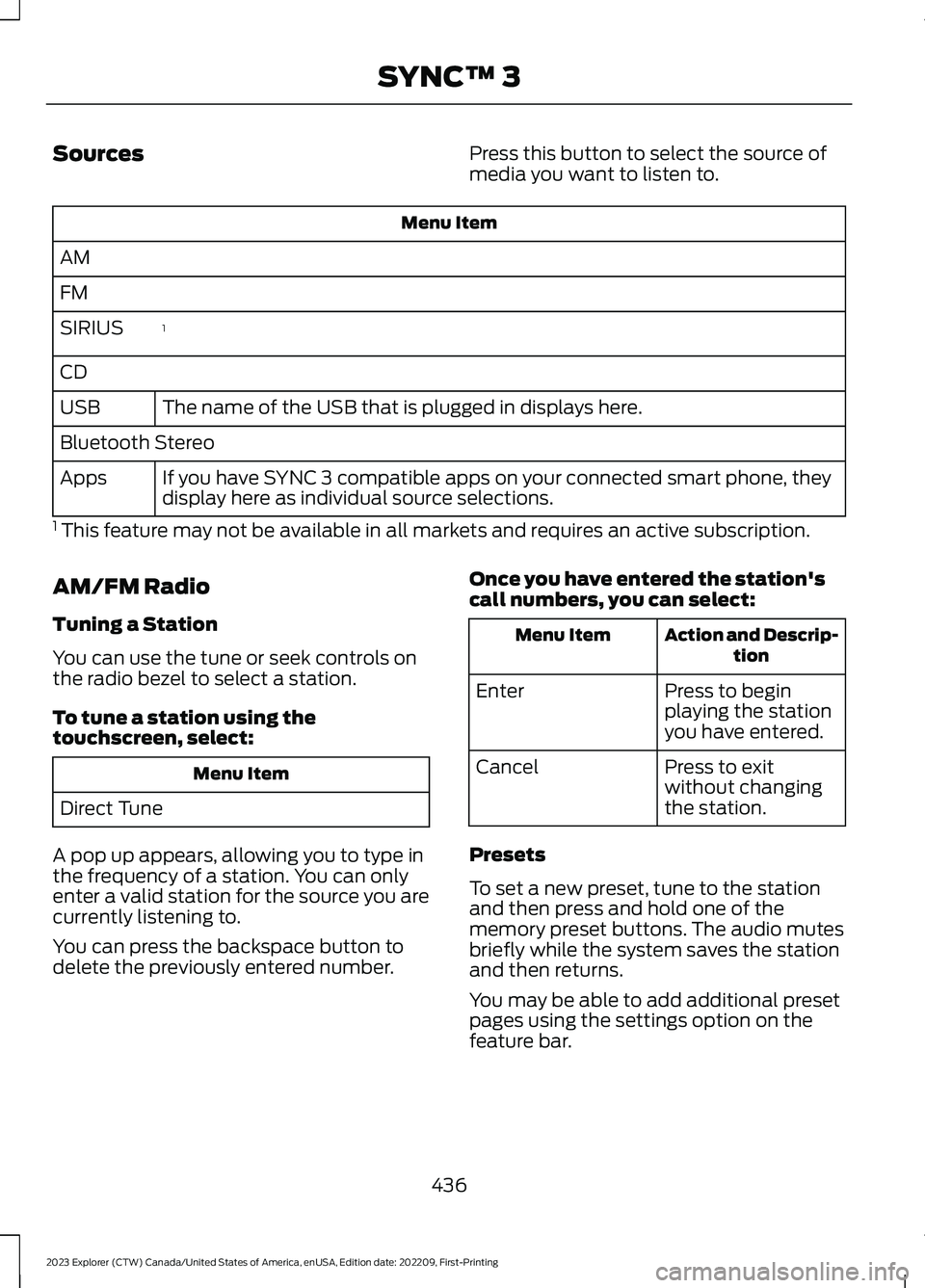
SourcesPress this button to select the source ofmedia you want to listen to.
Menu Item
AM
FM
1SIRIUS
CD
The name of the USB that is plugged in displays here.USB
Bluetooth Stereo
If you have SYNC 3 compatible apps on your connected smart phone, theydisplay here as individual source selections.Apps
1 This feature may not be available in all markets and requires an active subscription.
AM/FM Radio
Tuning a Station
You can use the tune or seek controls onthe radio bezel to select a station.
To tune a station using thetouchscreen, select:
Menu Item
Direct Tune
A pop up appears, allowing you to type inthe frequency of a station. You can onlyenter a valid station for the source you arecurrently listening to.
You can press the backspace button todelete the previously entered number.
Once you have entered the station'scall numbers, you can select:
Action and Descrip-tionMenu Item
Press to beginplaying the stationyou have entered.
Enter
Press to exitwithout changingthe station.
Cancel
Presets
To set a new preset, tune to the stationand then press and hold one of thememory preset buttons. The audio mutesbriefly while the system saves the stationand then returns.
You may be able to add additional presetpages using the settings option on thefeature bar.
436
2023 Explorer (CTW) Canada/United States of America, enUSA, Edition date: 202209, First-PrintingSYNC™ 3
Page 442 of 573
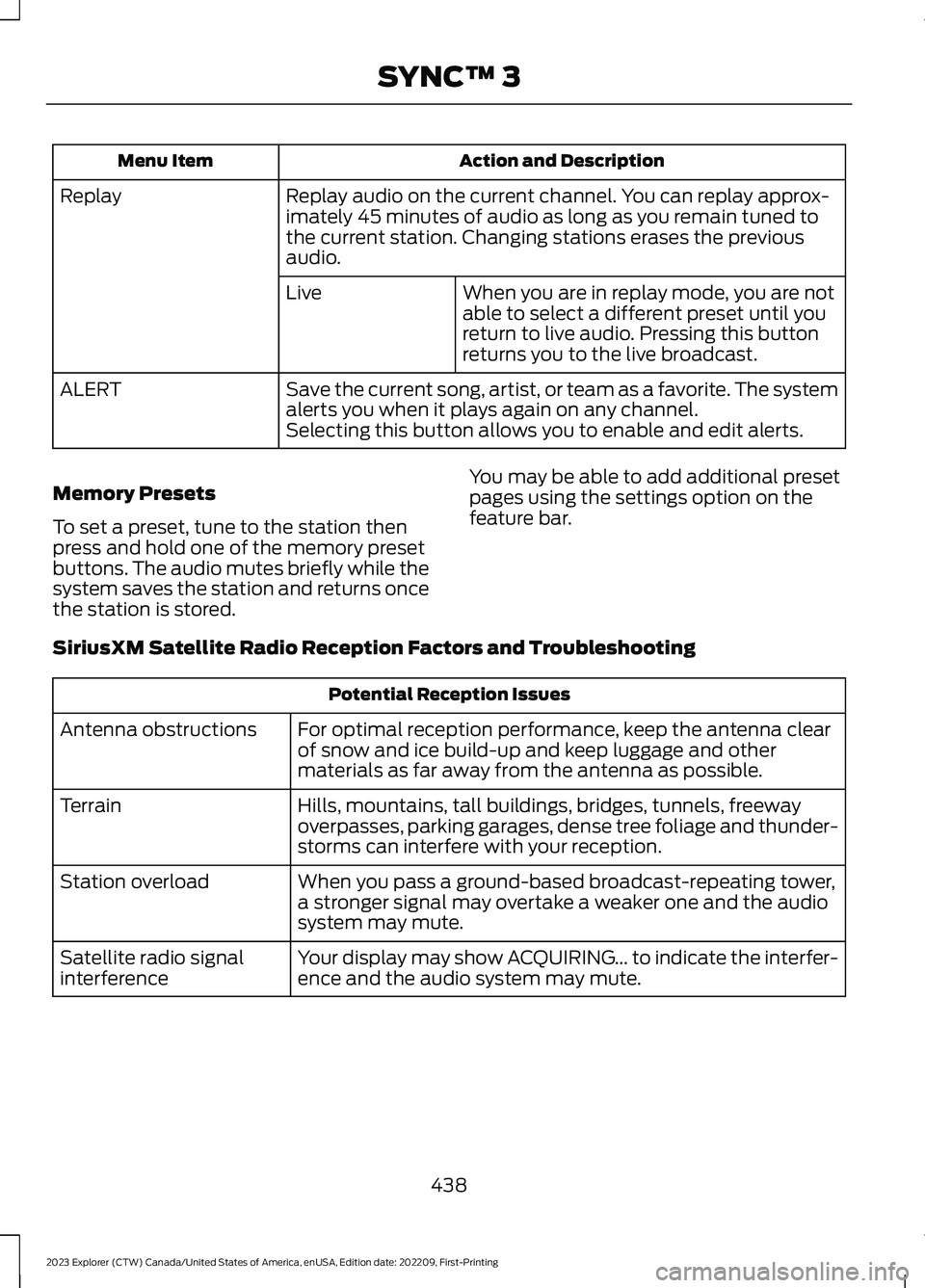
Action and DescriptionMenu Item
Replay audio on the current channel. You can replay approx-imately 45 minutes of audio as long as you remain tuned tothe current station. Changing stations erases the previousaudio.
Replay
When you are in replay mode, you are notable to select a different preset until youreturn to live audio. Pressing this buttonreturns you to the live broadcast.
Live
Save the current song, artist, or team as a favorite. The systemalerts you when it plays again on any channel.ALERT
Selecting this button allows you to enable and edit alerts.
Memory Presets
To set a preset, tune to the station thenpress and hold one of the memory presetbuttons. The audio mutes briefly while thesystem saves the station and returns oncethe station is stored.
You may be able to add additional presetpages using the settings option on thefeature bar.
SiriusXM Satellite Radio Reception Factors and Troubleshooting
Potential Reception Issues
For optimal reception performance, keep the antenna clearof snow and ice build-up and keep luggage and othermaterials as far away from the antenna as possible.
Antenna obstructions
Hills, mountains, tall buildings, bridges, tunnels, freewayoverpasses, parking garages, dense tree foliage and thunder-storms can interfere with your reception.
Terrain
When you pass a ground-based broadcast-repeating tower,a stronger signal may overtake a weaker one and the audiosystem may mute.
Station overload
Your display may show ACQUIRING... to indicate the interfer-ence and the audio system may mute.Satellite radio signalinterference
438
2023 Explorer (CTW) Canada/United States of America, enUSA, Edition date: 202209, First-PrintingSYNC™ 3
Page 446 of 573
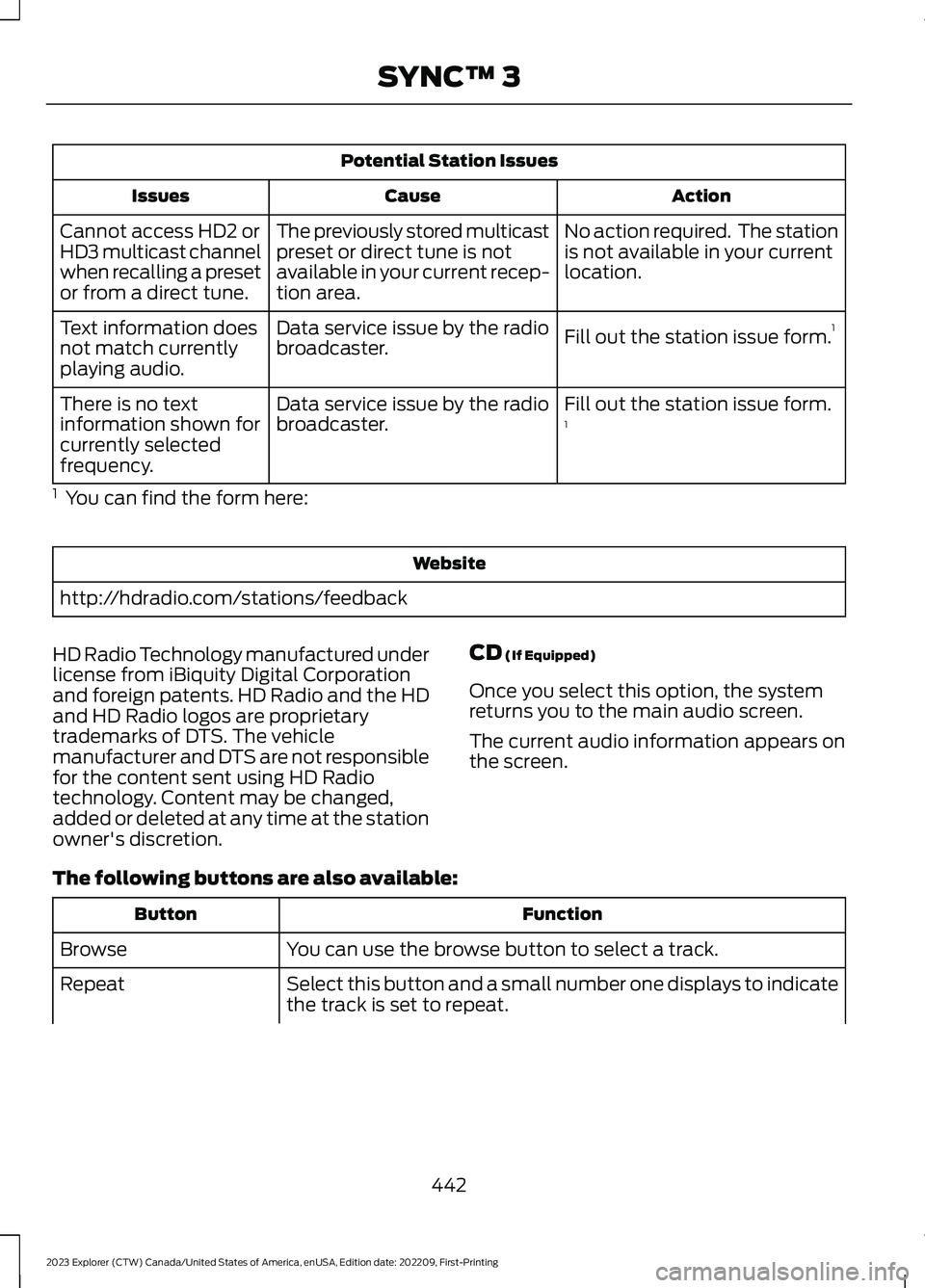
Potential Station Issues
ActionCauseIssues
No action required. The stationis not available in your currentlocation.
The previously stored multicastpreset or direct tune is notavailable in your current recep-tion area.
Cannot access HD2 orHD3 multicast channelwhen recalling a presetor from a direct tune.
Fill out the station issue form.1Data service issue by the radiobroadcaster.Text information doesnot match currentlyplaying audio.
Fill out the station issue form.1Data service issue by the radiobroadcaster.There is no textinformation shown forcurrently selectedfrequency.
1 You can find the form here:
Website
http://hdradio.com/stations/feedback
HD Radio Technology manufactured underlicense from iBiquity Digital Corporationand foreign patents. HD Radio and the HDand HD Radio logos are proprietarytrademarks of DTS. The vehiclemanufacturer and DTS are not responsiblefor the content sent using HD Radiotechnology. Content may be changed,added or deleted at any time at the stationowner's discretion.
CD (If Equipped)
Once you select this option, the systemreturns you to the main audio screen.
The current audio information appears onthe screen.
The following buttons are also available:
FunctionButton
You can use the browse button to select a track.Browse
Select this button and a small number one displays to indicatethe track is set to repeat.Repeat
442
2023 Explorer (CTW) Canada/United States of America, enUSA, Edition date: 202209, First-PrintingSYNC™ 3
Page 447 of 573
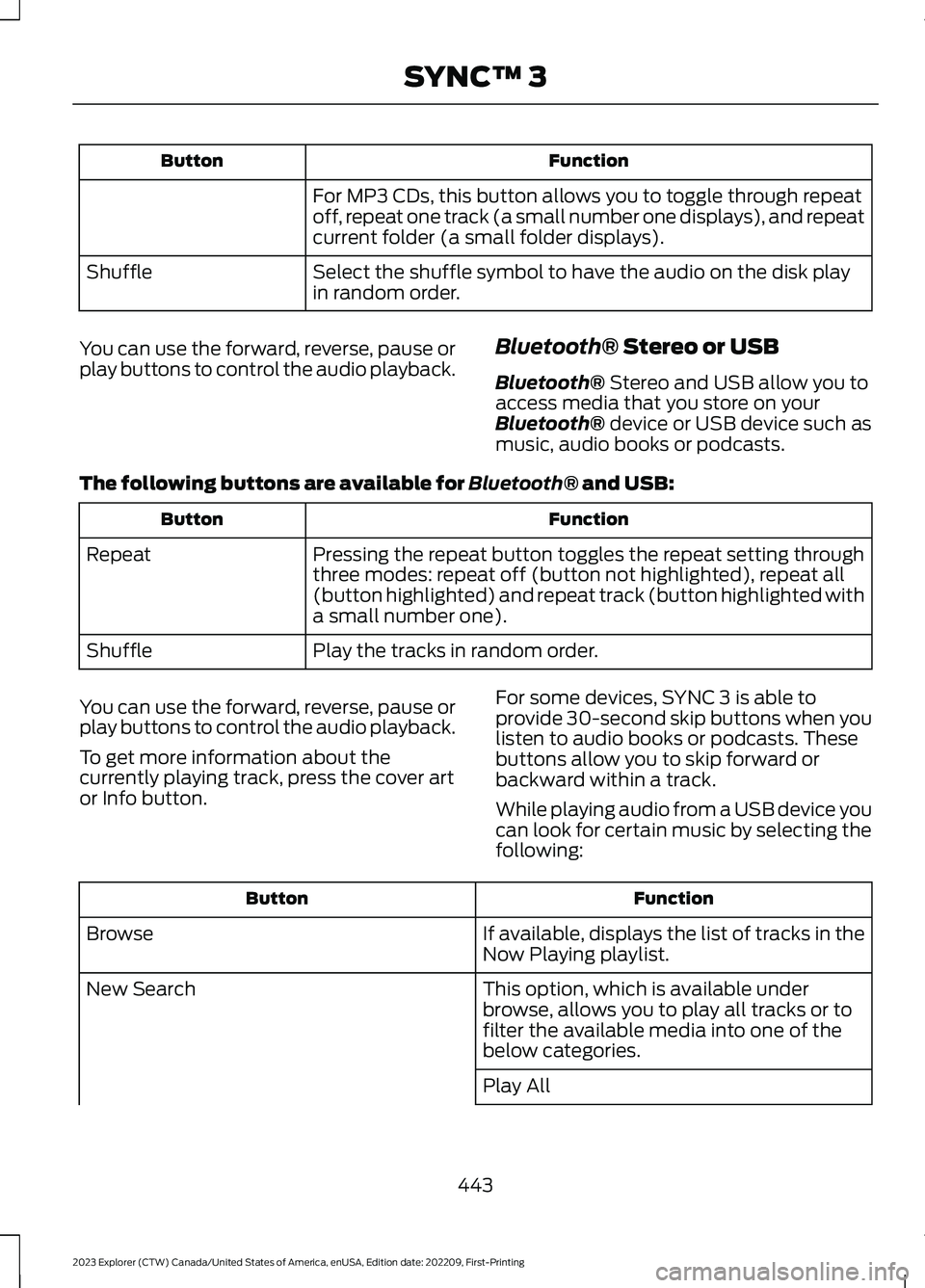
FunctionButton
For MP3 CDs, this button allows you to toggle through repeatoff, repeat one track (a small number one displays), and repeatcurrent folder (a small folder displays).
Select the shuffle symbol to have the audio on the disk playin random order.Shuffle
You can use the forward, reverse, pause orplay buttons to control the audio playback.Bluetooth® Stereo or USB
Bluetooth® Stereo and USB allow you toaccess media that you store on yourBluetooth® device or USB device such asmusic, audio books or podcasts.
The following buttons are available for Bluetooth® and USB:
FunctionButton
Pressing the repeat button toggles the repeat setting throughthree modes: repeat off (button not highlighted), repeat all(button highlighted) and repeat track (button highlighted witha small number one).
Repeat
Play the tracks in random order.Shuffle
You can use the forward, reverse, pause orplay buttons to control the audio playback.
To get more information about thecurrently playing track, press the cover artor Info button.
For some devices, SYNC 3 is able toprovide 30-second skip buttons when youlisten to audio books or podcasts. Thesebuttons allow you to skip forward orbackward within a track.
While playing audio from a USB device youcan look for certain music by selecting thefollowing:
FunctionButton
If available, displays the list of tracks in theNow Playing playlist.Browse
This option, which is available underbrowse, allows you to play all tracks or tofilter the available media into one of thebelow categories.
New Search
Play All
443
2023 Explorer (CTW) Canada/United States of America, enUSA, Edition date: 202209, First-PrintingSYNC™ 3
Page 449 of 573
Supported USB file systems include: FAT,exFAT, and NTFS.
SYNC 3 is also able to organize the mediafrom your USB device by metadata tags.Metadata tags, which are descriptivesoftware identifiers embedded in themedia files, provide information about thefile.
If your indexed media files contain noinformation embedded in these metadatatags, SYNC 3 may classify the emptymetadata tags as unknown.
SYNC 3 is capable of indexing up to50,000 songs per USB device, for up to 10devices.
CLIMATE
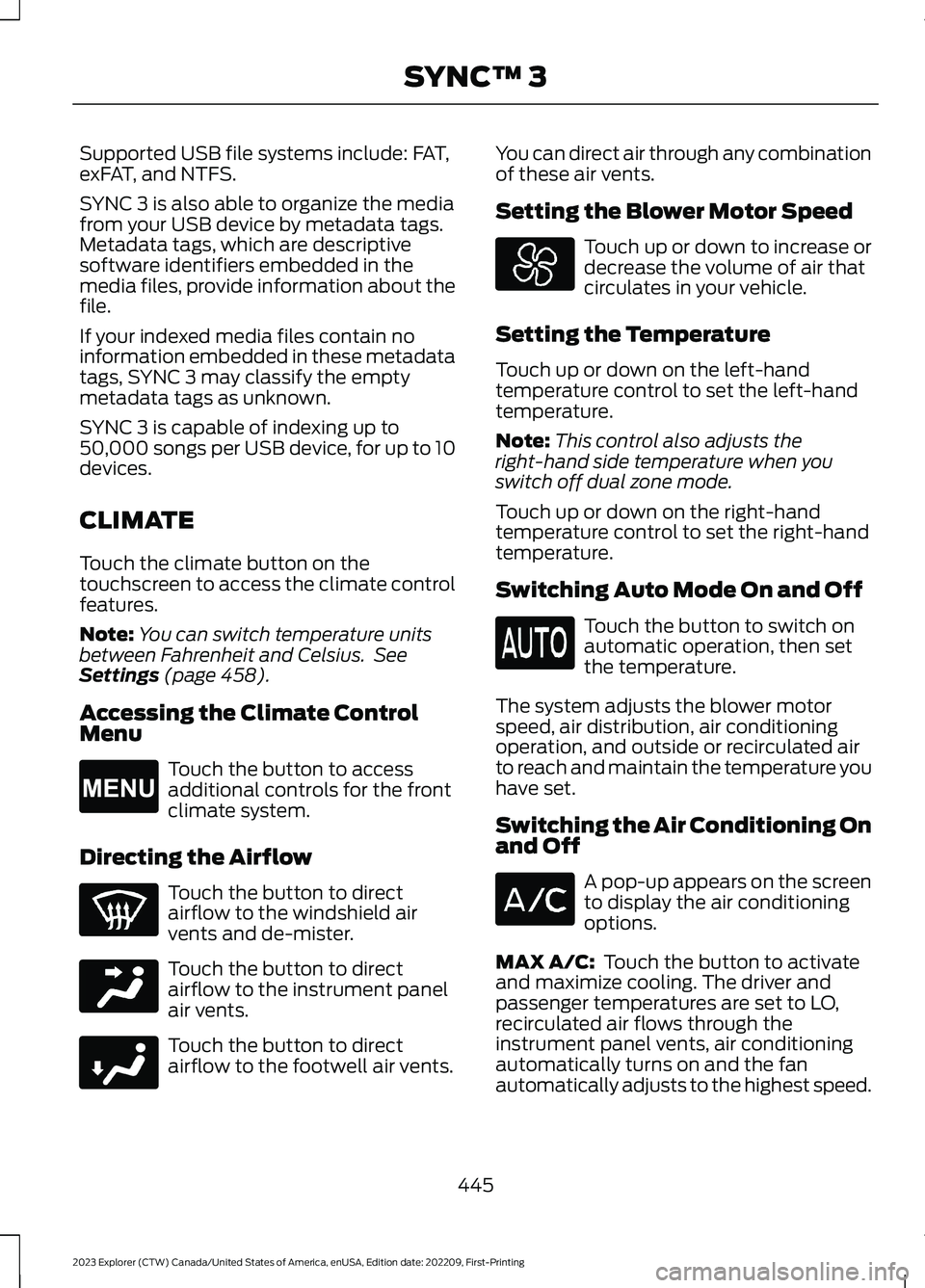
Touch the climate button on thetouchscreen to access the climate controlfeatures.
Note:You can switch temperature unitsbetween Fahrenheit and Celsius. SeeSettings (page 458).
Accessing the Climate ControlMenu
Touch the button to accessadditional controls for the frontclimate system.
Directing the Airflow
Touch the button to directairflow to the windshield airvents and de-mister.
Touch the button to directairflow to the instrument panelair vents.
Touch the button to directairflow to the footwell air vents.
You can direct air through any combinationof these air vents.
Setting the Blower Motor Speed
Touch up or down to increase ordecrease the volume of air thatcirculates in your vehicle.
Setting the Temperature
Touch up or down on the left-handtemperature control to set the left-handtemperature.
Note:This control also adjusts theright-hand side temperature when youswitch off dual zone mode.
Touch up or down on the right-handtemperature control to set the right-handtemperature.
Switching Auto Mode On and Off
Touch the button to switch onautomatic operation, then setthe temperature.
The system adjusts the blower motorspeed, air distribution, air conditioningoperation, and outside or recirculated airto reach and maintain the temperature youhave set.
Switching the Air Conditioning Onand Off
A pop-up appears on the screento display the air conditioningoptions.
MAX A/C: Touch the button to activateand maximize cooling. The driver andpassenger temperatures are set to LO,recirculated air flows through theinstrument panel vents, air conditioningautomatically turns on and the fanautomatically adjusts to the highest speed.
445
2023 Explorer (CTW) Canada/United States of America, enUSA, Edition date: 202209, First-PrintingSYNC™ 3E265038 E244097 E244098
Page 452 of 573
Note:The touchscreen indicates that youhave successfully paired your cell phone.
4.Download the phonebook from yourcell phone when you are prompted.
Note:If you pair more than one cell phone,use the phone settings to specify theprimary phone. You can change this settingat any time.
Using Your Cell Phone (If Equipped)
Recent Call List
Display and select an entry from a list ofprevious calls.
Contacts
Display a smart search form to look up yourcontacts. Use the List button toalphabetically sort your contacts.
Change Phone
Display the list of paired or connecteddevices that you can select.
Phone Settings
Change ring tones, alerts or pair anotherphone.
Do Not Disturb
Reject incoming calls and switch ring tonesand alerts off.
Phone Keypad
Directly dial a number.
Mute
Mute the microphone when in a call.
Phone Voice Assistant
Say a command to use the Google or Sirivoice assistant available on yourconnected phone to access supportedfeatures.
Text Messaging
Setting Text Message Notification
iOS
1.Go to the settings menu on your cellphone.
2.Select Bluetooth®.
3.Select the information icon to the rightof your vehicle.
4.Switch text message notification on.
Android
1.Go to the settings menu on your cellphone.
2.Select Bluetooth®.
3.Select the profiles option.
4.Select the phone profile.
5.Switch text message notification on.
Using Text Messaging
DescriptionMenu Item
Hear the text message.Hear It
View the text message.View
Call the sender.Call
Reply to the text message with a standard text message.Reply
448
2023 Explorer (CTW) Canada/United States of America, enUSA, Edition date: 202209, First-PrintingSYNC™ 3
Page 454 of 573
Setting a Destination
Destination Entry Menu
DescriptionItem
Enter a destination address.Search
Display and select from a list of previous destinations.Previous Destinations
Set your saved home address as your destinationHome
Set your saved place of work as your destination.Work
Display and select from a list of favorite destinations.Favorites
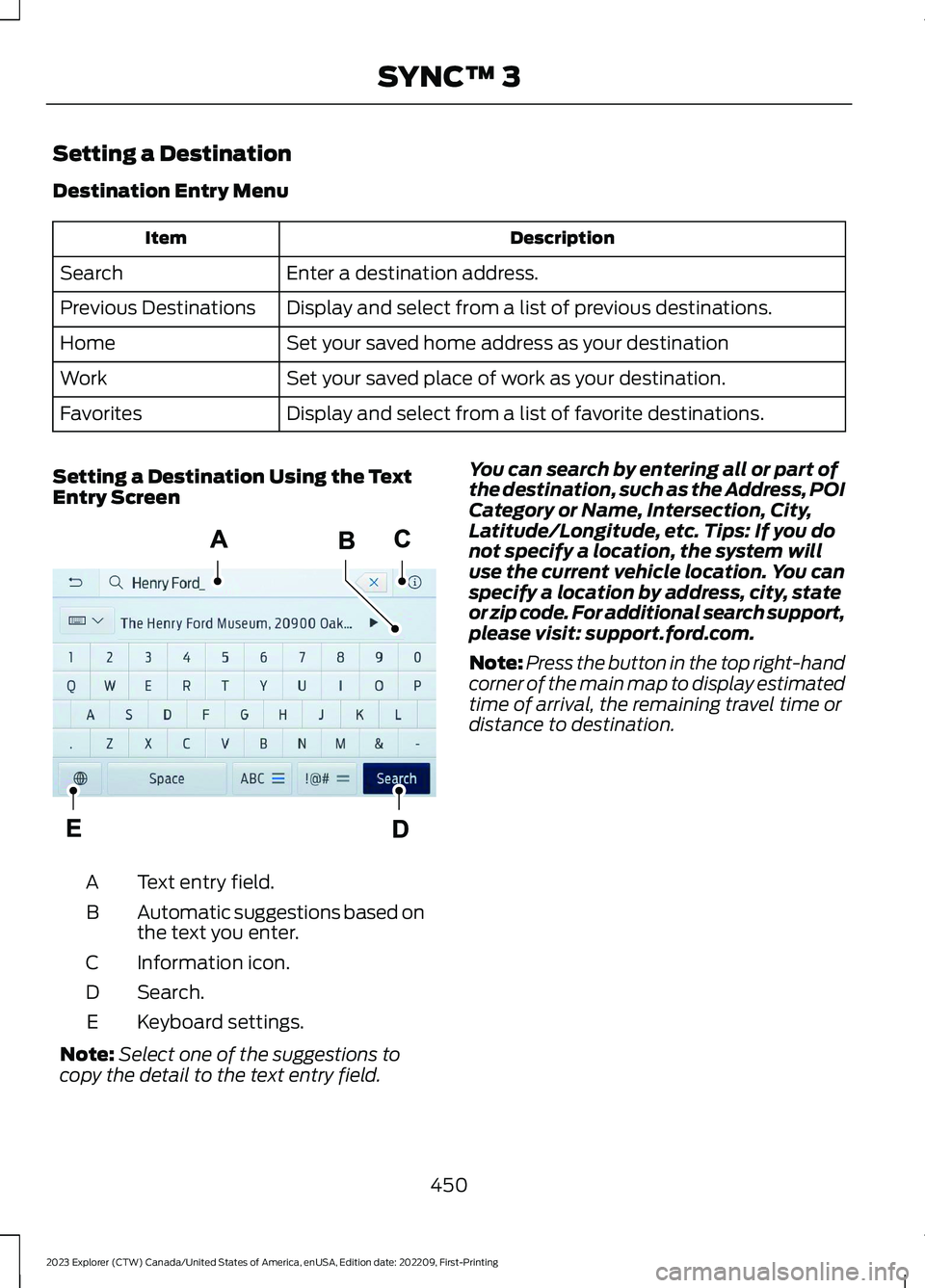
Setting a Destination Using the TextEntry Screen
Text entry field.A
Automatic suggestions based onthe text you enter.B
Information icon.C
Search.D
Keyboard settings.E
Note:Select one of the suggestions tocopy the detail to the text entry field.
You can search by entering all or part ofthe destination, such as the Address, POICategory or Name, Intersection, City,Latitude/Longitude, etc. Tips: If you donot specify a location, the system willuse the current vehicle location. You canspecify a location by address, city, stateor zip code. For additional search support,please visit: support.ford.com.
Note:Press the button in the top right-handcorner of the main map to display estimatedtime of arrival, the remaining travel time ordistance to destination.
450
2023 Explorer (CTW) Canada/United States of America, enUSA, Edition date: 202209, First-PrintingSYNC™ 3E297558