display FORD EXPLORER 2023 Owners Manual
[x] Cancel search | Manufacturer: FORD, Model Year: 2023, Model line: EXPLORER, Model: FORD EXPLORER 2023Pages: 573, PDF Size: 16.1 MB
Page 455 of 573
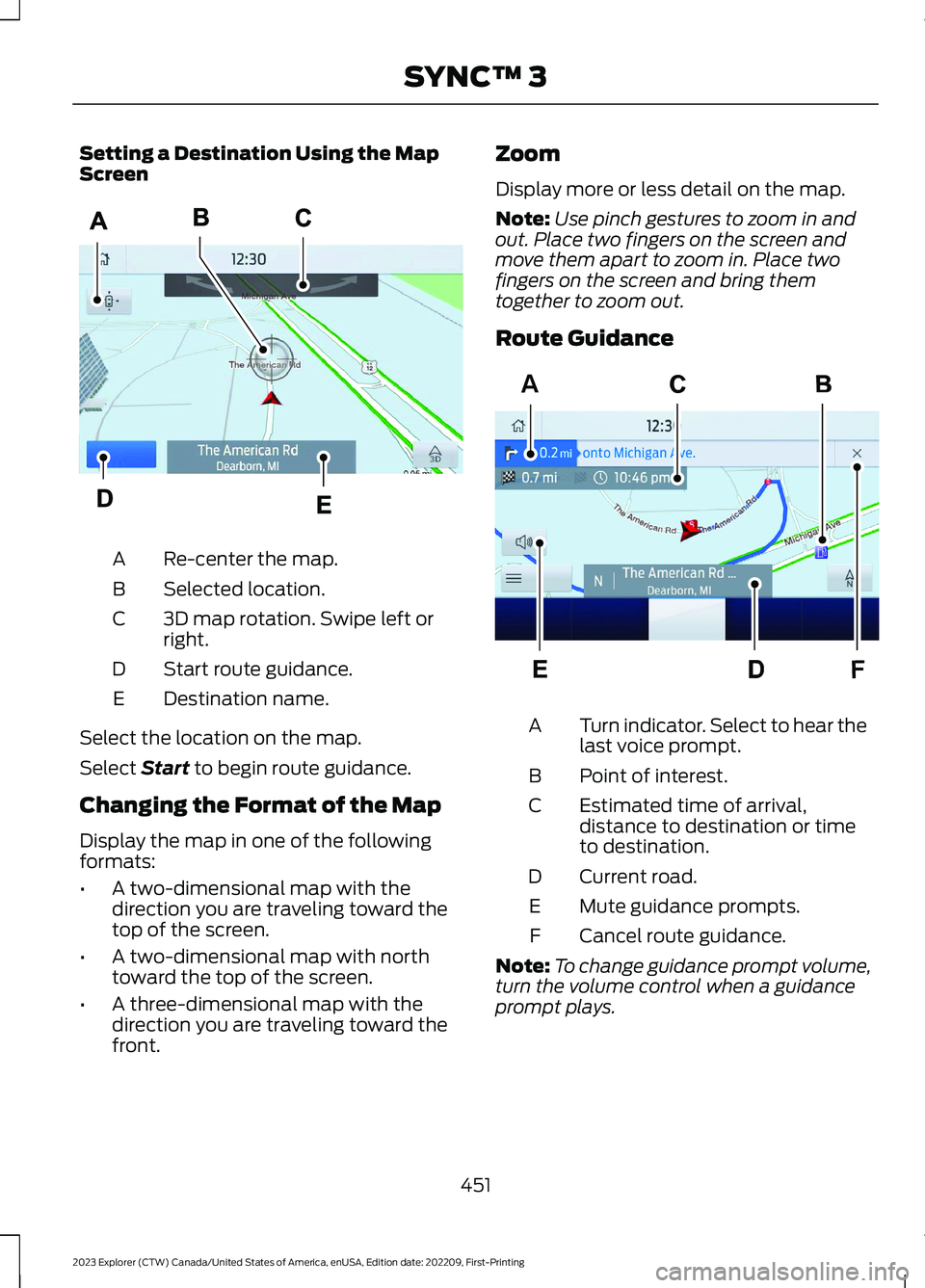
Setting a Destination Using the MapScreen
Re-center the map.A
Selected location.B
3D map rotation. Swipe left orright.C
Start route guidance.D
Destination name.E
Select the location on the map.
Select Start to begin route guidance.
Changing the Format of the Map
Display the map in one of the followingformats:
•A two-dimensional map with thedirection you are traveling toward thetop of the screen.
•A two-dimensional map with northtoward the top of the screen.
•A three-dimensional map with thedirection you are traveling toward thefront.
Zoom
Display more or less detail on the map.
Note:Use pinch gestures to zoom in andout. Place two fingers on the screen andmove them apart to zoom in. Place twofingers on the screen and bring themtogether to zoom out.
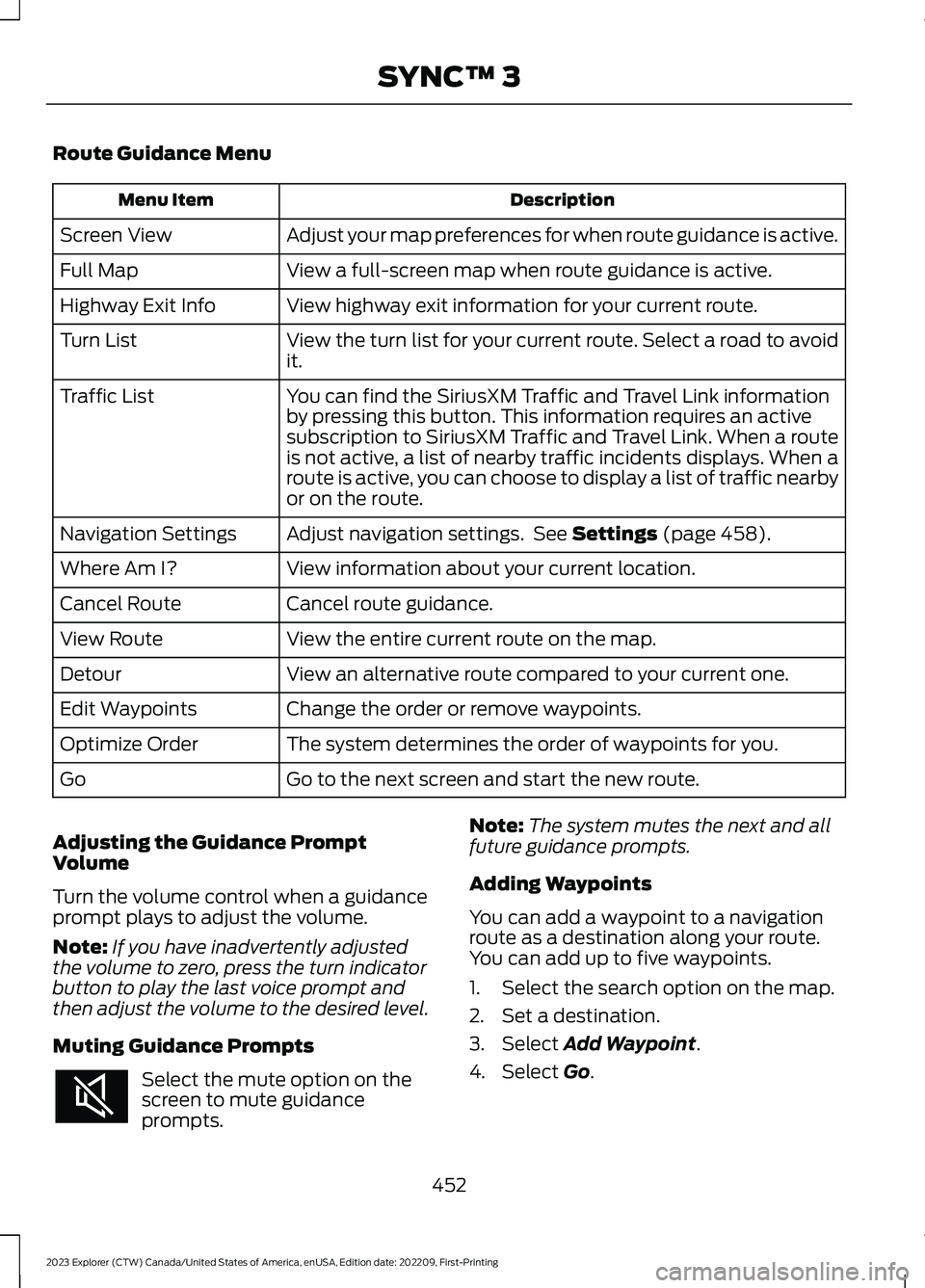
Route Guidance
Turn indicator. Select to hear thelast voice prompt.A
Point of interest.B
Estimated time of arrival,distance to destination or timeto destination.
C
Current road.D
Mute guidance prompts.E
Cancel route guidance.F
Note:To change guidance prompt volume,turn the volume control when a guidanceprompt plays.
451
2023 Explorer (CTW) Canada/United States of America, enUSA, Edition date: 202209, First-PrintingSYNC™ 3E297559 FAE297560
Page 456 of 573
Route Guidance Menu
DescriptionMenu Item
Adjust your map preferences for when route guidance is active.Screen View
View a full-screen map when route guidance is active.Full Map
View highway exit information for your current route.Highway Exit Info
View the turn list for your current route. Select a road to avoidit.Turn List
You can find the SiriusXM Traffic and Travel Link informationby pressing this button. This information requires an activesubscription to SiriusXM Traffic and Travel Link. When a routeis not active, a list of nearby traffic incidents displays. When aroute is active, you can choose to display a list of traffic nearbyor on the route.
Traffic List
Adjust navigation settings. See Settings (page 458).Navigation Settings
View information about your current location.Where Am I?
Cancel route guidance.Cancel Route
View the entire current route on the map.View Route
View an alternative route compared to your current one.Detour
Change the order or remove waypoints.Edit Waypoints
The system determines the order of waypoints for you.Optimize Order
Go to the next screen and start the new route.Go
Adjusting the Guidance PromptVolume
Turn the volume control when a guidanceprompt plays to adjust the volume.
Note:If you have inadvertently adjustedthe volume to zero, press the turn indicatorbutton to play the last voice prompt andthen adjust the volume to the desired level.
Muting Guidance Prompts
Select the mute option on thescreen to mute guidanceprompts.
Note:The system mutes the next and allfuture guidance prompts.
Adding Waypoints
You can add a waypoint to a navigationroute as a destination along your route.You can add up to five waypoints.
1.Select the search option on the map.
2.Set a destination.
3.Select Add Waypoint.
4.Select Go.
452
2023 Explorer (CTW) Canada/United States of America, enUSA, Edition date: 202209, First-PrintingSYNC™ 3
Page 457 of 573
Canceling Route Guidance
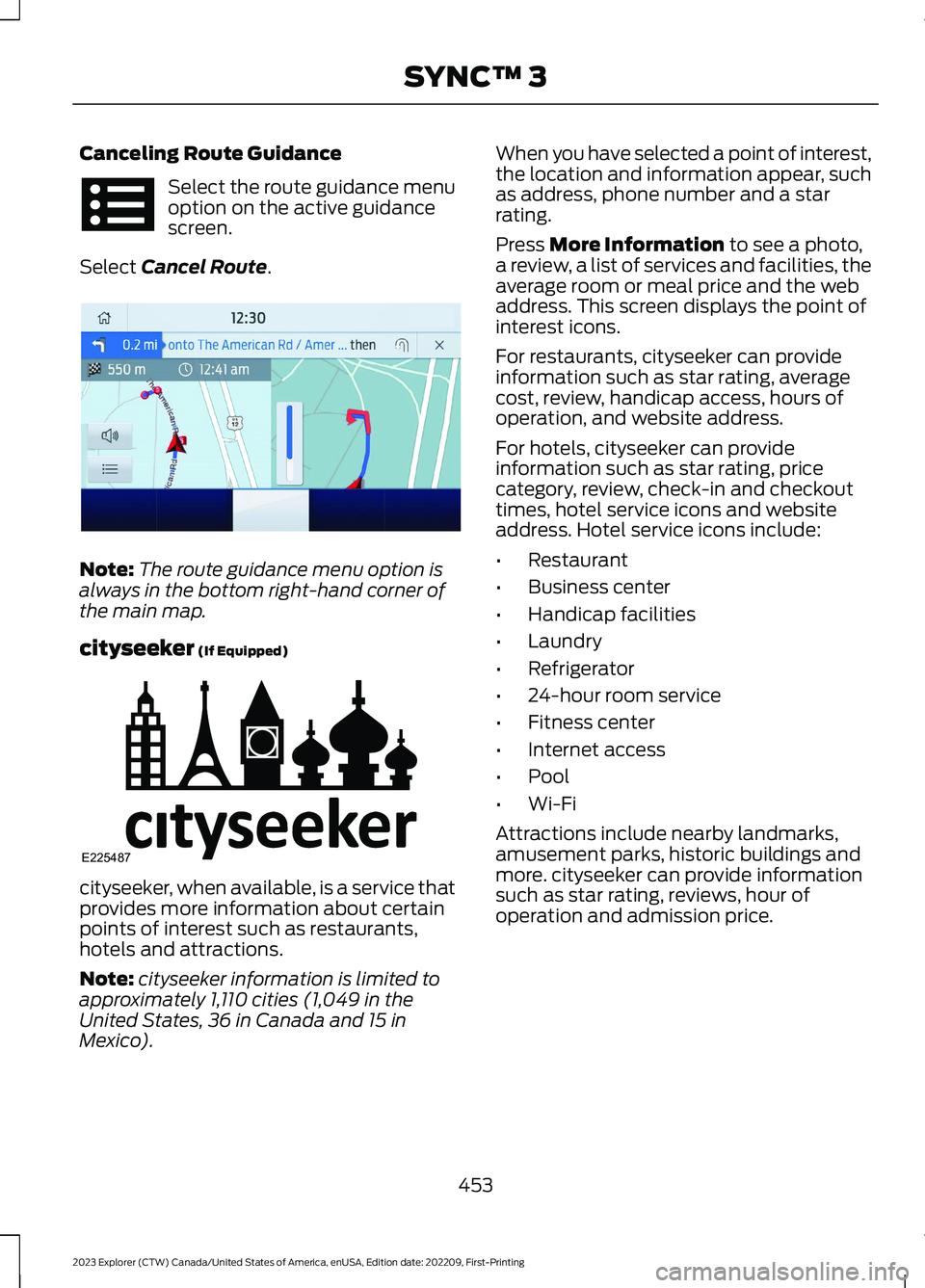
Select the route guidance menuoption on the active guidancescreen.
Select Cancel Route.
Note:The route guidance menu option isalways in the bottom right-hand corner ofthe main map.
cityseeker (If Equipped)
cityseeker, when available, is a service thatprovides more information about certainpoints of interest such as restaurants,hotels and attractions.
Note:cityseeker information is limited toapproximately 1,110 cities (1,049 in theUnited States, 36 in Canada and 15 inMexico).
When you have selected a point of interest,the location and information appear, suchas address, phone number and a starrating.
Press More Information to see a photo,a review, a list of services and facilities, theaverage room or meal price and the webaddress. This screen displays the point ofinterest icons.
For restaurants, cityseeker can provideinformation such as star rating, averagecost, review, handicap access, hours ofoperation, and website address.
For hotels, cityseeker can provideinformation such as star rating, pricecategory, review, check-in and checkouttimes, hotel service icons and websiteaddress. Hotel service icons include:
•Restaurant
•Business center
•Handicap facilities
•Laundry
•Refrigerator
•24-hour room service
•Fitness center
•Internet access
•Pool
•Wi-Fi
Attractions include nearby landmarks,amusement parks, historic buildings andmore. cityseeker can provide informationsuch as star rating, reviews, hour ofoperation and admission price.
453
2023 Explorer (CTW) Canada/United States of America, enUSA, Edition date: 202209, First-PrintingSYNC™ 3 E294817 E225487
Page 458 of 573
SiriusXM Traffic and Travel Link (If
Equipped)
SiriusXM Traffic and Travel Link is availableon vehicles equipped with navigation andonly in select markets. You must activateand subscribe to receive SiriusXM Trafficand Travel Link information. It helps youlocate the best gas prices, find movielistings, get current traffic alerts, view theweather map, get accurate ski conditionsand see current sports scores.
The system calculates a reasonableefficient route based on available speedlimits, traffic, and road conditions. You mayknow a local shortcut that is more efficientat a given time than the route provided bySYNC 3, but you should expect a slightdifference in minutes or miles with theSYNC 3 route.
Michelin Travel Guide (If Equipped)
The Michelin travel guide is a service thatprovides additional information aboutcertain places of interest, for examplerestaurants, hotels and tourist sites. Pointsof interest that have Michelin travel guideinformation display a button to show youmore information. Push the button to seethe additional information. If you havepaired your phone with the system, youcan press the phone button to directlyestablish a call with the selected point ofinterest.
Navigation Map Accuracy andUpdates
HERE is the digital map provider for thenavigation application. If you find map dataerrors, you may report them directly toHERE by going to www.here.com. HEREevaluates all reported map errors andresponds with the result of theirinvestigation by e-mail.
The navigation system map data maycontain inaccurate or incompleteinformation due to the passage of time,changing circumstances, sources used andthe nature of collecting comprehensivegeographic data, any of which may lead toincorrect results. Inaccurate speed limitinformation, turn restrictions and otherroad attributes may affect the determinedroute and associated guidance
Annual navigation map updates areavailable for purchase through yourdealership. Depending on your purchaseagreement, you might be eligible for a freemap update. You can choose to downloadthe map data update onto a USB, order aUSB, or use Wi-Fi to deliver automaticupdates. To update your map data overWi-Fi, your vehicle must be connected toa Wi-Fi access point. Map data files arelarge, so it is highly recommended toperform the update when free Wi-Fi isavailable otherwise high data rates mayapply. For USB updates, free map updateeligibility, and other details, contactdealers at 1-866-462-8837 in the UnitedStates and Canada or 800-557-5539 inMexico or visit our local website for moreinformation.
ELECTRIC VEHICLE
INFORMATION
Power Flow
The power flow information foryour hybrid vehicle is availablethrough the home screen orunder Apps.
Vehicle Operational States
Power flows to or from the front and rearwheels depending on the operational stateand the drive conditions.
454
2023 Explorer (CTW) Canada/United States of America, enUSA, Edition date: 202209, First-PrintingSYNC™ 3E260071
Page 463 of 573
Display
Select this tile to adjust display settingslike brightness and auto dim.
Charge Settings (If Equipped)
Select this tile to adjust the electric vehiclecharge settings.
Voice Control
Select this tile to adjust voice controlsettings like command confirmations anddisplayed lists.
Navigation (If Equipped)
Select this tile to adjust navigation settingslike map preferences and route guidance.
Seats (If Equipped)
Select this tile to adjust the lumbarfunction and massage function of yourmulti contour seats.
Message Center (If Equipped)
Select this tile to view vehicle messages.
Personal Profiles (If Equipped)
Select this tile to adjust recalled memoryfeatures when using personal profiles.
Valet Mode (If Equipped)
Select this tile to enable and disable valetmode.
Ambient Lighting (If Equipped)
Select this tile to change the color orintensity of the interior lighting.
459
2023 Explorer (CTW) Canada/United States of America, enUSA, Edition date: 202209, First-PrintingSYNC™ 3
Page 469 of 573
Possible Cause and ResolutionSymptom
–Incorrect cell phone settings.
•Allow the system to retrieve contacts from yourcell phone. Refer to your cell phone's user manual.
•Check the location of the missing contacts on yourcell phone. If they are stored on the SIM card, movethem to the cell phone memory.
–Incorrect system settings.
•Switch automatic phonebook download on. SeeSettings (page 458).
A message displayssuggesting that my phone-book has downloaded but itis empty or it has missingcontacts.
–Incompatible cell phone.
•Check the compatibility of your cell phone on ourwebsite.
–Cell phone malfunction.
•Switch your cell phone off and on to reset it andtry again.
•Install the latest cell phone firmware.
•Delete your device from the system and deleteSYNC from your device and try again.
•Switch automatic phonebook download off. SeeSettings (page 458).
I cannot connect my cellphone.
Text messaging does notwork.–You might not have switched on text message notific-ations.
•Switch text message notifications on. See Phone(page 447).
–Incompatible cell phone.
•Check the compatibility of your cell phone on ourwebsite.
–Cell phone malfunction.
•Switch your cell phone off and on to reset it andtry again.
–Device message sharing is not enabled.
•Check the permissions on your device to ensuretext message sharing is enabled.
–Incompatible cell phone.
•Check the compatibility of your cell phone on ourwebsite.
I cannot hear text messages.
465
2023 Explorer (CTW) Canada/United States of America, enUSA, Edition date: 202209, First-PrintingSYNC™ 3
Page 480 of 573
GENERAL MAINTENANCE
INFORMATION
Why Maintain Your Vehicle?
Carefully following the maintenanceschedule helps protect against major repairexpenses resulting from neglect orinadequate maintenance and may help toincrease the value of your vehicle whenyou sell or trade it. Keep all receipts forcompleted maintenance with your vehicle.
We have established regular maintenanceintervals for your vehicle based uponrigorous testing. It is important that youhave your vehicle serviced at the propertimes. These intervals serve two purposes:one is to maintain the reliability of yourvehicle and the second is to keep your costof owning your vehicle down.
It is your responsibility to have allscheduled maintenance performed and tomake sure that the materials used meetthe specifications identified in this owner'smanual. See Capacities andSpecifications (page 378).
Failure to perform scheduled maintenanceinvalidates warranty coverage on partsaffected by the lack of maintenance.
Why Maintain Your Vehicle at YourDealership?
Factory-Trained Technicians
Service technicians participate in extensivefactory-sponsored certification training tohelp them become experts on theoperation of your vehicle. Ask yourdealership about the training andcertification their technicians havereceived.
Our Genuine Replacement Parts
Dealerships stock our genuinemanufactured or our authorizedre-manufactured replacement parts.These parts meet or exceed ourspecifications. Parts installed at yourdealership carry a nationwide 24-monthor unlimited mile (kilometer) parts andlabor limited warranty.
If you do not use our authorized parts theymay not meet our specifications anddepending on the part, it could affectemissions compliance.
Convenience
Many dealerships have extended eveningand Saturday hours to make your servicevisit more convenient and they offer onestop shopping. They can perform anyservices that are required on your vehicle,from general maintenance to collisionrepairs.
Note:Not all dealers have extended hoursor body shops. Please contact your dealerfor details.
Protecting Your Investment
Maintenance is an investment that paysdividends in the form of improvedreliability, durability and resale value. Tomaintain the proper performance of yourvehicle and its emission control systems,make sure you have scheduledmaintenance performed at the designatedintervals.
Your vehicle has an Intelligent Oil-LifeMonitor system; a message appears in theinstrument cluster display at the proper oilchange interval. This interval may be up toone year or 10,000 mi (16,000 km), hybridvehicles may exceed 10,000 mi(16,000 km).
476
2023 Explorer (CTW) Canada/United States of America, enUSA, Edition date: 202209, First-PrintingScheduled Maintenance
Page 481 of 573
Your vehicle can be driven in such a waythat dilutes and increases the level of oilby short trips that do not allow the engineto get to operating temperature, extendedidling, and low speed driving for longperiods of time.
When the oil change message appears inthe instrument cluster display, it is time foran oil change. Make sure you perform theoil change within two weeks or 500 mi(800 km) of the message appearing. Makesure you reset the Intelligent Oil-LifeMonitor after each oil change. See OilChange Indicator Reset (page 320).
If your instrument cluster display resetsprematurely or becomes inoperative, youshould perform the oil change interval atsix months or 5,000 mi (8,000 km) fromyour last oil change. Never exceed one yearor 10,000 mi (16,000 km) between oilchange intervals,
Your vehicle is very sophisticated and builtwith multiple, complex performancesystems. Every manufacturer developsthese systems using differentspecifications and performance features.That is why it is important to rely upon yourdealership to properly diagnose and repairyour vehicle.
We have recommended maintenanceintervals for various parts and componentsystems based upon engineering testing.We rely upon this testing to determine themost appropriate mileage for replacementof oils and fluids to protect your vehicle atthe lowest overall cost to you andrecommends against maintenanceschedules that deviate from the scheduledmaintenance information.
We strongly recommend the use of onlyour genuine manufactured or ourauthorized re-manufactured replacementparts engineered for your vehicle.
Additives and Chemicals
This owner's manual and our WorkshopManual list the recommended additivesand chemicals for your vehicle. We do notrecommend using chemicals or additivesnot approved by us as part of your vehicle’snormal maintenance. Please consult yourwarranty information.
Oils, Fluids and Flushing
In many cases, fluid discoloration is anormal operating characteristic and, byitself, does not necessarily indicate aconcern or that the fluid needs to bechanged. However, a qualified expert, suchas the factory-trained technicians at yourdealership, should inspect discolored fluidsthat also show signs of overheating orforeign material contaminationimmediately.
Make sure to change your vehicle’s oils andfluids at the specified intervals or inconjunction with a repair. Flushing is aviable way to change fluid for many vehiclesub-systems during scheduledmaintenance. It is critical that systems areflushed only with new fluid that is the sameas that required to fill and operate thesystem or using our approved flushingchemical.
Owner Checks and Services
Make sure you perform the following basicmaintenance checks and inspections everymonth or at six-month intervals.
477
2023 Explorer (CTW) Canada/United States of America, enUSA, Edition date: 202209, First-PrintingScheduled Maintenance
Page 483 of 573
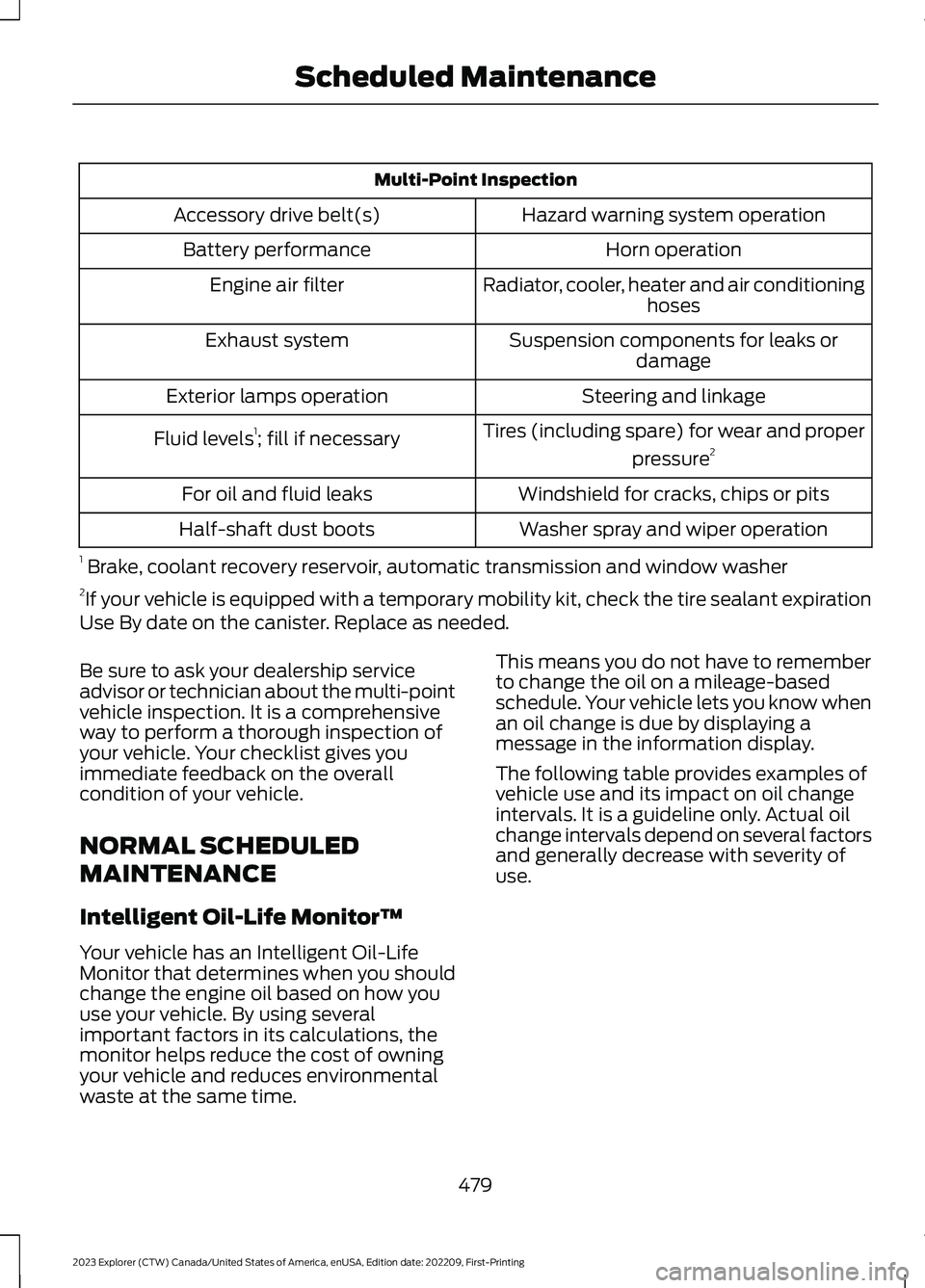
Multi-Point Inspection
Hazard warning system operationAccessory drive belt(s)
Horn operationBattery performance
Radiator, cooler, heater and air conditioninghosesEngine air filter
Suspension components for leaks ordamageExhaust system
Steering and linkageExterior lamps operation
Tires (including spare) for wear and proper
pressure2Fluid levels1; fill if necessary
Windshield for cracks, chips or pitsFor oil and fluid leaks
Washer spray and wiper operationHalf-shaft dust boots
1 Brake, coolant recovery reservoir, automatic transmission and window washer2If your vehicle is equipped with a temporary mobility kit, check the tire sealant expirationUse By date on the canister. Replace as needed.
Be sure to ask your dealership serviceadvisor or technician about the multi-pointvehicle inspection. It is a comprehensiveway to perform a thorough inspection ofyour vehicle. Your checklist gives youimmediate feedback on the overallcondition of your vehicle.
NORMAL SCHEDULED
MAINTENANCE
Intelligent Oil-Life Monitor™
Your vehicle has an Intelligent Oil-LifeMonitor that determines when you shouldchange the engine oil based on how youuse your vehicle. By using severalimportant factors in its calculations, themonitor helps reduce the cost of owningyour vehicle and reduces environmentalwaste at the same time.
This means you do not have to rememberto change the oil on a mileage-basedschedule. Your vehicle lets you know whenan oil change is due by displaying amessage in the information display.
The following table provides examples ofvehicle use and its impact on oil changeintervals. It is a guideline only. Actual oilchange intervals depend on several factorsand generally decrease with severity ofuse.
479
2023 Explorer (CTW) Canada/United States of America, enUSA, Edition date: 202209, First-PrintingScheduled Maintenance
Page 484 of 573
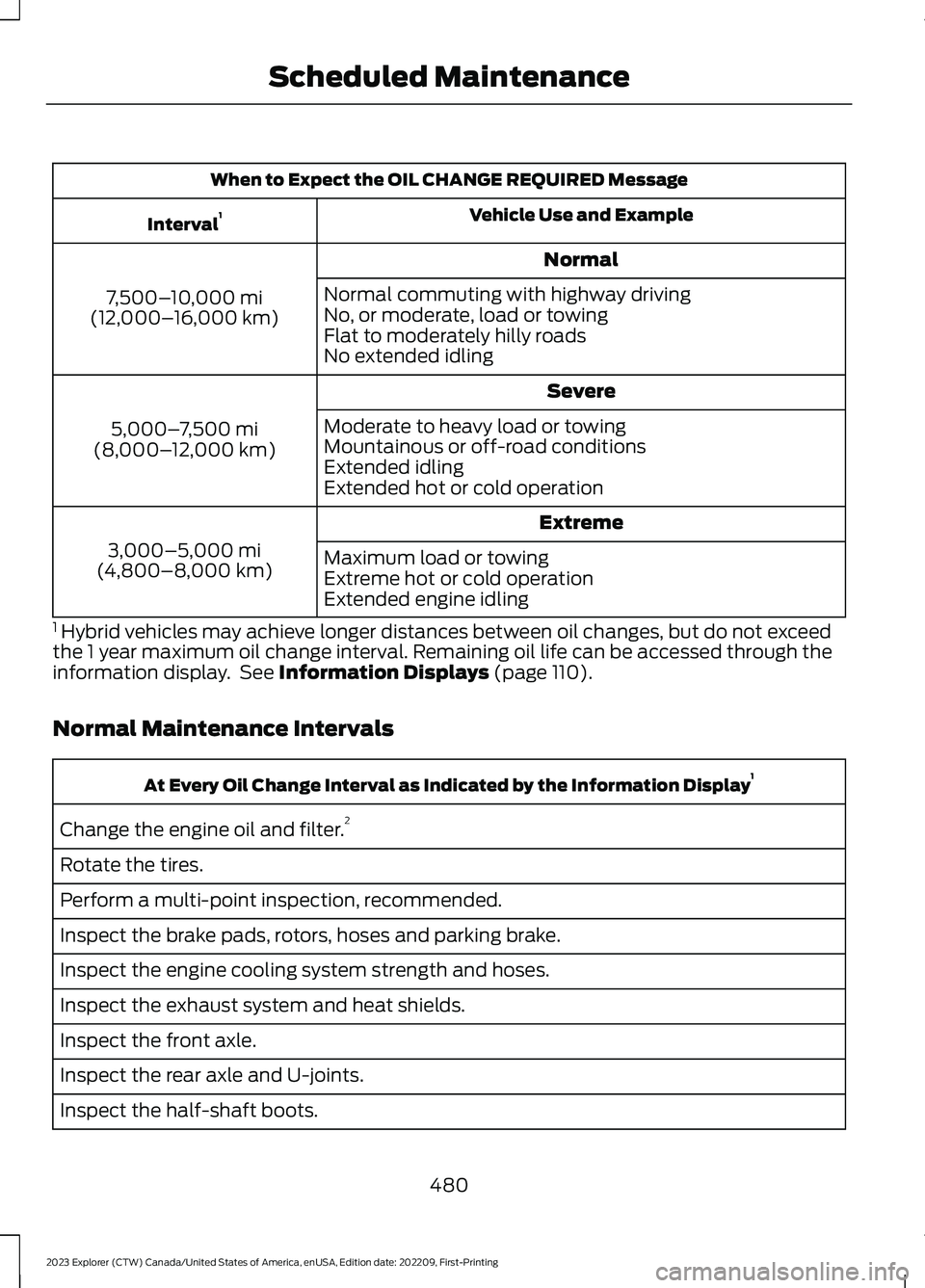
When to Expect the OIL CHANGE REQUIRED Message
Vehicle Use and ExampleInterval1
Normal
7,500–10,000 mi(12,000–16,000 km)
Normal commuting with highway drivingNo, or moderate, load or towingFlat to moderately hilly roadsNo extended idling
Severe
5,000–7,500 mi(8,000–12,000 km)
Moderate to heavy load or towingMountainous or off-road conditionsExtended idlingExtended hot or cold operation
Extreme
3,000–5,000 mi(4,800–8,000 km)Maximum load or towingExtreme hot or cold operationExtended engine idling
1 Hybrid vehicles may achieve longer distances between oil changes, but do not exceedthe 1 year maximum oil change interval. Remaining oil life can be accessed through theinformation display. See Information Displays (page 110).
Normal Maintenance Intervals
At Every Oil Change Interval as Indicated by the Information Display1
Change the engine oil and filter.2
Rotate the tires.
Perform a multi-point inspection, recommended.
Inspect the brake pads, rotors, hoses and parking brake.
Inspect the engine cooling system strength and hoses.
Inspect the exhaust system and heat shields.
Inspect the front axle.
Inspect the rear axle and U-joints.
Inspect the half-shaft boots.
480
2023 Explorer (CTW) Canada/United States of America, enUSA, Edition date: 202209, First-PrintingScheduled Maintenance