ad blue FORD EXPLORER 2023 User Guide
[x] Cancel search | Manufacturer: FORD, Model Year: 2023, Model line: EXPLORER, Model: FORD EXPLORER 2023Pages: 573, PDF Size: 16.1 MB
Page 451 of 573
Note:The heated rear window also turnson when you select maximum defrost.
Note:Depending on your region, airconditioning turns on.
Switching Recirculated Air On andOff
Touch the button to switchbetween outside air andrecirculated air.
The air currently in the passengercompartment recirculates. This mayreduce the time needed to cool the interior,when used with A/C, and reduce unwantedodors from entering your vehicle.
Note: Recirculated air may turn off, orprevent you from switching on, in all air flowmodes except MAX A/C to reduce the riskof fogging. Recirculation may also turn onand off in various air distribution controlcombinations during hot weather to improvecooling efficiency.
Switching the Ventilated Seats Onand Off
Touch the button to cyclethrough the various ventilatedseat settings.
Accessing Rear Climate Controls
Touch the button to accessadditional controls for the rearclimate system.
Rear Climate Control LockIndicator
Touch the button.
When on, you can only operatethe rear passenger settingsthrough the front controls.
Switching Rear Auto Mode On andOff
Touch the button to switch onrear automatic operation, thenset the temperature.
PHONE
WARNING: Driving while distractedcan result in loss of vehicle control, crashand injury. We strongly recommend thatyou use extreme caution when using anydevice that may take your focus off theroad. Your primary responsibility is thesafe operation of your vehicle. Werecommend against the use of anyhand-held device while driving andencourage the use of voice-operatedsystems when possible. Make sure youare aware of all applicable local lawsthat may affect the use of electronicdevices while driving.
Check the compatibility of your device onthe regional website.
Pairing Your Cell Phone for theFirst Time
Go to the settings menu on your device andswitch Bluetooth® on.
Select the phone option on thefeature bar.
1.Select Add Phone.
Note:A prompt alerts you to search for yourvehicle on your cell phone.
2.Select your vehicle on your cell phone.
Note:A number appears on your cell phoneand on the touchscreen.
3.Confirm that the number on your cellphone matches the number on thetouchscreen.
447
2023 Explorer (CTW) Canada/United States of America, enUSA, Edition date: 202209, First-PrintingSYNC™ 3 E268558 E270447 E265289
Page 452 of 573
Note:The touchscreen indicates that youhave successfully paired your cell phone.
4.Download the phonebook from yourcell phone when you are prompted.
Note:If you pair more than one cell phone,use the phone settings to specify theprimary phone. You can change this settingat any time.
Using Your Cell Phone (If Equipped)
Recent Call List
Display and select an entry from a list ofprevious calls.
Contacts
Display a smart search form to look up yourcontacts. Use the List button toalphabetically sort your contacts.
Change Phone
Display the list of paired or connecteddevices that you can select.
Phone Settings
Change ring tones, alerts or pair anotherphone.
Do Not Disturb
Reject incoming calls and switch ring tonesand alerts off.
Phone Keypad
Directly dial a number.
Mute
Mute the microphone when in a call.
Phone Voice Assistant
Say a command to use the Google or Sirivoice assistant available on yourconnected phone to access supportedfeatures.
Text Messaging
Setting Text Message Notification
iOS
1.Go to the settings menu on your cellphone.
2.Select Bluetooth®.
3.Select the information icon to the rightof your vehicle.
4.Switch text message notification on.
Android
1.Go to the settings menu on your cellphone.
2.Select Bluetooth®.
3.Select the profiles option.
4.Select the phone profile.
5.Switch text message notification on.
Using Text Messaging
DescriptionMenu Item
Hear the text message.Hear It
View the text message.View
Call the sender.Call
Reply to the text message with a standard text message.Reply
448
2023 Explorer (CTW) Canada/United States of America, enUSA, Edition date: 202209, First-PrintingSYNC™ 3
Page 460 of 573
When you start an app through the systemfor the first time, you could be asked togrant certain permissions. You can reviewand change the permissions that you havegranted at any time when your vehicle isnot moving. We recommend that youcheck your data plan before using yourapps through the system. Using themcould result in additional charges. We alsorecommend that you check the appprovider's terms and conditions andprivacy policy before using their app. Makesure that you have an active account forapps that you want to use through thesystem. Some apps will work with nosetup. Others require you to configuresome personal settings before you can usethem.
Note:For more information about availableapps, visit catalog.ford.com.
Using Apps on an iOS Device
Select the apps option on thefeature bar.
1.If your device is connected via USB,switch Apple CarPlay off. See Phone(page 447).
2.Connect your device to a USB port orpair and connect using Bluetooth.
3.If prompted to enable CarPlay, selectDisable.
4.Start the apps on your device that youwant to use through SYNC.
Note:If you close the apps on your device,you will not be able to use them through thesystem.
5.Select the app that you want to use onthe touchscreen.
Note:Connect your device to a USB port ifyou want to use a navigation app. Whenusing a navigation app, keep your deviceunlocked and the app open.
Using Apps on an Android Device
Select the apps option on thefeature bar.
1.If your device is connected via USB,switch Android Auto off. See Phone(page 447).
2.Pair your device. See Phone (page 447).
3.Start the apps on your device that youwant to use through SYNC.
Note:If you close the apps on your device,you will not be able to use them through thesystem.
4.Select Find Mobile Apps.
Note:The system searches and connectsto compatible apps that are running on yourdevice.
5.Select the app that you want to use onthe touchscreen.
Note:Mobile Apps on your device use theUSB port to establish a connection withSYNC. Some devices may lose the ability toplay music over USB when Mobile Apps areenabled.
Using Mobile Navigation on anAndroid Device
1.Connect your device to a USB port.
2.Switch Android Auto off. See Phone(page 447).
3.Switch on Enable Mobile Apps viaUSB in the Mobile Apps Settings tile.
4.Select the apps option on the featurebar.
5.Select the navigation app that youwant to use on the touchscreen.
Note:When using a navigation app, keepyour device unlocked and the app open.
456
2023 Explorer (CTW) Canada/United States of America, enUSA, Edition date: 202209, First-PrintingSYNC™ 3
Page 462 of 573
Action and DescriptionMenu Item
Select to choose from a listing ofweather locations.Area
Touch this button to view scores and schedules from a varietyof sports. You can also save up to 10 favorite teams for easieraccess. The score automatically refreshes when a game is inprogress.
Sports Info
Touch this button to view ski conditions for a specific area.Ski Conditions
SETTINGS
Press the button to enter thesettings menu.
Once you select a tile, press thebutton next to a menu item toview an explanation of thefeature or setting.
Sound
Select this tile to adjust the sound settings.
Clock
Select this tile to adjust the clock settings.
Bluetooth®
Select this tile to switch Bluetooth® onand off and adjust the settings.
Phone
Select this tile to connect, disconnect, andmanage the connected device settings.
Audio
Select this tile to adjust the audio settings.
Driver Assist (If Equipped)
Select this tile to adjust Driver Assistfeatures like Parking Aids, Lane KeepingSystem, Pedestrian Detection, andAuto-Start-Stop.
Vehicle
Select this tile to adjust vehicle settingslike windows, alarm, lighting, and MyKeysettings.
FordPass (If Equipped)
Select this tile to adjust the FordPasssettings
General
Select this tile to adjust settings likelanguage, measurement units, or to resetthe system.
911 Assist (If Equipped)
Select this tile to switch 911 Assist on andoff.
Automatic Updates
Select this tile to adjust the automaticupdate settings.
Mobile Apps
Select this tile to adjust permissions,enable, disable, and update mobile apps.
458
2023 Explorer (CTW) Canada/United States of America, enUSA, Edition date: 202209, First-PrintingSYNC™ 3E280315 E268570
Page 464 of 573
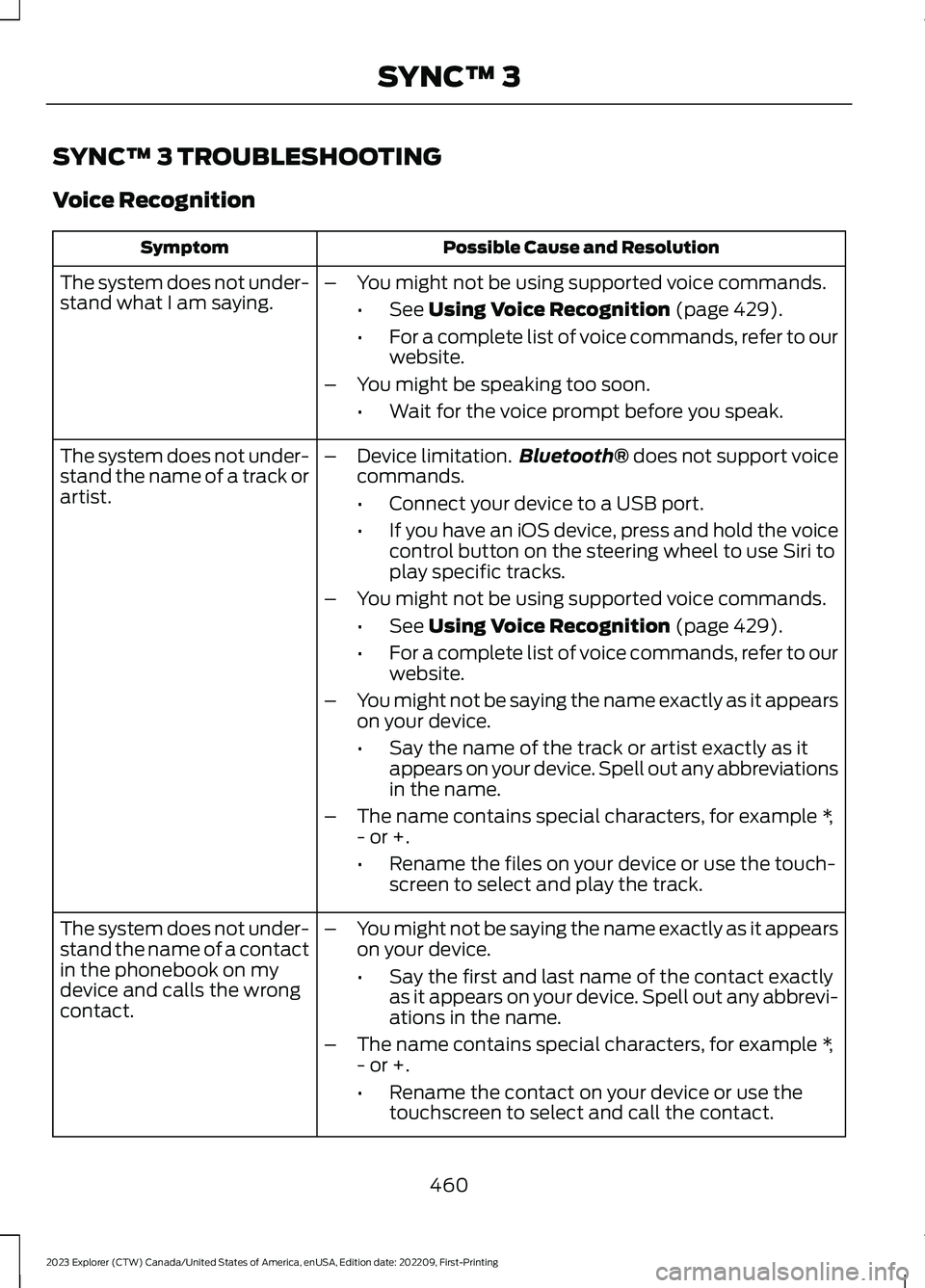
SYNC™ 3 TROUBLESHOOTING
Voice Recognition
Possible Cause and ResolutionSymptom
The system does not under-stand what I am saying.–You might not be using supported voice commands.
•See Using Voice Recognition (page 429).
•For a complete list of voice commands, refer to ourwebsite.
–You might be speaking too soon.
•Wait for the voice prompt before you speak.
The system does not under-stand the name of a track orartist.
–Device limitation.Bluetooth® does not support voicecommands.
•Connect your device to a USB port.
•If you have an iOS device, press and hold the voicecontrol button on the steering wheel to use Siri toplay specific tracks.
–You might not be using supported voice commands.
•See Using Voice Recognition (page 429).
•For a complete list of voice commands, refer to ourwebsite.
–You might not be saying the name exactly as it appearson your device.
•Say the name of the track or artist exactly as itappears on your device. Spell out any abbreviationsin the name.
–The name contains special characters, for example *,- or +.
•Rename the files on your device or use the touch-screen to select and play the track.
The system does not under-stand the name of a contactin the phonebook on mydevice and calls the wrongcontact.
–You might not be saying the name exactly as it appearson your device.
•Say the first and last name of the contact exactlyas it appears on your device. Spell out any abbrevi-ations in the name.
–The name contains special characters, for example *,- or +.
•Rename the contact on your device or use thetouchscreen to select and call the contact.
460
2023 Explorer (CTW) Canada/United States of America, enUSA, Edition date: 202209, First-PrintingSYNC™ 3
Page 465 of 573
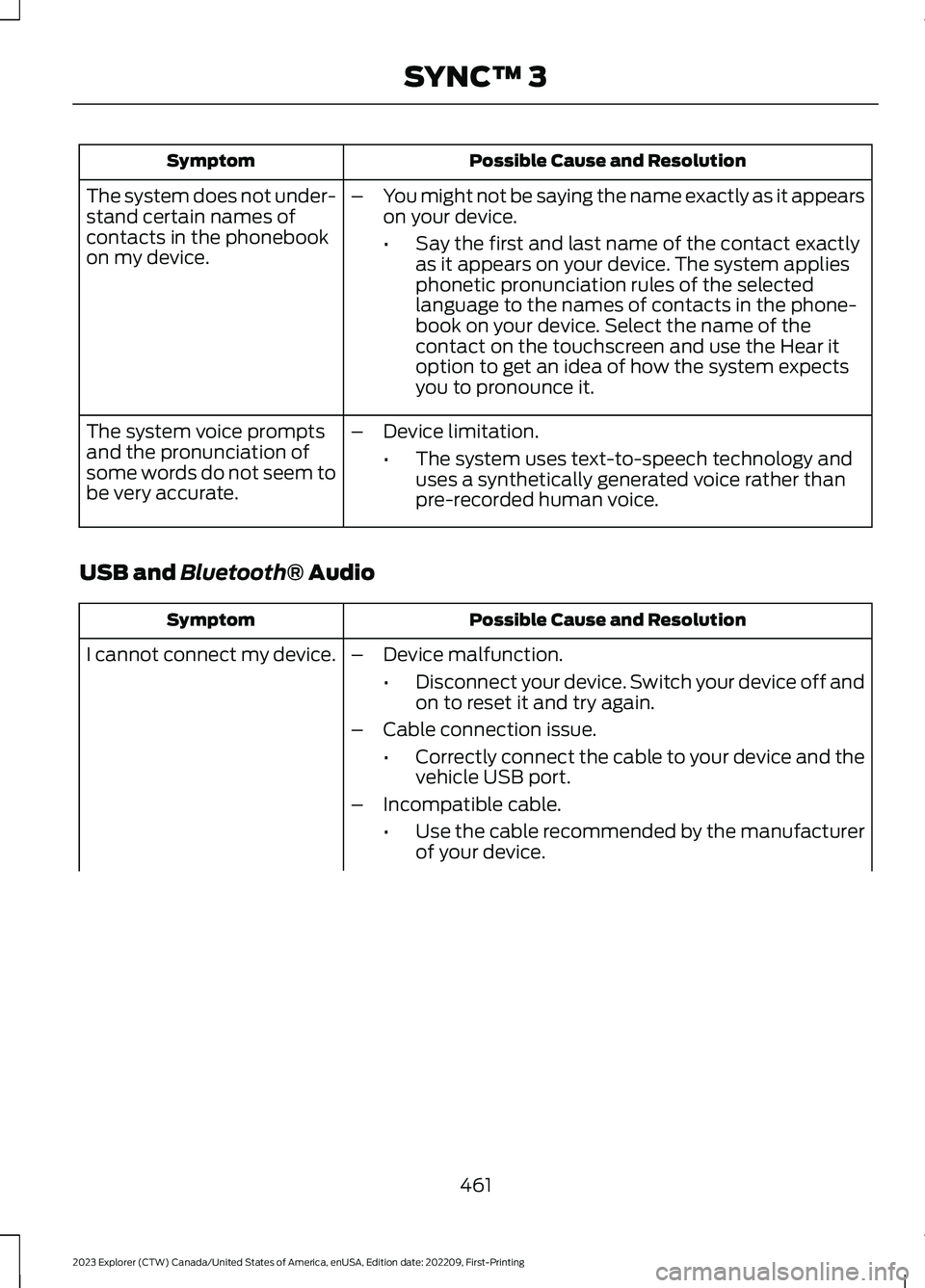
Possible Cause and ResolutionSymptom
–You might not be saying the name exactly as it appearson your device.
•Say the first and last name of the contact exactlyas it appears on your device. The system appliesphonetic pronunciation rules of the selectedlanguage to the names of contacts in the phone-book on your device. Select the name of thecontact on the touchscreen and use the Hear itoption to get an idea of how the system expectsyou to pronounce it.
The system does not under-stand certain names ofcontacts in the phonebookon my device.
–Device limitation.
•The system uses text-to-speech technology anduses a synthetically generated voice rather thanpre-recorded human voice.
The system voice promptsand the pronunciation ofsome words do not seem tobe very accurate.
USB and Bluetooth® Audio
Possible Cause and ResolutionSymptom
I cannot connect my device.–Device malfunction.
•Disconnect your device. Switch your device off andon to reset it and try again.
–Cable connection issue.
•Correctly connect the cable to your device and thevehicle USB port.
–Incompatible cable.
•Use the cable recommended by the manufacturerof your device.
461
2023 Explorer (CTW) Canada/United States of America, enUSA, Edition date: 202209, First-PrintingSYNC™ 3
Page 466 of 573
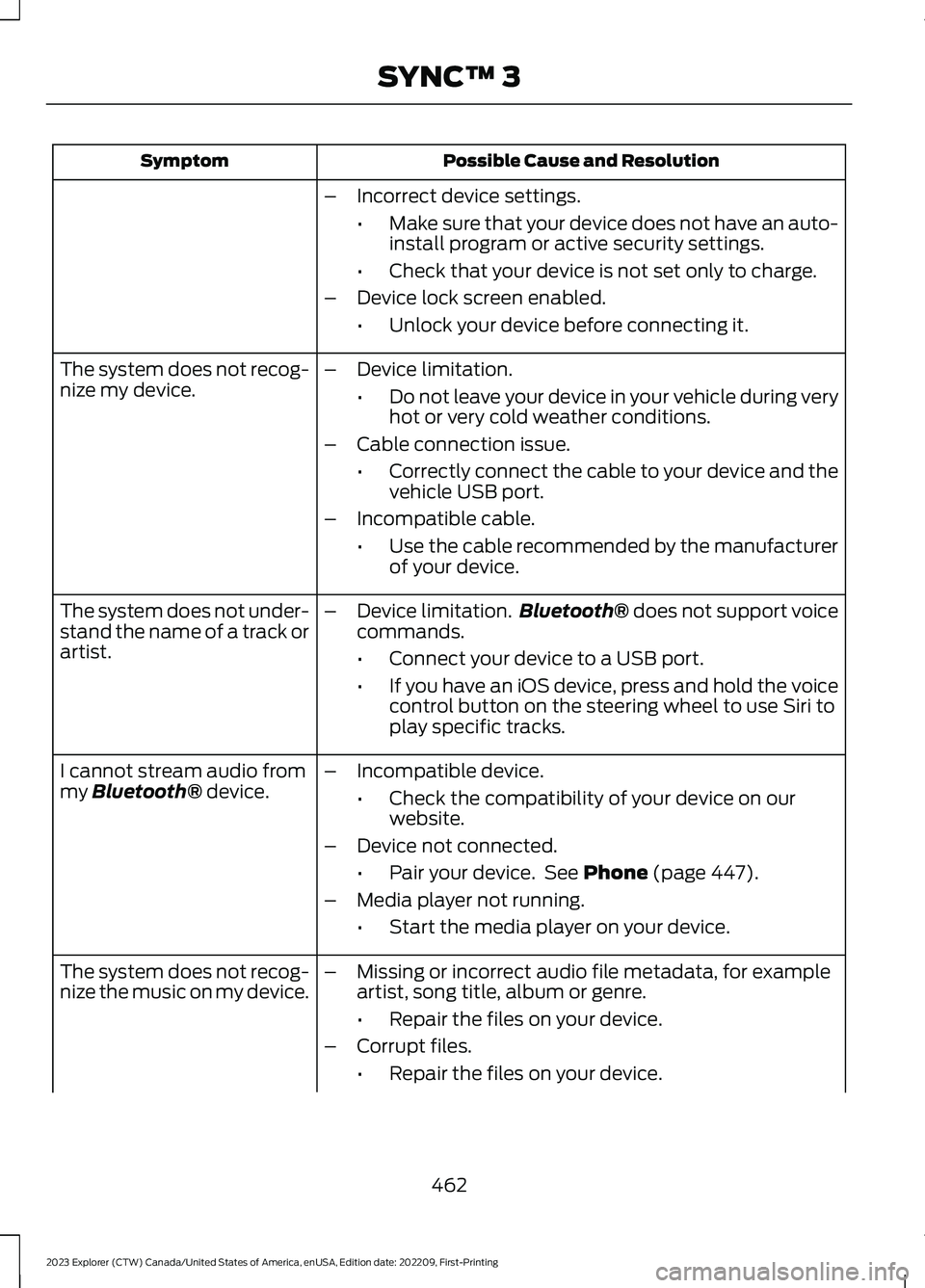
Possible Cause and ResolutionSymptom
–Incorrect device settings.
•Make sure that your device does not have an auto-install program or active security settings.
•Check that your device is not set only to charge.
–Device lock screen enabled.
•Unlock your device before connecting it.
The system does not recog-nize my device.–Device limitation.
•Do not leave your device in your vehicle during veryhot or very cold weather conditions.
–Cable connection issue.
•Correctly connect the cable to your device and thevehicle USB port.
–Incompatible cable.
•Use the cable recommended by the manufacturerof your device.
The system does not under-stand the name of a track orartist.
–Device limitation.Bluetooth® does not support voicecommands.
•Connect your device to a USB port.
•If you have an iOS device, press and hold the voicecontrol button on the steering wheel to use Siri toplay specific tracks.
I cannot stream audio frommy Bluetooth® device.–Incompatible device.
•Check the compatibility of your device on ourwebsite.
–Device not connected.
•Pair your device. See Phone (page 447).
–Media player not running.
•Start the media player on your device.
The system does not recog-nize the music on my device.–Missing or incorrect audio file metadata, for exampleartist, song title, album or genre.
•Repair the files on your device.
–Corrupt files.
•Repair the files on your device.
462
2023 Explorer (CTW) Canada/United States of America, enUSA, Edition date: 202209, First-PrintingSYNC™ 3
Page 468 of 573
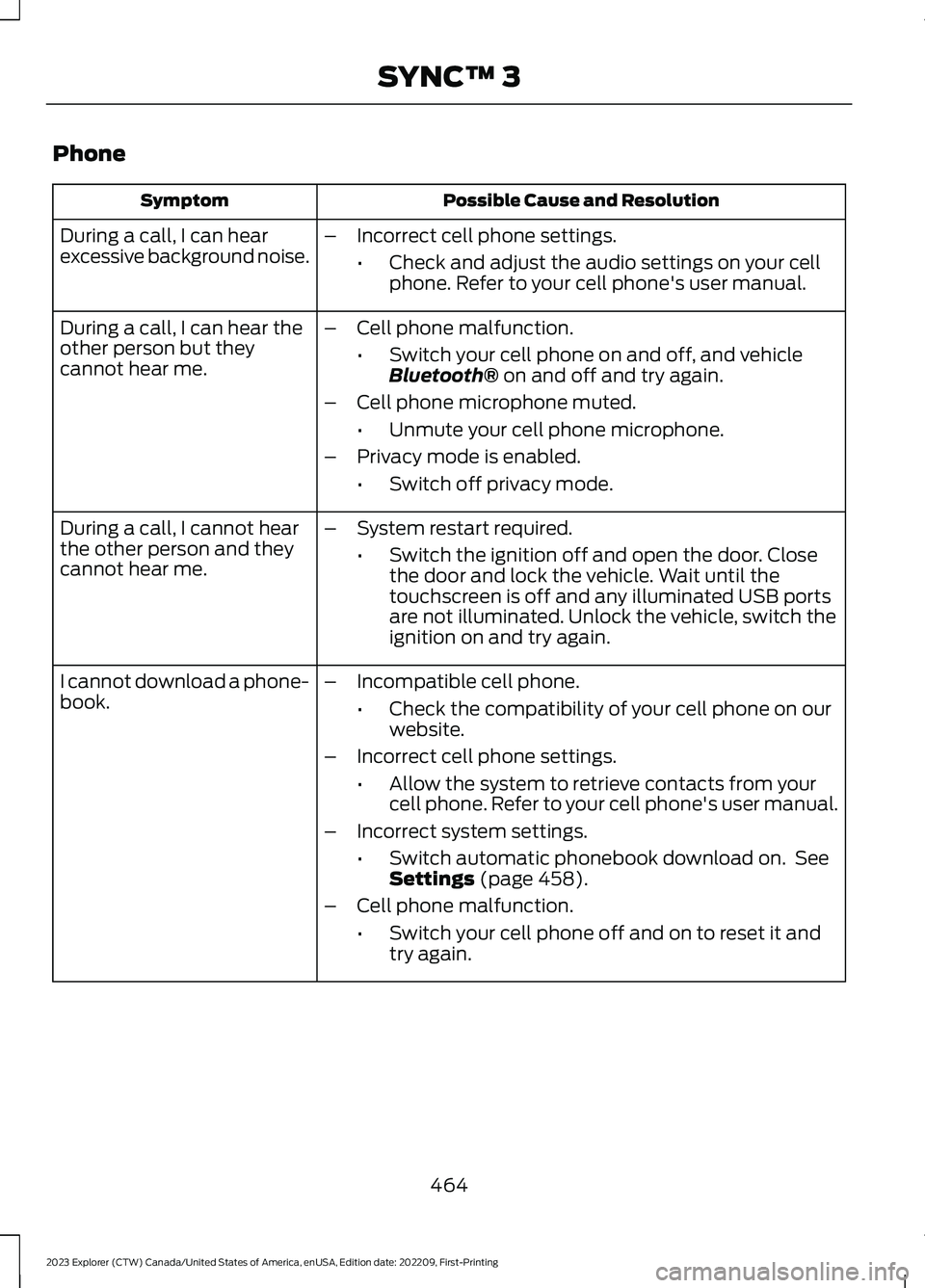
Phone
Possible Cause and ResolutionSymptom
During a call, I can hearexcessive background noise.–Incorrect cell phone settings.
•Check and adjust the audio settings on your cellphone. Refer to your cell phone's user manual.
During a call, I can hear theother person but theycannot hear me.
–Cell phone malfunction.
•Switch your cell phone on and off, and vehicleBluetooth® on and off and try again.
–Cell phone microphone muted.
•Unmute your cell phone microphone.
–Privacy mode is enabled.
•Switch off privacy mode.
During a call, I cannot hearthe other person and theycannot hear me.
–System restart required.
•Switch the ignition off and open the door. Closethe door and lock the vehicle. Wait until thetouchscreen is off and any illuminated USB portsare not illuminated. Unlock the vehicle, switch theignition on and try again.
I cannot download a phone-book.–Incompatible cell phone.
•Check the compatibility of your cell phone on ourwebsite.
–Incorrect cell phone settings.
•Allow the system to retrieve contacts from yourcell phone. Refer to your cell phone's user manual.
–Incorrect system settings.
•Switch automatic phonebook download on. SeeSettings (page 458).
–Cell phone malfunction.
•Switch your cell phone off and on to reset it andtry again.
464
2023 Explorer (CTW) Canada/United States of America, enUSA, Edition date: 202209, First-PrintingSYNC™ 3
Page 471 of 573
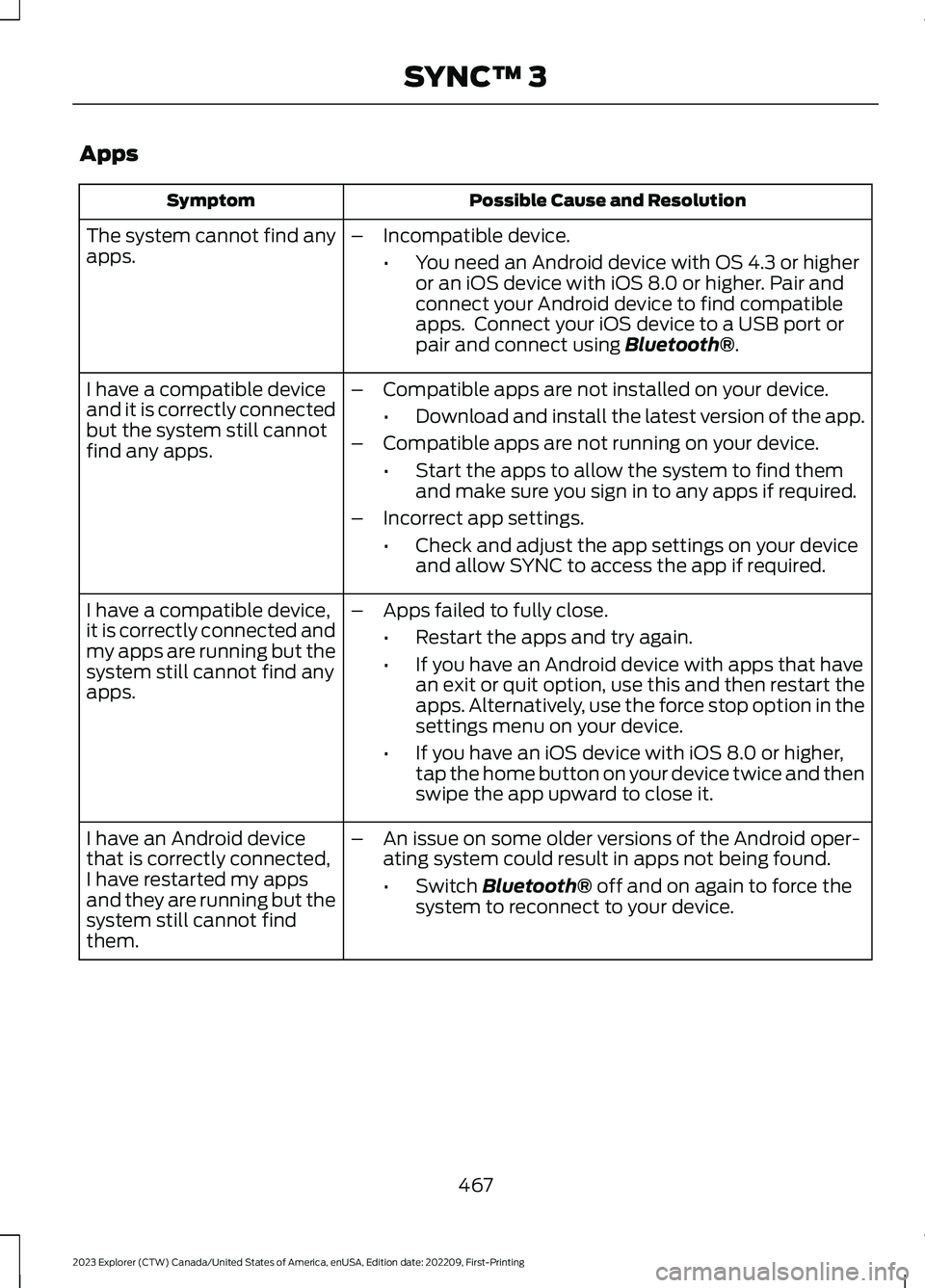
Apps
Possible Cause and ResolutionSymptom
The system cannot find anyapps.–Incompatible device.
•You need an Android device with OS 4.3 or higheror an iOS device with iOS 8.0 or higher. Pair andconnect your Android device to find compatibleapps. Connect your iOS device to a USB port orpair and connect using Bluetooth®.
I have a compatible deviceand it is correctly connectedbut the system still cannotfind any apps.
–Compatible apps are not installed on your device.
•Download and install the latest version of the app.
–Compatible apps are not running on your device.
•Start the apps to allow the system to find themand make sure you sign in to any apps if required.
–Incorrect app settings.
•Check and adjust the app settings on your deviceand allow SYNC to access the app if required.
I have a compatible device,it is correctly connected andmy apps are running but thesystem still cannot find anyapps.
–Apps failed to fully close.
•Restart the apps and try again.
•If you have an Android device with apps that havean exit or quit option, use this and then restart theapps. Alternatively, use the force stop option in thesettings menu on your device.
•If you have an iOS device with iOS 8.0 or higher,tap the home button on your device twice and thenswipe the app upward to close it.
I have an Android devicethat is correctly connected,I have restarted my appsand they are running but thesystem still cannot findthem.
–An issue on some older versions of the Android oper-ating system could result in apps not being found.
•Switch Bluetooth® off and on again to force thesystem to reconnect to your device.
467
2023 Explorer (CTW) Canada/United States of America, enUSA, Edition date: 202209, First-PrintingSYNC™ 3
Page 472 of 573
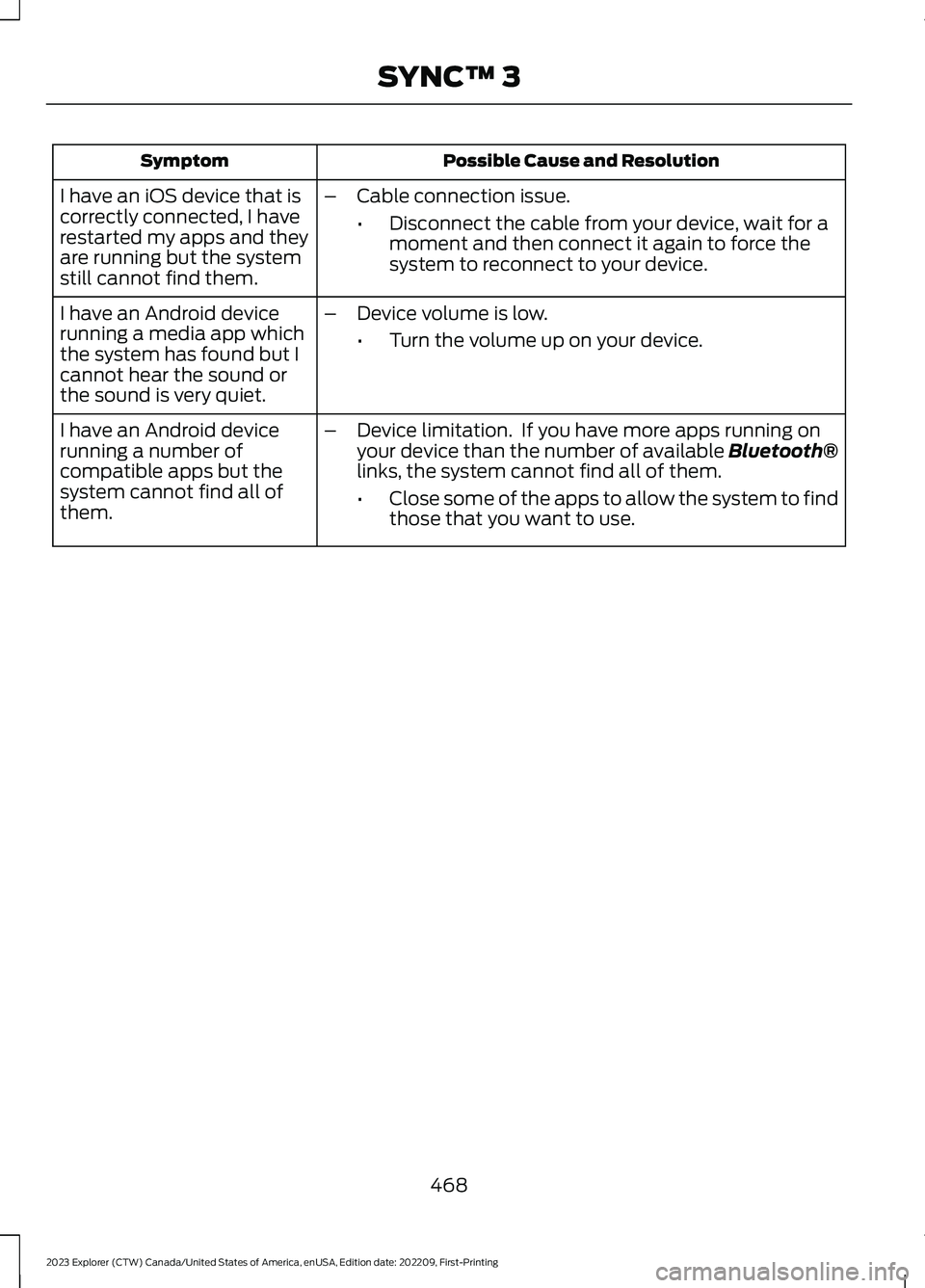
Possible Cause and ResolutionSymptom
I have an iOS device that iscorrectly connected, I haverestarted my apps and theyare running but the systemstill cannot find them.
–Cable connection issue.
•Disconnect the cable from your device, wait for amoment and then connect it again to force thesystem to reconnect to your device.
I have an Android devicerunning a media app whichthe system has found but Icannot hear the sound orthe sound is very quiet.
–Device volume is low.
•Turn the volume up on your device.
I have an Android devicerunning a number ofcompatible apps but thesystem cannot find all ofthem.
–Device limitation. If you have more apps running onyour device than the number of available Bluetooth®links, the system cannot find all of them.
•Close some of the apps to allow the system to findthose that you want to use.
468
2023 Explorer (CTW) Canada/United States of America, enUSA, Edition date: 202209, First-PrintingSYNC™ 3