instrument panel FORD EXPLORER 2023 User Guide
[x] Cancel search | Manufacturer: FORD, Model Year: 2023, Model line: EXPLORER, Model: FORD EXPLORER 2023Pages: 573, PDF Size: 16.1 MB
Page 170 of 573
WHAT IS THE WIRELESS
ACCESSORY CHARGER
The wireless accessory charger allows youto charge one compatible Qi wirelesscharging device on the charging area.
WIRELESS ACCESSORY
CHARGER PRECAUTIONS
WARNING: Wireless chargingdevices can affect the operation ofimplanted medical devices, includingcardiac pacemakers. If you have anyimplanted medical devices, werecommend that you consult with yourphysician.
Keep the charging area clean and removeforeign objects prior to charging a device.
Do not place items with a magnetic stripor radio-frequency identification chip, forexample passports, parking tickets,transportation passes or credit cards, nearthe charging area when charging a device.Damage could occur to the magnetic stripor radio-frequency identification chip.
Do not place metal objects, for exampleremote controls, coins and candywrappers, on or near the charging areawhen charging a device. Metal objects mayheat up and degrade the chargingperformance, in addition to causinginterruptions in charging.
Charging could be interrupted, degraded,or could stop if any of the following occur:
•The system detects a foreign object.
•The device is misaligned on thecharging area.
•The device moves on the activecharging area when the vehicle is inmotion.
•The vehicle ambient temperature is toohigh.
•You attempt to charge a non-Qicompatible device on the wirelesscharger.
Note:During charging, the device and thecharger could heat up, this is normal. If thebattery gets hotter than usual, the devicemay stop charging.
LOCATING THE WIRELESS
ACCESSORY CHARGER
The charging area is on thecenter console or in the mediabin below the instrument panel.
CHARGING A WIRELESS
DEVICE
Place the device on the center of thecharging surface with the charging sidedown. The charging stops after your devicereaches a full charge.
You can use the charger when the vehicleis in accessory mode, when the vehicle isrunning, or when SYNC is on.
Displays on the status bar whenwireless charging is in progress.
Note:The charging performance may beaffected if your device is in a case. It may benecessary to remove the case to wirelesslycharge your device.
Note:Software and firmware updates mayaffect device compatibility, including theuse of unofficial software or firmware. Youshould verify charging functionality with yourspecific devices in-vehicle.
166
2023 Explorer (CTW) Canada/United States of America, enUSA, Edition date: 202209, First-PrintingWireless Accessory Charger (If Equipped)E297549 E263583
Page 193 of 573
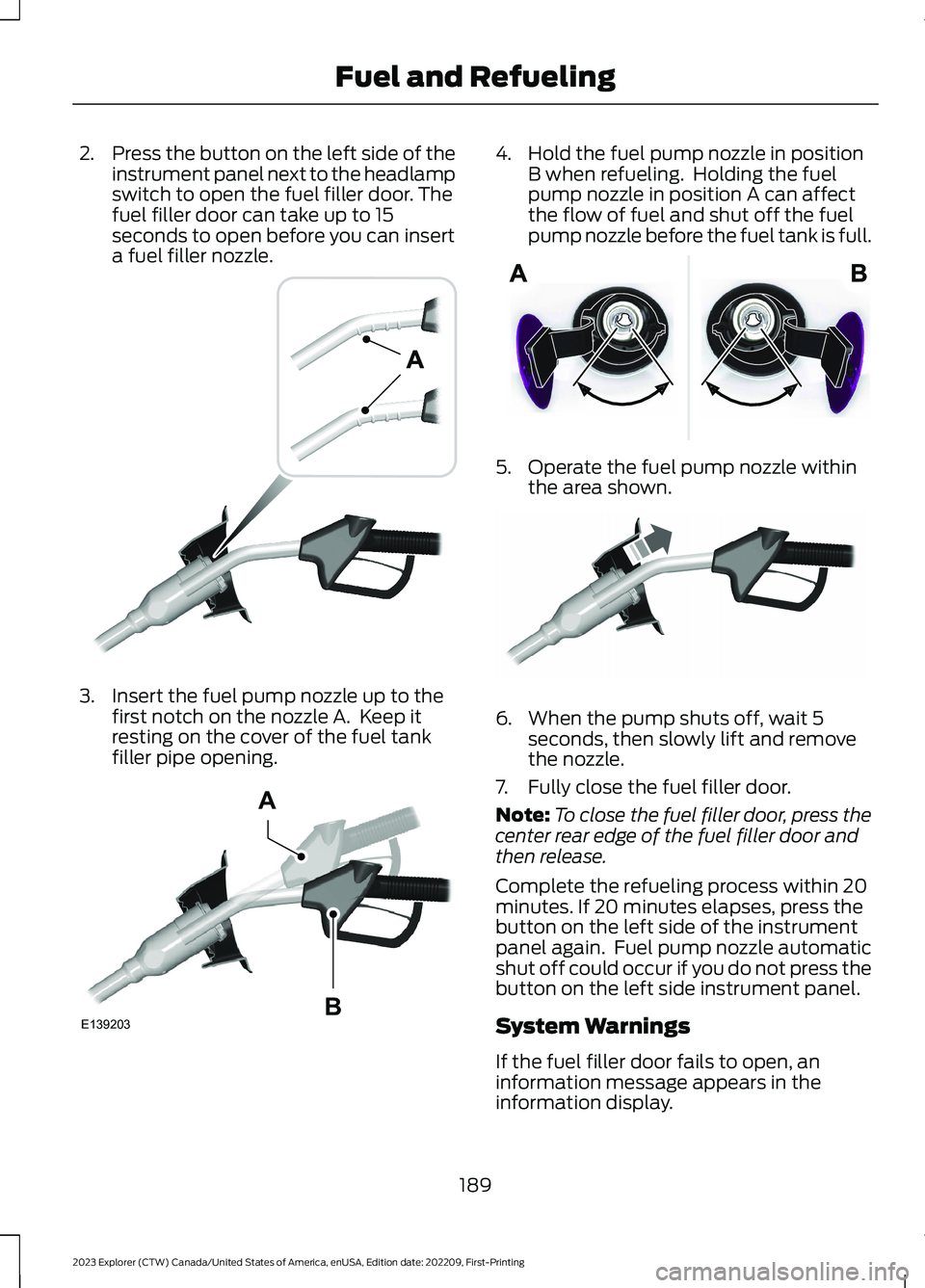
2.Press the button on the left side of theinstrument panel next to the headlampswitch to open the fuel filler door. Thefuel filler door can take up to 15seconds to open before you can inserta fuel filler nozzle.
3.Insert the fuel pump nozzle up to thefirst notch on the nozzle A. Keep itresting on the cover of the fuel tankfiller pipe opening.
4.Hold the fuel pump nozzle in positionB when refueling. Holding the fuelpump nozzle in position A can affectthe flow of fuel and shut off the fuelpump nozzle before the fuel tank is full.
5.Operate the fuel pump nozzle withinthe area shown.
6.When the pump shuts off, wait 5seconds, then slowly lift and removethe nozzle.
7.Fully close the fuel filler door.
Note:To close the fuel filler door, press thecenter rear edge of the fuel filler door andthen release.
Complete the refueling process within 20minutes. If 20 minutes elapses, press thebutton on the left side of the instrumentpanel again. Fuel pump nozzle automaticshut off could occur if you do not press thebutton on the left side instrument panel.
System Warnings
If the fuel filler door fails to open, aninformation message appears in theinformation display.
189
2023 Explorer (CTW) Canada/United States of America, enUSA, Edition date: 202209, First-PrintingFuel and RefuelingE139202 E139203AB E206912 E119081
Page 194 of 573
ActionMessage
Your vehicle has a sealedfuel system that may beunder pressure. This inform-ation message appearswhile the fuel system isdepressurizing with the fuelfiller door closed. Wait forthe fuel system to depres-surize and for the fuel fillerdoor to unlatch.
Pleasewait forfuel doorto open
This information messageappears when the fuelsystem depressurizes andthe fuel filler door opens.Fully open the fuel filler doorto refuel and fully close thefuel filler door whenrefueling is complete.
Fuel DoorOpen
Your vehicle has a sealedfuel system that requires thefuel filler door to be fullyclosed after refueling. Thiswarning message appearswhen the fuel filler door isajar. Please fully close thefuel filler door to avoid a"Check Engine" Light.
Fuel doorajar Closefully toavoid""CheckEngine""light
ActionMessage
If you see this message anda "Check Engine" lamp illu-minates, please fully closethe fuel filler door. The"Check Engine" Light shouldclear within five seconds. Ifthe "Check Engine" lightpersists, please see yourdealer.
A warning message appearsin the information displaywhen the fuel system failsto depressurize or the fuelfiller door fails to open. Youmay have to use the fuelfiller door manual overridelever.
RefuelError SeeManual
If the Refuel Error information messageappears, do the following:
1.Check the fuel filler door for anythingthat may be obstructing its movement,for example ice or snow.
2.Remove any obstruction from the fuelfiller door.
3.Press the button on the left side of theinstrument panel to open the fuel fillerdoor.
4.If the fuel filler door fails to open andthe Refuel Error message remains inthe information display, use the fuelfiller door manual override lever.
Fuel Filler Door Manual OverrideLever
WARNING: The fuel system maybe under pressure. If you hear a hissingsound near the fuel filler inlet, do notrefuel until the sound stops. Otherwise,fuel may spray out, which could causeserious personal injury.
190
2023 Explorer (CTW) Canada/United States of America, enUSA, Edition date: 202209, First-PrintingFuel and Refueling
Page 215 of 573
When you release the accelerator pedal orpress the brake pedal, the brake controllerautomatically detects the amount ofdeceleration requested and optimizes howmuch of the deceleration will be producedby regenerative braking. The remainingportion is generated by standard frictionbraking. When the battery is almost fullycharged, the amount of regenerativebraking is limited to avoid overcharging,and the requested deceleration isproduced by standard friction brakingalone.
Regenerative braking does not take theplace of the standard friction brakes; it onlyassists them. Regenerative braking isdesigned to interact with the anti-lockbrake system. Regenerative brakingdisables when the anti-lock brake systemis activated or the battery is fully charged.
HINTS ON DRIVING WITH
ANTI-LOCK BRAKES
The anti-lock brake system does noteliminate the risks when:
•You drive too closely to the vehicle infront of you.
•Your vehicle is hydroplaning.
•You take corners too fast.
•The road surface is poor.
Note: If the system activates, the brakepedal could pulse and may travel further.Maintain pressure on the brake pedal. Youmay also hear a noise from the system. Thisis normal.
ELECTRIC PARKING BRAKE
WARNING: Apply the parking brakeand shift into park (P) before leavingyour vehicle.
WARNING: If you drive extendeddistances with the parking brake applied,you could cause damage to the brakesystem.
WARNING: The electric parkingbrake does not operate if the vehiclebattery has run out of charge.
Your vehicle has an electric parking brake.You operate it with a switch instead of alever. The switch is on the center consoleor to the left-hand side of the steeringwheel, on the lower part of the instrumentpanel.
Note:The electric parking brake makesnoises during operation. This is normal.
Applying the Electric ParkingBrake
Pull the switch up.
The red warning lamp flashesduring operation and illuminateswhen the parking brake isapplied.
Note:It remains illuminated for a shortperiod of time after you switch the ignitionoff.
If it continues to flash or does notilluminate, the system has malfunctioned.Have your vehicle checked as soon aspossible.
Note:You can apply the electric parkingbrake when the ignition is off.
211
2023 Explorer (CTW) Canada/United States of America, enUSA, Edition date: 202209, First-PrintingBrakesE267156 E270480 E67024
Page 296 of 573
Vehicles Sold in Canada: GettingRoadside Assistance
To fully assist you should you have avehicle concern, Ford Motor Company ofCanada, Limited offers a complimentaryroadside assistance program. This programis eligible within Canada or the continentalUnited States.
The service is available 24 hours a day,seven days a week.
This program is separate from the NewVehicle Limited Warranty, but the coverageis concurrent with the powertrain coverageperiod of your vehicle. Canadian roadsidecoverage and benefits may differ from theU.S. coverage.
If you require more information, please callus in Canada at 1-800-665-2006, or visitour website at www.ford.ca.
HAZARD FLASHERS
Note:The hazard flashers operate whenthe ignition is in any position, or if the key isnot in the ignition. If used when the vehicleis not running, the battery loses charge. Asa result, there may be insufficient power torestart your vehicle.
The flasher control is on theinstrument panel. Use yourhazard flashers when yourvehicle is creating a safety hazard for othermotorists.
•Press the flasher control and all frontand rear direction indicators flash.
•Press the button again to switch themoff.
FUEL SHUTOFF
WARNING: If your vehicle has beeninvolved in a crash, have the fuel systemchecked. Failure to follow this instructioncould result in fire, personal injury ordeath.
Note:When you try to restart your vehicleafter a fuel shutoff, the vehicle makes surethat various systems are safe to restart.Once the vehicle determines the systemsare safe, then the vehicle allows you torestart.
Note:In the event that your vehicle doesnot restart after your third attempt, contacta qualified technician.
The fuel pump shutoff stops the flow offuel to the engine in the event of amoderate to severe crash. Not everyimpact causes a shutoff.
Should your vehicle shut off after a crash,you may restart your vehicle.
If your vehicle has a key system:
1.Switch off the ignition.
2.Switch to start position.
3.Switch off the ignition.
4.Switch on the ignition to re-enable thefuel pump.
5.If the vehicle does not start, repeatsteps 1 through 4.
If your vehicle has a push button startsystem:
1.Press START/STOP to switch off yourvehicle.
2.Press the brake pedal andSTART/STOP to switch on yourvehicle.
3.Remove your foot from the brake pedaland press START/STOP to switch offyour vehicle.
292
2023 Explorer (CTW) Canada/United States of America, enUSA, Edition date: 202209, First-PrintingRoadside EmergenciesE75790
Page 314 of 573
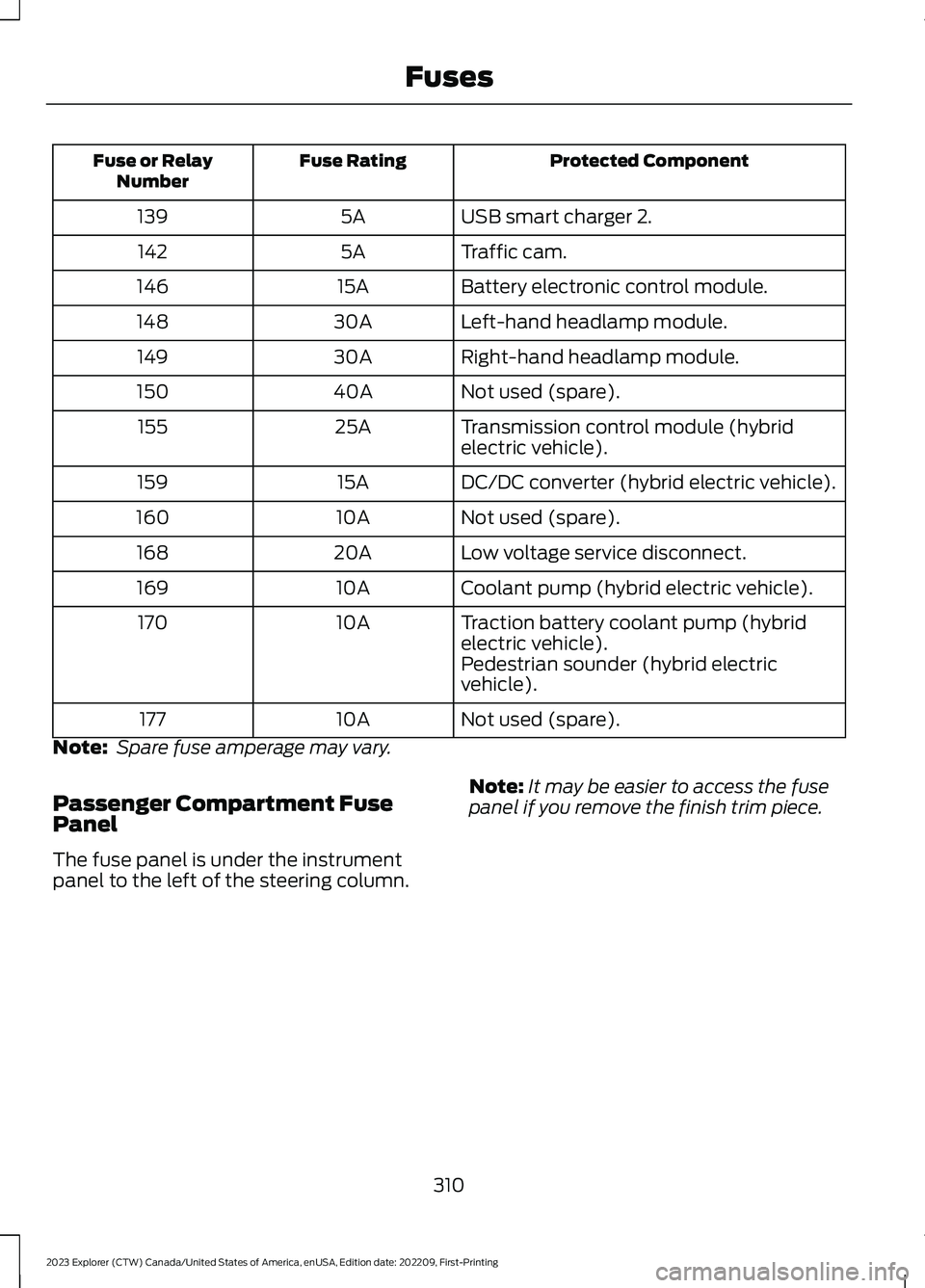
Protected ComponentFuse RatingFuse or RelayNumber
USB smart charger 2.5A139
Traffic cam.5A142
Battery electronic control module.15A146
Left-hand headlamp module.30A148
Right-hand headlamp module.30A149
Not used (spare).40A150
Transmission control module (hybridelectric vehicle).25A155
DC/DC converter (hybrid electric vehicle).15A159
Not used (spare).10A160
Low voltage service disconnect.20A168
Coolant pump (hybrid electric vehicle).10A169
Traction battery coolant pump (hybridelectric vehicle).10A170
Pedestrian sounder (hybrid electricvehicle).
Not used (spare).10A177
Note: Spare fuse amperage may vary.
Passenger Compartment FusePanel
The fuse panel is under the instrumentpanel to the left of the steering column.
Note:It may be easier to access the fusepanel if you remove the finish trim piece.
310
2023 Explorer (CTW) Canada/United States of America, enUSA, Edition date: 202209, First-PrintingFuses
Page 316 of 573
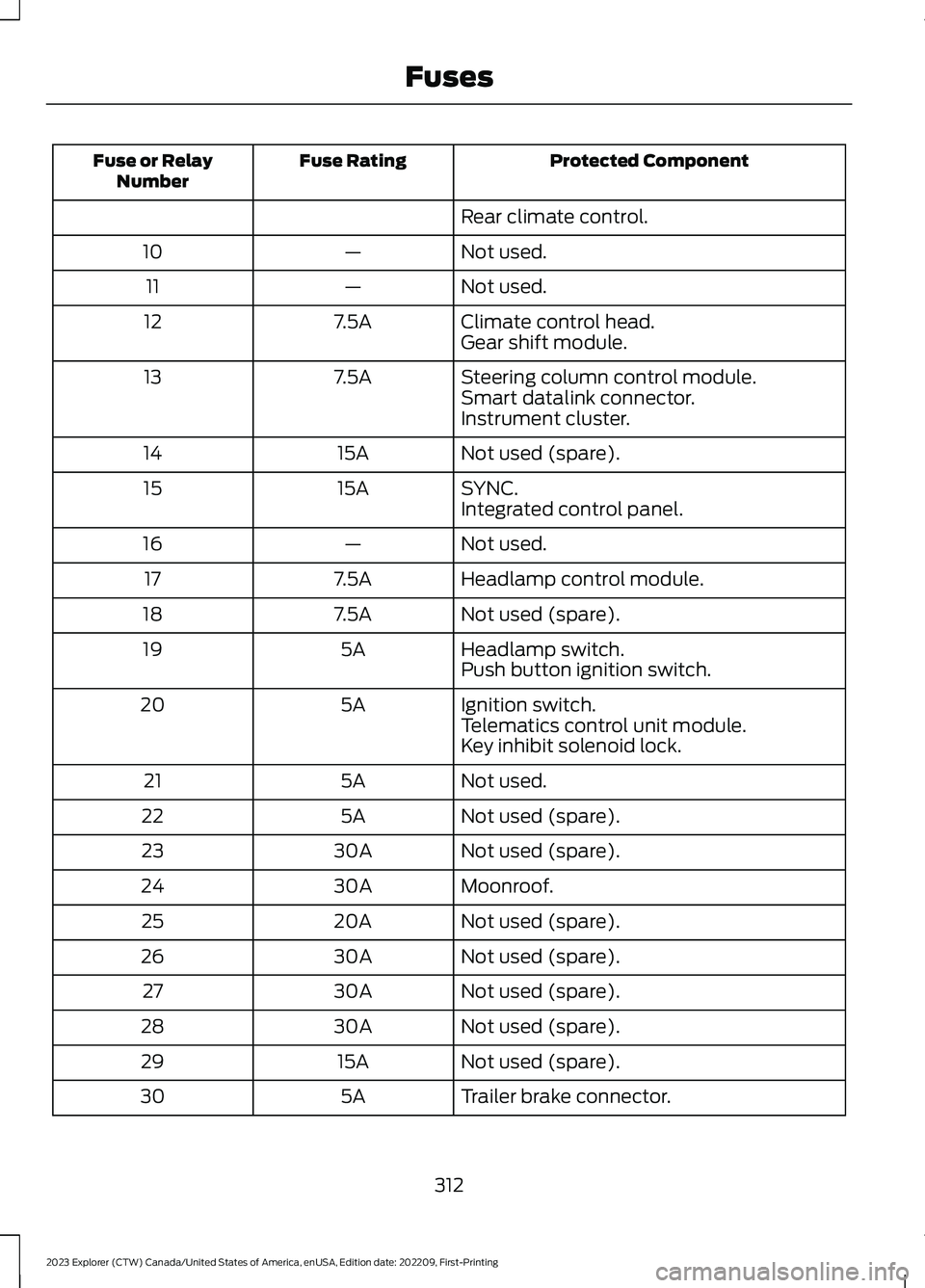
Protected ComponentFuse RatingFuse or RelayNumber
Rear climate control.
Not used.—10
Not used.—11
Climate control head.7.5A12Gear shift module.
Steering column control module.7.5A13Smart datalink connector.Instrument cluster.
Not used (spare).15A14
SYNC.15A15Integrated control panel.
Not used.—16
Headlamp control module.7.5A17
Not used (spare).7.5A18
Headlamp switch.5A19Push button ignition switch.
Ignition switch.5A20Telematics control unit module.Key inhibit solenoid lock.
Not used.5A21
Not used (spare).5A22
Not used (spare).30A23
Moonroof.30A24
Not used (spare).20A25
Not used (spare).30A26
Not used (spare).30A27
Not used (spare).30A28
Not used (spare).15A29
Trailer brake connector.5A30
312
2023 Explorer (CTW) Canada/United States of America, enUSA, Edition date: 202209, First-PrintingFuses
Page 346 of 573

•Never wash or rinse the engine while itis hot or running; water in the runningengine may cause internal damage.
•Never wash or rinse any ignition coil,spark plug wire or spark plug well, orthe area in and around these locations.
•Cover the battery, power distributionbox, and air filter assembly to preventwater damage when cleaning theengine.
CLEANING THE WINDOWS AND
WIPER BLADES
Car wash chemicals and environmentalfallout can result in windshield and wiperblade contamination. Dirty windshield andwipers will result in poor windshield wiperoperation. Keep the windshield and wiperblades clean to maintain windshield wiperperformance.
To clean the windshield and wiper blades:
•Clean the windshield with anon-abrasive glass cleaner. Whencleaning the interior of the windshield,avoid getting any glass cleaner on theinstrument panel or door panels. Wipeany glass cleaner off these surfacesimmediately.
•For windshields contaminated withtree sap, chemicals, wax or bugs, cleanthe entire windshield using steel wool(no greater than 0000 grade) in acircular motion and rinse with water.
•Clean the wiper blades with isopropylrubbing alcohol or windshield washerconcentrate.
Note: Do not use razor blades or othersharp objects to clean or remove decalsfrom the inside of the heated rear window.The vehicle warranty does not coverdamage caused to the heated rear windowgrid lines.
CLEANING THE INTERIOR
WARNING: Do not use cleaningsolvents, bleach or dye on the vehicle'sseatbelts, as these actions may weakenthe belt webbing.
WARNING: On vehicles equippedwith seat-mounted airbags, do not usechemical solvents or strong detergents.Such products could contaminate theside airbag system and affectperformance of the side airbag in a crash.
For fabric, carpets, cloth seats and seatsequipped with side airbags:
•Remove dust and loose dirt with avacuum cleaner.
•Remove light stains and soil withMotorcraft Professional StrengthCarpet & Upholstery Cleaner.
•If grease or tar is present on thematerial, spot-clean the area first withMotorcraft Spot and Stain Remover. InCanada, use Motorcraft Multi-PurposeCleaner.
•If a ring forms on the fabric after spotcleaning, clean the entire areaimmediately (but do not oversaturate)or the ring will set.
•Do not use household cleaningproducts or glass cleaners, which canstain and discolor the fabric and affectthe flame retardant abilities of the seatmaterials.
Mirrors
Do not clean the housing or glass of anymirror with harsh abrasives, fuel or otherpetroleum or ammonia-based cleaningproducts.
342
2023 Explorer (CTW) Canada/United States of America, enUSA, Edition date: 202209, First-PrintingVehicle Care
Page 347 of 573
CLEANING THE INSTRUMENT
PANEL AND INSTRUMENT
CLUSTER LENS
WARNING: Do not use chemicalsolvents or strong detergents whencleaning the steering wheel orinstrument panel to avoid contaminationof the airbag system.
Note:Follow the same procedure ascleaning leather seats for cleaning leatherinstrument panels and leather interior trimsurfaces. See Cleaning Leather Seats(page 343).
Clean the instrument panel and clusterlens with a clean, damp and soft cloth,then use a clean, dry and soft cloth to drythese areas.
•Avoid cleaners or polishes that increasethe gloss of the upper portion of theinstrument panel. The dull finish in thisarea helps protect you fromundesirable windshield reflection.
•Do not use any household cleaningproducts or glass cleaners as thesemay damage the finish of theinstrument panel, interior trim andcluster lens.
•Wash or wipe your hands clean if youhave been in contact with certainproducts such as insect repellent andsuntan lotion to avoid possible damageto the interior painted surfaces.
•Do not allow air fresheners and handsanitizers to spill onto interior surfaces.If a spill occurs, wipe off immediately.Your warranty may not cover thesedamages.
If a staining liquid like coffee or juice hasbeen spilled on the instrument panel or oninterior trim surfaces:
1.Wipe up spilled liquid using a clean,soft cloth as quickly as possible.
2.Use Motorcraft Premium Leather andVinyl Cleaner or a commerciallyavailable leather cleaning product forautomotive interiors. Test any cleaneror stain remover on an inconspicuousarea.
3.Alternatively, wipe the surface with aclean, soft cloth and a mild soap andwater solution. Dry the area with aclean, soft cloth.
4.If necessary, apply more soap andwater solution or cleaning product toa clean, soft cloth and press it onto thesoiled area. Allow this to set at roomtemperature for 30 minutes.
5.Remove the soaked cloth, then with aclean, damp cloth, use a rubbingmotion for 60 seconds on the soiledarea.
6.Dry the area with a clean, soft cloth.
CLEANING LEATHER SEATS
Note:Follow the same procedure ascleaning leather seats for cleaning leatherinstrument panels and leather interior trimsurfaces.
For routine cleaning, wipe the surface witha soft, damp cloth and a mild soap andwater solution. Dry the area with a clean,soft cloth.
For cleaning and removing stains such asdye transfer, use Motorcraft PremiumLeather and Vinyl Cleaner or acommercially available leather cleaningproduct for automotive interiors.
Note:Test any cleaner or stain remover onan inconspicuous area.
343
2023 Explorer (CTW) Canada/United States of America, enUSA, Edition date: 202209, First-PrintingVehicle Care
Page 387 of 573
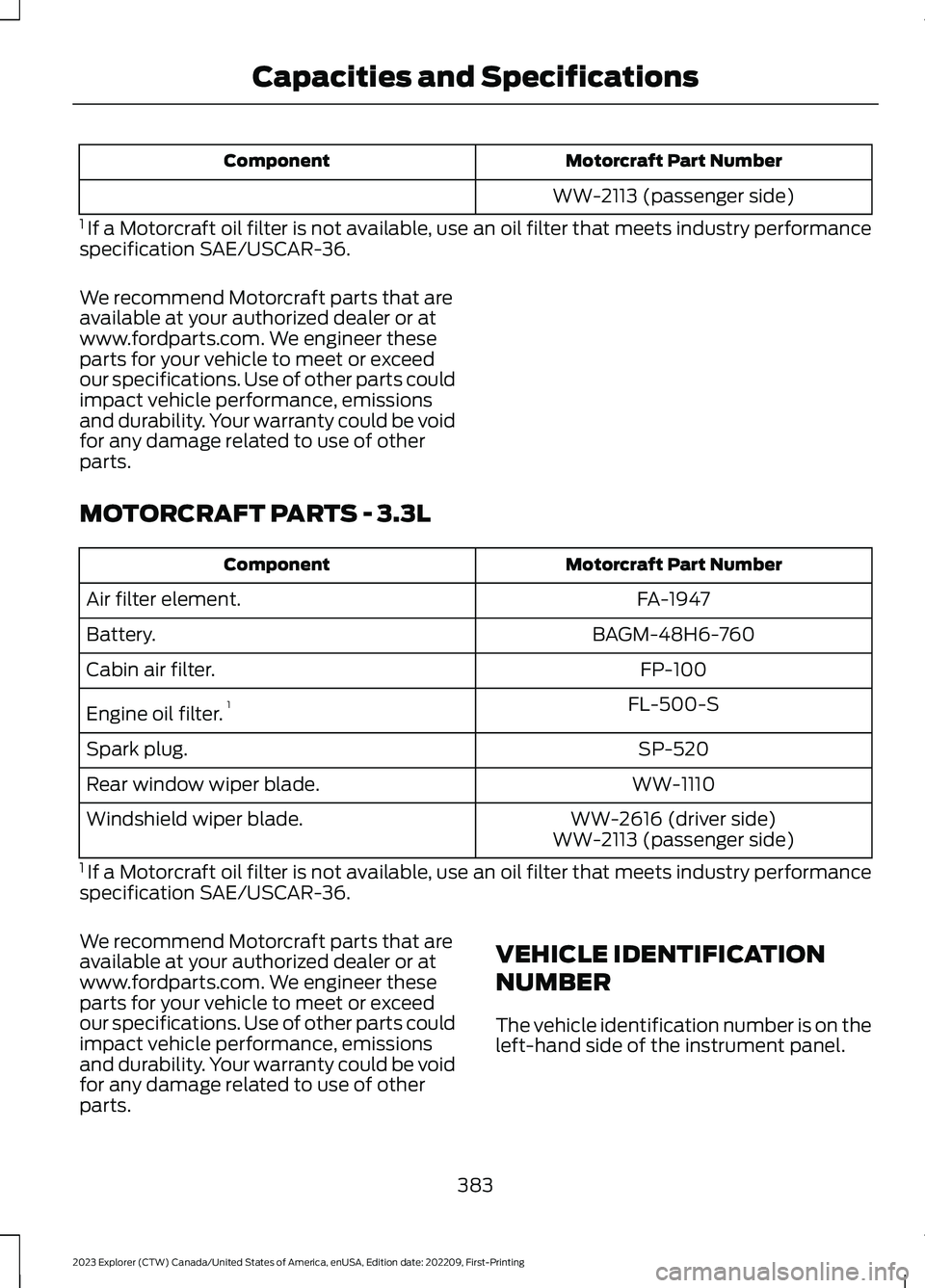
Motorcraft Part NumberComponent
WW-2113 (passenger side)
1 If a Motorcraft oil filter is not available, use an oil filter that meets industry performancespecification SAE/USCAR-36.
We recommend Motorcraft parts that areavailable at your authorized dealer or atwww.fordparts.com. We engineer theseparts for your vehicle to meet or exceedour specifications. Use of other parts couldimpact vehicle performance, emissionsand durability. Your warranty could be voidfor any damage related to use of otherparts.
MOTORCRAFT PARTS - 3.3L
Motorcraft Part NumberComponent
FA-1947Air filter element.
BAGM-48H6-760Battery.
FP-100Cabin air filter.
FL-500-SEngine oil filter.1
SP-520Spark plug.
WW-1110Rear window wiper blade.
WW-2616 (driver side)Windshield wiper blade.WW-2113 (passenger side)
1 If a Motorcraft oil filter is not available, use an oil filter that meets industry performancespecification SAE/USCAR-36.
We recommend Motorcraft parts that areavailable at your authorized dealer or atwww.fordparts.com. We engineer theseparts for your vehicle to meet or exceedour specifications. Use of other parts couldimpact vehicle performance, emissionsand durability. Your warranty could be voidfor any damage related to use of otherparts.
VEHICLE IDENTIFICATION
NUMBER
The vehicle identification number is on theleft-hand side of the instrument panel.
383
2023 Explorer (CTW) Canada/United States of America, enUSA, Edition date: 202209, First-PrintingCapacities and Specifications