mirror FORD F150 2013 12.G User Guide
[x] Cancel search | Manufacturer: FORD, Model Year: 2013, Model line: F150, Model: FORD F150 2013 12.GPages: 570, PDF Size: 6.13 MB
Page 102 of 570
MOONROOF (IF EQUIPPED)
WARNING:Do not let children play with the moonroof or leave
children unattended in the vehicle. They may seriously hurt
themselves.
WARNING:When closing the moonroof, you should verify that it
is free of obstructions and ensure that children and/or pets are
not in the proximity of the moonroof opening.
The sliding shade can be manually opened or closed when the moonroof
is closed. Pull the shade toward the front of the vehicle to close it.
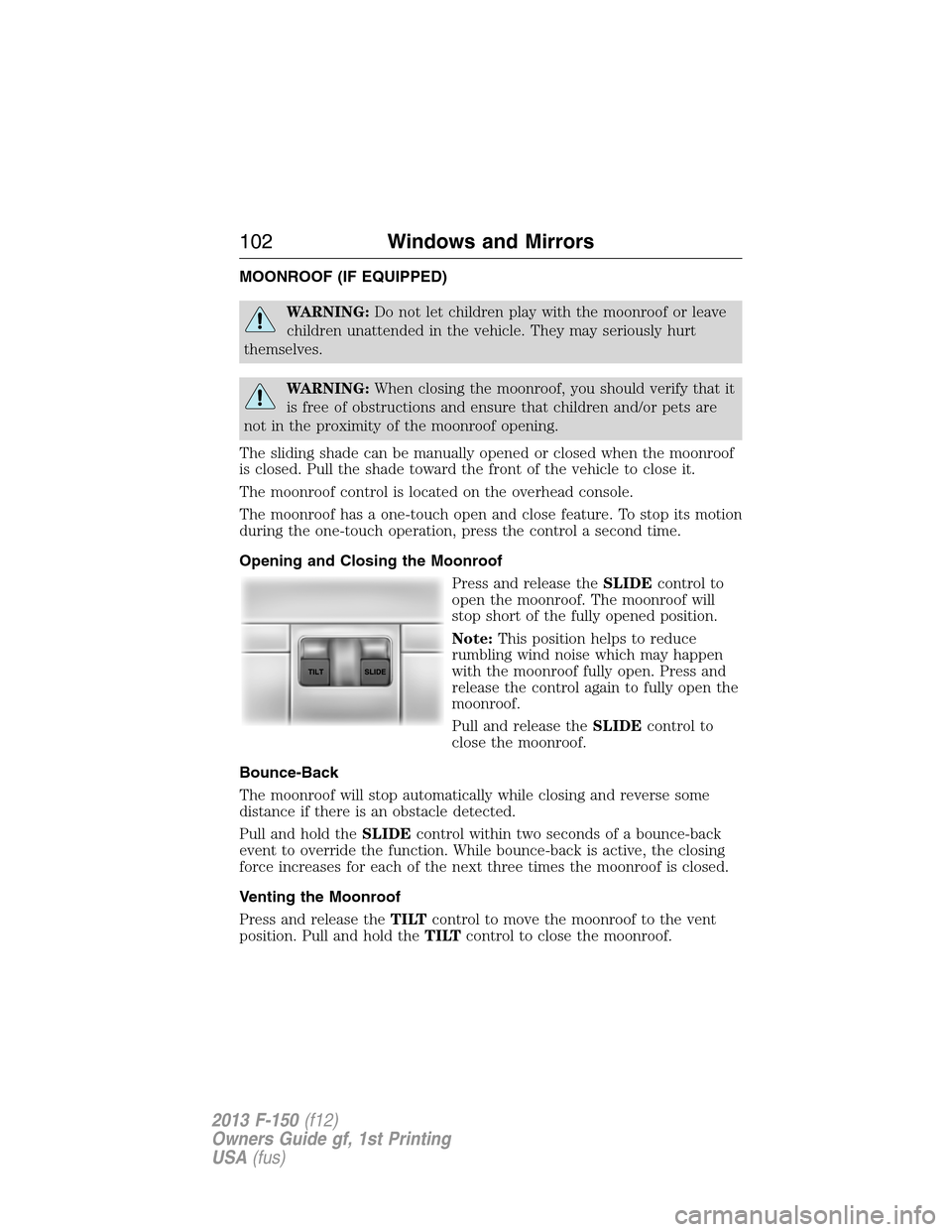
The moonroof control is located on the overhead console.
The moonroof has a one-touch open and close feature. To stop its motion
during the one-touch operation, press the control a second time.
Opening and Closing the Moonroof
Press and release theSLIDEcontrol to
open the moonroof. The moonroof will
stop short of the fully opened position.
Note:This position helps to reduce
rumbling wind noise which may happen
with the moonroof fully open. Press and
release the control again to fully open the
moonroof.
Pull and release theSLIDEcontrol to
close the moonroof.
Bounce-Back
The moonroof will stop automatically while closing and reverse some
distance if there is an obstacle detected.
Pull and hold theSLIDEcontrol within two seconds of a bounce-back
event to override the function. While bounce-back is active, the closing
force increases for each of the next three times the moonroof is closed.
Venting the Moonroof
Press and release theTILTcontrol to move the moonroof to the vent
position. Pull and hold theTILTcontrol to close the moonroof.
102Windows and Mirrors
2013 F-150(f12)
Owners Guide gf, 1st Printing
USA(fus)
Page 149 of 570
MANUAL HEATING AND AIR CONDITIONING SYSTEM
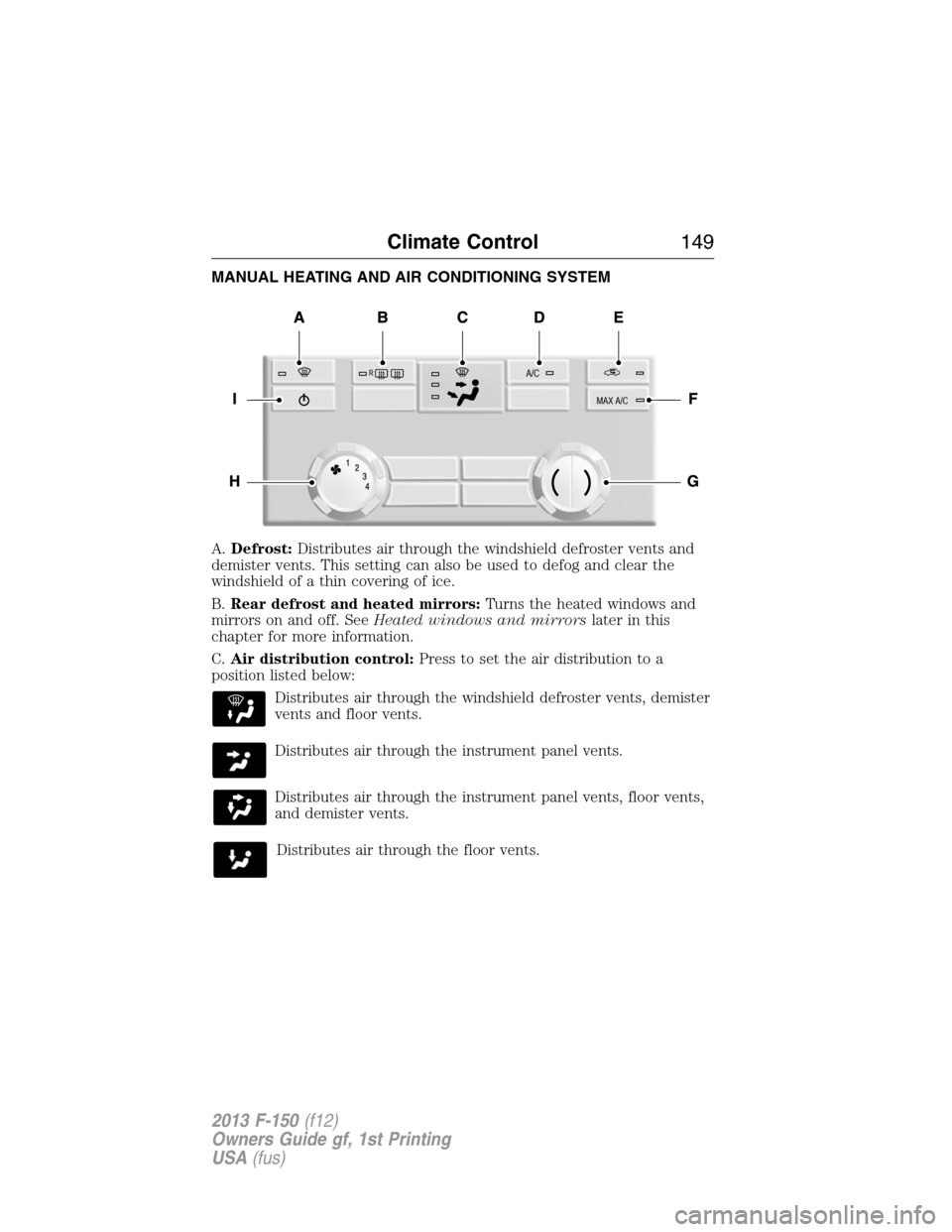
A.Defrost:Distributes air through the windshield defroster vents and
demister vents. This setting can also be used to defog and clear the
windshield of a thin covering of ice.
B.Rear defrost and heated mirrors:Turns the heated windows and
mirrors on and off. SeeHeated windows and mirrorslater in this
chapter for more information.
C.Air distribution control:Press to set the air distribution to a
position listed below:
Distributes air through the windshield defroster vents, demister
vents and floor vents.
Distributes air through the instrument panel vents.
Distributes air through the instrument panel vents, floor vents,
and demister vents.
Distributes air through the floor vents.
Climate Control149
2013 F-150(f12)
Owners Guide gf, 1st Printing
USA(fus)
Page 151 of 570
MANUAL HEATING AND AIR CONDITIONING SYSTEM
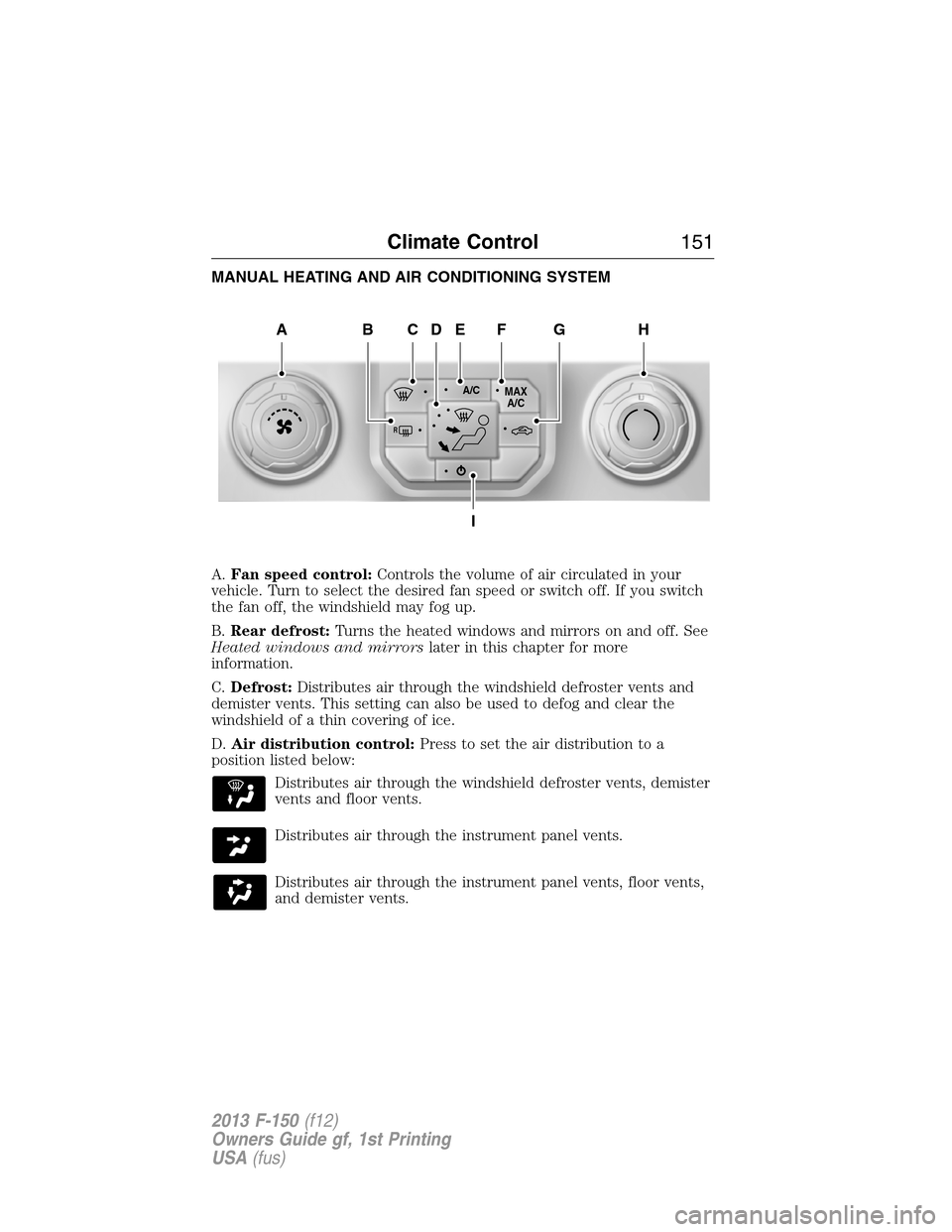
A.Fan speed control:Controls the volume of air circulated in your
vehicle. Turn to select the desired fan speed or switch off. If you switch
the fan off, the windshield may fog up.
B.Rear defrost:Turns the heated windows and mirrors on and off. See
Heated windows and mirrorslater in this chapter for more
information.
C.Defrost:Distributes air through the windshield defroster vents and
demister vents. This setting can also be used to defog and clear the
windshield of a thin covering of ice.
D.Air distribution control:Press to set the air distribution to a
position listed below:
Distributes air through the windshield defroster vents, demister
vents and floor vents.
Distributes air through the instrument panel vents.
Distributes air through the instrument panel vents, floor vents,
and demister vents.
A/CMAX
A/C
R
AHCEF
I
DBG
Climate Control151
2013 F-150(f12)
Owners Guide gf, 1st Printing
USA(fus)
Page 153 of 570
DUAL AUTOMATIC TEMPERATURE CONTROL SYSTEM
Note:You can switch temperature units between Fahrenheit and Celsius.
SeeMenu featuresin theMyFord TouchorMyLincoln Touchchapter.
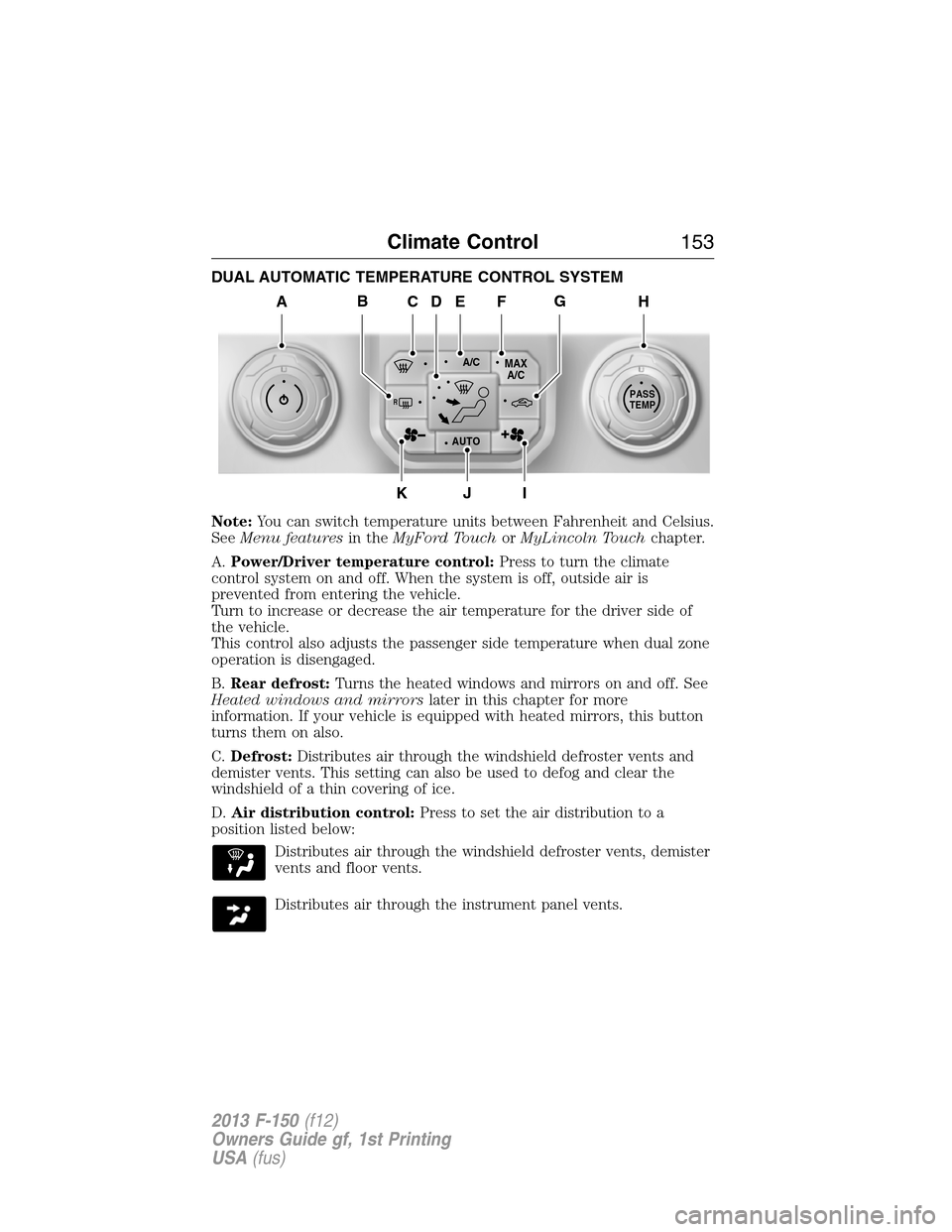
A.Power/Driver temperature control:Press to turn the climate
control system on and off. When the system is off, outside air is
prevented from entering the vehicle.
Turn to increase or decrease the air temperature for the driver side of
the vehicle.
This control also adjusts the passenger side temperature when dual zone
operation is disengaged.
B.Rear defrost:Turns the heated windows and mirrors on and off. See
Heated windows and mirrorslater in this chapter for more
information. If your vehicle is equipped with heated mirrors, this button
turns them on also.
C.Defrost:Distributes air through the windshield defroster vents and
demister vents. This setting can also be used to defog and clear the
windshield of a thin covering of ice.
D.Air distribution control:Press to set the air distribution to a
position listed below:
Distributes air through the windshield defroster vents, demister
vents and floor vents.
Distributes air through the instrument panel vents.
A/CMAX
A/C
R
AUTO
PASS
TEMP
AHCEF
JIK
DBG
Climate Control153
2013 F-150(f12)
Owners Guide gf, 1st Printing
USA(fus)
Page 157 of 570
HEATED WINDOWS AND MIRRORS (IF EQUIPPED)
Heated Rear Window
Note:The ignition must be switched on to use this feature.
Note:If your vehicle is equipped with a sliding rear window, the
defroster does not operate when the window is opened.
Press the button to clear the rear window of thin ice and fog. Press the
button again within 10 minutes to switch it off. It switches off
automatically after 10 minutes, or when you switch the ignition off.
Do not use razor blades or other sharp objects to clean the inside
of the rear window or to remove decals from the inside of the
rear window. This may cause damage to the heated grid lines and
will not be covered by your warranty.
Heated Exterior Mirror (If Equipped)
Note:Do not remove ice from the mirrors with a scraper or attempt to
readjust the mirror glass if it is frozen in place. These actions could
cause damage to the glass and mirrors.
Note:Do not clean the housing or glass of any mirror with harsh
abrasives, fuel or other petroleum-based cleaning products.
Note:If your driver side mirror is equipped with the auto-dimming
feature, the glass is thicker than the passenger side mirror and may take
longer to defrost.
Both mirrors are heated to remove ice, mist and fog when the rear
window defroster is activated.
REMOTE START CLIMATE OPERATION (IF EQUIPPED)
The climate control system adjusts the cabin temperature during remote
start.
You cannot adjust the system during remote start operation. Turn the
ignition on to return the system to its previous settings. You can now
make adjustments. You will need to turn certain vehicle-dependent
features back on, such as:
•heated seats
•cooled seats
•heated mirrors
•heated rear window.
You can adjust the settings using the information display controls. See
theInformation Displayschapter.
Climate Control157
2013 F-150(f12)
Owners Guide gf, 1st Printing
USA(fus)
Page 158 of 570
Automatic Climate Systems
Automatic Settings
You can set the climate control to operate in AUTO mode through the
information display setting: Remote Start > Climate Control > Heater –
A/C > Auto. The climate control system automatically sets the interior
temperature to 72°F (22°C).
In hot weather, the system is set to 72°F (22°C). Cooled seats are set to
high (if available, and selected to AUTO in the information display).
In moderate weather, the system either heats or cools (based on
previous settings). The rear defroster, heated mirrors and heated/cooled
seats are not automatically turned on.
In cold weather, the system is set to 72°F (22°C). The heated seats are
set to high (if available, and selected to AUTO in the information
display). The rear defroster and heated mirrors are automatically turned
on. If it is desired to have the system operate in defrost mode, select
AUTO for Heater – A/C. Also select AUTO for front defrost in the
information display.
Last Settings
You can set the climate control to operate using the last climate control
settings through the information display setting: Remote Start > Climate
Control > Heater – A/C > Last Settings. The climate control system
automatically uses the settings last selected before the vehicle was
turned off.
Heated and Cooled Devices
The climate control system controls other heated and cooled devices
inside the vehicle. These devices (if available, and selected to AUTO in
the information displays) may also be switched on during remote start.
Heated devices are typically switched on during cold weather, and cooled
devices during hot weather.
158Climate Control
2013 F-150(f12)
Owners Guide gf, 1st Printing
USA(fus)
Page 165 of 570
MEMORY FUNCTION (IF EQUIPPED)
WARNING:Before activating the seat memory, make sure that
the area immediately surrounding the seat is clear of obstructions
and that all occupants are clear of moving parts.
WARNING:Do not use the memory store function when your
vehicle is moving.
This feature will save and recall the position of the driver seat, power
mirrors, power adjustable foot pedals (if equipped), and steering column
(if equipped).
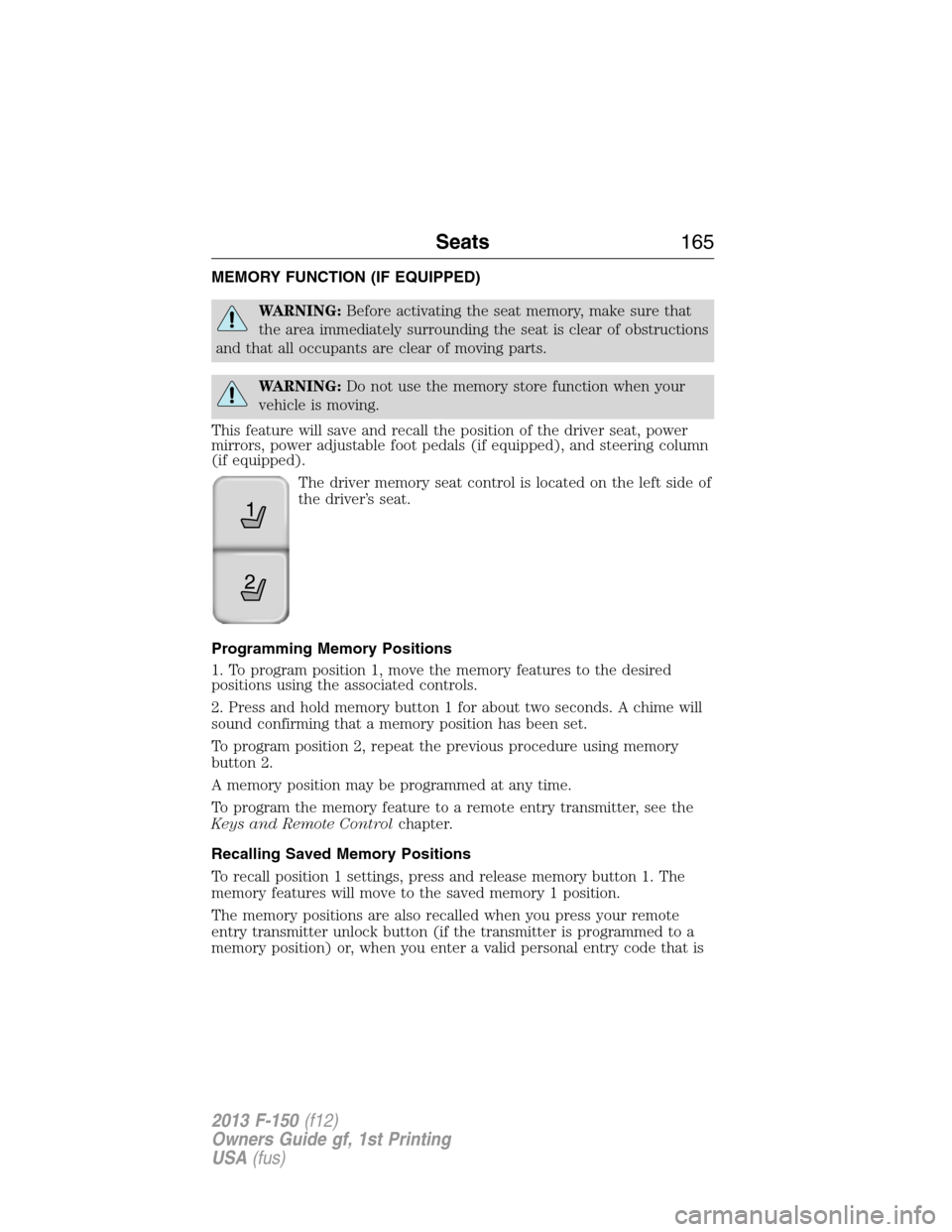
The driver memory seat control is located on the left side of
the driver’s seat.
Programming Memory Positions
1. To program position 1, move the memory features to the desired
positions using the associated controls.
2. Press and hold memory button 1 for about two seconds. A chime will
sound confirming that a memory position has been set.
To program position 2, repeat the previous procedure using memory
button 2.
A memory position may be programmed at any time.
To program the memory feature to a remote entry transmitter, see the
Keys and Remote Controlchapter.
Recalling Saved Memory Positions
To recall position 1 settings, press and release memory button 1. The
memory features will move to the saved memory 1 position.
The memory positions are also recalled when you press your remote
entry transmitter unlock button (if the transmitter is programmed to a
memory position) or, when you enter a valid personal entry code that is
21
Seats165
2013 F-150(f12)
Owners Guide gf, 1st Printing
USA(fus)
Page 166 of 570
programmed to a memory position. If the easy entry/exit feature is
enabled, the mirrors, pedals and steering column will move to the
programmed memory position and the seat will move to the easy entry
position. The seat will move to the driving memory position when the
ignition is activated.
A programmed memory position can be recalled:
•in any gearshift position if the ignition is not on.
•only in positionPorNif the ignition is on.
Easy-Entry/Exit Feature (If Equipped)
If the easy entry/exit feature is enabled, this feature automatically moves
the driver’s seat rearward 2 inches (5 centimeters) when the
transmission selector lever is in positionPand the key is removed from
the ignition.
If the seat is located less than 2 inches (5 centimeters) from the rear of
the seat track, the seat travel will be less than 2 inches (5 centimeters)
rearward.
The driver’s seat will return to the previous position when the key is put
in the ignition.
This feature is enabled or disabled through the information display. See
theInformation Displayschapter for more information.
REAR SEATS
Folding Up the Rear Seats (SuperCab only)
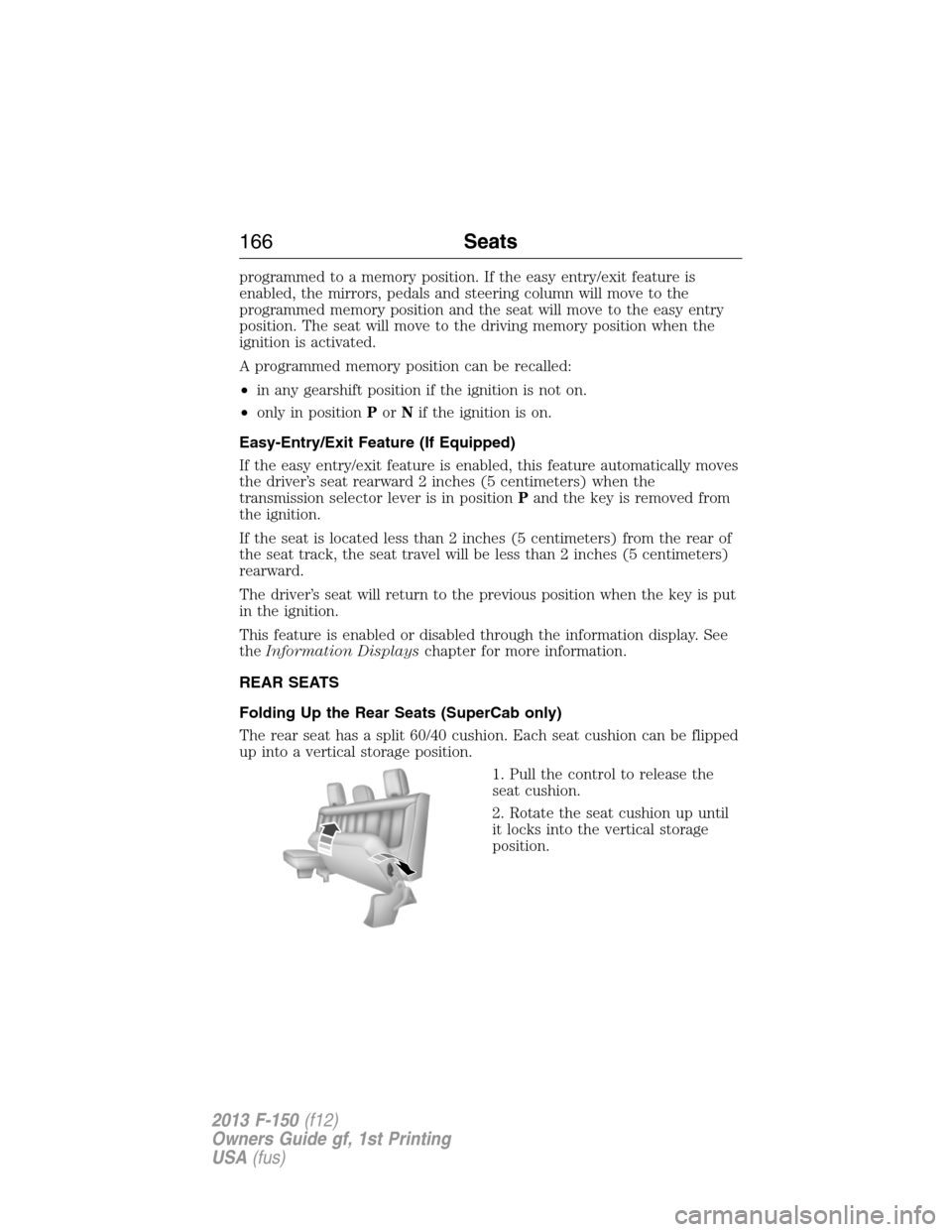
The rear seat has a split 60/40 cushion. Each seat cushion can be flipped
up into a vertical storage position.
1. Pull the control to release the
seat cushion.
2. Rotate the seat cushion up until
it locks into the vertical storage
position.
166Seats
2013 F-150(f12)
Owners Guide gf, 1st Printing
USA(fus)
Page 236 of 570
REAR VIEW CAMERA SYSTEM (IF EQUIPPED)
WARNING:The rear view camera system is a reverse aid
supplement device that still requires the driver to use it in
conjunction with the interior and exterior mirrors for maximum coverage.
WARNING:Objects that are close to either corner of the
bumper or under the bumper, might not be seen on the screen
due to the limited coverage of the camera system.
WARNING:Back up as slow as possible since higher speeds
might limit your reaction time to stop the vehicle.
WARNING:Use caution when turning camera features on or off
while in R (Reverse). Make sure the vehicle is not moving.
The rear view camera system provides a video image of the area behind
the vehicle.
During operation, lines appear in the display which represent your
vehicle’s path and proximity to objects behind the vehicle.
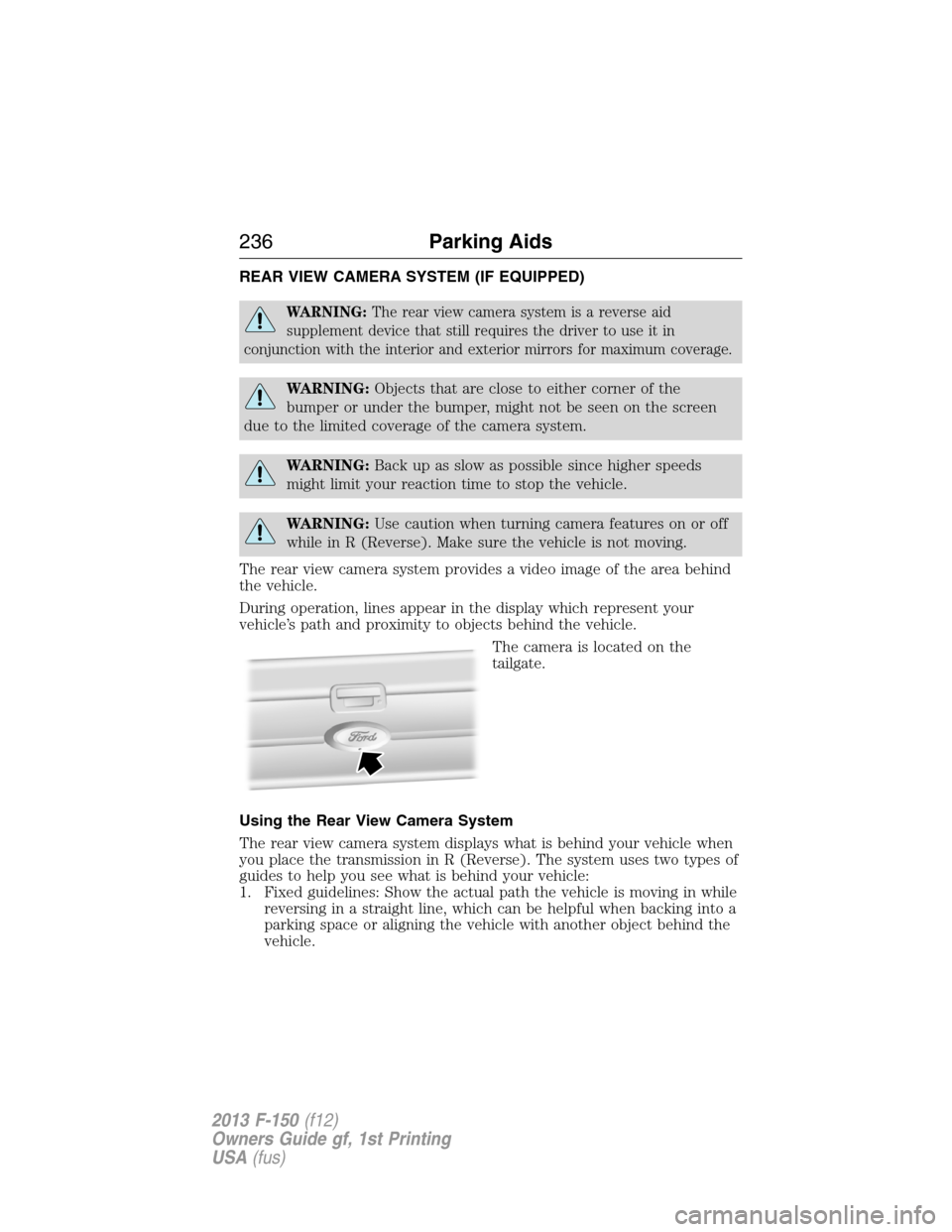
The camera is located on the
tailgate.
Using the Rear View Camera System
The rear view camera system displays what is behind your vehicle when
you place the transmission in R (Reverse). The system uses two types of
guides to help you see what is behind your vehicle:
1. Fixed guidelines: Show the actual path the vehicle is moving in while
reversing in a straight line, which can be helpful when backing into a
parking space or aligning the vehicle with another object behind the
vehicle.
236Parking Aids
2013 F-150(f12)
Owners Guide gf, 1st Printing
USA(fus)
Page 237 of 570
2. Centerline: Helps align the center of the vehicle with an object (i.e. a
trailer).
Note:If the image comes on while the transmission is not in R
(Reverse), have the system inspected by your authorized dealer.
Note:When towing, the camera only sees what is being towed behind
the vehicle. This might not provide adequate coverage as it usually
provides in normal operation and some objects might not be seen. In
some vehicles, the guidelines may disappear once the trailer tow
connector is engaged.
Note:The camera may not operate correctly under the following
conditions:
•Nighttime or dark areas if one or both reverse lamps are not
operating.
•The camera’s view is obstructed by mud, water or debris. Clean the
lens with a soft, lint-free cloth and non-abrasive cleaner.
•The rear of the vehicle is hit or damaged, causing the camera to
become misaligned.
Adjusting the Rear View Camera Settings
Touch screen display:
To access the rear view camera system settings, make the following
selections when the transmission is not in R (Reverse):
1. Menu
2. Vehicle
3. Rear View Camera
After changing a system setting, the touch screen shows a preview of the
feature(s) selected.
Rearview mirror display:
To access the rear view camera system settings see theInformation
Displaychapter.
The guidelines options are FIXED and OFF. If the vehicle is equipped
with a rearview mirror display and a standard instrument cluster, the
fixed guidelines will always remain on. There is no option to turn the
fixed guidelines off.
Parking Aids237
2013 F-150(f12)
Owners Guide gf, 1st Printing
USA(fus)