lock FORD F150 2023 Owner's Manual
[x] Cancel search | Manufacturer: FORD, Model Year: 2023, Model line: F150, Model: FORD F150 2023Pages: 786, PDF Size: 23.15 MB
Page 70 of 786
3.Insert the belt tongue into the properbuckle for your seating position untilyou hear a snap and feel it latch.
4.Make sure you securely fasten thetongue to the buckle by pulling on thetongue.
While you are fastened in the seatbelt, theseatbelt with a cinch tongue adjusts toyour movement. However, if you brakehard, turn hard, or if your vehicle receivesan impact of 5 mph (8 km/h) or more, theseatbelt locks and helps reduce yourforward movement.
SENSITIVE LOCKING MODE
WHAT IS SENSITIVE LOCKINGMODE
Sensitive locking mode is a seatbeltretractor feature that allows shoulder beltlength adjustment according to yourmovements and locking in response tovehicle movement.
HOW DOES SENSITIVE LOCKINGMODE WORK
If the driver suddenly brakes, turns a cornersharply, or the vehicle receives an impactof about 5 mph (8 km/h) or more, theseatbelts lock to help reduce forwardmovement of the driver and passengers.
In addition, the seatbelt retractor locks ifyou pull the seatbelt webbing out tooquickly. If the retractor locks, slowly lowerthe height adjuster to allow the seatbeltto retract.
If the retractor does not unlock, pull theseatbelt out slowly then feed a smalllength of webbing back toward the stowedposition.
For rear seatbelts, recline the rear seatbackrest or push the seat backrest cushionaway from the seatbelt. Feed a smalllength of webbing back toward the stowedposition.
AUTOMATIC LOCKING MODE
WHAT IS AUTOMATIC LOCKINGMODE
This feature keeps the seatbeltspre-locked. The belt still retracts to removeany slack in the shoulder belt.
WHEN TO USE AUTOMATICLOCKING MODE
Use this mode any time you install a childrestraint in a front or rear seating position.Properly restrain children 12 years old andunder in a rear seat whenever possible. SeeChild Safety (page 50).
Note:Automatic locking mode is notavailable on the driver seatbelt.
Note:Vehicles with optional front seatcenter may not have this function.
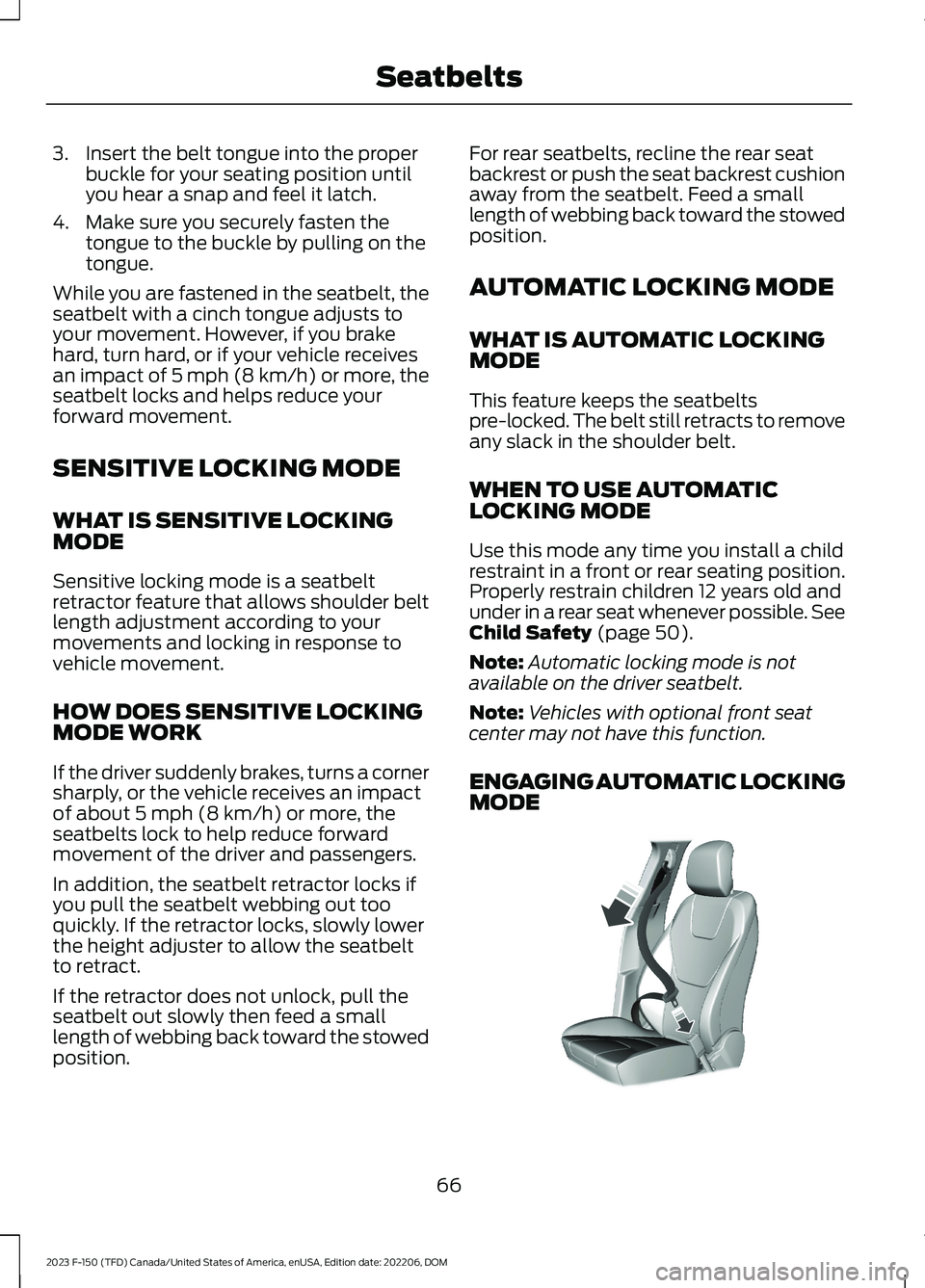
ENGAGING AUTOMATIC LOCKINGMODE
66
2023 F-150 (TFD) Canada/United States of America, enUSA, Edition date: 202206, DOMSeatbeltsE142591
Page 71 of 786
1.Fasten the combination lap andshoulder belt.
2.Grasp the shoulder portion and pulldownward until you pull the entire beltout.
3.Allow the belt to retract. As the beltretracts, you will hear a clicking sound.This indicates the seatbelt is now in theautomatic locking mode.
DISENGAGING AUTOMATICLOCKING MODE
Unbuckle the combination lap andshoulder belt and allow it to retractcompletely to disengage the automaticlocking mode and activate the vehiclesensitive locking mode.
ADJUSTING THE SEATBELTS
DURING PREGNANCY
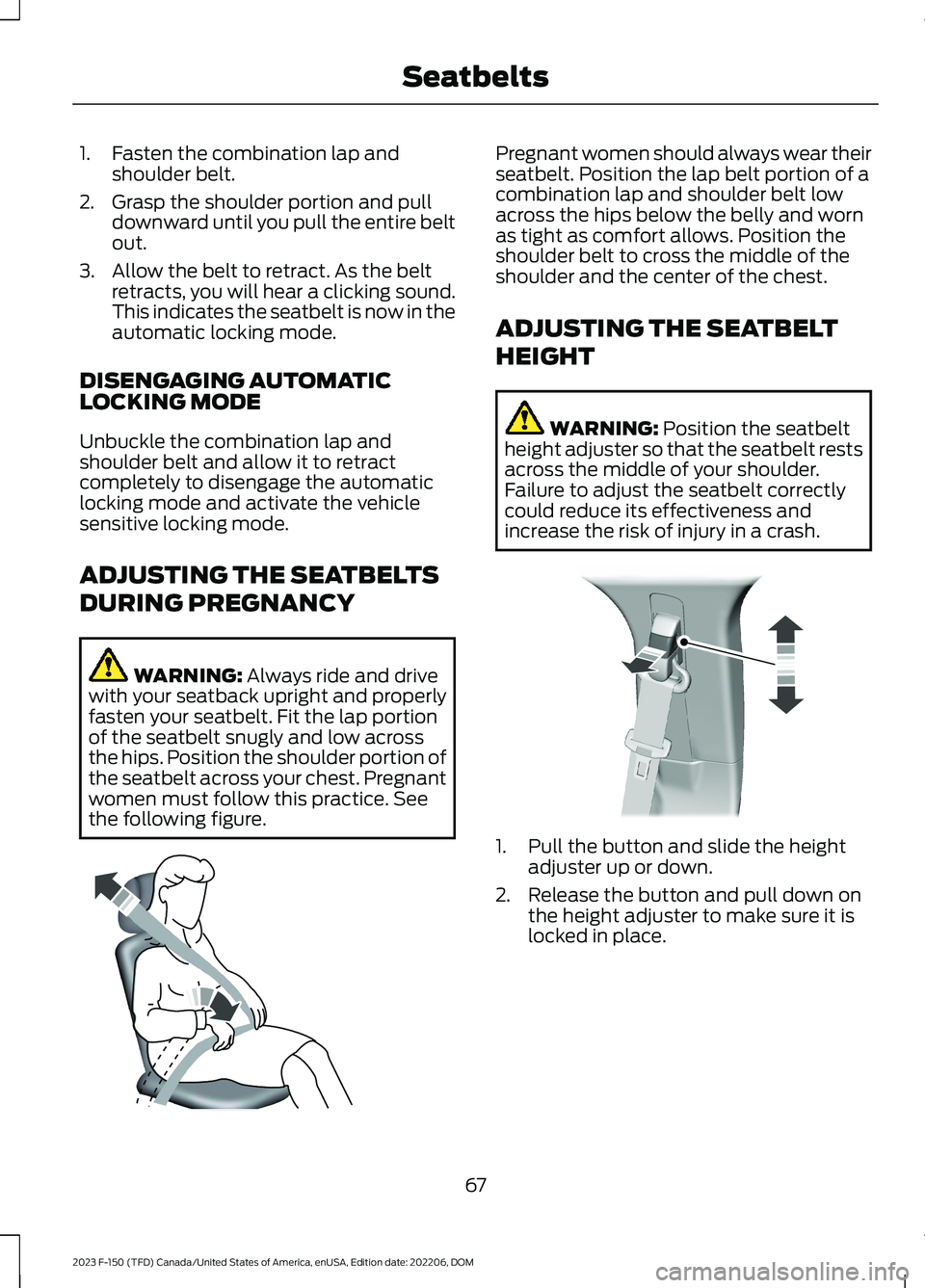
WARNING: Always ride and drivewith your seatback upright and properlyfasten your seatbelt. Fit the lap portionof the seatbelt snugly and low acrossthe hips. Position the shoulder portion ofthe seatbelt across your chest. Pregnantwomen must follow this practice. Seethe following figure.
Pregnant women should always wear theirseatbelt. Position the lap belt portion of acombination lap and shoulder belt lowacross the hips below the belly and wornas tight as comfort allows. Position theshoulder belt to cross the middle of theshoulder and the center of the chest.
ADJUSTING THE SEATBELT
HEIGHT
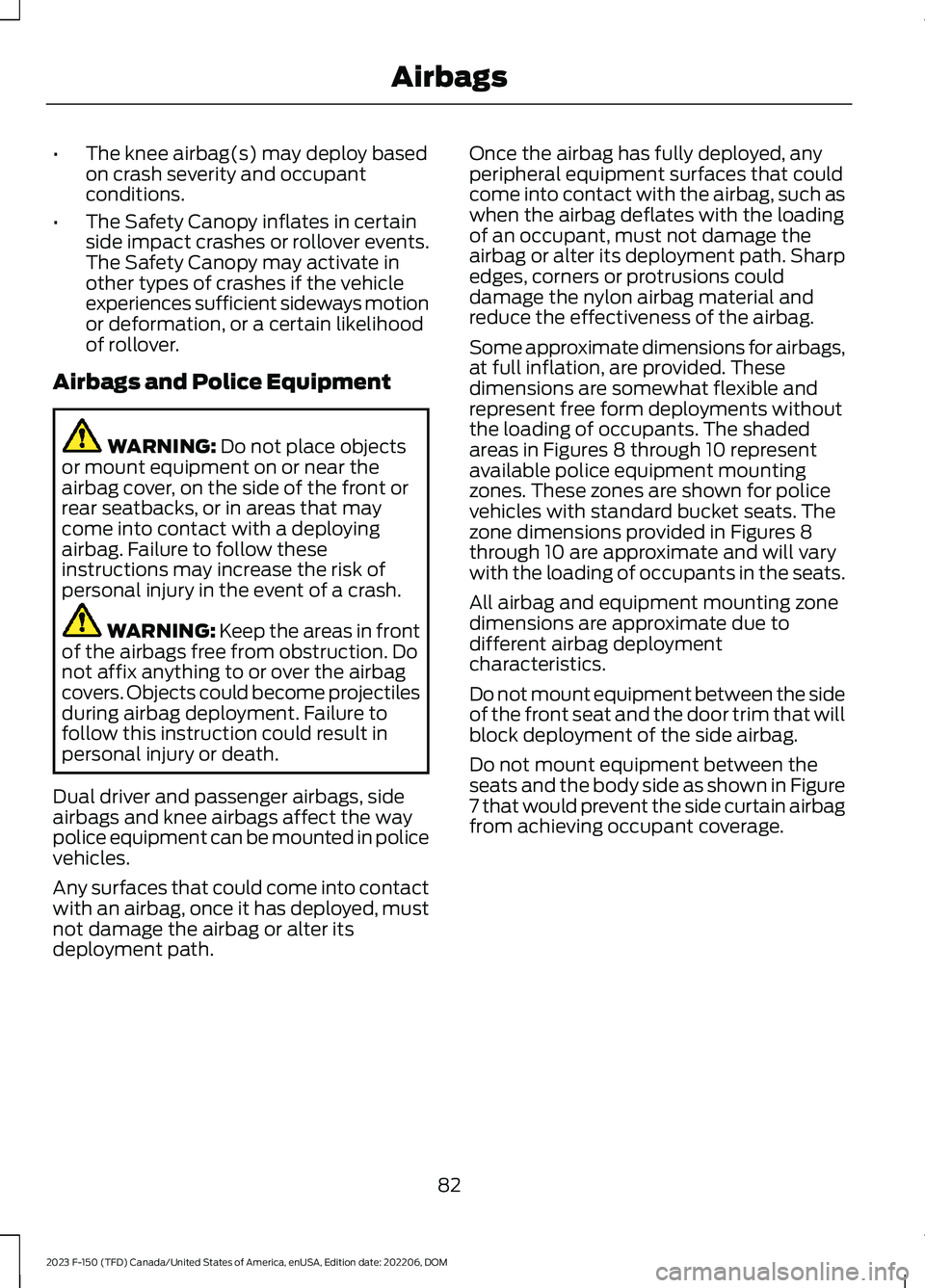
WARNING: Position the seatbeltheight adjuster so that the seatbelt restsacross the middle of your shoulder.Failure to adjust the seatbelt correctlycould reduce its effectiveness andincrease the risk of injury in a crash.
1.Pull the button and slide the heightadjuster up or down.
2.Release the button and pull down onthe height adjuster to make sure it islocked in place.
67
2023 F-150 (TFD) Canada/United States of America, enUSA, Edition date: 202206, DOMSeatbeltsE142590 E145664
Page 86 of 786
•The knee airbag(s) may deploy basedon crash severity and occupantconditions.
•The Safety Canopy inflates in certainside impact crashes or rollover events.The Safety Canopy may activate inother types of crashes if the vehicleexperiences sufficient sideways motionor deformation, or a certain likelihoodof rollover.
Airbags and Police Equipment
WARNING: Do not place objectsor mount equipment on or near theairbag cover, on the side of the front orrear seatbacks, or in areas that maycome into contact with a deployingairbag. Failure to follow theseinstructions may increase the risk ofpersonal injury in the event of a crash.
WARNING: Keep the areas in frontof the airbags free from obstruction. Donot affix anything to or over the airbagcovers. Objects could become projectilesduring airbag deployment. Failure tofollow this instruction could result inpersonal injury or death.
Dual driver and passenger airbags, sideairbags and knee airbags affect the waypolice equipment can be mounted in policevehicles.
Any surfaces that could come into contactwith an airbag, once it has deployed, mustnot damage the airbag or alter itsdeployment path.
Once the airbag has fully deployed, anyperipheral equipment surfaces that couldcome into contact with the airbag, such aswhen the airbag deflates with the loadingof an occupant, must not damage theairbag or alter its deployment path. Sharpedges, corners or protrusions coulddamage the nylon airbag material andreduce the effectiveness of the airbag.
Some approximate dimensions for airbags,at full inflation, are provided. Thesedimensions are somewhat flexible andrepresent free form deployments withoutthe loading of occupants. The shadedareas in Figures 8 through 10 representavailable police equipment mountingzones. These zones are shown for policevehicles with standard bucket seats. Thezone dimensions provided in Figures 8through 10 are approximate and will varywith the loading of occupants in the seats.
All airbag and equipment mounting zonedimensions are approximate due todifferent airbag deploymentcharacteristics.
Do not mount equipment between the sideof the front seat and the door trim that willblock deployment of the side airbag.
Do not mount equipment between theseats and the body side as shown in Figure7 that would prevent the side curtain airbagfrom achieving occupant coverage.
82
2023 F-150 (TFD) Canada/United States of America, enUSA, Edition date: 202206, DOMAirbags
Page 94 of 786
REMOTE CONTROL
LIMITATIONS
WARNING: Changes ormodifications not expressively approvedby the party responsible for compliancecould void the user's authority to operatethe equipment. The term "IC:" before theradio certification number only signifiesthat Industry Canada technicalspecifications were met.
This device complies with Part 15 of theFCC Rules and with Industry Canadalicense-exempt RSS standard(s).Operation is subject to the following twoconditions: (1) This device may not causeharmful interference, and (2) This devicemust accept any interference received,including interference that may causeundesired operation.
Make sure a valid remote control is within3 ft (1 m) from the front door handles andrear of vehicle.
The system may not function if:
•The remote control remains stationaryfor about a minute.
•The vehicle battery has no charge.
•The remote control battery has nocharge.
•There is interference causing issueswith the remote control frequencies.
•The remote control is too close tometal objects or electronic devices, forexample keys or a cell phone.
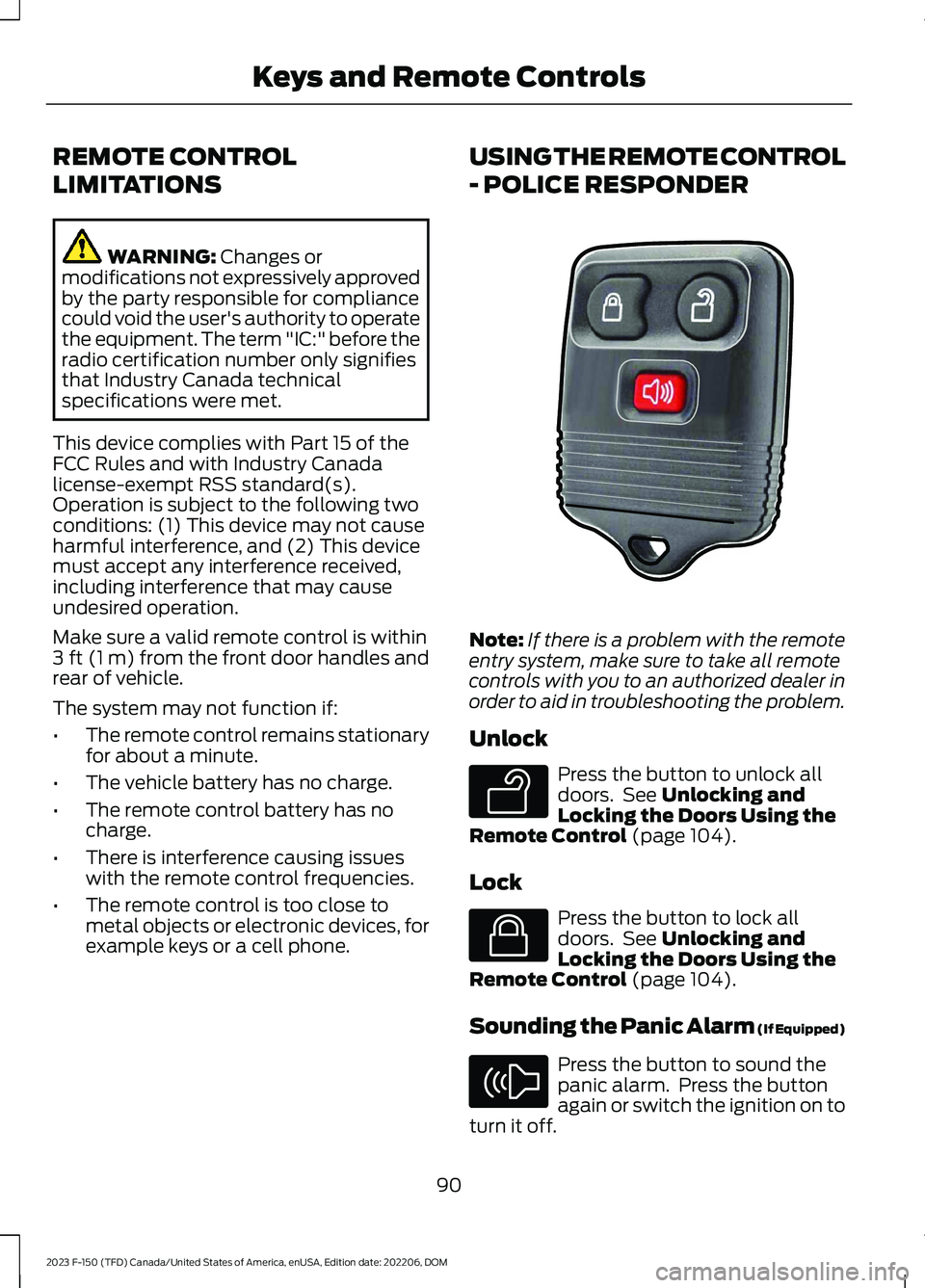
USING THE REMOTE CONTROL
- POLICE RESPONDER
Note:If there is a problem with the remoteentry system, make sure to take all remotecontrols with you to an authorized dealer inorder to aid in troubleshooting the problem.
Unlock
Press the button to unlock alldoors. See Unlocking andLocking the Doors Using theRemote Control (page 104).
Lock
Press the button to lock alldoors. See Unlocking andLocking the Doors Using theRemote Control (page 104).
Sounding the Panic Alarm (If Equipped)
Press the button to sound thepanic alarm. Press the buttonagain or switch the ignition on toturn it off.
90
2023 F-150 (TFD) Canada/United States of America, enUSA, Edition date: 202206, DOMKeys and Remote ControlsE203600 E138629 E138623 E138624
Page 95 of 786
Note:The panic alarm operates regardlessof the ignition position.
USING THE REMOTE CONTROL
Use your remote control to access variousvehicle systems.
Note:The buttons on your remote may varydepending on the vehicle region or options.
Unlock
Press the button to unlock alldoors. See Unlocking andLocking the Doors Using theRemote Control (page 104).
Lock
Press the button to lock alldoors. See Unlocking andLocking the Doors Using theRemote Control (page 104).
Remote Start (If Equipped)
Press the button to remote start.See Remotely Starting andStopping the Vehicle (page181).
Tailgate (If Equipped)
Press the button to open thetailgate. See Opening theTailgate Using the RemoteControl (page 127).
Panic Alarm (If Equipped)
Press the button to sound thepanic alarm. See Sounding thePanic Alarm (page 92).
OPENING AND CLOSING THE
FLIP KEY
Opening Your Flip Key
Press the round button on the remotecontrol to extend the flip key.
Note:Inspect the key blade for debris.Periodically clean with a brush.
Closing Your Flip Key
Press and hold the round button on theremote control to fold the key blade whennot in use.
91
2023 F-150 (TFD) Canada/United States of America, enUSA, Edition date: 202206, DOMKeys and Remote ControlsE138629 E138623 E138625 E191530 E138624 E191532 E191532
Page 96 of 786
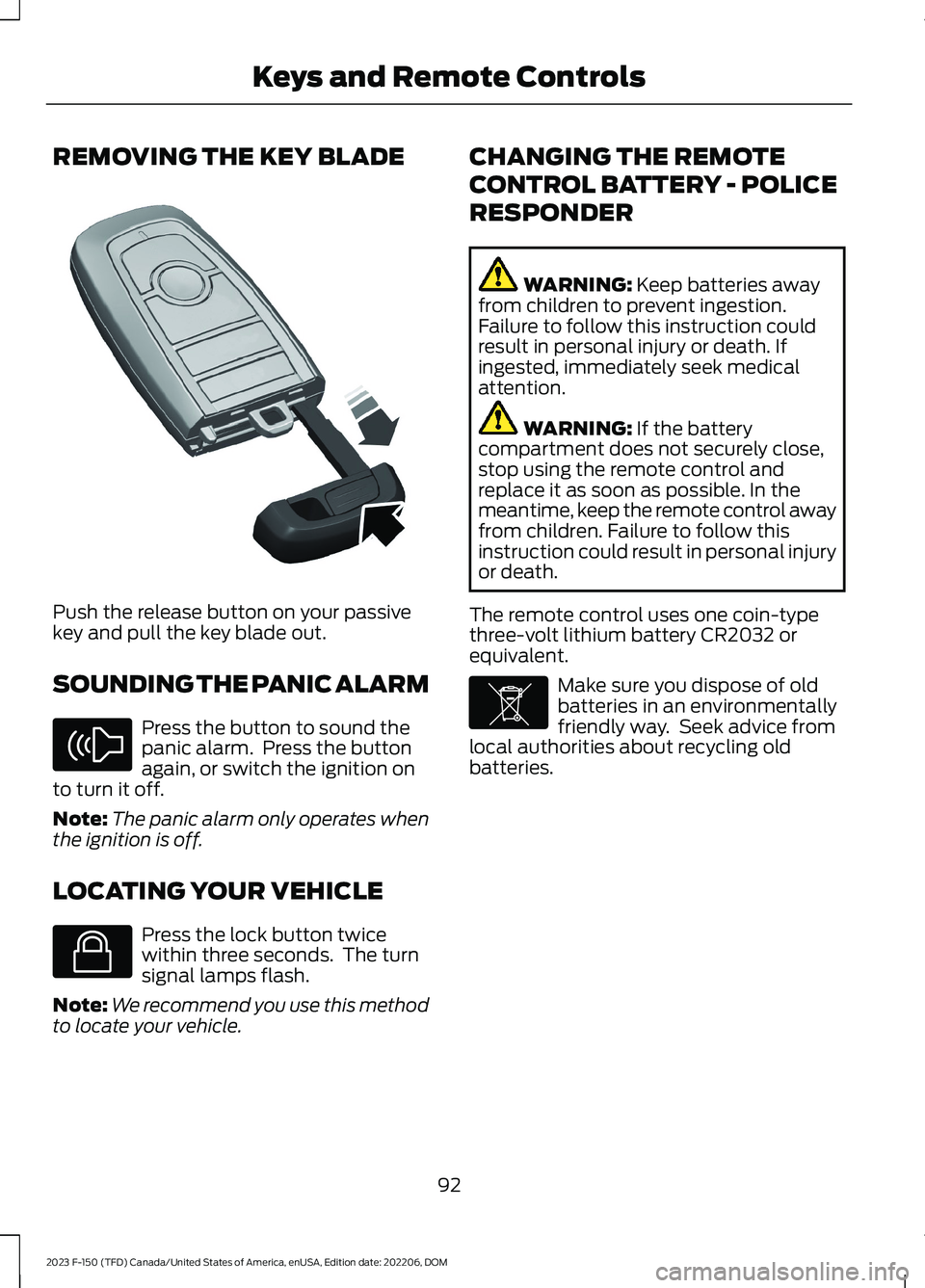
REMOVING THE KEY BLADE
Push the release button on your passivekey and pull the key blade out.
SOUNDING THE PANIC ALARM
Press the button to sound thepanic alarm. Press the buttonagain, or switch the ignition onto turn it off.
Note:The panic alarm only operates whenthe ignition is off.
LOCATING YOUR VEHICLE
Press the lock button twicewithin three seconds. The turnsignal lamps flash.
Note:We recommend you use this methodto locate your vehicle.
CHANGING THE REMOTE
CONTROL BATTERY - POLICE
RESPONDER
WARNING: Keep batteries awayfrom children to prevent ingestion.Failure to follow this instruction couldresult in personal injury or death. Ifingested, immediately seek medicalattention.
WARNING: If the batterycompartment does not securely close,stop using the remote control andreplace it as soon as possible. In themeantime, keep the remote control awayfrom children. Failure to follow thisinstruction could result in personal injuryor death.
The remote control uses one coin-typethree-volt lithium battery CR2032 orequivalent.
Make sure you dispose of oldbatteries in an environmentallyfriendly way. Seek advice fromlocal authorities about recycling oldbatteries.
92
2023 F-150 (TFD) Canada/United States of America, enUSA, Edition date: 202206, DOMKeys and Remote ControlsE322866 E138624 E138623 E107998
Page 102 of 786
2.Switch the ignition from off to on. Keepthe ignition on for at least threeseconds, but no more than 10 seconds.
3.Switch the ignition off and remove thefirst coded key from the ignition.
4.After three seconds but within 10seconds of switching the ignition off,insert the second previously coded keyinto the ignition.
5.Switch the ignition from off to on. Keepthe ignition on for at least threeseconds, but no more than 10 seconds.
6.Switch the ignition off and remove thesecond previously programmed codedkey from the ignition.
7.After three seconds but within 10seconds of switching the ignition offand removing the previouslyprogrammed coded key, insert the newun–programmed key into the ignition.
8.Switch the ignition from off to on. Keepthe ignition on for at least six secondsuntil you hear the door locks cycle.
9.Remove the newly programmed codedkey from the ignition.
The key starts the engine if programmingis successful. You can operate the keylessremote entry system with the new remotecontrol with integrated key.
If programming was not successful, wait20 seconds and repeat Steps 1 through 8.If you are still unsuccessful, take yourvehicle to an authorized dealer.
Note:You can program a maximum of sixcoded remote controls to your vehicle.
KEYS AND REMOTE CONTROLS – TROUBLESHOOTING
KEYS AND REMOTE CONTROLS – INFORMATION MESSAGES
ActionMessage
Replace remote control battery.Key Battery Low ReplaceSoon
98
2023 F-150 (TFD) Canada/United States of America, enUSA, Edition date: 202206, DOMKeys and Remote Controls
Page 108 of 786
OPERATING THE DOORS
FROM OUTSIDE YOUR
VEHICLE
UNLOCKING AND LOCKING THEDOORS USING THE REMOTECONTROL
You can only use the remote control whenyour vehicle is stationary.
Unlocking the Doors
Press the button to unlock alldoors. One long flash of the turnsignal lamps confirms that yourvehicle has unlocked.
One-Stage Unlocking
Press the button to unlock alldoors.
Two-Stage Unlocking (If Equipped)
Press the button to unlock thedriver's door. Press the buttonagain within three seconds tounlock all doors.
Locking the Doors
Press the button to lock alldoors. One short flash of theturn signal lamps confirms yourvehicle is locked.
Note:For more information on operatingthe doors from outside your vehicle SeeKeyless Entry Keypad (page 110).
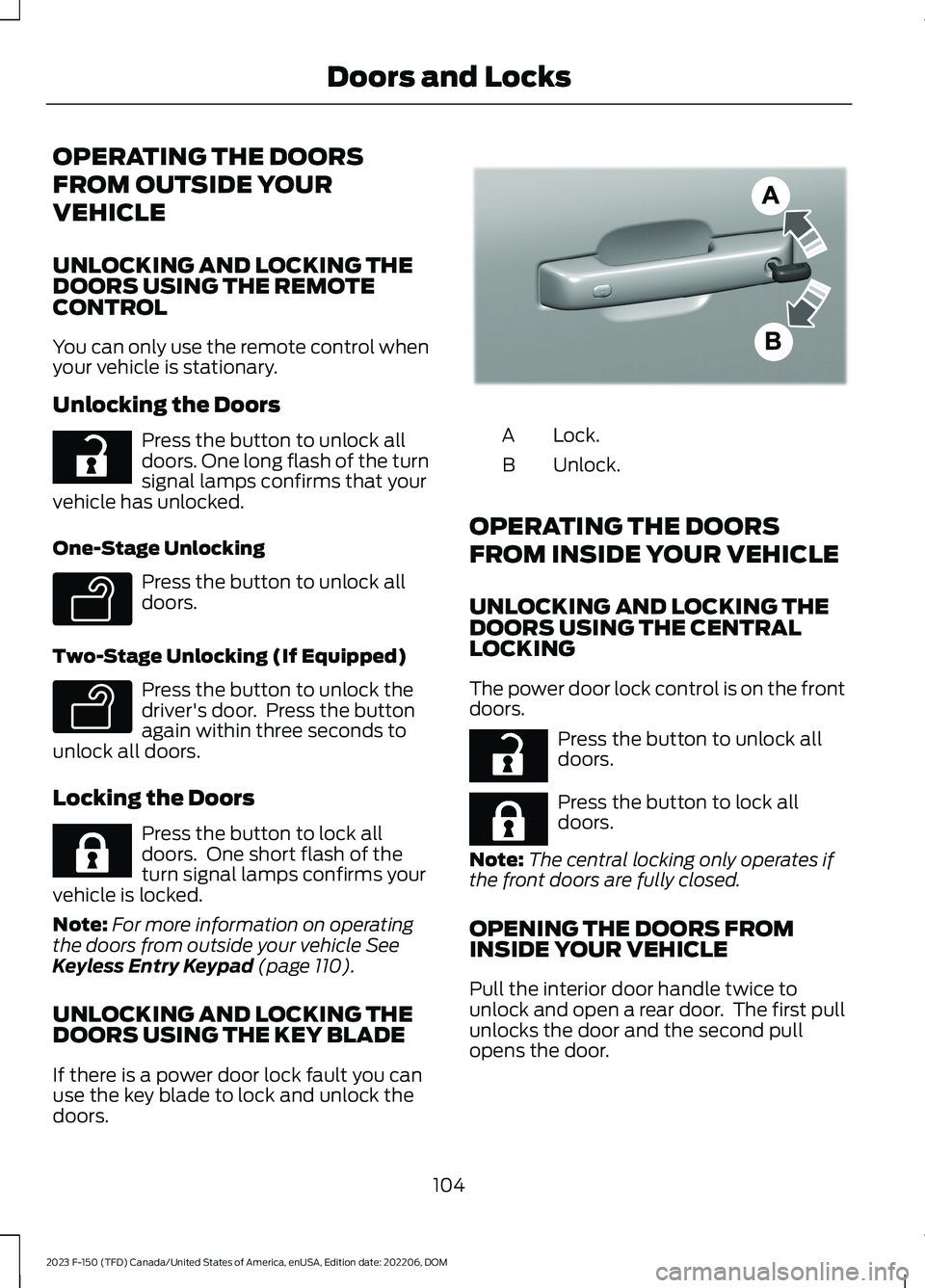
UNLOCKING AND LOCKING THEDOORS USING THE KEY BLADE
If there is a power door lock fault you canuse the key blade to lock and unlock thedoors.
Lock.A
Unlock.B
OPERATING THE DOORS
FROM INSIDE YOUR VEHICLE
UNLOCKING AND LOCKING THEDOORS USING THE CENTRALLOCKING
The power door lock control is on the frontdoors.
Press the button to unlock alldoors.
Press the button to lock alldoors.
Note:The central locking only operates ifthe front doors are fully closed.
OPENING THE DOORS FROMINSIDE YOUR VEHICLE
Pull the interior door handle twice tounlock and open a rear door. The first pullunlocks the door and the second pullopens the door.
104
2023 F-150 (TFD) Canada/United States of America, enUSA, Edition date: 202206, DOMDoors and LocksE267112 E138629 E138629 E267111 E333745 E267112 E267111
Page 109 of 786
AUTOUNLOCK (IF EQUIPPED)
WHAT IS AUTOUNLOCK
Autounlock is an unlocking feature thatunlocks the vehicle doors when yourvehicle comes to a stop.
AUTOUNLOCK REQUIREMENTS
Autounlock unlocks all the doors after allof the following occur.
1.All the doors are closed and yourvehicle is moving at a speed greaterthan 12 mph (20 km/h).
2.Your vehicle comes to a stop.
3.You open the driver door within 10minutes of switching the ignition off orto the accessory position.
Note:If you open the driver door after 10minutes, Autounlock does not unlock allother doors.
SWITCHING AUTOUNLOCK ONAND OFF
1.Press Settings on the touchscreen.
2.Press Vehicle Settings.
3.Switch Autounlock on or off.
AUTOLOCK (IF EQUIPPED)
WHAT IS AUTOLOCK
Autolock is a locking feature that locksyour vehicle doors when you start driving.
AUTOLOCK REQUIREMENTS
Autolock locks all the doors when all of thefollowing occur:
•All doors are closed.
•The ignition is on.
•Your vehicle reaches a speed greaterthan 12 mph (20 km/h).
MISLOCK (IF EQUIPPED)
WHAT IS MISLOCK
Mislock is a locking feature that warns youif your vehicle has not locked.
MISLOCK LIMITATIONS
When you press the lock button once, theturn signals do not flash if:
•Any door or the tailgate is open.
•The hood is open.
If you switch mislock off, the horn does notsound if you press the lock button on theremote control when a door is open.
SWITCHING MISLOCK ON ANDOFF
1.Press Settings on the touchscreen.
2.Press Vehicle Settings.
3.Switch Mislock Chirp on or off.
DOORS AND LOCKS AUDIBLE
WARNINGS
Door Ajar Audible Warning
Sounds when a door is not fully closed andyour vehicle is moving.
105
2023 F-150 (TFD) Canada/United States of America, enUSA, Edition date: 202206, DOMDoors and Locks
Page 110 of 786
DOORS AND LOCKS –
TROUBLESHOOTING
DOORS AND LOCKS – WARNINGLAMPS
Door Ajar Warning Lamp
Illuminates when you switch theignition on and remains on if anydoor or the hood is open.
DOORS AND LOCKS – INFORMATION MESSAGES
ActionMessage
Displays if a door is open. Fully close the door.Driver Door Ajar
Passenger Door Ajar
Rear Left Door Ajar
Rear Right Door Ajar
Displays if a hood is open. Fully close the hood.Hood Ajar
106
2023 F-150 (TFD) Canada/United States of America, enUSA, Edition date: 202206, DOMDoors and LocksE249859