lock FORD F150 2023 Workshop Manual
[x] Cancel search | Manufacturer: FORD, Model Year: 2023, Model line: F150, Model: FORD F150 2023Pages: 786, PDF Size: 23.15 MB
Page 138 of 786

PASSIVE ANTI-THEFT
SYSTEM
WHAT IS THE PASSIVE ANTI-THEFT SYSTEM
The passive anti-theft system preventssomeone from starting the vehicle with anincorrectly coded key.
Note:Do not leave a duplicate coded keyin your vehicle. Always take the keys andlock all the doors when leaving your vehicle.
HOW DOES THE PASSIVE ANTI-THEFT SYSTEM WORK
The passive anti-theft system arms whenyou switch the ignition off.
It disarms when the ignition is switched onwith a correctly coded key.
Note:The system is not compatible withnon-Ford aftermarket remote start systems.
Note:Do not leave a duplicate coded keyin your vehicle. Always take the keys andlock all doors when leaving your vehicle.
ANTI-THEFT ALARM SYSTEM
(IF EQUIPPED)
WHAT IS THE ANTI-THEFT ALARMSYSTEM
The anti-theft alarm system warns you ofan unauthorized entry to your vehicle.
HOW DOES THE ANTI-THEFTALARM SYSTEM WORK
When armed, the anti-theft alarm istriggered in any of the following ways:
•If someone opens a door, the tailgateor the hood without a correctly codedkey or remote control.
•If you turn the power on without acorrectly coded key.
•If the interior sensors detect movementinside your vehicle.
•If the inclination sensors detect anattempt to raise your vehicle.
•If someone disconnects the vehiclebattery or the battery backup alarm.
•If someone disconnects the trailer. SeeConnecting a Trailer (page 414).
Any further attempts to carry out one ofthe above, sounds the alarm again.
If the anti-theft alarm is triggered, thealarm horn sounds for 30 seconds and theturn signals flash for five minutes.
WHAT IS THE PERIMETER ALARM
The perimeter alarm is designed to detectunauthorized access to your vehicle.
WHAT ARE THE INTERIORSENSORS (If Equipped)
The interior sensors are designed to detectany movement inside your vehicle.
The interior sensors are in the overheadconsole.
Note:Do not cover the interior sensors.
134
2023 F-150 (TFD) Canada/United States of America, enUSA, Edition date: 202206, DOMSecurity
Page 139 of 786

WHAT ARE THE INCLINATIONSENSORS (If Equipped)
The inclination sensor is designed to detectan attempt to raise your vehicle, forexample to remove a wheel or to tow itaway.
ARMING THE ANTI-THEFT ALARMSYSTEM
The alarm is ready to arm when yourvehicle is switched off.
Lock your vehicle with your remote controlto arm the alarm.
DISARMING THE ANTI-THEFTALARM SYSTEM
Disarm the alarm by performing any of thefollowing actions:
•Unlock the doors or luggagecompartment with the remote control.
•Switch your vehicle on or start yourvehicle.
ANTI-THEFT ALARM SYSTEM
SETTINGS (IF EQUIPPED)
WHAT ARE THE ALARM SECURITYLEVELS
You can select two levels of alarm security,motion sensors on and motion sensors off.
Motion Sensors On
Motion sensors on is the standard setting.
In motion sensors on, all equipped sensorsare on when you arm the alarm.
Note:Do not arm the alarm with motionsensors on if passengers, animals or othermoving objects are inside your vehicle.
Motion Sensors Off
In motion sensors off, the interior sensorand the inclination sensor are off when youarm the alarm.
All the other equipped sensors activatewhen you arm the alarm in this mode.
SETTING THE ALARM SECURITYLEVEL
1.Press Settings on the touchscreen.
2.Press Vehicle.
3.Press Alarm System.
4.Press Motion Sensors.
5.Press a setting.
WHAT IS ASK ON EXIT
You can choose which level of security yourequire after you switch the ignition off.
Note:If you do not choose a setting, thesystem defaults to all sensors.
SWITCHING ASK ON EXIT ON ANDOFF
1.Press Settings on the touchscreen.
2.Press Vehicle.
3.Press Alarm System.
4.Switch Ask on Exit on or off.
135
2023 F-150 (TFD) Canada/United States of America, enUSA, Edition date: 202206, DOMSecurity
Page 142 of 786
POWER RUNNING BOARD
PRECAUTIONS
WARNING: In extreme climates,excessive ice buildup may occur, causingthe running boards not to deploy. Makesure that the running boards havedeployed, and have finished movingbefore attempting to step on them. Therunning boards will resume normalfunction once the blockage is cleared.
WARNING: Switch off the runningboards before jacking or placing anyobject under your vehicle. Never placeyour hand between the extended runningboard and your vehicle. A moving runningboard may cause injury.
Do not use the running boards, front andrear hinge assemblies, running boardmotors, or the running board underbodymounts to lift your vehicle when jacking.Use proper jacking points.
The running boards could move slower incold temperatures.
POWER RUNNING BOARD
SETTINGS
1.Press Features on the touchscreen.
2.Press Power Running Board.
3.Press SETTINGS.
Power Boards Modes
Note:When the vehicle speed is more than3 mph (5 km/h), the option to select themodes disables, to avoid unintendedoperation.
Note:The power running boards reversedirection and move to the end of travel ifthey encounter an object when moving.Keep the power running boards andbrackets clean for optimum performance.
Off
The power running boards remain stowed,regardless of door position.
Auto
The power running boards deploy whenyou approach your vehicle with a remotecontrol, unlock the door or open the door.
The power running boards stow:
•After a few seconds when you closethe doors.
•Instantly after you close and lock thedoors.
•If you unlock the door but do not openit, after the timeout.
•If you have switched approachdetection on and do not open a doorbefore the auto timer setting expires.
•When the vehicle speed is more than3 mph (5 km/h).
Note:When you select this mode, an optiondisplays that allows you to select how longthe running boards stay deployed withoutopening the door.
Out
The power running boards remaindeployed, regardless of door position. Thepower running boards stow when thevehicle speed is more than 5 km/h, and themode changes to auto. You need to selectOut mode again if you want the powerrunning boards to stay deployed at the endof each trip.
138
2023 F-150 (TFD) Canada/United States of America, enUSA, Edition date: 202206, DOMPower Running Boards (If Equipped)
Page 143 of 786

Approach detection
When you switch approach detection onwith auto switched on, the running boardsdeploy when you approach your vehiclewith a remote control.
POWER RUNNING BOARD
KICK SWITCH
You can use the power running board kickswitch to deploy and stow the runningboards without opening or closing the door.
Press the switch with your foot to use thepower running board kick switch.
Pressing the kick switch with the powerrunning boards stowed switches the modeto Out.
Pressing the kick switch with the powerrunning boards deployed switches themode to Auto.
Note:When you use the kick switch, thepower running board mode changes untilyou press the kick switch again.
You can change the kick switch settingthrough the touchscreen. See PowerRunning Board Settings (page 138).
Kick switch
Always active
The kick switch is on regardless of whetherthe doors are locked or unlocked.
Only while unlocked
The kick switch is on only with the doorsunlocked.
POWER RUNNING BOARDS –
TROUBLESHOOTING
POWER RUNNING BOARDS –FREQUENTLY ASKED QUESTIONS
Why is there unwanted noise comingfrom my power running boards?
The power running board mechanismcould trap debris such as mud, dirt,snow, ice and salt. If this happens, setthe running boards to the deployedposition. Then, wash the system, inparticular the front and rear hingearms, with a high-pressure car washwand.
139
2023 F-150 (TFD) Canada/United States of America, enUSA, Edition date: 202206, DOMPower Running Boards (If Equipped)E334917
Page 144 of 786

ADJUSTING THE STEERING
WHEEL - VEHICLES WITH:
MANUAL ADJUSTABLE
STEERING COLUMN
Adjusting the Steering Wheel
WARNING: Do not adjust thesteering wheel when your vehicle ismoving.
Note: Make sure that you are sitting in thecorrect position. See Sitting in the CorrectPosition (page 193).
1.Unlock the steering column.
2.Adjust the steering wheel to theposition you prefer.
3.Lock the steering column.
ADJUSTING THE STEERING
WHEEL - VEHICLES WITH:
POWER ADJUSTABLE
STEERING COLUMN
WARNING: Do not adjust thesteering wheel when your vehicle ismoving.
Note: Make sure that you are sitting in thecorrect position. See Sitting in the CorrectPosition (page 193).
Press the top or bottom of the control tomove the steering wheel up or down.
Press the front or rear of the control tomove the steering wheel in or out.
You can save and recall the steering wheelposition with the memory function. SeeRecalling a Preset Position (page 207).
140
2023 F-150 (TFD) Canada/United States of America, enUSA, Edition date: 202206, DOMSteering WheelE359744 E261582
Page 148 of 786

Note:Use intermittent wipe positions toadjust the rain sensor sensitivity.
When you select low sensitivity, the wipersoperate when the sensor detects a largeamount of water on the windshield.
When you select high sensitivity, the wipersoperate when the sensor detects a smallamount of water on the windshield.
CHECKING THE WIPER
BLADES
Improving Your Windshield WiperPerformance
Run the tip of your fingers over the edge ofthe blade to check for roughness.
REPLACING THE FRONT
WIPER BLADES
1.Pull the wiper blade and arm awayfrom the glass.
Note:Do not hold the wiper blade to lift thewiper arm.
2.Lift the wiper blade primary locking clip.
3.Press the wiper blade secondarylocking clip.
4.Remove the wiper blade.
Note:Make sure that the wiper arm doesnot spring back against the glass when thewiper blade is not attached.
5.To install, reverse the removalprocedure.
Note:Make sure that the wiper blade locksinto place.
144
2023 F-150 (TFD) Canada/United States of America, enUSA, Edition date: 202206, DOMWipers and WashersE142463 E165804 2E327597 E327598
Page 165 of 786
OPENING AND CLOSING THE
WINDOWS
WARNING: Do not leave childrenunattended in your vehicle and do notlet them play with the power windows.Failure to follow this instruction couldresult in personal injury.
WARNING: When closing thepower windows, verify they are free ofobstruction and make sure that childrenand pets are not in the proximity of thewindow openings.
Press the window control switchto open the window. Lift thewindow control switch to closethe window.
Note:The power windows operate with theignition on, and for several minutes after youswitch the ignition off or until you open afront door.
To reduce wind noise or pulsing noise whenone window is open, slightly open theopposite window.
One-Touch Open (If Equipped)
Fully press the window control switch andrelease it. Press again or lift it to stop thewindow.
One-Touch Close (If Equipped)
Fully lift the window control switch andrelease it. Press again or lift it to stop thewindow.
Resetting One-Touch Close
Carry out all steps within 30 seconds ofstarting the sequence.
1.Close the window.
2.Press and hold the window controlswitch until the window is fully open.Keep the window control switchpressed for a few seconds.
3.Lift and hold the window control switchuntil the window is fully closed. Keepthe window control switch held for afew seconds.
4.Press and hold the window controlswitch until the window is fully open.Keep the window control switchpressed for a few seconds.
5.Lift and hold the window control switchuntil the window is fully closed. Keepthe window control switch held for afew seconds.
Note:Repeat the procedure if the windowdoes not close when you use one-touch.
Accessory Delay
The window switches remain operationalfor several minutes when you switch theignition off or until you open either frontdoor.
GLOBAL OPENING
WHAT IS GLOBAL OPENING
You can use the remote control to openthe windows with the ignition off.
USING GLOBAL OPENING
1.Press and release the unlock button onthe remote control.
2.Press and hold the unlock button onthe remote control.
3.Release the button when the windowsstart to open.
Press the lock or the unlock button on theremote control to stop global opening.
161
2023 F-150 (TFD) Canada/United States of America, enUSA, Edition date: 202206, DOMWindows
Page 166 of 786
Note:You can use global opening for ashort period of time when you unlock yourvehicle using the remote control.
SWITCHING GLOBAL OPENING ONAND OFF
1.Using the information display controlson the steering wheel, select Settings.
2.Select Vehicle.
3.Select Windows.
4.Switch Remote Open on or off.
WINDOW BOUNCE-BACK (IF
EQUIPPED)
WHAT IS WINDOW BOUNCE-BACK
The window stops and reverses if it detectsan obstruction when closing.
OVERRIDING WINDOW BOUNCE-BACK
WARNING: If you overridebounce-back, the window does notreverse if it detects an obstacle. Takecare when closing the windows to avoidpersonal injury or damage to yourvehicle.
1.Close the window until it reaches thepoint of resistance and let it reverse.
2.Lift and hold the window control switchwithin two seconds to overridebounce-back and close the window.Bounce-back is now disabled and youcan close the window manually.
Note:The window goes past the point ofresistance and you can fully close it.
Note:If the window does not close, haveyour vehicle checked as soon as possible.
LOCKING THE REAR WINDOW
CONTROLS (IF EQUIPPED)
Press the window control switchto lock or unlock the rear windowcontrols. It illuminates when youlock the rear window controls.
OPENING AND CLOSING THE
SLIDING WINDOWS (IF EQUIPPED)
WARNING: When closing thepower windows, verify they are free ofobstruction and make sure that childrenand pets are not in the proximity of thewindow openings.
WARNING: Do not leave childrenunattended in your vehicle and do notlet them play with the power windows.Failure to follow this instruction couldresult in personal injury.
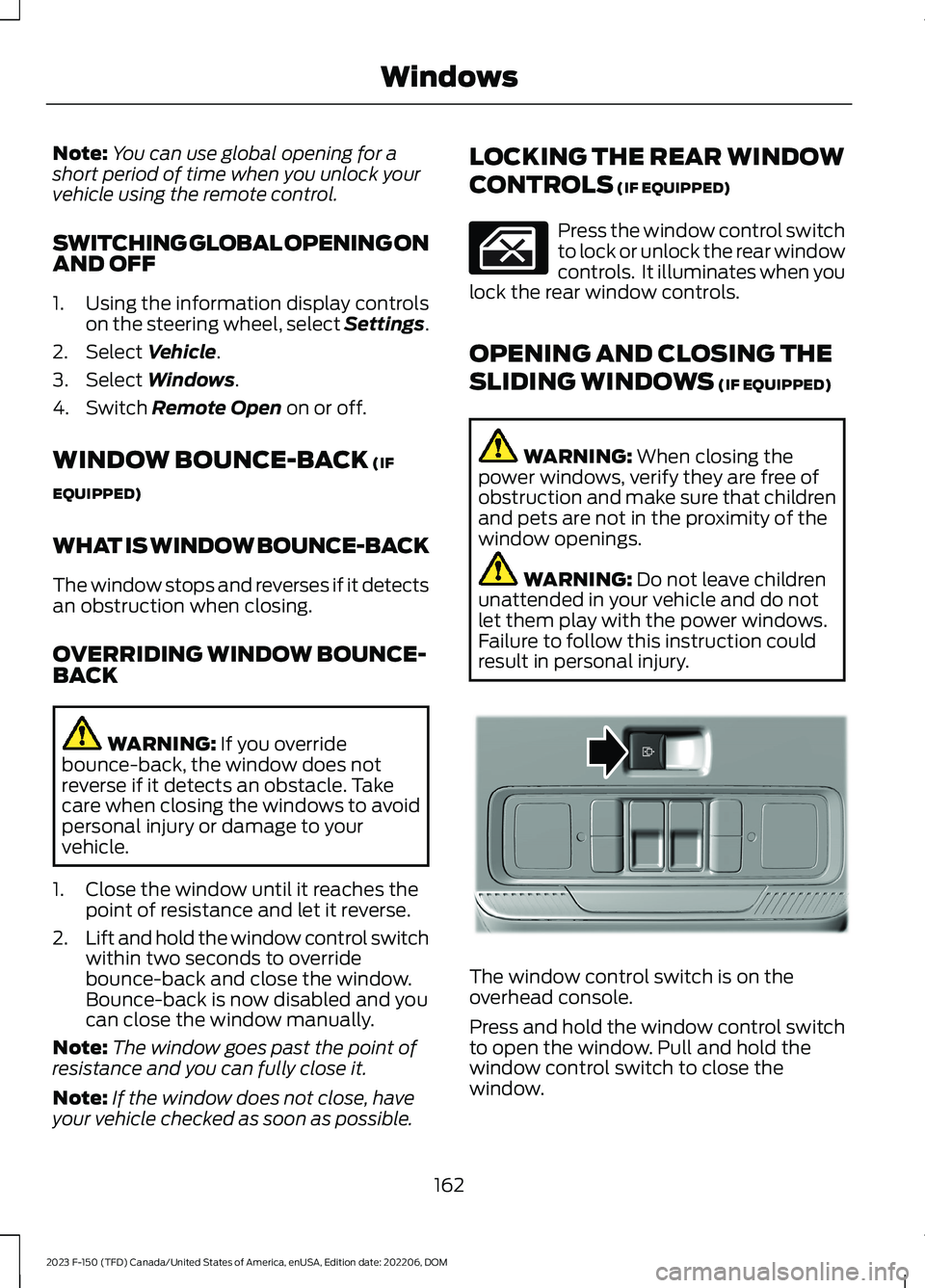
The window control switch is on theoverhead console.
Press and hold the window control switchto open the window. Pull and hold thewindow control switch to close thewindow.
162
2023 F-150 (TFD) Canada/United States of America, enUSA, Edition date: 202206, DOMWindows E311430
Page 167 of 786
INTERIOR MIRROR
PRECAUTIONS
WARNING: Do not adjust themirrors when your vehicle is moving. Thiscould result in the loss of control of yourvehicle, serious personal injury or death.
Note:Do not clean the mirror housing orglass with harsh abrasives, fuel or otherpetroleum-based cleaning products.
MANUALLY DIMMING THE
INTERIOR MIRROR
Pull the tab below the mirror toward youto reduce glare at night.
AUTO-DIMMING INTERIOR
MIRROR (IF EQUIPPED)
WHAT IS THE AUTO-DIMMINGINTERIOR MIRROR
The mirror dims to reduce the effect ofbright light from behind. It returns tonormal when the bright light from behindis no longer present or if you shift intoreverse (R).
AUTO-DIMMING INTERIORMIRROR LIMITATIONS
Do not block the sensors on the front andback of the mirror.
Note:A rear center passenger or raised rearcenter head restraint could prevent lightfrom reaching the sensor.
163
2023 F-150 (TFD) Canada/United States of America, enUSA, Edition date: 202206, DOMInterior Mirror
Page 168 of 786
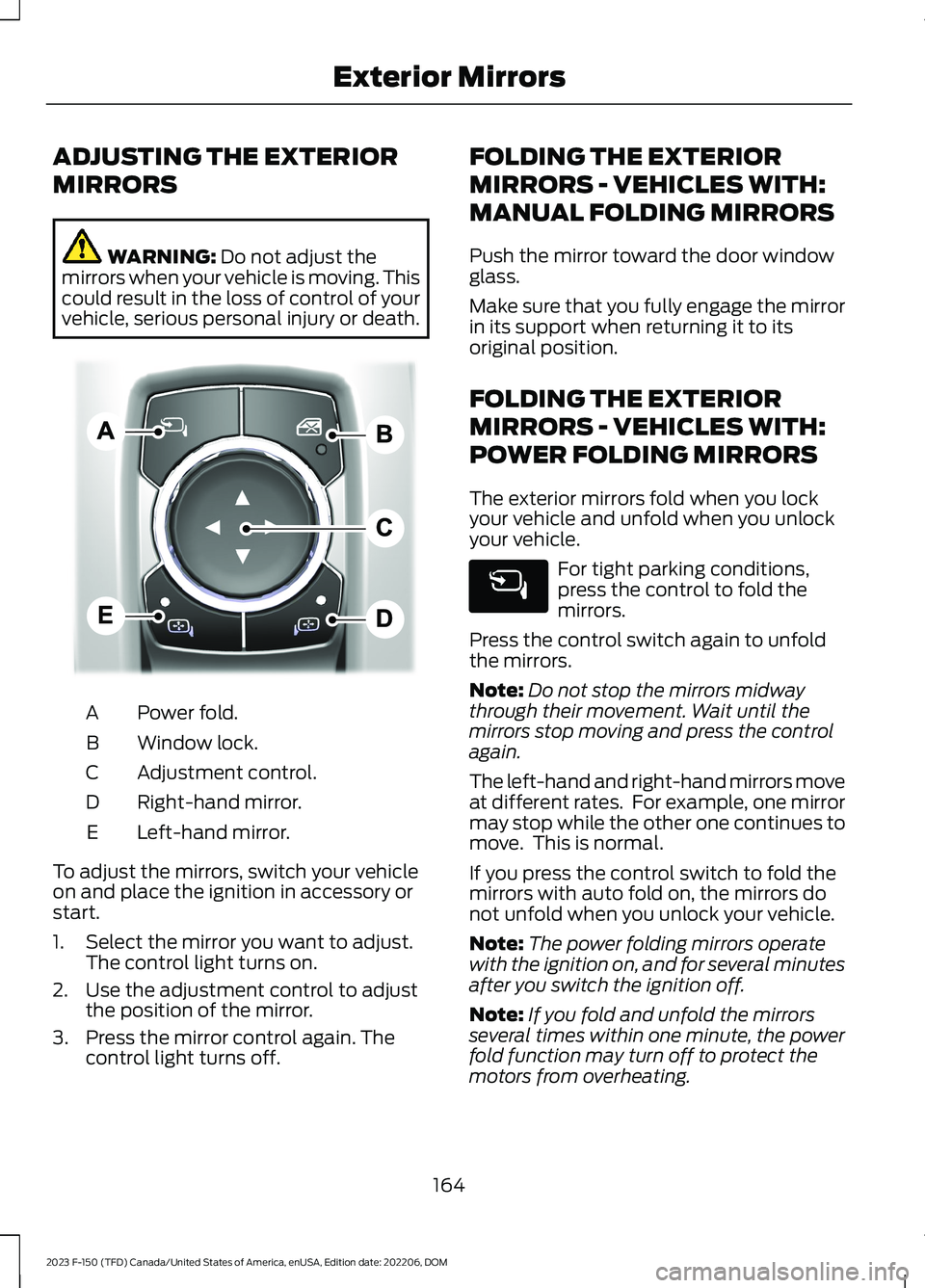
ADJUSTING THE EXTERIOR
MIRRORS
WARNING: Do not adjust themirrors when your vehicle is moving. Thiscould result in the loss of control of yourvehicle, serious personal injury or death.
Power fold.A
Window lock.B
Adjustment control.C
Right-hand mirror.D
Left-hand mirror.E
To adjust the mirrors, switch your vehicleon and place the ignition in accessory orstart.
1.Select the mirror you want to adjust.The control light turns on.
2.Use the adjustment control to adjustthe position of the mirror.
3.Press the mirror control again. Thecontrol light turns off.
FOLDING THE EXTERIOR
MIRRORS - VEHICLES WITH:
MANUAL FOLDING MIRRORS
Push the mirror toward the door windowglass.
Make sure that you fully engage the mirrorin its support when returning it to itsoriginal position.
FOLDING THE EXTERIOR
MIRRORS - VEHICLES WITH:
POWER FOLDING MIRRORS
The exterior mirrors fold when you lockyour vehicle and unfold when you unlockyour vehicle.
For tight parking conditions,press the control to fold themirrors.
Press the control switch again to unfoldthe mirrors.
Note:Do not stop the mirrors midwaythrough their movement. Wait until themirrors stop moving and press the controlagain.
The left-hand and right-hand mirrors moveat different rates. For example, one mirrormay stop while the other one continues tomove. This is normal.
If you press the control switch to fold themirrors with auto fold on, the mirrors donot unfold when you unlock your vehicle.
Note:The power folding mirrors operatewith the ignition on, and for several minutesafter you switch the ignition off.
Note:If you fold and unfold the mirrorsseveral times within one minute, the powerfold function may turn off to protect themotors from overheating.
164
2023 F-150 (TFD) Canada/United States of America, enUSA, Edition date: 202206, DOMExterior MirrorsE311081