key FORD F450 SUPER DUTY 2017 Owner's Guide
[x] Cancel search | Manufacturer: FORD, Model Year: 2017, Model line: F450 SUPER DUTY, Model: FORD F450 SUPER DUTY 2017Pages: 642, PDF Size: 12.35 MB
Page 117 of 642
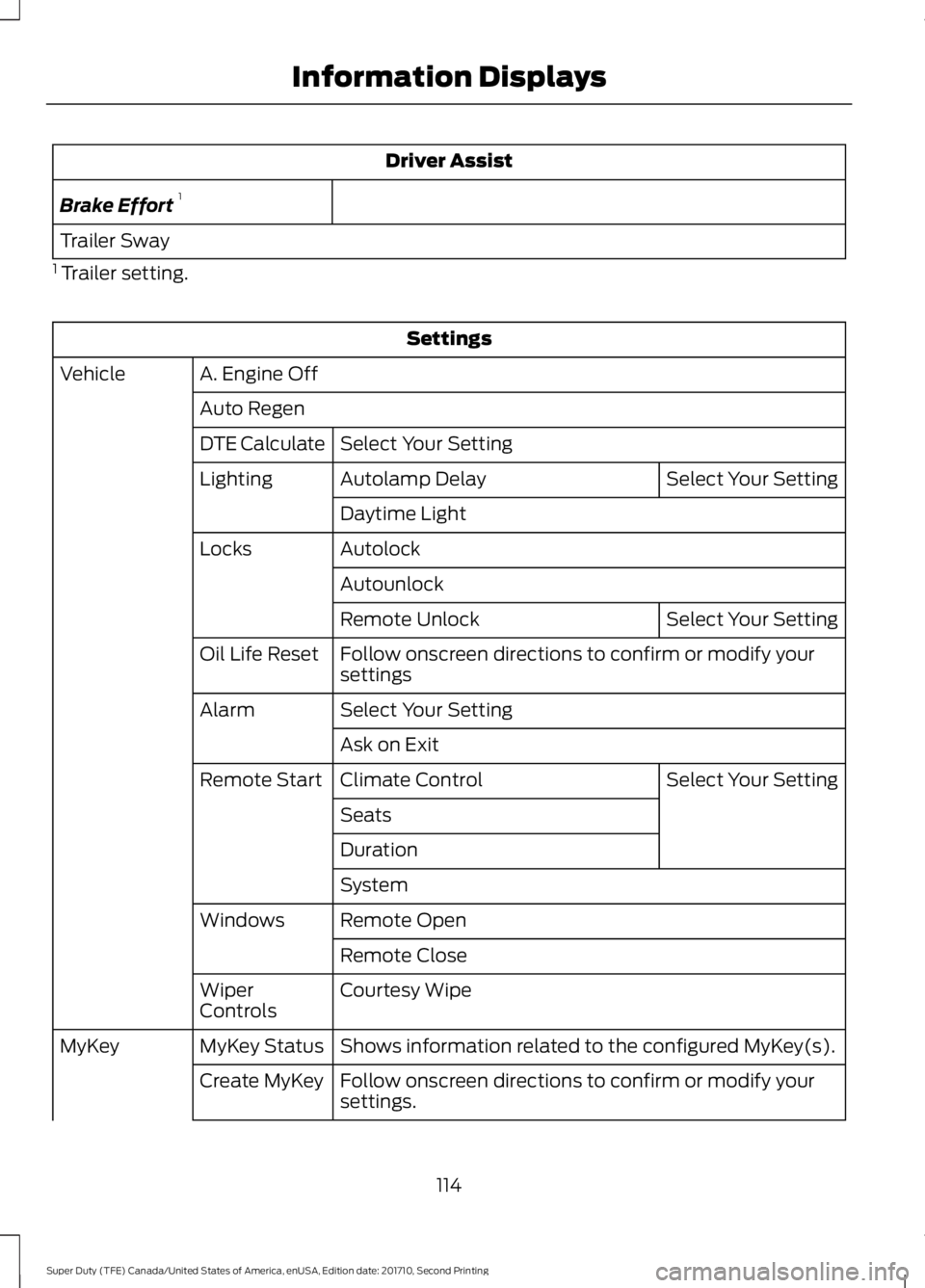
Driver Assist
Brake Effort1
Trailer Sway
1 Trailer setting.
Settings
A. Engine OffVehicle
Auto Regen
Select Your SettingDTE Calculate
Select Your SettingAutolamp DelayLighting
Daytime Light
AutolockLocks
Autounlock
Select Your SettingRemote Unlock
Follow onscreen directions to confirm or modify yoursettingsOil Life Reset
Select Your SettingAlarm
Ask on Exit
Select Your SettingClimate ControlRemote Start
Seats
Duration
System
Remote OpenWindows
Remote Close
Courtesy WipeWiperControls
Shows information related to the configured MyKey(s).MyKey StatusMyKey
Follow onscreen directions to confirm or modify yoursettings.Create MyKey
114
Super Duty (TFE) Canada/United States of America, enUSA, Edition date: 201710, Second Printing
Information Displays
Page 118 of 642
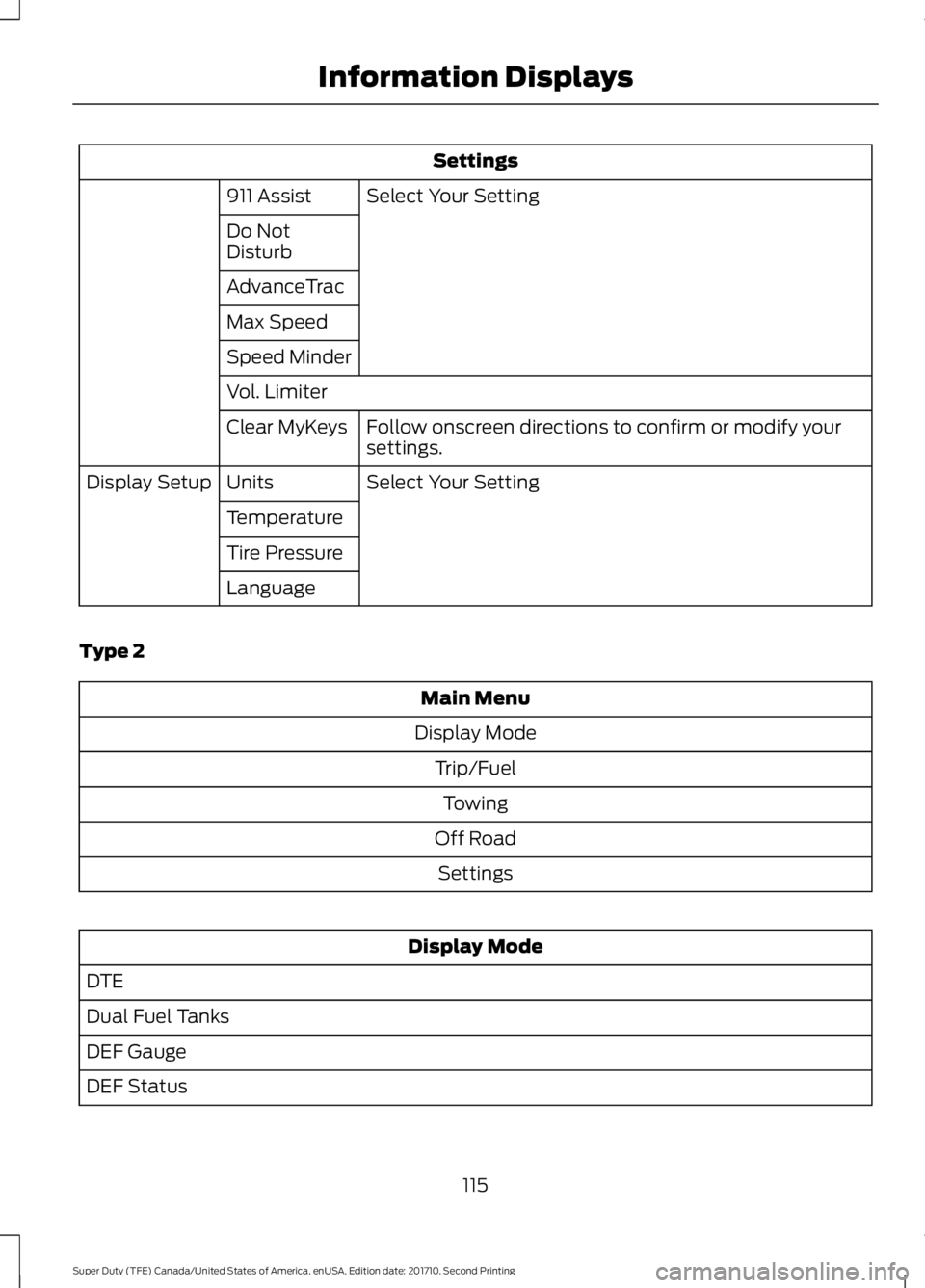
Settings
Select Your Setting911 Assist
Do NotDisturb
AdvanceTrac
Max Speed
Speed Minder
Vol. Limiter
Follow onscreen directions to confirm or modify yoursettings.Clear MyKeys
Select Your SettingUnitsDisplay Setup
Temperature
Tire Pressure
Language
Type 2
Main Menu
Display Mode
Trip/Fuel
Towing
Off Road
Settings
Display Mode
DTE
Dual Fuel Tanks
DEF Gauge
DEF Status
115
Super Duty (TFE) Canada/United States of America, enUSA, Edition date: 201710, Second Printing
Information Displays
Page 123 of 642
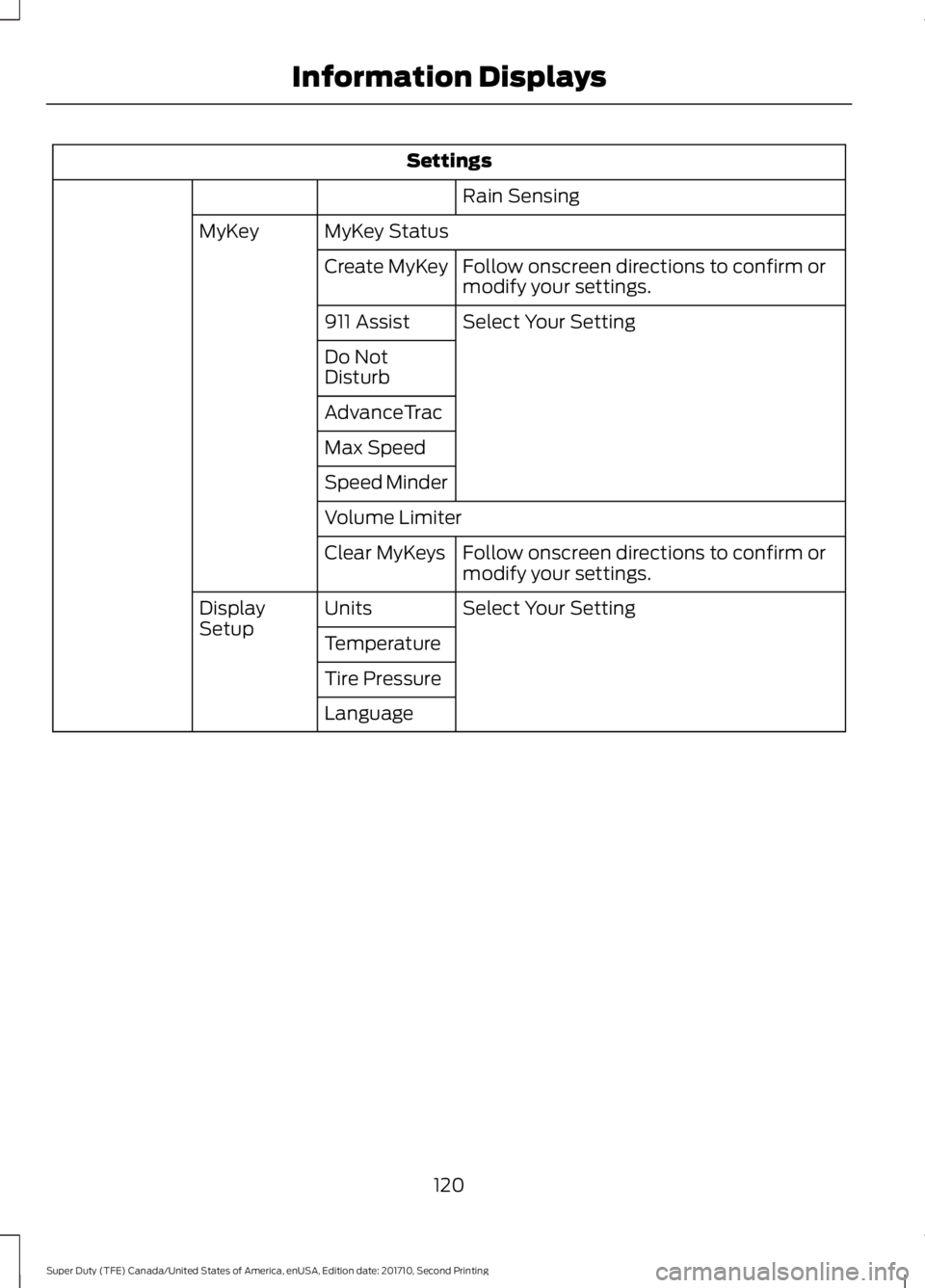
Settings
Rain Sensing
MyKey StatusMyKey
Follow onscreen directions to confirm ormodify your settings.Create MyKey
Select Your Setting911 Assist
Do NotDisturb
AdvanceTrac
Max Speed
Speed Minder
Volume Limiter
Follow onscreen directions to confirm ormodify your settings.Clear MyKeys
Select Your SettingUnitsDisplaySetupTemperature
Tire Pressure
Language
120
Super Duty (TFE) Canada/United States of America, enUSA, Edition date: 201710, Second Printing
Information Displays
Page 125 of 642
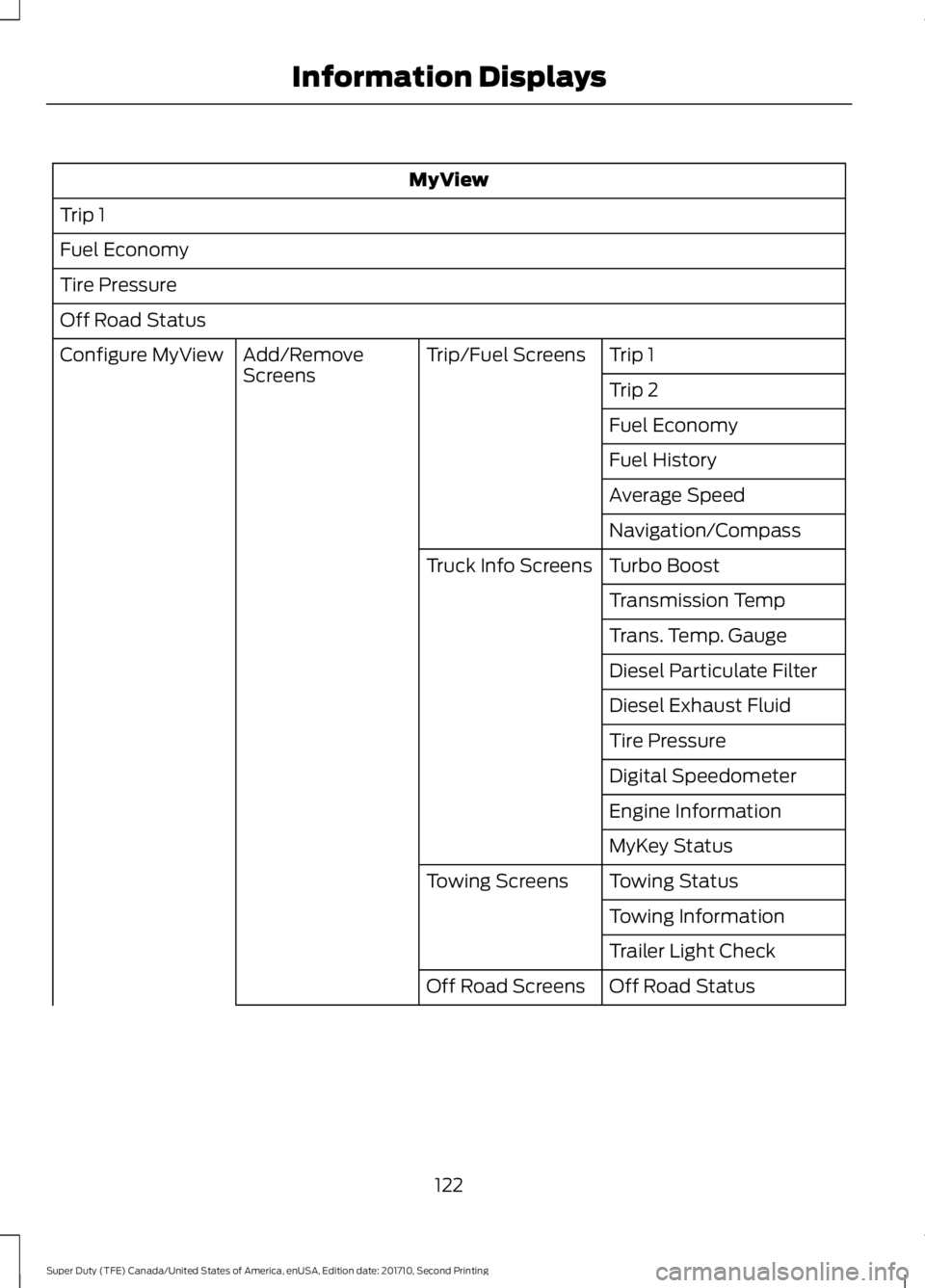
MyView
Trip 1
Fuel Economy
Tire Pressure
Off Road Status
Trip 1Trip/Fuel ScreensAdd/RemoveScreensConfigure MyView
Trip 2
Fuel Economy
Fuel History
Average Speed
Navigation/Compass
Turbo BoostTruck Info Screens
Transmission Temp
Trans. Temp. Gauge
Diesel Particulate Filter
Diesel Exhaust Fluid
Tire Pressure
Digital Speedometer
Engine Information
MyKey Status
Towing StatusTowing Screens
Towing Information
Trailer Light Check
Off Road StatusOff Road Screens
122
Super Duty (TFE) Canada/United States of America, enUSA, Edition date: 201710, Second Printing
Information Displays
Page 130 of 642
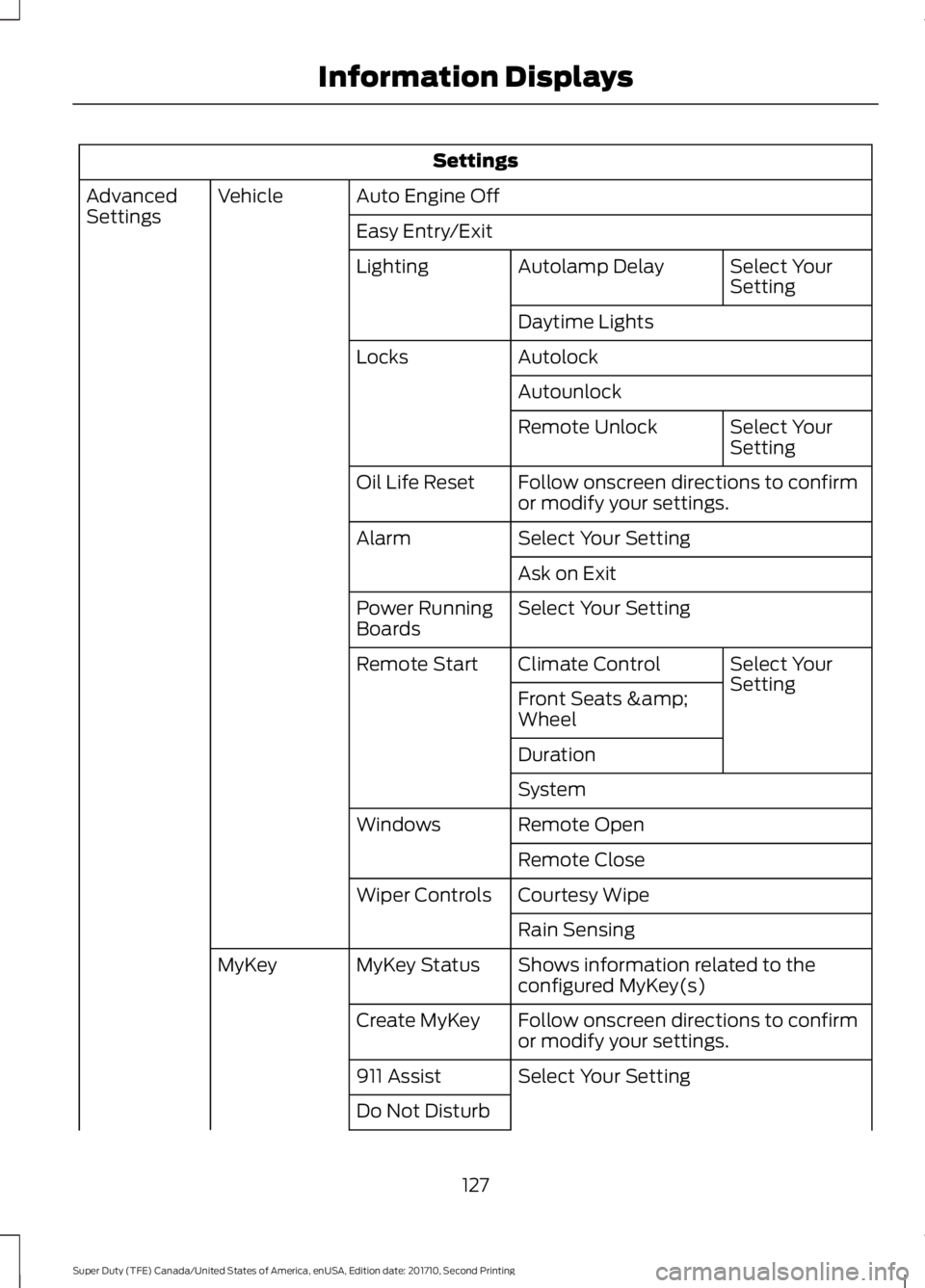
Settings
Auto Engine OffVehicleAdvancedSettingsEasy Entry/Exit
Select YourSettingAutolamp DelayLighting
Daytime Lights
AutolockLocks
Autounlock
Select YourSettingRemote Unlock
Follow onscreen directions to confirmor modify your settings.Oil Life Reset
Select Your SettingAlarm
Ask on Exit
Select Your SettingPower RunningBoards
Select YourSettingClimate ControlRemote Start
Front Seats &Wheel
Duration
System
Remote OpenWindows
Remote Close
Courtesy WipeWiper Controls
Rain Sensing
Shows information related to theconfigured MyKey(s)MyKey StatusMyKey
Follow onscreen directions to confirmor modify your settings.Create MyKey
Select Your Setting911 Assist
Do Not Disturb
127
Super Duty (TFE) Canada/United States of America, enUSA, Edition date: 201710, Second Printing
Information Displays
Page 131 of 642
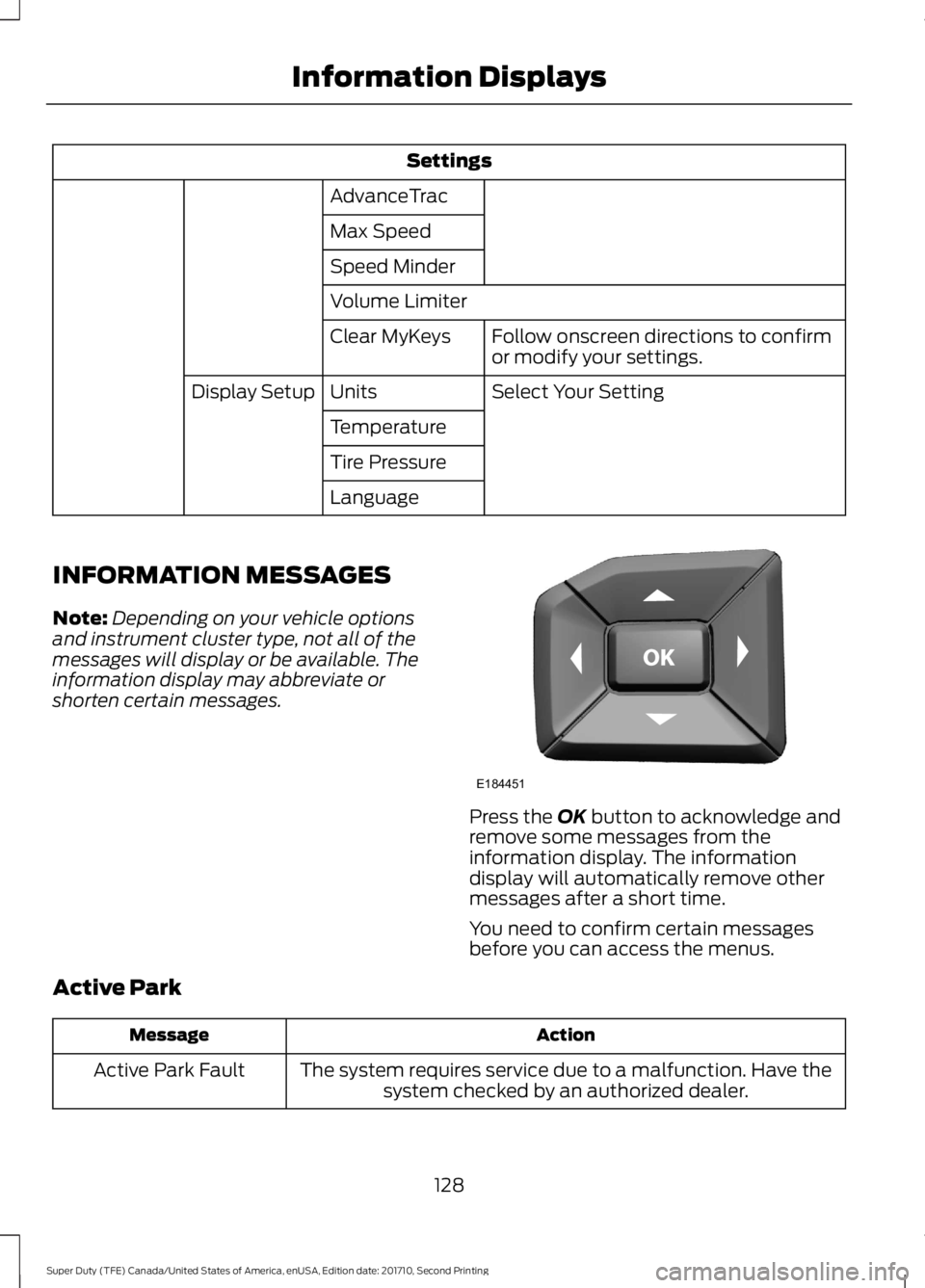
Settings
AdvanceTrac
Max Speed
Speed Minder
Volume Limiter
Follow onscreen directions to confirmor modify your settings.Clear MyKeys
Select Your SettingUnitsDisplay Setup
Temperature
Tire Pressure
Language
INFORMATION MESSAGES
Note:Depending on your vehicle optionsand instrument cluster type, not all of themessages will display or be available. Theinformation display may abbreviate orshorten certain messages.
Press the OK button to acknowledge andremove some messages from theinformation display. The informationdisplay will automatically remove othermessages after a short time.
You need to confirm certain messagesbefore you can access the menus.
Active Park
ActionMessage
The system requires service due to a malfunction. Have thesystem checked by an authorized dealer.Active Park Fault
128
Super Duty (TFE) Canada/United States of America, enUSA, Edition date: 201710, Second Printing
Information DisplaysE184451
Page 140 of 642
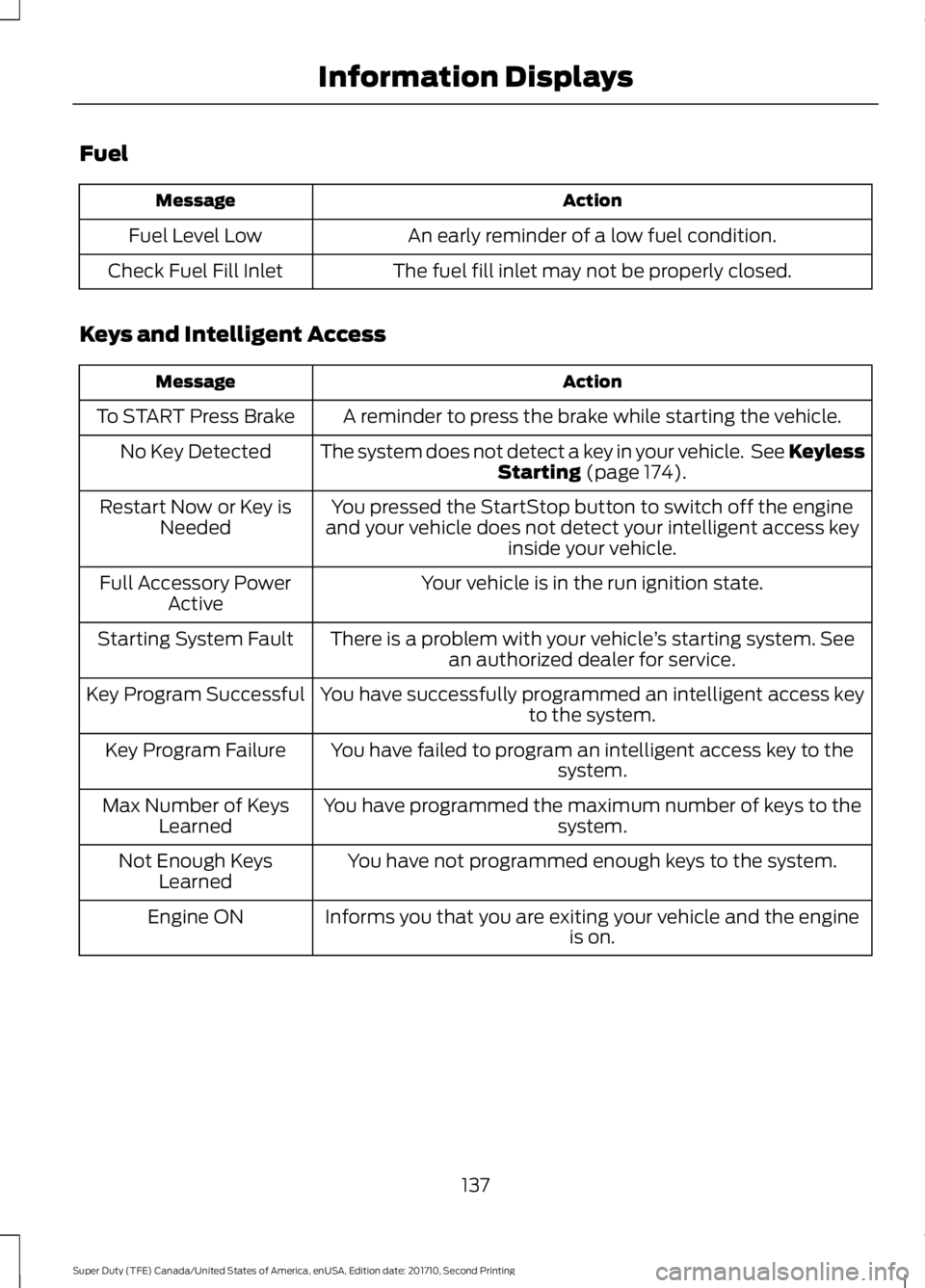
Fuel
ActionMessage
An early reminder of a low fuel condition.Fuel Level Low
The fuel fill inlet may not be properly closed.Check Fuel Fill Inlet
Keys and Intelligent Access
ActionMessage
A reminder to press the brake while starting the vehicle.To START Press Brake
The system does not detect a key in your vehicle. See KeylessStarting (page 174).No Key Detected
You pressed the StartStop button to switch off the engineand your vehicle does not detect your intelligent access keyinside your vehicle.
Restart Now or Key isNeeded
Your vehicle is in the run ignition state.Full Accessory PowerActive
There is a problem with your vehicle’s starting system. Seean authorized dealer for service.Starting System Fault
You have successfully programmed an intelligent access keyto the system.Key Program Successful
You have failed to program an intelligent access key to thesystem.Key Program Failure
You have programmed the maximum number of keys to thesystem.Max Number of KeysLearned
You have not programmed enough keys to the system.Not Enough KeysLearned
Informs you that you are exiting your vehicle and the engineis on.Engine ON
137
Super Duty (TFE) Canada/United States of America, enUSA, Edition date: 201710, Second Printing
Information Displays
Page 142 of 642
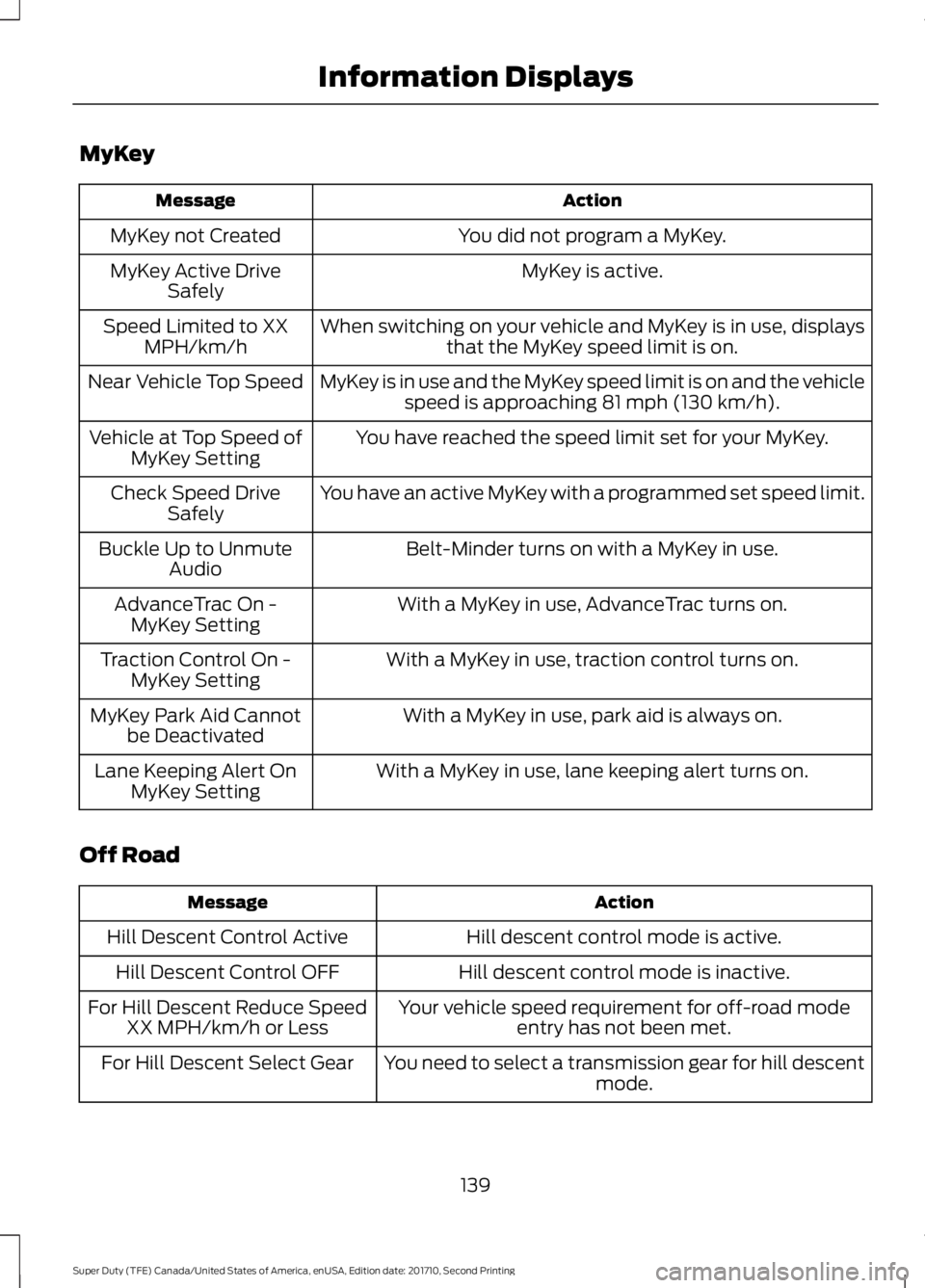
MyKey
ActionMessage
You did not program a MyKey.MyKey not Created
MyKey is active.MyKey Active DriveSafely
When switching on your vehicle and MyKey is in use, displaysthat the MyKey speed limit is on.Speed Limited to XXMPH/km/h
MyKey is in use and the MyKey speed limit is on and the vehiclespeed is approaching 81 mph (130 km/h).Near Vehicle Top Speed
You have reached the speed limit set for your MyKey.Vehicle at Top Speed ofMyKey Setting
You have an active MyKey with a programmed set speed limit.Check Speed DriveSafely
Belt-Minder turns on with a MyKey in use.Buckle Up to UnmuteAudio
With a MyKey in use, AdvanceTrac turns on.AdvanceTrac On -MyKey Setting
With a MyKey in use, traction control turns on.Traction Control On -MyKey Setting
With a MyKey in use, park aid is always on.MyKey Park Aid Cannotbe Deactivated
With a MyKey in use, lane keeping alert turns on.Lane Keeping Alert OnMyKey Setting
Off Road
ActionMessage
Hill descent control mode is active.Hill Descent Control Active
Hill descent control mode is inactive.Hill Descent Control OFF
Your vehicle speed requirement for off-road modeentry has not been met.For Hill Descent Reduce SpeedXX MPH/km/h or Less
You need to select a transmission gear for hill descentmode.For Hill Descent Select Gear
139
Super Duty (TFE) Canada/United States of America, enUSA, Edition date: 201710, Second Printing
Information Displays
Page 161 of 642
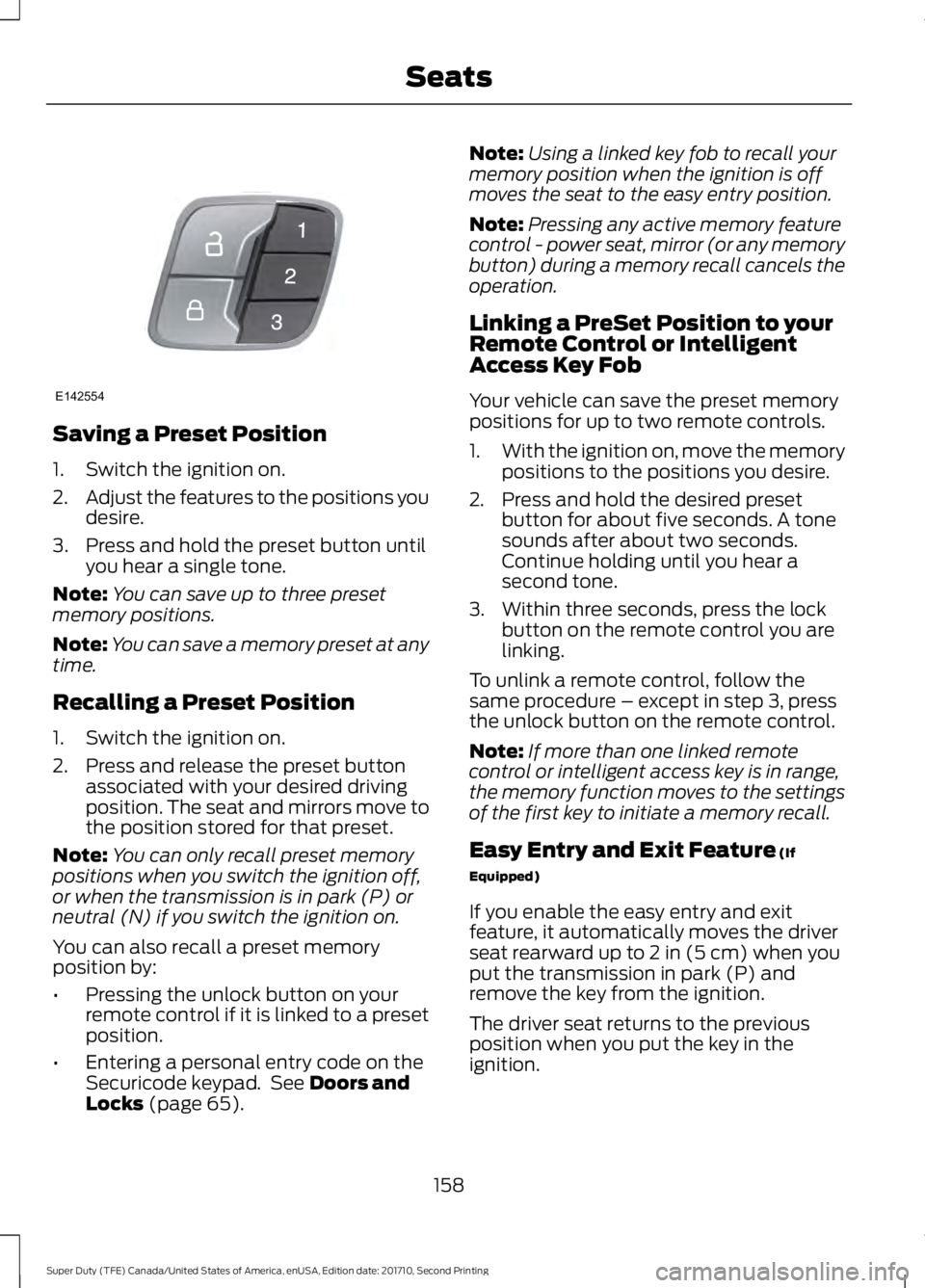
Saving a Preset Position
1. Switch the ignition on.
2.Adjust the features to the positions youdesire.
3. Press and hold the preset button untilyou hear a single tone.
Note:You can save up to three presetmemory positions.
Note:You can save a memory preset at anytime.
Recalling a Preset Position
1. Switch the ignition on.
2. Press and release the preset buttonassociated with your desired drivingposition. The seat and mirrors move tothe position stored for that preset.
Note:You can only recall preset memorypositions when you switch the ignition off,or when the transmission is in park (P) orneutral (N) if you switch the ignition on.
You can also recall a preset memoryposition by:
•Pressing the unlock button on yourremote control if it is linked to a presetposition.
•Entering a personal entry code on theSecuricode keypad. See Doors andLocks (page 65).
Note:Using a linked key fob to recall yourmemory position when the ignition is offmoves the seat to the easy entry position.
Note:Pressing any active memory featurecontrol - power seat, mirror (or any memorybutton) during a memory recall cancels theoperation.
Linking a PreSet Position to yourRemote Control or IntelligentAccess Key Fob
Your vehicle can save the preset memorypositions for up to two remote controls.
1.With the ignition on, move the memorypositions to the positions you desire.
2. Press and hold the desired presetbutton for about five seconds. A tonesounds after about two seconds.Continue holding until you hear asecond tone.
3. Within three seconds, press the lockbutton on the remote control you arelinking.
To unlink a remote control, follow thesame procedure – except in step 3, pressthe unlock button on the remote control.
Note:If more than one linked remotecontrol or intelligent access key is in range,the memory function moves to the settingsof the first key to initiate a memory recall.
Easy Entry and Exit Feature (If
Equipped)
If you enable the easy entry and exitfeature, it automatically moves the driverseat rearward up to 2 in (5 cm) when youput the transmission in park (P) andremove the key from the ignition.
The driver seat returns to the previousposition when you put the key in theignition.
158
Super Duty (TFE) Canada/United States of America, enUSA, Edition date: 201710, Second Printing
SeatsE142554
Page 162 of 642
You can enable or disable this featurethrough the information display. SeeInformation Displays (page 111).
REAR SEATS
Folding Up the Rear Seat Cushion
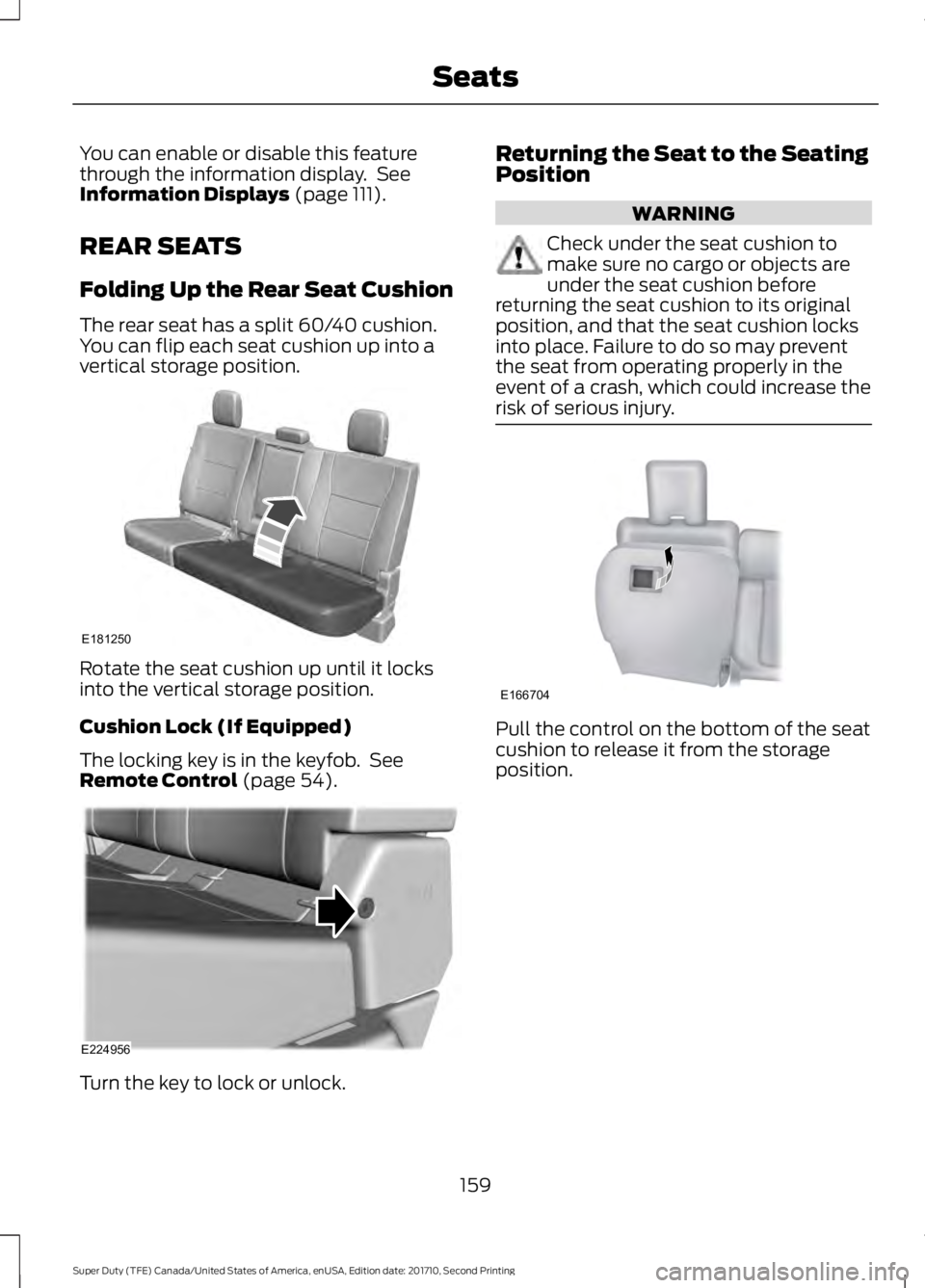
The rear seat has a split 60/40 cushion.You can flip each seat cushion up into avertical storage position.
Rotate the seat cushion up until it locksinto the vertical storage position.
Cushion Lock (If Equipped)
The locking key is in the keyfob. SeeRemote Control (page 54).
Turn the key to lock or unlock.
Returning the Seat to the SeatingPosition
WARNING
Check under the seat cushion tomake sure no cargo or objects areunder the seat cushion beforereturning the seat cushion to its originalposition, and that the seat cushion locksinto place. Failure to do so may preventthe seat from operating properly in theevent of a crash, which could increase therisk of serious injury.
Pull the control on the bottom of the seatcushion to release it from the storageposition.
159
Super Duty (TFE) Canada/United States of America, enUSA, Edition date: 201710, Second Printing
SeatsE181250 E224956 E166704