key FORD F450 SUPER DUTY 2017 Workshop Manual
[x] Cancel search | Manufacturer: FORD, Model Year: 2017, Model line: F450 SUPER DUTY, Model: FORD F450 SUPER DUTY 2017Pages: 642, PDF Size: 12.35 MB
Page 208 of 642
AUTOMATIC TRANSMISSION
WARNING
Always apply the parking brake fullyand make sure you shift into park (P).Switch the ignition off and removethe key whenever you leave your vehicle.
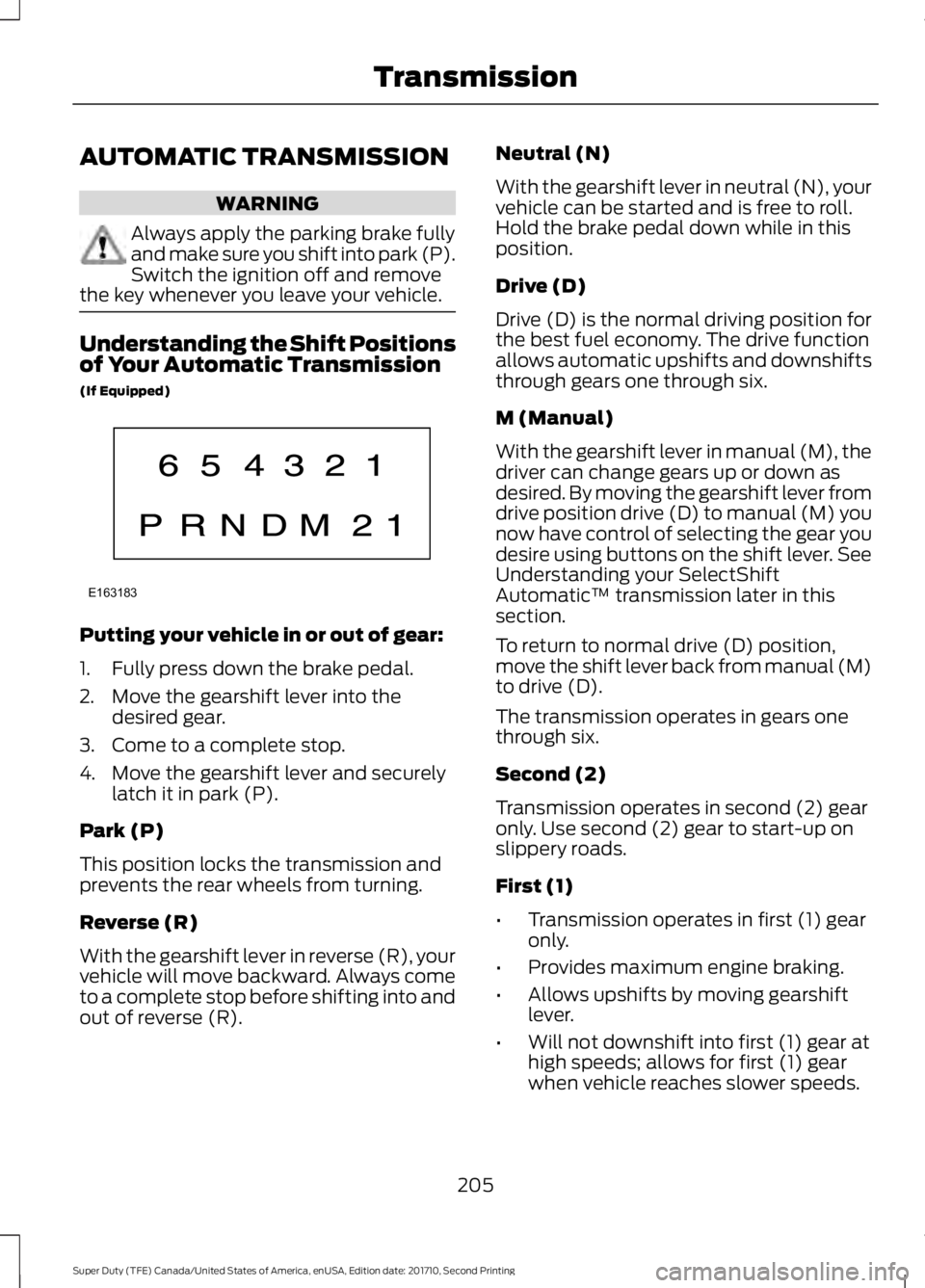
Understanding the Shift Positionsof Your Automatic Transmission
(If Equipped)
Putting your vehicle in or out of gear:
1. Fully press down the brake pedal.
2. Move the gearshift lever into thedesired gear.
3. Come to a complete stop.
4. Move the gearshift lever and securelylatch it in park (P).
Park (P)
This position locks the transmission andprevents the rear wheels from turning.
Reverse (R)
With the gearshift lever in reverse (R), yourvehicle will move backward. Always cometo a complete stop before shifting into andout of reverse (R).
Neutral (N)
With the gearshift lever in neutral (N), yourvehicle can be started and is free to roll.Hold the brake pedal down while in thisposition.
Drive (D)
Drive (D) is the normal driving position forthe best fuel economy. The drive functionallows automatic upshifts and downshiftsthrough gears one through six.
M (Manual)
With the gearshift lever in manual (M), thedriver can change gears up or down asdesired. By moving the gearshift lever fromdrive position drive (D) to manual (M) younow have control of selecting the gear youdesire using buttons on the shift lever. SeeUnderstanding your SelectShiftAutomatic™ transmission later in thissection.
To return to normal drive (D) position,move the shift lever back from manual (M)to drive (D).
The transmission operates in gears onethrough six.
Second (2)
Transmission operates in second (2) gearonly. Use second (2) gear to start-up onslippery roads.
First (1)
•Transmission operates in first (1) gearonly.
•Provides maximum engine braking.
•Allows upshifts by moving gearshiftlever.
•Will not downshift into first (1) gear athigh speeds; allows for first (1) gearwhen vehicle reaches slower speeds.
205
Super Duty (TFE) Canada/United States of America, enUSA, Edition date: 201710, Second Printing
TransmissionE163183
Page 211 of 642
Automatic Transmission AdaptiveLearning
This feature's design is to increasedurability and provide consistent shift feelover the life of your vehicle. A new vehicleor transmission may have firm shifts, softshifts or both. This operation is normal anddoes not affect function or durability of thetransmission. Over time, the adaptivelearning process fully updates transmissionoperation. Additionally, whenever youdisconnect the battery or install a newbattery, the system must relearn thestrategy.
Brake-Shift Interlock
WARNINGS
Do not drive your vehicle until youverify that the brake lamps areworking.
When doing this procedure, you needto take the transmission out of park(P) which means your vehicle canroll freely. To avoid unwanted vehiclemovement, always fully apply the parkingbrake prior to doing this procedure. Usewheels chocks if appropriate.
If the parking brake is fully released,but the brake warning lamp remainsilluminated, the brakes may not beworking properly. Have your vehiclechecked as soon as possible.
Your vehicle is equipped with a brake-shiftinterlock feature that prevents thegearshift lever from moving from park (P)when the ignition is on and the brake pedalis not pressed.
If you cannot move the gearshift lever outof park (P) position with the ignition is onand the brake pedal pressed, a malfunctionmay have occurred. It is possible that afuse has blown or your vehicle’s brakelamps are not operating properly. SeeFuse Specification Chart (page 312).
If the fuse is not blown and the brakelamps are working properly, the followingprocedure allows you to move the gearshiftlever from park (P):
1. Apply the parking brake. Switch theignition key to 1 (off), then remove thekey.
2. Move the steering column to the fulldown and full rearward position(toward the driver’s seat).
3. Remove the gearshift lever boot.
4. Place fingers into hole where youremoved the gearshift lever boot andpull top half of shroud up and forwardto separate it from the lower half of theshroud. There is a hinge at the forwardedge of the top shroud. Roll the tophalf of the shroud upward on the hingepoint to clear the hazard flasher button,then pull straight rearward toward thedriver’s seat to remove.
5. Remove the top half of the shroud.
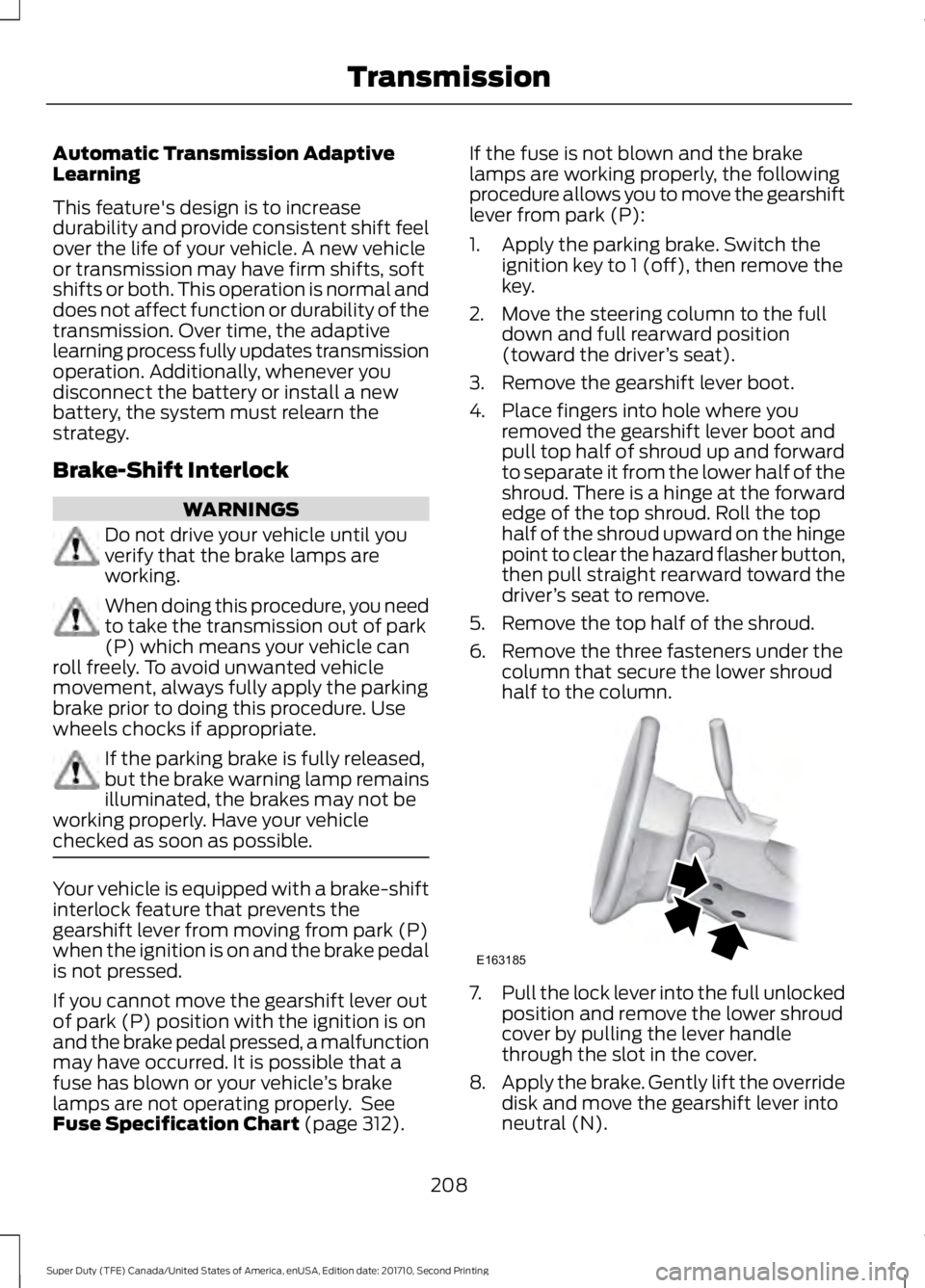
6. Remove the three fasteners under thecolumn that secure the lower shroudhalf to the column.
7.Pull the lock lever into the full unlockedposition and remove the lower shroudcover by pulling the lever handlethrough the slot in the cover.
8.Apply the brake. Gently lift the overridedisk and move the gearshift lever intoneutral (N).
208
Super Duty (TFE) Canada/United States of America, enUSA, Edition date: 201710, Second Printing
TransmissionE163185
Page 225 of 642
2. Release the accelerator pedal tomaximize engine braking.
3. Apply the brakes. The transmissiondownshifts to lower gears.
Note:You can shift the transmission tolower gears with progressive range selection(PRS) or manual shifting independent ofpressing the brakes.
Note:You can also use manual enginebraking with cruise control to improve gradedescent control.
Automatic Engine Braking
1. Press the button twice to switch onautomatic engine braking.
2.Release the accelerator or brake pedal.The system remembers your vehiclespeed.
Note:The system automatically activatesthe engine brake and, if necessary,downshifts the transmission to lower gearsto not exceed your vehicle's set speed whenthe brake or accelerator were last released.
Note:Use this when driving downhill andcarrying heavy loads or trailering.
Warning Lamp Conditions
•Illuminates when this feature isswitched on and the system isoperating properly. See WarningLamps and Indicators (page 105).
•Flashes when the engine brake isdisabled due to a fault or the enginedoes not meet the required brakingconditions.
•Does not illuminate when the switchor indicator is faulty.
You can switch the system on at anytime.The system becomes active once thebraking conditions are met.
Braking Conditions
•Your vehicle is in a forward gear.
•The engine speed is above about 1500RPM.
•Your foot is off the accelerator.
You can use this feature with tow/haul orprogressive range selection to providefurther increased engine braking. Thetransmission automatically upshifts toprevent the engine from entering the redzone on the tachometer. See AutomaticTransmission (page 205).
HINTS ON DRIVING WITH
ANTI-LOCK BRAKES
Note:When the system is operating, thebrake pedal may pulse and may travelfurther. Maintain pressure on the brakepedal. You may also hear a noise from thesystem. This is normal.
The anti-lock braking system will noteliminate the risks when:
•You drive too closely to the vehicle infront of you.
•Your vehicle is hydroplaning.
•You take corners too fast.
•The road surface is poor.
PARKING BRAKE
WARNING
Always set the parking brake fullyand make sure the transmission isplaced in park (P). Failure to set theparking brake and engage park could resultin vehicle roll-away, property damage orbodily injury. Turn the ignition to the lockposition and remove the key whenever youleave your vehicle.
222
Super Duty (TFE) Canada/United States of America, enUSA, Edition date: 201710, Second Printing
Brakes
Page 230 of 642
Roll Stability Control
The system enhances your vehicle’s abilityto prevent rollovers by detecting yourvehicle’s roll motion and the rate at whichit changes by applying the brakes to oneor more wheels individually.
Traction Control
The system enhances your vehicle’s abilityto maintain traction of the wheels bydetecting and controlling wheel spin. SeeUsing Traction Control (page 225).
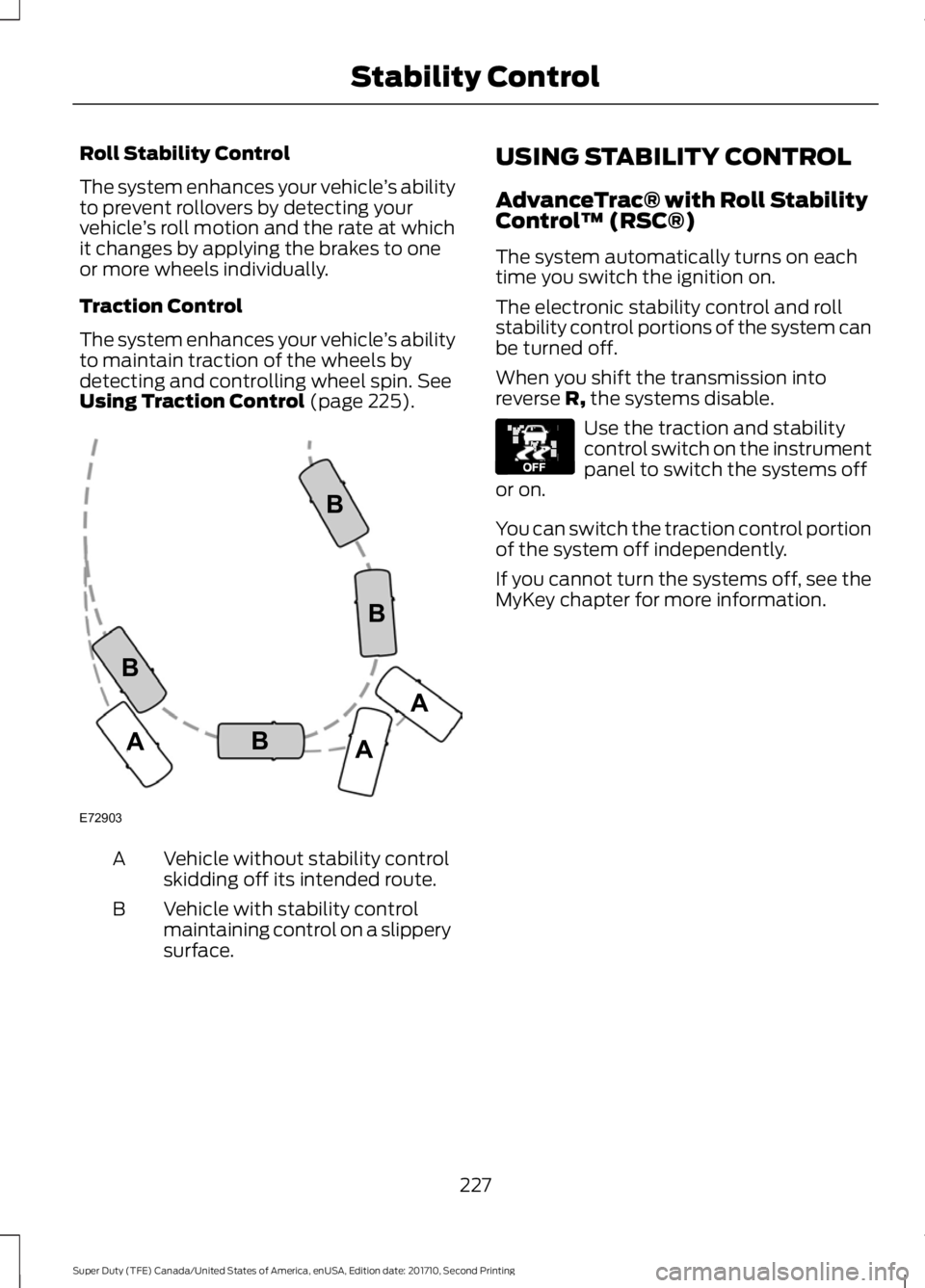
Vehicle without stability controlskidding off its intended route.A
Vehicle with stability controlmaintaining control on a slipperysurface.
B
USING STABILITY CONTROL
AdvanceTrac® with Roll StabilityControl™ (RSC®)
The system automatically turns on eachtime you switch the ignition on.
The electronic stability control and rollstability control portions of the system canbe turned off.
When you shift the transmission intoreverse R, the systems disable.
Use the traction and stabilitycontrol switch on the instrumentpanel to switch the systems offor on.
You can switch the traction control portionof the system off independently.
If you cannot turn the systems off, see theMyKey chapter for more information.
227
Super Duty (TFE) Canada/United States of America, enUSA, Edition date: 201710, Second Printing
Stability ControlE72903A
AA
B
BB
B E130458
Page 234 of 642
PRINCIPLE OF OPERATION
WARNINGS
To help avoid personal injury, pleaseread and understand the limitationsof the system as contained in thissection. Sensing is only an aid for some(generally large and fixed) objects whenmoving on a flat surface at parking speeds.Certain objects with surfaces that absorbultrasonic waves, surrounding vehicle'sparking aid systems, traffic controlsystems, fluorescent lamps, inclementweather, air brakes, and external motorsand fans may also affect the function ofthe sensing system. This may includereduced performance or a false activation.
To help avoid personal injury, alwaysuse caution when in reverse (R) andwhen using the sensing system.
This system is not designed toprevent contact with small or movingobjects. The system is designed toprovide a warning to assist the driver indetecting large stationary objects to avoiddamaging your vehicle. The system maynot detect smaller objects, particularlythose close to the ground.
Certain add-on devices such as largetrailer hitches, bike or surfboard racksand any device that may block thenormal detection zone of the system, maycreate false beeps.
Note:Keep the sensors, located on thebumper or fascia, free from snow, ice andlarge accumulations of dirt. If the sensorsare covered, the system’s accuracy can beaffected. Do not clean the sensors withsharp objects.
Note:If your vehicle sustains damage tothe bumper or fascia, leaving it misalignedor bent, the sensing zone may be alteredcausing inaccurate measurement ofobstacles or false alarms.
Note:The sensing system cannot be turnedoff when a MyKey is present. See Principleof Operation (page 61).
Note:If your vehicle is equipped with atrailer tow package and a trailer isconnected to your vehicle, the rear sensingsystem disables and you cannot switch thesystem on through the information display.
The sensing system warns the driver ofobstacles within a certain range of yourvehicle. The system turns on automaticallywhenever you switch the ignition on.
When receiving a detection warning, theradio volume reduces to a predeterminedlevel. After the warning goes away, theradio volume returns to the previous level.
You can turn the system on oroff by pressing the parking aidbutton. If your vehicle does nothave a parking aid button, the system canbe switched off through the informationdisplay menu or from the pop-up messagethat appears once you shift thetransmission into reverse (R). See GeneralInformation (page 111).
If a fault is present in the system, a warningmessage appears in the informationdisplay and you cannot switch the systemon through the pop-up message. SeeInformation Messages (page 128).
REAR PARKING AID
The rear sensors are only active when thetransmission is in reverse (R). As yourvehicle moves closer to the obstacle, therate of the audible warning increases.When the obstacle is less than 12 in(30 cm) away, the warning soundscontinuously. If the system detects a
231
Super Duty (TFE) Canada/United States of America, enUSA, Edition date: 201710, Second Printing
Parking AidsE139213
Page 249 of 642
ActionCause
Clean the grille surface in front of the radaror remove the object causing the obstruc-tion.
The surface of the radar in the grille is dirtyor obstructed in some way.
Wait a short time. It may take severalminutes for the radar to detect that it is freefrom obstruction.
The surface of the radar in the grille is cleanbut the message remains in the display.
Do not use the system in these conditionsbecause it may not detect any vehiclesahead.
Heavy rain or snow is interfering with theradar signals.
Do not use the system in these conditionsbecause it may not detect any vehiclesahead.
Swirling water, or snow or ice on the surfaceof the road may interfere with the radarsignals.
Wait a short time or switch to normal cruisecontrol.You are in a desert or remote area with noother vehicles and no roadside objects.
Due to the nature of radar technology, it ispossible to get a blockage warning and nothave a blockage. This can happen, forexample, when driving in sparse rural ordesert environments. A false blockedcondition either self clears or clears aftera key cycle.
Switching to Normal CruiseControl
WARNING
Normal cruise control will not brakewhen your vehicle is approachingslower vehicles. Always be aware ofwhich mode you have selected and applythe brakes when necessary.
You can manually change from adaptivecruise control to normal cruise controlthrough the information display. SeeInformation Messages (page 128).
The cruise control indicator lightreplaces the adaptive cruisecontrol indicator light if youselect normal cruise control. The gapsetting does not display, the system doesnot automatically respond to lead vehiclesand automatic braking remains active tomaintain set speed. The system recalls itslast setting when you start your vehicle.
246
Super Duty (TFE) Canada/United States of America, enUSA, Edition date: 201710, Second Printing
Cruise Control (If Equipped)E71340
Page 250 of 642
LANE KEEPING SYSTEM (If
Equipped)
WARNING
The system is designed to aid thedriver. It is not intended to replaceyour attention and judgment. You arestill responsible to drive with due care andattention.
Note:The system works as long as thecamera can detect one lane marking at aspeed above 40 mph (64 km/h).
Note:The system may not function if thecamera is blocked or there is damage to thewindshield.
The Lane Keeping System automaticallydetects and tracks the road lane markingsusing a camera mounted behind theinterior review view mirror. The systemnotifies you to stay in your lane when thefront camera detects an unintentional lanechange is likely to occur.
Switching the System On and Off
Note:The system on or off setting is storeduntil it is manually changed, unless a MyKeyis detected. If the system detects a MyKey,it defaults to on and the mode is set to alert.
Note:If a MyKey is detected, pressing thebutton will not affect the on or off status ofthe system. You can only change the modeand intensity settings.
Press the button located on thecenter console to switch thesystem on or off.
System Settings
The system sensitivity and intensity canbe adjusted through the display screen.See General Information (page 111). Thesystem remembers the last selection. Youdo not need to readjust the setting eachtime you turn on your vehicle.
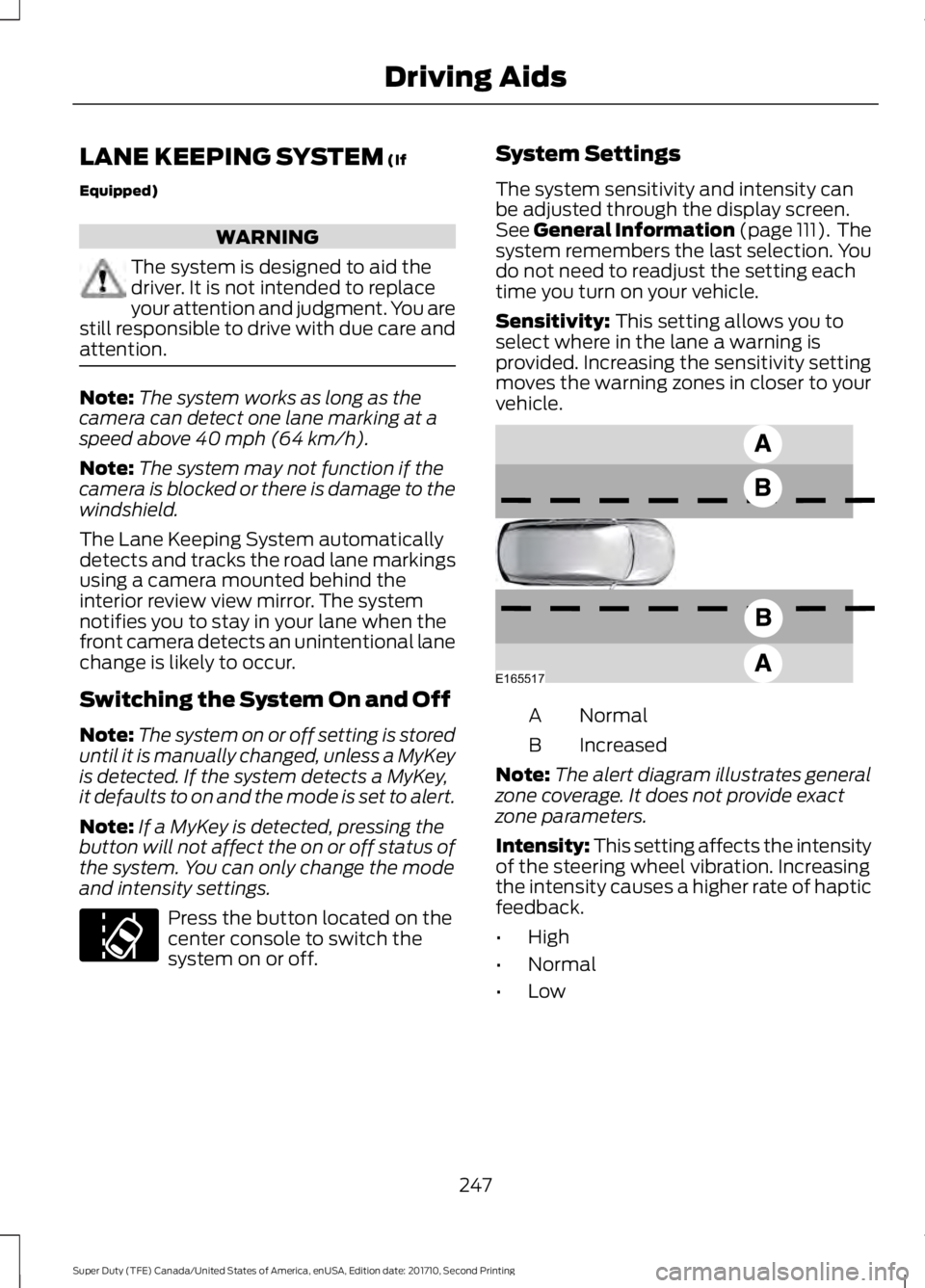
Sensitivity: This setting allows you toselect where in the lane a warning isprovided. Increasing the sensitivity settingmoves the warning zones in closer to yourvehicle.
NormalA
IncreasedB
Note:The alert diagram illustrates generalzone coverage. It does not provide exactzone parameters.
Intensity: This setting affects the intensityof the steering wheel vibration. Increasingthe intensity causes a higher rate of hapticfeedback.
•High
•Normal
•Low
247
Super Duty (TFE) Canada/United States of America, enUSA, Edition date: 201710, Second Printing
Driving AidsE173233 E165517
Page 261 of 642
COLLISION WARNING SYSTEM
(If Equipped)
Principle Of Operation (If Equipped)
WARNINGS
This system is an extra driving aid. Itdoes not replace your attention andjudgment, or the need to apply thebrakes. This system does NOTautomatically brake your vehicle. If you failto press the brake pedal when necessary,you may collide with another vehicle.
The collision warning system withbrake support cannot help preventall collisions. Do not rely on thissystem to replace your judgment and theneed to maintain correct distance andspeed.
Note:The system does not detect, warn orrespond to potential collisions with vehiclesto the rear or sides of your vehicle.
Note:The collision warning system is activeat speeds above approximately 5 mph(8 km/h).
Note:The collision warning system will beunavailable if you disable the electronicstability control. See Using StabilityControl (page 227).
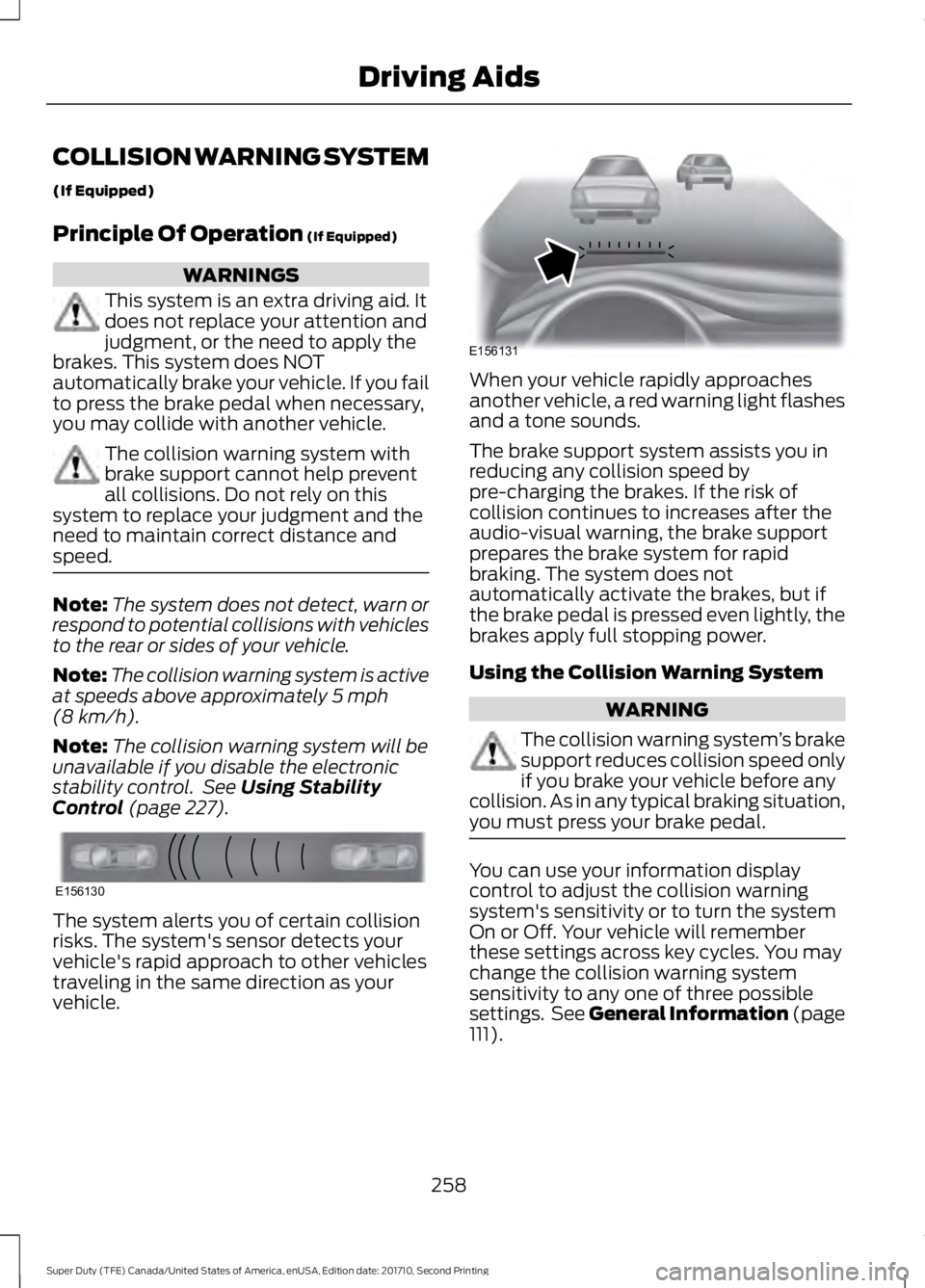
The system alerts you of certain collisionrisks. The system's sensor detects yourvehicle's rapid approach to other vehiclestraveling in the same direction as yourvehicle.
When your vehicle rapidly approachesanother vehicle, a red warning light flashesand a tone sounds.
The brake support system assists you inreducing any collision speed bypre-charging the brakes. If the risk ofcollision continues to increases after theaudio-visual warning, the brake supportprepares the brake system for rapidbraking. The system does notautomatically activate the brakes, but ifthe brake pedal is pressed even lightly, thebrakes apply full stopping power.
Using the Collision Warning System
WARNING
The collision warning system’s brakesupport reduces collision speed onlyif you brake your vehicle before anycollision. As in any typical braking situation,you must press your brake pedal.
You can use your information displaycontrol to adjust the collision warningsystem's sensitivity or to turn the systemOn or Off. Your vehicle will rememberthese settings across key cycles. You maychange the collision warning systemsensitivity to any one of three possiblesettings. See General Information (page111).
258
Super Duty (TFE) Canada/United States of America, enUSA, Edition date: 201710, Second Printing
Driving AidsE156130 E156131
Page 262 of 642
Note:It is recommended that you turn thecollision warning system off if a snow plowor similar object is installed in such a waythat it may block the radar sensor. Yourvehicle will remember the selected settingacross key cycles.
Note:When possible, the manufacturerrecommends using the highest sensitivitysetting. If warnings are too frequent, you canreduce your system's sensitivity. Reducedsensitivity causes fewer and later systemwarnings. See General Information (page111).
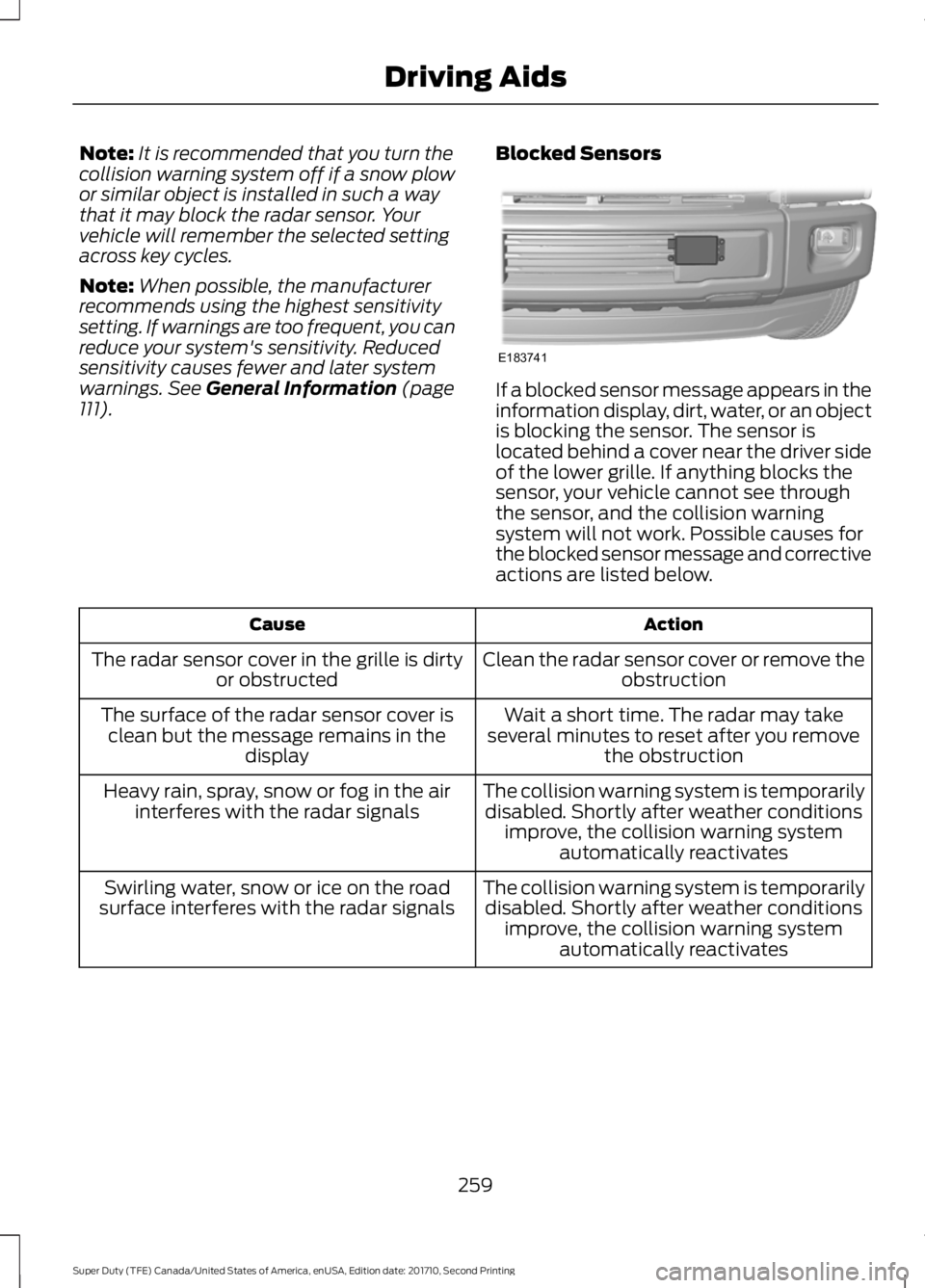
Blocked Sensors
If a blocked sensor message appears in theinformation display, dirt, water, or an objectis blocking the sensor. The sensor islocated behind a cover near the driver sideof the lower grille. If anything blocks thesensor, your vehicle cannot see throughthe sensor, and the collision warningsystem will not work. Possible causes forthe blocked sensor message and correctiveactions are listed below.
ActionCause
Clean the radar sensor cover or remove theobstructionThe radar sensor cover in the grille is dirtyor obstructed
Wait a short time. The radar may takeseveral minutes to reset after you removethe obstruction
The surface of the radar sensor cover isclean but the message remains in thedisplay
The collision warning system is temporarilydisabled. Shortly after weather conditionsimprove, the collision warning systemautomatically reactivates
Heavy rain, spray, snow or fog in the airinterferes with the radar signals
The collision warning system is temporarilydisabled. Shortly after weather conditionsimprove, the collision warning systemautomatically reactivates
Swirling water, snow or ice on the roadsurface interferes with the radar signals
259
Super Duty (TFE) Canada/United States of America, enUSA, Edition date: 201710, Second Printing
Driving AidsE183741
Page 272 of 642
RV & Trailer Towing Guide Online
http://www.fleet.ford.com/towing-guides/Website
TRAILER REVERSING AIDS
Trailer Reverse Guidance
WARNING
Driving while distracted can result inloss of vehicle control, crash andinjury. We strongly recommend thatyou use extreme caution when using anydevice that may take your focus off theroad. Your primary responsibility is the safeoperation of your vehicle. We recommendagainst the use of any hand-held devicewhile driving and encourage the use ofvoice-operated systems when possible.Make sure you are aware of all applicablelocal laws that may affect the use ofelectronic devices while driving.
Note:The system is not a substitute forsafe driving practices.
Note:You must always be aware of thevehicle and trailer combination and thesurrounding environment.
Note:The system does not detect orprevent the vehicle or trailer from makingcontact with obstacles in the surroundingenvironment.
Note:Keep in mind that the front end ofthe vehicle swings out when changing thedirection of the trailer.
Note:The system relies on usermeasurements to determine stickerplacement and system limits. It is critical totake the key measurements correctly.Incorrect measurements can result in theimproper function of the system up to andincluding contact between the vehicle andtrailer.
Note:The system limits vehicle speed whenbacking up. The system is not a replacementfor proper use of the throttle and brakepedals.
Principle of Operation
Trailer Reverse Guidance (TRG) is a driverassistance feature that helps take theguesswork out of getting your trailerpositioned where you want it, quickly andeasily, while you're driving in reverse.
Each trailer you use with your vehicle hasto be setup once.
Sticker placement is extremely importantand there are specific placement rules.
Setting Up Trailer ReverseGuidance
Note:Once you have entered a trailer'sinformation into the system, it is stored foreasy recall. A maximum of 10 trailers can beadded to the system.
Step 1: Position your Vehicle and Trailer
Hitch your trailer to the truck and connectthe electrical wiring harness. Check tomake sure that the wiring is working SeeEssential Towing Checks (page 281).
Park your vehicle and hitched trailer on alevel surface.
269
Super Duty (TFE) Canada/United States of America, enUSA, Edition date: 201710, Second Printing
Towing