key FORD F450 SUPER DUTY 2017 Repair Manual
[x] Cancel search | Manufacturer: FORD, Model Year: 2017, Model line: F450 SUPER DUTY, Model: FORD F450 SUPER DUTY 2017Pages: 642, PDF Size: 12.35 MB
Page 274 of 642
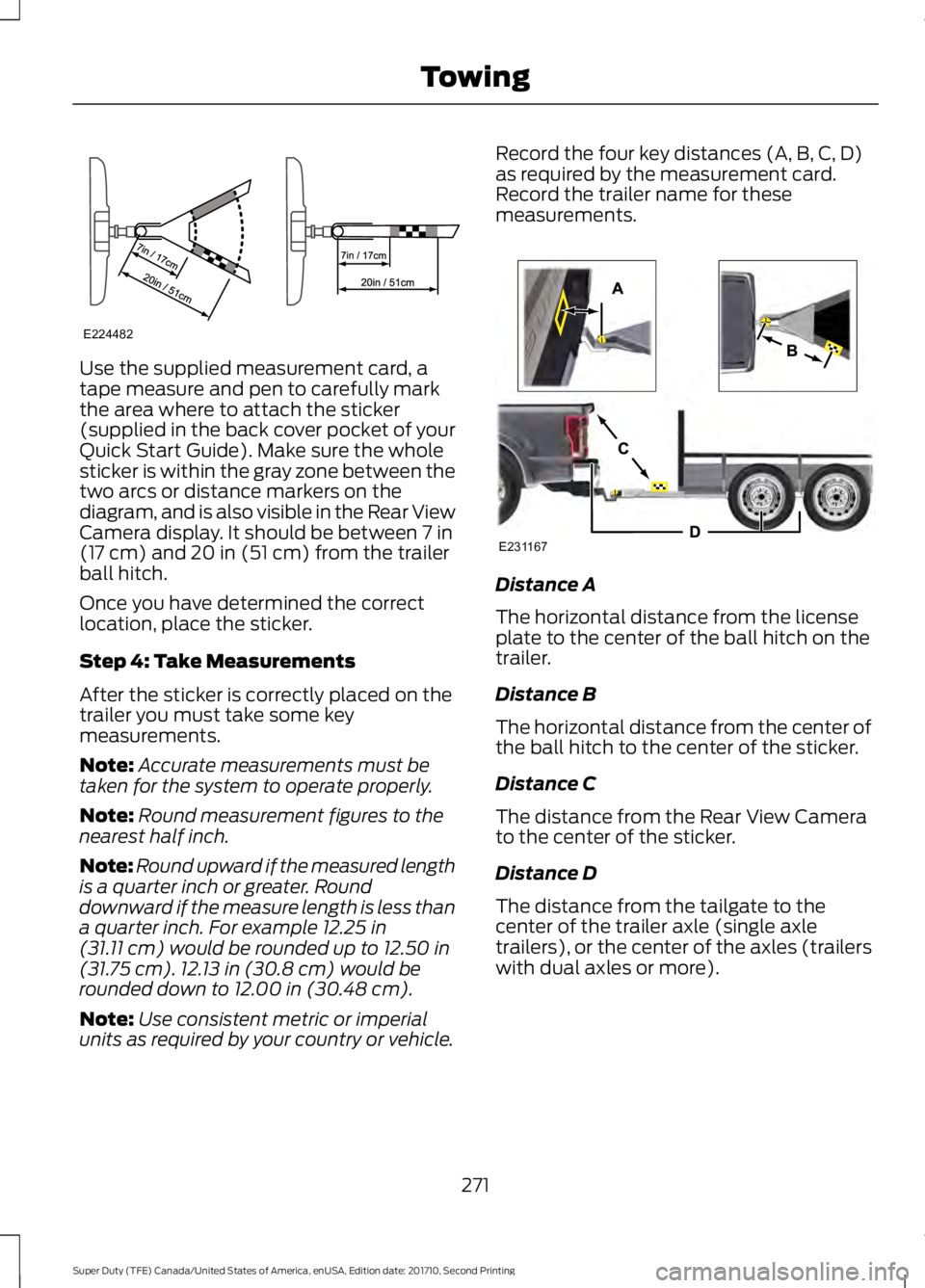
Use the supplied measurement card, atape measure and pen to carefully markthe area where to attach the sticker(supplied in the back cover pocket of yourQuick Start Guide). Make sure the wholesticker is within the gray zone between thetwo arcs or distance markers on thediagram, and is also visible in the Rear ViewCamera display. It should be between 7 in(17 cm) and 20 in (51 cm) from the trailerball hitch.
Once you have determined the correctlocation, place the sticker.
Step 4: Take Measurements
After the sticker is correctly placed on thetrailer you must take some keymeasurements.
Note:Accurate measurements must betaken for the system to operate properly.
Note:Round measurement figures to thenearest half inch.
Note:Round upward if the measured lengthis a quarter inch or greater. Rounddownward if the measure length is less thana quarter inch. For example 12.25 in(31.11 cm) would be rounded up to 12.50 in(31.75 cm). 12.13 in (30.8 cm) would berounded down to 12.00 in (30.48 cm).
Note:Use consistent metric or imperialunits as required by your country or vehicle.
Record the four key distances (A, B, C, D)as required by the measurement card.Record the trailer name for thesemeasurements.
Distance A
The horizontal distance from the licenseplate to the center of the ball hitch on thetrailer.
Distance B
The horizontal distance from the center ofthe ball hitch to the center of the sticker.
Distance C
The distance from the Rear View Camerato the center of the sticker.
Distance D
The distance from the tailgate to thecenter of the trailer axle (single axletrailers), or the center of the axles (trailerswith dual axles or more).
271
Super Duty (TFE) Canada/United States of America, enUSA, Edition date: 201710, Second Printing
TowingE224482 E231167
Page 275 of 642
Step 5: Enter Measurements Using theInformation Display
Using the recorded measurements, enterthe required data into the system. Followthe on screen prompts to enter each of themeasurements taken in step 4. Use theup/down arrows to increase or decreasethe numbers as needed. Press OK toconfirm each measurement. The screenprompts you to add the nextmeasurement. Once you add your lastmeasurement, the information displayshows you all of your enteredmeasurements. You can choose to confirmor change the measurements.
Step 6: Confirming the Sticker Location
Check the Rear View Camera display tosee if the sticker is identified by the systemand marked with a red circle.
Confirm that the red circle is correctlylocated over the sticker image in thedisplay. The on screen prompt will ask youto confirm this.
Note:If the system cannot locate thesticker try cleaning the camera lens, andalso make sure the sticker is within the zoneas indicated in step 3.
The information display shows aconfirmation message when yousuccessfully confirm the target.
Calibrating the System
To complete setup, drive your vehiclestraight forward between 4 mph (6 km/h)and 24 mph (39 km/h) as directed by theinformation display.
Note:Keep the steering wheel straightduring the calibration process. If the steeringwheel is in a turned position, then thecalibration pauses. The information displayprompts you to drive straight forward tocomplete the calibration.
The information display shows a messageduring calibration and after calibration iscomplete
Note:For best results, we do notrecommend that you calibrate the systemat night.
Using Trailer Reverse Guidance
1. Shift into reverse (R) if you are notalready in reverse. Press the rearcamera button to expand the menu.
2. Press the trailer icon .
3. Select your trailer on your informationdisplay.
4. While in TRG mode, you can see thecamera view on the side where yourtrailer is moving, or both sides whenthe trailer is straight behind you. Whenthe views change with the trailerdirection, it's called Auto Mode. Forexample, If you turn the trailer to theright, then you see the right side of yourvehicle and trailer. You can switch thisview manually at any time by using thearrow keys. To return to Auto Mode,press the Auto button.
Note:Auto Mode is your default setting.
Use the view that helps you the most whilebacking up your vehicle and trailer.
Normal rear view camera view.Use this feature when you wantto see your trailer hitch or whatis directly behind your vehicle.
Straight back-up mode. Use thisfeature when you want to keepyour trailer completely in linewith your truck. In this mode, a steeringwheel graphic shows you which way to turnyour steering wheel to keep your trailerstraight.
272
Super Duty (TFE) Canada/United States of America, enUSA, Edition date: 201710, Second Printing
TowingE224483 E224484
Page 293 of 642
Four-wheel Drive Vehicles Equippedwith a Manual-shift Transfer Case
1. Put the transmission in neutral (N).
2. Put the transfer case in neutral (N).
3.Put the hub locks in the FREE position.Always make sure that both hub locksare set to the same position.
Four-wheel Drive Vehicles Equippedwith an Electronic-shift Transfer Case
Only tow a four-wheel drive vehicle thathas an electronic-shift transfer case withall wheels on the ground. To do this, placethe transfer case in its neutral position andengage the four-wheel-down towingfeature.
Perform the steps in the following sectionafter positioning your vehicle behind thetow vehicle and properly securing themtogether.
Note:Make sure you properly secure yourvehicle to the tow vehicle.
Four-wheel-down Towing
1. Put the ignition in the on position, butdo not start the engine. If your vehiclehas an ignition key, turn the key to on.If your vehicle has intelligent access,press the engine START/STOP buttononce without pressing the brake pedal.
2. Press and hold the brake pedal.
3. Rotate the four-wheel drive switch to2H.
4. Shift the transmission to neutral (N).
5. Rotate the four-wheel drive switchfrom 2H to 4L and back to 2H fivetimes within seven seconds.
Note:If completed successfully, theinformation display shows a messageindicating that your vehicle is safe to towwith all wheels on the ground.
Note:If you do not see the message in thedisplay, you must perform the procedureagain from the beginning.
Note:You may hear an audible noise as thetransfer case shifts into its neutral position.This is normal.
6. Leave the transmission in neutral (N)and turn the ignition as far as it will gotoward the off position (it will not turnfully off when the transmission is inneutral). If your vehicle has an ignitionkey, you must leave the key in theignition while towing. To lock andunlock your vehicle, use the keylessentry keypad or extra set of keys. If yourvehicle has intelligent access, press theengine START/STOP button oncewithout pressing the brake pedal. Youdo not need to leave your keys in thevehicle. You can lock and unlock yourvehicle as you normally do.
7. Release the brake pedal.
WARNINGS
Do not disconnect the battery duringrecreational towing. It prevents thetransfer case from shifting properlyand may cause the vehicle to roll, even ifthe transmission is in park (P).
Shifting the transfer case to itsneutral position for recreationaltowing may cause the vehicle to roll,even if the transmission is in park (P). Itmay injure the driver and others. Make sureyou press the foot brake and the vehicle isin a secure, safe position when you shift toneutral (N).
Note:Failing to put the transfer case in itsneutral position while towing with all fourwheels on the ground will damage vehiclecomponents.
290
Super Duty (TFE) Canada/United States of America, enUSA, Edition date: 201710, Second Printing
Towing
Page 294 of 642
Note:You can check four-wheel-downtowing status at any time by opening thedriver's door or turning the ignition to theaccessory or on position and verifying amessage displays in the cluster.
To exit four-wheel-down towing and returnthe transfer case to its 2H position:
1.With your vehicle still properly securedto the tow vehicle, put the ignition inthe on position, but do not start theengine. If your vehicle has an ignitionkey, switch the key to on. If your vehiclehas intelligent access, press the engineSTART/STOP button once withoutpressing the brake pedal.
2. Press and hold the brake pedal.
3. Shift the transmission out of neutral(N) and into any other gear.
4. Release the brake pedal.
Note:If completed successfully, the 2Hindicator light illuminates and aconfirmation message displays in theinstrument cluster.
Note:If the indicator light and message donot display, you must perform the procedureagain from the beginning.
Note:You may hear an audible noise as thetransfer case shifts out of its neutralposition. This is normal.
Note:If a message displays in theinstrument cluster stating there is a shiftdelay, transfer case gear tooth blockagemay be present. See Resolving the ShiftDelay Issue after this section.
5.Apply the parking brake and disconnectthe vehicle from the tow vehicle.
6. Release the parking brake, start theengine and shift the transmission todrive (D) to make sure the transfercase is out of neutral (N).
7. If the transfer case does notsuccessfully shift out of neutral (N),set the parking brake until you can haveyour vehicle serviced.
Resolving the Shift Delay Issue
If the instrument cluster displays a shiftdelay message, See InformationMessages (page 128). You need toperform the following steps:
1. Press and hold the brake pedal.
2. Put the transmission into neutral (N),and then start the engine.
3. With the engine running, shift thetransmission to drive (D) and let thevehicle roll forward, up to 3 ft (1 m).You may hear an audible noise as thetransfer case shifts out of its neutralposition. This is normal.
4. When the issue is resolved, theinstrument cluster displays a messagestating neutral tow is disabled.
291
Super Duty (TFE) Canada/United States of America, enUSA, Edition date: 201710, Second Printing
Towing
Page 300 of 642
ROADSIDE ASSISTANCE
Vehicles Sold in the United States:Getting Roadside Assistance
To fully assist you should you have avehicle concern, Ford Motor Companyoffers a complimentary roadsideassistance program. This program isseparate from the New Vehicle LimitedWarranty. The service is available:
•24 hours a day, seven days a week.
•For the coverage period listed on theRoadside Assistance Card included inyour Owner's Manual portfolio.
Roadside Assistance covers:
•A flat tire change with a good spare, ifprovided with the vehicle (exceptvehicles supplied with a tire inflationkit).
•Battery jump start.
•Lock-out assistance (key replacementcost is the customer's responsibility).
•Fuel delivery — independent servicecontractors, if not prohibited by state,local or municipal law, shall deliver upto 2 gal (7.6 L) of gasoline or 5 gal(18.9 L) of diesel fuel to a disabledvehicle. Roadside Assistance limits fueldelivery service to two no-chargeoccurrences within a 12-month period.
•Winch out — available within 100 ft(30.5 m) of a paved or countymaintained road, no recoveries.
•Towing — independent servicecontractors, if not prohibited by state,local or municipal law, shall tow Fordeligible vehicles to an authorized dealerwithin 35 mi (56 km) of thedisablement location or to the nearest
authorized dealer. If a memberrequests a tow to an authorized dealerthat is more than 35 mi (56 km) fromthe disablement location, the membershall be responsible for any mileagecosts in excess of 35 mi (56 km).
Roadside Assistance includes up to $200for a towed trailer if the disabled eligiblevehicle requires service at the nearestauthorized dealer. If the towing vehicle isoperational but the trailer is not, then thetrailer does not qualify for any roadsideservices.
Vehicles Sold in the United States:Using Roadside Assistance
Complete the roadside assistanceidentification card and place it in yourwallet for quick reference. This card is inthe owner's information portfolio in theglove compartment.
United States Ford vehicle customers whorequire Roadside Assistance, call1-800-241-3673.
If you need to arrange roadside assistancefor yourself, Ford Motor Companyreimburses a reasonable amount fortowing to the nearest dealership within35 mi (56 km). To obtain reimbursementinformation, United States Ford vehiclecustomers call 1-800-241-3673.Customers need to submit their originalreceipts.
Vehicles Sold in Canada: GettingRoadside Assistance
To fully assist you should you have avehicle concern, Ford Motor Company ofCanada, Limited offers a complimentaryroadside assistance program. This programis eligible within Canada or the continentalUnited States.
297
Super Duty (TFE) Canada/United States of America, enUSA, Edition date: 201710, Second Printing
Roadside Emergencies
Page 301 of 642
This program is separate from the NewVehicle Limited Warranty, but the coverageis concurrent with the powertrain coverageperiod of your vehicle.
Canadian customers who require roadsideassistance, call 1-800-665-2006.
Vehicles Sold in Canada: UsingRoadside Assistance
Complete the roadside assistanceidentification card and place it in yourwallet for quick reference.
In Canada, this card is found in theWarranty Guide in the glove compartmentof your vehicle.
Vehicles Sold in Canada: RoadsideAssistance Program Coverage
The service is available 24 hours a day,seven days a week.
Canadian roadside coverage and benefitsmay differ from the U.S. coverage.
For complete program coverage detailsyou may contact your dealer, you can callus in Canada at 1-800-665-2006, or visitour website at www.ford.ca.
HAZARD FLASHERS
Note:The hazard flashers operate whenthe ignition is in any position, or if the key isnot in the ignition. If used when the vehicleis not running, the battery loses charge. Asa result, there may be insufficient power torestart your vehicle.
The flasher control is on theinstrument panel. Use yourhazard flashers when yourvehicle is creating a safety hazard for othermotorists.
•Press the flasher control and all frontand rear direction indicators flash.
•Press the button again to switch themoff.
FUEL SHUTOFF - 6.2L/6.8L
Note:If your vehicle is involved in a crash,have a qualified technician check the fuelsystem.
Note: When you try to restart your vehicleafter a fuel shutoff, the vehicle makes surethat various systems are safe to restart.Once the vehicle determines the systemsare safe, then the vehicle allows you torestart.
Note: In the event that your vehicle doesnot restart after your third attempt, contacta qualified technician.
The fuel pump shutoff stops the flow offuel to the engine in the event of amoderate to severe crash. Not everyimpact causes a shutoff.
If your vehicle has a key system:
1. Switch off the vehicle.
2. Switch on the vehicle.
3. Repeat steps 1 and 2 to re-enable thefuel pump.
FUEL SHUTOFF - 6.7L DIESEL
WARNING
Failure to inspect and, if necessary,repair fuel leaks after a collision mayincrease the risk of fire and seriousinjury. Ford Motor Company recommendsthat the fuel system be inspected by anauthorized dealer after any collision.
298
Super Duty (TFE) Canada/United States of America, enUSA, Edition date: 201710, Second Printing
Roadside Emergencies
Page 302 of 642
Note:When you try to restart your vehicleafter a fuel shutoff, your vehicle makes surethat various systems are safe to restart.Once your vehicle determines that thesystems are safe, then your vehicle willallow you to restart.
In the event of a moderate to severecollision, your vehicle is equipped with afuel pump shut-off feature that stops theflow of fuel to the engine. Not every impactwill cause a shutoff.
After an accident, if the engine cranks butdoes not start, this switch may have beenactivated.
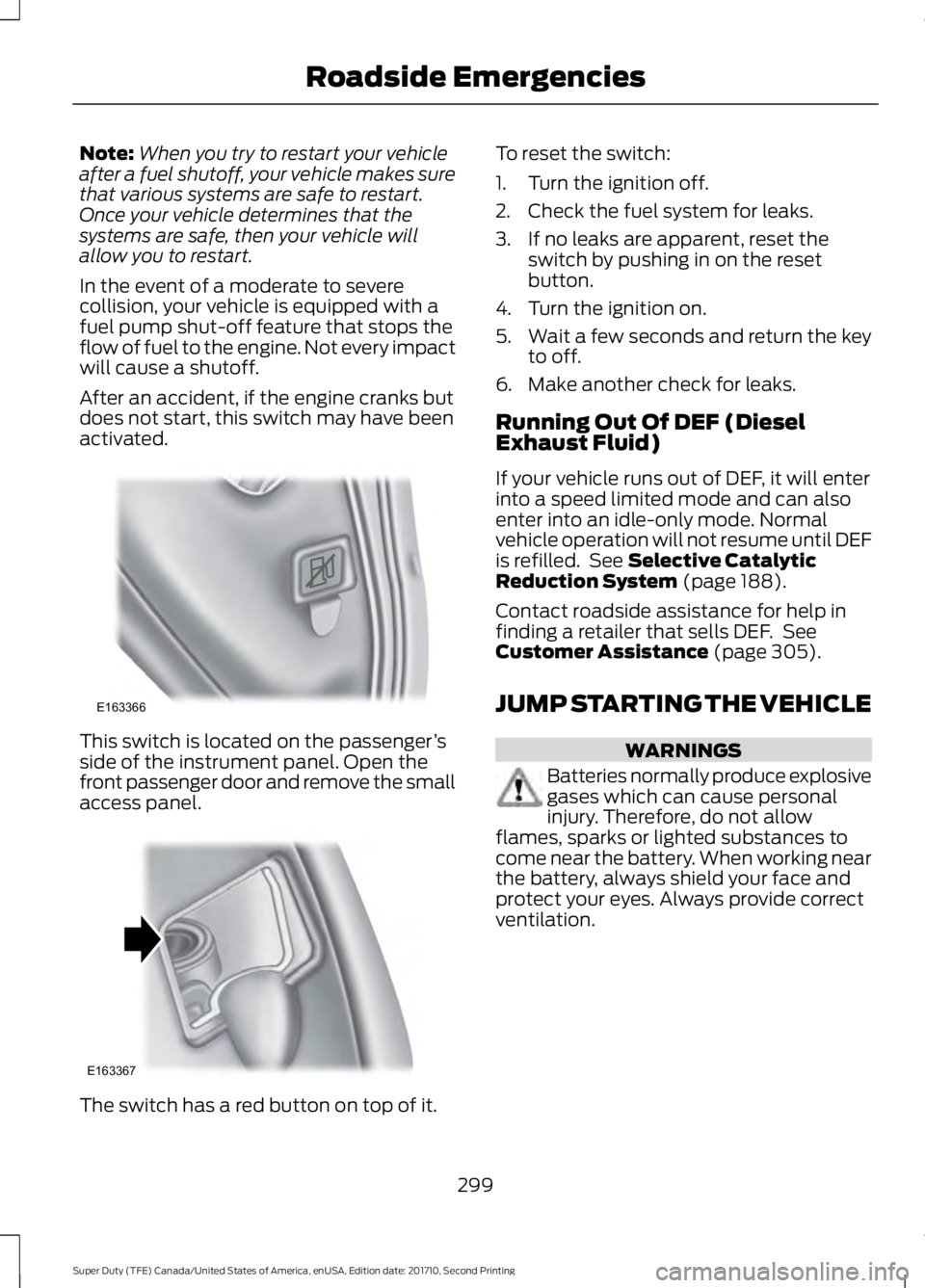
This switch is located on the passenger’sside of the instrument panel. Open thefront passenger door and remove the smallaccess panel.
The switch has a red button on top of it.
To reset the switch:
1. Turn the ignition off.
2. Check the fuel system for leaks.
3. If no leaks are apparent, reset theswitch by pushing in on the resetbutton.
4. Turn the ignition on.
5.Wait a few seconds and return the keyto off.
6. Make another check for leaks.
Running Out Of DEF (DieselExhaust Fluid)
If your vehicle runs out of DEF, it will enterinto a speed limited mode and can alsoenter into an idle-only mode. Normalvehicle operation will not resume until DEFis refilled. See Selective CatalyticReduction System (page 188).
Contact roadside assistance for help infinding a retailer that sells DEF. SeeCustomer Assistance (page 305).
JUMP STARTING THE VEHICLE
WARNINGS
Batteries normally produce explosivegases which can cause personalinjury. Therefore, do not allowflames, sparks or lighted substances tocome near the battery. When working nearthe battery, always shield your face andprotect your eyes. Always provide correctventilation.
299
Super Duty (TFE) Canada/United States of America, enUSA, Edition date: 201710, Second Printing
Roadside EmergenciesE163366 E163367
Page 321 of 642
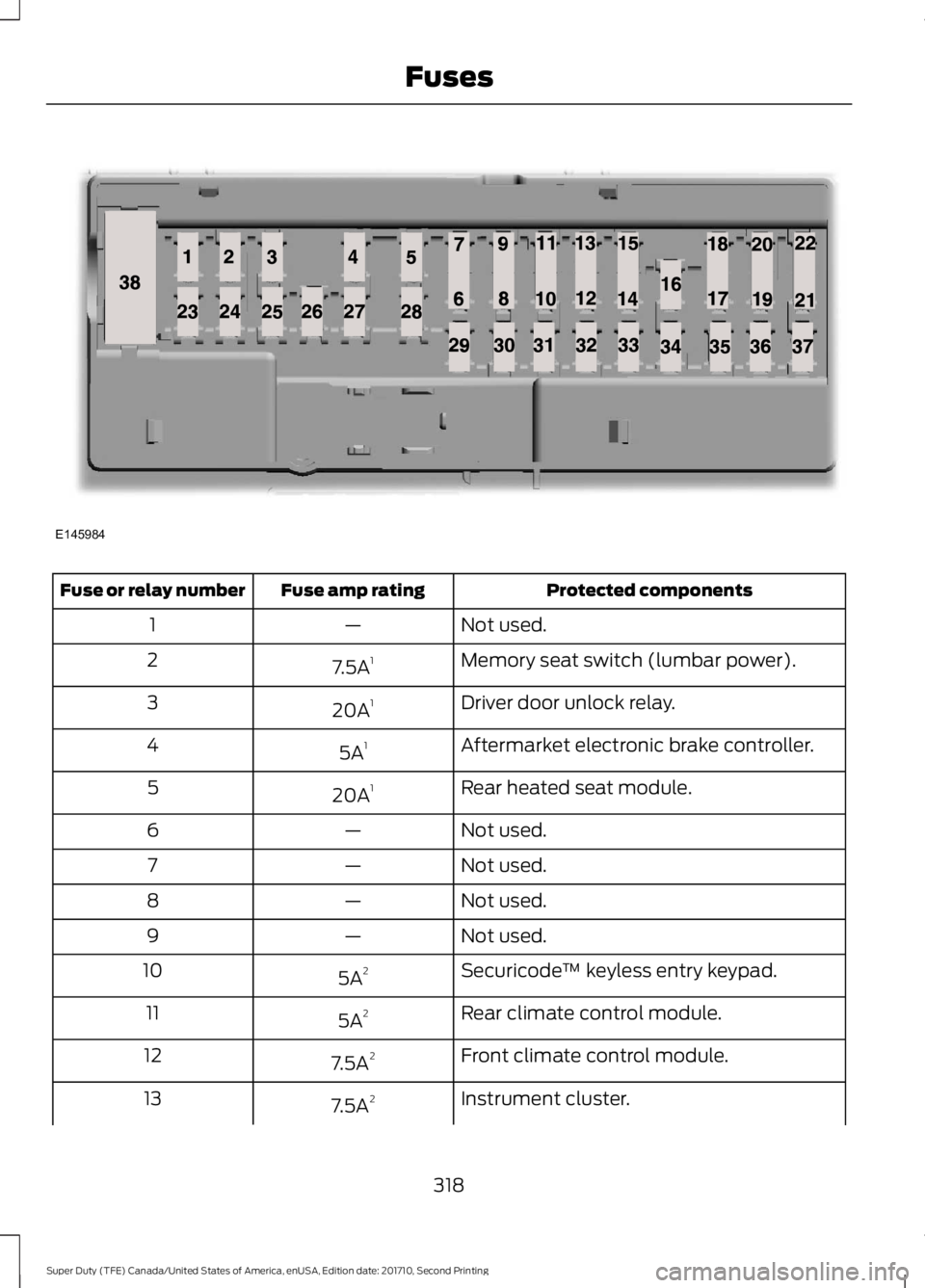
Protected componentsFuse amp ratingFuse or relay number
Not used.—1
Memory seat switch (lumbar power).7.5A12
Driver door unlock relay.20A13
Aftermarket electronic brake controller.5A14
Rear heated seat module.20A15
Not used.—6
Not used.—7
Not used.—8
Not used.—9
Securicode™ keyless entry keypad.5A210
Rear climate control module.5A211
Front climate control module.7.5A212
Instrument cluster.7.5A213
318
Super Duty (TFE) Canada/United States of America, enUSA, Edition date: 201710, Second Printing
FusesE145984
Page 322 of 642
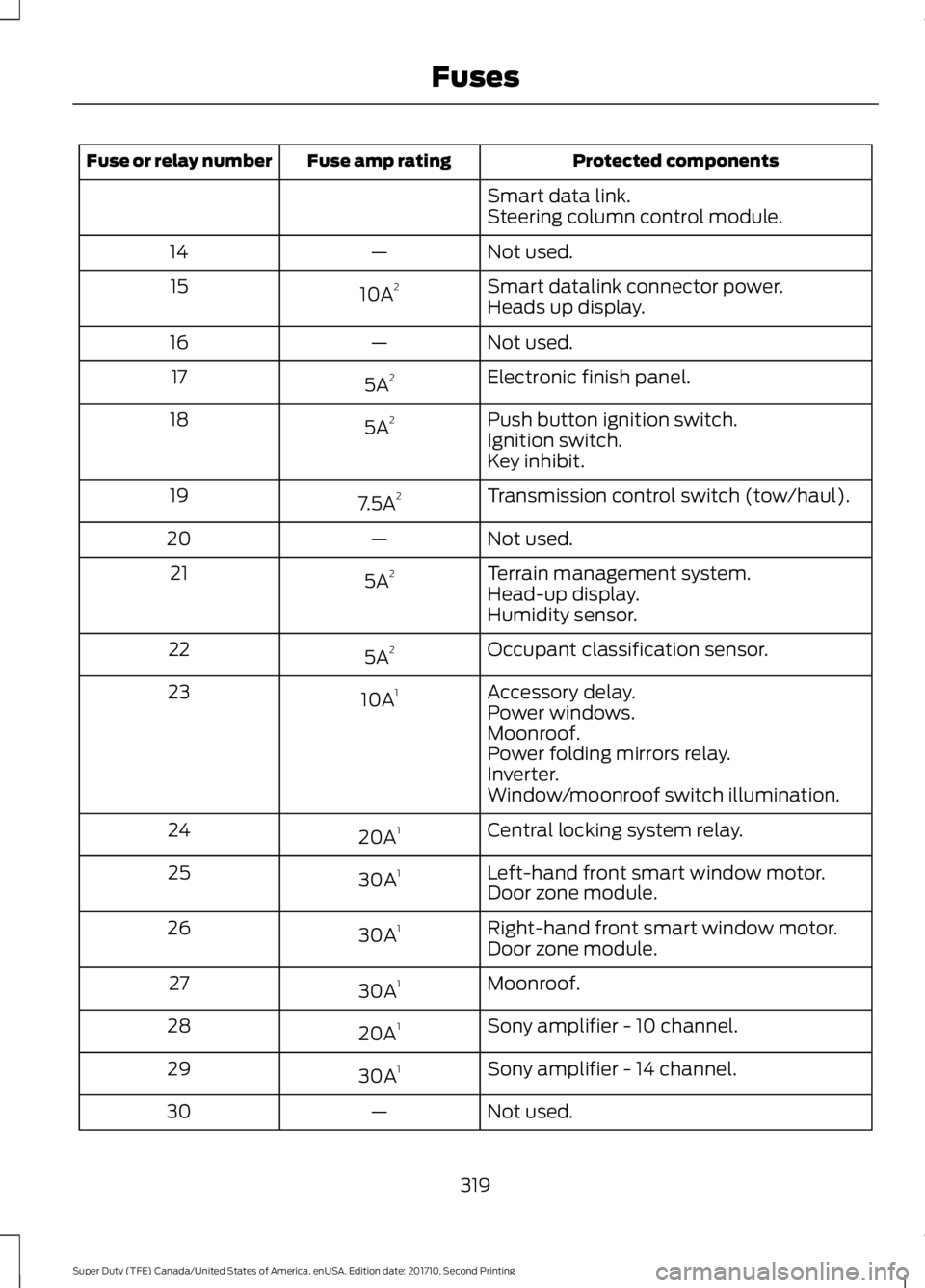
Protected componentsFuse amp ratingFuse or relay number
Smart data link.Steering column control module.
Not used.—14
Smart datalink connector power.10A215Heads up display.
Not used.—16
Electronic finish panel.5A217
Push button ignition switch.5A218Ignition switch.Key inhibit.
Transmission control switch (tow/haul).7.5A219
Not used.—20
Terrain management system.5A221Head-up display.Humidity sensor.
Occupant classification sensor.5A222
Accessory delay.10A123Power windows.Moonroof.Power folding mirrors relay.Inverter.Window/moonroof switch illumination.
Central locking system relay.20A124
Left-hand front smart window motor.30A125Door zone module.
Right-hand front smart window motor.30A126Door zone module.
Moonroof.30A127
Sony amplifier - 10 channel.20A128
Sony amplifier - 14 channel.30A129
Not used.—30
319
Super Duty (TFE) Canada/United States of America, enUSA, Edition date: 201710, Second Printing
Fuses
Page 402 of 642
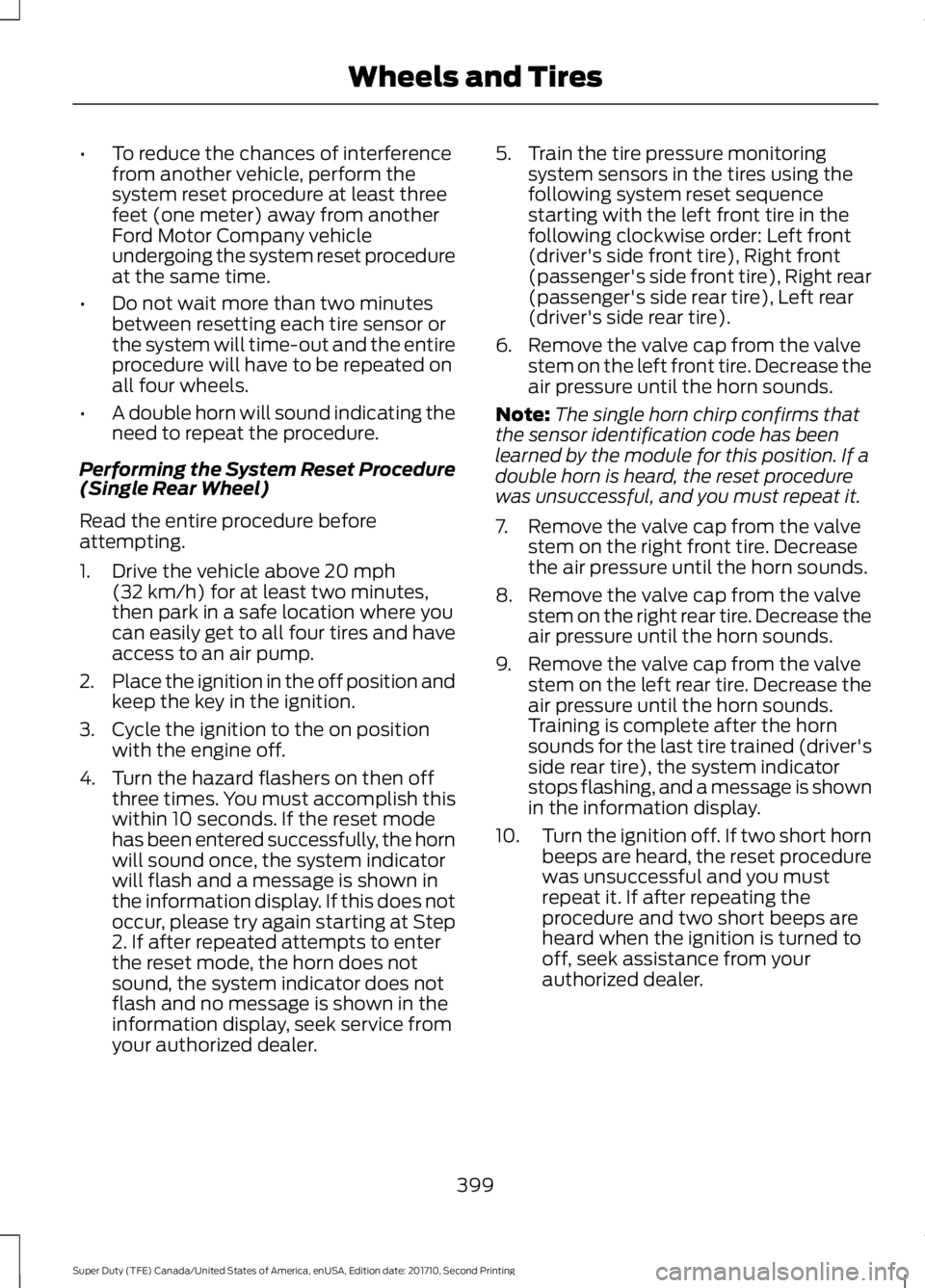
•To reduce the chances of interferencefrom another vehicle, perform thesystem reset procedure at least threefeet (one meter) away from anotherFord Motor Company vehicleundergoing the system reset procedureat the same time.
•Do not wait more than two minutesbetween resetting each tire sensor orthe system will time-out and the entireprocedure will have to be repeated onall four wheels.
•A double horn will sound indicating theneed to repeat the procedure.
Performing the System Reset Procedure(Single Rear Wheel)
Read the entire procedure beforeattempting.
1. Drive the vehicle above 20 mph(32 km/h) for at least two minutes,then park in a safe location where youcan easily get to all four tires and haveaccess to an air pump.
2.Place the ignition in the off position andkeep the key in the ignition.
3. Cycle the ignition to the on positionwith the engine off.
4. Turn the hazard flashers on then offthree times. You must accomplish thiswithin 10 seconds. If the reset modehas been entered successfully, the hornwill sound once, the system indicatorwill flash and a message is shown inthe information display. If this does notoccur, please try again starting at Step2. If after repeated attempts to enterthe reset mode, the horn does notsound, the system indicator does notflash and no message is shown in theinformation display, seek service fromyour authorized dealer.
5. Train the tire pressure monitoringsystem sensors in the tires using thefollowing system reset sequencestarting with the left front tire in thefollowing clockwise order: Left front(driver's side front tire), Right front(passenger's side front tire), Right rear(passenger's side rear tire), Left rear(driver's side rear tire).
6. Remove the valve cap from the valvestem on the left front tire. Decrease theair pressure until the horn sounds.
Note:The single horn chirp confirms thatthe sensor identification code has beenlearned by the module for this position. If adouble horn is heard, the reset procedurewas unsuccessful, and you must repeat it.
7. Remove the valve cap from the valvestem on the right front tire. Decreasethe air pressure until the horn sounds.
8. Remove the valve cap from the valvestem on the right rear tire. Decrease theair pressure until the horn sounds.
9. Remove the valve cap from the valvestem on the left rear tire. Decrease theair pressure until the horn sounds.Training is complete after the hornsounds for the last tire trained (driver'sside rear tire), the system indicatorstops flashing, and a message is shownin the information display.
10.Turn the ignition off. If two short hornbeeps are heard, the reset procedurewas unsuccessful and you mustrepeat it. If after repeating theprocedure and two short beeps areheard when the ignition is turned tooff, seek assistance from yourauthorized dealer.
399
Super Duty (TFE) Canada/United States of America, enUSA, Edition date: 201710, Second Printing
Wheels and Tires