key FORD F450 SUPER DUTY 2017 Owner's Manual
[x] Cancel search | Manufacturer: FORD, Model Year: 2017, Model line: F450 SUPER DUTY, Model: FORD F450 SUPER DUTY 2017Pages: 642, PDF Size: 12.35 MB
Page 72 of 642
Anti-Scan Feature
The keypad will go into an anti-scan modeif you enter the wrong code seven times(35 consecutive button presses). Thismode disables the keypad for one minuteand the keypad lamp will flash.
The anti-scan feature will turn off after:
•One minute of keypad inactivity.
•Pressing the unlock button on theremote control.
•Switching the ignition on.
•Unlocking the vehicle using intelligentaccess.
Unlocking and Locking the Doors
To Unlock the Driver Door
Enter the factory-set five-digit code or yourpersonal code. You must press eachnumber within five seconds of each other.The interior lamps illuminate.
Note:All doors unlock if you disable thetwo-stage unlocking feature. See GeneralInformation (page 111).
To Unlock All Doors
Enter the factory-set code or your personalcode, then press 3·4 control within fiveseconds.
To Lock All Doors
Press and hold 7·8 and 9·0 at the sametime with the driver door closed. You donot need to enter the keypad code first.
69
Super Duty (TFE) Canada/United States of America, enUSA, Edition date: 201710, Second Printing
Doors and Locks
Page 73 of 642
TAILGATE LOCK (If Equipped)
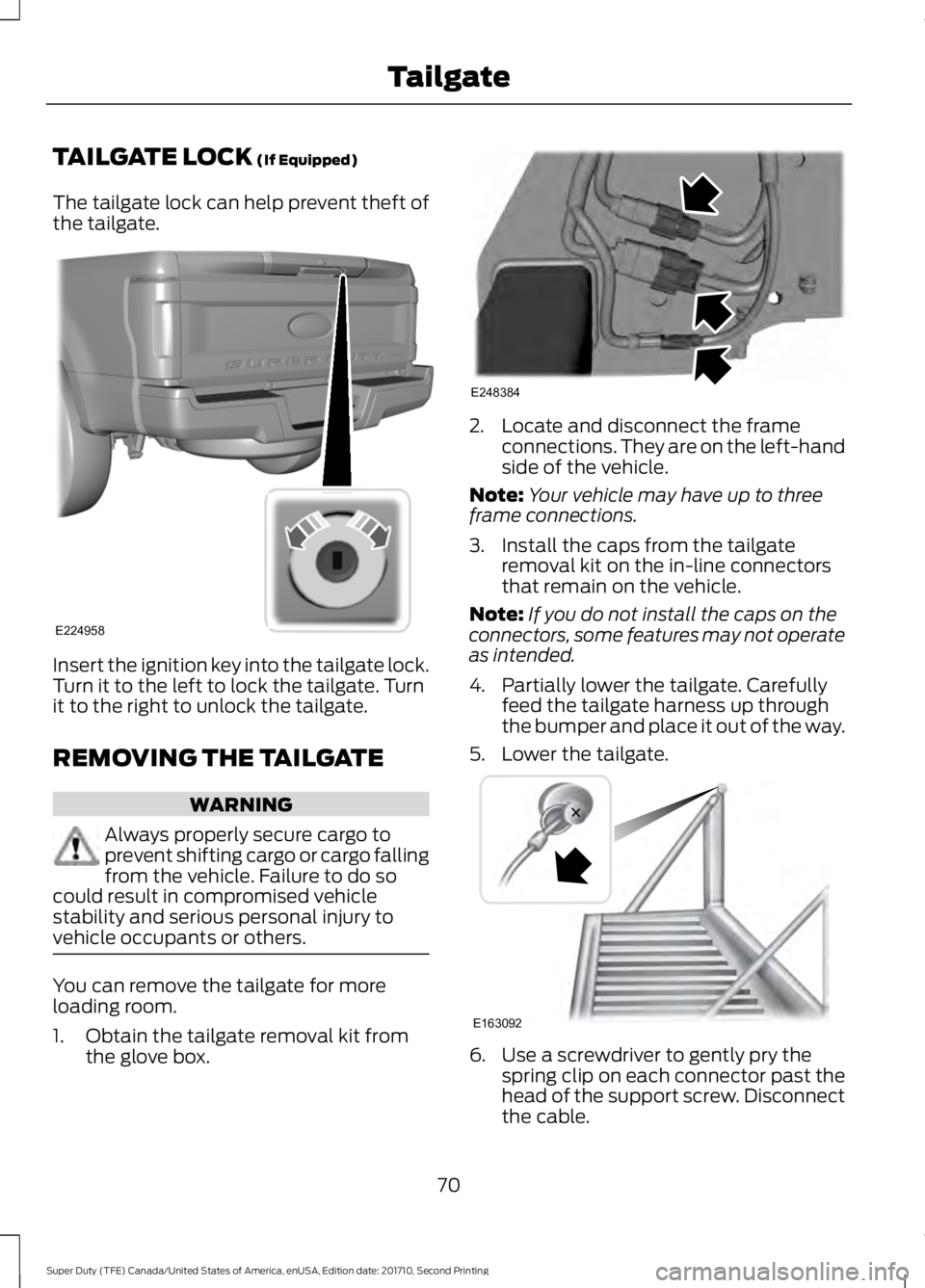
The tailgate lock can help prevent theft ofthe tailgate.
Insert the ignition key into the tailgate lock.Turn it to the left to lock the tailgate. Turnit to the right to unlock the tailgate.
REMOVING THE TAILGATE
WARNING
Always properly secure cargo toprevent shifting cargo or cargo fallingfrom the vehicle. Failure to do socould result in compromised vehiclestability and serious personal injury tovehicle occupants or others.
You can remove the tailgate for moreloading room.
1. Obtain the tailgate removal kit fromthe glove box.
2. Locate and disconnect the frameconnections. They are on the left-handside of the vehicle.
Note:Your vehicle may have up to threeframe connections.
3. Install the caps from the tailgateremoval kit on the in-line connectorsthat remain on the vehicle.
Note:If you do not install the caps on theconnectors, some features may not operateas intended.
4. Partially lower the tailgate. Carefullyfeed the tailgate harness up throughthe bumper and place it out of the way.
5. Lower the tailgate.
6. Use a screwdriver to gently pry thespring clip on each connector past thehead of the support screw. Disconnectthe cable.
70
Super Duty (TFE) Canada/United States of America, enUSA, Edition date: 201710, Second Printing
TailgateE224958 E248384 E163092
Page 77 of 642
PASSIVE ANTI-THEFT
SYSTEM
Note: The system is not compatible withnon-Ford aftermarket remote start systems.Use of these systems may result in enginestarting problems and a loss of securityprotection.
Note: Metallic objects, electronic devicesor a second coded key on the same keychain may result in vehicle startingproblems, especially if they are too close tothe key when starting your vehicle. Preventthese objects from touching the coded keywhen starting your vehicle. Switch theignition off, move all objects on the keychain away from the coded key and restartyour vehicle if a problem occurs.
Note: Do not leave a duplicate coded keyin your vehicle. Always take your keys andlock all doors when leaving your vehicle.
SecuriLock®
The system helps prevent the engine fromstarting unless you use a coded keyprogrammed to your vehicle. Using thewrong key may prevent your vehicle fromstarting. A message may appear in theinformation display.
If you are unable to start your vehicle witha coded key, it is not operating correctly.A message may appear in the informationdisplay.
Automatic Arming
The system arms when you switch theignition off.
Automatic Disarming
The system disarms when you switch theignition on with a coded key.
Replacement Keys
Note:Your vehicle comes with two keys.
The integrated keyhead transmitterfunctions as a programmed ignition keythat operates all the locks and starts yourvehicle, as well as a remote control.
The intelligent access key functions as aprogrammed key that operates the driverdoor lock and turns on the intelligentaccess with push button start system, aswell as a remote control.
If your coded keys are lost or stolen andyou do not have an extra coded key, youneed to erase the key codes from yourvehicle and program new coded keys.Contact an authorized dealer.
Store an extra programmed key away fromyour vehicle in a safe place. You canpurchase replacement keys or remotecontrols from an authorized dealer.
Programming a Spare IntegratedKeyhead Transmitter
Note:You can program a maximum of sixkeys to your vehicle. All six can be integratedkeyhead transmitters.
You can program your own integratedkeyhead transmitter or standardSecuriLock coded keys to your vehicle.This procedure programs both the vehicleimmobilizer keycode and the remotecontrol to your vehicle.
Only use integrated keyhead transmittersor standard SecuriLock keys.
You must have two previouslyprogrammed coded keys and the newunprogrammed key readily accessible.Contact an authorized dealer to have thespare key programmed if two previouslyprogrammed keys are not available.
Read and understand the entire procedurebefore you begin.
1.Insert the first previously programmedcoded key into the ignition.
74
Super Duty (TFE) Canada/United States of America, enUSA, Edition date: 201710, Second Printing
Security
Page 78 of 642
2.Switch the ignition from off to on. Keepthe ignition on for at least 3 seconds,but no more than 10 seconds.
3.Switch the ignition off and remove thefirst coded key from the ignition.
4. After at least 3 seconds but within 10seconds of switching the ignition off,insert the second previously coded keyinto the ignition.
5.Switch the ignition from off to on. Keepthe ignition on for at least 3 seconds,but no more than 10 seconds.
6.Switch the ignition off and remove thesecond previously programmed codedkey from the ignition.
7. After at least 3 seconds but within 10seconds of switching the ignition offand removing the previouslyprogrammed coded key, insert the newunprogrammed key into the ignition.
8.Switch the ignition from off to on. Keepthe ignition on for at least six seconds.
9.Remove the newly programmed codedkey from the ignition.
If you have successfully programmed thenew integrated keyhead transmitter, it willstart your vehicle and operate the remoteentry system.
If programming was unsuccessful, wait 10seconds and repeat steps 1 through 9. Ifyou are still unsuccessful, take your vehicleto your authorized dealer.
Programming a Spare IntelligentAccess Key
Note:You can program a maximum of sixkeys to your vehicle. All six must beintelligent access keys.
This procedure programs both the vehicleimmobilizer keycode and the remotecontrol to your vehicle.
You must have two previouslyprogrammed intelligent access keys insideyour vehicle and the new unprogrammedintelligent access key readily accessible.Contact an authorized dealer to have thespare key programmed if two previouslyprogrammed keys are not available.
Make sure that the ignition is switched offbefore beginning this procedure. Make surethat you close all the doors beforebeginning and that they remain closedthroughout the procedure. Carry out allsteps within 30 seconds of starting thesequence. Stop and wait for at least oneminute before starting again if you carryout any steps out of sequence.
Read and understand the entire procedurebefore you begin.
1. Remove the key blade from thetransmitter.
75
Super Duty (TFE) Canada/United States of America, enUSA, Edition date: 201710, Second Printing
Security
Page 79 of 642
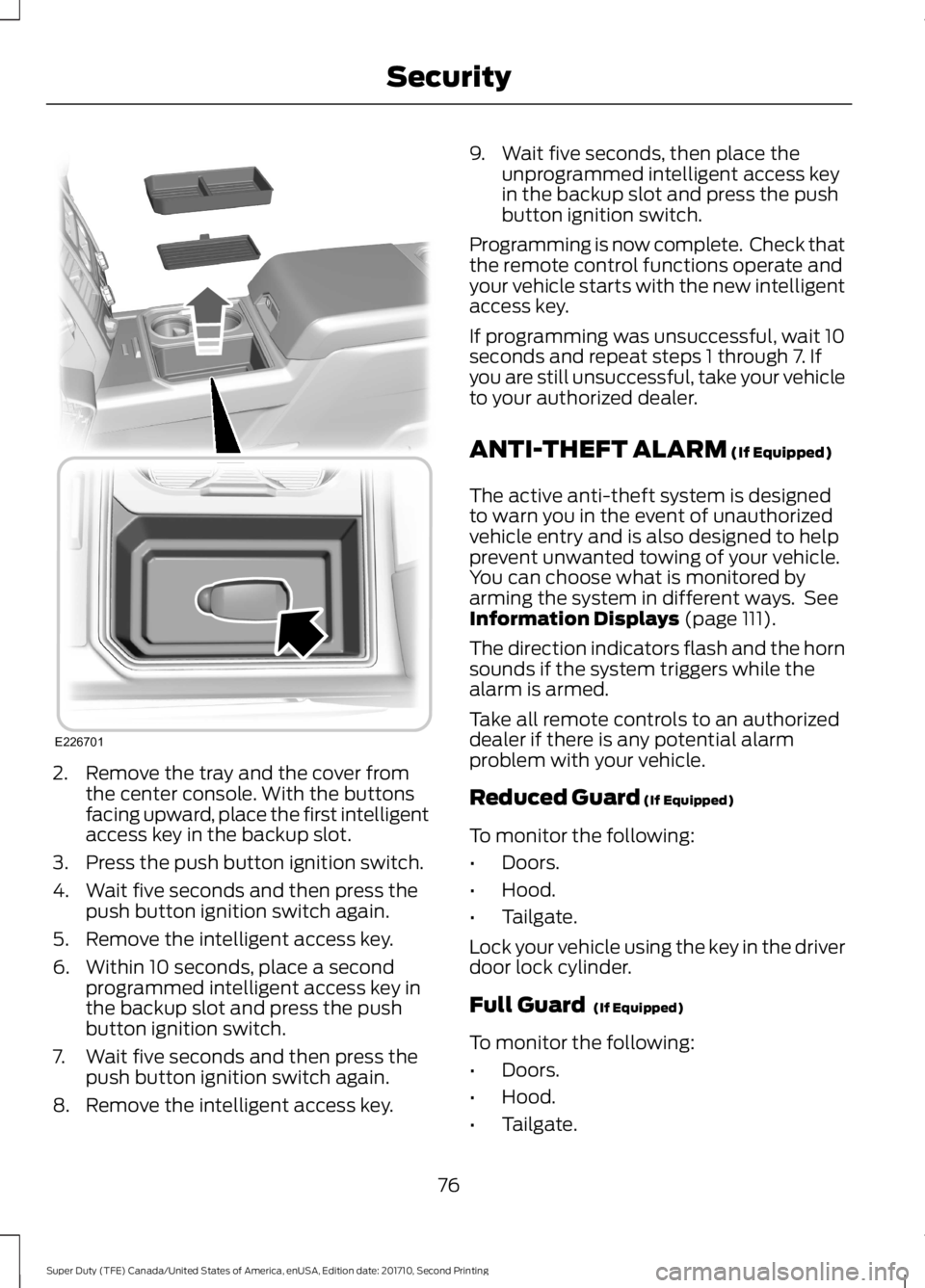
2. Remove the tray and the cover fromthe center console. With the buttonsfacing upward, place the first intelligentaccess key in the backup slot.
3. Press the push button ignition switch.
4. Wait five seconds and then press thepush button ignition switch again.
5. Remove the intelligent access key.
6. Within 10 seconds, place a secondprogrammed intelligent access key inthe backup slot and press the pushbutton ignition switch.
7. Wait five seconds and then press thepush button ignition switch again.
8. Remove the intelligent access key.
9. Wait five seconds, then place theunprogrammed intelligent access keyin the backup slot and press the pushbutton ignition switch.
Programming is now complete. Check thatthe remote control functions operate andyour vehicle starts with the new intelligentaccess key.
If programming was unsuccessful, wait 10seconds and repeat steps 1 through 7. Ifyou are still unsuccessful, take your vehicleto your authorized dealer.
ANTI-THEFT ALARM (If Equipped)
The active anti-theft system is designedto warn you in the event of unauthorizedvehicle entry and is also designed to helpprevent unwanted towing of your vehicle.You can choose what is monitored byarming the system in different ways. SeeInformation Displays (page 111).
The direction indicators flash and the hornsounds if the system triggers while thealarm is armed.
Take all remote controls to an authorizeddealer if there is any potential alarmproblem with your vehicle.
Reduced Guard (If Equipped)
To monitor the following:
•Doors.
•Hood.
•Tailgate.
Lock your vehicle using the key in the driverdoor lock cylinder.
Full Guard (If Equipped)
To monitor the following:
•Doors.
•Hood.
•Tailgate.
76
Super Duty (TFE) Canada/United States of America, enUSA, Edition date: 201710, Second Printing
SecurityE226701
Page 80 of 642
•Movement inside your vehicle.
•Change in vehicle inclination, forexample, unwanted towing.
Lock your vehicle using the remote controlor the power door lock control with theaccompanying door open and then closeall doors.
Note:Do not choose full monitor mode ifmovement within the vehicle is likely tooccur or when the vehicle is in transport.
Note:For correct operation of the interiormotion detection system, make sure allwindows are closed prior to arming thesystem. This helps prevent accidental alarmactivation due to external influences andmake sure of correct interior motiondetection. Additionally, the interior motionsensing system will not arm if any door isajar.
Arming the Alarm
The alarm is ready to arm when there isnot a key in the ignition. Lock your vehicleto arm the alarm.
The direction indicators flash once afteryou lock your vehicle. This indicates thealarm is in the pre-armed mode. It fullyarms after 20 seconds.
Disarming the Alarm
Disarm the alarm by any of the followingactions:
•Press the power door unlock buttonwithin the 20-second pre-armed mode.
•Unlock the doors with the remotecontrol or keyless entry keypad.
•Switch the ignition on or start yourvehicle.
•Use a key in the driver door lockcylinder to unlock your vehicle, thenswitch the ignition on within 12seconds.
Note:Pressing the panic button on theremote control stops the horn and directionindicators, but will not disarm the system.
77
Super Duty (TFE) Canada/United States of America, enUSA, Edition date: 201710, Second Printing
Security
Page 107 of 642
Engine Oil Pressure Gauge
Indicates engine oil pressure. The needleshould stay in the normal operating range(between L and H). If the needle fallsbelow the normal range, stop your vehicle,turn off the engine and check the engineoil level. Add oil if needed. If the oil level iscorrect, have your vehicle checked by anauthorized dealer.
Engine Coolant TemperatureGauge
WARNING
Never remove the coolant reservoircap when the engine is running orhot.
Indicates engine coolant temperature. Atnormal operating temperature, the levelindicator will be in the normal range. If theengine coolant temperature exceeds thenormal range, stop your vehicle as soon assafely possible, switch off the engine andlet the engine cool.
Fuel Gauge
Note:The fuel gauge may vary slightlywhen your vehicle is moving or on a gradient.
Switch the ignition on. The fuel gauge willindicate approximately how much fuel isleft in the fuel tank. The arrow adjacent tothe fuel pump symbol indicates on whichside of your vehicle the fuel filler door islocated.
The needle should move toward F whenyou refuel your vehicle. If the needle pointsto E after adding fuel, this indicates yourvehicle needs service soon.
After refueling some variability in needleposition is normal:
•It may take a short time for the needleto reach F after leaving the gas station.This is normal and depends upon theslope of pavement at the gas station.
•The fuel amount dispensed into thetank is a little less or more than thegauge indicated. This is normal anddepends upon the slope of pavementat the gas station.
•If the gas station nozzle shuts offbefore the tank is full, try a differentgas pump nozzle.
Low Fuel Reminder
A low fuel reminder triggers when thedistance to empty value reaches 50 mi(80 km) to empty, with additionalwarnings at 25 mi (40 km), 10 mi (20 km)and 0 mi (0 km) to empty, provided themessage is cleared each time. Anadditional warning at 75 mi (120 km) toempty is provided when the MyKey is beingused.
Variations:
Note:The distance-to-empty warning can appear at different fuel gauge positions dependingon fuel economy conditions. This variation is normal.
104
Super Duty (TFE) Canada/United States of America, enUSA, Edition date: 201710, Second Printing
Instrument Cluster
Page 112 of 642
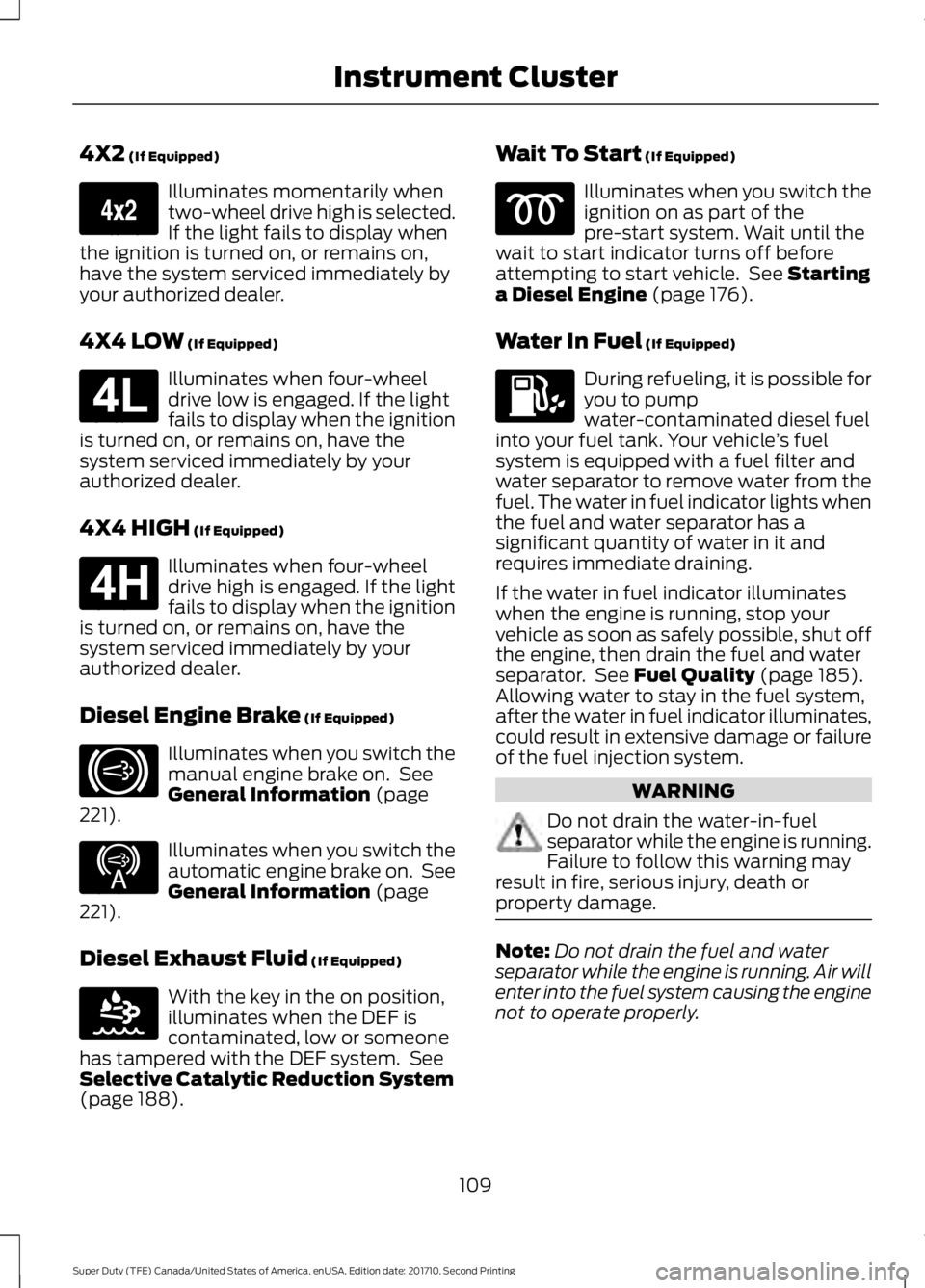
4X2 (If Equipped)
Illuminates momentarily whentwo-wheel drive high is selected.If the light fails to display whenthe ignition is turned on, or remains on,have the system serviced immediately byyour authorized dealer.
4X4 LOW (If Equipped)
Illuminates when four-wheeldrive low is engaged. If the lightfails to display when the ignitionis turned on, or remains on, have thesystem serviced immediately by yourauthorized dealer.
4X4 HIGH (If Equipped)
Illuminates when four-wheeldrive high is engaged. If the lightfails to display when the ignitionis turned on, or remains on, have thesystem serviced immediately by yourauthorized dealer.
Diesel Engine Brake (If Equipped)
Illuminates when you switch themanual engine brake on. SeeGeneral Information (page221).
Illuminates when you switch theautomatic engine brake on. SeeGeneral Information (page221).
Diesel Exhaust Fluid (If Equipped)
With the key in the on position,illuminates when the DEF iscontaminated, low or someonehas tampered with the DEF system. SeeSelective Catalytic Reduction System(page 188).
Wait To Start (If Equipped)
Illuminates when you switch theignition on as part of thepre-start system. Wait until thewait to start indicator turns off beforeattempting to start vehicle. See Startinga Diesel Engine (page 176).
Water In Fuel (If Equipped)
During refueling, it is possible foryou to pumpwater-contaminated diesel fuelinto your fuel tank. Your vehicle’s fuelsystem is equipped with a fuel filter andwater separator to remove water from thefuel. The water in fuel indicator lights whenthe fuel and water separator has asignificant quantity of water in it andrequires immediate draining.
If the water in fuel indicator illuminateswhen the engine is running, stop yourvehicle as soon as safely possible, shut offthe engine, then drain the fuel and waterseparator. See Fuel Quality (page 185).Allowing water to stay in the fuel system,after the water in fuel indicator illuminates,could result in extensive damage or failureof the fuel injection system.
WARNING
Do not drain the water-in-fuelseparator while the engine is running.Failure to follow this warning mayresult in fire, serious injury, death orproperty damage.
Note:Do not drain the fuel and waterseparator while the engine is running. Air willenter into the fuel system causing the enginenot to operate properly.
109
Super Duty (TFE) Canada/United States of America, enUSA, Edition date: 201710, Second Printing
Instrument ClusterE163173 E181780 E181779 E171217 E234452 E163176
Page 113 of 642
AUDIBLE WARNINGS AND
INDICATORS
Headlamps On Warning Chime
Sounds when you remove the key from theignition and open the driver's door and youhave left the headlamps or parking lampson.
Key in Ignition Warning Chime
Sounds when you open the driver's doorand you have left the key in the ignition.
Parking Brake On Warning Chime
Sounds when you have left the parkingbrake on and drive your vehicle. If thewarning chime remains on after you havereleased the parking brake, have thesystem checked by your authorized dealerimmediately.
110
Super Duty (TFE) Canada/United States of America, enUSA, Edition date: 201710, Second Printing
Instrument Cluster
Page 114 of 642
GENERAL INFORMATION
WARNING
Driving while distracted can result inloss of vehicle control, crash andinjury. We strongly recommend thatyou use extreme caution when using anydevice that may take your focus off theroad. Your primary responsibility is the safeoperation of your vehicle. We recommendagainst the use of any hand-held devicewhile driving and encourage the use ofvoice-operated systems when possible.Make sure you are aware of all applicablelocal laws that may affect the use ofelectronic devices while driving.
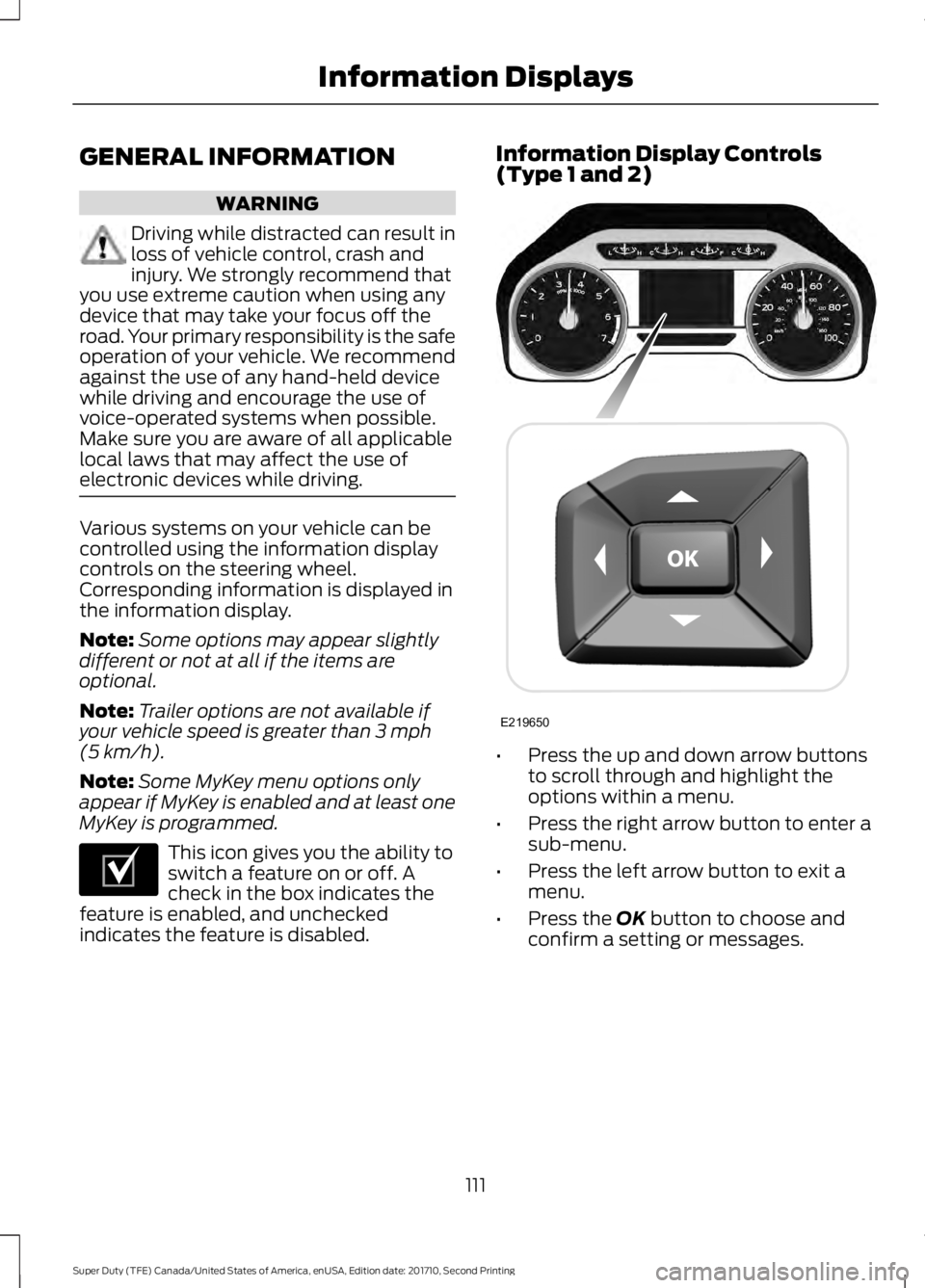
Various systems on your vehicle can becontrolled using the information displaycontrols on the steering wheel.Corresponding information is displayed inthe information display.
Note:Some options may appear slightlydifferent or not at all if the items areoptional.
Note:Trailer options are not available ifyour vehicle speed is greater than 3 mph(5 km/h).
Note:Some MyKey menu options onlyappear if MyKey is enabled and at least oneMyKey is programmed.
This icon gives you the ability toswitch a feature on or off. Acheck in the box indicates thefeature is enabled, and uncheckedindicates the feature is disabled.
Information Display Controls(Type 1 and 2)
•Press the up and down arrow buttonsto scroll through and highlight theoptions within a menu.
•Press the right arrow button to enter asub-menu.
•Press the left arrow button to exit amenu.
•Press the OK button to choose andconfirm a setting or messages.
111
Super Duty (TFE) Canada/United States of America, enUSA, Edition date: 201710, Second Printing
Information DisplaysE204495 E219650