sync FORD FIESTA 2015 Owner's Guide
[x] Cancel search | Manufacturer: FORD, Model Year: 2015, Model line: FIESTA, Model: FORD FIESTA 2015Pages: 423, PDF Size: 5.5 MB
Page 286 of 423
Note:
SYNC Services requires activation
before use. Visit www.SYNCMyRide.com to
register and check your eligibility for
complimentary services. Standard phone
and message rates may apply. Subscription
may be required. You must also have the
active SYNC Services Bluetooth-enabled
cellular phone paired and connected to the
system in order to connect to, and use,
SYNC Services. See Using SYNC™ With
Your Phone (page 268).
Note: This feature does not function
properly if you have enabled caller ID
blocking on your cellular phone. Make sure
your cellular phone is not blocking caller ID
before using SYNC Services.
Note: The driver is ultimately responsible
for the safe operation of the vehicle, and
therefore, must evaluate whether it is safe
to follow the suggested directions. Any
navigation features provided are only an aid.
Make your driving decisions based on your
observations of local conditions and existing
traffic regulations. Do not follow the route
suggestions if doing so would result in an
unsafe or illegal maneuver, place you in an
unsafe situation, or if you would be directed
into an area that you consider unsafe. Maps
used by this system may be inaccurate
because of errors, changes in roads, traffic
conditions or driving conditions. Note:
When you connect, the service uses
GPS technology and advanced vehicle
sensors to collect your vehicle's current
location, travel direction and speed to help
provide you with the directions, traffic
reports, or business searches you request.
Further, to provide the services you request,
for continuous improvement, the service
may collect and record call details and voice
communications. For more information, see
SYNC Services Terms and Conditions at
www.SYNCMyRide.com. If you do not want
Ford or its service providers to collect your
vehicle travel information or other
information identified in the Terms and
Conditions, do not subscribe or use the
service.
SYNC Services uses advanced vehicle
sensors, integrated GPS technology and
comprehensive map and traffic data, to
give you personalized traffic reports,
precise turn-by-turn directions, business
search, news, sports, weather and more.
For a complete list of services, or to learn
more, please visit www.SYNCMyRide.com.
Connecting to SYNC Services Using
Voice Commands
1. Press the voice button.
2. When prompted, say "Services". This initiates an outgoing call to SYNC
Services using your paired and
connected Bluetooth-enabled cellular
phone.
3. Once you connect to the service, follow
the voice prompts to request the
desired service, such as Traffic or
Directions. You can also say, "What are
my choices?" to receive a list of
available services from which to
choose.
4. Say, "Services" to return to the Services
main menu or for help, say, "Help".
283
Fiesta (CCT), enUSA, Second Printing SYNC™
ProCarManuals.com
Page 287 of 423
Connecting to SYNC Services Using
the Phone Menu
1. Press the phone button to enter the
phone menu.
2. Scroll to Services.
3. Press OK to confirm and enter the
Services menu. The display indicates
the system is connecting.
4. Press
OK. SYNC initiates the call to the
Services portal.
5. Once you connect to the service, follow
the voice prompts to request the
desired service, such as Traffic or
Directions. You can also say, "What are
my choices?" to receive a list of
available services from which to
choose.
6. Say, "Services" to return to the Services
main menu or for help, say, "Help".
Receiving Turn-by-Turn Directions
1. When connected to SYNC Services, say "Directions" or "Business search".
To find the closest business or type of
business to your current location, just
say "Business search" and then
"Search near me". If you need further
assistance in finding a location you can
say "Operator" at any time within a
Directions or Business search to speak
with a live operator. The system may
prompt you to speak with an operator
when it has difficulty matching your
voice request. The live operator can assist you by searching for businesses
by name or by category, residential
addresses by street address or by
name or specific street intersections.
Operator Assist is a feature of your
SYNC Services subscription. For more
information on Operator Assist, visit
www.SYNCMyRide.com/support.
2. Follow the voice prompts to select your
destination. Once you select your
destination, the system uploads your
current vehicle location, calculates a
route based on current traffic
conditions and sends it back to your
vehicle. After the route download is
complete, the phone call automatically
ends. You then receive audible and
visual driving instructions as you travel
toward your destination.
3. While on an active route, you can select
or say "Route summary" or "Route
status" to view the Route Summary
turn list or the Route Status ETA. You
can also turn voice guidance on or off,
cancel the route or update the route.
If you miss a turn, SYNC automatically asks
if you want the route updated. Just say,
"Yes" when prompted and the system
sends a new route to your vehicle.
Disconnecting from SYNC Services
1. Press and hold the phone button on the steering wheel.
2. Say "Goodbye" from the SYNC Services main menu.
284
Fiesta (CCT), enUSA, Second Printing SYNC™
ProCarManuals.com
Page 288 of 423
SYNC Services quick tips
You can personalize your Services feature to provide
quicker access to your most used or favorite information.
You can save address points such as work or home. You
can also save favorite information like sports teams or a
news category. You can learn more about personalization
by logging onto www.SYNCMyRide.com.
Personalizing
Press the voice button at any time (while connected to
SYNC Services) to interrupt a voice prompt or an audio
clip (such as a sports report) and say your voice command.
Push to interrupt
Your subscription is associated with your Bluetooth-
enabled cellular phone number, not your VIN (Vehicle
Identification Number). You can pair and connect your
phone to any vehicle equipped with SYNC Services and
continue enjoying your personalized services.
Portable
You can even access your account outside your vehicle.
Just use the number on your phone's call history. Traffic
and Directions features do not function properly but
information services and the 411 connect and text message
features are available.
SYNC AppLink
Note: This feature is only available in the
United States.
Note: You must pair and connect your
smartphone to SYNC to access AppLink.
Note: iPhone users need to connect the
phone to the USB port in order to start the
application. We recommend you lock your
iPhone after starting an application.
Note: The AppLink feature is not available
if your vehicle is equipped with the MyFord
Touch or MyLincoln Touch system.
Note: Depending on your display type, you
can access AppLink from the media menu,
the phone menu, or by using voice
commands. Once an app is running through
AppLink, you can control main features of
the app through voice commands and
steering wheel controls. To Access Using the Phone Menu
1. Press the phone button to access the
SYNC phone menu on-screen.
2. Scroll to Mobile Apps and press OK to access a list of available applications.
3. Scroll through the list of available applications and press OK to select a
particular app.
4. Once an app is running through SYNC,
you can access an app ’s menu by
pressing the MENU button to first
access the SYNC menu.
5. Select "SYNC-Media" by pressing
OK.
6. Scroll until "
then press
OK. From here, you can
access an application's features, such
as Thumbs up and Thumbs down. For
more information, please visit
www.SYNCMyRide.com.
285
Fiesta (CCT), enUSA, Second Printing SYNC™
ProCarManuals.com
Page 289 of 423
To Access Using the Media Menu
1. Press the AUX button on the center
console.
2. Press
MENU to access the SYNC
menu.
3. Select "SYNC-Media" by pressing
OK.
4. Scroll to Mobile Apps and press OK to
access a list of available applications.
5. Scroll through the list of available applications and press
OK to select a
particular app.
6. Once an app is running through SYNC,
you can access an app ’s menu by
pressing the
MENU button to first
access the SYNC menu.
7. Select "SYNC-Media" by pressing
OK.
8. Scroll until "
then press
OK. From here, you can
access an application's features, such
as Thumbs up and Thumbs down. For
more information, please visit
www.SYNCMyRide.com.
To Access Using Voice Commands
1. Press the voice icon.
2. When prompted, say "Mobile Apps".
3. Say the name of the application after the tone.
4. The app should start. While an app is running through SYNC, you can press
the voice button and speak commands
specific to the app, such as "Play
Station Quickmix". Say "Help" to
discover available voice commands. USING SYNC™ WITH YOUR
MEDIA PLAYER
You can access and play music from your
digital music player over your vehicle's
speaker system using the system's media
menu or voice commands. You can also
sort and play your music by specific
categories, for example artist and album.
Note:
The system is capable of indexing up
to 6,000 songs.
SYNC is capable of hosting nearly any
digital media player including: iPod®,
Zune ™, plays from device players, and
most USB drives. SYNC also supports the
following audio formats MP3, WMA, WAV
and ACC.
Connecting Your Digital Media
Player to the USB Port
Note: If your digital media player has a
power switch, make sure you switch it on
before plugging it in.
To Connect Using Voice Commands
Plug the device into the USB port. See
USB Port
(page 263). 286
Fiesta (CCT), enUSA, Second Printing SYNC™
ProCarManuals.comE142599
Page 290 of 423
![FORD FIESTA 2015 Owners Guide Press the voice button and when prompted say:
Action and Description
Voice command
You can now play music by saying any of the appropriate
voice commands. See Media voice commands.
(USB [stick] | iPod](/img/11/57821/w960_57821-289.png "FORD FIESTA 2015 Owners Guide Press the voice button and when prompted say:
Action and Description
Voice command
You can now play music by saying any of the appropriate
voice commands. See Media voice commands.
(USB [stick] | iPod")
Press the voice button and when prompted say:
Action and Description
Voice command
You can now play music by saying any of the appropriate
voice commands. See Media voice commands.
(USB [stick] | iPod | MP3
[player])
You do not need to say words that appear within square brackets. For example, for where
(USB [stick] | iPOD | MP3 [player]) appears, you can say USB or USB stick.
To Connect Using the System Menu
Plug the device into the USB port. See
USB Port (page 263).
Press the
AUX button, then scroll to: Action and Description
Message
Press the
OK button to enter the media menu.
Menu
Press the
OK button.
Browse device
Press the
OK button.
USB
Depending on how many digital media files are on your
connected device, the following message may appear in the
radio display. When indexing is complete, the screen returns
to the Play menu.
Indexing…
Select one of the following:
Play all
Artist
Albums
Genres
Playlists
Tracks
Browse USB
Similar music Exit the current menu.
Return
287
Fiesta (CCT), enUSA, Second Printing SYNC™
ProCarManuals.com
Page 291 of 423
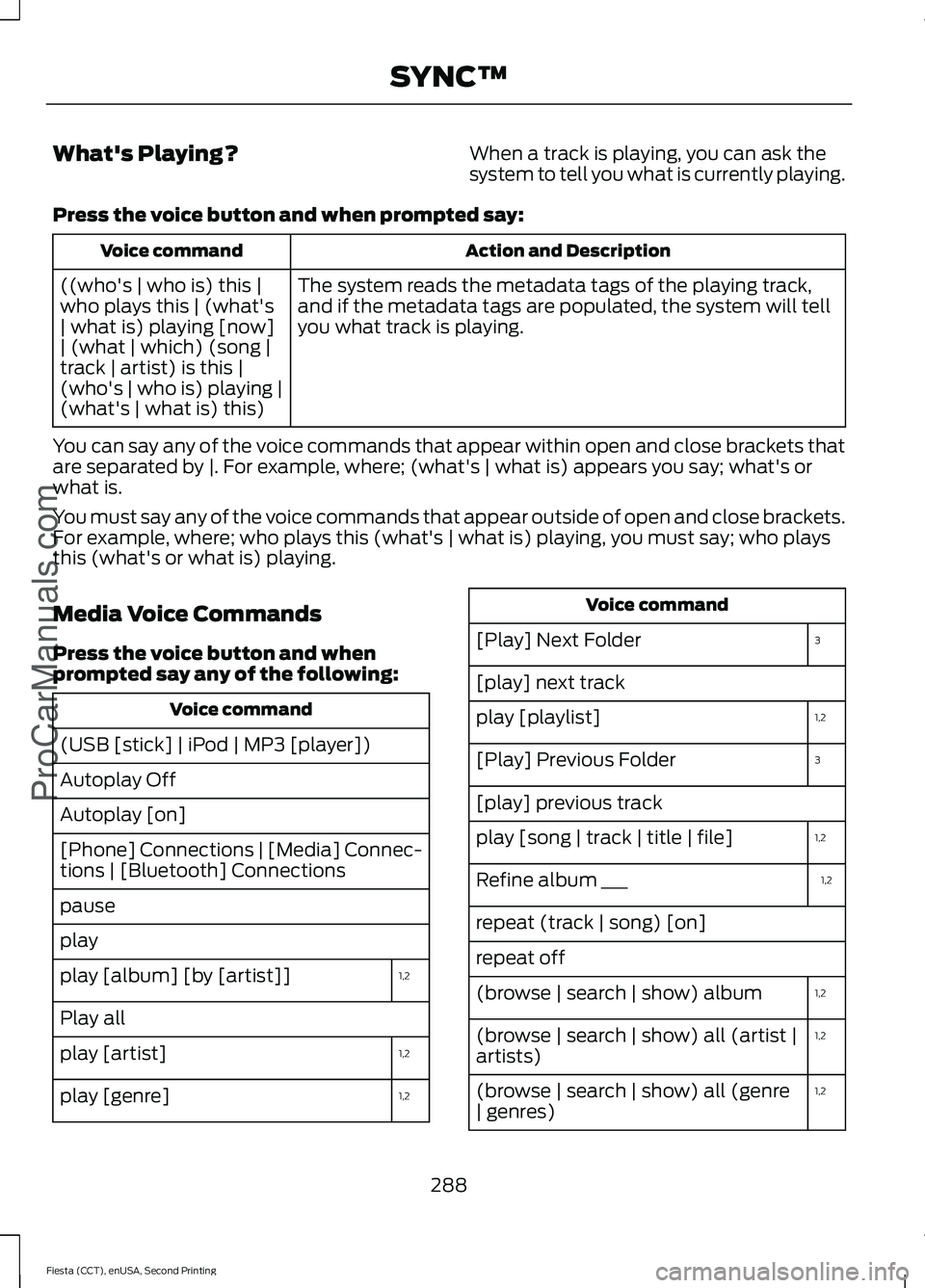
What's Playing?
When a track is playing, you can ask the
system to tell you what is currently playing.
Press the voice button and when prompted say: Action and Description
Voice command
The system reads the metadata tags of the playing track,
and if the metadata tags are populated, the system will tell
you what track is playing.
((who's | who is) this |
who plays this | (what's
| what is) playing [now]
| (what | which) (song |
track | artist) is this |
(who's | who is) playing |
(what's | what is) this)
You can say any of the voice commands that appear within open and close brackets that
are separated by |. For example, where; (what's | what is) appears you say; what's or
what is.
You must say any of the voice commands that appear outside of open and close brackets.
For example, where; who plays this (what's | what is) playing, you must say; who plays
this (what's or what is) playing.
Media Voice Commands
Press the voice button and when
prompted say any of the following: Voice command
(USB [stick] | iPod | MP3 [player])
Autoplay Off
Autoplay [on]
[Phone] Connections | [Media] Connec-
tions | [Bluetooth] Connections
pause
play 1,2
play [album] [by [artist]]
Play all
1,2
play [artist]
1,2
play [genre] Voice command
3
[Play] Next Folder
[play] next track
1,2
play [playlist]
3
[Play] Previous Folder
[play] previous track
1,2
play [song | track | title | file]
1,2
Refine album ___
repeat (track | song) [on]
repeat off
1,2
(browse | search | show) album
1,2
(browse | search | show) all (artist |
artists)
1,2
(browse | search | show) all (genre
| genres)
288
Fiesta (CCT), enUSA, Second Printing SYNC™ProCarManuals.com
Page 292 of 423
![FORD FIESTA 2015 Owners Guide Voice command
1,2
(browse | search | show) all (song |
songs | title | titles | file | files | track
| tracks)
shuffle [all] [on]
shuffle off Voice command
[play] (similar music | more like this)
((wh](/img/11/57821/w960_57821-291.png "FORD FIESTA 2015 Owners Guide Voice command
1,2
(browse | search | show) all (song |
songs | title | titles | file | files | track
| tracks)
shuffle [all] [on]
shuffle off Voice command
[play] (similar music | more like this)
((wh")
Voice command
1,2
(browse | search | show) all (song |
songs | title | titles | file | files | track
| tracks)
shuffle [all] [on]
shuffle off Voice command
[play] (similar music | more like this)
((who's | who is) this | who plays this |
(what's | what is) playing [now] | (what
| which) (song | track | artist) is this |
(who's | who is) playing | (what's | what
is) this)
1
it could be the name of anything, such as
a group, artist or song.
2 This voice command is not available until
indexing is complete.
3 This voice command is only available in
folder mode.
Voice Command Guide Action and Description
Voice command
Turn autoplay on to listen to music processed during indexing.
Turn autoplay off to allow the indexing process to finish
before the system plays any of your music. *
Autoplay [on]
The system searches all the data from your indexed music
and, if available, begins to play the chosen type of music. You
can only play genres of music that are present in the GENRE
metadata tags that you have on your digital media player.
(browse | search | show)
all (genre | genres)
play [genre]
The system compiles a playlist and then plays music similar
to what is currently playing from the USB port using indexed
metadata information.
[play] (similar music |
more like this)
The system searches for specific artist information from the
music indexed through the USB port.
(browse | search | show)
all (artist | artists)
The system searches for specific track information from the
music indexed through the USB port.
(browse | search | show)
all (song | songs | title |
titles | file | files | track |
tracks)
The system searches for specific album information from the
music indexed through the USB port.
(browse | search | show)
album
The system searches for specific artist information from the
music indexed through the USB port.
play [artist]
289
Fiesta (CCT), enUSA, Second Printing SYNC™ProCarManuals.com
Page 293 of 423
![FORD FIESTA 2015 Owners Guide Action and Description
Voice command
The system searches for specific track information from the
music indexed through the USB port.
play [song | track | title |
file]
The system searches for specific](/img/11/57821/w960_57821-292.png "FORD FIESTA 2015 Owners Guide Action and Description
Voice command
The system searches for specific track information from the
music indexed through the USB port.
play [song | track | title |
file]
The system searches for specific")
Action and Description
Voice command
The system searches for specific track information from the
music indexed through the USB port.
play [song | track | title |
file]
The system searches for specific album information from the
music indexed through the USB port.
play [album] [by [artist]]
This allows you to make your previous command more
specific. For example, if you asked to search and play all music
by a certain artist, you could then say, refine album and
choose a specific album from the list to view. If you then
select Play, the system only plays music from that specific
album.
Refine
* Indexing times can vary from device to device and with regard to the number of songs
the system needs to process.
Bluetooth Audio Command Guide
Press the voice button and when
prompted say any of the following: Voice command
[Phone] Connections | [Media] Connec-
tions | [Bluetooth] Connections
pause
play
[play] next track
[play] previous track Media Menu Features
The media menu allows you to select your
media source, how to play your music, for
example by artist, genre, shuffle or repeat,
and to add, connect or delete devices.
Press the AUX button, then scroll to: Action and Description
Message
Press the
OK button to enter the media menu.
Menu
Select one of the following:
Play your music by artist, album, genre, playlist, track, similar
music or play all music. You can also choose to Explore USB
to view the supported digital music files on your playing
device.
Menu
290
Fiesta (CCT), enUSA, Second Printing SYNC™
ProCarManuals.com
Page 294 of 423
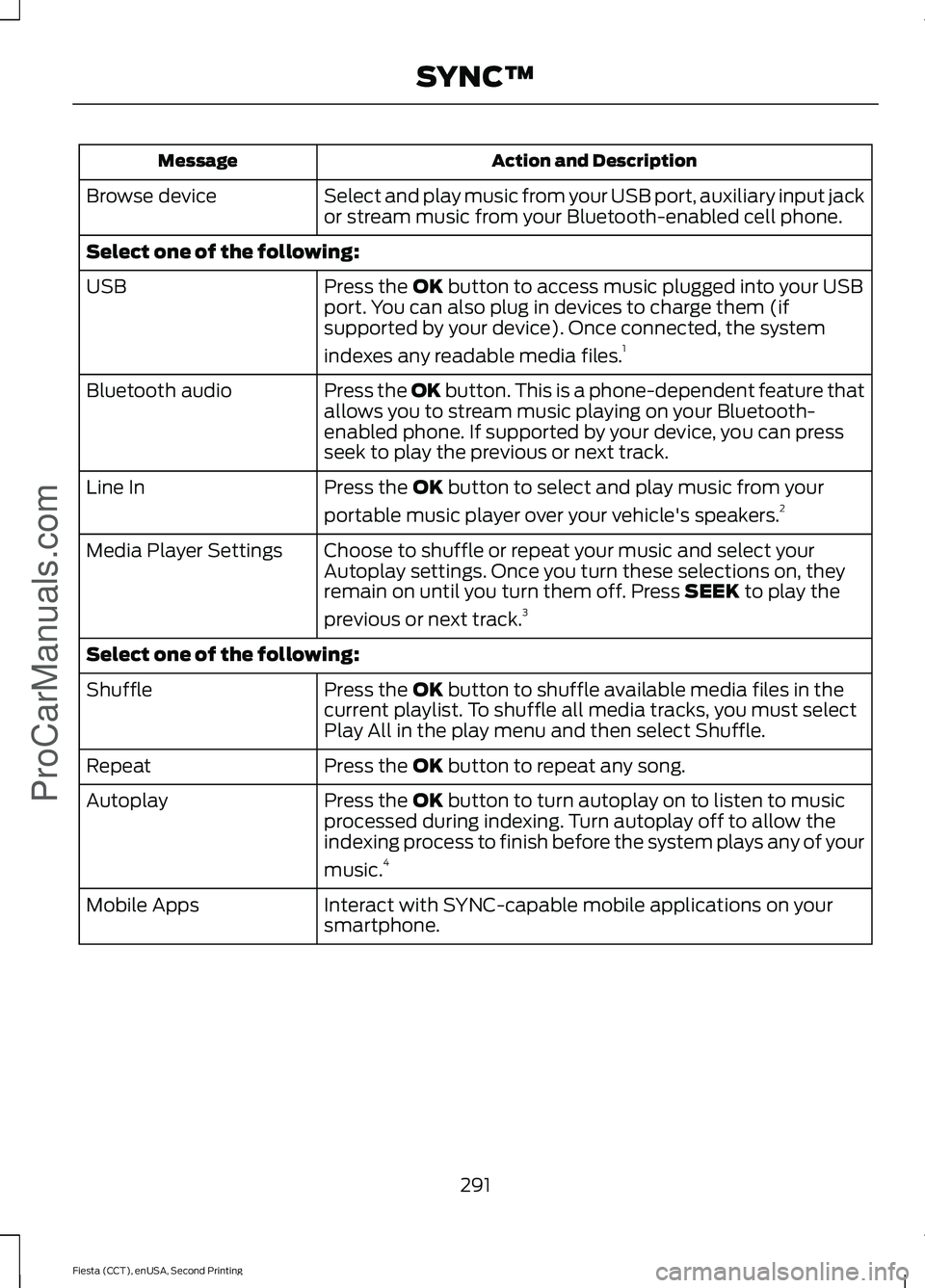
Action and Description
Message
Select and play music from your USB port, auxiliary input jack
or stream music from your Bluetooth-enabled cell phone.
Browse device
Select one of the following:
Press the OK button to access music plugged into your USB
port. You can also plug in devices to charge them (if
supported by your device). Once connected, the system
indexes any readable media files. 1
USB
Press the OK button. This is a phone-dependent feature that
allows you to stream music playing on your Bluetooth-
enabled phone. If supported by your device, you can press
seek to play the previous or next track.
Bluetooth audio
Press the
OK button to select and play music from your
portable music player over your vehicle's speakers. 2
Line In
Choose to shuffle or repeat your music and select your
Autoplay settings. Once you turn these selections on, they
remain on until you turn them off. Press
SEEK to play the
previous or next track. 3
Media Player Settings
Select one of the following:
Press the
OK button to shuffle available media files in the
current playlist. To shuffle all media tracks, you must select
Play All in the play menu and then select Shuffle.
Shuffle
Press the
OK button to repeat any song.
Repeat
Press the
OK button to turn autoplay on to listen to music
processed during indexing. Turn autoplay off to allow the
indexing process to finish before the system plays any of your
music. 4
Autoplay
Interact with SYNC-capable mobile applications on your
smartphone.
Mobile Apps
291
Fiesta (CCT), enUSA, Second Printing SYNC™
ProCarManuals.com
Page 295 of 423
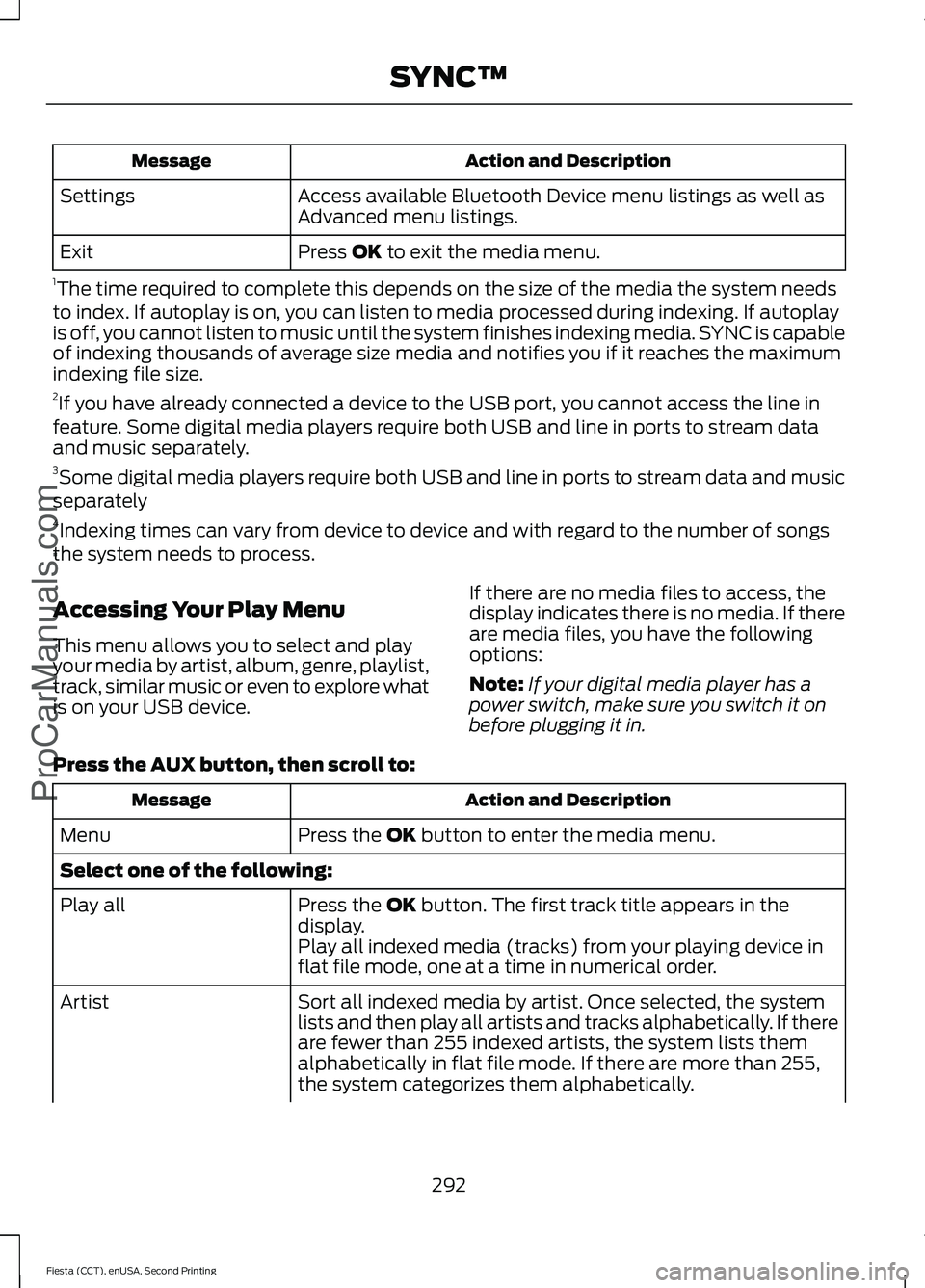
Action and Description
Message
Access available Bluetooth Device menu listings as well as
Advanced menu listings.
Settings
Press OK to exit the media menu.
Exit
1 The time required to complete this depends on the size of the media the system needs
to index. If autoplay is on, you can listen to media processed during indexing. If autoplay
is off, you cannot listen to music until the system finishes indexing media. SYNC is capable
of indexing thousands of average size media and notifies you if it reaches the maximum
indexing file size.
2 If you have already connected a device to the USB port, you cannot access the line in
feature. Some digital media players require both USB and line in ports to stream data
and music separately.
3 Some digital media players require both USB and line in ports to stream data and music
separately
4 Indexing times can vary from device to device and with regard to the number of songs
the system needs to process.
Accessing Your Play Menu
This menu allows you to select and play
your media by artist, album, genre, playlist,
track, similar music or even to explore what
is on your USB device. If there are no media files to access, the
display indicates there is no media. If there
are media files, you have the following
options:
Note:
If your digital media player has a
power switch, make sure you switch it on
before plugging it in.
Press the
AUX button, then scroll to: Action and Description
Message
Press the
OK button to enter the media menu.
Menu
Select one of the following:
Press the
OK button. The first track title appears in the
display.
Play all
Play all indexed media (tracks) from your playing device in
flat file mode, one at a time in numerical order.
Sort all indexed media by artist. Once selected, the system
lists and then play all artists and tracks alphabetically. If there
are fewer than 255 indexed artists, the system lists them
alphabetically in flat file mode. If there are more than 255,
the system categorizes them alphabetically.
Artist
292
Fiesta (CCT), enUSA, Second Printing SYNC™
ProCarManuals.com