display FORD FOCUS 2014 3.G User Guide
[x] Cancel search | Manufacturer: FORD, Model Year: 2014, Model line: FOCUS, Model: FORD FOCUS 2014 3.GPages: 492, PDF Size: 7.2 MB
Page 92 of 492
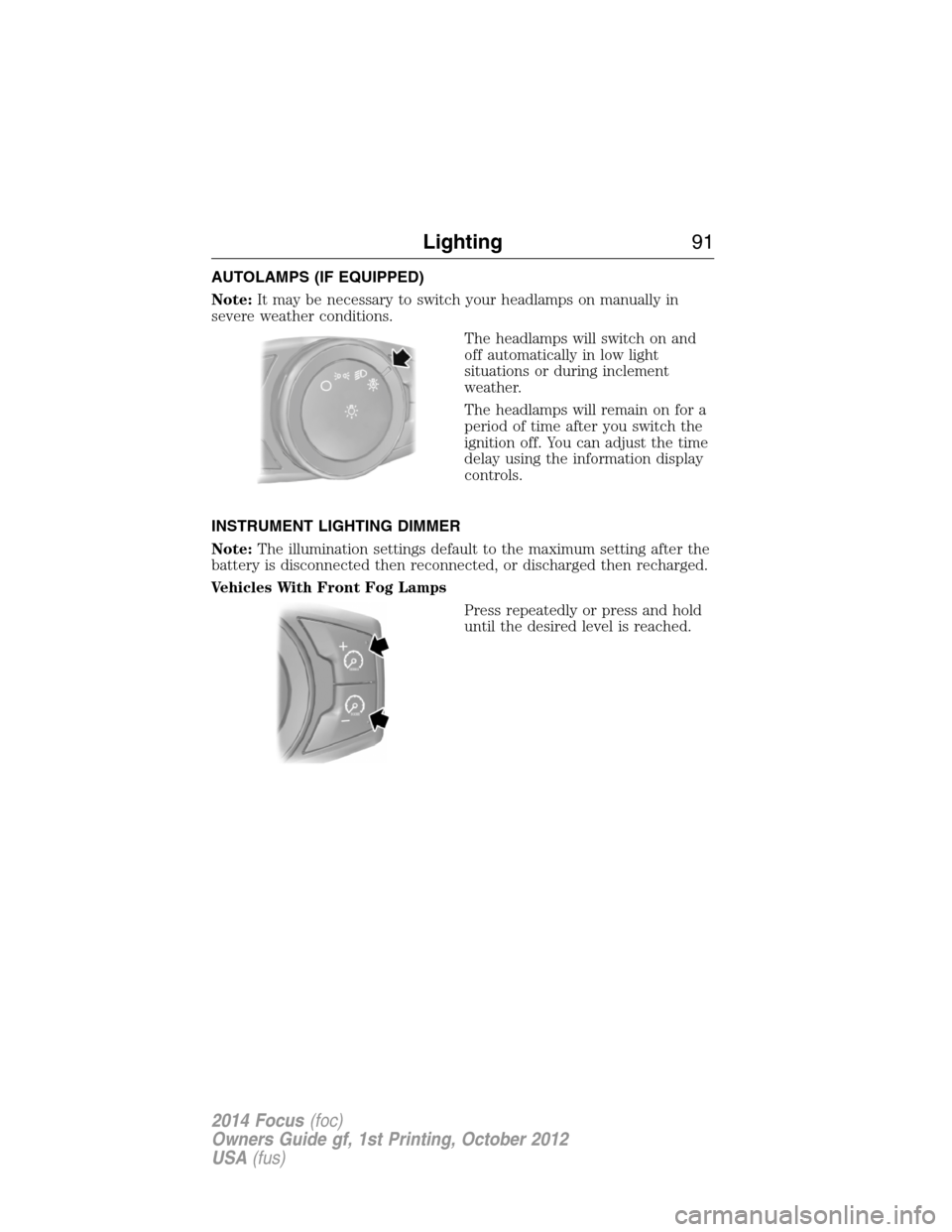
AUTOLAMPS (IF EQUIPPED)
Note:It may be necessary to switch your headlamps on manually in
severe weather conditions.
The headlamps will switch on and
off automatically in low light
situations or during inclement
weather.
The headlamps will remain on for a
period of time after you switch the
ignition off. You can adjust the time
delay using the information display
controls.
INSTRUMENT LIGHTING DIMMER
Note:The illumination settings default to the maximum setting after the
battery is disconnected then reconnected, or discharged then recharged.
Vehicles With Front Fog Lamps
Press repeatedly or press and hold
until the desired level is reached.
Lighting91
2014 Focus(foc)
Owners Guide gf, 1st Printing, October 2012
USA(fus)
Page 104 of 492
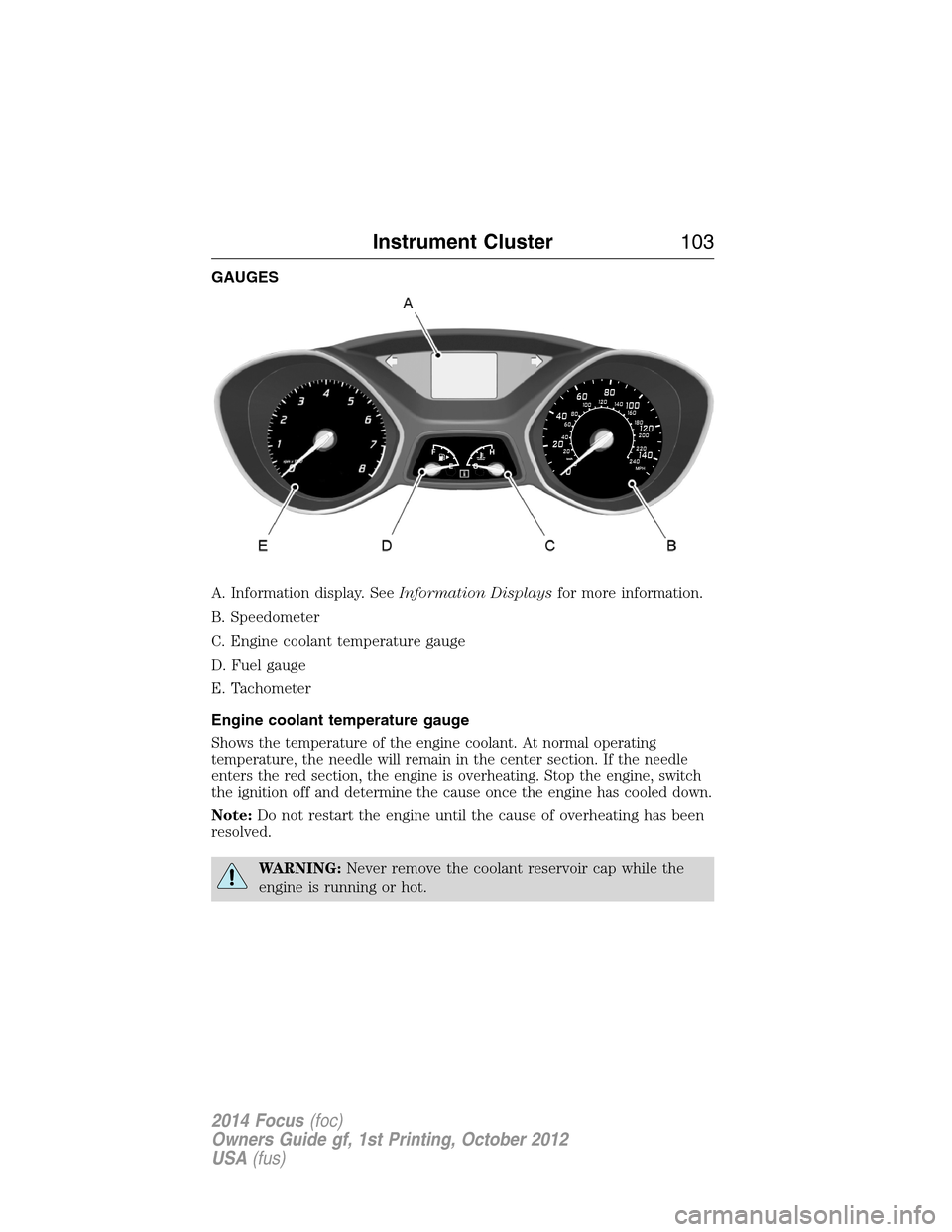
GAUGES
A. Information display. SeeInformation Displaysfor more information.
B. Speedometer
C. Engine coolant temperature gauge
D. Fuel gauge
E. Tachometer
Engine coolant temperature gauge
Shows the temperature of the engine coolant. At normal operating
temperature, the needle will remain in the center section. If the needle
enters the red section, the engine is overheating. Stop the engine, switch
the ignition off and determine the cause once the engine has cooled down.
Note:Do not restart the engine until the cause of overheating has been
resolved.
WARNING:Never remove the coolant reservoir cap while the
engine is running or hot.
0 20406080
10 0
12 0
14 0
10 012 0
14 0
16 0
18 0
0 20 406080
200
220
240
Instrument Cluster103
2014 Focus(foc)
Owners Guide gf, 1st Printing, October 2012
USA(fus)
Page 105 of 492
Fuel gauge
Switch the ignition on. The fuel gauge will indicate approximately how
much fuel is left in the fuel tank. The fuel gauge may vary slightly when
the vehicle is moving or on a gradient. The arrow adjacent to the fuel
pump symbol indicates on which side of your vehicle the fuel filler door
is located.
WARNING LAMPS AND INDICATORS
The following warning lamps and indicators will alert you to a vehicle
condition that may become serious. Some lamps will illuminate when you
start your vehicle to make sure they work. If any lamps remain on after
starting your vehicle, refer to the respective system warning lamp for
further information.
Note:Some warning indicators appear in the information display and
function the same as a warning lamp but do not display when you start
your vehicle.
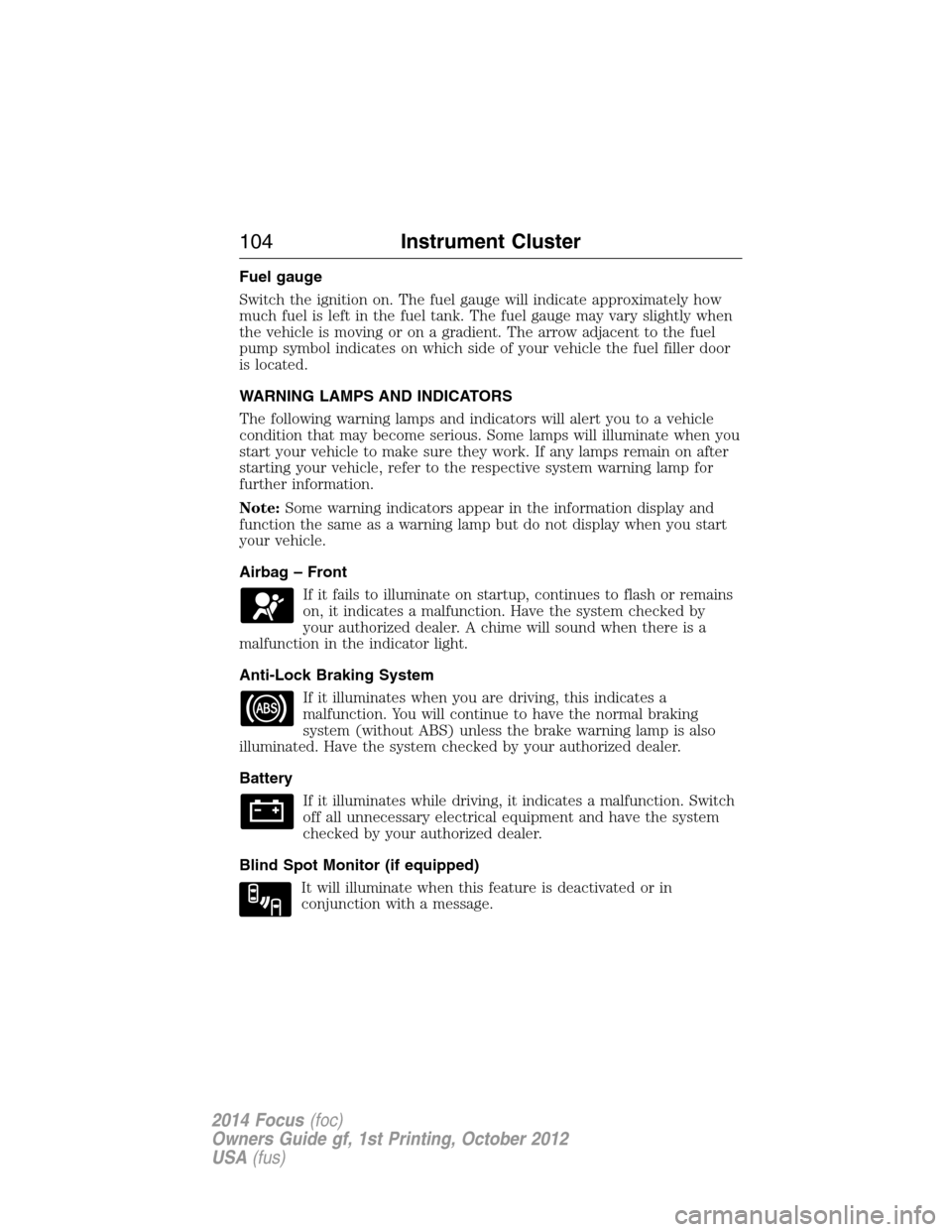
Airbag – Front
If it fails to illuminate on startup, continues to flash or remains
on, it indicates a malfunction. Have the system checked by
your authorized dealer. A chime will sound when there is a
malfunction in the indicator light.
Anti-Lock Braking System
If it illuminates when you are driving, this indicates a
malfunction. You will continue to have the normal braking
system (without ABS) unless the brake warning lamp is also
illuminated. Have the system checked by your authorized dealer.
Battery
If it illuminates while driving, it indicates a malfunction. Switch
off all unnecessary electrical equipment and have the system
checked by your authorized dealer.
Blind Spot Monitor (if equipped)
It will illuminate when this feature is deactivated or in
conjunction with a message.
104Instrument Cluster
2014 Focus(foc)
Owners Guide gf, 1st Printing, October 2012
USA(fus)
Page 107 of 492
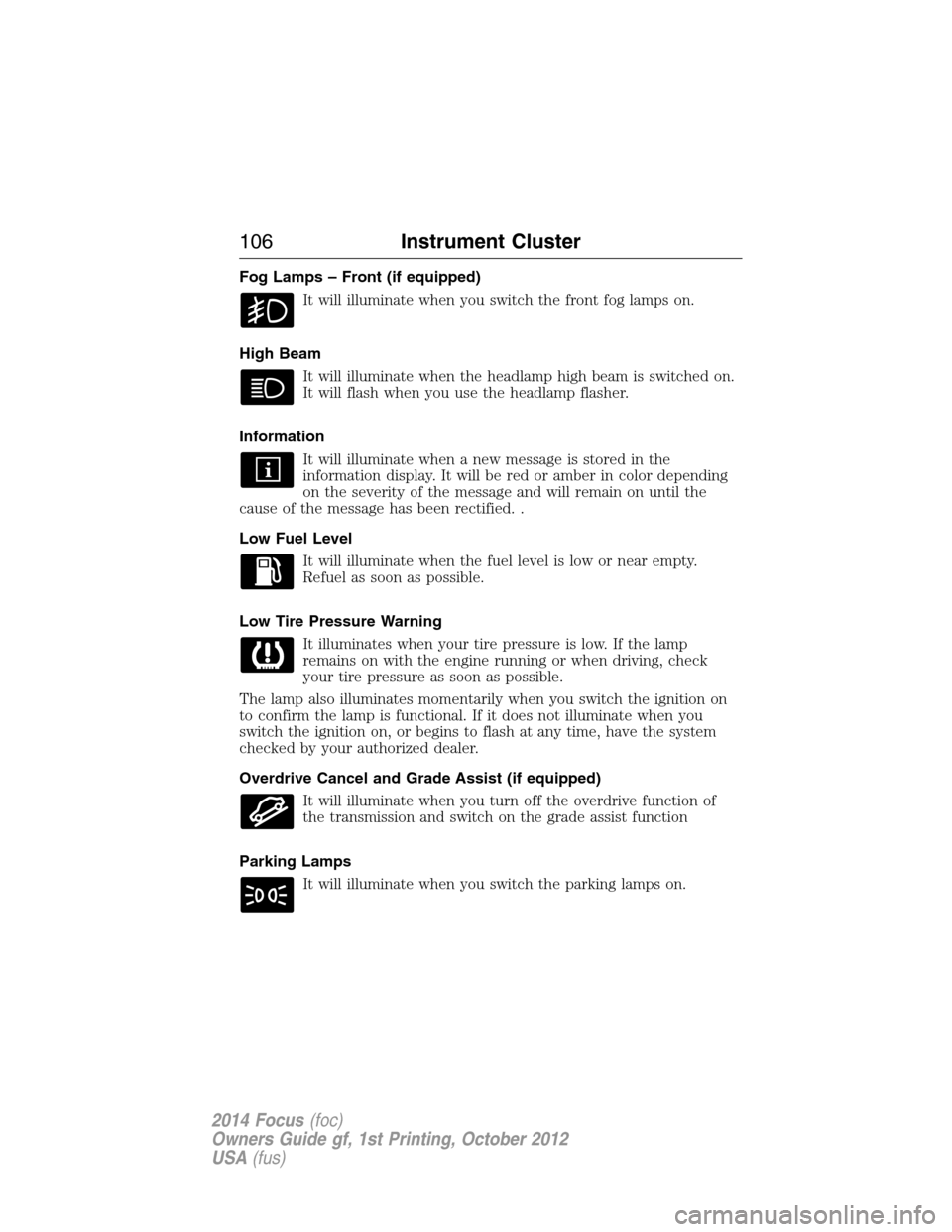
Fog Lamps – Front (if equipped)
It will illuminate when you switch the front fog lamps on.
High Beam
It will illuminate when the headlamp high beam is switched on.
It will flash when you use the headlamp flasher.
Information
It will illuminate when a new message is stored in the
information display. It will be red or amber in color depending
on the severity of the message and will remain on until the
cause of the message has been rectified. .
Low Fuel Level
It will illuminate when the fuel level is low or near empty.
Refuel as soon as possible.
Low Tire Pressure Warning
It illuminates when your tire pressure is low. If the lamp
remains on with the engine running or when driving, check
your tire pressure as soon as possible.
The lamp also illuminates momentarily when you switch the ignition on
to confirm the lamp is functional. If it does not illuminate when you
switch the ignition on, or begins to flash at any time, have the system
checked by your authorized dealer.
Overdrive Cancel and Grade Assist (if equipped)
It will illuminate when you turn off the overdrive function of
the transmission and switch on the grade assist function
Parking Lamps
It will illuminate when you switch the parking lamps on.
106Instrument Cluster
2014 Focus(foc)
Owners Guide gf, 1st Printing, October 2012
USA(fus)
Page 110 of 492
GENERAL INFORMATION
WARNING:Driving while distracted can result in loss of vehicle
control, crash and injury. We strongly recommend that you use
extreme caution when using any device that may take your focus off
the road. Your primary responsibility is the safe operation of your
vehicle. We recommend against the use of any handheld device while
driving and encourage the use of voice-operated systems when possible.
Make sure you are aware of all applicable local laws that may affect the
use of electronic devices while driving..
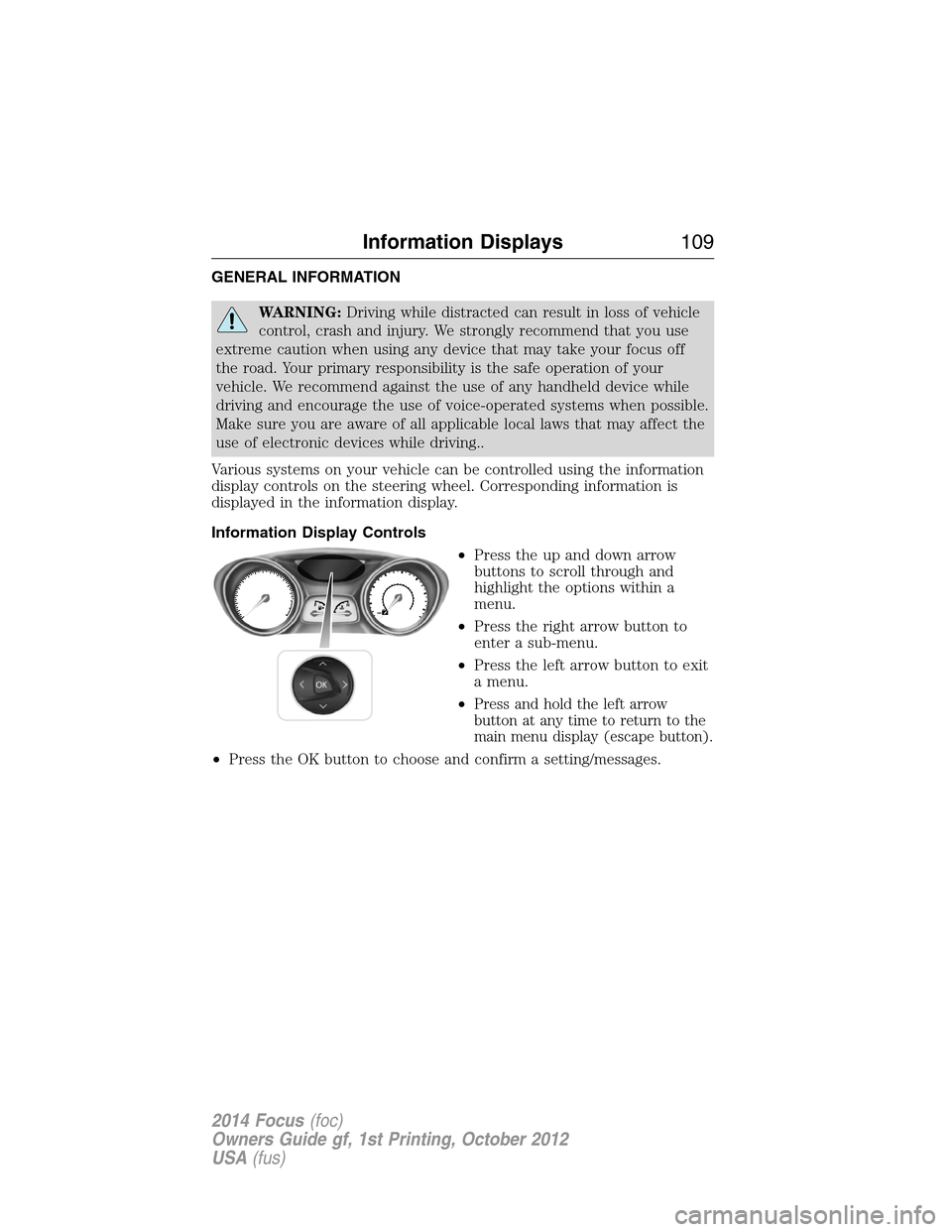
Various systems on your vehicle can be controlled using the information
display controls on the steering wheel. Corresponding information is
displayed in the information display.
Information Display Controls
•Press the up and down arrow
buttons to scroll through and
highlight the options within a
menu.
•Press the right arrow button to
enter a sub-menu.
•Press the left arrow button to exit
a menu.
•
Press and hold the left arrow
button at any time to return to the
main menu display (escape button).
•Press the OK button to choose and confirm a setting/messages.
Information Displays109
2014 Focus(foc)
Owners Guide gf, 1st Printing, October 2012
USA(fus)
Page 111 of 492
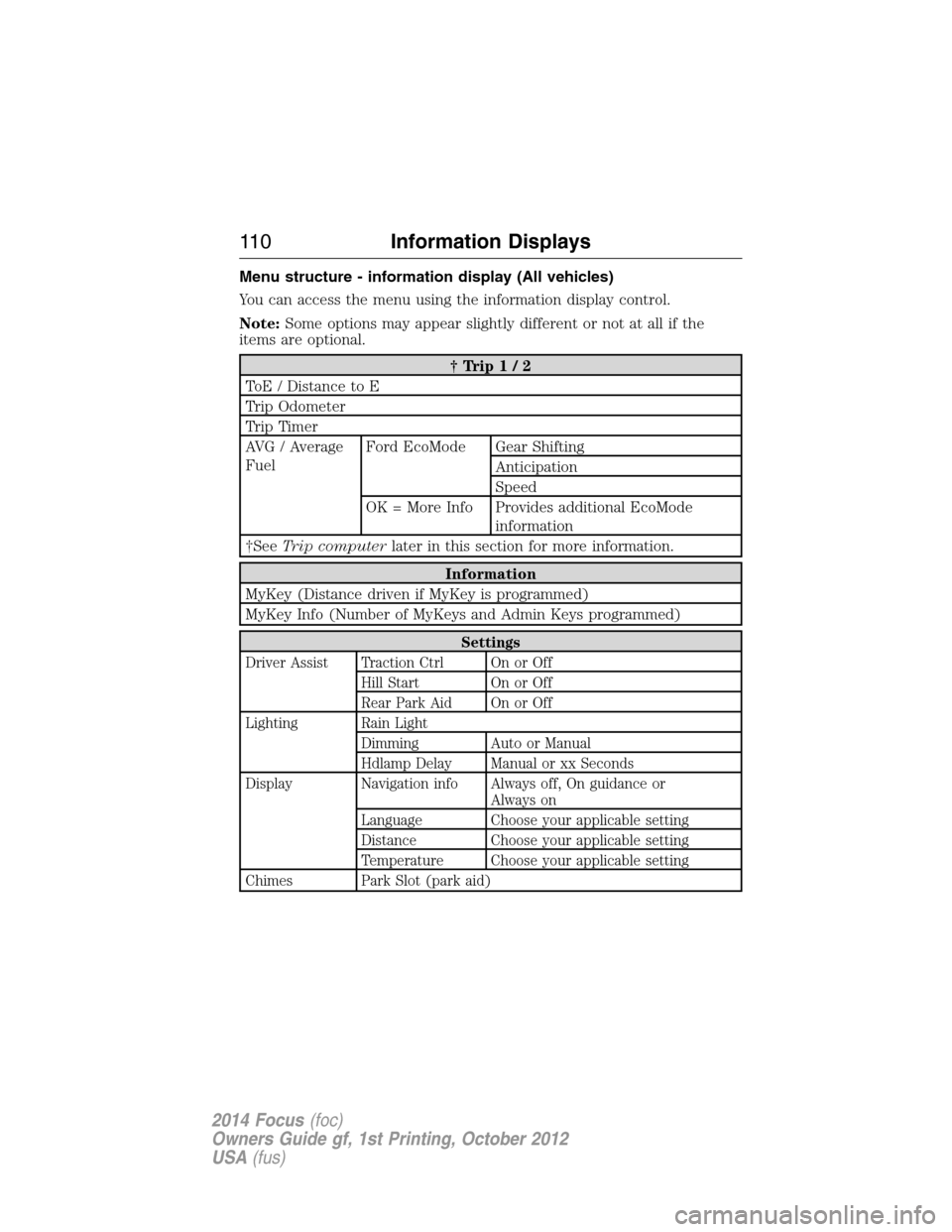
Menu structure - information display (All vehicles)
You can access the menu using the information display control.
Note:Some options may appear slightly different or not at all if the
items are optional.
†Trip1/2
ToE / Distance to E
Trip Odometer
Trip Timer
AVG / Average
FuelFord EcoMode Gear Shifting
Anticipation
Speed
OK = More Info Provides additional EcoMode
information
†SeeTrip computerlater in this section for more information.
Information
MyKey (Distance driven if MyKey is programmed)
MyKey Info (Number of MyKeys and Admin Keys programmed)
Settings
Driver Assist Traction Ctrl On or Off
Hill Start On or Off
Rear Park Aid On or Off
Lighting Rain Light
Dimming Auto or Manual
Hdlamp Delay Manual or xx Seconds
Display Navigation info Always off, On guidance or
Always on
Language Choose your applicable setting
Distance Choose your applicable setting
Temperature Choose your applicable setting
Chimes Park Slot (park aid)
11 0Information Displays
2014 Focus(foc)
Owners Guide gf, 1st Printing, October 2012
USA(fus)
Page 112 of 492
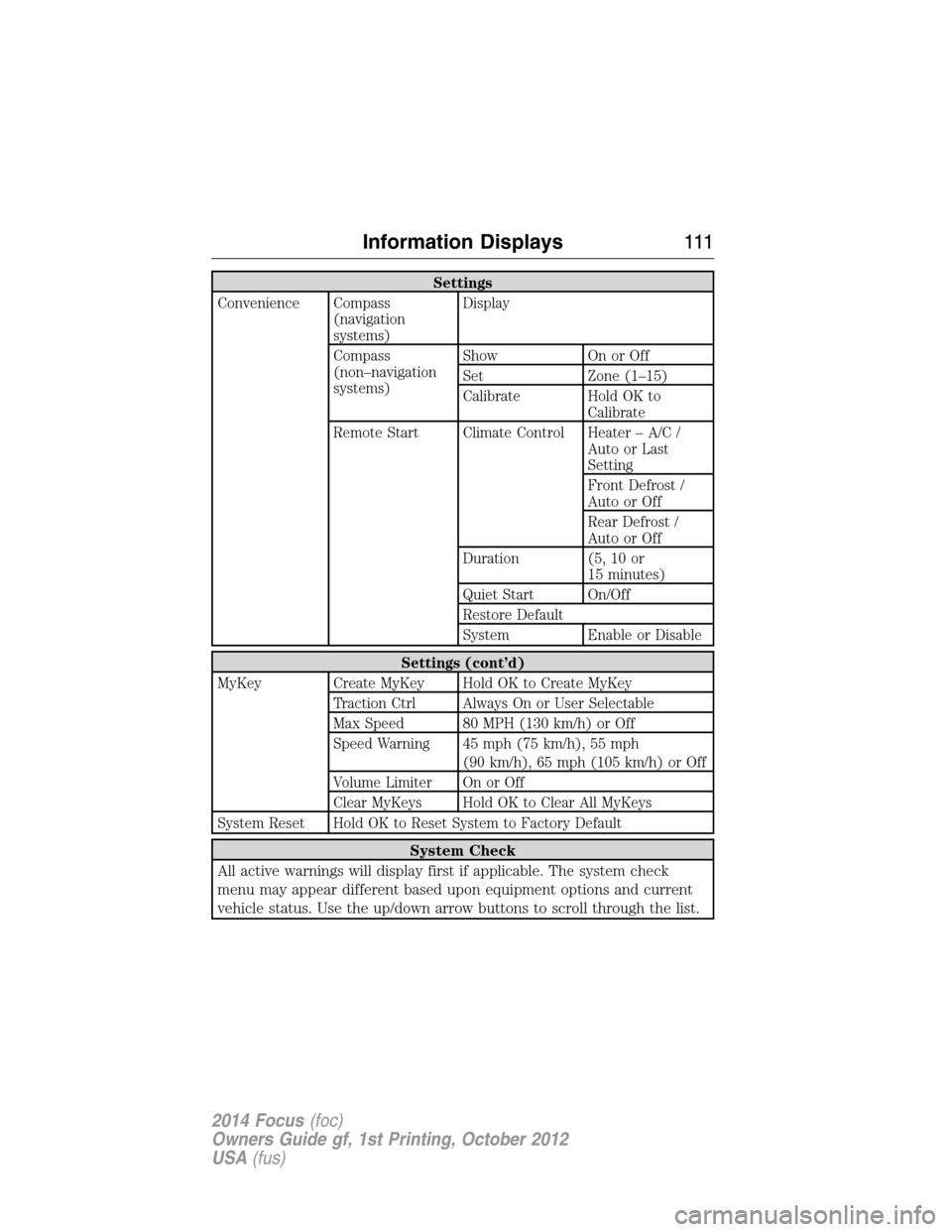
Settings
Convenience Compass
(navigation
systems)Display
Compass
(non–navigation
systems)Show On or Off
Set Zone (1–15)
Calibrate Hold OK to
Calibrate
Remote Start Climate Control Heater – A/C /
Auto or Last
Setting
Front Defrost /
Auto or Off
Rear Defrost /
Auto or Off
Duration (5, 10 or
15 minutes)
Quiet Start On/Off
Restore Default
System Enable or Disable
Settings (cont’d)
MyKey Create MyKey Hold OK to Create MyKey
Traction Ctrl Always On or User Selectable
Max Speed 80 MPH (130 km/h) or Off
Speed Warning 45 mph (75 km/h), 55 mph
(90 km/h), 65 mph (105 km/h) or Off
Volume Limiter On or Off
Clear MyKeys Hold OK to Clear All MyKeys
System Reset Hold OK to Reset System to Factory Default
System Check
All active warnings will display first if applicable. The system check
menu may appear different based upon equipment options and current
vehicle status. Use the up/down arrow buttons to scroll through the list.
Information Displays111
2014 Focus(foc)
Owners Guide gf, 1st Printing, October 2012
USA(fus)
Page 113 of 492
Status Display
The following features will display in the information center.
Compass
Displayed in the status line at the bottom of the display. Displays the
vehicle’s heading direction.
To calibrate the compass: Enter the compass menu and select Calibrate.
Follow the prompts.
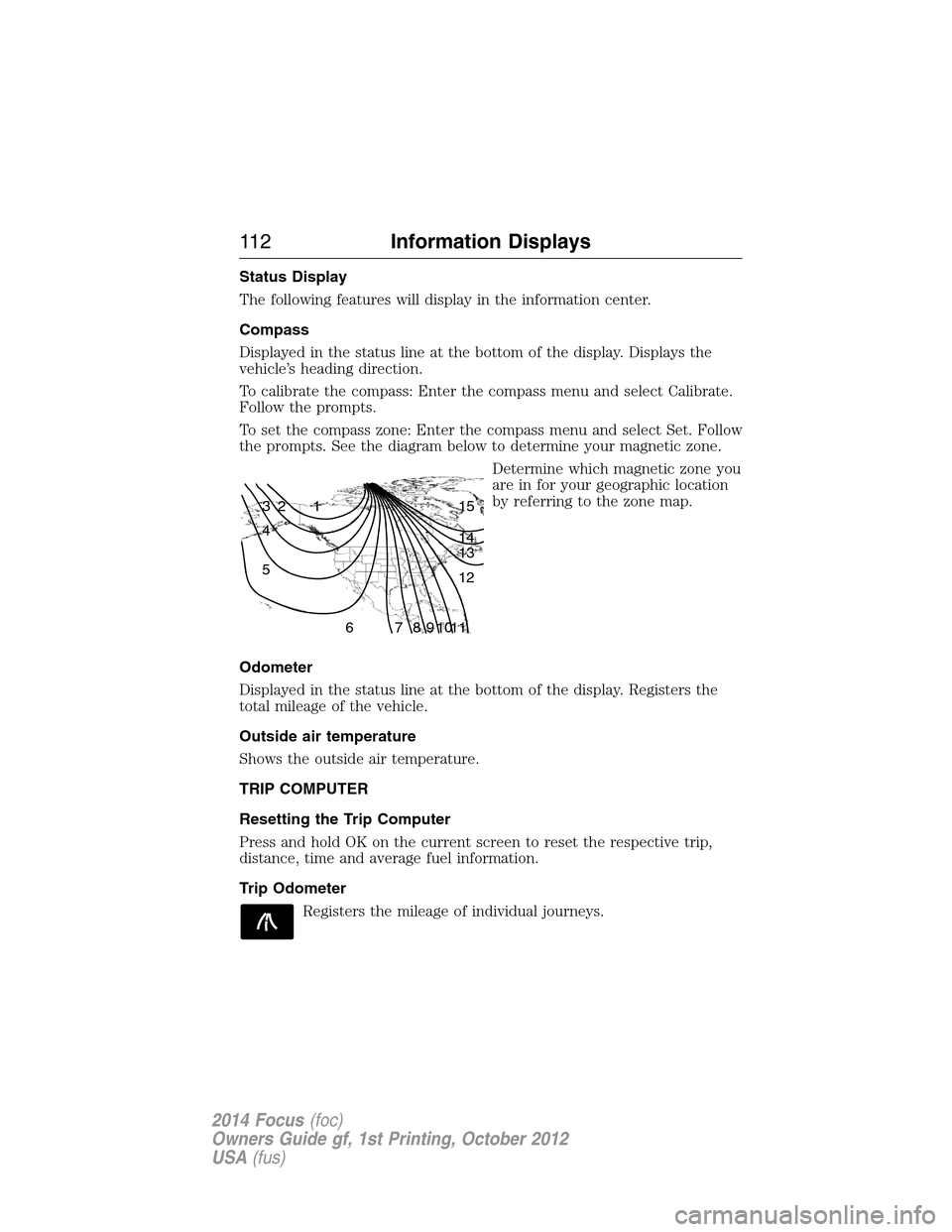
To set the compass zone: Enter the compass menu and select Set. Follow
the prompts. See the diagram below to determine your magnetic zone.
Determine which magnetic zone you
are in for your geographic location
by referring to the zone map.
Odometer
Displayed in the status line at the bottom of the display. Registers the
total mileage of the vehicle.
Outside air temperature
Shows the outside air temperature.
TRIP COMPUTER
Resetting the Trip Computer
Press and hold OK on the current screen to reset the respective trip,
distance, time and average fuel information.
Trip Odometer
Registers the mileage of individual journeys.
1 2 3
4
5
6 7 8 9 101112 13 14 15
11 2Information Displays
2014 Focus(foc)
Owners Guide gf, 1st Printing, October 2012
USA(fus)
Page 114 of 492
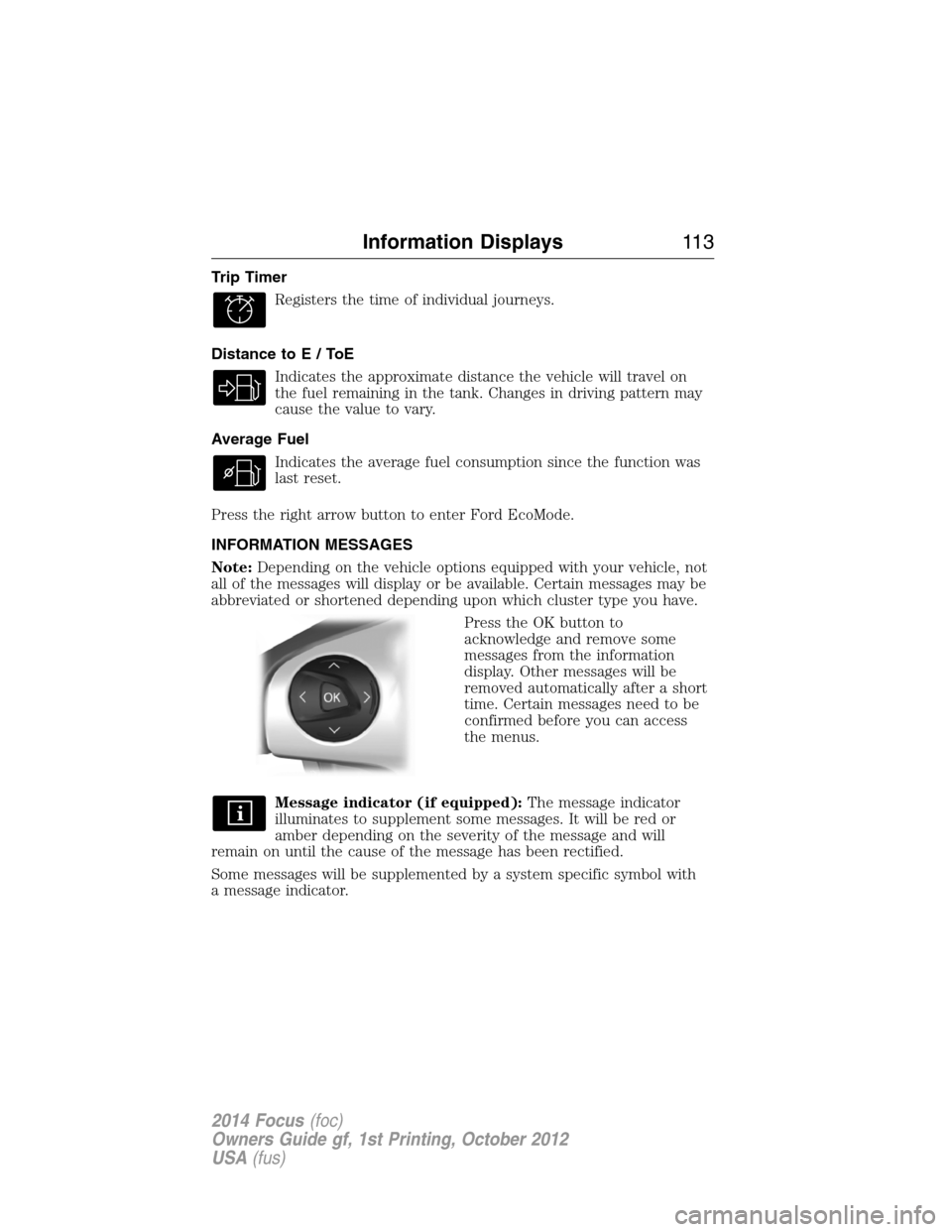
Trip Timer
Registers the time of individual journeys.
Distance toE/ToE
Indicates the approximate distance the vehicle will travel on
the fuel remaining in the tank. Changes in driving pattern may
cause the value to vary.
Average Fuel
Indicates the average fuel consumption since the function was
last reset.
Press the right arrow button to enter Ford EcoMode.
INFORMATION MESSAGES
Note:Depending on the vehicle options equipped with your vehicle, not
all of the messages will display or be available. Certain messages may be
abbreviated or shortened depending upon which cluster type you have.
Press the OK button to
acknowledge and remove some
messages from the information
display. Other messages will be
removed automatically after a short
time. Certain messages need to be
confirmed before you can access
the menus.
Message indicator (if equipped):The message indicator
illuminates to supplement some messages. It will be red or
amber depending on the severity of the message and will
remain on until the cause of the message has been rectified.
Some messages will be supplemented by a system specific symbol with
a message indicator.
Information Displays11 3
2014 Focus(foc)
Owners Guide gf, 1st Printing, October 2012
USA(fus)
Page 115 of 492
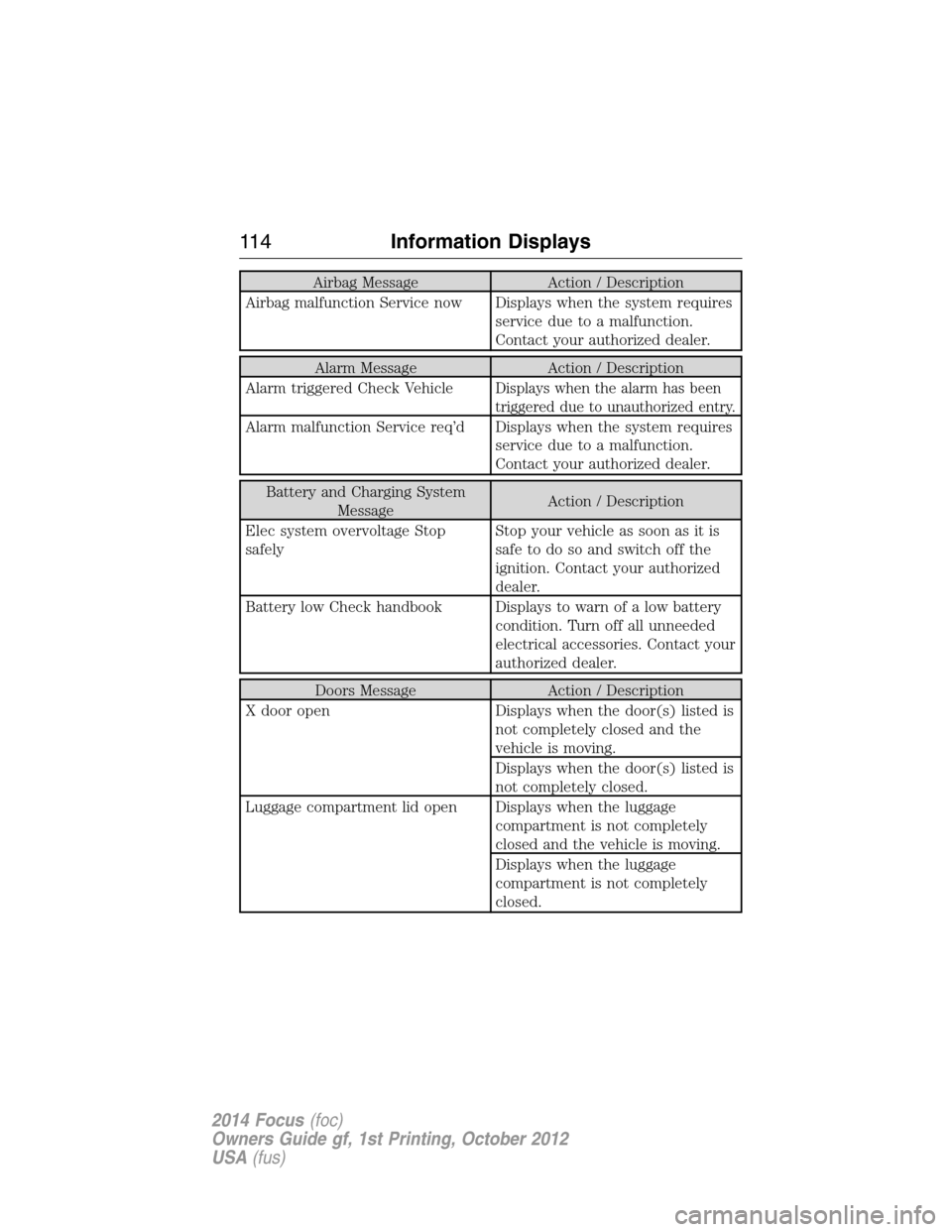
Airbag Message Action / Description
Airbag malfunction Service now Displays when the system requires
service due to a malfunction.
Contact your authorized dealer.
Alarm Message Action / Description
Alarm triggered Check Vehicle
Displays when the alarm has been
triggered due to unauthorized entry.
Alarm malfunction Service req’d Displays when the system requires
service due to a malfunction.
Contact your authorized dealer.
Battery and Charging System
MessageAction / Description
Elec system overvoltage Stop
safelyStop your vehicle as soon as it is
safetodosoandswitchoffthe
ignition. Contact your authorized
dealer.
Battery low Check handbook Displays to warn of a low battery
condition. Turn off all unneeded
electrical accessories. Contact your
authorized dealer.
Doors Message Action / Description
X door open Displays when the door(s) listed is
not completely closed and the
vehicle is moving.
Displays when the door(s) listed is
not completely closed.
Luggage compartment lid open Displays when the luggage
compartment is not completely
closed and the vehicle is moving.
Displays when the luggage
compartment is not completely
closed.
11 4Information Displays
2014 Focus(foc)
Owners Guide gf, 1st Printing, October 2012
USA(fus)