display FORD FOCUS 2014 3.G Owner's Manual
[x] Cancel search | Manufacturer: FORD, Model Year: 2014, Model line: FOCUS, Model: FORD FOCUS 2014 3.GPages: 492, PDF Size: 7.2 MB
Page 116 of 492
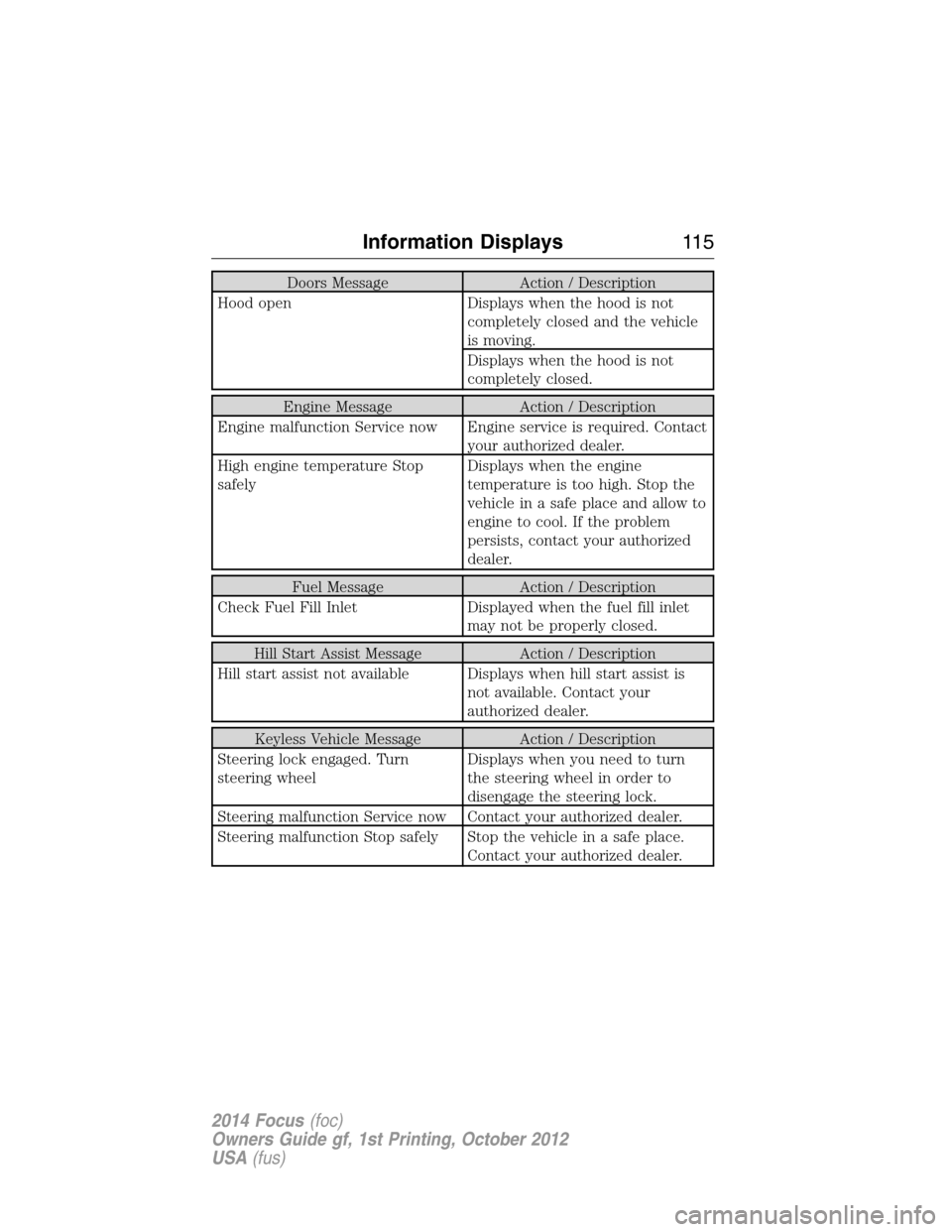
Doors Message Action / Description
Hood open Displays when the hood is not
completely closed and the vehicle
is moving.
Displays when the hood is not
completely closed.
Engine Message Action / Description
Engine malfunction Service now Engine service is required. Contact
your authorized dealer.
High engine temperature Stop
safelyDisplays when the engine
temperature is too high. Stop the
vehicle in a safe place and allow to
engine to cool. If the problem
persists, contact your authorized
dealer.
Fuel Message Action / Description
Check Fuel Fill Inlet Displayed when the fuel fill inlet
may not be properly closed.
Hill Start Assist Message Action / Description
Hill start assist not available Displays when hill start assist is
not available. Contact your
authorized dealer.
Keyless Vehicle Message Action / Description
Steering lock engaged. Turn
steering wheelDisplays when you need to turn
the steering wheel in order to
disengage the steering lock.
Steering malfunction Service now Contact your authorized dealer.
Steering malfunction Stop safely Stop the vehicle in a safe place.
Contact your authorized dealer.
Information Displays11 5
2014 Focus(foc)
Owners Guide gf, 1st Printing, October 2012
USA(fus)
Page 117 of 492
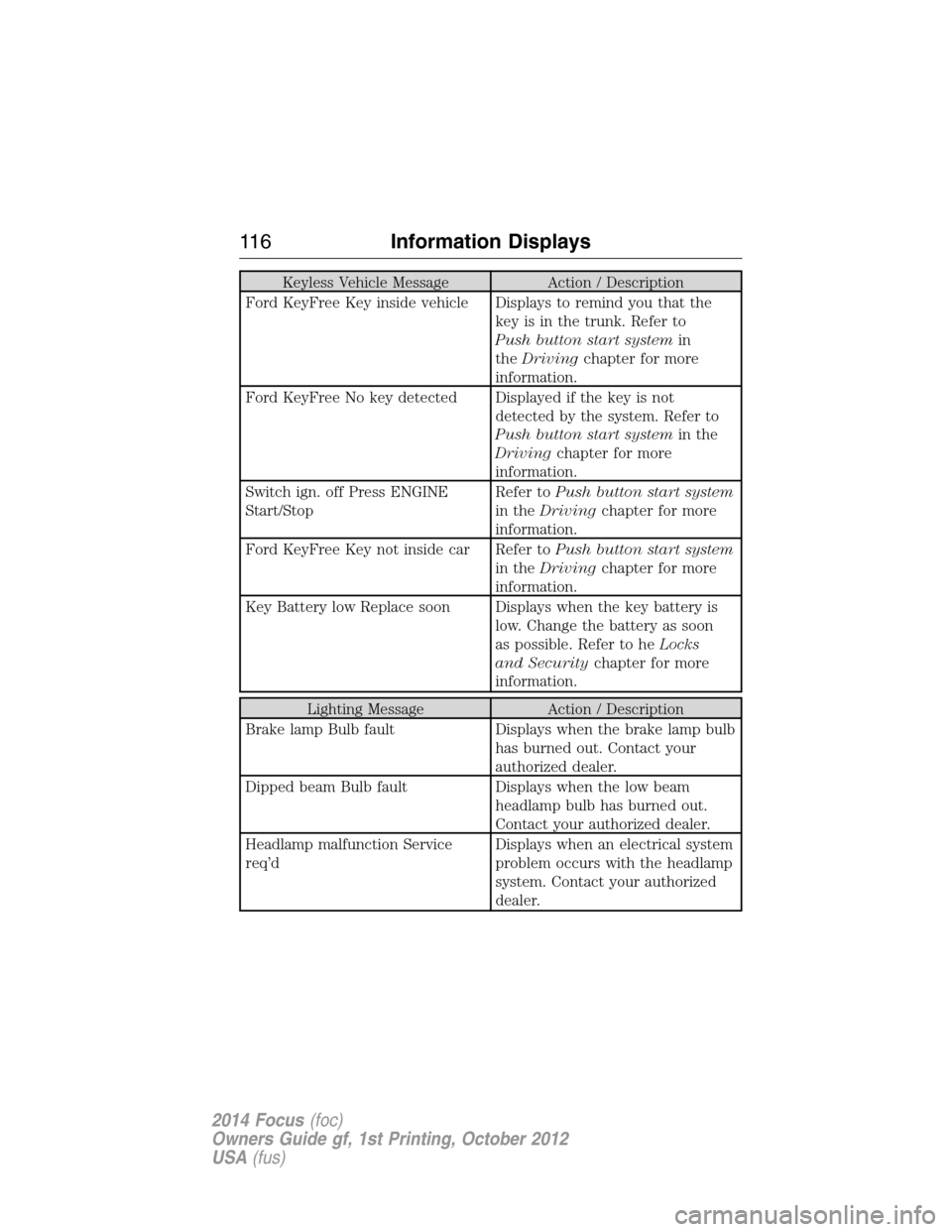
Keyless Vehicle Message Action / Description
Ford KeyFree Key inside vehicle Displays to remind you that the
key is in the trunk. Refer to
Push button start systemin
theDrivingchapter for more
information.
Ford KeyFree No key detected Displayed if the key is not
detected by the system. Refer to
Push button start systemin the
Drivingchapter for more
information.
Switch ign. off Press ENGINE
Start/StopRefer toPush button start system
in theDrivingchapter for more
information.
Ford KeyFree Key not inside car Refer toPush button start system
in theDrivingchapter for more
information.
Key Battery low Replace soon Displays when the key battery is
low. Change the battery as soon
as possible. Refer to heLocks
and Securitychapter for more
information.
Lighting Message Action / Description
Brake lamp Bulb fault Displays when the brake lamp bulb
has burned out. Contact your
authorized dealer.
Dipped beam Bulb fault Displays when the low beam
headlamp bulb has burned out.
Contact your authorized dealer.
Headlamp malfunction Service
req’dDisplays when an electrical system
problem occurs with the headlamp
system. Contact your authorized
dealer.
11 6Information Displays
2014 Focus(foc)
Owners Guide gf, 1st Printing, October 2012
USA(fus)
Page 118 of 492
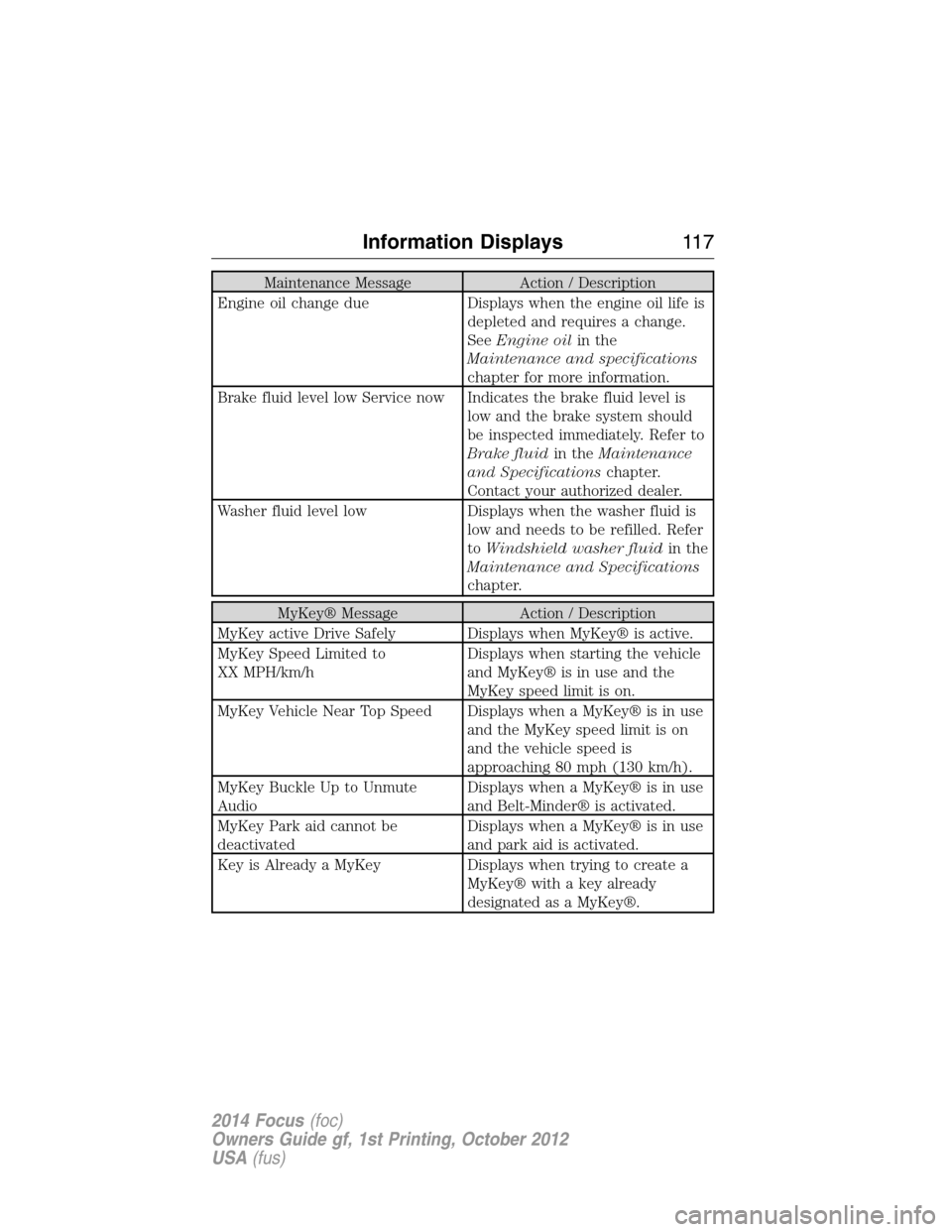
Maintenance Message Action / Description
Engine oil change due Displays when the engine oil life is
depleted and requires a change.
SeeEngine oilin the
Maintenance and specifications
chapter for more information.
Brake fluid level low Service now Indicates the brake fluid level is
low and the brake system should
be inspected immediately. Refer to
Brake fluidin theMaintenance
and Specificationschapter.
Contact your authorized dealer.
Washer fluid level low Displays when the washer fluid is
low and needs to be refilled. Refer
toWindshield washer fluidin the
Maintenance and Specifications
chapter.
MyKey® Message Action / Description
MyKey active Drive Safely Displays when MyKey® is active.
MyKey Speed Limited to
XX MPH/km/hDisplays when starting the vehicle
and MyKey® is in use and the
MyKey speed limit is on.
MyKey Vehicle Near Top Speed Displays when a MyKey® is in use
and the MyKey speed limit is on
and the vehicle speed is
approaching 80 mph (130 km/h).
MyKey Buckle Up to Unmute
AudioDisplays when a MyKey® is in use
and Belt-Minder® is activated.
MyKey Park aid cannot be
deactivatedDisplays when a MyKey® is in use
and park aid is activated.
Key is Already a MyKey Displays when trying to create a
MyKey® with a key already
designated as a MyKey®.
Information Displays11 7
2014 Focus(foc)
Owners Guide gf, 1st Printing, October 2012
USA(fus)
Page 119 of 492
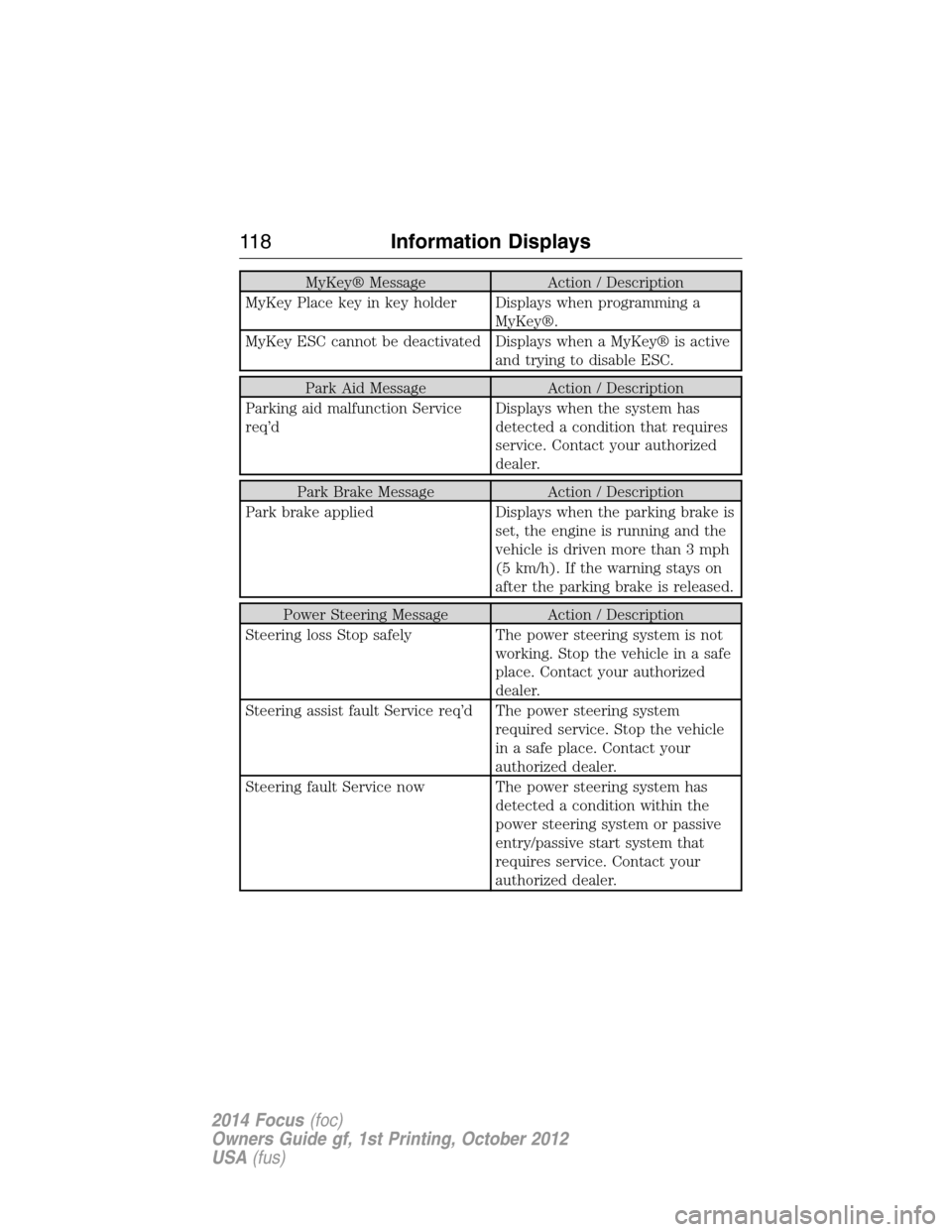
MyKey® Message Action / Description
MyKey Place key in key holder Displays when programming a
MyKey®.
MyKey ESC cannot be deactivated Displays when a MyKey® is active
and trying to disable ESC.
Park Aid Message Action / Description
Parking aid malfunction Service
req’dDisplays when the system has
detected a condition that requires
service. Contact your authorized
dealer.
Park Brake Message Action / Description
Park brake applied Displays when the parking brake is
set, the engine is running and the
vehicle is driven more than 3 mph
(5 km/h). If the warning stays on
after the parking brake is released.
Power Steering Message Action / Description
Steering loss Stop safely The power steering system is not
working. Stop the vehicle in a safe
place. Contact your authorized
dealer.
Steering assist fault Service req’d The power steering system
required service. Stop the vehicle
in a safe place. Contact your
authorized dealer.
Steering fault Service now The power steering system has
detected a condition within the
power steering system or passive
entry/passive start system that
requires service. Contact your
authorized dealer.
11 8Information Displays
2014 Focus(foc)
Owners Guide gf, 1st Printing, October 2012
USA(fus)
Page 120 of 492
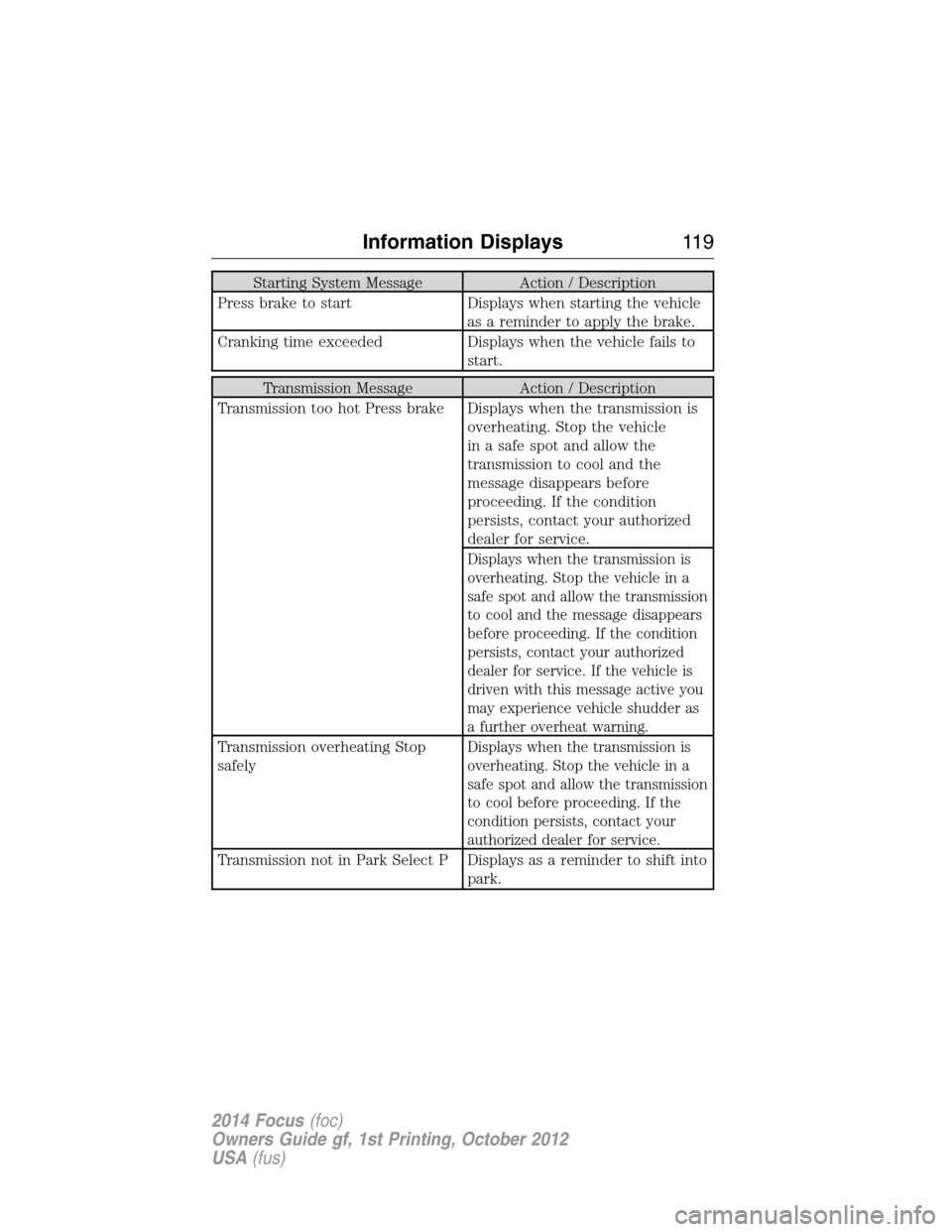
Starting System Message Action / Description
Press brake to start Displays when starting the vehicle
as a reminder to apply the brake.
Cranking time exceeded Displays when the vehicle fails to
start.
Transmission Message Action / Description
Transmission too hot Press brake Displays when the transmission is
overheating. Stop the vehicle
in a safe spot and allow the
transmission to cool and the
message disappears before
proceeding. If the condition
persists, contact your authorized
dealer for service.
Displays when the transmission is
overheating. Stop the vehicle in a
safe spot and allow the transmission
to cool and the message disappears
before proceeding. If the condition
persists, contact your authorized
dealer for service. If the vehicle is
driven with this message active you
may experience vehicle shudder as
a further overheat warning.
Transmission overheating Stop
safelyDisplays when the transmission is
overheating. Stop the vehicle in a
safe spot and allow the transmission
to cool before proceeding. If the
condition persists, contact your
authorized dealer for service.
Transmission not in Park Select P Displays as a reminder to shift into
park.
Information Displays11 9
2014 Focus(foc)
Owners Guide gf, 1st Printing, October 2012
USA(fus)
Page 121 of 492
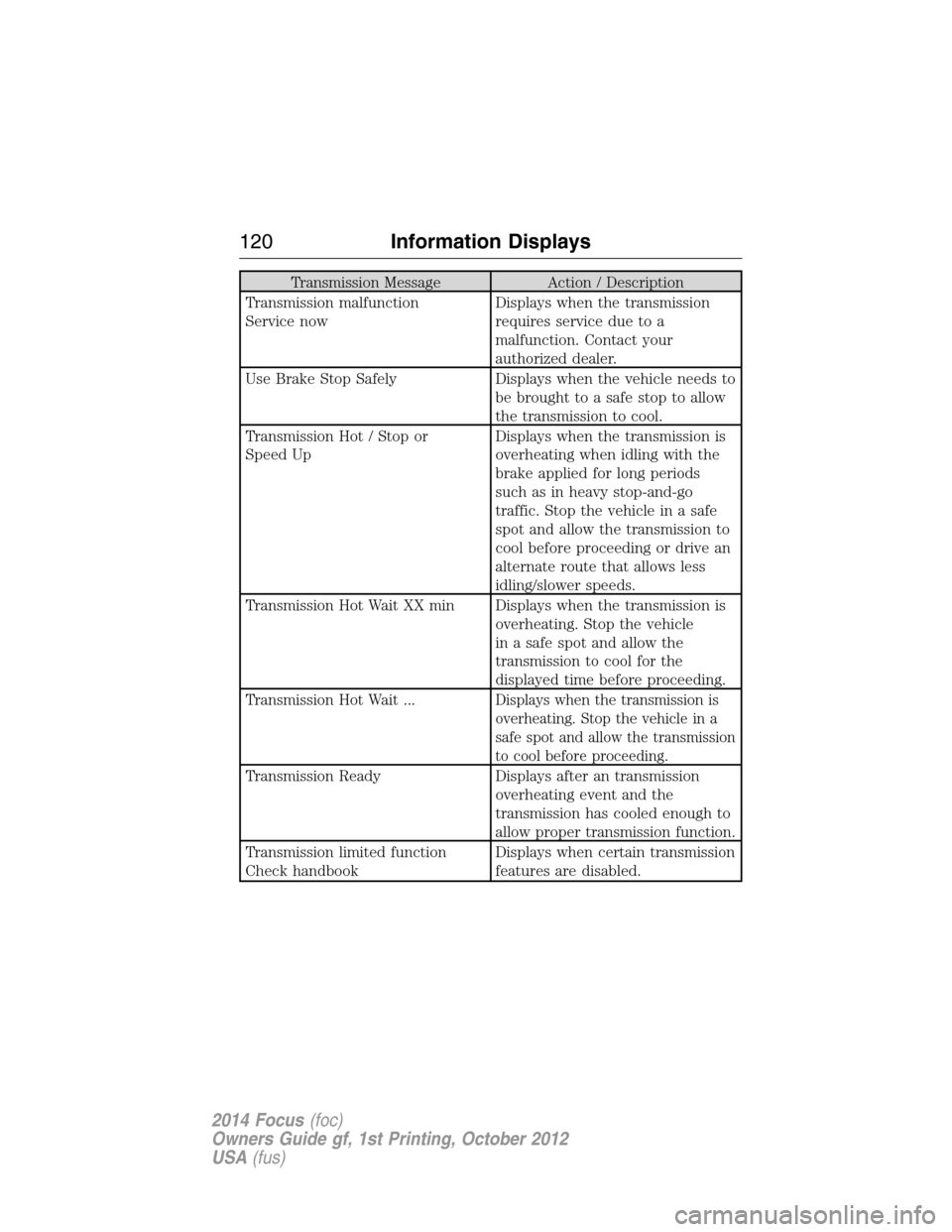
Transmission Message Action / Description
Transmission malfunction
Service nowDisplays when the transmission
requires service due to a
malfunction. Contact your
authorized dealer.
Use Brake Stop Safely Displays when the vehicle needs to
be brought to a safe stop to allow
the transmission to cool.
Transmission Hot / Stop or
Speed UpDisplays when the transmission is
overheating when idling with the
brake applied for long periods
such as in heavy stop-and-go
traffic. Stop the vehicle in a safe
spot and allow the transmission to
cool before proceeding or drive an
alternate route that allows less
idling/slower speeds.
Transmission Hot Wait XX min Displays when the transmission is
overheating. Stop the vehicle
in a safe spot and allow the
transmission to cool for the
displayed time before proceeding.
Transmission Hot Wait ...
Displays when the transmission is
overheating. Stop the vehicle in a
safe spot and allow the transmission
to cool before proceeding.
Transmission Ready Displays after an transmission
overheating event and the
transmission has cooled enough to
allow proper transmission function.
Transmission limited function
Check handbookDisplays when certain transmission
features are disabled.
120Information Displays
2014 Focus(foc)
Owners Guide gf, 1st Printing, October 2012
USA(fus)
Page 122 of 492
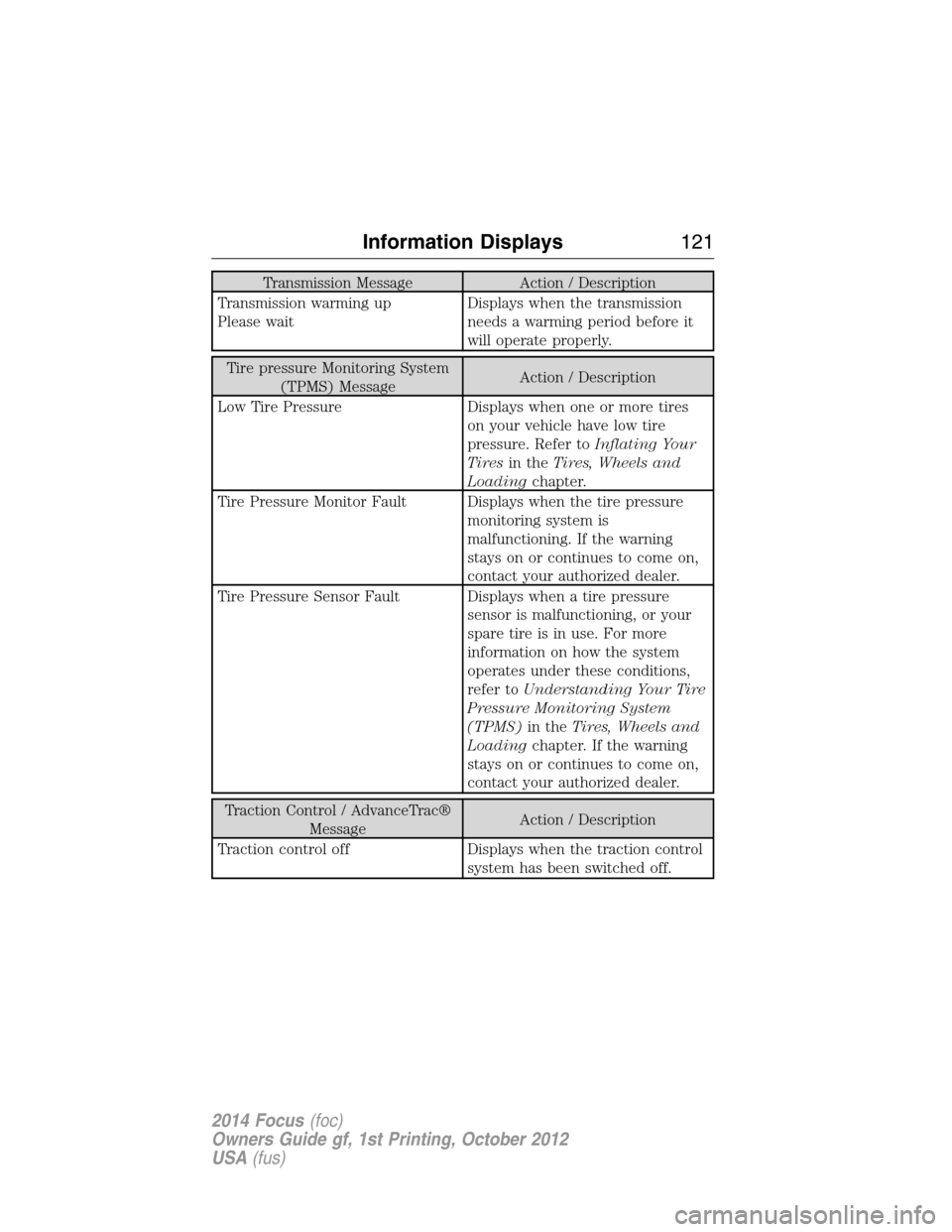
Transmission Message Action / Description
Transmission warming up
Please waitDisplays when the transmission
needs a warming period before it
will operate properly.
Tire pressure Monitoring System
(TPMS) MessageAction / Description
Low Tire Pressure Displays when one or more tires
on your vehicle have low tire
pressure. Refer toInflating Your
Tiresin theTires, Wheels and
Loadingchapter.
Tire Pressure Monitor Fault Displays when the tire pressure
monitoring system is
malfunctioning. If the warning
stays on or continues to come on,
contact your authorized dealer.
Tire Pressure Sensor Fault Displays when a tire pressure
sensor is malfunctioning, or your
spare tire is in use. For more
information on how the system
operates under these conditions,
refer toUnderstanding Your Tire
Pressure Monitoring System
(TPMS)in theTires, Wheels and
Loadingchapter. If the warning
stays on or continues to come on,
contact your authorized dealer.
Traction Control / AdvanceTrac®
MessageAction / Description
Traction control off Displays when the traction control
system has been switched off.
Information Displays121
2014 Focus(foc)
Owners Guide gf, 1st Printing, October 2012
USA(fus)
Page 125 of 492
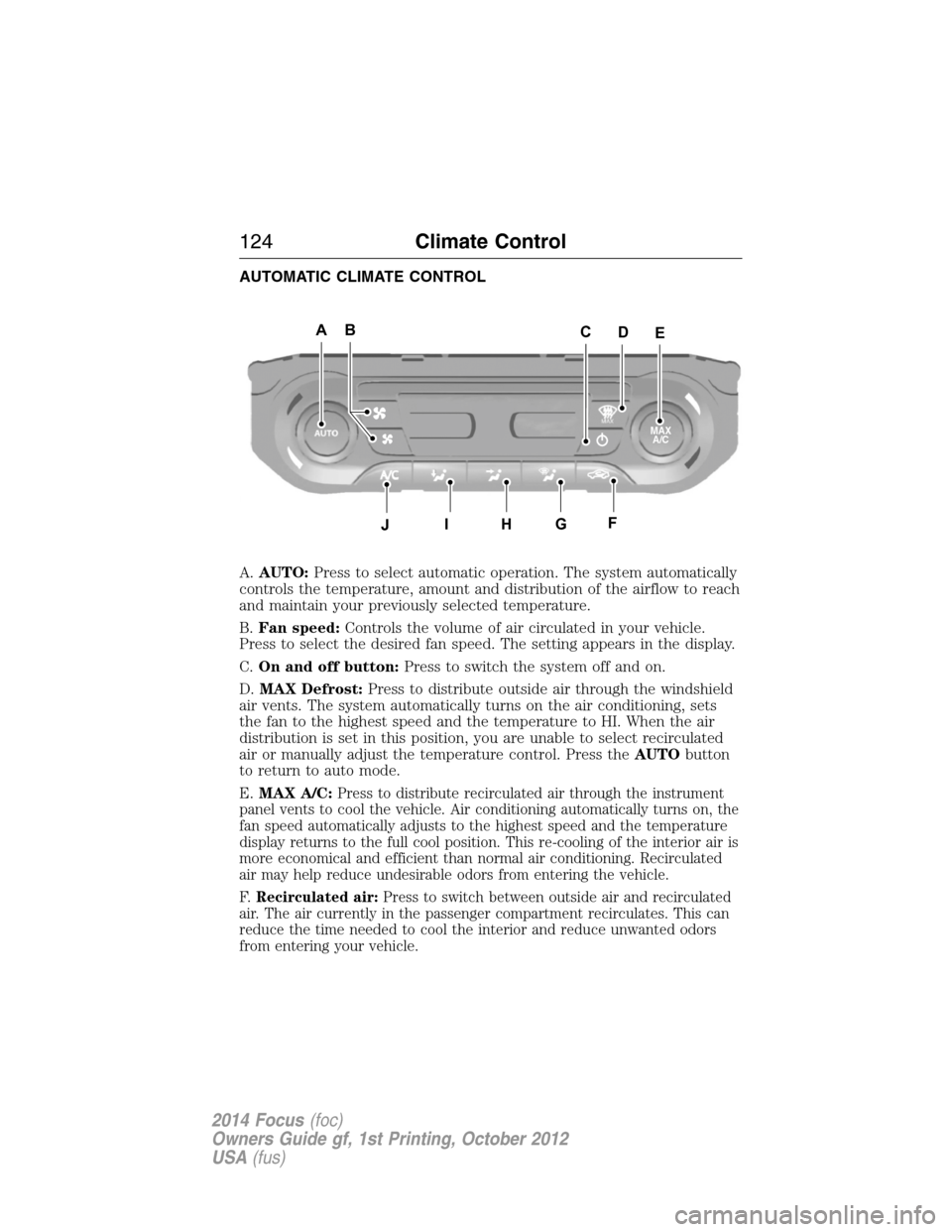
AUTOMATIC CLIMATE CONTROL
A.AUTO:Press to select automatic operation. The system automatically
controls the temperature, amount and distribution of the airflow to reach
and maintain your previously selected temperature.
B.Fan speed:Controls the volume of air circulated in your vehicle.
Press to select the desired fan speed. The setting appears in the display.
C.On and off button:Press to switch the system off and on.
D.MAX Defrost:Press to distribute outside air through the windshield
air vents. The system automatically turns on the air conditioning, sets
the fan to the highest speed and the temperature to HI. When the air
distribution is set in this position, you are unable to select recirculated
air or manually adjust the temperature control. Press theAUTObutton
to return to auto mode.
E.MAX A/C:
Press to distribute recirculated air through the instrument
panel vents to cool the vehicle. Air conditioning automatically turns on, the
fan speed automatically adjusts to the highest speed and the temperature
display returns to the full cool position. This re-cooling of the interior air is
more economical and efficient than normal air conditioning. Recirculated
air may help reduce undesirable odors from entering the vehicle.
F.Recirculated air:Press to switch between outside air and recirculated
air. The air currently in the passenger compartment recirculates. This can
reduce the time needed to cool the interior and reduce unwanted odors
from entering your vehicle.
ABAAEAAC
J
D
AHAGAFAI
MAX
A/C
124Climate Control
2014 Focus(foc)
Owners Guide gf, 1st Printing, October 2012
USA(fus)
Page 126 of 492
G.Defrost:Press to distribute air through the windshield air vents.
You can also use this setting to defog and clear the windshield of a thin
covering of ice.
H.Instrument panel:Press to distribute air through the instrument
panel air vents.
I.Floor:Press to distribute air through the floor air vents.
J.Air conditioning:Press to switch the air conditioning off and on.
Air conditioning cools your vehicle using outside air. To improve air
conditioning when starting your vehicle, drive with the windows slightly
open for two to three minutes.
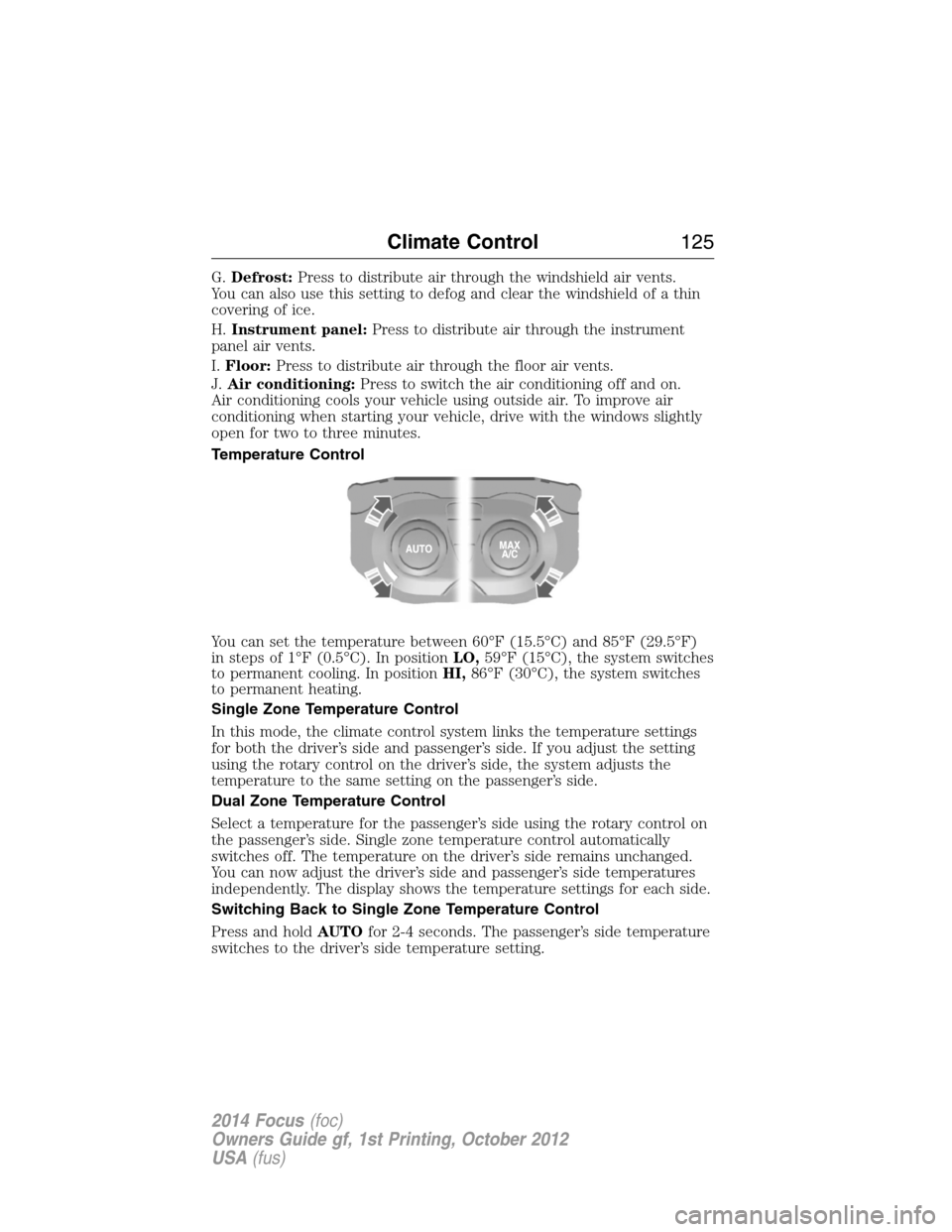
Temperature Control
You can set the temperature between 60°F (15.5°C) and 85°F (29.5°F)
in steps of 1°F (0.5°C). In positionLO,59°F (15°C), the system switches
to permanent cooling. In positionHI,86°F (30°C), the system switches
to permanent heating.
Single Zone Temperature Control
In this mode, the climate control system links the temperature settings
for both the driver’s side and passenger’s side. If you adjust the setting
using the rotary control on the driver’s side, the system adjusts the
temperature to the same setting on the passenger’s side.
Dual Zone Temperature Control
Select a temperature for the passenger’s side using the rotary control on
the passenger’s side. Single zone temperature control automatically
switches off. The temperature on the driver’s side remains unchanged.
You can now adjust the driver’s side and passenger’s side temperatures
independently. The display shows the temperature settings for each side.
Switching Back to Single Zone Temperature Control
Press and holdAUTOfor 2-4 seconds. The passenger’s side temperature
switches to the driver’s side temperature setting.
Climate Control125
2014 Focus(foc)
Owners Guide gf, 1st Printing, October 2012
USA(fus)
Page 131 of 492
CABIN AIR FILTER
Note:Make sure you have a cabin air filter installed at all times. This
prevents foreign objects from entering the system. Running the system
without a filter in place could result in degradation or damage to the
system.
Your cabin air filter is located under the instrument panel in the
passenger footwell area. The particulate filtration system reduces the
concentration of airborne particles such as dust, spores and pollen in
the air supplied to the interior of your vehicle. The particulate filtration
system gives you and your passengers the following benefits:
•It improves your driving comfort by reducing particle concentration.
•It improves the interior compartment cleanliness.
•It protects the climate control components from particle deposits.
Replace the filter at regular intervals. See theScheduled Maintenance
chapter.
For more information about your filter, see an authorized dealer.
REMOTE START CLIMATE OPERATION
The climate control system adjusts the cabin temperature during remote
start.
You cannot adjust the system during remote start operation. Turn the
ignition on to return the system to its previous settings. You can now
make adjustments. You will need to turn certain vehicle-dependent
features back on, such as:
•heated seats
•heated mirrors
•heated rear window.
You can adjust the settings using the information display controls.
See theInformation Displayschapter.
130Climate Control
2014 Focus(foc)
Owners Guide gf, 1st Printing, October 2012
USA(fus)