Amp FORD FOCUS 2014 3.G Manual Online
[x] Cancel search | Manufacturer: FORD, Model Year: 2014, Model line: FOCUS, Model: FORD FOCUS 2014 3.GPages: 492, PDF Size: 7.2 MB
Page 275 of 492
Damage
Periodically inspect the tire treads and sidewalls for damage (such as
bulges in the tread or sidewalls, cracks in the tread groove and
separation in the tread or sidewall). If damage is observed or suspected,
have the tire inspected by a tire professional. Tires can be damaged
during off-road use, so inspection after off-road use is also
recommended.
WARNING: Age
Tires degrade over time depending on many factors such as
weather, storage conditions, and conditions of use (such as load, speed,
inflation pressure) the tires experience throughout their lives.
In general, tires should be replaced after six years regardless of tread
wear. However, heat caused by hot climates or frequent high loading
conditions can accelerate the aging process and may require tires to be
replaced more frequently.
You should replace your spare tire when you replace the road tires or
after six years due to aging even if it has not been used.
U.S. DOT Tire Identification Number
Both U.S. and Canada Federal regulations require tire manufacturers
to place standardized information on the sidewall of all tires. This
information identifies and describes the fundamental characteristics of
the tire and also provides a U.S. DOT Tire Identification Number for
safety standard certification and in case of a recall.
This begins with the letters DOT and indicates that the tire meets all
federal standards. The next two numbers or letters are the plant code
designating where it was manufactured, the next two are the tire size
code and the last four numbers represent the week and year the tire was
built. For example, the numbers 317 mean the 31st week of 1997. After
2000 the numbers go to four digits. For example, 2501 means the 25th
week of 2001. The numbers in between are identification codes used for
traceability. This information is used to contact customers if a tire defect
requires a recall.
274Wheels and Tires
2014 Focus(foc)
Owners Guide gf, 1st Printing, October 2012
USA(fus)
Page 286 of 492
The usage of a full-size dissimilar spare tire and wheel assembly can lead
to impairment of the following:
•Handling, stability and braking performance
•Comfort and noise
•Ground clearance and parking at curbs
•Winter weather driving capability
•Wet weather driving capability
•All-wheel driving capability (if applicable)
•Load leveling adjustment (if applicable)
When driving with the full-size dissimilar spare tire and wheel assembly,
additional caution should be given to:
•towing a trailer.
•driving vehicles equipped with a camper body.
•driving vehicles with a load on the cargo rack.
Drive cautiously when using a full-size dissimilar spare tire and wheel,
and seek service as soon as possible.
Tire Change Procedure
WARNING:When one of the front wheels is off the ground, the
transmission alone will not prevent the vehicle from moving or
slipping off the jack, even if the transmission selector lever is in
positionPorN.
WARNING:To help prevent the vehicle from moving when you
change a tire, be sure to place the transmission selector lever in
positionPorN,set the parking brake and block (in both directions)
the wheel that is diagonally opposite (other side and end of the
vehicle) to the tire being changed.
WARNING:Never get underneath a vehicle that is supported
only by a jack. If the vehicle slips off the jack, you or someone
else could be seriously injured.
Wheels and Tires285
2014 Focus(foc)
Owners Guide gf, 1st Printing, October 2012
USA(fus)
Page 298 of 492
Peace of mind
•Keyless entry keypad•Wheel locks
•Remote start•Bumper mounted parking assist
system*
•Vehicle security systems•Car cover
*The accessory manufacturer designs, develops and therefore warrants
Ford Licensed Accessories, and does not design or test these accessories
to Ford Motor Company engineering requirements. Contact an
authorized Ford dealer for the manufacturer’s limited warranty details,
and request a copy of the Ford Licensed Accessories product limited
warranty from the accessory manufacturer.
For maximum vehicle performance, keep the following information in
mind when adding accessories or equipment to your vehicle:
•When adding accessories, equipment, passengers and luggage to your
vehicle, do not exceed the total weight capacity of the vehicle or of
the front or rear axle (GVWR or GAWR as indicated on the Safety
Compliance Certification label). Ask an authorized dealer for specific
weight information.
•The Federal Communications Commission (FCC) and Canadian Radio
Telecommunications Commission (CRTC) regulate the use of mobile
communications systems that are equipped with radio transmitters,
for example, two-way radios, telephones and theft alarms. Any such
equipment installed in your vehicle should comply with Federal
Communications Commission (FCC) and Canadian Radio
Telecommunications Commission (CRTC) regulations and should be
installed only by an authorized dealer.
•
Mobile communications systems may harm the operation of your vehicle,
particularly if they are not properly designed for automotive use.
•To avoid interference with other vehicle functions, for example
anti-lock brake systems, do not locate amateur radio antennas in the
area of the driver side hood.
•If you or an authorized Ford dealer add any non-Ford custom
electrical or electronic accessories or components to your vehicle, you
may adversely affect battery performance and durability, and may
adversely affect the performance of other electrical systems in the
vehicle.
Accessories297
2014 Focus(foc)
Owners Guide gf, 1st Printing, October 2012
USA(fus)
Page 312 of 492
MENU STRUCTURE
Note:Depending on your system, some options may appear slightly
different.
PressMENU.
Press the up and down arrow buttons to scroll through the options.
Press the right arrow to enter a menu. Press the left arrow to exit a
menu.
PressOKto confirm a selection.
Radio Settings
Manual tuneUse the left and right arrows to go up or down
the frequency band
ScanSelect for a brief sampling of all available
channels.
ASTSelect to store the six strongest local stations
on the AM-AST and FM-AST frequency bands.
PTY/Set CategorySelect to have the system search by certain
music categories (such as Rock, Pop or
Country).
RBDS/RDS TextSelect to view additional broadcast data, if
available. This feature defaults to off. RBDS
must be on for you to set a category.
SIRIUS
ScanSelect for a brief sampling of all available
channels.
Show ESNSelect to view your satellite radio electronic
serial number (ESN). You need this number
when communicating with Sirius to activate,
modify or track your account.
Audio System311
2014 Focus(foc)
Owners Guide gf, 1st Printing, October 2012
USA(fus)
Page 315 of 492
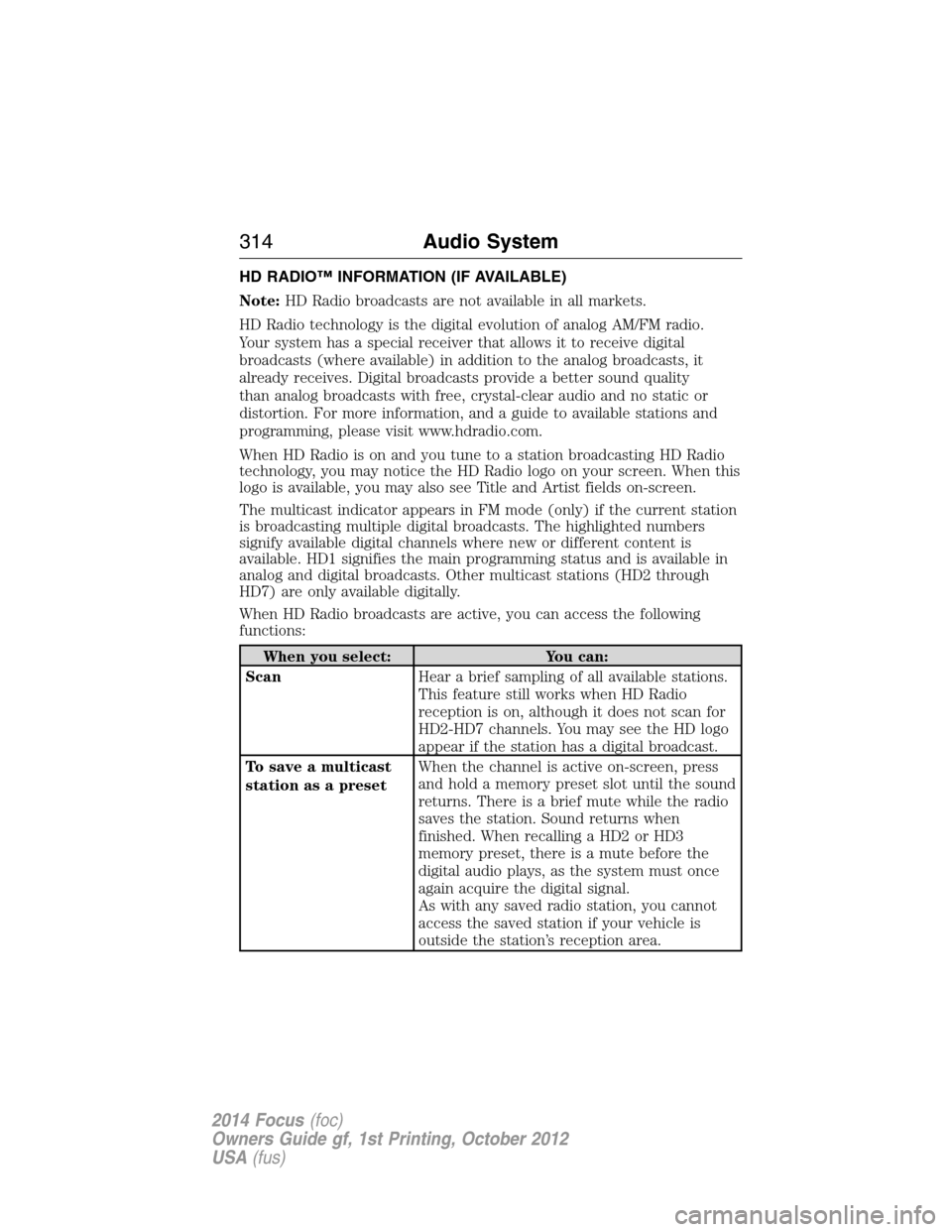
HD RADIO™ INFORMATION (IF AVAILABLE)
Note:HD Radio broadcasts are not available in all markets.
HD Radio technology is the digital evolution of analog AM/FM radio.
Your system has a special receiver that allows it to receive digital
broadcasts (where available) in addition to the analog broadcasts, it
already receives. Digital broadcasts provide a better sound quality
than analog broadcasts with free, crystal-clear audio and no static or
distortion. For more information, and a guide to available stations and
programming, please visit www.hdradio.com.
When HD Radio is on and you tune to a station broadcasting HD Radio
technology, you may notice the HD Radio logo on your screen. When this
logo is available, you may also see Title and Artist fields on-screen.
The multicast indicator appears in FM mode (only) if the current station
is broadcasting multiple digital broadcasts. The highlighted numbers
signify available digital channels where new or different content is
available. HD1 signifies the main programming status and is available in
analog and digital broadcasts. Other multicast stations (HD2 through
HD7) are only available digitally.
When HD Radio broadcasts are active, you can access the following
functions:
When you select: You can:
ScanHear a brief sampling of all available stations.
This feature still works when HD Radio
reception is on, although it does not scan for
HD2-HD7 channels. You may see the HD logo
appear if the station has a digital broadcast.
To save a multicast
station as a presetWhen the channel is active on-screen, press
and hold a memory preset slot until the sound
returns. There is a brief mute while the radio
saves the station. Sound returns when
finished. When recalling a HD2 or HD3
memory preset, there is a mute before the
digital audio plays, as the system must once
again acquire the digital signal.
As with any saved radio station, you cannot
access the saved station if your vehicle is
outside the station’s reception area.
314Audio System
2014 Focus(foc)
Owners Guide gf, 1st Printing, October 2012
USA(fus)
Page 328 of 492
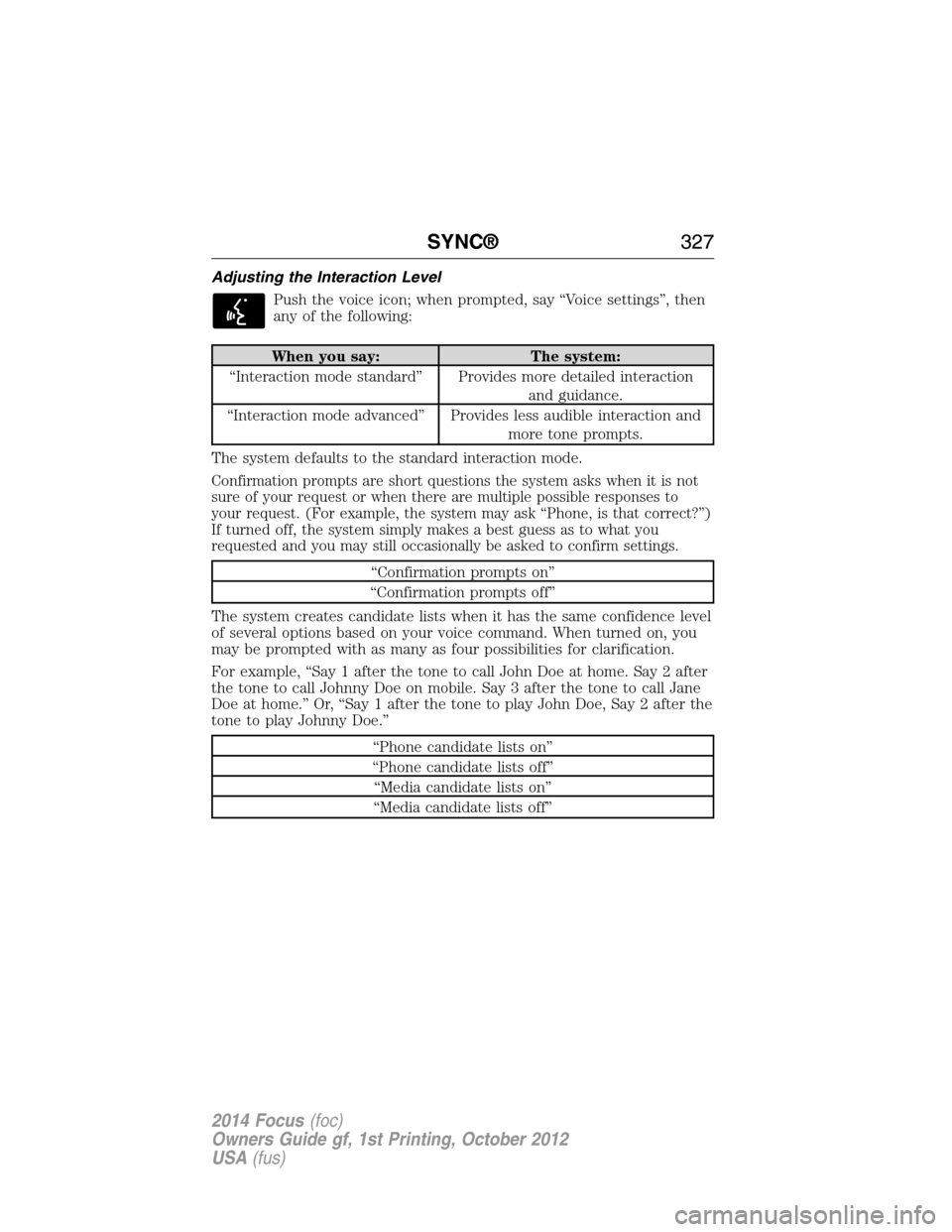
Adjusting the Interaction Level
Push the voice icon; when prompted, say “Voice settings”, then
any of the following:
When you say: The system:
“Interaction mode standard” Provides more detailed interaction
and guidance.
“Interaction mode advanced” Provides less audible interaction and
more tone prompts.
The system defaults to the standard interaction mode.
Confirmation prompts are short questions the system asks when it is not
sure of your request or when there are multiple possible responses to
your request. (For example, the system may ask “Phone, is that correct?”)
If turned off, the system simply makes a best guess as to what you
requested and you may still occasionally be asked to confirm settings.
“Confirmation prompts on”
“Confirmation prompts off”
The system creates candidate lists when it has the same confidence level
of several options based on your voice command. When turned on, you
may be prompted with as many as four possibilities for clarification.
For example, “Say 1 after the tone to call John Doe at home. Say 2 after
the tone to call Johnny Doe on mobile. Say 3 after the tone to call Jane
Doe at home.” Or, “Say 1 after the tone to play John Doe, Say 2 after the
tone to play Johnny Doe.”
“Phone candidate lists on”
“Phone candidate lists off”
“Media candidate lists on”
“Media candidate lists off”
SYNC®327
2014 Focus(foc)
Owners Guide gf, 1st Printing, October 2012
USA(fus)
Page 357 of 492
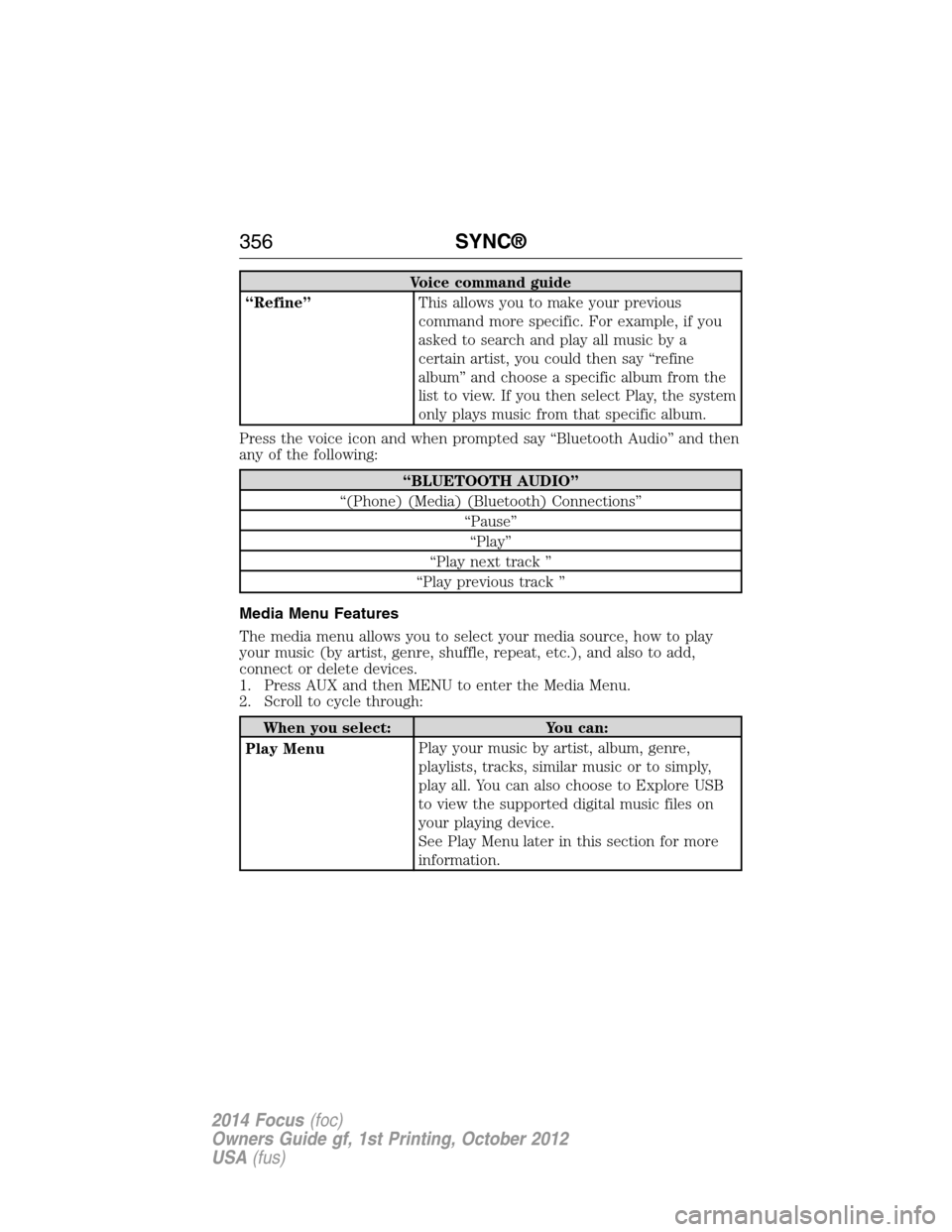
Voice command guide
“Refine”This allows you to make your previous
command more specific. For example, if you
asked to search and play all music by a
certain artist, you could then say “refine
album” and choose a specific album from the
list to view. If you then select Play, the system
only plays music from that specific album.
Press the voice icon and when prompted say “Bluetooth Audio” and then
any of the following:
“BLUETOOTH AUDIO”
“(Phone) (Media) (Bluetooth) Connections”
“Pause”
“Play”
“Play next track ”
“Play previous track ”
Media Menu Features
The media menu allows you to select your media source, how to play
your music (by artist, genre, shuffle, repeat, etc.), and also to add,
connect or delete devices.
1. Press AUX and then MENU to enter the Media Menu.
2. Scroll to cycle through:
When you select: You can:
Play MenuPlay your music by artist, album, genre,
playlists, tracks, similar music or to simply,
play all. You can also choose to Explore USB
to view the supported digital music files on
your playing device.
See Play Menu later in this section for more
information.
356SYNC®
2014 Focus(foc)
Owners Guide gf, 1st Printing, October 2012
USA(fus)
Page 371 of 492
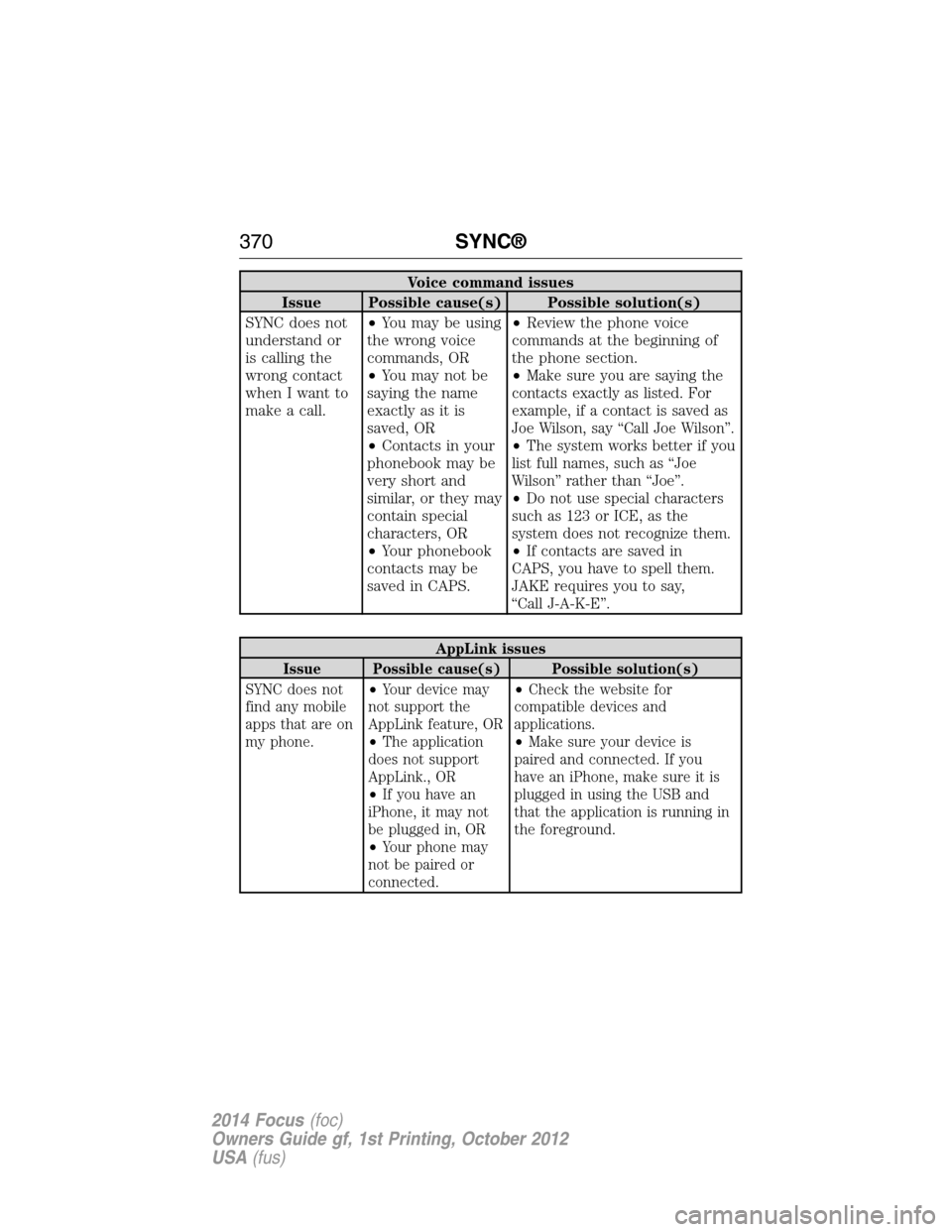
Voice command issues
Issue Possible cause(s) Possible solution(s)
SYNC does not
understand or
is calling the
wrong contact
when I want to
make a call.•You may be using
the wrong voice
commands, OR
•You may not be
saying the name
exactly as it is
saved, OR
•Contacts in your
phonebook may be
very short and
similar, or they may
contain special
characters, OR
•Your phonebook
contacts may be
saved in CAPS.•Review the phone voice
commands at the beginning of
the phone section.
•
Make sure you are saying the
contacts exactly as listed. For
example, if a contact is saved as
Joe Wilson, say “Call Joe Wilson”.
•The system works better if you
list full names, such as “Joe
Wilson” rather than “Joe”.
•Do not use special characters
such as 123 or ICE, as the
system does not recognize them.
•If contacts are saved in
CAPS, you have to spell them.
JAKE requires you to say,
“Call J-A-K-E”.
AppLink issues
Issue Possible cause(s) Possible solution(s)
SYNC does not
find any mobile
apps that are on
my phone.•Your device may
not support the
AppLink feature, OR
•The application
does not support
AppLink., OR
•If you have an
iPhone, it may not
be plugged in, OR
•Your phone may
not be paired or
connected.•Check the website for
compatible devices and
applications.
•Make sure your device is
paired and connected. If you
have an iPhone, make sure it is
plugged in using the USB and
that the application is running in
the foreground.
370SYNC®
2014 Focus(foc)
Owners Guide gf, 1st Printing, October 2012
USA(fus)
Page 375 of 492
Using the Touch-sensitive Controls on Your System
To turn a feature on and off, just touch the graphic with your finger.
To get the best performance from the touch-sensitive controls:
•Do not press hard on the controls. They are sensitive to light touch.
•Use your bare finger to touch the center of a touch-control graphic.
Touching off-center of the graphic may affect operation of a nearby
control.
•Make sure your hands are clean and dry.
•Keep metal and other conductive material away from the surface
of the touchscreen as this may cause electronic interference
(for example, inadvertently turning on a feature other than the one
you meant to turn on).
Depending on your vehicle and option package, you may also have these
controls on your bezel:
•Power: Switch the media or climate features off and on.
•VOL:Control the volume of playing media.
•Fan: Control the speed of the climate system fan.
•Seek and Tune buttons: Use as you normally would in media modes.
•Eject: Eject a CD from the entertainment system.
•SOURCE:Touch the word repeatedly to see all available media
modes. The screen does not change, but you see the media change
in the lower left status bar.
•SOUND:Touch the word to access the Sound menu where you can
adjust settings such as: Bass, Treble, Midrange, Balance and Fade,
THX Deep Note Demo, DSP (Digital Signal Processing), Occupancy
Mode and Speed Compensated Volume. (Your vehicle may not have
all of these sound options.)
•Hazard flasher: Switch the hazard flashers off and on.
Cleaning the Touchscreen Display
Use a clean, soft cloth such as one used for cleaning glasses. If dirt or
fingerprints are still visible, apply a small amount of alcohol to the cloth.
Do not pour or spray alcohol onto the display. Do not use detergent or
any type of solvent to clean the display.
374MyFord Touch® (If Equipped)
2014 Focus(foc)
Owners Guide gf, 1st Printing, October 2012
USA(fus)
Page 377 of 492
Speed-restricted Features
Some features of this system may be too difficult to use while your
vehicle is moving so they are restricted from use unless your vehicle is
stationary.
•Screens that are too crowded with information, such as Point of
Interest reviews and ratings, Sirius Travel Link sports scores, movie
times and ski conditions.
•Any action that requires you to use a keyboard is restricted, such as
entering a navigation destination or editing information.
•All lists are limited so the user can view fewer entries (such as phone
contacts or recent phone call entries).
See the following chart for more specific examples:
Restricted Features
Cellular Phone Pairing a Bluetooth phone
Adding phonebook contacts or uploading
phonebook contacts (from a USB)
List entries are limited for phone contacts and
recent phone call entries
System Functionality Editing the keypad code
Enabling Valet Mode
Editing settings while the rear view camera or
Active Park Assist are active
Wi-Fi and Wireless Editing wireless settings
Editing the list of wireless networks
Videos, Photos and
GraphicsPlaying video
Editing the screen’s wallpaper or adding new
wallpaper
Text Messages Composing text messages
Viewing received text messages
Editing preset text messages
Navigation Using the keyboard to enter a destination
Demo navigation route
Adding or Editing Address Book entries or
Avoid Areas
376MyFord Touch® (If Equipped)
2014 Focus(foc)
Owners Guide gf, 1st Printing, October 2012
USA(fus)