warning light FORD MAVERICK 2023 Owner's Manual
[x] Cancel search | Manufacturer: FORD, Model Year: 2023, Model line: MAVERICK, Model: FORD MAVERICK 2023Pages: 556, PDF Size: 14.79 MB
Page 171 of 556
HYBRID ELECTRIC VEHICLE
INFORMATION –
TROUBLESHOOTING
HYBRID ELECTRIC VEHICLEINFORMATION – WARNINGLAMPS
It illuminates if your vehicle hasan electrical component fault orfailure that causes your vehicleto shutdown or enter a limited operatingmode. A message may appear in theinstrument cluster display.
HYBRID ELECTRIC VEHICLEINFORMATION – INFORMATIONMESSAGES
ActionMessage
Displays when amalfunction occursin the high voltageelectric system.Stop your vehicle assoon as it is safe todo so. Have yourvehicle checked assoon as possible.
Stop Safely Now
HYBRID ELECTRIC VEHICLEINFORMATION – FREQUENTLYASKED QUESTIONS
What should I do if the vehicle runs outof fuel and the high voltage battery isout of charge?
Refuel and start your vehicle normally.The engine will recharge the highvoltage battery.
Why does the engine sometimes startat key-on?
The vehicle's computer determines ifan engine start is required at key-on.It starts the engine when necessary forcabin heating, windshield defrost, or ifthe outside temperature is low.
Can I put E15 or E85 in my vehicle, andhow will it affect my fuel economy?
Your hybrid vehicle can use E15 (15%ethanol, 85% gasoline) fuel, but youmay notice slightly reduced fueleconomy because ethanol containsless energy per gallon than gasoline.Your hybrid vehicle is not designed touse E85 (85% ethanol).
Why does it take a long time before theengine shuts down?
There are several reasons the enginestays on for an extended amount oftime when you first start it. Onecommon reason is to make sure thatthe emissions components are warmenough to minimize tailpipe emission.As the climate gets cooler, theengine-on time is extended.
Why does my engine stay on when it isextremely cold outside?
In order to make sure that the climatecontrol system can begin heating thecabin or defrosting the windshield assoon as a driver requests it, the enginecoolant temperature has to be keptsufficiently hot. Keeping the engine onis required to maintain the correctcoolant temperature.
167
2023 Maverick (CFE) Canada/United States of America, enUSA, Edition date: 202208, First-PrintingHybrid Electric Vehicle Information - Hybrid Electric Vehicle
(HEV)E332963
Page 179 of 556
WARNING: Read and follow all theinstructions on the pump island.
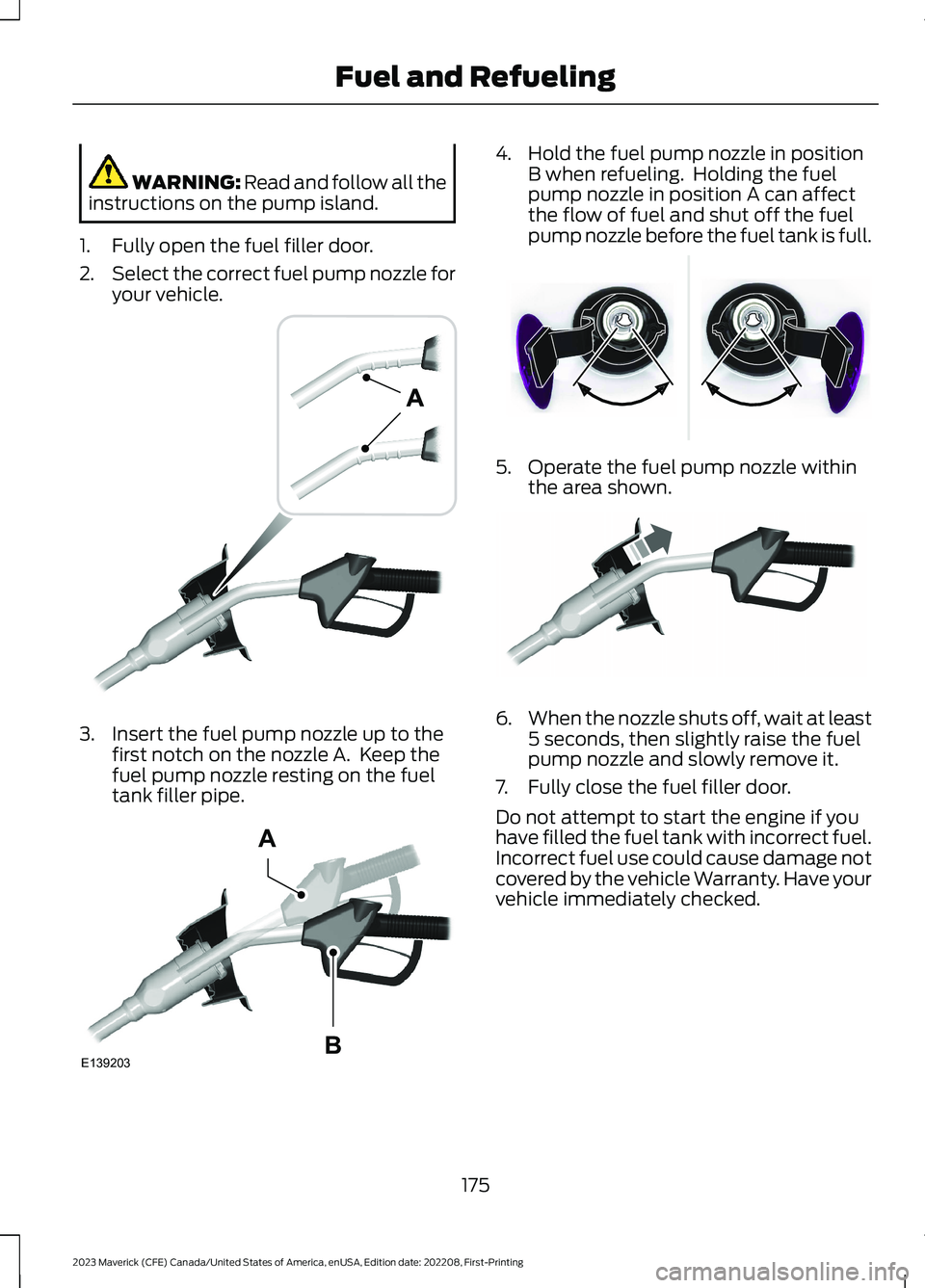
1.Fully open the fuel filler door.
2.Select the correct fuel pump nozzle foryour vehicle.
3.Insert the fuel pump nozzle up to thefirst notch on the nozzle A. Keep thefuel pump nozzle resting on the fueltank filler pipe.
4.Hold the fuel pump nozzle in positionB when refueling. Holding the fuelpump nozzle in position A can affectthe flow of fuel and shut off the fuelpump nozzle before the fuel tank is full.
5.Operate the fuel pump nozzle withinthe area shown.
6.When the nozzle shuts off, wait at least5 seconds, then slightly raise the fuelpump nozzle and slowly remove it.
7.Fully close the fuel filler door.
Do not attempt to start the engine if youhave filled the fuel tank with incorrect fuel.Incorrect fuel use could cause damage notcovered by the vehicle Warranty. Have yourvehicle immediately checked.
175
2023 Maverick (CFE) Canada/United States of America, enUSA, Edition date: 202208, First-PrintingFuel and RefuelingE139202 E139203AB E337395 E119081
Page 181 of 556
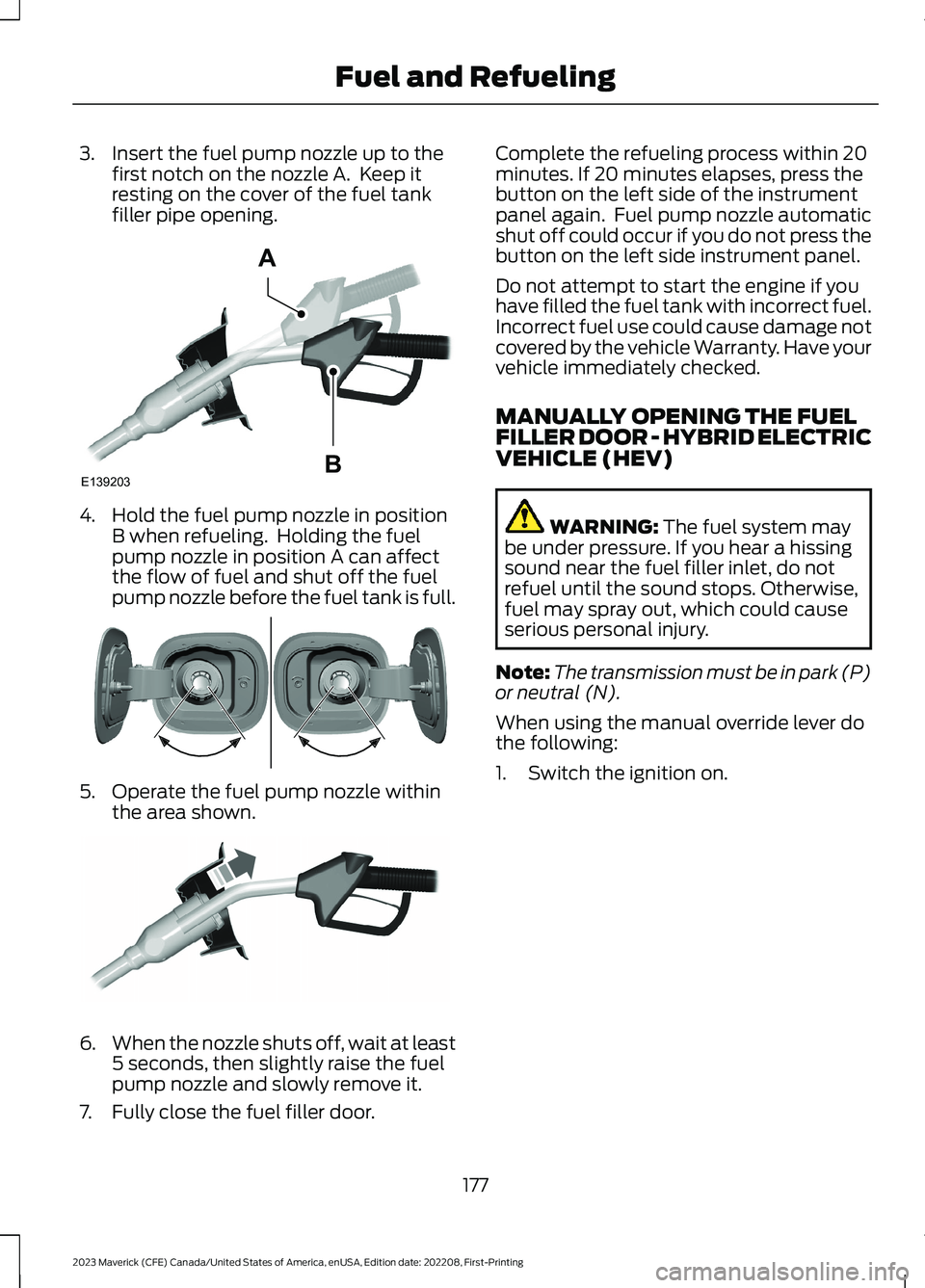
3.Insert the fuel pump nozzle up to thefirst notch on the nozzle A. Keep itresting on the cover of the fuel tankfiller pipe opening.
4.Hold the fuel pump nozzle in positionB when refueling. Holding the fuelpump nozzle in position A can affectthe flow of fuel and shut off the fuelpump nozzle before the fuel tank is full.
5.Operate the fuel pump nozzle withinthe area shown.
6.When the nozzle shuts off, wait at least5 seconds, then slightly raise the fuelpump nozzle and slowly remove it.
7.Fully close the fuel filler door.
Complete the refueling process within 20minutes. If 20 minutes elapses, press thebutton on the left side of the instrumentpanel again. Fuel pump nozzle automaticshut off could occur if you do not press thebutton on the left side instrument panel.
Do not attempt to start the engine if youhave filled the fuel tank with incorrect fuel.Incorrect fuel use could cause damage notcovered by the vehicle Warranty. Have yourvehicle immediately checked.
MANUALLY OPENING THE FUELFILLER DOOR - HYBRID ELECTRICVEHICLE (HEV)
WARNING: The fuel system maybe under pressure. If you hear a hissingsound near the fuel filler inlet, do notrefuel until the sound stops. Otherwise,fuel may spray out, which could causeserious personal injury.
Note:The transmission must be in park (P)or neutral (N).
When using the manual override lever dothe following:
1.Switch the ignition on.
177
2023 Maverick (CFE) Canada/United States of America, enUSA, Edition date: 202208, First-PrintingFuel and RefuelingE139203AB E337454 E119081
Page 183 of 556
FUEL AND REFUELING – INFORMATION MESSAGES - HYBRID ELECTRICVEHICLE (HEV)
ActionMessage
An early reminder of a low fuel condition.Fuel Level Low
The fuel fill inlet may not be properly closed.Check Fuel Fill Inlet
The information message appears while the fuel system isdepressurizing with the fuel filler door closed. Wait for the fuelsystem to depressurize and for the fuel filler door to unlatch.
Please wait for fuel doorto open
The information message appears when the fuel system hasdepressurized and opened the fuel filler door. Fully open thefuel filler door to refuel and fully close the fuel filler door whenrefueling is complete.
Fuel Door Open
Your vehicle is equipped with a sealed fuel system thatrequires the fuel filler door to be fully closed after refueling.This warning message appears when the fuel filler door is ajar.Please fully close the fuel filler door to avoid a "Check Engine"Light.
Fuel door ajar Close fullyto avoid Check enginelight
If you see this message and a "Check Engine" lamp illumin-ates, please fully close the fuel filler door. The "Check Engine"Light should clear within five seconds. If the "Check Engine"light persists, please see your dealer.
The information message appears when the fuel system failsto depressurize, or the fuel filler door fails to open. You couldhave to use the fuel filler door manual override lever whenopening the fuel door.
Refuel Error See Manual
179
2023 Maverick (CFE) Canada/United States of America, enUSA, Edition date: 202208, First-PrintingFuel and Refueling
Page 204 of 556
HOW DOES TRACTION
CONTROL WORK
If your vehicle begins to slide, the systemapplies the brakes to individual wheelsand, when needed, reduces power at thesame time. If the wheels spin whenaccelerating on slippery or loose surfaces,the system reduces power in order toincrease traction.
SWITCHING TRACTION
CONTROL ON AND OFF
WARNING: Operating your vehiclewith the traction control disabled couldlead to an increased risk of loss of vehiclecontrol, vehicle rollover, personal injuryand death.
The traction control system turns on eachtime you switch the ignition on.
The button for your traction control systemis located on the center console.
Press and release the button to switchtraction control off. The stability controlsystem remains fully active.
When you switch traction control off, amessage and an illuminated icon appearon the instrument cluster.
Press the switch again to turn the tractioncontrol system back on to normaloperation.
If your vehicle is stuck in mud or snow,switching traction control off may bebeneficial as this allows the wheels to spin.
Your vehicle may have MyKey restrictionsregarding this feature. See What IsMyKey (page 67).
TRACTION CONTROL
INDICATOR
TRACTION CONTROL –
TROUBLESHOOTING
TRACTION CONTROL – WARNINGLAMPS
System Messages
The traction control lighttemporarily illuminates onstart-up and flashes whenactivated by a driving condition.
The traction control off light temporarilyilluminates on start-up and stays on:
•When you switch the traction controlsystem off.
•When you select an alternative stabilitycontrol mode.
•If a problem occurs in the system.
200
2023 Maverick (CFE) Canada/United States of America, enUSA, Edition date: 202208, First-PrintingTraction ControlE356488 E138639 E130458 E138639
Page 206 of 556
HOW DOES STABILITY
CONTROL WORK
WARNING: Vehicle modificationsinvolving braking system, aftermarketroof racks, suspension, steering system,tire construction and wheel and tire sizemay change the handling characteristicsof your vehicle and may adversely affectthe performance of the electronicstability control system. In addition,installing any stereo loudspeakers mayinterfere with and adversely affect theelectronic stability control system. Installany aftermarket stereo loudspeaker asfar as possible from the front centerconsole, the tunnel, and the front seatsin order to minimize the risk of interferingwith the electronic stability controlsensors. Reducing the effectiveness ofthe electronic stability control systemcould lead to an increased risk of loss ofvehicle control, vehicle rollover, personalinjury and death.
WARNING: Remember that evenadvanced technology cannot defy thelaws of physics. It's always possible tolose control of a vehicle due toinappropriate driver input for theconditions. Aggressive driving on anyroad condition can cause you to losecontrol of your vehicle increasing the riskof personal injury or property damage.Activation of the electronic stabilitycontrol system is an indication that atleast some of the tires have exceededtheir ability to grip the road; this couldreduce the operator's ability to controlthe vehicle potentially resulting in a lossof vehicle control, vehicle rollover,personal injury and death. If yourelectronic stability control systemactivates, SLOW DOWN.
If a driving condition activates either thestability control or the traction controlsystem you may experience the followingconditions:
•The stability and traction control lightflashes.
•Your vehicle slows down.
•Reduced engine power.
The stability control system has severalfeatures built into it to help you maintaincontrol of your vehicle:
Electronic Stability Control
Electronic stability control enhances yourvehicle’s ability to prevent skids or lateralslides by applying brakes to one or moreof the wheels individually and, if necessary,reducing engine power.
Roll Stability Control
Roll stability control enhances yourvehicle’s ability to prevent rollovers bydetecting your vehicle’s roll motion andthe rate at which it changes by applyingthe brakes to one or more wheelsindividually.
Curve Control
Curve control enhances your vehicle’sability to follow the road when corneringseverely or avoiding objects in the roadway.Curve control operates by reducing enginepower and, if necessary, applying brakesto one or more of the wheels individually.
Traction Control
Traction control enhances your vehicle’sability to maintain traction of the wheelsby detecting and controlling wheel spin.See How Does Traction Control Work(page 200).
202
2023 Maverick (CFE) Canada/United States of America, enUSA, Edition date: 202208, First-PrintingStability Control
Page 219 of 556
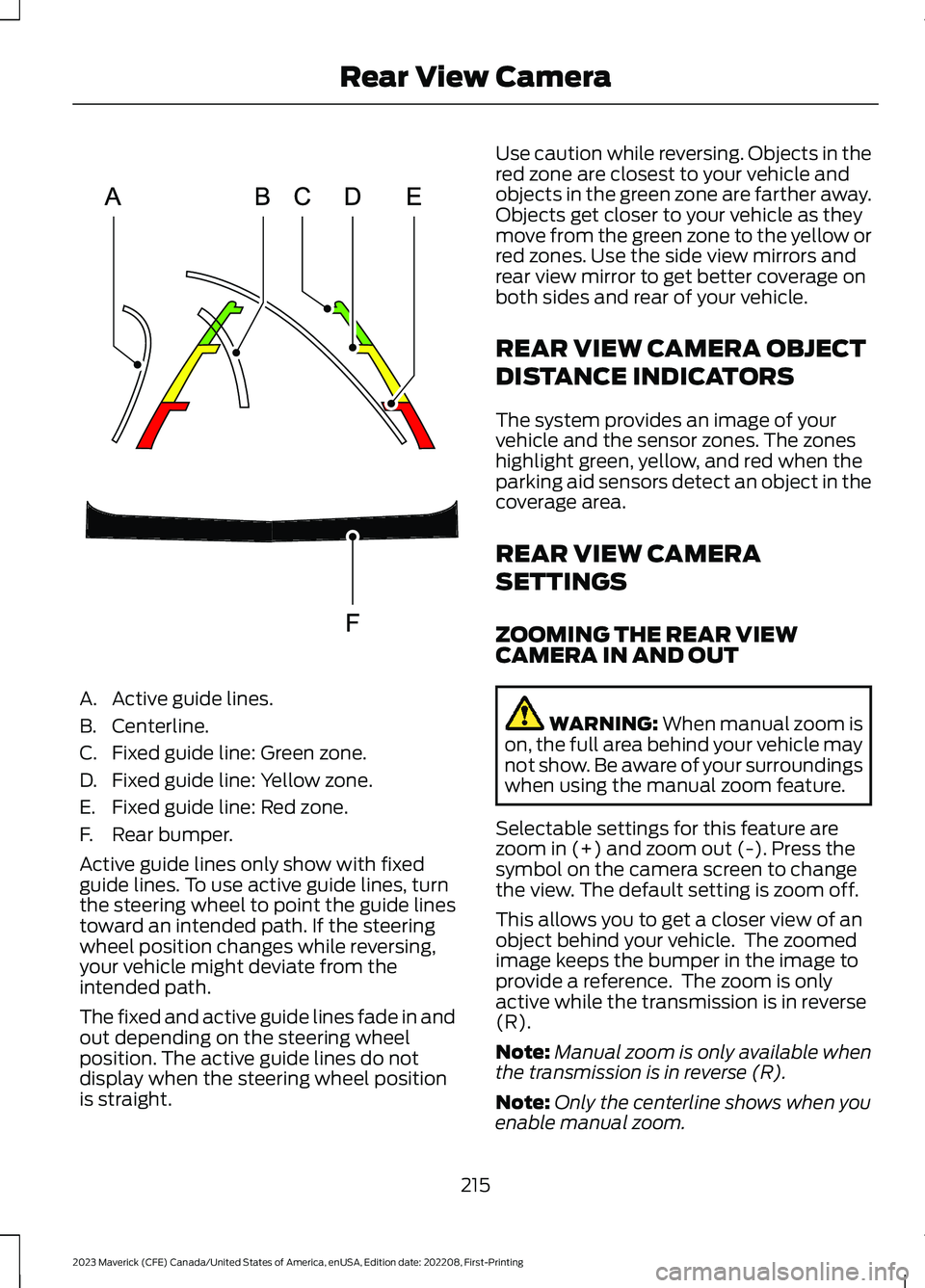
A.Active guide lines.
B.Centerline.
C.Fixed guide line: Green zone.
D.Fixed guide line: Yellow zone.
E.Fixed guide line: Red zone.
F.Rear bumper.
Active guide lines only show with fixedguide lines. To use active guide lines, turnthe steering wheel to point the guide linestoward an intended path. If the steeringwheel position changes while reversing,your vehicle might deviate from theintended path.
The fixed and active guide lines fade in andout depending on the steering wheelposition. The active guide lines do notdisplay when the steering wheel positionis straight.
Use caution while reversing. Objects in thered zone are closest to your vehicle andobjects in the green zone are farther away.Objects get closer to your vehicle as theymove from the green zone to the yellow orred zones. Use the side view mirrors andrear view mirror to get better coverage onboth sides and rear of your vehicle.
REAR VIEW CAMERA OBJECT
DISTANCE INDICATORS
The system provides an image of yourvehicle and the sensor zones. The zoneshighlight green, yellow, and red when theparking aid sensors detect an object in thecoverage area.
REAR VIEW CAMERA
SETTINGS
ZOOMING THE REAR VIEWCAMERA IN AND OUT
WARNING: When manual zoom ison, the full area behind your vehicle maynot show. Be aware of your surroundingswhen using the manual zoom feature.
Selectable settings for this feature arezoom in (+) and zoom out (-). Press thesymbol on the camera screen to changethe view. The default setting is zoom off.
This allows you to get a closer view of anobject behind your vehicle. The zoomedimage keeps the bumper in the image toprovide a reference. The zoom is onlyactive while the transmission is in reverse(R).
Note:Manual zoom is only available whenthe transmission is in reverse (R).
Note:Only the centerline shows when youenable manual zoom.
215
2023 Maverick (CFE) Canada/United States of America, enUSA, Edition date: 202208, First-PrintingRear View CameraE306774
Page 224 of 556
ADAPTIVE CRUISE CONTROL
LIMITATIONS
Sensor Limitations
WARNING: On rare occasions,detection issues can occur due to theroad infrastructures, for example bridges,tunnels and safety barriers. In thesecases, the system may brake late orunexpectedly. At all times, you areresponsible for controlling your vehicle,supervising the system and intervening,if required.
WARNING: If the systemmalfunctions, have your vehicle checkedas soon as possible.
WARNING: Large contrasts inoutside lighting can limit sensorperformance.
WARNING: The system only warnsof vehicles detected by the radar sensor.In some cases there may be no warningor a delayed warning. Apply the brakeswhen necessary. Failure to follow thisinstruction could result in personal injuryor death.
WARNING: The system may notdetect stationary or slow movingvehicles below 6 mph (10 km/h).
WARNING: The system does notdetect pedestrians or objects in the road.
WARNING: The system does notdetect oncoming vehicles in the samelane.
WARNING: The system may notoperate properly if the sensor is blocked.Keep the windshield free fromobstruction.
WARNING: The sensor mayincorrectly track lane markings as otherstructures or objects. This can result ina false or missed warning.
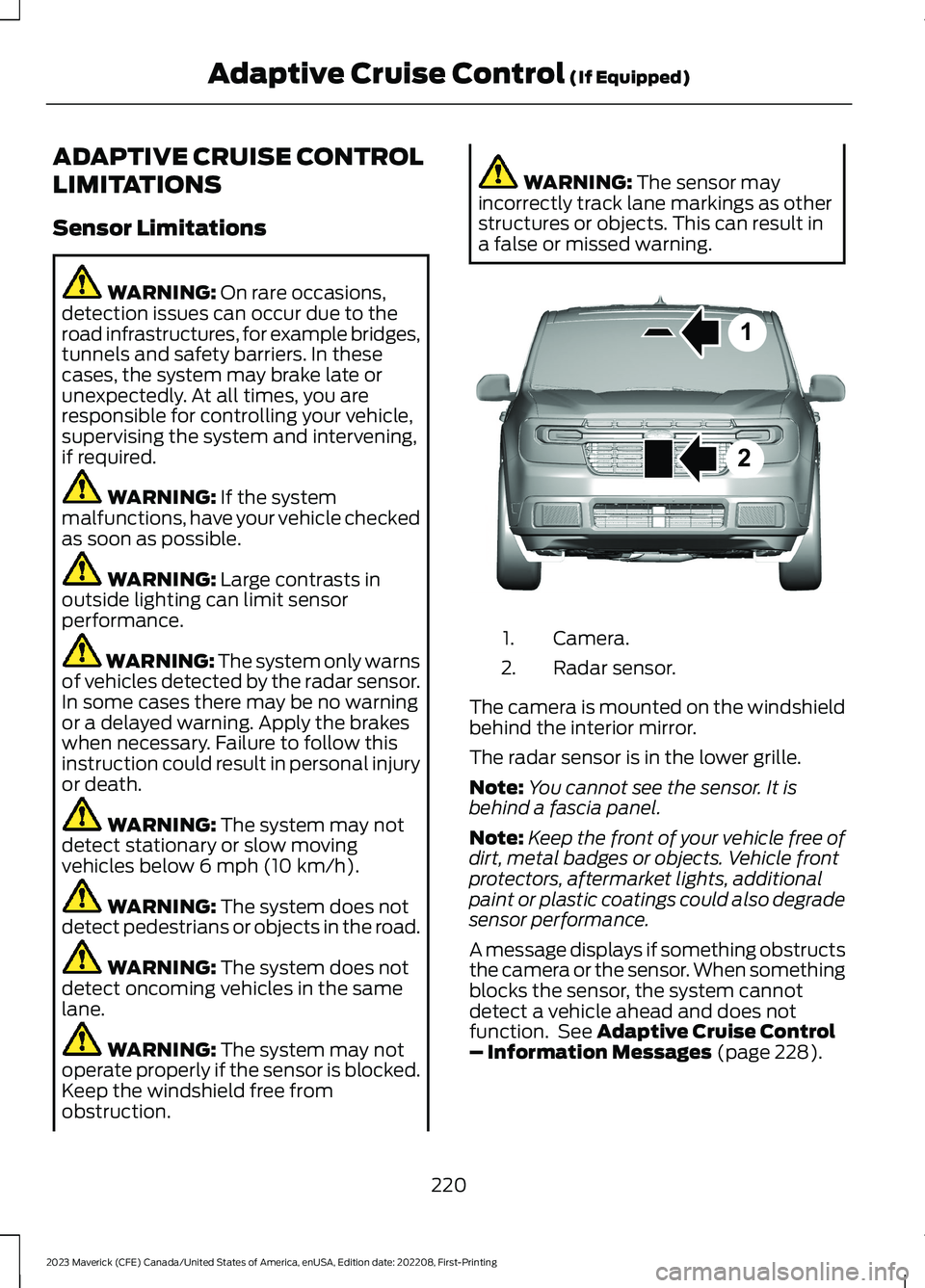
Camera.1.
Radar sensor.2.
The camera is mounted on the windshieldbehind the interior mirror.
The radar sensor is in the lower grille.
Note:You cannot see the sensor. It isbehind a fascia panel.
Note:Keep the front of your vehicle free ofdirt, metal badges or objects. Vehicle frontprotectors, aftermarket lights, additionalpaint or plastic coatings could also degradesensor performance.
A message displays if something obstructsthe camera or the sensor. When somethingblocks the sensor, the system cannotdetect a vehicle ahead and does notfunction. See Adaptive Cruise Control– Information Messages (page 228).
220
2023 Maverick (CFE) Canada/United States of America, enUSA, Edition date: 202208, First-PrintingAdaptive Cruise Control (If Equipped)12E355015
Page 230 of 556
•The system detects both lane markingswhen driving on a straight road.
•Your vehicle is initially centered in thelane between two visible line markings.
Note:If the system does not detect validlane line markings, the system will remainin standby until valid line markings areavailables.
LANE CENTERING LIMITATIONS
Adaptive cruise control limitations applyto lane centering unless stated otherwiseor contradicted by a lane centeringlimitation. See Adaptive Cruise ControlLimitations (page 220).
Lane centering may not correctly operatein any of the following conditions:
•The lane width is too narrow or wide.
•The curve in the road is too small.
•The system does not detect theminimum required lane markings orwhen lanes merge or split.
•When the required steering effort tomaintain lane center exceeds the lanecentering system limit.
•When driving in areas that are underconstruction or when road work is inprogress.
•If the front windshield camera and/orthe front radar are blocked.
•When using a spare tire.
•Inclement weather conditionsincluding, but not limited to, high wind,heavy rain, and fog.
•Driving into direct sunlight.
•When modification to the steeringsystem has been made, includingalterations to the steering wheel.
•When towing a trailer.
See Lane Centering Precautions (page225).
Note:The system steering assistance islimited and may not have sufficient effortfor all driving situations and/or conditions,such as driving through tight curves ordriving through curves at high speeds.
Note:In exceptional conditions, the systemmay deviate from the lane center.
SWITCHING LANE CENTERING ONAND OFF
You must keep your hands on the steeringwheel at all times.
The controls are on the steering wheel.
Press the button.
The indicator appears in the informationdisplay. When the system is on, the colorof the indicator changes to indicate thesystem status.
You can override the system at any timeby steering your vehicle.
Note:The correct requirements must bemet before you can switch the system on.See Lane Centering Requirements (page225).
LANE CENTERING ALERTS
You must keep your hands on the steeringwheel at all times.
When the system is active and detects nosteering activity for a period of time, thesystem alerts you to put your hands on thesteering wheel. If you do not reactappropriately to the warnings the adaptivecruise control with lane centering systemcancels and slows your vehicle down toidle speeds while maintaining steeringcontrol. See Lane Centering AutomaticCancellation (page 227).
226
2023 Maverick (CFE) Canada/United States of America, enUSA, Edition date: 202208, First-PrintingAdaptive Cruise Control (If Equipped)E262175
Page 238 of 556
WHAT IS THE LANE KEEPING
SYSTEM
The lane keeping system alerts you byproviding temporary steering assistanceor steering wheel vibration when it detectsan unintended lane departure.
HOW DOES THE LANE
KEEPING SYSTEM WORK
The lane keeping system uses a forwardlooking camera mounted on the windshieldto monitor vehicle movement within thetravel lane.
When the camera detects a drift out of thetravel lane, the lane keeping system alertsthe driver by vibrating the steering wheel,or aids the driver by providing a smallsteering input to move the vehicle backinto the travel lane.
The driver can select one of three modes:
•Alert (If Equipped)
•Aid
•Alert + Aid
LANE KEEPING SYSTEM
PRECAUTIONS
WARNING: You are responsible forcontrolling your vehicle at all times. Thesystem is designed to be an aid and doesnot relieve you of your responsibility todrive with due care and attention. Failureto follow this instruction could result inthe loss of control of your vehicle,personal injury or death.
WARNING: The system will notoperate if the sensor cannot track theroad lane markings.
WARNING: The sensor mayincorrectly track lane markings as otherstructures or objects. This can result ina false or missed warning.
WARNING: In cold and severeweather conditions the system may notfunction. Rain, snow and spray can alllimit sensor performance.
WARNING: The system may notoperate properly if the sensor is blocked.Keep the windshield free fromobstruction.
WARNING: If damage occurs in theimmediate area surrounding the sensor,have your vehicle checked as soon aspossible.
WARNING: The system may notcorrectly operate if your vehicle is fittedwith a suspension kit not approved byus.
WARNING: Large contrasts inoutside lighting can limit sensorperformance.
LANE KEEPING SYSTEM
LIMITATIONS
The lane keeping system only operateswhen the vehicle speed is greater than40 mph (64 km/h).
The system works when the camera candetect at least one lane marking or theedge of the road.
The lane keeping system may not correctlyoperate in any of the following conditions:
•The lane keeping system does notdetect at least one lane marking.
•You switch the turn signal on.
234
2023 Maverick (CFE) Canada/United States of America, enUSA, Edition date: 202208, First-PrintingLane Keeping System (If Equipped)