battery FORD MAVERICK 2023 Manual PDF
[x] Cancel search | Manufacturer: FORD, Model Year: 2023, Model line: MAVERICK, Model: FORD MAVERICK 2023Pages: 556, PDF Size: 14.79 MB
Page 431 of 556
Navigation Map Accuracy andUpdates
HERE is the digital map provider for thenavigation application. If you find map dataerrors, you may report them directly toHERE by going to www.here.com. HEREevaluates all reported map errors andresponds with the result of theirinvestigation by e-mail.
The navigation system map data maycontain inaccurate or incompleteinformation due to the passage of time,changing circumstances, sources used andthe nature of collecting comprehensivegeographic data, any of which may lead toincorrect results. Inaccurate speed limitinformation, turn restrictions and otherroad attributes may affect the determinedroute and associated guidance
Annual navigation map updates areavailable for purchase through yourdealership. Depending on your purchaseagreement, you might be eligible for a freemap update. You can choose to downloadthe map data update onto a USB, order aUSB, or use Wi-Fi to deliver automaticupdates. To update your map data overWi-Fi, your vehicle must be connected toa Wi-Fi access point. Map data files arelarge, so it is highly recommended toperform the update when free Wi-Fi isavailable otherwise high data rates mayapply. For USB updates, free map updateeligibility, and other details, contactdealers at 1-866-462-8837 in the UnitedStates and Canada or 800-557-5539 inMexico or visit our local website for moreinformation.
ELECTRIC VEHICLE
INFORMATION
Power Flow
The power flow information foryour hybrid vehicle is availablethrough the home screen orunder Apps.
Vehicle Operational States
Power flows to or from the front and rearwheels depending on operational stateand drive conditions.
•Idling: The vehicle is running and in park(P). The engine and/or the high voltagebattery are on.
•Electric Driving: The vehicle is runningand in drive (D) or neutral (N). The highvoltage battery provides power to thewheels.
•Hybrid Driving: The vehicle is runningand in drive (D) or neutral (N). Theengine and the high voltage batteryprovide power to the wheels.
•Regenerative Braking: The vehicle isrunning in drive (D) and is slowingdown. Power captured by theregenerative braking system is sentback to the high voltage battery.
Engine On Due To
The following conditions help to explainwhy the engine is on, and what you can doto allow all electric operation.
427
2023 Maverick (CFE) Canada/United States of America, enUSA, Edition date: 202208, First-PrintingSYNC™ 3 (If Equipped)E260071
Page 432 of 556
•Drive Power: The engine is on due toaccelerator pedal pressure or speedcontrol activation. Reduce pressure onthe accelerator pedal or switch off thespeed control to return to full electricmode.
•High Speed: The engine is on becausethe vehicle speed exceeds the level forfull electric operation. Reduce thespeed to return to electric operation.
•Heater Setting: The engine is onbecause of the heater setting. Reduceor turn off the heater setting to returnto electric operation.
•Neutral Gear: The engine is on becausethe vehicle is in neutral (N). Shift outof neutral gear to return to electricoperation.
•Engine Cold: The engine is on becauseit is cold. The vehicle returns to electricoperation once the engine is sufficientlywarm.
•Battery Charging: The engine is on tocharge the high-voltage battery. Thevehicle returns to electric operationonce the battery is charged.
•Low Gear: The engine is on becausethe vehicle is in low gear. Shift out oflow gear to return to electric operation.
•Normal Operation: The engine is on tooptimize vehicle operation. The vehiclereturns to electric operation whenpossible.
•Engine Braking Active: The engine is onto provide increased powertrainbraking. This can occur when you turnon the grade assist feature, whenspeed control is on or when driving withyour foot off the accelerator pedal.Turning off grade assist or speedcontrol may allow the vehicle to returnto electric operation.
•Battery Temperature: The engine is ondue to high or low high-voltage batterytemperature. This is a normal operatingcondition. The vehicle returns toelectric operation when possible.
•Drive Mode: The engine is on due to thedrive mode selection. Select anappropriate drive mode for electric onlyoperation.
APPS
The system allows you interact with selectmobile apps while keeping your eyes onthe road. Voice commands, your steeringwheel buttons, or a quick tap on yourtouchscreen give you advanced control ofcompatible mobile apps. You can alsostream your favorite music or podcasts,share your time of arrival with friends, andkeep connected safely.
When you start an app through the systemfor the first time, you could be asked togrant certain permissions. You can reviewand change the permissions that you havegranted at any time when your vehicle isnot moving. We recommend that youcheck your data plan before using yourapps through the system. Using themcould result in additional charges. We alsorecommend that you check the appprovider's terms and conditions andprivacy policy before using their app. Makesure that you have an active account forapps that you want to use through thesystem. Some apps will work with nosetup. Others require you to configuresome personal settings before you can usethem.
Note:For more information about availableapps, visit catalog.ford.com.
Using Apps on an iOS Device
Select the apps option on thefeature bar.
428
2023 Maverick (CFE) Canada/United States of America, enUSA, Edition date: 202208, First-PrintingSYNC™ 3 (If Equipped)
Page 450 of 556
For a complete listing of the accessoriesthat are available for your vehicle, pleasecontact your authorized dealer or visit theonline store web site:
Web Address (United States)
www.Accessories.Ford.com
Web Address (Canada)
www.Accessories.Ford.ca
We will repair or replace any properlyauthorized dealer-installed Ford OriginalAccessory found to be defective infactory-supplied materials or workmanshipduring the warranty period, as well as anycomponent damaged by the defectiveaccessories.
We will warrant your Ford OriginalAccessory through the warranty thatprovides the greatest benefit:
•24 months, unlimited mileage.
•The remainder of your new vehiclelimited warranty.
Contact an authorized dealer for detailsand a copy of the warranty.
Ford Licensed Accessories are theaccessory manufacturer's designs. Themanufacturer develops and thereforewarrants Ford Licensed Accessories, anddoes not design or test these accessoriesto Ford Motor Company engineeringrequirements. Contact an authorized Forddealer for the manufacturer’s limitedwarranty details, and request a copy of theFord Licensed Accessories product limitedwarranty from the accessory manufacturer.
For maximum vehicle performance, keepthe following information in mind whenadding accessories or equipment to yourvehicle:
•When adding accessories, equipment,passengers and luggage to yourvehicle, do not exceed the total weightcapacity of the vehicle or of the frontor rear axle (GVWR or GAWR asindicated on the Safety ComplianceCertification label). Ask an authorizeddealer for specific weight information.
•The Federal CommunicationsCommission (FCC) and CanadianRadio TelecommunicationsCommission (CRTC) regulate the useof mobile communications systemsthat are equipped with radiotransmitters, for example two-wayradios, telephones and theft alarms.Any such equipment installed in yourvehicle should comply with FederalCommunications Commission (FCC)and Canadian RadioTelecommunications Commission(CRTC) regulations and should beinstalled only by an authorized dealer.
•An authorized dealer needs to installmobile communications systems.Improper installation may harm theoperation of your vehicle, particularlyif the manufacturer did not design themobile communication systemspecifically for automotive use.
•If you or an authorized Ford dealer addany non-Ford electrical or electronicaccessories or components to yourvehicle, you may adversely affectbattery performance and durability. Inaddition, you may also adversely affectthe performance of other electricalsystems in the vehicle.
446
2023 Maverick (CFE) Canada/United States of America, enUSA, Edition date: 202208, First-PrintingAccessories
Page 451 of 556
WHAT ARE THE 12V PRE-
WIRED CONNECTIONS
The connections are a set of pre-wired 12 Vcircuits that make aftermarketcustomization easier. The circuits areindividually fused for 12 V connection ofelectrical accessories.
12V PRE-WIRED
CONNECTIONS PRECAUTIONS
When you switch the vehicle on, you canuse the connections to power 12 Vappliances with a maximum combinedcurrent rating total of 15 A between theright and left adapters.
Do not use right and left connections overthe vehicle capacity of 12 V DC 180 watt ora fuse could blow.
Do not plug in any device that suppliespower to the vehicle through theconnection point. This could result indamage to vehicle system.
Always keep the connection pointsplugged into the cap when not in use.
To prevent the battery from running out ofcharge:
•Do not use the connections longer thannecessary when the vehicle is off.
•Do not leave devices plugged inovernight or when you park your vehiclefor extended periods.
LOCATING THE 12V PRE-
WIRED CONNECTIONS
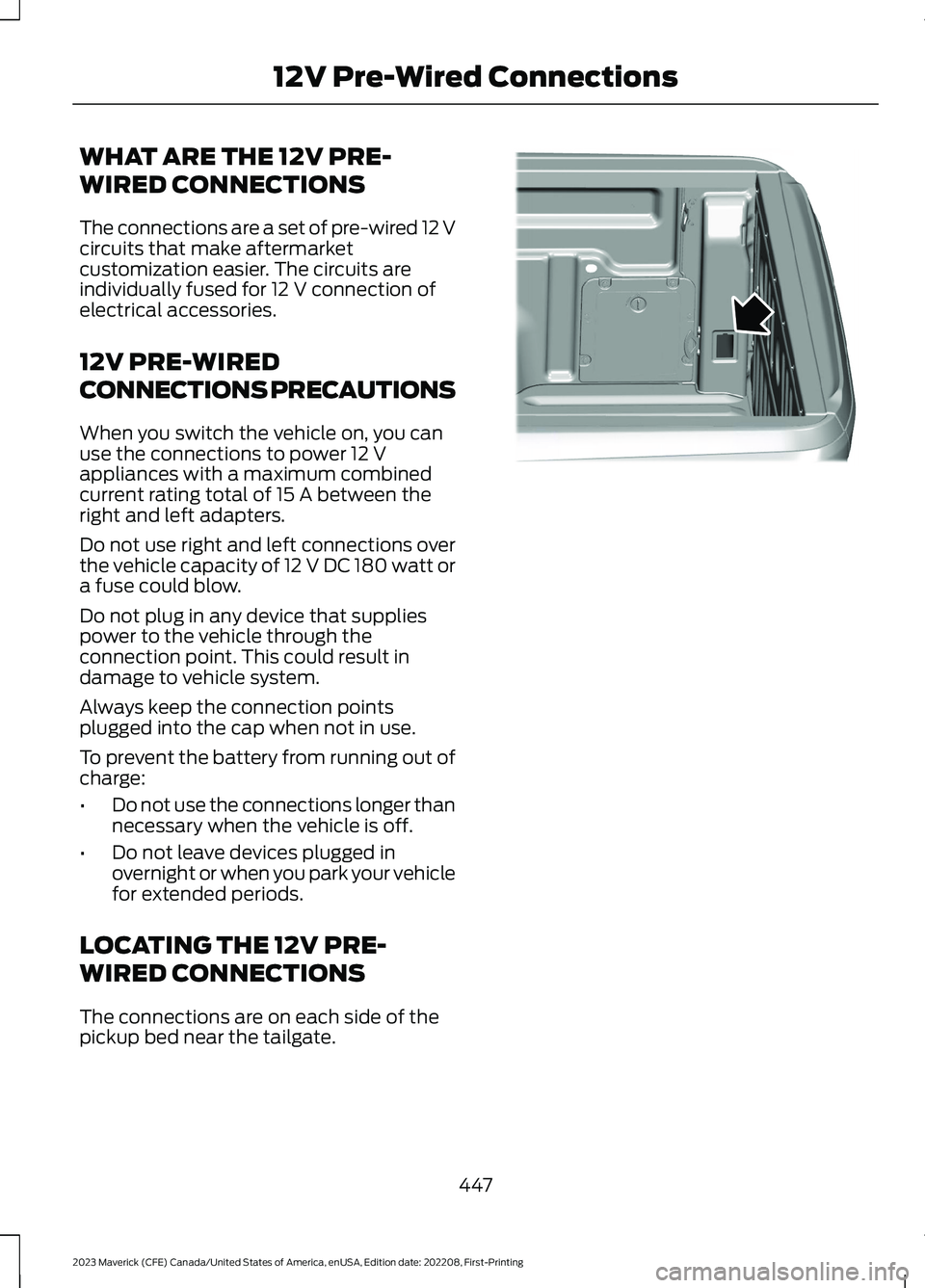
The connections are on each side of thepickup bed near the tailgate.
447
2023 Maverick (CFE) Canada/United States of America, enUSA, Edition date: 202208, First-Printing12V Pre-Wired ConnectionsE357738
Page 452 of 556
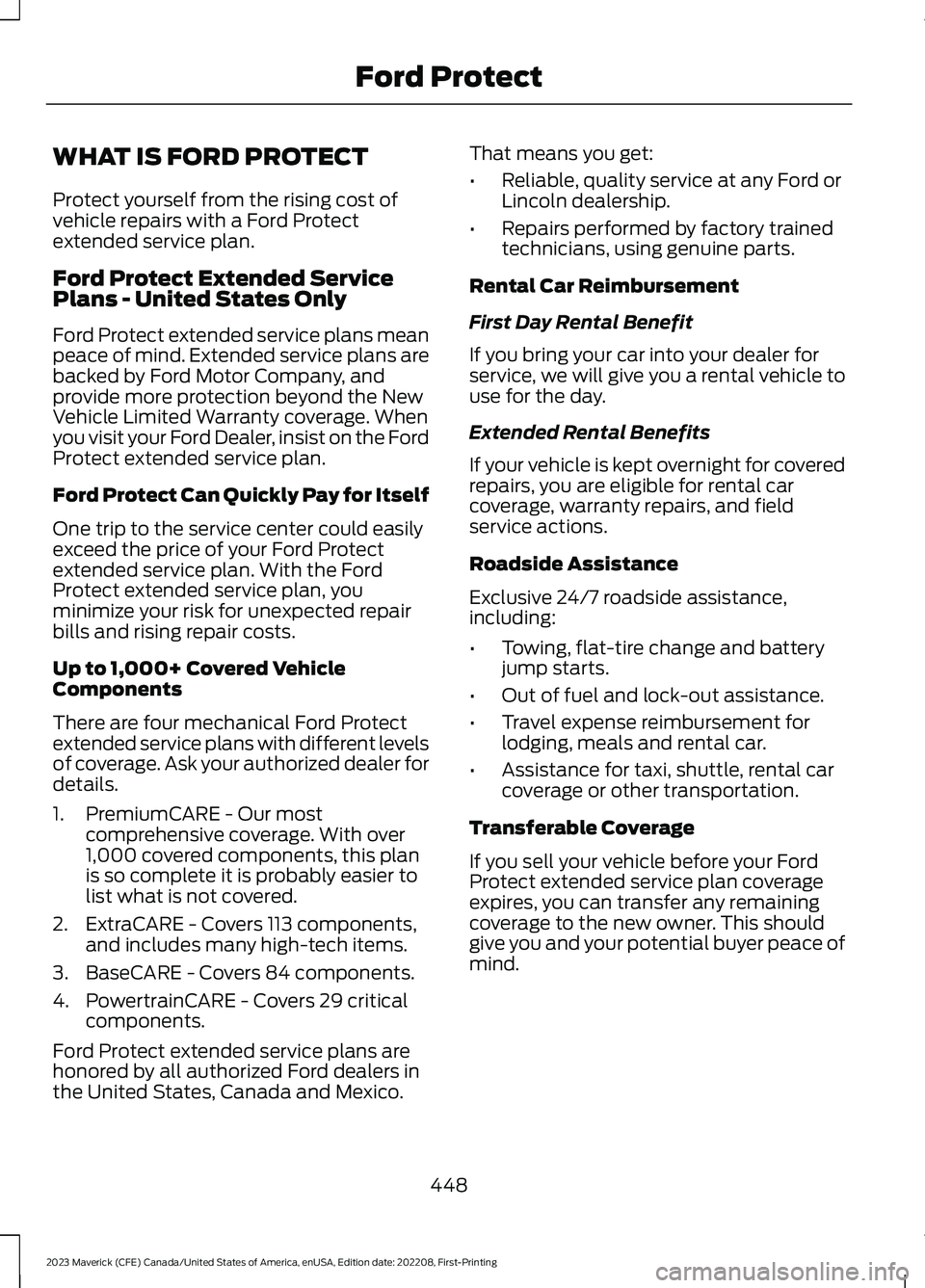
WHAT IS FORD PROTECT
Protect yourself from the rising cost ofvehicle repairs with a Ford Protectextended service plan.
Ford Protect Extended ServicePlans - United States Only
Ford Protect extended service plans meanpeace of mind. Extended service plans arebacked by Ford Motor Company, andprovide more protection beyond the NewVehicle Limited Warranty coverage. Whenyou visit your Ford Dealer, insist on the FordProtect extended service plan.
Ford Protect Can Quickly Pay for Itself
One trip to the service center could easilyexceed the price of your Ford Protectextended service plan. With the FordProtect extended service plan, youminimize your risk for unexpected repairbills and rising repair costs.
Up to 1,000+ Covered VehicleComponents
There are four mechanical Ford Protectextended service plans with different levelsof coverage. Ask your authorized dealer fordetails.
1.PremiumCARE - Our mostcomprehensive coverage. With over1,000 covered components, this planis so complete it is probably easier tolist what is not covered.
2.ExtraCARE - Covers 113 components,and includes many high-tech items.
3.BaseCARE - Covers 84 components.
4.PowertrainCARE - Covers 29 criticalcomponents.
Ford Protect extended service plans arehonored by all authorized Ford dealers inthe United States, Canada and Mexico.
That means you get:
•Reliable, quality service at any Ford orLincoln dealership.
•Repairs performed by factory trainedtechnicians, using genuine parts.
Rental Car Reimbursement
First Day Rental Benefit
If you bring your car into your dealer forservice, we will give you a rental vehicle touse for the day.
Extended Rental Benefits
If your vehicle is kept overnight for coveredrepairs, you are eligible for rental carcoverage, warranty repairs, and fieldservice actions.
Roadside Assistance
Exclusive 24/7 roadside assistance,including:
•Towing, flat-tire change and batteryjump starts.
•Out of fuel and lock-out assistance.
•Travel expense reimbursement forlodging, meals and rental car.
•Assistance for taxi, shuttle, rental carcoverage or other transportation.
Transferable Coverage
If you sell your vehicle before your FordProtect extended service plan coverageexpires, you can transfer any remainingcoverage to the new owner. This shouldgive you and your potential buyer peace ofmind.
448
2023 Maverick (CFE) Canada/United States of America, enUSA, Edition date: 202208, First-PrintingFord Protect
Page 456 of 556
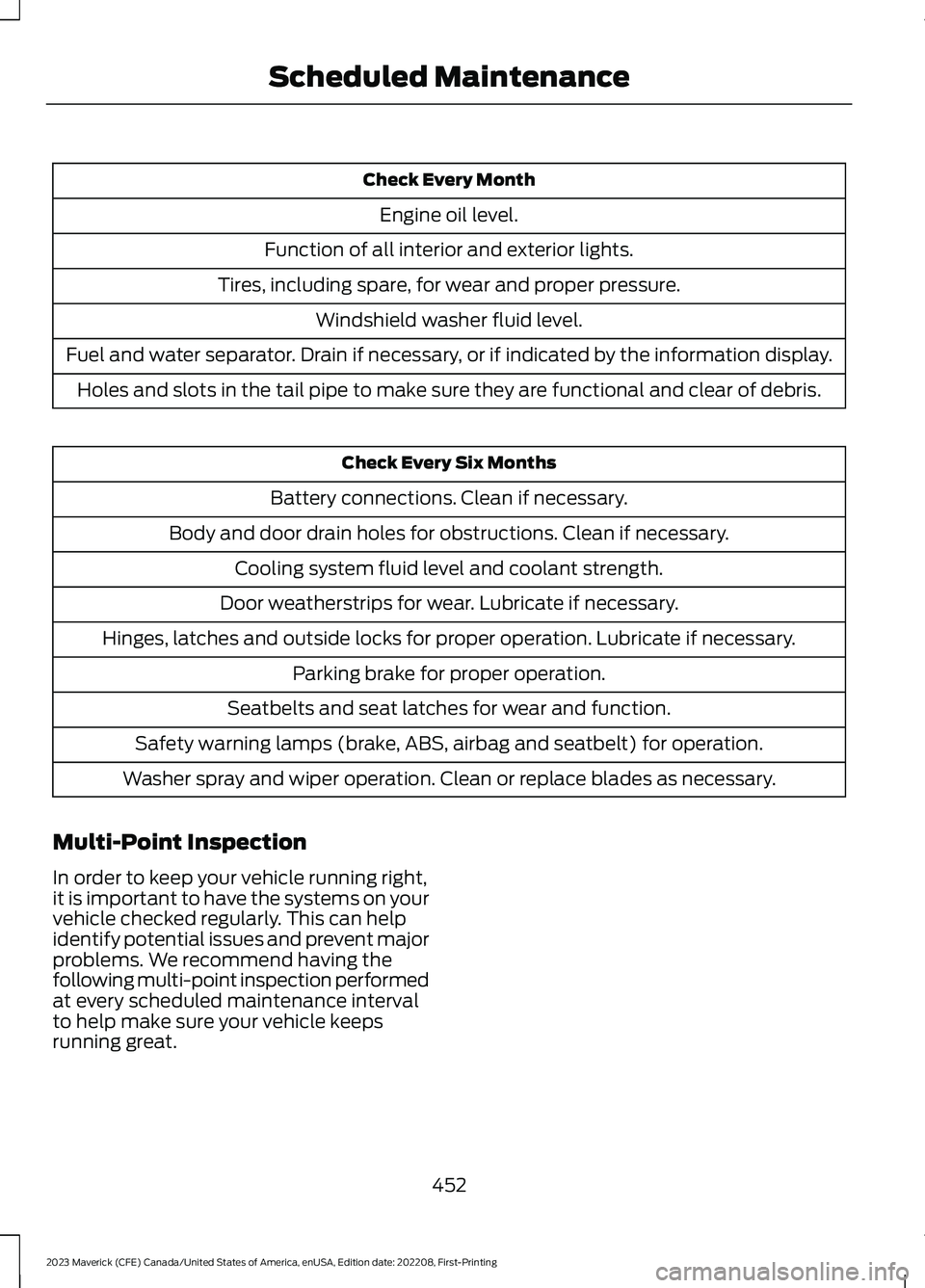
Check Every Month
Engine oil level.
Function of all interior and exterior lights.
Tires, including spare, for wear and proper pressure.
Windshield washer fluid level.
Fuel and water separator. Drain if necessary, or if indicated by the information display.
Holes and slots in the tail pipe to make sure they are functional and clear of debris.
Check Every Six Months
Battery connections. Clean if necessary.
Body and door drain holes for obstructions. Clean if necessary.
Cooling system fluid level and coolant strength.
Door weatherstrips for wear. Lubricate if necessary.
Hinges, latches and outside locks for proper operation. Lubricate if necessary.
Parking brake for proper operation.
Seatbelts and seat latches for wear and function.
Safety warning lamps (brake, ABS, airbag and seatbelt) for operation.
Washer spray and wiper operation. Clean or replace blades as necessary.
Multi-Point Inspection
In order to keep your vehicle running right,it is important to have the systems on yourvehicle checked regularly. This can helpidentify potential issues and prevent majorproblems. We recommend having thefollowing multi-point inspection performedat every scheduled maintenance intervalto help make sure your vehicle keepsrunning great.
452
2023 Maverick (CFE) Canada/United States of America, enUSA, Edition date: 202208, First-PrintingScheduled Maintenance
Page 457 of 556
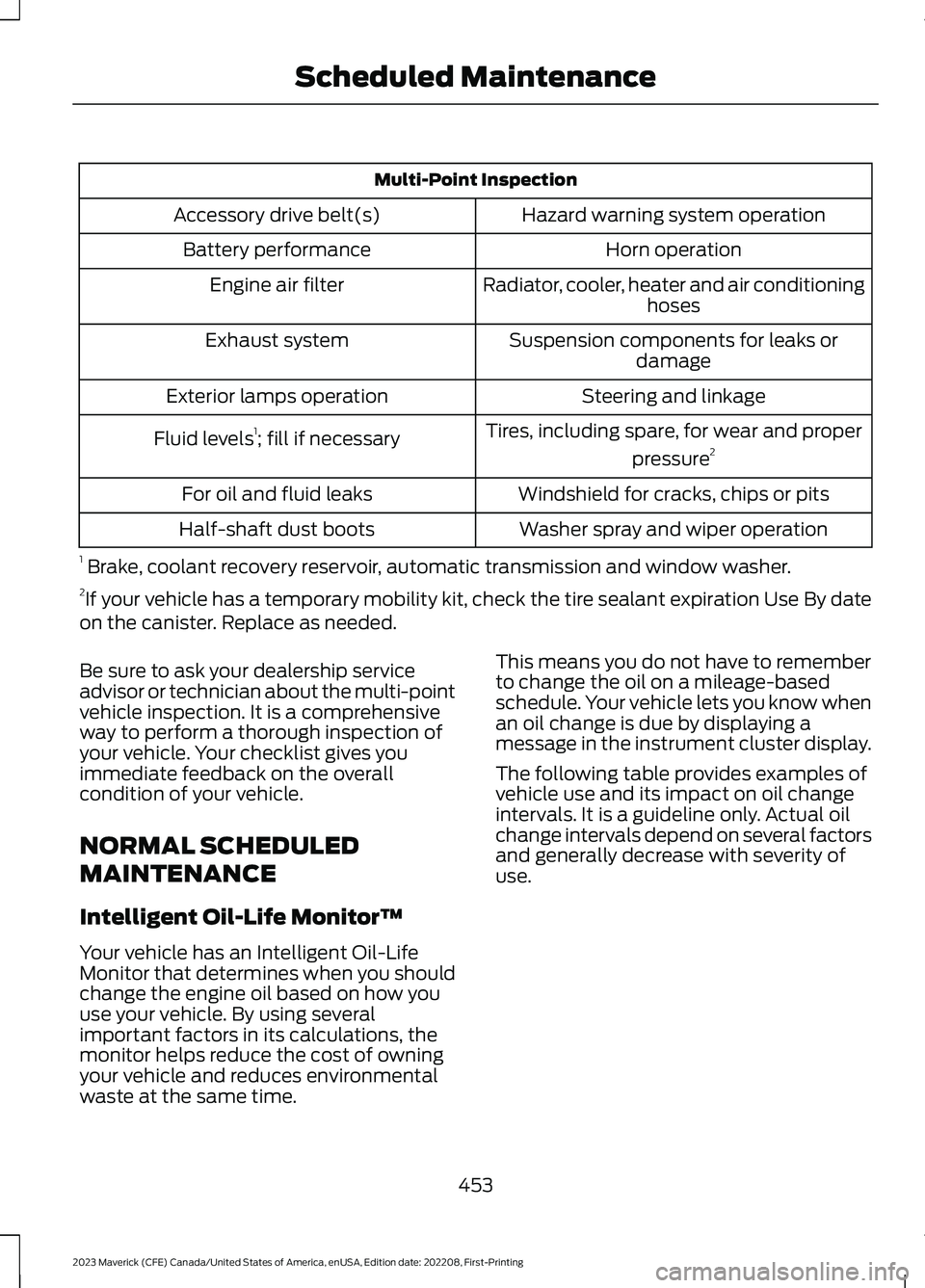
Multi-Point Inspection
Hazard warning system operationAccessory drive belt(s)
Horn operationBattery performance
Radiator, cooler, heater and air conditioninghosesEngine air filter
Suspension components for leaks ordamageExhaust system
Steering and linkageExterior lamps operation
Tires, including spare, for wear and proper
pressure2Fluid levels1; fill if necessary
Windshield for cracks, chips or pitsFor oil and fluid leaks
Washer spray and wiper operationHalf-shaft dust boots
1 Brake, coolant recovery reservoir, automatic transmission and window washer.2If your vehicle has a temporary mobility kit, check the tire sealant expiration Use By dateon the canister. Replace as needed.
Be sure to ask your dealership serviceadvisor or technician about the multi-pointvehicle inspection. It is a comprehensiveway to perform a thorough inspection ofyour vehicle. Your checklist gives youimmediate feedback on the overallcondition of your vehicle.
NORMAL SCHEDULED
MAINTENANCE
Intelligent Oil-Life Monitor™
Your vehicle has an Intelligent Oil-LifeMonitor that determines when you shouldchange the engine oil based on how youuse your vehicle. By using severalimportant factors in its calculations, themonitor helps reduce the cost of owningyour vehicle and reduces environmentalwaste at the same time.
This means you do not have to rememberto change the oil on a mileage-basedschedule. Your vehicle lets you know whenan oil change is due by displaying amessage in the instrument cluster display.
The following table provides examples ofvehicle use and its impact on oil changeintervals. It is a guideline only. Actual oilchange intervals depend on several factorsand generally decrease with severity ofuse.
453
2023 Maverick (CFE) Canada/United States of America, enUSA, Edition date: 202208, First-PrintingScheduled Maintenance
Page 540 of 556
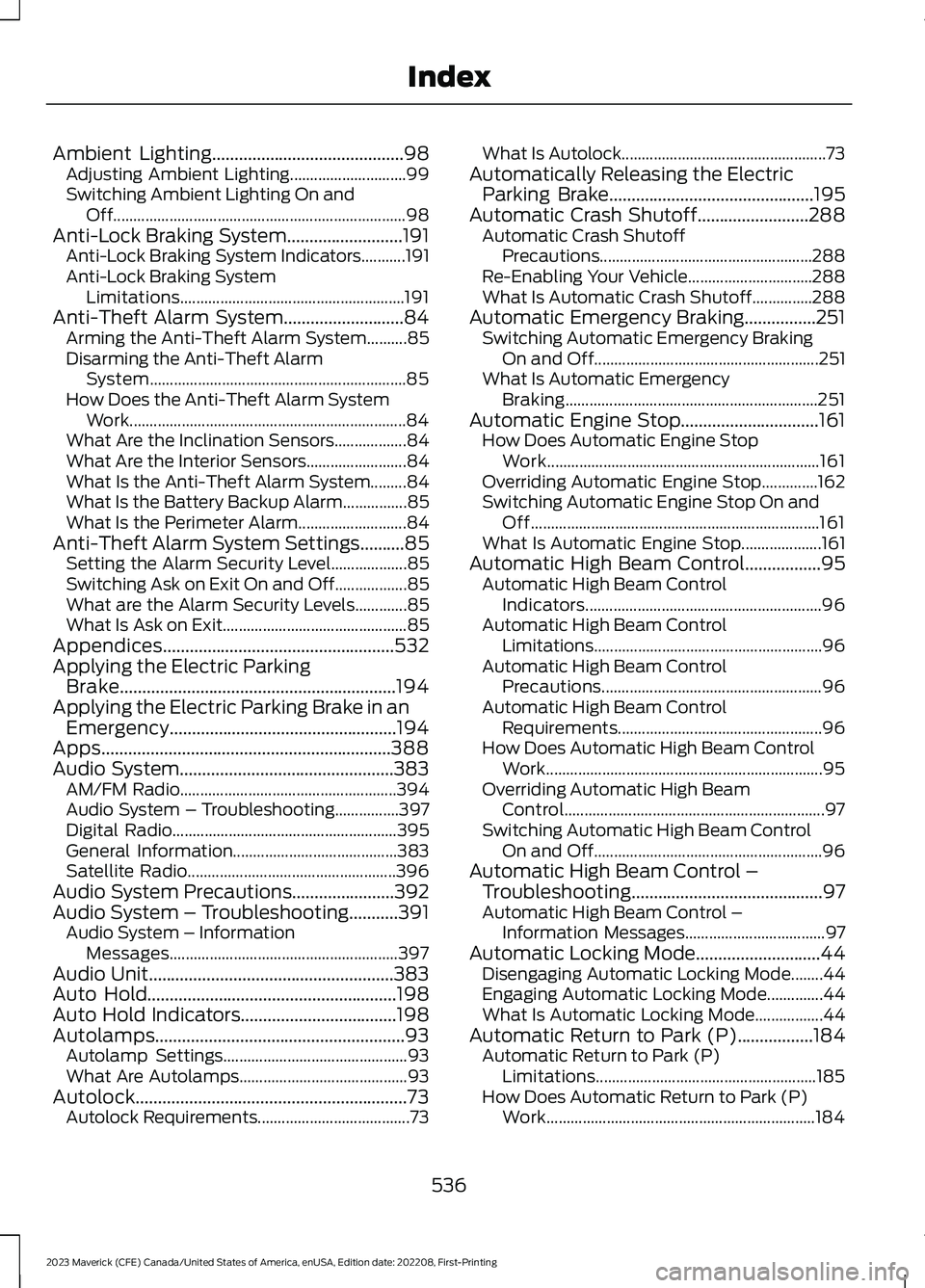
Ambient Lighting...........................................98Adjusting Ambient Lighting.............................99Switching Ambient Lighting On andOff.........................................................................98Anti-Lock Braking System..........................191Anti-Lock Braking System Indicators...........191Anti-Lock Braking SystemLimitations........................................................191Anti-Theft Alarm System...........................84Arming the Anti-Theft Alarm System..........85Disarming the Anti-Theft AlarmSystem................................................................85How Does the Anti-Theft Alarm SystemWork.....................................................................84What Are the Inclination Sensors..................84What Are the Interior Sensors.........................84What Is the Anti-Theft Alarm System.........84What Is the Battery Backup Alarm................85What Is the Perimeter Alarm...........................84Anti-Theft Alarm System Settings..........85Setting the Alarm Security Level...................85Switching Ask on Exit On and Off..................85What are the Alarm Security Levels.............85What Is Ask on Exit..............................................85Appendices....................................................532Applying the Electric ParkingBrake..............................................................194Applying the Electric Parking Brake in anEmergency...................................................194Apps.................................................................388Audio System................................................383AM/FM Radio......................................................394Audio System – Troubleshooting................397Digital Radio........................................................395General Information.........................................383Satellite Radio....................................................396Audio System Precautions.......................392Audio System – Troubleshooting...........391Audio System – InformationMessages.........................................................397Audio Unit.......................................................383Auto Hold........................................................198Auto Hold Indicators...................................198Autolamps........................................................93Autolamp Settings..............................................93What Are Autolamps..........................................93Autolock.............................................................73Autolock Requirements......................................73
What Is Autolock...................................................73Automatically Releasing the ElectricParking Brake..............................................195Automatic Crash Shutoff.........................288Automatic Crash ShutoffPrecautions.....................................................288Re-Enabling Your Vehicle...............................288What Is Automatic Crash Shutoff...............288Automatic Emergency Braking................251Switching Automatic Emergency BrakingOn and Off........................................................251What Is Automatic EmergencyBraking...............................................................251Automatic Engine Stop...............................161How Does Automatic Engine StopWork....................................................................161Overriding Automatic Engine Stop..............162Switching Automatic Engine Stop On andOff........................................................................161What Is Automatic Engine Stop....................161Automatic High Beam Control.................95Automatic High Beam ControlIndicators...........................................................96Automatic High Beam ControlLimitations.........................................................96Automatic High Beam ControlPrecautions.......................................................96Automatic High Beam ControlRequirements...................................................96How Does Automatic High Beam ControlWork.....................................................................95Overriding Automatic High BeamControl.................................................................97Switching Automatic High Beam ControlOn and Off.........................................................96Automatic High Beam Control –Troubleshooting...........................................97Automatic High Beam Control –Information Messages...................................97Automatic Locking Mode............................44Disengaging Automatic Locking Mode........44Engaging Automatic Locking Mode..............44What Is Automatic Locking Mode.................44Automatic Return to Park (P).................184Automatic Return to Park (P)Limitations.......................................................185How Does Automatic Return to Park (P)Work...................................................................184
536
2023 Maverick (CFE) Canada/United States of America, enUSA, Edition date: 202208, First-PrintingIndex
Page 541 of 556
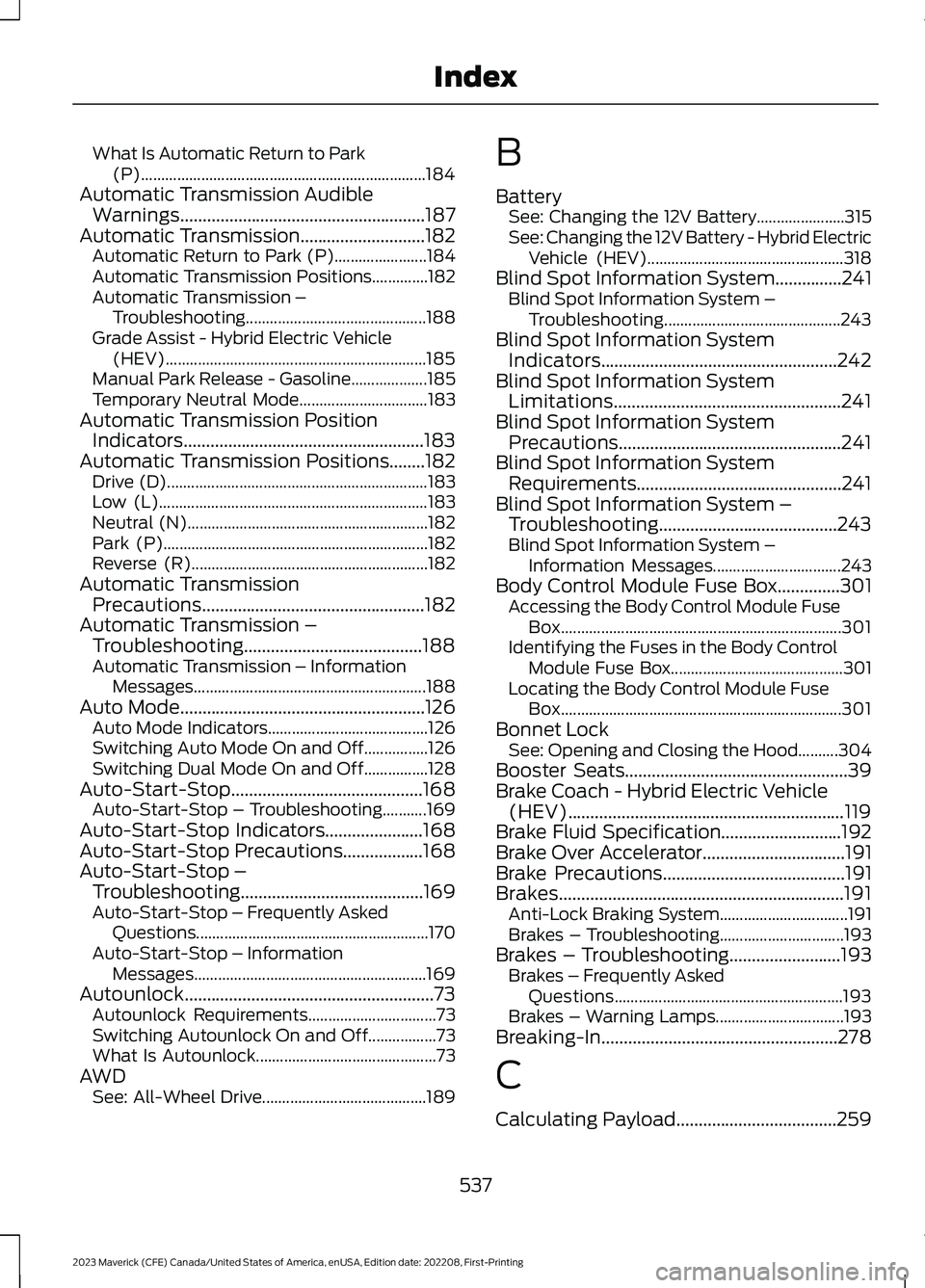
What Is Automatic Return to Park(P).......................................................................184Automatic Transmission AudibleWarnings.......................................................187Automatic Transmission............................182Automatic Return to Park (P).......................184Automatic Transmission Positions..............182Automatic Transmission –Troubleshooting.............................................188Grade Assist - Hybrid Electric Vehicle(HEV).................................................................185Manual Park Release - Gasoline...................185Temporary Neutral Mode................................183Automatic Transmission PositionIndicators......................................................183Automatic Transmission Positions........182Drive (D).................................................................183Low (L)...................................................................183Neutral (N)............................................................182Park (P)..................................................................182Reverse (R)...........................................................182Automatic TransmissionPrecautions..................................................182Automatic Transmission –Troubleshooting........................................188Automatic Transmission – InformationMessages..........................................................188Auto Mode.......................................................126Auto Mode Indicators........................................126Switching Auto Mode On and Off................126Switching Dual Mode On and Off................128Auto-Start-Stop...........................................168Auto-Start-Stop – Troubleshooting...........169Auto-Start-Stop Indicators......................168Auto-Start-Stop Precautions..................168Auto-Start-Stop –Troubleshooting.........................................169Auto-Start-Stop – Frequently AskedQuestions..........................................................170Auto-Start-Stop – InformationMessages..........................................................169Autounlock........................................................73Autounlock Requirements................................73Switching Autounlock On and Off.................73What Is Autounlock.............................................73AWDSee: All-Wheel Drive.........................................189
B
BatterySee: Changing the 12V Battery......................315See: Changing the 12V Battery - Hybrid ElectricVehicle (HEV).................................................318Blind Spot Information System...............241Blind Spot Information System –Troubleshooting............................................243Blind Spot Information SystemIndicators.....................................................242Blind Spot Information SystemLimitations...................................................241Blind Spot Information SystemPrecautions..................................................241Blind Spot Information SystemRequirements..............................................241Blind Spot Information System –Troubleshooting........................................243Blind Spot Information System –Information Messages................................243Body Control Module Fuse Box..............301Accessing the Body Control Module FuseBox......................................................................301Identifying the Fuses in the Body ControlModule Fuse Box...........................................301Locating the Body Control Module FuseBox......................................................................301Bonnet LockSee: Opening and Closing the Hood..........304Booster Seats..................................................39Brake Coach - Hybrid Electric Vehicle(HEV)..............................................................119Brake Fluid Specification...........................192Brake Over Accelerator................................191Brake Precautions.........................................191Brakes................................................................191Anti-Lock Braking System................................191Brakes – Troubleshooting...............................193Brakes – Troubleshooting.........................193Brakes – Frequently AskedQuestions.........................................................193Brakes – Warning Lamps................................193Breaking-In.....................................................278
C
Calculating Payload....................................259
537
2023 Maverick (CFE) Canada/United States of America, enUSA, Edition date: 202208, First-PrintingIndex
Page 542 of 556
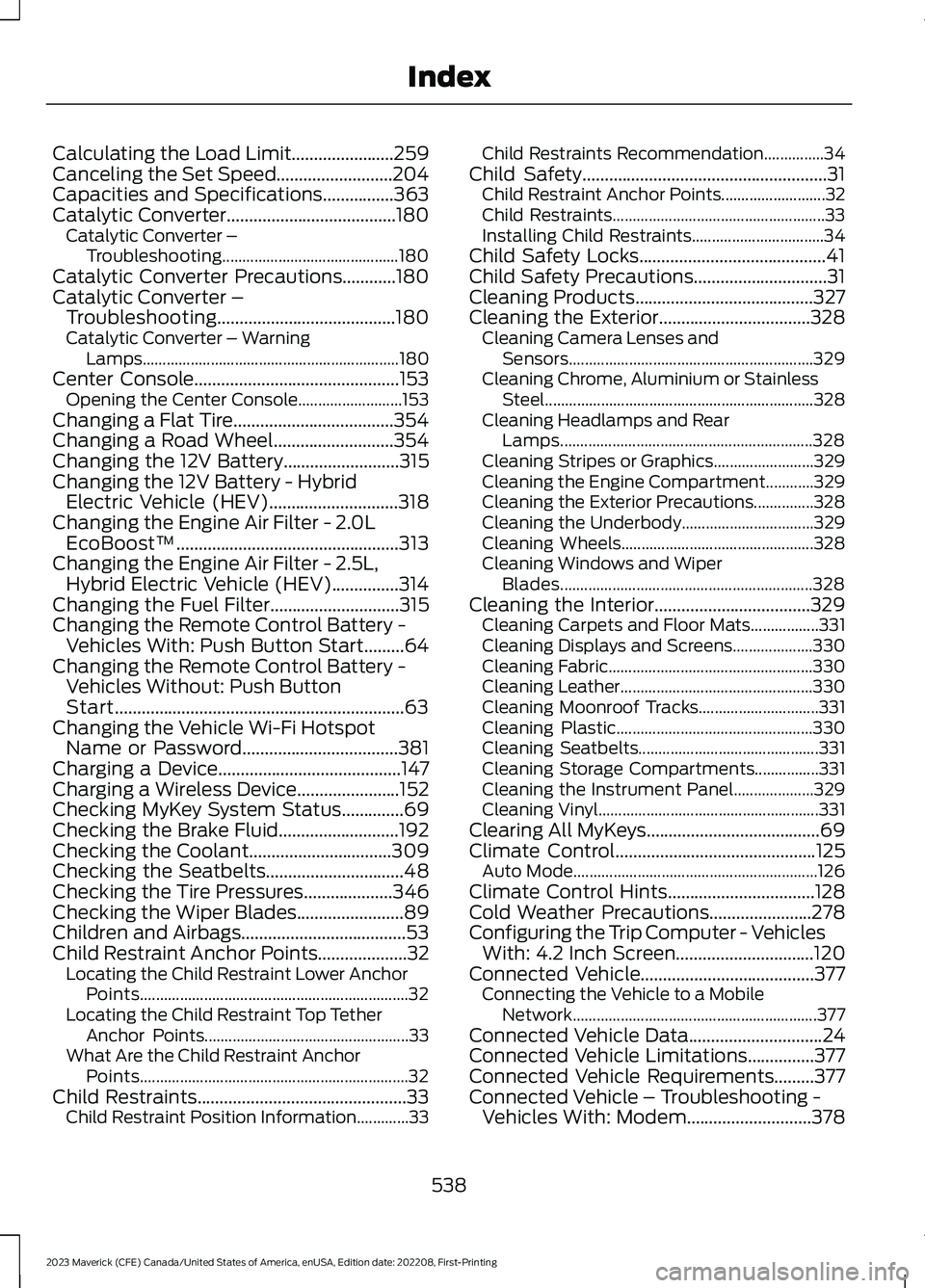
Calculating the Load Limit.......................259Canceling the Set Speed..........................204Capacities and Specifications................363Catalytic Converter......................................180Catalytic Converter –Troubleshooting............................................180Catalytic Converter Precautions............180Catalytic Converter –Troubleshooting........................................180Catalytic Converter – WarningLamps................................................................180Center Console..............................................153Opening the Center Console..........................153Changing a Flat Tire....................................354Changing a Road Wheel...........................354Changing the 12V Battery..........................315Changing the 12V Battery - HybridElectric Vehicle (HEV).............................318Changing the Engine Air Filter - 2.0LEcoBoost™..................................................313Changing the Engine Air Filter - 2.5L,Hybrid Electric Vehicle (HEV)...............314Changing the Fuel Filter.............................315Changing the Remote Control Battery -Vehicles With: Push Button Start.........64Changing the Remote Control Battery -Vehicles Without: Push ButtonStart.................................................................63Changing the Vehicle Wi-Fi HotspotName or Password...................................381Charging a Device.........................................147Charging a Wireless Device.......................152Checking MyKey System Status..............69Checking the Brake Fluid...........................192Checking the Coolant................................309Checking the Seatbelts...............................48Checking the Tire Pressures....................346Checking the Wiper Blades........................89Children and Airbags.....................................53Child Restraint Anchor Points....................32Locating the Child Restraint Lower AnchorPoints...................................................................32Locating the Child Restraint Top TetherAnchor Points...................................................33What Are the Child Restraint AnchorPoints...................................................................32Child Restraints...............................................33Child Restraint Position Information.............33
Child Restraints Recommendation...............34Child Safety.......................................................31Child Restraint Anchor Points..........................32Child Restraints.....................................................33Installing Child Restraints.................................34Child Safety Locks..........................................41Child Safety Precautions..............................31Cleaning Products........................................327Cleaning the Exterior..................................328Cleaning Camera Lenses andSensors.............................................................329Cleaning Chrome, Aluminium or StainlessSteel...................................................................328Cleaning Headlamps and RearLamps...............................................................328Cleaning Stripes or Graphics.........................329Cleaning the Engine Compartment............329Cleaning the Exterior Precautions...............328Cleaning the Underbody.................................329Cleaning Wheels................................................328Cleaning Windows and WiperBlades...............................................................328Cleaning the Interior...................................329Cleaning Carpets and Floor Mats.................331Cleaning Displays and Screens....................330Cleaning Fabric...................................................330Cleaning Leather................................................330Cleaning Moonroof Tracks..............................331Cleaning Plastic.................................................330Cleaning Seatbelts.............................................331Cleaning Storage Compartments................331Cleaning the Instrument Panel....................329Cleaning Vinyl.......................................................331Clearing All MyKeys.......................................69Climate Control.............................................125Auto Mode.............................................................126Climate Control Hints.................................128Cold Weather Precautions.......................278Configuring the Trip Computer - VehiclesWith: 4.2 Inch Screen...............................120Connected Vehicle.......................................377Connecting the Vehicle to a MobileNetwork.............................................................377Connected Vehicle Data..............................24Connected Vehicle Limitations...............377Connected Vehicle Requirements.........377Connected Vehicle – Troubleshooting -Vehicles With: Modem............................378
538
2023 Maverick (CFE) Canada/United States of America, enUSA, Edition date: 202208, First-PrintingIndex