transmission FORD MUSTANG 1969 Volume One Chassis
[x] Cancel search | Manufacturer: FORD, Model Year: 1969, Model line: MUSTANG, Model: FORD MUSTANG 1969Pages: 413, PDF Size: 75.81 MB
Page 357 of 413
07-03-17
FMX Transmission
07-03-17
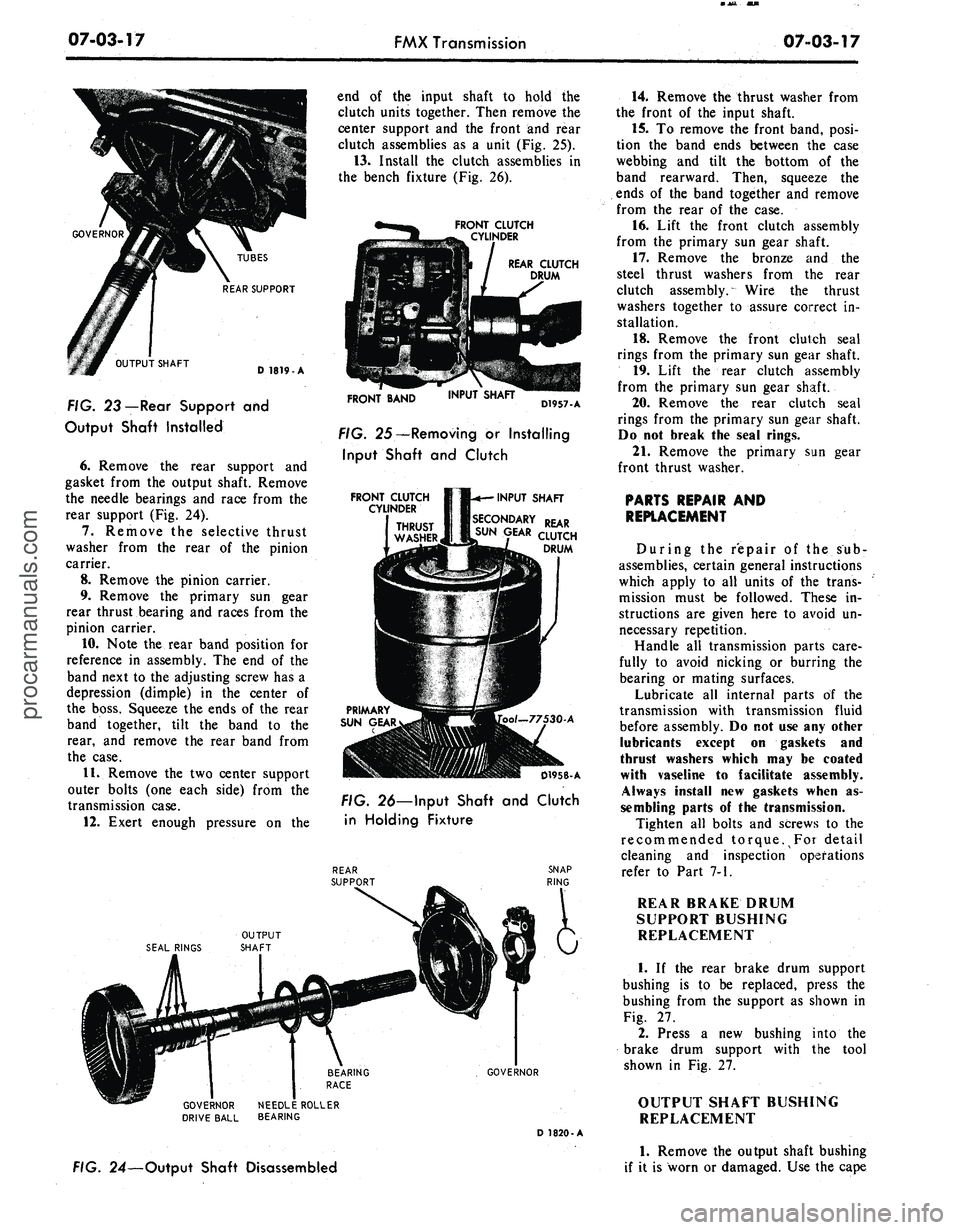
OUTPUT SHAFT
TUBES
REAR SUPPORT
D 1819-A
FIG. 23 — Rear Support
and
Output Shaft Installed
6. Remove
the
rear support
and
gasket from
the
output shaft. Remove
the needle bearings
and
race from
the
rear support
(Fig.
24).
7.
Remove
the
selective thrust
washer from
the
rear
of the
pinion
carrier.
8. Remove
the
pinion carrier.
9. Remove
the
primary
sun
gear
rear thrust bearing
and
races from
the
pinion carrier.
10.
Note
the
rear band position
for
reference
in
assembly.
The
end of the
band next
to
the
adjusting screw
has
a
depression (dimple)
in the
center
of
the boss. Squeeze
the
ends
of
the
rear
band together, tilt
the
band
to the
rear,
and
remove
the
rear band from
the case.
11.
Remove
the
two
center support
outer bolts
(one
each side) from
the
transmission case.
12.
Exert enough pressure
on the
end
of the
input shaft
to
hold
the
clutch units together. Then remove
the
center support
and the
front
and
rear
clutch assemblies
as a
unit
(Fig.
25).
13.
Install
the
clutch assemblies
in
the bench fixture
(Fig.
26).
FRONT CLUTCH
CYLINDER
REAR CLUTCH
DRUM
FRONT BAND
INPUT SHAFT
D1957-A
FIG. 25—Removing
or
Installing
Input Shaft
and
Clutch
FRONT CLUTCH
CYLINDER
INPUT SHAFT
SECONDARY REAR
SUN GEAR auTCH
DRUM
-77530-A
D1958-A
FIG. 26—Input Shaft
and
Clutch
in Holding Fixture
,
GOVERNOR
GOVERNOR NEEDLE ROLLER
DRIVE BALL BEARING
D 1820-A
FIG. 24—Output Shaft Disassembled
14.
Remove
the
thrust washer from
the front
of the
input shaft.
15.
To
remove
the
front band, posi-
tion
the
band ends between
the
case
webbing
and
tilt
the
bottom
of the
band rearward. Then, squeeze
the
ends
of the
band together
and
remove
from
the
rear
of the
case.
16.
Lift
the
front clutch assembly
from
the
primary
sun
gear shaft.
17.
Remove
the
bronze
and the
steel thrust washers from
the
rear
clutch assembly. Wire
the
thrust
washers together
to
assure correct
in-
stallation.
18.
Remove
the
front clutch seal
rings from
the
primary
sun
gear shaft.
19.
Lift
the
rear clutch assembly
from
the
primary
sun
gear shaft.
20.
Remove
the
rear clutch seal
rings from
the
primary
sun
gear shaft.
Do
not
break
the
seal rings.
21.
Remove
the
primary
sun
gear
front thrust washer.
PARTS REPAIR
AND
REPLACEMENT
During
the
repair
of the sub-
assemblies, certain general instructions
which apply
to all
units
of the
trans-
mission must
be
followed. These
in-
structions
are
given here
to
avoid
un-
necessary repetition.
Handle
all
transmission parts care-
fully
to
avoid nicking
or
burring
the
bearing
or
mating surfaces.
Lubricate
all
internal parts
of the
transmission with transmission fluid
before assembly.
Do
not use any
other
lubricants except
on
gaskets
and
thrust washers which
may be
coated
with vaseline
to
facilitate assembly.
Always install
new
gaskets when
as-
sembling parts
of the
transmission.
Tighten
all
bolts
and
screws
to the
recommended torque.
For
detail
cleaning
and
inspection operations
refer
to
Part
7-1.
REAR BRAKE DRUM
SUPPORT BUSHING
REPLACEMENT
1.
If the
rear brake drum support
bushing
is to be
replaced, press
the
bushing from
the
support
as
shown
in
Fig.
27.
2.
Press
a new
bushing into
the
brake drum support with
the
tool
shown
in
Fig.
27.
OUTPUT SHAFT BUSHING
REPLACEMENT
1.
Remove
the
output shaft bushing
if
it is
worn
or
damaged.
Use the
capeprocarmanuals.com
Page 358 of 413
07-03-18
FMX Transmission
07-03-18
Press
Rom
Handle
Tool - T64L-7003-A4
Tool - T64L.7003.B4
REMOVAL INSTALLATION
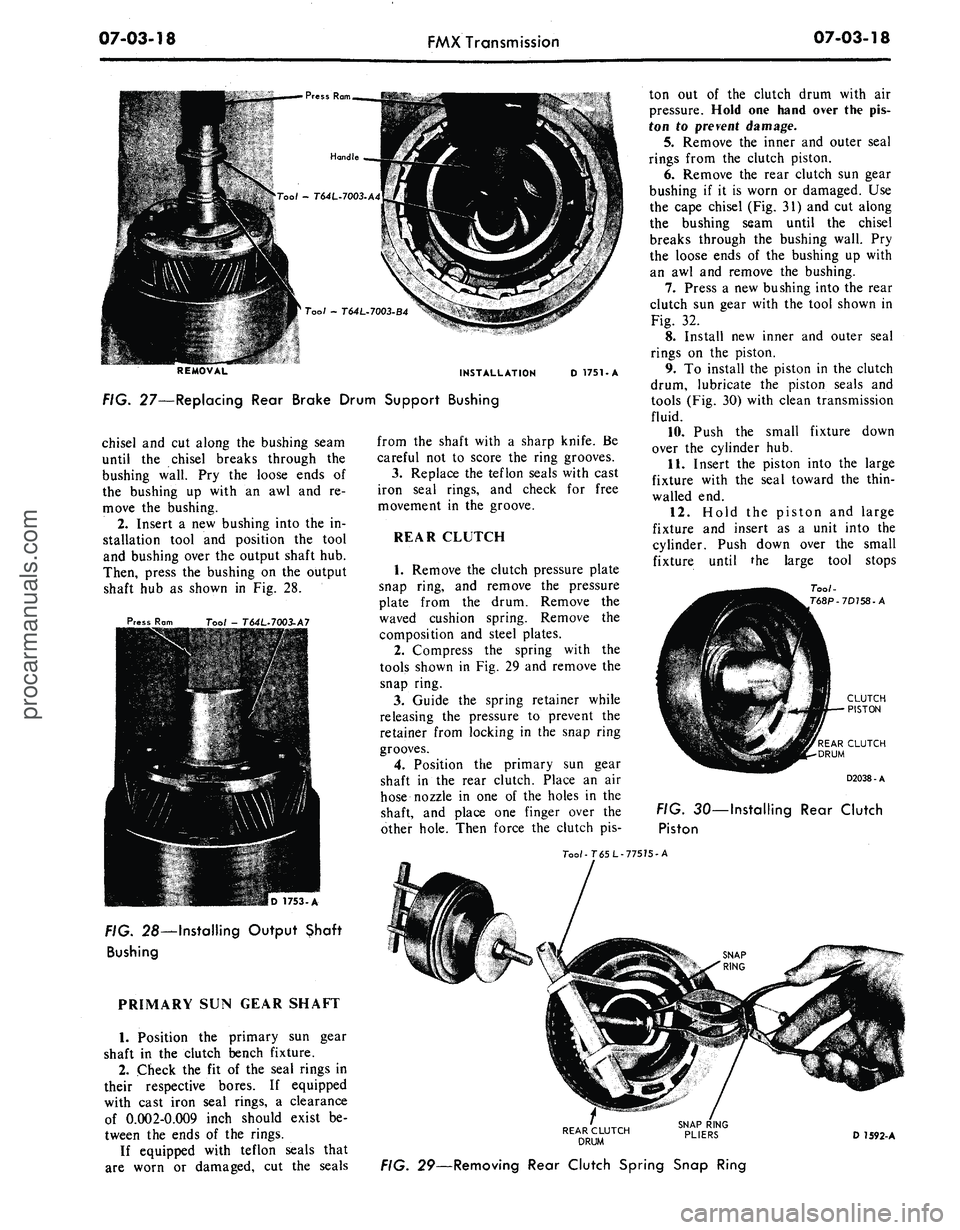
FIG. 27—Replacing Rear Brake Drum Support Bushing
D 1751-A
chisel
and cut
along
the
bushing seam
until
the
chisel breaks through
the
bushing wall.
Pry the
loose ends
of
the bushing
up
with
an awl and re-
move
the
bushing.
2.
Insert
a new
bushing into
the in-
stallation tool
and
position
the
tool
and bushing over
the
output shaft
hub.
Then, press
the
bushing
on the
output
shaft
hub as
shown
in Fig. 28.
Press
Ram
Tool - T64L-7003.A7
FIG. 28—Installing Output Shaft
Bushing
PRIMARY
SUN
GEAR SHAFT
1.
Position
the
primary
sun
gear
shaft
in the
clutch bench fixture.
2.
Check
the fit of the
seal rings
in
their respective bores.
If
equipped
with cast iron seal rings,
a
clearance
of 0.002-0.009 inch should exist
be-
tween
the
ends
of the
rings.
If equipped with teflon seals that
are worn
or
damaged,
cut the
seals
from
the
shaft with
a
sharp knife.
Be
careful
not to
score
the
ring grooves.
3.
Replace
the
teflon seals with cast
iron seal rings,
and
check
for
free
movement
in the
groove.
REAR CLUTCH
1.
Remove
the
clutch pressure plate
snap ring,
and
remove
the
pressure
plate from
the
drum. Remove
the
waved cushion spring. Remove
the
composition
and
steel plates.
2.
Compress
the
spring with
the
tools shown
in Fig. 29 and
remove
the
snap ring.
3.
Guide
the
spring retainer while
releasing
the
pressure
to
prevent
the
retainer from locking
in the
snap ring
grooves.
4.
Position
the
primary
sun
gear
shaft
in the
rear clutch. Place
an air
hose nozzle
in one of the
holes
in the
shaft,
and
place
one
finger over
the
other hole. Then force
the
clutch
pis-
ton
out of the
clutch drum with
air
pressure. Hold
one
hand over
the pis-
ton
to
prevent damage.
5.
Remove
the
inner
and
outer seal
rings from
the
clutch piston.
6. Remove
the
rear clutch
sun
gear
bushing
if it is
worn
or
damaged.
Use
the cape chisel
(Fig. 31) and cut
along
the bushing seam until
the
chisel
breaks through
the
bushing wall.
Pry
the loose ends
of the
bushing
up
with
an
awl and
remove
the
bushing.
7.
Press
a new
bushing into
the
rear
clutch
sun
gear with
the
tool shown
in
Fig.
32.
8. Install
new
inner
and
outer seal
rings
on the
piston.
9.
To
install
the
piston
in the
clutch
drum, lubricate
the
piston seals
and
tools
(Fig. 30)
with clean transmission
fluid.
10.
Push
the
small fixture down
over
the
cylinder
hub.
11.
Insert
the
piston into
the
large
fixture with
the
seal toward
the
thin-
walled
end.
12.
Hold
the
piston
and
large
fixture
and
insert
as a
unit into
the
cylinder. Push down over
the
small
fixture until
the
large tool stops
Too/-
T68P-7D758-A
REAR CLUTCH
DRUM
D2038-A
FIG.
30—
Installing
Rear Clutch
Piston
Too/-T65L-77575-A
REAR CLUTCH
DRUM
D 1592-A
FIG. 29—Removing Rear Clutch Spring Snap Ringprocarmanuals.com
Page 359 of 413
07-03-19
FMX Transmission
07-03-19
Cape Chisel
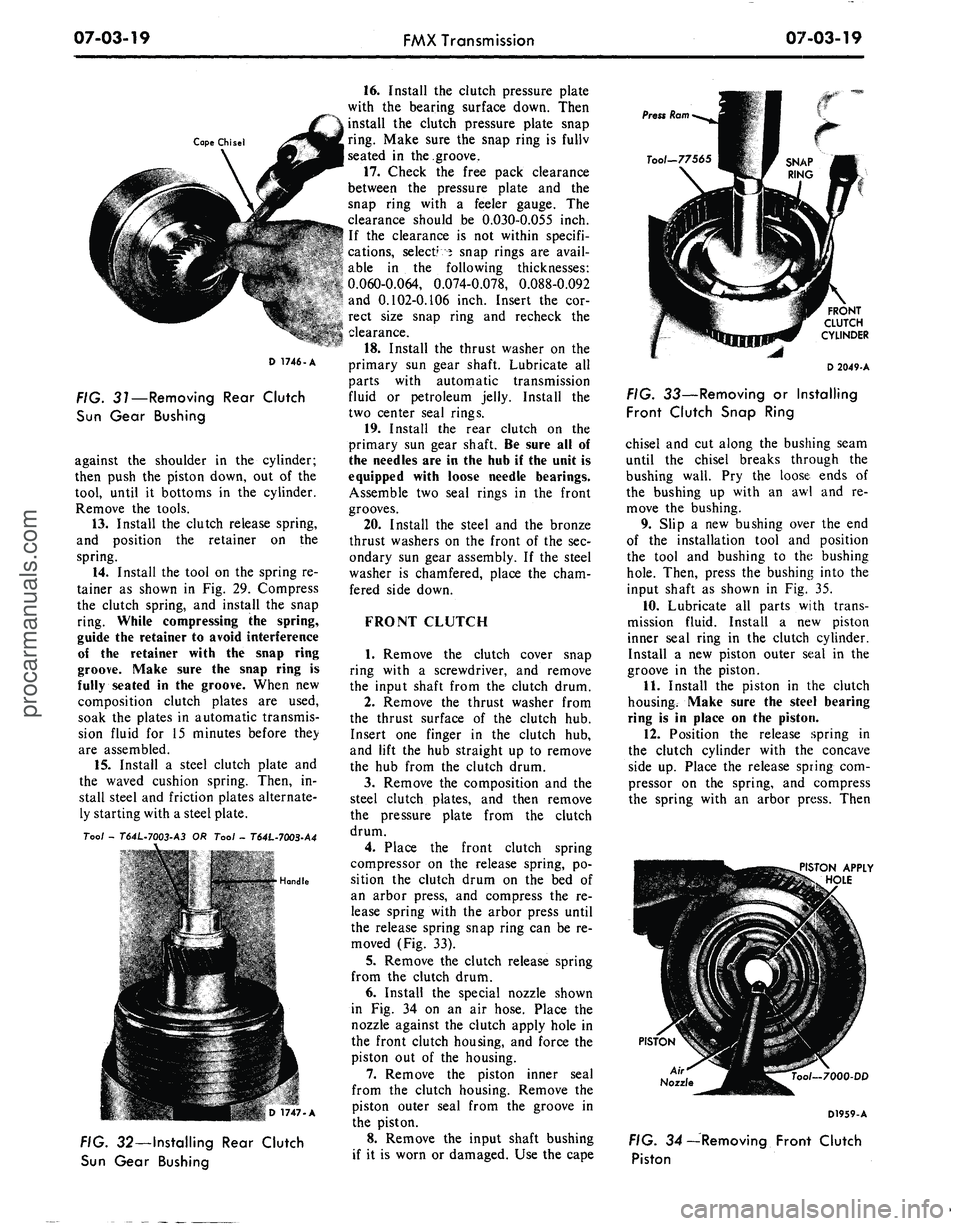
FIG. 31—Removing Rear Clutch
Sun Gear Bushing
against the shoulder in the cylinder;
then push the piston down, out of the
tool, until it bottoms in the cylinder.
Remove the tools.
13.
Install the clutch release spring,
and position the retainer on the
spring.
14.
Install the tool on the spring re-
tainer as shown in Fig. 29. Compress
the clutch spring, and install the snap
ring. While compressing the spring,
guide the retainer to avoid interference
of the retainer with the snap ring
groove. Make sure the snap ring is
fully seated in the groove. When new
composition clutch plates are used,
soak the plates in automatic transmis-
sion fluid for 15 minutes before they
are assembled.
15.
Install a steel clutch plate and
the waved cushion spring. Then, in-
stall steel and friction plates alternate-
ly starting with a steel plate.
Tool -
T64L-7003-A3
OR Tool -
T64L-7003-A4
• *'£- ' •
jRflg. >...•...!• Hondle
D 1747-A
FIG. 32—Installing Rear Clutch
Sun Gear Bushing
16.
Install the clutch pressure plate
with the bearing surface down. Then
install the clutch pressure plate snap
ring. Make sure the snap ring is fullv
seated in the groove,
17.
Check the free pack clearance
between the pressure plate and the
snap ring with a feeler gauge. The
clearance should be O.O3O-O.O55 inch.
If the clearance is not within specifi-
cations, select? 5 snap rings are avail-
able in the following thicknesses:
0.060-0.064, 0.074-0.078, 0.088-0.092
and 0.102-0.106 inch. Insert the cor-
rect size snap ring and recheck the
clearance.
18.
Install the thrust washer on the
primary sun gear shaft. Lubricate all
parts with automatic transmission
fluid or petroleum jelly. Install the
two center seal rings.
19.
Install the rear clutch on the
primary sun gear shaft. Be sure all of
the needles are in the hub if the unit is
equipped with loose needle bearings.
Assemble two seal rings in the front
grooves.
20.
Install the steel and the bronze
thrust washers on the front of the sec-
ondary sun gear assembly. If the steel
washer is chamfered, place the cham-
fered side down.
FRONT CLUTCH
1.
Remove the clutch cover snap
ring with a screwdriver, and remove
the input shaft from the clutch drum.
2.
Remove the thrust washer from
the thrust surface of the clutch hub.
Insert one finger in the clutch hub,
and lift the hub straight up to remove
the hub from the clutch drum.
3.
Remove the composition and the
steel clutch plates, and then remove
the pressure plate from the clutch
drum.
4.
Place the front clutch spring
compressor on the release spring, po-
sition the clutch drum on the bed of
an arbor press, and compress the re-
lease spring with the arbor press until
the release spring snap ring can be re-
moved (Fig. 33).
5.
Remove the clutch release spring
from the clutch drum.
6. Install the special nozzle shown
in Fig. 34 on an air hose. Place the
nozzle against the clutch apply hole in
the front clutch housing, and force the
piston out of the housing.
7.
Remove the piston inner seal
from the clutch housing. Remove the
piston outer seal from the groove in
the piston.
8. Remove the input shaft bushing
if it is worn or damaged. Use the cape
FRONT
CLUTCH
CYLINDER
D 2049-A
FIG. 33—Removing or Installing
Front Clutch Snap Ring
chisel and cut along the bushing seam
until the chisel breaks through the
bushing wall. Pry the loose ends of
the bushing up with an awl and re-
move the bushing.
9. Slip a new bushing over the end
of the installation tool and position
the tool and bushing to the bushing
hole.
Then, press the bushing into the
input shaft as shown in Fig. 35.
10.
Lubricate all parts with trans-
mission fluid. Install a new piston
inner seal ring in the clutch cylinder.
Install a new piston outer seal in the
groove in the piston.
11.
Install the piston in the clutch
housing. Make sure the steel bearing
ring is in place on the piston.
12.
Position the release spring in
the clutch cylinder with the concave
side up. Place the release spring com-
pressor on the spring, and compress
the spring with an arbor press. Then
PISTON APPLY
HOLE
PISTON
Air
Nozzle
ool-7000-DD
D1959-A
FIG. 34—Removing Front Clutch
Pistonprocarmanuals.com
Page 360 of 413
07-03-20
FMX Transmission
07-03-20
Handle
Tool - T64L-7003-A6
D 1752-A
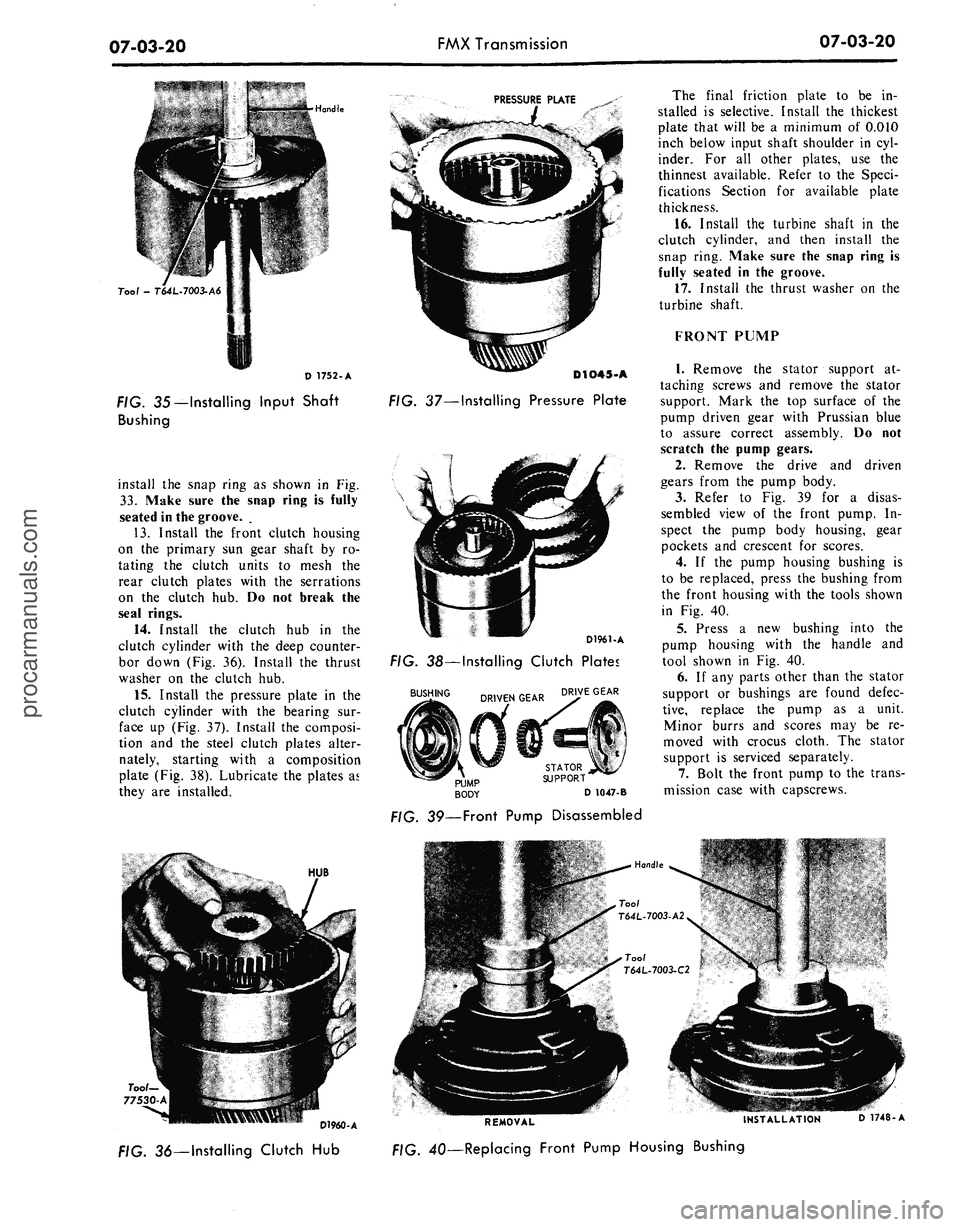
FIG. 35—Installing Input Shaft
Bushing
install the snap ring as shown in Fig.
33.
Make sure the snap ring is fully
seated in the groove. .
13.
Install the front clutch housing
on the primary sun gear shaft by ro-
tating the clutch units to mesh the
rear clutch plates with the serrations
on the clutch hub. Do not break the
seal rings.
14.
Install the clutch hub in the
clutch cylinder with the deep counter-
bor down (Fig. 36). Install the thrust
washer on the clutch hub.
15.
Install the pressure plate in the
clutch cylinder with the bearing sur-
face up (Fig. 37). Install the composi-
tion and the steel clutch plates alter-
nately, starting with a composition
plate (Fig. 38). Lubricate the plates as
they are installed.
HUB
PRESSURE PLATE
D1O45-A
FIG. 37—Installing Pressure Plate
D1961-A
FIG. 38—Installing Clutch Plates
BUSHING ^.^^ DRIVE GEAR
D 1047-B
39—Front Pump Disassembled
The final friction plate to be in-
stalled is selective. Install the thickest
plate that will be a minimum of 0.010
inch below input shaft shoulder in cyl-
inder. For all other plates, use the
thinnest available. Refer to the Speci-
fications Section for available plate
thickness.
16.
Install the turbine shaft in the
clutch cylinder, and then install the
snap ring. Make sure the snap ring is
fully seated in the groove.
17.
Install the thrust washer on the
turbine shaft.
FRONT PUMP
1.
Remove the stator support at-
taching screws and remove the stator
support. Mark the top surface of the
pump driven gear with Prussian blue
to assure correct assembly. Do not
scratch the pump gears.
2.
Remove the drive and driven
gears from the pump body.
3.
Refer to Fig. 39 for a disas-
sembled view of the front pump. In-
spect the pump body housing, gear
pockets and crescent for scores.
4.
If the pump housing bushing is
to be replaced, press the bushing from
the front housing with the tools shown
in Fig. 40.
5.
Press a new bushing into the
pump housing with the handle and
tool shown in Fig. 40.
6. If any parts other than the stator
support or bushings are found defec-
tive,
replace the pump as a unit.
Minor burrs and scores may be re-
moved with crocus cloth. The stator
support is serviced separately.
7.
Bolt the front pump to the trans-
mission case with capscrews.
D1960-A
/:/G.
36—Installing Clutch Hub
REMOVAL
INSTALLATION
D 1748-A
4Q—Replacing Front Pump Housing Bushingprocarmanuals.com
Page 361 of 413
07-03-21
FMX Transmission
07-03-21
Tool—1175-AB
Tool— T50T-100-A
D1962-A
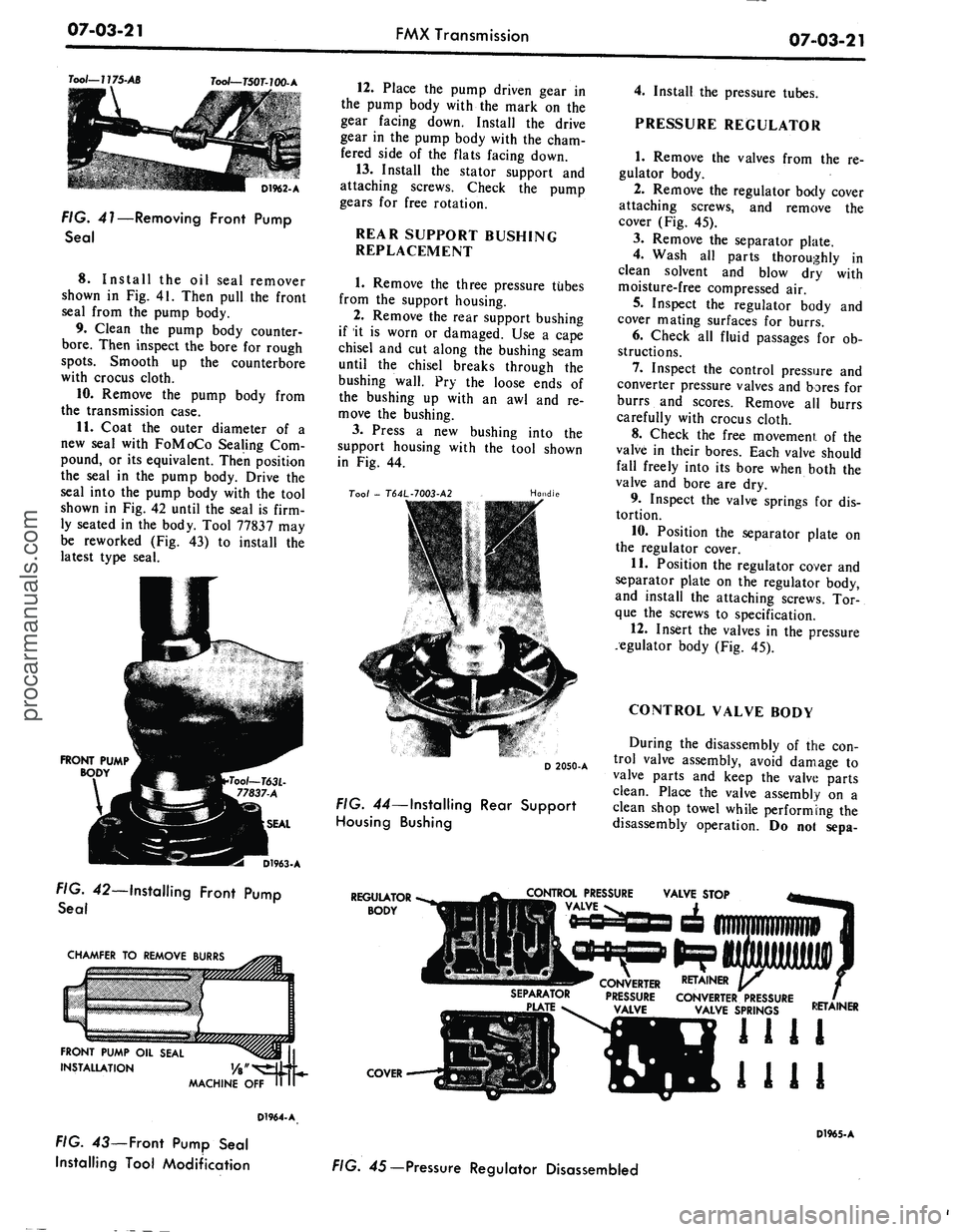
FIG. 41—Removing Front Pump
Seal
8. Install
the oil
seal remover
shown
in Fig. 41.
Then pull
the
front
seal from
the
pump body.
9. Clean
the
pump body counter-
bore.
Then inspect
the
bore
for
rough
spots.
Smooth
up the
counterbore
with crocus cloth.
10.
Remove
the
pump body from
the transmission case.
11.
Coat
the
outer diameter
of a
new seal with FoMoCo Sealing
Com-
pound,
or its
equivalent. Then position
the seal
in the
pump body. Drive
the
seal into
the
pump body with
the
tool
shown
in Fig. 42
until
the
seal
is
firm-
ly seated
in the
body. Tool 77837
may
be reworked
(Fig. 43) to
install
the
latest type seal.
FRONT PUMP
BODY
D1963-A
FIG. 42—Installing Front Pump
Seal
CHAMFER
TO
REMOVE BURRS
FRONT PUMP
OIL
SEAL
INSTALLATION
MACHINE
OFF
D1964-A
FIG.
43—
Front Pump Seal
Installing Tool Modification
12.
Place
the
pump driven gear
in
the pump body with
the
mark
on the
gear facing down. Install
the
drive
gear
in the
pump body with
the
cham-
fered side
of the
flats facing down.
13.
Install
the
stator support
and
attaching screws. Check
the
pump
gears
for
free rotation.
REAR SUPPORT BUSHING
REPLACEMENT
1.
Remove
the
three pressure tubes
from
the
support housing.
2.
Remove
the
rear support bushing
if
it is
worn
or
damaged.
Use a
cape
chisel
and cut
along
the
bushing seam
until
the
chisel breaks through
the
bushing wall.
Pry the
loose ends
of
the bushing
up
with
an awl and re-
move
the
bushing.
3.
Press
a new
bushing into
the
support housing with
the
tool shown
in
Fig. 44.
Too/
-
T64L-7003-A2
Handle
D 2050-A
FIG. 44—Installing Rear Support
Housing Bushing
4.
Install
the
pressure tubes.
PRESSURE REGULATOR
1.
Remove
the
valves from
the re-
gulator body.
2.
Remove
the
regulator body cover
attaching screws,
and
remove
the
cover
(Fig. 45).
3.
Remove
the
separator plate.
4.
Wash
all
parts thoroughly
in
clean solvent
and
blow
dry
with
moisture-free compressed
air.
5.
Inspect
the
regulator body
and
cover mating surfaces
for
burrs.
6. Check
all
fluid passages
for ob-
structions.
7.
Inspect
the
control pressure
and
converter pressure valves
and
bores
for
burrs
and
scores. Remove
all
burrs
carefully with crocus cloth.
8. Check
the
free movement
of the
valve
in
their bores. Each valve should
fall freely into
its
bore when both
the
valve
and
bore
are dry.
9. Inspect
the
valve springs
for dis-
tortion.
10.
Position
the
separator plate
on
the regulator cover.
11.
Position
the
regulator cover
and
separator plate
on the
regulator body,
and install
the
attaching screws.
Tor-
que
the
screws
to
specification.
12.
Insert
the
valves
in the
pressure
regulator body
(Fig. 45).
CONTROL VALVE BODY
During
the
disassembly
of the con-
trol valve assembly, avoid damage
to
valve parts
and
keep
the
valve parts
clean. Place
the
valve assembly
on a
clean shop towel while performing
the
disassembly operation.
Do not
sepa-
REGULATOR
BODY
CONTROL PRESSURE
VALVE
SEPARATOR
CONVERTER RETAINER
PRESSURE CONVERTER PRESSURE
VALVE SPRINGS
COVER
RETAINER
1111
1111
D1965-A
FIG. 45— Pressure Regulator Disassembledprocarmanuals.com
Page 366 of 413
07-03-26
FMX Transmission
07-03-26
MANUAL SHAFT
AND LEVER
DETENT SPRING—«^ DETENT PLUNGER
DETENT
/ LEVER
MANUAL SHAFT
NUT
INNER DOWNSHIFT LEVER
/ DOWNSHIFT
/ SHAFT
NUT
TOGGLE LIFT
ijG
LEVER SPRING
TOGGLE LEVER-
PAWL RETURN SPRING-
TOGGLE LEVER
PIN-
PLUG'
D1967-A
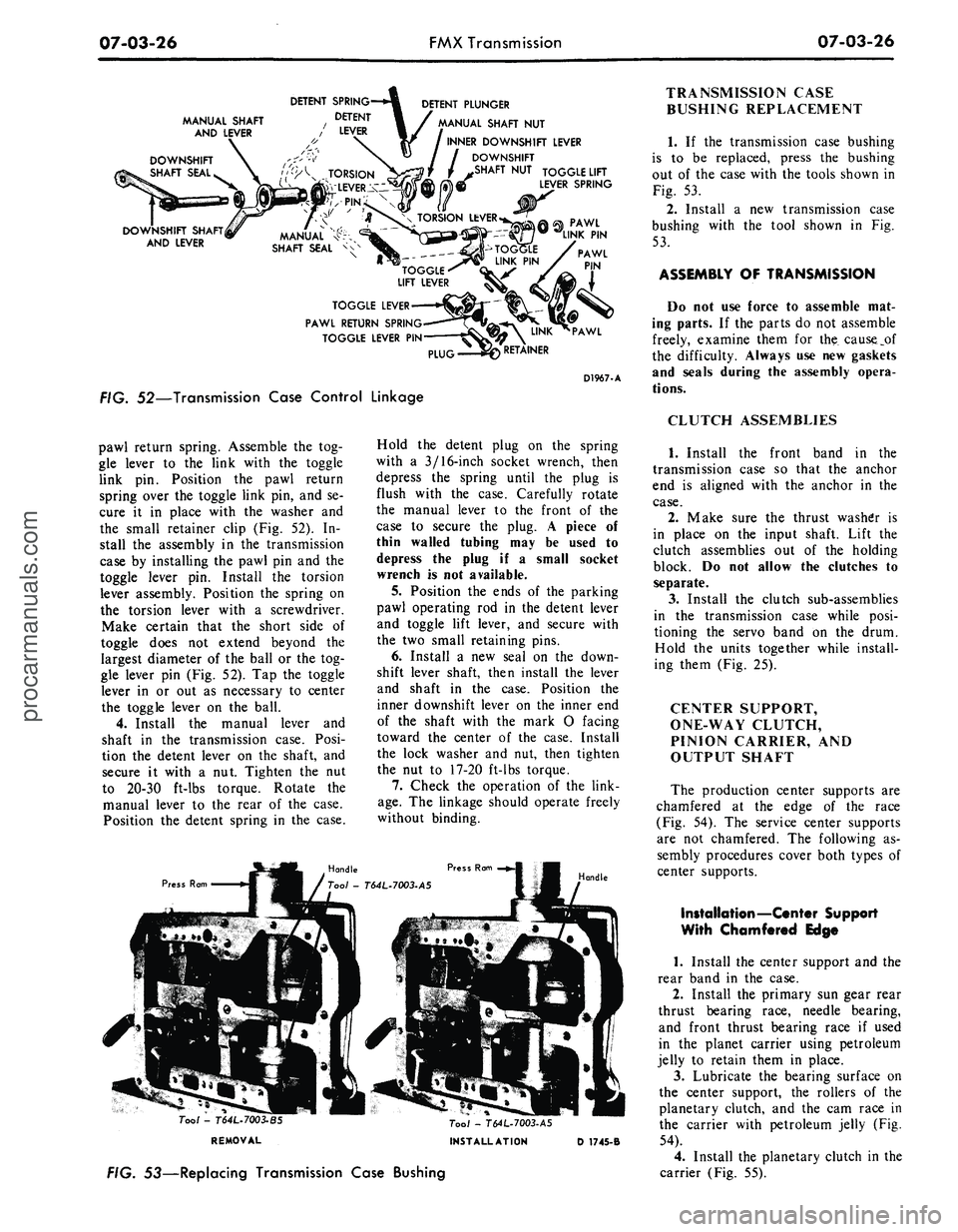
FIG. 52—Transmission Case Control Linkage
pawl return spring. Assemble
the tog-
gle lever
to the
link with
the
toggle
link
pin.
Position
the
pawl return
spring over
the
toggle link pin,
and se-
cure
it in
place with
the
washer
and
the small retainer clip
(Fig. 52). In-
stall
the
assembly
in the
transmission
case
by
installing
the
pawl
pin and the
toggle lever
pin.
Install
the
torsion
lever assembly. Position
the
spring
on
the torsion lever with
a
screwdriver.
Make certain that
the
short side
of
toggle does
not
extend beyond
the
largest diameter
of the
ball
or the
tog-
gle lever
pin
(Fig. 52).
Tap the
toggle
lever
in or out as
necessary
to
center
the toggle lever
on the
ball.
4.
Install
the
manual lever
and
shaft
in the
transmission case. Posi-
tion
the
detent lever
on the
shaft,
and
secure
it
with
a nut.
Tighten
the nut
to 20-30 ft-lbs torque. Rotate
the
manual lever
to the
rear
of the
case.
Position
the
detent spring
in the
case.
Press Ram
Hold
the
detent plug
on the
spring
with
a
3/16-inch socket wrench, then
depress
the
spring until
the
plug
is
flush with
the
case. Carefully rotate
the manual lever
to the
front
of the
case
to
secure
the
plug.
A
piece
of
thin walled tubing
may be
used
to
depress
the
plug
if a
small socket
wrench
is not
available.
5.
Position
the
ends
of the
parking
pawl operating
rod in the
detent lever
and toggle lift lever,
and
secure with
the
two
small retaining pins.
6. Install
a new
seal
on the
down-
shift lever shaft, then install
the
lever
and shaft
in the
case. Position
the
inner downshift lever
on the
inner
end
of
the
shaft with
the
mark
O
facing
toward
the
center
of the
case. Install
the lock washer
and nut,
then tighten
the
nut to
17-20 ft-lbs torque.
7.
Check
the
operation
of the
link-
age.
The
linkage should operate freely
without binding.
Handle
Tool -
T64L.7003-BS
REMOVAL
Tool - T64L-7003-A5
INSTALLATION
D 1745-B
FIG. 53—Replacing Transmission Case Bushing
TRANSMISSION CASE
BUSHING REPLACEMENT
1.
If the
transmission case bushing
is
to be
replaced, press
the
bushing
out
of the
case with
the
tools shown
in
Fig.
53.
2.
Install
a new
transmission case
bushing with
the
tool shown
in Fig.
53.
ASSEMBLY
OF
TRANSMISSION
Do
not use
force
to
assemble
mat-
ing parts.
If the
parts
do not
assemble
freely, examine them
for the
cause_pf
the difficulty. Always
use new
gaskets
and seals during
the
assembly opera-
tions.
CLUTCH ASSEMBLIES
1.
Install
the
front band
in the
transmission case
so
that
the
anchor
end
is
aligned with
the
anchor
in the
case.
2.
Make sure
the
thrust washer
is
in place
on the
input shaft. Lift
the
clutch assemblies
out of the
holding
block.
Do not
allow
the
clutches
to
separate.
3.
Install
the
clutch sub-assemblies
in
the
transmission case while posi-
tioning
the
servo band
on the
drum.
Hold
the
units together while install-
ing them (Fig.
25).
CENTER SUPPORT,
ONE-WAY CLUTCH,
PINION CARRIER,
AND
OUTPUT SHAFT
The production center supports
are
chamfered
at the
edge
of the
race
(Fig.
54). The
service center supports
are
not
chamfered.
The
following
as-
sembly procedures cover both types
of
center supports.
Installation—Center Support
With Chamfered Edge
1.
Install
the
center support
and the
rear band
in the
case.
2.
Install
the
primary
sun
gear rear
thrust bearing race, needle bearing,
and front thrust bearing race
if
used
in
the
planet carrier using petroleum
jelly
to
retain them
in
place.
3.
Lubricate
the
bearing surface
on
the center support,
the
rollers
of the
planetary clutch,
and the cam
race
in
the carrier with petroleum jelly
(Fig.
54).
4.
Install
the
planetary clutch
in the
carrier (Fig.
55).procarmanuals.com
Page 367 of 413
07-03-27
FMX Transmission
0703-27
CENTER SUPPORT
PLANETARY CLUTCH
"CAM TYPE" CLUTCH RACE
CHAMFER ON PRODUCTION
PART, ONLY-SERVICE PART NOT CHAMFERED
PLANET CARRIER
D1938-A
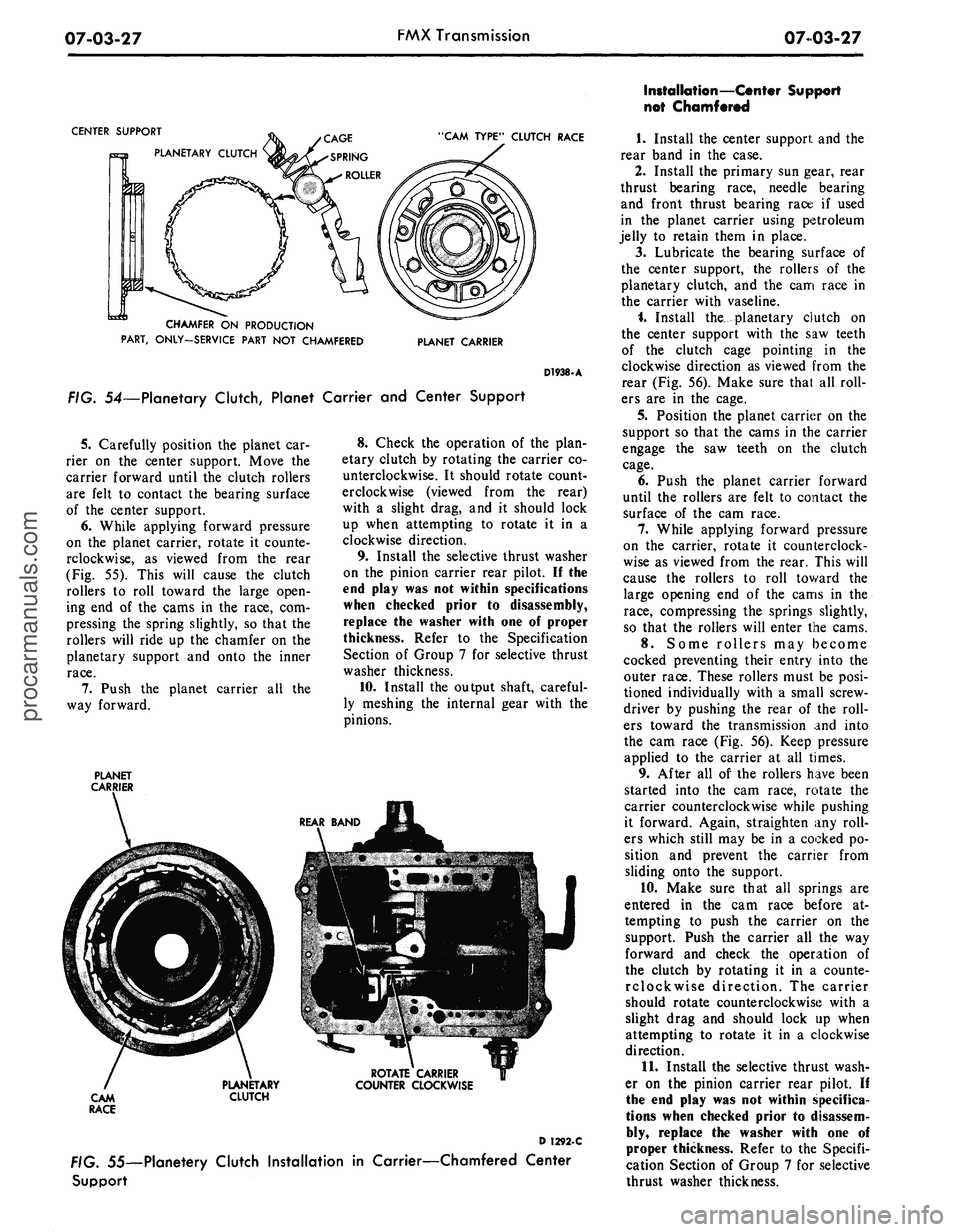
FIG. 54—Planetary Clutch, Planet Carrier and Center Support
5.
Carefully position the planet car-
rier on the center support. Move the
carrier forward until the clutch rollers
are felt to contact the bearing surface
of the center support.
6. While applying forward pressure
on the planet carrier, rotate it counte-
rclockwise, as viewed from the rear
(Fig. 55). This will cause the clutch
rollers to roll toward the large open-
ing end of the cams in the race, com-
pressing the spring slightly, so that the
rollers will ride up the chamfer on the
planetary support and onto the inner
race.
7.
Push the planet carrier all the
way forward.
PLANET
CARRIER
8. Check the operation of the plan-
etary clutch by rotating the carrier co-
unterclockwise. It should rotate count-
erclockwise (viewed from the rear)
with a slight drag, and it should lock
up when attempting to rotate it in a
clockwise direction.
9. Install the selective thrust washer
on the pinion carrier rear pilot. II the
end play was not within specifications
when checked prior to disassembly,
replace the washer with one of proper
thickness. Refer to the Specification
Section of Group 7 for selective thrust
washer thickness.
10.
Install the output shaft, careful-
ly meshing the internal gear with the
pinions.
ROTATE CARRIER
COUNTER CLOCKWISE
D 1292-C
. 55—Planetery Clutch Installation in Carrier—Chamfered Center
Support
Installation—Center Support
not Chamfered
1.
Install the center support and the
rear band in the case.
2.
Install the primary sun gear, rear
thrust bearing race, needle bearing
and front thrust bearing race if used
in the planet carrier using petroleum
jelly to retain them in place.
3.
Lubricate the bearing surface of
the center support, the rollers of the
planetary clutch, and the cam race in
the carrier with vaseline.
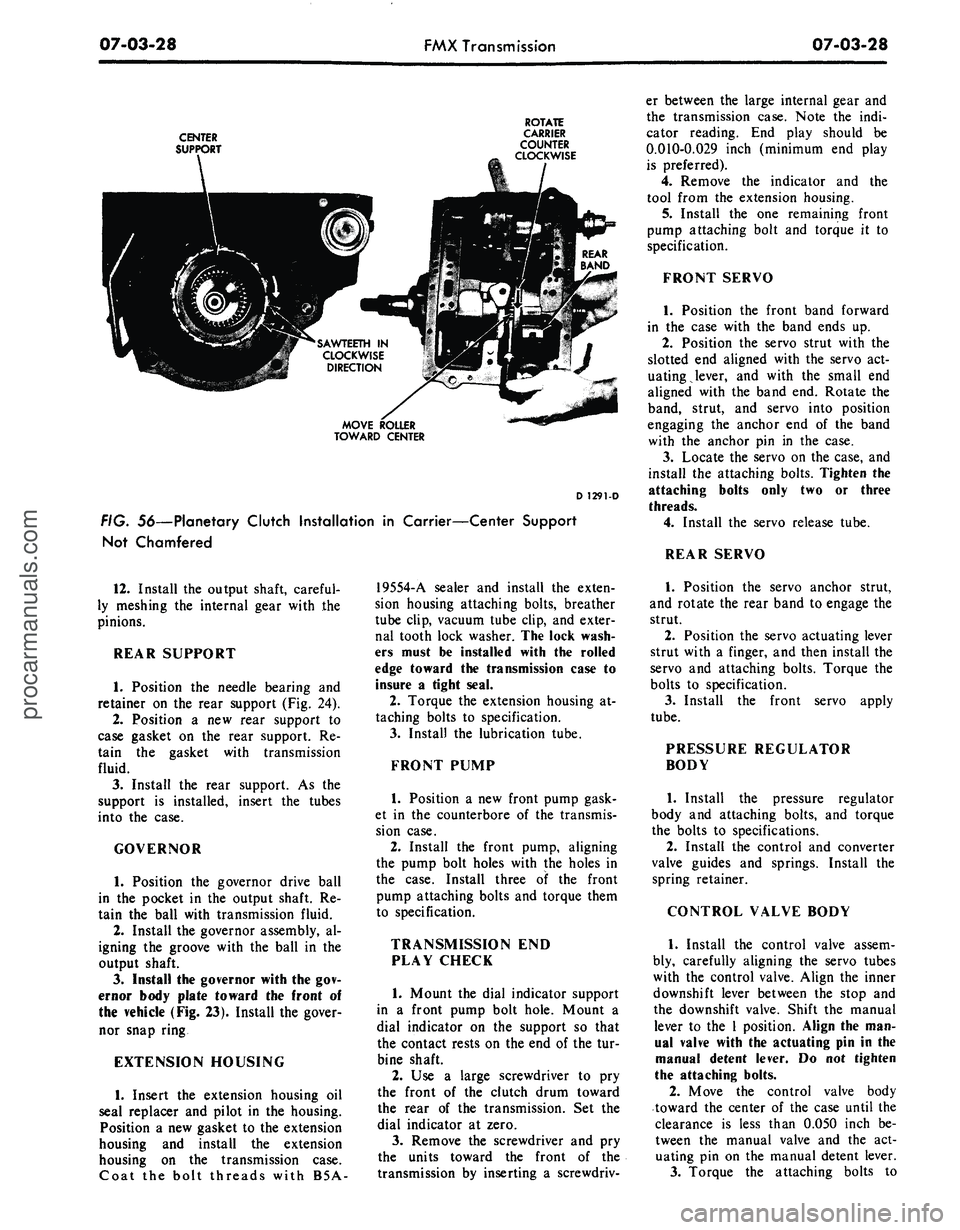
i. Install the^ planetary clutch on
the center support with the saw teeth
of the clutch cage pointing in the
clockwise direction as viewed from the
rear (Fig. 56). Make sure that all roll-
ers are in the cage.
5.
Position the planet carrier on the
support so that the cams in the carrier
engage the saw teeth on the clutch
cage.
6. Push the planet carrier forward
until the rollers are felt to contact the
surface of the cam race.
7.
While applying forward pressure
on the carrier, rotate it counterclock-
wise as viewed from the rear. This will
cause the rollers to roll toward the
large opening end of the cams in the
race,
compressing the springs slightly,
so that the rollers will enter the cams.
8. Some rollers may become
cocked preventing their entry into the
outer race. These rollers must be posi-
tioned individually with a small screw-
driver by pushing the rear of the roll-
ers toward the transmission and into
the cam race (Fig. 56). Keep pressure
applied to the carrier at all times.
9. After all of the rollers have been
started into the cam race, rotate the
carrier counterclockwise while pushing
it forward. Again, straighten any roll-
ers which still may be in a cocked po-
sition and prevent the carrier from
sliding onto the support.
10.
Make sure that all springs are
entered in the cam race before at-
tempting to push the carrier on the
support. Push the carrier all the way
forward and check the operation of
the clutch by rotating it in a counte-
rclockwise direction. The carrier
should rotate counterclockwise with a
slight drag and should lock up when
attempting to rotate it in a clockwise
direction.
11.
Install the selective thrust wash-
er on the pinion carrier rear pilot. If
the end play was not within specifica-
tions when checked prior to disassem-
bly, replace the washer with one of
proper thickness. Refer to the Specifi-
cation Section of Group 7 for selective
thrust washer thickness.procarmanuals.com
Page 368 of 413
07-03-28
FMX Transmission
07-03-28
CENTER
SUPPORT
ROTATE
CARRIER
COUNTER
CLOCKWISE
SAWTEETH IN
CLOCKWISE
DIRECTION
MOVE ROLLER
TOWARD CENTER
D 1291-D
FIG. 56—Planetary Clutch Installation in Carrier—Center Support
Not Chamfered
er between the large internal gear and
the transmission case. Note the indi-
cator reading. End play should be
0.010-0.029 inch (minimum end play
is preferred).
4.
Remove the indicator and the
tool from the extension housing.
5.
Install the one remaining front
pump attaching bolt and torque it to
specification.
FRONT SERVO
1.
Position the front band forward
in the case with the band ends up.
2.
Position the servo strut with the
slotted end aligned with the servo act-
uating lever, and with the small end
aligned with the band end. Rotate the
band, strut, and servo into position
engaging the anchor end of the band
with the anchor pin in the case.
3.
Locate the servo on the case, and
install the attaching bolts. Tighten the
attaching bolts only two or three
threads.
4.
Install the servo release tube.
REAR SERVO
12.
Install the output shaft, careful-
ly meshing the internal gear with the
pinions.
REAR SUPPORT
1.
Position the needle bearing and
retainer on the rear support (Fig. 24).
2.
Position a new rear support to
case gasket on the rear support. Re-
tain the gasket with transmission
fluid.
3.
Install the rear support. As the
support is installed, insert the tubes
into the case.
GOVERNOR
1.
Position the governor drive ball
in the pocket in the output shaft. Re-
tain the ball with transmission fluid.
2.
Install the governor assembly, al-
igning the groove with the ball in the
output shaft.
3.
Install the governor with the gov-
ernor body plate toward the front of
the vehicle (Fig. 23). Install the gover-
nor snap ring
EXTENSION HOUSING
1.
Insert the extension housing oil
seal re placer and pilot in the housing.
Position a new gasket to the extension
housing and install the extension
housing on the transmission case.
Coat the bolt threads with B5A-
19554-A sealer and install the exten-
sion housing attaching bolts, breather
tube clip, vacuum tube clip, and exter-
nal tooth lock washer. The lock wash-
ers must be installed with the rolled
edge toward the transmission case to
insure a tight seal.
2.
Torque the extension housing at-
taching bolts to specification.
3.
Install the lubrication tube.
FRONT PUMP
1.
Position a new front pump gask-
et in the counterbore of the transmis-
sion case.
2.
Install the front pump, aligning
the pump bolt holes with the holes in
the case. Install three of the front
pump attaching bolts and torque them
to specification.
TRANSMISSION END
PLAY CHECK
1.
Mount the dial indicator support
in a front pump bolt hole. Mount a
dial indicator on the support so that
the contact rests on the end of the tur-
bine shaft.
2.
Use a large screwdriver to pry
the front of the clutch drum toward
the rear of the transmission. Set the
dial indicator at zero.
3.
Remove the screwdriver and pry
the units toward the front of the
transmission by inserting a screwdriv-
1.
Position the servo anchor strut,
and rotate the rear band to engage the
strut.
2.
Position the servo actuating lever
strut with a finger, and then install the
servo and attaching bolts. Torque the
bolts to specification.
3.
Install the front servo apply
tube.
PRESSURE REGULATOR
BODY
1.
Install the pressure regulator
body and attaching bolts, and torque
the bolts to specifications.
2.
Install the control and converter
valve guides and springs. Install the
spring retainer.
CONTROL VALVE BODY
1.
Install the control valve assem-
bly, carefully aligning the servo tubes
with the control valve. Align the inner
downshift lever between the stop and
the downshift valve. Shift the manual
lever to the 1 position. Align the man-
ual valve with the actuating pin in the
manual detent lever. Do not tighten
the attaching bolts.
2.
Move the control valve body
toward the center of the case until the
clearance is less than 0.050 inch be-
tween the manual valve and the act-
uating pin on the manual detent lever.
3.
Torque the attaching bolts toprocarmanuals.com
Page 369 of 413
07-03-29
FMX Transmission
07-03-29
specification. Be sure that the rear
fluid screen retaining clip is installed
under the valve body bolt as shown in
Fig. 17.
4.
Install the large control pressure
tube in the valve body and regulator.
5.
Install the small control pressure
compensator tube in the valve body
and regulator.
6. Turn the manual valve one full
turn in each manual lever detent posi-
tion. If the manual valve binds against
the actuating pin in any detent posi-
tion, loosen the valve body attaching
bolts and move the body away from
the center of the case. Move the body
only enough to relieve the binding.
Torque the attaching bolts and check
the manual valve for binding.
7.
Torque the front servo attaching
bolts to specification.
FRONT AND REAR
BAND ADJUSTMENTS
Adjust the front and rear bands as
detailed in Section 2.
VACUUM DIAPHRAGM UNIT
1.
Position the control rod in the
bore of the vacuum diaphragm unit
and install the diaphragm unit. Make
sure the control rod enters the throttle
valve as the vacuum unit is installed.
2.
Torque the diaphragm unit to
specification.
FLUID FILTER
AND OIL PAN
1.
Position the fluid filter on the
rear clip so that the tang enters the
hole in the filter flange. Then, rotate
the filter (clockwise) until the grom-
met is over the pump inlet port of the
valve body regulator and press the fil-
ter down firmly. Install the filter re-
taining clip.
2.
Place a new gasket on the trans-
mission case and install the pan. In-
stall the attaching bolts and lock
washers and torque the bolts to speci-
fication.
If the converter and converter hous-
ing were removed from the transmis-
sion, install these components. Posi-
tion the transmission assembly on the
transmission jack, and refer to Trans-
mission Installation Procedures for in-
stalling the transmission.procarmanuals.com
Page 370 of 413
07-04-01
C-6 Automatic Transmission
07-04-01
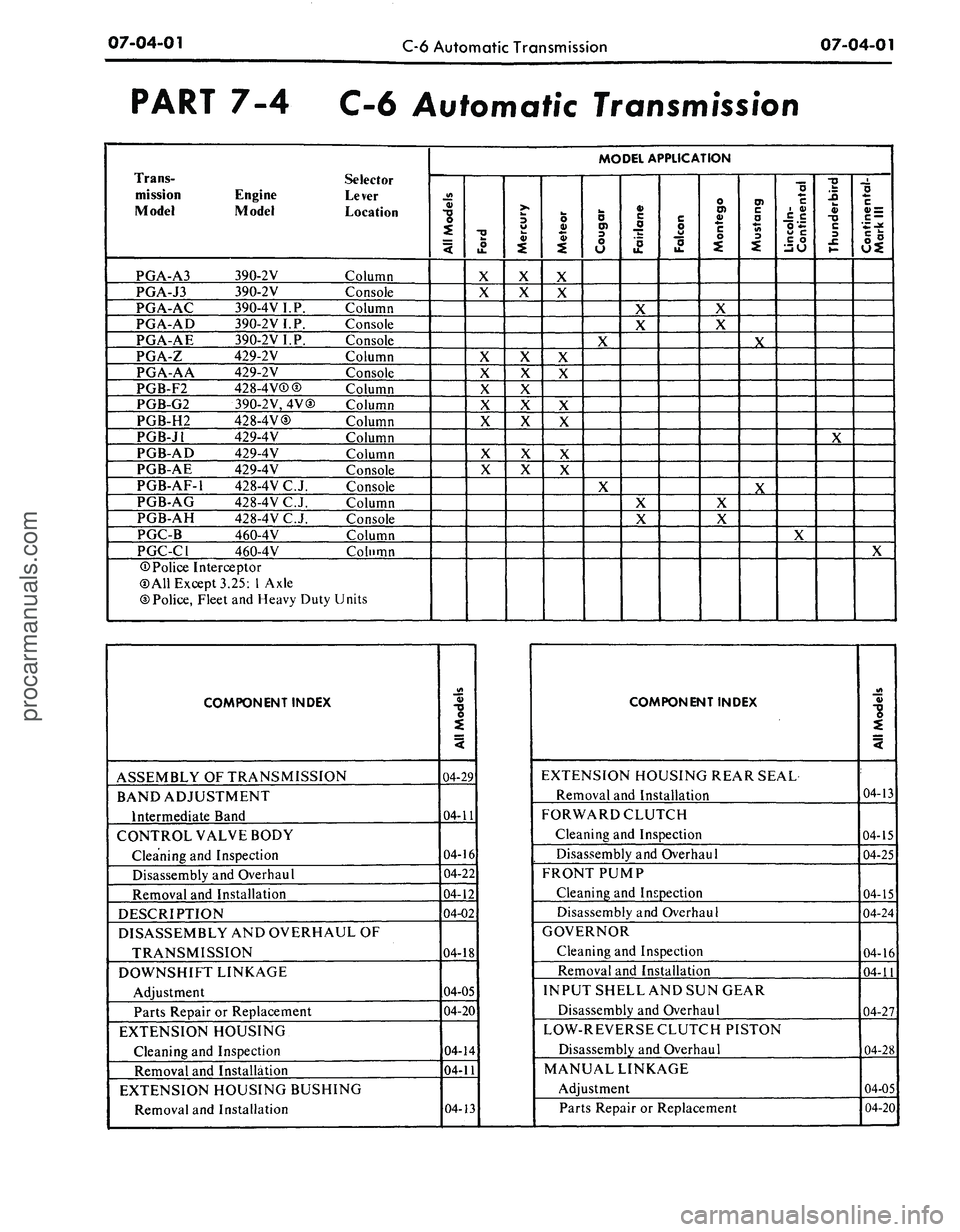
PART 7-4 C-6 Automatic Transmission
Trans-
Selector
mission Engine Lever
Model Model Location
PGA-A3 390-2V Column
PGA-J3 390-2V Console
PGA-AC 390-4VI.P. Column
PGA-AD 390-2VI.P. Console
PGA-AE 390-2V I.P. Console
PGA-Z 429-2V Column
PGA-AA 429-2V Console
PGB-F2 428-4 V®@ Column
PGB-G2 390-2V,4V© Column
PGB-H2 428-4V® Column
PGB-J1 429-4V Column
PGB-AD 429-4V Column
PGB-AE 429-4V Console
PGB-AF-1 428-4VC.J. Console
PGB-AG 428-4V C. J. Column
PGB-AH 428-4V C.J. Console
PGC-B 460-4V Column
PGC-C1 460-4V Column
©Police Interceptor
©All Except 3.25:
1
Axle
©Police, Fleet and Heavy Duty Units
MODEL APPLICATION
All
Models
Ford
X
X
X
X
X
X
X
X
X
Mercury
x
X
X
X
X
X
X
X
Meteor
X
X
X
X
X
X
X
X
Cougar
X
X
Fairlane
X
X
X
X
Falcon
Montego
X
X
X
X
Mustang
X
X
Lincoln-
Continental
X
Thunderbird
X
1
Continental-
Mark
III
X
COMPONENT INDEX
ASSEMBLY OF TRANSMISSION
BAND ADJUSTMENT
Intermediate Band
CONTROL VALVE BODY
Cleaning and Inspection
Disassembly and Overhaul
Removal and Installation
DESCRIPTION
DISASSEMBLY AND OVERHAUL OF
TRANSMISSION
DOWNSHIFT LINKAGE
Adjustment
Parts Repair or Replacement
EXTENSION HOUSING
Cleaning and Inspection
Removal and Installation
EXTENSION HOUSING BUSHING
Removal and Installation
All
Models
04-29
04-11
04-16
04-22
04-12
04-02
04-18
04-05
04-20
04-14
04-11
04-13
COMPONENT INDEX
EXTENSION HOUSING REAR SEAL
Removal and Installation
FORWARD CLUTCH
Cleaning and Inspection
Disassembly and Overhaul
FRONT PUMP
Cleaning and Inspection
Disassembly and Overhaul
GOVERNOR
Cleaning and Inspection
Removal and Installation
INPUT SHELL AND SUN GEAR
Disassembly and Overhaul
LOW-REVERSE CLUTCH PISTON
Disassembly and Overhaul
MANUAL LINKAGE
Adjustment
Parts Repair or Replacement
All
Models
04-13
04-15
04-25
04-15
04-24
04-16
04-11
04-27
04-28
04-05
04-20
procarmanuals.com