light FORD MUSTANG 1969 Volume One Chassis
[x] Cancel search | Manufacturer: FORD, Model Year: 1969, Model line: MUSTANG, Model: FORD MUSTANG 1969Pages: 413, PDF Size: 75.81 MB
Page 86 of 413
03-02-10
Suspension
03-02-10
lower
arm
free
to
drop
as
coil spring
tension
is
eased.
If a
chain hoist
or a
jack that
has
a
narrow contact
pad is
to
be
used
on the
bumper
to
raise
the
car, distribute
the
load along
the
bumper
by
using
a
steel plate
3 or 4
inches long
as a
contact
pad to pre-
vent damaging
the
bumper.
2.
If the
ball joint
is
riveted
to the
arm, drill
a
1/8-inch
pilot hole
com-
pletely through each rivet. Then drill
off
the
rivet head through
the
pilot
hole with
a
3/8-inch drill,
and
drive
out both rivets.
3.
Position
a
jack
or
safety stand
under
the
lower
arm, and
lower
the
vehicle about
6
inches
to
offset
the
coil spring tension.
4.
Remove
the
cotter
pin
from
the
ball joint stud,
and
remove
the nut.
5.
Place
a box
wrench over
the
lower
end
of the
tool shown
in
Fig.
7,
and position
the
tool.
The
tool should
seat firmly against
the end of
both
studs,
and
not
against
the
upper stud
nut.
6. Turn
the
wrench until both studs
are under tension,
and
then, with
a
hammer,
tap the
spindle near
the
lower stud
to
loosen
the
stud from
the
spindle.
Do not
loosen
the
stud with
tool pressure alone. Remove
the
ball
joint.
7.
Clean
the end of the arm, and
remove
all
burrs from
the
hole edges.
Check
for
cracks
in the
metal
at the
holes,
and
replace
the arm if it is
cracked.
8. Position
the
stud
of
the
ball joint
to
the
spindle bore,
and
install
the at-
taching
nut
finger-tight.
9. Attach
the
ball joint
to
the
lower
arm.
Use
only
the
specified bolts
and
nuts.
Do not
rivet
the new
ball joint
to
the
arm.
Torque nuts
to
specification.
10.
Torque
the
ball joint stud
nut
to specification,
and
install
a
new cot-
ter
pin.
11.
Remove
the
jack.
12.
Check
and, if
necessary, adjust
caster, camber,
and
toe-in. Whenever
any part
of the
front suspension
has
been removed
and
installed, front
wheel alignment must
be
checked.
BALL JOINT REPLACEMENT
LINCOLN CONTINENTAL
The lower ball joint
is
riveted
to
the
lower
arm
wheras
the
upper ball joint
is bolted
to the
upper
arm.
When
re-
placing
a
ball joint,
use all the
parts
supplied
in the kit.
T57P-3006-A
UPPER
ARM
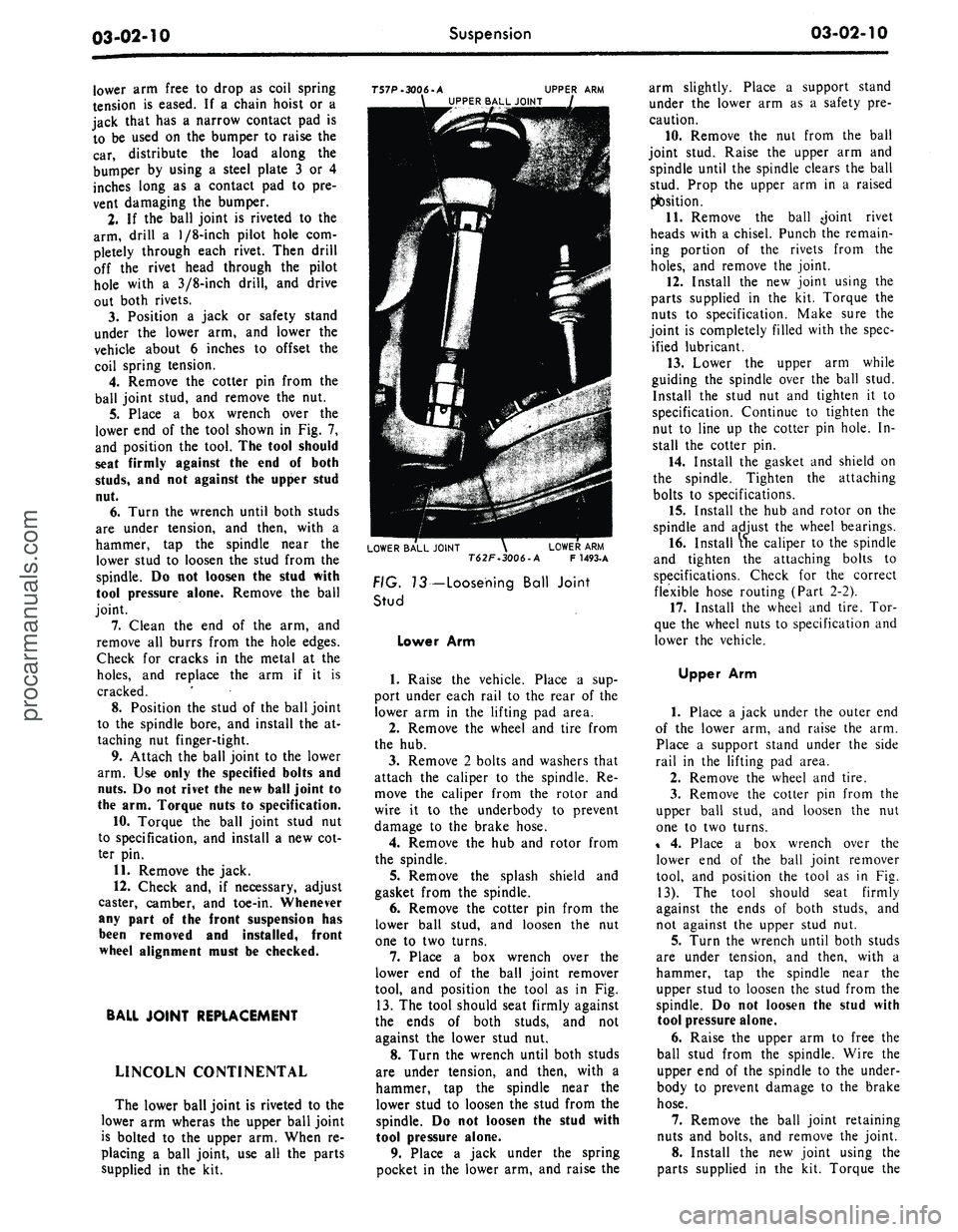
UPPER BALL JOINT
LOWER BALL JOINT
\
LOWER
ARM
T62F.3006-A
F
1493-A
FIG. 13— Loosening Ball Joint
Stud
Lower
Arm
1.
Raise
the
vehicle. Place
a sup-
port under each rail
to the
rear
of
the
lower
arm in the
lifting
pad
area.
2.
Remove
the
wheel
and
tire from
the
hub.
3.
Remove
2
bolts
and
washers that
attach
the
caliper
to the
spindle.
Re-
move
the
caliper from
the
rotor
and
wire
it to the
underbody
to
prevent
damage
to the
brake hose.
4.
Remove
the hub and
rotor from
the spindle.
5.
Remove
the
splash shield
and
gasket from
the
spindle.
6. Remove
the
cotter
pin
from
the
lower ball stud,
and
loosen
the nut
one
to two
turns.
7.
Place
a box
wrench over
the
lower
end of the
ball joint remover
tool,
and
position
the
tool
as in Fig.
13.
The
tool should seat firmly against
the ends
of
both studs,
and not
against
the
lower stud
nut.
8. Turn
the
wrench until both studs
are under tension,
and
then, with
a
hammer,
tap the
spindle near
the
lower stud
to
loosen
the
stud from
the
spindle.
Do not
loosen
the
stud with
tool pressure alone.
9. Place
a
jack under
the
spring
pocket
in the
lower
arm, and
raise
the
arm slightly. Place
a
support stand
under
the
lower
arm as a
safety
pre-
caution.
10.
Remove
the nut
from
the
ball
joint stud. Raise
the
upper
arm and
spindle until
the
spindle clears
the
ball
stud. Prop
the
upper
arm in a
raised
position.
11.
Remove
the
ball -joint rivet
heads with
a
chisel. Punch
the
remain-
ing portion
of the
rivets from
the
holes,
and
remove
the
joint.
12.
Install
the
new
joint using
the
parts supplied
in the kit.
Torque
the
nuts
to
specification. Make sure
the
joint
is
completely filled with
the
spec-
ified lubricant.
13.
Lower
the
upper
arm
while
guiding
the
spindle over
the
ball stud.
Install
the
stud
nut and
tighten
it to
specification. Continue
to
tighten
the
nut
to
line
up the
cotter
pin
hole.
In-
stall
the
cotter
pin.
14.
Install
the
gasket
and
shield
on
the spindle. Tighten
the
attaching
bolts
to
specifications.
15.
Install
the
hub and
rotor
on the
spindle
and
adjust
the
wheel bearings.
16.
Install
the
caliper
to
the
spindle
and tighten
the
attaching bolts
to
specifications. Check
for the
correct
flexible hose routing (Part
2-2).
17.
Install
the
wheel
and
tire.
Tor-
que
the
wheel nuts
to
specification
and
lower
the
vehicle.
Upper
Arm
1.
Place
a
jack under
the
outer
end
of
the
lower
arm,
and
raise
the arm.
Place
a
support stand under
the
side
rail
in the
lifting
pad
area.
2.
Remove
the
wheel
and
tire.
3.
Remove
the
cotter
pin
from
the
upper ball stud,
and
loosen
the nut
one
to two
turns.
%
4.
Place
a box
wrench over
the
lower
end of the
ball joint remover
tool,
and
position
the
tool
as in Fig.
13).
The
tool should seat firmly
against
the
ends
of
both studs,
and
not against
the
upper stud
nut.
5.
Turn
the
wrench until both studs
are under tension,
and
then, with
a
hammer,
tap the
spindle near
the
upper stud
to
loosen
the
stud from
the
spindle.
Do not
loosen
the
stud with
tool pressure alone.
6. Raise
the
upper
arm to
free
the
ball stud from
the
spindle. Wire
the
upper
end
of
the
spindle
to the
under-
body
to
prevent damage
to the
brake
hose.
7.
Remove
the
ball joint retaining
nuts
and
bolts,
and
remove
the
joint.
8. Install
the new
joint using
the
parts supplied
in the kit.
Torque
theprocarmanuals.com
Page 94 of 413
03-02-18
Suspension
03-02-18
5.
Remove the cotter pin from the
upper ball joint stud nut.
6. Loosen the upper ball joint stud
nut one or two turns. Do not remove
the nut from the stud at this time.
7.
Install tool T57P-3006-A be-
tween the upper and lower ball joint
studs with the adapter screw on top
(Fig. 13). The tool should be seated
firmly against the ends of both studs
and not against the nuts or lower stud
cotter pin.
8. With a wrench, turn the adapter
screw until the tool places the stua
under tension. Tap the spindle near
the upper stud with a hammer to loos-
en the stud in the spindle. Do not
loosen the stud from the spindle with
tool pressure only.
9. Remove the tool from between
the ball joint studs and place a floor
jack under the lower arm.
10.
Raise the floor jack to relieve
the pressure from the upper ball joint
stud nut and remove the nut.
11.
Remove the upper arm inner
shaft attaching bolts. Remove the
upper arm and inner shaft as an as-
sembly (Fig. 1).
12.
Remove the bumpei from the
upper arm.
Installation
1.
Position the bumper to the upper
arm and install the nut and washer.
Torque the nut to specifications.
2.
Position the upper arm inner
shaft to the frame side rail and install
the 2 attaching bolts and washers
snug.
3.
Connect the upper ball joint stud
to the spindle and install the attaching
nut. Torque the nut to specification
and continue to tighten the nut until
the cotter pin hole in the stud is in
line with the nut slots. Then, install
the cotter pin.
4.
If equipped with drum type bra-
kes—Adjust the brakes as outlined in
Part 2-2. Install the wheel, tire, and
drum to the spindle and adjust the
wheel bearings as outlined in Part
3-12.
5.
If equipped with disc brak-
es—Install the wheel and tire on the
hub and adjust the wheel bearings as
outlined in Part 3-12.
6. Install the hub cap or wheel
cover.
7.
Remove the safety stands and
lower the front of the vehicle.
8. Check caster, camber, and toe-in
and adjust as required (Section 2, Part
3-D.
COUGAR, FAIRLANE,
FALCON, MONTEGO,
MUSTANG
Removal
1.
Raise the front of the vehicle,
position safety stands under the
frame, and lower the vehicle slightly.
2.
Remove the wheel and tire.
3.
Remove the shock absorber
lower attaching nuts and washers.
4.
Remove the shock absorber
upper mounting bracket attaching
nuts,
and remove the shock absorber
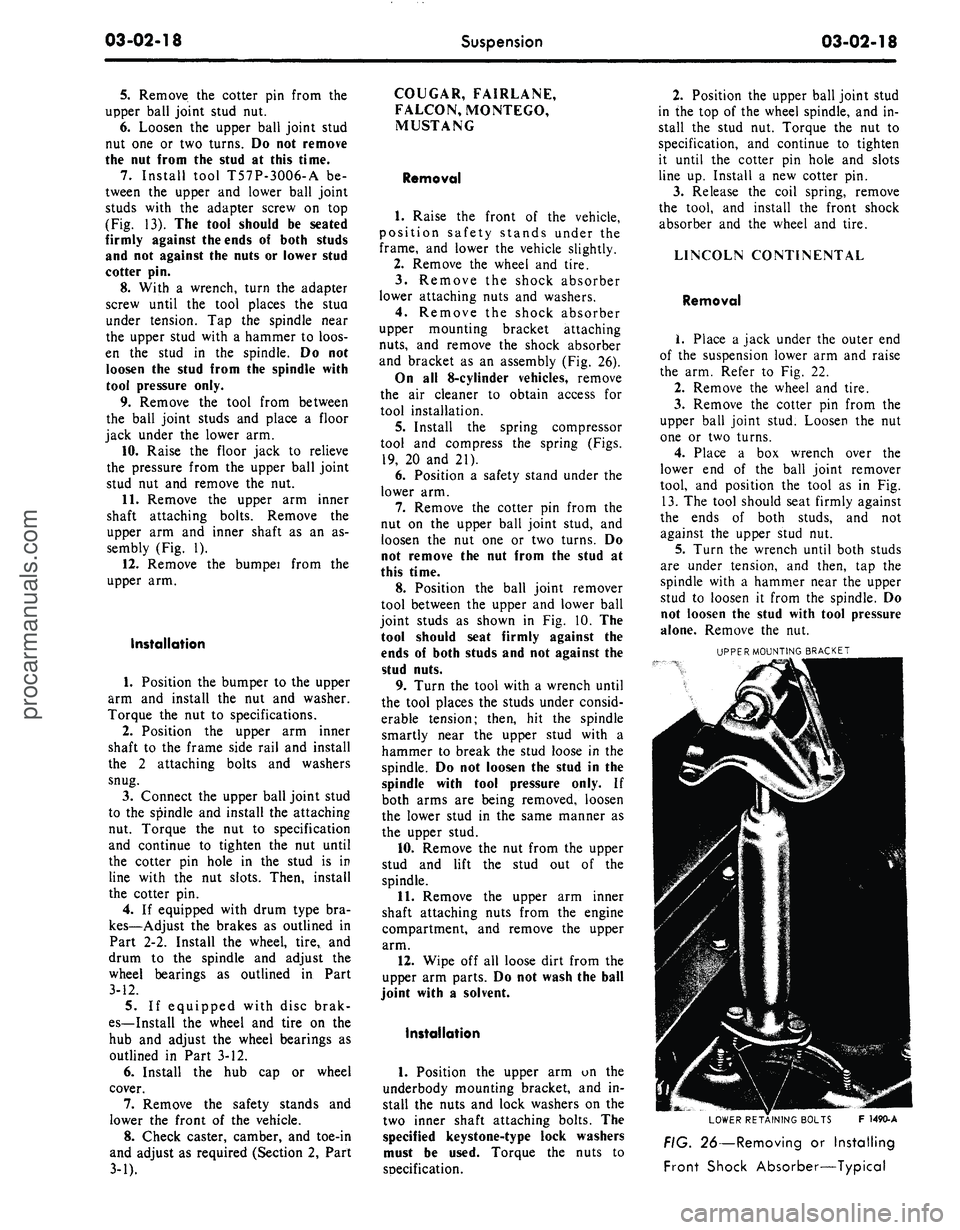
and bracket as an assembly (Fig. 26).
On all 8-cylinder vehicles, remove
the air cleaner to obtain access for
tool installation.
5.
Install the spring compressor
tool and compress the spring (Figs.
19,
20 and 21).
6. Position a safety stand under the
lower arm.
7.
Remove the cotter pin from the
nut on the upper ball joint stud, and
loosen the nut one or two turns. Do
not remove the nut from the stud at
this time.
8. Position the ball joint remover
tool between the upper and lower ball
joint studs as shown in Fig. 10. The
tool should seat firmly against the
ends of both studs and not against the
stud nuts.
9. Turn the tool with a wrench until
the tool places the studs under consid-
erable tension; then, hit the spindle
smartly near the upper stud with a
hammer to break the stud loose in the
spindle. Do not loosen the stud in the
spindle with tool pressure only. If
both arms are being removed, loosen
the lower stud in the same manner as
the upper stud.
10.
Remove the nut from the upper
stud and lift the stud out of the
spindle.
11.
Remove the upper arm inner
shaft attaching nuts from the engine
compartment, and remove the upper
arm.
12.
Wipe off all loose dirt from the
upper arm parts. Do not wash the ball
joint with a solvent.
Installation
1.
Position the upper arm on the
underbody mounting bracket, and in-
stall the nuts and lock washers on the
two inner shaft attaching bolts. The
specified keystone-type lock washers
must be used. Torque the nuts to
soecification.
2.
Position the upper ball joint stud
in the top of the wheel spindle, and in-
stall the stud nut. Torque the nut to
specification, and continue to tighten
it until the cotter pin hole and slots
line up. Install a new cotter pin.
3.
Release the coil spring, remove
the tool, and install the front shock
absorber and the wheel and tire.
LINCOLN CONTINENTAL
Removal
1.
Place a jack under the outer end
of the suspension lower arm and raise
the arm. Refer to Fig. 22.
2.
Remove the wheel and tire.
3.
Remove the cotter pin from the
upper ball joint stud. Loosen the nut
one or two turns.
4.
Place a box wrench over the
lower end of the ball joint remover
tool, and position the tool as in Fig.
13.
The tool should seat firmly against
the ends of both studs, and not
against the upper stud nut.
5.
Turn the wrench until both studs
are under tension, and then, tap the
spindle with a hammer near the upper
stud to loosen it from the spindle. Do
not loosen the stud with tool pressure
alone. Remove the nut.
UPPER MOUNTING BRACKET
LOWER RETAINING BOLTS F 1490-A
FIG. 26—Removing or Installing
Front Shock Absorber—Typicalprocarmanuals.com
Page 102 of 413
03-02-26
Suspension
03-02-26
T64K-578 7-B2 (Adapter)
-83 (Nut)
(Bolt)
SPRING FRONT
EYE
Tool-T64K-5781-B2 (Adapter)
BUSHING
F 1484-A
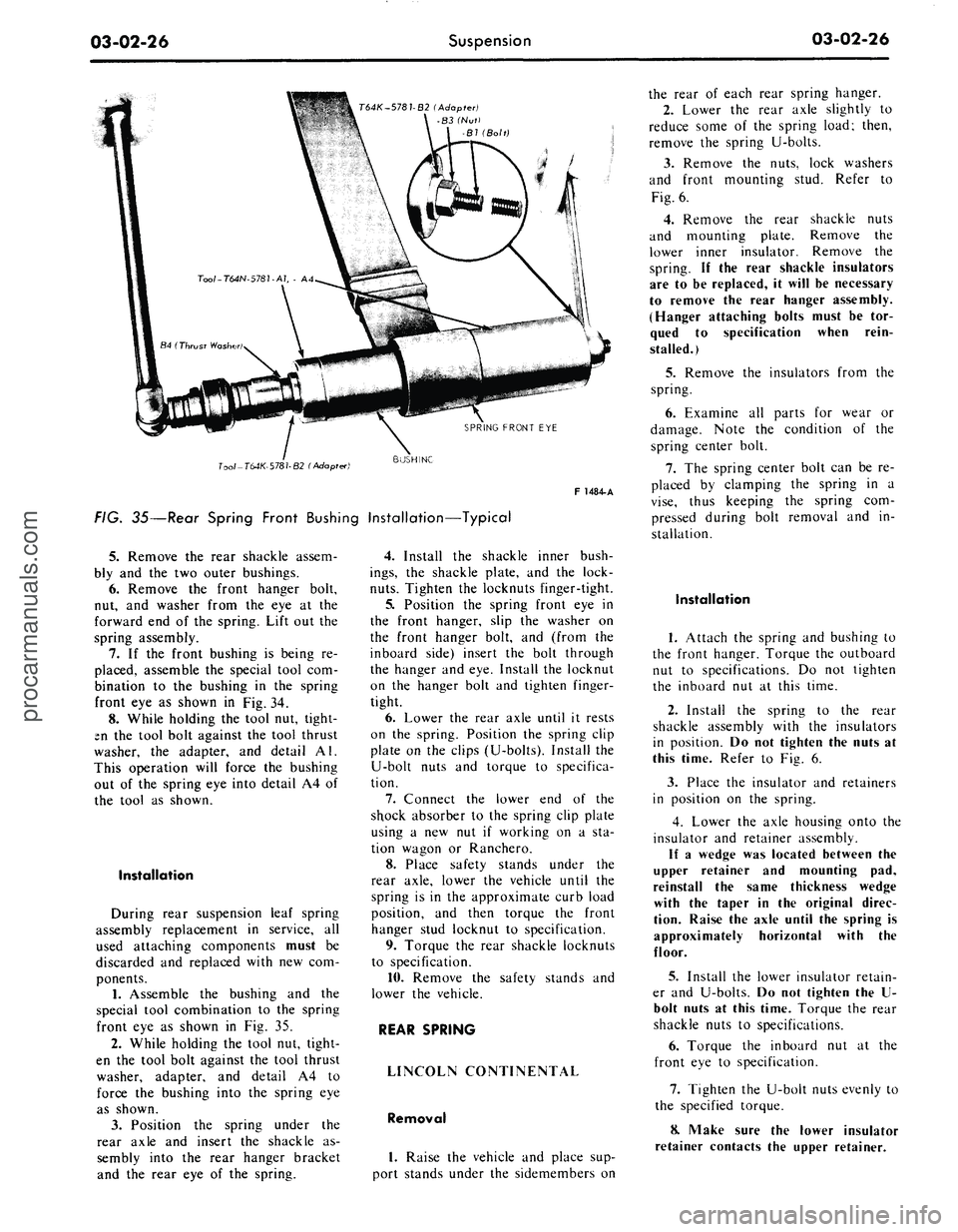
FIG. 35—Rear Spring Front Bushing Installation—Typical
5.
Remove
the
rear shackle assem-
bly
and the two
outer bushings.
6. Remove
the
front hanger bolt,
nut,
and
washer from
the eye at the
forward
end of the
spring. Lift
out the
spring assembly.
7.
If the
front bushing
is
being
re-
placed, assemble
the
special tool
com-
bination
to the
bushing
in the
spring
front
eye as
shown
in
Fig.
34.
8. While holding
the
tool
nut,
tight-
en
the
tool bolt against
the
tool thrust
washer,
the
adapter,
and
detail
Al.
This operation will force
the
bushing
out
of the
spring
eye
into detail
A4 of
the tool
as
shown.
Installation
During rear suspension leaf spring
assembly replacement
in
service,
all
used attaching components must
be
discarded
and
replaced with
new com-
ponents.
1.
Assemble
the
bushing
and the
special tool combination
to the
spring
front
eye as
shown
in Fig. 35.
2.
While holding
the
tool
nut,
tight-
en
the
tool bolt against
the
tool thrust
washer, adapter,
and
detail
A4 to
force
the
bushing into
the
spring
eye
as shown.
3.
Position
the
spring under
the
rear axle
and
insert
the
shackle
as-
sembly into
the
rear hanger bracket
and
the
rear
eye of the
spring.
4.
Install
the
shackle inner bush-
ings,
the
shackle plate,
and the
lock-
nuts.
Tighten
the
locknuts finger-tight.
5.
Position
the
spring front
eye in
the front hanger, slip
the
washer
on
the front hanger bolt,
and
(from
the
inboard side) insert
the
bolt through
the hanger
and
eye. Install
the
locknut
on
the
hanger bolt
and
tighten finger-
tight.
6. Lower
the
rear axle until
it
rests
on
the
spring. Position
the
spring clip
plate
on the
clips (U-bolts). Install
the
U-bolt nuts
and
torque
to
specifica-
tion.
7.
Connect
the
lower
end of the
shock absorber
to the
spring clip plate
using
a new nut if
working
on a sta-
tion wagon
or
Ranchero.
8. Place safety stands under
the
rear axle, lower
the
vehicle until
the
spring
is in the
approximate curb load
position,
and
then torque
the
front
hanger stud locknut
to
specification.
9. Torque
the
rear shackle locknuts
to specification.
10.
Remove
the
safety stands
and
lower
the
vehicle.
REAR SPRING
LINCOLN CONTINENTAL
Removal
1.
Raise
the
vehicle
and
place
sup-
port stands under
the
sidemembers
on
the rear
of
each rear spring hanger.
2.
Lower
the
rear axle slightly
to
reduce some
of the
spring load; then,
remove
the
spring U-bolts.
3.
Remove
the
nuts, lock washers
and front mounting stud. Refer
to
Fig.
6.
4.
Remove
the
rear shackle nuts
and mounting plate. Remove
the
lower inner insulator. Remove
the
spring.
If the
rear shackle insulators
are
to be
replaced,
it
will
be
necessary
to remove
the
rear hanger assembly.
(Hanger attaching bolts must
be tor-
qued
to
specification when rein-
stalled.)
5.
Remove
the
insulators from
the
spring.
6. Examine
all
parts
for
wear
or
damage. Note
the
condition
of the
spring center bolt.
7.
The
spring center bolt
can be re-
placed
by
clamping
the
spring
in a
vise,
thus keeping
the
spring
com-
pressed during bolt removal
and in-
stallation.
Installation
1.
Attach
the
spring
and
bushing
to
the front hanger. Torque
the
outboard
nut
to
specifications.
Do not
tighten
the inboard
nut at
this time.
2.
Install
the
spring
to the
rear
shackle assembly with
the
insulators
in position.
Do not
tighten
the
nuts
at
this time. Refer
to Fig. 6.
3.
Place
the
insulator
and
retainers
in position
on the
spring.
4.
Lower
the
axle housing onto
the
insulator
and
retainer assembly.
If
a
wedge
was
located between
the
upper retainer
and
mounting
pad,
reinstall
the
same thickness wedge
with
the
taper
in the
original direc-
tion. Raise
the
axle until
the
spring
is
approximately horizontal with
the
floor.
5.
Install
the
lower insulator retain-
er
and
U-bolts.
Do not
tighten
the U-
bolt nuts
at
this time. Torque
the
rear
shackle nuts
to
specifications.
6. Torque
the
inboard
nut at the
front
eye to
specification.
7.
Tighten
the
U-bolt nuts evenly
to
the specified torque.
8. Make sure
the
lower insulator
retainer contacts
the
upper retainer.procarmanuals.com
Page 112 of 413
03-04-03
Automatic Air Leveling System — Lincoln Continental
03-04-03
outlet lines to their respective parts.
3.
Adjust the trim height as de-
tailed in Section 4.
4.
Connect the link to the arm.
5.
Remove the jack stands and
lower the vehicle.
SUPER LIFT SHOCK ABSORBER
REMOVAL
1.
Raise the vehicle and place jack
stands under the axle to compress the
super lift.
2.
Loosen the air line or lines (right
super lift) slowly to release the air
from the system. Then, disconnect the
line or lines.
3.
Remove the three mounting plate
attaching screws from the upper end
of the super lift.
4.
Remove the attaching nut and
washer from the lower end of the
super lift and remove it from the vehi-
cle.
5.
Remove the nut, outer washer
and the insulator that attach the super
lift to the mounting plate. Remove the
plate, remaining insulator and washer.
INSTALLATION
1.
Position a washer, insulator,
mounting plate, insulator, washer and
nut on the stud at the upper end of
the super lift. Torque the nut to speci-
fication.
2.
Install the mounting plate, outer
insulator, washer and nut on the stud.
Torque the nut to specification.
3.
Attach the mounting plate and
shock absorber to the crossmember
with the attaching screws to specifica-
tions.
4.
Connect the lower end of the
super lift to the mounting stud with
the washers and attaching nut. Torque
the nut to specification.
5.
Connect the air line or lines
(right super lift) to the super lift.
6. Start the engine and check for
leaks.
3 IN-VEHICLE ADJUSTMENTS AND REPAIRS
REGULATOR ADJUSTMENT HEIGHT CONTROL VALVE
The regulator may be adjusted if
the regulator pressure is under 100 psi
with the reservoir pressure at a mini-
mum of 140 psi. If the regulated pres-
sure exceeds 130 psi, the regulator
must be replaced.
To adjust the regulator, remove the
boot and reposition the sleeve and re-
tainer deeper into the body of the re-
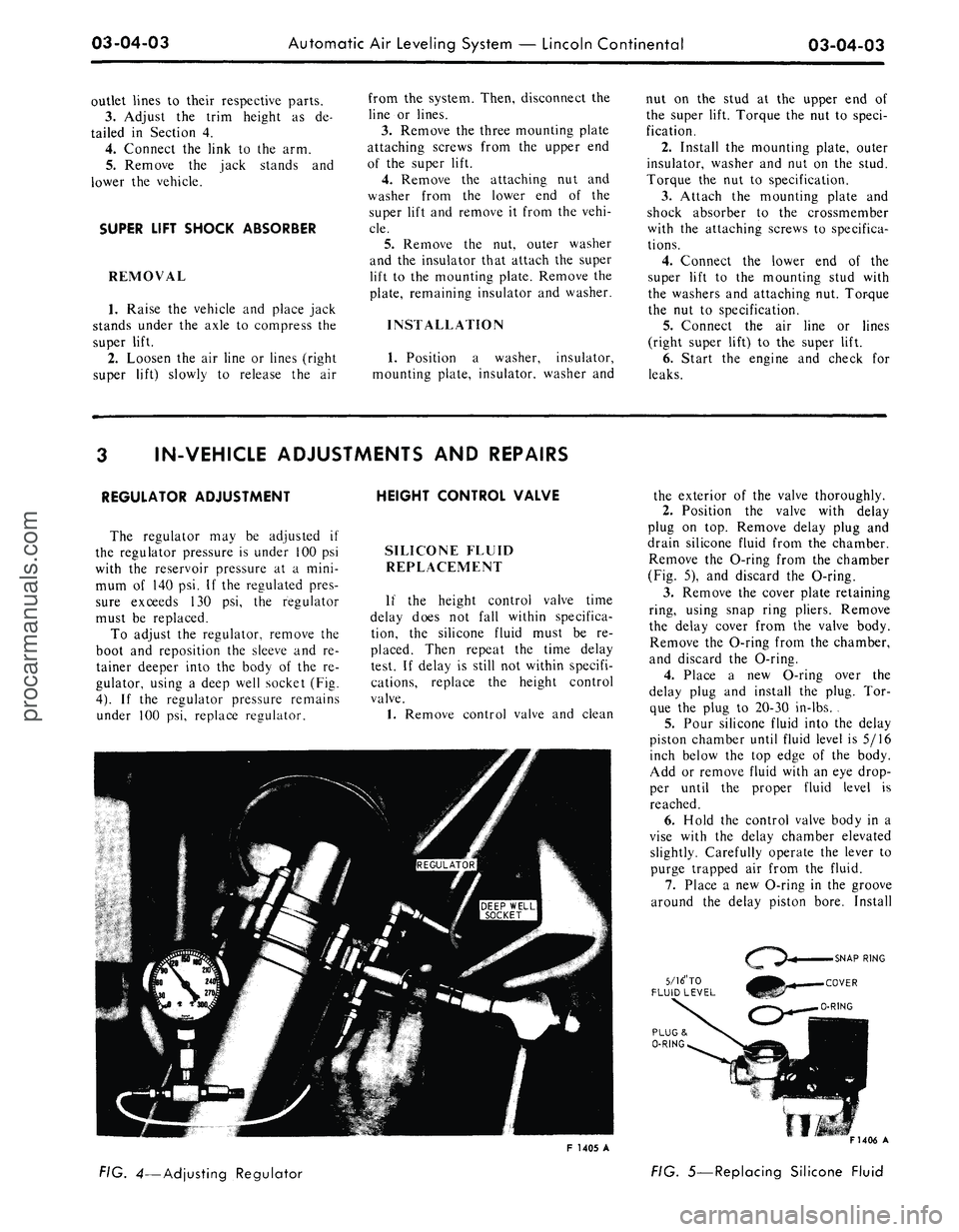
gulator, using a deep well socket (Fig.
4).
If the regulator pressure remains
under 100 psi, replace regulator.
SILICONE FLUID
REPLACEMENT
If the height control valve time
delay does not fall within specifica-
tion, the silicone fluid must be re-
placed. Then repeat the time delay
test. If delay is still not within specifi-
cations, replace the height control
valve.
1.
Remove control valve and clean
the exterior of the valve thoroughly.
2.
Position the valve with delay
plug on top. Remove delay plug and
drain silicone fluid from the chamber.
Remove the O-ring from the chamber
(Fig. 5), and discard the O-ring.
3.
Remove the cover plate retaining
ring, using snap ring pliers. Remove
the delay cover from the valve body.
Remove the O-ring from the chamber,
and discard the O-ring.
4.
Place a new O-ring over the
delay plug and install the plug. Tor-
que the plug to 20-30 in-lbs. .
5.
Pour silicone fluid into the delay
piston chamber until fluid level is 5/16
inch below the top edge of the body.
Add or remove fluid with an eye drop-
per until the proper fluid level is
reached.
6. Hold the control valve body in a
vise with the delay chamber elevated
slightly. Carefully operate the lever to
purge trapped air from the fluid.
7.
Place a new O-ring in the groove
around the delay piston bore. Install
5/16" TO
FLUID LEVEL
F 1405 A
FIG. 4—Adjusting Regulator
F1406 A
FIG. 5—Replacing Silicone Fluidprocarmanuals.com
Page 116 of 413
03-05-03
Steering Columns And Linkage
03-05-03
tapping the steering shaft lightly with
a plastic hammer to free the bearing
and flange from the shaft.
9. Remove the bearing and insula-
tor from the flange.
Installation
1.
Install flange bolts (square head)
in flange if they were removed. Turn
the nuts onto the bolts one complete
turn only.
2.
Position the flange onto the
steering column tube.
3.
Engage the two flange bolt heads
with the square holes in the column
tube,
then tighten the two attaching
nuts to specification.
4.
Position the bearing and insula-
tor on the shaft. Work it down onto
the shaft as far as possible, then place
a piece of 3/4 ID x 2 1/8 inch pipe
over the end of the shaft and install
the steering wheel attaching nut (Fig.
2).
5.
Tighten the nut until the bearing
is seated in the flange, then remove
the nut and pipe from the shaft.
6. Position the turn signal switch
on the flange and install the three at-
taching screws.
7.
Make certain that the wheels are
in the straight ahead position. Place
the steering wheel on the steering
shaft with the spokes in the horizontal
position. Install and torque the attach-
ing nut to specification.
8. Secure the crash pad to the
steering wheel with the two attaching
screws.
9. Connect the horn and turn signal
wires.
10.
Install the turn signal lever.
TILT WHEEL COLUMNS
Removal
1.
Disconnect the negative cable
from the battery.
2.
Remove the steering wheel with
tool T67L-3600-A (Fig. 1). Install the
spring, shipping spacer (3/4 x 1 1/8-
inch pipe) and a steering wheel attach-
ing nut on the shaft. Do not use a
knock-off type steering wheel puller or
strike the end of the steering shaft
with a hammer. Striking the puller or
shaft will damage the bearing or the
collapsible column.
3.
Remove the turn indicator lever
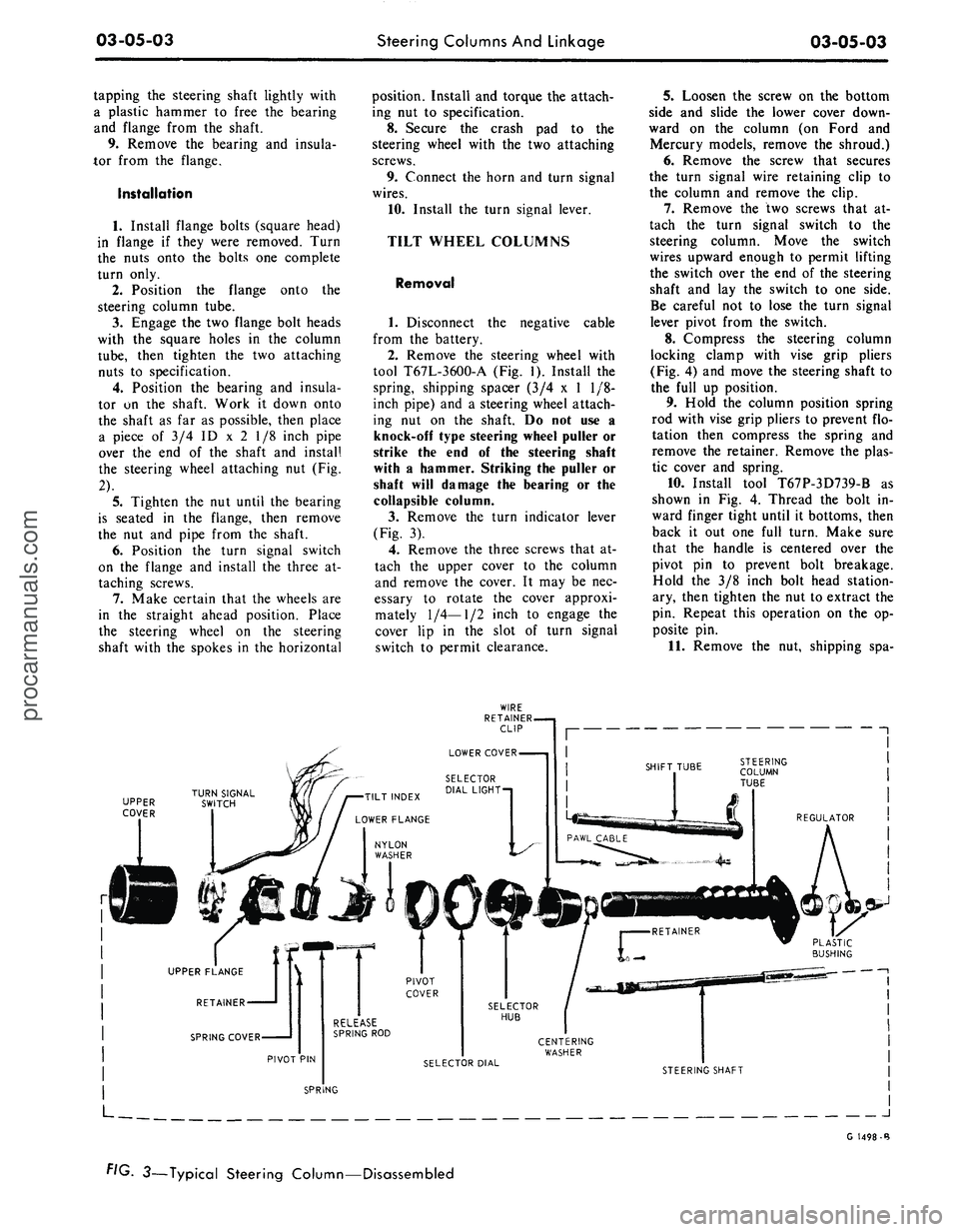
(Fig. 3).
4.
Remove the three screws that at-
tach the upper cover to the column
and remove the cover. It may be nec-
essary to rotate the cover approxi-
mately
1/4—1/2
inch to engage the
cover lip in the slot of turn signal
switch to permit clearance.
5.
Loosen the screw on the bottom
side and slide the lower cover down-
ward on the column (on Ford and
Mercury models, remove the shroud.)
6. Remove the screw that secures
the turn signal wire retaining clip to
the column and remove the clip.
7.
Remove the two screws that at-
tach the turn signal switch to the
steering column. Move the switch
wires upward enough to permit lifting
the switch over the end of the steering
shaft and lay the switch to one side.
Be careful not to lose the turn signal
lever pivot from the switch.
8. Compress the steering column
locking clamp with vise grip pliers
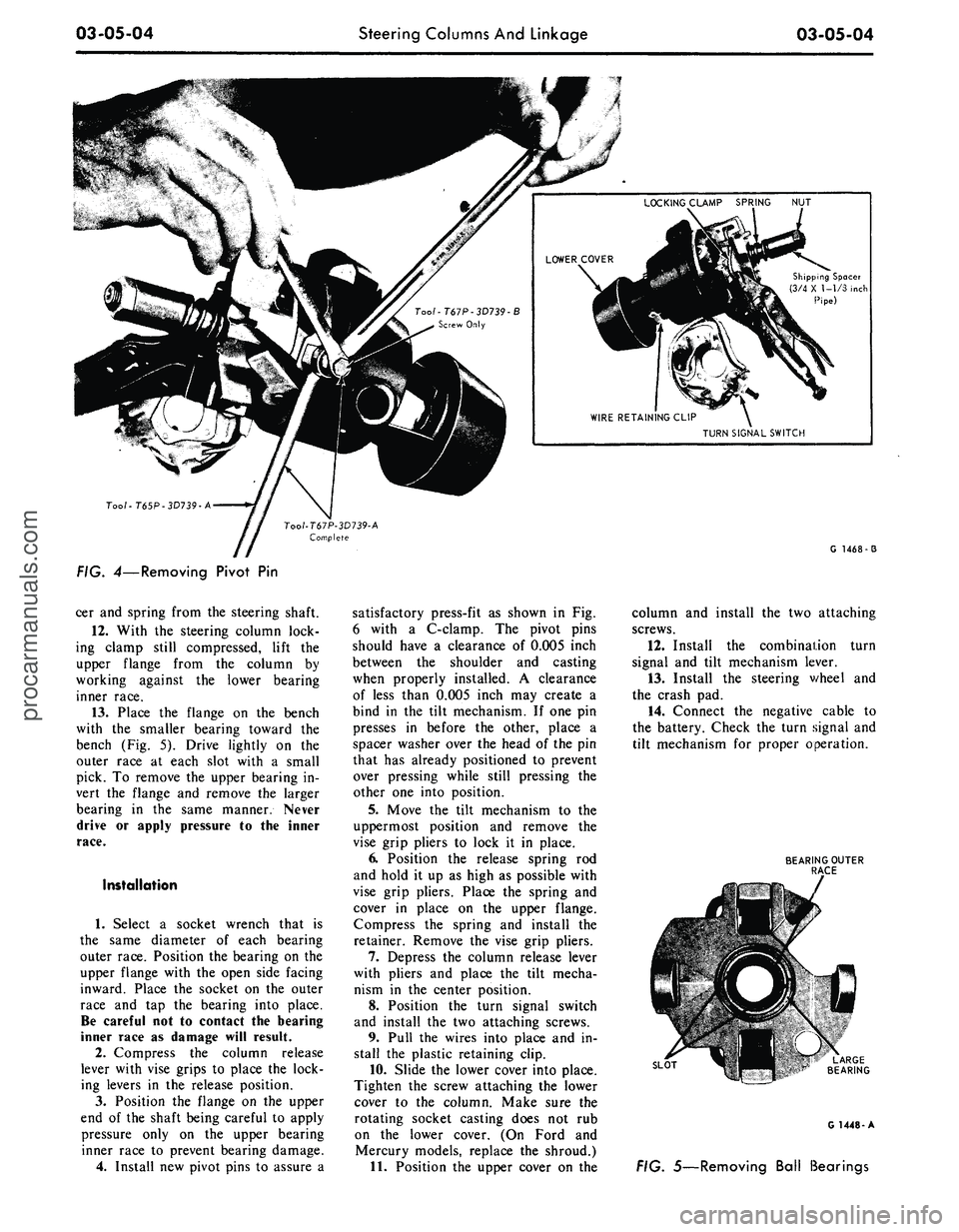
(Fig. 4) and move the steering shaft to
the full up position.
9. Hold the column position spring
rod with vise grip pliers to prevent flo-
tation then compress the spring and
remove the retainer. Remove the plas-
tic cover and spring.
10.
Install tool T67P-3D739-B as
shown in Fig. 4. Thread the bolt in-
ward finger tight until it bottoms, then
back it out one full turn. Make sure
that the handle is centered over the
pivot pin to prevent bolt breakage.
Hold the 3/8 inch bolt head station-
ary, then tighten the nut to extract the
pin. Repeat this operation on the op-
posite pin.
11.
Remove the nut, shipping spa-
UPPER
COVER
J
G 1498-B
FIG. 3—Typical Steering Column—Disassembledprocarmanuals.com
Page 117 of 413
03-05-04
Steering Columns And Linkage
03-05-04
Shipping Spacer
(3/4 X 1-1/3 inch
Pipe)
TURN SIGNAL SWITCH
Too/-T65P-3D739-A
G 1468-3
FIG. 4—Removing Pivot
Pin
cer and spring from the steering shaft.
12.
With
the
steering column lock-
ing clamp still compressed, lift
the
upper flange from
the
column
by
working against
the
lower bearing
inner race.
13.
Place
the
flange
on the
bench
with
the
smaller bearing toward
the
bench (Fig.
5).
Drive lightly
on the
outer race
at
each slot with
a
small
pick.
To
remove the upper bearing in-
vert
the
flange
and
remove
the
larger
bearing
in the
same manner. Never
drive
or
apply pressure
to the
inner
race.
Installation
1.
Select
a
socket wrench that
is
the same diameter
of
each bearing
outer race. Position the bearing on the
upper flange with the open side facing
inward. Place
the
socket
on the
outer
race
and tap the
bearing into place.
Be careful not
to
contact
the
bearing
inner race
as
damage will result.
2.
Compress
the
column release
lever with vise grips
to
place the lock-
ing levers
in the
release position.
3.
Position
the
flange
on the
upper
end
of
the shaft being careful
to
apply
pressure only
on the
upper bearing
inner race
to
prevent bearing damage.
4.
Install new pivot pins
to
assure
a
satisfactory press-fit
as
shown
in Fig.
6 with
a
C-clamp.
The
pivot pins
should have
a
clearance
of
0.005 inch
between
the
shoulder
and
casting
when properly installed.
A
clearance
of less than 0.005 inch may create
a
bind
in the
tilt mechanism.
If
one pin
presses
in
before
the
other, place
a
spacer washer over the head
of
the pin
that has already positioned
to
prevent
over pressing while still pressing
the
other one into position.
5.
Move
the
tilt mechanism
to the
uppermost position
and
remove
the
vise grip pliers
to
lock
it in
place.
6. Position
the
release spring
rod
and hold
it
up
as
high
as
possible with
vise grip pliers. Place
the
spring
and
cover
in
place
on the
upper flange.
Compress
the
spring
and
install
the
retainer. Remove the vise grip pliers.
7.
Depress
the
column release lever
with pliers
and
place
the
tilt mecha-
nism
in the
center position.
8. Position
the
turn signal switch
and install
the
two attaching screws.
9. Pull
the
wires into place and
in-
stall
the
plastic retaining clip.
10.
Slide the lower cover into place.
Tighten
the
screw attaching the lower
cover
to the
column. Make sure
the
rotating socket casting does
not rub
on
the
lower cover.
(On
Ford
and
Mercury models, replace
the
shroud.)
11.
Position the upper cover
on the
column
and
install
the
two attaching
screws.
12.
Install
the
combination turn
signal
and
tilt mechanism lever.
13.
Install
the
steering v/heel
and
the crash pad.
14.
Connect
the
negative cable
to
the battery. Check the turn signal and
tilt mechanism
for
proper operation.
BEARING OUTER
RACE
SLOT
G 1448-A
FIG. 5—Removing Ball Bearingsprocarmanuals.com
Page 121 of 413
03-05-08
Steering Columns And Linkage
03-05-08
tube.
In some instances the column
will shift into proper alignment when
the toe plate attaching nuts are loos-
ened. (Alignment is acceptable if a
.010 inch feeler blade can be passed
freely, completely around the area be-
tween the outer diameter of the steer-
ing shaft and the shift tube.) if the
misalignment condition can be attrib-
uted to this area, file or ream the dash
panel holes for greater clearance. If
the alignment is maintained after the
toe plate nuts and toe plate to column
clamp bolt and nut are torqued to the
8-12 ft-lb specification, no further ad-
justment is necessary.
4.
Remove instrument panel lower
trim panel. Vehicles equipped with a
combination radio stereo tape player
will require removal of the radio and
tape player assembly in order to gain
access to the upper R.H. steering col-
umn support bracket bolt.
5.
Loosen the seven bolts at the
steering column support bracket and
brake pedal support bracket.
6. Install a 3/16 inch diameter rod
spacer in the flex coupling to assure
proper clearance between upper and
lower steering shaft.
7.
Raise the vehicle, remove the
transmission splash shield, and visual-
ly align the column to center the
steering shaft in the column. Tighten
two toe plate attaching nuts sufficient-
ly to hold the column alignment (two
persons may be required for this oper-
ation).
8. Lower the vehicle.
9. Check the clearance between the
steering column support bracket and
the instrument panel bracket. It may
be necessary to add shims (Part Num-
ber MK-3054-A .060 inch thick, or
C3AZ-3054-A, .113 inch thick) be-
tween the support bracket and the in-
strument panel bracket to prevent
movement of the column when the
support bracket bolts are tightened.
10.
Loosen the two toe plate at-
taching nuts previously tightened. Re-
check steering column alignment. In
some instances it may be necessary to
enlarge the holes in the dash panel in
order to obtain proper column align-
ment.
11.
With the column properly al-
igned, torque the four toe plate at-
taching nuts to 4-9 ft-lbs.
12.
Torque the toe plate to steering
column clamp bolt to 3-5 ft-lbs.
13.
Recheck steering shaft to shift
tube alignment. A 0.10 inch feeler
blade should pass freely, completely
around the area between the outer di-
ameter of the steering shaft and shift-
er tube.
14.
Raise the vehicle.
15.
Adjust transmission shift link-
age.
16.
Install transmission splash
shield.
17.
Lower the vehicle.
18.
Install the radio stereo tape
player if so equipped.
19.
Install instrument panel lower
trim panel.
20.
Connect the battery.
REMOVAL AND INSTALLATION
STEERING COLUMN
FORD, MERCURY, METEOR
Removal
1.
Disconnect the battery cable
from the negative post.
2.
Disconnect the turn signal switch
wires at the connector.
3.
Disconnect the neutral start
switch and back-up light switch wires
from the switches.
4.
Disconnect the transmission con-
trol rod(s) from the lever(s) at the
lower end of the column.
5.
Remove the bolt that secures the
flex coupling to the steering gear.
6. Remove the nuts that secure the
column retainer and seal at the toe
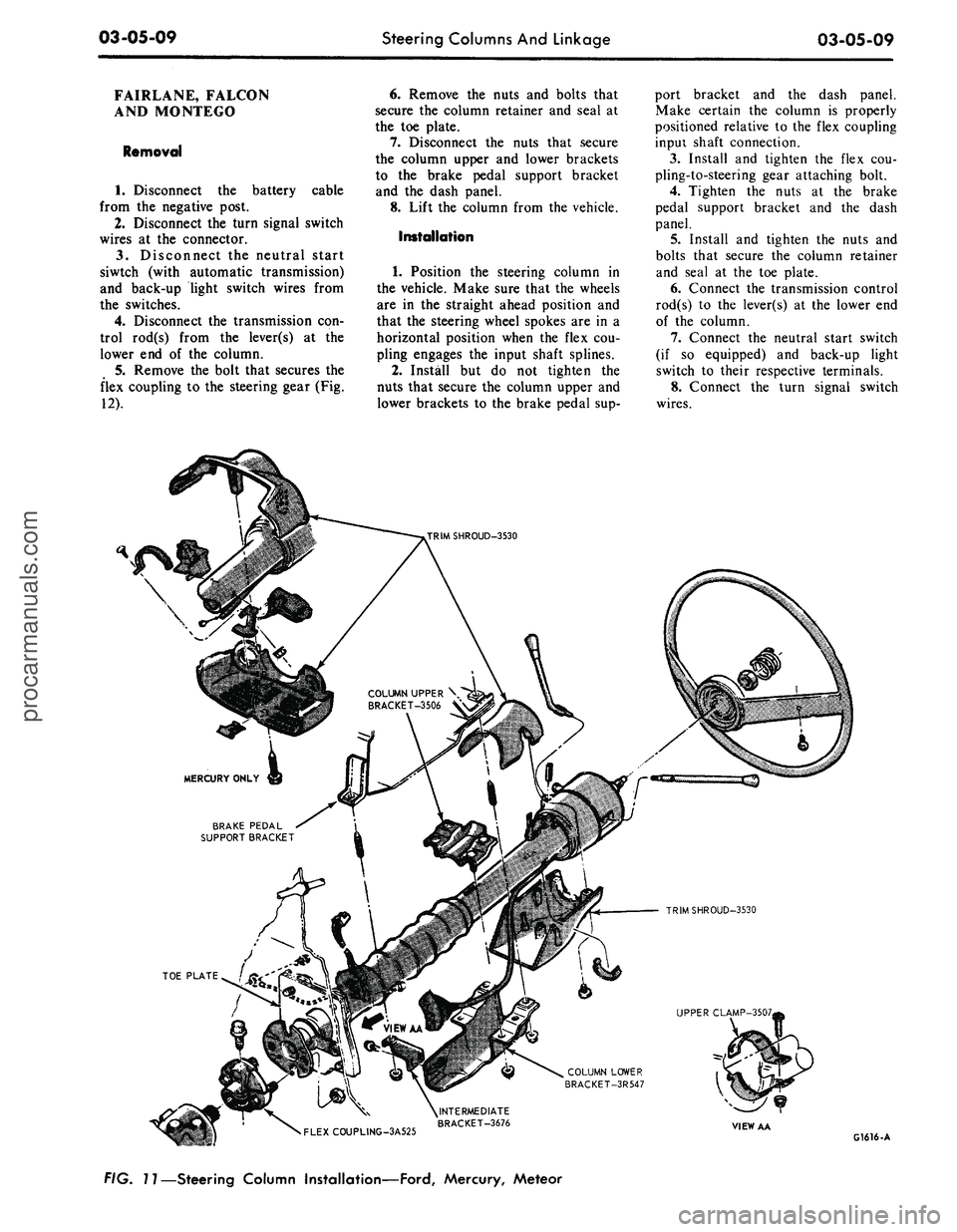
plate (Fig. 11).
7.
Ford, Meteor: Remove the two
screws that secure the lower trim
shroud to the upper trim shroud. Re-
move the two shrouds.
Mercury: Remove the two screws
that secure the lower trim shroud to
the upper trim shroud. Remove the
top shroud Disconnect the ignition
switch light bulb. Remove the ignition
and light switch bezels and spring clip
and remove the lower shroud. Discon-
nect the light switch electrical connec-
tor block.
8. Remove the two screws that se-
cure the intermediate bracket to the
column lower bracket.
9. While supporting the steering
column, remove the two nuts that se-
cure the column lower bracket to the
instrument panel. Remove the brack-
ets.
10.
Lift the steering column and
wheel from the vehicle.
Installation
1.
Position the steering column in
the vehicle. Index the block tooth on
the steering gear shaft with the corre-
sponding slot on the flex coupling. In-
stall and tighten the flex coupling-
to-steering gear attaching bolt.
2.
Place the column upper bracket
and column lower bracket in position
on the column and install but do not
tighten the four attaching nuts.
3.
Install and tighten the two nuts
that secure the column lower bracket
to the instrument panel. Make certain
the column is properly positioned rela-
tive to the flex coupling input shaft
connection.
4.
Install and tighten the screws
that secure the intermediate bracket to
the column lower bracket.
5.
Tighten the four attaching nuts
at the upper and lower brackets and
the two nuts at the upper bracket to
instrument panel. The dial pointer (if
so equipped) should be adjusted to
coincide with the selector lever.
6. Install and tighten the nuts and
bolts that secure the column retainer
and seal at the toe plate. Make sure
the steering shaft is centered in the
column before tightening the nuts.
7.
Ford, Meteor: Install and tighten
the two screws that secure the lower
trim shroud to the upper trim shroud.
Mercury: Connect the light switch
harness block. Install the ignition and
light switch bezels. Connect the igni-
tion switch light bulb. Install the top
shroud and the two screws that secure
the lower trim shroud to the upper
shroud.
8. Connect the transmission control
rod(s) to the lever(s) at the lower end
of the column.
9. Connect the neutral start switch
and back-up light switch to their re-
spective terminals.
10.
Connect the turn signal switch
wires.
11.
Connect the negative battery
cable to the battery.
12.
Check the operation of the
steering tilt mechanism if so equipped
and the switches.procarmanuals.com
Page 122 of 413
03-05-09
Steering Columns And Linkage
03-05-09
FAIRLANE, FALCON
AND MONTEGO
Removal
1.
Disconnect the battery cable
from the negative post.
2.
Disconnect the turn signal switch
wires at the connector.
3.
Disconnect the neutral start
siwtch (with automatic transmission)
and back-up light switch wires from
the switches.
4.
Disconnect the transmission con-
trol rod(s) from the lever(s) at the
lower end of the column.
5.
Remove the bolt that secures the
flex coupling to the steering gear (Fig.
12).
6. Remove the nuts and bolts that
secure the column retainer and seal at
the toe plate.
7.
Disconnect the nuts that secure
the column upper and lower brackets
to the brake pedal support bracket
and the dash panel.
8. Lift the column from the vehicle.
Installation
1.
Position the steering column in
the vehicle. Make sure that the wheels
are in the straight ahead position and
that the steering wheel spokes are in a
horizontal position when the flex cou-
pling engages the input shaft splines.
2.
Install but do not tighten the
nuts that secure the column upper and
lower brackets to the brake pedal sup-
port bracket and the dash panel.
Make certain the column is properly
positioned relative to the flex coupling
inpui shaft connection.
3.
Install and tighten the flex cou-
pling-to-steering gear attaching bolt.
4.
Tighten the nuts at the brake
pedal support bracket and the dash
panel.
5.
Install and tighten the nuts and
bolts that secure the column retainer
and seal at the toe plate.
6. Connect the transmission control
rod(s) to the lever(s) at the lower end
of the column.
7.
Connect the neutral start switch
(if so equipped) and back-up light
switch to their respective terminals.
8. Connect the turn signal switch
wires.
COLUMN UPPER \
BRACKET-3506 V
BRAKE PEDAL
SUPPORT BRACKET
TRIMSHROUD-3530
UPPER CLAMP-3507,
COLUMN LOWER
BRACKET-3R547
•
FLEXCOUPLING-3A525
^INTERMEDIATE
BRACKET-3676
VIEW AA
G1616-A
FIG. 11—Steering Column Installation—Ford, Mercury, Meteorprocarmanuals.com
Page 127 of 413
03-05-14
Steering Columns And Linkage
03-05-14
8. Connect the turn signal and
emergency flasher switch wires at the
multiple connectors. Connect the wires
to the neutral start switch. Adjust-
ments for the neutral start switch are
detailed in Group 7 of this manual.
9. Connect the tilt-column control
cable to the release cable retainer and
vacuum motor (if so equipped). To re-
move cable slack, loosen the bracket
attaching screw and pull it slightly
toward the column, then tighten the
screw. If difficulty in adjusting this
control is experienced, the retainer
slot may be filed to gain additional
travel.
10.
Install the instrument panel
steering column plate and cover and
the instrument panel lower outer fin-
ish panel.
11.
Connect the negative cable to
the battery.
12.
Start the engine and check the
operation of the steering column and
switches.
LINCOLN CONTINENTAL
Removal
1.
Disconnect the battery.
2.
Disconnect the rod from the
lever at the lower end of the selector
tube.
Loosen the clamp bolt that locks
the flexible coupling to the steering
shaft.
3.
Working from the underside of
the steering wheel spoke, remove the
two screws that secure the crash pad.
Remove the pad. Do not use a ham-
mer or knock-off type wheel puller.
Striking the puller or shaft may cause
damage to the bearings and/or col-
lapsible column. Remove the steering
wheel as shown in Fig. 15.
4.
Remove the instrument panel
steering column finish plate.
5.
Remove the four screws that at-
tach the lower retainer to the dash
panel.
6. Disconnect the turn signal switch
and emergency flasher wires at the
connectors. Disconnect the wires from
the neutral start switch.
7.
While supporting the steering
column, remove the bolts that attach
the lower clamp to the upper bracket
(Fig. 15). Lift the column from the ve-
hicle.
Installation
1.
Position the column in the vehi-
cle,
making sure that the steering
shaft engages the flex coupling.
2.
Install the column retainer-
to-dash panel attaching screws, but do
not tighten them.
3.
Install the lower clamp and the
attaching nuts. Tighten the nuts fing-
ertight.
4.
Move the lower flange as re-
quired to center the steering shaft in
the tube. Aligning procedures are de-
tailed in Part 3-1. Tighten the lower
flange attaching nuts when the shaft is
centered.
5.
Connect the shift rod to the shift
lever at the lower end of the column.
6. Install and tighten the flex cou-
pling attaching bolt.
7.
Tighten the instrument panel-
to-clamp attaching nuts.
8. Connect the turn signal and
emergency flasher switch wirss at the
multiple connectors. Connect the wires
to the neutral start switch. Adjust-
ments for the neutral start switch are
detailed in Group 7 of this manual.
9. Install the instrument panel
steering column finish plate.
10.
Install the steering wheel and
crash pad.
MAJOR REPAIR OPERATIONS
STEERING COLUMN
SHIFT TUBE REPLACEMENT
STATIONARY COLUMN
WITH STANDARD
TRANSMISSION
Removal
1.
Working from the underside of
the steering wheel spoke, remove the
two screws that secure the crash pad.
Remove the pad. (On Continental
Mark III models, pry out the crash
pad insert and remove the two screws
that secure the crash pad. Remove the
crash pad. On models equipped with
steering wheel mounted speed con-
trols,
refer to Group 16 for removal
instructions).
2.
Remove the steering wheel from
the steering shaft with tool T67L-
3600-A (Fig. 1). Then, remove the
tool from the steering wheel. Do not
use a knock-off type steering Wheel
puller or strike the end of the steering
shaft with a hammer. Striking the
puller or shaft will damage the bear-
ing or the collapsible column.
3.
Remove the steering column
from the vehicle.
4.
Remove the selector lever from
the hub (Fig. 16).
5.
Remove the bearing upper snap
ring. It may be necessary to pull the
turn signal switch out to remove the
snap ring.
6. Remove the screws that attach
the shift tube bearing, shift arms, and
shift tube to the lower end of the
steering column.
7.
Slip the shift tube and steering
shaft from the lower end of the steer-
ing column tube. The upper bearing
has a slight press fit on the steering
shaft.
8. Remove the C-washer from the
upper end of the steering shaft, and
pull the shift tube from the steering
shaft.
9. Remove the shift tube bearing
from the lower end of the tube
Installation
1.
Position the shift tube bearing
(Fig. 16) on the tube and insert the
steering shaft in the shift tube.
2.
Install the C-washer on the
upper end of the steering shaft.
3.
Insert the shift tube and steering
shaft into the steerint column tube
and install the three attaching screws
at the lower end of the steering col-
umn tube.
4.
Position the bearing and insula-
tor on the shaft if it was disturbed
during removal. Work it down onto
the shaft as far as possible, then place
a piece of 3/4 ID x 2 1/8 inch pipe
over the end of shaft and install the
steering wheel attaching nut (Fig. 2).
5.
Tighten the nut until the bearing
is seated in the flange, then remove
the nut and pipe from the shaft.
6. Position the turn signal switch
on the flange and install the three at-
taching screws. Install the upper snap
ring.
7.
Install the selector lever and the
turn signal lever in the column.
8. Adjust and install the neutral
start switch as detailed in Group 7.
9. Install the steering column in the
vehicle.procarmanuals.com
Page 137 of 413
03-06-03
Manual Steering
03-06-03
MAJOR REPAIR OPERATIONS
STEERING GEAR
DISASSEMBLY
1. Rotate the steering shaft 3 turns
from either stop.
2.
After removing the sector adjust-
ing screw locknut and the housing
cover bolts (Fig. 6), remove the sector
shaft with the cover. Remove the
cover from the shaft by turning the
screw clockwise. Keep the shim with
the screw.
HOUSING
•
3548
6. Turn the ball nut over, and ro-
tate the worm shaft from side to side
until all 50 balls have dropped out of
the nut into a clean pan. With the
balls removed, the ball nut will slide
off the worm.
7. Remove the upper bearing cup
from the bearing adjuster and the
lower cup from the housing. It may be
necessary to tap the housing or the
adjuster on a block of wood to jar the
bearing cups loose.
8. If the preliminary inspection
GASKET
• 3581
SHIM-3A657 COVER
AND
BUSHING
•
3583
SECTOR SHAFT
ADJUSTING SCREW
.
3577
•BEARING-3576
SEAL
- 3591
G 1623-A
FIG. 6—Sector Shaft
and
Housing Disassembled
-^-HOUSING-3548
BEARING
CUP •
3552
BALL
NUT
BEARING-3571
FILLER PLUG-3556
LOCK NUT-3707
3524 BEARING
CUP \
SEAL-3738
•GUIDE -3523
• BEARINGS
•
3647
.CLAMP-3544
BEARING
• 3571
G 1624-A
FIG. 7—Steering Shaft
and
Related Parts Disassembled
3.
Loosen the worm bearing adjust-
er nut, and remove the adjuster as-
sembly and the steering shaft upper
bearing (Fig. 7).
4.
Carefully pull the steering shaft
and ball nut from the housing, and i •-
move the steering shaft lower bearr g.
To avoid possible damage to the ball
return guides, keep
the
ball
nut
from
running down
to
either
end of the
worm.
Disassemble
the
ball only
if
there
is
indication
of
binding
or
tightness.
5.
Remove the ball return guide
clamp and the ball return guides from
the ball
nut.
Keep
the
ball
nut
clamp-
side up until ready to remove the
balls.
shows damage, press the sector shaft
bearing and the oil seal from the
housing (Fig. 8).
ASSEMBLY
1. If the sector shaft bearing and
oil seal have been removed, press a
new bearing into the housing and in-
stall a new oil seal. Do not clean,
wash or soak seals in cleaning solvent
(Fig.
7).
Apply
the
recommended
steering gear lubricant
to the
bearing
and seals.
2.
Install a bearing cup in the lower
end of the housing and in the adjuster.
3.
If the seal in the bearing adjuster
was removed, install a new seal.
Tool
-
T62F
•
3576
- A
G 1622-A
FIG.
8—Removing
Oil
Seal
and Bearing
4.
Insert the ball guides into the
holes of the ball nut, tapping them
lightly with a wood handle of a screw
driver if necessary to seat them.
5.
Insert 25 balls into the hole in
the top of each ball guide. It may be
necessary to rotate the shafi: slightly
one way, then in the opposite direc-
tion to distribute the balls in the cir-
cuit.
6. After the 50 balls are installed,
install the ball guide clamp. Torque
the screws to specification. Check the
worm shaft to make sure that it ro-
tates freely.
7. Coat the threads of the steering
shaft bearing adjuster, the housing
cover bolts, and the sector adjusting
screw with a suitable oil-resisi:ant seal-
ing compound. Do not apply sealer to
female threads and especially avoid
getting any sealer on the steering shaft
bearings.
8.
Coat the worm bearings, sector
shaft bearings, and gear teeth with
steering gear lubricant.
9. Clamp the housing in a vise, with
the sector shaft axis horizontal, and
position the steering shaft lower bear-
ing in its cup.
10.
Position the steering shaft and
ball nut assemblies in the housing.
11.
Position the steering shaft
upper bearing on the top of the worm,
and install the steering shaft bearingprocarmanuals.com