wheels FORD MUSTANG 1969 Volume One Chassis
[x] Cancel search | Manufacturer: FORD, Model Year: 1969, Model line: MUSTANG, Model: FORD MUSTANG 1969Pages: 413, PDF Size: 75.81 MB
Page 87 of 413
03-02-11
Suspension
03-02-11
nuts to specification. Make sure that
the joint is completely filled with the
specified lubricant.
9. Guide the ball joint stud into the
spindle. Install the stud nut and tor-
que it to specification. Continue to
tighten the nut to line up the cotter
pin hole. Install the cotter pin.
10.
Install the wheel and tire. Tor-
que the wheel nuts to specification.
STABILIZER REPAIR
FORD, MERCURY,
METEOR, THUNDERBIRD,
CONTINENTAL MARK III
To replace the end bushings on each
stabilizer link, use the following pro-
cedure.
1.
Raise the vehicle on a hoist.
2.
Remove the nut, washer and in-
sulator from the lower end of the sta-
bilizer bar attaching bolt.
3.
Remove the bolt and the remain-
ing washers(3) insulators (3) and the
spacer.
4.
Assemble a flat washer and a
new insulator on the bolt.
5.
Insert the bolt through the stabi-
lizer bar then install a new insulator
and a flat washer on it.
6. Install the spacer, flat washer
and another new insulator on the bolt
(Fig. 1).
7.
Insert the bolt through the lower
arm and install a new insulator and a
flat washer. Install and torque the at-
taching nut to specification.
COUGAR, FAIRLANE,
FALCON, MONTEGO,
MUSTANG
1.
Raise the vehicle high enough to
provide working space, and place sup-
ports under both front wheels.
2.
Disconnect the stabilizer from
each link. Disconnect both stabilizer
attaching brackets, and remove the
stabilizer.
3.
Coat the necessary parts of the
stabilizer with RUGLYDE or a com-
parable lubricant, and slide new insu-
lators onto the stabilizer.
4.
Secure each end of the stabilizer
bar to the lower arm making sure that
the bolt head is at the top (Fig. 2) to
eliminate interference with the brake
hose.
5.
Remove the supports and lower
the vehicle.
FRONT SUSPENSION LOWER
ARM STRUT AND/OR
BUSHING
FORD, MERCURY,
METEOR, THUNDERBIRD,
CONTINENTAL MARK III
1.
Remove the cotter pin from the
lower arm strut at the frame front
crossmember and remove the nut,
washer, and bushing from the strut.
2.
Remove nuts, washers, and bolts
attaching the strut and rubber bumper
to the lower arm (Fig. 1).
3.
Pull the strut from the frame
crossmember.
4.
Remove the crossmember rear
side bushing and washer from the
strut.
5.
Place the crossmember rear side
washer and bushing on the strut and
position the strut to the frame and
lower arm.
6. Position the rubber bumper on
the strut and install the bolts, washer,
and nuts attaching the strut to the
lower arm. Torque the nuts and bolts
to specification.
7.
Install the bushing, washer, and
nut on the strut at the front cross-
member. Tighten the nut and install
the cotter pin.
8. Check caster, camber, and toe-in
and adjust if necessary.
LOWER ARM STRUT AND/OR
BUSHING REPLACEMENT
COUGAR, FAIRLANE,
FALCON, MONTEGO,
MUSTANG
1.
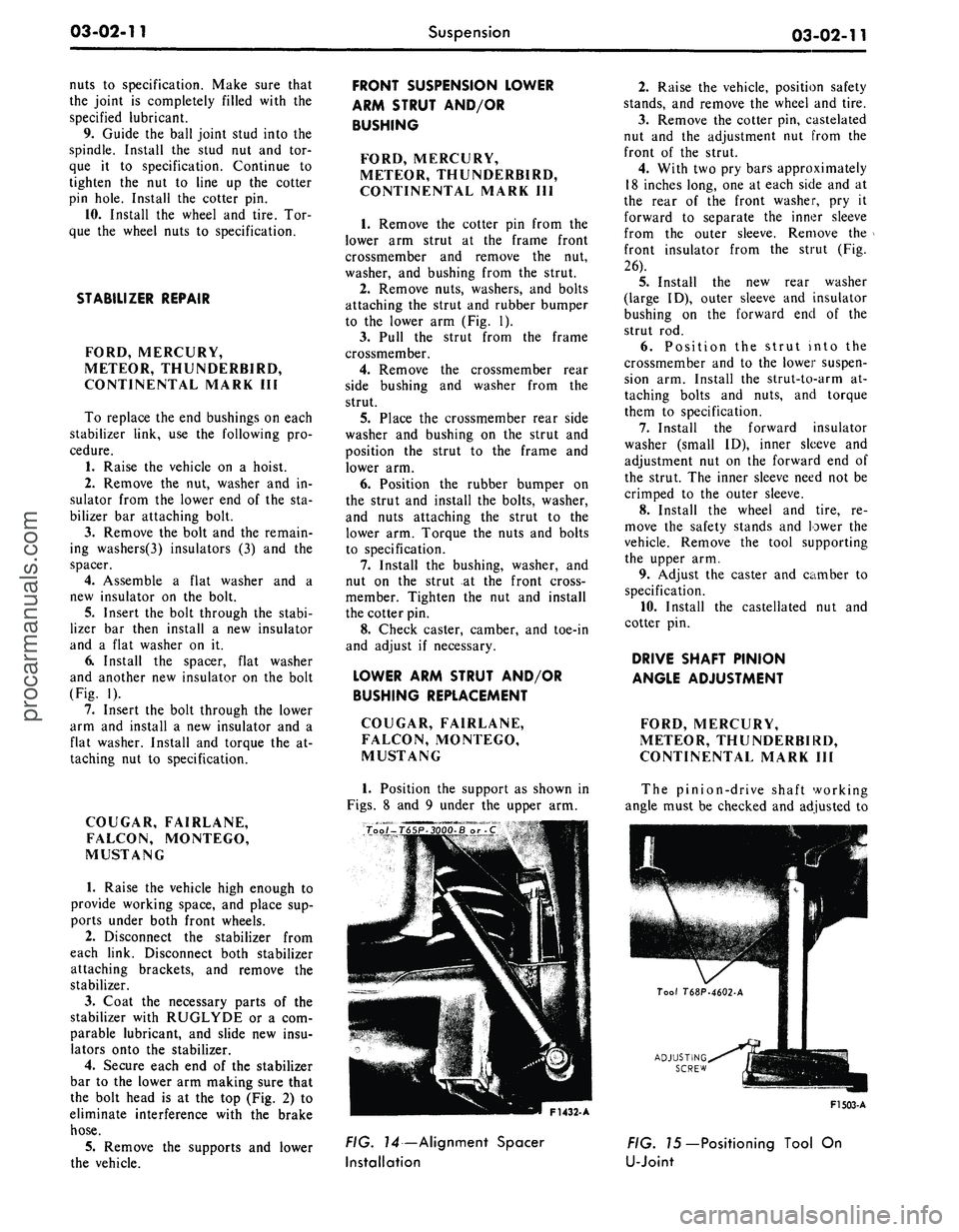
Position the support as shown in
Figs.
8 and 9 under the upper arm.
2.
Raise the vehicle, position safety
stands, and remove the wheel and tire.
3.
Remove the cotter pin, castelated
nut and the adjustment nut from the
front of the strut.
4.
With two pry bars approximately
18 inches long, one at each side and at
the rear of the front washer, pry it
forward to separate the inner sleeve
from the outer sleeve. Remove the
front insulator from the strut (Fig.
26).
5.
Install the new rear washer
(large ID), outer sleeve and insulator
bushing on the forward end of the
strut rod.
6. Position the strut into the
crossmember and to the lower suspen-
sion arm. Install the strut-to-arm at-
taching bolts and nuts, and torque
them to specification.
7.
Install the forward insulator
washer (small ID), inner sleeve and
adjustment nut on the forward end of
the strut. The inner sleeve need not be
crimped to the outer sleeve.
8. Install the wheel and tire, re-
move the safety stands and lower the
vehicle. Remove the tool supporting
the upper arm.
9. Adjust the caster and camber to
specification.
10.
Install the castellated nut and
cotter pin.
DRIVE SHAFT PINION
ANGLE ADJUSTMENT
FORD, MERCURY,
METEOR, THUNDERBIRD,
CONTINENTAL MARK III
The pinion-drive shaft working
angle must be checked and adjusted to
ADJUSTING
SCREW
F1432- A
F1503-A
FIG. 14—Alignment Spacer
Installation
FIG. 75—Positioning Tool On
U-Jointprocarmanuals.com
Page 92 of 413
03-02-16
Suspension
03-02-16
2.
Place a jack under the outer end
of the arm.
3.
Tape the upper and lower spring
insulators to the spring.
4.
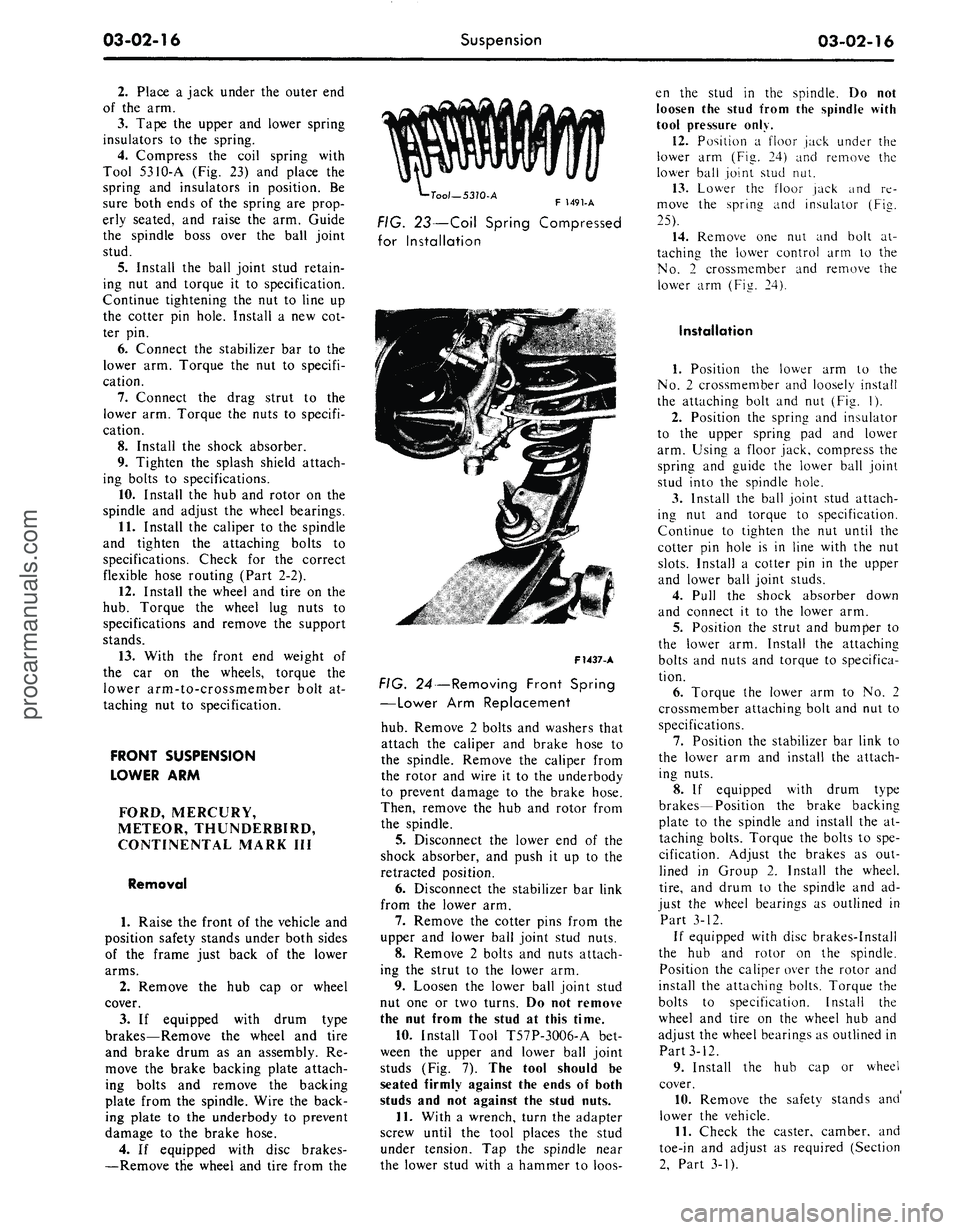
Compress the coil spring with
Tool 5310-A (Fig. 23) and place the
spring and insulators in position. Be
sure both ends of the spring are prop-
erly seated, and raise the arm. Guide
the spindle boss over the ball joint
stud.
5.
Install the ball joint stud retain-
ing nut and torque it to specification.
Continue tightening the nut to line up
the cotter pin hole. Install a new cot-
ter pin.
6. Connect the stabilizer bar to the
lower arm. Torque the nut to specifi-
cation.
7.
Connect the drag strut to the
lower arm. Torque the nuts to specifi-
cation.
8. Install the shock absorber.
9. Tighten the splash shield attach-
ing bolts to specifications.
10.
Install the hub and rotor on the
spindle and adjust the wheel bearings.
11.
Install the caliper to the spindle
and tighten the attaching bolts to
specifications. Check for the correct
flexible hose routing (Part 2-2).
12.
Install the wheel and tire on the
hub.
Torque the wheel lug nuts to
specifications and remove the support
stands.
13.
With the front end weight of
the car on the wheels, torque the
lower arm-to-crossmember bolt at-
taching nut to specification.
FRONT SUSPENSION
LOWER ARM
FORD, MERCURY,
METEOR, THUNDERBIRD,
CONTINENTAL MARK III
Removal
1.
Raise the front of the vehicle and
position safety stands under both sides
of the frame just back of the lower
arms.
2.
Remove the hub cap or wheel
cover.
3.
If equipped with drum type
brakes—Remove the wheel and tire
and brake drum as an assembly. Re-
move the brake backing plate attach-
ing bolts and remove the backing
plate from the spindle. Wire the back-
ing plate to the underbody to prevent
damage to the brake hose.
4.
If equipped with disc brakes-
—Remove the wheel and tire from the
•Tool—5310-A
F 1491-A
FIG. 23—Coil Spring Compressed
for Installation
F1437-A
FIG. 24—Removing Front Spring
—Lower Arm Replacement
hub.
Remove 2 bolts and washers that
attach the caliper and brake hose to
the spindle. Remove the caliper from
the rotor and wire it to the underbody
to prevent damage to the brake hose.
Then, remove the hub and rotor from
the spindle.
5.
Disconnect the lower end of the
shock absorber, and push it up to the
retracted position.
6. Disconnect the stabilizer bar link
from the lower arm.
7.
Remove the cotter pins from the
upper and lower ball joint stud nuts.
8. Remove 2 bolts and nuts attach-
ing the strut to the lower arm.
9. Loosen the lower ball joint stud
nut one or two turns. Do not remove
the nut from the stud at this time.
10.
Install Tool T57P-3OO6-A bet-
ween the upper and lower ball joint
studs (Fig. 7). The tool should be
seated firmly against the ends of both
studs and not against the stud nuts.
11.
With a wrench, turn the adapter
screw until the tool places the stud
under tension. Tap the spindle near
the lower stud with a hammer to loos-
en the stud in the spindle. Do not
loosen the stud from the spindle with
tool pressure only.
12.
Position a floor jack under the
lower arm (Fig. 24) and remove the
lower ball joint stud nut.
13.
Lower the floor jack and re-
move the sprina and insulator (Fie.
25).
14.
Remove one nut and bolt at-
taching the lower control arm to the
No.
2 crossmember and remove the
lower arm (Fig. 24).
Installation
1.
Position the lower arm to the
No.
2 crossmember and loosely install
the attaching bolt and nut (Fig. 1).
2.
Position the spring and insulator
to the upper spring pad and lower
arm. Using a floor jack, compress the
spring and guide the lower ball joint
stud into the spindle hole.
3.
Install the ball joint stud attach-
ing nut and torque to specification.
Continue to tighten the nut until the
cotter pin hole is in line with the nut
slots.
Install a cotter pin in the upper
and lower ball joint studs.
4.
Pull the shock absorber down
and connect it to the lower arm.
5.
Position the strut and bumper to
the lower arm. Install the attaching
bolts and nuts and torque to specifica-
tion.
6. Torque the lower arm to No. 2
crossmember attaching bolt and nut to
specifications.
7.
Position the stabilizer bar link to
the lower arm and install the attach-
ing nuts.
8. If equipped with drum type
brakes—Position the brake backing
plate to the spindle and install the at-
taching bolts. Torque the bolts to spe-
cification. Adjust the brakes as out-
lined in Group 2. Install the wheel,
tire,
and drum to the spindle and ad-
just the wheel bearings as outlined in
Part 3-12.
If equipped with disc brakes-Install
the hub and rotor on the spindle.
Position the caliper over the rotor and
install the attaching bolts. Torque the
bolts to specification. Install the
wheel and tire on the wheel hub and
adjust the wheel bearings as outlined in
Part 3-12.
9. Install the hub cap or wheel
cover.
10.
Remove the safety stands and'
lower the vehicle.
11.
Check the caster, camber, and
toe-in and adjust as required (Section
2,
Part 3-1).procarmanuals.com
Page 95 of 413
03-02-19
Suspension
03-02-19
6. Raise the upper arm to free the
ball joint stud from the spindle. Wire
the upper end of the spindle to the un-
derbody to prevent damage to the
brake hose.
7.
Mark the position of the upper
arm shaft on the underbody member
to facilitate making caster and camber
adjustments after installation of the
upper arm.
8. Remove the suspension upper
arm-to-underbody attaching bolts,
lock washers, and attaching nuts.
Then, remove the upper arm.
Installation
1.
Position the upper arm shaft on
the underbody member. Line up the
shaft with the marks made before re-
moval of the arm.
2.
Install the attaching bolts and
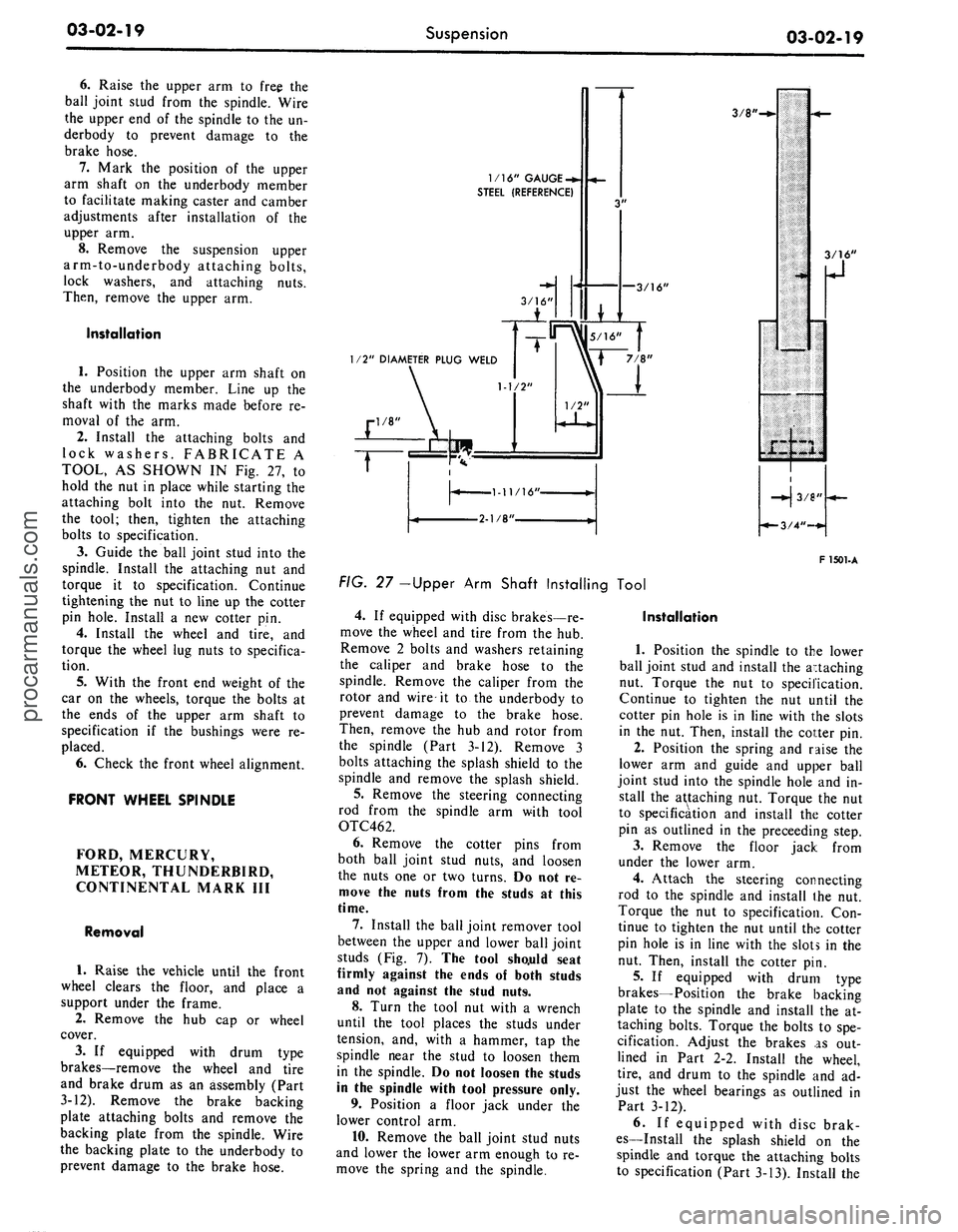
lock washers. FABRICATE A
TOOL, AS SHOWN IN Fig. 27, to
hold the nut in place while starting the
attaching bolt into the nut. Remove
the tool; then, tighten the attaching
bolts to specification.
3.
Guide the ball joint stud into the
spindle. Install the attaching nut and
torque it to specification. Continue
tightening the nut to line up the cotter
pin hole. Install a new cotter pin.
4.
Install the wheel and tire, and
torque the wheel lug nuts to specifica-
tion.
5.
With the front end weight of the
car on the wheels, torque the bolts at
the ends of the upper arm shaft to
specification if the bushings were re-
placed.
6. Check the front wheel alignment.
FRONT WHEEL SPINDLE
FORD, MERCURY,
METEOR, THUNDERBIRD,
CONTINENTAL MARK III
Removal
1.
Raise the vehicle until the front
wheel clears the floor, and place a
support under the frame.
2.
Remove the hub cap or wheel
cover.
3.
If equipped with drum type
brakes—remove the wheel and tire
and brake drum as an assembly (Part
3-12). Remove the brake backing
plate attaching bolts and remove the
backing plate from the spindle. Wire
the backing plate to the underbody to
prevent damage to the brake hose.
1/16" GAUGE
-*.
STEEL (REFERENCE)
—3/16'
3/8'
1/2" DIAMETER PLUG WELD
F 1501-A
FIG. 27 -Upper Arm Shaft Installing Tool
4.
If equipped with disc brakes—re-
move the wheel and tire from the hub.
Remove 2 bolts and washers retaining
the caliper and brake hose to the
spindle. Remove the caliper from the
rotor and wire it to the underbody to
prevent damage to the brake hose.
Then, remove the hub and rotor from
the spindle (Part 3-12). Remove 3
bolts attaching the splash shield to the
spindle and remove the splash shield.
5.
Remove the steering connecting
rod from the spindle arm with tool
OTC462.
6. Remove the cotter pins from
both ball joint stud nuts, and loosen
the nuts one or two turns. Do not re-
move the nuts from the studs at this
time.
7.
Install the ball joint remover tool
between the upper and lower ball joint
studs (Fig. 7). The tool sho.uld seat
firmly against the ends of both studs
and not against the stud nuts.
8. Turn the tool nut with a wrench
until the tool places the studs under
tension, and, with a hammer, tap the
spindle near the stud to loosen them
in the spindle. Do not loosen the studs
in the spindle with tool pressure only.
9. Position a floor jack under the
lower control arm.
10.
Remove the ball joint stud nuts
and lower the lower arm enough to re-
move the spring and the spindle.
Installation
1.
Position the spindle to the lower
ball joint stud and install the attaching
nut. Torque the nut to specification.
Continue to tighten the nut until the
cotter pin hole is in line with the slots
in the nut. Then, install the cotter pin.
2.
Position the spring and raise the
lower arm and guide and upper ball
joint stud into the spindle hole and in-
stall the attaching nut. Torque the nut
to specification and install the cotter
pin as outlined in the preceeding step.
3.
Remove the floor jack from
under the lower arm.
4.
Attach the steering connecting
rod to the spindle and install the nut.
Torque the nut to specification. Con-
tinue to tighten the nut until the cotter
pin hole is in line with the slots in the
nut. Then, install the cotter pin.
5.
If equipped with drum type
brakes—Position the brake backing
plate to the spindle and install the at-
taching bolts. Torque the bolts to spe-
cification. Adjust the brakes as out-
lined in Part 2-2. Install the wheel,
tire,
and drum to the spindle and ad-
just the wheel bearings as outlined in
Part 3-12).
6. If equipped with disc brak-
es—Install the splash shield on the
spindle and torque the attaching bolts
to specification (Part 3-13). Install theprocarmanuals.com
Page 104 of 413
03-02-28
Suspension
03-02-28
used, these components should
be re-
placed
on the
bench.
Do not wash the ball joint with sol-
vent.
The
solvent
may
attack parts
within the joint.
BUSHING AND INNER
SHAFT REPLACEMENT
LINCOLN CONTINENTAL
Always replace both upper
arm
bushings,
if
either bushing
is
worn
or
damaged. Install only
new
bushings
when replacing
the
inner shaft. Refer
to Section
3 for
the upper arm remov-
al procedure.
1.
Remove
the
bolts, lock washers,
and flat washers from the ends
of
the
upper arm shaft.
2.
Assemble
the
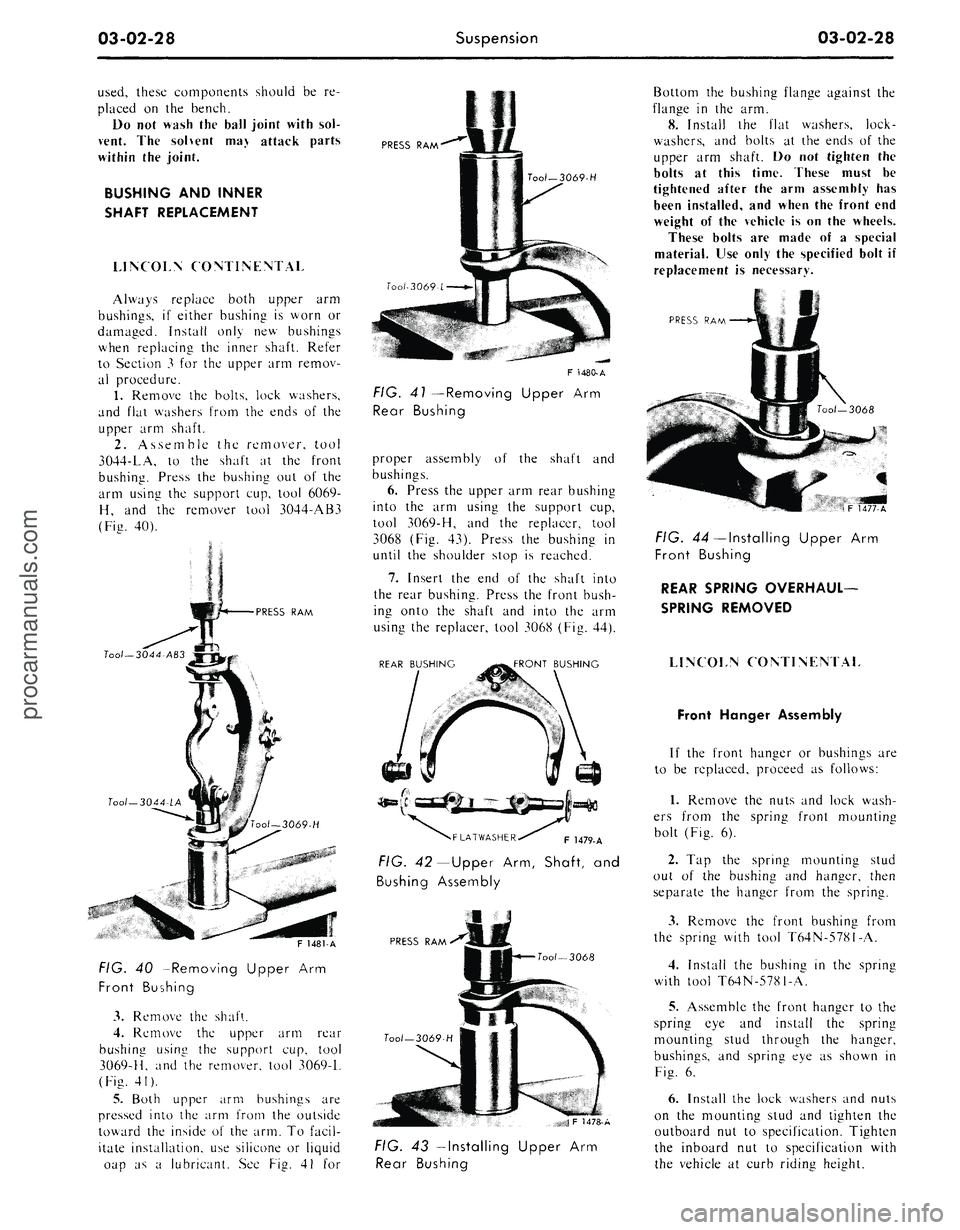
remover, tool
3044-LA,
to the
shaft
at the
front
bushing. Press
the
bushing
out of the
arm using
the
support cup, tool 6069-
H,
and the
remover tool 3044-AB3
(Fig. 40).
PRESS RAM
FIG.
40
—Removing Upper
Arm
Front Bushing
3.
Remove
the
shaft.
4.
Remove
the
upper
arm
rear
bushing using
the
support
cup,
tool
3069-H, and
the
remover, tool 3069-L
(Fig. 41).
5.
Both upper
arm
bushings
are
pressed into the arm from the outside
toward the inside
of
the arm. To facil-
itate installation, use silicone
or
liquid
oap
as a
lubricant.
See
Fig.
41 for
PRESS RAM
Tool-3069-H
F 1480-A
FIG. 41—Removing Upper
Arm
Rear Bushing
proper assembly
of the
shaft
and
bushings.
6. Press the upper arm rear bushing
into
the arm
using
the
support cup,
tool 3069-H,
and the
replacer, tool
3068 (Fig. 43). Press
the
bushing
in
until
the
shoulder stop
is
reached.
7.
Insert
the end of the
shaft into
the rear bushing. Press the front bush-
ing onto
the
shaft
and
into
the arm
using the replacer, tool 3068 (Fig. 44).
REAR BUSHING
FRONT BUSHING
F 1479-A
FIG. 42— Upper Arm, Shaft,
and
Bushing Assembly
PRESS RAM
Tool— 3068
JF 1478-A
Bottom the bushing flange against the
flange
in the
arm.
8. Install
the
flat washers, lock-
washers,
and
bolts
at
the ends
of
the
upper
arm
shaft.
Do not
tighten
the
bolts
at
this time. These must
be
tightened after
the
arm assembly
has
been installed, and when the front end
weight
of
the vehicle
is
on the wheels.
These bolts
are
made
of a
special
material. Use only the specified bolt
if
replacement
is
necessary.
PRESS
RAM
FIG. 43—Installing Upper
Arm
Rear Bushing
FIG. 44—Installing Upper
Arm
Front Bushing
REAR SPRING OVERHAUL-
SPRING REMOVED
LINCOLN CONTINENTAL
Front Hanger Assembly
If
the
front hanger
or
bushings
are
to
be
replaced, proceed
as
follows:
1.
Remove
the
nuts and lock wash-
ers from
the
spring front mounting
bolt (Fig.
6).
2.
Tap the
spring mounting stud
out
of the
bushing
and
hanger, then
separate
the
hanger from
the
spring.
3.
Remove
the
front bushing from
the spring with tool T64N-5781-A.
4.
Install
the
bushing
in the
spring
with tool T64N-5781-A.
5.
Assemble the front hanger
to
the
spring
eye and
install
the
spring
mounting stud through
the
hanger,
bushings,
and
spring eye
as
shown
in
Fig.
6.
6. Install the lock washers and nuts
on
the
mounting stud
and
tighten
the
outboard
nut to
specification. Tighten
the inboard
nut to
specification with
the vehicle
at
curb riding height.procarmanuals.com
Page 111 of 413
03-04-02
Automatic Air Leveling System — Lincoln Continental
03-04-02
REMOVAL AND INSTALLATION
COMPRESSOR
REMOVAL
1.
Raise the front of the vehicle and
place jack stands under frame side
rails.
2.
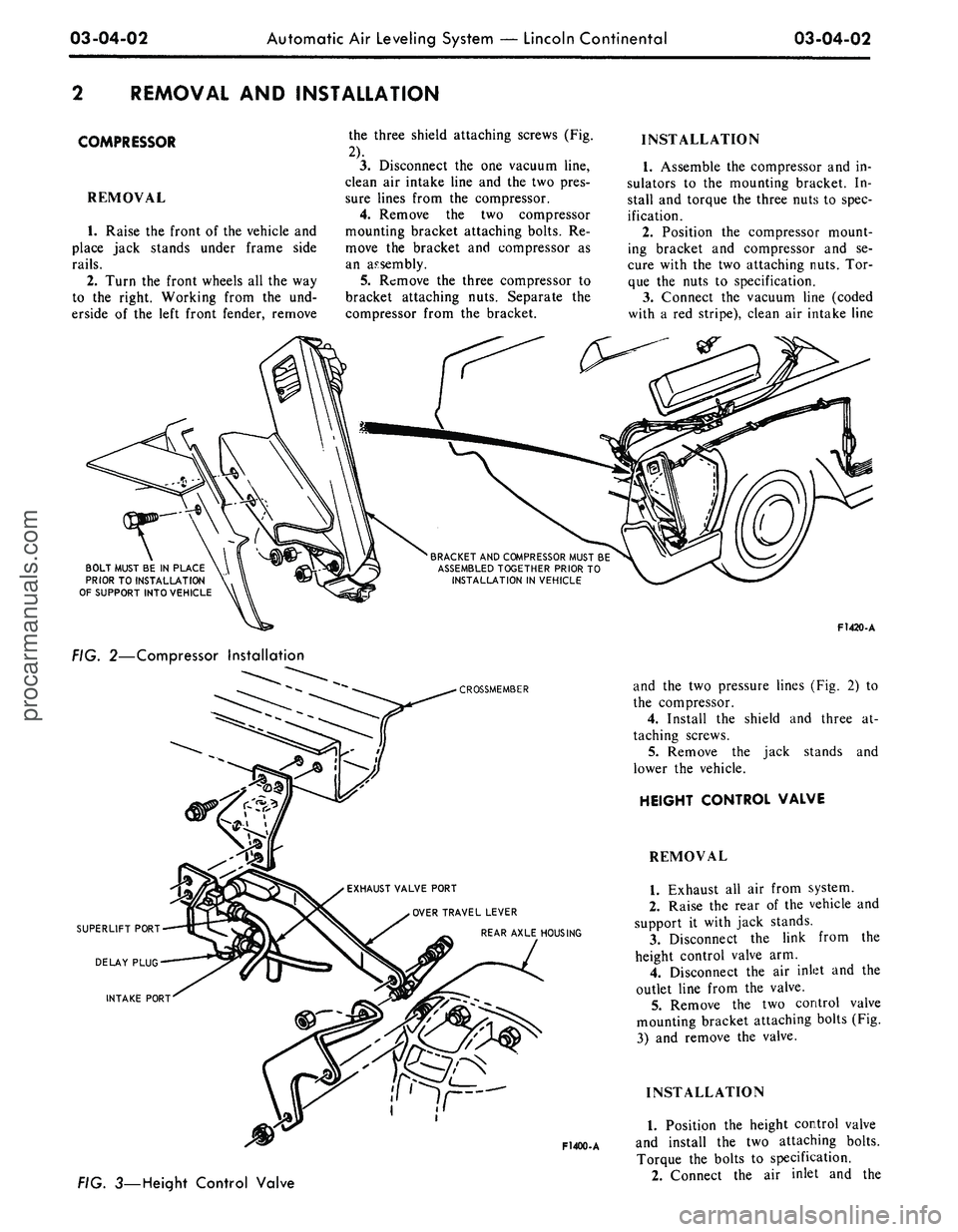
Turn the front wheels all the way
to the right. Working from the und-
erside of the left front fender, remove
the three shield attaching screws (Fig.
2).
3.
Disconnect the one vacuum line,
clean air intake line and the two pres-
sure lines from the compressor.
4.
Remove the two compressor
mounting bracket attaching bolts. Re-
move the bracket and compressor as
an assembly.
5.
Remove the three compressor to
bracket attaching nuts. Separate the
compressor from the bracket.
INSTALLATION
1.
Assemble the compressor and in-
sulators to the mounting bracket. In-
stall and torque the three nuts to spec-
ification.
2.
Position the compressor mount-
ing bracket and compressor and se-
cure with the two attaching nuts. Tor-
que the nuts to specification.
3.
Connect the vacuum line (coded
with a red stripe), clean air intake line
BRACKET
AND
COMPRESSOR
MUST
BE
ASSEMBLED
TOGETHER
PRIOR
TO
INSTALLATION
IN
VEHICLE
BOLT MUST
BE IN
PLACE
PRIOR
TO
INSTALLATION
OF
SUPPORT
INTO
VEHICLE
FIG. 2—Compressor Installation
CROSSMEMBER
EXHAUST
VALVE PORT
OVER
TRAVEL
LEVER
REAR AXLE
HOUSING
F1400-A
3—Height Control Valve
F1420-A
and the two pressure lines (Fig. 2) to
the compressor.
4.
Install the shield and three at-
taching screws.
5.
Remove the jack stands and
lower the vehicle.
HEIGHT CONTROL VALVE
REMOVAL
1.
Exhaust all air from system.
2.
Raise the rear of the vehicle and
support it with jack stands.
3.
Disconnect the link from the
height control valve arm.
4.
Disconnect the air inlet and the
outlet line from the valve.
5.
Remove the two control valve
mounting bracket attaching bolts (Fig.
3) and remove the valve.
INSTALLATION
1.
Position the height control valve
and install the two attaching bolts.
Torque the bolts to specification.
2.
Connect the air inlet and theprocarmanuals.com
Page 115 of 413
03-05-02
Steering Columns
And
Linkage
03-05-02
which also will shear away during
im-
pact.
TILT STEERING COLUMNS
The steering column
is of the col-
lapsible type
to
lessen
the
possibility
of injury
to the
driver
of the
vehicle
should
he
become involved
in an
acci-
dent.
The
lower
end of the
steering
column tube
at the
bellows area will
collapse approximately
six
inches
upon
a
hard impact.
The shift tube
and the
steering shaft
are provided with plastic dowels
and
will shear
and
allow them
to
collapse
in proportion
to the
outer tube upon
impact.
Once
the
steering column
has
been
collapsed,
a
complete
new
column
must
be
installed.
The tilt column features nine driv-
ing positions (four
up and
four down
from
a
center position).
The
.column
also features
a
turn signal switch with
a lane-changer position turn indicating
position
and
emergency warning flash-
er control.
TILT-AWAY STEERING COLUMNS
The tilt-away steering column
fea-
tures nine driving positions (four
up
and four down from
a
center position)
and
a
tilt-away position that
is
auto-
matically accomplished
on
Mustang
and Cougar models when
the
ignition
key
is
turned
to the
OFF
position
and
the left door
is
opened.
On
Thunder-
bird models,
the
tilt-away occurs when
the shift lever
is
placed
in
PARK
and
the driverns door
is
opened.
The steering column
is of the col-
lapsible type
to
lessen
the
possibility
of injury
to the
driver
of the
vehicle
should
he
become involved
in an
acci-
dent.
The
lower
end of the
steering
column tube
at the
bellows area will
collapse approximately
six
inches
upon
a
hard impact.
The shift tube
and the
steering shaft
are provided with plastic dowels
and
will shear
and
allow them
to
collapse
in proportion
to the
outer tube upon
impact.
Once
the
steering column
has
been
collapsed,
a
complete
new
column
must
be
installed along with mounting
brackets which will also shear away
during impact.
IN-VEHICLE ADJUSTMENTS
AND
REPAIRS
STEERING WHEEL SPOKE
POSITION ADJUSTMENT
When
the
steering gear
is on the
high point,
the
front wheels should
be
in
the
straight-ahead position
and the
steering wheel spokes should
be in
their normal position with
the
Pitman
arm pointing directly forward.
If the
spokes
are not in
their normal posi-
tion, they
can be
adjusted without
dis-
turbing
the
toe-in adjustment (Part
3-1).
STEERING WHEEL
REPLACEMENT
1.
Disconnect
the
negative cable
from
the
battery.
2.
Working from
the
underside
of
the steering wheel spoke, remove
the
crash
pad
attaching screws. Lift
the
crash
pad
from
the
wheel.
(On
Conti-
nental Mark
III
models,
pry out the
crash
pad
insert
and
remove
the two
screws that secure
the
crash
pad. Re-
move
the
crash
pad. On
models
equipped with steering wheel mounted
speed controls, refer
to
Group
16 for
removal instructions). Remove
the
horn ring
(if so
equipped)
by
turning
it counterclockwise.
3.
Remove
the
steering wheel
nut,
and then remove
the
steering wheel
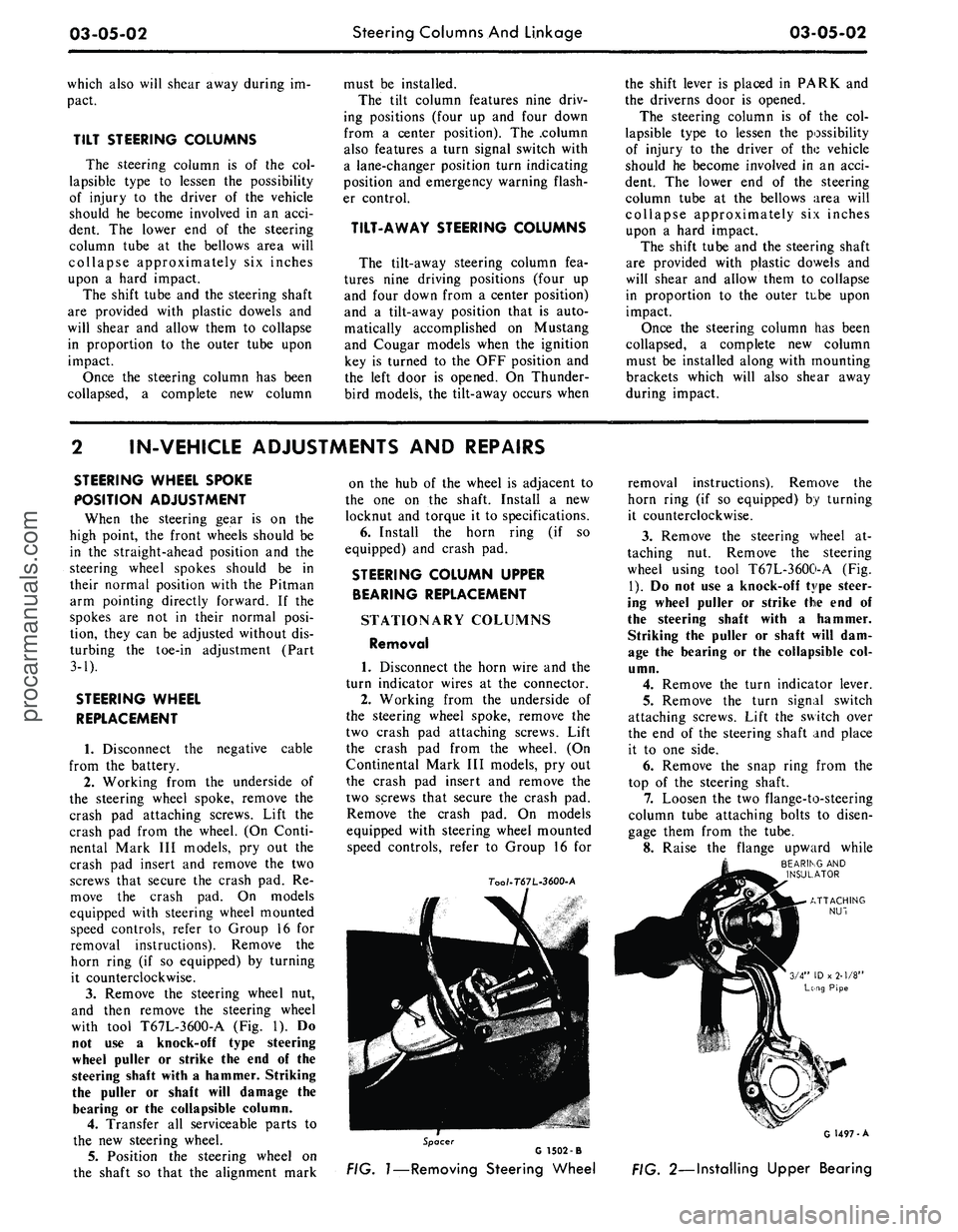
with tool T67L-3600-A
(Fig. 1). Do
not
use a
knock-off type steering
wheel puller
or
strike
the end of the
steering shaft with
a
hammer. Striking
the puller
or
shaft will damage
the
bearing
or the
collapsible column.
4.
Transfer
all
serviceable parts
to
the
new
steering wheel.
5.
Position
the
steering wheel
on
the shaft
so
that
the
alignment mark
on
the hub of the
wheel
is
adjacent
to
the
one on the
shaft. Install
a new
locknut
and
torque
it to
specifications.
6. Install
the
horn ring
(if so
equipped)
and
crash
pad.
STEERING COLUMN UPPER
BEARING REPLACEMENT
STATIONARY COLUMNS
Removal
1. Disconnect
the
horn wire
and the
turn indicator wires
at the
connector.
2.
Working from
the
underside
of
the steering wheel spoke, remove
the
two crash
pad
attaching screws. Lift
the crash
pad
from
the
wheel.
(On
Continental Mark
III
models,
pry out
the crash
pad
insert
and
remove
the
two screws that secure
the
crash
pad.
Remove
the
crash
pad. On
models
equipped with steering wheel mounted
speed controls, refer
to
Group
16 for
7oo/-T67L-3600-A
removal instructions). Remove
the
horn ring
(if so
equipped)
by
turning
it counterclockwise.
3.
Remove
the
steering wheel
at-
taching
nut.
Remove
the
steering
wheel using tool T67L-3600-A
(Fig.
1).
Do not use a
knock-off type steer-
ing wheel puller
or
strike
the end of
the steering shaft with
a
hammer.
Striking
the
puller
or
shaft will
dam-
age
the
bearing
or the
collapsible
col-
umn.
4.
Remove
the
turn indicator lever.
5.
Remove
the
turn signal switch
attaching screws. Lift
the
switch over
the
end of the
steering shaft
and
place
it
to one
side.
6. Remove
the
snap ring from
the
top
of the
steering shaft.
7.
Loosen
the two
flange-to-steering
column tube attaching bolts
to
disen-
gage them from
the
tube.
8. Raise
the
flange upward while
BEARING
AND
INSULATOR
Spacer
G 1502 -B
FIG.
1—Removing
Steering Wheel
G 1497-A
FIG. 2—Installing Upper Bearingprocarmanuals.com
Page 116 of 413
03-05-03
Steering Columns And Linkage
03-05-03
tapping the steering shaft lightly with
a plastic hammer to free the bearing
and flange from the shaft.
9. Remove the bearing and insula-
tor from the flange.
Installation
1.
Install flange bolts (square head)
in flange if they were removed. Turn
the nuts onto the bolts one complete
turn only.
2.
Position the flange onto the
steering column tube.
3.
Engage the two flange bolt heads
with the square holes in the column
tube,
then tighten the two attaching
nuts to specification.
4.
Position the bearing and insula-
tor on the shaft. Work it down onto
the shaft as far as possible, then place
a piece of 3/4 ID x 2 1/8 inch pipe
over the end of the shaft and install
the steering wheel attaching nut (Fig.
2).
5.
Tighten the nut until the bearing
is seated in the flange, then remove
the nut and pipe from the shaft.
6. Position the turn signal switch
on the flange and install the three at-
taching screws.
7.
Make certain that the wheels are
in the straight ahead position. Place
the steering wheel on the steering
shaft with the spokes in the horizontal
position. Install and torque the attach-
ing nut to specification.
8. Secure the crash pad to the
steering wheel with the two attaching
screws.
9. Connect the horn and turn signal
wires.
10.
Install the turn signal lever.
TILT WHEEL COLUMNS
Removal
1.
Disconnect the negative cable
from the battery.
2.
Remove the steering wheel with
tool T67L-3600-A (Fig. 1). Install the
spring, shipping spacer (3/4 x 1 1/8-
inch pipe) and a steering wheel attach-
ing nut on the shaft. Do not use a
knock-off type steering wheel puller or
strike the end of the steering shaft
with a hammer. Striking the puller or
shaft will damage the bearing or the
collapsible column.
3.
Remove the turn indicator lever
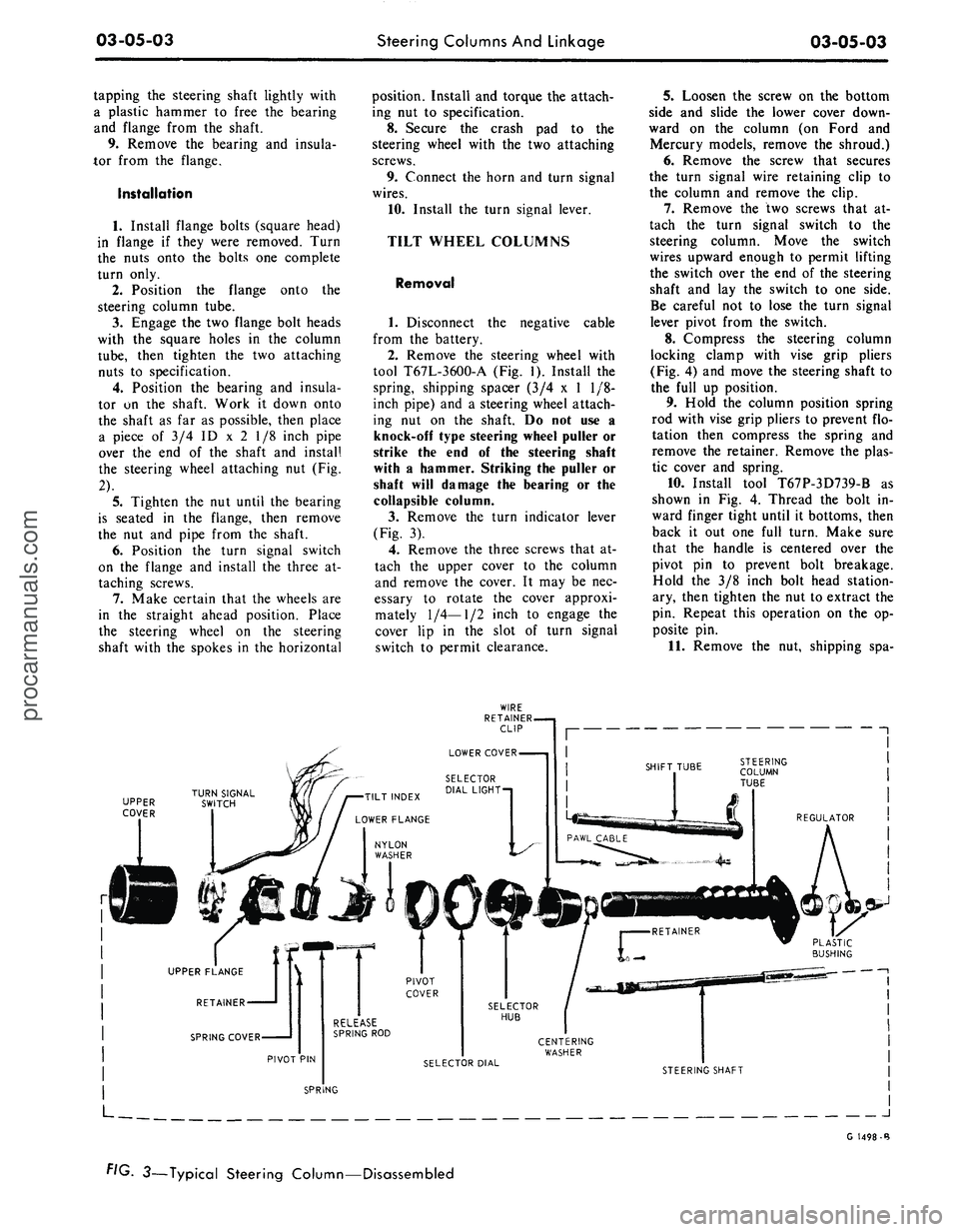
(Fig. 3).
4.
Remove the three screws that at-
tach the upper cover to the column
and remove the cover. It may be nec-
essary to rotate the cover approxi-
mately
1/4—1/2
inch to engage the
cover lip in the slot of turn signal
switch to permit clearance.
5.
Loosen the screw on the bottom
side and slide the lower cover down-
ward on the column (on Ford and
Mercury models, remove the shroud.)
6. Remove the screw that secures
the turn signal wire retaining clip to
the column and remove the clip.
7.
Remove the two screws that at-
tach the turn signal switch to the
steering column. Move the switch
wires upward enough to permit lifting
the switch over the end of the steering
shaft and lay the switch to one side.
Be careful not to lose the turn signal
lever pivot from the switch.
8. Compress the steering column
locking clamp with vise grip pliers
(Fig. 4) and move the steering shaft to
the full up position.
9. Hold the column position spring
rod with vise grip pliers to prevent flo-
tation then compress the spring and
remove the retainer. Remove the plas-
tic cover and spring.
10.
Install tool T67P-3D739-B as
shown in Fig. 4. Thread the bolt in-
ward finger tight until it bottoms, then
back it out one full turn. Make sure
that the handle is centered over the
pivot pin to prevent bolt breakage.
Hold the 3/8 inch bolt head station-
ary, then tighten the nut to extract the
pin. Repeat this operation on the op-
posite pin.
11.
Remove the nut, shipping spa-
UPPER
COVER
J
G 1498-B
FIG. 3—Typical Steering Column—Disassembledprocarmanuals.com
Page 122 of 413
03-05-09
Steering Columns And Linkage
03-05-09
FAIRLANE, FALCON
AND MONTEGO
Removal
1.
Disconnect the battery cable
from the negative post.
2.
Disconnect the turn signal switch
wires at the connector.
3.
Disconnect the neutral start
siwtch (with automatic transmission)
and back-up light switch wires from
the switches.
4.
Disconnect the transmission con-
trol rod(s) from the lever(s) at the
lower end of the column.
5.
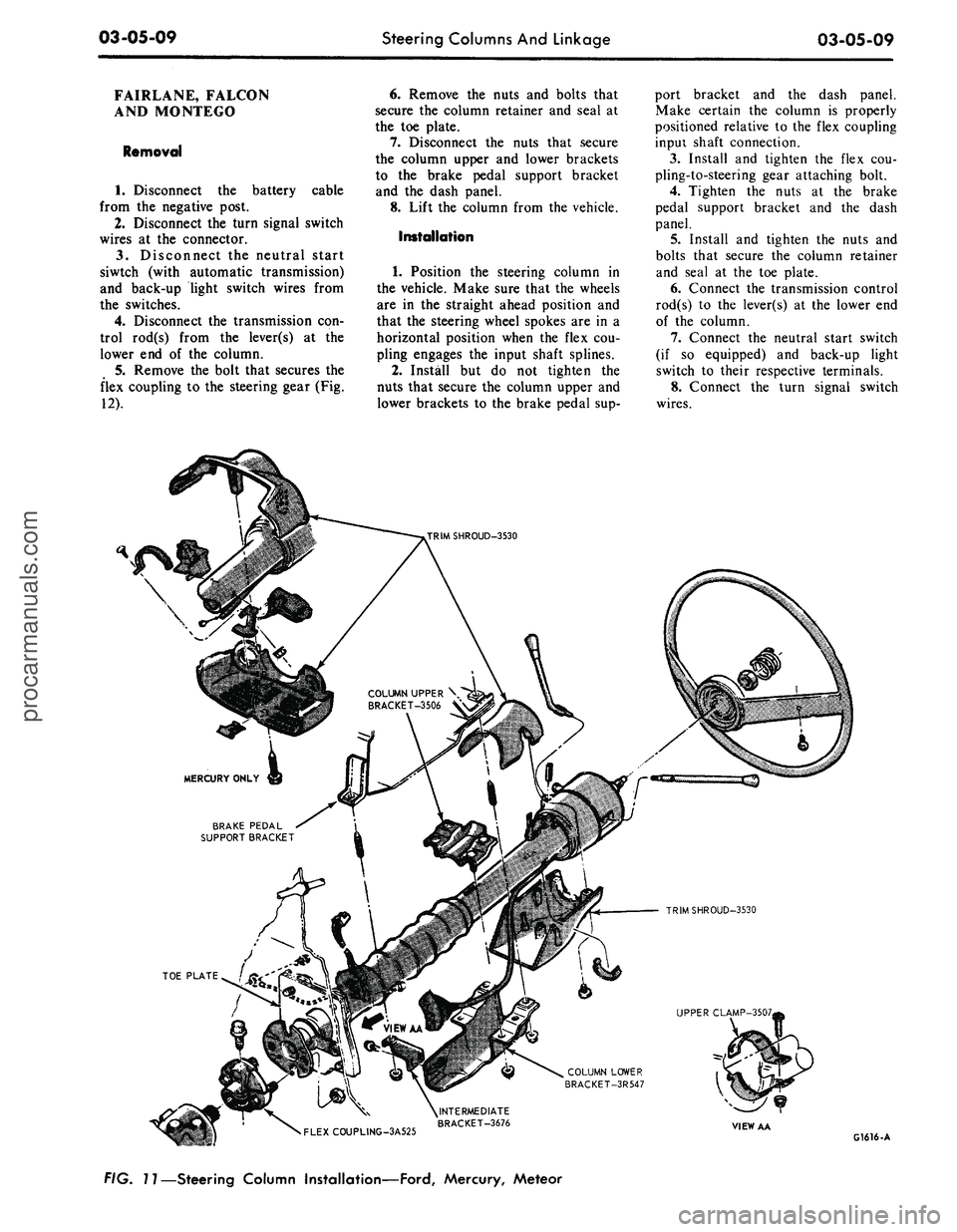
Remove the bolt that secures the
flex coupling to the steering gear (Fig.
12).
6. Remove the nuts and bolts that
secure the column retainer and seal at
the toe plate.
7.
Disconnect the nuts that secure
the column upper and lower brackets
to the brake pedal support bracket
and the dash panel.
8. Lift the column from the vehicle.
Installation
1.
Position the steering column in
the vehicle. Make sure that the wheels
are in the straight ahead position and
that the steering wheel spokes are in a
horizontal position when the flex cou-
pling engages the input shaft splines.
2.
Install but do not tighten the
nuts that secure the column upper and
lower brackets to the brake pedal sup-
port bracket and the dash panel.
Make certain the column is properly
positioned relative to the flex coupling
inpui shaft connection.
3.
Install and tighten the flex cou-
pling-to-steering gear attaching bolt.
4.
Tighten the nuts at the brake
pedal support bracket and the dash
panel.
5.
Install and tighten the nuts and
bolts that secure the column retainer
and seal at the toe plate.
6. Connect the transmission control
rod(s) to the lever(s) at the lower end
of the column.
7.
Connect the neutral start switch
(if so equipped) and back-up light
switch to their respective terminals.
8. Connect the turn signal switch
wires.
COLUMN UPPER \
BRACKET-3506 V
BRAKE PEDAL
SUPPORT BRACKET
TRIMSHROUD-3530
UPPER CLAMP-3507,
COLUMN LOWER
BRACKET-3R547
•
FLEXCOUPLING-3A525
^INTERMEDIATE
BRACKET-3676
VIEW AA
G1616-A
FIG. 11—Steering Column Installation—Ford, Mercury, Meteorprocarmanuals.com
Page 123 of 413
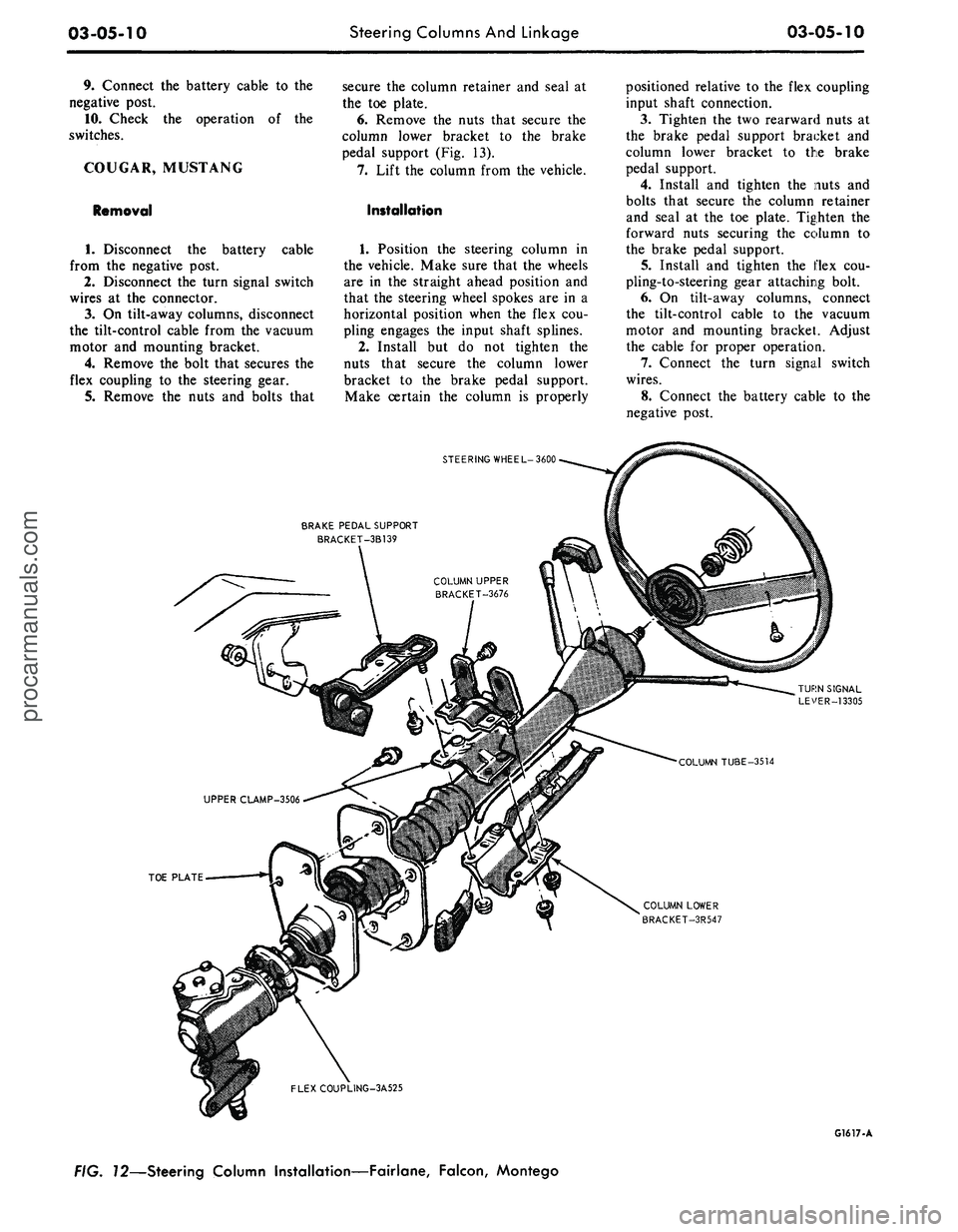
03-05-10
Steering Columns And Linkage
03-05-10
9. Connect the battery cable to the
negative post.
10.
Check the operation of the
switches.
COUGAR, MUSTANG
Removal
cable
1.
Disconnect the battery
from the negative post.
2.
Disconnect the turn signal switch
wires at the connector.
3.
On tilt-away columns, disconnect
the tilt-control cable from the vacuum
motor and mounting bracket.
4.
Remove the bolt that secures the
flex coupling to the steering gear.
5.
Remove the nuts and bolts that
secure the column retainer and seal at
the toe plate.
6. Remove the nuts that secure the
column lower bracket to the brake
pedal support (Fig. 13).
7.
Lift the column from the vehicle.
Installation
1.
Position the steering column in
the vehicle. Make sure that the wheels
are in the straight ahead position and
that the steering wheel spokes are in a
horizontal position when the flex cou-
pling engages the input shaft splines.
2.
Install but do not tighten the
nuts that secure the column lower
bracket to the brake pedal support.
Make certain the column is properly
positioned relative to the flex coupling
input shaft connection.
3.
Tighten the two rearward nuts at
the brake pedal support bracket and
column lower bracket to the brake
pedal support.
4.
Install and tighten the nuts and
bolts that secure the column retainer
and seal at the toe plate. Tighten the
forward nuts securing the column to
the brake pedal support.
5.
Install and tighten the flex cou-
pling-to-steering gear attaching bolt.
6. On tilt-away columns, connect
the tilt-control cable to the vacuum
motor and mounting bracket. Adjust
the cable for proper operation.
7.
Connect the turn signal switch
wires.
8. Connect the battery cable to the
negative post.
STEERING WHEEL-3600
BRAKE PEDAL SUPPORT
BRACKET-3B139
TOE PLATE
COLUMN LOWER
BRACKET-3R547
FLEXCOUPLING-3A525
G1617-A
FIG. 72—Steering Column Installation—Fairlane, Falcon, Montegoprocarmanuals.com
Page 133 of 413
03-05-20
Steering Columns And Linkage
03-05-20
placed if it becomes worn or damaged
(Figs.
18 through 21). Do not attempt
to straighten the sleeve if damaged.
1.
Remove the spindle connecting
rod end assemblies as described in the
previous sub-section.
2.
Screw the spindle rod end assem-
blies into the new sleeve the same
number of turns as the ends that were
removed. Do not tighten the clamp
bolts at this time.
3.
Position the sleeve and end as-
sembly on the center link and the
spindle arm. Install the attaching nut,
torque it to specification, and install
the cotter pin.
4.
Check and, if necessary, adjust
toe-in (Part 3-1). After toe-in is
checked and adjusted, oil the sleeve
clamp bolts then torque them to speci-
fication. The sleeve clamp must be in-
stalled as shown in Figs. 18 through
21.
CENTER LINK
REPLACEMENT
The center link connecting the Pit-
man arm and the idler arm is non-
adjustable and is provided with ta-
pered holes to accommodate the ball
studs (Figs. 18 through 21). The link
should be replaced when damaged or
when worn at the ball studs. On Lin-
coln Continental models, the link
should be replaced if excessive loose-
ness is noticed in either ball stud sock-
et.
REMOVAL
1.
Raise the vehicle on a hoist and
position safety stands.
2.
Remove the cotter pins and nuts
that attach both inner connecting rod
ends to the center link (Figs. 18
through 21).
3.
Disconnect the inner connecting
rod ends from the center link using
Tool 3290-C (Fig. 22).
4.
Remove the cotter pin and nut
attaching the idler arm to the center
link. Disconnect the idler arm from
the center link using Tool 3290-C for
Lincoln Continental models only.
5.
Remove the cotter pin and nut
attaching the Pitman arm to the cen-
ter link. Disconnect the Pitman arm
from the center link (use Tool 3290-C)
and remove the center link. On ve-
hicles equipped with the non-integral
power steering system, remove the
center link from the control valve as
detailed in Part 3-7.
INSTALLATION
1.
Replace the rubber seals on the
spindle connecting rod ends, if re-
quired.
2.
Position the center link to the
Pitman arm and idler arm and install
the attaching nuts loosely. On all ve-
hicles except Lincoln Continental
models, place the idler arm and the
front wheels in the straight ahead po-
sition to insure keeping the steering
wheel aligned and to prevent bushing
damage after the attaching nuts have
been torqued. On Lincoln Continental
models, insure that the seal is properly
installed on the center link. Torque
the nuts to the low end of the specifi-
cation. Continue to tighten each nut
until the slots in the nut align with the
hole in the stud. Then install a new
cotter pin.
3.
Position the spindle connecting
rod ends to the center link and install
the attaching nuts. Torque the nuts to
the low end of the specification. Con-
tinue to tighten each nut until the
slots in the nut align with the hole in
the stud. Then, install a new cotter
pin.
4.
Remove the safety stands, lower
the vehicle, check and adjust toe-in to
specification (Part 3-1).
STEERING IDLER ARM
AND BRACKET ASSEMBLY
REPLACEMENT
REMOVAL
If the idler arm bushings are worn
the complete idler arm assembly must
be replaced. In Lincoln Continental
models, if the socket at the idler
bracket is excessively loose, replace
the complet assembly.
1.
Remove the cotter pin and nut
attaching the steering center link at
the idler arm (Figs. 18 through 21).
2.
Disconnect the center link from
the idler arm (on Lincoln Continental
models, use Tool 3290-C).
3.
Remove the two bolts that attach
the idler arm and bracket assembly to
the frame.
INSTALLATION
1.
Secure the new idler arm and
bracket assembly to the frame with
the two attaching bolts (nuts and flat
washers as shown in Figs. 18, 19 and
21).
2.
On all vehicles except Lincoln
Continental models, place the idler
arm and the front wheels in the
straight ahead position to insure keep-
ing the steering wheel aligned and to
prevent bushing damage after the at-
taching nut has been torqued. Insert
the center link stud through the hole
in the end of the idler arm and install
the nut and washer.
On Lincoln Continental models, in-
sert the center link stud through the
hole in the end of the idler arm insur-
ing that the seal is properly installed
on the center link.
3.
Torque the idler arm rod nut to
specification and install a new cotter
pin.
PITMAN ARM
REPLACEMENT
REMOVAL
1.
Remove the cotter pin from the
castellated nut that attaches the steer-
ing center link to the Pitman arm.
Remove the castellated nut.
2.
Disconnect the steering center
link from the Pitman arm with tool
3290-C.
3.
Remove the Pitman arm attaching
nut and lock washer.
4.
Position the front wheels in the
straight ahead position. Remove the
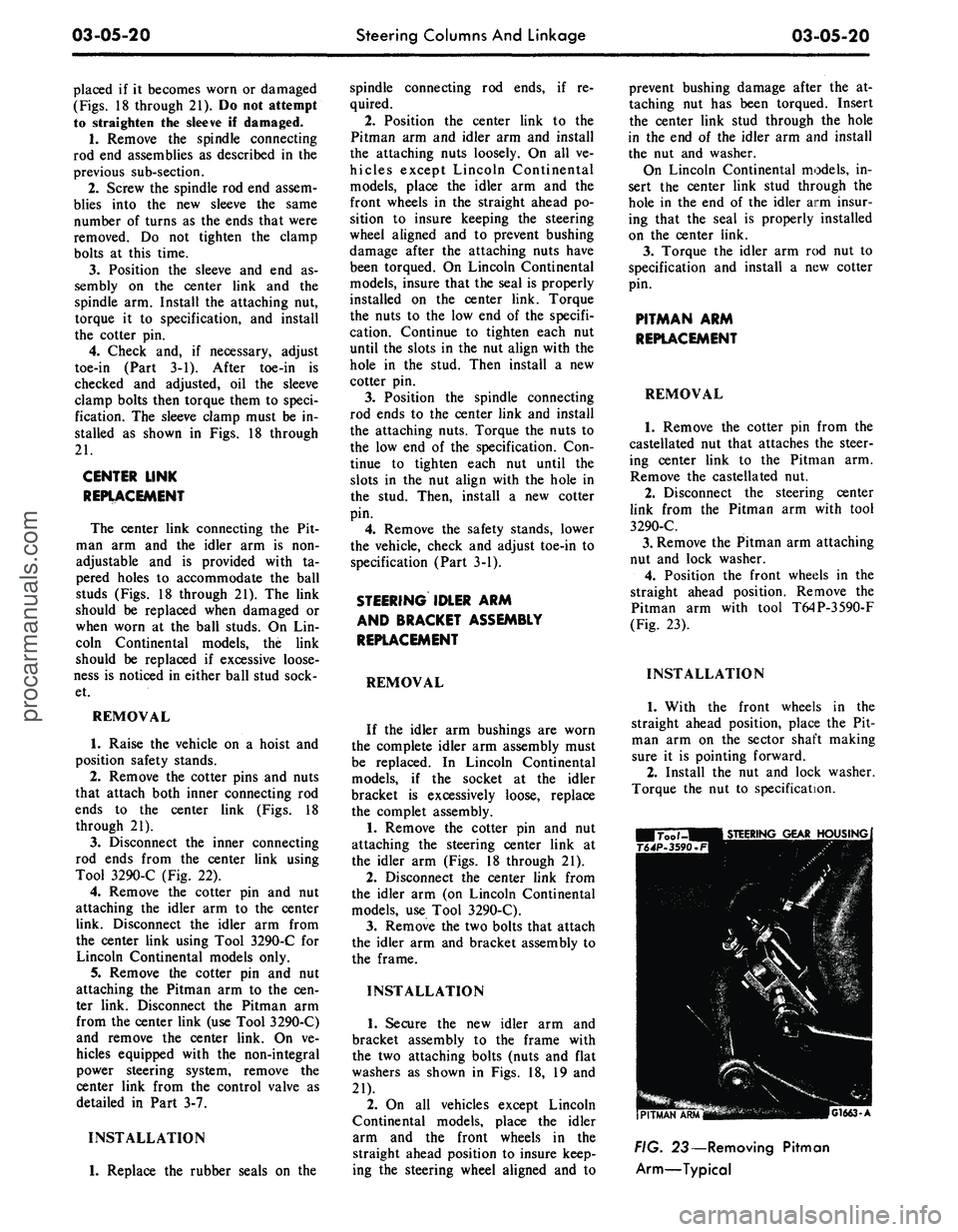
Pitman arm with tool T64P-3590-F
(Fig. 23).
INSTALLATION
1.
With the front wheels in the
straight ahead position, place the Pit-
man arm on the sector shaft making
sure it is pointing forward.
2.
Install the nut and lock washer.
Torque the nut to specification.
G1663-A
FIG. 23— Removing Pitman
Arm—Typicalprocarmanuals.com