See FORD MUSTANG 2015 6.G Owners Manual
[x] Cancel search | Manufacturer: FORD, Model Year: 2015, Model line: MUSTANG, Model: FORD MUSTANG 2015 6.GPages: 441, PDF Size: 6.98 MB
Page 389 of 441
"CLIMATE"
"Temperature" *
"Temperature <15.5-29.5> degrees" "Temperature <60-85> degrees" "Temperature decrease""Temperature high"
"Temperature increase" "Temperature low"
"Windshield floor on" "Help"
* If you say "Temperature", you can then
say any of the commands in the following
chart. "TEMPERATURE"
"<15.5-29.5> degrees" "<60-85> degrees" "High""Low"
"Help"
NAVIGATION
Note: The navigation SD card must be in
the SD card slot to operate the navigation
system. If you need a replacement SD card,
see an authorized dealer.
Note: The SD card slot is spring-loaded. To
remove the SD card, just push the card in
and release it. Do not attempt to pull the
card out to remove it; this could cause
damage. Your navigation system is comprised of
two main features, destination mode and
map mode.
To set a destination, press the green corner
of your touchscreen, then the Dest button
when it appears. See Setting a
Destination later in this chapter.
To view the navigation map and your
vehicle's current location, touch the green
bar in the upper right-hand corner of the
touchscreen, or, press Dest, then Map. See
Map mode
later in this chapter.
Setting a Destination
Press the green corner of your touchscreen,
then the
Dest button when it appears.
Choose any of the following: Destination
My HomeFavorites
Previous Destinations Point of InterestEmergency
Street Address IntersectionCity Center Map
Edit Route
Cancel Route
386
Mustang (), enUSA, First Printing MyFord Touch
™
(If Equipped)
Page 391 of 441
Subcategories
Govt Office
Public Transit Education
To expand these listings, press the + in
front of the listing.
The system also allows you to sort
alphabetically, by distance or by cityseekr
listings (if available).
cityseekr
Note: cityseekr point of interest (POI)
information is limited to approximately 912
cities (881 in the United States, 20 in
Canada and 11 in Mexico). cityseekr, when available, is a service that
provides more information about certain
points of interest such as restaurants,
hotels and attractions.
When you have selected a point of interest,
the location and information appear, such
as address and phone number. If cityseekr
lists the point of interest, more information
is available, such as a brief description,
check-in and checkout times or restaurant
hours.
Press More Information for a longer
review, a list of services and facilities, the
average room or meal price as well as the
website. This screen displays the point of
interest icon such as: Hotel
Coffeehouse
Food & Drink
Nightlife
Attraction
This icon appears when your
selection exists in multiple
categories within the system.
When you are viewing more information
for hotels, cityseekr also tells you if the
hotel has certain services and facilities
using icons, such as:
• Restaurant.
• Business center.
• Handicap facilities.
• Laundry.
• Refrigerator.
• 24 hour room service.
• Fitness center.
• Internet access.
• Pool.
• Wi-fi.
388
Mustang (), enUSA, First Printing MyFord Touch
™
(If Equipped)E142634 E143884 E142636 E142637 E142638 E142639 E142640
Page 392 of 441
For restaurants, cityseekr can provide
information such as star rating, average
cost, review, handicap access, hours of
operation, and website address.
For hotels, cityseekr can provide
information such as star rating, price
category, review, check-in and checkout
times, hotel service icons and website
address.
Setting Your Navigation
Preferences
Select settings for the system to take into
account when planning your route.
Press the Settings icon >
Settings > Navigation.
Map Preferences
Breadcrumbs
Display your vehicle ’s previously traveled
route with white dots. Switch this feature
ON
or OFF.
Turn List Format
Have the system display your turn list Top
to Bottom
or Bottom to Top.
Parking POI Notification
Set the automatic parking point of interest
notification. Switch this feature ON or OFF.
When parking point of interest notification
is on, the icons display on the map when
you get close to your destination. This may
not be very useful in dense areas, and may
clutter the map when other points of
interest display. Route Preferences
Preferred Route
Choose to have the system display the
Shortest, Fastest or most Ecological route
first. If you set
Always Use Preferred
Route to Yes, the system uses the
selected route type to calculate only one
route to the desired destination.
Always Use Preferred Route
Bypass route selection in destination
programming. The system only calculates
one route based on preferred route setting.
Eco Time Penalty
Select a low, medium or high cost for the
calculated Eco Route. The higher the
setting, the longer the time allotment is for
the route.
Avoid
These features allow you to choose to
have the system avoid freeways, toll roads,
ferries and car trains when planning your
route. Switch these features
ON or OFF.
Use HOV Lanes
Have the system use high-occupancy
vehicle lanes, if available, when planning
your route.
Navigation Preferences
Guidance Prompts
Have the system use
Voice & Tones or
Tone Only on your programmed route.
Auto - Fill State/Province
Have the system automatically fill in the
state and province based on the
information already entered into the
system. Switch this feature
ON or OFF.
389
Mustang (), enUSA, First Printing MyFord Touch
™
(If Equipped)E142607
Page 403 of 441
•
Links to Third Party Sites: The MS
SOFTWARE may provide you with the
ability to link to third party sites through
the use of the SOFTWARE. The third
party sites are not under the control of
MS, Microsoft Corporation, their
affiliates and/or their designated
agent. Neither MS nor Microsoft
Corporation nor their affiliates nor their
designated agent are responsible for
(i) the contents of any third party sites,
any links contained in third party sites,
or any changes or updates to third
party sites, or (ii) webcasting or any
other form of transmission received
from any third party sites. If the
SOFTWARE provides links to third
party sites, those links are provided to
you only as a convenience, and the
inclusion of any link does not imply an
endorsement of the third party site by
MS, Microsoft Corporation, their
affiliates and/or their designated
agent.
• Obligation to Drive Responsibly:
You recognize your obligation to drive
responsibly and keep attention on the
road. You will read and abide with the
DEVICE operating instructions
particularly as they pertain to safety
and assumes any risk associated with
the use of the DEVICE.
UPGRADES AND RECOVERY MEDIA:
If the SOFTWARE is provided by FORD
MOTOR COMPANY separate from the
DEVICE on media such as a ROM chip, CD
ROM disk(s) or via web download or other
means, and is labeled "For Upgrade
Purposes Only" or "For Recovery Purposes
Only" you may install one (1) copy of such
SOFTWARE onto the DEVICE as a
replacement copy for the existing
SOFTWARE, and use it in accordance with
this EULA, including any additional EULA
terms accompanying the upgrade
SOFTWARE. INTELLECTUAL PROPERTY RIGHTS:
All title and intellectual property rights in
and to the SOFTWARE (including but not
limited to any images, photographs,
animations, video, audio, music, text and
"applets" incorporated into the
SOFTWARE), the accompanying printed
materials, and any copies of the
SOFTWARE, are owned by MS, Microsoft
Corporation, FORD MOTOR COMPANY, or
their affiliates or suppliers. The
SOFTWARE is licensed, not sold. You may
not copy the printed materials
accompanying the SOFTWARE. All title
and intellectual property rights in and to
the content which may be accessed
through use of the SOFTWARE is the
property of the respective content owner
and may be protected by applicable
copyright or other intellectual property
laws and treaties. This EULA grants you no
rights to use such content. All rights not
specifically granted under this EULA are
reserved by MS, Microsoft Corporation,
FORD MOTOR COMPANY, third party
software and service providers, their
affiliates and suppliers. Use of any on-line
services which may be accessed through
the SOFTWARE may be governed by the
respective terms of use relating to such
services. If this SOFTWARE contains
documentation that is provided only in
electronic form, you may print one copy of
such electronic documentation.
EXPORT RESTRICTIONS:
You
acknowledge that the SOFTWARE is
subject to U.S. and European Union export
jurisdiction. You agree to comply with all
applicable international and national laws
that apply to the SOFTWARE, including
the U.S. Export Administration Regulations,
as well as end-user, end-use and
destination restrictions issued by U.S. and
other governments. For additional
information, see
http://www.microsoft.com/exporting/.
400
Mustang (), enUSA, First Printing Appendices
Page 404 of 441
TRADEMARKS: This EULA does not grant
you any rights in connection with any
trademarks or service marks of FORD
MOTOR COMPANY, MS, Microsoft
Corporation, third party software or service
providers, their affiliates or suppliers.
PRODUCT SUPPORT: Product support
for the SOFTWARE is not provided by MS,
its parent corporation Microsoft
Corporation, or their affiliates or
subsidiaries. For product support, please
refer to FORD MOTOR COMPANY
instructions provided in the documentation
for the DEVICE. Should you have any
questions concerning this EULA, or if you
desire to contact FORD MOTOR
COMPANY for any other reason, please
refer to the address provided in the
documentation for the DEVICE.
No Liability for Certain Damages:
EXCEPT AS PROHIBITED BY LAW, FORD
MOTOR COMPANY, ANY THIRD PARTY
SOFTWARE OR SERVICES SUPPLIERS,
MS, MICROSOFT CORPORATION AND
THEIR AFFILIATES SHALL HAVE NO
LIABILITY FOR ANY INDIRECT, SPECIAL,
CONSEQUENTIAL OR INCIDENTAL
DAMAGES ARISING FROM OR IN
CONNECTION WITH THE USE OR
PERFORMANCE OF THE SOFTWARE. THIS
LIMITATION SHALL APPLY EVEN IF ANY
REMEDY FAILS OF ITS ESSENTIAL
PURPOSE. IN NO EVENT SHALL MS,
MICROSOFT CORPORATION AND/OR
THEIR AFFILIATES BE LIABLE FOR ANY
AMOUNT IN EXCESS OF U.S. TWO
HUNDRED FIFTY DOLLARS (U.S.
$250.00).
• THERE ARE NO WARRANTIES OTHER
THAN THOSE THAT MAY EXPRESSLY
BE PROVIDED FOR YOUR NEW
VEHICLE. Adobe
Contains Adobe® [Flash® Player] or
[AIR®] technology by Adobe Systems
Incorporated. This [Licensee Product]
contains [Adobe® Flash® Player]
[Adobe® AIR®] software under license
from Adobe Systems Incorporated,
Copyright ©1995-2009 Adobe
Macromedia Software LLC. All rights
reserved. Adobe, Flash and AIR are
trademarks of Adobe Systems
Incorporated.
End User Notice
Microsoft® Windows® Mobile for
Automotive Important Safety
Information
This system Ford SYNC contains software
that is licensed to Manufacturer FORD
MOTOR COMPANY by an affiliate of
Microsoft Corporation pursuant to a license
agreement. Any removal, reproduction,
reverse engineering or other unauthorized
use of the software from this system in
violation of the license agreement is strictly
prohibited and may subject you to legal
action.
Read and follow instructions:
Before
using your Windows Automotive- based
system, read and follow all instructions
and safety information provided in this end
user manual ("User's Guide"). Not
following precautions found in this User's
Guide can lead to an accident or other
serious consequences.
Keep User's Guide in vehicle: When kept
in the vehicle, the User's Guide will be a
ready reference for you and other users
unfamiliar with the Windows
Automotive-based system. Please make
certain that before using the system for
the first time, all persons have access to
the User's Guide and read its instructions
and safety information carefully.
401
Mustang (), enUSA, First Printing Appendices
Page 412 of 441
Entire Agreement:
These terms and conditions constitute the
entire agreement between HERE (and its
licensors, including their licensors and
suppliers) and you pertaining to the subject
matter hereof, and supersedes in their
entirety any and all written or oral
agreements previously existing between
us with respect to such subject matter.
Severability:
You and HERE agree that if any portion of
this agreement is found illegal or
unenforceable, that portion shall be
severed and the remainder of the
Agreement shall be given full force and
effect.
Severability:
You and HERE agree that if any portion of
this agreement is found illegal or
unenforceable, that portion shall be
severed and the remainder of the
Agreement shall be given full force and
effect.
Governing Law:
The above terms and conditions shall be
governed by the laws of the State of Illinois
(for Data for the Americas and/or the Asia
Pacific region) or The Netherlands (for
Data for Europe, the Middle East and
Africa), without giving effect to (i) its
conflict of laws provisions, or (ii) the United
Nations Convention for Contracts for the
International Sale of Goods, which is
explicitly excluded. For any and all
disputes, claims and actions arising from
or in connection with the Data (“Claims”),
you agree to submit to the personal
jurisdiction of (a) the State of Illinois for
Claims related to Data for the Americas
and/or the Asia Pacific region provided to
you hereunder, and (b) The Netherlands
for Data for Europe, the Middle East and/or
Africa provided to you hereunder.
Government End Users:
If the Data is being acquired by or on behalf
of the United States government or any
other entity seeking or applying rights
similar to those customarily claimed by the
United States government, this Data is a
“
commercial item ” as that term is defined
at 48 C.F.R. (“FAR”) 2.101, is licensed in
accordance with this End¬ User License
Agreement, and each copy of Data
delivered or otherwise furnished shall be
marked and embedded as appropriate
with the following “Notice of Use”, and be
treated in accordance with such Notice:
NOTICE OF USE
CONTRACTOR
(MANUFACTURER/SUPPLIER)
NAME:
HERE
CONTRACTOR
(MANUFACTURER/SUPPLIER)
ADDRESS:
425 West Randolph Street, Chicago, IL
60606.
This Data is a commercial item as defined
in FAR 2.101
and is subject to the End User License
Agreement under
which this Data was provided.
© 1987-2013 HERE. All rights reserved.
If the Contracting Officer, federal
government agency, or any federal official
refuses to use the legend provided herein,
the Contracting Officer, federal
government agency, or any federal official
must notify HERE prior to seeking
additional or alternative rights in the Data.
409
Mustang (), enUSA, First Printing Appendices
Page 413 of 441
Gracenote® Copyright
CD and music-related data from
Gracenote, Inc., copyright© 2000-2007
Gracenote. Gracenote Software, copyright
© 2000-2007 Gracenote. This product and
service may practice one or more of the
following U.S. Patents #5,987,525,
#6,061,680, #6,154,773, #6,161,132,
#6,230,192, #6,230,207, #6.240,459,
#6,330,593 and other patents issued or
pending. Some services supplied under
license from Open Globe, Inc. for U.S.
Patent: #6,304,523.
Gracenote and CDDB are registered
trademarks of Gracenote. The Gracenote
logo and logotype, and the "Powered by
Gracenote
™" logo are trademarks of
Gracenote.
Gracenote® End User License Agreement
(EULA)
This device contains software from
Gracenote, Inc. of 2000 Powell Street
Emeryville, California 94608
("Gracenote").
The software from Gracenote (the
"Gracenote Software") enables this device
to do disc and music file identification and
obtain music-related information, including
name, artist, track, and title information
("Gracenote Data") from online servers
("Gracenote Servers"), and to perform
other functions. You may use Gracenote
Data only by means of the intended End
User functions of this device.
This device may contain content belonging
to Gracenote's providers. If so, all of the
restrictions set forth herein with respect to
Gracenote Data shall also apply to such
content and such content providers shall
be entitled to all of the benefits and
protections set forth herein that are
available to Gracenote. You agree that you will use the content
from Gracenote ("Gracenote Content") ,
Gracenote Data, the Gracenote Software,
and Gracenote Servers for your own
personal, non-commercial use only. You
agree not to assign, copy, transfer or
transmit the Gracenote Content,
Gracenote Software or any Gracenote
Data (except in a Tag associated with a
music file) to any third party. YOU AGREE
NOT TO USE OR EXPLOIT GRACENOTE
CONTENT, GRACENOTE DATA, THE
GRACENOTE SOFTWARE, OR
GRACENOTE SERVERS, EXCEPT AS
EXPRESSLY PERMITTED HEREIN.
You agree that your non-exclusive licenses
to use the Gracenote Content, Gracenote
Data, the Gracenote Software, and
Gracenote Servers will terminate if you
violate these restrictions. If your licenses
terminate, you agree to cease any and all
use of the Gracenote Content, Gracenote
Data, the Gracenote Software, and
Gracenote Servers. Gracenote,
respectively, reserve all rights in Gracenote
Data, the Gracenote Software, and the
Gracenote Servers and Gracenote Content,
including all ownership rights. Under no
circumstances will either Gracenote
become liable for any payment to you for
any information that you provide, including
any copyrighted material or music file
information. You agree that Gracenote
may enforce its respective rights,
collectively or separately, under this
agreement against you, directly in each
company's own name.
Gracenote uses a unique identifier to track
queries for statistical purposes. The
purpose of a randomly assigned numeric
identifier is to allow Gracenote to count
queries without knowing anything about
who you are. For more information, see the
web page at www.gracenote.com for the
Gracenote Privacy Policy.
410
Mustang (), enUSA, First Printing Appendices
Page 417 of 441
GENERAL MAINTENANCE
INFORMATION
Why Maintain Your Vehicle?
Carefully following the maintenance
schedule helps protect against major repair
expenses resulting from neglect or
inadequate maintenance and may help to
increase the value of your vehicle when
you sell or trade it. Keep all receipts for
completed maintenance with your vehicle.
We have established regular maintenance
intervals for your vehicle based upon
rigorous testing. It is important that you
have your vehicle serviced at the proper
times. These intervals serve two purposes;
one is to maintain the reliability of your
vehicle and the second is to keep your cost
of owning your vehicle down.
It is your responsibility to have all
scheduled maintenance performed and to
make sure that the materials used meet
the specifications identified in this owner's
manual. See Capacities and
Specifications (page 267).
Failure to perform scheduled maintenance
invalidates warranty coverage on parts
affected by the lack of maintenance.
Why Maintain Your Vehicle at Your
Dealership?
Factory-Trained Technicians
Service technicians participate in extensive
factory-sponsored certification training to
help them become experts on the
operation of your vehicle. Ask your
dealership about the training and
certification their technicians have
received. Genuine Ford and Motorcraft®
Replacement Parts
Dealerships stock Ford, Motorcraft and
Ford-authorized branded re-manufactured
replacement parts. These parts meet or
exceed our specifications. Parts installed
at your dealership carry a nationwide
24-month or unlimited mile (kilometer)
parts and labor limited warranty.
If you do not use Ford authorized parts they
may not meet our specifications and
depending on the part, it could affect
emissions compliance.
Convenience
Many dealerships have extended evening
and Saturday hours to make your service
visit more convenient and they offer one
stop shopping. They can perform any
services that are required on your vehicle,
from general maintenance to collision
repairs.
Note:
Not all dealers have extended hours
or body shops. Please contact your dealer
for details.
Protecting Your Investment
Maintenance is an investment that pays
dividends in the form of improved
reliability, durability and resale value. To
maintain the proper performance of your
vehicle and its emission control systems,
make sure you have scheduled
maintenance performed at the designated
intervals.
Your vehicle is equipped with the
Intelligent Oil-Life Monitor system, which
displays a message in the information
display at the proper oil change interval.
This interval may be up to one year or
10000 miles (16000 kilometers).
414
Mustang (), enUSA, First Printing Scheduled Maintenance
Page 418 of 441
When the oil change message appears in
the information display, it is time for an oil
change. Make sure you perform the oil
change within two weeks or 500 miles
(800 kilometers) of the message
appearing. Make sure you reset the
Intelligent Oil-Life Monitor after each oil
change. See General Information (page
83).
If your information display resets
prematurely or becomes inoperative, you
should perform the oil change interval at
six months or 5000 miles (8000
kilometers) from your last oil change.
Never exceed one year or 10000 miles
(16000 kilometers) between oil change
intervals.
Your vehicle is very sophisticated and built
with multiple, complex, performance
systems. Every manufacturer develops
these systems using different
specifications and performance features.
That is why it is important to rely upon your
dealership to properly diagnose and repair
your vehicle.
Ford Motor Company has recommended
maintenance intervals for various parts
and component systems based upon
engineering testing. Ford Motor Company
relies upon this testing to determine the
most appropriate mileage for replacement
of oils and fluids to protect your vehicle at
the lowest overall cost to you and
recommends against maintenance
schedules that deviate from the scheduled
maintenance information.
We strongly recommend the use of only
genuine Ford, Motorcraft or
Ford-authorized re-manufactured
replacement parts engineered for your
vehicle. Additives and Chemicals
This owner's manual and the Ford
Workshop Manual list the recommended
additives and chemicals for your vehicle.
We do not recommend using chemicals or
additives not approved by us as part of
your vehicle
’s normal maintenance. Please
consult your warranty information.
Oils, Fluids and Flushing
In many cases, fluid discoloration is a
normal operating characteristic and, by
itself, does not necessarily indicate a
concern or that the fluid needs to be
changed. However, a qualified expert, such
as the factory-trained technicians at your
dealership, should inspect discolored fluids
that also show signs of overheating or
foreign material contamination
immediately.
Make sure to change your vehicle ’s oils and
fluids at the specified intervals or in
conjunction with a repair. Flushing is a
viable way to change fluid for many vehicle
sub-systems during scheduled
maintenance. It is critical that systems are
flushed only with new fluid that is the same
as that required to fill and operate the
system or using a Ford-approved flushing
chemical.
Owner Checks and Services
Make sure you perform the following basic
maintenance checks and inspections every
month or at six-month intervals.
415
Mustang (), enUSA, First Printing Scheduled Maintenance
Page 422 of 441
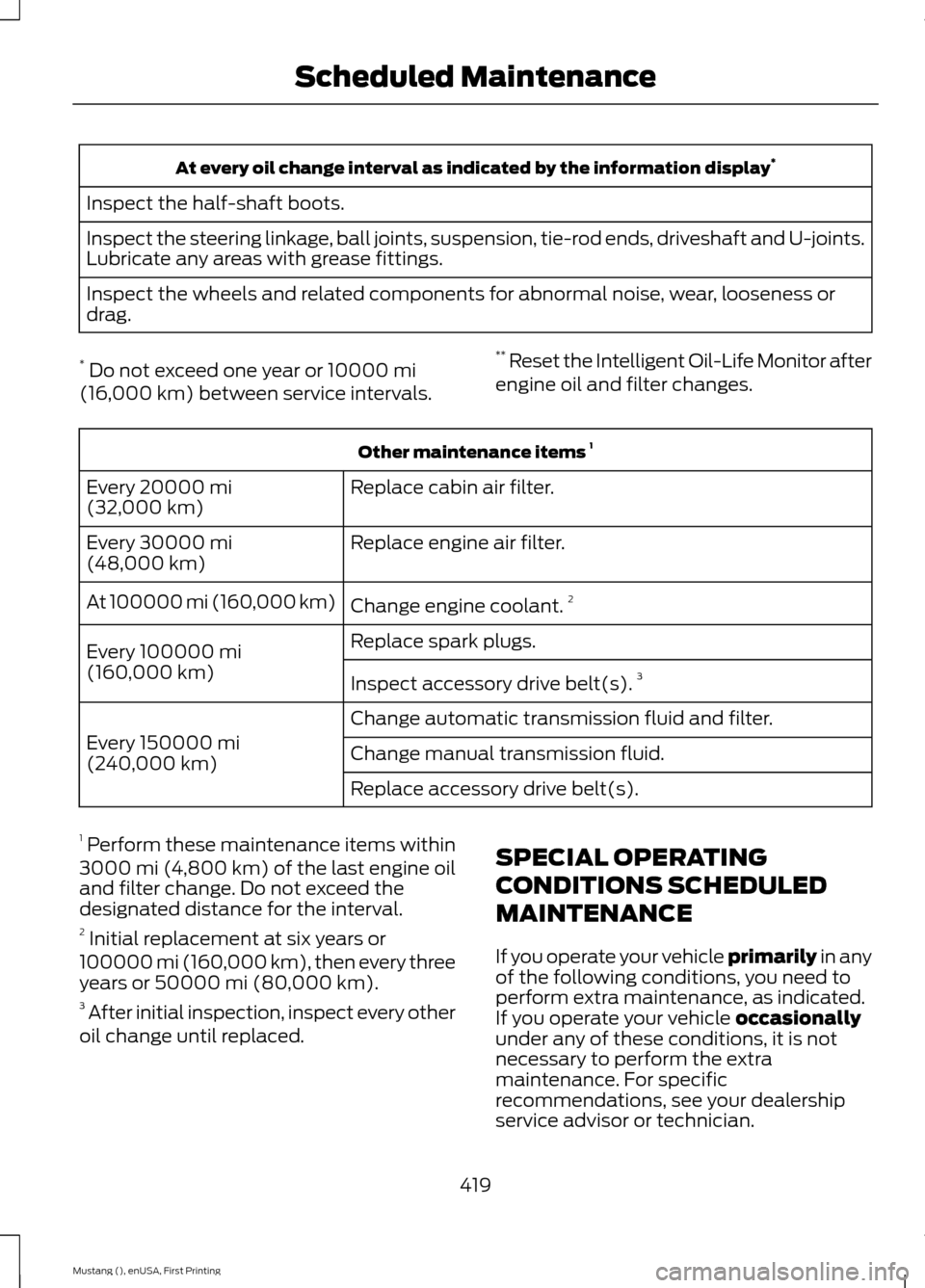
At every oil change interval as indicated by the information display
*
Inspect the half-shaft boots.
Inspect the steering linkage, ball joints, suspension, tie-rod ends, driveshaft and U-joints.
Lubricate any areas with grease fittings.
Inspect the wheels and related components for abnormal noise, wear, looseness or
drag.
* Do not exceed one year or 10000 mi
(16,000 km) between service intervals. **
Reset the Intelligent Oil-Life Monitor after
engine oil and filter changes. Other maintenance items
1
Replace cabin air filter.
Every
20000 mi
(32,000 km)
Replace engine air filter.
Every
30000 mi
(48,000 km)
Change engine coolant.2
At 100000 mi (160,000 km)
Replace spark plugs.
Every
100000 mi
(160,000 km) Inspect accessory drive belt(s). 3
Change automatic transmission fluid and filter.
Every
150000 mi
(240,000 km) Change manual transmission fluid.
Replace accessory drive belt(s).
1 Perform these maintenance items within
3000 mi (4,800 km) of the last engine oil
and filter change. Do not exceed the
designated distance for the interval.
2 Initial replacement at six years or
100000 mi (160,000 km)
, then every three
years or 50000 mi (80,000 km).
3 After initial inspection, inspect every other
oil change until replaced. SPECIAL OPERATING
CONDITIONS SCHEDULED
MAINTENANCE
If you operate your vehicle primarily
in any
of the following conditions, you need to
perform extra maintenance, as indicated.
If you operate your vehicle
occasionally
under any of these conditions, it is not
necessary to perform the extra
maintenance. For specific
recommendations, see your dealership
service advisor or technician.
419
Mustang (), enUSA, First Printing Scheduled Maintenance