USB FORD MUSTANG 2015 6.G User Guide
[x] Cancel search | Manufacturer: FORD, Model Year: 2015, Model line: MUSTANG, Model: FORD MUSTANG 2015 6.GPages: 441, PDF Size: 6.98 MB
Page 322 of 441
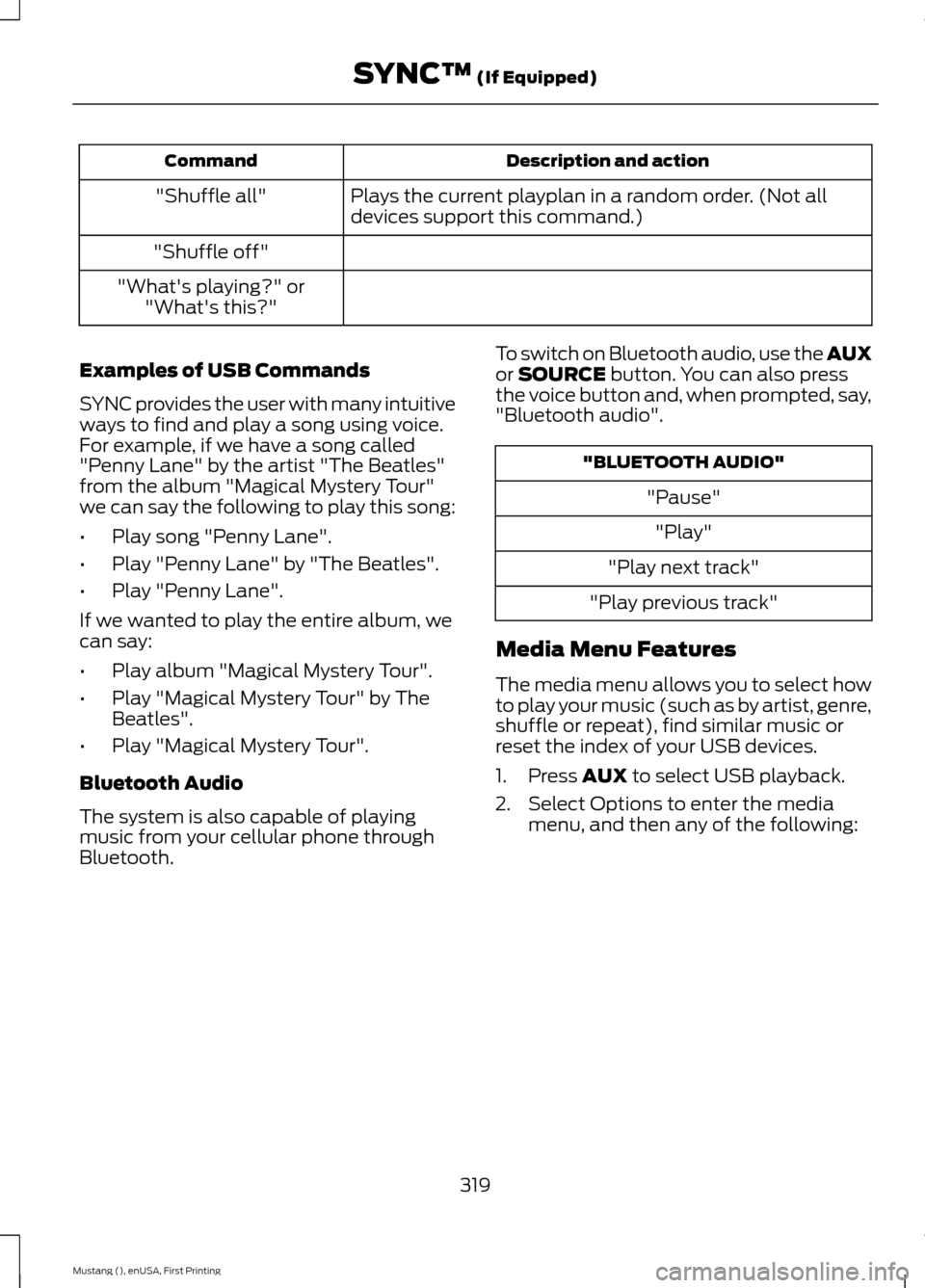
Description and action
Command
Plays the current playplan in a random order. (Not all
devices support this command.)
"Shuffle all"
"Shuffle off"
"What's playing?" or "What's this?"
Examples of USB Commands
SYNC provides the user with many intuitive
ways to find and play a song using voice.
For example, if we have a song called
"Penny Lane" by the artist "The Beatles"
from the album "Magical Mystery Tour"
we can say the following to play this song:
• Play song "Penny Lane".
• Play "Penny Lane" by "The Beatles".
• Play "Penny Lane".
If we wanted to play the entire album, we
can say:
• Play album "Magical Mystery Tour".
• Play "Magical Mystery Tour" by The
Beatles".
• Play "Magical Mystery Tour".
Bluetooth Audio
The system is also capable of playing
music from your cellular phone through
Bluetooth. To switch on Bluetooth audio, use the AUX
or SOURCE button. You can also press
the voice button and, when prompted, say,
"Bluetooth audio". "BLUETOOTH AUDIO"
"Pause""Play"
"Play next track"
"Play previous track"
Media Menu Features
The media menu allows you to select how
to play your music (such as by artist, genre,
shuffle or repeat), find similar music or
reset the index of your USB devices.
1. Press
AUX to select USB playback.
2. Select Options to enter the media menu, and then any of the following:
319
Mustang (), enUSA, First Printing SYNC™
(If Equipped)
Page 323 of 441
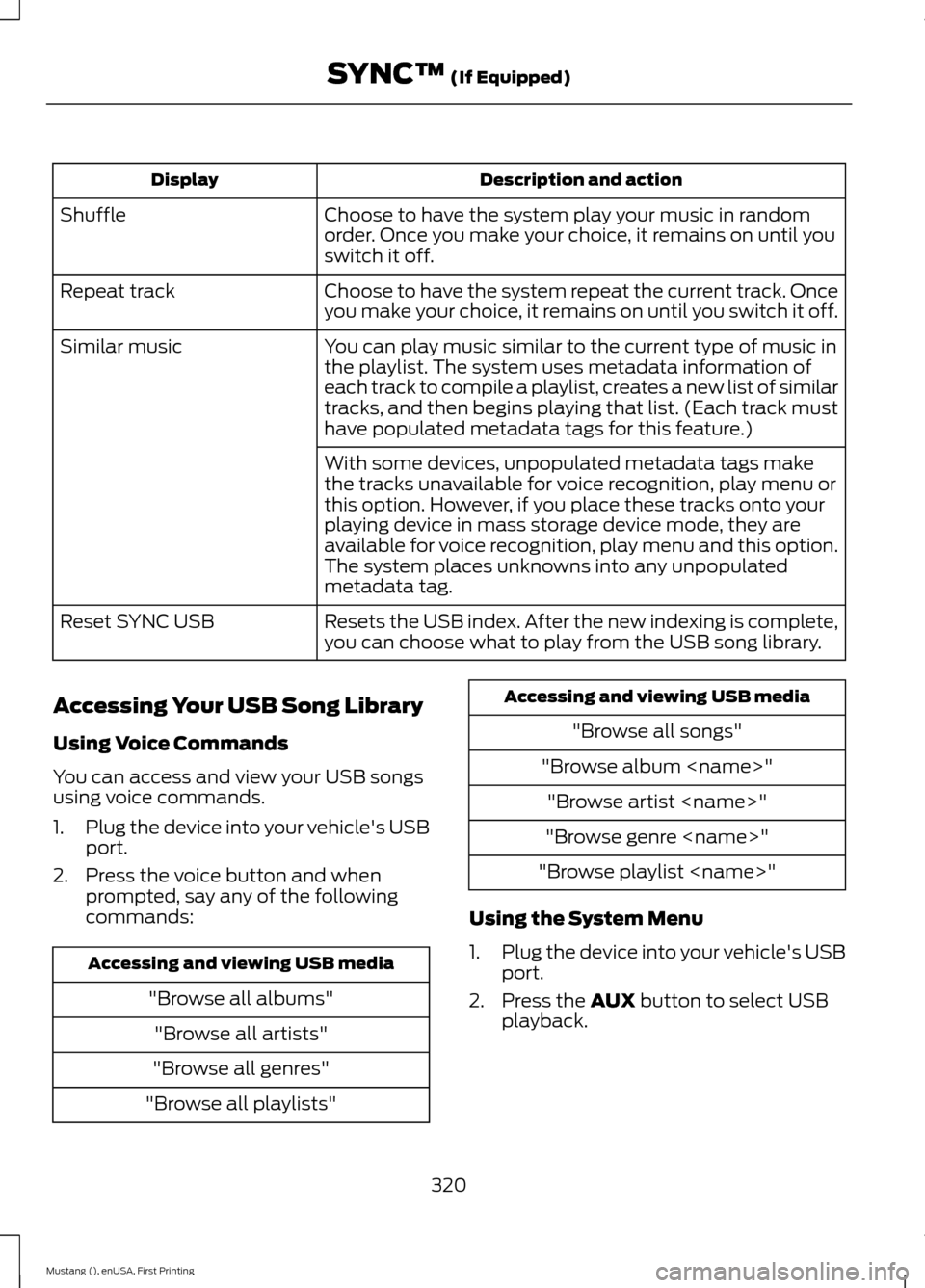
Description and action
Display
Choose to have the system play your music in random
order. Once you make your choice, it remains on until you
switch it off.
Shuffle
Choose to have the system repeat the current track. Once
you make your choice, it remains on until you switch it off.
Repeat track
You can play music similar to the current type of music in
the playlist. The system uses metadata information of
each track to compile a playlist, creates a new list of similar
tracks, and then begins playing that list. (Each track must
have populated metadata tags for this feature.)
Similar music
With some devices, unpopulated metadata tags make
the tracks unavailable for voice recognition, play menu or
this option. However, if you place these tracks onto your
playing device in mass storage device mode, they are
available for voice recognition, play menu and this option.
The system places unknowns into any unpopulated
metadata tag.
Resets the USB index. After the new indexing is complete,
you can choose what to play from the USB song library.
Reset SYNC USB
Accessing Your USB Song Library
Using Voice Commands
You can access and view your USB songs
using voice commands.
1. Plug the device into your vehicle's USB
port.
2. Press the voice button and when prompted, say any of the following
commands: Accessing and viewing USB media
"Browse all albums""Browse all artists"
"Browse all genres"
"Browse all playlists" Accessing and viewing USB media
"Browse all songs"
"Browse album
"Browse genre
"Browse playlist
Using the System Menu
1. Plug the device into your vehicle's USB
port.
2. Press the AUX button to select USB
playback.
320
Mustang (), enUSA, First Printing SYNC™
(If Equipped)
Page 324 of 441
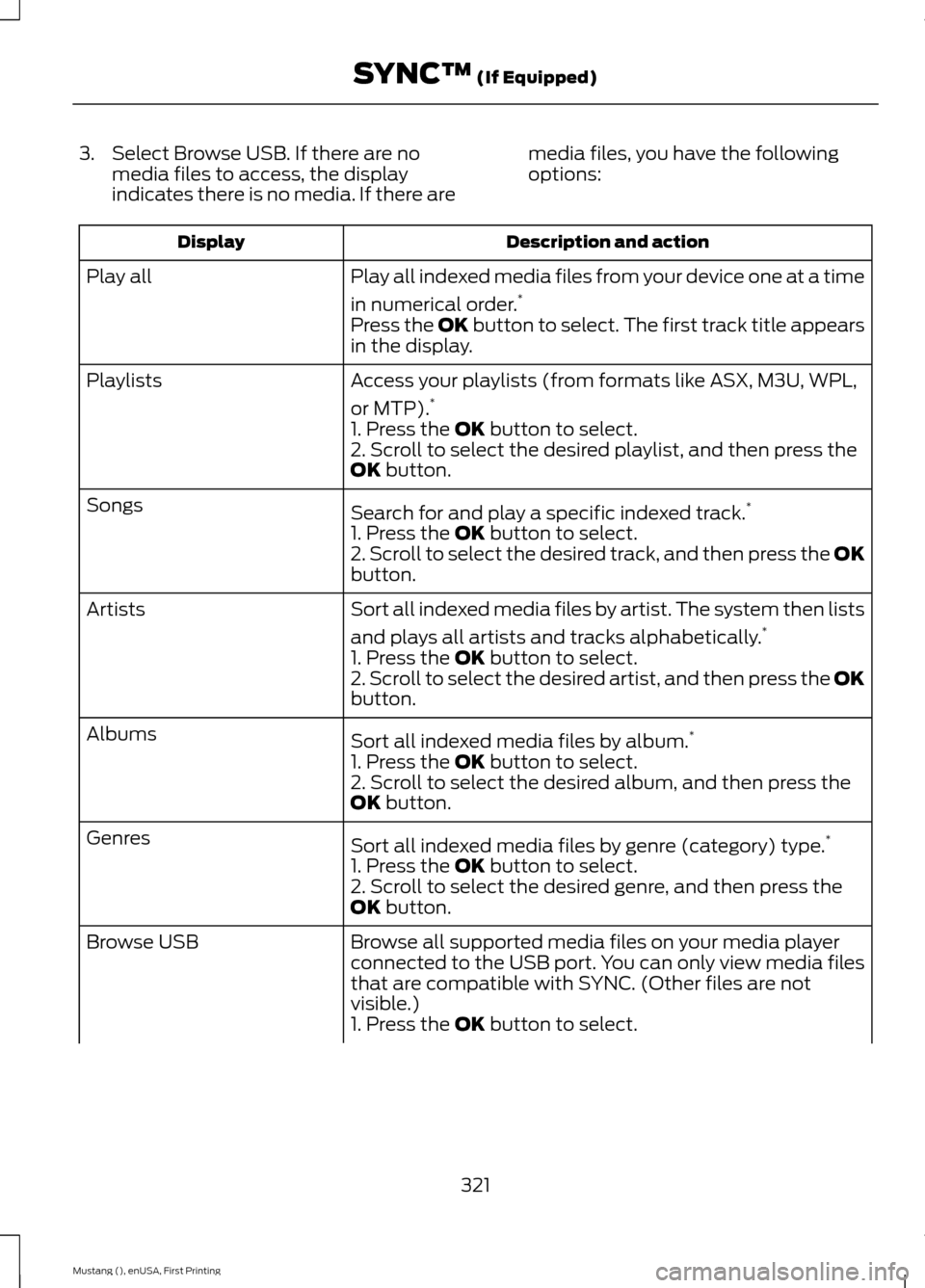
3. Select Browse USB. If there are no
media files to access, the display
indicates there is no media. If there are media files, you have the following
options: Description and action
Display
Play all indexed media files from your device one at a time
in numerical order.*
Play all
Press the OK button to select. The first track title appears
in the display.
Access your playlists (from formats like ASX, M3U, WPL,
or MTP).*
Playlists
1. Press the OK button to select.
2. Scroll to select the desired playlist, and then press the
OK
button.
Search for and play a specific indexed track. *
Songs
1. Press the
OK button to select.
2. Scroll to select the desired track, and then press the OK
button.
Sort all indexed media files by artist. The system then lists
and plays all artists and tracks alphabetically. *
Artists
1. Press the
OK button to select.
2. Scroll to select the desired artist, and then press the OK
button.
Sort all indexed media files by album. *
Albums
1. Press the
OK button to select.
2. Scroll to select the desired album, and then press the
OK
button.
Sort all indexed media files by genre (category) type. *
Genres
1. Press the
OK button to select.
2. Scroll to select the desired genre, and then press the
OK
button.
Browse all supported media files on your media player
connected to the USB port. You can only view media files
that are compatible with SYNC. (Other files are not
visible.)
Browse USB
1. Press the
OK button to select.
321
Mustang (), enUSA, First Printing SYNC™
(If Equipped)
Page 325 of 441
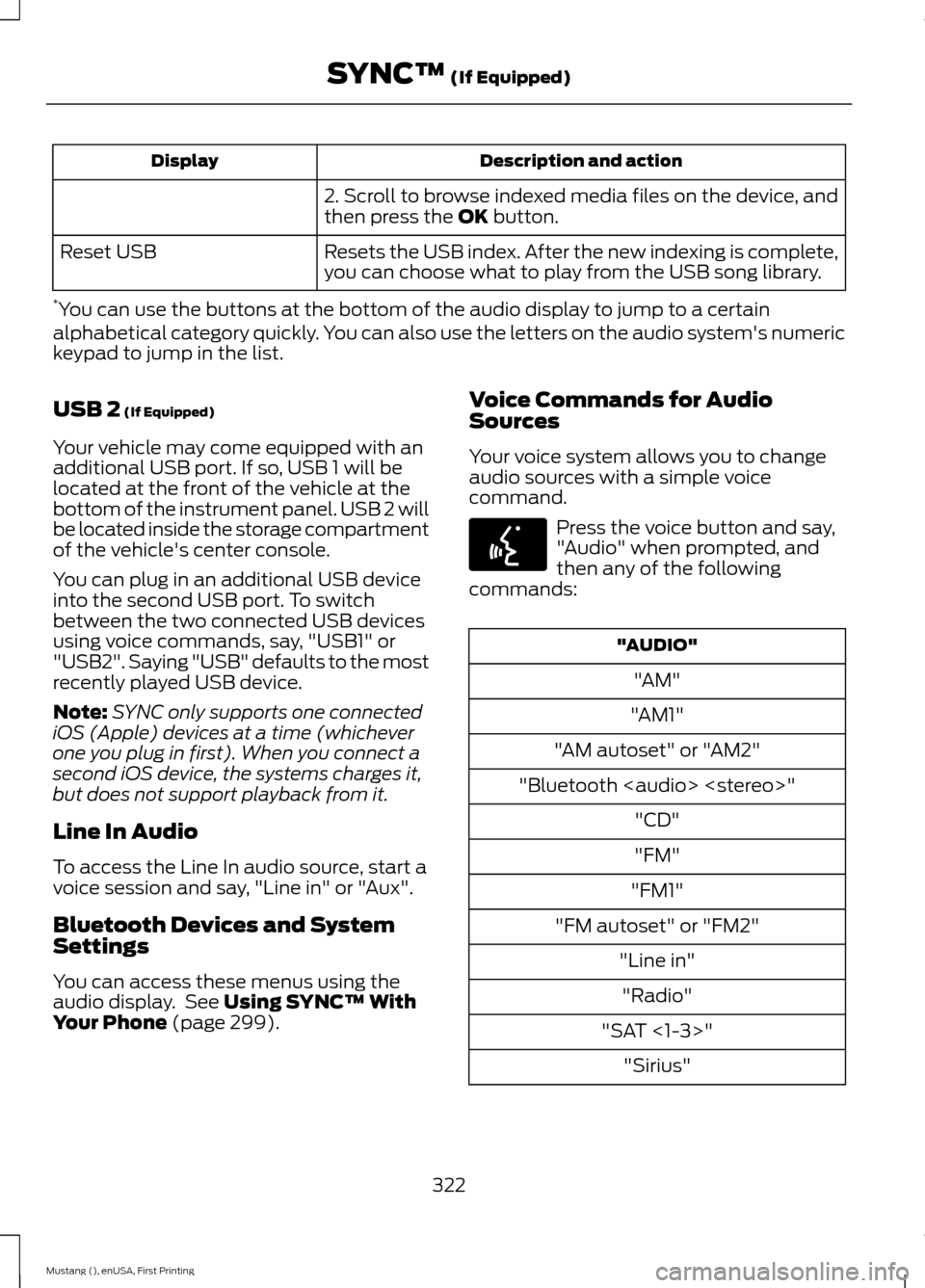
Description and action
Display
2. Scroll to browse indexed media files on the device, and
then press the OK button.
Resets the USB index. After the new indexing is complete,
you can choose what to play from the USB song library.
Reset USB
* You can use the buttons at the bottom of the audio display to jump to a certain
alphabetical category quickly. You can also use the letters on the audio system's numeric
keypad to jump in the list.
USB 2
(If Equipped)
Your vehicle may come equipped with an
additional USB port. If so, USB 1 will be
located at the front of the vehicle at the
bottom of the instrument panel. USB 2 will
be located inside the storage compartment
of the vehicle's center console.
You can plug in an additional USB device
into the second USB port. To switch
between the two connected USB devices
using voice commands, say, "USB1" or
"USB2". Saying "USB" defaults to the most
recently played USB device.
Note: SYNC only supports one connected
iOS (Apple) devices at a time (whichever
one you plug in first). When you connect a
second iOS device, the systems charges it,
but does not support playback from it.
Line In Audio
To access the Line In audio source, start a
voice session and say, "Line in" or "Aux".
Bluetooth Devices and System
Settings
You can access these menus using the
audio display. See
Using SYNC™ With
Your Phone (page 299). Voice Commands for Audio
Sources
Your voice system allows you to change
audio sources with a simple voice
command. Press the voice button and say,
"Audio" when prompted, and
then any of the following
commands: "AUDIO"
"AM"
"AM1"
"AM autoset" or "AM2"
"Bluetooth
Page 326 of 441
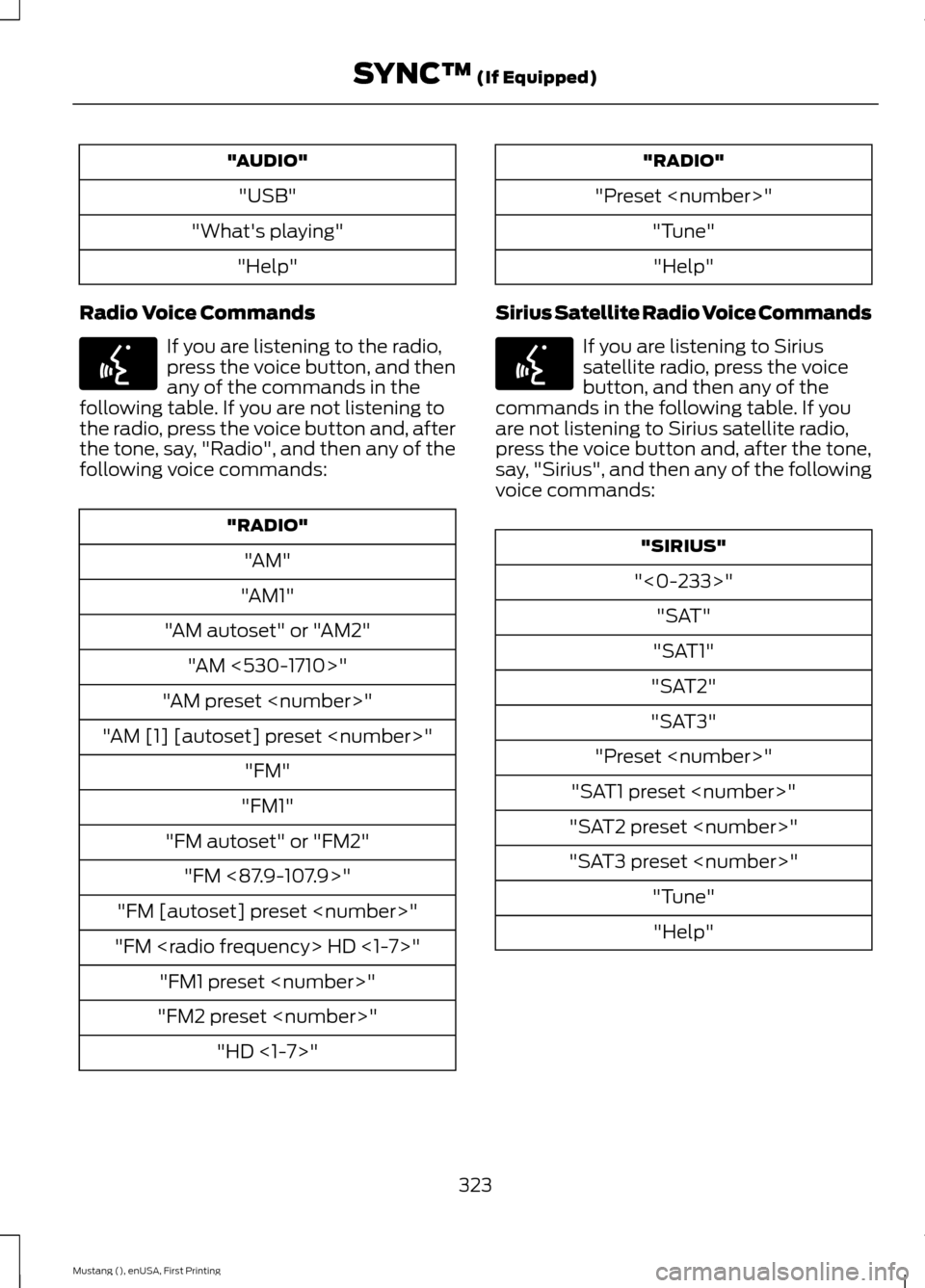
"AUDIO"
"USB"
"What's playing" "Help"
Radio Voice Commands If you are listening to the radio,
press the voice button, and then
any of the commands in the
following table. If you are not listening to
the radio, press the voice button and, after
the tone, say, "Radio", and then any of the
following voice commands: "RADIO"
"AM"
"AM1"
"AM autoset" or "AM2" "AM <530-1710>"
"AM preset
"AM [1] [autoset] preset
"FM1"
"FM autoset" or "FM2" "FM <87.9-107.9>"
"FM [autoset] preset
"FM
"FM2 preset
"Preset
Sirius Satellite Radio Voice Commands If you are listening to Sirius
satellite radio, press the voice
button, and then any of the
commands in the following table. If you
are not listening to Sirius satellite radio,
press the voice button and, after the tone,
say, "Sirius", and then any of the following
voice commands: "SIRIUS"
"<0-233>" "SAT"
"SAT1"
"SAT2"
"SAT3"
"Preset
"SAT1 preset
"SAT2 preset
"SAT3 preset
323
Mustang (), enUSA, First Printing SYNC™ (If Equipped)E142599 E142599
Page 329 of 441
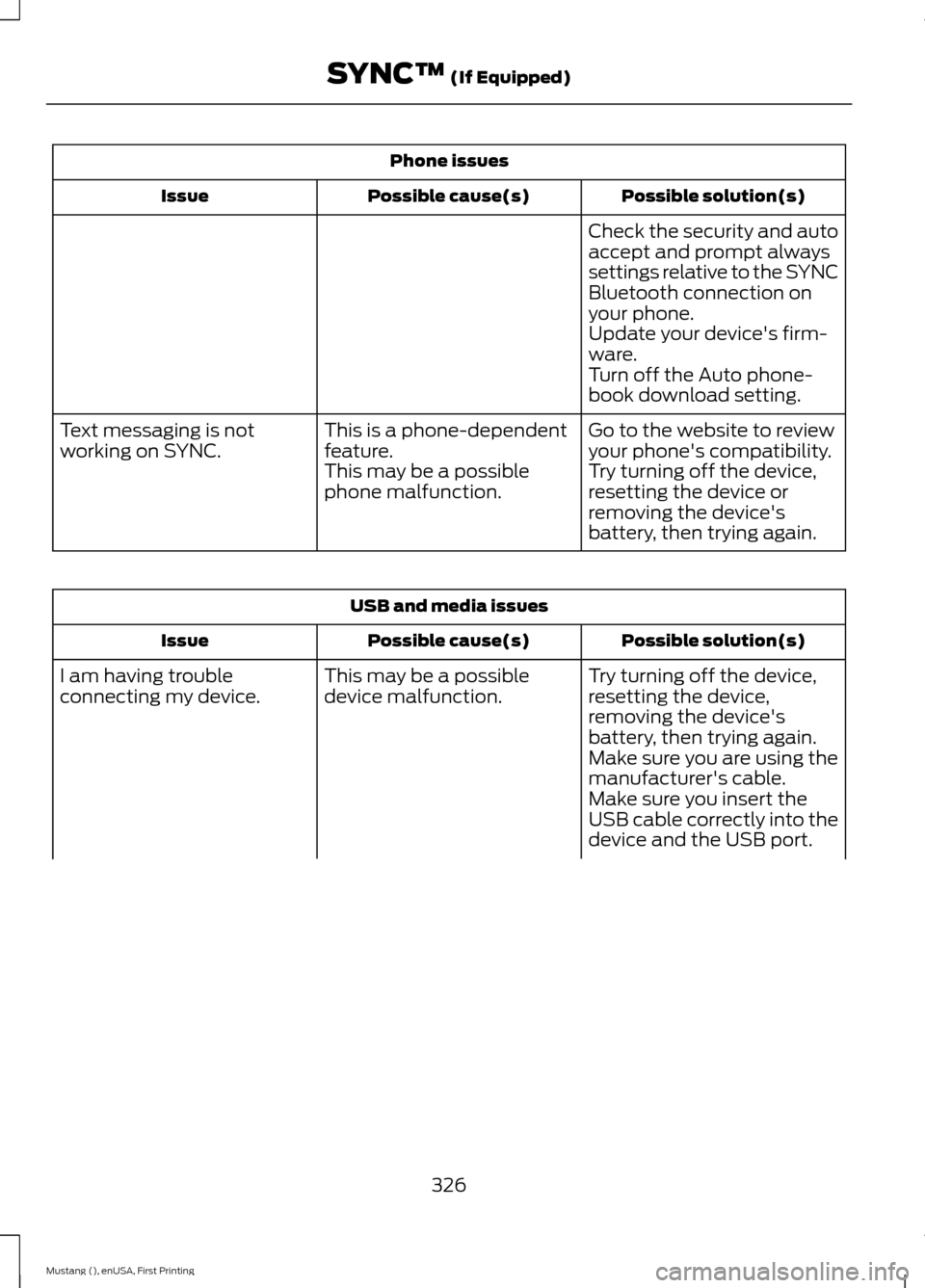
Phone issues
Possible solution(s)
Possible cause(s)
Issue
Check the security and auto
accept and prompt always
settings relative to the SYNC
Bluetooth connection on
your phone.
Update your device's firm-
ware.
Turn off the Auto phone-
book download setting.
Go to the website to review
your phone's compatibility.
This is a phone-dependent
feature.
Text messaging is not
working on SYNC.
Try turning off the device,
resetting the device or
removing the device's
battery, then trying again.
This may be a possible
phone malfunction. USB and media issues
Possible solution(s)
Possible cause(s)
Issue
Try turning off the device,
resetting the device,
removing the device's
battery, then trying again.
This may be a possible
device malfunction.
I am having trouble
connecting my device.
Make sure you are using the
manufacturer's cable.
Make sure you insert the
USB cable correctly into the
device and the USB port.
326
Mustang (), enUSA, First Printing SYNC™ (If Equipped)
Page 330 of 441
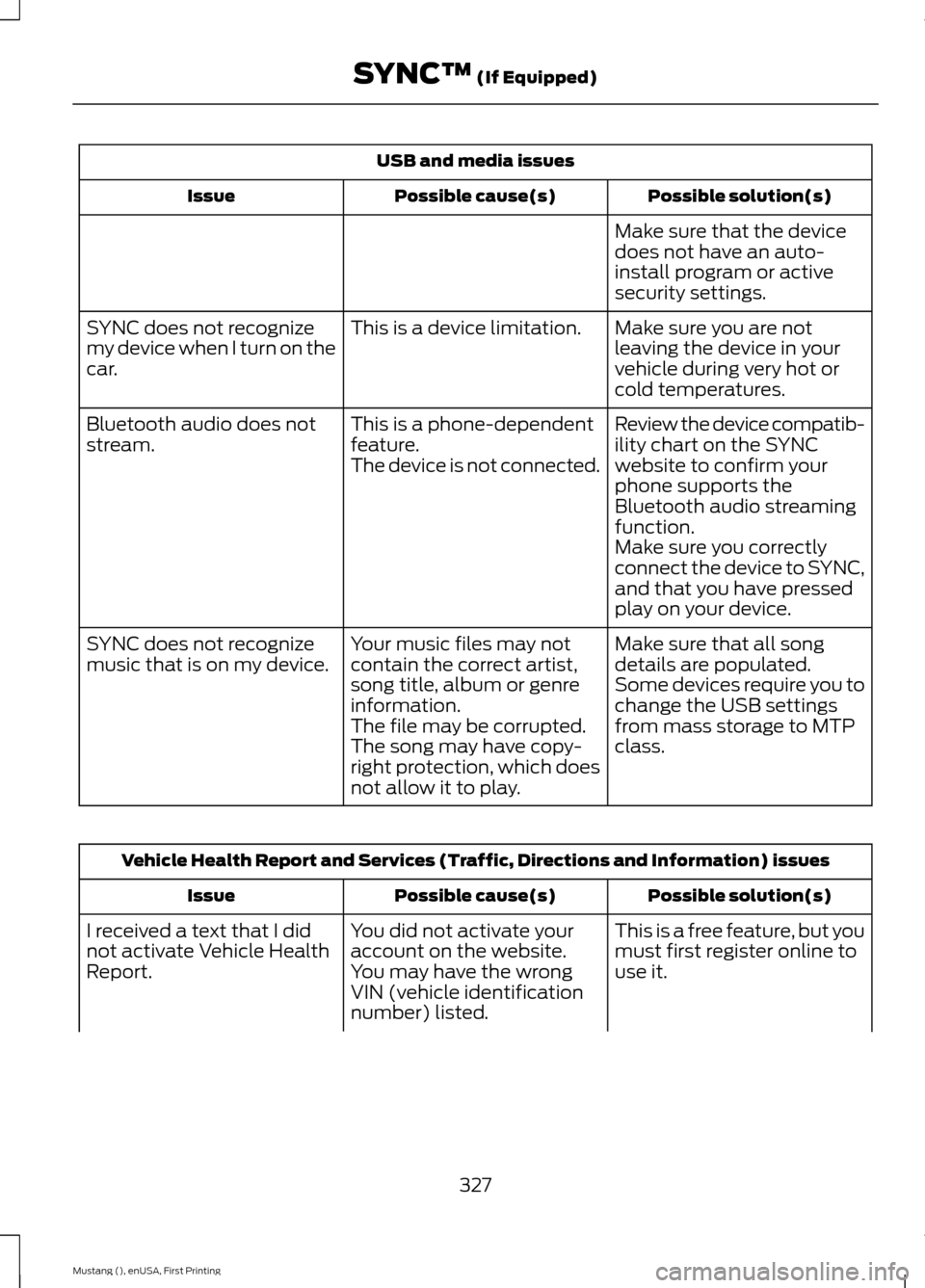
USB and media issues
Possible solution(s)
Possible cause(s)
Issue
Make sure that the device
does not have an auto-
install program or active
security settings.
Make sure you are not
leaving the device in your
vehicle during very hot or
cold temperatures.
This is a device limitation.
SYNC does not recognize
my device when I turn on the
car.
Review the device compatib-
ility chart on the SYNC
website to confirm your
phone supports the
Bluetooth audio streaming
function.
This is a phone-dependent
feature.
The device is not connected.
Bluetooth audio does not
stream.
Make sure you correctly
connect the device to SYNC,
and that you have pressed
play on your device.
Make sure that all song
details are populated.
Your music files may not
contain the correct artist,
song title, album or genre
information.
SYNC does not recognize
music that is on my device.
Some devices require you to
change the USB settings
from mass storage to MTP
class.
The file may be corrupted.
The song may have copy-
right protection, which does
not allow it to play. Vehicle Health Report and Services (Traffic, Directions and Information) issues
Possible solution(s)
Possible cause(s)
Issue
This is a free feature, but you
must first register online to
use it.
You did not activate your
account on the website.
You may have the wrong
VIN (vehicle identification
number) listed.
I received a text that I did
not activate Vehicle Health
Report.
327
Mustang (), enUSA, First Printing SYNC™ (If Equipped)
Page 334 of 441
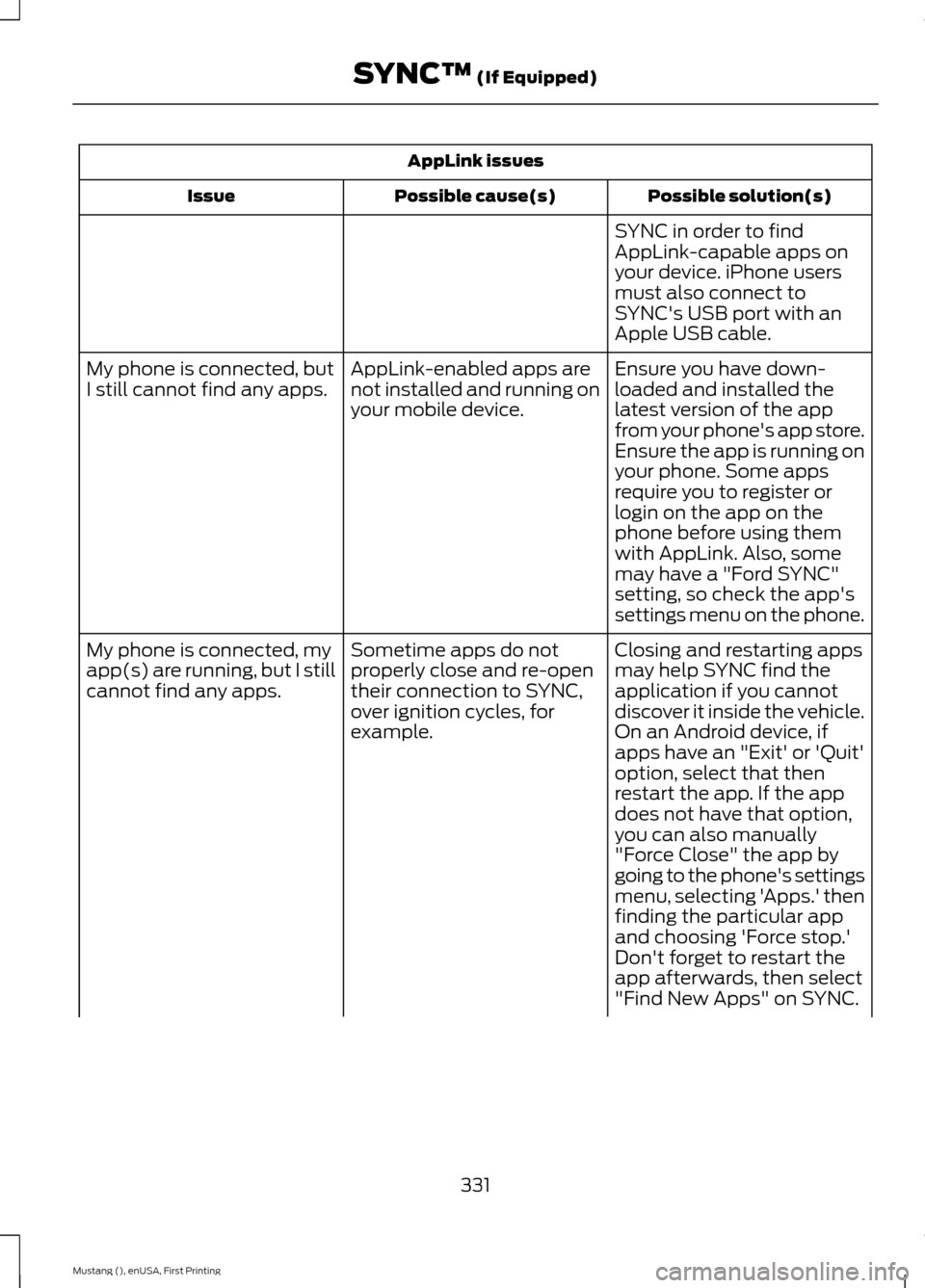
AppLink issues
Possible solution(s)
Possible cause(s)
Issue
SYNC in order to find
AppLink-capable apps on
your device. iPhone users
must also connect to
SYNC's USB port with an
Apple USB cable.
Ensure you have down-
loaded and installed the
latest version of the app
from your phone's app store.
Ensure the app is running on
your phone. Some apps
AppLink-enabled apps are
not installed and running on
your mobile device.
My phone is connected, but
I still cannot find any apps.
require you to register or
login on the app on the
phone before using them
with AppLink. Also, some
may have a "Ford SYNC"
setting, so check the app's
settings menu on the phone.
Closing and restarting apps
may help SYNC find the
application if you cannot
discover it inside the vehicle.
On an Android device, if
apps have an "Exit' or 'Quit'
Sometime apps do not
properly close and re-open
their connection to SYNC,
over ignition cycles, for
example.
My phone is connected, my
app(s) are running, but I still
cannot find any apps.
option, select that then
restart the app. If the app
does not have that option,
you can also manually
"Force Close" the app by
going to the phone's settings
menu, selecting 'Apps.' then
finding the particular app
and choosing 'Force stop.'
Don't forget to restart the
app afterwards, then select
"Find New Apps" on SYNC.
331
Mustang (), enUSA, First Printing SYNC™ (If Equipped)
Page 336 of 441
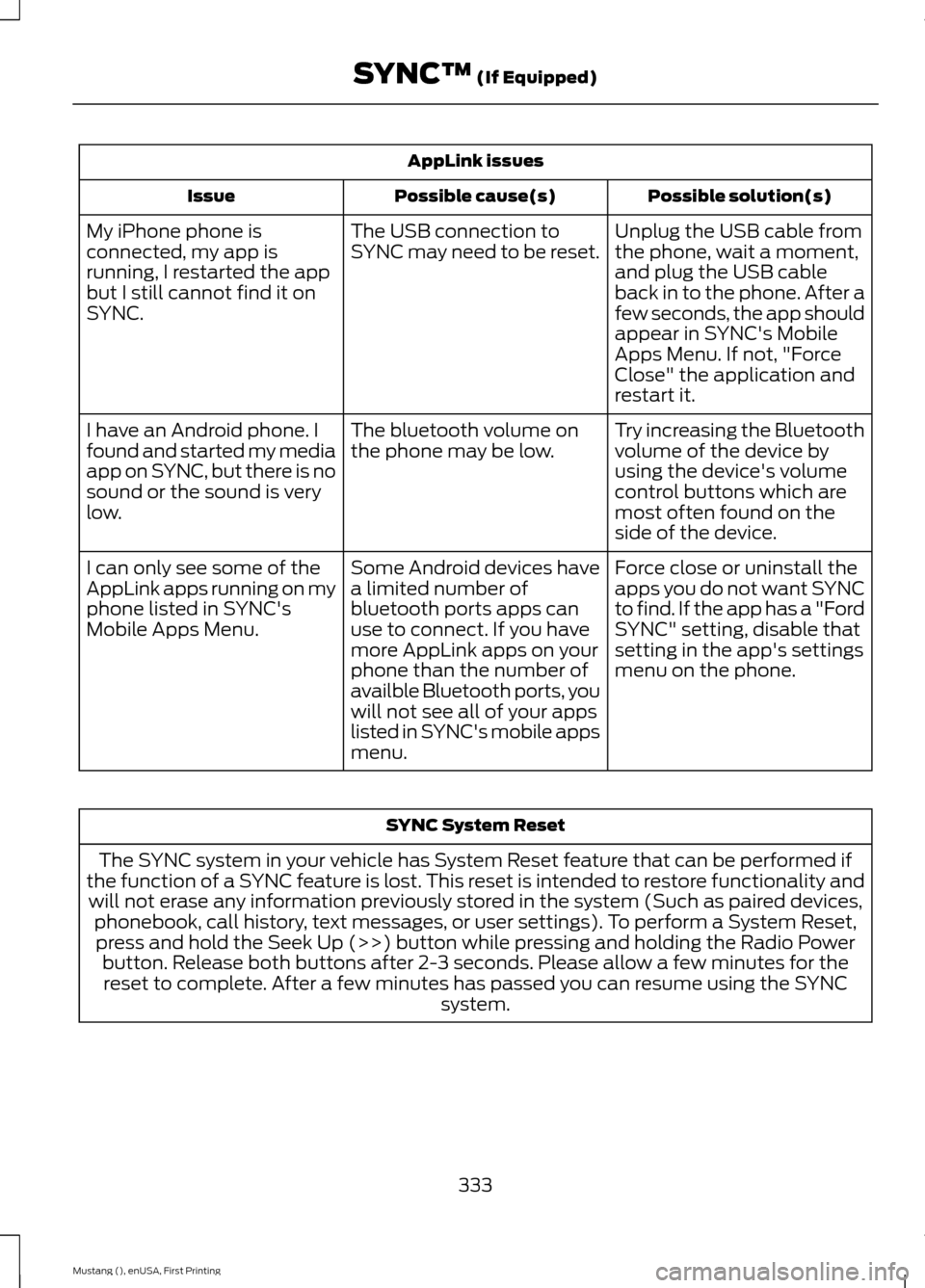
AppLink issues
Possible solution(s)
Possible cause(s)
Issue
Unplug the USB cable from
the phone, wait a moment,
and plug the USB cable
back in to the phone. After a
few seconds, the app should
appear in SYNC's Mobile
Apps Menu. If not, "Force
Close" the application and
restart it.
The USB connection to
SYNC may need to be reset.
My iPhone phone is
connected, my app is
running, I restarted the app
but I still cannot find it on
SYNC.
Try increasing the Bluetooth
volume of the device by
using the device's volume
control buttons which are
most often found on the
side of the device.
The bluetooth volume on
the phone may be low.
I have an Android phone. I
found and started my media
app on SYNC, but there is no
sound or the sound is very
low.
Force close or uninstall the
apps you do not want SYNC
to find. If the app has a "Ford
SYNC" setting, disable that
setting in the app's settings
menu on the phone.
Some Android devices have
a limited number of
bluetooth ports apps can
use to connect. If you have
more AppLink apps on your
phone than the number of
availble Bluetooth ports, you
will not see all of your apps
listed in SYNC's mobile apps
menu.
I can only see some of the
AppLink apps running on my
phone listed in SYNC's
Mobile Apps Menu. SYNC System Reset
The SYNC system in your vehicle has System Reset feature that can be performed if
the function of a SYNC feature is lost. This reset is intended to restore functionality and will not erase any information previously stored in the system (Such as paired devices, phonebook, call history, text messages, or user settings). To perform a System Reset,press and hold the Seek Up (>>) button while pressing and holding the Radio Power button. Release both buttons after 2-3 seconds. Please allow a few minutes for thereset to complete. After a few minutes has passed you can resume using the SYNC system.
333
Mustang (), enUSA, First Printing SYNC™ (If Equipped)
Page 339 of 441
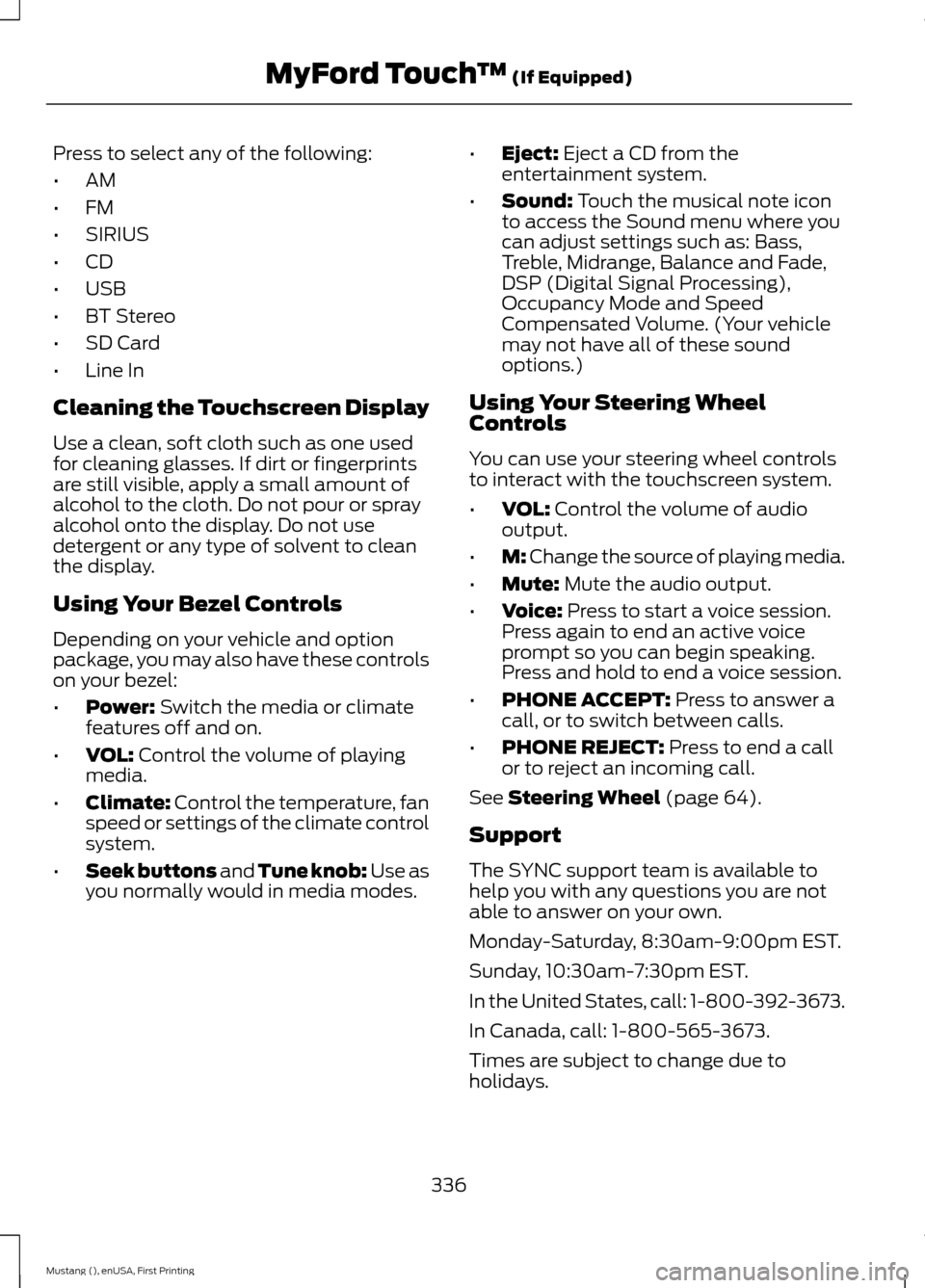
Press to select any of the following:
•
AM
• FM
• SIRIUS
• CD
• USB
• BT Stereo
• SD Card
• Line In
Cleaning the Touchscreen Display
Use a clean, soft cloth such as one used
for cleaning glasses. If dirt or fingerprints
are still visible, apply a small amount of
alcohol to the cloth. Do not pour or spray
alcohol onto the display. Do not use
detergent or any type of solvent to clean
the display.
Using Your Bezel Controls
Depending on your vehicle and option
package, you may also have these controls
on your bezel:
• Power: Switch the media or climate
features off and on.
• VOL:
Control the volume of playing
media.
• Climate:
Control the temperature, fan
speed or settings of the climate control
system.
• Seek buttons and Tune knob: Use as
you normally would in media modes. •
Eject:
Eject a CD from the
entertainment system.
• Sound:
Touch the musical note icon
to access the Sound menu where you
can adjust settings such as: Bass,
Treble, Midrange, Balance and Fade,
DSP (Digital Signal Processing),
Occupancy Mode and Speed
Compensated Volume. (Your vehicle
may not have all of these sound
options.)
Using Your Steering Wheel
Controls
You can use your steering wheel controls
to interact with the touchscreen system.
• VOL:
Control the volume of audio
output.
• M:
Change the source of playing media.
• Mute:
Mute the audio output.
• Voice:
Press to start a voice session.
Press again to end an active voice
prompt so you can begin speaking.
Press and hold to end a voice session.
• PHONE ACCEPT:
Press to answer a
call, or to switch between calls.
• PHONE REJECT:
Press to end a call
or to reject an incoming call.
See
Steering Wheel (page 64).
Support
The SYNC support team is available to
help you with any questions you are not
able to answer on your own.
Monday-Saturday, 8:30am-9:00pm EST.
Sunday, 10:30am-7:30pm EST.
In the United States, call: 1-800-392-3673.
In Canada, call: 1-800-565-3673.
Times are subject to change due to
holidays.
336
Mustang (), enUSA, First Printing MyFord Touch
™
(If Equipped)