stop start FORD MUSTANG 2015 6.G Owner's Guide
[x] Cancel search | Manufacturer: FORD, Model Year: 2015, Model line: MUSTANG, Model: FORD MUSTANG 2015 6.GPages: 441, PDF Size: 6.98 MB
Page 196 of 441
Should your vehicle shut off after a
collision, you may restart your vehicle. For
vehicles equipped with a push button start
system:
1. Press the START/STOP button to
switch off the ignition.
2. Press the brake pedal (automatic transmission) or the clutch pedal
(manual transmission) and press the
START/STOP
button to start the
vehicle.
3. Remove your foot from the brake or clutch pedal and press the
START/STOP
button to switch off
the ignition.
4. Press the brake or clutch pedal and the
START/STOP
button, or switch on
the ignition only by pressing the
START/STOP
button without
pressing the brake or clutch pedal. Both
ways re-enable the fuel system.
Note: When you try to restart your vehicle
after a fuel shutoff, the vehicle makes sure
that various systems are safe to restart.
Once your vehicle determines that the
systems are safe, then the vehicle will allow
you to restart.
Note: In the event that your vehicle does
not restart after your third attempt, contact
an authorized dealer.
JUMP STARTING THE VEHICLE WARNINGS
The gases around the battery can
explode if exposed to flames, sparks,
or lit cigarettes. An explosion could
result in personal injury or vehicle damage. Batteries contain sulfuric acid which
can burn skin, eyes and clothing, if
contacted.
Use only an adequate-sized cable
with insulated clamps. Preparing Your Vehicle
Note:
Do not attempt to push-start your
automatic transmission vehicle. Automatic
transmissions do not have push-start
capability. Attempting to push-start a
vehicle with an automatic transmission may
cause transmission damage.
Note: Use only a 12-volt supply to start your
vehicle.
Note: Do not disconnect the battery of the
disabled vehicle as this could damage the
vehicle's electrical system.
Park the booster vehicle close to the hood
of the disabled vehicle, making sure the
two vehicles do not touch. Turn all
accessories off.
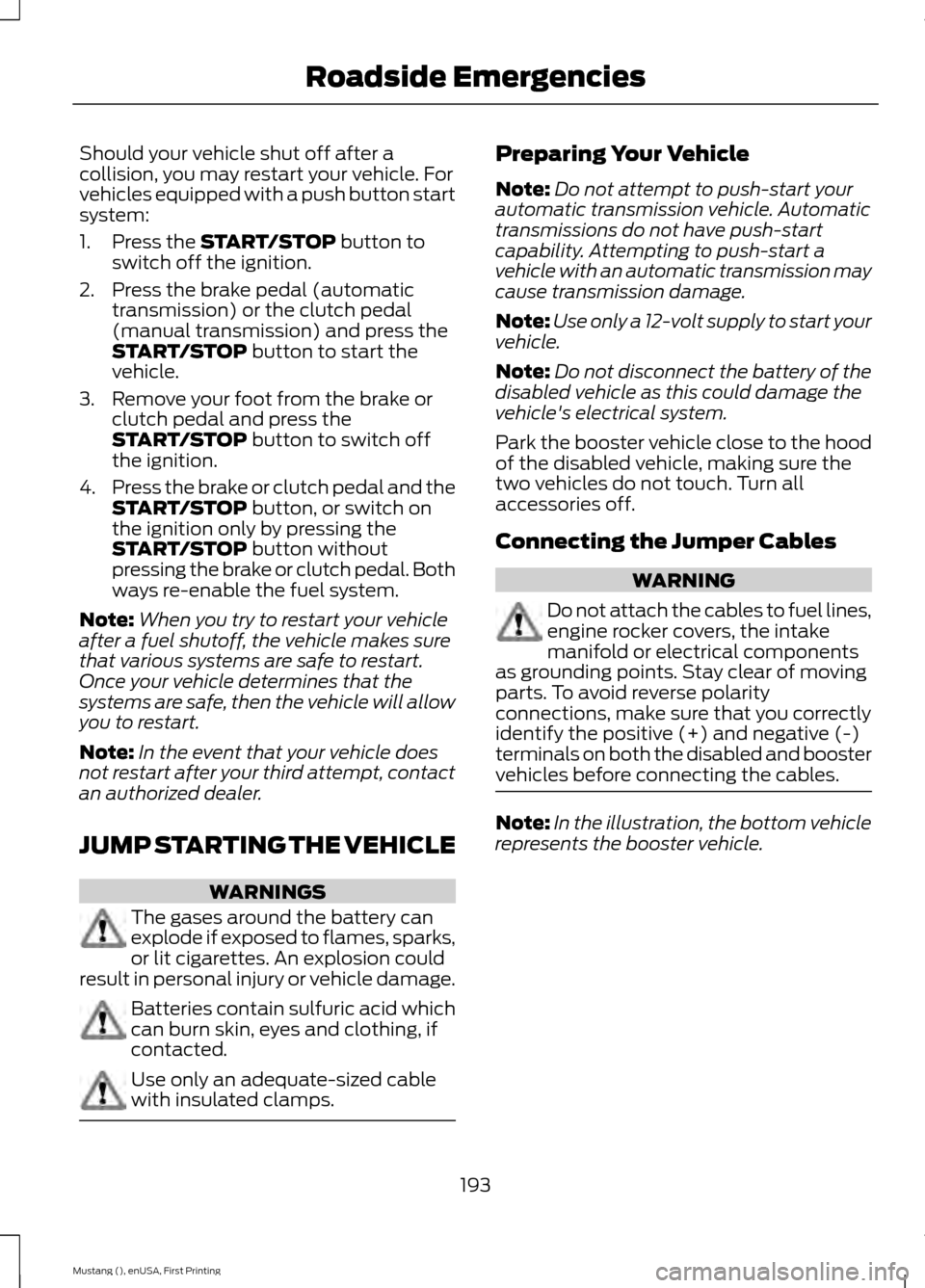
Connecting the Jumper Cables WARNING
Do not attach the cables to fuel lines,
engine rocker covers, the intake
manifold or electrical components
as grounding points. Stay clear of moving
parts. To avoid reverse polarity
connections, make sure that you correctly
identify the positive (+) and negative (-)
terminals on both the disabled and booster
vehicles before connecting the cables. Note:
In the illustration, the bottom vehicle
represents the booster vehicle.
193
Mustang (), enUSA, First Printing Roadside Emergencies
Page 224 of 441
For longer, trouble-free operation, keep the
top of the battery clean and dry. Also,
make certain the battery cables are always
tightly fastened to the battery terminals.
If you see any corrosion on the battery or
terminals, remove the cables from the
terminals and clean with a wire brush. You
can neutralize the acid with a solution of
baking soda and water.
It is recommended that the negative
battery cable terminal be disconnected
from the battery if you plan to store your
vehicle for an extended period of time.
Because your vehicle
’s engine is
electronically controlled by a computer,
some control conditions are maintained
by power from the battery. When the
battery is disconnected or a new battery
is installed, the engine must relearn its idle
and fuel trim strategy for optimum
driveability and performance. Flexible fuel
vehicles (FFV) must also relearn the
ethanol content of the fuel for optimum
driveability and performance. To begin this
process:
1. With your vehicle at a complete stop, set the parking brake.
2. Put the gearshift in P(Park), turn off all
accessories.
3. Start the engine. Run the engine until it reaches normal operating
temperature.
4. Allow the engine to idle for at least one
minute.
5. Turn the air conditioning on and allow the engine to idle for at least one
minute. 6. Release the parking brake. With your
foot on the brake pedal and with the
air conditioning on, put your vehicle in
D
(Drive) and allow the engine to idle
for at least one minute.
• If you do not allow the engine to
relearn its idle trim, the idle quality
of your vehicle may be adversely
affected until the idle trim is
eventually relearned.
7. Drive your vehicle to complete the relearning process
•Your vehicle may need to be driven
10 miles (16 kilometers) or more to
relearn the idle and fuel trim
strategy along with the ethanol
content for flexible fuel vehicles.
• For flexible fuel vehicles, if you are
operating on E85, you may
experience poor starts or an
inability to start the engine and
driveability problems until the fuel
trim and ethanol content have been
relearned.
If the battery has been disconnected or a
new battery has been installed, the clock
and radio settings must be reset once the
battery is reconnected.
Always dispose of automotive
batteries in a responsible manner.
Follow your local authorized standards
for disposal. Call your local authorized
recycling center to find out more about
recycling automotive batteries.
Battery Management System (If
Equipped)
The battery management system (BMS)
monitors battery conditions and takes
actions to extend battery life. If excessive
battery drain is detected, the system may
temporarily disable certain electrical
features to protect the battery. Those
electrical accessories affected include the
rear defrost, heated/cooled seats, climate
221
Mustang (), enUSA, First Printing Maintenance
Page 241 of 441
5. Remove the warning sticker found on
the casing/housing and place it on the
top of the instrument panel or the
center of the dash.
6. Start the vehicle and leave the engine running so the compressor does not
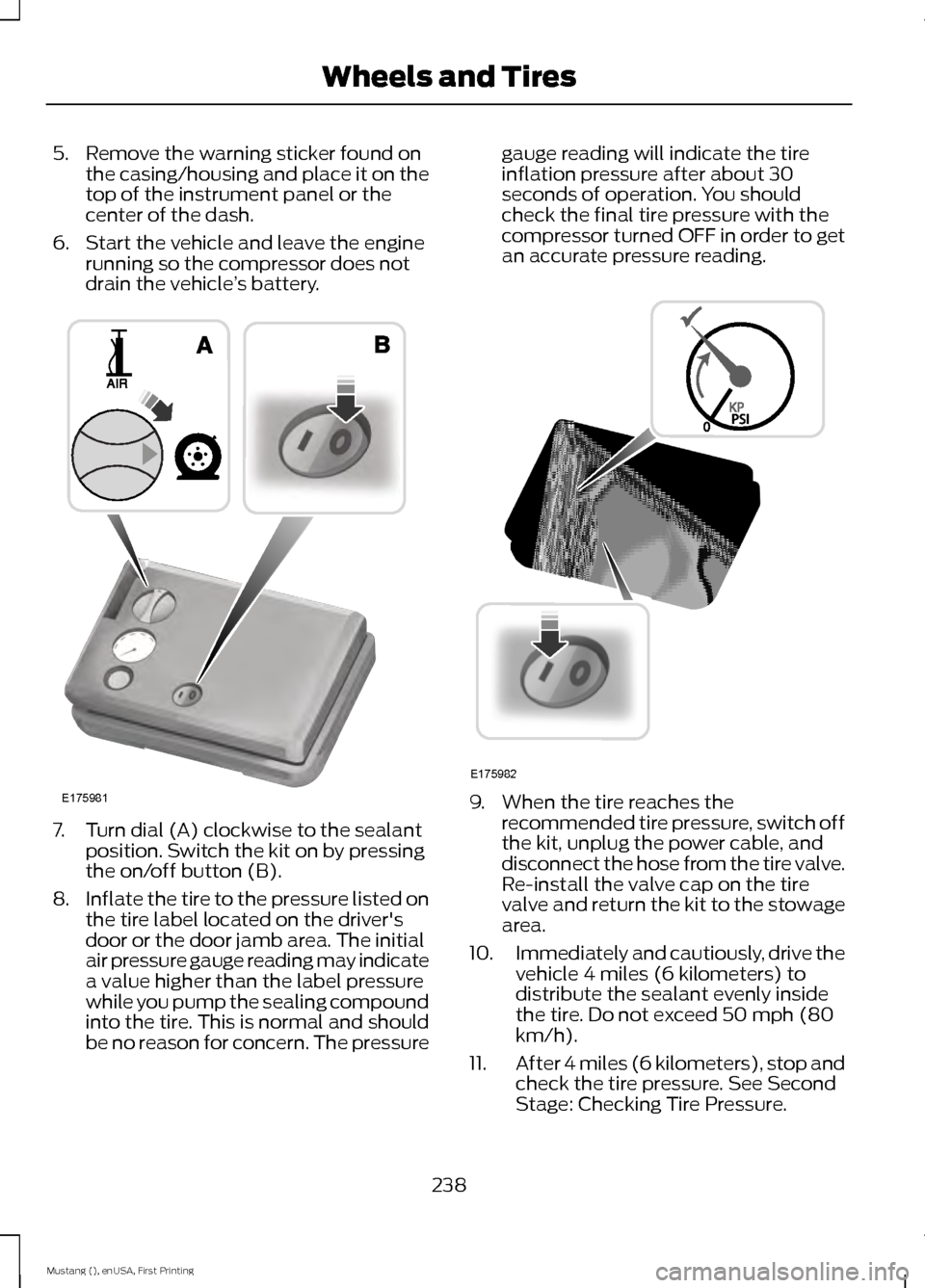
drain the vehicle ’s battery. 7. Turn dial (A) clockwise to the sealant
position. Switch the kit on by pressing
the on/off button (B).
8. Inflate the tire to the pressure listed on
the tire label located on the driver's
door or the door jamb area. The initial
air pressure gauge reading may indicate
a value higher than the label pressure
while you pump the sealing compound
into the tire. This is normal and should
be no reason for concern. The pressure gauge reading will indicate the tire
inflation pressure after about 30
seconds of operation. You should
check the final tire pressure with the
compressor turned OFF in order to get
an accurate pressure reading.
9. When the tire reaches the
recommended tire pressure, switch off
the kit, unplug the power cable, and
disconnect the hose from the tire valve.
Re-install the valve cap on the tire
valve and return the kit to the stowage
area.
10. Immediately and cautiously, drive the
vehicle 4 miles (6 kilometers) to
distribute the sealant evenly inside
the tire. Do not exceed 50 mph (80
km/h).
11. After 4 miles (6 kilometers), stop and
check the tire pressure. See Second
Stage: Checking Tire Pressure.
238
Mustang (), enUSA, First Printing Wheels and TiresE175981 E175982
Page 257 of 441
It is recommended that the two
front tires or two rear tires
generally be replaced as a pair.
The tire pressure sensors mounted
in the wheels (originally installed
on your vehicle) are not designed
to be used in aftermarket wheels.
The use of wheels or tires not
recommended by Ford Motor
Company may affect the
operation of your tire pressure
monitoring system.
If the tire pressure monitoring
system indicator is flashing, your
system is malfunctioning. Your
replacement tire might be
incompatible with your tire
pressure monitoring system, or
some component of the system
may be damaged.
Safety Practices
WARNINGS
If your vehicle is stuck in
snow, mud, or sand, do not
rapidly spin the tires. Spinning the
tires can tear the tire and cause
an explosion. A tire can explode in
as little as three to five seconds. Do not spin the wheels at
over 35 mph (56 km/h). The
tires may fail and injure a
passenger or bystander. Driving habits have a great deal
to do with your tire mileage and
safety.
*Observe posted speed limits
*Avoid fast starts, stops and turns
*Avoid potholes and objects on
the road
*Do not run over curbs or hit the
tire against a curb when parking
Highway Hazards
No matter how carefully you drive
there
’s always the possibility that
you may eventually have a flat tire
on the highway. Drive slowly to the
closest safe area out of traffic.
This may further damage the flat
tire, but your safety is more
important.
If you feel a sudden vibration or
ride disturbance while driving, or
you suspect your tire or vehicle
has been damaged, immediately
reduce your speed. Drive with
caution until you can safely pull
off the road. Stop and inspect the
tires for damage. If a tire is
under-inflated or damaged,
deflate it, remove wheel and
replace it with your spare tire and
wheel. If you cannot detect a
cause, have the vehicle towed to
the nearest repair facility or tire
dealer to have the vehicle
inspected.
254
Mustang (), enUSA, First Printing Wheels and Tires
Page 260 of 441
•
Purchase chains or cables from a
manufacturer that clearly labels body
to tire dimension restrictions. The snow
chains or cables must be mounted in
pairs on the front or the rear tires only.
• Do not exceed 30 mph (50 km/h) if
recommended by the chain
manufacturer while using snow chains.
• Install cables securely, verifying that
the cables do not touch any wiring,
brake lines or fuel lines.
• Drive cautiously. If you hear the cables
rub or bang against the vehicle, stop
and retighten them. If this does not
work, remove the cables to prevent
vehicle damage.
• Remove the tire chains when they are
no longer needed. Do not use tire
chains on dry roads.
If you have any questions regarding snow
chains or cables, please contact your
authorized dealer.
TIRE PRESSURE MONITORING
SYSTEM WARNING
The tire pressure monitoring system
is not a substitute for manually
checking tire pressure. The tire
pressure should be checked periodically
(at least monthly) using a tire gauge, see
Inflating your tires in this chapter. Failure
to properly maintain your tire pressure
could increase the risk of tire failure, loss
of control, vehicle rollover and personal
injury. Each tire, including the spare (if
provided), should be checked
monthly when cold and inflated
to the inflation pressure
recommended by the vehicle manufacturer
on the vehicle placard or tire inflation
pressure label. (If your vehicle has tires of
a different size than the size indicated on
the vehicle placard or tire inflation pressure
label, you should determine the proper tire
inflation pressure for those tires.)
As an added safety feature, your vehicle
has been equipped with a Tire Pressure
Monitoring System (TPMS) that
illuminates a low tire pressure telltale
when one or more of your tires is
significantly under-inflated. Accordingly,
when the low tire pressure telltale
illuminates, you should stop and check
your tires as soon as possible, and inflate
them to the proper pressure. Driving on a
significantly under-inflated tire causes the
tire to overheat and can lead to tire failure.
Under-inflation also reduces fuel efficiency
and tire tread life, and may affect the
vehicle ’s handling and stopping ability.
Please note that the TPMS is not a
substitute for proper tire maintenance, and
it is the driver ’s responsibility to maintain
correct tire pressure, even if under-inflation
has not reached the level to trigger
illumination of the TPMS low tire pressure
telltale.
Your vehicle has also been equipped with
a TPMS malfunction indicator to indicate
when the system is not operating properly.
The TPMS malfunction indicator is
combined with the low tire pressure
telltale. When the system detects a
malfunction, the telltale will flash for
approximately one minute and then remain
continuously illuminated. This sequence
will continue upon subsequent vehicle
start-ups as long as the malfunction exists.
257
Mustang (), enUSA, First Printing Wheels and Tires
Page 334 of 441
AppLink issues
Possible solution(s)
Possible cause(s)
Issue
SYNC in order to find
AppLink-capable apps on
your device. iPhone users
must also connect to
SYNC's USB port with an
Apple USB cable.
Ensure you have down-
loaded and installed the
latest version of the app
from your phone's app store.
Ensure the app is running on
your phone. Some apps
AppLink-enabled apps are
not installed and running on
your mobile device.
My phone is connected, but
I still cannot find any apps.
require you to register or
login on the app on the
phone before using them
with AppLink. Also, some
may have a "Ford SYNC"
setting, so check the app's
settings menu on the phone.
Closing and restarting apps
may help SYNC find the
application if you cannot
discover it inside the vehicle.
On an Android device, if
apps have an "Exit' or 'Quit'
Sometime apps do not
properly close and re-open
their connection to SYNC,
over ignition cycles, for
example.
My phone is connected, my
app(s) are running, but I still
cannot find any apps.
option, select that then
restart the app. If the app
does not have that option,
you can also manually
"Force Close" the app by
going to the phone's settings
menu, selecting 'Apps.' then
finding the particular app
and choosing 'Force stop.'
Don't forget to restart the
app afterwards, then select
"Find New Apps" on SYNC.
331
Mustang (), enUSA, First Printing SYNC™ (If Equipped)
Page 439 of 441
Starting a Gasoline Engine........................122
Automatic Engine Shutdown......................... 123
Failure to Start..................................................... 123
Fast Restart........................................................... 123
Guarding Against Exhaust Fumes................124
Important Ventilating Information...............124
Stopping the Engine When Your Vehicle is Moving................................................................ 124
Stopping the Engine When Your Vehicle is Stationary......................................................... 123
Starting and Stopping the Engine...........121 General Information............................................ 121
Steering............................................................163 Electric Power Steering.................................... 163
Steering Wheel Lock....................................122
Steering Wheel...............................................64
Storage Compartments.............................120
Sun Visors..........................................................76 Illuminated Vanity Mirror................................... 76
Supplementary Restraints System.........36 Principle of Operation........................................ 36
Symbols Glossary
.............................................7
SYNC™ Applications and Services........................................................309
911 Assist.............................................................. 309
SYNC Mobile Apps............................................. 315
SYNC Services: Traffic, Directions & Information (TDI) (If Equipped, United
States Only)..................................................... 312
Vehicle Health Report........................................ 311
SYNC™...........................................................295 General Information......................................... 295
SYNC™ Troubleshooting
..........................324
T
Technical Specifications See: Capacities and Specifications.............267
Temporary Mobility Kit
..............................235
First Stage: Inflating the Tire with Sealing
Compound and Air........................................ 237
General Information......................................... 236
Second Stage: Checking Tire Pressure............................................................ 239
Tips for Use of the Kit...................................... 236
What to Do After the Tire has Been Sealed............................................................... 239
What to do When a Tire Is Punctured........237 The Better Business Bureau (BBB) Auto
Line Program (U.S. Only)
.......................198
Tire Care...........................................................241
Glossary of Tire Terminology......................... 243
Information About Uniform Tire Quality Grading.............................................................. 241
Information Contained on the Tire Sidewall........................................................... 244
Temperature A B C............................................ 242
Traction AA A B C............................................... 242
Treadwear............................................................. 242
Tire Inflation When Punctured See: Temporary Mobility Kit........................... 235
Tire Pressure Monitoring System...........257 Changing Tires With a Tire Pressure
Monitoring System....................................... 258
Understanding Your Tire Pressure Monitoring System ...................................... 258
Tire Repair Kit See: Temporary Mobility Kit........................... 235
Tires See: Wheels and Tires..................................... 235
Towing a Trailer
..............................................179
Load Placement.................................................. 179
Towing the Vehicle on Four Wheels
...........................................................183
Emergency Towing............................................. 183
Recreational Towing.......................................... 183
Towing...............................................................179
Traction Control
............................................142
Principle of Operation....................................... 142
Transmission Code Designation
............270
Transmission..................................................134
Transmission See: Transmission.............................................. 134
Transporting the Vehicle............................183
U
Under Hood Overview - 2.3L EcoBoost™...................................................211
Under Hood Overview - 3.7L.....................212
Under Hood Overview - 5.0L 32V Ti-VCT
............................................................213
Universal Garage Door Opener................114 HomeLink Wireless Control System.............114
USB Port
.........................................................294
436
Mustang (), enUSA, First Printing Index