steering FORD MUSTANG 2015 6.G Repair Manual
[x] Cancel search | Manufacturer: FORD, Model Year: 2015, Model line: MUSTANG, Model: FORD MUSTANG 2015 6.GPages: 441, PDF Size: 6.98 MB
Page 379 of 441
Connecting to SYNC Services Using
the Touchscreen
If your vehicle is equipped with
Navigation, press the
Information button.
If your vehicle is not equipped with
Navigation, press the green tab on your
touchscreen.
1. Select
Connect to Services to initiate
an outgoing call to SYNC Services
using your phone.
2. Once connected, follow the voice prompts to request your desired
Service, such as "Traffic" or
"Directions". You can also say, "What
are my choices?" to receive a list of
available services from which to
choose.
3. Say, "Services" to return to the Services
main menu or for help, say, "Help".
Receiving Turn-by-Turn Directions
1. When connected to SYNC Services, say "Directions" or "Business search".
To find the closest business or type of
business to your current location, just
say "Business search" and then
"Search near me". If you need further
assistance in finding a location you can
say "Operator" at any time within a
Directions or Business search to speak
with a live operator. The system may
prompt you to speak with an operator
when it has difficulty matching your
voice request. The live operator can
assist you by searching for businesses
by name or by category, residential addresses by street address or by
name or specific street intersections.
Operator Assist is a feature of your
SYNC Services subscription. For more
information on Operator Assist, visit
www.SYNCMyRide.com/support.
2. Follow the voice prompts to select your
Destination. After the route download
is finished, the phone call automatically
ends.
If your vehicle is not equipped with
Navigation:
• Turn-by-turn directions appear in the
information display, in the status bar
of your touchscreen system and on the
SYNC Services screen. You also receive
driving instructions from audible
prompts.
• When on an active route, you can
select
Route Summary or Route
Status using the touchscreen controls
or voice commands to view the Route
Summary Turn List
or the Route
Status ETA. You can also turn voice
guidance on or off, cancel the route or
update the route.
If you miss a turn, SYNC automatically asks
if you want the route updated. Just say,
"Yes" when prompted and the system
delivers a new route to your vehicle.
If your vehicle is equipped with Navigation,
SYNC Services downloads your requested
destination to the navigation system. The
navigation system then calculates the
route and provides driving instructions.
Disconnecting from SYNC Services
1. Press and hold the hang-up phone button on the steering wheel.
2. Say "Good-bye" from the SYNC Services main menu.
376
Mustang (), enUSA, First Printing MyFord Touch
™
(If Equipped)E142608
Page 380 of 441
SYNC Services quick tips
You can personalize your Services feature to provide
quicker access to your most used or favorite information.
You can save address points, such as work or home. You
can also save favorite information like sports teams, such
as Detroit Lions, or a news category. You can learn more
about personalization by logging onto
www.SYNCMyRide.com.
Personalizing
Press the voice button at any time (while connected to
SYNC Services) to interrupt a voice prompt or an audio
clip (such as a sports report) and say your voice command.
Push to interrupt
Your subscription is associated with your Bluetooth-
enabled cellular phone number, not your VIN (Vehicle
Identification Number). You can pair and connect your
phone to any vehicle equipped with SYNC Services and
continue enjoying your personalized services.
Portable
SYNC Services Voice Commands When a route has been
downloaded (non-navigation
systems), press the voice button
on the steering wheel controls. When
prompted, say any of the following
commands: "SERVICES"
"Cancel route"
"Navigation voice off" "Navigation voice on" "Next turn"
"Route status"
"Route summary" "Services"
"Update route" "Help" Sirius Travel Link (If Equipped) WARNING
Driving while distracted can result in
loss of vehicle control, crash and
injury. We strongly recommend that
you use extreme caution when using any
device that may take your focus off the
road. Your primary responsibility is the safe
operation of your vehicle. We recommend
against the use of any handheld device
while driving and encourage the use of
voice-operated systems when possible.
Make sure you are aware of all applicable
local laws that may affect the use of
electronic devices while driving. Note:
In order to use Sirius Travel Link, your
vehicle must be equipped with navigation
and your navigation SD card must be in the
SD card slot.
Note: This feature is only available in the
United States.
377
Mustang (), enUSA, First Printing MyFord Touch
™
(If Equipped)E142599
Page 381 of 441
Note:
A paid subscription is required to
access and use these features. Go to
www.siriusxm.com/travellink for more
information.
Note: Visit www.siriusxm.com/traffic and
click on Coverage map and details for a
complete listing of all traffic areas covered
by Sirius Travel Link.
Note: Neither Sirius nor Ford is responsible
for any errors or inaccuracies in the Sirius
Travel Link services or its use in vehicles.
When you subscribe to Sirius Travel Link,
it can help you locate the best gas prices,
find movie listings, get current traffic alerts,
view the current weather map, get
accurate ski conditions and see scores to
current sports games. If your vehicle is equipped with
Navigation, touch the I
(Information) button to access
these features. If your vehicle is not
equipped with Navigation, touch the corner
of the touchscreen with the green tab.
Traffic On Route and Traffic Nearby
Touch these buttons to identify traffic
incidents on your route, nearby your
vehicle ’s current location or near any of
your favorite places, if programmed.
Fuel Prices
Touch this button to view fuel prices at
stations close to your vehicle ’s location or
on an active navigation route.
Movie Listings
Touch this button to view nearby movie
theaters and their show times, if available. Weather
Touch this button to view the nearby
weather, current weather, or the five day
forecast for the chosen area. Select Map
to see the weather map, which can show
storms, radar information, charts and
winds. Select Area to select from a listing
of weather locations.
Sports Info
Touch this button to view scores and
schedules from a variety of sports. You can
also save up to 10 favorite teams for easier
access. The score automatically refreshes
when a game is in progress.
Ski Conditions
Touch this button to view ski conditions
for a specific area.
Sirius Travel Link Voice Commands Press the voice button on the
steering wheel controls. When
prompted, say any of the
following commands: "SIRIUS TRAVEL LINK"
"5-day weather forecast" "Fuel prices"
"Movie listings"
"Sports headlines" *
"Sports schedules" *
"Sports scores" *
"Traffic"
"Weather"
378
Mustang (), enUSA, First Printing MyFord Touch
™
(If Equipped)E142608 E142599
Page 384 of 441
If a crash deploys an airbag, excluding knee
airbags and rear inflatable safety belts
where fitted or activates the fuel pump
shut-off, your SYNC-equipped vehicle may
be able to contact emergency services by
dialing 911 through a paired and connected
Bluetooth-enabled phone. You can learn
more about the 911 Assist feature, visit
www.SYNCMyRide.com,
www.SYNCMyRide.ca or
www.syncmaroute.ca.
See Supplementary Restraints System
(page 36). Important information
regarding airbag deployment is in this
chapter.
See
Roadside Emergencies (page 191).
Important information regarding the fuel
pump shut-off is in this chapter.
Setting 911 Assist On If your vehicle is equipped with
Navigation, touch the i
(Information) button to access
these features. If your vehicle is not
equipped with Navigation, touch the corner
of the touchscreen with the green tab.
Touch
Apps > 911 Assist, then select On. You can also access 911 Assist
by:
• Pressing the Settings icon >
Settings
> Phone > 911 Assist, or
• Pressing the Settings icon > Help > 911
Assist
.
To make sure that 911 Assist works
properly:
• SYNC must be powered and working
properly at the time of the incident and
throughout feature activation and use.
• The 911 Assist feature must be set on
prior to the incident. •
You must pair and connect a
Bluetooth-enabled and compatible
phone to SYNC.
• A connected Bluetooth-enabled phone
must have the ability to make and
maintain an outgoing call at the time
of the incident.
• A connected Bluetooth-enabled phone
must have adequate network coverage,
battery power and signal strength.
• The vehicle must have battery power
and be located in the United States,
Canada or in a territory in which 911 is
the emergency number.
In the Event of a Crash
Not all crashes deploy an airbag or activate
the fuel pump shut-off (which would
trigger 911 Assist); however, SYNC tries to
contact emergency services if 911 Assist
triggers. If a connected phone sustains
damage or loses connection to SYNC,
SYNC searches for, and tries to connect
to, any available previously paired phone
and tries to make the call to 911.
Before making the call:
• SYNC provides a short window of time
(approximately 10 seconds) to cancel
the call. If you fail to cancel the call,
SYNC attempts to dial 911.
• SYNC says the following, or a similar
message: "SYNC will attempt to call
911, to cancel the call, press Cancel on
your screen or press and hold the
phone button on your steering wheel."
If you do not cancel the call, and SYNC
makes a successful call, a pre-recorded
message plays for the 911 operator, and
then the occupant(s) in your vehicle is able
to talk with the operator. Be prepared to
provide your name, phone number and
location immediately, because not all 911
systems are capable of receiving this
information electronically.
381
Mustang (), enUSA, First Printing MyFord Touch
™
(If Equipped)E142608 E142607
Page 386 of 441
To run a report by voice
command, press the voice
button on the steering wheel
and, when prompted, say "Vehicle health
report".
Vehicle Health Report Privacy Notice
When you create a Vehicle Health Report,
Ford Motor Company may collect your
cellular phone number (to process your
report request) and diagnostic information
about your vehicle. Certain versions or
updates to Vehicle Health Report may also
collect more vehicle information. Ford may
use your vehicle information it collects for
any purpose. If you do not want to disclose
your cellular phone number or vehicle information, do not run the feature or set
up your Vehicle Health Report profile at
www.SYNCMyRide.com. See
www.SYNCMyRide.com (Vehicle Health
Report Terms and Conditions, and Privacy
Statement) for more information.
CLIMATE
Touch the lower right corner on the
touchscreen to access your climate control
features. Depending on your vehicle line
and option package, your climate screen
may look different from this screen.
Note:
You can switch temperature units
between Fahrenheit and Celsius. See
Settings (page 341). Power:
Touch the button to switch the system on and off. Switching off the
climate control system prevents outside air from entering the vehicle.
A
Passenger settings:
B
Touch the
+ or – to increase or decrease the air temperature on the passenger
side of the vehicle.
Touch the heated seat icon to switch the heated seat off and on (if equipped).
Touch the climate-controlled seat icon to switch the climate-controlled seat
off and on (if equipped).
383
Mustang (), enUSA, First Printing MyFord Touch
™
(If Equipped)E142599 E176637
Page 388 of 441
Air distribution control: Touch these buttons to switch airflow from the
windshield, instrument panel, or footwell vents on or off. The system can
distribute air through any combination of these vents.
J
Driver settings:
K
Touch the
+ or – to increase or decrease the air temperature on the driver side
of the vehicle.
Touch the heated seat icon to switch the heated seat off and on (if equipped).
Touch the climate-controlled seat icon to switch the climate-controlled seat
off and on (if equipped).
Touch
MyTemp to select your preset temperature setpoint. Touch and hold
MyTemp to save a new preset temperature setpoint.
Climate Control Voice Commands Press the voice button on the
steering wheel controls. When
prompted, say any of the
following commands: Climate control commands
"Climate automatic" "Climate off""Climate on"
"Climate temperature <15.5-29.5> degrees"
"Climate temperature <60-85> degrees" "Climate my temp""Help"
There are additional climate control
commands but in order to access them,
you have to say "Climate" first. When the
system is ready to listen, you may say any
of the following commands: "CLIMATE"
"A/C off""A/C on"
"Automatic"
"Climate my temp" "Defrost off""Defrost on" "Dual off"
"Fan decrease" "Fan increase" "Floor on"
"MAX A/C off" "MAX A/C on" "Off""On"
"Panel floor on" "Panel on"
"Recirc off" "Recirc on"
385
Mustang (), enUSA, First Printing MyFord Touch
™
(If Equipped)E142599
Page 396 of 441
Navigation Voice Commands
When in navigation mode, press
the voice button on the steering
wheel controls. After the tone,
say any of the following commands: Navigation system voice commands
"Cancel next waypoint" 1
"Cancel route" 1
"Destination" 2
"Destination
"Destination
"Destination intersection"
"Destination nearest
"Destination play nametags" "Destination POI"
"Destination POI category"
"Destination previous destination" "Destination street address"
"Detour"1
"Navigation" 3
"Navigation voice volume decrease" "Navigation voice volume increase"
"Repeat instruction" 1
"Show 3D" Navigation system voice commands
"Show heading up""Show map"
"Show north up"
"Show route" 1
"Show turn list" 1
"Voice guidance off" "Voice guidance on" "Where am I?""Zoom in"
"Zoom out" "Help"
1 These commands are only available when
a navigation route is active.
2 If you say "Destination", you can then say
any command in the following
"Destination" chart.
3 If you say "Navigation", you can then say
any command in the following
"Navigation" chart. "DESTINATION"
"
"
"Intersection"
"Nearest
"Play nametags"
393
Mustang (), enUSA, First Printing MyFord Touch
™ (If Equipped)E142599
Page 420 of 441
Multi-Point inspection
Hazard warning system operation
Accessory drive belt(s)
Horn operation
Battery performance
Radiator, cooler, heater and air conditioninghoses
Engine air filter
Suspension components for leaks ordamage
Exhaust system
Steering and linkage
Exterior lamps operation
Tires (including spare) for wear and properpressure**
Fluid levels *
; fill if necessary
Windshield for cracks, chips or pits
For oil and fluid leaks
Washer spray and wiper operation
Half-shaft dust boots
* Brake, coolant recovery reservoir, automatic transmission and window washer
** If your vehicle is equipped with a temporary mobility kit, check the tire sealant expiration
Use By date on the canister. Replace as needed.
Be sure to ask your dealership service
advisor or technician about the multi-point
vehicle inspection. It is a comprehensive
way to perform a thorough inspection of
your vehicle. Your checklist gives you
immediate feedback on the overall
condition of your vehicle.
NORMAL SCHEDULED
MAINTENANCE
Intelligent Oil-Life Monitor®
Your vehicle is equipped with an Intelligent
Oil-Life Monitor that determines when you
should change the engine oil based on how
your vehicle is used. By using several
important factors in its calculations, the
monitor helps reduce the cost of owning
your vehicle and reduces environmental
waste at the same time. This means you do not have to remember
to change the oil on a mileage-based
schedule. Your vehicle lets you know when
an oil change is due by displaying ENGINE
OIL CHANGE DUE or OIL CHANGE
REQUIRED in the information display.
The following table provides examples of
vehicle use and its impact on oil change
intervals. It is a guideline only. Actual oil
change intervals depend on several factors
and generally decrease with severity of
use.
417
Mustang (), enUSA, First Printing Scheduled Maintenance
Page 422 of 441
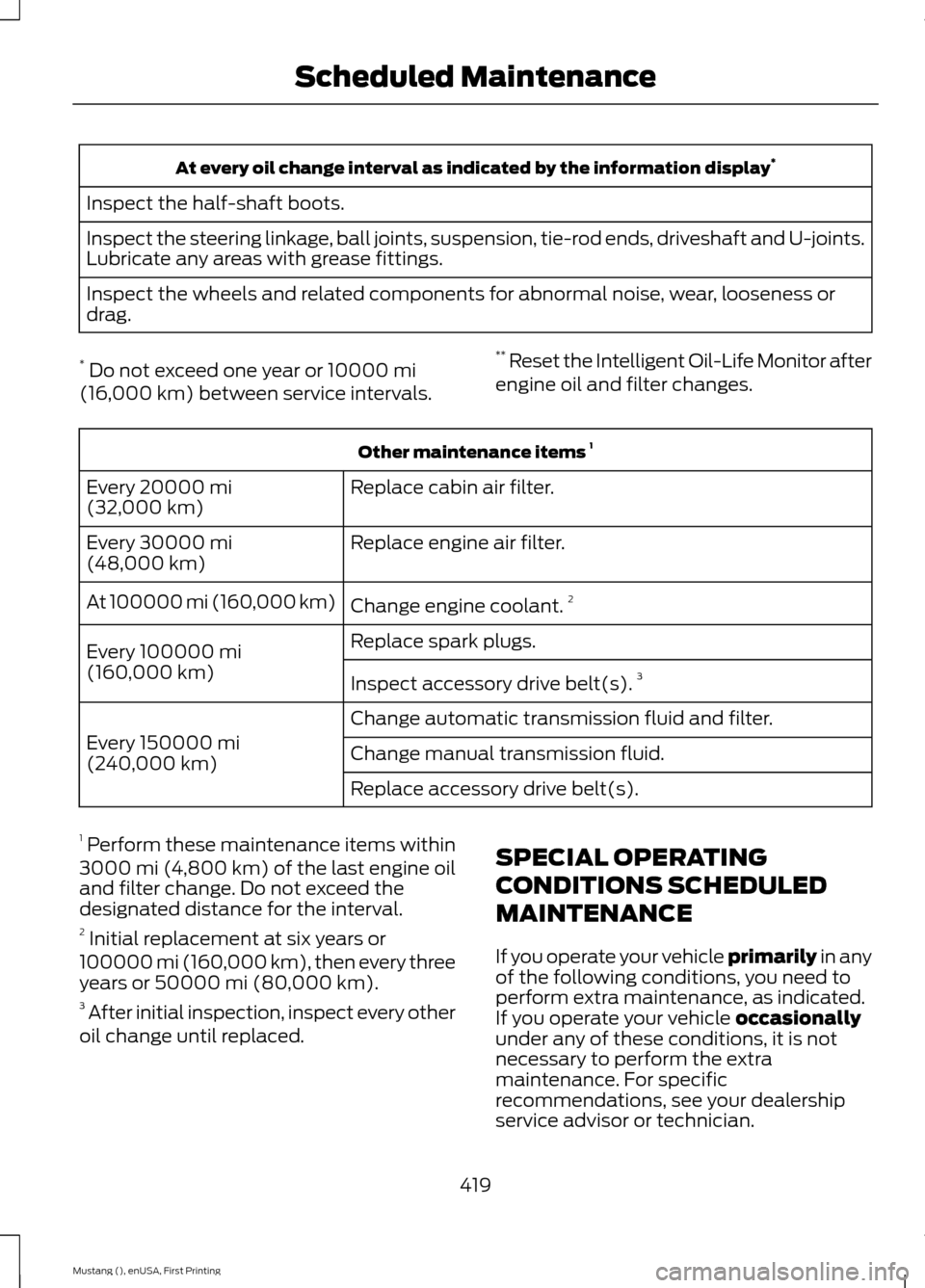
At every oil change interval as indicated by the information display
*
Inspect the half-shaft boots.
Inspect the steering linkage, ball joints, suspension, tie-rod ends, driveshaft and U-joints.
Lubricate any areas with grease fittings.
Inspect the wheels and related components for abnormal noise, wear, looseness or
drag.
* Do not exceed one year or 10000 mi
(16,000 km) between service intervals. **
Reset the Intelligent Oil-Life Monitor after
engine oil and filter changes. Other maintenance items
1
Replace cabin air filter.
Every
20000 mi
(32,000 km)
Replace engine air filter.
Every
30000 mi
(48,000 km)
Change engine coolant.2
At 100000 mi (160,000 km)
Replace spark plugs.
Every
100000 mi
(160,000 km) Inspect accessory drive belt(s). 3
Change automatic transmission fluid and filter.
Every
150000 mi
(240,000 km) Change manual transmission fluid.
Replace accessory drive belt(s).
1 Perform these maintenance items within
3000 mi (4,800 km) of the last engine oil
and filter change. Do not exceed the
designated distance for the interval.
2 Initial replacement at six years or
100000 mi (160,000 km)
, then every three
years or 50000 mi (80,000 km).
3 After initial inspection, inspect every other
oil change until replaced. SPECIAL OPERATING
CONDITIONS SCHEDULED
MAINTENANCE
If you operate your vehicle primarily
in any
of the following conditions, you need to
perform extra maintenance, as indicated.
If you operate your vehicle
occasionally
under any of these conditions, it is not
necessary to perform the extra
maintenance. For specific
recommendations, see your dealership
service advisor or technician.
419
Mustang (), enUSA, First Printing Scheduled Maintenance
Page 432 of 441
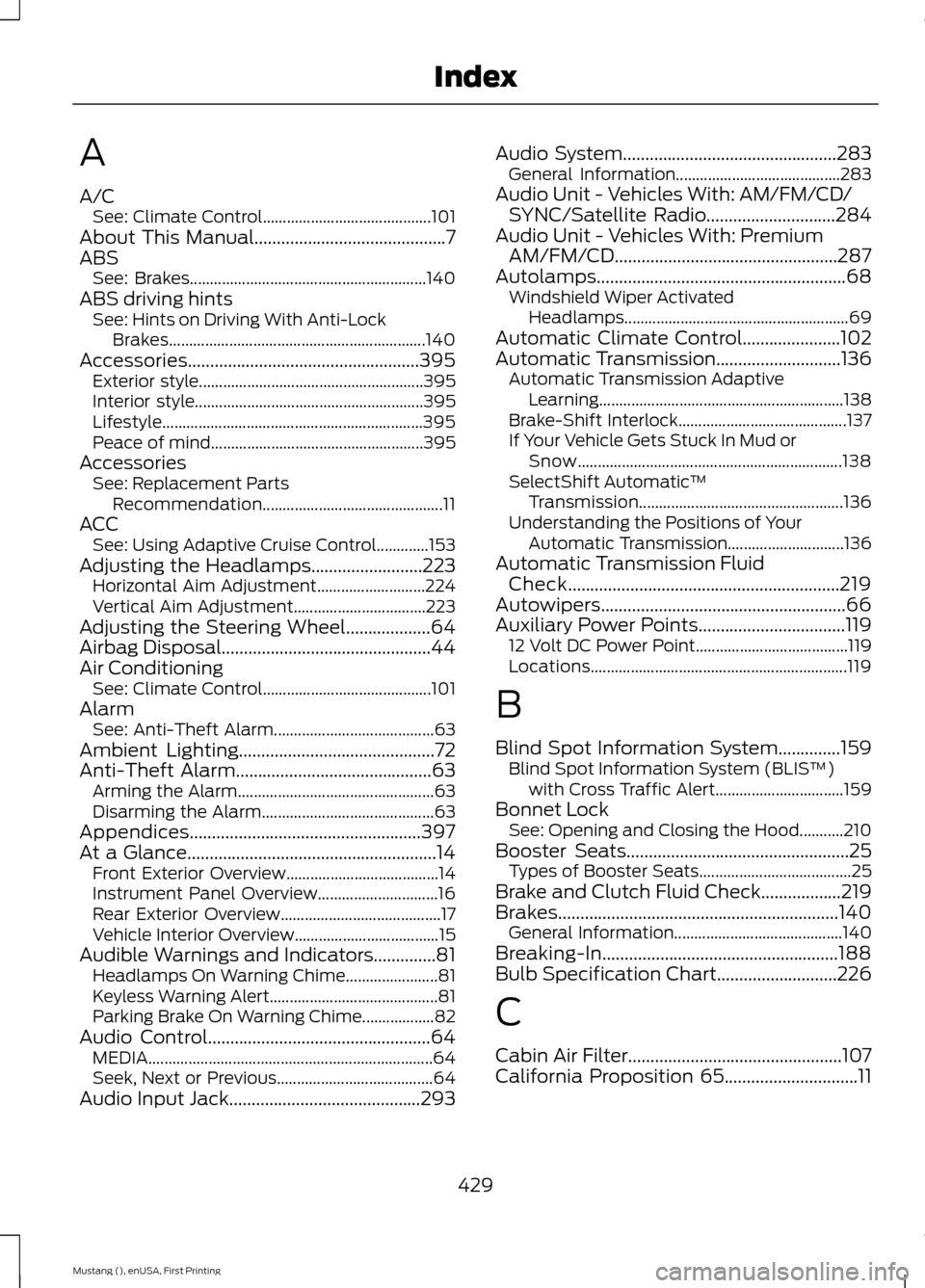
A
A/C
See: Climate Control.......................................... 101
About This Manual...........................................7
ABS See: Brakes........................................................... 140
ABS driving hints See: Hints on Driving With Anti-Lock
Brakes................................................................ 140
Accessories....................................................395 Exterior style........................................................ 395
Interior style......................................................... 395
Lifestyle................................................................. 395
Peace of mind..................................................... 395
Accessories See: Replacement Parts
Recommendation............................................. 11
ACC See: Using Adaptive Cruise Control.............153
Adjusting the Headlamps
.........................223
Horizontal Aim Adjustment........................... 224
Vertical Aim Adjustment................................. 223
Adjusting the Steering Wheel...................64
Airbag Disposal...............................................44
Air Conditioning See: Climate Control.......................................... 101
Alarm See: Anti-Theft Alarm........................................ 63
Ambient Lighting............................................72
Anti-Theft Alarm
............................................63
Arming the Alarm................................................. 63
Disarming the Alarm........................................... 63
Appendices....................................................397
At a Glance........................................................14 Front Exterior Overview...................................... 14
Instrument Panel Overview.............................. 16
Rear Exterior Overview........................................ 17
Vehicle Interior Overview.................................... 15
Audible Warnings and Indicators
..............81
Headlamps On Warning Chime....................... 81
Keyless Warning Alert.......................................... 81
Parking Brake On Warning Chime.................. 82
Audio Control..................................................64 MEDIA....................................................................... 64
Seek, Next or Previous....................................... 64
Audio Input Jack...........................................293 Audio System
................................................283
General Information......................................... 283
Audio Unit - Vehicles With: AM/FM/CD/ SYNC/Satellite Radio
.............................284
Audio Unit - Vehicles With: Premium AM/FM/CD..................................................287
Autolamps
........................................................68
Windshield Wiper Activated
Headlamps........................................................ 69
Automatic Climate Control......................102
Automatic Transmission............................136 Automatic Transmission Adaptive
Learning............................................................. 138
Brake-Shift Interlock.......................................... 137
If Your Vehicle Gets Stuck In Mud or Snow.................................................................. 138
SelectShift Automatic ™
Transmission................................................... 136
Understanding the Positions of Your Automatic Transmission............................. 136
Automatic Transmission Fluid Check.............................................................219
Autowipers.......................................................66
Auxiliary Power Points.................................119 12 Volt DC Power Point...................................... 119
Locations................................................................ 119
B
Blind Spot Information System..............159 Blind Spot Information System (BLIS ™)
with Cross Traffic Alert................................ 159
Bonnet Lock See: Opening and Closing the Hood...........210
Booster Seats..................................................25 Types of Booster Seats...................................... 25
Brake and Clutch Fluid Check..................219
Brakes...............................................................140 General Information.......................................... 140
Breaking-In.....................................................188
Bulb Specification Chart...........................226
C
Cabin Air Filter................................................107
California Proposition 65..............................11
429
Mustang (), enUSA, First Printing Index