ignition FORD MUSTANG 2023 Owner's Manual
[x] Cancel search | Manufacturer: FORD, Model Year: 2023, Model line: MUSTANG, Model: FORD MUSTANG 2023Pages: 535, PDF Size: 15.46 MB
Page 99 of 535
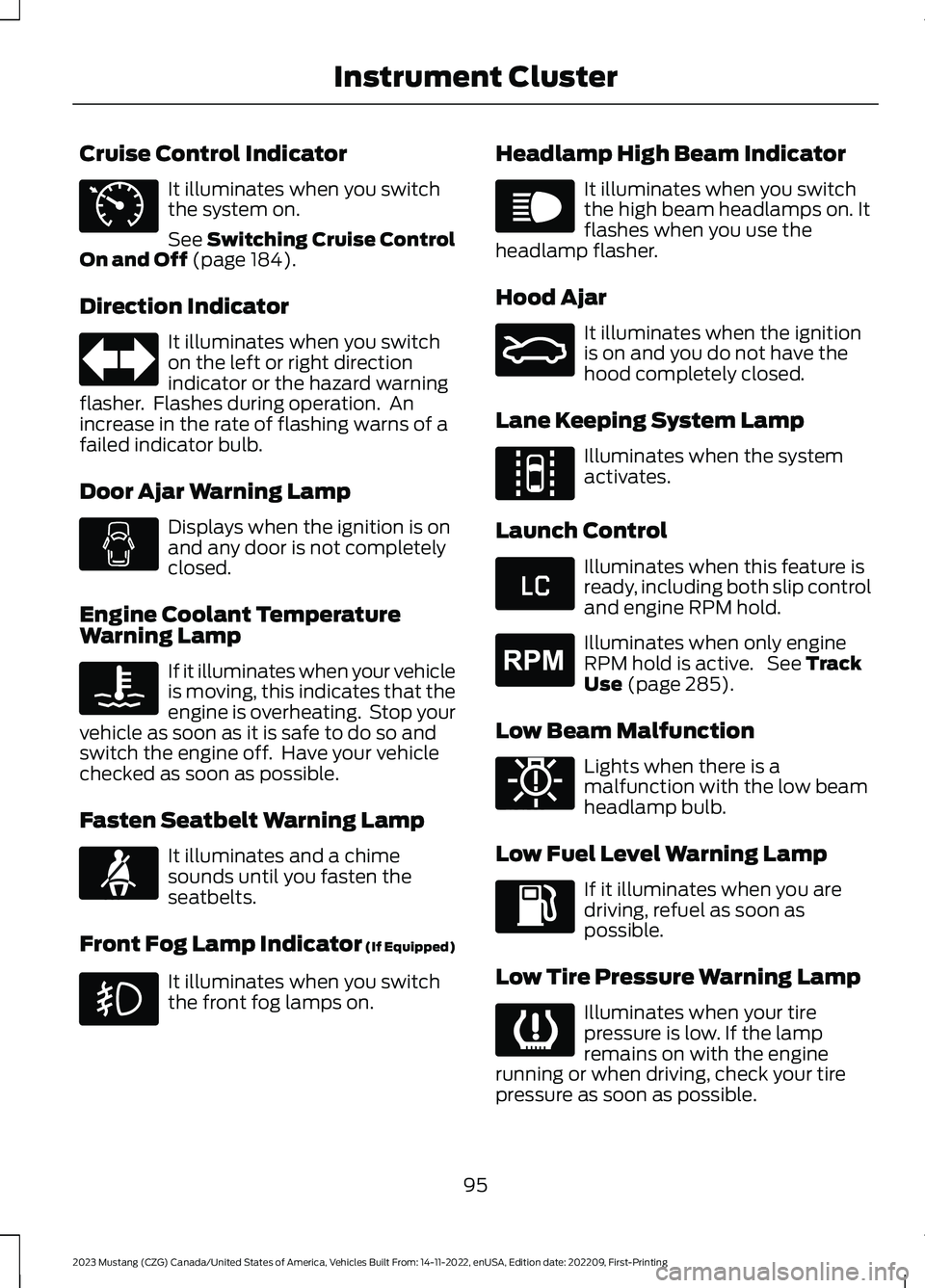
Cruise Control Indicator
It illuminates when you switchthe system on.
See Switching Cruise ControlOn and Off (page 184).
Direction Indicator
It illuminates when you switchon the left or right directionindicator or the hazard warningflasher. Flashes during operation. Anincrease in the rate of flashing warns of afailed indicator bulb.
Door Ajar Warning Lamp
Displays when the ignition is onand any door is not completelyclosed.
Engine Coolant TemperatureWarning Lamp
If it illuminates when your vehicleis moving, this indicates that theengine is overheating. Stop yourvehicle as soon as it is safe to do so andswitch the engine off. Have your vehiclechecked as soon as possible.
Fasten Seatbelt Warning Lamp
It illuminates and a chimesounds until you fasten theseatbelts.
Front Fog Lamp Indicator (If Equipped)
It illuminates when you switchthe front fog lamps on.
Headlamp High Beam Indicator
It illuminates when you switchthe high beam headlamps on. Itflashes when you use theheadlamp flasher.
Hood Ajar
It illuminates when the ignitionis on and you do not have thehood completely closed.
Lane Keeping System Lamp
Illuminates when the systemactivates.
Launch Control
Illuminates when this feature isready, including both slip controland engine RPM hold.
Illuminates when only engineRPM hold is active. See TrackUse (page 285).
Low Beam Malfunction
Lights when there is amalfunction with the low beamheadlamp bulb.
Low Fuel Level Warning Lamp
If it illuminates when you aredriving, refuel as soon aspossible.
Low Tire Pressure Warning Lamp
Illuminates when your tirepressure is low. If the lampremains on with the enginerunning or when driving, check your tirepressure as soon as possible.
95
2023 Mustang (CZG) Canada/United States of America, Vehicles Built From: 14-11-2022, enUSA, Edition date: 202209, First-PrintingInstrument ClusterE71340 E67018 E103308 E71880 E67019 E159324 E144813 E234583 E255688 E181350 E139232
Page 100 of 535
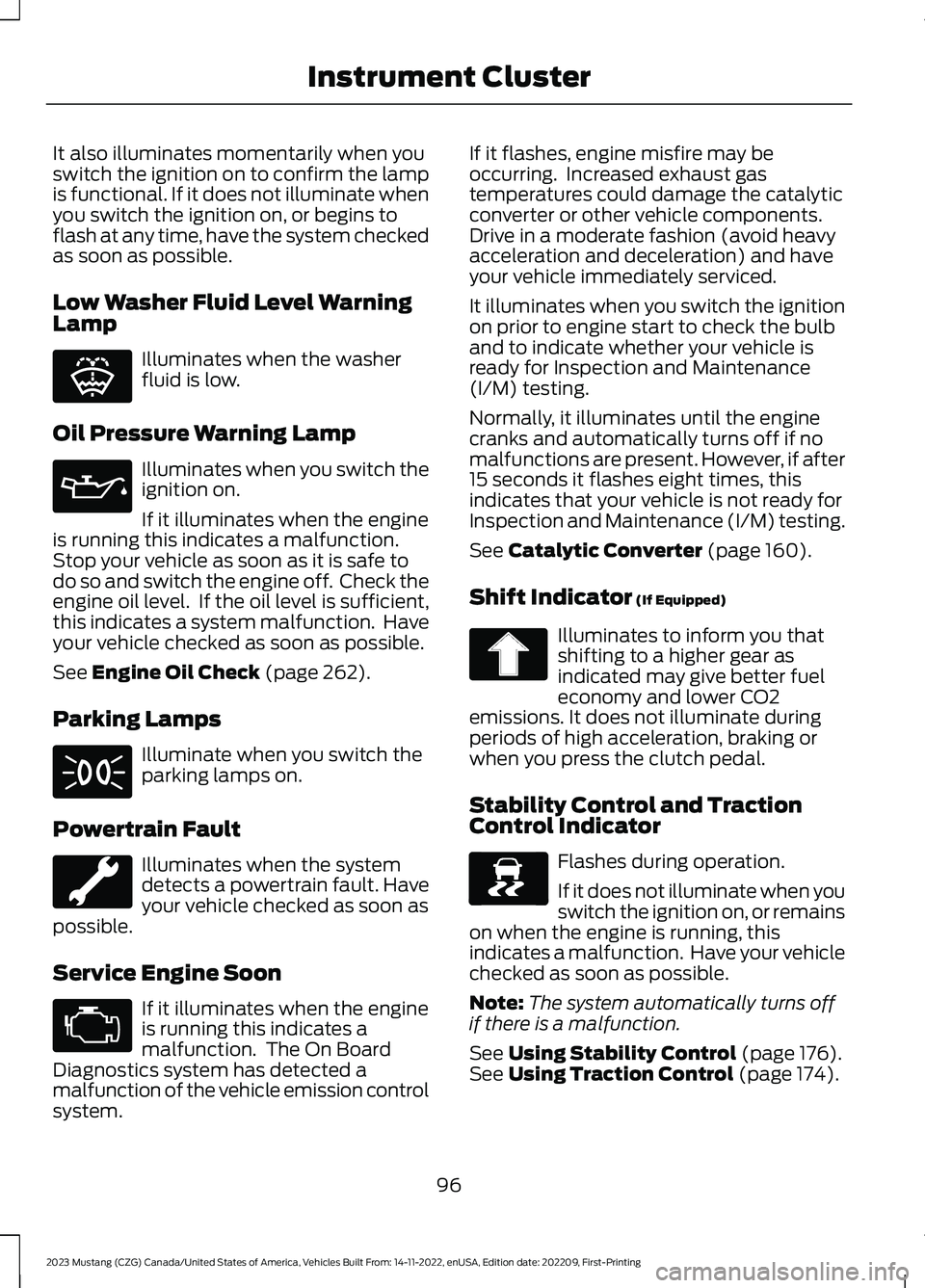
It also illuminates momentarily when youswitch the ignition on to confirm the lampis functional. If it does not illuminate whenyou switch the ignition on, or begins toflash at any time, have the system checkedas soon as possible.
Low Washer Fluid Level WarningLamp
Illuminates when the washerfluid is low.
Oil Pressure Warning Lamp
Illuminates when you switch theignition on.
If it illuminates when the engineis running this indicates a malfunction.Stop your vehicle as soon as it is safe todo so and switch the engine off. Check theengine oil level. If the oil level is sufficient,this indicates a system malfunction. Haveyour vehicle checked as soon as possible.
See Engine Oil Check (page 262).
Parking Lamps
Illuminate when you switch theparking lamps on.
Powertrain Fault
Illuminates when the systemdetects a powertrain fault. Haveyour vehicle checked as soon aspossible.
Service Engine Soon
If it illuminates when the engineis running this indicates amalfunction. The On BoardDiagnostics system has detected amalfunction of the vehicle emission controlsystem.
If it flashes, engine misfire may beoccurring. Increased exhaust gastemperatures could damage the catalyticconverter or other vehicle components.Drive in a moderate fashion (avoid heavyacceleration and deceleration) and haveyour vehicle immediately serviced.
It illuminates when you switch the ignitionon prior to engine start to check the bulband to indicate whether your vehicle isready for Inspection and Maintenance(I/M) testing.
Normally, it illuminates until the enginecranks and automatically turns off if nomalfunctions are present. However, if after15 seconds it flashes eight times, thisindicates that your vehicle is not ready forInspection and Maintenance (I/M) testing.
See Catalytic Converter (page 160).
Shift Indicator (If Equipped)
Illuminates to inform you thatshifting to a higher gear asindicated may give better fueleconomy and lower CO2emissions. It does not illuminate duringperiods of high acceleration, braking orwhen you press the clutch pedal.
Stability Control and TractionControl Indicator
Flashes during operation.
If it does not illuminate when youswitch the ignition on, or remainson when the engine is running, thisindicates a malfunction. Have your vehiclechecked as soon as possible.
Note:The system automatically turns offif there is a malfunction.
See Using Stability Control (page 176).See Using Traction Control (page 174).
96
2023 Mustang (CZG) Canada/United States of America, Vehicles Built From: 14-11-2022, enUSA, Edition date: 202209, First-PrintingInstrument ClusterE132353 E67022 E71341 E67028 E138639
Page 101 of 535
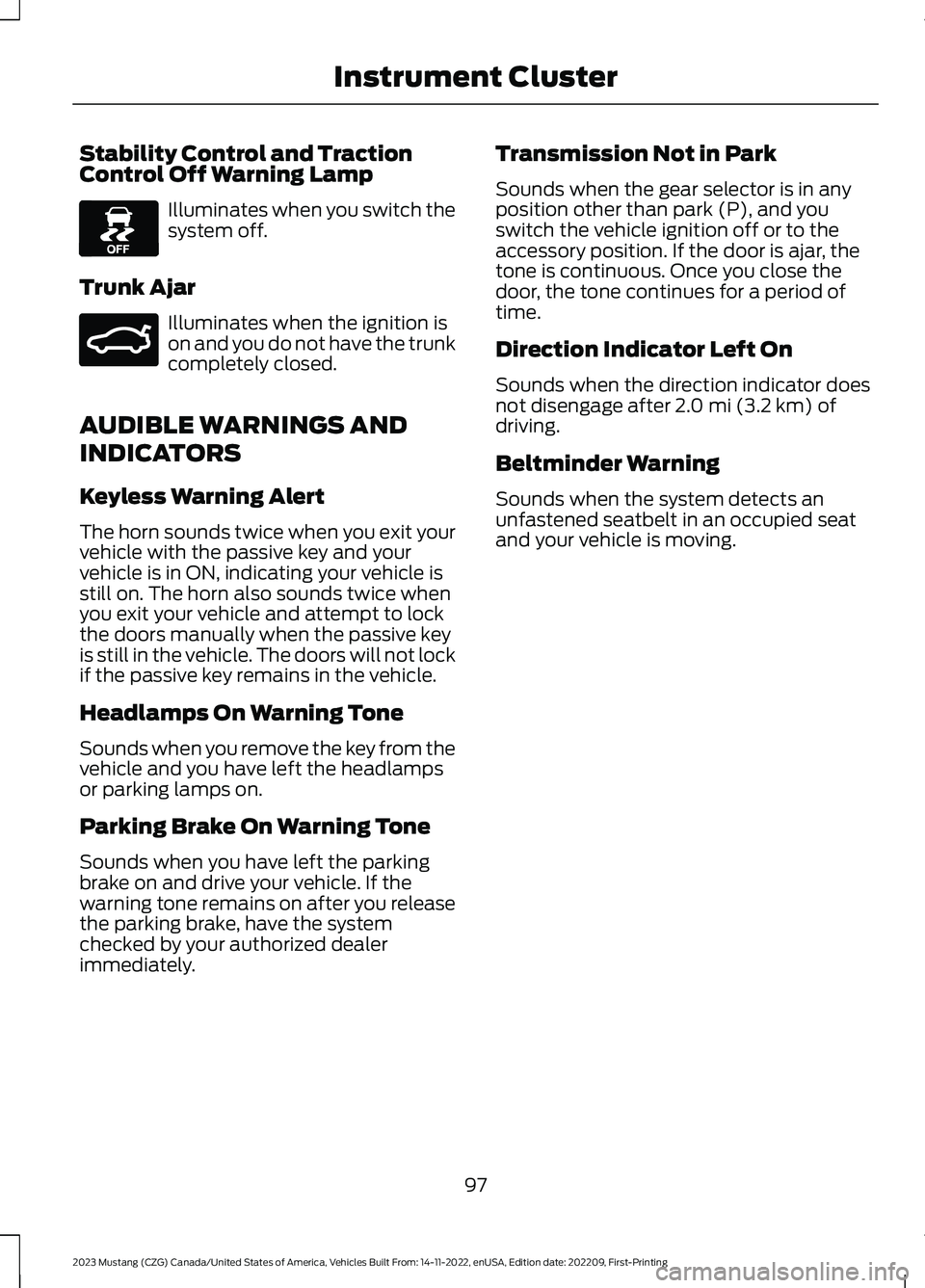
Stability Control and TractionControl Off Warning Lamp
Illuminates when you switch thesystem off.
Trunk Ajar
Illuminates when the ignition ison and you do not have the trunkcompletely closed.
AUDIBLE WARNINGS AND
INDICATORS
Keyless Warning Alert
The horn sounds twice when you exit yourvehicle with the passive key and yourvehicle is in ON, indicating your vehicle isstill on. The horn also sounds twice whenyou exit your vehicle and attempt to lockthe doors manually when the passive keyis still in the vehicle. The doors will not lockif the passive key remains in the vehicle.
Headlamps On Warning Tone
Sounds when you remove the key from thevehicle and you have left the headlampsor parking lamps on.
Parking Brake On Warning Tone
Sounds when you have left the parkingbrake on and drive your vehicle. If thewarning tone remains on after you releasethe parking brake, have the systemchecked by your authorized dealerimmediately.
Transmission Not in Park
Sounds when the gear selector is in anyposition other than park (P), and youswitch the vehicle ignition off or to theaccessory position. If the door is ajar, thetone is continuous. Once you close thedoor, the tone continues for a period oftime.
Direction Indicator Left On
Sounds when the direction indicator doesnot disengage after 2.0 mi (3.2 km) ofdriving.
Beltminder Warning
Sounds when the system detects anunfastened seatbelt in an occupied seatand your vehicle is moving.
97
2023 Mustang (CZG) Canada/United States of America, Vehicles Built From: 14-11-2022, enUSA, Edition date: 202209, First-PrintingInstrument ClusterE130458 E159323
Page 118 of 535
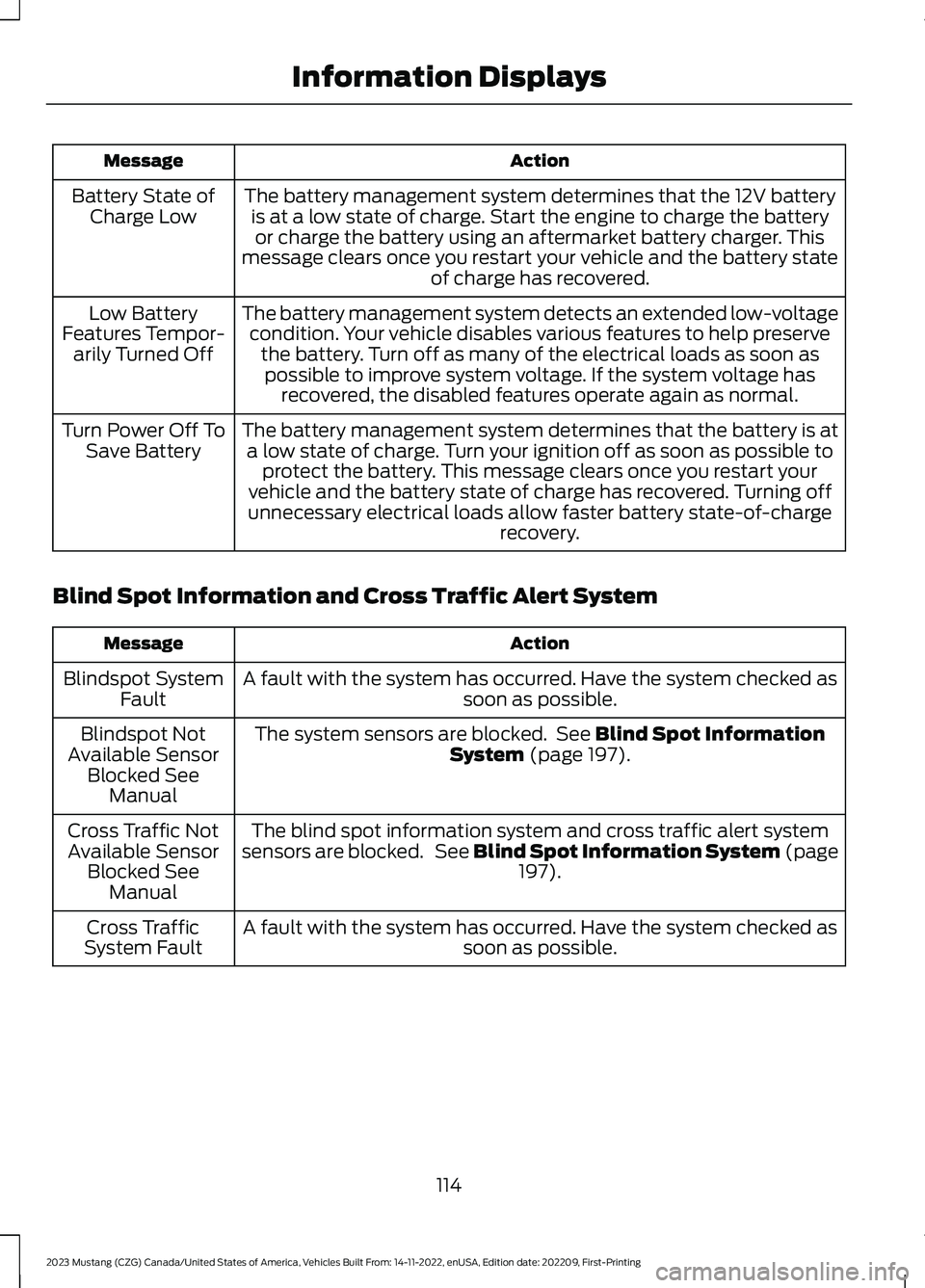
ActionMessage
The battery management system determines that the 12V batteryis at a low state of charge. Start the engine to charge the batteryor charge the battery using an aftermarket battery charger. Thismessage clears once you restart your vehicle and the battery stateof charge has recovered.
Battery State ofCharge Low
The battery management system detects an extended low-voltagecondition. Your vehicle disables various features to help preservethe battery. Turn off as many of the electrical loads as soon aspossible to improve system voltage. If the system voltage hasrecovered, the disabled features operate again as normal.
Low BatteryFeatures Tempor-arily Turned Off
The battery management system determines that the battery is ata low state of charge. Turn your ignition off as soon as possible toprotect the battery. This message clears once you restart yourvehicle and the battery state of charge has recovered. Turning offunnecessary electrical loads allow faster battery state-of-chargerecovery.
Turn Power Off ToSave Battery
Blind Spot Information and Cross Traffic Alert System
ActionMessage
A fault with the system has occurred. Have the system checked assoon as possible.Blindspot SystemFault
The system sensors are blocked. See Blind Spot InformationSystem (page 197).Blindspot NotAvailable SensorBlocked SeeManual
The blind spot information system and cross traffic alert systemsensors are blocked. See Blind Spot Information System (page197).
Cross Traffic NotAvailable SensorBlocked SeeManual
A fault with the system has occurred. Have the system checked assoon as possible.Cross TrafficSystem Fault
114
2023 Mustang (CZG) Canada/United States of America, Vehicles Built From: 14-11-2022, enUSA, Edition date: 202209, First-PrintingInformation Displays
Page 120 of 535
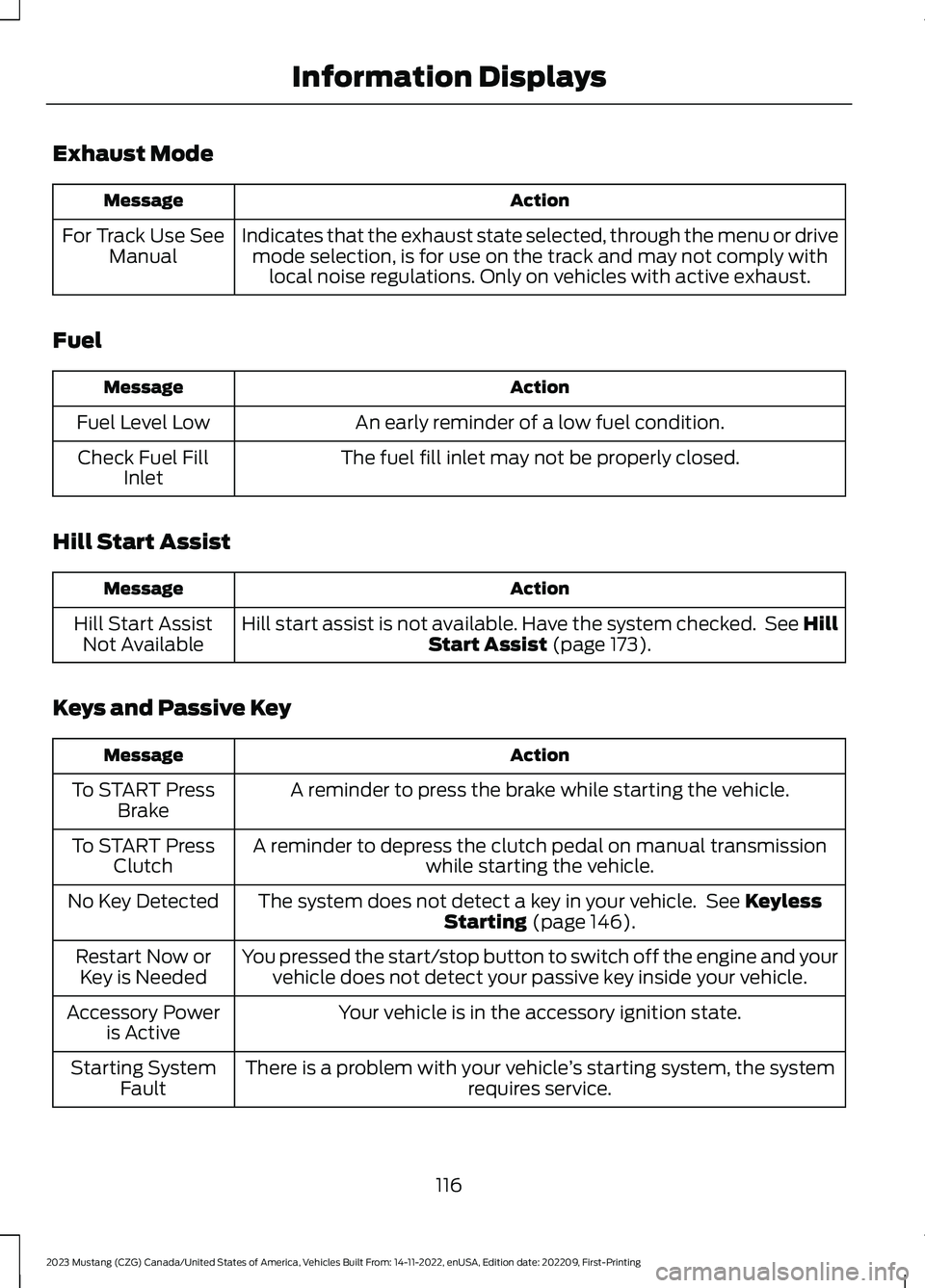
Exhaust Mode
ActionMessage
Indicates that the exhaust state selected, through the menu or drivemode selection, is for use on the track and may not comply withlocal noise regulations. Only on vehicles with active exhaust.
For Track Use SeeManual
Fuel
ActionMessage
An early reminder of a low fuel condition.Fuel Level Low
The fuel fill inlet may not be properly closed.Check Fuel FillInlet
Hill Start Assist
ActionMessage
Hill start assist is not available. Have the system checked. See HillStart Assist (page 173).Hill Start AssistNot Available
Keys and Passive Key
ActionMessage
A reminder to press the brake while starting the vehicle.To START PressBrake
A reminder to depress the clutch pedal on manual transmissionwhile starting the vehicle.To START PressClutch
The system does not detect a key in your vehicle. See KeylessStarting (page 146).No Key Detected
You pressed the start/stop button to switch off the engine and yourvehicle does not detect your passive key inside your vehicle.Restart Now orKey is Needed
Your vehicle is in the accessory ignition state.Accessory Poweris Active
There is a problem with your vehicle’s starting system, the systemrequires service.Starting SystemFault
116
2023 Mustang (CZG) Canada/United States of America, Vehicles Built From: 14-11-2022, enUSA, Edition date: 202209, First-PrintingInformation Displays
Page 127 of 535
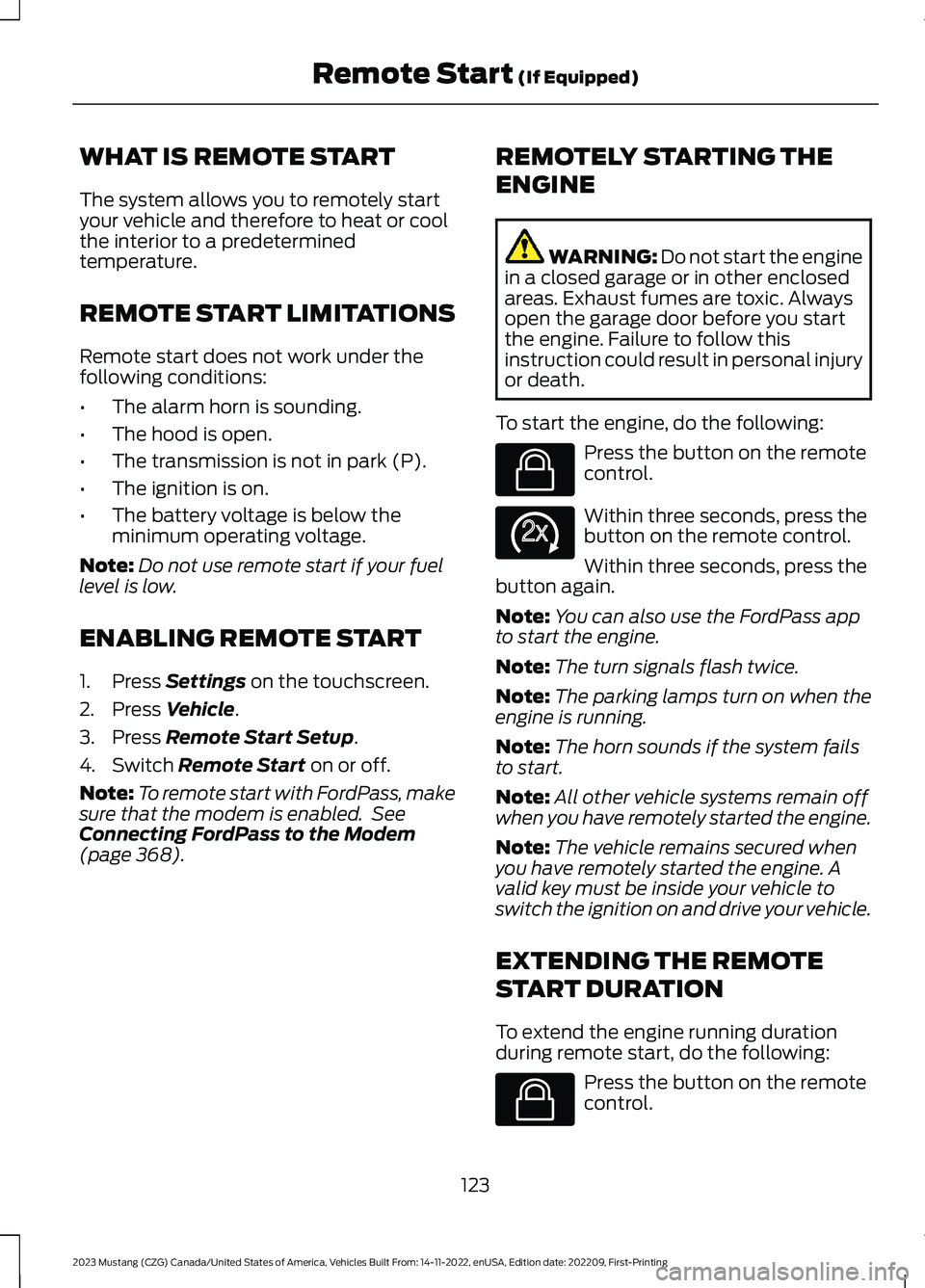
WHAT IS REMOTE START
The system allows you to remotely startyour vehicle and therefore to heat or coolthe interior to a predeterminedtemperature.
REMOTE START LIMITATIONS
Remote start does not work under thefollowing conditions:
•The alarm horn is sounding.
•The hood is open.
•The transmission is not in park (P).
•The ignition is on.
•The battery voltage is below theminimum operating voltage.
Note:Do not use remote start if your fuellevel is low.
ENABLING REMOTE START
1.Press Settings on the touchscreen.
2.Press Vehicle.
3.Press Remote Start Setup.
4.Switch Remote Start on or off.
Note:To remote start with FordPass, makesure that the modem is enabled. SeeConnecting FordPass to the Modem(page 368).
REMOTELY STARTING THE
ENGINE
WARNING: Do not start the enginein a closed garage or in other enclosedareas. Exhaust fumes are toxic. Alwaysopen the garage door before you startthe engine. Failure to follow thisinstruction could result in personal injuryor death.
To start the engine, do the following:
Press the button on the remotecontrol.
Within three seconds, press thebutton on the remote control.
Within three seconds, press thebutton again.
Note:You can also use the FordPass appto start the engine.
Note:The turn signals flash twice.
Note:The parking lamps turn on when theengine is running.
Note:The horn sounds if the system failsto start.
Note:All other vehicle systems remain offwhen you have remotely started the engine.
Note:The vehicle remains secured whenyou have remotely started the engine. Avalid key must be inside your vehicle toswitch the ignition on and drive your vehicle.
EXTENDING THE REMOTE
START DURATION
To extend the engine running durationduring remote start, do the following:
Press the button on the remotecontrol.
123
2023 Mustang (CZG) Canada/United States of America, Vehicles Built From: 14-11-2022, enUSA, Edition date: 202209, First-PrintingRemote Start (If Equipped)E138623 E138625 E138623
Page 128 of 535
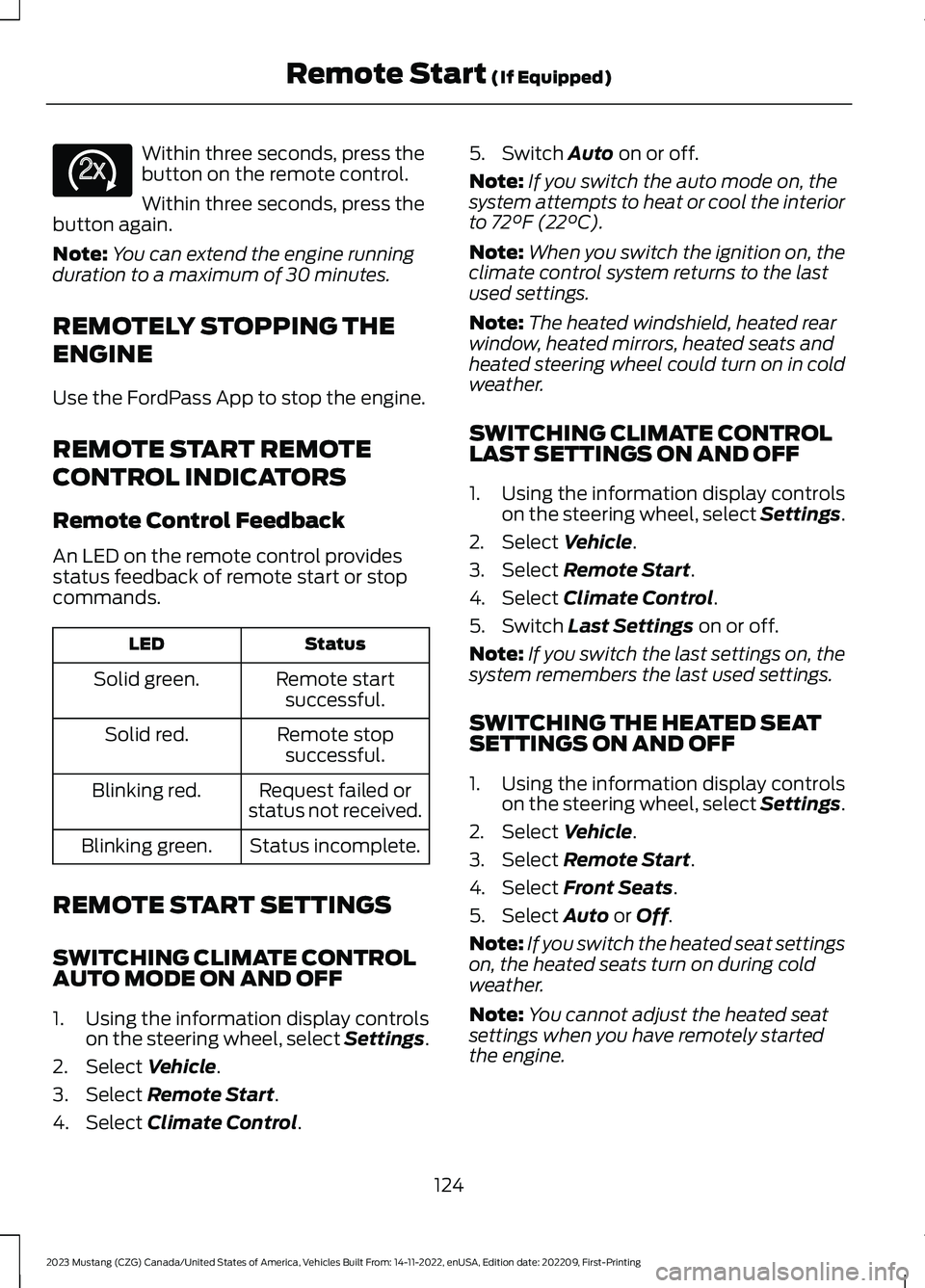
Within three seconds, press thebutton on the remote control.
Within three seconds, press thebutton again.
Note:You can extend the engine runningduration to a maximum of 30 minutes.
REMOTELY STOPPING THE
ENGINE
Use the FordPass App to stop the engine.
REMOTE START REMOTE
CONTROL INDICATORS
Remote Control Feedback
An LED on the remote control providesstatus feedback of remote start or stopcommands.
StatusLED
Remote startsuccessful.Solid green.
Remote stopsuccessful.Solid red.
Request failed orstatus not received.Blinking red.
Status incomplete.Blinking green.
REMOTE START SETTINGS
SWITCHING CLIMATE CONTROLAUTO MODE ON AND OFF
1.Using the information display controlson the steering wheel, select Settings.
2.Select Vehicle.
3.Select Remote Start.
4.Select Climate Control.
5.Switch Auto on or off.
Note:If you switch the auto mode on, thesystem attempts to heat or cool the interiorto 72°F (22°C).
Note:When you switch the ignition on, theclimate control system returns to the lastused settings.
Note:The heated windshield, heated rearwindow, heated mirrors, heated seats andheated steering wheel could turn on in coldweather.
SWITCHING CLIMATE CONTROLLAST SETTINGS ON AND OFF
1.Using the information display controlson the steering wheel, select Settings.
2.Select Vehicle.
3.Select Remote Start.
4.Select Climate Control.
5.Switch Last Settings on or off.
Note:If you switch the last settings on, thesystem remembers the last used settings.
SWITCHING THE HEATED SEATSETTINGS ON AND OFF
1.Using the information display controlson the steering wheel, select Settings.
2.Select Vehicle.
3.Select Remote Start.
4.Select Front Seats.
5.Select Auto or Off.
Note:If you switch the heated seat settingson, the heated seats turn on during coldweather.
Note:You cannot adjust the heated seatsettings when you have remotely startedthe engine.
124
2023 Mustang (CZG) Canada/United States of America, Vehicles Built From: 14-11-2022, enUSA, Edition date: 202209, First-PrintingRemote Start (If Equipped)E138625
Page 141 of 535
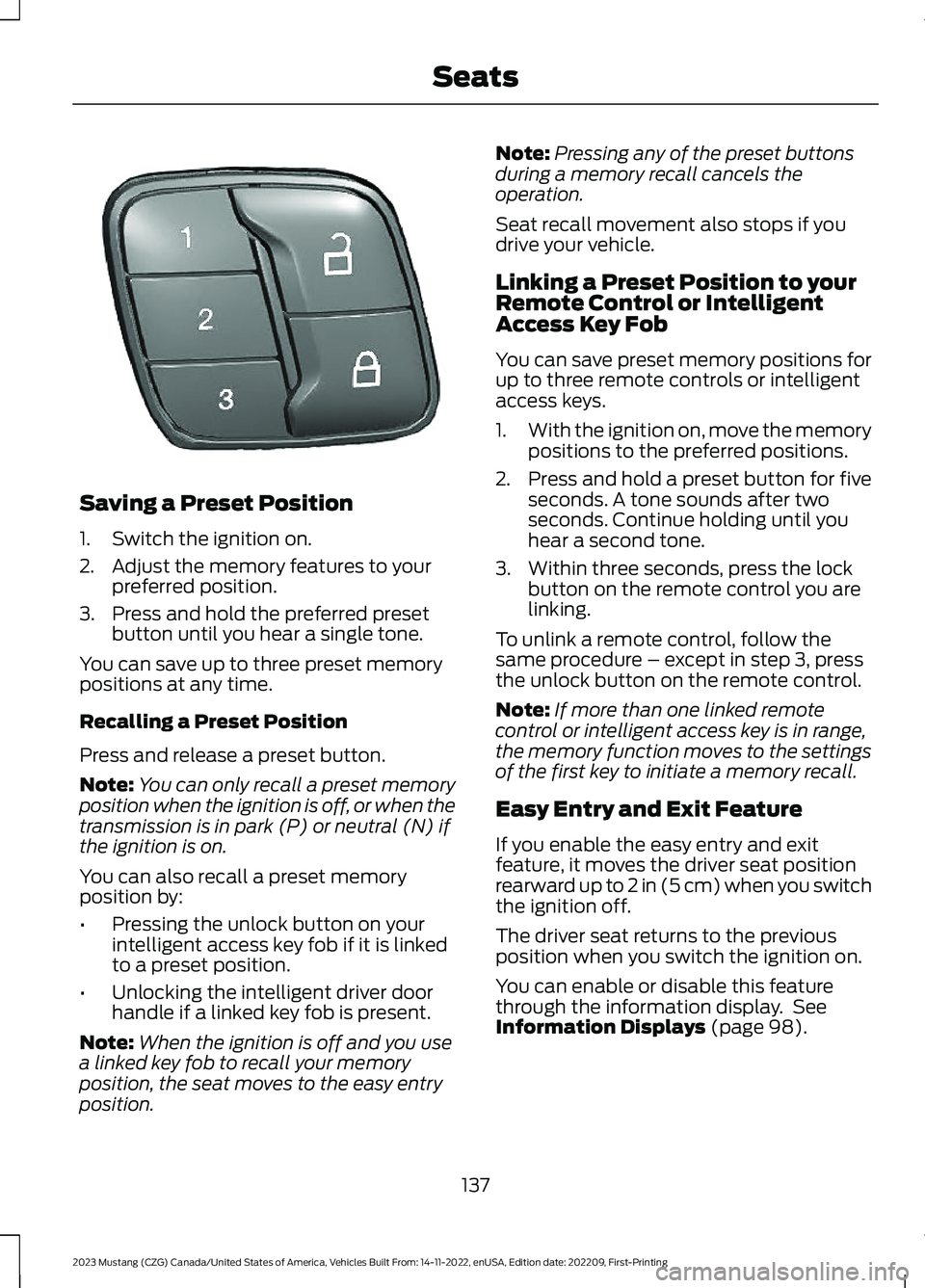
Saving a Preset Position
1.Switch the ignition on.
2.Adjust the memory features to yourpreferred position.
3.Press and hold the preferred presetbutton until you hear a single tone.
You can save up to three preset memorypositions at any time.
Recalling a Preset Position
Press and release a preset button.
Note:You can only recall a preset memoryposition when the ignition is off, or when thetransmission is in park (P) or neutral (N) ifthe ignition is on.
You can also recall a preset memoryposition by:
•Pressing the unlock button on yourintelligent access key fob if it is linkedto a preset position.
•Unlocking the intelligent driver doorhandle if a linked key fob is present.
Note:When the ignition is off and you usea linked key fob to recall your memoryposition, the seat moves to the easy entryposition.
Note:Pressing any of the preset buttonsduring a memory recall cancels theoperation.
Seat recall movement also stops if youdrive your vehicle.
Linking a Preset Position to yourRemote Control or IntelligentAccess Key Fob
You can save preset memory positions forup to three remote controls or intelligentaccess keys.
1.With the ignition on, move the memorypositions to the preferred positions.
2.Press and hold a preset button for fiveseconds. A tone sounds after twoseconds. Continue holding until youhear a second tone.
3.Within three seconds, press the lockbutton on the remote control you arelinking.
To unlink a remote control, follow thesame procedure – except in step 3, pressthe unlock button on the remote control.
Note:If more than one linked remotecontrol or intelligent access key is in range,the memory function moves to the settingsof the first key to initiate a memory recall.
Easy Entry and Exit Feature
If you enable the easy entry and exitfeature, it moves the driver seat positionrearward up to 2 in (5 cm) when you switchthe ignition off.
The driver seat returns to the previousposition when you switch the ignition on.
You can enable or disable this featurethrough the information display. SeeInformation Displays (page 98).
137
2023 Mustang (CZG) Canada/United States of America, Vehicles Built From: 14-11-2022, enUSA, Edition date: 202209, First-PrintingSeatsE331901
Page 145 of 535
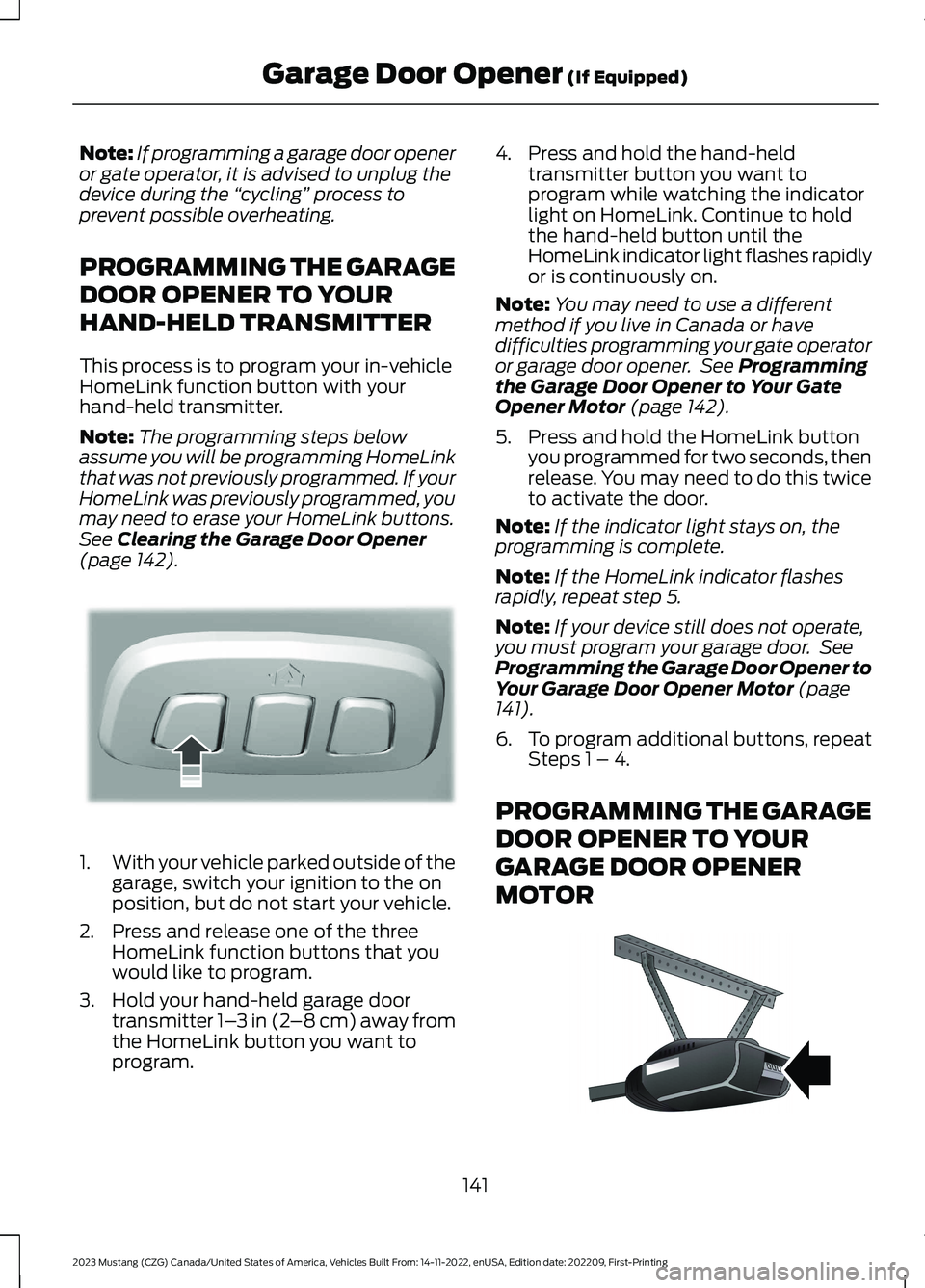
Note:If programming a garage door openeror gate operator, it is advised to unplug thedevice during the “cycling” process toprevent possible overheating.
PROGRAMMING THE GARAGE
DOOR OPENER TO YOUR
HAND-HELD TRANSMITTER
This process is to program your in-vehicleHomeLink function button with yourhand-held transmitter.
Note:The programming steps belowassume you will be programming HomeLinkthat was not previously programmed. If yourHomeLink was previously programmed, youmay need to erase your HomeLink buttons.See Clearing the Garage Door Opener(page 142).
1.With your vehicle parked outside of thegarage, switch your ignition to the onposition, but do not start your vehicle.
2.Press and release one of the threeHomeLink function buttons that youwould like to program.
3.Hold your hand-held garage doortransmitter 1–3 in (2–8 cm) away fromthe HomeLink button you want toprogram.
4.Press and hold the hand-heldtransmitter button you want toprogram while watching the indicatorlight on HomeLink. Continue to holdthe hand-held button until theHomeLink indicator light flashes rapidlyor is continuously on.
Note:You may need to use a differentmethod if you live in Canada or havedifficulties programming your gate operatoror garage door opener. See Programmingthe Garage Door Opener to Your GateOpener Motor (page 142).
5.Press and hold the HomeLink buttonyou programmed for two seconds, thenrelease. You may need to do this twiceto activate the door.
Note:If the indicator light stays on, theprogramming is complete.
Note:If the HomeLink indicator flashesrapidly, repeat step 5.
Note:If your device still does not operate,you must program your garage door. SeeProgramming the Garage Door Opener toYour Garage Door Opener Motor (page141).
6.To program additional buttons, repeatSteps 1 – 4.
PROGRAMMING THE GARAGE
DOOR OPENER TO YOUR
GARAGE DOOR OPENER
MOTOR
141
2023 Mustang (CZG) Canada/United States of America, Vehicles Built From: 14-11-2022, enUSA, Edition date: 202209, First-PrintingGarage Door Opener (If Equipped)E188212 E142659
Page 148 of 535
12 Volt DC Power Point
WARNING: Do not plug optionalelectrical accessories into the cigarlighter socket. Incorrect use of the cigarlighter can cause damage not coveredby the vehicle warranty, and can resultin fire or serious injury.
Note:When you switch the ignition on, youcan use the socket to power 12 voltappliances with a maximum current ratingof 15 amps.
If the power supply does not work after youswitch the ignition off, switch the ignitionon.Note:Do not hang any accessory from theaccessory plug.
Note:Do not use the power point over thevehicle capacity of 12 volt DC 180 watts ora fuse may blow.
Note:Always keep the power point capsclosed when not in use.
Do not insert objects other than anaccessory plug into the power point. Thisdamages the power point and may blowthe fuse.
Run the vehicle for full capacity use of thepower point.
To prevent the battery from running out ofcharge:
•Do not use the power point longer thannecessary when the vehicle is notrunning.
•Do not leave devices plugged inovernight or when you park your vehiclefor extended periods.
Locations
Power points may be in the followinglocations:
•On the front of the center console.
•Inside the center console.
144
2023 Mustang (CZG) Canada/United States of America, Vehicles Built From: 14-11-2022, enUSA, Edition date: 202209, First-PrintingAuxiliary Power Points