instrument cluster FORD MUSTANG MACH E 2023 User Guide
[x] Cancel search | Manufacturer: FORD, Model Year: 2023, Model line: MUSTANG MACH E, Model: FORD MUSTANG MACH E 2023Pages: 496, PDF Size: 13.09 MB
Page 133 of 496
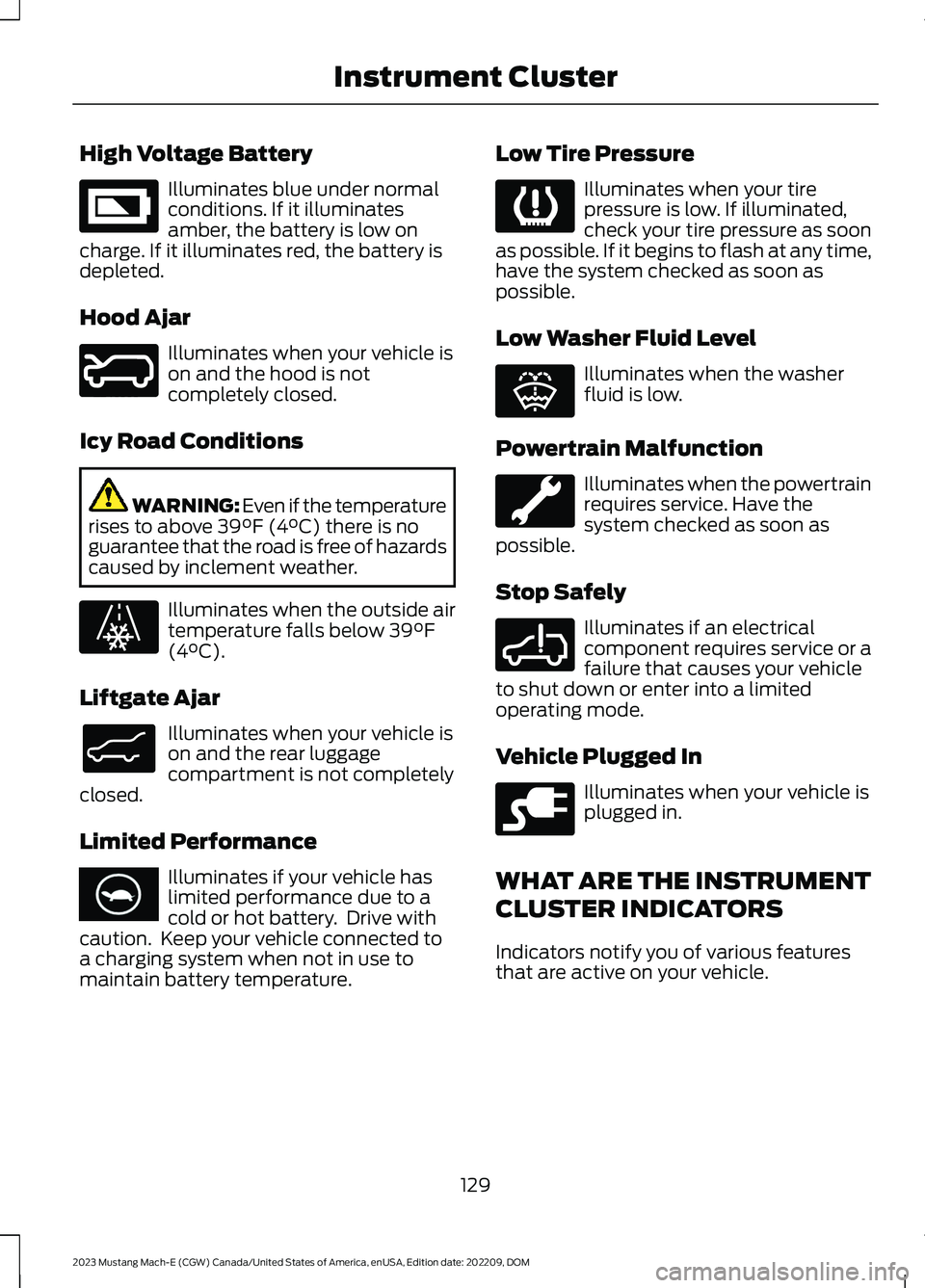
High Voltage Battery
Illuminates blue under normalconditions. If it illuminatesamber, the battery is low oncharge. If it illuminates red, the battery isdepleted.
Hood Ajar
Illuminates when your vehicle ison and the hood is notcompletely closed.
Icy Road Conditions
WARNING: Even if the temperaturerises to above 39°F (4°C) there is noguarantee that the road is free of hazardscaused by inclement weather.
Illuminates when the outside airtemperature falls below 39°F(4°C).
Liftgate Ajar
Illuminates when your vehicle ison and the rear luggagecompartment is not completelyclosed.
Limited Performance
Illuminates if your vehicle haslimited performance due to acold or hot battery. Drive withcaution. Keep your vehicle connected toa charging system when not in use tomaintain battery temperature.
Low Tire Pressure
Illuminates when your tirepressure is low. If illuminated,check your tire pressure as soonas possible. If it begins to flash at any time,have the system checked as soon aspossible.
Low Washer Fluid Level
Illuminates when the washerfluid is low.
Powertrain Malfunction
Illuminates when the powertrainrequires service. Have thesystem checked as soon aspossible.
Stop Safely
Illuminates if an electricalcomponent requires service or afailure that causes your vehicleto shut down or enter into a limitedoperating mode.
Vehicle Plugged In
Illuminates when your vehicle isplugged in.
WHAT ARE THE INSTRUMENT
CLUSTER INDICATORS
Indicators notify you of various featuresthat are active on your vehicle.
129
2023 Mustang Mach-E (CGW) Canada/United States of America, enUSA, Edition date: 202209, DOMInstrument ClusterE335242 E246598 E131558 E138633 E375575 E139232 E132353 E288355 E228962
Page 134 of 496
INSTRUMENT CLUSTER
INDICATORS
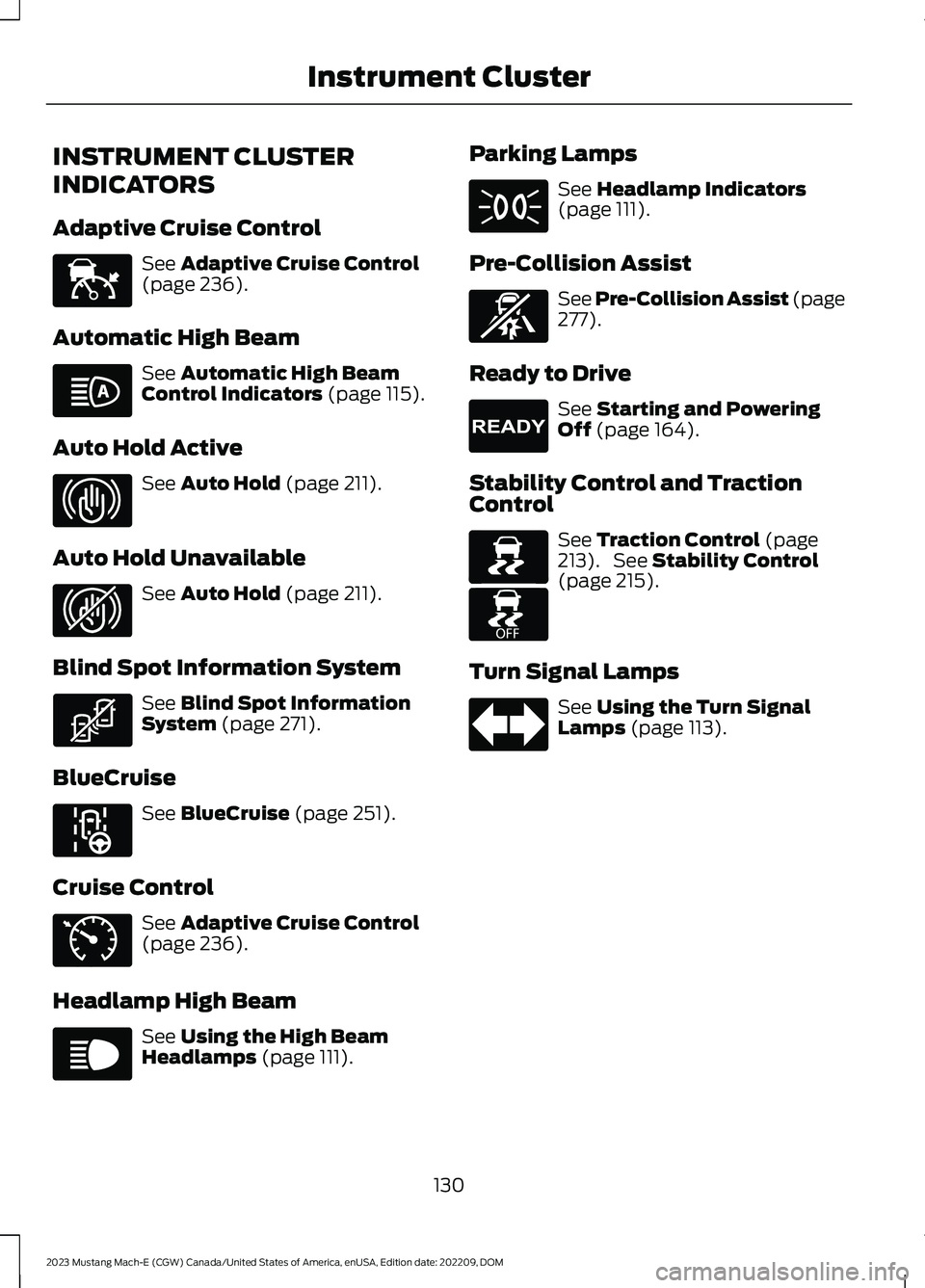
Adaptive Cruise Control
See Adaptive Cruise Control(page 236).
Automatic High Beam
See Automatic High BeamControl Indicators (page 115).
Auto Hold Active
See Auto Hold (page 211).
Auto Hold Unavailable
See Auto Hold (page 211).
Blind Spot Information System
See Blind Spot InformationSystem (page 271).
BlueCruise
See BlueCruise (page 251).
Cruise Control
See Adaptive Cruise Control(page 236).
Headlamp High Beam
See Using the High BeamHeadlamps (page 111).
Parking Lamps
See Headlamp Indicators(page 111).
Pre-Collision Assist
See Pre-Collision Assist (page277).
Ready to Drive
See Starting and PoweringOff (page 164).
Stability Control and TractionControl
See Traction Control (page213). See Stability Control(page 215).
Turn Signal Lamps
See Using the Turn SignalLamps (page 113).
130
2023 Mustang Mach-E (CGW) Canada/United States of America, enUSA, Edition date: 202209, DOMInstrument ClusterE144524 E146105 E323448 E323449 E323542 E297977 E71340 E67019 E71341 E329467 E224090 E138639 E225466 E67018
Page 135 of 496
BRAKE COACH
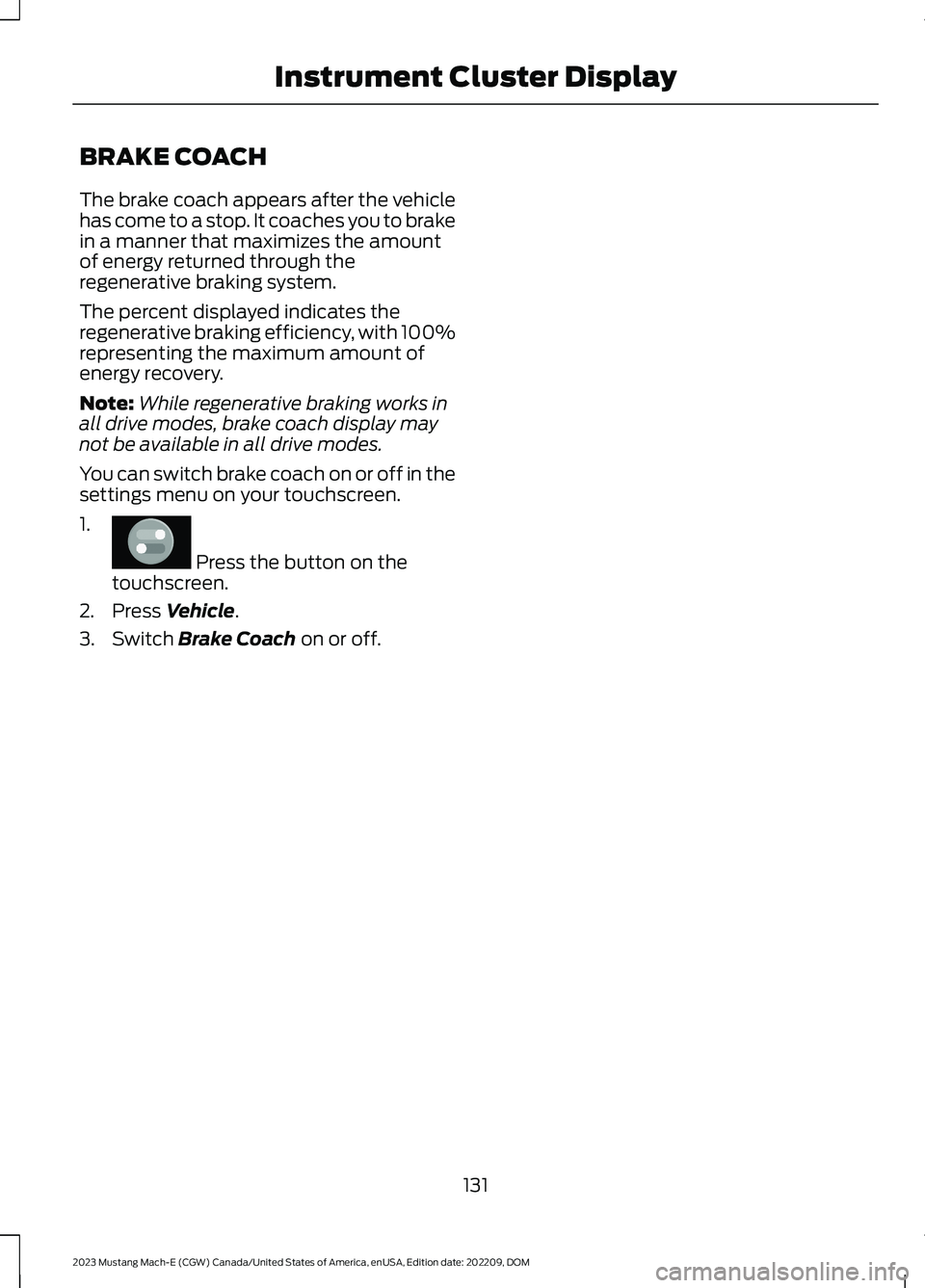
The brake coach appears after the vehiclehas come to a stop. It coaches you to brakein a manner that maximizes the amountof energy returned through theregenerative braking system.
The percent displayed indicates theregenerative braking efficiency, with 100%representing the maximum amount ofenergy recovery.
Note:While regenerative braking works inall drive modes, brake coach display maynot be available in all drive modes.
You can switch brake coach on or off in thesettings menu on your touchscreen.
1.
Press the button on thetouchscreen.
2.Press Vehicle.
3.Switch Brake Coach on or off.
131
2023 Mustang Mach-E (CGW) Canada/United States of America, enUSA, Edition date: 202209, DOMInstrument Cluster DisplayE386797
Page 217 of 496
WHAT IS TRACTION CONTROL
The traction control system helps to avoiddrive wheel spin and loss of traction.
HOW DOES TRACTION
CONTROL WORK
If your vehicle begins to slide, the systemapplies the brakes to individual wheelsand, when needed, reduces power at thesame time. If the wheels spin whenaccelerating on slippery or loose surfaces,the system reduces power in order toincrease traction.
SWITCHING TRACTION
CONTROL ON AND OFF
WARNING: Operating your vehiclewith the traction control disabled couldlead to an increased risk of loss of vehiclecontrol, vehicle rollover, personal injuryand death.
The system turns traction control andstability control on each time you poweron your vehicle.
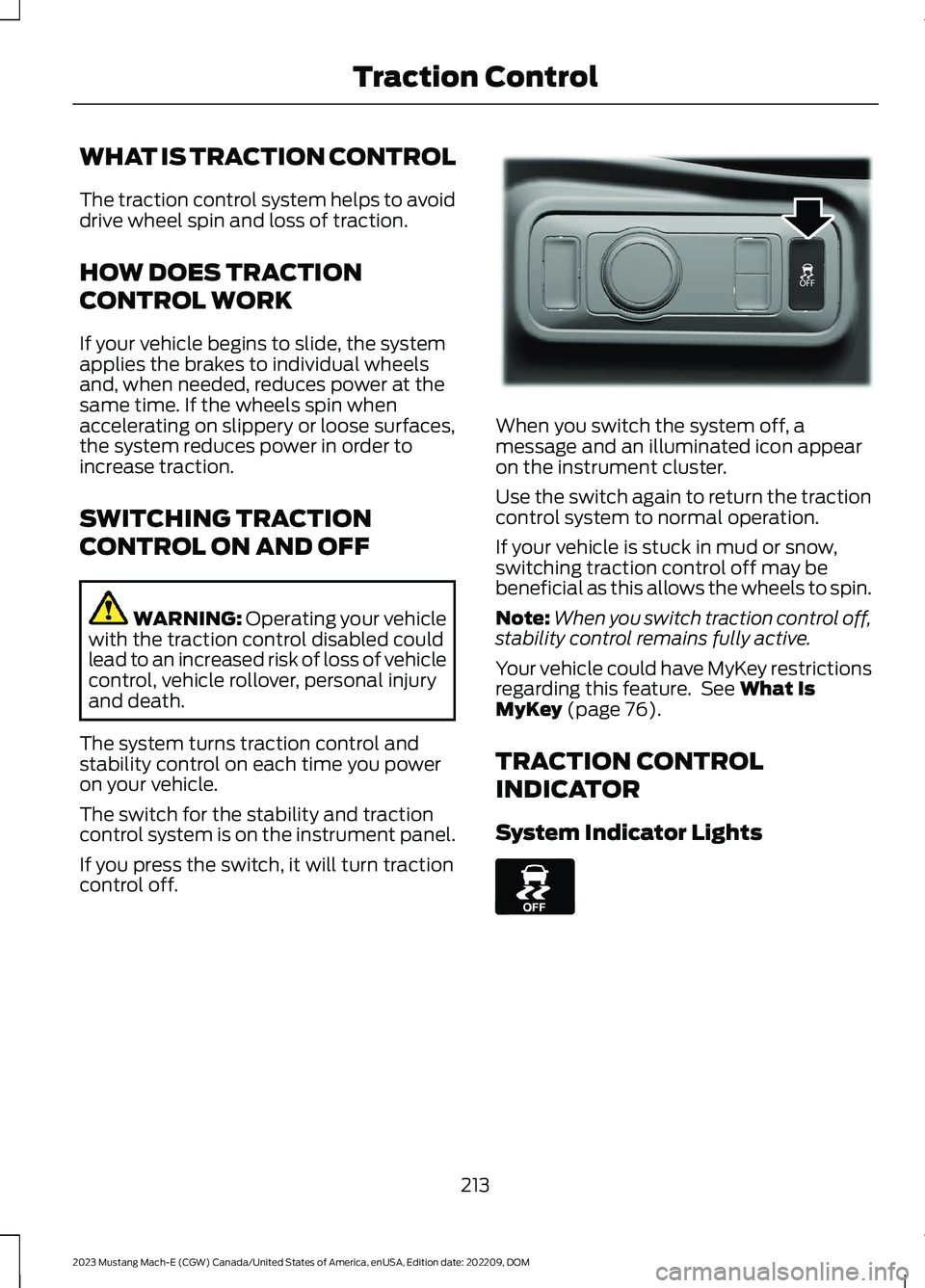
The switch for the stability and tractioncontrol system is on the instrument panel.
If you press the switch, it will turn tractioncontrol off.
When you switch the system off, amessage and an illuminated icon appearon the instrument cluster.
Use the switch again to return the tractioncontrol system to normal operation.
If your vehicle is stuck in mud or snow,switching traction control off may bebeneficial as this allows the wheels to spin.
Note:When you switch traction control off,stability control remains fully active.
Your vehicle could have MyKey restrictionsregarding this feature. See What IsMyKey (page 76).
TRACTION CONTROL
INDICATOR
System Indicator Lights
213
2023 Mustang Mach-E (CGW) Canada/United States of America, enUSA, Edition date: 202209, DOMTraction ControlE341071 E130458
Page 229 of 496
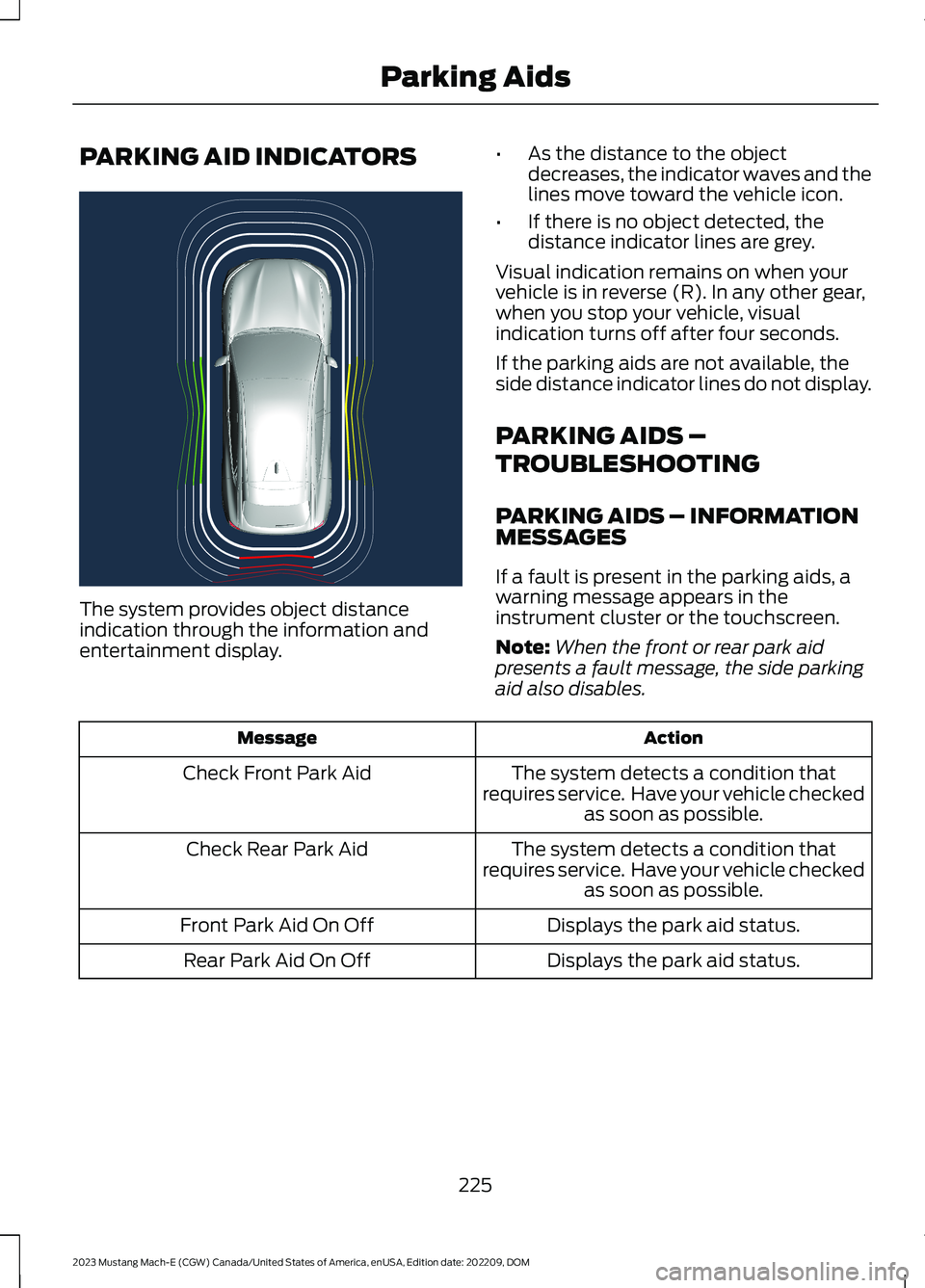
PARKING AID INDICATORS
The system provides object distanceindication through the information andentertainment display.
•As the distance to the objectdecreases, the indicator waves and thelines move toward the vehicle icon.
•If there is no object detected, thedistance indicator lines are grey.
Visual indication remains on when yourvehicle is in reverse (R). In any other gear,when you stop your vehicle, visualindication turns off after four seconds.
If the parking aids are not available, theside distance indicator lines do not display.
PARKING AIDS –
TROUBLESHOOTING
PARKING AIDS – INFORMATIONMESSAGES
If a fault is present in the parking aids, awarning message appears in theinstrument cluster or the touchscreen.
Note:When the front or rear park aidpresents a fault message, the side parkingaid also disables.
ActionMessage
The system detects a condition thatrequires service. Have your vehicle checkedas soon as possible.
Check Front Park Aid
The system detects a condition thatrequires service. Have your vehicle checkedas soon as possible.
Check Rear Park Aid
Displays the park aid status.Front Park Aid On Off
Displays the park aid status.Rear Park Aid On Off
225
2023 Mustang Mach-E (CGW) Canada/United States of America, enUSA, Edition date: 202209, DOMParking AidsE333288
Page 242 of 496
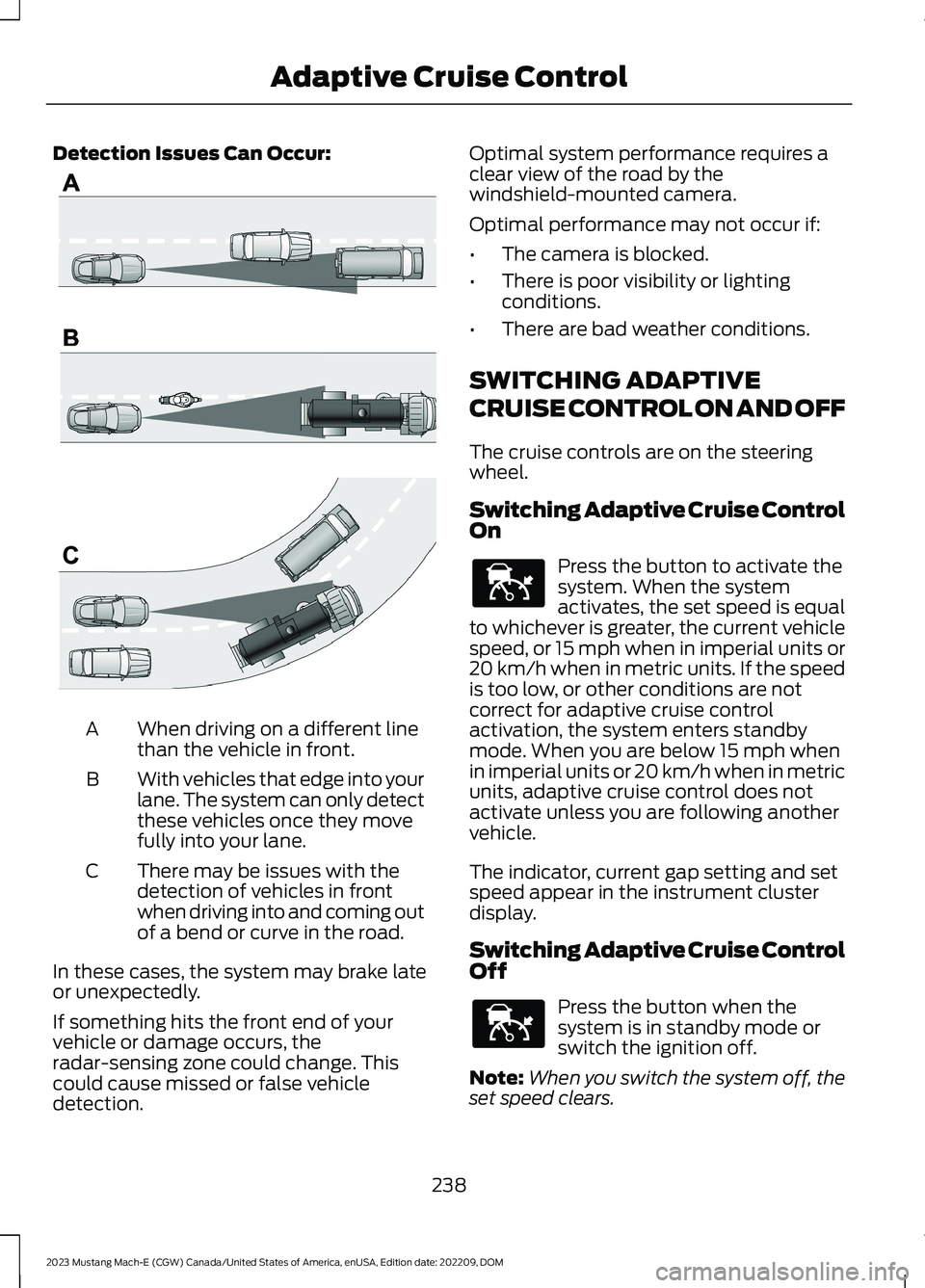
Detection Issues Can Occur:
When driving on a different linethan the vehicle in front.A
With vehicles that edge into yourlane. The system can only detectthese vehicles once they movefully into your lane.
B
There may be issues with thedetection of vehicles in frontwhen driving into and coming outof a bend or curve in the road.
C
In these cases, the system may brake lateor unexpectedly.
If something hits the front end of yourvehicle or damage occurs, theradar-sensing zone could change. Thiscould cause missed or false vehicledetection.
Optimal system performance requires aclear view of the road by thewindshield-mounted camera.
Optimal performance may not occur if:
•The camera is blocked.
•There is poor visibility or lightingconditions.
•There are bad weather conditions.
SWITCHING ADAPTIVE
CRUISE CONTROL ON AND OFF
The cruise controls are on the steeringwheel.
Switching Adaptive Cruise ControlOn
Press the button to activate thesystem. When the systemactivates, the set speed is equalto whichever is greater, the current vehiclespeed, or 15 mph when in imperial units or20 km/h when in metric units. If the speedis too low, or other conditions are notcorrect for adaptive cruise controlactivation, the system enters standbymode. When you are below 15 mph whenin imperial units or 20 km/h when in metricunits, adaptive cruise control does notactivate unless you are following anothervehicle.
The indicator, current gap setting and setspeed appear in the instrument clusterdisplay.
Switching Adaptive Cruise ControlOff
Press the button when thesystem is in standby mode orswitch the ignition off.
Note:When you switch the system off, theset speed clears.
238
2023 Mustang Mach-E (CGW) Canada/United States of America, enUSA, Edition date: 202209, DOMAdaptive Cruise ControlE71621 E144529 E144529
Page 243 of 496
ADAPTIVE CRUISE CONTROL
AUTOMATIC CANCELLATION
The system may cancel if:
•The tires lose traction.
•You apply the parking brake.
The system may cancel and set the parkingbrake if:
•You unbuckle the seatbelt and openthe driver door after adaptive cruisecontrol stops your vehicle.
•Adaptive cruise control holds yourvehicle at a stop continuously for morethan three minutes.
The system may deactivate or preventactivating when requested if:
•The vehicle has a blocked sensor.
•The brake temperature is too high.
•There is a failure in the system or arelated system.
SETTING THE ADAPTIVE
CRUISE CONTROL SPEED
Drive to the speed you prefer.
Press the toggle button upwardor downward to set the currentspeed.
Take your foot off the accelerator pedal.
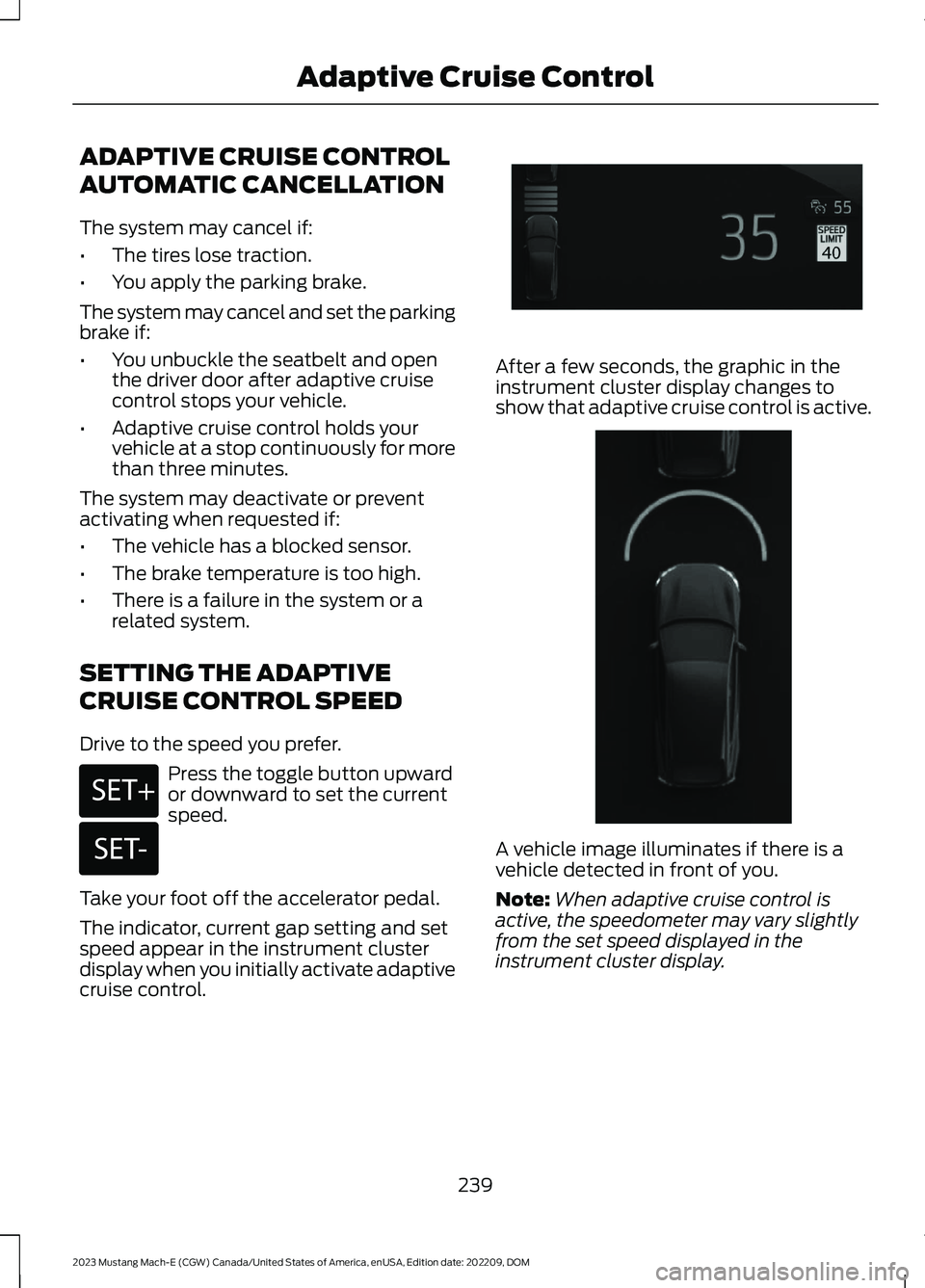
The indicator, current gap setting and setspeed appear in the instrument clusterdisplay when you initially activate adaptivecruise control.
After a few seconds, the graphic in theinstrument cluster display changes toshow that adaptive cruise control is active.
A vehicle image illuminates if there is avehicle detected in front of you.
Note:When adaptive cruise control isactive, the speedometer may vary slightlyfrom the set speed displayed in theinstrument cluster display.
239
2023 Mustang Mach-E (CGW) Canada/United States of America, enUSA, Edition date: 202209, DOMAdaptive Cruise ControlE246884 E246885 E357411 E356720
Page 244 of 496
Setting the Adaptive Cruise Speedfrom a Complete Stop
Press the toggle button upwardor downward while keeping thebrake pedal fully pressed.
The set speed adjusts to 15 mph when inimperial units or 20 km/h when in metricunits.
The indicator, current gap setting and setspeed appear in the instrument clusterdisplay.
Note:The system activates from acomplete stop only when it detects a leadvehicle in close proximity.
Manually Changing the Set Speed
Press and release the togglebutton upward to increase theset speed in small increments.Press and hold the toggle button upwardto increase the set speed in largeincrements. Release the button when theset speed is equal to the preferred speed.
Press and release the togglebutton downward to decreasethe set speed in smallincrements. Press and hold the togglebutton downward to decrease the setspeed in large increments. Release thebutton when the set speed is equal to thepreferred speed.
You can also press the accelerator or brakepedal until you reach the speed you prefer.Press the toggle button upward ordownward to select the current speed asthe set speed.
The system may apply the brakes to slowthe vehicle to the new set speed. The setspeed continuously displays in theinstrument cluster display when thesystem is active.
SETTING THE ADAPTIVE
CRUISE CONTROL GAP
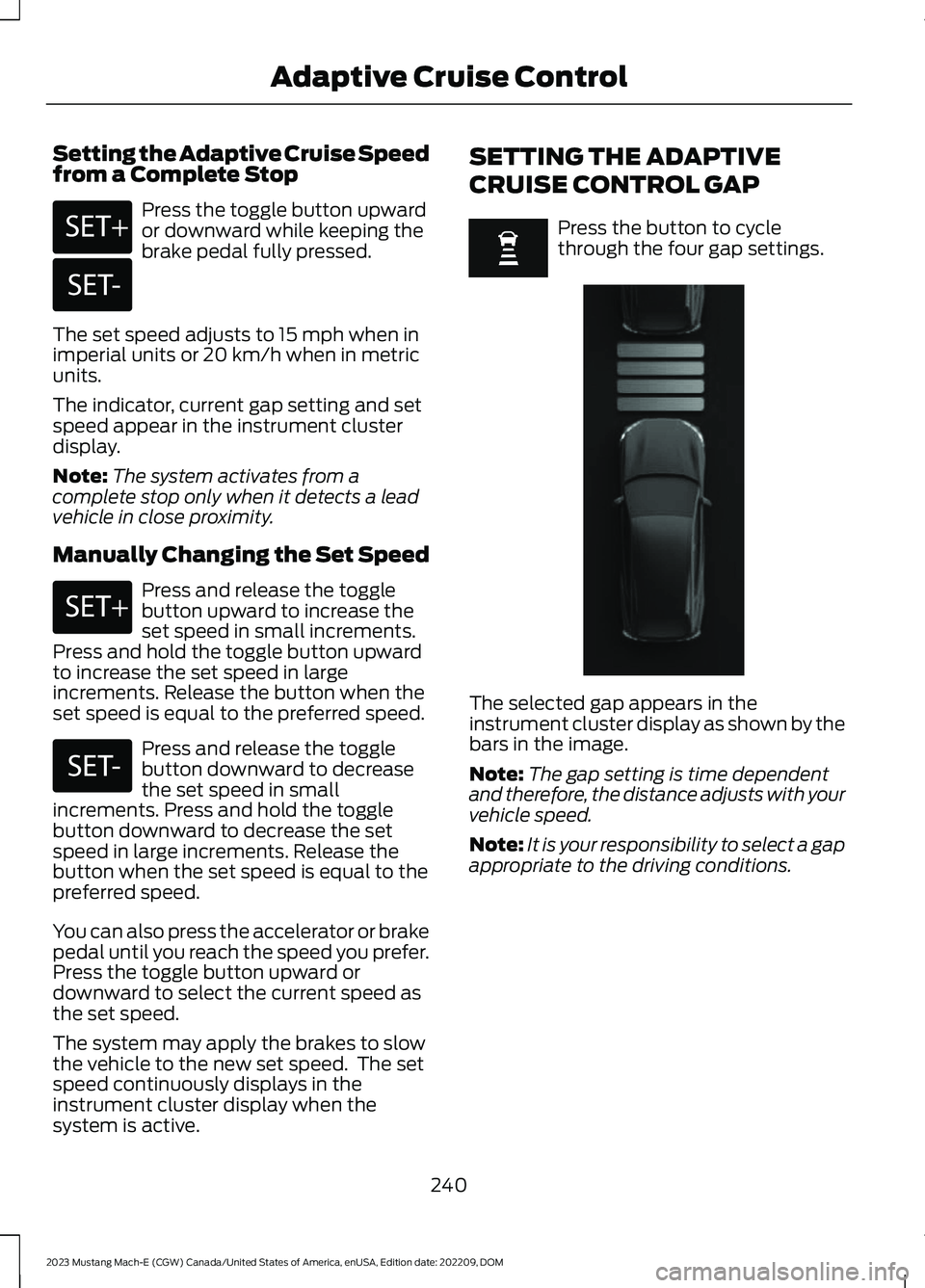
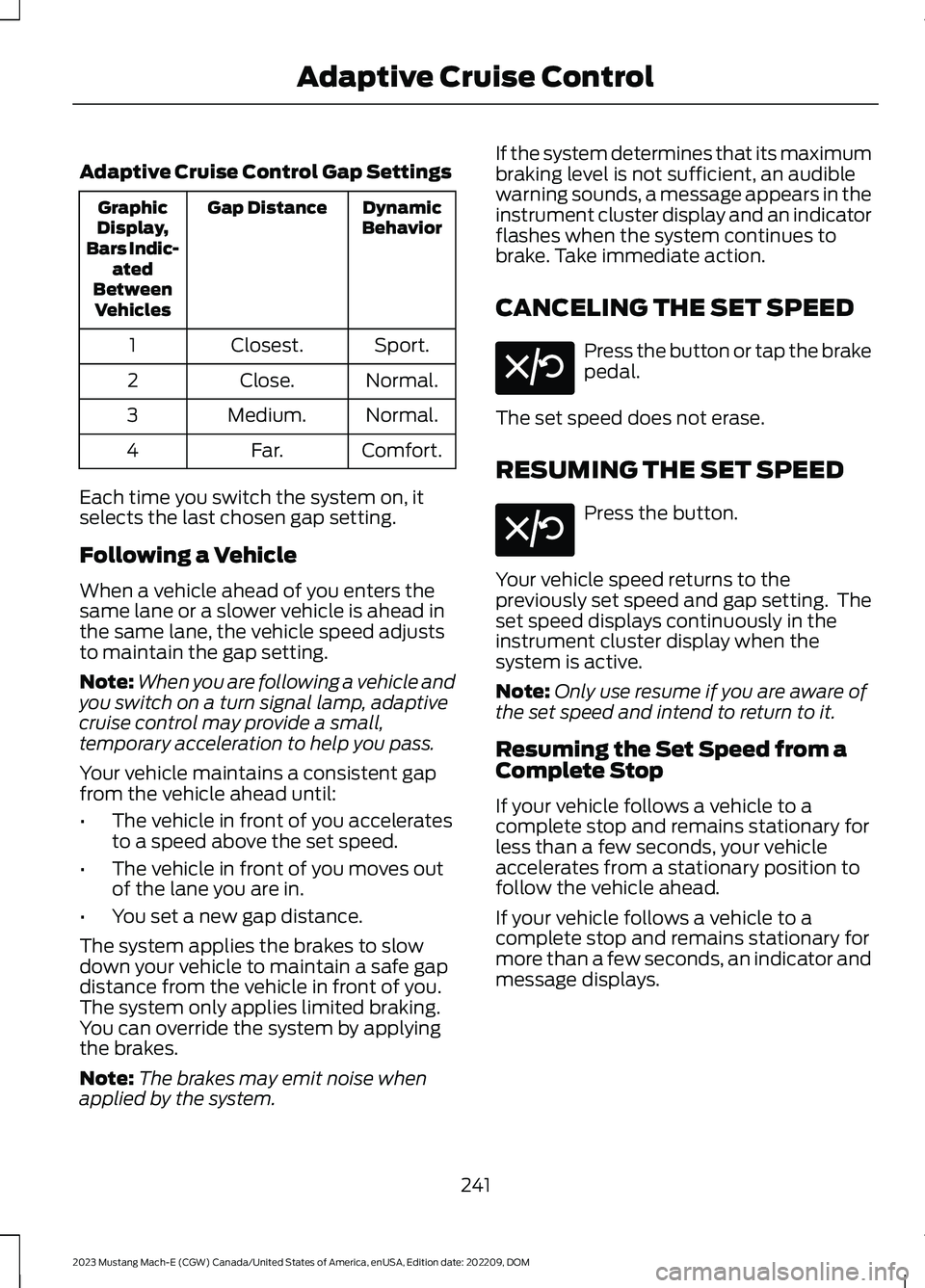
Press the button to cyclethrough the four gap settings.
The selected gap appears in theinstrument cluster display as shown by thebars in the image.
Note:The gap setting is time dependentand therefore, the distance adjusts with yourvehicle speed.
Note:It is your responsibility to select a gapappropriate to the driving conditions.
240
2023 Mustang Mach-E (CGW) Canada/United States of America, enUSA, Edition date: 202209, DOMAdaptive Cruise ControlE246884 E246885 E246884 E246885 E357221
Page 245 of 496
Adaptive Cruise Control Gap Settings
DynamicBehaviorGap DistanceGraphicDisplay,Bars Indic-atedBetweenVehicles
Sport.Closest.1
Normal.Close.2
Normal.Medium.3
Comfort.Far.4
Each time you switch the system on, itselects the last chosen gap setting.
Following a Vehicle
When a vehicle ahead of you enters thesame lane or a slower vehicle is ahead inthe same lane, the vehicle speed adjuststo maintain the gap setting.
Note:When you are following a vehicle andyou switch on a turn signal lamp, adaptivecruise control may provide a small,temporary acceleration to help you pass.
Your vehicle maintains a consistent gapfrom the vehicle ahead until:
•The vehicle in front of you acceleratesto a speed above the set speed.
•The vehicle in front of you moves outof the lane you are in.
•You set a new gap distance.
The system applies the brakes to slowdown your vehicle to maintain a safe gapdistance from the vehicle in front of you.The system only applies limited braking.You can override the system by applyingthe brakes.
Note:The brakes may emit noise whenapplied by the system.
If the system determines that its maximumbraking level is not sufficient, an audiblewarning sounds, a message appears in theinstrument cluster display and an indicatorflashes when the system continues tobrake. Take immediate action.
CANCELING THE SET SPEED
Press the button or tap the brakepedal.
The set speed does not erase.
RESUMING THE SET SPEED
Press the button.
Your vehicle speed returns to thepreviously set speed and gap setting. Theset speed displays continuously in theinstrument cluster display when thesystem is active.
Note:Only use resume if you are aware ofthe set speed and intend to return to it.
Resuming the Set Speed from aComplete Stop
If your vehicle follows a vehicle to acomplete stop and remains stationary forless than a few seconds, your vehicleaccelerates from a stationary position tofollow the vehicle ahead.
If your vehicle follows a vehicle to acomplete stop and remains stationary formore than a few seconds, an indicator andmessage displays.
241
2023 Mustang Mach-E (CGW) Canada/United States of America, enUSA, Edition date: 202209, DOMAdaptive Cruise ControlE308130 E308130
Page 247 of 496
OVERRIDING THE SET SPEED
WARNING: If you override thesystem by pressing the acceleratorpedal, it does not automatically applythe brakes to maintain a gap from anyvehicle ahead.
When you press the accelerator pedal, youoverride the set speed and gap distance.
Use the accelerator pedal to intentionallyexceed the set speed limit.
When you override the system, the greenindicator illuminates and the vehicle icondoes not appear in the instrument clusterdisplay.
The system resumes operation when yourelease the accelerator pedal. The vehiclespeed decreases to the set speed, or alower speed if following a slower vehicle.
ADAPTIVE CRUISE CONTROL
INDICATORS
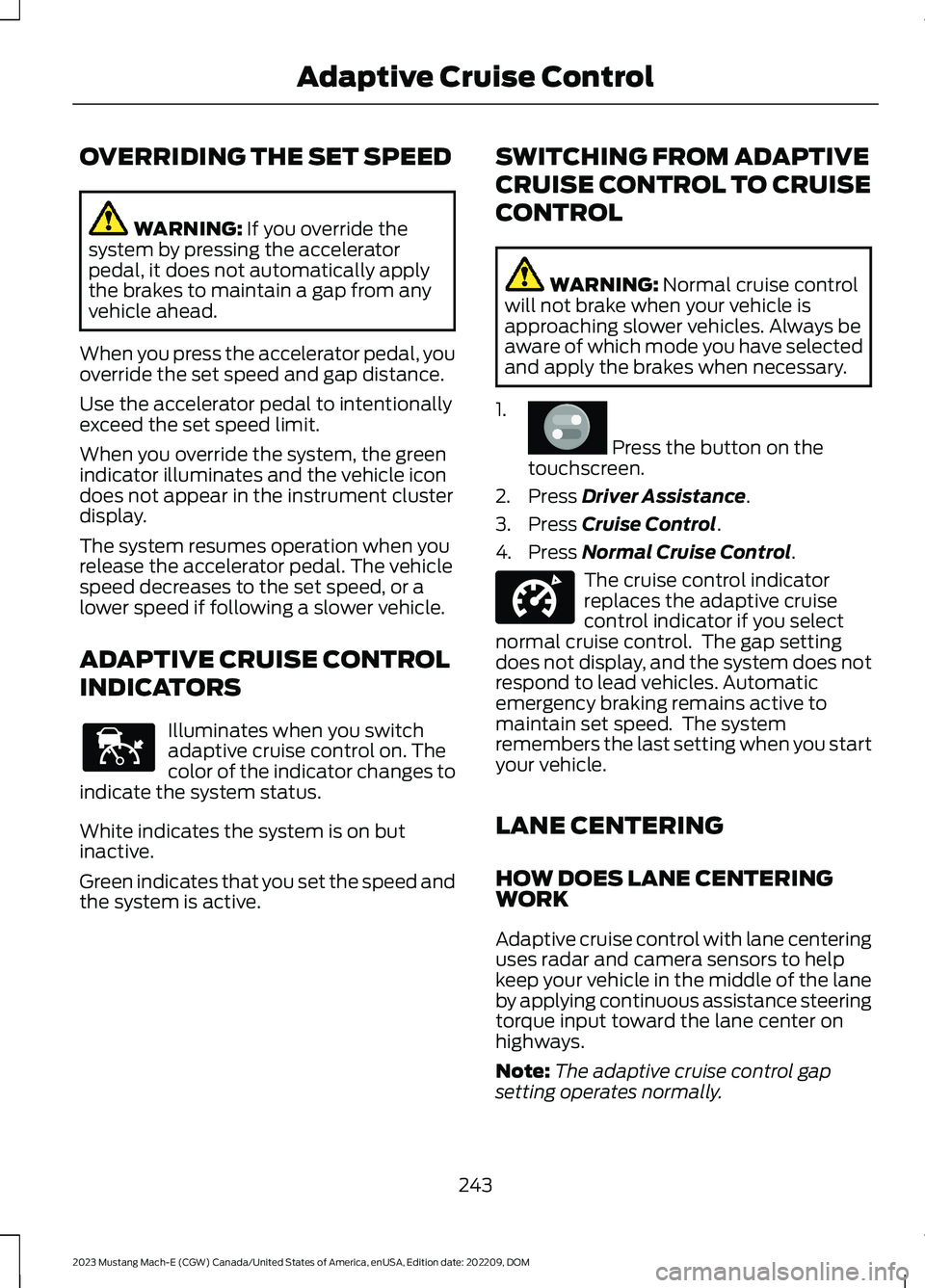
Illuminates when you switchadaptive cruise control on. Thecolor of the indicator changes toindicate the system status.
White indicates the system is on butinactive.
Green indicates that you set the speed andthe system is active.
SWITCHING FROM ADAPTIVE
CRUISE CONTROL TO CRUISE
CONTROL
WARNING: Normal cruise controlwill not brake when your vehicle isapproaching slower vehicles. Always beaware of which mode you have selectedand apply the brakes when necessary.
1.
Press the button on thetouchscreen.
2.Press Driver Assistance.
3.Press Cruise Control.
4.Press Normal Cruise Control.
The cruise control indicatorreplaces the adaptive cruisecontrol indicator if you selectnormal cruise control. The gap settingdoes not display, and the system does notrespond to lead vehicles. Automaticemergency braking remains active tomaintain set speed. The systemremembers the last setting when you startyour vehicle.
LANE CENTERING
HOW DOES LANE CENTERINGWORK
Adaptive cruise control with lane centeringuses radar and camera sensors to helpkeep your vehicle in the middle of the laneby applying continuous assistance steeringtorque input toward the lane center onhighways.
Note:The adaptive cruise control gapsetting operates normally.
243
2023 Mustang Mach-E (CGW) Canada/United States of America, enUSA, Edition date: 202209, DOMAdaptive Cruise ControlE144529 E386797 E332905