instrument cluster FORD MUSTANG MACH E 2023 Owner's Manual
[x] Cancel search | Manufacturer: FORD, Model Year: 2023, Model line: MUSTANG MACH E, Model: FORD MUSTANG MACH E 2023Pages: 496, PDF Size: 13.09 MB
Page 249 of 496
Note:In exceptional conditions, such asinclement weather or direct sunlight, thesystem could deviate from the center lineor could cancel.
SWITCHING LANE CENTERING ONAND OFF
You must keep your hands on the steeringwheel at all times.
The controls are on the steering wheel.
Press the button.
The indicator appears in the instrumentcluster display. When the system is on, thecolor of the indicator changes to indicatethe system status.
You can override the system at any timeby steering your vehicle.
Note:The correct requirements must bemet before you can switch the system on.See Lane Centering Requirements (page244).
Enabling and Disabling LaneCentering
1.
Press the button on thetouchscreen.
2.Press Driver Assistance.
3.Press Cruise Control.
4.Press Adaptive Cruise Control.
5.Press Lane Centering Assist.
LANE CENTERING ALERTS
You must keep your hands on the steeringwheel at all times.
When the system is active and detects nosteering activity for a period of time, thesystem alerts you to put your hands on thesteering wheel. If you do not react to thewarnings the system cancels and slowsyour vehicle down to idle speeds whilemaintaining steering control. See LaneCentering Automatic Cancellation(page 245).
The system also alerts you if your vehiclecrosses lane markings without detectedsteering activity.
Note:The system could detect a light gripor touch on the steering wheel as hands-offdriving.
LANE CENTERING AUTOMATICCANCELLATION
When an external condition cancels thesystem, for example, no lane markingsavailable, a tone sounds and a messageappears in the instrument cluster display.
If your vehicle starts to slow down, youmust provide steering input to the wheeland press the accelerator pedal to regainfull system performance.
Automatic cancellation can also occur if:
•The lane becomes too wide or toonarrow.
•The system cannot detect valid lanemarkings.
•Lane markings cross over one another.
Note:The system disables until the nextkey cycle if your vehicle slows down due todriver inactivity twice within a key cycle.
LANE CENTERING MANUALCANCELLATION
When you perform the following actions,adaptive cruise control with lane centeringwill cancel:
245
2023 Mustang Mach-E (CGW) Canada/United States of America, enUSA, Edition date: 202209, DOMAdaptive Cruise ControlE308131 E386797
Page 253 of 496
PREDICTIVE SPEED ASSIST – TROUBLESHOOTING
PREDICTIVE SPEED ASSIST – INFORMATION MESSAGES
ActionMessage
Navigation system based speed limit information is notavailable. If the message continues to appear, have yourvehicle checked as soon as possible.
Adaptive Cruise ControlSpeed Sign RecognitionNot Available
The system is going to cancel and you must take control.Driver Resume Control
ADAPTIVE CRUISE CONTROL
– TROUBLESHOOTING
ADAPTIVE CRUISE CONTROL –INFORMATION MESSAGES -VEHICLES WITH: LANECENTERING
Note:Depending on your vehicle optionsand instrument cluster type, not allmessages display or are available.
Note:The system could abbreviate orshorten certain messages depending uponwhich cluster type you have.
ActionMessage
Return your hands to the steering wheel and provide steeringinput to cancel the message.Keep Hands on SteeringWheel
To reset the feature when the vehicle is stationary, return thegear selector to park and turn the vehicle off. Restart thevehicle with your foot on the brake pedal.
Lane Centering AssistNot Available
You must immediately take full control of the vehicle.Resume Control
Resume adaptive cruise control with lane centering byapplying foot pressure on the accelerator pedal. You can alsoresume the feature by pressing the resume button on thesteering wheel.
Press Accelerator Pedalto Resume
249
2023 Mustang Mach-E (CGW) Canada/United States of America, enUSA, Edition date: 202209, DOMAdaptive Cruise Control
Page 254 of 496
ADAPTIVE CRUISE CONTROL –INFORMATION MESSAGES -VEHICLES WITH: STOP AND GO
Note:Depending on your vehicle optionsand instrument cluster type, not allmessages display or are available.
Note:The system could abbreviate orshorten certain messages depending uponwhich cluster type you have.
ActionMessage
A malfunction is preventing the adaptive cruise from engaging.Adaptive CruiseMalfunction
Front Sensor Not AlignedContact an authorized dealer to have the radar checked forproper coverage and operation.
Conditions exist preventing the system from being available.Adaptive Cruise NotAvailable
You have a blocked radar because of poor radar visibility dueto inclement weather or ice, mud, or water in front of the radar.You can typically clean the sensor to resolve this.
Adaptive Cruise NotAvailable SensorBlocked See ManualDue to the nature of radar technology, it is possible to get ablockage warning with no actual block. This happens, forexample, when driving in sparse rural or desert environments.A false blocked condition either self clears, or clears after yourestart your vehicle.
You have selected normal cruise control. The system doesnot brake or react to traffic.Normal Cruise ActiveAdaptive Braking Off
Displays when the adaptive cruise control is going to canceland you must take control.Adaptive Cruise - DriverResume Control
Displays when the vehicle speed is too slow to activate theadaptive cruise control and there is no lead vehicle in range.Adaptive Cruise SpeedToo Low to Activate
250
2023 Mustang Mach-E (CGW) Canada/United States of America, enUSA, Edition date: 202209, DOMAdaptive Cruise Control
Page 257 of 496
BLUECRUISE LIMITATIONS
Any of the following conditions could resultin BlueCruise not correctly operating:
•You do not have your vehicle centeredin the lane.
•The lane is too narrow or too wide.
•The system does not detect at leastone lane marking or when lanes mergeor split.
•You are applying a low amount ofsteering input.
•You are using the system in areas underconstruction.
•If you make any aftermarketmodifications to the steering system.
•You are using a spare tire.
The driver-facing camera may not operatecorrectly due to any of the following:
•You have a pre-existing eye condition,such as an eye misalignment, or havehad eye surgery.
•You cover your facial features by amask, hat or other items.
•The lighting conditions changesignificantly.
•You are not in the field of view of thecamera.
•You position or tilt yourself to one side.
•You are moving around extensively.
•You are wearing glasses or sunglassesthat are too dark or reflective.
Note:The system has limited steeringassistance and may not be sufficient for alldriving situations.
Note:In exceptional conditions, such asinclement weather or direct sunlight, thesystem could deviate from the center line.
Note:The information provided by thenavigation map data could be inaccurate orout of date.
BLUECRUISE SETTINGS
Enabling BlueCruise
1.
Press the button on thetouchscreen.
2.Press Driver Assistance.
3.Press Cruise Control.
4.Press Lane Centering withHands-Free.
Enabling Activation Prompts
1.
Press the button on thetouchscreen.
2.Press Driver Assistance.
3.Press Cruise Control.
4.Press Activation Prompts.
SWITCHING BLUECRUISE ON
AND OFF
Switching BlueCruise On
The controls are on the steering wheel.
Using Activation Prompts
When the prompt appears, pressthe button to switch BlueCruiseon.
The indicator appears in the instrumentcluster. When the system is on, the colorof the indicator changes to indicate thesystem status.
Note:You must enable activation promptsin the touchscreen.
253
2023 Mustang Mach-E (CGW) Canada/United States of America, enUSA, Edition date: 202209, DOMBlueCruise - Vehicles With: Hands Free DrivingE386797 E386797 E144529
Page 258 of 496
Using Steering Wheel Controls
Using the adaptive cruise controland lateral support buttons,make sure both systems areactive. BlueCruise activates.
Switching BlueCruise Off
Press either the lateral supportor adaptive cruise control buttonwhen system is active or instandby mode.
BlueCruise turns off througheach ignition cycle.
BLUECRUISE ALERTS
When BlueCruise is providing hands-ondriving or transitioning to hands-on drivingfrom hands-free driving and detects nosteering activity for a certain period of time,the system alerts you with a message inthe instrument cluster to put your handson the steering wheel. After the first alert,the system alerts you with a message inthe instrument cluster and an audiblewarning.
When BlueCruise is providing hands-on orhands-free driving and detects you are notlooking at the road for a certain period oftime, the system alerts you to return youreyes to the road. Depending on where youare looking, the alert can be a message inthe instrument cluster and an audiblewarning.
If you do not react to the warnings,BlueCruise cancels, quickly activates andreleases the brakes, and slows your vehicledown to low speeds while maintainingsteering control.
If your vehicle slows down and you resumecontrol, a message appears to prompt youto press the accelerator pedal to allow thesystem to resume.
Note:If the system detects repeatedinactivity, it disables until the next key cycle.
BLUECRUISE AUTOMATIC
CANCELLATION
When an external condition cancelsBlueCruise, for example, no lane markingsavailable, a tone sounds and a messageappears in the instrument cluster.
If your vehicle starts to slowdown, you must take control ofsteering and press and releasethe button to reactivate BlueCruise.
System cancellation can also occur if:
•The lane becomes too narrow.
•The system cannot detect valid lanemarkings.
•Lane markings cross.
•Your eyes are not on the road or yourhands are not on the steering wheel.
If you have your hands on the steeringwheel and your eyes are on the road whenthe feature is active and a cancellationoccurs, the system sounds a tone anddisplays a cancelled graphic in theinstrument cluster.
If you are not paying attention to the roador your hands are not on the steering wheeland a cancellation occurs, the systemdisplays a message and a tone sounds untilyou resume control. If you do not resumecontrol in time, BlueCruise quickly activatesand releases the brakes, and slows your
254
2023 Mustang Mach-E (CGW) Canada/United States of America, enUSA, Edition date: 202209, DOMBlueCruise - Vehicles With: Hands Free DrivingE308131 E144529 E308131 E144529 E308130
Page 259 of 496
vehicle to low speeds while maintainingsteering control. If your vehicle slows downand you resume control, a messageappears to prompt you to press theaccelerator pedal to allow the system toresume.
Note:The system disables until the vehicleis turned off and back on if it detectsrepeated inactivity.
BLUECRUISE INDICATORS
When on, the color of theindicator changes to indicate thestatus.
Gray indicates BlueCruise is on but inactive.
Green indicates BlueCruise is active andapplying continuous steering support.
Blue indicates BlueCruise is active andhands-free driving mode is available.
Hands-On Driving SupportAvailable
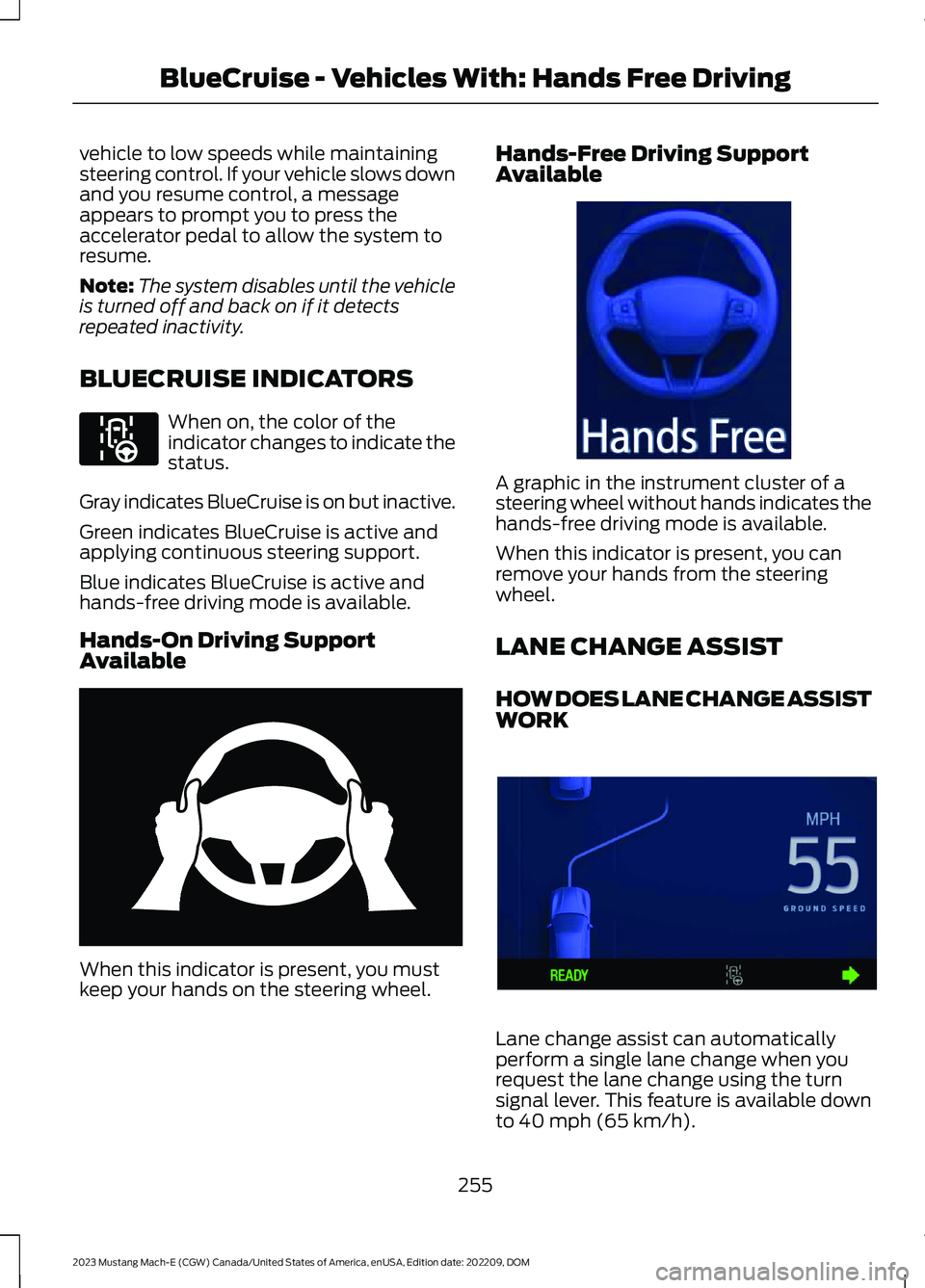
When this indicator is present, you mustkeep your hands on the steering wheel.
Hands-Free Driving SupportAvailable
A graphic in the instrument cluster of asteering wheel without hands indicates thehands-free driving mode is available.
When this indicator is present, you canremove your hands from the steeringwheel.
LANE CHANGE ASSIST
HOW DOES LANE CHANGE ASSISTWORK
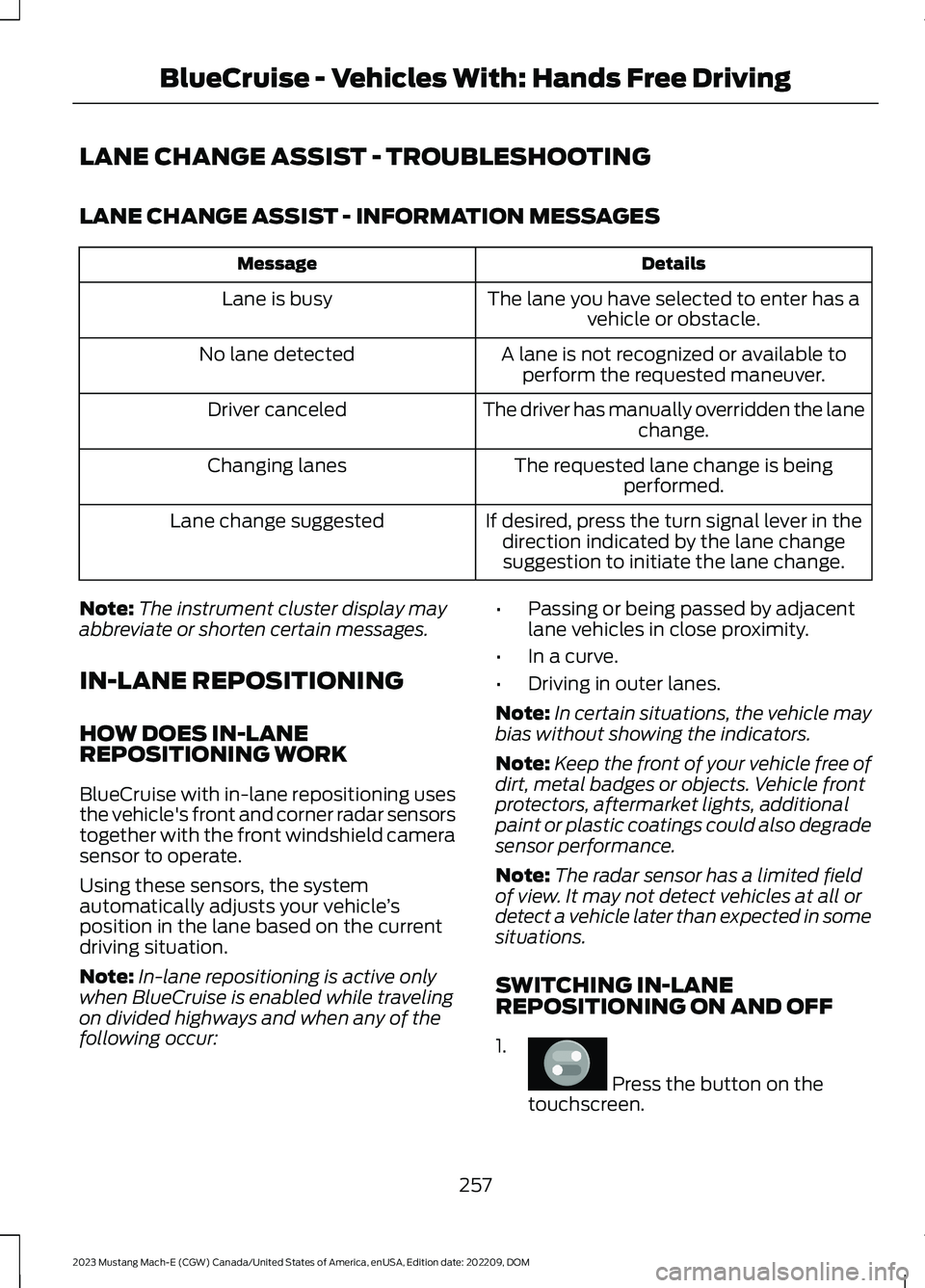
Lane change assist can automaticallyperform a single lane change when yourequest the lane change using the turnsignal lever. This feature is available downto 40 mph (65 km/h).
255
2023 Mustang Mach-E (CGW) Canada/United States of America, enUSA, Edition date: 202209, DOMBlueCruise - Vehicles With: Hands Free DrivingE297977 E333236 E333232 E394395
Page 261 of 496
LANE CHANGE ASSIST - TROUBLESHOOTING
LANE CHANGE ASSIST - INFORMATION MESSAGES
DetailsMessage
The lane you have selected to enter has avehicle or obstacle.Lane is busy
A lane is not recognized or available toperform the requested maneuver.No lane detected
The driver has manually overridden the lanechange.Driver canceled
The requested lane change is beingperformed.Changing lanes
If desired, press the turn signal lever in thedirection indicated by the lane changesuggestion to initiate the lane change.
Lane change suggested
Note:The instrument cluster display mayabbreviate or shorten certain messages.
IN-LANE REPOSITIONING
HOW DOES IN-LANEREPOSITIONING WORK
BlueCruise with in-lane repositioning usesthe vehicle's front and corner radar sensorstogether with the front windshield camerasensor to operate.
Using these sensors, the systemautomatically adjusts your vehicle’sposition in the lane based on the currentdriving situation.
Note:In-lane repositioning is active onlywhen BlueCruise is enabled while travelingon divided highways and when any of thefollowing occur:
•Passing or being passed by adjacentlane vehicles in close proximity.
•In a curve.
•Driving in outer lanes.
Note:In certain situations, the vehicle maybias without showing the indicators.
Note:Keep the front of your vehicle free ofdirt, metal badges or objects. Vehicle frontprotectors, aftermarket lights, additionalpaint or plastic coatings could also degradesensor performance.
Note:The radar sensor has a limited fieldof view. It may not detect vehicles at all ordetect a vehicle later than expected in somesituations.
SWITCHING IN-LANEREPOSITIONING ON AND OFF
1.
Press the button on thetouchscreen.
257
2023 Mustang Mach-E (CGW) Canada/United States of America, enUSA, Edition date: 202209, DOMBlueCruise - Vehicles With: Hands Free DrivingE386797
Page 262 of 496
2.Press Driver Assistance.
3.Press Cruise Control.
4.Press Adaptive Cruise Control.
5.Press Lane Centering withHands-Free.
6.Press In-Lane Repositioning to togglethe system on or off.
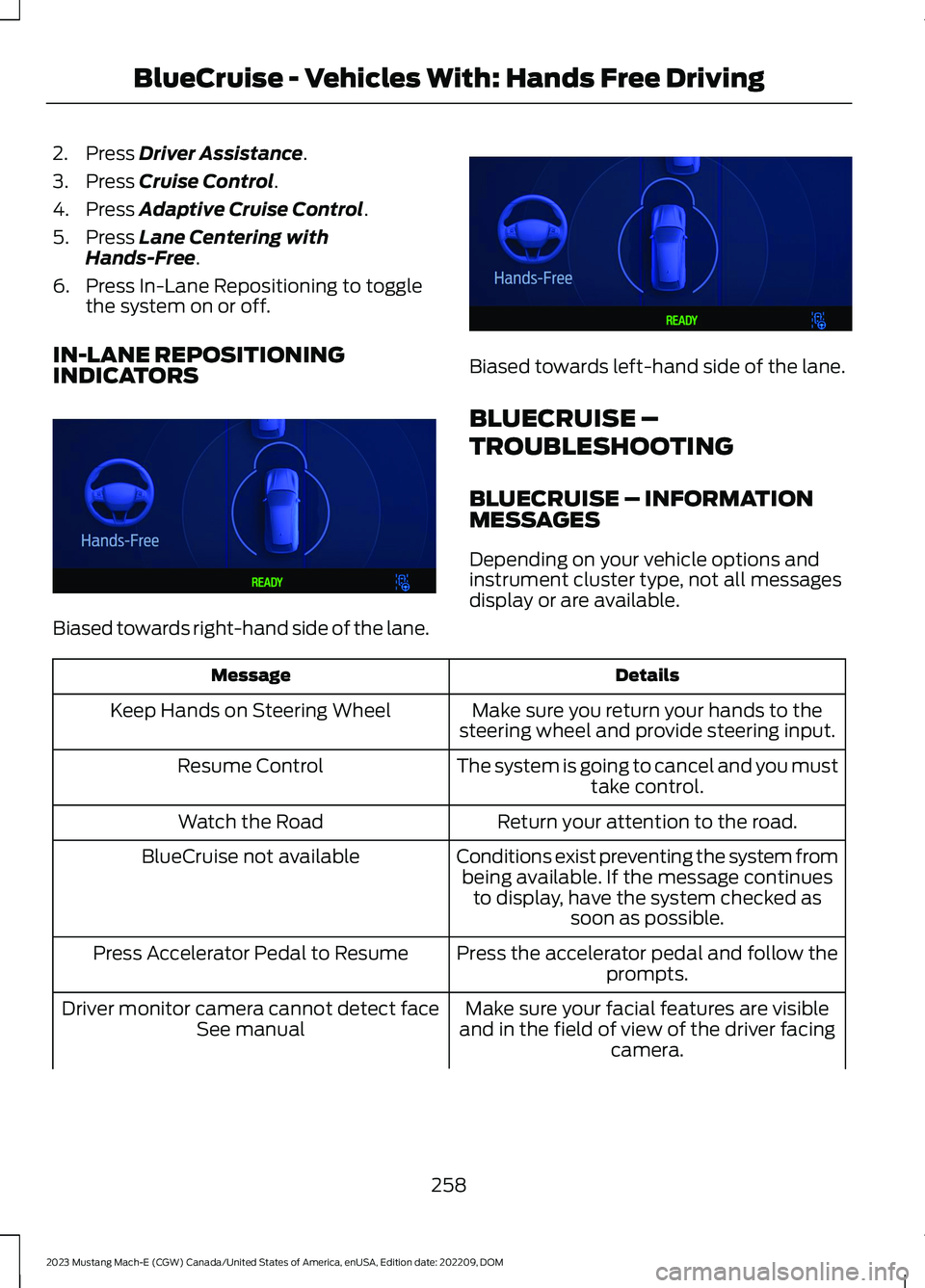
IN-LANE REPOSITIONINGINDICATORS
Biased towards right-hand side of the lane.
Biased towards left-hand side of the lane.
BLUECRUISE –
TROUBLESHOOTING
BLUECRUISE – INFORMATIONMESSAGES
Depending on your vehicle options andinstrument cluster type, not all messagesdisplay or are available.
DetailsMessage
Make sure you return your hands to thesteering wheel and provide steering input.Keep Hands on Steering Wheel
The system is going to cancel and you musttake control.Resume Control
Return your attention to the road.Watch the Road
Conditions exist preventing the system frombeing available. If the message continuesto display, have the system checked assoon as possible.
BlueCruise not available
Press the accelerator pedal and follow theprompts.Press Accelerator Pedal to Resume
Make sure your facial features are visibleand in the field of view of the driver facingcamera.
Driver monitor camera cannot detect faceSee manual
258
2023 Mustang Mach-E (CGW) Canada/United States of America, enUSA, Edition date: 202209, DOMBlueCruise - Vehicles With: Hands Free DrivingE393990 E393991
Page 263 of 496
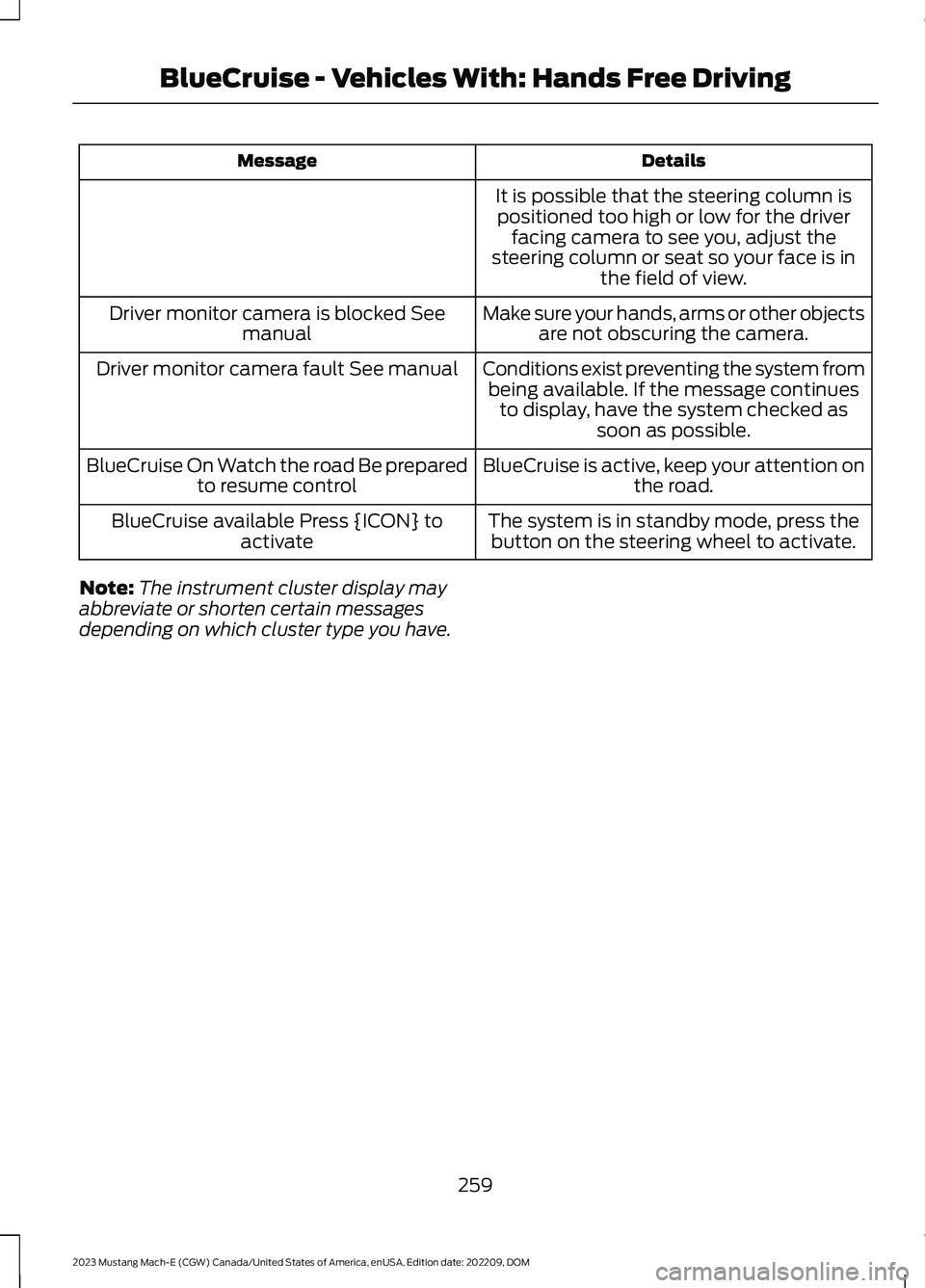
DetailsMessage
It is possible that the steering column ispositioned too high or low for the driverfacing camera to see you, adjust thesteering column or seat so your face is inthe field of view.
Make sure your hands, arms or other objectsare not obscuring the camera.Driver monitor camera is blocked Seemanual
Conditions exist preventing the system frombeing available. If the message continuesto display, have the system checked assoon as possible.
Driver monitor camera fault See manual
BlueCruise is active, keep your attention onthe road.BlueCruise On Watch the road Be preparedto resume control
The system is in standby mode, press thebutton on the steering wheel to activate.BlueCruise available Press {ICON} toactivate
Note:The instrument cluster display mayabbreviate or shorten certain messagesdepending on which cluster type you have.
259
2023 Mustang Mach-E (CGW) Canada/United States of America, enUSA, Edition date: 202209, DOMBlueCruise - Vehicles With: Hands Free Driving
Page 264 of 496
WHAT IS DRIVE MODE
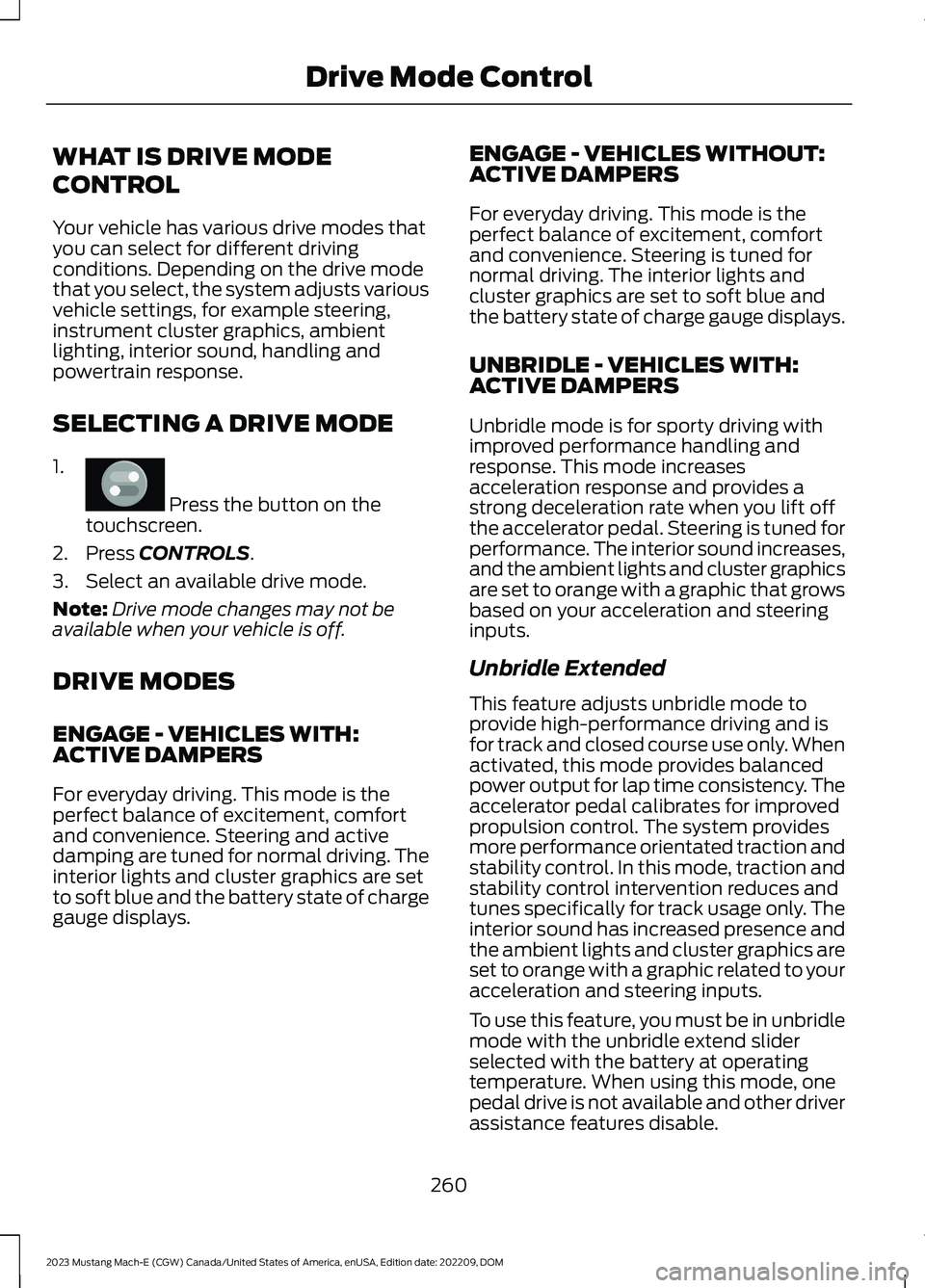
CONTROL
Your vehicle has various drive modes thatyou can select for different drivingconditions. Depending on the drive modethat you select, the system adjusts variousvehicle settings, for example steering,instrument cluster graphics, ambientlighting, interior sound, handling andpowertrain response.
SELECTING A DRIVE MODE
1.
Press the button on thetouchscreen.
2.Press CONTROLS.
3.Select an available drive mode.
Note:Drive mode changes may not beavailable when your vehicle is off.
DRIVE MODES
ENGAGE - VEHICLES WITH:ACTIVE DAMPERS
For everyday driving. This mode is theperfect balance of excitement, comfortand convenience. Steering and activedamping are tuned for normal driving. Theinterior lights and cluster graphics are setto soft blue and the battery state of chargegauge displays.
ENGAGE - VEHICLES WITHOUT:ACTIVE DAMPERS
For everyday driving. This mode is theperfect balance of excitement, comfortand convenience. Steering is tuned fornormal driving. The interior lights andcluster graphics are set to soft blue andthe battery state of charge gauge displays.
UNBRIDLE - VEHICLES WITH:ACTIVE DAMPERS
Unbridle mode is for sporty driving withimproved performance handling andresponse. This mode increasesacceleration response and provides astrong deceleration rate when you lift offthe accelerator pedal. Steering is tuned forperformance. The interior sound increases,and the ambient lights and cluster graphicsare set to orange with a graphic that growsbased on your acceleration and steeringinputs.
Unbridle Extended
This feature adjusts unbridle mode toprovide high-performance driving and isfor track and closed course use only. Whenactivated, this mode provides balancedpower output for lap time consistency. Theaccelerator pedal calibrates for improvedpropulsion control. The system providesmore performance orientated traction andstability control. In this mode, traction andstability control intervention reduces andtunes specifically for track usage only. Theinterior sound has increased presence andthe ambient lights and cluster graphics areset to orange with a graphic related to youracceleration and steering inputs.
To use this feature, you must be in unbridlemode with the unbridle extend sliderselected with the battery at operatingtemperature. When using this mode, onepedal drive is not available and other driverassistance features disable.
260
2023 Mustang Mach-E (CGW) Canada/United States of America, enUSA, Edition date: 202209, DOMDrive Mode ControlE386797