ad blue FORD MUSTANG MACH E 2023 Owner's Manual
[x] Cancel search | Manufacturer: FORD, Model Year: 2023, Model line: MUSTANG MACH E, Model: FORD MUSTANG MACH E 2023Pages: 496, PDF Size: 13.09 MB
Page 185 of 496
STOPPING CHARGING
WARNING: To safely discontinuecharging at any time, follow thedisconnect instructions in stoppingcharging. Charging will automatically andsafely come to a stop. The BLUESTATUS indicator remains ON solidwhen the coupler is removed.
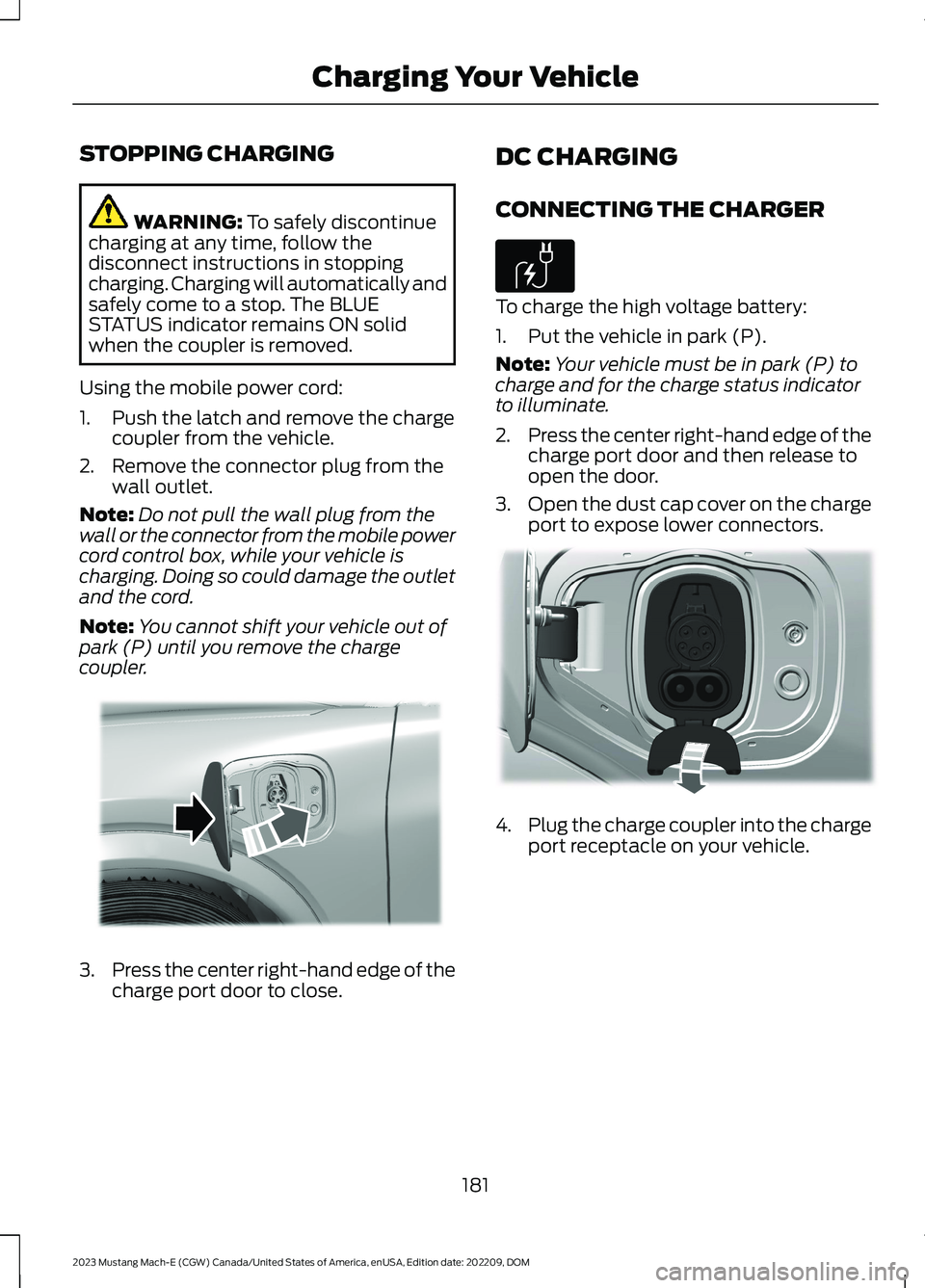
Using the mobile power cord:
1.Push the latch and remove the chargecoupler from the vehicle.
2.Remove the connector plug from thewall outlet.
Note:Do not pull the wall plug from thewall or the connector from the mobile powercord control box, while your vehicle ischarging. Doing so could damage the outletand the cord.
Note:You cannot shift your vehicle out ofpark (P) until you remove the chargecoupler.
3.Press the center right-hand edge of thecharge port door to close.
DC CHARGING
CONNECTING THE CHARGER
To charge the high voltage battery:
1.Put the vehicle in park (P).
Note:Your vehicle must be in park (P) tocharge and for the charge status indicatorto illuminate.
2.Press the center right-hand edge of thecharge port door and then release toopen the door.
3.Open the dust cap cover on the chargeport to expose lower connectors.
4.Plug the charge coupler into the chargeport receptacle on your vehicle.
181
2023 Mustang Mach-E (CGW) Canada/United States of America, enUSA, Edition date: 202209, DOMCharging Your VehicleE317333 E306676 E335267
Page 193 of 496
Note:Save your departure settings beforeselecting additional days/times. Theprocess must be repeated in order to addadditional unique departure times andcomfort levels.
Note:Cabin conditioning comfort level mayvary depending on if you plug into a normalhousehold outlet or a higher power outletor charging station. The power available forconditioning is limited to the chargingstation power available. At low ambienttemperatures and low charge power, asmall amount of high voltage battery powerin addition to the charging power could beused to heat the cabin.
Note:The departure and comfort settingscan also be accessed through the separatevehicle settings departure and comfortbutton. Press the edit button from thisscreen to begin the settings process outlinedabove.
USING FORDPASS AND
CHARGING
The FordPass app allows you to do thefollowing:
•Monitor and manage your vehicle'scharging, including charge schedulesand preferences.
•Locate a charger and activate a chargeron the BlueOval Charging Network.
•Plan a trip and charging options alongyour route.
•Check charging station plug availability.
•Initiate a charge session automaticallyat Plug and Charge capable chargestations.
•Control your Ford Connected ChargeStation remotely.
•Override charge preferences andstarting and stopping charging.
For more information, visitwww.owner.ford.com.
CHARGING YOUR VEHICLE
HINTS
Use AC charging when possible andminimize the use of DC charging. It helpsto preserve your high voltage battery'sefficiency and lifespan.
We recommend ending DC charges at80% state of charge.
Note:The system could reduce DC fastcharging rate to preserve the battery. Thisis based on battery temperature, batterystate of charge and battery health.
In cold temperatures, you may notice thatDC charging takes longer when theambient temperature drops below 50°F(10°C). Shutting off climate control orreducing climate control temperature andfan settings for the first 10 to 15 minutes ofDC charging allows the battery to warmup and improve the charging rate.
Note:When the temperature is belowfreezing, fully turning off cabin heat for thefirst 10 to 15 minutes of DC charging couldsignificantly improve the charging rate.
When AC charging, keep your vehicleplugged in when outside temperatures arevery high or low. This enables the systemto maintain the high voltage battery forbest performance.
CHARGING YOUR VEHICLE –
TROUBLESHOOTING
CHARGING YOUR VEHICLE –WARNING LAMPS
Plugged into charger.
189
2023 Mustang Mach-E (CGW) Canada/United States of America, enUSA, Edition date: 202209, DOMCharging Your VehicleE228962
Page 252 of 496
SWITCHING PREDICTIVE SPEEDASSIST MODE ON AND OFF
1.
Press the button on thetouchscreen.
2.Press Driver Assistance.
3.Press Cruise Control.
4.Press Adaptive Cruise Control.
5.Switch Predictive Speed Assist on oroff.
ADJUSTING THE SET SPEEDTOLERANCE
1.
Press the button on thetouchscreen.
2.Press Driver Assistance.
3.Press Cruise Control.
4.Press Adaptive Cruise Control.
5.Switch Predictive Speed Assist on.
6.Press Tolerance.
7.Adjust the slider to set the tolerance.
Note:You can set tolerance for vehiclespeed adjustment based on speed signrecognition only.
PREDICTIVE SPEED ASSISTALERTS
If the speed sign recognition systemdetects a speed limit below the minimumadaptive cruise control set speed, a tonesounds and the system returns to standbymode.
PREDICTIVE SPEED ASSISTINDICATORS
A blue marker around the speed sign anda blue arrow next to the set speedindicates that the system is active.
Speed Sign Indicator
When the system detects a new speedsign, a gray indicator appears above theset speed while the system adjusts thevehicle speed to the speed limit. When thespeed limit is reached, the set speedupdates and the gray indicator disappears.
Road Geometry Indicator
When the system detects a curve orhighway exit, the vehicle starts todecelerate, and the indicator appears andchanges color.
Road Geometry Indicator Symbols
Left curve.
Right curve.
248
2023 Mustang Mach-E (CGW) Canada/United States of America, enUSA, Edition date: 202209, DOMAdaptive Cruise ControlE386797 E386797 E379737 E379738
Page 255 of 496
WHAT IS BLUECRUISE
BlueCruise keeps your vehicle centered inthe lane and offers a hands-free drivingmode in certain situations when usingadaptive cruise control.
HOW DOES BLUECRUISE
WORK
BlueCruise uses cameras to monitor yourvehicle position within a lane and appliessteering support to keep your vehiclecentered in the lane.
Using the cameras and locationinformation, BlueCruise allows you toremove your hands from the steering wheeland offers a hands-free driving mode incertain areas.
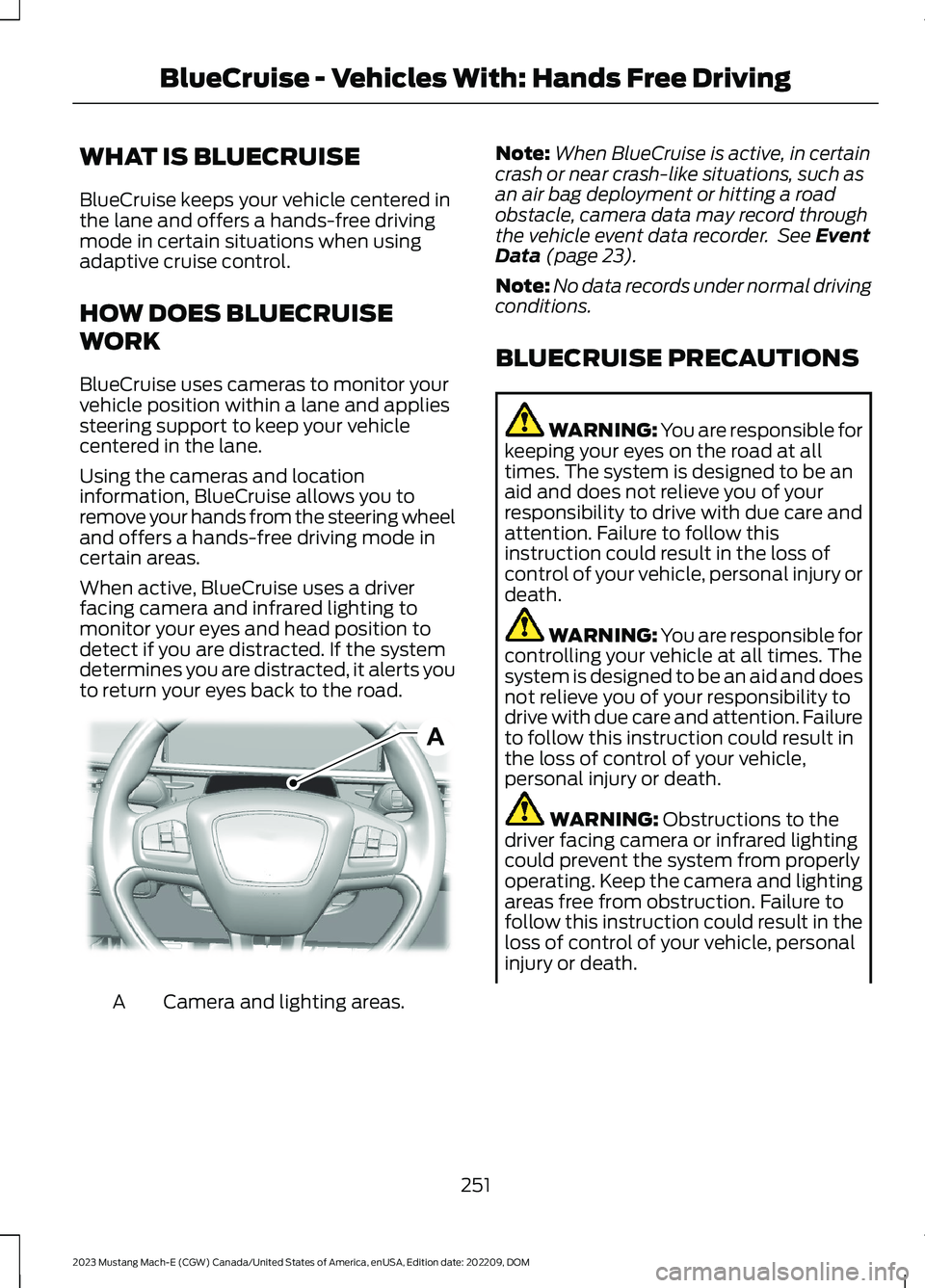
When active, BlueCruise uses a driverfacing camera and infrared lighting tomonitor your eyes and head position todetect if you are distracted. If the systemdetermines you are distracted, it alerts youto return your eyes back to the road.
Camera and lighting areas.A
Note:When BlueCruise is active, in certaincrash or near crash-like situations, such asan air bag deployment or hitting a roadobstacle, camera data may record throughthe vehicle event data recorder. See EventData (page 23).
Note:No data records under normal drivingconditions.
BLUECRUISE PRECAUTIONS
WARNING: You are responsible forkeeping your eyes on the road at alltimes. The system is designed to be anaid and does not relieve you of yourresponsibility to drive with due care andattention. Failure to follow thisinstruction could result in the loss ofcontrol of your vehicle, personal injury ordeath.
WARNING: You are responsible forcontrolling your vehicle at all times. Thesystem is designed to be an aid and doesnot relieve you of your responsibility todrive with due care and attention. Failureto follow this instruction could result inthe loss of control of your vehicle,personal injury or death.
WARNING: Obstructions to thedriver facing camera or infrared lightingcould prevent the system from properlyoperating. Keep the camera and lightingareas free from obstruction. Failure tofollow this instruction could result in theloss of control of your vehicle, personalinjury or death.
251
2023 Mustang Mach-E (CGW) Canada/United States of America, enUSA, Edition date: 202209, DOMBlueCruise - Vehicles With: Hands Free DrivingAE319834
Page 256 of 496
WARNING: Do not use the systemif any changes or modifications to thesteering wheel have been made. Anychanges or modifications to the steeringwheel could affect the functionality orperformance of the system. Failure tofollow this instruction could result in theloss of control of your vehicle, personalinjury or death.
WARNING: The system may notfunction if the sensor is blocked.
WARNING: Pay close attention tochanging road conditions such asentering or leaving a highway, on roadswith intersections or roundabouts, roadswithout visible lanes of travel, roads thatare unpaved, or steep slopes. Failure tofollow this instruction could result in theloss of control of your vehicle, personalinjury or death.
WARNING: The system is not acrash warning or avoidance system.
WARNING: Large contrasts inoutside lighting can limit sensorperformance.
WARNING: The system attemptsto keep your vehicle in the center of thelane as well as maintain speed and gapcontrol. The system may not be able toperform these tasks in all situations. Donot use the system in complex oruncertain driving conditions. Failure tofollow this instruction could result in theloss of control of your vehicle, personalinjury or death.
WARNING: Your vehicle could driftout of the lane of travel. Always beprepared to manually steer your vehicle.Failure to follow this instruction couldresult in the loss of control of yourvehicle, personal injury or death.
WARNING: The system will notoperate if the sensor cannot track theroad lane markings.
WARNING: Do not use the systemwhen towing a trailer. Failure to followthis instruction could result in the loss ofcontrol of your vehicle, personal injury ordeath.
BLUECRUISE REQUIREMENTS
BlueCruise only activates when all of thefollowing occur:
•BlueCruise is enabled in your centerdisplay screen. See BlueCruiseSettings (page 253).
•Adaptive cruise control is on.
•The system detects both lanemarkings.
•Your hands are on the steering wheel.
•Your eyes are on the road.
Note:For hands-free mode to work, yourvehicle must be on certain limited accessdivided freeways.
Note:The system may require updatedsoftware for hands-free mode. See VehicleSoftware Updates (page 404).
252
2023 Mustang Mach-E (CGW) Canada/United States of America, enUSA, Edition date: 202209, DOMBlueCruise - Vehicles With: Hands Free Driving
Page 257 of 496
BLUECRUISE LIMITATIONS
Any of the following conditions could resultin BlueCruise not correctly operating:
•You do not have your vehicle centeredin the lane.
•The lane is too narrow or too wide.
•The system does not detect at leastone lane marking or when lanes mergeor split.
•You are applying a low amount ofsteering input.
•You are using the system in areas underconstruction.
•If you make any aftermarketmodifications to the steering system.
•You are using a spare tire.
The driver-facing camera may not operatecorrectly due to any of the following:
•You have a pre-existing eye condition,such as an eye misalignment, or havehad eye surgery.
•You cover your facial features by amask, hat or other items.
•The lighting conditions changesignificantly.
•You are not in the field of view of thecamera.
•You position or tilt yourself to one side.
•You are moving around extensively.
•You are wearing glasses or sunglassesthat are too dark or reflective.
Note:The system has limited steeringassistance and may not be sufficient for alldriving situations.
Note:In exceptional conditions, such asinclement weather or direct sunlight, thesystem could deviate from the center line.
Note:The information provided by thenavigation map data could be inaccurate orout of date.
BLUECRUISE SETTINGS
Enabling BlueCruise
1.
Press the button on thetouchscreen.
2.Press Driver Assistance.
3.Press Cruise Control.
4.Press Lane Centering withHands-Free.
Enabling Activation Prompts
1.
Press the button on thetouchscreen.
2.Press Driver Assistance.
3.Press Cruise Control.
4.Press Activation Prompts.
SWITCHING BLUECRUISE ON
AND OFF
Switching BlueCruise On
The controls are on the steering wheel.
Using Activation Prompts
When the prompt appears, pressthe button to switch BlueCruiseon.
The indicator appears in the instrumentcluster. When the system is on, the colorof the indicator changes to indicate thesystem status.
Note:You must enable activation promptsin the touchscreen.
253
2023 Mustang Mach-E (CGW) Canada/United States of America, enUSA, Edition date: 202209, DOMBlueCruise - Vehicles With: Hands Free DrivingE386797 E386797 E144529
Page 258 of 496
Using Steering Wheel Controls
Using the adaptive cruise controland lateral support buttons,make sure both systems areactive. BlueCruise activates.
Switching BlueCruise Off
Press either the lateral supportor adaptive cruise control buttonwhen system is active or instandby mode.
BlueCruise turns off througheach ignition cycle.
BLUECRUISE ALERTS
When BlueCruise is providing hands-ondriving or transitioning to hands-on drivingfrom hands-free driving and detects nosteering activity for a certain period of time,the system alerts you with a message inthe instrument cluster to put your handson the steering wheel. After the first alert,the system alerts you with a message inthe instrument cluster and an audiblewarning.
When BlueCruise is providing hands-on orhands-free driving and detects you are notlooking at the road for a certain period oftime, the system alerts you to return youreyes to the road. Depending on where youare looking, the alert can be a message inthe instrument cluster and an audiblewarning.
If you do not react to the warnings,BlueCruise cancels, quickly activates andreleases the brakes, and slows your vehicledown to low speeds while maintainingsteering control.
If your vehicle slows down and you resumecontrol, a message appears to prompt youto press the accelerator pedal to allow thesystem to resume.
Note:If the system detects repeatedinactivity, it disables until the next key cycle.
BLUECRUISE AUTOMATIC
CANCELLATION
When an external condition cancelsBlueCruise, for example, no lane markingsavailable, a tone sounds and a messageappears in the instrument cluster.
If your vehicle starts to slowdown, you must take control ofsteering and press and releasethe button to reactivate BlueCruise.
System cancellation can also occur if:
•The lane becomes too narrow.
•The system cannot detect valid lanemarkings.
•Lane markings cross.
•Your eyes are not on the road or yourhands are not on the steering wheel.
If you have your hands on the steeringwheel and your eyes are on the road whenthe feature is active and a cancellationoccurs, the system sounds a tone anddisplays a cancelled graphic in theinstrument cluster.
If you are not paying attention to the roador your hands are not on the steering wheeland a cancellation occurs, the systemdisplays a message and a tone sounds untilyou resume control. If you do not resumecontrol in time, BlueCruise quickly activatesand releases the brakes, and slows your
254
2023 Mustang Mach-E (CGW) Canada/United States of America, enUSA, Edition date: 202209, DOMBlueCruise - Vehicles With: Hands Free DrivingE308131 E144529 E308131 E144529 E308130
Page 259 of 496
vehicle to low speeds while maintainingsteering control. If your vehicle slows downand you resume control, a messageappears to prompt you to press theaccelerator pedal to allow the system toresume.
Note:The system disables until the vehicleis turned off and back on if it detectsrepeated inactivity.
BLUECRUISE INDICATORS
When on, the color of theindicator changes to indicate thestatus.
Gray indicates BlueCruise is on but inactive.
Green indicates BlueCruise is active andapplying continuous steering support.
Blue indicates BlueCruise is active andhands-free driving mode is available.
Hands-On Driving SupportAvailable
When this indicator is present, you mustkeep your hands on the steering wheel.
Hands-Free Driving SupportAvailable
A graphic in the instrument cluster of asteering wheel without hands indicates thehands-free driving mode is available.
When this indicator is present, you canremove your hands from the steeringwheel.
LANE CHANGE ASSIST
HOW DOES LANE CHANGE ASSISTWORK
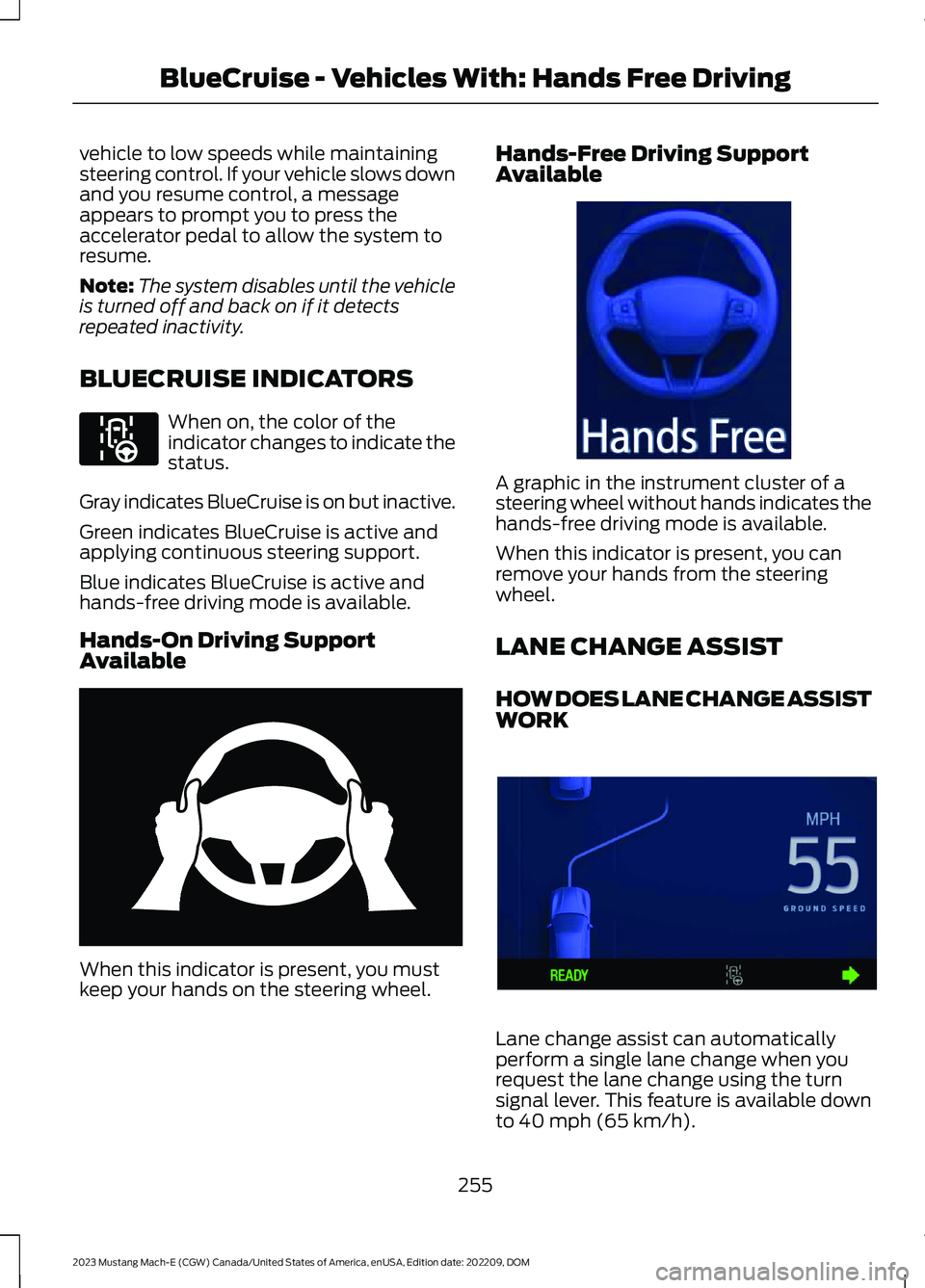
Lane change assist can automaticallyperform a single lane change when yourequest the lane change using the turnsignal lever. This feature is available downto 40 mph (65 km/h).
255
2023 Mustang Mach-E (CGW) Canada/United States of America, enUSA, Edition date: 202209, DOMBlueCruise - Vehicles With: Hands Free DrivingE297977 E333236 E333232 E394395
Page 260 of 496
WARNING: Do not use the lanechange assist system as a replacementfor using the interior and exterior mirrorsor looking over your shoulder beforechanging lanes. The lane change assistsystem is not a replacement for carefuldriving.
1.Make sure the lane you are requestingis clear of traffic or obstacles.
2.Tap or latch the lever in the directionof your planned lane change.
3.Once the lane change is complete,move the turn signal lever back to themiddle position if necessary.
Note: When using lane change assist youcan tap or latch the lever.
Lane Change Suggestion
If you are approaching or have beenfollowing a slower moving vehicle, thesystem may suggest a lane change to passthat vehicle using an available passinglane.
LANE CHANGE ASSISTLIMITATIONS
Lane change assist will not perform therequested maneuver if traffic is identifiedin the selected lane.
SWITCHING LANE CHANGEASSIST ON AND OFF
1.
Press the button on thetouchscreen.
2.Press Driver Assistance.
3.Press Cruise Control.
4.Press Lane Change Assist to togglethe system on and off.
LANE CHANGE ASSISTCANCELLATION
To cancel lane change assist, manuallysteer your vehicle or return the turn signallever to the middle position.
256
2023 Mustang Mach-E (CGW) Canada/United States of America, enUSA, Edition date: 202209, DOMBlueCruise - Vehicles With: Hands Free DrivingE386797
Page 261 of 496
LANE CHANGE ASSIST - TROUBLESHOOTING
LANE CHANGE ASSIST - INFORMATION MESSAGES
DetailsMessage
The lane you have selected to enter has avehicle or obstacle.Lane is busy
A lane is not recognized or available toperform the requested maneuver.No lane detected
The driver has manually overridden the lanechange.Driver canceled
The requested lane change is beingperformed.Changing lanes
If desired, press the turn signal lever in thedirection indicated by the lane changesuggestion to initiate the lane change.
Lane change suggested
Note:The instrument cluster display mayabbreviate or shorten certain messages.
IN-LANE REPOSITIONING
HOW DOES IN-LANEREPOSITIONING WORK
BlueCruise with in-lane repositioning usesthe vehicle's front and corner radar sensorstogether with the front windshield camerasensor to operate.
Using these sensors, the systemautomatically adjusts your vehicle’sposition in the lane based on the currentdriving situation.
Note:In-lane repositioning is active onlywhen BlueCruise is enabled while travelingon divided highways and when any of thefollowing occur:
•Passing or being passed by adjacentlane vehicles in close proximity.
•In a curve.
•Driving in outer lanes.
Note:In certain situations, the vehicle maybias without showing the indicators.
Note:Keep the front of your vehicle free ofdirt, metal badges or objects. Vehicle frontprotectors, aftermarket lights, additionalpaint or plastic coatings could also degradesensor performance.
Note:The radar sensor has a limited fieldof view. It may not detect vehicles at all ordetect a vehicle later than expected in somesituations.
SWITCHING IN-LANEREPOSITIONING ON AND OFF
1.
Press the button on thetouchscreen.
257
2023 Mustang Mach-E (CGW) Canada/United States of America, enUSA, Edition date: 202209, DOMBlueCruise - Vehicles With: Hands Free DrivingE386797