ad blue FORD MUSTANG MACH E 2023 Owner's Guide
[x] Cancel search | Manufacturer: FORD, Model Year: 2023, Model line: MUSTANG MACH E, Model: FORD MUSTANG MACH E 2023Pages: 496, PDF Size: 13.09 MB
Page 262 of 496
2.Press Driver Assistance.
3.Press Cruise Control.
4.Press Adaptive Cruise Control.
5.Press Lane Centering withHands-Free.
6.Press In-Lane Repositioning to togglethe system on or off.
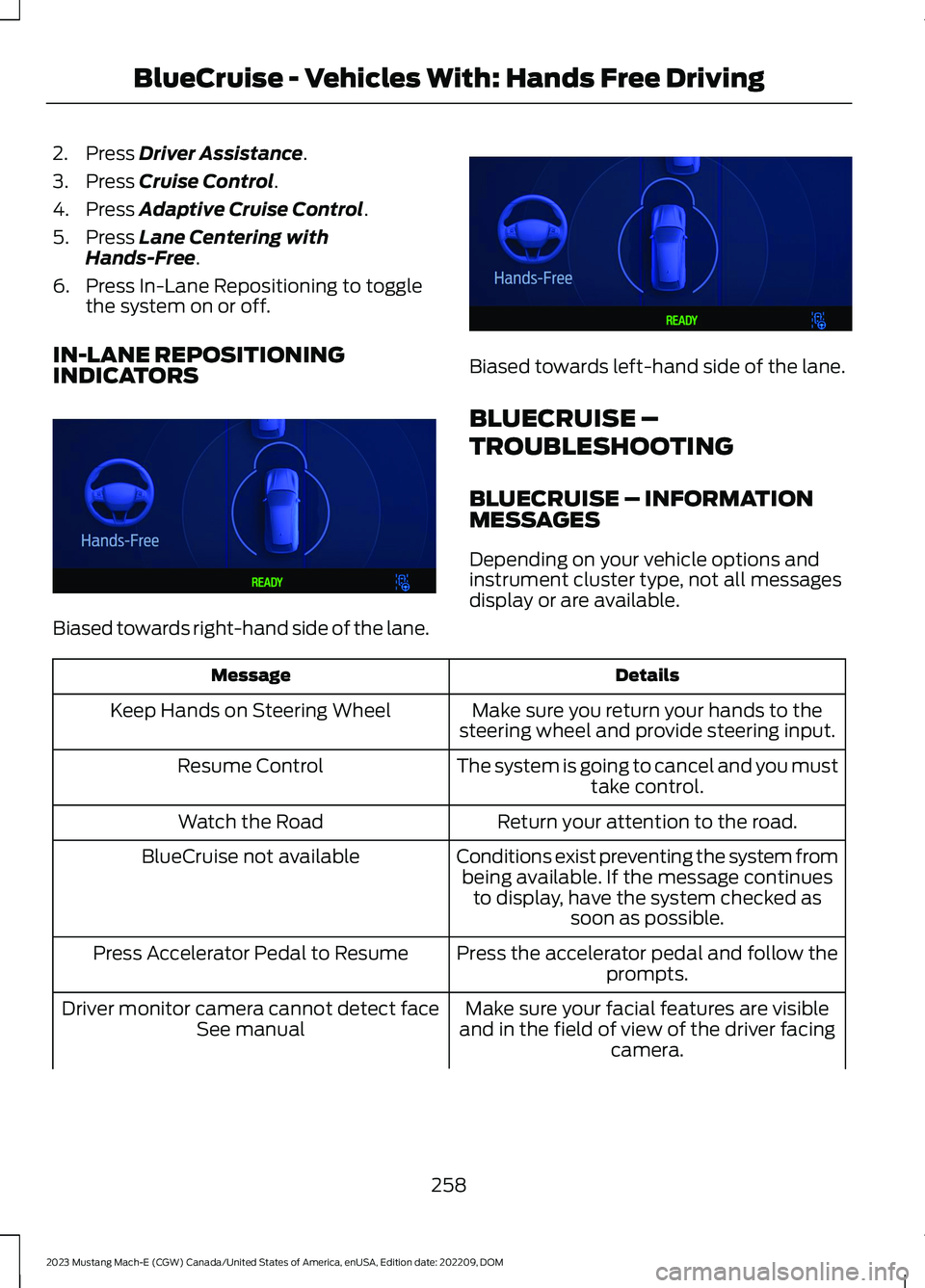
IN-LANE REPOSITIONINGINDICATORS
Biased towards right-hand side of the lane.
Biased towards left-hand side of the lane.
BLUECRUISE –
TROUBLESHOOTING
BLUECRUISE – INFORMATIONMESSAGES
Depending on your vehicle options andinstrument cluster type, not all messagesdisplay or are available.
DetailsMessage
Make sure you return your hands to thesteering wheel and provide steering input.Keep Hands on Steering Wheel
The system is going to cancel and you musttake control.Resume Control
Return your attention to the road.Watch the Road
Conditions exist preventing the system frombeing available. If the message continuesto display, have the system checked assoon as possible.
BlueCruise not available
Press the accelerator pedal and follow theprompts.Press Accelerator Pedal to Resume
Make sure your facial features are visibleand in the field of view of the driver facingcamera.
Driver monitor camera cannot detect faceSee manual
258
2023 Mustang Mach-E (CGW) Canada/United States of America, enUSA, Edition date: 202209, DOMBlueCruise - Vehicles With: Hands Free DrivingE393990 E393991
Page 263 of 496
DetailsMessage
It is possible that the steering column ispositioned too high or low for the driverfacing camera to see you, adjust thesteering column or seat so your face is inthe field of view.
Make sure your hands, arms or other objectsare not obscuring the camera.Driver monitor camera is blocked Seemanual
Conditions exist preventing the system frombeing available. If the message continuesto display, have the system checked assoon as possible.
Driver monitor camera fault See manual
BlueCruise is active, keep your attention onthe road.BlueCruise On Watch the road Be preparedto resume control
The system is in standby mode, press thebutton on the steering wheel to activate.BlueCruise available Press {ICON} toactivate
Note:The instrument cluster display mayabbreviate or shorten certain messagesdepending on which cluster type you have.
259
2023 Mustang Mach-E (CGW) Canada/United States of America, enUSA, Edition date: 202209, DOMBlueCruise - Vehicles With: Hands Free Driving
Page 264 of 496
WHAT IS DRIVE MODE
CONTROL
Your vehicle has various drive modes thatyou can select for different drivingconditions. Depending on the drive modethat you select, the system adjusts variousvehicle settings, for example steering,instrument cluster graphics, ambientlighting, interior sound, handling andpowertrain response.
SELECTING A DRIVE MODE
1.
Press the button on thetouchscreen.
2.Press CONTROLS.
3.Select an available drive mode.
Note:Drive mode changes may not beavailable when your vehicle is off.
DRIVE MODES
ENGAGE - VEHICLES WITH:ACTIVE DAMPERS
For everyday driving. This mode is theperfect balance of excitement, comfortand convenience. Steering and activedamping are tuned for normal driving. Theinterior lights and cluster graphics are setto soft blue and the battery state of chargegauge displays.
ENGAGE - VEHICLES WITHOUT:ACTIVE DAMPERS
For everyday driving. This mode is theperfect balance of excitement, comfortand convenience. Steering is tuned fornormal driving. The interior lights andcluster graphics are set to soft blue andthe battery state of charge gauge displays.
UNBRIDLE - VEHICLES WITH:ACTIVE DAMPERS
Unbridle mode is for sporty driving withimproved performance handling andresponse. This mode increasesacceleration response and provides astrong deceleration rate when you lift offthe accelerator pedal. Steering is tuned forperformance. The interior sound increases,and the ambient lights and cluster graphicsare set to orange with a graphic that growsbased on your acceleration and steeringinputs.
Unbridle Extended
This feature adjusts unbridle mode toprovide high-performance driving and isfor track and closed course use only. Whenactivated, this mode provides balancedpower output for lap time consistency. Theaccelerator pedal calibrates for improvedpropulsion control. The system providesmore performance orientated traction andstability control. In this mode, traction andstability control intervention reduces andtunes specifically for track usage only. Theinterior sound has increased presence andthe ambient lights and cluster graphics areset to orange with a graphic related to youracceleration and steering inputs.
To use this feature, you must be in unbridlemode with the unbridle extend sliderselected with the battery at operatingtemperature. When using this mode, onepedal drive is not available and other driverassistance features disable.
260
2023 Mustang Mach-E (CGW) Canada/United States of America, enUSA, Edition date: 202209, DOMDrive Mode ControlE386797
Page 265 of 496
Note:This feature may not be available intemperatures below 32°F (0°C), or 59°F(15°C) for the battery.
Note:If the feature is not available, chargeyour vehicle until the battery has sufficientcharge, and meets temperature conditions.
UNBRIDLE - VEHICLES WITHOUT:ACTIVE DAMPERS
This mode is for sporty driving withimproved performance handling andresponse. This mode increasesacceleration response and provides astrong deceleration rate when you lift offthe accelerator pedal. Steering is tuned forperformance. The interior sound increases,and the ambient lights and cluster graphicsare set to orange with a graphic that growsbased on your acceleration and steeringinputs.
WHISPER - VEHICLES WITHOUT:ACTIVE DAMPERS
Whisper mode is for relaxed driving andadverse weather conditions. This is thebest mode for driving in slippery conditions.This mode decreases accelerator responseat partial inputs. Steering tunes forcomfort. When you release the acceleratorpedal, your vehicle slowly deceleratesallowing for a more comfortable ride. Theinterior sound turns off and the ambientlights and cluster graphics are set to bluewith a graphic that starts to illuminate blueas you drive efficiently at consistentspeeds.
WHISPER - VEHICLES WITH:ACTIVE DAMPERS
Whisper mode is for relaxed driving andadverse weather conditions. This is thebest mode for driving in slippery conditions.This mode decreases accelerator responseat partial inputs. Steering and activedamping tunes for comfort. When yourelease the accelerator pedal, your vehicleslowly decelerates allowing for a morecomfortable ride. The interior sound turnsoff and the ambient lights and clustergraphics are set to blue with a graphic thatstarts to illuminate blue as you driveefficiently at consistent speeds.
261
2023 Mustang Mach-E (CGW) Canada/United States of America, enUSA, Edition date: 202209, DOMDrive Mode Control
Page 284 of 496
Note:If your vehicle detects excessive heatat the camera or a potential misalignmentcondition, a message could display in theinformation display indicating temporarysensor unavailability. When operationalconditions are correct, the messagedeactivates. For example, when the ambienttemperature around the sensor decreasesor the sensor recalibrates successfully.
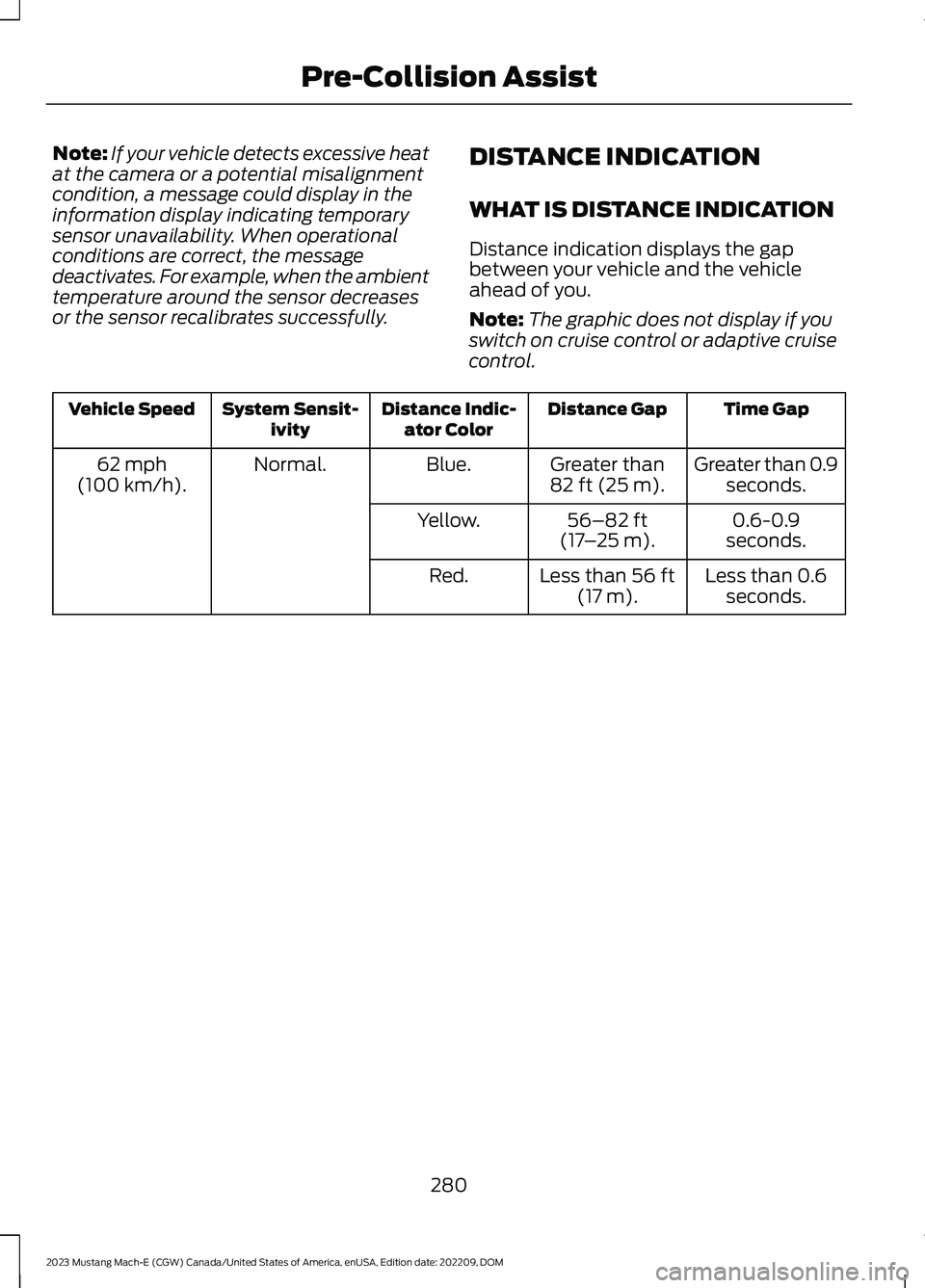
DISTANCE INDICATION
WHAT IS DISTANCE INDICATION
Distance indication displays the gapbetween your vehicle and the vehicleahead of you.
Note:The graphic does not display if youswitch on cruise control or adaptive cruisecontrol.
Time GapDistance GapDistance Indic-ator ColorSystem Sensit-ivityVehicle Speed
Greater than 0.9seconds.Greater than82 ft (25 m).Blue.Normal.62 mph(100 km/h).
0.6-0.9seconds.56–82 ft(17–25 m).Yellow.
Less than 0.6seconds.Less than 56 ft(17 m).Red.
280
2023 Mustang Mach-E (CGW) Canada/United States of America, enUSA, Edition date: 202209, DOMPre-Collision Assist
Page 327 of 496
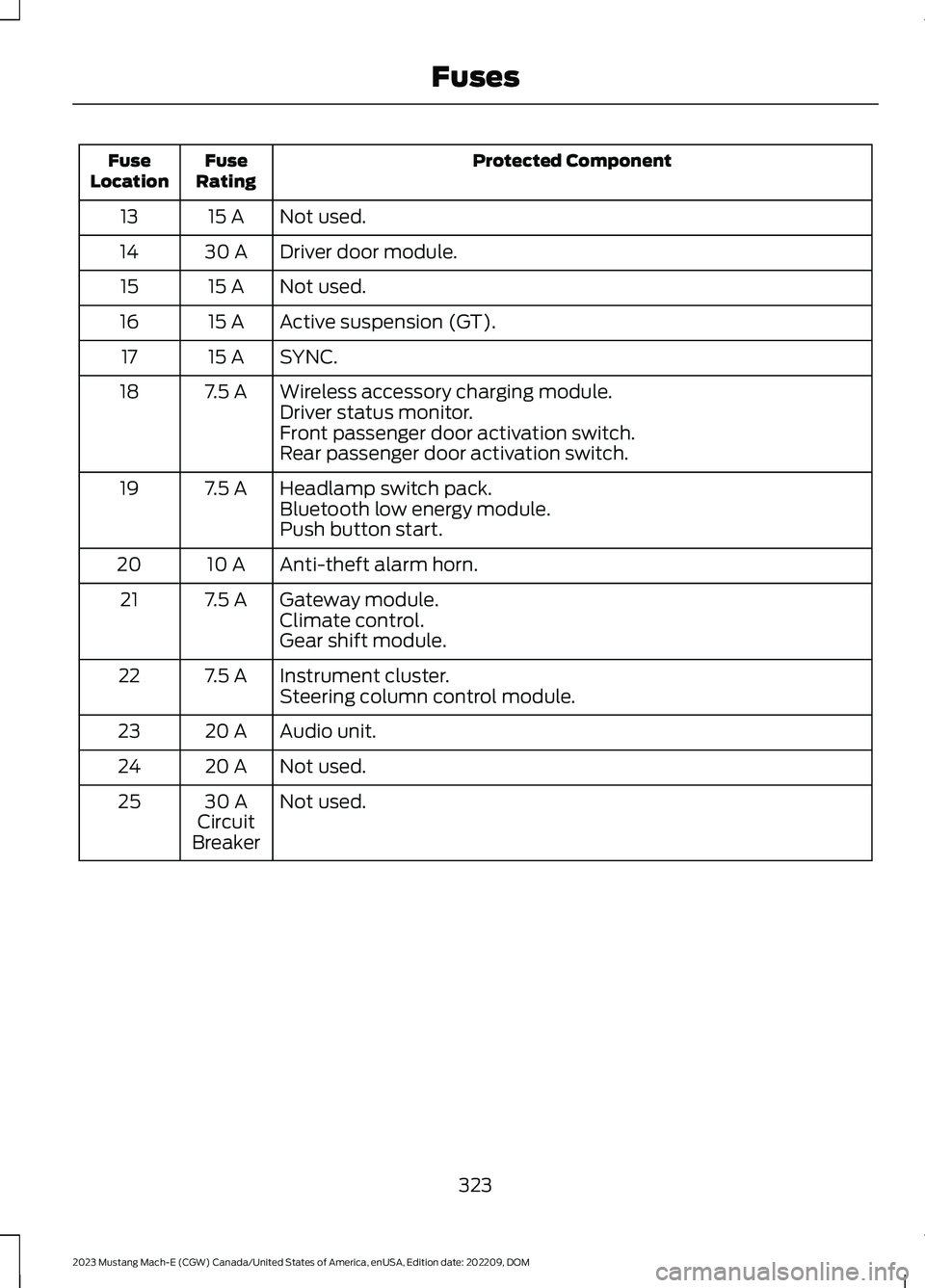
Protected ComponentFuseRatingFuseLocation
Not used.15 A13
Driver door module.30 A14
Not used.15 A15
Active suspension (GT).15 A16
SYNC.15 A17
Wireless accessory charging module.7.5 A18Driver status monitor.Front passenger door activation switch.Rear passenger door activation switch.
Headlamp switch pack.7.5 A19Bluetooth low energy module.Push button start.
Anti-theft alarm horn.10 A20
Gateway module.7.5 A21Climate control.Gear shift module.
Instrument cluster.7.5 A22Steering column control module.
Audio unit.20 A23
Not used.20 A24
Not used.30 ACircuitBreaker
25
323
2023 Mustang Mach-E (CGW) Canada/United States of America, enUSA, Edition date: 202209, DOMFuses
Page 391 of 496
CENTER DISPLAY
PRECAUTIONS
WARNING: Driving while distractedcan result in loss of vehicle control, crashand injury. We strongly recommend thatyou use extreme caution when using anydevice that may take your focus off theroad. Your primary responsibility is thesafe operation of your vehicle. Werecommend against the use of anyhand-held device while driving andencourage the use of voice-operatedsystems when possible. Make sure youare aware of all applicable local lawsthat may affect the use of electronicdevices while driving.
CENTER DISPLAY
LIMITATIONS
Speed-restricted Features
For your safety, some features are notavailable while the vehicle is in motion ator above 5 mph (8 km/h). Settings thatare not critical while driving your vehicleare shown as restricted on your display.Some of these settings include:
•Software updates.
•Personal profiles setup.
•Valet mode setup.
•Driver assistance settings.
•MyKey setup.
•Door keypad code setup.
These restricted features becomeavailable when your vehicle is no longer inmotion.
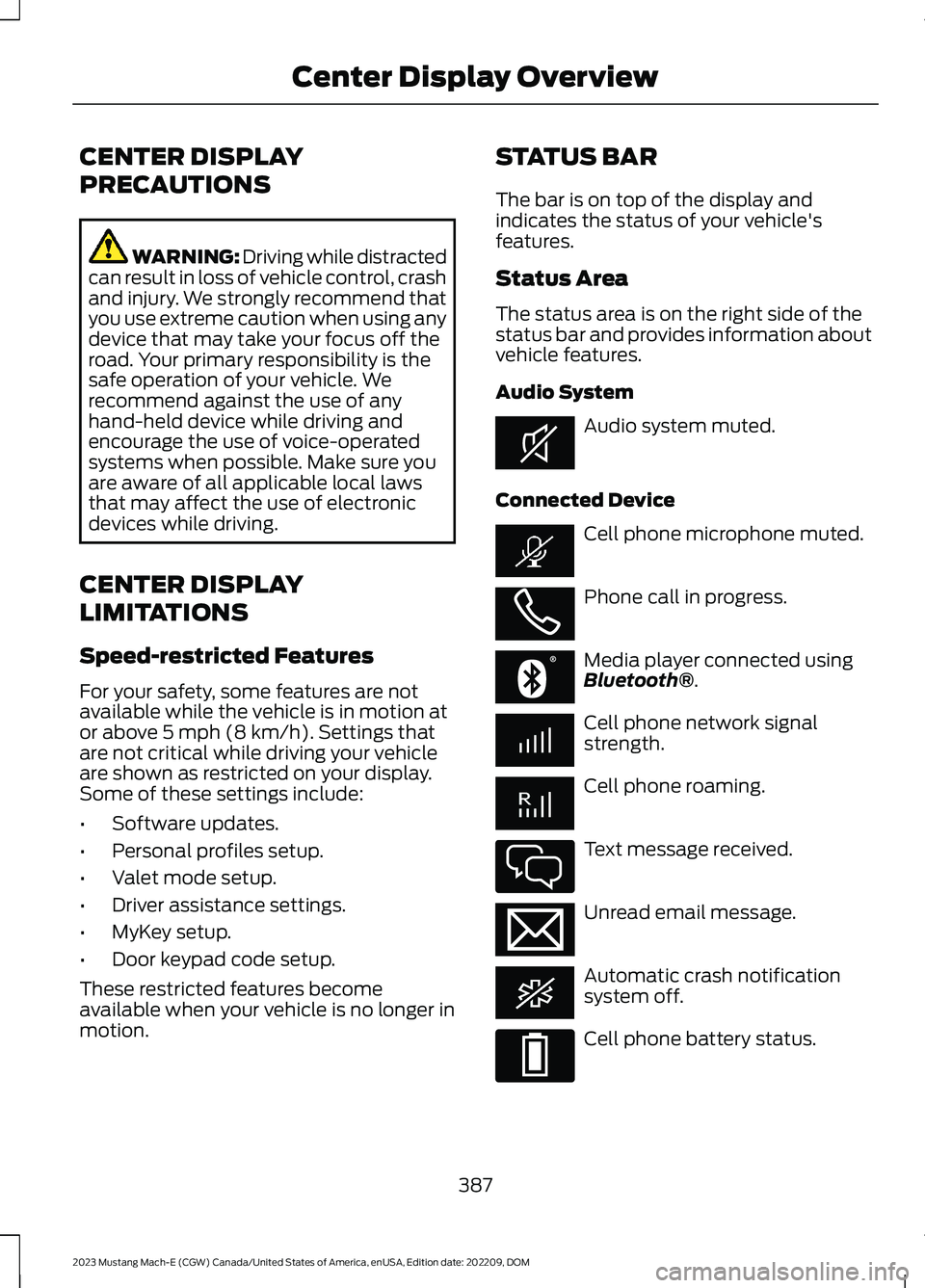
STATUS BAR
The bar is on top of the display andindicates the status of your vehicle'sfeatures.
Status Area
The status area is on the right side of thestatus bar and provides information aboutvehicle features.
Audio System
Audio system muted.
Connected Device
Cell phone microphone muted.
Phone call in progress.
Media player connected usingBluetooth®.
Cell phone network signalstrength.
Cell phone roaming.
Text message received.
Unread email message.
Automatic crash notificationsystem off.
Cell phone battery status.
387
2023 Mustang Mach-E (CGW) Canada/United States of America, enUSA, Edition date: 202209, DOMCenter Display OverviewE353221 E353213 E353208 E335295 E353216 E335293
Page 393 of 496
FORD ASSISTANT
USING FORD ASSISTANT
The digital assistant allows you to controlvehicle features using conversationalrequests.
To begin a voice interaction using the wakeword, say the selected wake word, thensay your command.
Press the voice interactionbutton on the steering wheel. Atone sounds before you can sayyour command.
Note:You may need to enable yourvehicle's modem to use certain voicecommands. See Enabling and Disablingthe Modem (page 372).
Note:When you are not driving, additionalcommands are available by using popularchat applications. Use FordPass to setup aconversation with your Ford assistant.
Voice Command Examples
To see examples of what voice commandsyou can use with different features:
1.
Press the button on thetouschscreen.
2.Press Ford Assistant.
3.Press Voice Command Help.
4.Select a feature.
FORD ASSISTANT SETTINGS
To access the settings menu:
1.
Press the button on thetouschscreen.
2.Press Ford Assistant.
From the settings menu you can do thefollowing:
•Switch listen for wake word on or off.
•Set the preferred wake word.
•Switch advance mode on or off.
•Switch phone confirmation on or off.
•Switch the commands list on or off.
•View the commands help menu.
Press the button next to a menuoption for more information.
FORD ASSISTANT – FREQUENTLYASKED QUESTIONS
Why does the system notunderstand what I am saying?
•You are speaking too soon. When usingthe button of the steering wheel, waitfor the tone before you speak.
Why does the system notunderstand the name of a track orartist?
•Bluetooth® does not support voicecommands.Connect your device to aUSB port.
•You are not saying the name exactlyas it appears on your device. Say thename of the track or artist exactly as itappears on your device. Spell out anyabbreviations in the name.
•The system does not recognize somespecial characters contained in thename of a song or artist, for example*, - or +. Rename the files on yourdevice or use the touchscreen to selectand play the track.
389
2023 Mustang Mach-E (CGW) Canada/United States of America, enUSA, Edition date: 202209, DOMVoice InteractionE142599 E386797 E386797 E366956
Page 397 of 496
PHONE PRECAUTIONS
WARNING: Driving while distractedcan result in loss of vehicle control, crashand injury. We strongly recommend thatyou use extreme caution when using anydevice that may take your focus off theroad. Your primary responsibility is thesafe operation of your vehicle. Werecommend against the use of anyhand-held device while driving andencourage the use of voice-operatedsystems when possible. Make sure youare aware of all applicable local lawsthat may affect the use of electronicdevices while driving.
CONNECTING YOUR PHONE
Connecting your phone stores contact andcall data on your vehicle.
Note:This data is used to provide intelligentsuggestions. You can switch this off in thetouchscreen settings menu. See Creatinga Personal Profile (page 399).
Note:Unpairing your phone removes thecontact and call data from your vehicle andstops intelligent call suggestions.
1.Make sure Bluetooth® is enabled onyour device.
2.
Press the button on thetouchscreen.
3.Press Phone List.
4.Select Add Phone.
5.Follow the instructions on the screento pair your device.
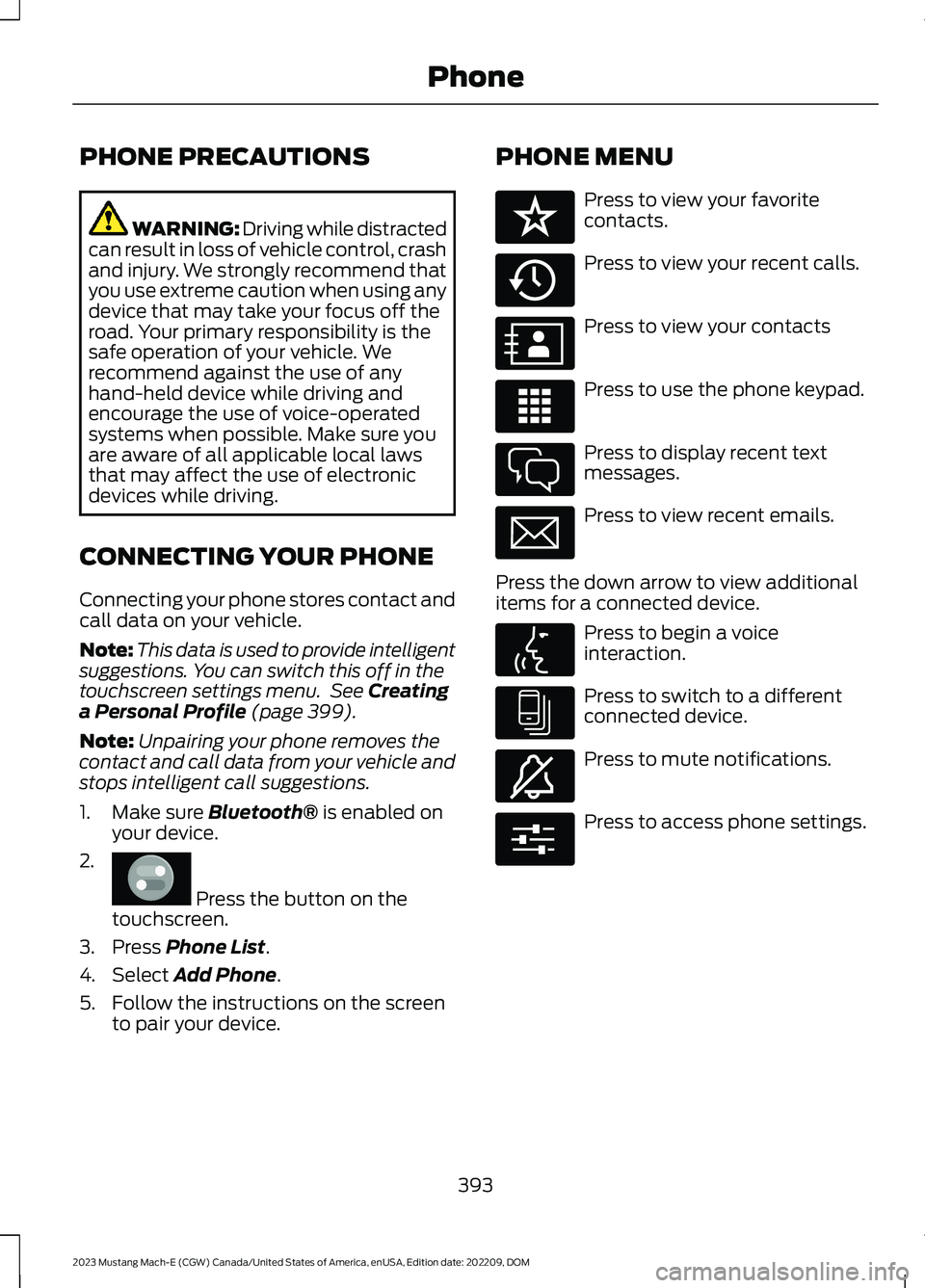
PHONE MENU
Press to view your favoritecontacts.
Press to view your recent calls.
Press to view your contacts
Press to use the phone keypad.
Press to display recent textmessages.
Press to view recent emails.
Press the down arrow to view additionalitems for a connected device.
Press to begin a voiceinteraction.
Press to switch to a differentconnected device.
Press to mute notifications.
Press to access phone settings.
393
2023 Mustang Mach-E (CGW) Canada/United States of America, enUSA, Edition date: 202209, DOMPhoneE386797 E329089 E329088 E329086 E329087 E329085 E329084 E329083 E329082 E329081 E280315
Page 400 of 496
CONNECTING A BLUETOOTH®
DEVICE
1.Make sure Bluetooth® is enabled onyour device.
2.
Press the button on thetouchscreen.
3.Press Connectivity.
4.Press Bluetooth.
5.Switch Bluetooth on.
6.Press Add a Bluetooth Device.
Note:A prompt alerts you to search for yourvehicle on your device.
Note:A number appears on your device andon the touchscreen.
Note:The touchscreen indicates that youhave successfully paired your device.
The Bluetooth® word mark and logos areregistered trademarks owned by BluetoothSIG, Inc. and any use of such marks byFord Motor Company is under license.Other trademarks and trade names arethose of their respective owners.
PLAYING MEDIA USING
BLUETOOTH®
WARNING: Driving while distractedcan result in loss of vehicle control, crashand injury. We strongly recommend thatyou use extreme caution when using anydevice that may take your focus off theroad. Your primary responsibility is thesafe operation of your vehicle. Werecommend against the use of any
hand-held device while driving andencourage the use of voice-operatedsystems when possible. Make sure youare aware of all applicable local lawsthat may affect the use of electronicdevices while driving.
1.Connect your device to Bluetooth®
2.
Press the button on thetouchscreen. See Accessing Apps(page 397).
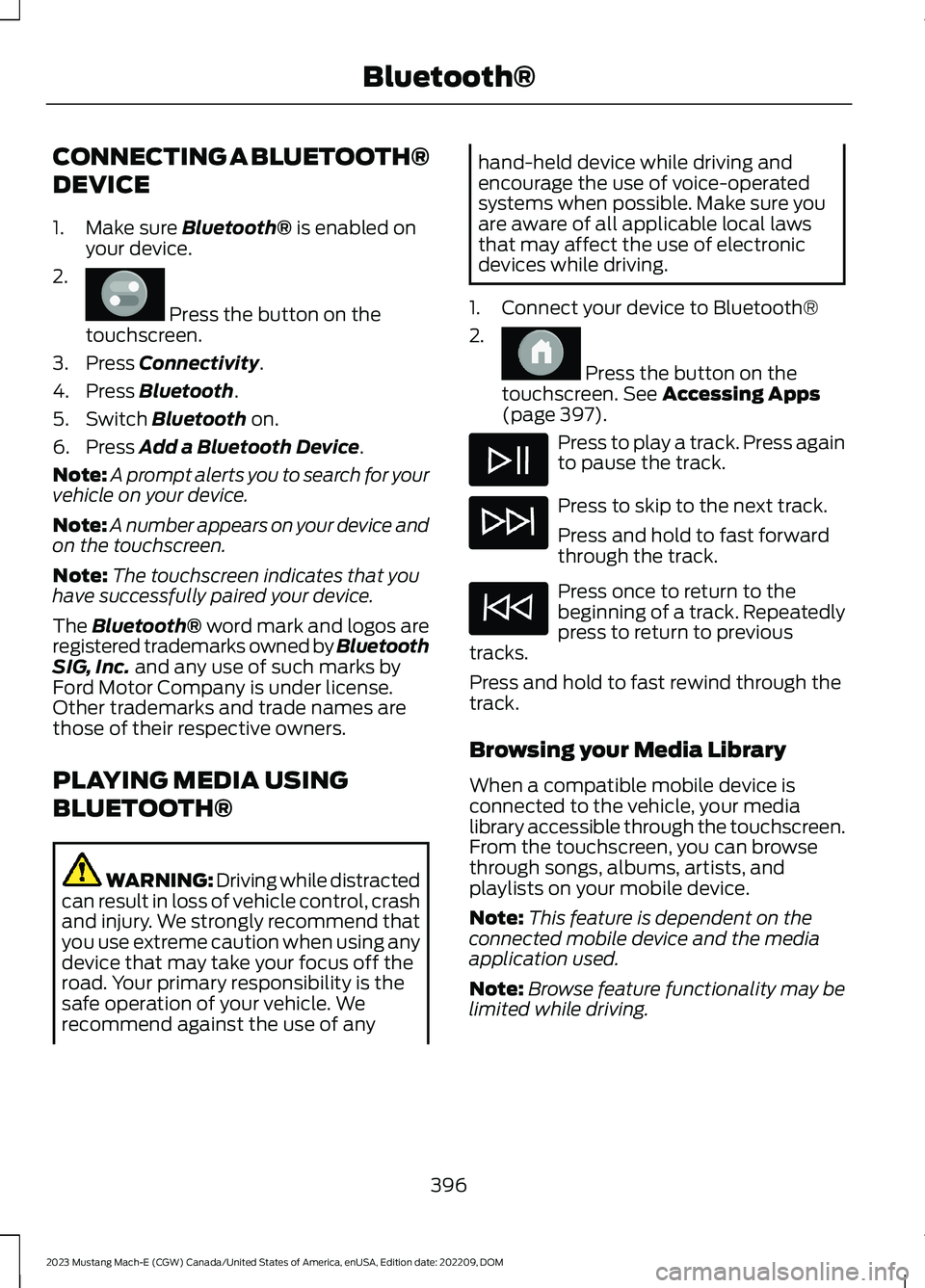
Press to play a track. Press againto pause the track.
Press to skip to the next track.
Press and hold to fast forwardthrough the track.
Press once to return to thebeginning of a track. Repeatedlypress to return to previoustracks.
Press and hold to fast rewind through thetrack.
Browsing your Media Library
When a compatible mobile device isconnected to the vehicle, your medialibrary accessible through the touchscreen.From the touchscreen, you can browsethrough songs, albums, artists, andplaylists on your mobile device.
Note:This feature is dependent on theconnected mobile device and the mediaapplication used.
Note:Browse feature functionality may belimited while driving.
396
2023 Mustang Mach-E (CGW) Canada/United States of America, enUSA, Edition date: 202209, DOMBluetooth®E386797 E386798