lock FORD TRANSIT 2015 5.G Manual PDF
[x] Cancel search | Manufacturer: FORD, Model Year: 2015, Model line: TRANSIT, Model: FORD TRANSIT 2015 5.GPages: 461, PDF Size: 5.82 MB
Page 262 of 461
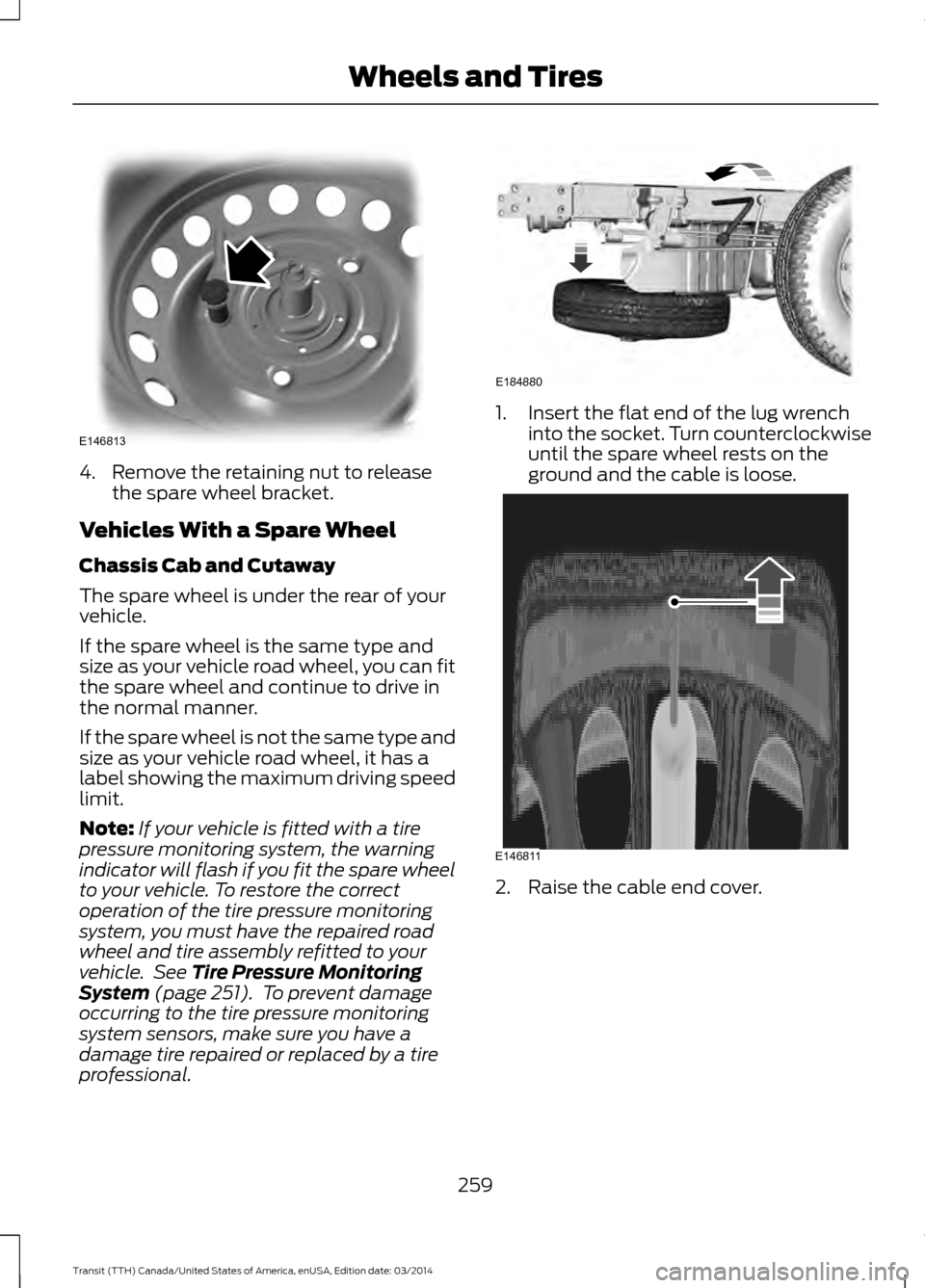
4. Remove the retaining nut to release
the spare wheel bracket.
Vehicles With a Spare Wheel
Chassis Cab and Cutaway
The spare wheel is under the rear of your
vehicle.
If the spare wheel is the same type and
size as your vehicle road wheel, you can fit
the spare wheel and continue to drive in
the normal manner.
If the spare wheel is not the same type and
size as your vehicle road wheel, it has a
label showing the maximum driving speed
limit.
Note: If your vehicle is fitted with a tire
pressure monitoring system, the warning
indicator will flash if you fit the spare wheel
to your vehicle. To restore the correct
operation of the tire pressure monitoring
system, you must have the repaired road
wheel and tire assembly refitted to your
vehicle. See Tire Pressure Monitoring
System (page 251). To prevent damage
occurring to the tire pressure monitoring
system sensors, make sure you have a
damage tire repaired or replaced by a tire
professional. 1. Insert the flat end of the lug wrench
into the socket. Turn counterclockwise
until the spare wheel rests on the
ground and the cable is loose. 2. Raise the cable end cover.
259 Transit (TTH) Canada/United States of America, enUSA, Edition date: 03/2014 Wheels and TiresE146813 E184880 E146811
Page 263 of 461
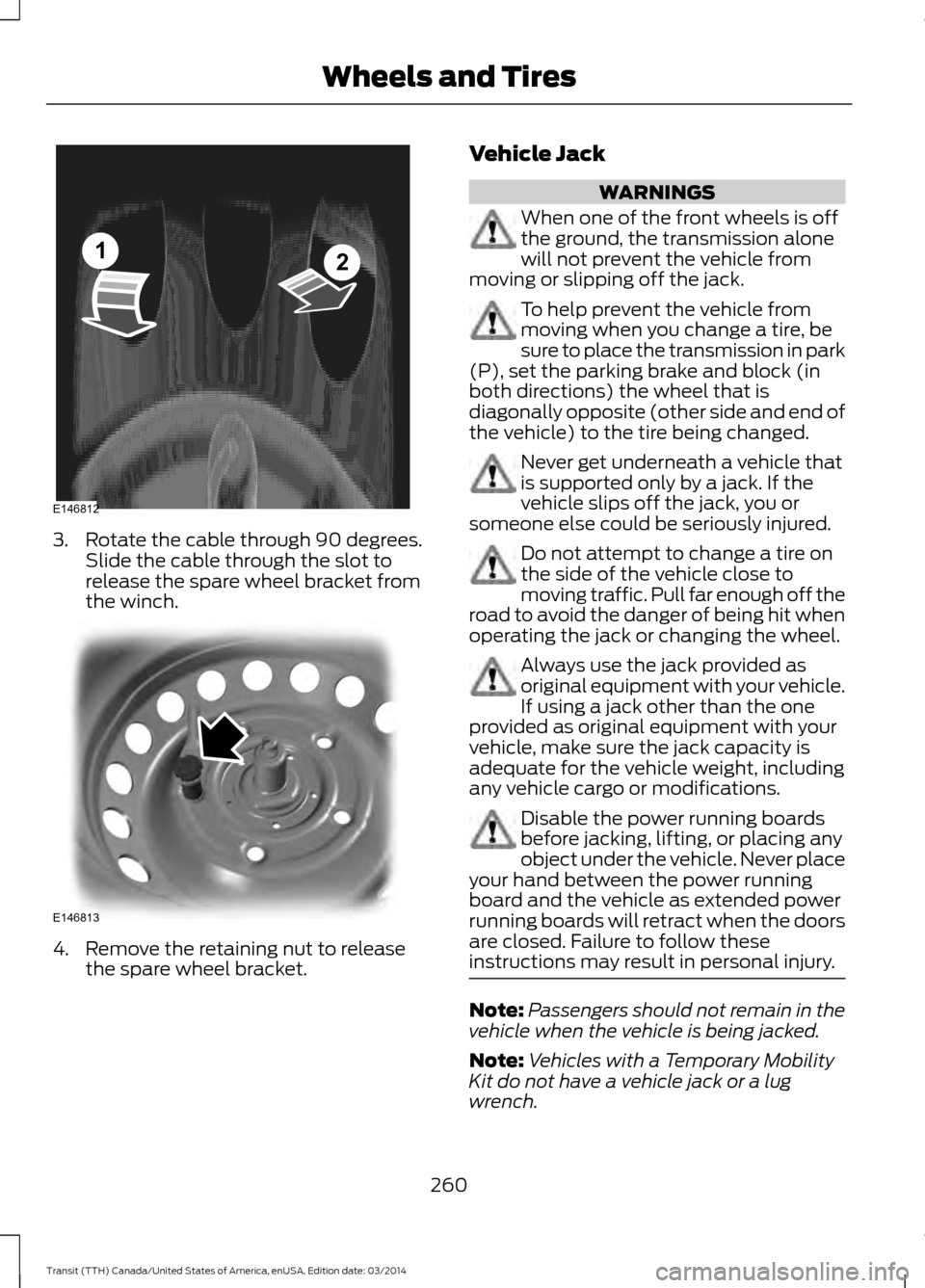
3. Rotate the cable through 90 degrees.
Slide the cable through the slot to
release the spare wheel bracket from
the winch. 4. Remove the retaining nut to release
the spare wheel bracket. Vehicle Jack WARNINGS
When one of the front wheels is off
the ground, the transmission alone
will not prevent the vehicle from
moving or slipping off the jack. To help prevent the vehicle from
moving when you change a tire, be
sure to place the transmission in park
(P), set the parking brake and block (in
both directions) the wheel that is
diagonally opposite (other side and end of
the vehicle) to the tire being changed. Never get underneath a vehicle that
is supported only by a jack. If the
vehicle slips off the jack, you or
someone else could be seriously injured. Do not attempt to change a tire on
the side of the vehicle close to
moving traffic. Pull far enough off the
road to avoid the danger of being hit when
operating the jack or changing the wheel. Always use the jack provided as
original equipment with your vehicle.
If using a jack other than the one
provided as original equipment with your
vehicle, make sure the jack capacity is
adequate for the vehicle weight, including
any vehicle cargo or modifications. Disable the power running boards
before jacking, lifting, or placing any
object under the vehicle. Never place
your hand between the power running
board and the vehicle as extended power
running boards will retract when the doors
are closed. Failure to follow these
instructions may result in personal injury. Note:
Passengers should not remain in the
vehicle when the vehicle is being jacked.
Note: Vehicles with a Temporary Mobility
Kit do not have a vehicle jack or a lug
wrench.
260 Transit (TTH) Canada/United States of America, enUSA, Edition date: 03/2014 Wheels and TiresE146812
12 E146813
Page 264 of 461
Vehicle Jack Storage
The vehicle jack is under the passenger
seat. The jack handle and lug wrench are
located in a storage compartment in the
front right-hand side stepwell.
Note:
The vehicle jack is in the load space
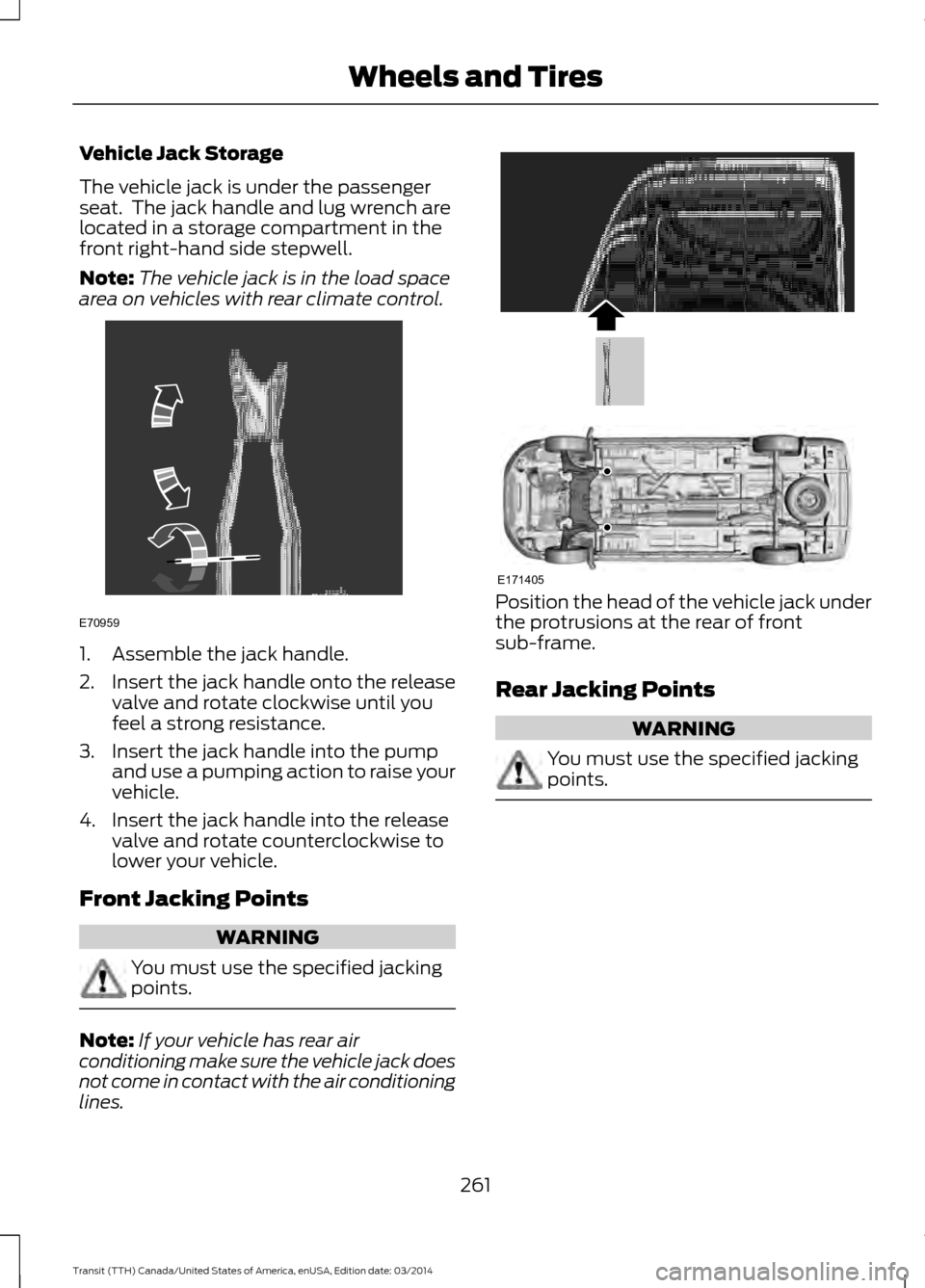
area on vehicles with rear climate control. 1. Assemble the jack handle.
2.
Insert the jack handle onto the release
valve and rotate clockwise until you
feel a strong resistance.
3. Insert the jack handle into the pump and use a pumping action to raise your
vehicle.
4. Insert the jack handle into the release valve and rotate counterclockwise to
lower your vehicle.
Front Jacking Points WARNING
You must use the specified jacking
points.
Note:
If your vehicle has rear air
conditioning make sure the vehicle jack does
not come in contact with the air conditioning
lines. Position the head of the vehicle jack under
the protrusions at the rear of front
sub-frame.
Rear Jacking Points
WARNING
You must use the specified jacking
points.
261
Transit (TTH) Canada/United States of America, enUSA, Edition date: 03/2014 Wheels and TiresE70959 E171405
Page 265 of 461
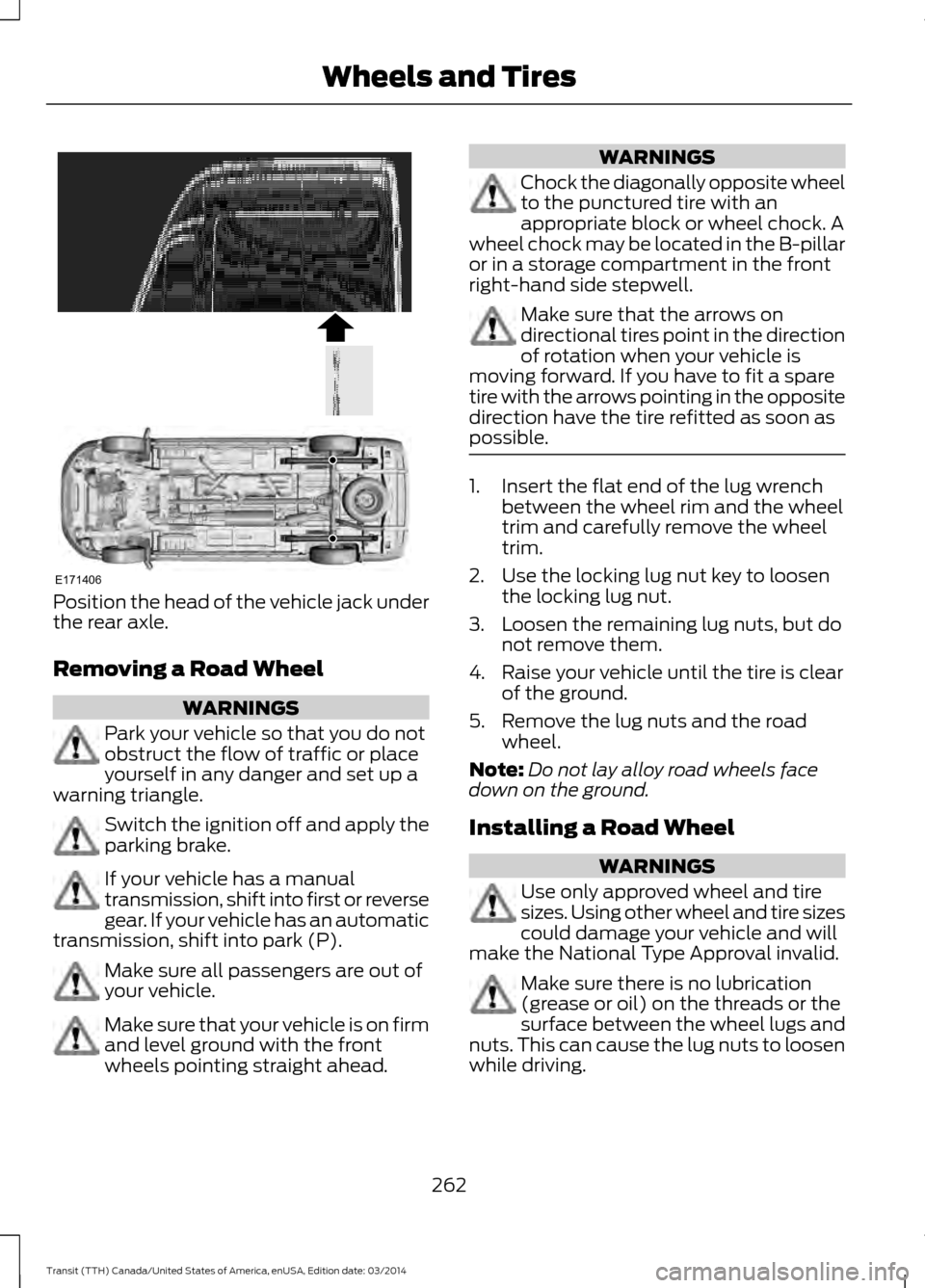
Position the head of the vehicle jack under
the rear axle.
Removing a Road Wheel
WARNINGS
Park your vehicle so that you do not
obstruct the flow of traffic or place
yourself in any danger and set up a
warning triangle. Switch the ignition off and apply the
parking brake.
If your vehicle has a manual
transmission, shift into first or reverse
gear. If your vehicle has an automatic
transmission, shift into park (P). Make sure all passengers are out of
your vehicle.
Make sure that your vehicle is on firm
and level ground with the front
wheels pointing straight ahead. WARNINGS
Chock the diagonally opposite wheel
to the punctured tire with an
appropriate block or wheel chock. A
wheel chock may be located in the B-pillar
or in a storage compartment in the front
right-hand side stepwell. Make sure that the arrows on
directional tires point in the direction
of rotation when your vehicle is
moving forward. If you have to fit a spare
tire with the arrows pointing in the opposite
direction have the tire refitted as soon as
possible. 1. Insert the flat end of the lug wrench
between the wheel rim and the wheel
trim and carefully remove the wheel
trim.
2. Use the locking lug nut key to loosen the locking lug nut.
3. Loosen the remaining lug nuts, but do not remove them.
4. Raise your vehicle until the tire is clear of the ground.
5. Remove the lug nuts and the road wheel.
Note: Do not lay alloy road wheels face
down on the ground.
Installing a Road Wheel WARNINGS
Use only approved wheel and tire
sizes. Using other wheel and tire sizes
could damage your vehicle and will
make the National Type Approval invalid. Make sure there is no lubrication
(grease or oil) on the threads or the
surface between the wheel lugs and
nuts. This can cause the lug nuts to loosen
while driving.
262 Transit (TTH) Canada/United States of America, enUSA, Edition date: 03/2014 Wheels and TiresE171406
Page 266 of 461
WARNINGS
Make sure the wheel and hub
contact surfaces are free from
foreign material.
Never use wheels or lug nuts
different than the original equipment
as this could damage the wheel or
mounting system. This damage could
allow the wheels to come off when your
vehicle is moving. 1. Install the wheel.
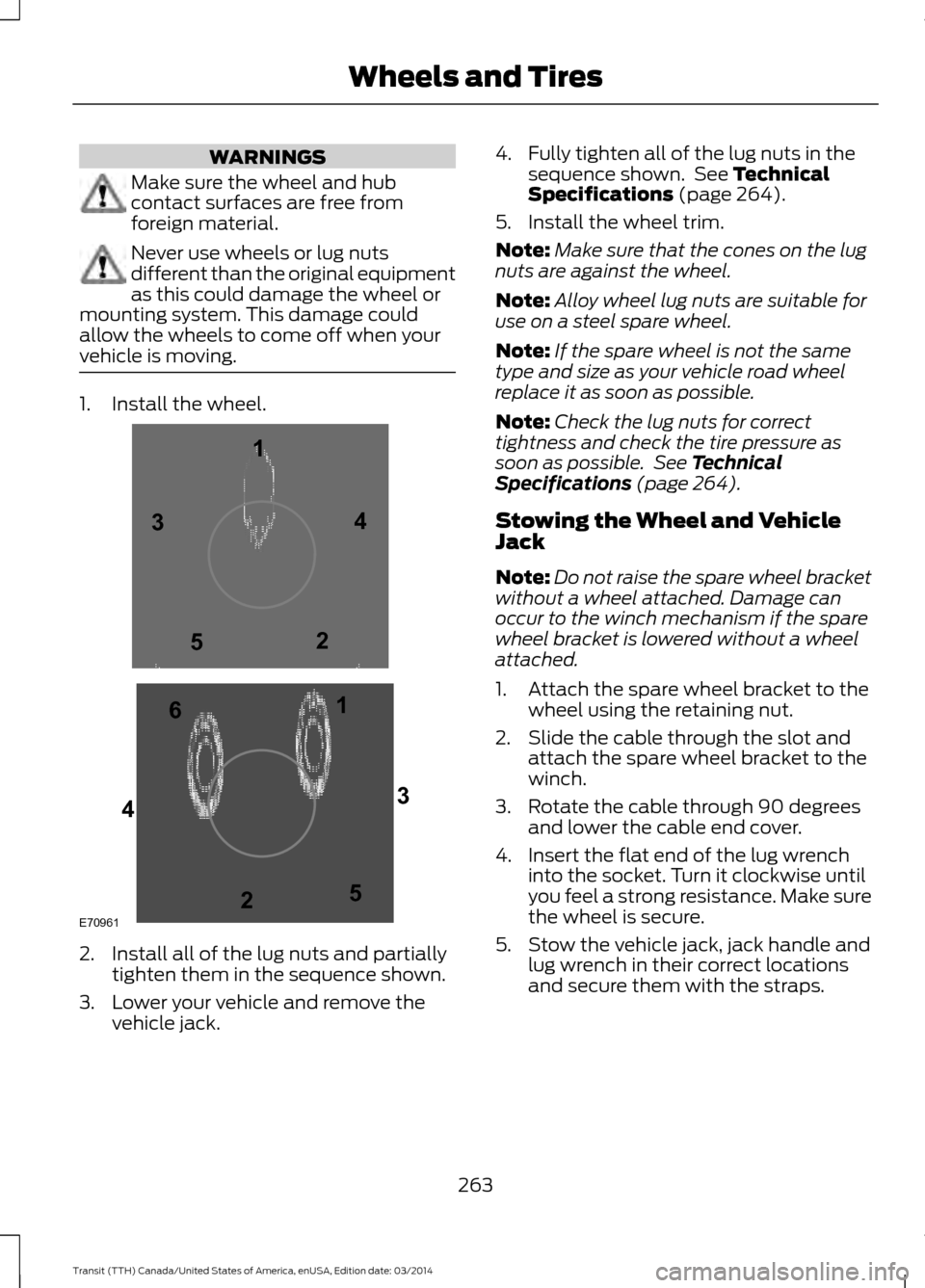
2. Install all of the lug nuts and partially
tighten them in the sequence shown.
3. Lower your vehicle and remove the vehicle jack. 4. Fully tighten all of the lug nuts in the
sequence shown. See Technical
Specifications (page 264).
5. Install the wheel trim.
Note: Make sure that the cones on the lug
nuts are against the wheel.
Note: Alloy wheel lug nuts are suitable for
use on a steel spare wheel.
Note: If the spare wheel is not the same
type and size as your vehicle road wheel
replace it as soon as possible.
Note: Check the lug nuts for correct
tightness and check the tire pressure as
soon as possible. See Technical
Specifications (page 264).
Stowing the Wheel and Vehicle
Jack
Note: Do not raise the spare wheel bracket
without a wheel attached. Damage can
occur to the winch mechanism if the spare
wheel bracket is lowered without a wheel
attached.
1. Attach the spare wheel bracket to the wheel using the retaining nut.
2. Slide the cable through the slot and attach the spare wheel bracket to the
winch.
3. Rotate the cable through 90 degrees and lower the cable end cover.
4. Insert the flat end of the lug wrench into the socket. Turn it clockwise until
you feel a strong resistance. Make sure
the wheel is secure.
5. Stow the vehicle jack, jack handle and lug wrench in their correct locations
and secure them with the straps.
263 Transit (TTH) Canada/United States of America, enUSA, Edition date: 03/2014 Wheels and TiresE709611
1
2 3
4
5
6
2
3
4
5
Page 287 of 461
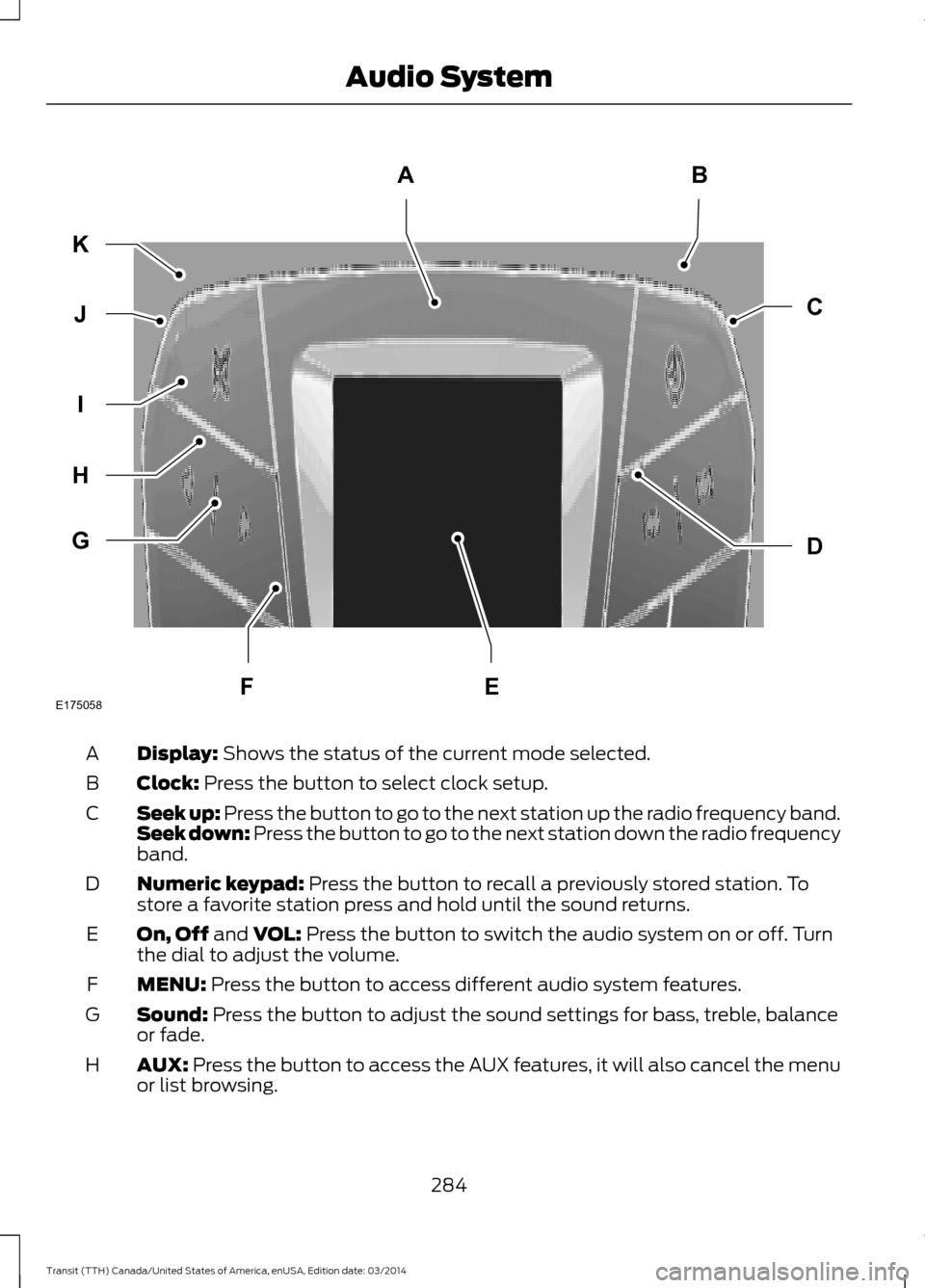
Display: Shows the status of the current mode selected.
A
Clock: Press the button to select clock setup.
B
Seek up: Press the button to go to the next station up the radio frequency band.
S
eek down: Press the button to go to the next station down the radio frequency
band.
C
Numeric keypad:
Press the button to recall a previously stored station. To
store a favorite station press and hold until the sound returns.
D
On, Off and
VOL: Press the button to switch the audio system on or off. Turn
the dial to adjust the volume.
E
MENU:
Press the button to access different audio system features.
F
Sound: Press the button to adjust the sound settings for bass, treble, balance
or fade.
G
AUX:
Press the button to access the AUX features, it will also cancel the menu
or list browsing.
H
284Transit (TTH) Canada/United States of America, enUSA, Edition date: 03/2014 Audio SystemE175058
AB
D
C
G
H
I
J
K
FE
Page 288 of 461
Radio: Press the button to select different radio frequency bands. Press to
cancel the menu or list browsing.
I
Cursor up
or down: Press the cursor up or down arrow buttons to adjust the
settings within the menus or to move to the next radio station while listening
to the radio on the
FM or AM frequency band.
J
Mute:
Press the button to mute the sound.
K
Clock Button
This allows you to adjust the clock settings.
Press the
Clock button until the following message is displayed. Action and Description
Message
Use the cursor up or down arrow buttons to set the correct
hour.
Set Hour
Press the
Clock button again until the following message is displayed.
Use the cursor up or down arrow buttons to set the correct
minutes.
Set Minutes
Setting 24 Hour or 12 Hour Display
Press the
Menu button until the following message is displayed. Action and Description
Message
Use the cursor up or down arrow buttons to select one of the
following:
24 Hour
12 Hour
24 Hour
Note: The default setting is 24 hour.
Station Tuning Buttons
Seek Tuning
Select a frequency band and briefly press
one of the seek buttons. The unit will stop
at the first station it finds in the direction
you have chosen. Manual Tuning
Use the cursor up or down arrow buttons
to tune up or down the frequency band in
small increments. To increment quickly,
press and hold until you find a station you
want to listen to.
285 Transit (TTH) Canada/United States of America, enUSA, Edition date: 03/2014 Audio System
Page 289 of 461
Station Preset Buttons
This feature allows you to store your
favorite stations. They can be recalled by
selecting the appropriate frequency band
and pressing one of the preset buttons.
1. Select a frequency band.
2. Tune to the station required.
3. Press and hold one of the preset
buttons. The audio unit will also mute
momentarily as confirmation.
You can repeat this on each frequency
band and for each preset button.
Menu Button
This allows you to adjust all of the audio
system settings. Press the button
repeatedly until the required setting is
displayed. Use the cursor up or down arrow
buttons to adjust the following settings:
• Clock hour.
• Clock minutes.
• 24 hour, 12 hour.
• Bass.
• Treble.
• Balance.
• Fade.
• RDS.
Sound Button
This allows you to adjust the sound
settings for bass, treble, balance or fade.
1. Press the sound button until the required setting is displayed. 2. Use the cursor up or down arrow
buttons to select the required level.
Note: Fade settings are only adjustable if
there are speakers in the rear of your vehicle.
AUX Button
Connect your media device to the audio
unit. See USB Port (page 297).
Select your media device as the audio
source by pressing the
AUX button. After
connecting your media device, the first
track will start to play automatically.
AUDIO UNIT - VEHICLES WITH:
PREMIUM AM/FM/CD WARNING
Driving while distracted can result in
loss of vehicle control, crash and
injury. We strongly recommend that
you use extreme caution when using any
device that may take your focus off the
road. Your primary responsibility is the safe
operation of your vehicle. We recommend
against the use of any hand-held device
while driving and encourage the use of
voice-operated systems when possible.
Make sure you are aware of all applicable
local laws that may affect the use of
electronic devices while driving. Note:
The MyFord Touch system controls
most of the audio features. See
MyFord
Touch ™ (page 349).
286 Transit (TTH) Canada/United States of America, enUSA, Edition date: 03/2014 Audio System
Page 292 of 461
Eject: Press this button to eject a CD.
A
Cursor arrows:
Press these buttons to scroll through on screen audio system
choices.
B
OK: Press this button to confirm menu selections.
C
Information: Press this button to access any available radio or CD information.
D
TUNE - and TUNE +:
Press these buttons to manually search the frequency
band.
E
Numeric keypad:
In radio mode, store your favorite radio stations. To store a
radio station, tune to the station, then press and hold a preset button until sound
returns. In CD mode, select a track. In phone mode, enter a phone number.
F
Clock:
Push to access clock settings. You can also set the clock by pressing
the MENU button and scrolling to Clock Settings.
G
Function buttons: Select different functions of the audio system depending
on which mode you are in (such as Radio mode or CD mode).
H
Seek:
Press and release these buttons to go to the previous or next preset radio
station or disc track. Press and hold these buttons to fast forward to the previous
or next strong radio station, memory preset or through the current disc track.
I
On, off and volume:
Press this button to switch the system off and on. Turn
to adjust the volume.
J
MENU: Press this button to access different audio system features. See Menu
Structure later in this section.
K
SOUND: Press this button to access settings for Treble, Middle, Bass, Fade,
Balance and Occupancy. Use the up and down arrow buttons to select the
various settings. When you make your selection, press the left and right arrow
buttons to change the settings. Press OK
to set or press MENU to exit.
L
PHONE:
Press this button to access the phone features of the SYNC system.
See SYNC™ (page 300).
M
MEDIA:
Press this button to switch between listening to a CD and the
SYNC-Media menu. To change the SYNC-Media device (such as switching from
a device plugged into the USB port to a Bluetooth audio device), press MENU
and scroll to Select Source.
N
RADIO: Press this button to listen to the radio or change radio frequencies.
Press the function buttons below the radio screen to select different radio
functions.
O
289Transit (TTH) Canada/United States of America, enUSA, Edition date: 03/2014 Audio System
Page 294 of 461
Eject: Press this button to eject a CD.
A
Cursor arrows:
Press these buttons to scroll through on screen audio system
choices.
B
OK: Press this button to confirm menu selections.
C
Information: Press this button to access any available radio or CD information.
D
TUNE - and TUNE +:
Press these buttons to manually search the frequency
band.
E
Numeric keypad:
In radio mode, store your favorite radio stations. To store a
radio station, tune to the station, then press and hold a preset button until sound
returns. In CD mode, select a track. In phone mode, enter a phone number.
F
Clock:
Push to access clock settings. You can also set the clock by pressing
the MENU button and scrolling to Clock Settings.
G
Function buttons: Select different functions of the audio system depending
on which mode you are in (such as Radio mode or CD mode).
H
Sound:
Press this button to access settings for Treble, Middle, Bass, Fade,
Balance and Occupancy. Use the up and down arrow buttons to select the
various settings. When you make your selection, press the left and right arrow
buttons to change the settings. Press
OK to set or press MENU to exit.
I
Seek:
Press and release these buttons to go to the previous or next preset radio
station or disc track. Press and hold these buttons to fast forward to the previous
or next strong radio station, memory preset or through the current disc track.
J
On, off and volume:
Press this button to switch the system off and on. Turn
to adjust the volume.
K
MENU: Press this button to access different audio system features. See Menu
Structure later in this section.
L
PHONE: Press this button to access the phone features of the SYNC system.
See
SYNC™ (page 300).
M
MEDIA: Press this button to switch between listening to a CD and the
SYNC-Media menu. To change the SYNC-Media device (such as switching from
a device plugged into the USB port to a Bluetooth audio device), press
MENU
and scroll to Select Source.
N
SIRIUS:
Press this button to listen to SIRIUS satellite radio.
O
RADIO: Press this button to listen to the radio or change radio frequencies.
Press the function buttons below the radio screen to select different radio
functions.
P
291Transit (TTH) Canada/United States of America, enUSA, Edition date: 03/2014 Audio System