See Manual FORD TRANSIT 2021 User Guide
[x] Cancel search | Manufacturer: FORD, Model Year: 2021, Model line: TRANSIT, Model: FORD TRANSIT 2021Pages: 509, PDF Size: 8.21 MB
Page 198 of 509
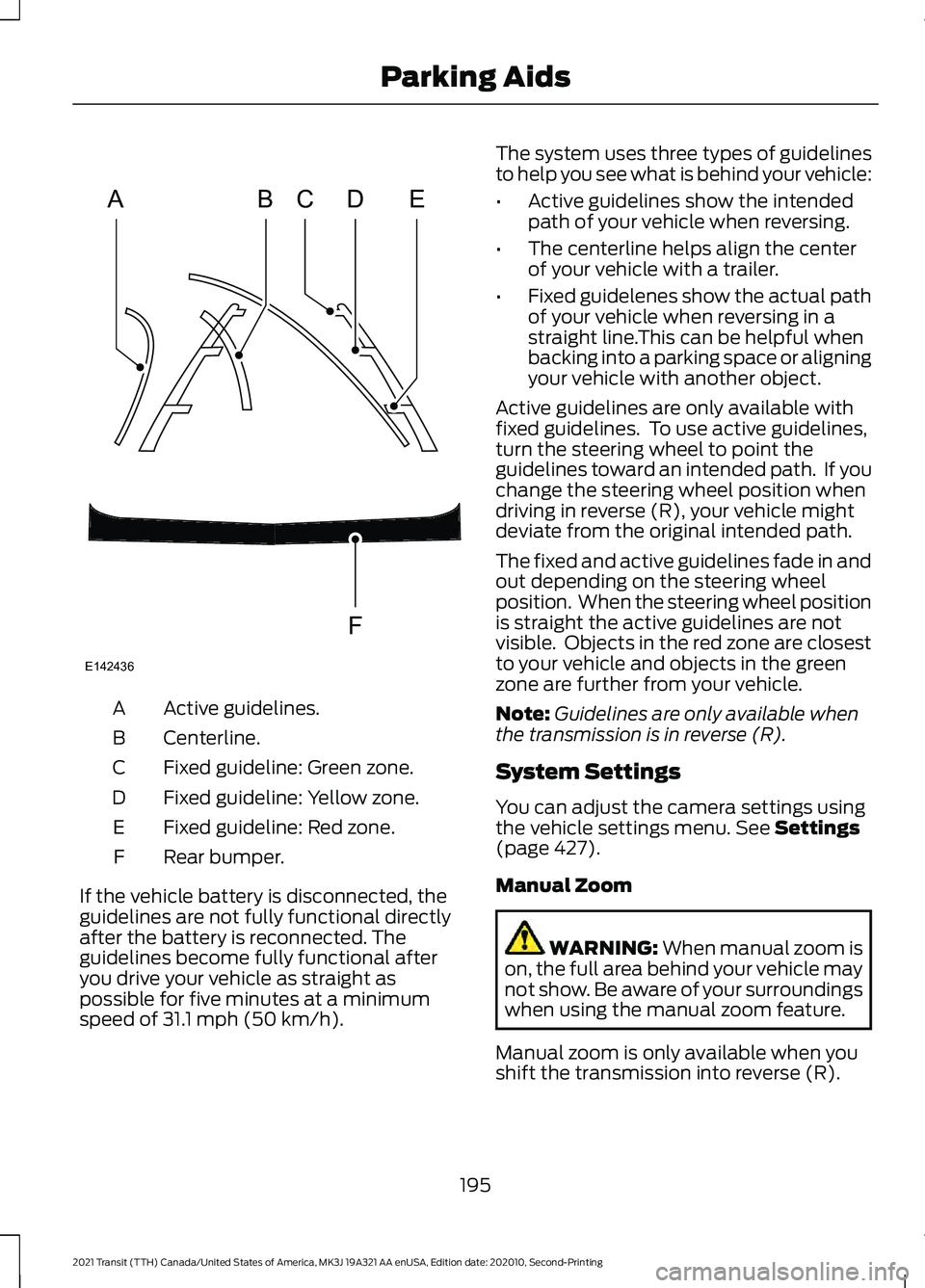
Active guidelines.
A
Centerline.
B
Fixed guideline: Green zone.
C
Fixed guideline: Yellow zone.
D
Fixed guideline: Red zone.
E
Rear bumper.
F
If the vehicle battery is disconnected, the
guidelines are not fully functional directly
after the battery is reconnected. The
guidelines become fully functional after
you drive your vehicle as straight as
possible for five minutes at a minimum
speed of 31.1 mph (50 km/h). The system uses three types of guidelines
to help you see what is behind your vehicle:
•
Active guidelines show the intended
path of your vehicle when reversing.
• The centerline helps align the center
of your vehicle with a trailer.
• Fixed guidelenes show the actual path
of your vehicle when reversing in a
straight line.This can be helpful when
backing into a parking space or aligning
your vehicle with another object.
Active guidelines are only available with
fixed guidelines. To use active guidelines,
turn the steering wheel to point the
guidelines toward an intended path. If you
change the steering wheel position when
driving in reverse (R), your vehicle might
deviate from the original intended path.
The fixed and active guidelines fade in and
out depending on the steering wheel
position. When the steering wheel position
is straight the active guidelines are not
visible. Objects in the red zone are closest
to your vehicle and objects in the green
zone are further from your vehicle.
Note: Guidelines are only available when
the transmission is in reverse (R).
System Settings
You can adjust the camera settings using
the vehicle settings menu.
See Settings
(page 427).
Manual Zoom WARNING:
When manual zoom is
on, the full area behind your vehicle may
not show. Be aware of your surroundings
when using the manual zoom feature.
Manual zoom is only available when you
shift the transmission into reverse (R).
195
2021 Transit (TTH) Canada/United States of America, MK3J 19A321 AA enUSA, Edition date: 202010, Second-Printing Parking AidsABCD
F
E
E142436
Page 199 of 509
Selectable settings for this feature are
Zoom in (+) and Zoom Out (-). Press the
symbol in the camera screen to change the
view. The default setting is Zoom OFF. The
rear bumper remains in the image as a
reference point.
Note:
Only the centerline shows when you
switch on manual zoom.
Rear View Camera Delay
You can switch this feature on or off using
the vehicle settings menu. See Settings
(page 427). The default setting is off.
When shifting the transmission out of
reverse (R) and into any gear other than
park (P), the camera image remains in the
display until:
• Your vehicle speed sufficiently
increases.
• You shift your vehicle into park (P).
Enhanced Parking Aids or Park
Pilot
(If Equipped)
You can switch this feature on or off using
the vehicle settings menu. See
Settings
(page 427).
When the reverse sensing system detects
an object, it displays red, yellow and green
indicators at the top of the image.
180 DEGREE CAMERA WARNING:
The rear view camera
system is a reverse aid supplement
device that still requires the driver to use
it in conjunction with the interior and
exterior mirrors for maximum coverage. WARNING:
Objects that are close
to either corner of the bumper or under
the bumper, might not be seen on the
screen due to the limited coverage of the
camera system. WARNING:
Use caution when
turning camera features on or off when
the transmission is not in park (P). Make
sure your vehicle is not moving. WARNING: You are responsible for
controlling your vehicle at all times. The
system is designed to be an aid and does
not relieve you of your responsibility to
drive with due care and attention. Failure
to follow this instruction could result in
the loss of control of your vehicle,
personal injury or death.
Note: Use caution using the 180 view when
any of the doors are ajar. If a door is ajar, the
camera will be out of position and the video
image may be incorrect.
Front View Camera WARNING:
The front camera
system still requires the driver to use it
in conjunction with looking out of your
vehicle.
Note: The system turns off the front video
image when your vehicle is in motion at low
speed, except when in reverse (R).
Note: The area displayed on the screen may
vary according to your vehicle's orientation
or road condition.
Note: The camera system may not operate
correctly if mud, water or debris obstructs
the camera's view. You can clean the lens
with a soft, lint-free cloth and non-abrasive
cleaner or by using your front washer.
See
Wipers and Washers (page 97).
196
2021 Transit (TTH) Canada/United States of America, MK3J 19A321 AA enUSA, Edition date: 202010, Second-Printing Parking Aids
Page 208 of 509
You can change from adaptive cruise
control to cruise control using the
information display.
To switch between adaptive cruise control and normal cruise control, use the
information display controls on the steering wheel to select the following: Action
Menu Item
Press the menu button.
Driver Assist.
Press the OK button.
Cruise Control
Press the
OK button. Press the toggle button upward or
downward to choose your required setting. Press the OK
button.
Mode The cruise control indicator
replaces the adaptive cruise
control indicator if you select
normal cruise control. The gap setting
does not display, the system does not
automatically respond to lead vehicles and
adaptive braking does not activate. The
system remembers the last setting when
you start your vehicle. Adaptive Cruise Control Indicator The indicator appears when you
switch the system on.
The indicator appears in the information
display when the system is in standby
mode and when you set the adaptive
cruise speed.
Adaptive Cruise Control Information Messages Action
Message
The radar has reduced visibility.
Adaptive Cruise Not
Available Sensor Blocked
See Manual
The system is not available.
Adaptive Cruise Not
Available
The system has malfunctioned. Have your vehicle checked
as soon as possible.
Adaptive Cruise Malfunc-
tion
You have switched normal cruise control on. Adaptive braking
turns off.
Normal Cruise Active
Adaptive Braking Off
205
2021 Transit (TTH) Canada/United States of America, MK3J 19A321 AA enUSA, Edition date: 202010, Second-Printing Cruise ControlE71340 E144524
Page 218 of 509
Blind Spot Information System
Limitations
Some trailers may cause a slight change
in system performance:
•
Wide box trailers, especially those
wider than the towing vehicle, may
cause false alerts to occur when driving
next to infrastructure or near parked
cars. A false alert may also occur while
making a 90-degree turn or driving
through a roundabout.
• Wide trailers that have a total length
greater than 20 ft (6 m) may cause
delayed alerts when a vehicle is
passing at high speed. •
Box trailers that have a width greater
than
7.9 ft (2.4 m) may cause early
alerts when you pass a vehicle.
• Clam shell or V-Nose box trailers with
a width greater than 7.9 ft (2.4 m) may
cause delayed alerts when a vehicle
traveling the same speed as your
vehicle merges lanes.
Blind Spot Information System
Warning Lamp It illuminates in the instrument
cluster if you switch the system
off.
If it illuminates when the system is on this
indicates a malfunction. Have your vehicle
checked as soon as possible.
Blind Spot Information System Information Messages Description
Message
Displays if the new trailer is attached but not selected. Select
a trailer.
Trailer Blind Spot Add
Trailer Exit Press OK to
Select
Displays if the blind spot information system sensors are
blocked.
Blind Spot Not Available
Sensor Blocked See
Manual
Displays if you attach a trailer to your vehicle.
Blind spot & cross Traffic
alert deact. Trailer
attached
The system has detected a fault that requires service. Have
your vehicle checked as soon as possible.
Blind Spot System Fault
215
2021 Transit (TTH) Canada/United States of America, MK3J 19A321 AA enUSA, Edition date: 202010, Second-Printing Driving AidsE249861E249861
Page 221 of 509
Cross Traffic Alert behavior when
trailer is attached
Note:
The system may not correctly operate
when towing a trailer. For vehicles with an
approved trailer tow module and tow bar,
the system turns off when you attach a
trailer. For vehicles with an aftermarket
trailer tow module or tow bar, we
recommend that you switch the system off
when you attach a trailer.
Cross traffic alert remains on when you
attach a trailer in vehicles equipped with
a Blind Sport Information System with
Trailer Tow under the following conditions:
• You connect a trailer.
• The trailer is a bike rack or cargo rack
with a maximum length of 3 ft (1 m).
• You set the trailer length to
3 ft (1 m)
in the information display.
See
Blind Spot Information System
(page 212).
Switching the System On and Off
To switch cross traffic alert on or off, use
the Information display. See
General
Information (page 115). Note:
The system turns on every time you
switch the ignition on. To permanently
switch the system off, contact an authorized
dealer.
Cross Traffic Alert Indicator When the system detects an
approaching vehicle a tone
sounds, a warning lamp
illuminates in the relevant exterior mirror
and arrows appear in the information
display to show which side the
approaching vehicle is coming from.
Note: If arrows do not display, a message
appears in the information display.
If the system malfunctions, a warning lamp
illuminates in the instrument cluster and
a message appears in the information
display. Have your vehicle checked as soon
as possible.
Note: In exceptional conditions, the system
could alert you, even when there is nothing
in the detection zone, for example a vehicle
passing further away from your vehicle.
Cross Traffic Alert Information Messages Action
Message
Displays instead of indication arrows when the system
detects a vehicle. Check for approaching traffic.
Cross Traffic Alert
Displays if the cross traffic alert system sensors are blocked.
Clean the sensors. If the message continues to appear, have
your vehicle checked as soon as possible.
Cross Traffic Not Avail-
able Sensor Blocked See
Manual
The system has malfunctioned. Have your vehicle checked
as soon as possible.
Cross Traffic System
Fault
Displays if you attach a trailer to your vehicle.
Cross Traffic Alert Deac-
tivated Trailer Attached
218
2021 Transit (TTH) Canada/United States of America, MK3J 19A321 AA enUSA, Edition date: 202010, Second-Printing Driving AidsE268294
Page 223 of 509
Trip Summary
The calculated trip summary is shown as
five colored bars. The bars travel from left
to right as the calculated efficiency levels
increase. The bars indicate the average
efficiency level for acceleration,
deceleration, speed, gear shifting and
compliance score during the total distance
traveled by your vehicle for both last and
current trips.
Note:
Vehicles with an automatic
transmission do not have a bar for gear
shifting.
Viewing the trip summary
1. Using the information display controls on the steering wheel, select MyView.
2. Select
Eco Coach.
3. Switch the engine off.
4. Press the
OK button.
STEERING
Electric Power Steering WARNING:
The electric power
steering system has diagnostic checks
that continuously monitor the system. If
a fault is detected, a message displays
in the information display. Stop your
vehicle as soon as it is safe to do so.
Switch the ignition off. After at least 10
seconds, switch the ignition on and
watch the information display for a
steering system warning message. If a
steering system warning message
returns, have the system checked as
soon as possible. WARNING:
If the system detects
an error, you may not feel a difference in
the steering, however a serious condition
may exist. Have your vehicle checked as
soon as possible. Failure to do so may
result in loss of steering control.
Your vehicle has an electric power steering
system, there is no fluid reservoir, no
maintenance is required.
If your vehicle loses electrical power while
you are driving, electric power steering
assistance is lost. The steering system still
operates and you can steer your vehicle
manually. Manually steering your vehicle
requires more effort.
Extreme continuous steering may increase
the effort required for you to steer your
vehicle, this increased effort prevents
overheating and permanent damage to
the steering system. You do not lose the
ability to steer your vehicle manually.
Typical steering and driving maneuvers
allow the system to cool and return to
normal operation.
Steering Tips
If the steering wanders or pulls, check for:
• Correct tire pressures.
• Uneven tire wear.
• Loose or worn suspension
components.
• Loose or worn steering components.
• Improper vehicle alignment.
Note: A high crown in the road or high
crosswinds may also make the steering
seem to wander or pull.
220
2021 Transit (TTH) Canada/United States of America, MK3J 19A321 AA enUSA, Edition date: 202010, Second-Printing Driving Aids
Page 237 of 509
TOWING A TRAILER
WARNING: Towing trailers
beyond the maximum
recommended gross trailer
weight exceeds the limit of your
vehicle and could result in engine
damage, transmission damage,
structural damage, loss of
vehicle control, vehicle rollover
and personal injury. WARNING:
Do not exceed
the GVWR or the GAWR
specified on the certification
label.
Note: See
Recommended
Towing Weights (page 235).
Your vehicle may have electrical
items, such as fuses or relays,
related to towing. See
Fuses
(page 263).
Your vehicle's load capacity
designation is by weight, not by
volume, so you cannot necessarily
use all available space when
loading a vehicle or trailer.
Towing a trailer places an extra
load on your vehicle's engine,
transmission, axle, brakes, tires
and suspension. Inspect these
components periodically during,
and after, any towing operation. Load Placement
To help minimize how trailer
movement affects your vehicle
when driving:
•
Load the heaviest items closest
to the trailer floor.
• Load the heaviest items
centered between the left and
right side trailer tires.
• Load the heaviest items above
the trailer axles or just slightly
forward toward the trailer
tongue. Do not allow the final
trailer tongue weight to go
above or below 10-15% of the
loaded trailer weight.
• Select a ball mount with the
correct rise or drop and load
capacity. When both the
loaded vehicle and trailer are
connected, the trailer frame
should be level, or slightly
angled down toward your
vehicle, when viewed from the
side.
When driving with a trailer or
payload, a slight takeoff vibration
or shudder may be present due to
the increased payload weight.
Additional information regarding
proper trailer loading and setting
your vehicle up for towing is
located in another chapter of this
manual. See
Load Limit (page
229).
You can also find information in
the
RV & Trailer Towing Guide
available at your authorized
dealer, or online.
234
2021 Transit (TTH) Canada/United States of America, MK3J 19A321 AA enUSA, Edition date: 202010, Second-Printing Towing
Page 244 of 509
Integrated Trailer Brake Controller
WARNING: Use the integrated
trailer brake controller to properly adjust
the trailer brakes and check all
connections before towing a trailer.
Failure to follow this instruction could
result in the loss of control of your
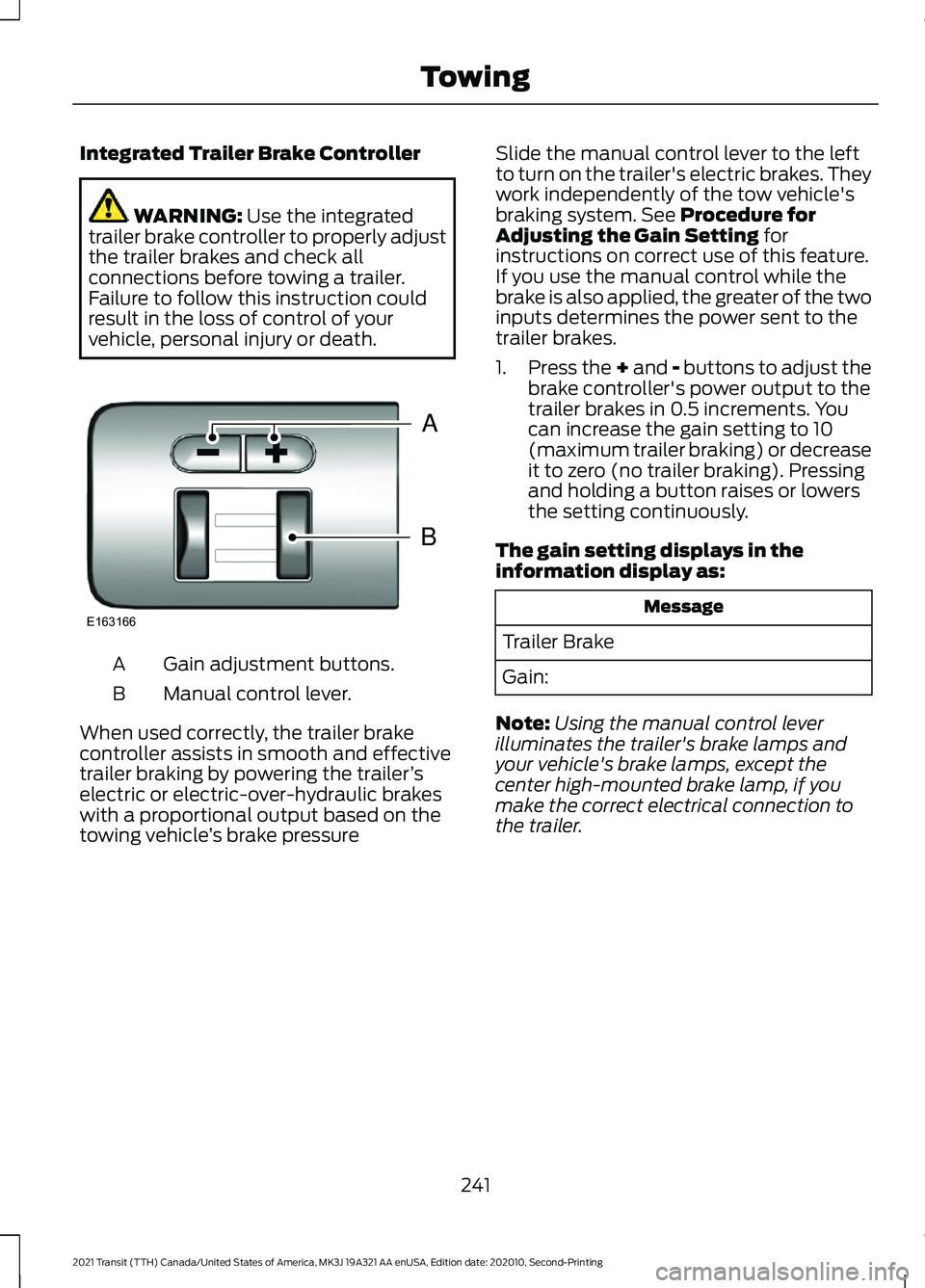
vehicle, personal injury or death. Gain adjustment buttons.
A
Manual control lever.
B
When used correctly, the trailer brake
controller assists in smooth and effective
trailer braking by powering the trailer ’s
electric or electric-over-hydraulic brakes
with a proportional output based on the
towing vehicle ’s brake pressure Slide the manual control lever to the left
to turn on the trailer's electric brakes. They
work independently of the tow vehicle's
braking system. See Procedure for
Adjusting the Gain Setting for
instructions on correct use of this feature.
If you use the manual control while the
brake is also applied, the greater of the two
inputs determines the power sent to the
trailer brakes.
1. Press the + and - buttons to adjust the
brake controller's power output to the
trailer brakes in 0.5 increments. You
can increase the gain setting to 10
(maximum trailer braking) or decrease
it to zero (no trailer braking). Pressing
and holding a button raises or lowers
the setting continuously.
The gain setting displays in the
information display as: Message
Trailer Brake
Gain:
Note: Using the manual control lever
illuminates the trailer's brake lamps and
your vehicle's brake lamps, except the
center high-mounted brake lamp, if you
make the correct electrical connection to
the trailer.
241
2021 Transit (TTH) Canada/United States of America, MK3J 19A321 AA enUSA, Edition date: 202010, Second-Printing TowingB
A
E163166
Page 245 of 509
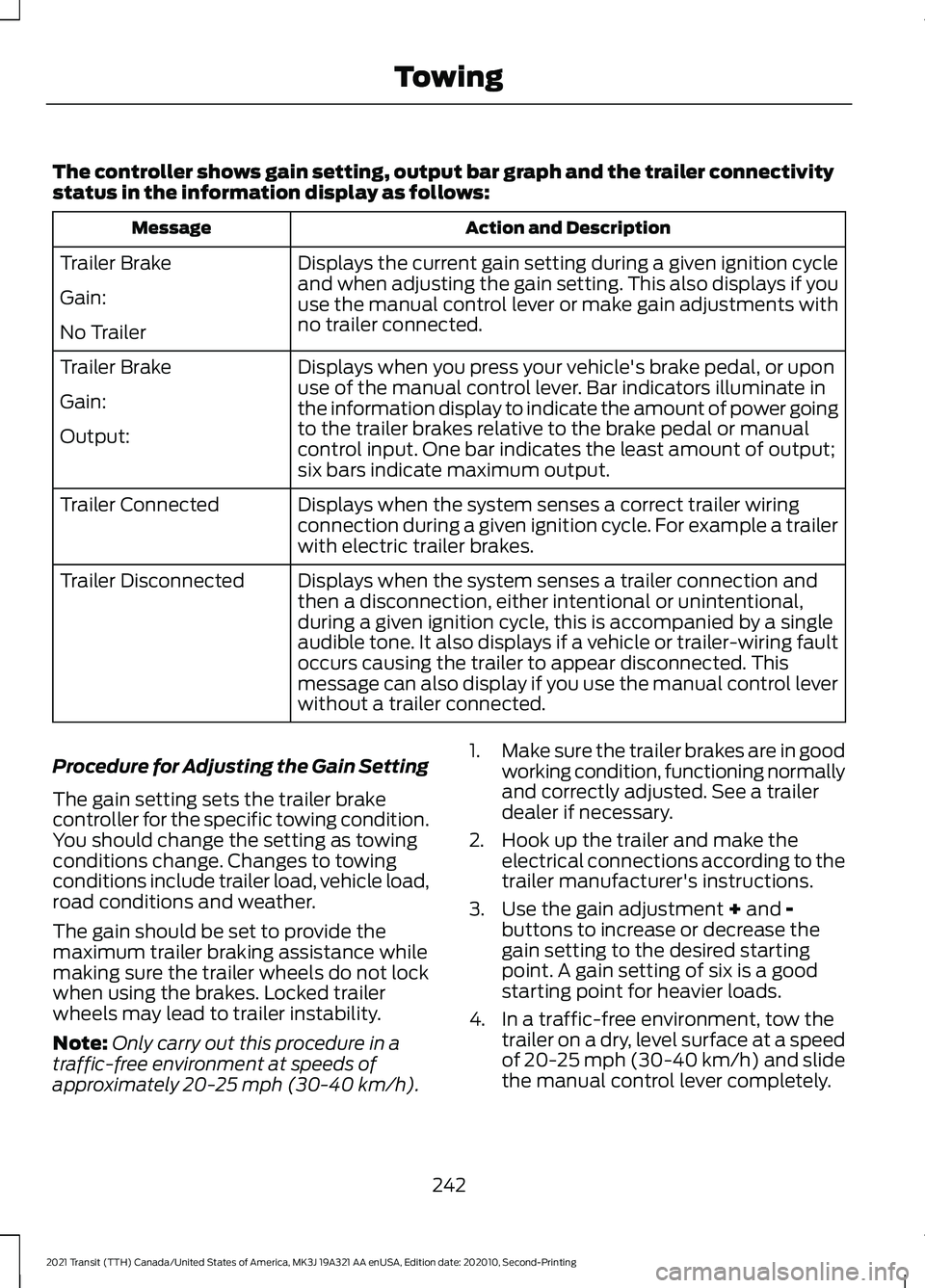
The controller shows gain setting, output bar graph and the trailer connectivity
status in the information display as follows:
Action and Description
Message
Displays the current gain setting during a given ignition cycle
and when adjusting the gain setting. This also displays if you
use the manual control lever or make gain adjustments with
no trailer connected.
Trailer Brake
Gain:
No Trailer
Displays when you press your vehicle's brake pedal, or upon
use of the manual control lever. Bar indicators illuminate in
the information display to indicate the amount of power going
to the trailer brakes relative to the brake pedal or manual
control input. One bar indicates the least amount of output;
six bars indicate maximum output.
Trailer Brake
Gain:
Output:
Displays when the system senses a correct trailer wiring
connection during a given ignition cycle. For example a trailer
with electric trailer brakes.
Trailer Connected
Displays when the system senses a trailer connection and
then a disconnection, either intentional or unintentional,
during a given ignition cycle, this is accompanied by a single
audible tone. It also displays if a vehicle or trailer-wiring fault
occurs causing the trailer to appear disconnected. This
message can also display if you use the manual control lever
without a trailer connected.
Trailer Disconnected
Procedure for Adjusting the Gain Setting
The gain setting sets the trailer brake
controller for the specific towing condition.
You should change the setting as towing
conditions change. Changes to towing
conditions include trailer load, vehicle load,
road conditions and weather.
The gain should be set to provide the
maximum trailer braking assistance while
making sure the trailer wheels do not lock
when using the brakes. Locked trailer
wheels may lead to trailer instability.
Note: Only carry out this procedure in a
traffic-free environment at speeds of
approximately 20-25 mph (30-40 km/h). 1.
Make sure the trailer brakes are in good
working condition, functioning normally
and correctly adjusted. See a trailer
dealer if necessary.
2. Hook up the trailer and make the electrical connections according to the
trailer manufacturer's instructions.
3. Use the gain adjustment + and -
buttons to increase or decrease the
gain setting to the desired starting
point. A gain setting of six is a good
starting point for heavier loads.
4. In a traffic-free environment, tow the trailer on a dry, level surface at a speed
of 20-25 mph (30-40 km/h) and slide
the manual control lever completely.
242
2021 Transit (TTH) Canada/United States of America, MK3J 19A321 AA enUSA, Edition date: 202010, Second-Printing Towing
Page 337 of 509
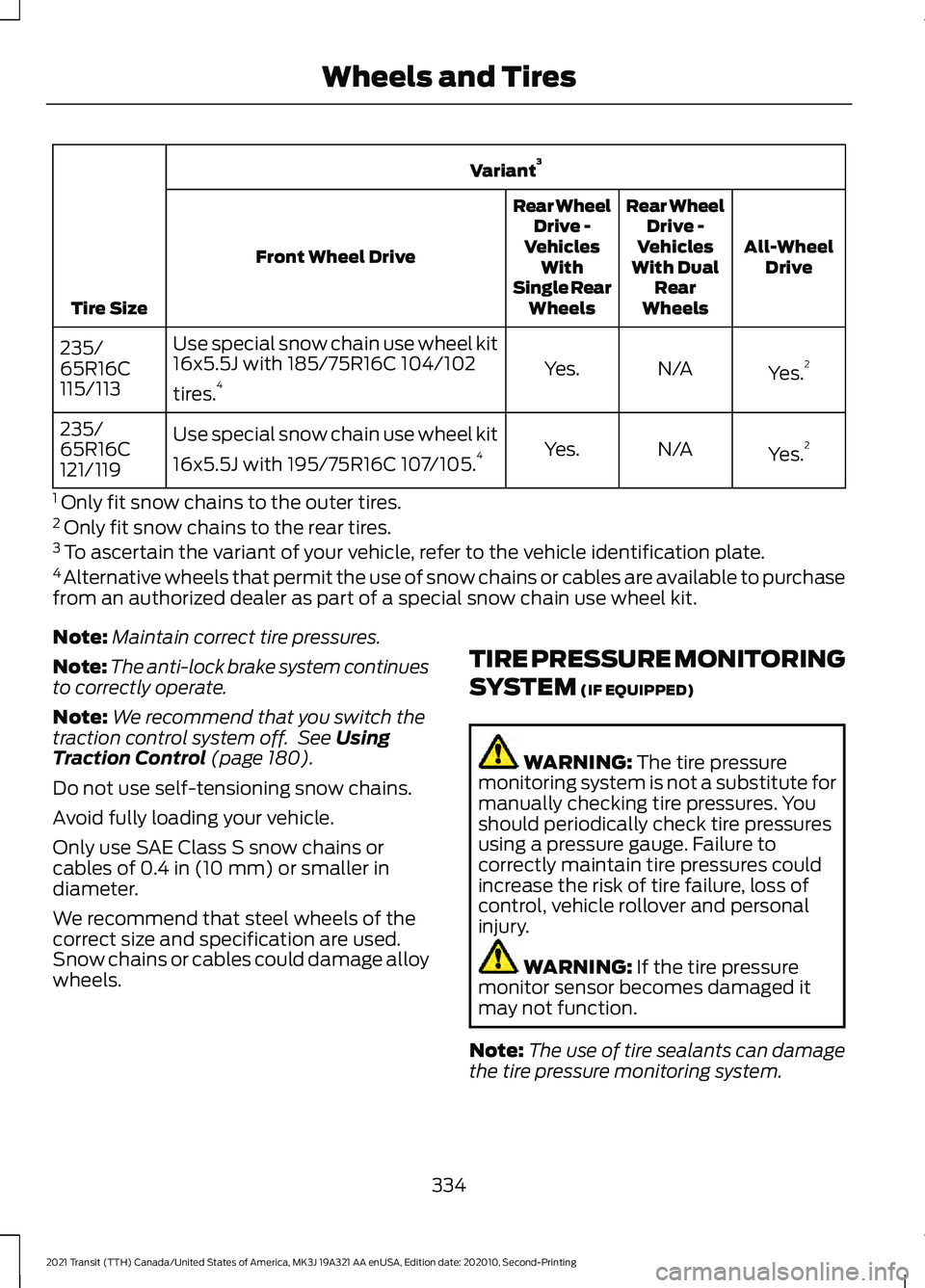
Variant
3
Tire Size All-Wheel
Drive
Rear Wheel
Drive -
Vehicles
With Dual Rear
Wheels
Rear Wheel
Drive -
Vehicles With
Single Rear Wheels
Front Wheel Drive
Yes.2
N/A
Yes.
Use special snow chain use wheel kit
16x5.5J with 185/75R16C 104/102
tires.
4
235/
65R16C
115/113
Yes.2
N/A
Yes.
Use special snow chain use wheel kit
16x5.5J with 195/75R16C 107/105.
4
235/
65R16C
121/119
1 Only fit snow chains to the outer tires.
2 Only fit snow chains to the rear tires.
3 To ascertain the variant of your vehicle, refer to the vehicle identification plate.
4 Alternative wheels that permit the use of snow chains or cables are available to purchase
from an authorized dealer as part of a special snow chain use wheel kit.
Note: Maintain correct tire pressures.
Note: The anti-lock brake system continues
to correctly operate.
Note: We recommend that you switch the
traction control system off. See Using
Traction Control (page 180).
Do not use self-tensioning snow chains.
Avoid fully loading your vehicle.
Only use SAE Class S snow chains or
cables of
0.4 in (10 mm) or smaller in
diameter.
We recommend that steel wheels of the
correct size and specification are used.
Snow chains or cables could damage alloy
wheels. TIRE PRESSURE MONITORING
SYSTEM
(IF EQUIPPED) WARNING:
The tire pressure
monitoring system is not a substitute for
manually checking tire pressures. You
should periodically check tire pressures
using a pressure gauge. Failure to
correctly maintain tire pressures could
increase the risk of tire failure, loss of
control, vehicle rollover and personal
injury. WARNING:
If the tire pressure
monitor sensor becomes damaged it
may not function.
Note: The use of tire sealants can damage
the tire pressure monitoring system.
334
2021 Transit (TTH) Canada/United States of America, MK3J 19A321 AA enUSA, Edition date: 202010, Second-Printing Wheels and Tires