See Manual FORD TRANSIT 2021 Owners Manual
[x] Cancel search | Manufacturer: FORD, Model Year: 2021, Model line: TRANSIT, Model: FORD TRANSIT 2021Pages: 509, PDF Size: 8.21 MB
Page 12 of 509
ABOUT THIS MANUAL
Thank you for choosing Ford. We
recommend that you take some time to
get to know your vehicle by reading this
manual. The more that you know about
your vehicle, the greater the safety and
pleasure you will get from driving it.
WARNING: Driving while
distracted can result in loss of vehicle
control, crash and injury. We strongly
recommend that you use extreme
caution when using any device that may
take your focus off the road. Your
primary responsibility is the safe
operation of your vehicle. We
recommend against the use of any
hand-held device while driving and
encourage the use of voice-operated
systems when possible. Make sure you
are aware of all applicable local laws
that may affect the use of electronic
devices while driving.
Note: This manual describes product
features and options available throughout
the range of available models, sometimes
even before they are generally available. It
may describe options not fitted to the
vehicle you have purchased.
Note: Some of the illustrations in this
manual may show features as used in
different models, so may appear different
to you on your vehicle.
Note: Always use and operate your vehicle
in line with all applicable laws and
regulations.
Note: Pass on this manual when selling
your vehicle. It is an integral part of your
vehicle. Note:
Either Ford Motor Company or an
authorized Ford dealer may have originally
sold this incomplete vehicle to a vehicle
modifier who upfitted it. As a result, it may
have different options and features than
described in this manual.
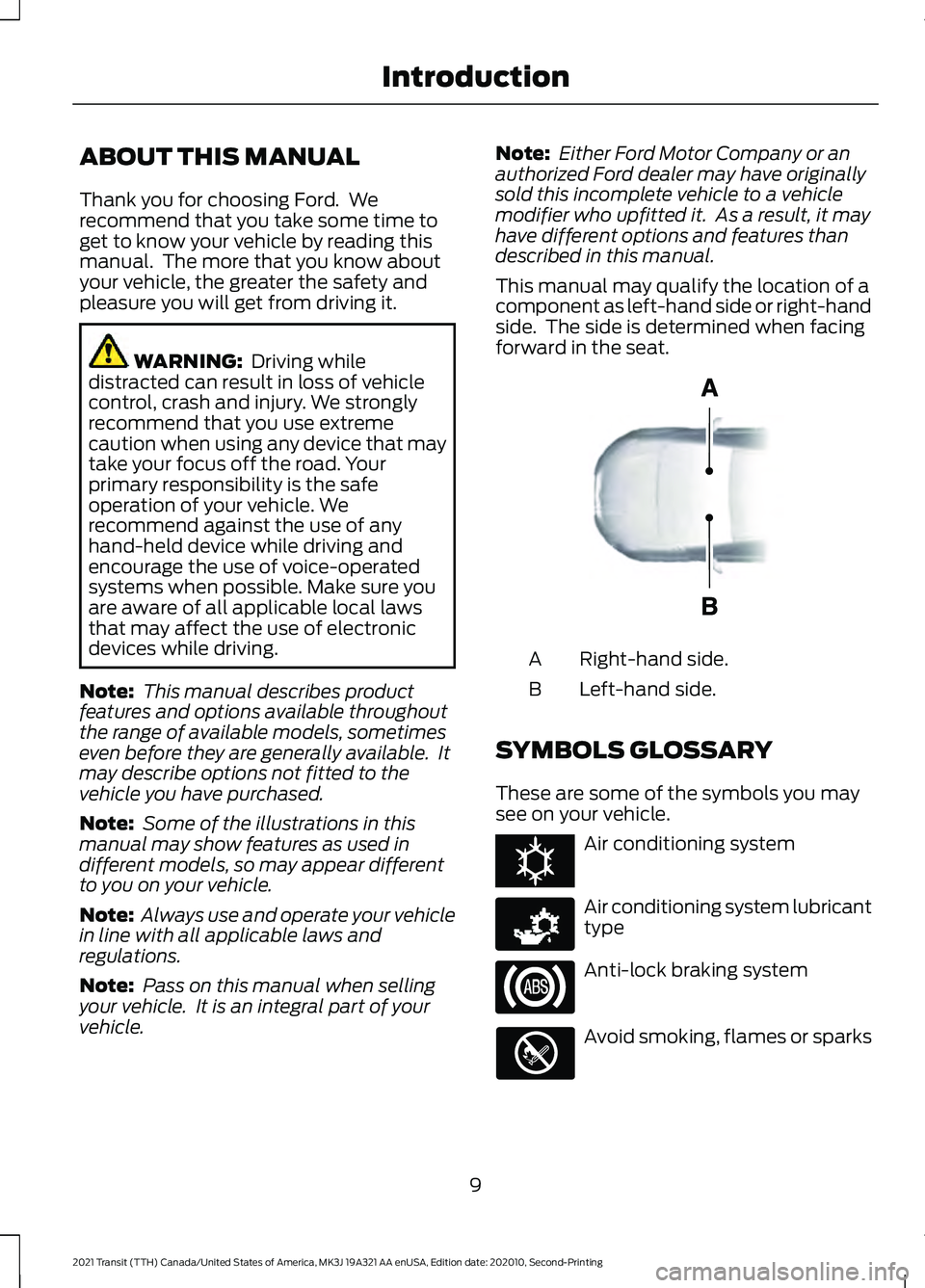
This manual may qualify the location of a
component as left-hand side or right-hand
side. The side is determined when facing
forward in the seat. Right-hand side.
A
Left-hand side.
B
SYMBOLS GLOSSARY
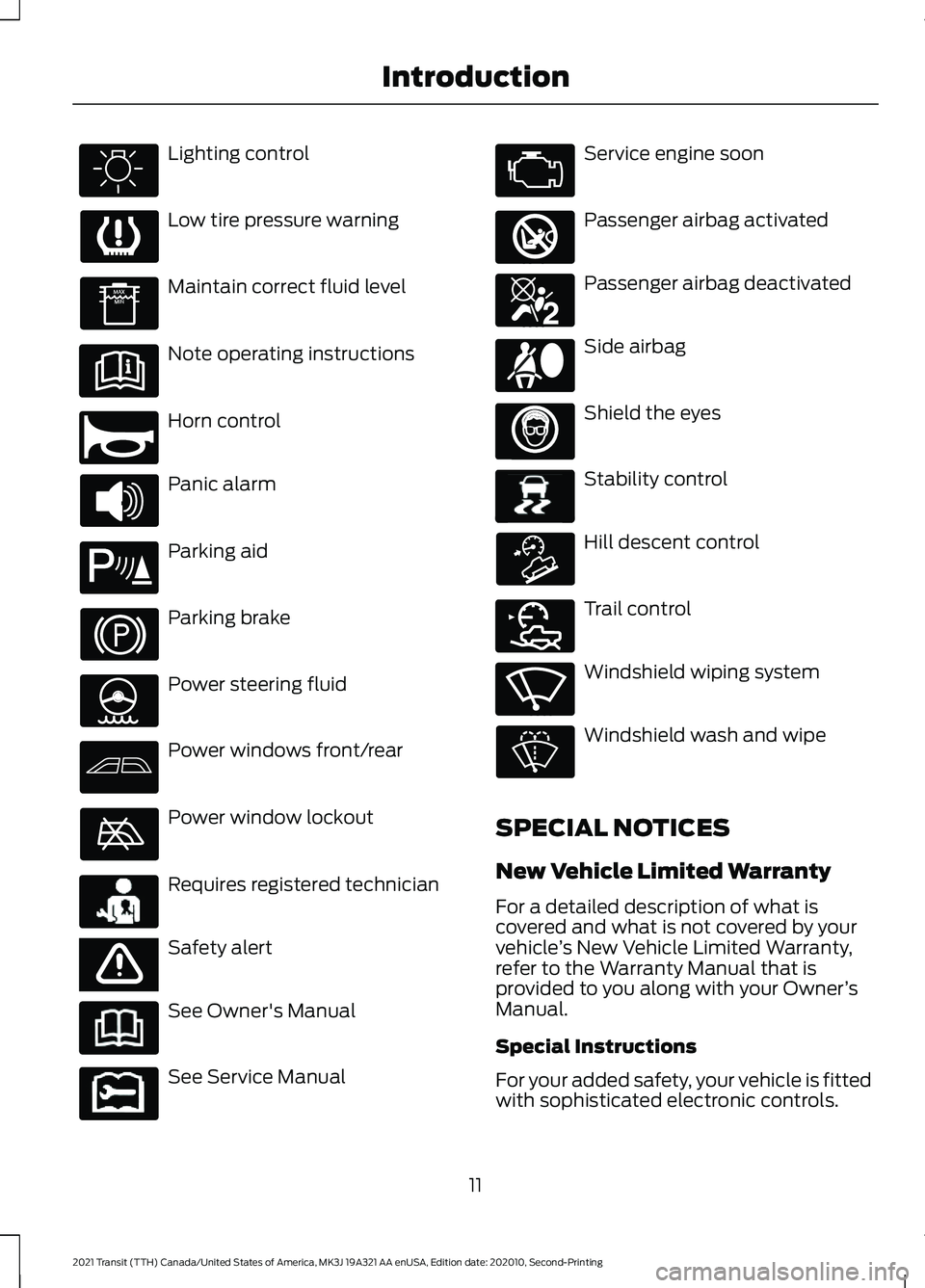
These are some of the symbols you may
see on your vehicle. Air conditioning system
Air conditioning system lubricant
type
Anti-lock braking system
Avoid smoking, flames or sparks
9
2021 Transit (TTH) Canada/United States of America, MK3J 19A321 AA enUSA, Edition date: 202010, Second-Printing IntroductionE154903 E162384 E231157
Page 14 of 509
Lighting control
Low tire pressure warning
Maintain correct fluid level
Note operating instructions
Horn control
Panic alarm
Parking aid
Parking brake
Power steering fluid
Power windows front/rear
Power window lockout
Requires registered technician
Safety alert
See Owner's Manual
See Service Manual Service engine soon
Passenger airbag activated
Passenger airbag deactivated
Side airbag
Shield the eyes
Stability control
Hill descent control
Trail control
Windshield wiping system
Windshield wash and wipe
SPECIAL NOTICES
New Vehicle Limited Warranty
For a detailed description of what is
covered and what is not covered by your
vehicle ’s New Vehicle Limited Warranty,
refer to the Warranty Manual that is
provided to you along with your Owner ’s
Manual.
Special Instructions
For your added safety, your vehicle is fitted
with sophisticated electronic controls.
11
2021 Transit (TTH) Canada/United States of America, MK3J 19A321 AA enUSA, Edition date: 202010, Second-Printing Introduction E270945 E139213 E231159 E65963 E231158 E270849 E270850 E167012 E138639 E163957 E272858 E270969
Page 17 of 509
WARNING: Do not connect
wireless plug-in devices to the data link
connector. Unauthorized third parties
could gain access to vehicle data and
impair the performance of safety related
systems. Only allow repair facilities that
follow our service and repair instructions
to connect their equipment to the data
link connector.
We respect your privacy and are
committed to protecting it. The
information contained in this manual was
correct at the time of publication, but as
technology rapidly changes, we
recommend that you visit the local Ford
website for the latest information.
Your vehicle has electronic control units
that have data recording functionality and
the ability to permanently or temporarily
store data. This data could include
information on the condition and status of
your vehicle, vehicle maintenance
requirements, events and malfunctions.
The types of data that can be recorded are
described in this section. Some of the data
recorded is stored in event logs or error
logs.
Note: Error logs are reset following a service
or repair.
Note: We may provide information in
response to requests from law enforcement,
other government authorities and third
parties acting with lawful authority or
through a legal process. Such information
could be used by them in legal proceedings.
Data recorded includes, for example:
• Operating states of system
components, for example fuel level,
tire pressure and battery charge level.
• Vehicle and component status, for
example wheel speed, deceleration,
lateral acceleration and seatbelt
status. •
Events or errors in essential systems,
for example headlamps and brakes.
• System responses to driving situations,
for example airbag deployment and
stability control.
• Environmental conditions, for example
temperature.
Some of this data, when used in
combination with other information, for
example an accident report, damage to a
vehicle or eyewitness statements, could
be associated with a specific person.
Services That We Provide
If you use our services, we collect and use
data, for example account information,
vehicle location and driving characteristics,
that could identify you. We transmit this
data through a dedicated, protected
connection. We only collect and use data
to enable your use of our services to which
you have subscribed, with your consent or
where permitted by law. For additional
information, see the terms and conditions
of the services to which you have
subscribed.
For additional information about our
privacy policy, refer to the local Ford
website.
Services That Third Parties
Provide
We recommend that you review the terms
and conditions and data privacy
information for any services equipped with
your vehicle or to which you subscribe. We
take no responsibility for services that third
parties provide.
14
2021 Transit (TTH) Canada/United States of America, MK3J 19A321 AA enUSA, Edition date: 202010, Second-Printing Data Privacy
Page 88 of 509
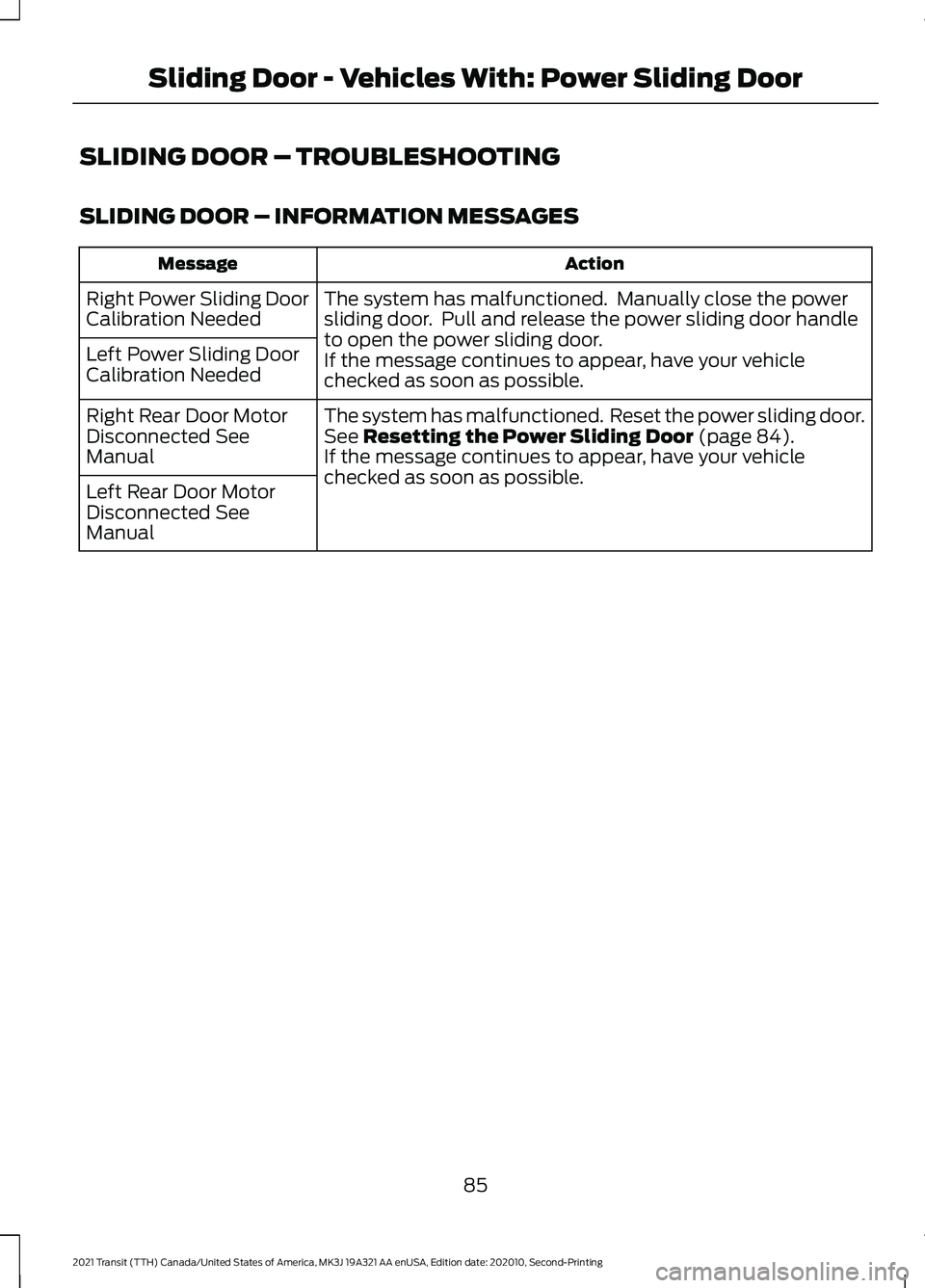
SLIDING DOOR – TROUBLESHOOTING
SLIDING DOOR – INFORMATION MESSAGES
Action
Message
The system has malfunctioned. Manually close the power
sliding door. Pull and release the power sliding door handle
to open the power sliding door.
If the message continues to appear, have your vehicle
checked as soon as possible.
Right Power Sliding Door
Calibration Needed
Left Power Sliding Door
Calibration Needed
The system has malfunctioned. Reset the power sliding door.
See Resetting the Power Sliding Door (page 84).
If the message continues to appear, have your vehicle
checked as soon as possible.
Right Rear Door Motor
Disconnected See
Manual
Left Rear Door Motor
Disconnected See
Manual
85
2021 Transit (TTH) Canada/United States of America, MK3J 19A321 AA enUSA, Edition date: 202010, Second-Printing Sliding Door - Vehicles With: Power Sliding Door
Page 89 of 509
SLIDING DOOR – FREQUENTLY
ASKED QUESTIONS
Why does the power sliding door stop
moving?
The power sliding door stops when it
detects an obstacle. A tone sounds
and the power sliding door starts
moving in the opposite direction. After
you remove the obstacle, you can
continue to operate the power sliding
door.
Why is the power sliding door moving
with reduced speed? You let the power sliding door open
for more than five minutes. Fully close
the power sliding door using the button
on the instrument panel or the power
sliding door handles. Open the power
sliding door as normal.
Why can I not close the power sliding
door? If the power sliding door does not
close, restart the engine and then
close it as normal. See Closing the
Sliding Door From Inside Your
Vehicle (page 83). If the power sliding
door still does not close, manually
close the power sliding door and then
open it as normal. If the power sliding
door still does not close the system
has malfunctioned. Have your vehicle
checked as soon as possible.
What can I do if the power sliding door
does not operate as normal? If there is a malfunction on the power
sliding door, restart the engine. How can I open the sliding door if the
system loses power?
If the sliding door loses power, you
could need to apply more force when
trying to open it. Push the back of the
sliding door and the interior sliding
door handle in opening direction at the
same time and open it as normal.
86
2021 Transit (TTH) Canada/United States of America, MK3J 19A321 AA enUSA, Edition date: 202010, Second-Printing Sliding Door - Vehicles With: Power Sliding Door
Page 131 of 509
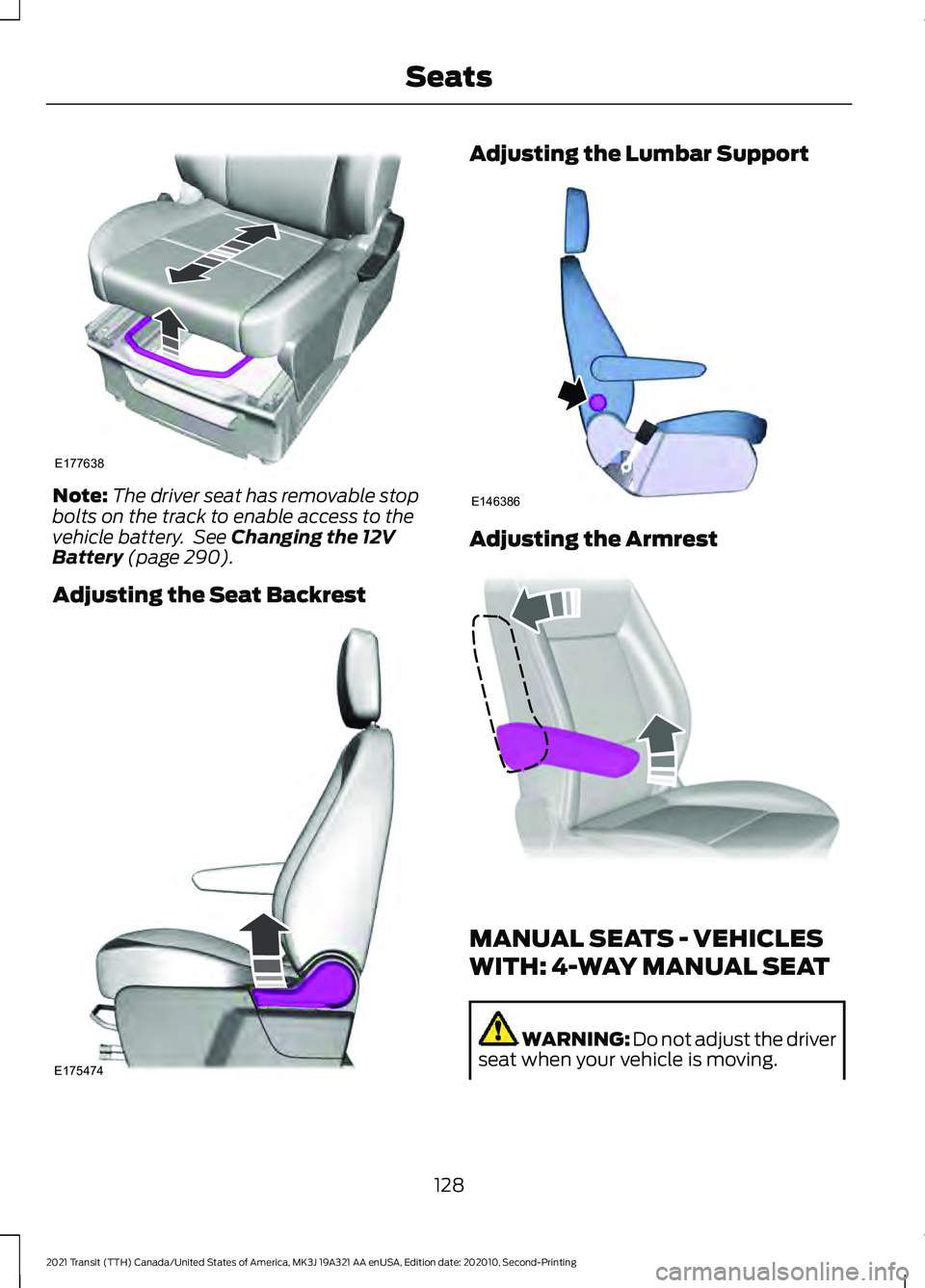
Note:
The driver seat has removable stop
bolts on the track to enable access to the
vehicle battery. See Changing the 12V
Battery (page 290).
Adjusting the Seat Backrest Adjusting the Lumbar Support
Adjusting the Armrest
MANUAL SEATS - VEHICLES
WITH: 4-WAY MANUAL SEAT
WARNING: Do not adjust the driver
seat when your vehicle is moving.
128
2021 Transit (TTH) Canada/United States of America, MK3J 19A321 AA enUSA, Edition date: 202010, Second-Printing SeatsE177638 E175474 E146386 E337855
Page 180 of 509
WHAT IS THE ELECTRIC
PARKING BRAKE
The electric parking brake is used to hold
your vehicle on slopes and flat roads.
APPLYING THE ELECTRIC
PARKING BRAKE
WARNING: Always fully apply the
parking brake and make sure you shift
into park (P). Failure to follow this
instruction could result in personal injury
or death. WARNING:
If you drive extended
distances with the parking brake applied,
you could cause damage to the brake
system. The switch is next to the steering
wheel on the lower part of the
instrument panel.
1. Pull the switch up.
The red warning lamp flashes during
operation and illuminates when the parking
brake is applied.
Note: You can apply the electric parking
brake when the ignition is off.
Note: The electric parking brake could
apply when you shift into park (P).
See
Automatic Transmission (page 161).
APPLYING THE ELECTRIC
PARKING BRAKE IN AN
EMERGENCY
You can use the electric parking brake to
slow or stop your vehicle in an emergency.
1. Pull the switch up and hold it. The electric parking brake continues to
slow your vehicle down unless you release
the switch.
The red warning lamp illuminates, a tone
sounds and the stoplamps turn on when
you use the electric parking brake in an
emergency.
Note:
Do not apply the electric parking
brake when your vehicle is moving, except
in an emergency.
MANUALLY RELEASING THE
ELECTRIC PARKING BRAKE
1. Switch the ignition on.
2. Press and hold the brake pedal.
3. Push the switch down.
The red warning lamp turns off.
Pulling Away on a Hill When Towing a
Trailer
1. Press and hold the brake pedal.
2. Pull the switch upward and hold it.
3. Shift into gear.
4. Press the accelerator pedal until engine
has developed sufficient torque to
prevent your vehicle from rolling down
the hill.
5. Release the switch and pull away in a normal manner.
AUTOMATICALLY RELEASING
THE ELECTRIC PARKING
BRAKE
1. Close the driver door.
2. Shift into gear.
3. Press the accelerator pedal and pull away in a normal manner.
177
2021 Transit (TTH) Canada/United States of America, MK3J 19A321 AA enUSA, Edition date: 202010, Second-Printing Electric Parking BrakeE267156
Page 181 of 509
ELECTRIC PARKING BRAKE
AUDIBLE WARNING
Sounds when the parking brake is on and
your vehicle is moving. If the warning tone
continues after you have released the
parking brake, this indicates a malfunction.
Have your vehicle checked as soon as
possible.
RELEASING THE ELECTRIC
PARKING BRAKE IF THE
VEHICLE BATTERY HAS RUN
OUT OF CHARGE
WARNING: The electric parking
brake does not operate if the vehicle
battery has run out of charge. Connect a booster battery to the vehicle
battery to release the electric parking brake
if the vehicle battery has run out of charge.
See
Jump Starting the Vehicle (page
251).
ELECTRIC PARKING BRAKE –
TROUBLESHOOTING
ELECTRIC PARKING BRAKE –
WARNING LAMPS The red warning lamp
illuminates when the electronic
parking brake is applied or for a
few seconds on start up.
If it remains illuminated or
flashes when the electronic
parking brake is not applied, it indicates a
malfunction. Have your vehicle checked
as soon as possible.
ELECTRIC PARKING BRAKE – INFORMATION MESSAGES Action
Message
The electric parking brake has malfunctioned. Have your
vehicle checked as soon as possible.
Park Brake Malfunction
Service Now
The electric parking brake has not released. Manually release
the electric parking brake. If the message continues to appear,
have your vehicle checked as soon as possible.
Park Brake Not Released
The electric parking brake has not applied. Apply the electric
parking brake. If the message continues to appear, have your
vehicle checked as soon as possible.
Park Brake Not Applied
The electric parking brake has not automatically released.
Manually release the electric parking brake.
Park Brake Use Switch to
Release
You have not pressed the brake pedal. Press the brake pedal
to release the parking brake.
To Release: Press Brake
and Switch
The electric parking brake has malfunctioned. Have your
vehicle checked as soon as possible.
Park Brake Limited Func-
tion Service Required
178
2021 Transit (TTH) Canada/United States of America, MK3J 19A321 AA enUSA, Edition date: 202010, Second-Printing Electric Parking BrakeE270480
Page 190 of 509
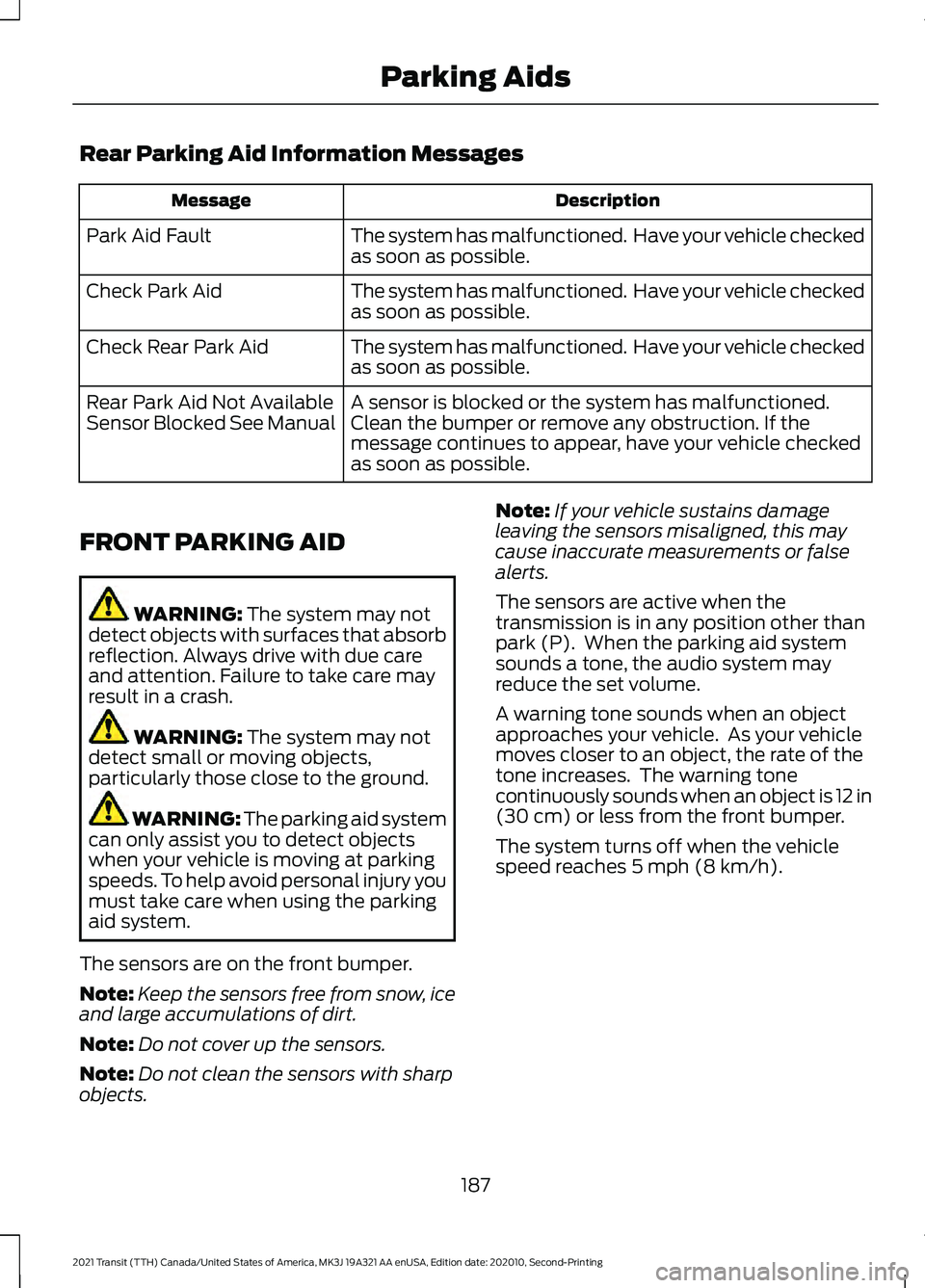
Rear Parking Aid Information Messages
Description
Message
The system has malfunctioned. Have your vehicle checked
as soon as possible.
Park Aid Fault
The system has malfunctioned. Have your vehicle checked
as soon as possible.
Check Park Aid
The system has malfunctioned. Have your vehicle checked
as soon as possible.
Check Rear Park Aid
A sensor is blocked or the system has malfunctioned.
Clean the bumper or remove any obstruction. If the
message continues to appear, have your vehicle checked
as soon as possible.
Rear Park Aid Not Available
Sensor Blocked See Manual
FRONT PARKING AID WARNING: The system may not
detect objects with surfaces that absorb
reflection. Always drive with due care
and attention. Failure to take care may
result in a crash. WARNING:
The system may not
detect small or moving objects,
particularly those close to the ground. WARNING:
The parking aid system
can only assist you to detect objects
when your vehicle is moving at parking
speeds. To help avoid personal injury you
must take care when using the parking
aid system.
The sensors are on the front bumper.
Note: Keep the sensors free from snow, ice
and large accumulations of dirt.
Note: Do not cover up the sensors.
Note: Do not clean the sensors with sharp
objects. Note:
If your vehicle sustains damage
leaving the sensors misaligned, this may
cause inaccurate measurements or false
alerts.
The sensors are active when the
transmission is in any position other than
park (P). When the parking aid system
sounds a tone, the audio system may
reduce the set volume.
A warning tone sounds when an object
approaches your vehicle. As your vehicle
moves closer to an object, the rate of the
tone increases. The warning tone
continuously sounds when an object is 12 in
(30 cm) or less from the front bumper.
The system turns off when the vehicle
speed reaches
5 mph (8 km/h).
187
2021 Transit (TTH) Canada/United States of America, MK3J 19A321 AA enUSA, Edition date: 202010, Second-Printing Parking Aids
Page 192 of 509
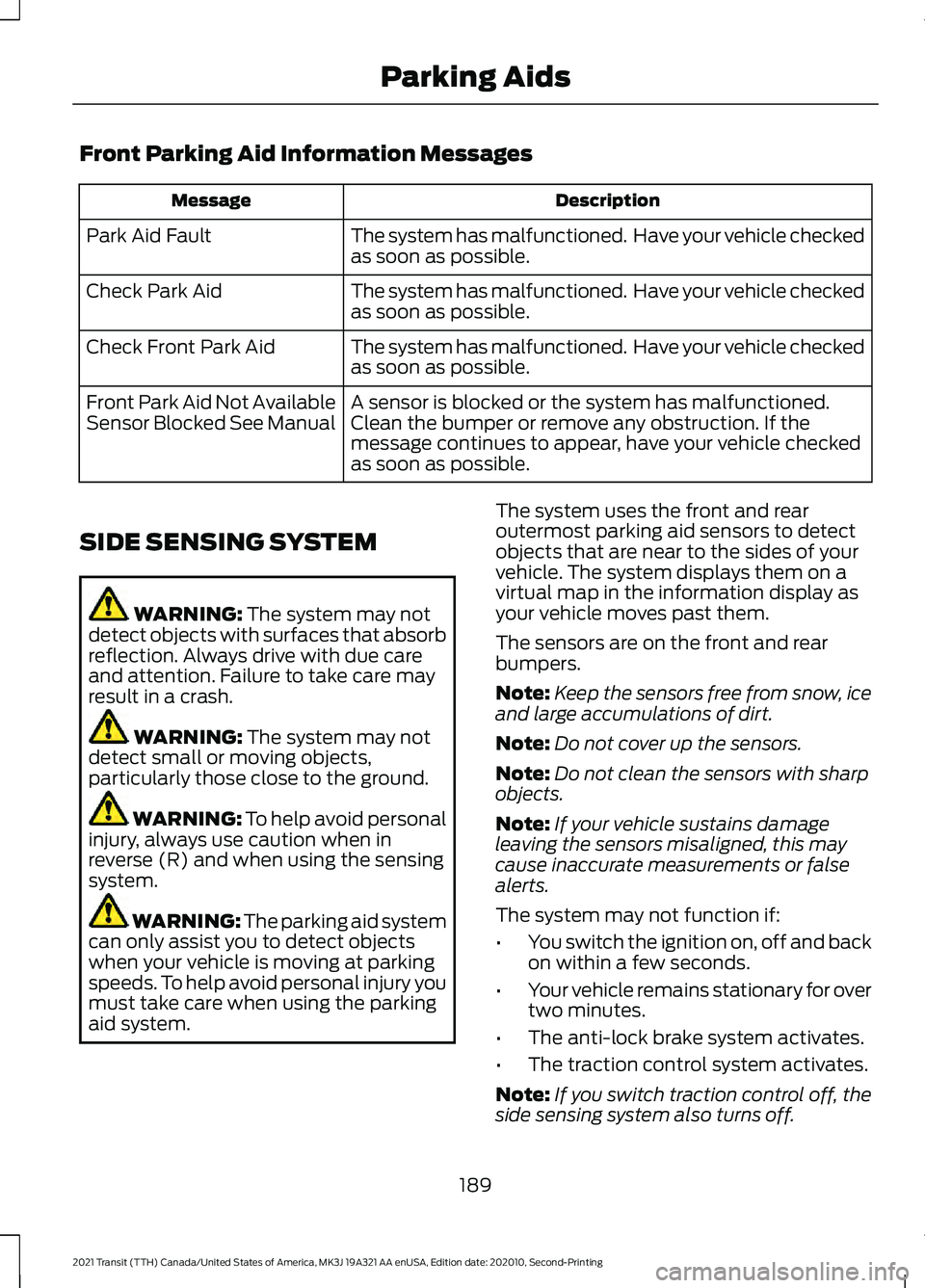
Front Parking Aid Information Messages
Description
Message
The system has malfunctioned. Have your vehicle checked
as soon as possible.
Park Aid Fault
The system has malfunctioned. Have your vehicle checked
as soon as possible.
Check Park Aid
The system has malfunctioned. Have your vehicle checked
as soon as possible.
Check Front Park Aid
A sensor is blocked or the system has malfunctioned.
Clean the bumper or remove any obstruction. If the
message continues to appear, have your vehicle checked
as soon as possible.
Front Park Aid Not Available
Sensor Blocked See Manual
SIDE SENSING SYSTEM WARNING: The system may not
detect objects with surfaces that absorb
reflection. Always drive with due care
and attention. Failure to take care may
result in a crash. WARNING:
The system may not
detect small or moving objects,
particularly those close to the ground. WARNING:
To help avoid personal
injury, always use caution when in
reverse (R) and when using the sensing
system. WARNING:
The parking aid system
can only assist you to detect objects
when your vehicle is moving at parking
speeds. To help avoid personal injury you
must take care when using the parking
aid system. The system uses the front and rear
outermost parking aid sensors to detect
objects that are near to the sides of your
vehicle. The system displays them on a
virtual map in the information display as
your vehicle moves past them.
The sensors are on the front and rear
bumpers.
Note:
Keep the sensors free from snow, ice
and large accumulations of dirt.
Note: Do not cover up the sensors.
Note: Do not clean the sensors with sharp
objects.
Note: If your vehicle sustains damage
leaving the sensors misaligned, this may
cause inaccurate measurements or false
alerts.
The system may not function if:
• You switch the ignition on, off and back
on within a few seconds.
• Your vehicle remains stationary for over
two minutes.
• The anti-lock brake system activates.
• The traction control system activates.
Note: If you switch traction control off, the
side sensing system also turns off.
189
2021 Transit (TTH) Canada/United States of America, MK3J 19A321 AA enUSA, Edition date: 202010, Second-Printing Parking Aids