airbag off FORD TRANSIT CONNECT 2020 User Guide
[x] Cancel search | Manufacturer: FORD, Model Year: 2020, Model line: TRANSIT CONNECT, Model: FORD TRANSIT CONNECT 2020Pages: 509, PDF Size: 7.73 MB
Page 148 of 509
Switching the Automatic Engine Shutdown On or Off
To switch the automatic engine shutdown on or off, use the information display
controls on the steering wheel to select the following:
Action
Menu Item
Press the menu button.
Settings
Press the OK button.
Vehicle Settings
Press the
OK button.
30min Max Idle
Note: You cannot permanently switch off
the automatic shutdown. If you switch it
off, it turns on each time you switch the
ignition on.
Stopping the Engine When Your
Vehicle is Stationary
Vehicles with an Ignition Key
1. Shift into park (P).
2. Turn the key to position
0.
3. Apply the parking brake.
Vehicles with a Push Button Ignition
Switch
See
Push Button Ignition Switch (page
140).
Stopping the Engine When Your
Vehicle is Moving WARNING:
Switching off the
engine when your vehicle is still moving
results in a significant decrease in
braking assistance. Higher effort is
required to apply the brakes and to stop
your vehicle. A significant decrease in
steering assistance could also occur. The
steering does not lock, but higher effort could be required to steer your vehicle.
When you switch the ignition off, some
electrical circuits, for example airbags,
also turn off. If you unintentionally switch
the ignition off, shift into neutral (N) and
restart the engine.
Vehicles with an Ignition Key
1. Shift into neutral and use the brakes to
bring your vehicle to a safe stop.
2. Shift into park (P).
3. Turn the key to position
0.
4. Apply the parking brake.
Vehicles with a Push Button Ignition
Switch
See
Push Button Ignition Switch (page
140).
Guarding Against Exhaust Fumes WARNING:
Exhaust leaks may
result in entry of harmful and potentially
lethal fumes into the passenger
compartment. If you smell exhaust
fumes inside your vehicle, have your
vehicle inspected immediately. Do not
drive if you smell exhaust fumes.
144
2020 Transit Connect (CHC) Canada/United States of America, CG3739en enUSA, Edition date: 201903, First-Printing Starting and Stopping the Engine
Page 151 of 509
You can stop the shutdown, or reset the
timer, at any point before the 30-second
countdown has expired by doing any of the
following:
•
You can reset the timer by interacting
with your vehicle (such as pressing the
brake pedal or accelerator pedal).
• You can temporarily switch off the
shutdown feature any time the ignition
is on (for the current ignition cycle
only). Use the information display to
do so. See Information Displays
(page 98).
• During the countdown before
shutdown, you are prompted to press
OK or RESET (depending on your type
of information display) to temporarily
switch the feature off (for the current
ignition cycle only).
Stopping the Engine When Your
Vehicle is Stationary
Vehicles with an Ignition Key
1. Shift into park (P).
2. Turn the key to position
0.
3. Apply the parking brake.
Vehicles with Keyless Start
See
Push Button Ignition Switch (page
140).
Stopping the Engine When Your
Vehicle is Moving WARNING:
Switching off the
engine when your vehicle is still moving
results in a significant decrease in
braking assistance. Higher effort is
required to apply the brakes and to stop
your vehicle. A significant decrease in
steering assistance could also occur. The
steering does not lock, but higher effort could be required to steer your vehicle.
When you switch the ignition off, some
electrical circuits, for example airbags,
also turn off. If you unintentionally switch
the ignition off, shift into neutral (N) and
restart the engine.
Vehicles with an Ignition Key
1. Shift into neutral and use the brakes to
bring your vehicle to a safe stop.
2. When your vehicle has stopped, shift into park (P) or neutral and switch the
ignition off.
3. Apply the parking brake.
Vehicles with Keyless Start
See
Push Button Ignition Switch (page
140).
Guarding Against Exhaust Fumes WARNING:
Exhaust leaks may
result in entry of harmful and potentially
lethal fumes into the passenger
compartment. If you smell exhaust
fumes inside your vehicle, have your
vehicle inspected immediately. Do not
drive if you smell exhaust fumes.
Important Ventilating Information
If you stop your vehicle and then leave the
engine idling for long periods, we
recommend that you do one of the
following:
• Open the windows at least 1 in (3 cm).
• Set your climate control to outside air.
147
2020 Transit Connect (CHC) Canada/United States of America, CG3739en enUSA, Edition date: 201903, First-Printing Starting and Stopping the Engine
Page 152 of 509
STARTING A DIESEL ENGINE
Before starting your vehicle, check the
following:
•
Make sure the headlamps and
electrical accessories are off.
• Make sure the parking brake is on.
• Make sure the transmission is in park
(P).
Vehicles with an Ignition Key
1. Turn the key to position II.
2. Wait until the glow plug indicator turns
off.
3. Fully press the brake pedal.
Note: Do not touch the accelerator pedal.
4. Turn the key to position
III.
Note: Releasing the brake pedal when the
engine is starting stops the engine cranking
and the ignition returns to on.
Note: When the temperature is below
5°F
(-15°C), you may need to crank the engine
for up to 10 seconds.
Note: You can only attempt to start the
engine for a limited amount of time before
the starting system temporarily disables. If
you exceed the starting time limit, a
message may appear and you cannot
attempt to start the engine for at least 15
minutes.
Vehicles with a Push Button
Ignition Switch
See
Push Button Ignition Switch (page
140).
Failure to Start
Vehicles with an Ignition Key
If the engine does not start, do the
following:
1. Fully press the brake pedal. 2. Apply the parking brake.
3. Shift into park (P).
4. Turn the key to position
III until the
engine starts.
Vehicles with a Push Button Ignition
Switch
See
Push Button Ignition Switch (page
140).
Stopping the Engine When Your
Vehicle is Stationary
Vehicles with an Ignition Key
1. Shift into park (P).
2. Turn the key to position
0.
3. Apply the parking brake.
Vehicles with a Push Button Ignition
Switch
See
Push Button Ignition Switch (page
140).
Stopping the Engine When Your
Vehicle is Moving WARNING:
Switching off the
engine when your vehicle is still moving
results in a significant decrease in
braking assistance. Higher effort is
required to apply the brakes and to stop
your vehicle. A significant decrease in
steering assistance could also occur. The
steering does not lock, but higher effort
could be required to steer your vehicle.
When you switch the ignition off, some
electrical circuits, for example airbags,
also turn off. If you unintentionally switch
the ignition off, shift into neutral (N) and
restart the engine.
148
2020 Transit Connect (CHC) Canada/United States of America, CG3739en enUSA, Edition date: 201903, First-Printing Starting and Stopping the Engine
Page 258 of 509
1. Remove the jumper cable from the
ground metal surface or connecting
point, if available.
2. Remove the jumper cable on the negative (-) terminal of the booster
vehicle's battery.
3. Remove the jumper cable from the positive (+) terminal of the booster
vehicle's battery.
4. Remove the jumper cable from the positive (+) terminal of the disabled
vehicle's battery.
After starting your vehicle and removing
the jumper cables, allow it to idle for
several minutes so the battery can
recharge.
POST-CRASH ALERT SYSTEM
The system flashes the turn signal lamps
and sounds the horn (intermittently) in the
event of a serious impact that deploys an
airbag (front, side, side curtain or Safety
Canopy) or the seatbelt pretensioners.
The horn and lamps will turn off when:
• The hazard control button is pressed
• The panic button (if equipped) is
pressed on the remote entry
transmitter
• Your vehicle runs out of power
TOWING POINTS
Front Towing Point WARNING: Make sure that the
towing eye is fully tightened. Failure to
follow this instruction could result in
personal injury. WARNING:
You must switch the
ignition on when your vehicle is being
towed. 1. Carefully remove the cover.
2. Install the towing eye.
Note:
It has a left-hand thread. Turn it
counterclockwise to install it.
Rear Towing Point WARNING:
Make sure that the
towing eye is fully tightened. Failure to
follow this instruction could result in
personal injury. 1. Carefully remove the cover.
254
2020 Transit Connect (CHC) Canada/United States of America, CG3739en enUSA, Edition date: 201903, First-Printing Roadside EmergenciesE165018 E165019
Page 303 of 509
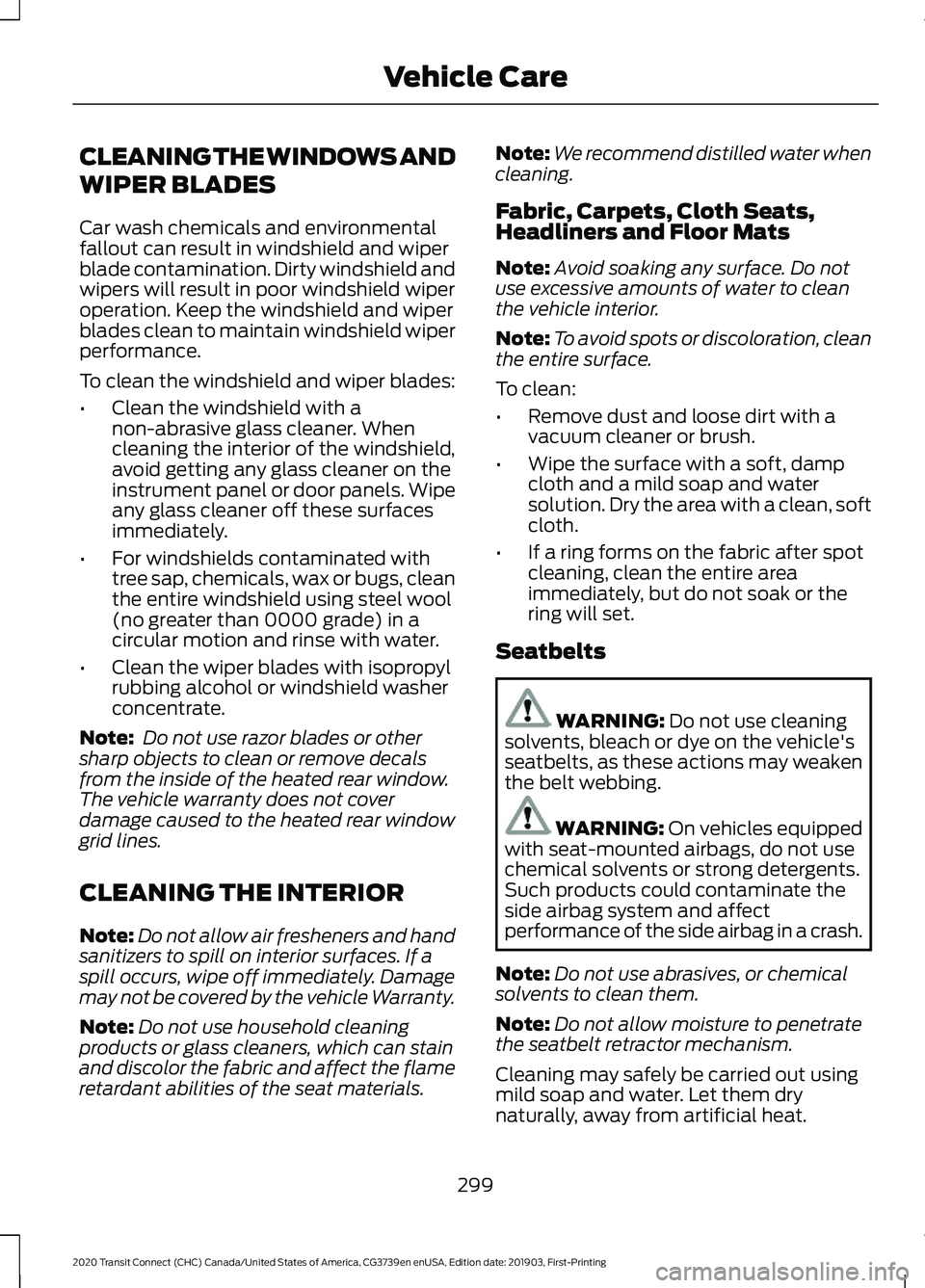
CLEANING THE WINDOWS AND
WIPER BLADES
Car wash chemicals and environmental
fallout can result in windshield and wiper
blade contamination. Dirty windshield and
wipers will result in poor windshield wiper
operation. Keep the windshield and wiper
blades clean to maintain windshield wiper
performance.
To clean the windshield and wiper blades:
•
Clean the windshield with a
non-abrasive glass cleaner. When
cleaning the interior of the windshield,
avoid getting any glass cleaner on the
instrument panel or door panels. Wipe
any glass cleaner off these surfaces
immediately.
• For windshields contaminated with
tree sap, chemicals, wax or bugs, clean
the entire windshield using steel wool
(no greater than 0000 grade) in a
circular motion and rinse with water.
• Clean the wiper blades with isopropyl
rubbing alcohol or windshield washer
concentrate.
Note: Do not use razor blades or other
sharp objects to clean or remove decals
from the inside of the heated rear window.
The vehicle warranty does not cover
damage caused to the heated rear window
grid lines.
CLEANING THE INTERIOR
Note: Do not allow air fresheners and hand
sanitizers to spill on interior surfaces. If a
spill occurs, wipe off immediately. Damage
may not be covered by the vehicle Warranty.
Note: Do not use household cleaning
products or glass cleaners, which can stain
and discolor the fabric and affect the flame
retardant abilities of the seat materials. Note:
We recommend distilled water when
cleaning.
Fabric, Carpets, Cloth Seats,
Headliners and Floor Mats
Note: Avoid soaking any surface. Do not
use excessive amounts of water to clean
the vehicle interior.
Note: To avoid spots or discoloration, clean
the entire surface.
To clean:
• Remove dust and loose dirt with a
vacuum cleaner or brush.
• Wipe the surface with a soft, damp
cloth and a mild soap and water
solution. Dry the area with a clean, soft
cloth.
• If a ring forms on the fabric after spot
cleaning, clean the entire area
immediately, but do not soak or the
ring will set.
Seatbelts WARNING: Do not use cleaning
solvents, bleach or dye on the vehicle's
seatbelts, as these actions may weaken
the belt webbing. WARNING:
On vehicles equipped
with seat-mounted airbags, do not use
chemical solvents or strong detergents.
Such products could contaminate the
side airbag system and affect
performance of the side airbag in a crash.
Note: Do not use abrasives, or chemical
solvents to clean them.
Note: Do not allow moisture to penetrate
the seatbelt retractor mechanism.
Cleaning may safely be carried out using
mild soap and water. Let them dry
naturally, away from artificial heat.
299
2020 Transit Connect (CHC) Canada/United States of America, CG3739en enUSA, Edition date: 201903, First-Printing Vehicle Care
Page 305 of 509
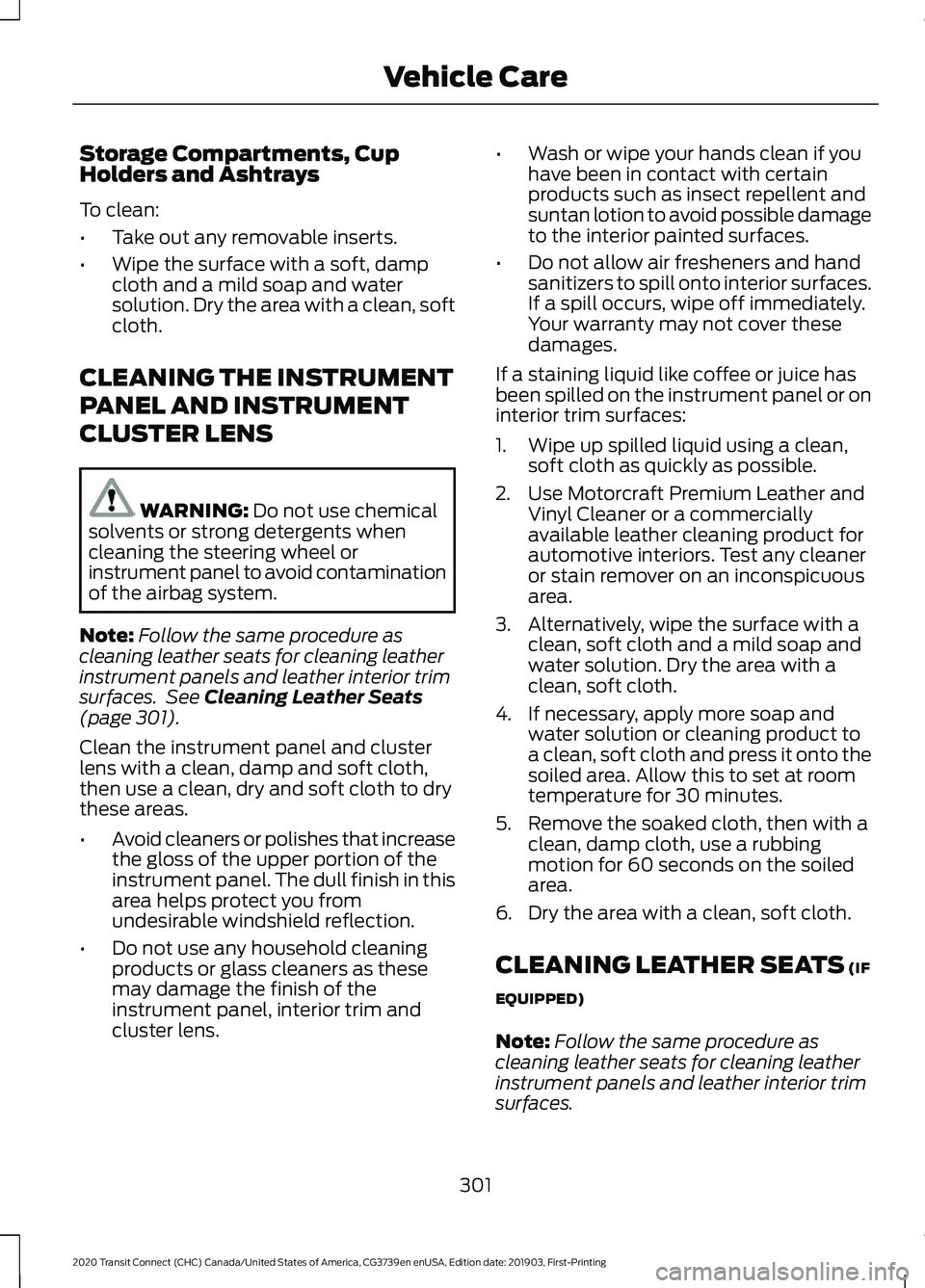
Storage Compartments, Cup
Holders and Ashtrays
To clean:
•
Take out any removable inserts.
• Wipe the surface with a soft, damp
cloth and a mild soap and water
solution. Dry the area with a clean, soft
cloth.
CLEANING THE INSTRUMENT
PANEL AND INSTRUMENT
CLUSTER LENS WARNING: Do not use chemical
solvents or strong detergents when
cleaning the steering wheel or
instrument panel to avoid contamination
of the airbag system.
Note: Follow the same procedure as
cleaning leather seats for cleaning leather
instrument panels and leather interior trim
surfaces. See
Cleaning Leather Seats
(page 301).
Clean the instrument panel and cluster
lens with a clean, damp and soft cloth,
then use a clean, dry and soft cloth to dry
these areas.
• Avoid cleaners or polishes that increase
the gloss of the upper portion of the
instrument panel. The dull finish in this
area helps protect you from
undesirable windshield reflection.
• Do not use any household cleaning
products or glass cleaners as these
may damage the finish of the
instrument panel, interior trim and
cluster lens. •
Wash or wipe your hands clean if you
have been in contact with certain
products such as insect repellent and
suntan lotion to avoid possible damage
to the interior painted surfaces.
• Do not allow air fresheners and hand
sanitizers to spill onto interior surfaces.
If a spill occurs, wipe off immediately.
Your warranty may not cover these
damages.
If a staining liquid like coffee or juice has
been spilled on the instrument panel or on
interior trim surfaces:
1. Wipe up spilled liquid using a clean, soft cloth as quickly as possible.
2. Use Motorcraft Premium Leather and Vinyl Cleaner or a commercially
available leather cleaning product for
automotive interiors. Test any cleaner
or stain remover on an inconspicuous
area.
3. Alternatively, wipe the surface with a clean, soft cloth and a mild soap and
water solution. Dry the area with a
clean, soft cloth.
4. If necessary, apply more soap and water solution or cleaning product to
a clean, soft cloth and press it onto the
soiled area. Allow this to set at room
temperature for 30 minutes.
5. Remove the soaked cloth, then with a clean, damp cloth, use a rubbing
motion for 60 seconds on the soiled
area.
6. Dry the area with a clean, soft cloth.
CLEANING LEATHER SEATS
(IF
EQUIPPED)
Note: Follow the same procedure as
cleaning leather seats for cleaning leather
instrument panels and leather interior trim
surfaces.
301
2020 Transit Connect (CHC) Canada/United States of America, CG3739en enUSA, Edition date: 201903, First-Printing Vehicle Care
Page 493 of 509
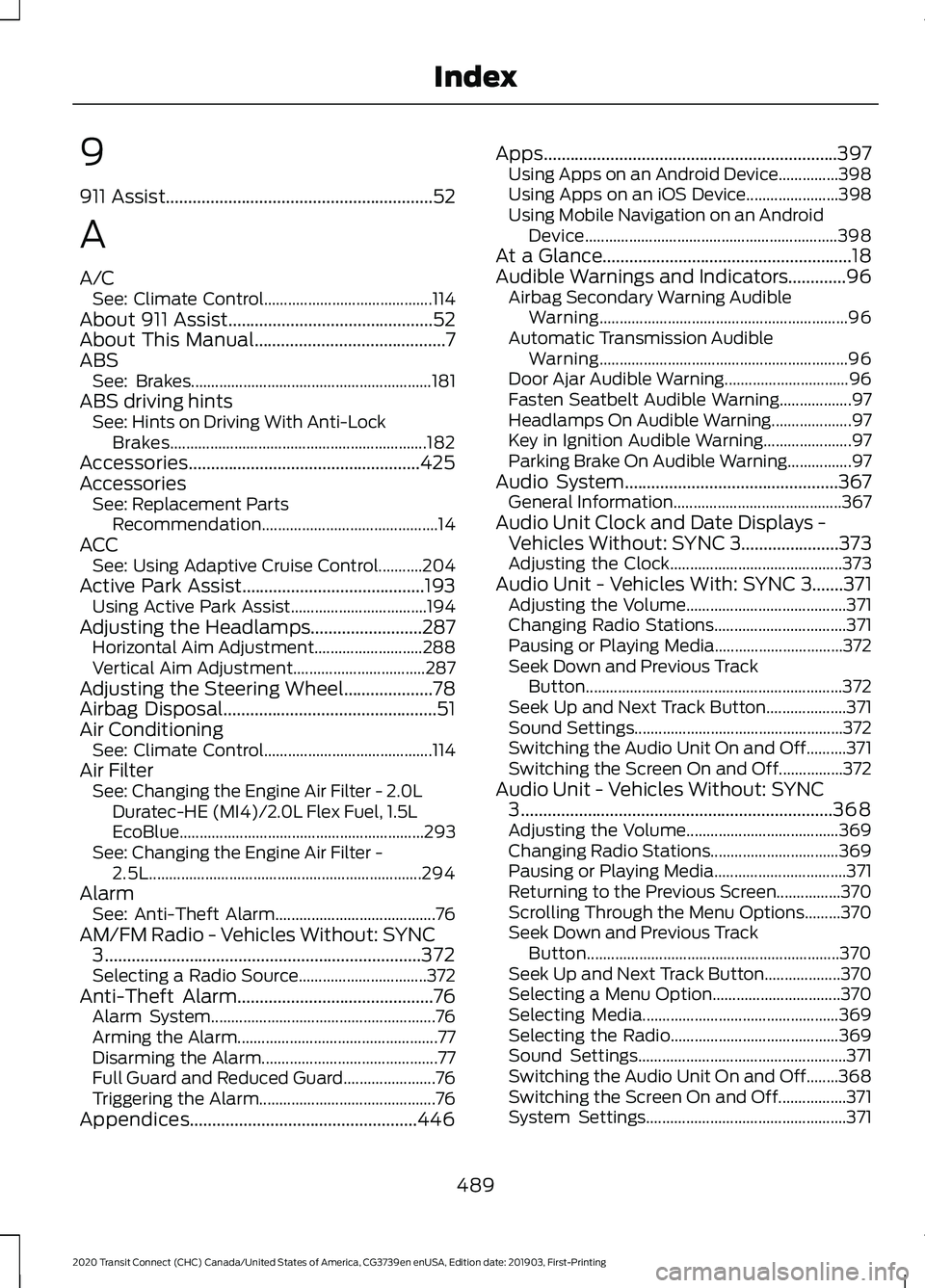
9
911 Assist............................................................52
A
A/C See: Climate Control.......................................... 114
About 911 Assist
..............................................52
About This Manual...........................................7
ABS See: Brakes............................................................ 181
ABS driving hints See: Hints on Driving With Anti-Lock
Brakes................................................................ 182
Accessories....................................................425
Accessories See: Replacement Parts
Recommendation............................................ 14
ACC See: Using Adaptive Cruise Control...........204
Active Park Assist.........................................193 Using Active Park Assist.................................. 194
Adjusting the Headlamps.........................287 Horizontal Aim Adjustment........................... 288
Vertical Aim Adjustment................................. 287
Adjusting the Steering Wheel....................78
Airbag Disposal................................................51
Air Conditioning See: Climate Control.......................................... 114
Air Filter See: Changing the Engine Air Filter - 2.0L
Duratec-HE (MI4)/2.0L Flex Fuel, 1.5L
EcoBlue............................................................. 293
See: Changing the Engine Air Filter - 2.5L.................................................................... 294
Alarm See: Anti-Theft Alarm........................................ 76
AM/FM Radio - Vehicles Without: SYNC 3
.......................................................................372
Selecting a Radio Source................................ 372
Anti-Theft Alarm
............................................76
Alarm System........................................................ 76
Arming the Alarm.................................................. 77
Disarming the Alarm............................................ 77
Full Guard and Reduced Guard....................... 76
Triggering the Alarm............................................ 76
Appendices...................................................446 Apps..................................................................397
Using Apps on an Android Device...............398
Using Apps on an iOS Device....................... 398
Using Mobile Navigation on an Android Device............................................................... 398
At a Glance........................................................18
Audible Warnings and Indicators.............96 Airbag Secondary Warning Audible
Warning.............................................................. 96
Automatic Transmission Audible Warning.............................................................. 96
Door Ajar Audible Warning............................... 96
Fasten Seatbelt Audible Warning.................. 97
Headlamps On Audible Warning.................... 97
Key in Ignition Audible Warning...................... 97
Parking Brake On Audible Warning................97
Audio System
................................................367
General Information.......................................... 367
Audio Unit Clock and Date Displays - Vehicles Without: SYNC 3......................373
Adjusting the Clock........................................... 373
Audio Unit - Vehicles With: SYNC 3.......371 Adjusting the Volume........................................ 371
Changing Radio Stations................................. 371
Pausing or Playing Media................................ 372
Seek Down and Previous Track Button................................................................ 372
Seek Up and Next Track Button.................... 371
Sound Settings.................................................... 372
Switching the Audio Unit On and Off..........371
Switching the Screen On and Off................372
Audio Unit - Vehicles Without: SYNC 3
......................................................................368
Adjusting the Volume...................................... 369
Changing Radio Stations................................ 369
Pausing or Playing Media................................. 371
Returning to the Previous Screen................370
Scrolling Through the Menu Options.........370
Seek Down and Previous Track Button............................................................... 370
Seek Up and Next Track Button................... 370
Selecting a Menu Option................................ 370
Selecting Media................................................. 369
Selecting the Radio.......................................... 369
Sound Settings.................................................... 371
Switching the Audio Unit On and Off........368
Switching the Screen On and Off.................371
System Settings.................................................. 371
489
2020 Transit Connect (CHC) Canada/United States of America, CG3739en enUSA, Edition date: 201903, First-Printing Index
Page 496 of 509
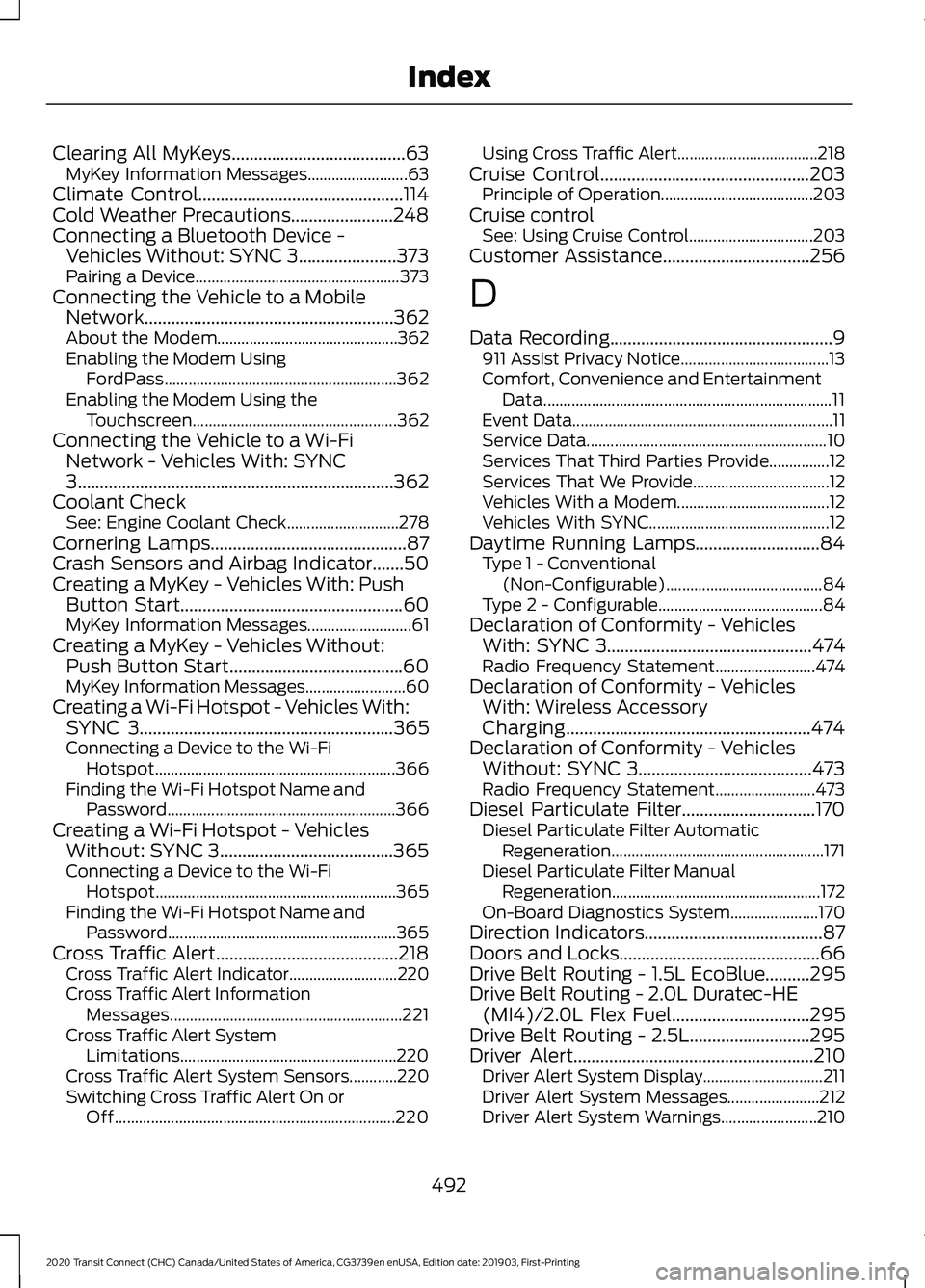
Clearing All MyKeys.......................................63
MyKey Information Messages......................... 63
Climate Control..............................................114
Cold Weather Precautions.......................248
Connecting a Bluetooth Device - Vehicles Without: SYNC 3......................373
Pairing a Device................................................... 373
Connecting the Vehicle to a Mobile Network........................................................362
About the Modem............................................. 362
Enabling the Modem Using FordPass.......................................................... 362
Enabling the Modem Using the Touchscreen................................................... 362
Connecting the Vehicle to a Wi-Fi Network - Vehicles With: SYNC
3.......................................................................362
Coolant Check See: Engine Coolant Check............................ 278
Cornering Lamps............................................87
Crash Sensors and Airbag Indicator
.......50
Creating a MyKey - Vehicles With: Push Button Start
..................................................60
MyKey Information Messages.......................... 61
Creating a MyKey - Vehicles Without: Push Button Start.......................................60
MyKey Information Messages......................... 60
Creating a Wi-Fi Hotspot - Vehicles With: SYNC 3
.........................................................365
Connecting a Device to the Wi-Fi
Hotspot............................................................ 366
Finding the Wi-Fi Hotspot Name and Password......................................................... 366
Creating a Wi-Fi Hotspot - Vehicles Without: SYNC 3.......................................365
Connecting a Device to the Wi-Fi Hotspot............................................................ 365
Finding the Wi-Fi Hotspot Name and Password......................................................... 365
Cross Traffic Alert.........................................218 Cross Traffic Alert Indicator........................... 220
Cross Traffic Alert Information Messages.......................................................... 221
Cross Traffic Alert System Limitations...................................................... 220
Cross Traffic Alert System Sensors............220
Switching Cross Traffic Alert On or Off...................................................................... 220Using Cross Traffic Alert...................................
218
Cruise Control
...............................................203
Principle of Operation...................................... 203
Cruise control See: Using Cruise Control............................... 203
Customer Assistance.................................256
D
Data Recording
..................................................9
911 Assist Privacy Notice..................................... 13
Comfort, Convenience and Entertainment Data........................................................................\
11
Event Data................................................................. 11
Service Data............................................................ 10
Services That Third Parties Provide...............12
Services That We Provide.................................. 12
Vehicles With a Modem...................................... 12
Vehicles With SYNC............................................. 12
Daytime Running Lamps............................84 Type 1 - Conventional
(Non-Configurable)....................................... 84
Type 2 - Configurable......................................... 84
Declaration of Conformity - Vehicles With: SYNC 3
..............................................474
Radio Frequency Statement......................... 474
Declaration of Conformity - Vehicles With: Wireless Accessory
Charging
.......................................................474
Declaration of Conformity - Vehicles Without: SYNC 3.......................................473
Radio Frequency Statement......................... 473
Diesel Particulate Filter..............................170 Diesel Particulate Filter Automatic
Regeneration..................................................... 171
Diesel Particulate Filter Manual Regeneration.................................................... 172
On-Board Diagnostics System...................... 170
Direction Indicators
........................................87
Doors and Locks.............................................66
Drive Belt Routing - 1.5L EcoBlue..........295
Drive Belt Routing - 2.0L Duratec-HE (MI4)/2.0L Flex Fuel...............................295
Drive Belt Routing - 2.5L...........................295
Driver Alert
......................................................210
Driver Alert System Display.............................. 211
Driver Alert System Messages....................... 212
Driver Alert System Warnings........................ 210
492
2020 Transit Connect (CHC) Canada/United States of America, CG3739en enUSA, Edition date: 201903, First-Printing Index
Page 497 of 509
Switching Driver Alert On or Off.....................
211
Driver and Passenger Airbags...................44 Children and Airbags...........................................45
Proper Driver and Front Passenger Seating
Adjustment........................................................ 44
Driver Knee Airbag.........................................49
Driving Aids.....................................................210
Driving Hints...................................................247
Driving Through Water...............................248
DRL See: Daytime Running Lamps......................... 84
E
Eco......................................................................221 Eco Mode System Display............................... 221
Principle of Operation....................................... 221
Economical Driving
......................................247
Electromagnetic Compatibility..............446
Emergency Call Limitations.......................53
Emergency Call Requirements..................52
Emission Law
.................................................165
Noise Emissions Warranty, Prohibited
Tampering Acts and Maintenance.........166
Tampering With a Noise Control System............................................................... 165
End User License Agreement.................448 VEHICLE SOFTWARE END USER LICENSE
AGREEMENT (EULA) ................................ 448
Engine Block Heater....................................150 Using the Engine Block Heater....................... 151
Engine Coolant Check................................278 Adding Coolant................................................... 279
Coolant Change................................................. 280
Engine Coolant Temperature Management.................................................. 282
Fail-Safe Cooling............................................... 280
Recycled Coolant.............................................. 280
Severe Climates................................................. 280
Engine Cooling Fan - Diesel.....................278
Engine Cooling Fan - Gasoline................278
Engine Emission Control............................165
Engine Immobilizer See: Passive Anti-Theft System..................... 74
Engine Oil Check..........................................276 Adding Engine Oil............................................... 277
Engine Oil Dipstick - 1.5L EcoBlue.........276 Engine Oil Dipstick - 2.0L Duratec-HE
(MI4)/2.0L Flex Fuel/2.5L.....................276
Engine Specifications - 1.5L EcoBlue.........................................................337
Engine Specifications - 2.0L Duratec-HE (MI4)/2.0L Flex Fuel...............................338
Engine Specifications - 2.5L....................339
Entertainment..............................................390 Playing Music From a USB or Media
Player................................................................. 391
Streaming Music From a Bluetooth Device............................................................... 390
Using the Radio.................................................. 390
Environment......................................................17
Essential Towing Checks...........................241 Before Towing a Trailer.................................... 243
Hitches................................................................... 242
Launching or Retrieving a Boat or Personal Watercraft....................................................... 244
Safety Chains...................................................... 242
Trailer Brakes....................................................... 243
Trailer Lamps....................................................... 243
Trailer Towing Connector................................ 242
When Towing a Trailer..................................... 243
Event Data Recording See: Data Recording.............................................. 9
Export Unique Options
.................................16
Exterior Mirrors...............................................90 Adjusting the Mirrors.......................................... 90
Folding the Mirrors................................................ 91
F
Fan See: Engine Cooling Fan - Diesel.................278
See: Engine Cooling Fan - Gasoline............278
Fastening the Seatbelts..............................36 Seatbelt Locking Modes.................................... 37
Using Seatbelts During Pregnancy................36
Flat Tire See: Changing a Road Wheel....................... 330
Flat Tire Inflation See: Tire Sealant and Inflator Kit................306
Floor Mats......................................................248
Fog Lamps - Front See: Front Fog Lamps........................................ 86
Ford Credit
.........................................................13
US Only..................................................................... 13
493
2020 Transit Connect (CHC) Canada/United States of America, CG3739en enUSA, Edition date: 201903, First-Printing Index
Page 504 of 509
Mobile Apps........................................................
406
Navigation............................................................ 405
Phone..................................................................... 401
Radio...................................................................... 404
Sound.................................................................... 399
Valet Mode............................................................ 412
Vehicle.................................................................... 410
Voice Control......................................................... 411
Wi-Fi & Hotspot................................................ 408
Side Airbags.....................................................48
Side Sensing System...................................191
Object Distance Indicator................................ 192
Sitting in the Correct Position..................120
Sliding Door
.....................................................69
Snow Chains See: Using Snow Chains................................. 325
Spare Wheel See: Changing a Road Wheel....................... 330
Special Notices
................................................14
New Vehicle Limited Warranty......................... 14
Notice to Owners of Pickup Trucks and Utility Type Vehicles........................................ 15
On Board Diagnostics Data Link Connector............................................................ 15
Special Instructions.............................................. 14
Using Your Vehicle as an Ambulance............15
Using Your Vehicle With a Snowplow...........15
Special Operating Conditions Scheduled Maintenance..............................................434
Speed Control See: Cruise Control........................................... 203
Stability Control
............................................185
Principle of Operation....................................... 185
Starter Switch See: Ignition Switch........................................... 139
Starting a Diesel Engine
.............................148
Engine Warning Lamps.................................... 149
Failure to Start..................................................... 148
Glow Plug Indicator........................................... 149
Guarding Against Exhaust Fumes................149
Important Ventilating Information...............149
Starting System Information Messages.......................................................... 150
Stopping the Engine When Your Vehicle is Moving............................................................... 148
Stopping the Engine When Your Vehicle is Stationary......................................................... 148
Vehicles with an Ignition Key......................... 148Vehicles with a Push Button Ignition
Switch................................................................ 148
Starting a Flex Fuel Engine.......................146 Automatic Shutdown....................................... 146
Failure to Start..................................................... 146
Flex Fuel Engine Start System...................... 146
Guarding Against Exhaust Fumes................147
Important Ventilating Information...............147
Stopping the Engine When Your Vehicle is Moving................................................................ 147
Stopping the Engine When Your Vehicle is Stationary......................................................... 147
Starting a Gasoline Engine........................142 Automatic Engine Shutdown......................... 143
Engine Warning Lamps.................................... 145
Failure to Start..................................................... 143
Guarding Against Exhaust Fumes................144
Important Ventilating Information...............145
Starting System Information Messages.......................................................... 145
Stopping the Engine When Your Vehicle is Moving............................................................... 144
Stopping the Engine When Your Vehicle is Stationary......................................................... 144
Vehicles with an Ignition Key.......................... 143
Vehicles with a Push Button Ignition Switch................................................................ 143
Starting and Stopping the Engine..........139 General Information.......................................... 139
Steering............................................................222 Adaptive Learning.............................................. 223
Electric Power Steering.................................... 222
Steering Wheel................................................78
Storage Compartments
.............................138
Streaming Bluetooth Audio - Vehicles Without: SYNC 3
.......................................375
Selecting a Bluetooth Source........................ 375
Sun Shades
......................................................92
Bounce-Back......................................................... 92
Opening and Closing the Sun Shade...........92
Sun Shade Relearning........................................ 92
Supplementary Restraints System.........43 Principle of Operation........................................ 43
Switching Off the Engine..........................150 Vehicles With a Turbocharger....................... 150
Symbols Glossary
.............................................7
SYNC™ 3.........................................................377
General Information.......................................... 377
500
2020 Transit Connect (CHC) Canada/United States of America, CG3739en enUSA, Edition date: 201903, First-Printing Index