battery GEELY CK 2008 Owner's Manual
[x] Cancel search | Manufacturer: GEELY, Model Year: 2008, Model line: CK, Model: GEELY CK 2008Pages: 392, PDF Size: 38.86 MB
Page 171 of 392

164Section 2 Charging System
(MR479Q, MR479QA, MR481QA)I. BATTERYMaintenance-free battery is applied in this vehicle. Its termination voltage is 12V. It is connected inline by six
2V single cell in tandem with walls between every pole.
1. BATTERY WARNING SIGNS
1 -- Danger of corrosion
The battery electrolyte is very corrosive. DO NOT overturn the battery.
2 -- Read the instructions for battery
3 -- Children are forbidden to touch the battery
4 -- Avoid fire, electromagnetic wave and strong light.
Avoid electric spark while repair; avoid short.
5 -- Wear protecting glasses
6 -- Danger of explosion
The explosive mixed gas will be produced while charging.
7 -- How to deal with a scrapped battery
The scrapped battery should be delivered to the collection station.1234567
Page 172 of 392

1652. BATTERY REMOVAL AND INSTALLATION
HINT:
(1) The battery is not allowed to contact lubricating grease.
(2) The battery terminal is only allowed to be softly pulled out, in order to void damaging the battery.REMOVAL(1) Remove the negative (-) ground cable
(2) Remove the battery positive (+) cable
(3) Loosen the fixing clamp on the battery.INSTALLATIONInstall according to the inverted order of removal.
Tighten the torque
Tighten the battery cable clip to 6N.m (61kgf.cm, 4ft.lbf)
Tighten the fixing clamp to 12N.m (123kgf.cm, 8.6ft.lbf)
Page 173 of 392
166II. CHARGING SYSTEM INSPECTION1. CHECK BATTERY WORKING VOLTAGE
(a) After having driven the vehicle and in the case that 20 minutes have not passed after having stopped the
engine, turn the ignition switch ON and turn on the electrical system (headlight, blower motor) for 60
seconds to remove the surface charge.
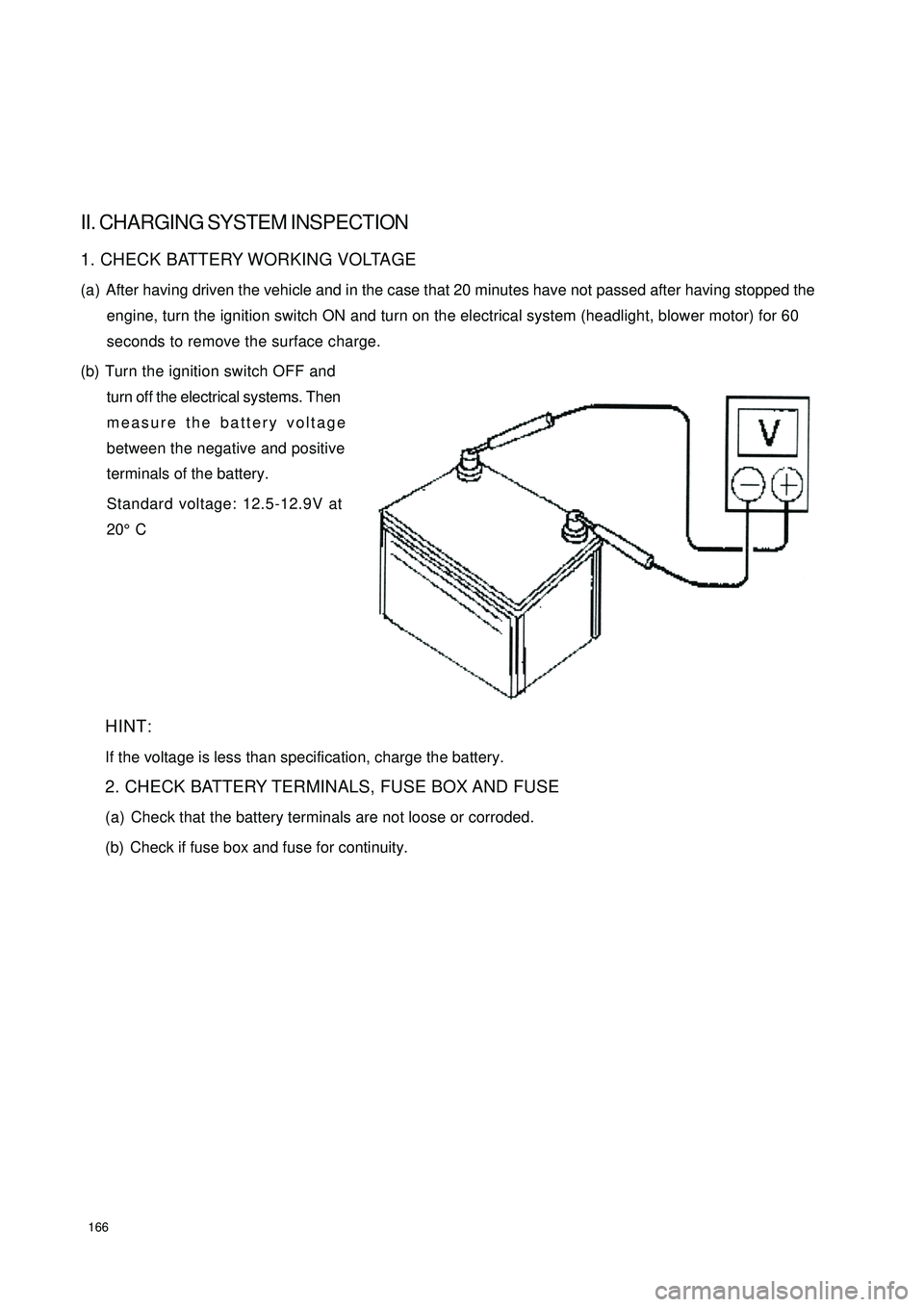
(b) Turn the ignition switch OFF and
turn off the electrical systems. Then
measure the battery voltage
between the negative and positive
terminals of the battery.
Standard voltage: 12.5-12.9V at
20°C
HINT:
If the voltage is less than specification, charge the battery.
2. CHECK BATTERY TERMINALS, FUSE BOX AND FUSE
(a) Check that the battery terminals are not loose or corroded.
(b) Check if fuse box and fuse for continuity.
Page 175 of 392
1687. INSPECT CHARGING CIRCUIT WITHOUT LOAD
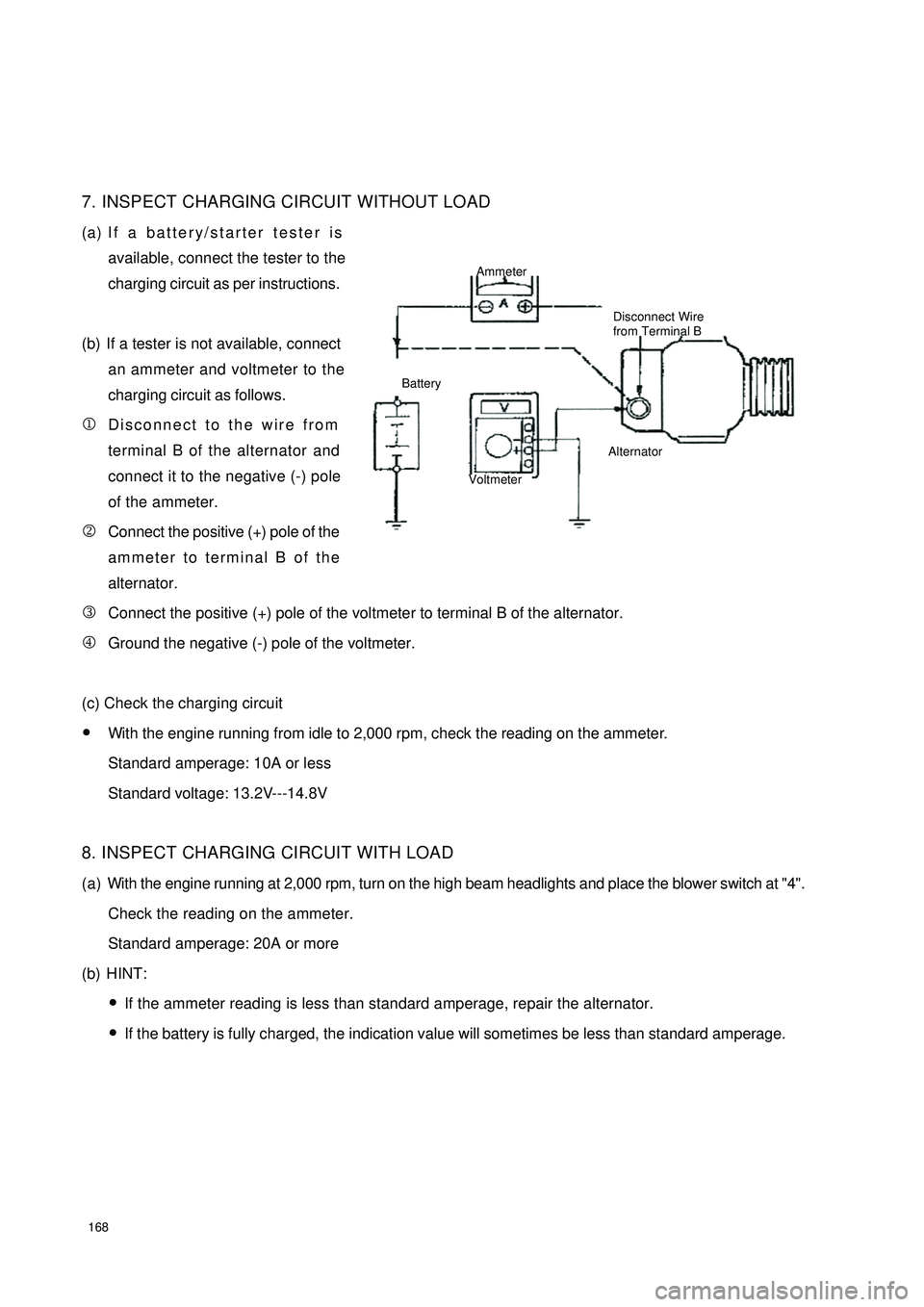
(a) If a battery/starter tester is
available, connect the tester to the
charging circuit as per instructions.
(b) If a tester is not available, connect
an ammeter and voltmeter to the
charging circuit as follows.
1Disconnect to the wire from
terminal B of the alternator and
connect it to the negative (-) pole
of the ammeter.
2Connect the positive (+) pole of the
ammeter to terminal B of the
alternator.
3Connect the positive (+) pole of the voltmeter to terminal B of the alternator.
4Ground the negative (-) pole of the voltmeter.
(c) Check the charging circuit
yWith the engine running from idle to 2,000 rpm, check the reading on the ammeter.
Standard amperage: 10A or less
Standard voltage: 13.2V---14.8V
8. INSPECT CHARGING CIRCUIT WITH LOAD
(a) With the engine running at 2,000 rpm, turn on the high beam headlights and place the blower switch at "4".
Check the reading on the ammeter.
Standard amperage: 20A or more
(b) HINT:
yIf the ammeter reading is less than standard amperage, repair the alternator.
yIf the battery is fully charged, the indication value will sometimes be less than standard amperage.Ammeter
Disconnect Wire
from Terminal B
Battery
VoltmeterAlternator
Page 182 of 392
175II. DETAILED SOLUTION PROCEDURE1. THE WHOLE COMBINATION METER
DOSE NOT OPERATE.
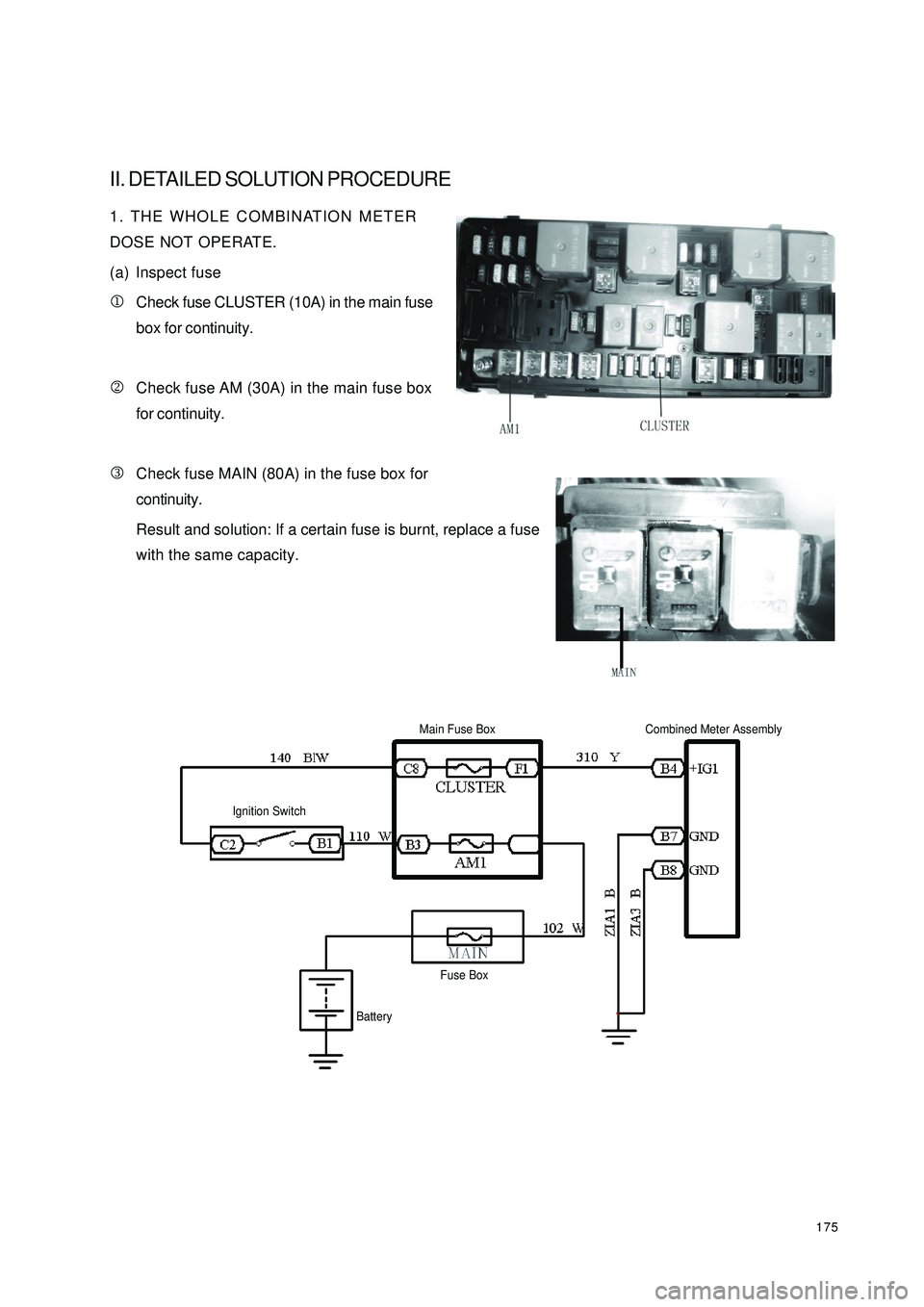
(a) Inspect fuse
1Check fuse CLUSTER (10A) in the main fuse
box for continuity.
2Check fuse AM (30A) in the main fuse box
for continuity.
3Check fuse MAIN (80A) in the fuse box for
continuity.
Result and solution: If a certain fuse is burnt, replace a fuse
with the same capacity.Ignition SwitchMain Fuse BoxCombined Meter AssemblyBatteryFuse Box
Page 201 of 392

194II. MALFUNCTION INSPECTION1. WASHER PUMP INSPECTION
(1) Mount washer pump on the can system. Pour washer fluid into the can.
(2) Disconnect the connector of washer pump.
(3) Connect the terminal 1 of washer pump to the battery positive (+) and the terminal 2 to the negative (-),
as shown below. Inspect that the washer fluid flows out of the can.
(4) If not, replace the washer pump.
2. WIPER SWITCH ASSEMBLY
(a) Inspect the continuity
yInspect each terminal on connector for continuity.
Standard:Switch position Tested terminal Specified condition
MIST 8(
+)
—10(
+)
Continuity
OFF 3(
+)
—10(
+)
Continuity
INT 8(
+)
—6(
+)
3(
+)
—10(
+)
Continuity
LO 8(
+)
—10(
+)
Continuity
HI 8(
+)
—11(
-)
Continuity
Page 202 of 392

195Front washer switch
If no continuity, replace the switch.
(b) Operation inspection (washer switch)
1Turn the washer switch on the position OFF.
2Connect the connector terminal 8 to the battery positive (+)
and the terminal 2 of wiper connector to the negative (-). Turn
the washer switch ON and OFF and then measure the battery
voltage between the terminal 8 and terminal 2 of the wiper
motor connector.
Standard: as shown on the left
If it is not as specified, replace the switch.
3. WIPER MOTOR ASSEMBLY
(a) Inspect the low speed shift
yConnect the connector terminal 3 to the battery positive
(+) and the connector terminal 2 (E) to the negative
(-), check that the motor operates at low speed.
If it is not as specified, replace the motor.
(b) Inspect the high speed shift
yConnect the connector terminal 3 to the battery positive
(+) and the connector terminal 2 (E) to the negative
(-), check that the motor operates at high speed.
If it is not as specified, replace the motor.
(c) Inspect automatic return
1Connect the connector terminal 5 to the battery positive (+) and the connector terminal 2 (E) to the
negative (-). Let the motor operates at low speed, disconnect terminal 5 (+) to make the motor stop at a
random position.
2Connect the terminal 5 and terminal 3, and connect the terminal 4 to the battery positive (+), make the
motor restart at low speed.
3Check that the automatic return operates in a normal way.
If it is not as specified, replace the motor.Switc h position Te ste d termina l Spe c ifie d c onditionOFFNo c ontinuity
ON 8(+)—7(-)Continuity
Page 205 of 392
198Chapter 5 Light SystemSection 1 Survey of Light SystemI. COMPOSITION1. Front combination lamp assembly: turn signal lamp, high beam, low beam, head lamp, front position lamp.
2. Rear combination lamp: turn signal lamp, back-up lamp, rear fog lamp, tail lamp, brake lamp, retro reflector.
3. Front fog lamp
4. Side turn signal lamp
5. High mounted stop lamp
6. Rear trunk lamp
7. License plate lamp
8. Interior dome lamp
9. Rear row reading lamp
10. Door lampshield and bulb assemblyII. NOTES FOR REPAIR1. NOTES WHEN REPAIRING ELECTRICAL EQUIPMENTS
(a) Disconnect the battery ground cable.
2. Notes when replacing a headlamp bulb
(a) Before replacing a halogen bulb, turn the headlamp OFF to make it cool.
(b) When installing a new halogen bulb, do not touch the glass part of the bulb with bare hands.
(c) If there is oil stain on the surface of halogen bulb (headlamp and front fog lamp) when the lamps are
turned ON, its service life will be shortened.
(d) Halogen bulbs (headlamp and front fog lamp) have pressurized gas inside and require special handling.
They can explode if dropped to ground.The glass fragments will splash up.
(e) When replacing, make sure to use the bulbs with the same power, same model.
(f) After the bulb is installed, make the lamp holder tight.
Page 217 of 392
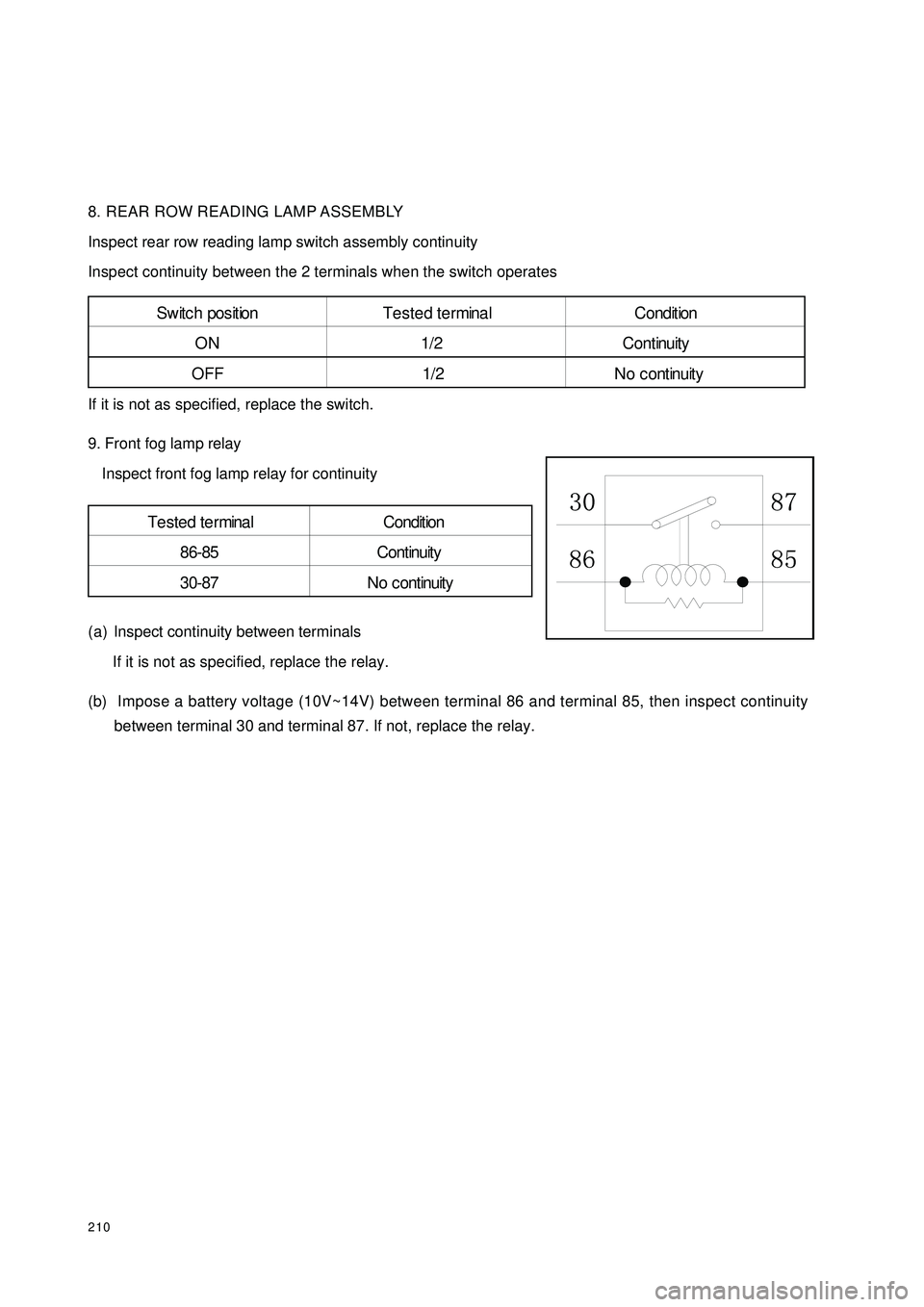
2108. REAR ROW READING LAMP ASSEMBLY
Inspect rear row reading lamp switch assembly continuity
Inspect continuity between the 2 terminals when the switch operates
If it is not as specified, replace the switch.
9. Front fog lamp relay
Inspect front fog lamp relay for continuity
(a) Inspect continuity between terminals
If it is not as specified, replace the relay.
(b) Impose a battery voltage (10V~14V) between terminal 86 and terminal 85, then inspect continuity
between terminal 30 and terminal 87. If not, replace the relay.S w it c h pos it ion T e s t e d t e r mina l C ondit ion
ON 1/2 Continuity
OFF 1/2 No continuityTe ste d te rmina l Condition
86-85 Continuity
30-87 No c ontinuity
Page 233 of 392

226II. Inspection1. Power switch system doesn't work
Wiring Diagram
(1) Check radio assembly (+B, ¬ACC, ¬GND)
1Check the continuity between terminals under each operating condition as shown in the table below
Standard:
2Check the voltage between terminals under each operating condition as shown in the table
Standard:
Normal:Repair or replace wire harness, connector
Abnormal:Check or replace radio assemblyMain Fuse BoxRadio and CD
BatteryFusible Link BoxIgnition SwitchTester connection Condition Standard Status
GND Consta nt Status ContinuityTeste r Connec tion Condition Sta nda rd Sta tus
+B - GND Consta nt Status 10~
14V
ACC - GND Ignition switch ACC or ON 10~
14V