battery GEELY CK 2008 Owner's Guide
[x] Cancel search | Manufacturer: GEELY, Model Year: 2008, Model line: CK, Model: GEELY CK 2008Pages: 392, PDF Size: 38.86 MB
Page 234 of 392

2272. The radio backlight does not light up with the illumination switch ON
Wiring Diagram
(1) Check radio assembly (TAIL)
Check the voltage between terminals under each operating condition as shown in the table below.
Standard:
Abnormal:Repair or replace wire harness and connector
Normal:Check and replace radio assemblyMain Fuse BoxRadio and CDFusible Link Box
BatteryLight
Control
Switch
BatteryTeste r Connec tion Condition Sta nda rd Sta tus
TAIL - GND Combined Switch (Light switc h) 10~
14V
Page 235 of 392

2283. Speaker soundless in all modes
Wiring Diagram
(1) Check LCD (Liquid Crystal Display) illumination
1Turn ignition switch to ACC
2Connect radio assembly continuity
3Switch on position lamp
Standard: Radio assembly LCD light goes on
Abnormal:Go to Step (7)
Normal:Go to Next Step
(2) Control volume and adjust volume balance
yOperate the radio assembly to adjust volume balance and find soundless speaker
Check and replace the radio assembly if all the speakers are soundless
Check and replace the soundless speakers if some of the speakers are soundlessMain Fuse BoxRadio and CDIgnition switchFusible Link BoxBatteryLeft Rear SpeakerRight Rear SpeakerLeft tweeter SpeakerRight tweeter SpeakerLeft Front Speaker
Right Front Speaker
Page 245 of 392

238Section 4 Audio and Video System ReplacementI. Notice on operationPlease explain to the customer that the AM/FM broadcast channel information will be cleared when remov-
ing the battery negative terminal cable. Record the channel information before removing the negative termi-
nal cable if necessary. Reset after connecting the negative terminal cable.
yAll cassette tapes and CDs must be taken out before radio removal and installation.
yIf the cassette tapes and CDs can not be taken out due to radio fault. Do not take them out by force.
Drive the vehicle to Service Station.
yMake sure the grounding bolts are tightened before antenna removal and installation.
yThere will be noise when receiving electric wave if the grounding bolts are not tightened.
yDon't touch the speaker cone.Intermediate Multiple CD main unit Radio assemblyInstrument PanelMultiple DVD main unit
Page 249 of 392

242Chapter 7
SRS (Supplemental Restraint System)Section 1 SRS-General InformationI. PRECAUTIONFor safe reasons, read the following precautions before starting any operation.
1. When servicing the SRS, correct sequence and items are described in the following chapter.
2. Instruments and special tools recommended in this chapter shall be used for operation.
3. When servicing the following components, replace them with the new ones if there is a failure.
(1) SRS ECU
(2) Clock Spring Module
(3) Driver Airbag Module
(4) Passenger Airbag Assembly (Option)
4. If there is any abnormality in the wire harness of the SRS, replace it with a new one. Correct or replace the
abnormal wire harness in accordance with Table 1.
Figure 1 (Table 1)No De signation De scription
1 Belt-pretensioner, Driver, Low Seat belt pretensioner, driver side, low position
2 Belt-pretensioner, Driver, High Seat belt pretensioner, driver side, high position
3 Belt-pretensioner, Passenger, High Seat belt pretensioner, passenger side, high position
4 Belt-pretensioner, Passenger, Low Seat belt pretensioner, passenger side, low position
5 IGN Battery voltage
6 GND Ground-ground w ire
7 WL Airbag w arning light
9 K Diagnostic serial data I/O (K line)
10 DAB Hi Driver airbag, high positionE C U T e r mina l D e s c r ipt ion
Page 250 of 392

2435. Servicing operation shall be carried out 60s after the negative
(-) terminal cable is disconnected from the battery. In addition,
the disconnected negative (-) terminal cable shall be protected
with insulating tape for insulation.
In order to deploy an airbag within a certain time period after the
battery is disconnected, condenser in the ECU shall retain some
electrical energy. Otherwise, it could lead to a serious accident
because of the unexpected deployment of airbag.
6. During spray paint work, ECU, airbag assembly, clock spring
assembly, etc shall be removed and kept in place to avoid the effects of overheat. (Over 93¡æ)
7. When the SRS is serviced, a diagnostic scan meter is used to clear the DTC to enable the normal work of
the warning light.1 1 D AB Lo D r iv er a ir b ag , lo w p o s it io n
13 (Option) PAB Hi Passenger airbag, high position
14 (Option) PAB Lo Passenger airbag, low position
20Passenger Airbag Deactivation
Indic atorPassenger airbag deac tivation indic ator light
27PPD/ Passenger Airbag
Deac tivation Sw itch, HighPassenger airbag deac tivation sw itc h, high position
30 Crash Output Crash outputInsulating TapeBatteryCableDriver Side
Warning LampPassenger Side
Warning LampDriver Seat Inflation
Element & AirbagCrash Sensor &
Diagnostic ModuleFront/RH Inflation
Element & Airbag
Page 256 of 392
249(3) Clear DTCs
When ECU diagnostic tester (Hi-DSTM) receives the "Clear DTCs" command from the serial interface,
the DTCs stored in ECU will be cleared off. But if an internal DTC is recorded or there is one crash
record, the command will not be executed.
5. Trouble display (Warning light ON)
(1) Light bulb check
When working voltage is supplied to SRS ECU (HAE2.5) through battery, SRS ECU (HAE2.5) lights up
the warning light to check the light bulb. In the initiation stage, the light will be on for 6s at the frequency
of 1Hz and then go out. To give notice of the presence of troubles to the driver, the warning light will
remain on after the working voltage is supplied. If the history troubles happened for less than 5 times, the
warning light will be on for 6s after ignition on and then go out. In the initiation stage, the SRS ECU
(HAE2.5) will not check crash and arrest deployment until the circuit of SRS ECU (HAE2.5) goes
stable.
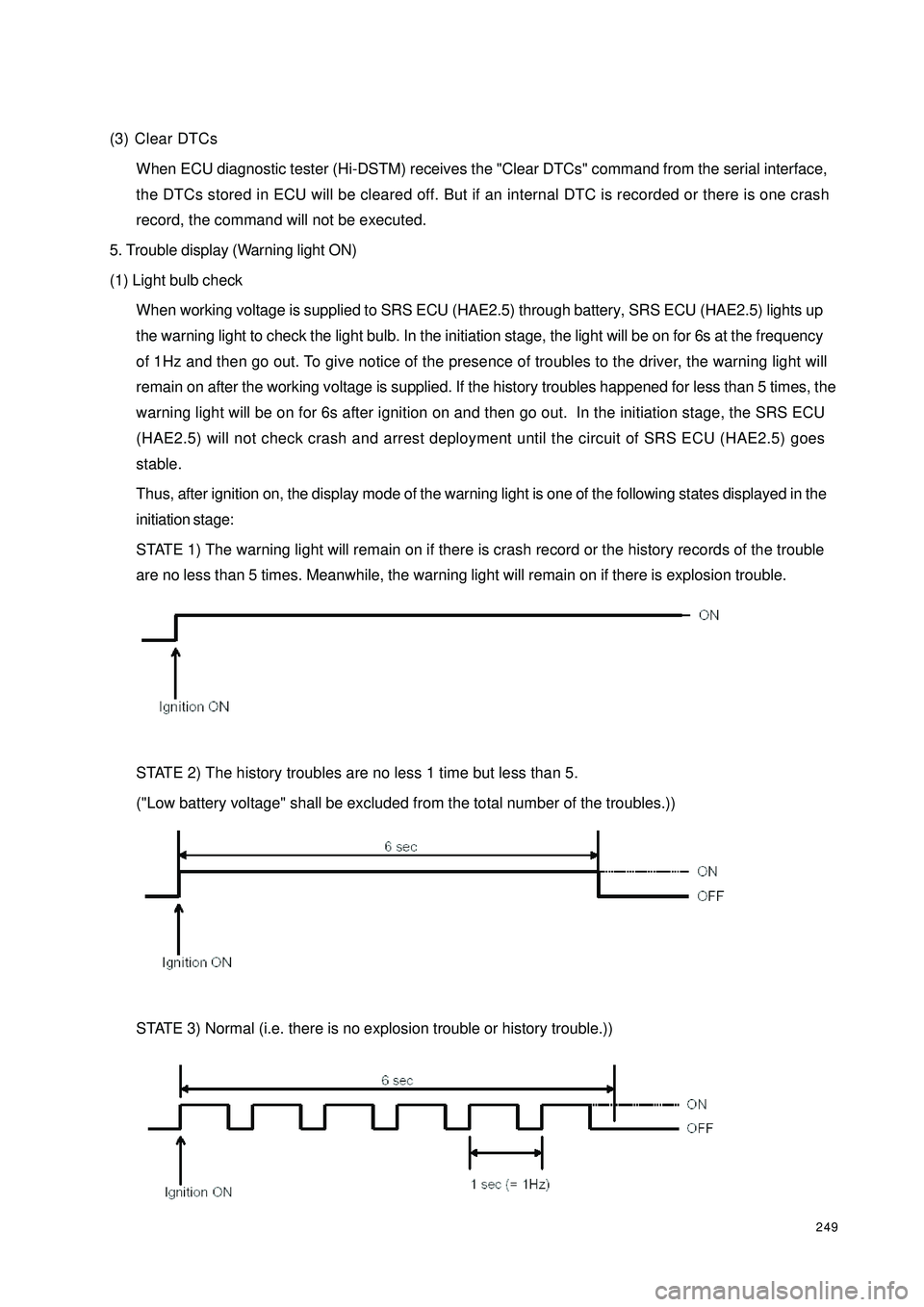
Thus, after ignition on, the display mode of the warning light is one of the following states displayed in the
initiation stage:
STATE 1) The warning light will remain on if there is crash record or the history records of the trouble
are no less than 5 times. Meanwhile, the warning light will remain on if there is explosion trouble.
STATE 2) The history troubles are no less 1 time but less than 5.
("Low battery voltage" shall be excluded from the total number of the troubles.))
STATE 3) Normal (i.e. there is no explosion trouble or history trouble.))
Page 257 of 392
250(2) Trouble indication
1In case of a trouble, the warning light will indicate. If the external trouble is a history trouble, the indication
will be cancelled. When the history trouble happens for no less than 5 times, the indicator light will remain
on even if there is no more trouble. "Low battery voltage" shall not be counted in the total number of
troubles.
2Only a service worker can reset a displayed or history trouble. The internal troubles of a SRS ECU
(HAE2.5) or the "crash record" of a trouble cannot be reset, in which case the SRS ECU (HAE2.5) shall
be replaced.
(3) Microcontroller-independent warning light on
Microcontroller with definitive troubles cannot fulfill its functions, thus cannot control the warning light. In
this case, the warning light will light up through proper circuit regardless of the microcontroller as stated
below:
yMalfunction of the battery supplying power to SRS ECU (HAE2.5): the warning lights are turned
on continuously by means of the drive function of the selfcheck light.
yLoss of internal working voltage: the warning light remains on.
yReset due to trigger failure of the watchdog: the warning light blinks.
yMicrocontroller out of work: the warning light always lights up.
yIncomplete insertion of SRS ECU (HAE2.5) connector: the warning light remains on by means of
a shorting bar.
The diagnostic procedures can well be illustrated as follows:
If it is found that the SRS warning light remains on, follow the undermentioned procedures to check even if
the light goes out eventually. First, a scan meter is used to check the location of the trouble.
Then£¬go on with the checking in accordance with specific methods and procedures for the correspondent
location.
a. If the result indicates that it is an internal trouble or that the SRS is already detonated, replace the
ECU directly.
b. Troubleshooting.
Page 258 of 392
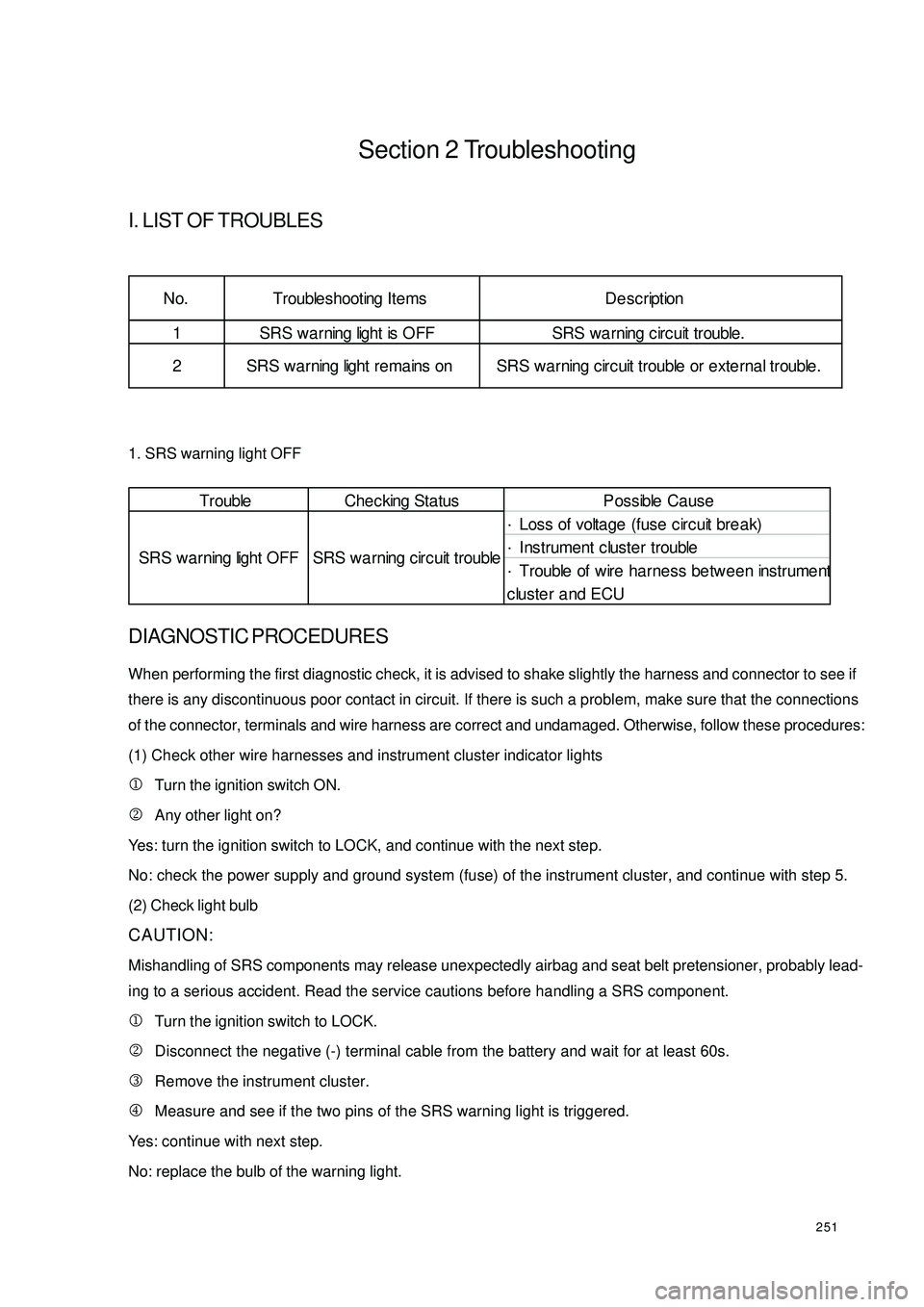
251Section 2 TroubleshootingI. LIST OF TROUBLES1. SRS warning light OFFDIAGNOSTIC PROCEDURESWhen performing the first diagnostic check, it is advised to shake slightly the harness and connector to see if
there is any discontinuous poor contact in circuit. If there is such a problem, make sure that the connections
of the connector, terminals and wire harness are correct and undamaged. Otherwise, follow these procedures:
(1) Check other wire harnesses and instrument cluster indicator lights
1Turn the ignition switch ON.
2Any other light on?
Yes: turn the ignition switch to LOCK, and continue with the next step.
No: check the power supply and ground system (fuse) of the instrument cluster, and continue with step 5.
(2) Check light bulb
CAUTION:
Mishandling of SRS components may release unexpectedly airbag and seat belt pretensioner, probably lead-
ing to a serious accident. Read the service cautions before handling a SRS component.
1Turn the ignition switch to LOCK.
2Disconnect the negative (-) terminal cable from the battery and wait for at least 60s.
3Remove the instrument cluster.
4Measure and see if the two pins of the SRS warning light is triggered.
Yes: continue with next step.
No: replace the bulb of the warning light.
Trouble Che c king Status P ossible Ca use
·Loss of voltage (fuse c irc uit bre a k)
·Instrument cluster trouble
·Trouble of wire harness between instrument
cluster and ECU SRS warning light OFF SRS wa rning c ircuit trouble1 SRS warning light is OFF SRS wa rning c irc uit trouble. No. Trouble shooting Ite ms De sc ription
2 SRS warning light re mains on SRS wa rning circ uit trouble or exte rna l trouble.
Page 259 of 392

252(3)Check the connection between ECU and instrument cluster
1Turn the ignition switch to LOCK.
2Disconnect the negative (-) terminal cable from the battery.
3Disconnect the connector of instrument cluster.
4Check if the related circuits of the warning light are connected or not.
Yes: continue with next step.
No: replace the wire harness, and then continue with step 5.
2. SRS warning light remains on.DIAGNOSTIC PROCEDURESTo begin the check, first use special diagnostic instruments and ECU to perform communication diagnosis
and find out the causes of the trouble. If the communication fails, continue with the following procedures:
(1) Check battery
1Check battery voltage.
2Is voltage higher than 9V?
Yes: continue with next step.
No: Insufficient battery supply. Check the charging/discharging system, and then continue with step (5).
(2) Check the continuity of the wire harness between ECU and instrument cluster
1Turn the ignition switch to LOCK.
2Disconnect negative (-) terminal cable from the battery.
3Open the guard plate of the central passage.
4Disconnect the connector of the instrument cluster.
5Connect the negative (-) terminal cable of the battery.
6Turn the ignition switch ON.
7Check whether the voltage of the connector terminal of the instrument is 12V (power supply and instrument
connecting wire).Trouble Che cking Sta tus P ossible Causez Insufficient battery supplyz ECU internal troublez SRS wa rning light trouble of instrument c luste rz Improper connection of ECU connectorz P oor c ontac t of instrume nt c luste r c onne c torz Ope n circ uit or poor c onta c t of ECU power supply fusez P oor c onne c tion of ECU connec tor te rmina lz P oor conta ct of the wire ha rne ss be twe en ECU
connec tor te rmina l a nd groundz Drive r or pa ssenge r side circ uit trouble of SRS SRS wa rning light
remains onSRS warning light
remains on
Page 260 of 392

253Yes: continue with next step.
No: check the circuit, repair it and continue with step (5).
8Turn the ignition switch to LOCK.
9Check the continuity of the terminal of instrument connector and that of diagnostic interface (check the
two ends of K line).
Yes: continue with next step.
No: repair or replace the wire harness. Continue with step (5).
VMake sure to disconnect the negative terminal cable from the battery and wait for at least 60s.Disconnect
the ECU connector. 11Disconnect the connectors of the instrument cluster 12 Are the connector terminals 5, 7 and 9 and those of instrument cluster continuity?
Yes: continue with next step.
No: replace the wire harness, and then continue with step (5). 13Remove ECU and see whether the terminals are in good condition and whether the shorting bar is
broken.
Yes: replace the ECU.
No: reconnect the ECU connector, and then continue with next step.
(3) Make sure of the nonrecurrence of the trouble after repair
1Turn the ignition switch to LOCK.
2Disconnect the negative (-) terminal cable from the battery and wait for at least 60s.
3Connect all the ECU connectors.
4Connect the connector of driver airbag assembly.
5Connect the connector of passenger airbag assembly.
6Connect the connectors of driver and passenger seat belt pretensioners (vehicle with pretensioner).
7Connect clock spring connector.
8Connect the negative (-) terminal cable of the battery.
9Turn the ignition switch to ON.
VIs the SRS warning light working normal?
Yes: the trouble is eliminated. Explain the repair procedures to the Customer.
No: recheck symptoms of the trouble. Repeat these procedures from the first step if the trouble reoccurs.