set GENESIS G70 2021 User Guide
[x] Cancel search | Manufacturer: GENESIS, Model Year: 2021, Model line: G70, Model: GENESIS G70 2021Pages: 516, PDF Size: 12.84 MB
Page 102 of 516

3-17
Convenient features of your vehicle
3
Recalling Positions from
Memory
1. Check that the gear is in P (Park)
while the Engine Start/Stop button
is in the ON position.
2. Press the desired memory button
(1 or 2). The system will beep
once, and then the driver's seat
position, side view mirror position,
steering wheel position, instru-
ment panel illumination intensity
and head-up display height/bright-
ness will automatically adjust to
the stored positions.
3. "Driver 1 (or 2) settings applied"
will appear on the cluster LCD dis-
play.
Information
• While recalling the "1" memory
position, pressing the SET or 1 but-
ton temporarily stops the adjust-
ment of the recalled memory posi-
tion. Pressing the 2 button recalls
the "2" memory position.
• While recalling the "2" memory
position, pressing the SET or 2 but-
ton temporarily stops the adjust-
ment of the recalled memory posi-
tion. Pressing the 1 button recalls
the "1" memory position.
• While recalling the stored positions,
pressing one of the control buttons
for the driver's seat, side view mir-
ror, steering wheel, instrument
panel illumination or head-up dis-
play will cause the movement of that
component to stop and move in the
direction that the control button is
pressed.
Resetting the Driver's Seat
Memory System
Take the following procedures to reset
the driver's seat memory system,
when it does not operate properly.
To reset the driver's seat memo-
ry system
1. Press the Engine Start/Stop but-
ton to the ON position, set the
gear in P (Park), and open the dri-
ver's door.
2. Operate the control switch to set
the driver's seat and seatback to
the foremost position.
3. Simultaneously press the SET
button and push forward the seat
movement switch over 2 seconds.
i
Page 103 of 516

3-18
Convenient features of your vehicle
While resetting the driver's seat
memory system
1. It starts with the notification
sound.
2. The driver's seat and seatback is
adjusted to the rearward position
with the notification sound.
3. The driver's seat and seatback is
re-adjusted to the default position
(central position) with the notifica-
tion sound.
However, in the following cases, the
resetting procedure and the notifica-
tion sound may stop.
- The memory button is pressed.
- The control switch is operated.
- The gear is shifted out of P (Park).
- The driving speed exceeds 2 mph
(3 km/h).
- The driver's door is closed.• Reattempt to do the resetting
procedure again, when the reset-
ting procedure incompletely
stops or the notification sound
do not stop.
• Make sure that there is no obsta-
cle around the driver's seat in
advance of resetting the driver's
seat memory system.
Easy Access Function
The system will move the driver's
seat and steering wheel automatical-
ly as follows:
• Exiting the vehicle:
The driver's seat will move rear-
ward and the steering wheel will
move upward when the driver’s
door is opened and the Engine
Start/Stop button is in the OFF
positon with the gear in P (Park).
However, the driver's seat may not
move rearward if there is not
enough space between the driver’s
seat and the rear seats.
Also, on a regular basis, the steer-
ing wheel will also move forward to
adjust its location by itself.
NOTICE
Page 104 of 516

3-19
Convenient features of your vehicle
• Entering the vehicle:
The driver's seat and steering
wheel will move back to its original
position when the Engine Start/
Stop button is in the OFF position
and the driver's door is closed with
the smart key in possession or
when the Engine Start/Stop button
is changed to the ACC, ON or
START position from the OFF posi-
tion.
• When you enter or exit the vehicle,
the seat bolster is automatically
adjusted (if equipped).
- When you enter, the seat bolter is
adjusted to the position set by the
driver.
- When you exit, the seat bolster is
adjusted to the default position.You can activate or deactivate the
Easy Access Function from the User
Settings mode in the cluster LCD dis-
play.
- Seat Easy Access:
'Convenience
→Seat Easy Access →Off/
Normal/Extended'.
- Steering Easy Access: 'Convenience
→Steering Easy Access →On/Off'.
For more details, refer to "LCD
Display" in this chapter.
3
Driver should be cautious when
using this function to assure no
injury to passenger or child on
the back seat. In case of emer-
gency the driver has to stop
movement of front seat (when
easy access feature is activat-
ed) by pressing SET button or
any of the driver seat control
switches.
CAUTION
Page 107 of 516

3-22
Convenient features of your vehicle
Electric type
To adjust the steering wheel angle
and height:
• Move the switch (1) up and down
to adjust the angle (2).
• Move the switch forward or rear-
ward to adjust the height (3).
Do not adjust the steering wheel
longer than necessary when the
engine is turned off. This may
result in unnecessary battery
drain.
Heated Steering Wheel
(if equipped)
When the Engine Start/Stop button
is in the ON position, press the heat-
ed steering wheel switch to warm the
steering wheel.• Each time you push the switch, the
temperature setting changes as
follows:
• When the heated steering wheel
switch is pressed to high ( ) :
The heated steering wheel switch
automatically changes to the low
position after 30 minutes. You can
turn off the heated steering wheel
by pressing the switch to the OFF
position.
Do not install any cover or acces-
sory on the steering wheel. This
cover or accessory could cause
damage to the heated steering
wheel system.
NOTICE
NOTICE
OIK047033
■Type A
OIK047033N
■Type B
OIK047032
OFF →HIGH ( ) →LOW ( )
→
Page 109 of 516

3-24
Convenient features of your vehicle
Electric Chromic Mirror (ECM)
(if equipped)
Some vehicles come equipped with
an electrochromic mirror that helps
control glare while driving at night or
under low light driving conditions.
When the engine is running, the
glare is automatically controlled by
the sensor mounted in the rearview
mirror. The sensor detects the light
level around the vehicle, and auto-
matically adjusts to control the head-
lamp glare from vehicles behind you.
Whenever the shift lever is placed in
R (Reverse), the mirror will automat-
ically go to the brightest setting in
order to improve the driver’s view
behind the vehicle.
[A] : Indicator
When cleaning the mirror, use a
paper towel or similar material
dampened with glass cleaner. Do
not spray glass cleaner directly on
the mirror as that may cause the
liquid cleaner to enter the mirror
housing.
Electrochromic mirror (ECM)
with HomeLink®system and
Genesis Connected Service
(if equipped)
[A] : Telemetics buttons, [B] : HomeLink buttons,
[C] : HomeLink indicator
Your vehicle may be equipped with a
Gentex Automatic-Dimming Mirror with
an Integrated HomeLink
®Wireless
Control System.
During nighttime driving, this feature
will automatically detect and help
reduce rearview mirror glare. The
HomeLink
®Universal Transceiver
allows you to activate your garage
door(s), electric gate, home lighting,
etc.
NOTICE
OIK047082N
OIK047082E
Page 117 of 516

3-32
Convenient features of your vehicle
• The mirrors stop moving when
they reach the maximum adjust-
ing angles, but the motor contin-
ues to operate while the switch
is pressed. Do not press the
switch longer than necessary,
because this can damage the
motor.
• Do not attempt to adjust the side
view mirror by hand, because
this can damage the motor.
Folding/Unfolding the side view
mirror
Manual type
To fold the side view mirrors, grasp
the housing of the mirror and then
fold it inwards.
Electric type
The outside rearview mirror can be
folded or unfolded by pressing the
switch.
• If 'Convenience →Welcome mirror/
light →On door unlock' is selected
in the User Settings mode in the
cluster LCD display, the outside mir-
ror will fold or unfold automatically
as follows:- The mirror will fold or unfold when
the door is locked or unlocked by
the smart key.
- The mirror will fold or unfold when
the door is locked or unlocked by
the button on the outside door
handle.
• If 'Convenience →Welcome mirror/
light →On door unlock' and
'Convenience →Welcome mirror/
light →On driver approach' is
selected in the User Settings mode
in the cluster LCD display, the out-
side mirror will unfold automatically
when you approach the vehicle (all
doors closed and locked) with a
smart key in possession.
The electric type side view mirror
operates even though the Engine
Start/Stop button is in the OFF
position. However, to prevent
unnecessary battery discharge,
do not adjust the mirrors longer
than necessary while the engine is
not running.
NOTICE
NOTICE
OIK047037
Page 121 of 516

3-36
Convenient features of your vehicle
To reset the power windows
If the power windows do not operate
normally, the automatic power win-
dow system must be reset as follows:
1. Place the Engine Start/Stop but-
ton to the ON position.
2. Close the window and continue
pulling up on the power window
switch for at least one second.
If the power windows do not operate
properly after resetting, have the
system checked by an authorized
retailer of Genesis Branded prod-
ucts.
Automatic reverse
If a window senses any obstacle while
it is closing automatically, it will stop
and lower approximately 12 inches (30
cm) to allow the object to be cleared.
If the window detects the resistance
while the power window switch is
pulled up continuously, the window
will stop upward movement then
lower approximately 1 inch (2.5 cm).
If the power window switch is pulled
up continuously again within 5 sec-
onds after the window is lowered by
the automatic window reverse fea-
ture, the automatic window reverse
will not operate.
Information
The automatic reverse feature is only
active when the "Auto Up" feature is
used by fully pulling up the switch to
the second detent.
Information
Do not install any accessories on the
windows. The automatic reverse fea-
ture may not operate.
i
i
OIK047017
The automatic reverse feature
doesn't activate while resetting
the power window system.
Make sure body parts or other
objects are safely out of the way
before closing the windows to
avoid injuries or vehicle damage.
WARNING
Make sure body parts or other
objects are safely out of the way
before closing the windows to
avoid injuries or vehicle damage.
Objects less than 0.16 inch (4
mm) in diameter caught
between the window glass and
the upper window channel may
not be detected by the automat-
ic reverse window and the win-
dow will not stop and reverse
direction.
WARNING
Page 126 of 516

3-41
Convenient features of your vehicle
3
• Periodically remove any dirt that
may accumulate on the sunroof
guide rail or between the sun-
roof and roof panel which can
make a noise.
• Do not try to open the sunroof
when the temperature is below
freezing or when the sunroof is
covered with snow or ice, other-
wise the motor could be dam-
aged. In cold and wet climates, the
sunroof may not work properly.
Resetting the Sunroof
The sunroof may need to be reset if
the following conditions occur:
• The battery is discharged or dis-
connected or the sunroof fuse has
been replaced or disconnected
• The sunroof control lever is not
operating correctly
To reset the sunroof, perform the fol-
lowing steps:
1. Turn the engine on and close the
sunroof glass and sunshade com-
pletely.2. Release the control lever.
3. Push and hold the sunroof control
lever forward (to close the sun-
shade) for about 10 seconds until
the sunroof moves slightly, then
release the control lever.
4. Push and hold the sunroof control
lever forward until the sunroof
operates as follows:
Sunshade Open→ Glass Tilt Open
→ Glass Slide Open → Glass Slide
Close → Sunshade Close
Then, release the control lever.
When this is complete, the sunroof
system is reset.
For more information, contact an
authorized retailer of Genesis
Branded products.
Information
If you do not reset the sunroof, it may
not work properly.
Sunroof Open Warning
(if equipped)
• If the driver turns off the engine
when the sunroof is not fully
closed, the warning chime will
sound for approximately 3 seconds
and the sunroof open warning will
appear on the cluster LCD display.
• If the driver turns off the engine
and opens the door when the sun-
roof is not fully closed, the sunroof
open warning will appear on the
cluster LCD display until the door is
closed or the sunroof is fully
closed.
Close the sunroof securely when
leaving your vehicle.
i
NOTICE
OIK047118
Page 127 of 516
3-42
Convenient features of your vehicle
Hood
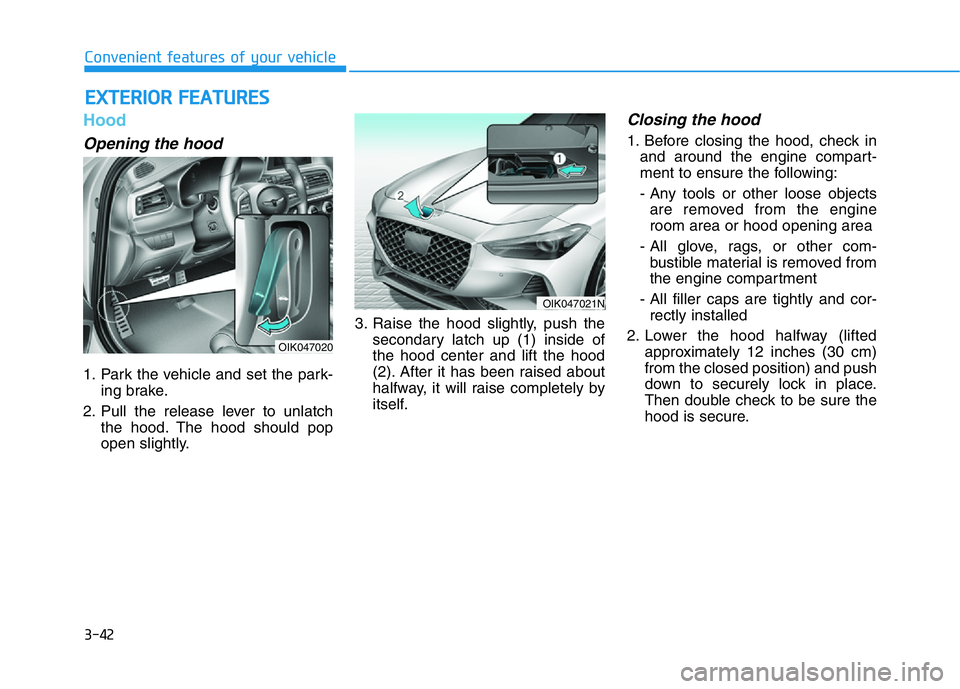
Opening the hood
1. Park the vehicle and set the park-
ing brake.
2. Pull the release lever to unlatch
the hood. The hood should pop
open slightly.3. Raise the hood slightly, push the
secondary latch up (1) inside of
the hood center and lift the hood
(2). After it has been raised about
halfway, it will raise completely by
itself.
Closing the hood
1. Before closing the hood, check in
and around the engine compart-
ment to ensure the following:
- Any tools or other loose objects
are removed from the engine
room area or hood opening area
- All glove, rags, or other com-
bustible material is removed from
the engine compartment
- All filler caps are tightly and cor-
rectly installed
2. Lower the hood halfway (lifted
approximately 12 inches (30 cm)
from the closed position) and push
down to securely lock in place.
Then double check to be sure the
hood is secure.
EXTERIOR FEATURES
OIK047020
OIK047021N
Page 136 of 516
3-51
Convenient features of your vehicle
3
How to reset the power trunk
If the battery has been discharged or
disconnected, or if the power trunk
fuse has been replaced or removed,
reset the power trunk by performing
the following procedure:
1. Put the shift lever in P (Park).
2. Press the power trunk inner button
and the power trunk outer handle
button simultaneously for more
than 3 seconds. The chime will
sound.
3. Close the trunk manually.
If the power trunk does not work prop-
erly after the above procedure, have
the system checked by an authorized
retailer of Genesis Branded products.
When operating the power trunk,
the gear shift lever must be in the
(P) park position in order to oper-
ate normally.
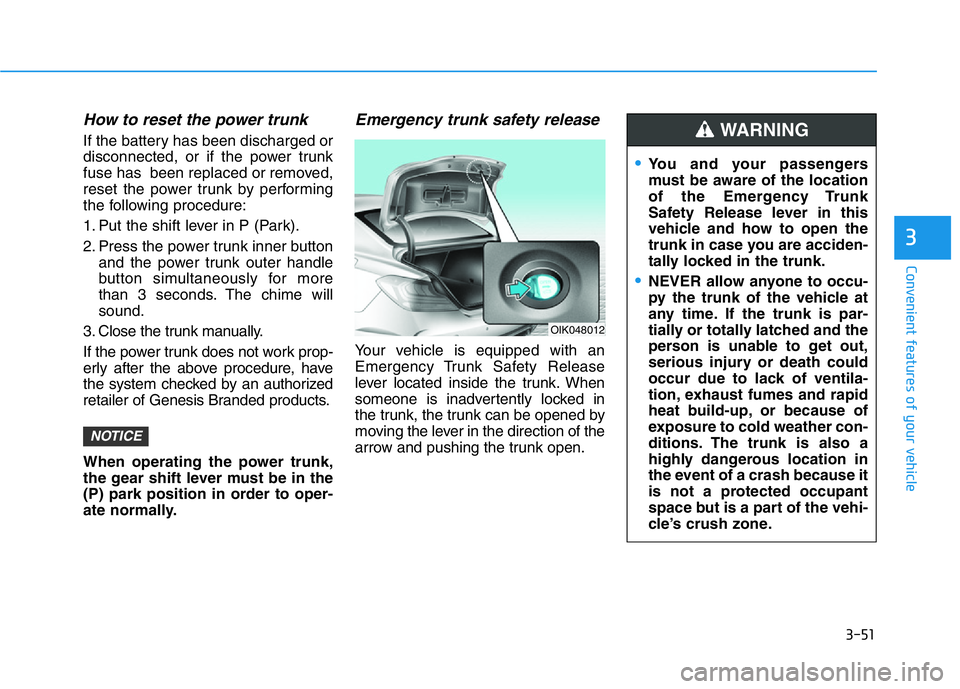
Emergency trunk safety release
Your vehicle is equipped with an
Emergency Trunk Safety Release
lever located inside the trunk. When
someone is inadvertently locked in
the trunk, the trunk can be opened by
moving the lever in the direction of the
arrow and pushing the trunk open.
NOTICE
OIK048012
•You and your passengers
must be aware of the location
of the Emergency Trunk
Safety Release lever in this
vehicle and how to open the
trunk in case you are acciden-
tally locked in the trunk.
•NEVER allow anyone to occu-
py the trunk of the vehicle at
any time. If the trunk is par-
tially or totally latched and the
person is unable to get out,
serious injury or death could
occur due to lack of ventila-
tion, exhaust fumes and rapid
heat build-up, or because of
exposure to cold weather con-
ditions. The trunk is also a
highly dangerous location in
the event of a crash because it
is not a protected occupant
space but is a part of the vehi-
cle’s crush zone.
WARNING