set GENESIS G70 2021 Service Manual
[x] Cancel search | Manufacturer: GENESIS, Model Year: 2021, Model line: G70, Model: GENESIS G70 2021Pages: 516, PDF Size: 12.84 MB
Page 193 of 516
3-108
Convenient features of your vehicle
Turn signals and lane change
signals
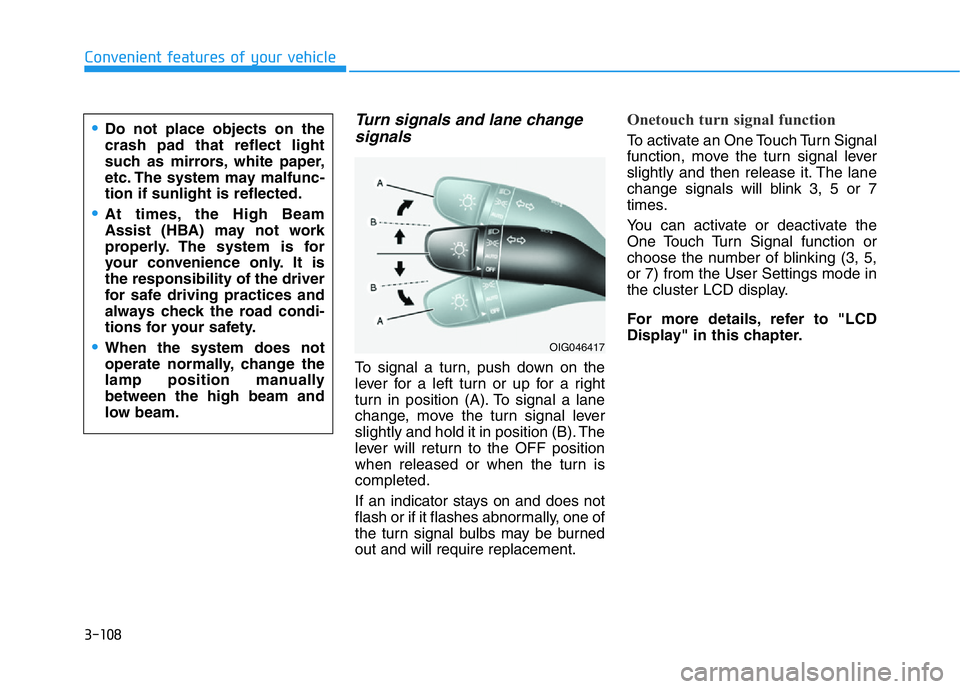
To signal a turn, push down on the
lever for a left turn or up for a right
turn in position (A). To signal a lane
change, move the turn signal lever
slightly and hold it in position (B). The
lever will return to the OFF position
when released or when the turn is
completed.
If an indicator stays on and does not
flash or if it flashes abnormally, one of
the turn signal bulbs may be burned
out and will require replacement.
Onetouch turn signal function
To activate an One Touch Turn Signal
function, move the turn signal lever
slightly and then release it. The lane
change signals will blink 3, 5 or 7
times.
You can activate or deactivate the
One Touch Turn Signal function or
choose the number of blinking (3, 5,
or 7) from the User Settings mode in
the cluster LCD display.
For more details, refer to "LCD
Display" in this chapter.•Do not place objects on the
crash pad that reflect light
such as mirrors, white paper,
etc. The system may malfunc-
tion if sunlight is reflected.
•At times, the High Beam
Assist (HBA) may not work
properly. The system is for
your convenience only. It is
the responsibility of the driver
for safe driving practices and
always check the road condi-
tions for your safety.
•When the system does not
operate normally, change the
lamp position manually
between the high beam and
low beam.OIG046417
Page 194 of 516

3-109
Convenient features of your vehicle
3
Battery saver function
The purpose of this feature is to help
prevent the battery from being dis-
charged. The system automatically
turns off the parking lamp when the
driver turns the engine off and opens
the driver-side door.
With this feature, the parking lamps
will turn off automatically if the driver
parks on the side of road at night.
If necessary, to keep the lamps on
when the engine is turned off, perform
the following:
1) Open the driver-side door.
2) Turn the parking lamps OFF and
ON again using the light switch on
the steering column.
Headlamp delay function
(if equipped)
If you place the Engine Start/Stop
button to the ACC or OFF position
with the headlamps ON, the head-
lamps (and/or parking lamps) remain
on for about 5 minutes. However,
with the engine off if the driver’s door
is opened and closed, the head-
lamps (and/or parking lamps) are
turned off after 15 seconds.
The headlamps (and/or parking
lamps) can be turned off by pressing
the lock button on the smart key
twice or turning the light switch to the
OFF or AUTO position. However, if
you turn the light switch to the AUTO
position when it is dark outside, the
headlamps will not be turned off.
You can activate or deactivate the
Headlamp Delay function from the
User Settings mode in the cluster
LCD display.
For more details, refer to "LCD
Display" in this chapter.
Information
If the driver exits the vehicle through
another door besides the driver door,
the battery saver function does not
operate and the headlamp delay func-
tion does not turn OFF automatically.
i
Page 195 of 516

3-110
Convenient features of your vehicle
AFS (Adaptive Front-Lighting
System) a.k.a. DBL (Dynamic
Bending Light) (if equipped)
Adaptive front lighting system uses
the steering angle and vehicle
speed, to keep your field of vision
wide by swiveling and leveling the
headlamp.
Change the switch to the AUTO posi-
tion when the engine is running. The
adaptive front lighting system will
operate when the headlamp is ON.
To turn off the AFS, change the
switch to other positions. After turn-
ing the AFS off, headlamp swiveling
no longer occurs, but leveling oper-
ates continuously.If the AFS malfunction indicator
comes on, the AFS is not working
properly. Drive to the nearest safe
location and restart the engine. If the
indicator continuously remains on,
have the system checked by an
authorized retailer of Genesis
Branded products.
Daytime running light (DRL)
The Daytime Running Lights (DRL)
can help others to see the front of
your vehicle during the day, especial-
ly after dawn and before sunset.
The DRL system will turn OFF when:
• The light switch is in the parking or
headlamp lamp position, including
the operation that the parking lamp
or headlamp is turned on automat-
ically in the AUTO light position.
• The engine is turned off.
• The hazard warning flasher is on.
• The turn signal light is on.
If you turn on the turn signal light,
only the corresponding daytime
running lights will turn off.
• The parking brake is applied.
OIK047053
OIK047111
Page 196 of 516

3-111
Convenient features of your vehicle
3
Headlamp leveling device
(if equipped)
It automatically adjusts the head-
lamp beam level according to the
number of passengers and loading
weight in the luggage area. It also
adjusts to the appropriate headlamp
beam level for various situations.
Welcome System (if equipped)
Welcome light
Puddle lamp (if equipped) and door
handle lamp
With all the doors (and trunk) closed
and locked, the puddle lamp and
door handle lamp will come on for
about 15 seconds if any of the below
is performed.
1. If 'Convenience →
Welcome mir-
ror/light →
On door unlock' is
selected in the User Settings
mode in the cluster LCD display,
• the lamps will turn on when the
door unlock button is pressed on
the smart key.• the lamps will turn on when the
button of the outside door handle
is pressed with the smart key in
possession.
2. If both 'Convenience →
Welcome
mirror/light →
On door unlock' and
'Convenience →
Welcome
mirror/light →
On driver approach'
is selected in the User Settings
mode in the cluster LCD display,
the lamps will turn on when the
vehicle is approached with the
smart key in possession.
You can activate or deactivate
Welcome Light function from the
User Settings mode in the cluster
LCD display.
For more details, refer to "LCD
Display" in this chapter.
OIK047054N
If the function does not work
properly, have the system be
inspected by an authorized
retailer of Genesis Branded
products. Do not attempt to
inspect or replace the wiring
yourself.
WARNING
Page 201 of 516

3-116
Convenient features of your vehicle
A : Wiper speed control
· MIST – Single wipe
· OFF – Off
· INT - Intermittent wipe
· AUTO – Automatic control wipe
(if equipped)
· LO – Low wiper speed
· HI – High wiper speed
B : Intermittent control wipe time
adjustment/Auto control wipe
time adjustment (if equipped)
C : Wash with brief wipes
Windshield Wipers
Operates as follows when the Engine
Start/Stop button is in the ON position.
MIST : For a single wiping cycle,
push the lever upward and
release. The wipers will oper-
ate continuously if the lever is
held in this position.
OFF : Wiper is not in operation.
INT : Wiper operates intermittently at
the same wiping intervals. To
vary the speed setting, move
the speed control lever. The top
most setting will run the wipers
most frequently (for more rain).
The bottom setting will run the
wipers the least frequently (for
less rain).
LO : The wiper runs at a lower speed.
HI : The wiper runs at a higher speed.
Information
If there is heavy accumulation of snow
or ice on the windshield, defrost the
windshield for about 10 minutes, or
until the snow and/or ice is removed
before using the windshield wipers to
ensure proper operation.
If you do not remove the snow and/ or
ice before using the wiper and washer,
it may damage the wiper and washer
system.
i
WIPERS AND WASHERS
OAD046437L
Page 202 of 516

3-117
Convenient features of your vehicle
AUTO (Automatic) control
(if equipped)
The rain sensor located on the upper
end of the windshield glass senses
the amount of rainfall and controls the
wiping cycle for the proper interval.
The more it rains, the faster the wiper
operates. When the rain stops, the
wiper stops. To vary the speed set-
ting, turn the speed control knob (B).
If the wiper switch is set in AUTO
mode when the Engine Start/Stop
button is in the ON position, the
wiper will operate once to perform a
self-check of the system. Set the
wiper to OFF position when the wiper
is not in use.• When washing the vehicle, set
the wiper switch in the OFF posi-
tion to stop the auto wiper oper-
ation. The wiper may operate
and be damaged if the switch is
set in the AUTO mode while
washing the vehicle.
• Do not remove the sensor cover
located on the upper end of the
passenger side windshield
glass. Damage to system parts
could occur and may not be cov-
ered by your vehicle warranty.
NOTICE
3
To avoid personal injury from
the windshield wipers, when the
engine is running and the wind-
shield wiper switch is placed in
the AUTO mode:
•Do not touch the upper end of
the windshield glass facing
the rain sensor.
•Do not wipe the upper end of
the windshield glass with a
damp or wet cloth.
•Do not put pressure on the
windshield glass.
WARNING
Page 218 of 516
3-133
Convenient features of your vehicle
3
Automatic Heating and Air
Conditioning
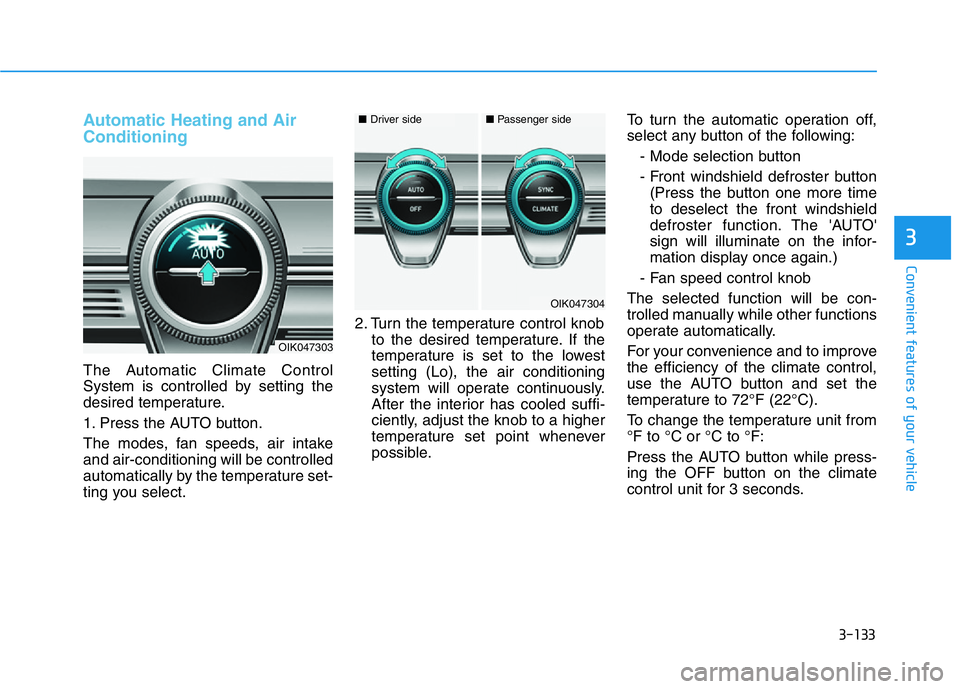
The Automatic Climate Control
System is controlled by setting the
desired temperature.
1. Press the AUTO button.
The modes, fan speeds, air intake
and air-conditioning will be controlled
automatically by the temperature set-
ting you select.2. Turn the temperature control knob
to the desired temperature. If the
temperature is set to the lowest
setting (Lo), the air conditioning
system will operate continuously.
After the interior has cooled suffi-
ciently, adjust the knob to a higher
temperature set point whenever
possible.To turn the automatic operation off,
select any button of the following:
- Mode selection button
- Front windshield defroster button
(Press the button one more time
to deselect the front windshield
defroster function. The 'AUTO'
sign will illuminate on the infor-
mation display once again.)
- Fan speed control knob
The selected function will be con-
trolled manually while other functions
operate automatically.
For your convenience and to improve
the efficiency of the climate control,
use the AUTO button and set the
temperature to 72°F (22°C).
To change the temperature unit from
°F to °C or °C to °F:
Press the AUTO button while press-
ing the OFF button on the climate
control unit for 3 seconds.
OIK047303
OIK047304
■Driver side■Passenger side
Page 219 of 516
3-134
Convenient features of your vehicle
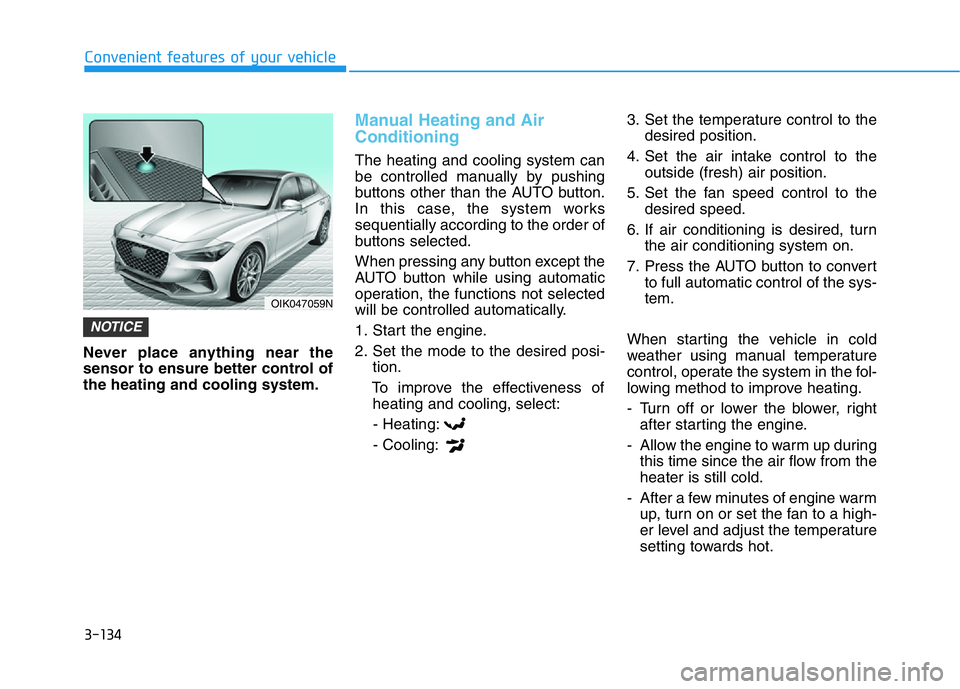
Never place anything near the
sensor to ensure better control of
the heating and cooling system.
Manual Heating and Air
Conditioning
The heating and cooling system can
be controlled manually by pushing
buttons other than the AUTO button.
In this case, the system works
sequentially according to the order of
buttons selected.
When pressing any button except the
AUTO button while using automatic
operation, the functions not selected
will be controlled automatically.
1. Start the engine.
2. Set the mode to the desired posi-
tion.
To improve the effectiveness of
heating and cooling, select:
- Heating:
- Cooling:3. Set the temperature control to the
desired position.
4. Set the air intake control to the
outside (fresh) air position.
5. Set the fan speed control to the
desired speed.
6. If air conditioning is desired, turn
the air conditioning system on.
7. Press the AUTO button to convert
to full automatic control of the sys-
tem.
When starting the vehicle in cold
weather using manual temperature
control, operate the system in the fol-
lowing method to improve heating.
- Turn off or lower the blower, right
after starting the engine.
- Allow the engine to warm up during
this time since the air flow from the
heater is still cold.
- After a few minutes of engine warm
up, turn on or set the fan to a high-
er level and adjust the temperature
setting towards hot.
NOTICE
OIK047059N
Page 221 of 516

3-136
Convenient features of your vehicle
Floor & Defrost
(A, C, D, E, F)
Most of the air flow is directed to the
floor and the windshield with a small
amount directed to the side window
defrosters.
Defrost-Level (A)
Most of the air flow is directed to the
windshield with a small amount of air
directed to the side window defrosters.
Instrument panel vents
The outlet vents can be opened ( )
or closed ( ) separately using the
thumbwheel. Also, you can adjust the
direction of air delivered from these
vents using the vent control lever as
shown.
Temperature control
Turn the knob to the right to increase
the temperature. Turn the knob to the
left to decrease temperature.
The temperature will increase or
decrease by 1°F/0.5°C for each incre-
mental location. When set to the low-
est temperature setting, the air condi-
tioning will operate continuously.
OIK047308
OIK047309
■Front
OIK047310
■RearOIK047304
■Driver side■Passenger side
Page 222 of 516

3-137
Convenient features of your vehicle
3
Adjusting the driver and passenger
side temperature equally
• Press the "SYNC" button to oper-
ate the driver and passenger side
temperature equally.
The passenger side temperature
will be set to the same temperature
as the driver side temperature.
• Turn the driver side temperature
control knob. The driver and pas-
senger side temperature will be
adjusted equally.
Adjusting the driver and passenger
side temperature individually
Press the "SYNC" button again to
operate the driver and passenger
side temperature individually. The
button indicator will turn off.
Temperature conversion
If the battery has been discharged or
disconnected, the temperature mode
display will reset to Fahrenheit.
To change the temperature unit from
°F to °C or °C to °F:
- On the instrument cluster, go to
User Settings Mode ➝Other ➝
Temperature Unit.
- Press the AUTO button while press-
ing the OFF button on the climate
control unit for 3 seconds.
The temperature unit on both the
cluster LCD display and climate con-
trol screen will change.
Air intake control
This button is used to select the out-
side (fresh) air position or recirculat-
ed air position.
OIK047311
OIK047312
■Type A
OIK047313
■Type B